






ID103: What’s New In IBM
Connections and 

IBM Connections Mobile
David Brooks, Lead Architect, IBM Connections, @brooksda
Luis Benitez, Sr. Product Manager, IBM Connections, @Lbenitez
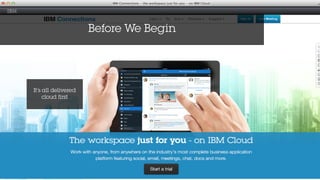
Before We Begin
It’s all delivered
cloud first
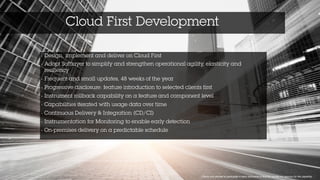
Cloud First Development
1 Clients who elected to participate in early disclosure of feature, usually our sponsor for the capability
• Design, implement and deliver on Cloud First 	
  
• Adopt Softlayer to simplify and strengthen operational agility, elasticity and
resiliency 	
  
• Frequent and small updates, 48 weeks of the year 	
  
• Progressive disclosure: feature introduction to selected clients first 	
  
• Instrument rollback capability on a feature and component level 	
  
• Capabilities iterated with usage data over time	
  
• Continuous Delivery & Integration (CD/CI)	
  
• Instrumentation for Monitoring to enable early detection	
  
• On-premises delivery on a predictable schedule
5
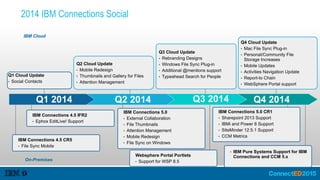
IBM Cloud
Q1 Cloud Update
● Social Contacts
Q2 Cloud Update
● Mobile Redesign
● Thumbnails and Gallery for Files
● Attention Management
IBM Connections 4.5 IFR2
● Ephox EditLive! Support
Q3 Cloud Update
● Rebranding Designs
● Windows File Sync Plug-in
● Additional @mentions support
● Typeahead Search for People
Q4 Cloud Update
● Mac File Sync Plug-in
● Personal/Community File 

Storage Increases
● Mobile Updates
● Activities Navigation Update
● Report-to Chain
● WebSphere Portal support
On-Premises
Q1 2014 Q2 2014 Q3 2014 Q4 2014
IBM Connections 4.5 CR5
● File Sync Mobile
IBM Connections 5.0
● External Collaboration
● File Thumbnails
● Attention Management
● Mobile Redesign
● File Sync on Windows
Websphere Portal Portlets
● Support for WSP 8.5
IBM Connections 5.0 CR1
● Sharepoint 2013 Support
● IBMi and Power 8 Support
● SiteMinder 12.5.1 Support
● CCM Metrics
● IBM Pure Systems Support for IBM
Connections and CCM 5.x
2014 IBM Connections Social
TODAY
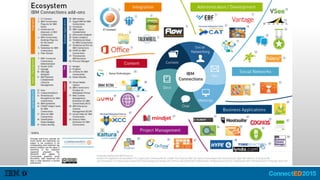
A reminder of what’s out there
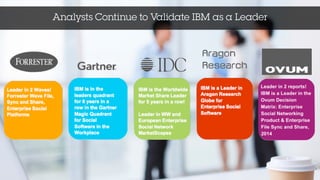
Analysts Continue to Validate IBM as a Leader
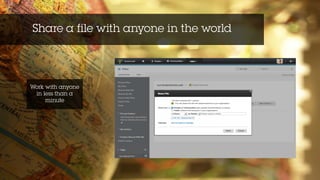
Share a file with anyone in the world
Work with anyone
in less than a
minute
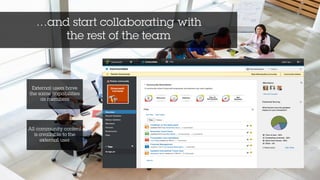
…and start collaborating with 

the rest of the team
External users have
the same capabilities
as members
All community content
is available to the
external user
Focus on what’s important to get what you
need
One-tap access to the
content that matters to
you
View and manage
community events
Personalized
navigation
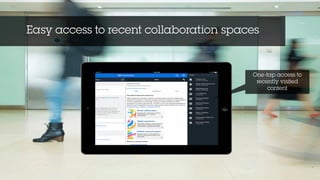
Easy access to recent collaboration spaces
One-tap access to
recently visited
content
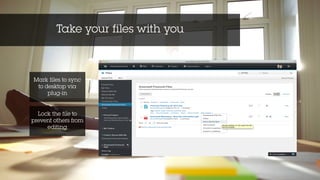
Take your files with you
Lock the file to
prevent others from
editing
Mark files to sync
to desktop via
plug-in
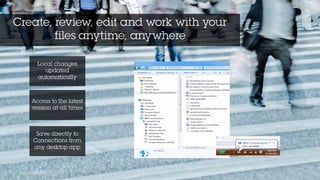
Create, review, edit and work with your
files anytime, anywhere
Access to the latest
version at all times
Local changes
updated
automatically
Save directly to
Connections from
any desktop app
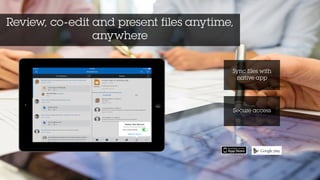
Review, co-edit and present files anytime,
anywhere
Sync files with
native app
Secure access
16
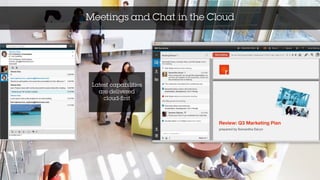
Latest capabilities
are delivered
cloud-first
Meetings and Chat in the Cloud
Delivered in
Q3 2014
IBM Connections
5.0 CR1 and more!
• Copy/paste into Activities
• Link to file consistency in Activities
• Updated file preview design in stream
• View full file from thumbnail
• Monthly repeat of community events
• Answered/Unanswered questions in Forums
• Switch external communities to internal
• Faster load of search results page
• @mentions in CCM
• Metrics for CCM
• Support for IBM i and Power 8
• Support for Siteminder 12.5.1
• PureSystems Pattern
IBM Connections
Cloud Deliveries
• Increased personal file space to 1TB
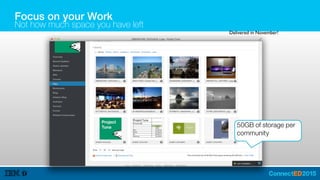
• Increased community file space to 50GB
• Increased wikis attachment space to 5GB
• Ability to turn off Mail Community
• Boost your content in search
• Support for Czech, Hungarian, Slovanian
IBM Connections
Shipped in 2H 2014
Apps / plugins
• Lock/unlock directly from Office
• View comments directly from Office
• Copy/send smart links directly from Office
• Publish / save drafts directly from Office
• Mac File Sync plug-in for Cloud
• Round trip editing for CCM
• Portlet support for cloud
• Support for SharePoint 2013
• Mobile:
• Thumbnail view
• @mention everywhere
• Additional MDM support
Q4 2014
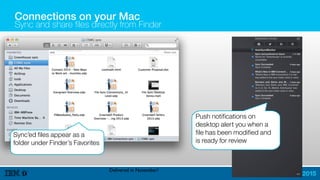
Connections on your Mac
Sync and share files directly from Finder
Sync’ed files appear as a
folder under Finder’s Favorites
Push notifications on
desktop alert you when a
file has been modified and
is ready for review
Delivered in November!
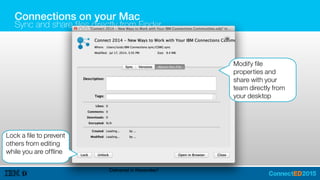
Connections on your Mac
Sync and share files directly from Finder
Modify file
properties and
share with your
team directly from
your desktop
Lock a file to prevent
others from editing
while you are offline
Delivered in November!
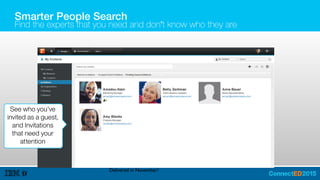
Smarter People Search
Find the experts that you need and don’t know who they are
See who you’ve
invited as a guest,
and Invitations
that need your
attention
Delivered in November!
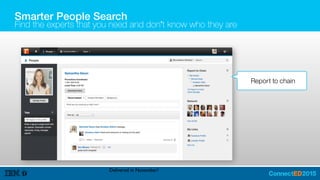
My Profile (planned)
Report to chain
Delivered in November!
Smarter People Search
Find the experts that you need and don’t know who they are
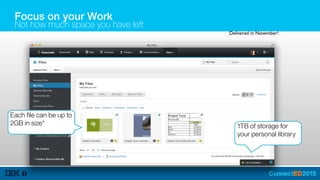
Focus on your Work
Not how much space you have left
1TB of storage for
your personal library
Each file can be up to
2GB in size*
Delivered in November!
Focus on your Work
Not how much space you have left
50GB of storage per
community
Delivered in November!
Focus on your Work
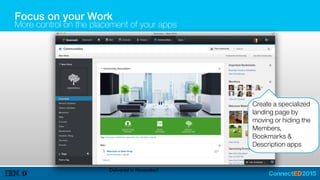
More control on the placement of your apps
Create a specialized
landing page by
moving or hiding the
Members,
Bookmarks &
Description apps
Delivered in November!
Focus on your Work
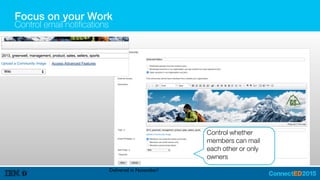
Control email notifications
Control whether
members can mail
each other or only
owners
Delivered in November!
Find your content, faster
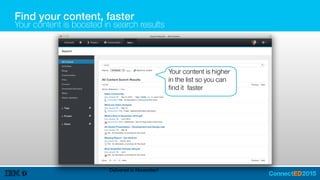
Your content is boosted in search results
Your content is higher
in the list so you can
find it faster
Delivered in November!
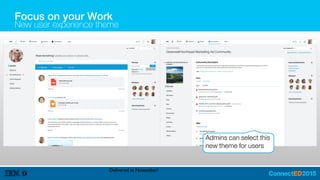
Focus on your Work
New user experience theme
Admins can select this
new theme for users
Delivered in November!
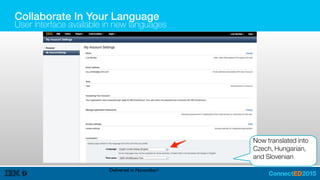
Collaborate In Your Language
User interface available in new languages
Now translated into
Czech, Hungarian,
and Slovenian
Delivered in November!
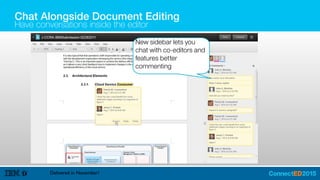
Chat Alongside Document Editing
Have conversations inside the editor
Delivered in November!
New sidebar lets you
chat with co-editors and
features better
commenting
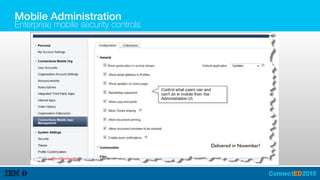
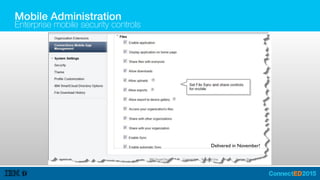
Mobile Administration
Enterprise mobile security controls
Delivered in November!
Mobile Administration
Enterprise mobile security controls
Delivered in November!
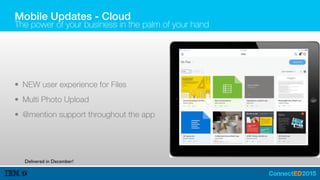
Mobile Updates - Cloud
The power of your business in the palm of your hand
• NEW user experience for Files
• Multi Photo Upload
• @mention support throughout the app
Delivered in December!
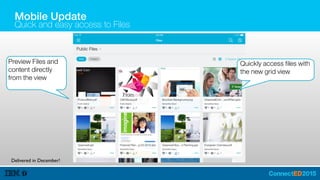
Mobile Update
Quick and easy access to Files
Quickly access files with
the new grid view
Delivered in December!
Preview Files and
content directly
from the view
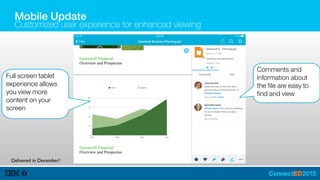
Comments and
information about
the file are easy to
find and view
Full screen tablet
experience allows
you view more
content on your
screen
Mobile Update
Customized user experience for enhanced viewing
Delivered in December!
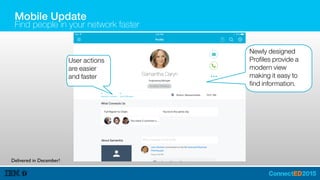
Mobile Update
Find people in your network faster
Newly designed
Profiles provide a
modern view
making it easy to
find information.
User actions
are easier
and faster
Delivered in December!
Mobile Update
Find and exchange information faster
Quickly take action to
contact people in your
network
New design provides
a sleek and easy
way to find contacts
Delivered in December!
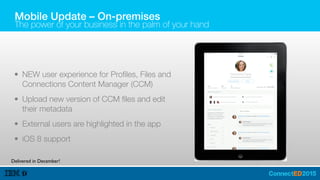
Mobile Update – On-premises
The power of your business in the palm of your hand
• NEW user experience for Profiles, Files and
Connections Content Manager (CCM)
• Upload new version of CCM files and edit
their metadata
• External users are highlighted in the app
• iOS 8 support
Delivered in December!
TOMORROW
A look at what’s around the corner
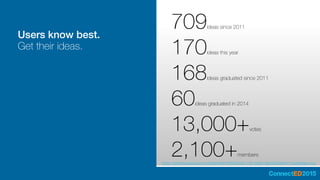
Users know best.
Get their ideas.
https://greenhouse.lotus.com/blogs/We047f6e69323_42ff_8db6_8bd4fe32a841/?openIdeas=true
709ideas since 2011
170ideas this year
168ideas graduated since 2011
60ideas graduated in 2014
13,000+votes
2,100+members
IBM Connections
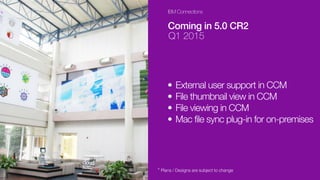
Coming in 5.0 CR2
Q1 2015
• External user support in CCM
• File thumbnail view in CCM
• File viewing in CCM
• Mac file sync plug-in for on-premises
* Plans / Designs are subject to change
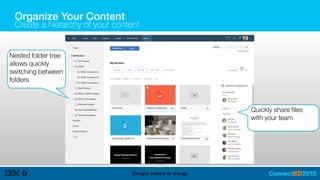
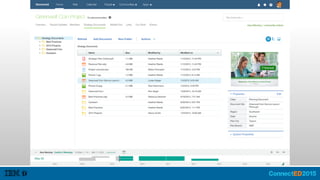
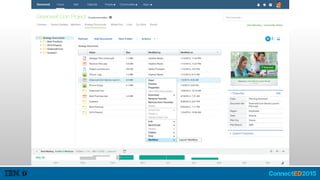
Organize Your Content
Create a hierarchy of your content
Designs subject to change
Nested folder tree
allows quickly
switching between
folders
Quickly share files
with your team
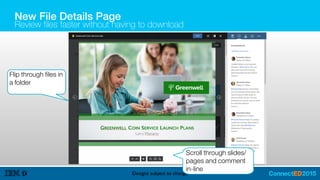
New File Details Page
Review files faster without having to download
Designs subject to change
Flip through files in
a folder
Scroll through slides/
pages and comment
in-line
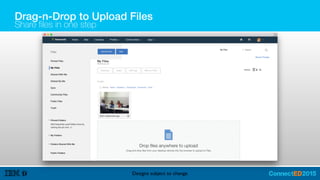
Drag-n-Drop to Upload Files
Share files in one step
Designs subject to change
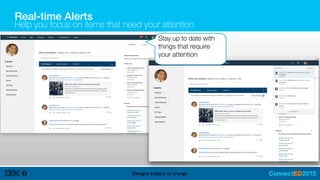
Real-time Alerts
Help you focus on items that need your attention
Designs subject to change
Stay up to date with
things that require
your attention
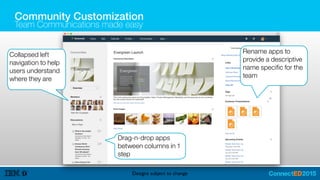
Community Customization
Team Communications made easy
Designs subject to change
Collapsed left
navigation to help
users understand
where they are
Drag-n-drop apps
between columns in 1
step
Rename apps to
provide a descriptive
name specific for the
team
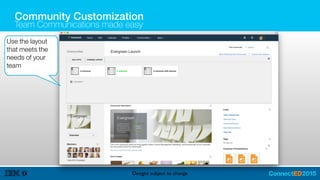
Community Customization
Team Communications made easy
Designs subject to change
Use the layout
that meets the
needs of your
team
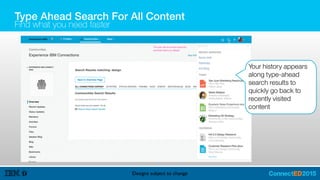
Type Ahead Search For All Content
Find what you need faster
Designs subject to change
Your history appears
along type-ahead
search results to
quickly go back to
recently visited
content
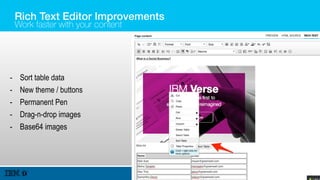
Rich Text Editor Improvements
Work faster with your content
Designs subject to change
- Sort table data
- New theme / buttons
- Permanent Pen
- Drag-n-drop images
- Base64 images
Mobile Updates
The power of your business in the palm of your hand
• Mobile app for BlackBerry 10 – delivered Jan 2015
• Activities support for Cloud
• Notification Center
• Custom Streams
• MobileIron Support for Android
BEYOND
What to expect in the future
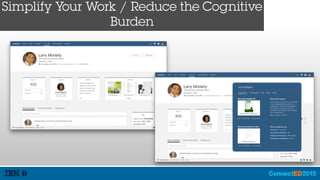
Simplify Your Work / Reduce the Cognitive
Burden
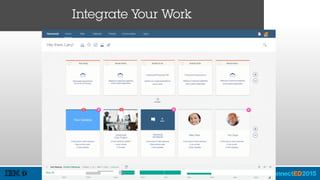
Integrate Your Work
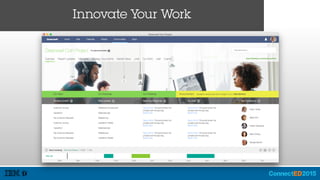
Innovate Your Work
WRAP UP
Let’s get this show on the road!
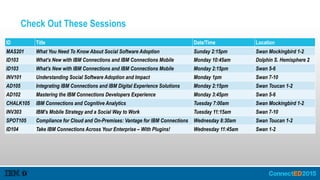
Check Out These Sessions
ID Title Date/Time Location
MAS201 What You Need To Know About Social Software Adoption Sunday 2:15pm Swan Mockingbird 1-2
ID103 What’s New with IBM Connections and IBM Connections Mobile Monday 10:45am Dolphin S. Hemisphere 2
ID103 What’s New with IBM Connections and IBM Connections Mobile Monday 2:15pm Swan 5-6
INV101 Understanding Social Software Adoption and Impact Monday 1pm Swan 7-10
AD105 Integrating IBM Connections and IBM Digital Experience Solutions Monday 2:15pm Swan Toucan 1-2
AD102 Mastering the IBM Connections Developers Experience Monday 3:45pm Swan 5-6
CHALK105 IBM Connections and Cognitive Analytics Tuesday 7:00am Swan Mockingbird 1-2
INV303 IBM’s Mobile Strategy and a Social Way to Work Tuesday 11:15am Swan 7-10
SPOT105 Compliance for Cloud and On-Premises: Vantage for IBM Connections Wednesday 8:30am Swan Toucan 1-2
ID104 Take IBM Connections Across Your Enterprise – With Plugins! Wednesday 11:45am Swan 1-2
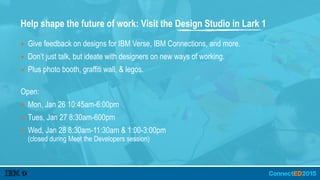
Help shape the future of work: Visit the Design Studio in Lark 1
▪ Give feedback on designs for IBM Verse, IBM Connections, and more.
▪ Don’t just talk, but ideate with designers on new ways of working.
▪ Plus photo booth, graffiti wall, & legos.
Open:
▪ Mon, Jan 26 10:45am-6:00pm
▪ Tues, Jan 27 8:30am-600pm
▪ Wed, Jan 28 8:30am-11:30am & 1:00-3:00pm 

(closed during Meet the Developers session)
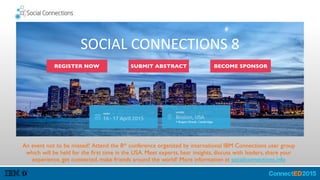
An event not to be missed! Attend the 8th conference organized by international IBM Connections user group
which will be held for the first time in the USA. Meet experts, hear insights, discuss with leaders, share your
experience, get connected, make friends around the world! More information at socialconnections.info
SOCIAL	
  CONNECTIONS	
  8
REGISTER NOW SUBMIT ABSTRACT BECOME SPONSOR
Engage Online
▪ SocialBiz User Group socialbizug.org
– Join the epicenter of Notes and Collaboration user groups
▪ Social Business Insights blog ibm.com/blogs/socialbusiness
– Read and engage with our bloggers
▪ Follow us on Twitter
– @IBMConnect and @IBMSocialBiz
▪ LinkedIn http://bit.ly/SBComm
– Participate in the IBM Social Business group on LinkedIn
▪ Facebook https://www.facebook.com/IBMConnected
– Like IBM Social Business on Facebook
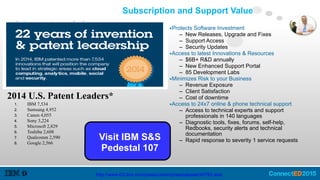
Subscription and Support Value
2014 U.S. Patent Leaders*
1. IBM 7,534
2. Samsung 4,952
3. Canon 4,055
4. Sony 3,224
5. Microsoft 2,829
6. Toshiba 2,608
7. Qualcomm 2,590
8. Google 2,566
http://www-03.ibm.com/press/us/en/pressrelease/45793.wss
▪Protects Software Investment
– New Releases, Upgrade and Fixes
– Support Access
– Security Updates
▪Access to latest Innovations & Resources
– $6B+ R&D annually
– New Enhanced Support Portal
– 85 Development Labs
▪Minimizes Risk to your Business
– Revenue Exposure
– Client Satisfaction
– Cost of downtime
▪Access to 24x7 online & phone technical support
– Access to technical experts and support
professionals in 140 languages
– Diagnostic tools, fixes, forums, self-help,
Redbooks, security alerts and technical
documentation
– Rapid response to severity 1 service requestsVisit IBM S&S
Pedestal 107
Notices and Disclaimers
Copyright © 2015 by International Business Machines Corporation (IBM). No part of this document may be reproduced or transmitted in any form without written permission from IBM.
U.S. Government Users Restricted Rights - Use, duplication or disclosure restricted by GSA ADP Schedule Contract with IBM.
Information in these presentations (including information relating to products that have not yet been announced by IBM) has been reviewed for accuracy as of the date of initial publication and could include unintentional
technical or typographical errors. IBM shall have no responsibility to update this information. THIS DOCUMENT IS DISTRIBUTED "AS IS" WITHOUT ANY WARRANTY, EITHER EXPRESS OR IMPLIED. IN NO EVENT
SHALL IBM BE LIABLE FOR ANY DAMAGE ARISING FROM THE USE OF THIS INFORMATION, INCLUDING BUT NOT LIMITED TO, LOSS OF DATA, BUSINESS INTERRUPTION, LOSS OF PROFIT OR LOSS OF
OPPORTUNITY. IBM products and services are warranted according to the terms and conditions of the agreements under which they are provided.
Any statements regarding IBM's future direction, intent or product plans are subject to change or withdrawal without notice.
Performance data contained herein was generally obtained in a controlled, isolated environments. Customer examples are presented as illustrations of how those customers have used IBM products and the results they
may have achieved. Actual performance, cost, savings or other results in other operating environments may vary.
References in this document to IBM products, programs, or services does not imply that IBM intends to make such products, programs or services available in all countries in which IBM operates or does business.
Workshops, sessions and associated materials may have been prepared by independent session speakers, and do not necessarily reflect the views of IBM. All materials and discussions are provided for informational
purposes only, and are neither intended to, nor shall constitute legal or other guidance or advice to any individual participant or their specific situation.
It is the customer’s responsibility to insure its own compliance with legal requirements and to obtain advice of competent legal counsel as to the identification and interpretation of any relevant laws and regulatory
requirements that may affect the customer’s business and any actions the customer may need to take to comply with such laws. IBM does not provide legal advice or represent or warrant that its services or products will
ensure that the customer is in compliance with any law.
Information concerning non-IBM products was obtained from the suppliers of those products, their published announcements or other publicly available sources. IBM has not tested those products in connection with this
publication and cannot confirm the accuracy of performance, compatibility or any other claims related to non-IBM products. Questions on the capabilities of non-IBM products should be addressed to the suppliers of
those products. IBM does not warrant the quality of any third-party products, or the ability of any such third-party products to interoperate with IBM’s products. IBM EXPRESSLY DISCLAIMS ALL WARRANTIES,
EXPRESSED OR IMPLIED, INCLUDING BUT NOT LIMITED TO, THE IMPLIED WARRANTIES OF MERCHANTABILITY AND FITNESS FOR A PARTICULAR PURPOSE.
The provision of the information contained herein is not intended to, and does not, grant any right or license under any IBM patents, copyrights, trademarks or other intellectual property right.
IBM, the IBM logo, ibm.com, BrassRing®, Connections™, Domino®, Global Business Services®, Global Technology Services®, SmartCloud®, Social Business®, Kenexa®, Notes®, PartnerWorld®, Prove It!®,
PureSystems®, Sametime®, Verse™, Watson™, WebSphere®, Worklight®, are trademarks of International Business Machines Corporation, registered in many jurisdictions worldwide. Other product and service names
might be trademarks of IBM or other companies. A current list of IBM trademarks is available on the Web at "Copyright and trademark information" at: www.ibm.com/legal/copytrade.shtml.

IDI103 - What is New in IBM Connections - IBM ConnectED 2015

  • 2.
    ID103: What’s NewIn IBM Connections and 
 IBM Connections Mobile David Brooks, Lead Architect, IBM Connections, @brooksda Luis Benitez, Sr. Product Manager, IBM Connections, @Lbenitez
  • 3.
    Before We Begin It’sall delivered cloud first
  • 4.
    Cloud First Development 1Clients who elected to participate in early disclosure of feature, usually our sponsor for the capability • Design, implement and deliver on Cloud First   • Adopt Softlayer to simplify and strengthen operational agility, elasticity and resiliency   • Frequent and small updates, 48 weeks of the year   • Progressive disclosure: feature introduction to selected clients first   • Instrument rollback capability on a feature and component level   • Capabilities iterated with usage data over time   • Continuous Delivery & Integration (CD/CI)   • Instrumentation for Monitoring to enable early detection   • On-premises delivery on a predictable schedule
  • 5.
    5 IBM Cloud Q1 CloudUpdate ● Social Contacts Q2 Cloud Update ● Mobile Redesign ● Thumbnails and Gallery for Files ● Attention Management IBM Connections 4.5 IFR2 ● Ephox EditLive! Support Q3 Cloud Update ● Rebranding Designs ● Windows File Sync Plug-in ● Additional @mentions support ● Typeahead Search for People Q4 Cloud Update ● Mac File Sync Plug-in ● Personal/Community File 
 Storage Increases ● Mobile Updates ● Activities Navigation Update ● Report-to Chain ● WebSphere Portal support On-Premises Q1 2014 Q2 2014 Q3 2014 Q4 2014 IBM Connections 4.5 CR5 ● File Sync Mobile IBM Connections 5.0 ● External Collaboration ● File Thumbnails ● Attention Management ● Mobile Redesign ● File Sync on Windows Websphere Portal Portlets ● Support for WSP 8.5 IBM Connections 5.0 CR1 ● Sharepoint 2013 Support ● IBMi and Power 8 Support ● SiteMinder 12.5.1 Support ● CCM Metrics ● IBM Pure Systems Support for IBM Connections and CCM 5.x 2014 IBM Connections Social
  • 6.
    TODAY A reminder ofwhat’s out there
  • 7.
    Analysts Continue toValidate IBM as a Leader
  • 9.
    Share a filewith anyone in the world Work with anyone in less than a minute
  • 10.
    …and start collaboratingwith 
 the rest of the team External users have the same capabilities as members All community content is available to the external user
  • 11.
    Focus on what’simportant to get what you need One-tap access to the content that matters to you View and manage community events Personalized navigation
  • 12.
    Easy access torecent collaboration spaces One-tap access to recently visited content
  • 13.
    Take your fileswith you Lock the file to prevent others from editing Mark files to sync to desktop via plug-in
  • 14.
    Create, review, editand work with your files anytime, anywhere Access to the latest version at all times Local changes updated automatically Save directly to Connections from any desktop app
  • 15.
    Review, co-edit andpresent files anytime, anywhere Sync files with native app Secure access
  • 16.
  • 17.
  • 18.
    IBM Connections 5.0 CR1and more! • Copy/paste into Activities • Link to file consistency in Activities • Updated file preview design in stream • View full file from thumbnail • Monthly repeat of community events • Answered/Unanswered questions in Forums • Switch external communities to internal • Faster load of search results page • @mentions in CCM • Metrics for CCM • Support for IBM i and Power 8 • Support for Siteminder 12.5.1 • PureSystems Pattern
  • 19.
    IBM Connections Cloud Deliveries •Increased personal file space to 1TB • Increased community file space to 50GB • Increased wikis attachment space to 5GB • Ability to turn off Mail Community • Boost your content in search • Support for Czech, Hungarian, Slovanian
  • 20.
    IBM Connections Shipped in2H 2014 Apps / plugins • Lock/unlock directly from Office • View comments directly from Office • Copy/send smart links directly from Office • Publish / save drafts directly from Office • Mac File Sync plug-in for Cloud • Round trip editing for CCM • Portlet support for cloud • Support for SharePoint 2013 • Mobile: • Thumbnail view • @mention everywhere • Additional MDM support
  • 21.
  • 22.
    Connections on yourMac Sync and share files directly from Finder Sync’ed files appear as a folder under Finder’s Favorites Push notifications on desktop alert you when a file has been modified and is ready for review Delivered in November!
  • 23.
    Connections on yourMac Sync and share files directly from Finder Modify file properties and share with your team directly from your desktop Lock a file to prevent others from editing while you are offline Delivered in November!
  • 24.
    Smarter People Search Findthe experts that you need and don’t know who they are See who you’ve invited as a guest, and Invitations that need your attention Delivered in November!
  • 25.
    My Profile (planned) Reportto chain Delivered in November! Smarter People Search Find the experts that you need and don’t know who they are
  • 26.
    Focus on yourWork Not how much space you have left 1TB of storage for your personal library Each file can be up to 2GB in size* Delivered in November!
  • 27.
    Focus on yourWork Not how much space you have left 50GB of storage per community Delivered in November!
  • 28.
    Focus on yourWork More control on the placement of your apps Create a specialized landing page by moving or hiding the Members, Bookmarks & Description apps Delivered in November!
  • 29.
    Focus on yourWork Control email notifications Control whether members can mail each other or only owners Delivered in November!
  • 30.
    Find your content,faster Your content is boosted in search results Your content is higher in the list so you can find it faster Delivered in November!
  • 31.
    Focus on yourWork New user experience theme Admins can select this new theme for users Delivered in November!
  • 32.
    Collaborate In YourLanguage User interface available in new languages Now translated into Czech, Hungarian, and Slovenian Delivered in November!
  • 33.
    Chat Alongside DocumentEditing Have conversations inside the editor Delivered in November! New sidebar lets you chat with co-editors and features better commenting
  • 34.
    Mobile Administration Enterprise mobilesecurity controls Delivered in November!
  • 35.
    Mobile Administration Enterprise mobilesecurity controls Delivered in November!
  • 36.
    Mobile Updates -Cloud The power of your business in the palm of your hand • NEW user experience for Files • Multi Photo Upload • @mention support throughout the app Delivered in December!
  • 37.
    Mobile Update Quick andeasy access to Files Quickly access files with the new grid view Delivered in December! Preview Files and content directly from the view
  • 38.
    Comments and information about thefile are easy to find and view Full screen tablet experience allows you view more content on your screen Mobile Update Customized user experience for enhanced viewing Delivered in December!
  • 39.
    Mobile Update Find peoplein your network faster Newly designed Profiles provide a modern view making it easy to find information. User actions are easier and faster Delivered in December!
  • 40.
    Mobile Update Find andexchange information faster Quickly take action to contact people in your network New design provides a sleek and easy way to find contacts Delivered in December!
  • 41.
    Mobile Update –On-premises The power of your business in the palm of your hand • NEW user experience for Profiles, Files and Connections Content Manager (CCM) • Upload new version of CCM files and edit their metadata • External users are highlighted in the app • iOS 8 support Delivered in December!
  • 42.
    TOMORROW A look atwhat’s around the corner
  • 43.
    Users know best. Gettheir ideas. https://greenhouse.lotus.com/blogs/We047f6e69323_42ff_8db6_8bd4fe32a841/?openIdeas=true 709ideas since 2011 170ideas this year 168ideas graduated since 2011 60ideas graduated in 2014 13,000+votes 2,100+members
  • 44.
    IBM Connections Coming in5.0 CR2 Q1 2015 • External user support in CCM • File thumbnail view in CCM • File viewing in CCM • Mac file sync plug-in for on-premises * Plans / Designs are subject to change
  • 45.
    Organize Your Content Createa hierarchy of your content Designs subject to change Nested folder tree allows quickly switching between folders Quickly share files with your team
  • 46.
    New File DetailsPage Review files faster without having to download Designs subject to change Flip through files in a folder Scroll through slides/ pages and comment in-line
  • 47.
    Drag-n-Drop to UploadFiles Share files in one step Designs subject to change
  • 48.
    Real-time Alerts Help youfocus on items that need your attention Designs subject to change Stay up to date with things that require your attention
  • 49.
    Community Customization Team Communicationsmade easy Designs subject to change Collapsed left navigation to help users understand where they are Drag-n-drop apps between columns in 1 step Rename apps to provide a descriptive name specific for the team
  • 50.
    Community Customization Team Communicationsmade easy Designs subject to change Use the layout that meets the needs of your team
  • 51.
    Type Ahead SearchFor All Content Find what you need faster Designs subject to change Your history appears along type-ahead search results to quickly go back to recently visited content
  • 52.
    Rich Text EditorImprovements Work faster with your content Designs subject to change - Sort table data - New theme / buttons - Permanent Pen - Drag-n-drop images - Base64 images
  • 53.
    Mobile Updates The powerof your business in the palm of your hand • Mobile app for BlackBerry 10 – delivered Jan 2015 • Activities support for Cloud • Notification Center • Custom Streams • MobileIron Support for Android
  • 54.
    BEYOND What to expectin the future
  • 55.
    Simplify Your Work/ Reduce the Cognitive Burden
  • 56.
  • 57.
  • 60.
    WRAP UP Let’s getthis show on the road!
  • 61.
    Check Out TheseSessions ID Title Date/Time Location MAS201 What You Need To Know About Social Software Adoption Sunday 2:15pm Swan Mockingbird 1-2 ID103 What’s New with IBM Connections and IBM Connections Mobile Monday 10:45am Dolphin S. Hemisphere 2 ID103 What’s New with IBM Connections and IBM Connections Mobile Monday 2:15pm Swan 5-6 INV101 Understanding Social Software Adoption and Impact Monday 1pm Swan 7-10 AD105 Integrating IBM Connections and IBM Digital Experience Solutions Monday 2:15pm Swan Toucan 1-2 AD102 Mastering the IBM Connections Developers Experience Monday 3:45pm Swan 5-6 CHALK105 IBM Connections and Cognitive Analytics Tuesday 7:00am Swan Mockingbird 1-2 INV303 IBM’s Mobile Strategy and a Social Way to Work Tuesday 11:15am Swan 7-10 SPOT105 Compliance for Cloud and On-Premises: Vantage for IBM Connections Wednesday 8:30am Swan Toucan 1-2 ID104 Take IBM Connections Across Your Enterprise – With Plugins! Wednesday 11:45am Swan 1-2
  • 62.
    Help shape thefuture of work: Visit the Design Studio in Lark 1 ▪ Give feedback on designs for IBM Verse, IBM Connections, and more. ▪ Don’t just talk, but ideate with designers on new ways of working. ▪ Plus photo booth, graffiti wall, & legos. Open: ▪ Mon, Jan 26 10:45am-6:00pm ▪ Tues, Jan 27 8:30am-600pm ▪ Wed, Jan 28 8:30am-11:30am & 1:00-3:00pm 
 (closed during Meet the Developers session)
  • 63.
    An event notto be missed! Attend the 8th conference organized by international IBM Connections user group which will be held for the first time in the USA. Meet experts, hear insights, discuss with leaders, share your experience, get connected, make friends around the world! More information at socialconnections.info SOCIAL  CONNECTIONS  8 REGISTER NOW SUBMIT ABSTRACT BECOME SPONSOR
  • 64.
    Engage Online ▪ SocialBizUser Group socialbizug.org – Join the epicenter of Notes and Collaboration user groups ▪ Social Business Insights blog ibm.com/blogs/socialbusiness – Read and engage with our bloggers ▪ Follow us on Twitter – @IBMConnect and @IBMSocialBiz ▪ LinkedIn http://bit.ly/SBComm – Participate in the IBM Social Business group on LinkedIn ▪ Facebook https://www.facebook.com/IBMConnected – Like IBM Social Business on Facebook
  • 65.
    Subscription and SupportValue 2014 U.S. Patent Leaders* 1. IBM 7,534 2. Samsung 4,952 3. Canon 4,055 4. Sony 3,224 5. Microsoft 2,829 6. Toshiba 2,608 7. Qualcomm 2,590 8. Google 2,566 http://www-03.ibm.com/press/us/en/pressrelease/45793.wss ▪Protects Software Investment – New Releases, Upgrade and Fixes – Support Access – Security Updates ▪Access to latest Innovations & Resources – $6B+ R&D annually – New Enhanced Support Portal – 85 Development Labs ▪Minimizes Risk to your Business – Revenue Exposure – Client Satisfaction – Cost of downtime ▪Access to 24x7 online & phone technical support – Access to technical experts and support professionals in 140 languages – Diagnostic tools, fixes, forums, self-help, Redbooks, security alerts and technical documentation – Rapid response to severity 1 service requestsVisit IBM S&S Pedestal 107
  • 66.
    Notices and Disclaimers Copyright© 2015 by International Business Machines Corporation (IBM). No part of this document may be reproduced or transmitted in any form without written permission from IBM. U.S. Government Users Restricted Rights - Use, duplication or disclosure restricted by GSA ADP Schedule Contract with IBM. Information in these presentations (including information relating to products that have not yet been announced by IBM) has been reviewed for accuracy as of the date of initial publication and could include unintentional technical or typographical errors. IBM shall have no responsibility to update this information. THIS DOCUMENT IS DISTRIBUTED "AS IS" WITHOUT ANY WARRANTY, EITHER EXPRESS OR IMPLIED. IN NO EVENT SHALL IBM BE LIABLE FOR ANY DAMAGE ARISING FROM THE USE OF THIS INFORMATION, INCLUDING BUT NOT LIMITED TO, LOSS OF DATA, BUSINESS INTERRUPTION, LOSS OF PROFIT OR LOSS OF OPPORTUNITY. IBM products and services are warranted according to the terms and conditions of the agreements under which they are provided. Any statements regarding IBM's future direction, intent or product plans are subject to change or withdrawal without notice. Performance data contained herein was generally obtained in a controlled, isolated environments. Customer examples are presented as illustrations of how those customers have used IBM products and the results they may have achieved. Actual performance, cost, savings or other results in other operating environments may vary. References in this document to IBM products, programs, or services does not imply that IBM intends to make such products, programs or services available in all countries in which IBM operates or does business. Workshops, sessions and associated materials may have been prepared by independent session speakers, and do not necessarily reflect the views of IBM. All materials and discussions are provided for informational purposes only, and are neither intended to, nor shall constitute legal or other guidance or advice to any individual participant or their specific situation. It is the customer’s responsibility to insure its own compliance with legal requirements and to obtain advice of competent legal counsel as to the identification and interpretation of any relevant laws and regulatory requirements that may affect the customer’s business and any actions the customer may need to take to comply with such laws. IBM does not provide legal advice or represent or warrant that its services or products will ensure that the customer is in compliance with any law. Information concerning non-IBM products was obtained from the suppliers of those products, their published announcements or other publicly available sources. IBM has not tested those products in connection with this publication and cannot confirm the accuracy of performance, compatibility or any other claims related to non-IBM products. Questions on the capabilities of non-IBM products should be addressed to the suppliers of those products. IBM does not warrant the quality of any third-party products, or the ability of any such third-party products to interoperate with IBM’s products. IBM EXPRESSLY DISCLAIMS ALL WARRANTIES, EXPRESSED OR IMPLIED, INCLUDING BUT NOT LIMITED TO, THE IMPLIED WARRANTIES OF MERCHANTABILITY AND FITNESS FOR A PARTICULAR PURPOSE. The provision of the information contained herein is not intended to, and does not, grant any right or license under any IBM patents, copyrights, trademarks or other intellectual property right. IBM, the IBM logo, ibm.com, BrassRing®, Connections™, Domino®, Global Business Services®, Global Technology Services®, SmartCloud®, Social Business®, Kenexa®, Notes®, PartnerWorld®, Prove It!®, PureSystems®, Sametime®, Verse™, Watson™, WebSphere®, Worklight®, are trademarks of International Business Machines Corporation, registered in many jurisdictions worldwide. Other product and service names might be trademarks of IBM or other companies. A current list of IBM trademarks is available on the Web at "Copyright and trademark information" at: www.ibm.com/legal/copytrade.shtml.