
ANSIBLE
A TOOL FOR DEV/OPS
SESSION OBJECTIVES
Objectives
Present Ansible, a popular tool used in Dev/Ops context
The needs to automate tasks across distributed systems
Typical needs
Ansible use cases for managing Openstack
WHAT IS ANSIBLE
WHAT IS ANSIBLE
Ansible is a free software platform for configuring and managing
computers.
The platform was created by Michael DeHaan, he is the Cobbler author
as well.
THE NEED FOR AUTOMATION
TYPICAL NEEDS
As a developer/tester: during dev and test phase.
Safely Do repetitive configurations tasks on a set of VMs implementing a multi-tier cluster
Provision ssh public keys of team members on N freshly deployed nodes during dev phase
Automate a documented complex installation sequence – BTW why writing such a document ? etc
As a Sysadmin/Sysops
Automate remote scripting of many day to day tasks
Check and maintain configuration on systems, can be coupled with a revision management tool
As a Service Delivery team: efficiency
Efficient deployment of complex solutions with easily injecting customers or deal specific configuration parameters
Avoid restarting from start when you hit an error
Do it faster and cheaper and at scale
As <anyone>
Be efficient in front of the explosion of the # of entities (servers, VMs, ...) to ‘manage’
THE AVAILABLE TOOLS
ANDKEY PROPERTIES
The ‘old ways’ we all experimented: is gone
Document the pre-requisites, document the sequence of actions.
Keeping the doc up to date and tested is time consuming. Doc is subject to interpretation, ...
Shell scripting
Handling errors correctly is hard. Designing them to avoid restart from scratch is even harder
The current way: Configuration management and automation frameworks.
Puppet, Chef, Salt,
All promote idempotency
Ansible addresses most of the issues at low cost
Easy to learn and debug
Open source software (with commercial support available)
Leaves no “fingerprints” or residue on target systems
Predictable execution / Repeatable / Idempotent Mostly / Parallel operations
Ansible
ANSIBLE BASICS AND KEY CONCEPTS
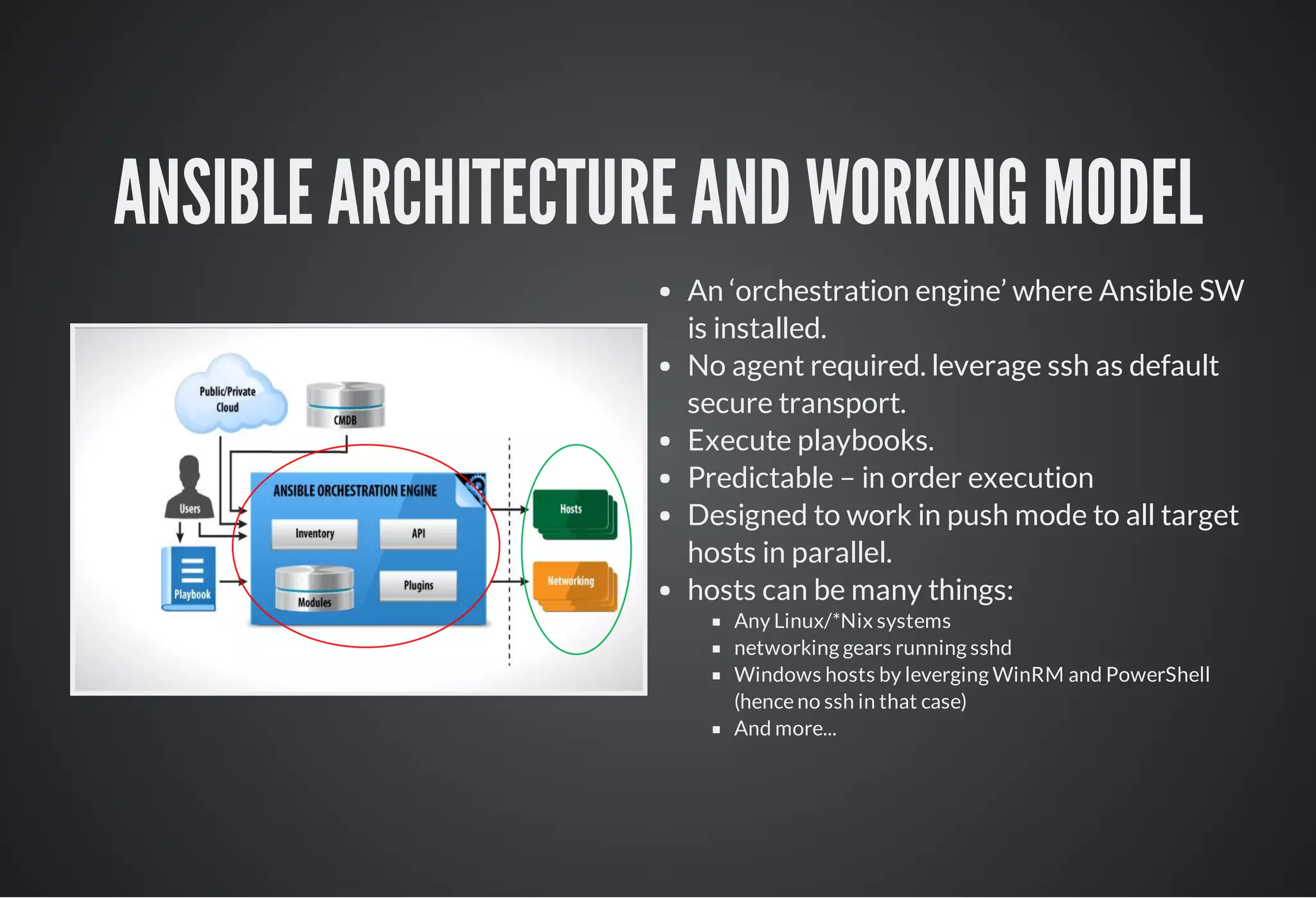
ANSIBLE ARCHITECTURE AND WORKING MODEL
An ‘orchestration engine’ where Ansible SW
is installed.
No agent required. leverage ssh as default
secure transport.
Execute playbooks.
Predictable – in order execution
Designed to work in push mode to all target
hosts in parallel.
hosts can be many things:
Any Linux/*Nix systems
networking gears running sshd
Windows hosts by leverging WinRM and PowerShell
(hence no ssh in that case)
And more...
THE INVENTORY
WHERE THE HOSTS ARE REGISTERED
ABOUTINVENTORIES
Static inventory:
A file containing a set of hosts and groups of hosts.
Can also contain some host specific settings.
Common practice is to name groups per intended
function.
Dynamic inventory – hosts and groups from
external source via inventory plugin.
From a CMDB
From a cloud provider (e.g: AWS EC2/Eucalyptus,
Rackspace Cloud. OpenStack nova, gce, digital ocean ...)
Useful when hosts names are hard to predict or when
many hosts
More than one inventory and mix of static
and dynamic inventory sources is possible:
One for development, one for staging, one for production
One for public cloud one for private cloud
EXAMPLE OF ASIMPLE STATIC INVENTORY – NO DBNEEDED
# This is a comment         
# localhost refers to the ansible control node
localhost
[webservers]
www1.example.com
www2.example.com
www[10:50].example.com
[dbservers] 
db1.example.com      
db[a:f].example.com
10.0.1.9 ansible_ssh_port=2222 ansible_ssh_user=admin
[LinuxVMs]
localhost
db1.example.com
www21.example.com
ANSIBLE PLAYBOOKS - THE PLAYS
ALISTOF PLAYS TO RUN ON TARGETHOSTS
Playbooks are yaml text files containing a list
of plays and run via the ansible-playbook cli
Playbooks can be hierarchical and use
structured directory and file layout.
A play maps a set of hosts with “what to
execute” on them
Has a name: descriptive text
Start with a section specifying the set of target hosts with
the parameters to access them.
May contain variables declaration sections
Contains sections specifying “what to run” on them
A play optionally ‘gather Facts’ and makes
them available as variables. Facts are all the
information Ansible discovers about a host.
Each play is run in sequence and may specify
the account (remote_user) to be used to
connect to the remote hosts, if sudo is
needed, etc
PLAYBOOKEXTRACT– THE FIRSTSECTION OF APLAY
­ name: This is the PLAY1 title
  hosts: webservers  # this can be host, groups or complex expr
  gather_facts: True  # trigger facts discovery about targets
  remote_user tester  # connect as 'tester' account
  sudo: False         # whether to run as sudo or not
  [...skipped part...] # what to run on the targets – skipped
­ name: This is the PLAY2 Title 
  hosts: dbservers:!db1.example.com # exclude a host
  gather_facts: False
  remote_user: admin  # connect as 'admin' account
  sudo: True
  [...skipped part...] # what to run on the targets – skipped
ANSIBLE PLAYBOOKS – THE TASKS
WHATTO RUN ON TARGETHOSTS
The tasks section describes the list of actions
you want to execute on the target hosts
The tasks are run in order, one at a time,
against all the target hosts in parallel, before
moving to the next.
A task:
Has a name : descriptive text
Executes a module with specific parameters.
Reports status [ok, changed, failed, skipping] at runtime
Handlers are tasks triggered at the end of
the play if a change was made
A is a small program, generally
idempotent and that can be written in any
language *.
There are modules for many things, see the
module index. You can write your own.
Variables and templates leverage jinja2
templating engine
module
THE NTP SIMPLE EXAMPLE
­ name: Setup ntp client
  hosts: linuxVMs:!localhost # target hosts
  remote_user: tester # connect as ‘tester’ account 
  sudo: True # and need sudo capability
  vars:
    ­ time_sources: [ntp2.austin.hp.com, gpsclock0.sdd.hp.com, ntp1
    ­ ntp_rpm: ntp
  tasks:
    ­ name: Install the required  time service package
      yum: name={{ ntp_rpm }} state=installed
    ­ name: Instantiate the ntp.conf from template file
      template: src=ntp.conf.j2  dest=/etc/ntp.conf
  notify: 
    ­ restart time server daemon
    ­ name: The os are we running on
      debug: msg=“this is a {{ ansible_distribution }} {{ ansible_
  handlers:
    ­ name: restart time server daemon
      service: name=ntpd state=restarted enabled=yes
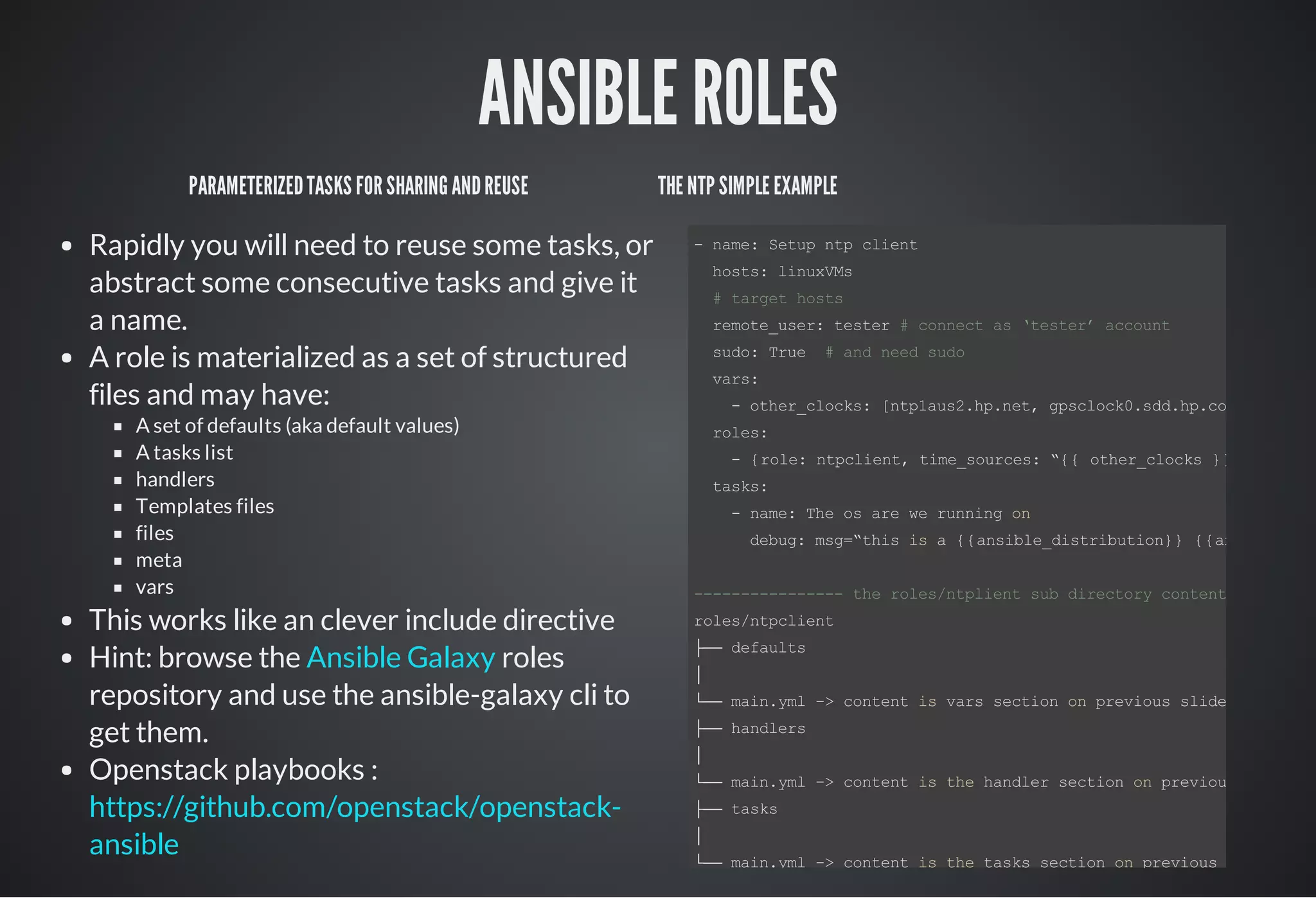
ANSIBLE ROLES
PARAMETERIZEDTASKS FORSHARINGANDREUSE
Rapidly you will need to reuse some tasks, or
abstract some consecutive tasks and give it
a name.
A role is materialized as a set of structured
files and may have:
A set of defaults (aka default values)
A tasks list
handlers
Templates files
files
meta
vars
This works like an clever include directive
Hint: browse the roles
repository and use the ansible-galaxy cli to
get them.
Openstack playbooks :
Ansible Galaxy
https://github.com/openstack/openstack-
ansible
THE NTP SIMPLE EXAMPLE
­ name: Setup ntp client
  hosts: linuxVMs
  # target hosts
  remote_user: tester # connect as ‘tester’ account
  sudo: True  # and need sudo
  vars:
    ­ other_clocks: [ntp1aus2.hp.net, gpsclock0.sdd.hp.com, ntp1.ed
  roles:
    ­ {role: ntpclient, time_sources: “{{ other_clocks }}”, }
  tasks:
    ­ name: The os are we running on
      debug: msg=“this is a {{ansible_distribution}} {{ansible_dis
­­­­­­­­­­­­­­­­ the roles/ntplient sub directory content ­­­­­­
roles/ntpclient
├── defaults
│
└── main.yml ­> content is vars section on previous slide
├── handlers
│
└── main.yml ­> content is the handler section on previous slide
├── tasks
│
└── main.yml ­> content is the tasks section on previous slide
ANSIBLE - A LOT MORE TO DISCOVER
WE JUST SCRATCHED THE SURFACE
Ansible conditionals
Ansible loops
Ansible-Vault
Facts
Jinja2 filters
...
SIMPLE LIVE EXAMPLES
THANK YOU
Based on original presentation from :
Philippe Eveque <philippe.eveque@hp.com>
Adaptation to openstack by :
Jérome Justet <jerome.justet@hp.com>
René Ribaud <rene.ribaud@hp.com>

Ansible a tool for dev ops

  • 1.
  • 2.
    SESSION OBJECTIVES Objectives Present Ansible,a popular tool used in Dev/Ops context The needs to automate tasks across distributed systems Typical needs Ansible use cases for managing Openstack
  • 3.
  • 4.
    WHAT IS ANSIBLE Ansibleis a free software platform for configuring and managing computers. The platform was created by Michael DeHaan, he is the Cobbler author as well.
  • 5.
    THE NEED FORAUTOMATION
  • 6.
    TYPICAL NEEDS As adeveloper/tester: during dev and test phase. Safely Do repetitive configurations tasks on a set of VMs implementing a multi-tier cluster Provision ssh public keys of team members on N freshly deployed nodes during dev phase Automate a documented complex installation sequence – BTW why writing such a document ? etc As a Sysadmin/Sysops Automate remote scripting of many day to day tasks Check and maintain configuration on systems, can be coupled with a revision management tool As a Service Delivery team: efficiency Efficient deployment of complex solutions with easily injecting customers or deal specific configuration parameters Avoid restarting from start when you hit an error Do it faster and cheaper and at scale As <anyone> Be efficient in front of the explosion of the # of entities (servers, VMs, ...) to ‘manage’
  • 7.
    THE AVAILABLE TOOLS ANDKEYPROPERTIES The ‘old ways’ we all experimented: is gone Document the pre-requisites, document the sequence of actions. Keeping the doc up to date and tested is time consuming. Doc is subject to interpretation, ... Shell scripting Handling errors correctly is hard. Designing them to avoid restart from scratch is even harder The current way: Configuration management and automation frameworks. Puppet, Chef, Salt, All promote idempotency Ansible addresses most of the issues at low cost Easy to learn and debug Open source software (with commercial support available) Leaves no “fingerprints” or residue on target systems Predictable execution / Repeatable / Idempotent Mostly / Parallel operations Ansible
  • 8.
    ANSIBLE BASICS ANDKEY CONCEPTS
  • 9.
    ANSIBLE ARCHITECTURE ANDWORKING MODEL An ‘orchestration engine’ where Ansible SW is installed. No agent required. leverage ssh as default secure transport. Execute playbooks. Predictable – in order execution Designed to work in push mode to all target hosts in parallel. hosts can be many things: Any Linux/*Nix systems networking gears running sshd Windows hosts by leverging WinRM and PowerShell (hence no ssh in that case) And more...
  • 10.
    THE INVENTORY WHERE THEHOSTS ARE REGISTERED ABOUTINVENTORIES Static inventory: A file containing a set of hosts and groups of hosts. Can also contain some host specific settings. Common practice is to name groups per intended function. Dynamic inventory – hosts and groups from external source via inventory plugin. From a CMDB From a cloud provider (e.g: AWS EC2/Eucalyptus, Rackspace Cloud. OpenStack nova, gce, digital ocean ...) Useful when hosts names are hard to predict or when many hosts More than one inventory and mix of static and dynamic inventory sources is possible: One for development, one for staging, one for production One for public cloud one for private cloud EXAMPLE OF ASIMPLE STATIC INVENTORY – NO DBNEEDED # This is a comment          # localhost refers to the ansible control node localhost [webservers] www1.example.com www2.example.com www[10:50].example.com [dbservers]  db1.example.com       db[a:f].example.com 10.0.1.9 ansible_ssh_port=2222 ansible_ssh_user=admin [LinuxVMs] localhost db1.example.com www21.example.com
  • 11.
    ANSIBLE PLAYBOOKS -THE PLAYS ALISTOF PLAYS TO RUN ON TARGETHOSTS Playbooks are yaml text files containing a list of plays and run via the ansible-playbook cli Playbooks can be hierarchical and use structured directory and file layout. A play maps a set of hosts with “what to execute” on them Has a name: descriptive text Start with a section specifying the set of target hosts with the parameters to access them. May contain variables declaration sections Contains sections specifying “what to run” on them A play optionally ‘gather Facts’ and makes them available as variables. Facts are all the information Ansible discovers about a host. Each play is run in sequence and may specify the account (remote_user) to be used to connect to the remote hosts, if sudo is needed, etc PLAYBOOKEXTRACT– THE FIRSTSECTION OF APLAY ­ name: This is the PLAY1 title   hosts: webservers  # this can be host, groups or complex expr   gather_facts: True  # trigger facts discovery about targets   remote_user tester  # connect as 'tester' account   sudo: False         # whether to run as sudo or not   [...skipped part...] # what to run on the targets – skipped ­ name: This is the PLAY2 Title    hosts: dbservers:!db1.example.com # exclude a host   gather_facts: False   remote_user: admin  # connect as 'admin' account   sudo: True   [...skipped part...] # what to run on the targets – skipped
  • 12.
    ANSIBLE PLAYBOOKS –THE TASKS WHATTO RUN ON TARGETHOSTS The tasks section describes the list of actions you want to execute on the target hosts The tasks are run in order, one at a time, against all the target hosts in parallel, before moving to the next. A task: Has a name : descriptive text Executes a module with specific parameters. Reports status [ok, changed, failed, skipping] at runtime Handlers are tasks triggered at the end of the play if a change was made A is a small program, generally idempotent and that can be written in any language *. There are modules for many things, see the module index. You can write your own. Variables and templates leverage jinja2 templating engine module THE NTP SIMPLE EXAMPLE ­ name: Setup ntp client   hosts: linuxVMs:!localhost # target hosts   remote_user: tester # connect as ‘tester’ account    sudo: True # and need sudo capability   vars:     ­ time_sources: [ntp2.austin.hp.com, gpsclock0.sdd.hp.com, ntp1     ­ ntp_rpm: ntp   tasks:     ­ name: Install the required  time service package       yum: name={{ ntp_rpm }} state=installed     ­ name: Instantiate the ntp.conf from template file       template: src=ntp.conf.j2  dest=/etc/ntp.conf   notify:      ­ restart time server daemon     ­ name: The os are we running on       debug: msg=“this is a {{ ansible_distribution }} {{ ansible_   handlers:     ­ name: restart time server daemon       service: name=ntpd state=restarted enabled=yes
  • 13.
    ANSIBLE ROLES PARAMETERIZEDTASKS FORSHARINGANDREUSE Rapidlyyou will need to reuse some tasks, or abstract some consecutive tasks and give it a name. A role is materialized as a set of structured files and may have: A set of defaults (aka default values) A tasks list handlers Templates files files meta vars This works like an clever include directive Hint: browse the roles repository and use the ansible-galaxy cli to get them. Openstack playbooks : Ansible Galaxy https://github.com/openstack/openstack- ansible THE NTP SIMPLE EXAMPLE ­ name: Setup ntp client   hosts: linuxVMs   # target hosts   remote_user: tester # connect as ‘tester’ account   sudo: True  # and need sudo   vars:     ­ other_clocks: [ntp1aus2.hp.net, gpsclock0.sdd.hp.com, ntp1.ed   roles:     ­ {role: ntpclient, time_sources: “{{ other_clocks }}”, }   tasks:     ­ name: The os are we running on       debug: msg=“this is a {{ansible_distribution}} {{ansible_dis ­­­­­­­­­­­­­­­­ the roles/ntplient sub directory content ­­­­­­ roles/ntpclient ├── defaults │ └── main.yml ­> content is vars section on previous slide ├── handlers │ └── main.yml ­> content is the handler section on previous slide ├── tasks │ └── main.yml ­> content is the tasks section on previous slide
  • 14.
    ANSIBLE - ALOT MORE TO DISCOVER WE JUST SCRATCHED THE SURFACE Ansible conditionals Ansible loops Ansible-Vault Facts Jinja2 filters ...
  • 15.
  • 16.
    THANK YOU Based onoriginal presentation from : Philippe Eveque <philippe.eveque@hp.com> Adaptation to openstack by : Jérome Justet <jerome.justet@hp.com> René Ribaud <rene.ribaud@hp.com>