1
Dashboards, Goals & Alerts
Scott J. Falkowitz, OHST, CHST
Process Improvement Leader
Agenda
• Access the goal module
• Review goal types & setup
• Communication & Alerts
• Case Examples
2
3
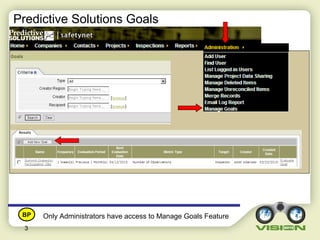
Only Administrators have access to Manage Goals Feature
Predictive Solutions Goals
BP
4
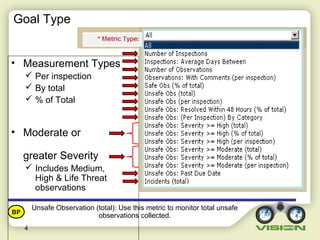
• Measurement Types
 Per inspection
 By total
 % of Total
• Moderate or
greater Severity
 Includes Medium,
High & Life Threat
observations
Unsafe Observation (total): Use this metric to monitor total unsafe
observations collected.
Goal Type
BP
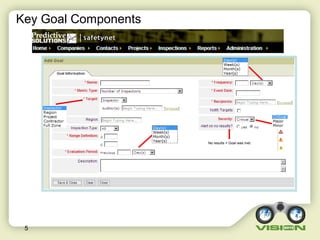
Key Goal Components
5
No results = Goal was met
6
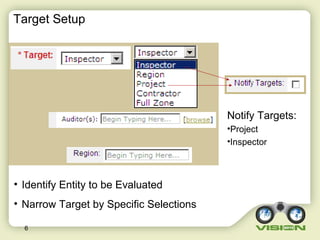
• Identify Entity to be Evaluated
• Narrow Target by Specific Selections
Notify Targets:
•Project
•Inspector
Target Setup
7
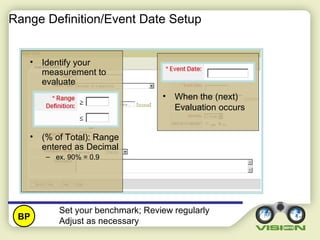
Range Definition/Event Date Setup
• Identify your
measurement to
evaluate
• (% of Total): Range
entered as Decimal
– ex. 90% = 0.9
• When the (next)
Evaluation occurs
Set your benchmark; Review regularly
Adjust as necessaryBP
8
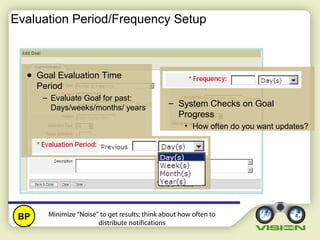
Evaluation Period/Frequency Setup
– System Checks on Goal
Progress
• How often do you want updates?
Minimize “Noise” to get results; think about how often to
distribute notifications
BP
● Goal Evaluation Time
Period
– Evaluate Goal for past:
Days/weeks/months/ years
9
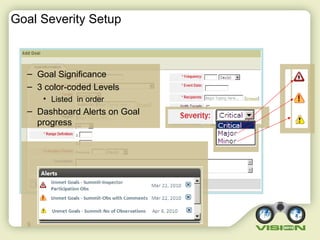
Goal Severity Setup
– Goal Significance
– 3 color-coded Levels
• Listed in order
– Dashboard Alerts on Goal
progress
10
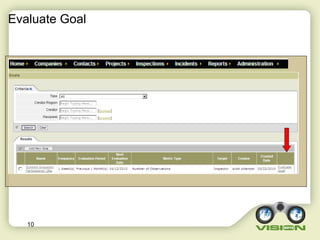
Evaluate Goal
11
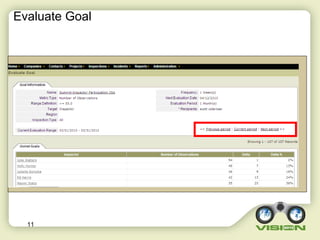
Evaluate Goal
12
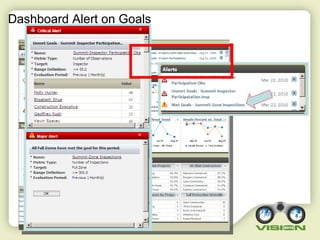
Dashboard Alert on Goals
Case Example – 1 – High % Safe
13
Finding safes is good. It helps us determine what we
didn’t inspect.
BP
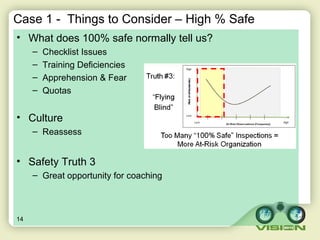
Case 1 - Things to Consider – High % Safe
• What does 100% safe normally tell us?
– Checklist Issues
– Training Deficiencies
– Apprehension & Fear
– Quotas
• Culture
– Reassess
• Safety Truth 3
– Great opportunity for coaching
14
Case Example – 2 – Low Participation
15
After setting quantitative goals, coach the employees
and give feedback. Analyze quality!
BP
Case 2 – Things to Consider – Low Participation
• Were the goals communicated?
• What is driving this?
– Inadequate checklist
– Lack of feedback
– Mismatched priorities
– Absence of leadership
– Failure to resolve
• Engagement – Keep it in the forefront!
16
Case Example – 3 – Missing Comments
17
Comments for at-risks should always have a commentBP
Case 3 – Things to Consider – Missing Comments
• What do comments do for BBS programs in general?
– Document conversations for positive and at-risk behavior
– Help manage a rewards/recognition program
• What two benefits do comments provide for unsafes?
– Provide the reader with a clear understanding of what was observed
– Show interim corrective action for those items which are still open
**Talk with the inspector to help them better understand the concern**
18
Case Example – 4 – Severity
19
The detail report can be used for severity calibrationBP
Case 4 – Things to Consider - Severity
• What causes this?
– People afraid that they will be questioned in a punitive manner
– People afraid that it might get others in trouble
– Not properly trained in the severity matrix
– Don’t understand risk
• What can you do?
– Address the cultural issues by showing management support
– Coach to Improve
– Reinforce that finding unsafes is desirable
– Publicize & reward identification correction as positive
20
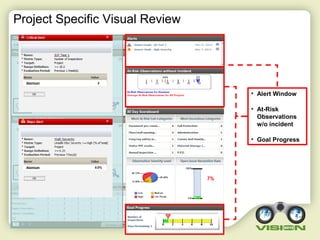
Project Specific Visual Review
21
• Alert Window
• At-Risk
Observations
w/o incident
• Goal Progress
Atomium 2
Atomium 0.0%
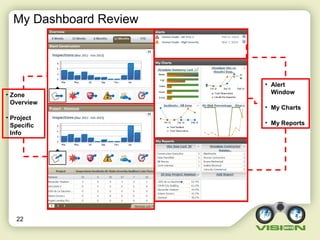
My Dashboard Review
22
• Alert
Window
• My Charts
• My Reports
• Zone
Overview
• Project
Specific
Info
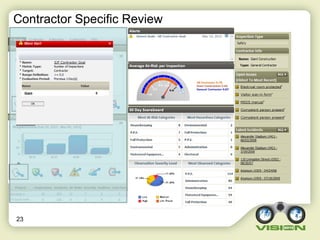
Contractor Specific Review
23
Giant 0
Summary
• Learn the features and functionality – Work with your P&T Lead
• The dashboard provides a wealth of information
• Expectations must be set and understood up front
• The manage goals feature helps measure progress against
expectation
• Meeting AND missing goals should be acknowledged
24

SafetyNet: Dashboard, Goals & Alerts (2013)

  • 1.
    1 Dashboards, Goals &Alerts Scott J. Falkowitz, OHST, CHST Process Improvement Leader
  • 2.
    Agenda • Access thegoal module • Review goal types & setup • Communication & Alerts • Case Examples 2
  • 3.
    3 Only Administrators haveaccess to Manage Goals Feature Predictive Solutions Goals BP
  • 4.
    4 • Measurement Types Per inspection  By total  % of Total • Moderate or greater Severity  Includes Medium, High & Life Threat observations Unsafe Observation (total): Use this metric to monitor total unsafe observations collected. Goal Type BP
  • 5.
    Key Goal Components 5 Noresults = Goal was met
  • 6.
    6 • Identify Entityto be Evaluated • Narrow Target by Specific Selections Notify Targets: •Project •Inspector Target Setup
  • 7.
    7 Range Definition/Event DateSetup • Identify your measurement to evaluate • (% of Total): Range entered as Decimal – ex. 90% = 0.9 • When the (next) Evaluation occurs Set your benchmark; Review regularly Adjust as necessaryBP
  • 8.
    8 Evaluation Period/Frequency Setup –System Checks on Goal Progress • How often do you want updates? Minimize “Noise” to get results; think about how often to distribute notifications BP ● Goal Evaluation Time Period – Evaluate Goal for past: Days/weeks/months/ years
  • 9.
    9 Goal Severity Setup –Goal Significance – 3 color-coded Levels • Listed in order – Dashboard Alerts on Goal progress
  • 10.
  • 11.
  • 12.
  • 13.
    Case Example –1 – High % Safe 13 Finding safes is good. It helps us determine what we didn’t inspect. BP
  • 14.
    Case 1 -Things to Consider – High % Safe • What does 100% safe normally tell us? – Checklist Issues – Training Deficiencies – Apprehension & Fear – Quotas • Culture – Reassess • Safety Truth 3 – Great opportunity for coaching 14
  • 15.
    Case Example –2 – Low Participation 15 After setting quantitative goals, coach the employees and give feedback. Analyze quality! BP
  • 16.
    Case 2 –Things to Consider – Low Participation • Were the goals communicated? • What is driving this? – Inadequate checklist – Lack of feedback – Mismatched priorities – Absence of leadership – Failure to resolve • Engagement – Keep it in the forefront! 16
  • 17.
    Case Example –3 – Missing Comments 17 Comments for at-risks should always have a commentBP
  • 18.
    Case 3 –Things to Consider – Missing Comments • What do comments do for BBS programs in general? – Document conversations for positive and at-risk behavior – Help manage a rewards/recognition program • What two benefits do comments provide for unsafes? – Provide the reader with a clear understanding of what was observed – Show interim corrective action for those items which are still open **Talk with the inspector to help them better understand the concern** 18
  • 19.
    Case Example –4 – Severity 19 The detail report can be used for severity calibrationBP
  • 20.
    Case 4 –Things to Consider - Severity • What causes this? – People afraid that they will be questioned in a punitive manner – People afraid that it might get others in trouble – Not properly trained in the severity matrix – Don’t understand risk • What can you do? – Address the cultural issues by showing management support – Coach to Improve – Reinforce that finding unsafes is desirable – Publicize & reward identification correction as positive 20
  • 21.
    Project Specific VisualReview 21 • Alert Window • At-Risk Observations w/o incident • Goal Progress Atomium 2 Atomium 0.0%
  • 22.
    My Dashboard Review 22 •Alert Window • My Charts • My Reports • Zone Overview • Project Specific Info
  • 23.
  • 24.
    Summary • Learn thefeatures and functionality – Work with your P&T Lead • The dashboard provides a wealth of information • Expectations must be set and understood up front • The manage goals feature helps measure progress against expectation • Meeting AND missing goals should be acknowledged 24

Editor's Notes

  • #4 How do I find Goals in Predictive Solutions
  • #5 Goal Metric type Number of Inspections: The number of inspections with at least one observation. Inspections: Average Days Between: The average number of days between inspections. Number of Observations: The number of observations. Observations: With Comments (per inspection): The number of observations with comments. Safe Obs (% of total): The percent of safe observations compared to total number of observations. Unsafe Obs (total): The total number of unsafe observations. Unsafe Obs (per inspection): The number of unsafe observations per inspection. Unsafe Obs: Resolved Within 48 Hours (% of total): The percent of unsafe observations resolved within 48 hours. Unsafe Obs: per inspection by Category: The number of unsafe observations in the housekeeping category per inspection. Unsafe Obs: Severity >= High (total): The total number of unsafe observations with high severity. Unsafe Obs: Severity >= High (% of total): The percent of unsafe observations with high severity. Unsafe Obs: Severity >= High (per inspection): The number of unsafe observations with high severity per inspection. Unsafe Obs: Severity >= Moderate (total): The total number of unsafe observations with medium severity. Unsafe Obs: Severity >= Moderate (% of total): The percent of unsafe observations with medium severity. Unsafe Obs: Severity >= Moderate (per inspection): The number of unsafe observations with medium severity per inspection. Unsafe Obs Past Due Date: The number of unsafe observations which have passed their scheduled due date Incidents (total): The total number of incidents recorded in the incident reporting module.
  • #6 Need to explain all of these first!! Add/edit goals—key goal components Name and Recipients are pretty self-explanatory—briefly touch on here We will cover the remaining red-asterisked components in the slides that follow
  • #7 Goal Target—who/what is being measured Include notify Targets
  • #10 If an alert is sent, an email is generated The Severity determines how it is stacked on the Dashboard
  • #13 If an alert is sent, an email is generated