Android Content
Placeholder Animation Like
Facebook Using Shimmer
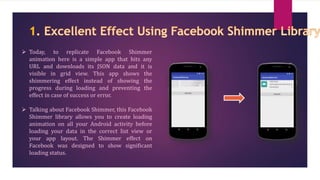
 Today, to replicate Facebook Shimmer
animation here is a simple app that hits any
URL and downloads its JSON data and it is
visible in grid view. This app shows the
shimmering effect instead of showing the
progress during loading and preventing the
effect in case of success or error.
 Talking about Facebook Shimmer, this Facebook
Shimmer library allows you to create loading
animation on all your Android activity before
loading your data in the correct list view or
your app layout. The Shimmer effect on
Facebook was designed to show significant
loading status.
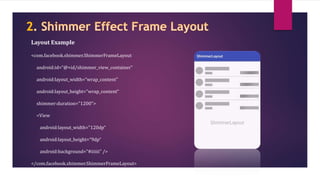
<com.facebook.shimmer.ShimmerFrameLayout
android:id=“@+id/shimmer_view_container”
android:layout_width=“wrap_content”
android:layout_height="wrap_content“
shimmer:duration="1200">
<View
android:layout_width="120dp“
android:layout_height=“9dp“
android:background="#iiiiii" />
</com.facebook.shimmer.ShimmerFrameLayout>
Layout Example
JSON is a lightweight data-interchange
format that is easy to read and write for all
users. It is very easy to parse and generate
all machines. JSON is considered an ideal
data-interchange language for
communicating data with a minimum It is
considered as a form that is used to transmit
user's data between servers and web
applications in the alternative of XML data.
[{
"id": 2,
"name": “Hiren Patel",
"description": "Put the ginger and garlic into a bowl and mix with the soy sauce,
maple syrup, mirin and a drizzle of olive oil",
"price": 100,
"chef": “Mayur Patel",
"thumbnail": "/images/food/3.jpg",
"timestamp": “8 min ago“
}, {
"id": 3,
"name": “Jay Patel",
"description": "Combine butter, dill and garlic salt, brush over mushrooms.",
"price": 120,
"chef": "Raj Patel",
"thumbnail": "/images/food/4.jpg",
"timestamp": “12 min ago"
}
]
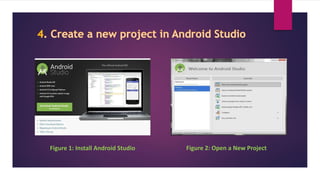
Figure 1: Install Android Studio Figure 2: Open a New Project
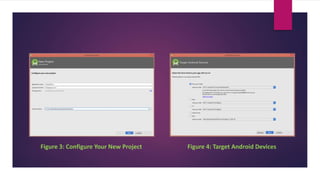
Figure 4: Target Android DevicesFigure 3: Configure Your New Project
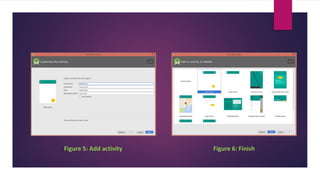
Figure 6: FinishFigure 5: Add activity
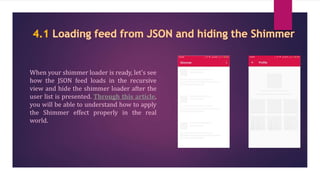
When your shimmer loader is ready, let's see
how the JSON feed loads in the recursive
view and hide the shimmer loader after the
user list is presented. Through this article,
you will be able to understand how to apply
the Shimmer effect properly in the real
world.
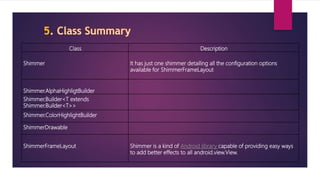
Class Description
Shimmer It has just one shimmer detailing all the configuration options
available for ShimmerFrameLayout
Shimmer.AlphaHighligtBuilder
Shimmer.Builder<T extends
Shimmer.Builder<T>>
Shimmer.ColorHighlightBuilder
ShimmerDrawable
ShimmerFrameLayout Shimmer is a kind of Android library capable of providing easy ways
to add better effects to all android.view.View.
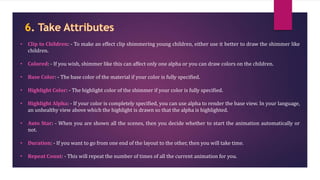
• Clip to Children: - To make an effect clip shimmering young children, either use it better to draw the shimmer like
children.
• Colored: - If you wish, shimmer like this can affect only one alpha or you can draw colors on the children.
• Base Color: - The base color of the material if your color is fully specified.
• Highlight Color: - The highlight color of the shimmer if your color is fully specified.
• Highlight Alpha: - If your color is completely specified, you can use alpha to render the base view. In your language,
an unhealthy view above which the highlight is drawn so that the alpha is highlighted.
• Auto Star: - When you are shown all the scenes, then you decide whether to start the animation automatically or
not.
• Duration: - If you want to go from one end of the layout to the other, then you will take time.
• Repeat Count: - This will repeat the number of times of all the current animation for you.
• Repeat Delay: - This will repeat the current animation after a delay.
• Repeat Mode: - What should you do after you reach the end of the animation? You can start from the
beginning or you can reverse back
• Direction: - If you are looking at the direction of travel of the shimmer then you can do it from left to
right, right to left, top to bottom or bottom to top.
• Dropoff: - This helps control the shape of the fading edge of your highlight.
• Intensity: - This helps control the brightness of your highlight in the center.
• Shape: - This is the shape of your highlight mask either linear or with a circular gradient.
• Till: - It measures your angle at which the highlight is tilted in degrees.
• Fixed Width, Height: - If you set the fixed size highlight mask it overrides the relative size value.
• Width, Height Ratio: - It decides the size of the highlight mask and relative to the layout to which it is
applied.
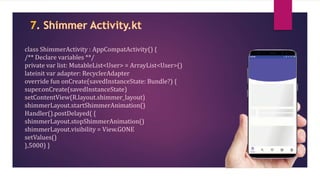
class ShimmerActivity : AppCompatActivity() {
/** Declare variables **/
private var list: MutableList<User> = ArrayList<User>()
lateinit var adapter: RecyclerAdapter
override fun onCreate(savedInstanceState: Bundle?) {
super.onCreate(savedInstanceState)
setContentView(R.layout.shimmer_layout)
shimmerLayout.startShimmerAnimation()
Handler().postDelayed( {
shimmerLayout.stopShimmerAnimation()
shimmerLayout.visibility = View.GONE
setValues()
},5000) }
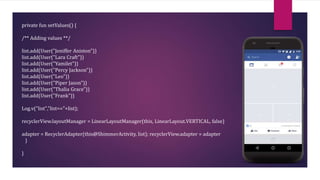
private fun setValues() {
/** Adding values **/
list.add(User("Jeniffer Aniston"))
list.add(User("Lara Craft"))
list.add(User("Yamilet"))
list.add(User("Percy Jackson"))
list.add(User("Leo"))
list.add(User("Piper Jason"))
list.add(User("Thalia Grace"))
list.add(User("Frank"))
Log.v("list","list=="+list);
recyclerView.layoutManager = LinearLayoutManager(this, LinearLayout.VERTICAL, false)
adapter = RecyclerAdapter(this@ShimmerActivity, list); recyclerView.adapter = adapter
}
}
Contact Us
info@nexmobility.com
+91 80009 20081
https://www.nexmobility.com/
"Royal Square“ 1st Floor, Off No. 110, Nr.
Shilp Tower, Tagore Road, Rajkot - 360 001,
Gujarat - INDIA
How to create content placeholder animations for Android using shimmer effects?

How to create content placeholder animations for Android using shimmer effects?

  • 1.
    Android Content Placeholder AnimationLike Facebook Using Shimmer
  • 2.
     Today, toreplicate Facebook Shimmer animation here is a simple app that hits any URL and downloads its JSON data and it is visible in grid view. This app shows the shimmering effect instead of showing the progress during loading and preventing the effect in case of success or error.  Talking about Facebook Shimmer, this Facebook Shimmer library allows you to create loading animation on all your Android activity before loading your data in the correct list view or your app layout. The Shimmer effect on Facebook was designed to show significant loading status.
  • 3.
  • 4.
    JSON is alightweight data-interchange format that is easy to read and write for all users. It is very easy to parse and generate all machines. JSON is considered an ideal data-interchange language for communicating data with a minimum It is considered as a form that is used to transmit user's data between servers and web applications in the alternative of XML data.
  • 5.
    [{ "id": 2, "name": “HirenPatel", "description": "Put the ginger and garlic into a bowl and mix with the soy sauce, maple syrup, mirin and a drizzle of olive oil", "price": 100, "chef": “Mayur Patel", "thumbnail": "/images/food/3.jpg", "timestamp": “8 min ago“ }, { "id": 3, "name": “Jay Patel", "description": "Combine butter, dill and garlic salt, brush over mushrooms.", "price": 120, "chef": "Raj Patel", "thumbnail": "/images/food/4.jpg", "timestamp": “12 min ago" } ]
  • 6.
    Figure 1: InstallAndroid Studio Figure 2: Open a New Project
  • 7.
    Figure 4: TargetAndroid DevicesFigure 3: Configure Your New Project
  • 8.
    Figure 6: FinishFigure5: Add activity
  • 9.
    When your shimmerloader is ready, let's see how the JSON feed loads in the recursive view and hide the shimmer loader after the user list is presented. Through this article, you will be able to understand how to apply the Shimmer effect properly in the real world.
  • 10.
    Class Description Shimmer Ithas just one shimmer detailing all the configuration options available for ShimmerFrameLayout Shimmer.AlphaHighligtBuilder Shimmer.Builder<T extends Shimmer.Builder<T>> Shimmer.ColorHighlightBuilder ShimmerDrawable ShimmerFrameLayout Shimmer is a kind of Android library capable of providing easy ways to add better effects to all android.view.View.
  • 11.
    • Clip toChildren: - To make an effect clip shimmering young children, either use it better to draw the shimmer like children. • Colored: - If you wish, shimmer like this can affect only one alpha or you can draw colors on the children. • Base Color: - The base color of the material if your color is fully specified. • Highlight Color: - The highlight color of the shimmer if your color is fully specified. • Highlight Alpha: - If your color is completely specified, you can use alpha to render the base view. In your language, an unhealthy view above which the highlight is drawn so that the alpha is highlighted. • Auto Star: - When you are shown all the scenes, then you decide whether to start the animation automatically or not. • Duration: - If you want to go from one end of the layout to the other, then you will take time. • Repeat Count: - This will repeat the number of times of all the current animation for you.
  • 12.
    • Repeat Delay:- This will repeat the current animation after a delay. • Repeat Mode: - What should you do after you reach the end of the animation? You can start from the beginning or you can reverse back • Direction: - If you are looking at the direction of travel of the shimmer then you can do it from left to right, right to left, top to bottom or bottom to top. • Dropoff: - This helps control the shape of the fading edge of your highlight. • Intensity: - This helps control the brightness of your highlight in the center. • Shape: - This is the shape of your highlight mask either linear or with a circular gradient. • Till: - It measures your angle at which the highlight is tilted in degrees. • Fixed Width, Height: - If you set the fixed size highlight mask it overrides the relative size value. • Width, Height Ratio: - It decides the size of the highlight mask and relative to the layout to which it is applied.
  • 13.
    class ShimmerActivity :AppCompatActivity() { /** Declare variables **/ private var list: MutableList<User> = ArrayList<User>() lateinit var adapter: RecyclerAdapter override fun onCreate(savedInstanceState: Bundle?) { super.onCreate(savedInstanceState) setContentView(R.layout.shimmer_layout) shimmerLayout.startShimmerAnimation() Handler().postDelayed( { shimmerLayout.stopShimmerAnimation() shimmerLayout.visibility = View.GONE setValues() },5000) }
  • 14.
    private fun setValues(){ /** Adding values **/ list.add(User("Jeniffer Aniston")) list.add(User("Lara Craft")) list.add(User("Yamilet")) list.add(User("Percy Jackson")) list.add(User("Leo")) list.add(User("Piper Jason")) list.add(User("Thalia Grace")) list.add(User("Frank")) Log.v("list","list=="+list); recyclerView.layoutManager = LinearLayoutManager(this, LinearLayout.VERTICAL, false) adapter = RecyclerAdapter(this@ShimmerActivity, list); recyclerView.adapter = adapter } }
  • 15.
    Contact Us info@nexmobility.com +91 8000920081 https://www.nexmobility.com/ "Royal Square“ 1st Floor, Off No. 110, Nr. Shilp Tower, Tagore Road, Rajkot - 360 001, Gujarat - INDIA