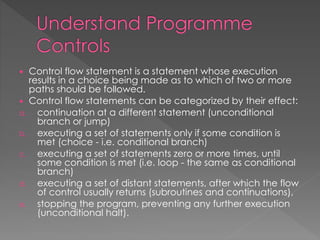
 Control flow statement is a statement whose execution 
results in a choice being made as to which of two or more 
paths should be followed. 
 Control flow statements can be categorized by their effect: 
a. continuation at a different statement (unconditional 
branch or jump) 
b. executing a set of statements only if some condition is 
met (choice - i.e. conditional branch) 
c. executing a set of statements zero or more times, until 
some condition is met (i.e. loop - the same as conditional 
branch) 
d. executing a set of distant statements, after which the flow 
of control usually returns (subroutines and continuations), 
e. stopping the program, preventing any further execution 
(unconditional halt).
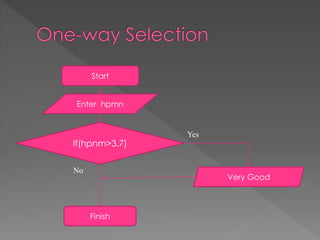
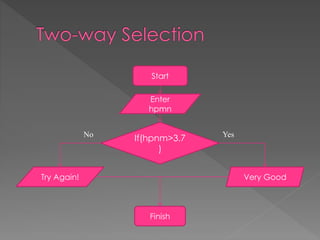
Start 
Enter hpmn 
If(hpnm>3.7) 
Finish 
Yes 
No 
Very Good
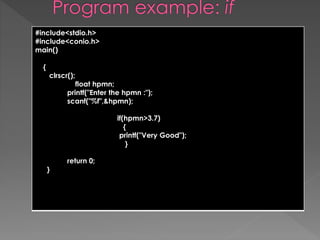
#include<stdio.h> 
#include<conio.h> 
main() 
{ 
clrscr(); 
float hpmn; 
printf("Enter the hpmn :"); 
scanf("%f",&hpmn); 
if(hpmn>3.7) 
{ 
printf("Very Good"); 
} 
return 0; 
}
Start 
Enter 
hpmn 
No Yes 
If(hpnm>3.7 
) 
Try Again! Very Good 
Finish
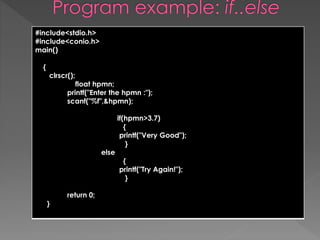
#include<stdio.h> 
#include<conio.h> 
main() 
{ 
clrscr(); 
float hpmn; 
printf("Enter the hpmn :"); 
scanf("%f",&hpmn); 
if(hpmn>3.7) 
{ 
printf("Very Good"); 
} 
else 
{ 
printf("Try Again!"); 
} 
return 0; 
}
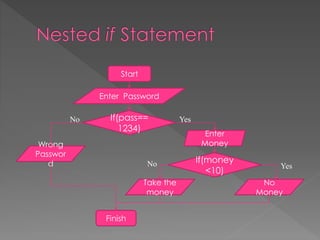
Start 
Enter Password 
If(pass== 
1234) 
No Yes 
Finish 
Enter 
Wrong Money 
Passwor 
d If(money 
No Yes 
<10) 
No 
Money 
Take the 
money
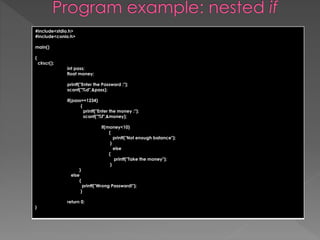
#include<stdio.h> 
#include<conio.h> 
main() 
{ 
clrscr(); 
int pass; 
float money; 
printf("Enter the Password :"); 
scanf("%d",&pass); 
if(pass==1234) 
{ 
printf("Enter the money :"); 
scanf("%f",&money); 
if(money<10) 
{ 
printf("Not enough balance"); 
} 
else 
{ 
printf("Take the money"); 
} 
} 
else 
{ 
printf("Wrong Password!"); 
} 
return 0; 
}
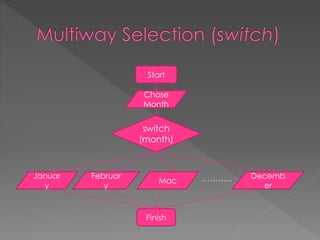
Start 
Chose 
Month 
switch 
(month) 
Finish 
Januar 
y 
Februar 
y 
Mac 
Decemb 
er 
………...
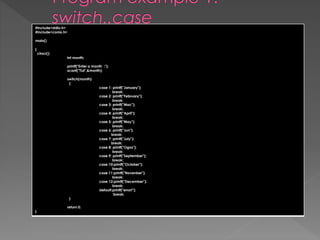
#include<stdio.h> 
#include<conio.h> 
main() 
{ 
clrscr(); 
int month; 
printf("Enter a month :"); 
scanf("%d",&month); 
switch(month) 
{ 
case 1: printf("January"); 
break; 
case 2: printf("February"); 
break; 
case 3: printf("Mac"); 
break; 
case 4: printf("April"); 
break; 
case 5: printf("May"); 
break; 
case 6: printf("Jun"); 
break; 
case 7: printf("July"); 
break; 
case 8: printf("Ogos"); 
break; 
case 9: printf("September"); 
break; 
case 10:printf("October"); 
break; 
case 11:printf("Novenber"); 
break; 
case 12:printf("December"); 
break; 
default:printf("error!"); 
break; 
} 
return 0; 
}
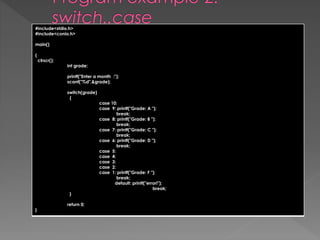
#include<stdio.h> 
#include<conio.h> 
main() 
{ 
clrscr(); 
int grade; 
printf("Enter a month :"); 
scanf("%d",&grade); 
switch(grade) 
{ 
case 10: 
case 9: printf("Grade: A "); 
break; 
case 8: printf("Grade: B "); 
break; 
case 7: printf("Grade: C "); 
break; 
case 6: printf("Grade: D "); 
break; 
case 5: 
case 4: 
case 3: 
case 2: 
case 1: printf("Grade: F "); 
break; 
default: printf("error!"); 
break; 
} 
return 0; 
}
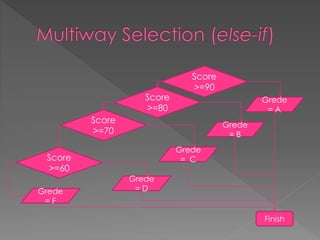
Score 
>=90 
Grede 
= A 
Finish 
Score 
>=80 
Score 
>=70 
Score 
>=60 
Grede 
= B 
Grede 
= C 
Grede 
Grede = D 
= F
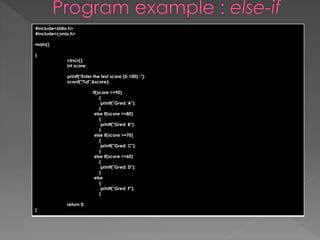
#include<stdio.h> 
#include<conio.h> 
main() 
{ 
clrscr(); 
int score; 
printf("Enter the test score (0-100) :"); 
scanf("%d",&score); 
if(score >=90) 
{ 
printf("Gred: A"); 
} 
else if(score >=80) 
{ 
printf("Gred: B"); 
} 
else if(score >=70) 
{ 
printf("Gred: C"); 
} 
else if(score >=60) 
{ 
printf("Gred: D"); 
} 
else 
{ 
printf("Gred: F"); 
} 
return 0; 
}
 Is a pretest loop 
 Use an expression to control the loop 
 It test the expression before ever iteration 
of the loop
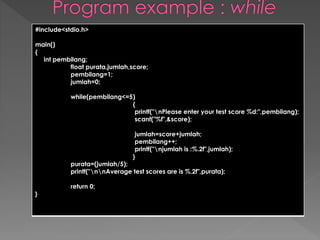
#include<stdio.h> 
main() 
{ 
int pembilang; 
float purata,jumlah,score; 
pembilang=1; 
jumlah=0; 
while(pembilang<=5) 
{ 
printf("nPlease enter your test score %d:",pembilang); 
scanf("%f",&score); 
jumlah=score+jumlah; 
pembilang++; 
printf("njumlah is :%.2f",jumlah); 
} 
purata=(jumlah/5); 
printf("nnAverage test scores are is %.2f",purata); 
return 0; 
}
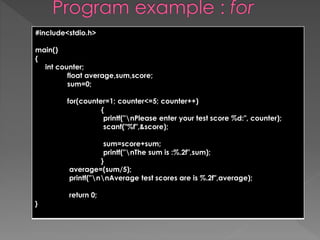
 Is a pretest loop that uses three 
expressions 
 The first expression contains any 
initialization statements, the second 
contains the terminating expression and 
the third contains the updating 
expression
#include<stdio.h> 
main() 
{ 
int counter; 
float average,sum,score; 
sum=0; 
for(counter=1; counter<=5; counter++) 
{ 
printf("nPlease enter your test score %d:", counter); 
scanf("%f",&score); 
sum=score+sum; 
printf("nThe sum is :%.2f",sum); 
} 
average=(sum/5); 
printf("nnAverage test scores are is %.2f",average); 
return 0; 
}
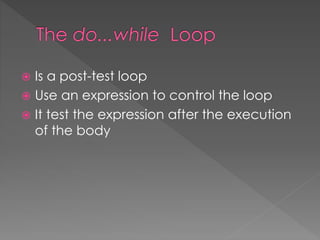
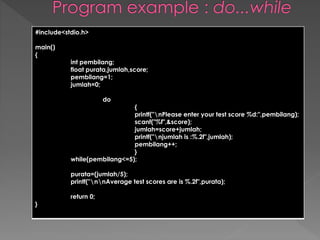
 Is a post-test loop 
 Use an expression to control the loop 
 It test the expression after the execution 
of the body
#include<stdio.h> 
main() 
{ 
int pembilang; 
float purata,jumlah,score; 
pembilang=1; 
jumlah=0; 
do 
{ 
printf("nPlease enter your test score %d:",pembilang); 
scanf("%f",&score); 
jumlah=score+jumlah; 
printf("njumlah is :%.2f",jumlah); 
pembilang++; 
} 
while(pembilang<=5); 
purata=(jumlah/5); 
printf("nnAverage test scores are is %.2f",purata); 
return 0; 
}
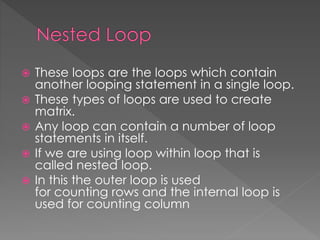
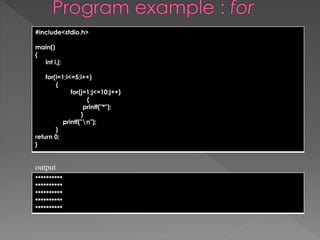
 These loops are the loops which contain 
another looping statement in a single loop. 
 These types of loops are used to create 
matrix. 
 Any loop can contain a number of loop 
statements in itself. 
 If we are using loop within loop that is 
called nested loop. 
 In this the outer loop is used 
for counting rows and the internal loop is 
used for counting column
#include<stdio.h> 
main() 
{ 
int i,j; 
for(i=1;i<=5;i++) 
{ 
for(j=1;j<=10;j++) 
{ 
printf("*"); 
} 
printf("n"); 
} 
return 0; 
} 
output 
********** 
********** 
********** 
********** 
**********
 The C language provides a capability that enables the user 
to define a set of ordered data items known as an array. 
 Suppose we had a set of grades that we wished to read 
into the computer and suppose we wished to perform some 
operations on these grades, we will quickly realize that we 
cannot perform such an operation until each and every 
grade has been entered since it would be quite a tedious 
task to declare each and every student grade as a variable 
especially since there may be a very large number. 
 In C we can define variable called grades, which 
represents not a single value of grade but a entire set of 
grades. Each element of the set can then be referenced by 
means of a number called as index number or subscript.
 Like any other variable arrays must be 
declared before they are used. The general 
form of declaration is: 
type variable-name[size]; 
 The type specifies the type of the elements 
that will be contained in the array, such as 
int float or char and the size indicates the 
maximum number of elements that can be 
stored inside the array for ex: 
float height[50]; 
int week[7];
 The declaration int values[10]; would reserve 
enough space for an array called values that 
could hold up to 10 integers. Refer to the below 
given picture to conceptualize the reserved 
storage space. 
values[0] 
values[1] 
values[2] 
values[3] 
values[4] 
values[5] 
values[6] 
values[7] 
values[8] 
values[9] 
 The array values stored in the memory.
 We can initialize the elements in the array in the same way as the ordinary variables when 
they are declared. The general form of initialization off arrays is: 
type array_name[size]={list of values}; 
 The values in the list care separated by commas, for example the statement 
int number[3]={0,0,0}; 
 Will declare the array size as a array of size 3 and will assign zero to each element if the 
number of values in the list is less than the number of elements, then only that many 
elements are initialized. The remaining elements will be set to zero automatically. 
 In the declaration of an array the size may be omitted, in such cases the compiler 
allocates enough space for all initialized elements. For example the statement 
int counter[]={1,1,1,1}; 
 Will declare the array to contain four elements with initial values 1. this approach works 
fine as long as we initialize every element in the array. 
 The initialization of arrays in c suffers two draw backs 
1. There is no convenient way to initialize only selected elements. 
2. There is no shortcut method to initialize large number of elements.
Arrays of Greater Dimension 
One-dimensional arrays are linear containers. 
© 2006 Pearson Addison-Wesley. 
12.5.26 All rights reserved 
Multi-dimensional Arrays 
[0] [1] [2] 
[0] 
[0] [1] [2] [3] 
[1] 
[2] 
two-dimensional 
[0] 
[0] [1] [2] [3] [4] 
[1] 
[2] 
[3] 
[2] 
[1] 
[0] 
three-dimensional
Initializing Multi-dimensional Arrays 
© 2006 Pearson Addison-Wesley. 
12.5.27 All rights reserved 
[0] 
[0] [1] [2] [3] 
[1] 
[2] 
[0] 
[0] [1] [2] [3] [4] 
[1] 
[2] 
[3] 
[2] 
[1] 
[0] 
[0] [1] [2] 
declaration instantiation 
Oval[] circles; circles = new Oval[3]; 
double[][] table; table = new double[3][4]; 
int[][][] arr; arr = new int[4][5][3];
How many cells in each of the following? 
double[][] distance = new double[10][15]; 
int[][][] cube = new int[8][8][10]; 
String[][][][][] words = new String[5][4][5][12][6]; 
© 2006 Pearson Addison-Wesley. 
12.5.28 All rights reserved
Creating Multi-dimensional Arrays 
The initialization notation for 1D arrays can be extended. 
char[][] words = { {'c', 'i', 'p', 'h', 'e', 'r'}, 
{'h', 'i', 'c', 'c’, 'u', 'p'}, 
{'a', 'p', 'i', 't', 'c', 'h'} }; 
© 2006 Pearson Addison-Wesley. 
12.5.29 All rights reserved 
[0] 
[0] [1] [2] [3] [4] [5] 
[1] 
[2] 
c i p h e 
h i c c u 
a p i t c 
r 
p 
h 
Exercise 
How would you duplicate this behavior without the initialization 
notation?
Processing Multi-dimensional Arrays 
The key to processing all cells of a multi-dimensional array is nested 
loops. 
12.5.30 
[0] [1] [2] [3] 
[0] 
[1] 
[2] 
10 11 12 13 
14 15 16 17 
18 19 20 21 
22 23 24 25 
26 27 28 29 
[3] 
[4] 
for (int row=0; row!=5; row++) { 
for (int col=0; col!=4; col++) { 
System.out.println( myArray[row][col] ); 
} 
} 
for (int col=0; col!=4; col++) { 
for (int row=0; row!=5; row++) { 
System.out.println( myArray[row][col] ); 
} 
} 
Exercises 
1) Write a method to initialize this array with the given values. 
2) Write a method to interchange two columns, indexed by two int 
parameters.
Atlanta Chicago Dallas Los Angelas New York City 
Atlanta 0 722 2244 800 896 
Chicago 722 0 1047 2113 831 
Dallas 2244 1047 0 1425 1576 
Los Angeles 800 2113 1425 0 2849 
New York City 896 831 1576 2849 0 
private final int[] mileage = {{0, 722, 2244, 800, 896}, 
{722, 0, 1047, 2113, 831}, 
{2244, 1047, 0, 1425, 1576}, 
{800, 2113, 1425, 0, 2849, 
{896, 831, 1576, 2849, 0} }; 
© 2006 Pearson Addison-Wesley. 
Tables 
12.5.31 All rights reserved 
private final int atlanta = 0; 
private final int chicago = 1; 
private final int dallas = 2; 
private final int losAngelas = 3; 
private final int newYork = 4;
#include<stdio.h> 
main( ) 
{ 
int bil,data[10]={10,20,-5,36,-95,14,-82,0,1,25}; 
printf("Please select the value to be viewed [0-9]:"); 
scanf("%d",&bil); 
printf("nValue in data %d is %d",bil,data[bil]); 
return 0; 
} 
output 
Please select the value to be viewed [0-9]: 8 
Value in data 8 is 1
#include<stdio.h> 
main( ) 
{ 
int data[50],saiz,kira_neg=0,kira_pos=0,count,bil; 
printf("Enter the size of the arrayn :"); 
scanf("%d",&saiz); 
for (count=0;count<saiz;count++) 
{ 
for(count=0;count<saiz;count++) 
{ 
bil=count+1; 
printf("nEnter the elements of the arrayn %d:",bil); 
scanf("%d",&data[count]); 
if(data[count]<0) 
kira_neg++; 
else 
kira_pos++; 
} 
} 
printf("nThere are %d positive numbers and %d negative numbers in the arrays",kira_pos,kira_neg); 
return 0; 
}

CHAPTER 5

  • 2.
     Control flowstatement is a statement whose execution results in a choice being made as to which of two or more paths should be followed.  Control flow statements can be categorized by their effect: a. continuation at a different statement (unconditional branch or jump) b. executing a set of statements only if some condition is met (choice - i.e. conditional branch) c. executing a set of statements zero or more times, until some condition is met (i.e. loop - the same as conditional branch) d. executing a set of distant statements, after which the flow of control usually returns (subroutines and continuations), e. stopping the program, preventing any further execution (unconditional halt).
  • 3.
    Start Enter hpmn If(hpnm>3.7) Finish Yes No Very Good
  • 4.
    #include<stdio.h> #include<conio.h> main() { clrscr(); float hpmn; printf("Enter the hpmn :"); scanf("%f",&hpmn); if(hpmn>3.7) { printf("Very Good"); } return 0; }
  • 5.
    Start Enter hpmn No Yes If(hpnm>3.7 ) Try Again! Very Good Finish
  • 6.
    #include<stdio.h> #include<conio.h> main() { clrscr(); float hpmn; printf("Enter the hpmn :"); scanf("%f",&hpmn); if(hpmn>3.7) { printf("Very Good"); } else { printf("Try Again!"); } return 0; }
  • 7.
    Start Enter Password If(pass== 1234) No Yes Finish Enter Wrong Money Passwor d If(money No Yes <10) No Money Take the money
  • 8.
    #include<stdio.h> #include<conio.h> main() { clrscr(); int pass; float money; printf("Enter the Password :"); scanf("%d",&pass); if(pass==1234) { printf("Enter the money :"); scanf("%f",&money); if(money<10) { printf("Not enough balance"); } else { printf("Take the money"); } } else { printf("Wrong Password!"); } return 0; }
  • 9.
    Start Chose Month switch (month) Finish Januar y Februar y Mac Decemb er ………...
  • 10.
    #include<stdio.h> #include<conio.h> main() { clrscr(); int month; printf("Enter a month :"); scanf("%d",&month); switch(month) { case 1: printf("January"); break; case 2: printf("February"); break; case 3: printf("Mac"); break; case 4: printf("April"); break; case 5: printf("May"); break; case 6: printf("Jun"); break; case 7: printf("July"); break; case 8: printf("Ogos"); break; case 9: printf("September"); break; case 10:printf("October"); break; case 11:printf("Novenber"); break; case 12:printf("December"); break; default:printf("error!"); break; } return 0; }
  • 11.
    #include<stdio.h> #include<conio.h> main() { clrscr(); int grade; printf("Enter a month :"); scanf("%d",&grade); switch(grade) { case 10: case 9: printf("Grade: A "); break; case 8: printf("Grade: B "); break; case 7: printf("Grade: C "); break; case 6: printf("Grade: D "); break; case 5: case 4: case 3: case 2: case 1: printf("Grade: F "); break; default: printf("error!"); break; } return 0; }
  • 12.
    Score >=90 Grede = A Finish Score >=80 Score >=70 Score >=60 Grede = B Grede = C Grede Grede = D = F
  • 13.
    #include<stdio.h> #include<conio.h> main() { clrscr(); int score; printf("Enter the test score (0-100) :"); scanf("%d",&score); if(score >=90) { printf("Gred: A"); } else if(score >=80) { printf("Gred: B"); } else if(score >=70) { printf("Gred: C"); } else if(score >=60) { printf("Gred: D"); } else { printf("Gred: F"); } return 0; }
  • 14.
     Is apretest loop  Use an expression to control the loop  It test the expression before ever iteration of the loop
  • 15.
    #include<stdio.h> main() { int pembilang; float purata,jumlah,score; pembilang=1; jumlah=0; while(pembilang<=5) { printf("nPlease enter your test score %d:",pembilang); scanf("%f",&score); jumlah=score+jumlah; pembilang++; printf("njumlah is :%.2f",jumlah); } purata=(jumlah/5); printf("nnAverage test scores are is %.2f",purata); return 0; }
  • 16.
     Is apretest loop that uses three expressions  The first expression contains any initialization statements, the second contains the terminating expression and the third contains the updating expression
  • 17.
    #include<stdio.h> main() { int counter; float average,sum,score; sum=0; for(counter=1; counter<=5; counter++) { printf("nPlease enter your test score %d:", counter); scanf("%f",&score); sum=score+sum; printf("nThe sum is :%.2f",sum); } average=(sum/5); printf("nnAverage test scores are is %.2f",average); return 0; }
  • 18.
     Is apost-test loop  Use an expression to control the loop  It test the expression after the execution of the body
  • 19.
    #include<stdio.h> main() { int pembilang; float purata,jumlah,score; pembilang=1; jumlah=0; do { printf("nPlease enter your test score %d:",pembilang); scanf("%f",&score); jumlah=score+jumlah; printf("njumlah is :%.2f",jumlah); pembilang++; } while(pembilang<=5); purata=(jumlah/5); printf("nnAverage test scores are is %.2f",purata); return 0; }
  • 20.
     These loopsare the loops which contain another looping statement in a single loop.  These types of loops are used to create matrix.  Any loop can contain a number of loop statements in itself.  If we are using loop within loop that is called nested loop.  In this the outer loop is used for counting rows and the internal loop is used for counting column
  • 21.
    #include<stdio.h> main() { int i,j; for(i=1;i<=5;i++) { for(j=1;j<=10;j++) { printf("*"); } printf("n"); } return 0; } output ********** ********** ********** ********** **********
  • 22.
     The Clanguage provides a capability that enables the user to define a set of ordered data items known as an array.  Suppose we had a set of grades that we wished to read into the computer and suppose we wished to perform some operations on these grades, we will quickly realize that we cannot perform such an operation until each and every grade has been entered since it would be quite a tedious task to declare each and every student grade as a variable especially since there may be a very large number.  In C we can define variable called grades, which represents not a single value of grade but a entire set of grades. Each element of the set can then be referenced by means of a number called as index number or subscript.
  • 23.
     Like anyother variable arrays must be declared before they are used. The general form of declaration is: type variable-name[size];  The type specifies the type of the elements that will be contained in the array, such as int float or char and the size indicates the maximum number of elements that can be stored inside the array for ex: float height[50]; int week[7];
  • 24.
     The declarationint values[10]; would reserve enough space for an array called values that could hold up to 10 integers. Refer to the below given picture to conceptualize the reserved storage space. values[0] values[1] values[2] values[3] values[4] values[5] values[6] values[7] values[8] values[9]  The array values stored in the memory.
  • 25.
     We caninitialize the elements in the array in the same way as the ordinary variables when they are declared. The general form of initialization off arrays is: type array_name[size]={list of values};  The values in the list care separated by commas, for example the statement int number[3]={0,0,0};  Will declare the array size as a array of size 3 and will assign zero to each element if the number of values in the list is less than the number of elements, then only that many elements are initialized. The remaining elements will be set to zero automatically.  In the declaration of an array the size may be omitted, in such cases the compiler allocates enough space for all initialized elements. For example the statement int counter[]={1,1,1,1};  Will declare the array to contain four elements with initial values 1. this approach works fine as long as we initialize every element in the array.  The initialization of arrays in c suffers two draw backs 1. There is no convenient way to initialize only selected elements. 2. There is no shortcut method to initialize large number of elements.
  • 26.
    Arrays of GreaterDimension One-dimensional arrays are linear containers. © 2006 Pearson Addison-Wesley. 12.5.26 All rights reserved Multi-dimensional Arrays [0] [1] [2] [0] [0] [1] [2] [3] [1] [2] two-dimensional [0] [0] [1] [2] [3] [4] [1] [2] [3] [2] [1] [0] three-dimensional
  • 27.
    Initializing Multi-dimensional Arrays © 2006 Pearson Addison-Wesley. 12.5.27 All rights reserved [0] [0] [1] [2] [3] [1] [2] [0] [0] [1] [2] [3] [4] [1] [2] [3] [2] [1] [0] [0] [1] [2] declaration instantiation Oval[] circles; circles = new Oval[3]; double[][] table; table = new double[3][4]; int[][][] arr; arr = new int[4][5][3];
  • 28.
    How many cellsin each of the following? double[][] distance = new double[10][15]; int[][][] cube = new int[8][8][10]; String[][][][][] words = new String[5][4][5][12][6]; © 2006 Pearson Addison-Wesley. 12.5.28 All rights reserved
  • 29.
    Creating Multi-dimensional Arrays The initialization notation for 1D arrays can be extended. char[][] words = { {'c', 'i', 'p', 'h', 'e', 'r'}, {'h', 'i', 'c', 'c’, 'u', 'p'}, {'a', 'p', 'i', 't', 'c', 'h'} }; © 2006 Pearson Addison-Wesley. 12.5.29 All rights reserved [0] [0] [1] [2] [3] [4] [5] [1] [2] c i p h e h i c c u a p i t c r p h Exercise How would you duplicate this behavior without the initialization notation?
  • 30.
    Processing Multi-dimensional Arrays The key to processing all cells of a multi-dimensional array is nested loops. 12.5.30 [0] [1] [2] [3] [0] [1] [2] 10 11 12 13 14 15 16 17 18 19 20 21 22 23 24 25 26 27 28 29 [3] [4] for (int row=0; row!=5; row++) { for (int col=0; col!=4; col++) { System.out.println( myArray[row][col] ); } } for (int col=0; col!=4; col++) { for (int row=0; row!=5; row++) { System.out.println( myArray[row][col] ); } } Exercises 1) Write a method to initialize this array with the given values. 2) Write a method to interchange two columns, indexed by two int parameters.
  • 31.
    Atlanta Chicago DallasLos Angelas New York City Atlanta 0 722 2244 800 896 Chicago 722 0 1047 2113 831 Dallas 2244 1047 0 1425 1576 Los Angeles 800 2113 1425 0 2849 New York City 896 831 1576 2849 0 private final int[] mileage = {{0, 722, 2244, 800, 896}, {722, 0, 1047, 2113, 831}, {2244, 1047, 0, 1425, 1576}, {800, 2113, 1425, 0, 2849, {896, 831, 1576, 2849, 0} }; © 2006 Pearson Addison-Wesley. Tables 12.5.31 All rights reserved private final int atlanta = 0; private final int chicago = 1; private final int dallas = 2; private final int losAngelas = 3; private final int newYork = 4;
  • 32.
    #include<stdio.h> main( ) { int bil,data[10]={10,20,-5,36,-95,14,-82,0,1,25}; printf("Please select the value to be viewed [0-9]:"); scanf("%d",&bil); printf("nValue in data %d is %d",bil,data[bil]); return 0; } output Please select the value to be viewed [0-9]: 8 Value in data 8 is 1
  • 33.
    #include<stdio.h> main( ) { int data[50],saiz,kira_neg=0,kira_pos=0,count,bil; printf("Enter the size of the arrayn :"); scanf("%d",&saiz); for (count=0;count<saiz;count++) { for(count=0;count<saiz;count++) { bil=count+1; printf("nEnter the elements of the arrayn %d:",bil); scanf("%d",&data[count]); if(data[count]<0) kira_neg++; else kira_pos++; } } printf("nThere are %d positive numbers and %d negative numbers in the arrays",kira_pos,kira_neg); return 0; }