運用Edmodo作為
發展老師電腦素養的工具
Mike H. L. Chui
mikechui@ied.edu.hk
數學的探究學習與綠色及雲端運算環境的電子學習
June 18, 2013
What Computer Literacy (CL) elements involve?
• Key module content
• Search engines (search operators/ image
searching techniques)
• Word processing
• Chinese input method
• Photo retouching
• Sound recording and editing
• Presentation application
• Key assignment
• Creating a Web site and learning package for
pre-school children
Why Edmodo?
• Facebook for school – microblogging
• No advertisement
• Support tag (for post)
• Support Google Drive sharing
• Notification by email (like RSS)
• Teacher: Group and Sub-group creation
• Student: No sign up
• Post supports Unicode characters (by copy-and-paste from
word processor)
• Subscribe professional communities (i.e. Discover)
• iOS and Android apps available
• … and more by your exploration
Reference: http://help.edmodo.com/
Edmodo screenshot #1
Edmodo screenshot #2
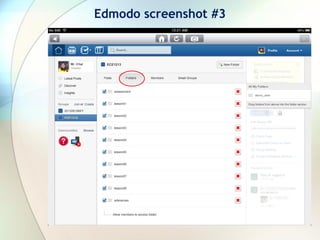
Edmodo screenshot #3
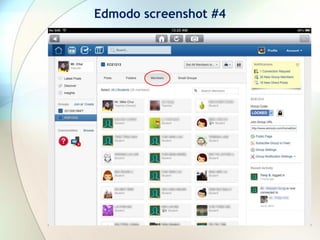
Edmodo screenshot #4
Edmodo screenshot #5
Encountered limitations
• Cannot rename uploaded file
• Chinese folder name  ok
• Chinese filename  After unloaded (中文教案.doc
will be renamed to 1.doc … unpredicted filename!)
• For English filename, “1” will added to the re-
uploaded file
• For Chinese filename, filename is unpredicted to
the re-uploaded file
Interactive BYOD session
Teacher Participants
 Sign in http://www.edmodo.com
 Subscribe/ Unsubscribe a
Community (demo)
 Create a Group with group code
(e.g. xd8u9h)
 Show created folder and uploaded
file
 Create Assignment/ Quiz/ Poll
 Go to http://www.edmodo.com
 Click on I’m a student button
 Downloading file
 Submit Assignment (i.e. Turn In)
 Post Quiz
 Post Poll
Q & A
Thanks for your participation!

Using Edmodo for developing teachers' computer literacy [with some Chinese content]

  • 1.
    運用Edmodo作為 發展老師電腦素養的工具 Mike H. L.Chui mikechui@ied.edu.hk 數學的探究學習與綠色及雲端運算環境的電子學習 June 18, 2013
  • 2.
    What Computer Literacy(CL) elements involve? • Key module content • Search engines (search operators/ image searching techniques) • Word processing • Chinese input method • Photo retouching • Sound recording and editing • Presentation application • Key assignment • Creating a Web site and learning package for pre-school children
  • 3.
    Why Edmodo? • Facebookfor school – microblogging • No advertisement • Support tag (for post) • Support Google Drive sharing • Notification by email (like RSS) • Teacher: Group and Sub-group creation • Student: No sign up • Post supports Unicode characters (by copy-and-paste from word processor) • Subscribe professional communities (i.e. Discover) • iOS and Android apps available • … and more by your exploration Reference: http://help.edmodo.com/
  • 4.
  • 5.
  • 6.
  • 7.
  • 8.
  • 9.
    Encountered limitations • Cannotrename uploaded file • Chinese folder name  ok • Chinese filename  After unloaded (中文教案.doc will be renamed to 1.doc … unpredicted filename!) • For English filename, “1” will added to the re- uploaded file • For Chinese filename, filename is unpredicted to the re-uploaded file
  • 10.
    Interactive BYOD session TeacherParticipants  Sign in http://www.edmodo.com  Subscribe/ Unsubscribe a Community (demo)  Create a Group with group code (e.g. xd8u9h)  Show created folder and uploaded file  Create Assignment/ Quiz/ Poll  Go to http://www.edmodo.com  Click on I’m a student button  Downloading file  Submit Assignment (i.e. Turn In)  Post Quiz  Post Poll
  • 11.
    Q & A Thanksfor your participation!