Input, Process, Output, Storage 
and Feedback
Input-Process-Output 
â€Ē Any ICT system can be broken into: 
â€ĒInput 
â€ĒProcess 
â€ĒOutput 
â€ĒStorage 
â€Ēfeedback
Input-Process-Output 
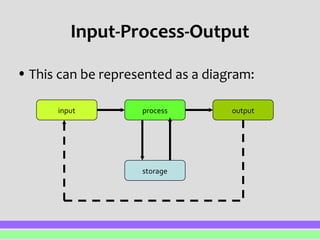
â€Ē This can be represented as a diagram: 
input process output 
storage
Input 
â€Ē This refers to entering external data into the 
system 
â€Ē This may be any of the following methods: 
â€ĒManual input via keyboard 
â€ĒMouse to select options from a list 
â€ĒScanning a barcode 
â€ĒUsing optical mark reader (automated input)
Example of Input 
â€Ē Teacher entering exam marks, homework 
marks into an electronic mark book 
â€Ē Data collected by temperature sensor and 
automatically input into a system
Processing 
â€Ē This is an action performed on the data. 
â€Ē Processing can include: 
â€ĒSorting 
â€ĒSearching 
â€ĒPerforming calculations 
â€Ēgraphs
Example of Processing 
â€Ē Searching sales data to find which products 
in fashion store have sold the most 
â€Ē Sorting a list of customer orders in 
alphabetical
Output 
â€Ē This is taking information that was in the 
system and outputting it. 
â€Ē This method used may result in: 
â€ĒPrinting output 
â€ĒOutput on screen 
â€ĒElectronic output, e.g. disk/CD
Example of Output 
â€Ē A printout of student examination results 
â€Ē An alarm from a fire detected in a room 
â€Ē Magazine, leaflets, handbooks
Storage 
â€Ē This is where data is held. 
â€Ē It may be the data that has been input, data 
required during processing or the results of 
processing. 
â€Ē This data is still within the system
Feedback 
â€Ē This is where the output from the system 
forms part of the input to the system. 
â€Ē Feedback is usually applied to real-time 
solution 
â€Ē Normally will go back into the system to 
influence the input – opened loop 
â€Ē Close loop is when the response to the 
feedback is automatic
Example 
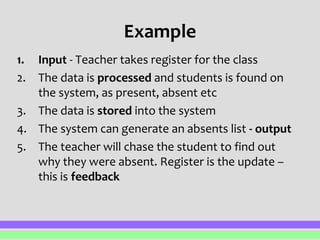
1. Input - Teacher takes register for the class 
2. The data is processed and students is found on 
the system, as present, absent etc 
3. The data is stored into the system 
4. The system can generate an absents list - output 
5. The teacher will chase the student to find out 
why they were absent. Register is the update – 
this is feedback

Pp10 input process-output

  • 1.
    Input, Process, Output,Storage and Feedback
  • 2.
    Input-Process-Output â€Ē AnyICT system can be broken into: â€ĒInput â€ĒProcess â€ĒOutput â€ĒStorage â€Ēfeedback
  • 3.
    Input-Process-Output â€Ē Thiscan be represented as a diagram: input process output storage
  • 4.
    Input â€Ē Thisrefers to entering external data into the system â€Ē This may be any of the following methods: â€ĒManual input via keyboard â€ĒMouse to select options from a list â€ĒScanning a barcode â€ĒUsing optical mark reader (automated input)
  • 5.
    Example of Input â€Ē Teacher entering exam marks, homework marks into an electronic mark book â€Ē Data collected by temperature sensor and automatically input into a system
  • 6.
    Processing â€Ē Thisis an action performed on the data. â€Ē Processing can include: â€ĒSorting â€ĒSearching â€ĒPerforming calculations â€Ēgraphs
  • 7.
    Example of Processing â€Ē Searching sales data to find which products in fashion store have sold the most â€Ē Sorting a list of customer orders in alphabetical
  • 8.
    Output â€Ē Thisis taking information that was in the system and outputting it. â€Ē This method used may result in: â€ĒPrinting output â€ĒOutput on screen â€ĒElectronic output, e.g. disk/CD
  • 9.
    Example of Output â€Ē A printout of student examination results â€Ē An alarm from a fire detected in a room â€Ē Magazine, leaflets, handbooks
  • 10.
    Storage â€Ē Thisis where data is held. â€Ē It may be the data that has been input, data required during processing or the results of processing. â€Ē This data is still within the system
  • 11.
    Feedback â€Ē Thisis where the output from the system forms part of the input to the system. â€Ē Feedback is usually applied to real-time solution â€Ē Normally will go back into the system to influence the input – opened loop â€Ē Close loop is when the response to the feedback is automatic
  • 12.
    Example 1. Input- Teacher takes register for the class 2. The data is processed and students is found on the system, as present, absent etc 3. The data is stored into the system 4. The system can generate an absents list - output 5. The teacher will chase the student to find out why they were absent. Register is the update – this is feedback