Interaction
Design
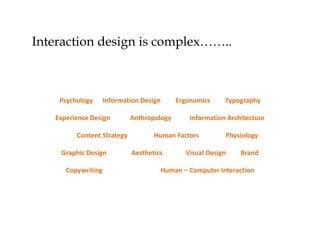
Interaction design is complex……..

Psychology

Information Design

Experience Design
Content Strategy
Graphic Design
Copywriting

Anthropology

Ergonomics

Information Architecture

Human Factors
Aesthetics

Typography

Physiology

Visual Design

Brand

Human – Computer Interaction
Definition
• Interaction Design Association, interaction
design, often abbreviated IxD, defines the
structure and behavior of interactive
systems. Interaction designers strive to create
meaningful relationships between people and
the products and services that they use, from
computers, to mobile devices, to appliances, and
beyond.
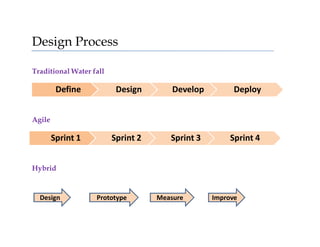
Design Process
Traditional Water fall

Define

Design

Develop

Deploy

Sprint 1

Sprint 2

Sprint 3

Sprint 4

Agile

Hybrid

Design

Prototype

Measure

Improve
Solving Problems
Define

Observe

Research

Prototype

Ideate

Design
Core Principles of Idx
• Consistency - because people notice change
• Perceivability – invites interaction
• Learnability – makes interaction simple
• Predictability – sets accurate expectations
• Feedback – acknowledges our interactions
Principle forms the system

Perceive

Consistent

Observe &
Practice

Predict
Interact

Learn

Feedback
Building the interface for your audience
•
•
•
•
•
•

Understand context & motivation
Tailor the content for your audience
Understand the audience the behavior
Understand how people browse/use the interface
people are coming to the interface with specific goals in their mind.
Design to meet the goals & needs
Don’t get in way of the information
Simple, consistent & standard design : DO NOT MAKE PEOPLE THINK

REMEMBER : PEOPLE ARE LAZY. THEY WILL CHOOSE
WHATEVER IS EASIER.
If not using your interface is easier – so be it.
ARE YOU BORED ?

Let me share some cool designs with you in next slides……
http://cambridgehealthcare.com/
Simple. Clean. Transparency. Blue.
www.feyt.com
Simple. Clean. White. Great use of Icons.
http://www.yellowmarshmallow.co.uk/
Simple. Clean. Yellow. Clever use of space. To the point.
Inspired ?
Lets discuss NAVIGATION

Two main purpose of navigation :
1. Help people move around
2. Help them understand where they are
More on Navigation
- Content needs a structure
- Navigation Labels
- Use words what people are used to – No need to show your Language skills

-Post finalizing the structure
– Decide best way to display it.

Remember People move their mouse in straight line.
- Don’t use industry or company specific Jargons
- Law of Pragnanz
-The Law of Proximity
- The Law of Similarity
- The Law of Closure
-

-Or Gestalt Psychology
Shaping thinking
Using images & colours & perception of motion..
- Trichromatic theory
Understand cognitive biases
Communicate with labels & icons
Consider Framing effect
Understand Cognitive Load

Its not about animation, graphics, making associations &
providing structure……. How do you solve their problem ?
Its about people behavior !
Devil lies in the details
Consider your user & you will be fine.

Source of this presentation :
1. Internet ☺
2. Dr. Dave Hogue & Chris Nodder

Interaction design

  • 1.
  • 2.
    Interaction design iscomplex…….. Psychology Information Design Experience Design Content Strategy Graphic Design Copywriting Anthropology Ergonomics Information Architecture Human Factors Aesthetics Typography Physiology Visual Design Brand Human – Computer Interaction
  • 3.
    Definition • Interaction DesignAssociation, interaction design, often abbreviated IxD, defines the structure and behavior of interactive systems. Interaction designers strive to create meaningful relationships between people and the products and services that they use, from computers, to mobile devices, to appliances, and beyond.
  • 4.
    Design Process Traditional Waterfall Define Design Develop Deploy Sprint 1 Sprint 2 Sprint 3 Sprint 4 Agile Hybrid Design Prototype Measure Improve
  • 5.
  • 6.
    Core Principles ofIdx • Consistency - because people notice change • Perceivability – invites interaction • Learnability – makes interaction simple • Predictability – sets accurate expectations • Feedback – acknowledges our interactions
  • 7.
    Principle forms thesystem Perceive Consistent Observe & Practice Predict Interact Learn Feedback
  • 8.
    Building the interfacefor your audience • • • • • • Understand context & motivation Tailor the content for your audience Understand the audience the behavior Understand how people browse/use the interface people are coming to the interface with specific goals in their mind. Design to meet the goals & needs Don’t get in way of the information Simple, consistent & standard design : DO NOT MAKE PEOPLE THINK REMEMBER : PEOPLE ARE LAZY. THEY WILL CHOOSE WHATEVER IS EASIER. If not using your interface is easier – so be it.
  • 9.
    ARE YOU BORED? Let me share some cool designs with you in next slides……
  • 10.
  • 11.
  • 12.
  • 13.
    Inspired ? Lets discussNAVIGATION Two main purpose of navigation : 1. Help people move around 2. Help them understand where they are
  • 14.
    More on Navigation -Content needs a structure - Navigation Labels - Use words what people are used to – No need to show your Language skills -Post finalizing the structure – Decide best way to display it. Remember People move their mouse in straight line. - Don’t use industry or company specific Jargons - Law of Pragnanz -The Law of Proximity - The Law of Similarity - The Law of Closure - -Or Gestalt Psychology
  • 15.
    Shaping thinking Using images& colours & perception of motion.. - Trichromatic theory Understand cognitive biases Communicate with labels & icons Consider Framing effect Understand Cognitive Load Its not about animation, graphics, making associations & providing structure……. How do you solve their problem ? Its about people behavior !
  • 16.
    Devil lies inthe details Consider your user & you will be fine. Source of this presentation : 1. Internet ☺ 2. Dr. Dave Hogue & Chris Nodder