Nov 20-21, 2020Sofia
var title = “FluxQL - NextGen Management of Time
Series Inspired by JS”;
var info = {
name: “Ivelin Andreev”,
otherOptional: “Functional data scripting language designed for
querying, analyzing and acting on data. ”
};
Nov 20-21, 2020
Thanks to our Sponsors:
General Sponsor:
Trusted Sponsor:
Innovation Sponsor:
Silver Sponsor:
Gold Sponsors:
Platinum Sponsors:
Bronze Sponsors:
Technology Partners:
Nov 20-21, 2020
About me
• Microsoft Azure MVP
• Software Architect @
o 18+ years professional experience
• CTO @
• External Expert Horizon 2020, Eurostars-Eureka
• External Expert InnoFund Denmark, RIF Cyprus
• Business Interests
o Web Development, SOA, Integration
o IoT, Machine Learning, Computer Intelligence
o Security & Performance Optimization
• Contact
ivelin.andreev@icb.bg
www.linkedin.com/in/ivelin
www.slideshare.net/ivoandreev
Nov 20-21, 2020
agenda();
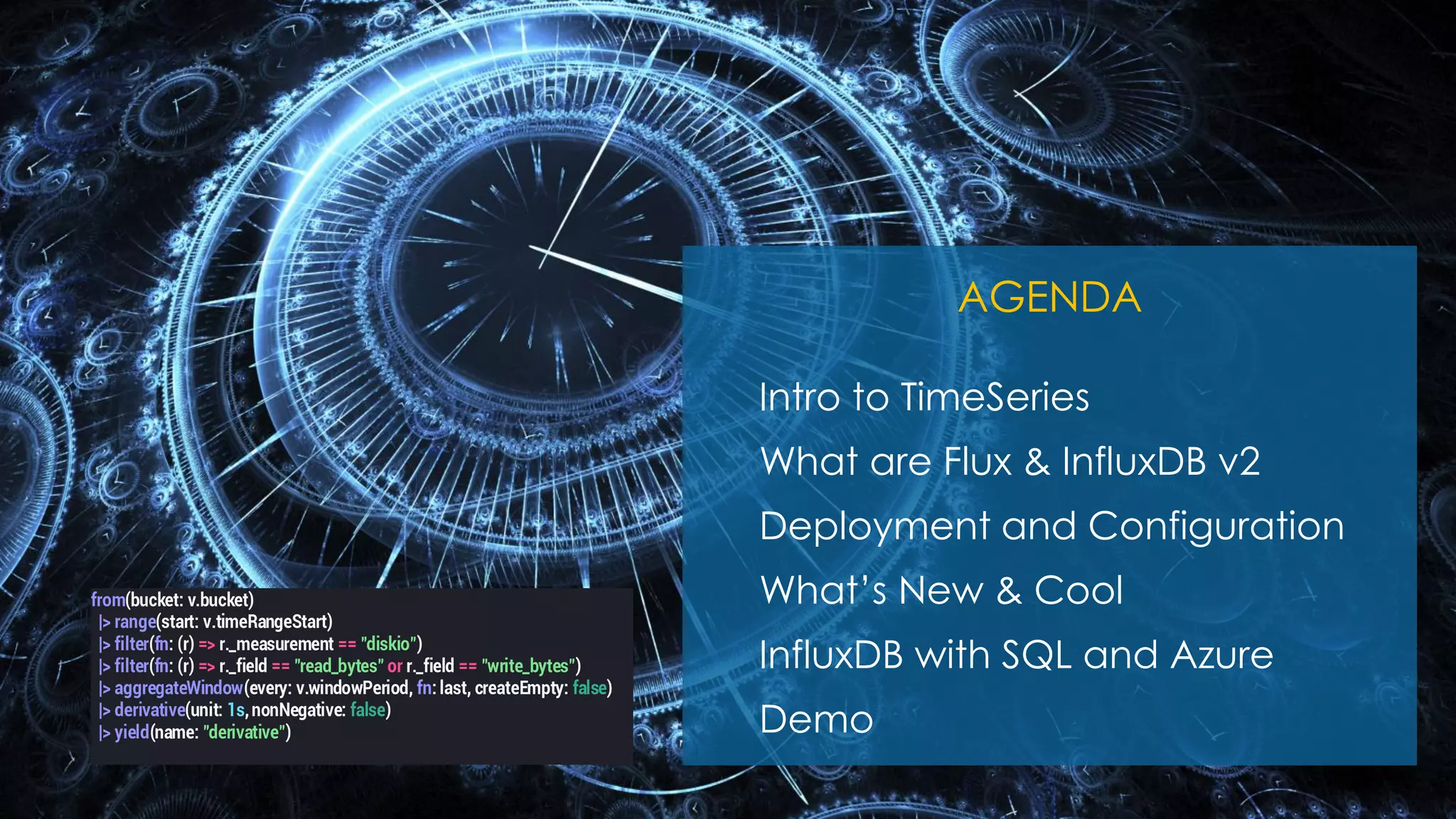
AGENDA
Intro to TimeSeries
What are Flux & InfluxDB v2
Deployment and Configuration
What’s New & Cool
InfluxDB with SQL and Azure
Demo
from(bucket: v.bucket)
|> range(start: v.timeRangeStart)
|> filter(fn: (r) => r._measurement == "diskio")
|> filter(fn: (r) => r._field == "read_bytes" or r._field == "write_bytes")
|> aggregateWindow(every: v.windowPeriod, fn: last, createEmpty: false)
|> derivative(unit: 1s,nonNegative: false)
|> yield(name: "derivative")
Nov 20-21, 2020
• TimeSeries DB Requirements (Credits: Baron Schwartz)
o https://www.xaprb.com/blog/2014/06/08/time-series-database-requirements/
• InfluxDB Clustering & Flux Specification
o https://www.influxdata.com/blog/influxdb-clustering/
o https://github.com/influxdata/influxdb/issues
o https://github.com/influxdata/flux
o https://github.com/influxdata/flux/blob/master/docs/SPEC.md
• What’s New & InfluxQL vs Flux
o https://docs.influxdata.com/influxdb/v2.0/api/
o https://docs.influxdata.com/influxdb/v1.8/flux/flux-vs-influxql/
• Templates Gallery
o https://www.influxdata.com/products/influxdb-templates/gallery/
• InfluxDB Client Libraries
o https://docs.influxdata.com/influxdb/v2.0/tools/client-libraries/
o https://github.com/influxdata/influxdb-client-csharp (InfluxDB 1.8+, InfluxDB 2.0)
o https://github.com/influxdata/influxdb-csharp (InfluxDB 1.7 and earlier)
• InfluxDB YouTube Videos (150 videos for the last 1y)
o https://www.youtube.com/channel/UCnrgOD6G0y0_rcubQuICpTQ/videos /
Takeaways & References
Nov 20-21, 2020
Here we go…
Nov 20-21, 2020
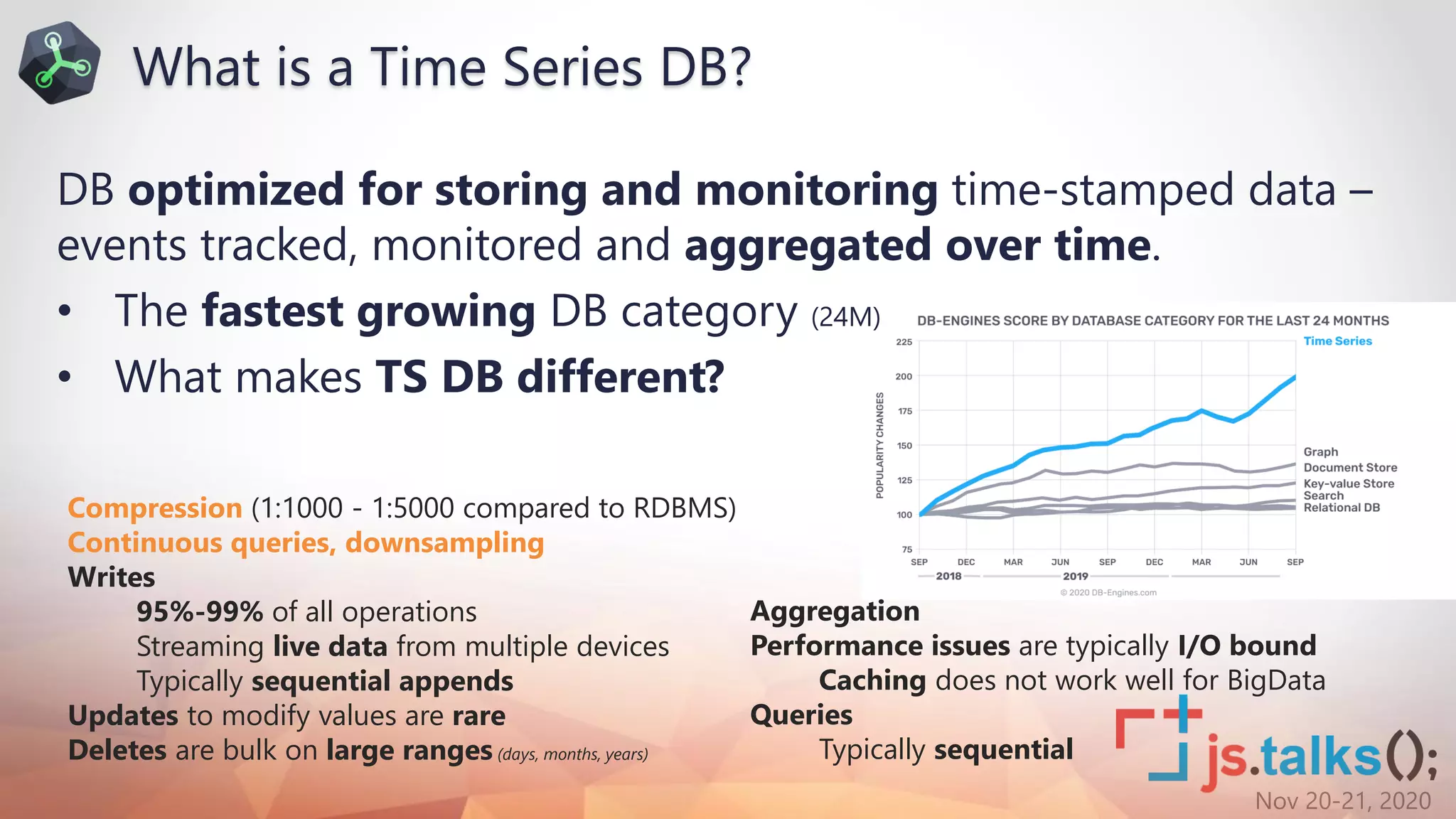
DB optimized for storing and monitoring time-stamped data –
events tracked, monitored and aggregated over time.
• The fastest growing DB category (24M)
• What makes TS DB different?
Compression (1:1000 - 1:5000 compared to RDBMS)
Continuous queries, downsampling
Writes
95%-99% of all operations
Streaming live data from multiple devices
Typically sequential appends
Updates to modify values are rare
Deletes are bulk on large ranges (days, months, years)
Aggregation
Performance issues are typically I/O bound
Caching does not work well for BigData
Queries
Typically sequential
What is a Time Series DB?
Nov 20-21, 2020
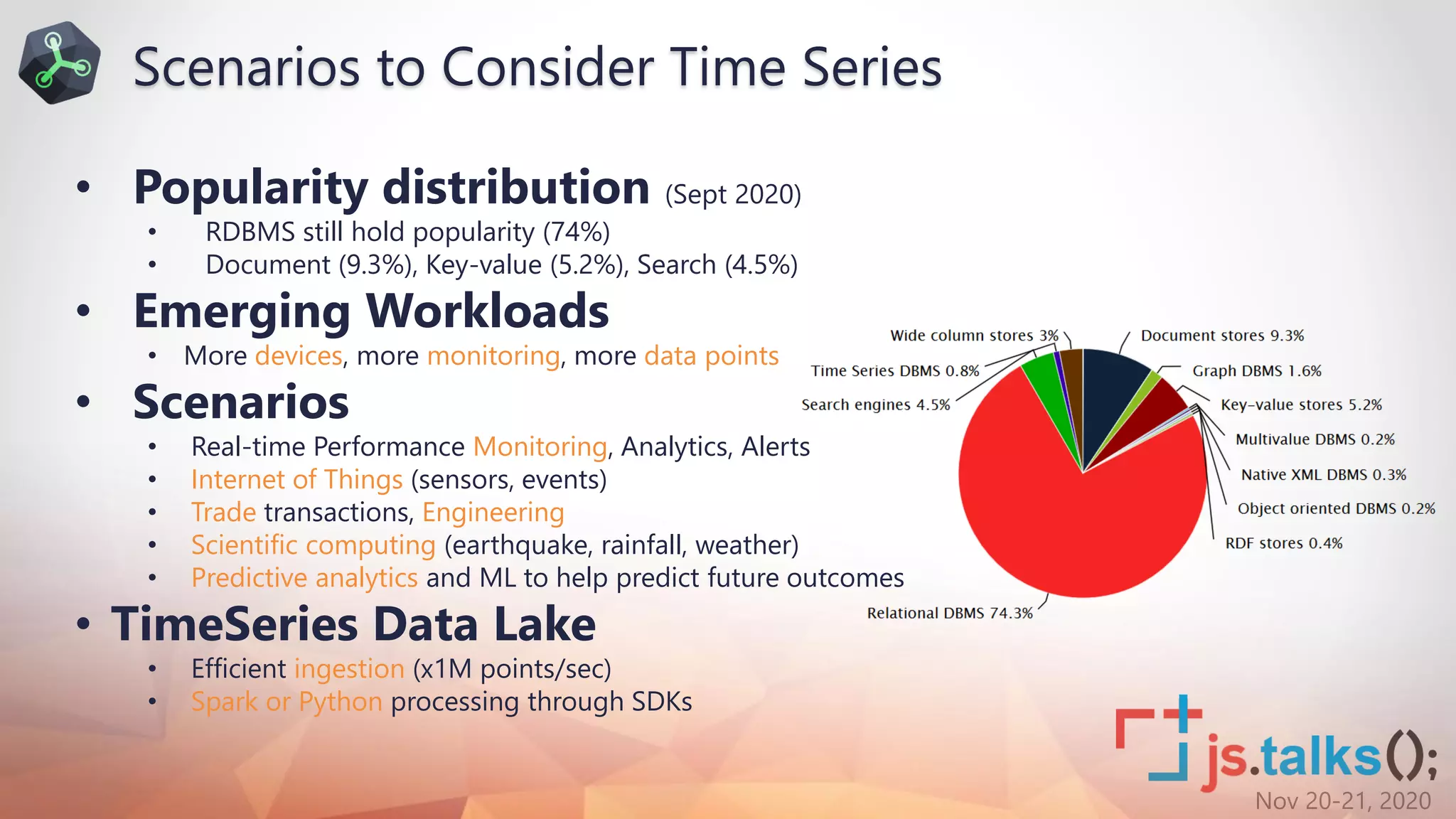
• Popularity distribution (Sept 2020)
• RDBMS still hold popularity (74%)
• Document (9.3%), Key-value (5.2%), Search (4.5%)
• Emerging Workloads
• More devices, more monitoring, more data points
• Scenarios
• Real-time Performance Monitoring, Analytics, Alerts
• Internet of Things (sensors, events)
• Trade transactions, Engineering
• Scientific computing (earthquake, rainfall, weather)
• Predictive analytics and ML to help predict future outcomes
• TimeSeries Data Lake
• Efficient ingestion (x1M points/sec)
• Spark or Python processing through SDKs
Scenarios to Consider Time Series
Nov 20-21, 2020
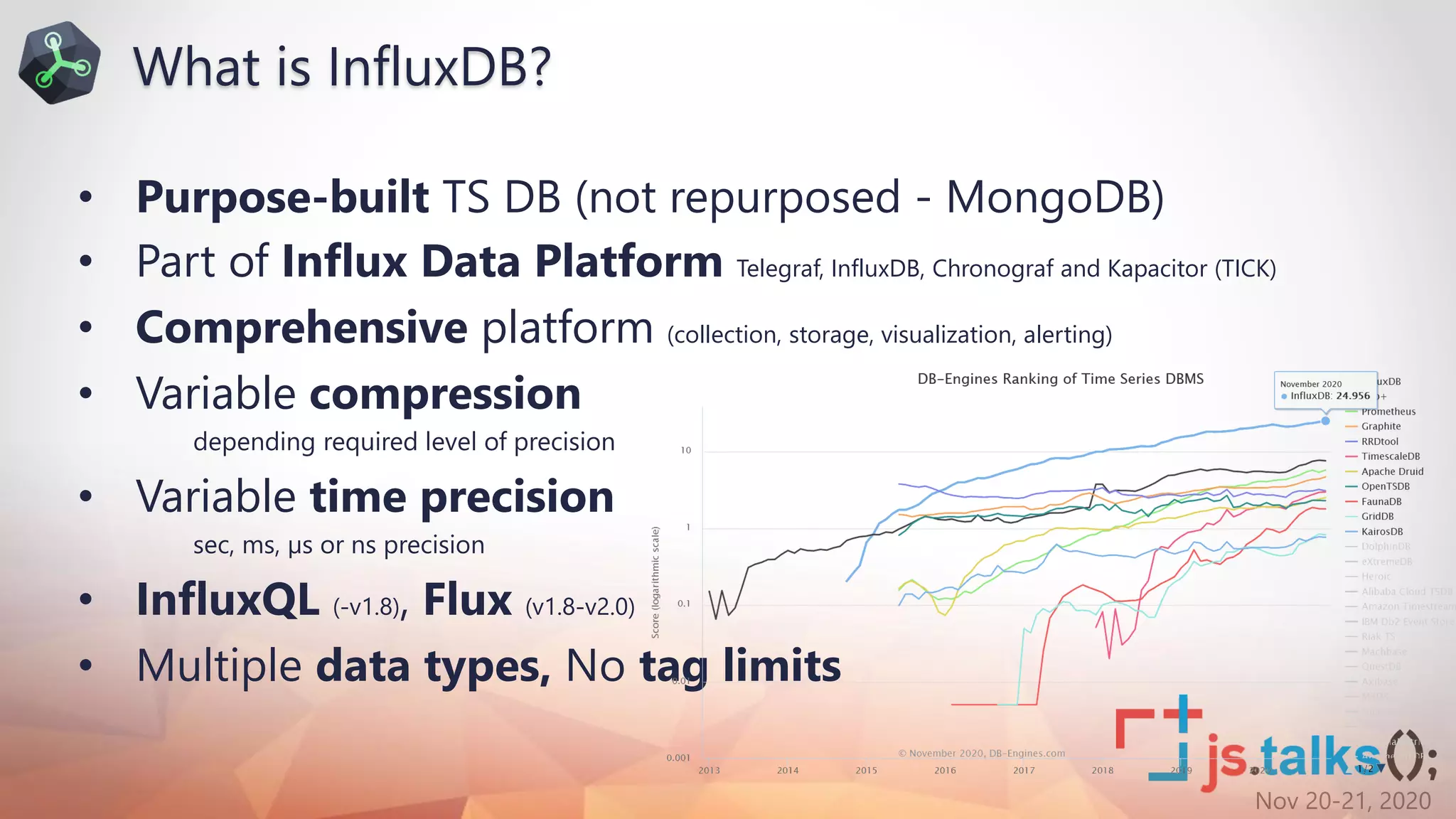
• Purpose-built TS DB (not repurposed - MongoDB)
• Part of Influx Data Platform Telegraf, InfluxDB, Chronograf and Kapacitor (TICK)
• Comprehensive platform (collection, storage, visualization, alerting)
• Variable compression
depending required level of precision
• Variable time precision
sec, ms, µs or ns precision
• InfluxQL (-v1.8), Flux (v1.8-v2.0)
• Multiple data types, No tag limits
What is InfluxDB?
Nov 20-21, 2020
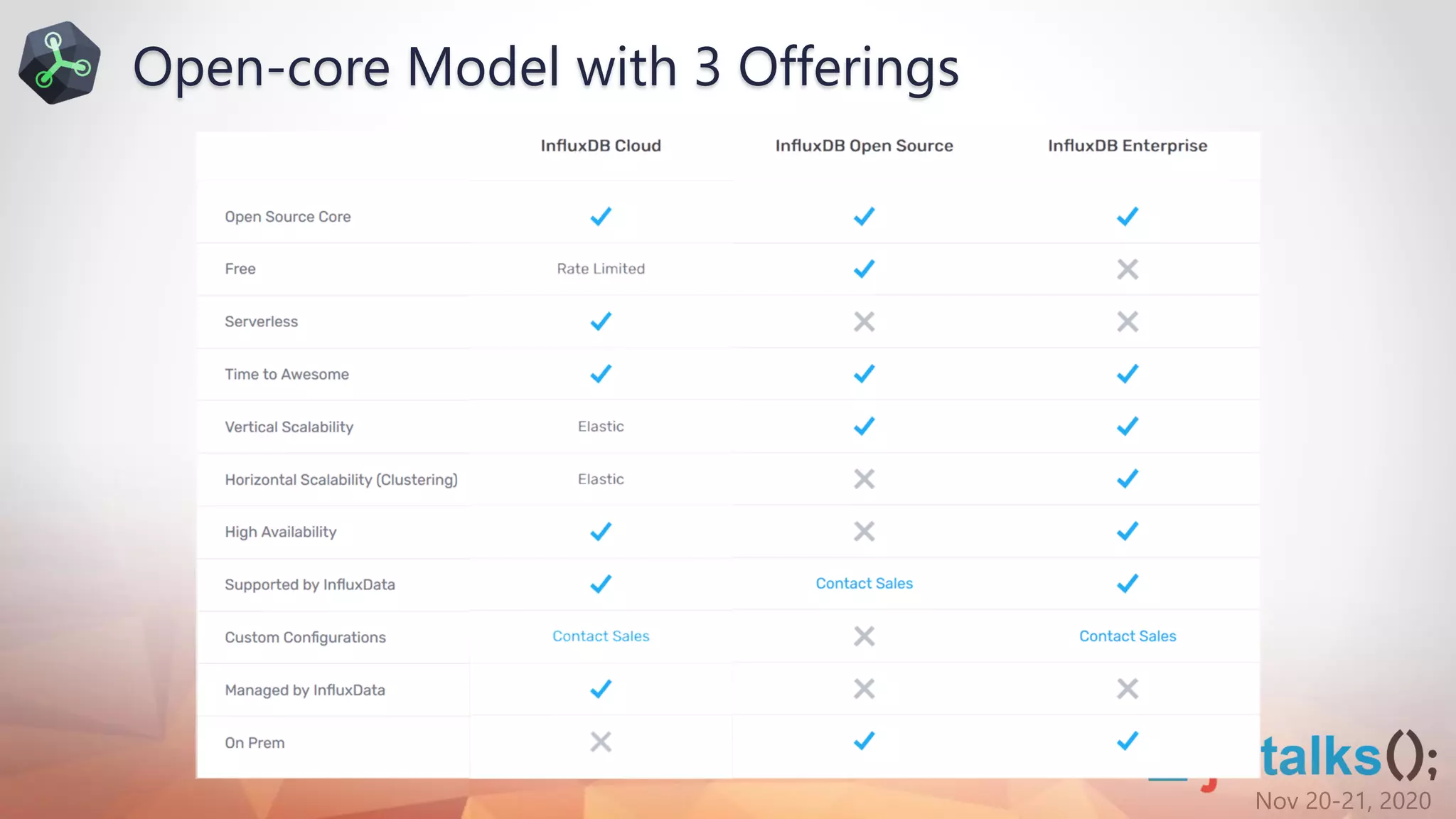
Open-core Model with 3 Offerings
Nov 20-21, 2020
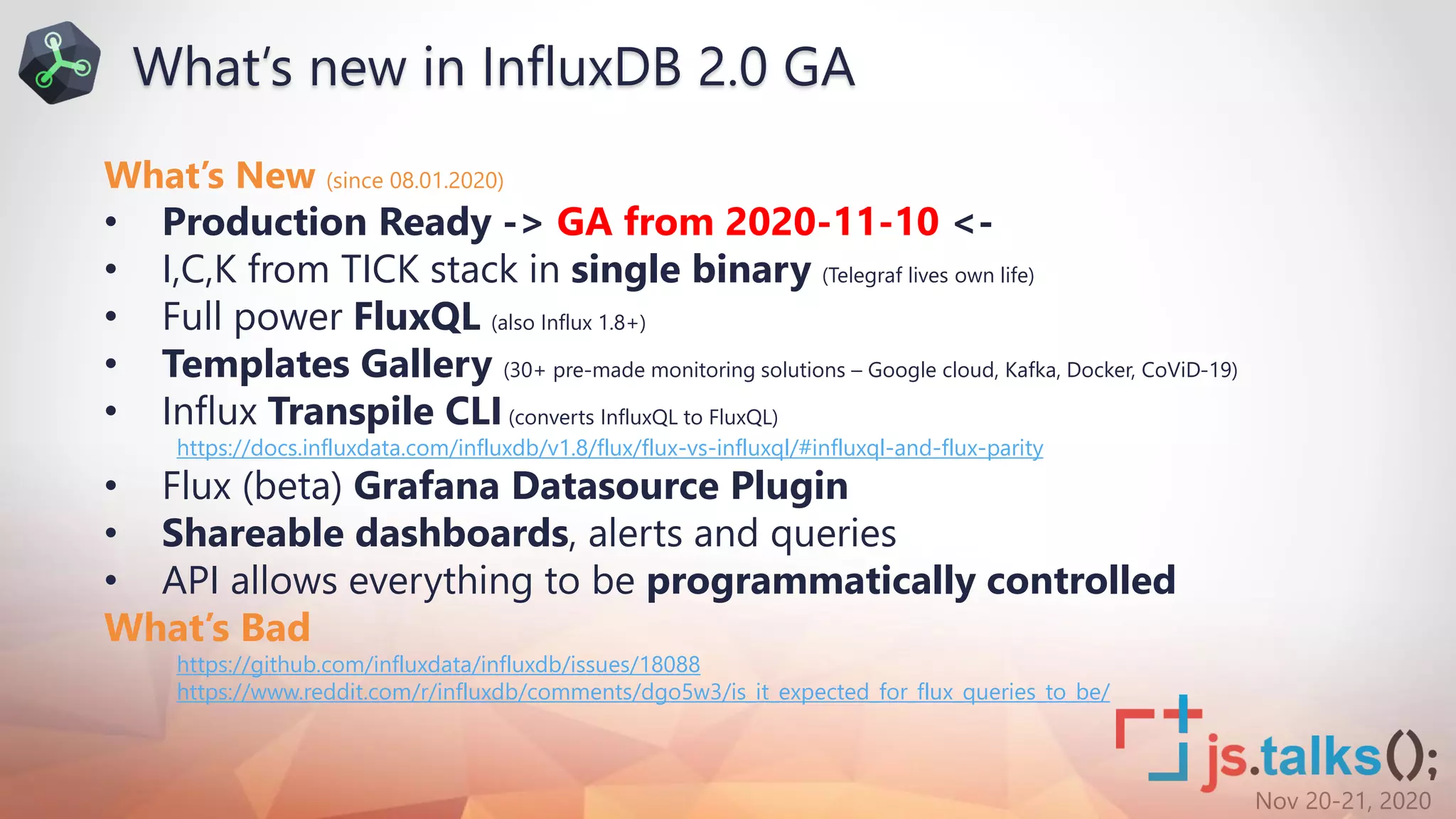
What’s New (since 08.01.2020)
• Production Ready -> GA from 2020-11-10 <-
• I,C,K from TICK stack in single binary (Telegraf lives own life)
• Full power FluxQL (also Influx 1.8+)
• Templates Gallery (30+ pre-made monitoring solutions – Google cloud, Kafka, Docker, CoViD-19)
• Influx Transpile CLI(converts InfluxQL to FluxQL)
https://docs.influxdata.com/influxdb/v1.8/flux/flux-vs-influxql/#influxql-and-flux-parity
• Flux (beta) Grafana Datasource Plugin
• Shareable dashboards, alerts and queries
• API allows everything to be programmatically controlled
What’s Bad
https://github.com/influxdata/influxdb/issues/18088
https://www.reddit.com/r/influxdb/comments/dgo5w3/is_it_expected_for_flux_queries_to_be/
What’s new in InfluxDB 2.0 GA
Nov 20-21, 2020
• 4th gen programming language (since July 2018)
• Why a new Language?
• Features
• Highly Readable – piping, instead of nesting, clear data origin
• Useable – aids productivity, shorter code to express the same
• Readable – derived from something common (JS)
• Testable – Flux functions can be tested in isolation from the outside world(unlike SQL)
• Shareable – community defines functions, creates libraries
• Decouples query engine from storage tier
Why the Trouble of a New Language?
d1=from(bucket: "industry4sme")
|> range(start: v.timeRangeStart, stop: v.timeRangeStop)
|> filter(fn: (r) => r["_measurement"] == "telemetry")
|> filter(fn: (r) => r["SensorID"] == "M186")
|> filter(fn: (r) => r["Type"] == "S1load")
Nov 20-21, 2020
• Joins – from any bucket, measurement and on any columns
• Math across measurements - run calculations using data from separate measurements
• Sort on tags – Order by time only was supported in InfluxQL
• Group by any column – InfluxQL allows grouping on tags and time only
• Multiple datasources – Flux query data from datasources like CSV, SQL and BigTable packages
• Custom functions – define custom auxiliary functions
• Datepart queries –only data within a specified hour range (i.e. work hours), for a large period
• Pivot - pivot data tables by specifying rowKey, columnKey
• Histograms - generate a cumulative histogram in buckets [10, 20, 30, 40, 50, 60, 70, 80, 90, 100]
• Covariance - covariance() function calculates the covariance between two columns
Flux vs InfluxQL
Nov 20-21, 2020
InfluxDB
Deployment Options
Nov 20-21, 2020
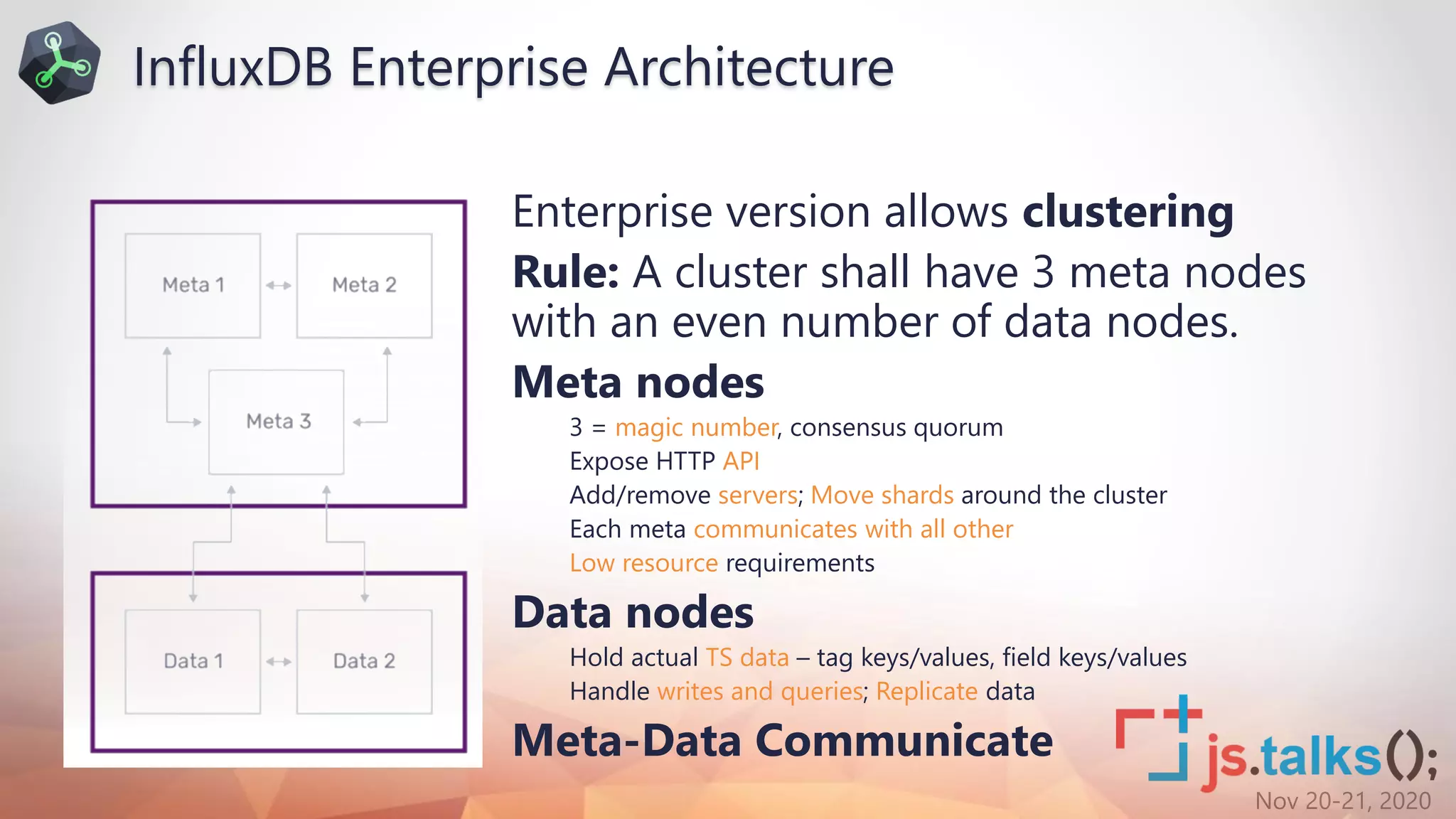
Enterprise version allows clustering
Rule: A cluster shall have 3 meta nodes
with an even number of data nodes.
Meta nodes
3 = magic number, consensus quorum
Expose HTTP API
Add/remove servers; Move shards around the cluster
Each meta communicates with all other
Low resource requirements
Data nodes
Hold actual TS data – tag keys/values, field keys/values
Handle writes and queries; Replicate data
Meta-Data Communicate
InfluxDB Enterprise Architecture
Nov 20-21, 2020
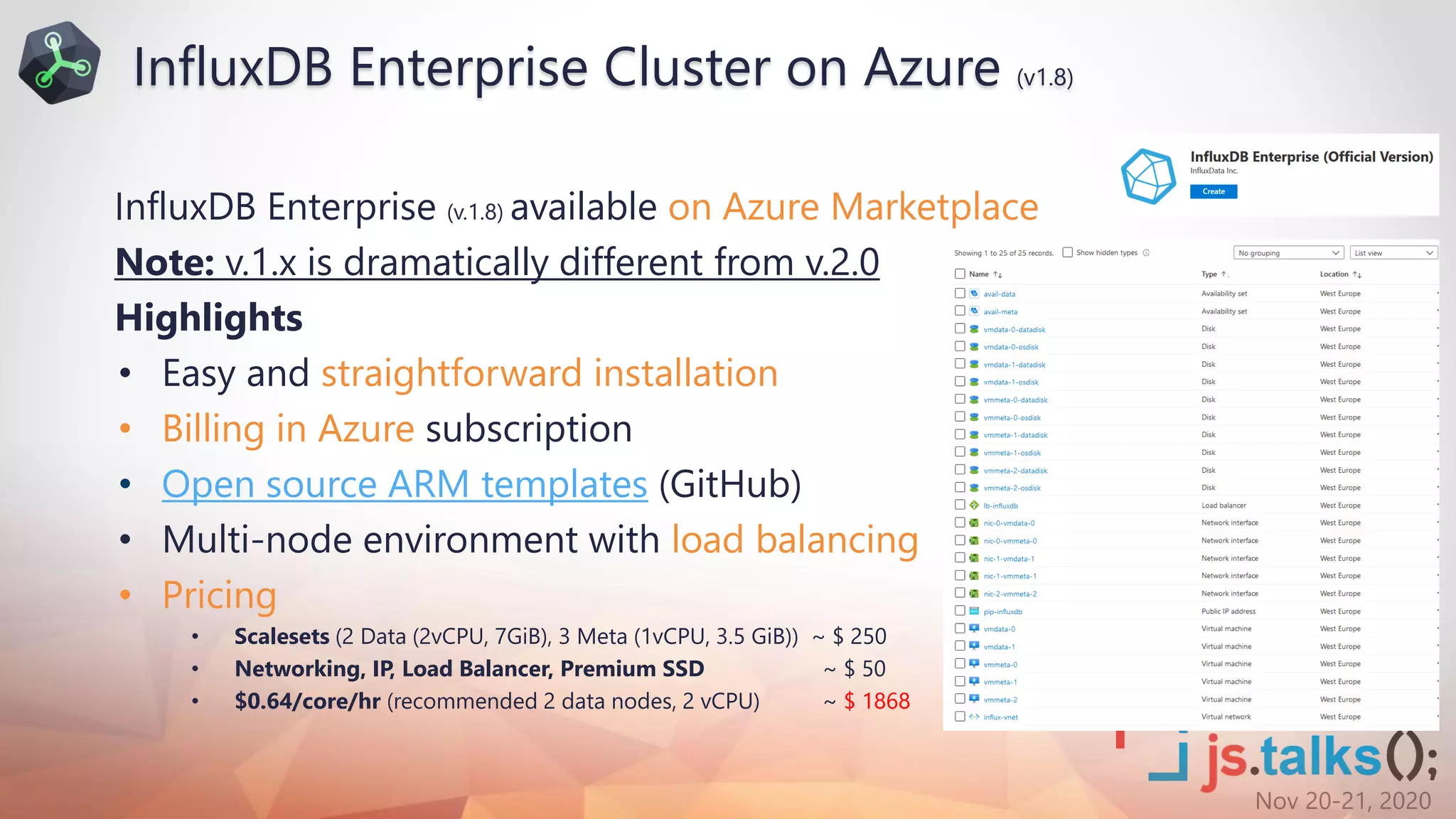
InfluxDB Enterprise (v.1.8) available on Azure Marketplace
Note: v.1.x is dramatically different from v.2.0
Highlights
• Easy and straightforward installation
• Billing in Azure subscription
• Open source ARM templates (GitHub)
• Multi-node environment with load balancing
• Pricing
• Scalesets (2 Data (2vCPU, 7GiB), 3 Meta (1vCPU, 3.5 GiB)) ~ $ 250
• Networking, IP, Load Balancer, Premium SSD ~ $ 50
• $0.64/core/hr (recommended 2 data nodes, 2 vCPU) ~ $ 1868
InfluxDB Enterprise Cluster on Azure (v1.8)
Nov 20-21, 2020
$ wget https://dl.influxdata.com/influxdb/releases/influxdb_2.0.0-beta.16_linux_amd64.tar.gz
$ tar xvzf influxdb_2.0.0-beta.16_linux_amd64.tar.gz
• MacOS, Linux, Docker…No Windows? (see Docker)
• Create a VM (i.e. Standard B2s (2 vcpus, 4 GiB memory, Standard SSD))
• Connect with SSH client of choice (i.e. Putty)
• Download and Unzip
• Setup as Service
$ sudo cp influxdb_2.0.0-beta.16_linux_amd64/{influx,influxd}
/usr/local/bin/
$ sudo useradd -rs /bin/false influxdb
$ sudo mkdir /home/influxdb
$ sudo chown influxdb /home/influxdb
$ sudo vi /lib/systemd/system/influxdb2.service
(Add the InfluxDB service file content)
$ sudo systemctl enable influxdb2
$ sudo systemctl start influxdb2
$ sudo systemctl status influxdb2
InfluxDB service file
[Unit]
Description=InfluxDB 2.0 service file.
After=network-online.target
[Service]
User=influxdb
Group=influxdb
ExecStart=/usr/local/bin/influxd
Restart=on-failure
[Install]
WantedBy=multi-user.target
InfluxDB OSS 2.0 Installation (Azure VM)
Nov 20-21, 2020
• Configure
Add Firewall rule (allow incoming TCP port 9999)
Option 1(GUI)
Open http://[IPAddress]:9999
Option 2(CLI)
influx setup
Configure InfluxDB OSS 2.0
Nov 20-21, 2020
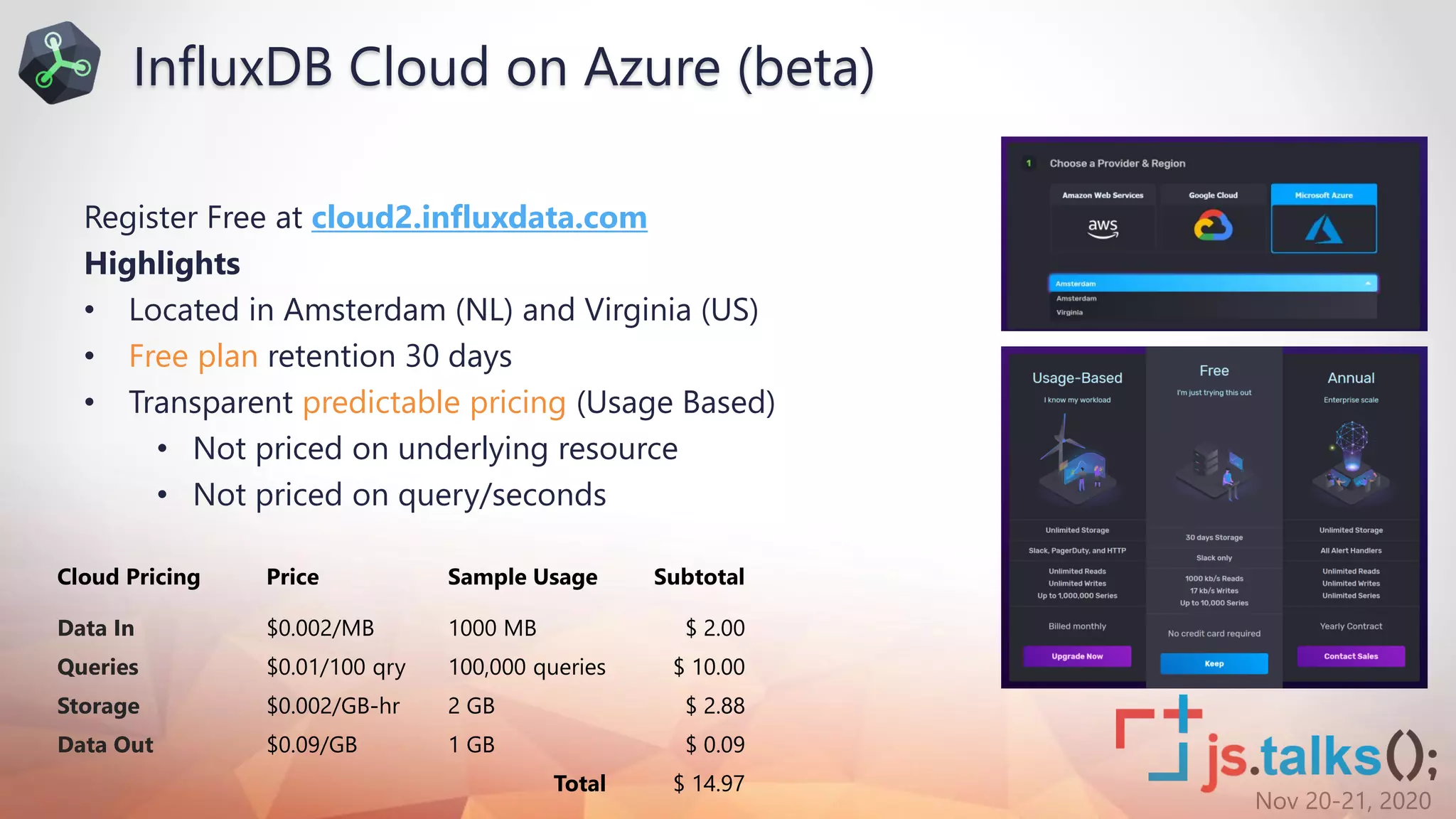
Register Free at cloud2.influxdata.com
Highlights
• Located in Amsterdam (NL) and Virginia (US)
• Free plan retention 30 days
• Transparent predictable pricing (Usage Based)
• Not priced on underlying resource
• Not priced on query/seconds
Cloud Pricing Price Sample Usage Subtotal
Data In $0.002/MB 1000 MB $ 2.00
Queries $0.01/100 qry 100,000 queries $ 10.00
Storage $0.002/GB-hr 2 GB $ 2.88
Data Out $0.09/GB 1 GB $ 0.09
Total $ 14.97
InfluxDB Cloud on Azure (beta)
Nov 20-21, 2020
What’s Cool
in InfluxDB v2
Nov 20-21, 2020
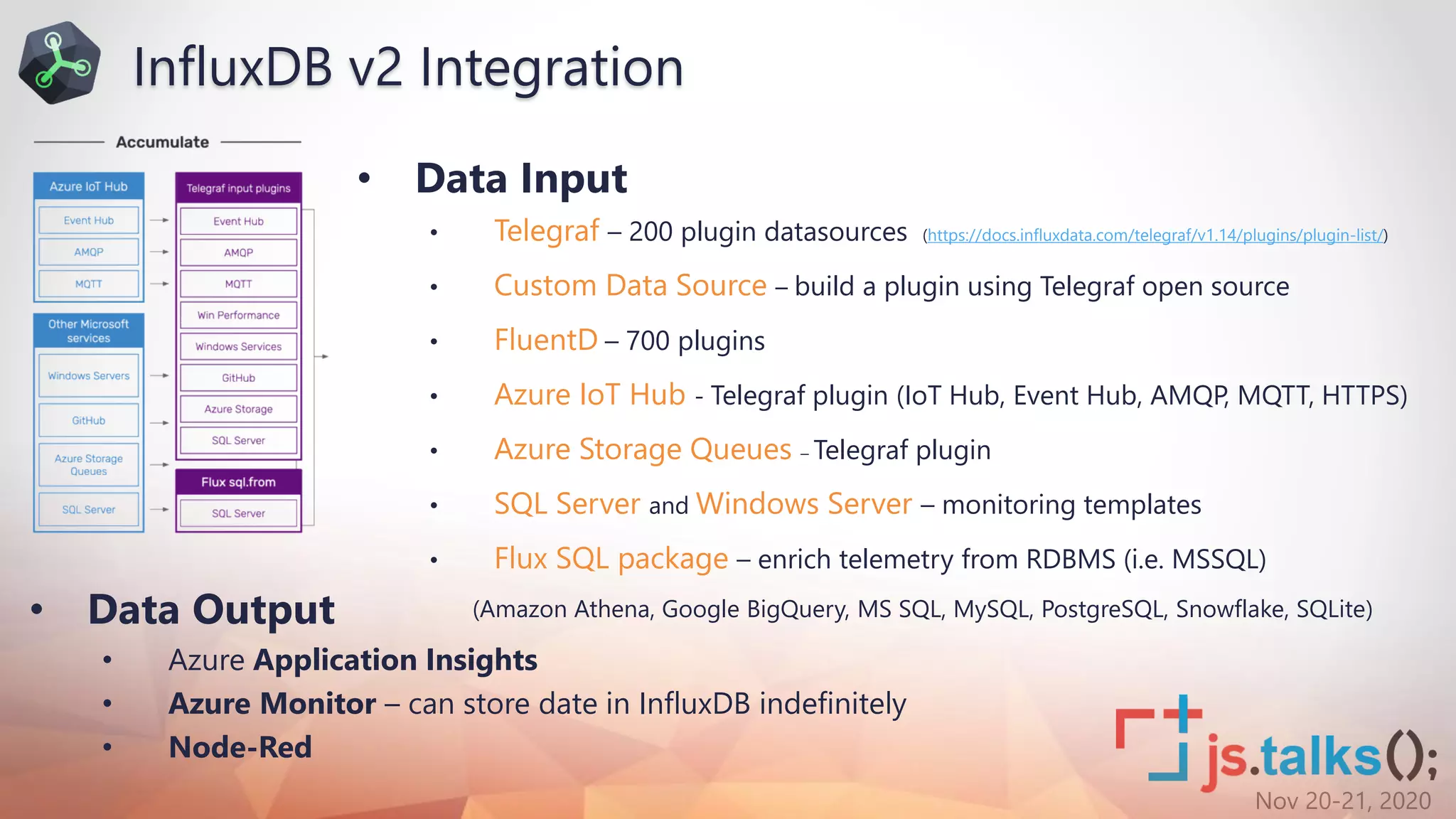
• Data Input
• Telegraf – 200 plugin datasources (https://docs.influxdata.com/telegraf/v1.14/plugins/plugin-list/)
• Custom Data Source – build a plugin using Telegraf open source
• FluentD – 700 plugins
• Azure IoT Hub - Telegraf plugin (IoT Hub, Event Hub, AMQP, MQTT, HTTPS)
• Azure Storage Queues – Telegraf plugin
• SQL Server and Windows Server – monitoring templates
• Flux SQL package – enrich telemetry from RDBMS (i.e. MSSQL)
(Amazon Athena, Google BigQuery, MS SQL, MySQL, PostgreSQL, Snowflake, SQLite)
InfluxDB v2 Integration
• Data Output
• Azure Application Insights
• Azure Monitor – can store date in InfluxDB indefinitely
• Node-Red
Nov 20-21, 2020
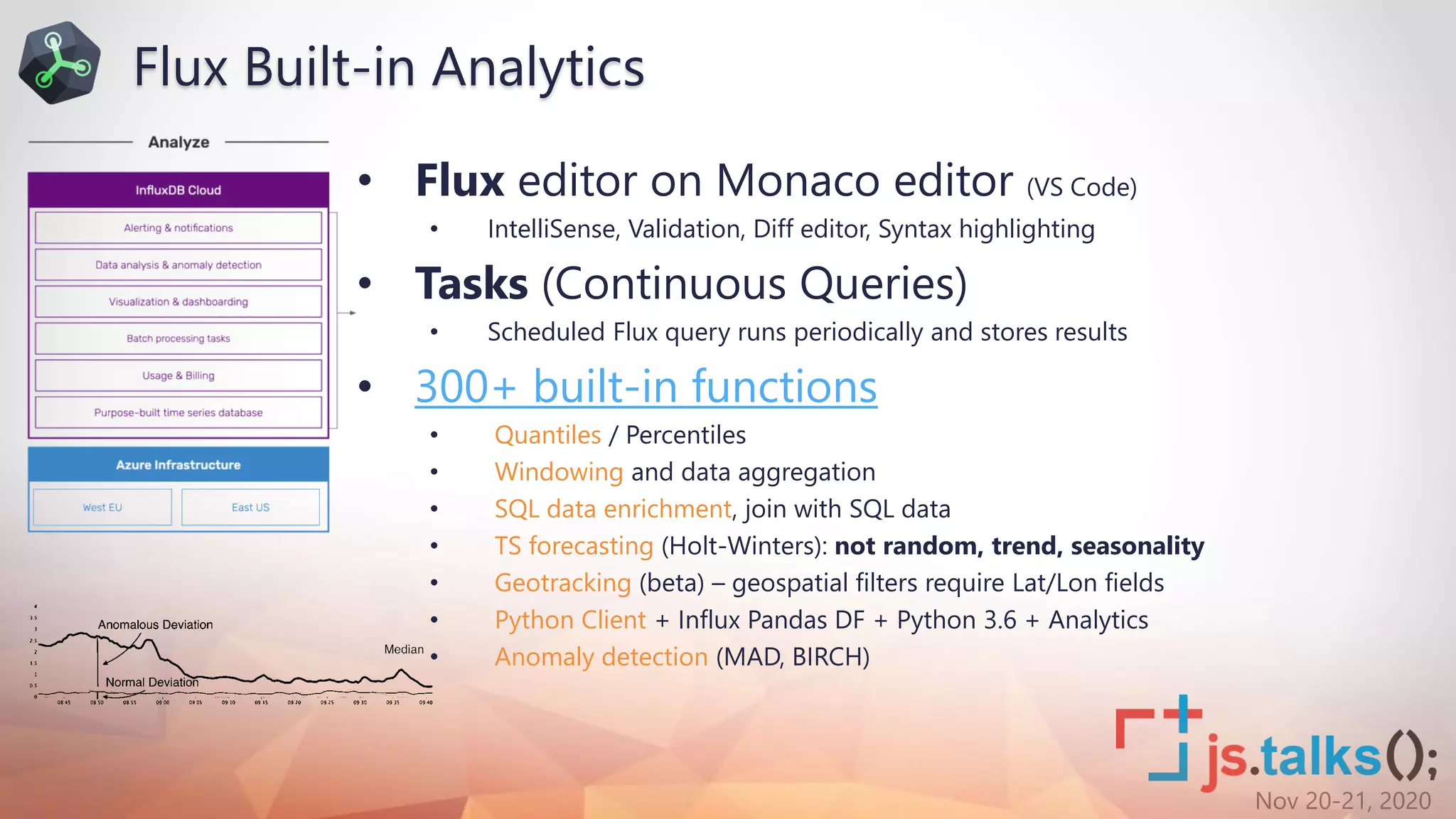
• Flux editor on Monaco editor (VS Code)
• IntelliSense, Validation, Diff editor, Syntax highlighting
• Tasks (Continuous Queries)
• Scheduled Flux query runs periodically and stores results
• 300+ built-in functions
• Quantiles / Percentiles
• Windowing and data aggregation
• SQL data enrichment, join with SQL data
• TS forecasting (Holt-Winters): not random, trend, seasonality
• Geotracking (beta) – geospatial filters require Lat/Lon fields
• Python Client + Influx Pandas DF + Python 3.6 + Analytics
• Anomaly detection (MAD, BIRCH)
Flux Built-in Analytics
Nov 20-21, 2020
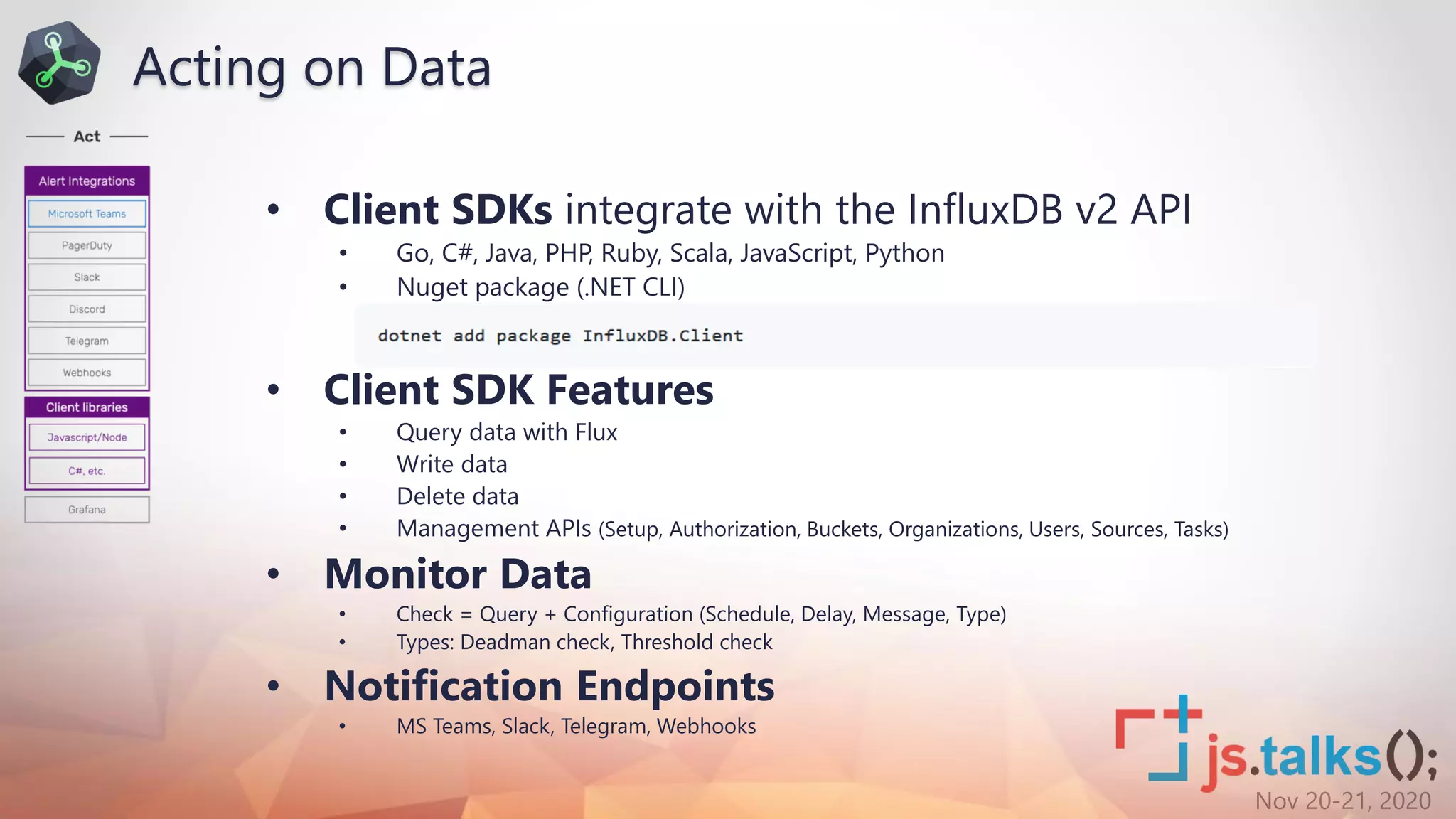
• Client SDKs integrate with the InfluxDB v2 API
• Go, C#, Java, PHP, Ruby, Scala, JavaScript, Python
• Nuget package (.NET CLI)
• Client SDK Features
• Query data with Flux
• Write data
• Delete data
• Management APIs (Setup, Authorization, Buckets, Organizations, Users, Sources, Tasks)
• Monitor Data
• Check = Query + Configuration (Schedule, Delay, Message, Type)
• Types: Deadman check, Threshold check
• Notification Endpoints
• MS Teams, Slack, Telegram, Webhooks
Acting on Data
Nov 20-21, 2020
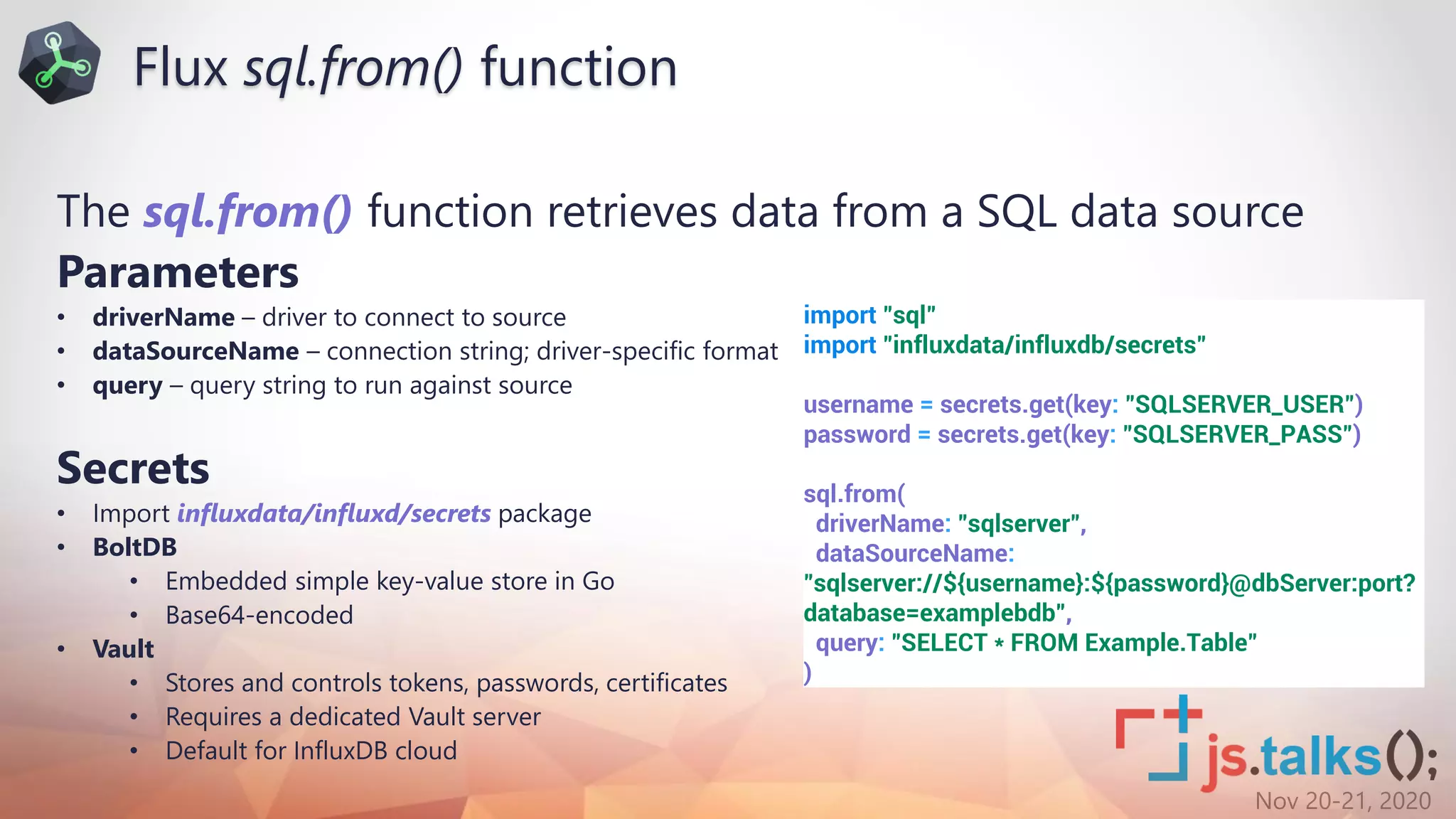
The sql.from() function retrieves data from a SQL data source
Parameters
• driverName – driver to connect to source
• dataSourceName – connection string; driver-specific format
• query – query string to run against source
Secrets
• Import influxdata/influxd/secrets package
• BoltDB
• Embedded simple key-value store in Go
• Base64-encoded
• Vault
• Stores and controls tokens, passwords, certificates
• Requires a dedicated Vault server
• Default for InfluxDB cloud
import "sql"
import "influxdata/influxdb/secrets"
username = secrets.get(key: "SQLSERVER_USER")
password = secrets.get(key: "SQLSERVER_PASS")
sql.from(
driverName: "sqlserver",
dataSourceName:
"sqlserver://${username}:${password}@dbServer:port?
database=examplebdb",
query: "SELECT * FROM Example.Table"
)
Flux sql.from() function
Nov 20-21, 2020
DEMO
Nov 20-21, 2020
Export from InfluxDB 1.x
• Export to Influx line protocol
influx_inspect export -datadir “[influxRoot]data" -waldir "[influxRoot]meta" -out “[outFolder]"
-database [databaseName] -retention autogen -start "2020-10-01T00:00:00Z“
Note: Edit file and remove DDL statements (CREATE DATABASE [databaseName] WITH NAME autogen)
Import in InfluxDB 2
• Option 1 (GUI)
• Open InfluxDB home (http://[IPAddress]:9999/)
• Open Data Tab
• Find TS Data bucket
• 1.1 Line Protocol
• Drag file for import
• 1.2 Client Library
• Open IDE
• Reuse sample code
• Option 2 (CLI)
• Connect remotely (i.e. Putty)
• Upload files to VM over SFTP (i.e. WinSCP)
• Bucket must exist prior to import
influx write -b [bucket] -o [orgName] -p ns --
format=lp -f [filePath/filename] -t [token]
Migration to Flux
Nov 20-21, 2020
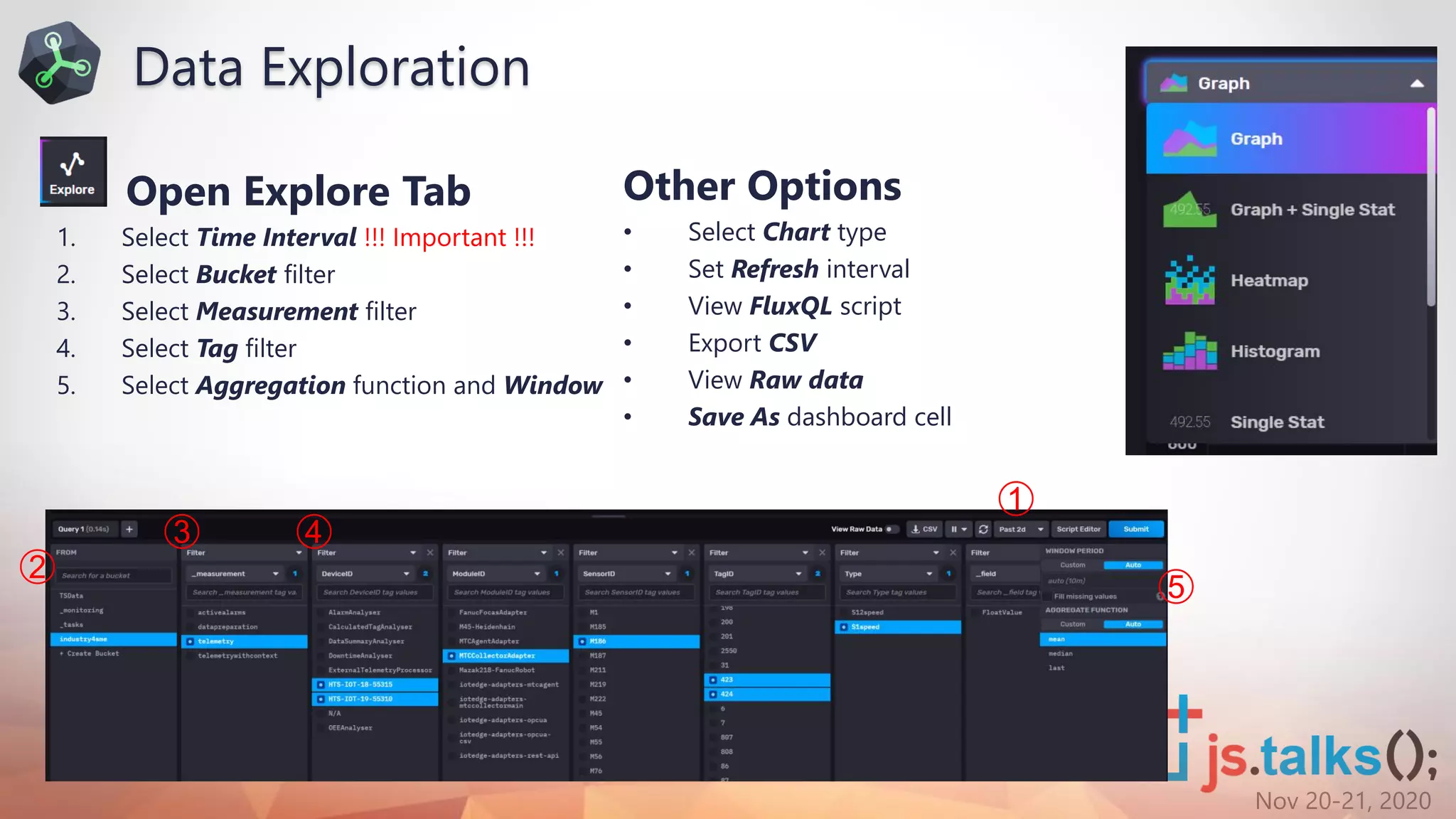
Open Explore Tab
1. Select Time Interval !!! Important !!!
2. Select Bucket filter
3. Select Measurement filter
4. Select Tag filter
5. Select Aggregation function and Window
➀
➁
➂ ➃
➄
Other Options
• Select Chart type
• Set Refresh interval
• View FluxQL script
• Export CSV
• View Raw data
• Save As dashboard cell
Data Exploration
Nov 20-21, 2020
Secrets
• Add Secrets
influx secret update -k [database.User] -v [userName] -o [orgName] -t [token]
influx secret update -k [database.Pass] -v [password] -o [orgName] -t [token]
• View Secrets
influx secret list -o [orgName] -t [token]
Note: Use ReadOnly user for security reasons; Enable access to SQL through the firewall
import "sql"
import "influxdata/influxdb/secrets"
username = secrets.get(key: "ConfigDB.User")
password = secrets.get(key: "ConfigDB.Pass")
configDB = secrets.get(key: "ConfigDB")
machineData = sql.from(
driverName: "sqlserver",
dataSourceName: "sqlserver://${username}:${password}@${configDB}?
database=ConfigurationDB",
query: "exec [org].[spRetrieveMachineList] 'grafana_admin@localhost', 'S
tatus', 'All', 'All'"
)
SQL Fluxsensordata = from(bucket: "industry4sme")
|> range(start: v.timeRangeStart, stop: v.timeRangeStop)
|> filter(fn: (r) => r["_measurement"] == "telemetry")
|> filter(fn: (r) => r["SensorID"] == "M186" or r["SensorID"] == "M222"
)
|> filter(fn: (r) => r["Type"] == "S1speed")
|> aggregateWindow(every: 5m, fn: mean, createEmpty: false)
Flux sql.from()
Nov 20-21, 2020
Join
• Join 2 data streams in a single table - InfluxDB query results with SQLServer query results
• Both tables must have all columns specified in this list.
• Columns renamed if having the same name i.e. Type_metric
Mapped table
• Build a new table, mapping existing columns to new ones.
• Aggregate the rows, grouping by interval and using Max as aggregation function
join(tables: {metric: sensordata, info: machineData}, on: ["SensorID"])
|> map(fn: (r) => ({
SensorID: r.SensorID,
Name: r.Name,
_value: r._value,
_time: r._time
})
)
|> aggregateWindow(every: 10m, fn: max)
Flux join()
Nov 20-21, 2020
cov()
• Computes the covariance between two streams by first joining the streams
Covariance
• Measures the extent of change in one variable compared to other (-∞;+∞)
• High covariance - strong relationship, low covariance - weak relationship
Pearsonr()
• Computes the Pearson R correlation coefficient between two streams by first joining the streams
Correlation
• How strongly two variables are related, scaled covariance [-1;+1] , 0.0-0.4 – low, 0.4-0.7 – moderate, 0.7-1.0 -
high
d1=from(bucket: "industry4sme")
|> range(start: v.timeRangeStart, stop: v.timeRangeStop)
|> filter(fn: (r) => r["_measurement"] == "telemetry")
|> filter(fn: (r) => r["SensorID"] == "M186")
|> filter(fn: (r) => r["Type"] == "S1load")
d2=from(bucket: "industry4sme")
|> range(start: v.timeRangeStart, stop: v.timeRangeStop)
|> filter(fn: (r) => r["_measurement"] == "telemetry")
|> filter(fn: (r) => r["SensorID"] == "M186")
|> filter(fn: (r) => r["Type"] == "S2load")
pearsonr(x: d2, y: d1, on:["_time", "SensorID"])
cov(x: d2, y: d1, on:["_time", "SensorID"])
Flux cov(), pearsonr()
Nov 20-21, 2020
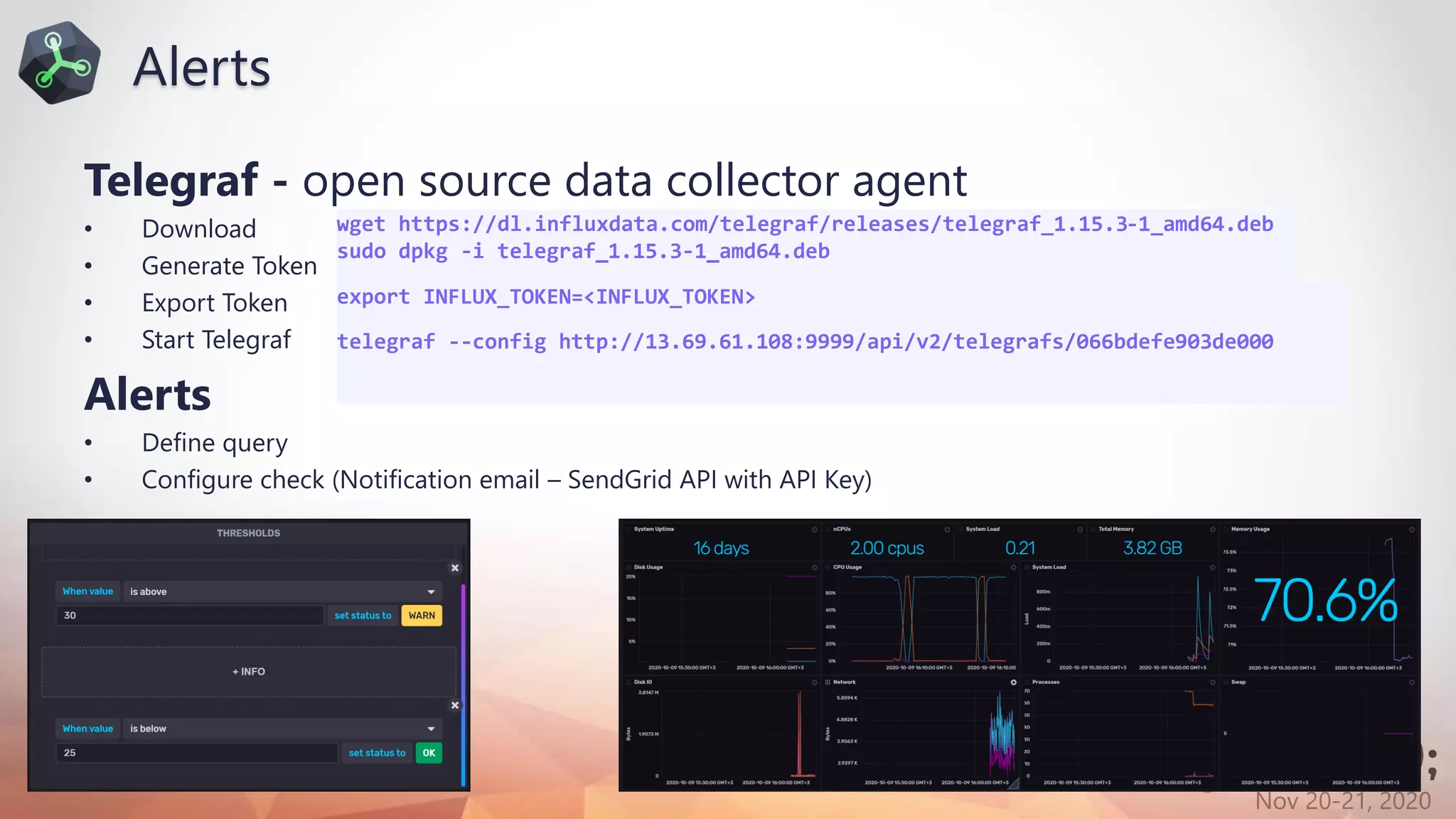
Telegraf - open source data collector agent
• Download
• Generate Token
• Export Token
• Start Telegraf
Alerts
• Define query
• Configure check (Notification email – SendGrid API with API Key)
wget https://dl.influxdata.com/telegraf/releases/telegraf_1.15.3-1_amd64.deb
sudo dpkg -i telegraf_1.15.3-1_amd64.deb
export INFLUX_TOKEN=<INFLUX_TOKEN>
telegraf --config http://13.69.61.108:9999/api/v2/telegrafs/066bdefe903de000
Alerts
Nov 20-21, 2020
Thanks to our Sponsors:
General Sponsor:
Trusted Sponsor:
Innovation Sponsor:
Silver Sponsor:
Gold Sponsors:
Platinum Sponsors:
Bronze Sponsors:
Technology Partners:

Flux QL - Nexgen Management of Time Series Inspired by JS

  • 1.
    Nov 20-21, 2020Sofia vartitle = “FluxQL - NextGen Management of Time Series Inspired by JS”; var info = { name: “Ivelin Andreev”, otherOptional: “Functional data scripting language designed for querying, analyzing and acting on data. ” };
  • 2.
    Nov 20-21, 2020 Thanksto our Sponsors: General Sponsor: Trusted Sponsor: Innovation Sponsor: Silver Sponsor: Gold Sponsors: Platinum Sponsors: Bronze Sponsors: Technology Partners:
  • 3.
    Nov 20-21, 2020 Aboutme • Microsoft Azure MVP • Software Architect @ o 18+ years professional experience • CTO @ • External Expert Horizon 2020, Eurostars-Eureka • External Expert InnoFund Denmark, RIF Cyprus • Business Interests o Web Development, SOA, Integration o IoT, Machine Learning, Computer Intelligence o Security & Performance Optimization • Contact ivelin.andreev@icb.bg www.linkedin.com/in/ivelin www.slideshare.net/ivoandreev
  • 4.
    Nov 20-21, 2020 agenda(); AGENDA Introto TimeSeries What are Flux & InfluxDB v2 Deployment and Configuration What’s New & Cool InfluxDB with SQL and Azure Demo from(bucket: v.bucket) |> range(start: v.timeRangeStart) |> filter(fn: (r) => r._measurement == "diskio") |> filter(fn: (r) => r._field == "read_bytes" or r._field == "write_bytes") |> aggregateWindow(every: v.windowPeriod, fn: last, createEmpty: false) |> derivative(unit: 1s,nonNegative: false) |> yield(name: "derivative")
  • 5.
    Nov 20-21, 2020 •TimeSeries DB Requirements (Credits: Baron Schwartz) o https://www.xaprb.com/blog/2014/06/08/time-series-database-requirements/ • InfluxDB Clustering & Flux Specification o https://www.influxdata.com/blog/influxdb-clustering/ o https://github.com/influxdata/influxdb/issues o https://github.com/influxdata/flux o https://github.com/influxdata/flux/blob/master/docs/SPEC.md • What’s New & InfluxQL vs Flux o https://docs.influxdata.com/influxdb/v2.0/api/ o https://docs.influxdata.com/influxdb/v1.8/flux/flux-vs-influxql/ • Templates Gallery o https://www.influxdata.com/products/influxdb-templates/gallery/ • InfluxDB Client Libraries o https://docs.influxdata.com/influxdb/v2.0/tools/client-libraries/ o https://github.com/influxdata/influxdb-client-csharp (InfluxDB 1.8+, InfluxDB 2.0) o https://github.com/influxdata/influxdb-csharp (InfluxDB 1.7 and earlier) • InfluxDB YouTube Videos (150 videos for the last 1y) o https://www.youtube.com/channel/UCnrgOD6G0y0_rcubQuICpTQ/videos / Takeaways & References
  • 6.
  • 7.
    Nov 20-21, 2020 DBoptimized for storing and monitoring time-stamped data – events tracked, monitored and aggregated over time. • The fastest growing DB category (24M) • What makes TS DB different? Compression (1:1000 - 1:5000 compared to RDBMS) Continuous queries, downsampling Writes 95%-99% of all operations Streaming live data from multiple devices Typically sequential appends Updates to modify values are rare Deletes are bulk on large ranges (days, months, years) Aggregation Performance issues are typically I/O bound Caching does not work well for BigData Queries Typically sequential What is a Time Series DB?
  • 8.
    Nov 20-21, 2020 •Popularity distribution (Sept 2020) • RDBMS still hold popularity (74%) • Document (9.3%), Key-value (5.2%), Search (4.5%) • Emerging Workloads • More devices, more monitoring, more data points • Scenarios • Real-time Performance Monitoring, Analytics, Alerts • Internet of Things (sensors, events) • Trade transactions, Engineering • Scientific computing (earthquake, rainfall, weather) • Predictive analytics and ML to help predict future outcomes • TimeSeries Data Lake • Efficient ingestion (x1M points/sec) • Spark or Python processing through SDKs Scenarios to Consider Time Series
  • 9.
    Nov 20-21, 2020 •Purpose-built TS DB (not repurposed - MongoDB) • Part of Influx Data Platform Telegraf, InfluxDB, Chronograf and Kapacitor (TICK) • Comprehensive platform (collection, storage, visualization, alerting) • Variable compression depending required level of precision • Variable time precision sec, ms, µs or ns precision • InfluxQL (-v1.8), Flux (v1.8-v2.0) • Multiple data types, No tag limits What is InfluxDB?
  • 10.
    Nov 20-21, 2020 Open-coreModel with 3 Offerings
  • 11.
    Nov 20-21, 2020 What’sNew (since 08.01.2020) • Production Ready -> GA from 2020-11-10 <- • I,C,K from TICK stack in single binary (Telegraf lives own life) • Full power FluxQL (also Influx 1.8+) • Templates Gallery (30+ pre-made monitoring solutions – Google cloud, Kafka, Docker, CoViD-19) • Influx Transpile CLI(converts InfluxQL to FluxQL) https://docs.influxdata.com/influxdb/v1.8/flux/flux-vs-influxql/#influxql-and-flux-parity • Flux (beta) Grafana Datasource Plugin • Shareable dashboards, alerts and queries • API allows everything to be programmatically controlled What’s Bad https://github.com/influxdata/influxdb/issues/18088 https://www.reddit.com/r/influxdb/comments/dgo5w3/is_it_expected_for_flux_queries_to_be/ What’s new in InfluxDB 2.0 GA
  • 12.
    Nov 20-21, 2020 •4th gen programming language (since July 2018) • Why a new Language? • Features • Highly Readable – piping, instead of nesting, clear data origin • Useable – aids productivity, shorter code to express the same • Readable – derived from something common (JS) • Testable – Flux functions can be tested in isolation from the outside world(unlike SQL) • Shareable – community defines functions, creates libraries • Decouples query engine from storage tier Why the Trouble of a New Language? d1=from(bucket: "industry4sme") |> range(start: v.timeRangeStart, stop: v.timeRangeStop) |> filter(fn: (r) => r["_measurement"] == "telemetry") |> filter(fn: (r) => r["SensorID"] == "M186") |> filter(fn: (r) => r["Type"] == "S1load")
  • 13.
    Nov 20-21, 2020 •Joins – from any bucket, measurement and on any columns • Math across measurements - run calculations using data from separate measurements • Sort on tags – Order by time only was supported in InfluxQL • Group by any column – InfluxQL allows grouping on tags and time only • Multiple datasources – Flux query data from datasources like CSV, SQL and BigTable packages • Custom functions – define custom auxiliary functions • Datepart queries –only data within a specified hour range (i.e. work hours), for a large period • Pivot - pivot data tables by specifying rowKey, columnKey • Histograms - generate a cumulative histogram in buckets [10, 20, 30, 40, 50, 60, 70, 80, 90, 100] • Covariance - covariance() function calculates the covariance between two columns Flux vs InfluxQL
  • 14.
  • 15.
    Nov 20-21, 2020 Enterpriseversion allows clustering Rule: A cluster shall have 3 meta nodes with an even number of data nodes. Meta nodes 3 = magic number, consensus quorum Expose HTTP API Add/remove servers; Move shards around the cluster Each meta communicates with all other Low resource requirements Data nodes Hold actual TS data – tag keys/values, field keys/values Handle writes and queries; Replicate data Meta-Data Communicate InfluxDB Enterprise Architecture
  • 16.
    Nov 20-21, 2020 InfluxDBEnterprise (v.1.8) available on Azure Marketplace Note: v.1.x is dramatically different from v.2.0 Highlights • Easy and straightforward installation • Billing in Azure subscription • Open source ARM templates (GitHub) • Multi-node environment with load balancing • Pricing • Scalesets (2 Data (2vCPU, 7GiB), 3 Meta (1vCPU, 3.5 GiB)) ~ $ 250 • Networking, IP, Load Balancer, Premium SSD ~ $ 50 • $0.64/core/hr (recommended 2 data nodes, 2 vCPU) ~ $ 1868 InfluxDB Enterprise Cluster on Azure (v1.8)
  • 17.
    Nov 20-21, 2020 $wget https://dl.influxdata.com/influxdb/releases/influxdb_2.0.0-beta.16_linux_amd64.tar.gz $ tar xvzf influxdb_2.0.0-beta.16_linux_amd64.tar.gz • MacOS, Linux, Docker…No Windows? (see Docker) • Create a VM (i.e. Standard B2s (2 vcpus, 4 GiB memory, Standard SSD)) • Connect with SSH client of choice (i.e. Putty) • Download and Unzip • Setup as Service $ sudo cp influxdb_2.0.0-beta.16_linux_amd64/{influx,influxd} /usr/local/bin/ $ sudo useradd -rs /bin/false influxdb $ sudo mkdir /home/influxdb $ sudo chown influxdb /home/influxdb $ sudo vi /lib/systemd/system/influxdb2.service (Add the InfluxDB service file content) $ sudo systemctl enable influxdb2 $ sudo systemctl start influxdb2 $ sudo systemctl status influxdb2 InfluxDB service file [Unit] Description=InfluxDB 2.0 service file. After=network-online.target [Service] User=influxdb Group=influxdb ExecStart=/usr/local/bin/influxd Restart=on-failure [Install] WantedBy=multi-user.target InfluxDB OSS 2.0 Installation (Azure VM)
  • 18.
    Nov 20-21, 2020 •Configure Add Firewall rule (allow incoming TCP port 9999) Option 1(GUI) Open http://[IPAddress]:9999 Option 2(CLI) influx setup Configure InfluxDB OSS 2.0
  • 19.
    Nov 20-21, 2020 RegisterFree at cloud2.influxdata.com Highlights • Located in Amsterdam (NL) and Virginia (US) • Free plan retention 30 days • Transparent predictable pricing (Usage Based) • Not priced on underlying resource • Not priced on query/seconds Cloud Pricing Price Sample Usage Subtotal Data In $0.002/MB 1000 MB $ 2.00 Queries $0.01/100 qry 100,000 queries $ 10.00 Storage $0.002/GB-hr 2 GB $ 2.88 Data Out $0.09/GB 1 GB $ 0.09 Total $ 14.97 InfluxDB Cloud on Azure (beta)
  • 20.
    Nov 20-21, 2020 What’sCool in InfluxDB v2
  • 21.
    Nov 20-21, 2020 •Data Input • Telegraf – 200 plugin datasources (https://docs.influxdata.com/telegraf/v1.14/plugins/plugin-list/) • Custom Data Source – build a plugin using Telegraf open source • FluentD – 700 plugins • Azure IoT Hub - Telegraf plugin (IoT Hub, Event Hub, AMQP, MQTT, HTTPS) • Azure Storage Queues – Telegraf plugin • SQL Server and Windows Server – monitoring templates • Flux SQL package – enrich telemetry from RDBMS (i.e. MSSQL) (Amazon Athena, Google BigQuery, MS SQL, MySQL, PostgreSQL, Snowflake, SQLite) InfluxDB v2 Integration • Data Output • Azure Application Insights • Azure Monitor – can store date in InfluxDB indefinitely • Node-Red
  • 22.
    Nov 20-21, 2020 •Flux editor on Monaco editor (VS Code) • IntelliSense, Validation, Diff editor, Syntax highlighting • Tasks (Continuous Queries) • Scheduled Flux query runs periodically and stores results • 300+ built-in functions • Quantiles / Percentiles • Windowing and data aggregation • SQL data enrichment, join with SQL data • TS forecasting (Holt-Winters): not random, trend, seasonality • Geotracking (beta) – geospatial filters require Lat/Lon fields • Python Client + Influx Pandas DF + Python 3.6 + Analytics • Anomaly detection (MAD, BIRCH) Flux Built-in Analytics
  • 23.
    Nov 20-21, 2020 •Client SDKs integrate with the InfluxDB v2 API • Go, C#, Java, PHP, Ruby, Scala, JavaScript, Python • Nuget package (.NET CLI) • Client SDK Features • Query data with Flux • Write data • Delete data • Management APIs (Setup, Authorization, Buckets, Organizations, Users, Sources, Tasks) • Monitor Data • Check = Query + Configuration (Schedule, Delay, Message, Type) • Types: Deadman check, Threshold check • Notification Endpoints • MS Teams, Slack, Telegram, Webhooks Acting on Data
  • 24.
    Nov 20-21, 2020 Thesql.from() function retrieves data from a SQL data source Parameters • driverName – driver to connect to source • dataSourceName – connection string; driver-specific format • query – query string to run against source Secrets • Import influxdata/influxd/secrets package • BoltDB • Embedded simple key-value store in Go • Base64-encoded • Vault • Stores and controls tokens, passwords, certificates • Requires a dedicated Vault server • Default for InfluxDB cloud import "sql" import "influxdata/influxdb/secrets" username = secrets.get(key: "SQLSERVER_USER") password = secrets.get(key: "SQLSERVER_PASS") sql.from( driverName: "sqlserver", dataSourceName: "sqlserver://${username}:${password}@dbServer:port? database=examplebdb", query: "SELECT * FROM Example.Table" ) Flux sql.from() function
  • 25.
  • 26.
    Nov 20-21, 2020 Exportfrom InfluxDB 1.x • Export to Influx line protocol influx_inspect export -datadir “[influxRoot]data" -waldir "[influxRoot]meta" -out “[outFolder]" -database [databaseName] -retention autogen -start "2020-10-01T00:00:00Z“ Note: Edit file and remove DDL statements (CREATE DATABASE [databaseName] WITH NAME autogen) Import in InfluxDB 2 • Option 1 (GUI) • Open InfluxDB home (http://[IPAddress]:9999/) • Open Data Tab • Find TS Data bucket • 1.1 Line Protocol • Drag file for import • 1.2 Client Library • Open IDE • Reuse sample code • Option 2 (CLI) • Connect remotely (i.e. Putty) • Upload files to VM over SFTP (i.e. WinSCP) • Bucket must exist prior to import influx write -b [bucket] -o [orgName] -p ns -- format=lp -f [filePath/filename] -t [token] Migration to Flux
  • 27.
    Nov 20-21, 2020 OpenExplore Tab 1. Select Time Interval !!! Important !!! 2. Select Bucket filter 3. Select Measurement filter 4. Select Tag filter 5. Select Aggregation function and Window ➀ ➁ ➂ ➃ ➄ Other Options • Select Chart type • Set Refresh interval • View FluxQL script • Export CSV • View Raw data • Save As dashboard cell Data Exploration
  • 28.
    Nov 20-21, 2020 Secrets •Add Secrets influx secret update -k [database.User] -v [userName] -o [orgName] -t [token] influx secret update -k [database.Pass] -v [password] -o [orgName] -t [token] • View Secrets influx secret list -o [orgName] -t [token] Note: Use ReadOnly user for security reasons; Enable access to SQL through the firewall import "sql" import "influxdata/influxdb/secrets" username = secrets.get(key: "ConfigDB.User") password = secrets.get(key: "ConfigDB.Pass") configDB = secrets.get(key: "ConfigDB") machineData = sql.from( driverName: "sqlserver", dataSourceName: "sqlserver://${username}:${password}@${configDB}? database=ConfigurationDB", query: "exec [org].[spRetrieveMachineList] 'grafana_admin@localhost', 'S tatus', 'All', 'All'" ) SQL Fluxsensordata = from(bucket: "industry4sme") |> range(start: v.timeRangeStart, stop: v.timeRangeStop) |> filter(fn: (r) => r["_measurement"] == "telemetry") |> filter(fn: (r) => r["SensorID"] == "M186" or r["SensorID"] == "M222" ) |> filter(fn: (r) => r["Type"] == "S1speed") |> aggregateWindow(every: 5m, fn: mean, createEmpty: false) Flux sql.from()
  • 29.
    Nov 20-21, 2020 Join •Join 2 data streams in a single table - InfluxDB query results with SQLServer query results • Both tables must have all columns specified in this list. • Columns renamed if having the same name i.e. Type_metric Mapped table • Build a new table, mapping existing columns to new ones. • Aggregate the rows, grouping by interval and using Max as aggregation function join(tables: {metric: sensordata, info: machineData}, on: ["SensorID"]) |> map(fn: (r) => ({ SensorID: r.SensorID, Name: r.Name, _value: r._value, _time: r._time }) ) |> aggregateWindow(every: 10m, fn: max) Flux join()
  • 30.
    Nov 20-21, 2020 cov() •Computes the covariance between two streams by first joining the streams Covariance • Measures the extent of change in one variable compared to other (-∞;+∞) • High covariance - strong relationship, low covariance - weak relationship Pearsonr() • Computes the Pearson R correlation coefficient between two streams by first joining the streams Correlation • How strongly two variables are related, scaled covariance [-1;+1] , 0.0-0.4 – low, 0.4-0.7 – moderate, 0.7-1.0 - high d1=from(bucket: "industry4sme") |> range(start: v.timeRangeStart, stop: v.timeRangeStop) |> filter(fn: (r) => r["_measurement"] == "telemetry") |> filter(fn: (r) => r["SensorID"] == "M186") |> filter(fn: (r) => r["Type"] == "S1load") d2=from(bucket: "industry4sme") |> range(start: v.timeRangeStart, stop: v.timeRangeStop) |> filter(fn: (r) => r["_measurement"] == "telemetry") |> filter(fn: (r) => r["SensorID"] == "M186") |> filter(fn: (r) => r["Type"] == "S2load") pearsonr(x: d2, y: d1, on:["_time", "SensorID"]) cov(x: d2, y: d1, on:["_time", "SensorID"]) Flux cov(), pearsonr()
  • 31.
    Nov 20-21, 2020 Telegraf- open source data collector agent • Download • Generate Token • Export Token • Start Telegraf Alerts • Define query • Configure check (Notification email – SendGrid API with API Key) wget https://dl.influxdata.com/telegraf/releases/telegraf_1.15.3-1_amd64.deb sudo dpkg -i telegraf_1.15.3-1_amd64.deb export INFLUX_TOKEN=<INFLUX_TOKEN> telegraf --config http://13.69.61.108:9999/api/v2/telegrafs/066bdefe903de000 Alerts
  • 32.
    Nov 20-21, 2020 Thanksto our Sponsors: General Sponsor: Trusted Sponsor: Innovation Sponsor: Silver Sponsor: Gold Sponsors: Platinum Sponsors: Bronze Sponsors: Technology Partners: