14 | SEP | 2024
Platinum Sponsor Platinum Sponsor
Silver Sponsor Partner
14 | SEP | 2024
NEXT EVENTS
Data Saturday Sofia 2024
05 | October | 2024
Free Ticket
Labs building, Sofia Tech Park
14 | SEP | 2024
• Solution Architect @
• Microsoft AI & IoT MVP
• External Expert Eurostars-Eureka, Horizon Europe
• External Expert InnoFund Denmark, RIF Cyprus
• Business Interests
o Web Development, SOA, Integration
o IoT, Machine Learning
o Security & Performance Optimization
• Contact
ivelin.andreev@kongsbergdigital.com
www.linkedin.com/in/ivelin
www.slideshare.net/ivoandreev
SPEAKER BIO
14 | SEP | 2024
AUTONOMOUS SYSTEMS
for Optimization and Control
14 | SEP | 2024
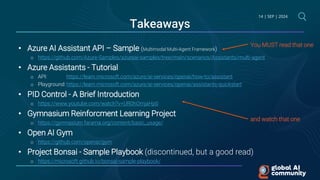
Takeaways
• Azure AI Assistant API – Sample (Multimodal Multi-Agent Framework)
o https://github.com/Azure-Samples/azureai-samples/tree/main/scenarios/Assistants/multi-agent
• Azure Assistants - Tutorial
o API: https://learn.microsoft.com/azure/ai-services/openai/how-to/assistant
o Playground: https://learn.microsoft.com/azure/ai-services/openai/assistants-quickstart
• PID Control - A Brief Introduction
o https://www.youtube.com/watch?v=UR0hOmjaHp0
• Gymnasium Reinforcment Learning Project
o https://gymnasium.farama.org/content/basic_usage/
• Open AI Gym
o https://github.com/openai/gym
• Project Bonsai - Sample Playbook (discontinued, but a good read)
o https://microsoft.github.io/bonsai-sample-playbook/
You MUST read that one
and watch that one
Introduction to Autonomous Control
• Autonomy is moving ML from bits to atoms
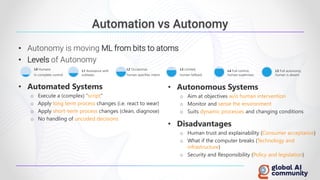
• Levels of Autonomy
L0 Humans
In complete control
L1 Assistance with
subtasks
L2 Occasional,
human specifies intent
L3 Limited,
human fallback
L4 Full control,
human supervises
L5 Full autonomy,
human is absent
Automation vs Autonomy
• Automated Systems
o Execute a (complex) “script”
o Apply long term process changes (i.e. react to wear)
o Apply short-term process changes (clean, diagnose)
o No handling of uncoded decisions
• Autonomous Systems
o Aim at objectives w/o human intervention
o Monitor and sense the environment
o Suits dynamic processes and changing conditions
• Disadvantages
o Human trust and explainability (Consumer acceptance)
o What if the computer breaks (Technology and
infrastructure)
o Security and Responsibility (Policy and legislation)
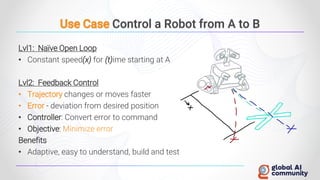
Use Case Control a Robot from A to B
Lvl1: Naïve Open Loop
• Constant speed(x) for (t)ime starting at A
Lvl2: Feedback Control
• Trajectory changes or moves faster
• Error - deviation from desired position
• Controller: Convert error to command
• Objective: Minimize error
Benefits
• Adaptive, easy to understand, build and test
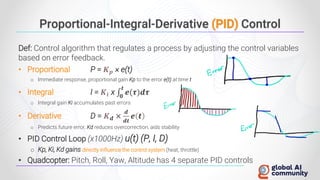
Proportional-Integral-Derivative (PID) Control
Def: Control algorithm that regulates a process by adjusting the control variables
based on error feedback.
• Proportional P = 𝑲𝒑 × e(t)
o Immediate response, proportional gain Kp to the error e(t) at time t
• Integral I = 𝑲𝒊 x ‫׬‬
𝟎
𝒕
𝒆(𝝉)𝒅𝝉
o Integral gain Ki accumulates past errors
• Derivative D = 𝑲𝒅 ×
𝒅
𝒅𝒕
𝒆 𝒕
o Predicts future error, Kd reduces overcorrection, aids stability
• PID Control Loop (x1000Hz) u(t) (P, I, D)
o Kp, Ki, Kd gains directly influence the control system (heat, throttle)
• Quadcopter: Pitch, Roll, Yaw, Altitude has 4 separate PID controls
Autonomous System
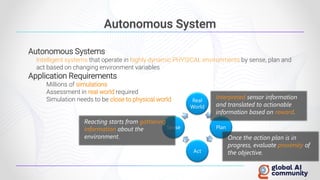
Autonomous Systems
Intelligent systems that operate in highly dynamic PHYSICAL environments by sense, plan and
act based on changing environment variables
Application Requirements
○ Millions of simulations
○ Assessment in real world required
○ Simulation needs to be close to physical world Real
World
Plan
Act
Sense
Once the action plan is in
progress, evaluate proximity of
the objective.
Reacting starts from gathering
information about the
environment.
Interpreted sensor information
and translated to actionable
information based on reward.
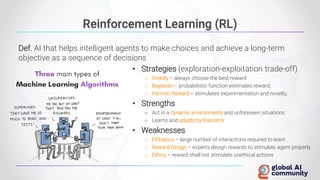
Reinforcement Learning (RL)
Def. AI that helps intelligent agents to make choices and achieve a long-term
objective as a sequence of decisions
• Strategies (exploration-exploitation trade-off)
o Greedy – always choose the best reward
o Bayesian – probabilistic function estimates reward;
o Intrinsic Reward – stimulates experimentation and novelty.
• Strengths
o Act in a dynamic environments and unforeseen situations
o Learns and adapts by trial/error
• Weaknesses
o Efficiency – large number of interactions required to learn
o Reward Design – experts design rewards to stimulate agent properly
o Ethics – reward shall not stimulate unethical actions
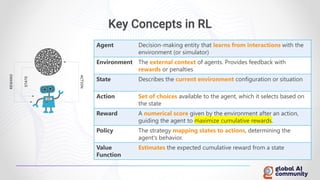
Key Concepts in RL
Agent Decision-making entity that learns from interactions with the
environment (or simulator)
Environment The external context of agents. Provides feedback with
rewards or penalties
State Describes the current environment configuration or situation
Action Set of choices available to the agent, which it selects based on
the state
Reward A numerical score given by the environment after an action,
guiding the agent to maximize cumulative rewards.
Policy The strategy mapping states to actions, determining the
agent's behavior.
Value
Function
Estimates the expected cumulative reward from a state
Autonomous Control Frameworks
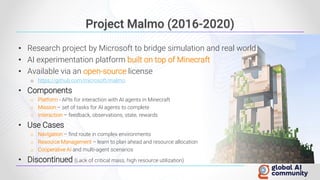
Project Malmo (2016-2020)
• Research project by Microsoft to bridge simulation and real world
• AI experimentation platform built on top of Minecraft
• Available via an open-source license
o https://github.com/microsoft/malmo
• Components
o Platform - APIs for interaction with AI agents in Minecraft
o Mission – set of tasks for AI agents to complete
o Interaction – feedback, observations, state, rewards
• Use Cases
o Navigation – find route in complex environments
o Resource Management – learn to plan ahead and resource allocation
o Cooperative AI and multi-agent scenarios
• Discontinued (Lack of critical mass, high resource utilization)
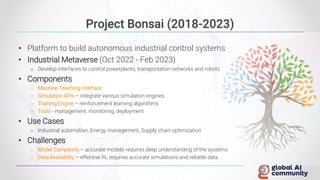
Project Bonsai (2018-2023)
• Platform to build autonomous industrial control systems
• Industrial Metaverse (Oct 2022 - Feb 2023)
o Develop interfaces to control powerplants, transportation networks and robots
• Components
o Machine Teaching Interface
o Simulation APIs – integrate various simulation engines
o Training Engine – reinforcement learning algorithms
o Tools - management, monitoring, deployment
• Use Cases
o Industrial automation, Energy management, Supply chain optimization
• Challenges
o Model Complexity – accurate models requires deep understanding of the systems
o Data Availability – effective RL requires accurate simulations and reliable data
Can’t we Use Something Now?
• Gym (2016 - 2021)
o Open-source Python library for testing reinforcement learning (RL) algorithms
o Standard APIs for environment-algorithm communication
o De Facto standard: 43M installations, 54’800 GitHub projects
• Gymnasium (2021 – Now)
o Maintained by Farama Foundation (Non-Profit)
• Key Components
o Environment – description of the problem RL is trying to solve
• Types: Classic control; Box 2D Physics; MuJoCo (multi-joint); Atari video games
o Spaces
• Observation – current state information (position, velocity, sensor readings)
• Action – all possible actions an agent could perform (Discrete, MultiDiscrete, Box)
o Reward – returned by the environment after an action
Now you
know why ☺
Gymnasium Installation (Windows)
• Install Python (supported v.3.8 - 3.11)
o Add Python to PATH; Windows works but not officially supported
• Install Gymnasium
• Install MuJoCo (Multi-Joint dynamics with Contact)
o Developed by Emo Todorov (University of Washington)
o Acquired by Google DeepMind; Feely available from 2021
• Dependencies for environment families
• Test Gymnasium
o Create environment instance
pip install gymnasium
pip install “gymnasium[mujoco]”
pip install mujoco
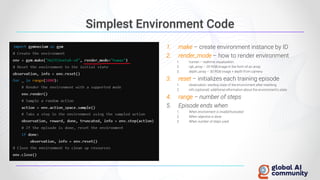
Simplest Environment Code
1. make – create environment instance by ID
2. render_mode – how to render environment
1. human – realtime visualization
2. rgb_array – 2D RGB image in the form of an array
3. depth_array – 3D RGB image + depth from camera
3. reset – initializes each training episode
1. observation: starting state of the environment after resetting.
2. info (optional): additional information about the environment's state
4. range – number of steps
5. Episode ends when
1. When environment is invalid/truncated
2. When objective is done
3. When number of steps used
Reinforcement Learning with Gymnasium
DEMO
The Training Environment of the Autonomous
Control “Brain”
Simulation is the Key
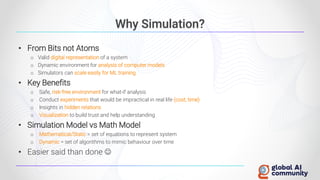
Why Simulation?
• From Bits not Atoms
o Valid digital representation of a system
o Dynamic environment for analysis of computer models
o Simulators can scale easily for ML training
• Key Benefits
o Safe, risk-free environment for what-if analysis
o Conduct experiments that would be impractical in real life (cost, time)
o Insights in hidden relations
o Visualization to build trust and help understanding
• Simulation Model vs Math Model
o Mathematical/Static = set of equations to represent system
o Dynamic = set of algorithms to mimic behaviour over time
• Easier said than done ☺
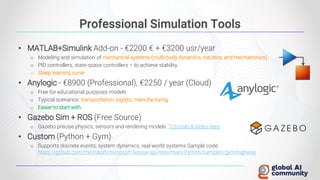
Professional Simulation Tools
• MATLAB+Simulink Add-on - €2200 € + €3200 usr/year
o Modeling and simulation of mechanical systems (multi-body dynamics, robotics, and mechatronics).
o PID controllers, state-space controllers – to achieve stability
o Steep learning curve
• Anylogic - €8900 (Professional), €2250 / year (Cloud)
o Free for educational purposes models
o Typical scenarios: transportation, logistic, manufacturing
o Easier to start with
• Gazebo Sim + ROS (Free Source)
o Gazebo precise physics, sensors and rendering models. Tutorials & Video here
• Custom (Python + Gym)
o Supports discrete events, system dynamics, real-world systems Sample code:
https://github.com/microsoft/microsoft-bonsai-api/tree/main/Python/samples/gym-highway
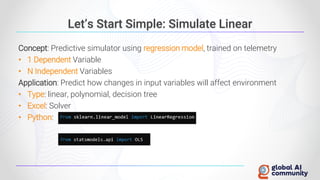
Let’s Start Simple: Simulate Linear
Concept: Predictive simulator using regression model, trained on telemetry
• 1 Dependent Variable
• N Independent Variables
Application: Predict how changes in input variables will affect environment
• Type: linear, polynomial, decision tree
• Excel: Solver
• Python:
Simulate Non-Linear Relations
Support Vector Machine (SVM)
• Supervised ML algorithm for classification
• Precondition
Number of samples (points) > Number of features
• Support Vectors – points in N-dimensional space
• Kernel Trick – determine point relations in higher space
o i.e. Polynomial Kernel 2D [𝒙𝟏, 𝒙𝟐] -> 3D [𝒙𝟏, 𝒙𝟐, 𝒙𝟏
𝟐
+ 𝒙𝟐
𝟐
], 5D [𝒙𝟏
𝟐
, 𝒙𝟐
𝟐
, 𝒙𝟏 × 𝒙𝟐 , 𝒙𝟏 , 𝒙𝟐]
Support Vector Regression (SVR)
• Identify regression hyperplane in a higher dimension
• Hyperplane in ϵ margin where most points fit
• Python:
Simulate Multiple Outcomes
Example: Predictors [diet, exercise, medication] -> Outcomes [blood pressure, cholesterol, BMI]
Option 1: Multiple SVR Models
• SVR model for each outcome
• Precondition: outcomes are independent
Option 2: Multivariative Multiple Regression
• Predictors (Xi): multiple independent input variables
• Outcomes (Yi): multiple dependent variables to be predicted
• Coefficients (β), Error (ϵi)
• Precondition: linear relations
• Python:
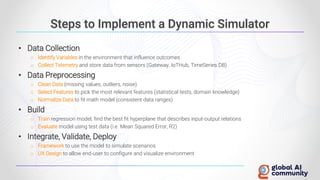
Steps to Implement a Dynamic Simulator
• Data Collection
o Identify Variables in the environment that influence outcomes
o Collect Telemetry and store data from sensors (Gateway, IoTHub, TimeSeries DB)
• Data Preprocessing
o Clean Data (missing values, outliers, noise)
o Select Features to pick the most relevant features (statistical tests, domain knowledge)
o Normalize Data to fit math model (consistent data ranges)
• Build
o Train regression model, find the best fit hyperplane that describes input-output relations
o Evaluate model using test data (i.e. Mean Squared Error, R2)
• Integrate, Validate, Deploy
o Framework to use the model to simulate scenarios
o UX Design to allow end-user to configure and visualize environment
Networks of Specialized Agents can Solve
Complex task in Dynamic Environments
GPT is only the Beginning
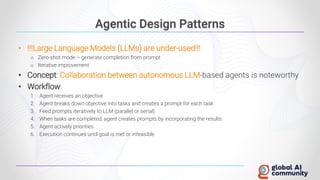
Agentic Design Patterns
• !!!Large Language Models (LLMs) are under-used!!!
o Zero-shot mode – generate completion from prompt
o Iterative improvement
• Concept: Collaboration between autonomous LLM-based agents is noteworthy
• Workflow:
1. Agent receives an objective
2. Agent breaks down objective into tasks and creates a prompt for each task
3. Feed prompts iteratively to LLM (parallel or serial)
4. When tasks are completed, agent creates prompts by incorporating the results
5. Agent actively priorities
6. Execution continues until goal is met or infeasible
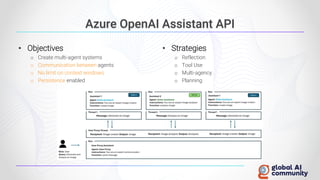
Azure OpenAI Assistant API
• Objectives
o Create multi-agent systems
o Communication between agents
o No limit on context windows
o Persistence enabled
• Strategies
o Reflection
o Tool Use
o Multi-agency
o Planning
Simulator: Sample Implementation
DEMO
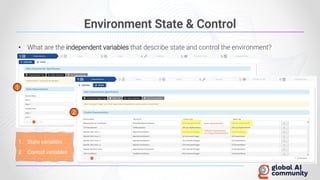
• What are the independent variables that describe state and control the environment?
Environment State & Control
Same characteristics
Different characteristics
(no 2-way communication)
1. State variables
2. Control variables
1
2
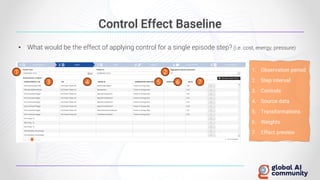
Control Effect Baseline
• What would be the effect of applying control for a single episode step? (i.e. cost, energy, pressure)
1. Observation period
2. Step interval
3. Controls
4. Source data
5. Transformations
6. Weights
7. Effect preview
1 2
3 4 5 6 7
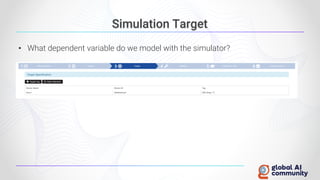
Simulation Target
• What dependent variable do we model with the simulator?
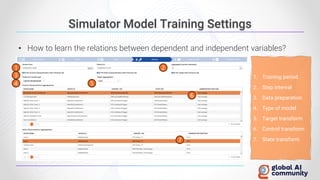
• How to learn the relations between dependent and independent variables?
Simulator Model Training Settings
1
1. Training period
2. Step interval
3. Data preparation
4. Type of model
5. Target transform
6. Control transform
7. State transform
2
3
4 5
6
7
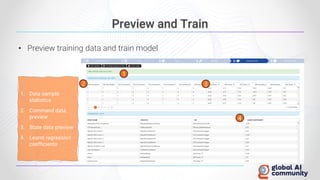
Preview and Train
• Preview training data and train model
1. Data sample
statistics
2. Command data
preview
3. State data preview
4. Learnt regression
coefficients
2 3
4
1
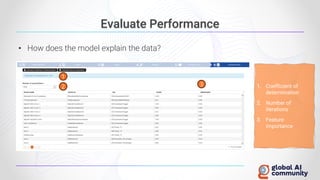
Evaluate Performance
• How does the model explain the data?
1
3
2 1. Coefficient of
determination
2. Number of
iterations
3. Feature
importance
Autonomous Control: Sample Implementation
DEMO
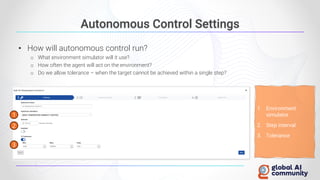
Autonomous Control Settings
• How will autonomous control run?
o What environment simulator will it use?
o How often the agent will act on the environment?
o Do we allow tolerance – when the target cannot be achieved within a single step?
1
3
2
1. Environment
simulator
2. Step interval
3. Tolerance
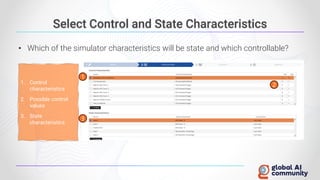
Select Control and State Characteristics
• Which of the simulator characteristics will be state and which controllable?
1. Control
characteristics
2. Possible control
values
3. State
characteristics
1
3
2
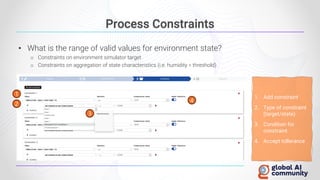
Process Constraints
• What is the range of valid values for environment state?
o Constraints on environment simulator target
o Constraints on aggregation of state characteristics (i.e. humidity < threshold)
1. Add constraint
2. Type of constraint
(target/state)
3. Condition for
constraint
4. Accept tollerance
1
3
2
4
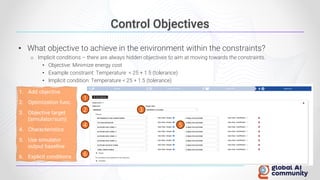
Control Objectives
• What objective to achieve in the environment within the constraints?
o Implicit conditions – there are always hidden objectives to aim at moving towards the constraints.
• Objective: Minimize energy cost
• Example constraint: Temperature < 25 + 1.5 (tolerance)
• Implicit condition: Temperature < 25 + 1.5 (tolerance)
1. Add objective
2. Optimization func.
3. Objective target
(simulator/sum)
4. Characteristics
5. Use simulator
output baseline
6. Explicit conditions
1
2
6
3
4 5
Autonomous Systems for Optimization and Control

Autonomous Systems for Optimization and Control

  • 2.
    14 | SEP| 2024 Platinum Sponsor Platinum Sponsor Silver Sponsor Partner
  • 3.
    14 | SEP| 2024 NEXT EVENTS Data Saturday Sofia 2024 05 | October | 2024 Free Ticket Labs building, Sofia Tech Park
  • 4.
    14 | SEP| 2024 • Solution Architect @ • Microsoft AI & IoT MVP • External Expert Eurostars-Eureka, Horizon Europe • External Expert InnoFund Denmark, RIF Cyprus • Business Interests o Web Development, SOA, Integration o IoT, Machine Learning o Security & Performance Optimization • Contact ivelin.andreev@kongsbergdigital.com www.linkedin.com/in/ivelin www.slideshare.net/ivoandreev SPEAKER BIO
  • 5.
    14 | SEP| 2024 AUTONOMOUS SYSTEMS for Optimization and Control
  • 6.
    14 | SEP| 2024 Takeaways • Azure AI Assistant API – Sample (Multimodal Multi-Agent Framework) o https://github.com/Azure-Samples/azureai-samples/tree/main/scenarios/Assistants/multi-agent • Azure Assistants - Tutorial o API: https://learn.microsoft.com/azure/ai-services/openai/how-to/assistant o Playground: https://learn.microsoft.com/azure/ai-services/openai/assistants-quickstart • PID Control - A Brief Introduction o https://www.youtube.com/watch?v=UR0hOmjaHp0 • Gymnasium Reinforcment Learning Project o https://gymnasium.farama.org/content/basic_usage/ • Open AI Gym o https://github.com/openai/gym • Project Bonsai - Sample Playbook (discontinued, but a good read) o https://microsoft.github.io/bonsai-sample-playbook/ You MUST read that one and watch that one
  • 7.
  • 8.
    • Autonomy ismoving ML from bits to atoms • Levels of Autonomy L0 Humans In complete control L1 Assistance with subtasks L2 Occasional, human specifies intent L3 Limited, human fallback L4 Full control, human supervises L5 Full autonomy, human is absent Automation vs Autonomy • Automated Systems o Execute a (complex) “script” o Apply long term process changes (i.e. react to wear) o Apply short-term process changes (clean, diagnose) o No handling of uncoded decisions • Autonomous Systems o Aim at objectives w/o human intervention o Monitor and sense the environment o Suits dynamic processes and changing conditions • Disadvantages o Human trust and explainability (Consumer acceptance) o What if the computer breaks (Technology and infrastructure) o Security and Responsibility (Policy and legislation)
  • 9.
    Use Case Controla Robot from A to B Lvl1: Naïve Open Loop • Constant speed(x) for (t)ime starting at A Lvl2: Feedback Control • Trajectory changes or moves faster • Error - deviation from desired position • Controller: Convert error to command • Objective: Minimize error Benefits • Adaptive, easy to understand, build and test
  • 10.
    Proportional-Integral-Derivative (PID) Control Def:Control algorithm that regulates a process by adjusting the control variables based on error feedback. • Proportional P = 𝑲𝒑 × e(t) o Immediate response, proportional gain Kp to the error e(t) at time t • Integral I = 𝑲𝒊 x ‫׬‬ 𝟎 𝒕 𝒆(𝝉)𝒅𝝉 o Integral gain Ki accumulates past errors • Derivative D = 𝑲𝒅 × 𝒅 𝒅𝒕 𝒆 𝒕 o Predicts future error, Kd reduces overcorrection, aids stability • PID Control Loop (x1000Hz) u(t) (P, I, D) o Kp, Ki, Kd gains directly influence the control system (heat, throttle) • Quadcopter: Pitch, Roll, Yaw, Altitude has 4 separate PID controls
  • 11.
    Autonomous System Autonomous Systems Intelligentsystems that operate in highly dynamic PHYSICAL environments by sense, plan and act based on changing environment variables Application Requirements ○ Millions of simulations ○ Assessment in real world required ○ Simulation needs to be close to physical world Real World Plan Act Sense Once the action plan is in progress, evaluate proximity of the objective. Reacting starts from gathering information about the environment. Interpreted sensor information and translated to actionable information based on reward.
  • 12.
    Reinforcement Learning (RL) Def.AI that helps intelligent agents to make choices and achieve a long-term objective as a sequence of decisions • Strategies (exploration-exploitation trade-off) o Greedy – always choose the best reward o Bayesian – probabilistic function estimates reward; o Intrinsic Reward – stimulates experimentation and novelty. • Strengths o Act in a dynamic environments and unforeseen situations o Learns and adapts by trial/error • Weaknesses o Efficiency – large number of interactions required to learn o Reward Design – experts design rewards to stimulate agent properly o Ethics – reward shall not stimulate unethical actions
  • 13.
    Key Concepts inRL Agent Decision-making entity that learns from interactions with the environment (or simulator) Environment The external context of agents. Provides feedback with rewards or penalties State Describes the current environment configuration or situation Action Set of choices available to the agent, which it selects based on the state Reward A numerical score given by the environment after an action, guiding the agent to maximize cumulative rewards. Policy The strategy mapping states to actions, determining the agent's behavior. Value Function Estimates the expected cumulative reward from a state
  • 14.
  • 15.
    Project Malmo (2016-2020) •Research project by Microsoft to bridge simulation and real world • AI experimentation platform built on top of Minecraft • Available via an open-source license o https://github.com/microsoft/malmo • Components o Platform - APIs for interaction with AI agents in Minecraft o Mission – set of tasks for AI agents to complete o Interaction – feedback, observations, state, rewards • Use Cases o Navigation – find route in complex environments o Resource Management – learn to plan ahead and resource allocation o Cooperative AI and multi-agent scenarios • Discontinued (Lack of critical mass, high resource utilization)
  • 16.
    Project Bonsai (2018-2023) •Platform to build autonomous industrial control systems • Industrial Metaverse (Oct 2022 - Feb 2023) o Develop interfaces to control powerplants, transportation networks and robots • Components o Machine Teaching Interface o Simulation APIs – integrate various simulation engines o Training Engine – reinforcement learning algorithms o Tools - management, monitoring, deployment • Use Cases o Industrial automation, Energy management, Supply chain optimization • Challenges o Model Complexity – accurate models requires deep understanding of the systems o Data Availability – effective RL requires accurate simulations and reliable data
  • 17.
    Can’t we UseSomething Now? • Gym (2016 - 2021) o Open-source Python library for testing reinforcement learning (RL) algorithms o Standard APIs for environment-algorithm communication o De Facto standard: 43M installations, 54’800 GitHub projects • Gymnasium (2021 – Now) o Maintained by Farama Foundation (Non-Profit) • Key Components o Environment – description of the problem RL is trying to solve • Types: Classic control; Box 2D Physics; MuJoCo (multi-joint); Atari video games o Spaces • Observation – current state information (position, velocity, sensor readings) • Action – all possible actions an agent could perform (Discrete, MultiDiscrete, Box) o Reward – returned by the environment after an action Now you know why ☺
  • 18.
    Gymnasium Installation (Windows) •Install Python (supported v.3.8 - 3.11) o Add Python to PATH; Windows works but not officially supported • Install Gymnasium • Install MuJoCo (Multi-Joint dynamics with Contact) o Developed by Emo Todorov (University of Washington) o Acquired by Google DeepMind; Feely available from 2021 • Dependencies for environment families • Test Gymnasium o Create environment instance pip install gymnasium pip install “gymnasium[mujoco]” pip install mujoco
  • 19.
    Simplest Environment Code 1.make – create environment instance by ID 2. render_mode – how to render environment 1. human – realtime visualization 2. rgb_array – 2D RGB image in the form of an array 3. depth_array – 3D RGB image + depth from camera 3. reset – initializes each training episode 1. observation: starting state of the environment after resetting. 2. info (optional): additional information about the environment's state 4. range – number of steps 5. Episode ends when 1. When environment is invalid/truncated 2. When objective is done 3. When number of steps used
  • 20.
  • 21.
    The Training Environmentof the Autonomous Control “Brain” Simulation is the Key
  • 22.
    Why Simulation? • FromBits not Atoms o Valid digital representation of a system o Dynamic environment for analysis of computer models o Simulators can scale easily for ML training • Key Benefits o Safe, risk-free environment for what-if analysis o Conduct experiments that would be impractical in real life (cost, time) o Insights in hidden relations o Visualization to build trust and help understanding • Simulation Model vs Math Model o Mathematical/Static = set of equations to represent system o Dynamic = set of algorithms to mimic behaviour over time • Easier said than done ☺
  • 23.
    Professional Simulation Tools •MATLAB+Simulink Add-on - €2200 € + €3200 usr/year o Modeling and simulation of mechanical systems (multi-body dynamics, robotics, and mechatronics). o PID controllers, state-space controllers – to achieve stability o Steep learning curve • Anylogic - €8900 (Professional), €2250 / year (Cloud) o Free for educational purposes models o Typical scenarios: transportation, logistic, manufacturing o Easier to start with • Gazebo Sim + ROS (Free Source) o Gazebo precise physics, sensors and rendering models. Tutorials & Video here • Custom (Python + Gym) o Supports discrete events, system dynamics, real-world systems Sample code: https://github.com/microsoft/microsoft-bonsai-api/tree/main/Python/samples/gym-highway
  • 24.
    Let’s Start Simple:Simulate Linear Concept: Predictive simulator using regression model, trained on telemetry • 1 Dependent Variable • N Independent Variables Application: Predict how changes in input variables will affect environment • Type: linear, polynomial, decision tree • Excel: Solver • Python:
  • 25.
    Simulate Non-Linear Relations SupportVector Machine (SVM) • Supervised ML algorithm for classification • Precondition Number of samples (points) > Number of features • Support Vectors – points in N-dimensional space • Kernel Trick – determine point relations in higher space o i.e. Polynomial Kernel 2D [𝒙𝟏, 𝒙𝟐] -> 3D [𝒙𝟏, 𝒙𝟐, 𝒙𝟏 𝟐 + 𝒙𝟐 𝟐 ], 5D [𝒙𝟏 𝟐 , 𝒙𝟐 𝟐 , 𝒙𝟏 × 𝒙𝟐 , 𝒙𝟏 , 𝒙𝟐] Support Vector Regression (SVR) • Identify regression hyperplane in a higher dimension • Hyperplane in ϵ margin where most points fit • Python:
  • 26.
    Simulate Multiple Outcomes Example:Predictors [diet, exercise, medication] -> Outcomes [blood pressure, cholesterol, BMI] Option 1: Multiple SVR Models • SVR model for each outcome • Precondition: outcomes are independent Option 2: Multivariative Multiple Regression • Predictors (Xi): multiple independent input variables • Outcomes (Yi): multiple dependent variables to be predicted • Coefficients (β), Error (ϵi) • Precondition: linear relations • Python:
  • 27.
    Steps to Implementa Dynamic Simulator • Data Collection o Identify Variables in the environment that influence outcomes o Collect Telemetry and store data from sensors (Gateway, IoTHub, TimeSeries DB) • Data Preprocessing o Clean Data (missing values, outliers, noise) o Select Features to pick the most relevant features (statistical tests, domain knowledge) o Normalize Data to fit math model (consistent data ranges) • Build o Train regression model, find the best fit hyperplane that describes input-output relations o Evaluate model using test data (i.e. Mean Squared Error, R2) • Integrate, Validate, Deploy o Framework to use the model to simulate scenarios o UX Design to allow end-user to configure and visualize environment
  • 28.
    Networks of SpecializedAgents can Solve Complex task in Dynamic Environments GPT is only the Beginning
  • 29.
    Agentic Design Patterns •!!!Large Language Models (LLMs) are under-used!!! o Zero-shot mode – generate completion from prompt o Iterative improvement • Concept: Collaboration between autonomous LLM-based agents is noteworthy • Workflow: 1. Agent receives an objective 2. Agent breaks down objective into tasks and creates a prompt for each task 3. Feed prompts iteratively to LLM (parallel or serial) 4. When tasks are completed, agent creates prompts by incorporating the results 5. Agent actively priorities 6. Execution continues until goal is met or infeasible
  • 30.
    Azure OpenAI AssistantAPI • Objectives o Create multi-agent systems o Communication between agents o No limit on context windows o Persistence enabled • Strategies o Reflection o Tool Use o Multi-agency o Planning
  • 31.
  • 32.
    • What arethe independent variables that describe state and control the environment? Environment State & Control Same characteristics Different characteristics (no 2-way communication) 1. State variables 2. Control variables 1 2
  • 33.
    Control Effect Baseline •What would be the effect of applying control for a single episode step? (i.e. cost, energy, pressure) 1. Observation period 2. Step interval 3. Controls 4. Source data 5. Transformations 6. Weights 7. Effect preview 1 2 3 4 5 6 7
  • 34.
    Simulation Target • Whatdependent variable do we model with the simulator?
  • 35.
    • How tolearn the relations between dependent and independent variables? Simulator Model Training Settings 1 1. Training period 2. Step interval 3. Data preparation 4. Type of model 5. Target transform 6. Control transform 7. State transform 2 3 4 5 6 7
  • 36.
    Preview and Train •Preview training data and train model 1. Data sample statistics 2. Command data preview 3. State data preview 4. Learnt regression coefficients 2 3 4 1
  • 37.
    Evaluate Performance • Howdoes the model explain the data? 1 3 2 1. Coefficient of determination 2. Number of iterations 3. Feature importance
  • 38.
    Autonomous Control: SampleImplementation DEMO
  • 39.
    Autonomous Control Settings •How will autonomous control run? o What environment simulator will it use? o How often the agent will act on the environment? o Do we allow tolerance – when the target cannot be achieved within a single step? 1 3 2 1. Environment simulator 2. Step interval 3. Tolerance
  • 40.
    Select Control andState Characteristics • Which of the simulator characteristics will be state and which controllable? 1. Control characteristics 2. Possible control values 3. State characteristics 1 3 2
  • 41.
    Process Constraints • Whatis the range of valid values for environment state? o Constraints on environment simulator target o Constraints on aggregation of state characteristics (i.e. humidity < threshold) 1. Add constraint 2. Type of constraint (target/state) 3. Condition for constraint 4. Accept tollerance 1 3 2 4
  • 42.
    Control Objectives • Whatobjective to achieve in the environment within the constraints? o Implicit conditions – there are always hidden objectives to aim at moving towards the constraints. • Objective: Minimize energy cost • Example constraint: Temperature < 25 + 1.5 (tolerance) • Implicit condition: Temperature < 25 + 1.5 (tolerance) 1. Add objective 2. Optimization func. 3. Objective target (simulator/sum) 4. Characteristics 5. Use simulator output baseline 6. Explicit conditions 1 2 6 3 4 5