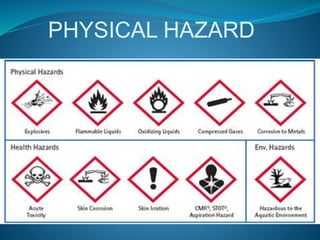
PHYSICAL HAZARD
One of the most common physical 
hazards involving computer technicians 
is cables running across the floor . If 
someone trips, falls, and hurts himself 
because of a cable you ran across the 
floor , someone (you , your employer , or 
your customer) has a serious legal 
negligence problem . If you need to 
temporarily run a cable across the floor , 
place a Danger sign similar to those “wet 
floor” signs by cleaning services.
For cables that are temporary but will 
need to run across the floor for a 
longer period of time , use “gaffers 
tape” . Gaffers tape is a heavy tape 
with strong adhesive to the floor .It 
comes in a wide range of colors , 
from un intrusive matte black to 
hazard warning red . Although it has 
strong adhesive , it can be removed 
easily and cleanly.
For long term cable routing there 
is a wide variety of cable 
organizing devices like cable ties , 
cable raceway which can be used 
to run cable safety along the wall 
or ceiling.
Other common physical hazards 
include leaving tools on top of 
ladders and placing electronic 
equipment in precarious positions 
or on support that is not sturdy 
enough or not designed for 
holding electronic equipment.
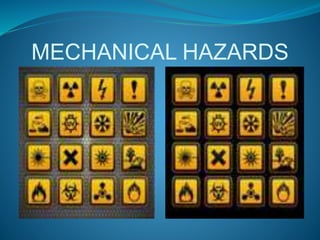
MECHANICAL HAZARDS
 When working on electronic equipment , ask yourself “Is 
there any way this equipment could hurt me?”.You might 
stick your hand in a printer and suddenly the paper feed 
arm moves , feeding not only paper through the printer , 
but a piece of you finger too.
 You might move your hand past a computer chassis and 
lose a chunk of flesh because it is razor sharp . When 
working on electronic equipment always be alert to any 
possibility of being hurt by moving parts , hot components 
, or sharp edges.
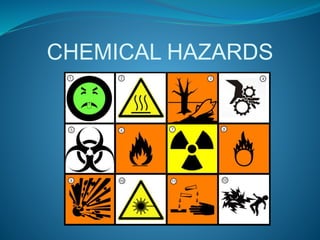
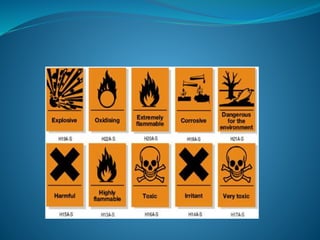
CHEMICAL HAZARDS
There is a wide array of chemicals used 
with electronic equipment . There are 
display cleaning chemicals , keyboard 
cleaning chemicals , compressed gas dirt 
and dust removers , and many cleaning 
solvents . Some of these chemicals can be 
harmful if accidentally swallowed , get 
on bare skin , or get in eyes . Before using 
any chemicals for electronic equipment 
always read the warnings and instructions 
on the label.
Also be very careful when 
dealing with inkjet printer 
cartridges , or laser printer 
toner cartridges . Ink and 
toner can stain skin , 
clothing , and carpet .
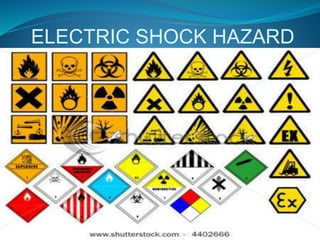
ELECTRIC SHOCK HAZARD
Inside computers and 
electronic equipment , there is 
a range of voltages from 3.3 
volts , most of these are 
harmless . But at the power 
supply , you’ll find line voltage 
,which is a lethal 220 volts.
Most of the time while working 
inside computers and electronic 
equipment , you’ll want them 
unplugged from the wall socket . 
It you need to work on equipment 
while it is still plugged in or 
powered up , remove all jewelry 
and wrist watches.
If you must work inside a line power 
distribution box , wear an electrician’s 
rubber insulated gloves and safety 
glasses. You might think you don’t need 
these safety devices because you are 
going to be extra careful , but one little 
slip could cause a flaming explosion that 
could take off your hand , embed shrapnel 
in your eyes , or conduct electricity 
through your heart , where it takes only 
10 milliamps (0.01) to kill a human.
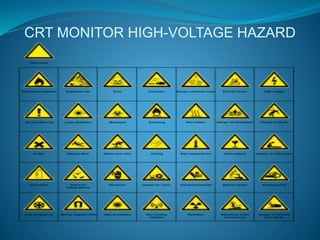
CRT MONITOR HIGH-VOLTAGE HAZARD
CRT monitors are becoming less 
common nowadays , but should you 
run into one , it is best NOT to open it 
up .Instead , outsources any CRT 
repair job to a qualified CRT repair 
service . A CRT monitor has a high-voltage 
anode inside it , which can 
carry a charge of to 25,000 volts , and 
it can still be holding a high charge 
days after the power is removed .
If you must open a CRT monitor case for 
some reason , be sure to study the proper 
way to discharge a CRT before you 
proceed . It involves using a jumper wire 
and a flat blade screwdriver to shorten the 
anode to ground . After being discharged 
, even with no power connection , the 
anode voltage will actually build up again 
. So you have to repeatedly discharge it.

Computer hazard

  • 2.
  • 3.
    One of themost common physical hazards involving computer technicians is cables running across the floor . If someone trips, falls, and hurts himself because of a cable you ran across the floor , someone (you , your employer , or your customer) has a serious legal negligence problem . If you need to temporarily run a cable across the floor , place a Danger sign similar to those “wet floor” signs by cleaning services.
  • 4.
    For cables thatare temporary but will need to run across the floor for a longer period of time , use “gaffers tape” . Gaffers tape is a heavy tape with strong adhesive to the floor .It comes in a wide range of colors , from un intrusive matte black to hazard warning red . Although it has strong adhesive , it can be removed easily and cleanly.
  • 5.
    For long termcable routing there is a wide variety of cable organizing devices like cable ties , cable raceway which can be used to run cable safety along the wall or ceiling.
  • 6.
    Other common physicalhazards include leaving tools on top of ladders and placing electronic equipment in precarious positions or on support that is not sturdy enough or not designed for holding electronic equipment.
  • 7.
  • 8.
     When workingon electronic equipment , ask yourself “Is there any way this equipment could hurt me?”.You might stick your hand in a printer and suddenly the paper feed arm moves , feeding not only paper through the printer , but a piece of you finger too.
  • 9.
     You mightmove your hand past a computer chassis and lose a chunk of flesh because it is razor sharp . When working on electronic equipment always be alert to any possibility of being hurt by moving parts , hot components , or sharp edges.
  • 10.
  • 12.
    There is awide array of chemicals used with electronic equipment . There are display cleaning chemicals , keyboard cleaning chemicals , compressed gas dirt and dust removers , and many cleaning solvents . Some of these chemicals can be harmful if accidentally swallowed , get on bare skin , or get in eyes . Before using any chemicals for electronic equipment always read the warnings and instructions on the label.
  • 13.
    Also be verycareful when dealing with inkjet printer cartridges , or laser printer toner cartridges . Ink and toner can stain skin , clothing , and carpet .
  • 14.
  • 15.
    Inside computers and electronic equipment , there is a range of voltages from 3.3 volts , most of these are harmless . But at the power supply , you’ll find line voltage ,which is a lethal 220 volts.
  • 16.
    Most of thetime while working inside computers and electronic equipment , you’ll want them unplugged from the wall socket . It you need to work on equipment while it is still plugged in or powered up , remove all jewelry and wrist watches.
  • 17.
    If you mustwork inside a line power distribution box , wear an electrician’s rubber insulated gloves and safety glasses. You might think you don’t need these safety devices because you are going to be extra careful , but one little slip could cause a flaming explosion that could take off your hand , embed shrapnel in your eyes , or conduct electricity through your heart , where it takes only 10 milliamps (0.01) to kill a human.
  • 18.
  • 19.
    CRT monitors arebecoming less common nowadays , but should you run into one , it is best NOT to open it up .Instead , outsources any CRT repair job to a qualified CRT repair service . A CRT monitor has a high-voltage anode inside it , which can carry a charge of to 25,000 volts , and it can still be holding a high charge days after the power is removed .
  • 20.
    If you mustopen a CRT monitor case for some reason , be sure to study the proper way to discharge a CRT before you proceed . It involves using a jumper wire and a flat blade screwdriver to shorten the anode to ground . After being discharged , even with no power connection , the anode voltage will actually build up again . So you have to repeatedly discharge it.