Systems Analysis and DesignSystems Analysis and Design
5th Edition5th Edition
Chapter 9.Chapter 9. User Interface DesignUser Interface Design
Alan Dennis, Barbara Haley Wixom, and Roberta Roth
9-1© Copyright 2011 John Wiley & Sons, Inc.
Chapter 9 Outline
Principles of user interface
design.
User interface design process.
Navigation design.
Input design.
Output design.
© Copyright 2011 John Wiley & Sons, Inc. 9-2
INTRODUCTION
Interface design is the process of
defining how the system will interact
with external entities.
In this chapter, we focus on the design of
user interfaces – how the system will
interact with the users.
The design of system interfaces defines
how the systems exchange information
with other systems.© Copyright 2011 John Wiley & Sons, Inc. 9-3
(cont’d)
 The user interface includes three fundamental parts:
- The Navigation mechanism - the way in which the
user tells the system what to do.
- The input mechanism – the way in which the system
captures information.
- The output mechanism - the way in which the system
provides information to the user or to other systems.
 Graphical user interfaces (GUI) use windows, menus,
icons, etc., and are the most common type of user
interfaces.
© Copyright 2011 John Wiley & Sons, Inc. 9-4
PRINCIPLES FOR USER INTERFACEPRINCIPLES FOR USER INTERFACE
DESIGNDESIGN
User interface design is an art.
The goal is to make the interface
pleasing to the eye and simple to
use, while minimizing the user’s
effort.
© Copyright 2011 John Wiley & Sons, Inc. 9-5
(cont’d)
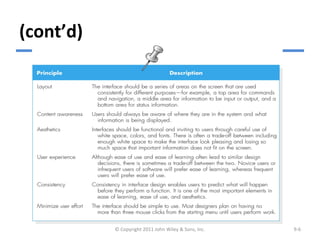
© Copyright 2011 John Wiley & Sons, Inc. 9-6
Layout
 Layout refers to organizing areas of the screen and
document for different purposes and using these
areas consistently throughout the user interface.
 The screen is often divided into three areas:
– The top area provides the user with ways to
navigate through the system;
– The middle and the largest area is for display of
user’s work; and
– The bottom area contains status information
about that the user is doing.
© Copyright 2011 John Wiley & Sons, Inc. 9-7
(cont’d)
The areas and information within areas should
have a natural intuitive flow to minimize
user’s movement from one area to the next.
Ideally, the areas will remain consistent in
–size,
–shape,
–placement for the forms, and
–reports used to present it.
© Copyright 2011 John Wiley & Sons, Inc. 9-8
(cont’d)
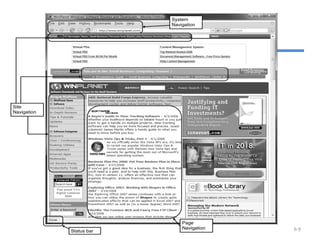
Web page layout with multiple
navigation areas
© Copyright 2011 John Wiley & Sons, Inc. 9-9
(cont’d)
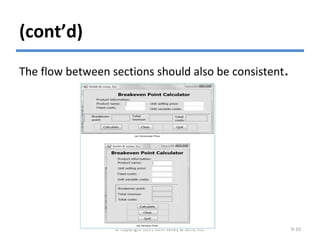
The flow between sections should also be consistent.
© Copyright 2011 John Wiley & Sons, Inc. 9-10
Content Awareness
Content awareness refers to the ability of an
interface to make the user aware of the
information it contains.
All interfaces should have titles.
Menus should show where the user are and
where the user came from to get there.
All area should be clear and well defined.
Content awareness also applies to the fields and
field labels within each area, and the information
that a form or report contains.
© Copyright 2011 John Wiley & Sons, Inc. 9-11
Aesthetics
Aesthetics refers to designing interfaces that
pleasing to the eye.
Interfaces need to be functional and inviting
to use.
In general, all forms and reports need a
certain amount of white space.
The design of text is also important.
– Fonts and font sizes
– Colors and patterns
© Copyright 2011 John Wiley & Sons, Inc. 9-12
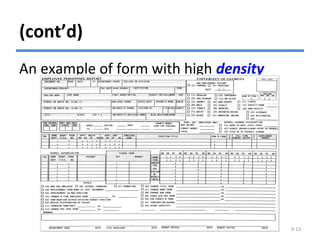
(cont’d)
An example of form with high density
© Copyright 2011 John Wiley & Sons, Inc. 9-13
User Experience
User experience refers to designing the user
interface with the users’ level of computer
experience in mind.
Novice users are concerned with easy of
learning.
Expert users are concerned with easy of use.
Often, the two objectives are complementary
and lead to similar design decisions, but
sometimes there are trade-offs.
© Copyright 2011 John Wiley & Sons, Inc. 9-14
Consistency
 Consistency usually refers to the interface within one
computer system, so that all parts of the same system
work in the same way. Ideally, however, the system
also should be consistent with other computer systems
in the organization.
 Consistency enables users to predict what will happen,
and to reduce the amount of learning.
 Consistency occurs at many different levels.
– Navigation controls;
– Terminology;
– Report and form design.
© Copyright 2011 John Wiley & Sons, Inc. 9-15
Minimize User Effort
Minimizing user effort means using the
fewest possible mouse clicks or keystrokes
to move from one part of the system to
another.
Three-clicks rule
– Users should be able to go from the start or main
menu of a system to the information or action
they want in no more than three mouse clicks or
three keystrokes.
© Copyright 2011 John Wiley & Sons, Inc. 9-16
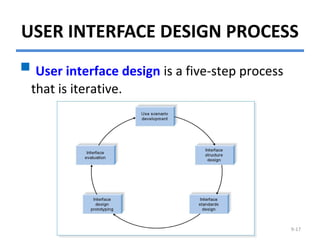
USER INTERFACE DESIGN PROCESS
© Copyright 2011 John Wiley & Sons, Inc. 9-17
 User interface design is a five-step process
that is iterative.
Use Scenario Development
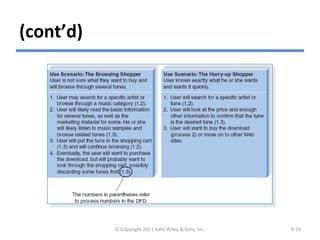
A use scenario is an outline of steps
that user s perform to accomplish
some part of their work.
Use scenarios are presented in a
simple narrative description that is
tied to the DFD.
© Copyright 2011 John Wiley & Sons, Inc. 9-18
(cont’d)
Examples of use scenarios
© Copyright 2011 John Wiley & Sons, Inc. 9-19
Interface Structure Design
 The interface structure design defines the basic
components of the interface and how they work
together to provide functionality to users.
 An interface structure diagram (ISD) is used to show
how all screens, forms, and reports are related and
how the user moves from one to another.
 An ISD is similar to a DFD in that it uses boxes and lines
to show the structure. However, unlike DFDs, there
are no commonly used rules or standards for ISDs.
 The basic structure of the interface follows the basic
structure of the business process itself as defined in
the process model.© Copyright 2011 John Wiley & Sons, Inc. 9-20
(cont’d)
Interface Structure Diagram Example
© Copyright 2011 John Wiley & Sons, Inc. 9-21
Interface Standards Design
 The interface standards are the basic design
elements that are common across the individual
screens, forms, and reports within the system.
 An interface metaphor is a concept from the real
world that is used as a model for the computer
system.
– E.g., Quicken uses a checkbook metaphor.
 The interface template defines the general
appearance of all screens and the paper-based forms
and reports.
© Copyright 2011 John Wiley & Sons, Inc. 9-22
(cont’d)
 The template specifies the names that the
interface will use for the major interface
objects, the fundamental building blocks of
the system.
 The template gives names to the most
commonly used interface actions.
The interface objects and actions, and also
their status, may be represented by interface
icons.
© Copyright 2011 John Wiley & Sons, Inc. 9-23
Interface Design Prototyping
An interface design prototype is a mock-
up or a simulation of a computer screen,
form, or report.
Common approaches to interface design
prototyping:
– Storyboards
– HTML prototypes
– Language prototypes.
© Copyright 2011 John Wiley & Sons, Inc. 9-24
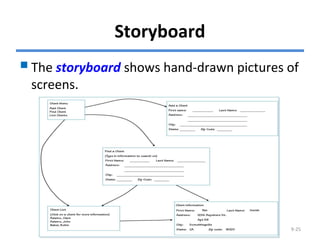
Storyboard
The storyboard shows hand-drawn pictures of
screens.
© Copyright 2011 John Wiley & Sons, Inc. 9-25
HTML Prototype
An HTML prototype is built with the
use of Web pages created in HTML
(hypertext mark-up language).
 The designer uses HTML to create a
series of Web pages that show the
fundamental parts of the system.
© Copyright 2011 John Wiley & Sons, Inc. 9-26
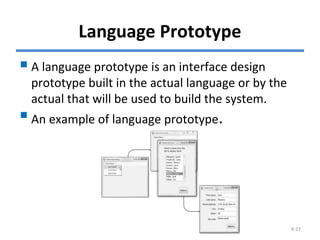
Language Prototype
A language prototype is an interface design
prototype built in the actual language or by the
actual that will be used to build the system.
An example of language prototype.
© Copyright 2011 John Wiley & Sons, Inc. 9-27
Interface Evaluation
 The objective of interface evaluation is to
understand how to improve the interface design.
 There are four common approaches to interface
evaluation.
1. Heuristic evaluation - Compare the interface to a
checklist of design principles.
2. Walk-through evaluation - It is a meeting conducted
with the users to walk through the interface.
3. Interactive evaluation - Users try out the interface.
4. Formal usability testing - It is a formal testing
process to understand how usable the interface is.
© Copyright 2011 John Wiley & Sons, Inc. 9-28
NAVIGATION DESIGN
Basic Principles
- Analysts usually must assume that users
have not read the manual, have not
attended training, and do not have
external help readily at hand.
- All controls should be clear and
understandable and placed in an
intuitive location on the screen.
© Copyright 2011 John Wiley & Sons, Inc. 9-29
(cont’d)
 Prevent Mistakes - The first of principle of designing
navigation control is to prevent users from making
mistakes.
– Labeling commands appropriately and limiting
choices.
– Confirming with the user that the actions are difficult
or impossible to undo.
 Simplify Recovery from Mistakes – making “undo”
buttons whenever possible.
 Use Consistent Grammar Order – Windows
application uses an object-action grammar order.
© Copyright 2011 John Wiley & Sons, Inc. 9-30
Types of Navigation Control
There are three basic software approaches for
defining user commands:
- Languages: command language and natural
language.
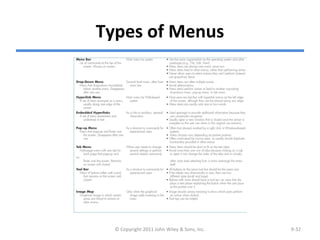
- Menus: A menu presents the user with a list of
choices.
- Direct Manipulation: With direct manipulation,
the user enters commands by working directly
with interface objects.
© Copyright 2011 John Wiley & Sons, Inc. 9-31
Types of Menus
© Copyright 2011 John Wiley & Sons, Inc. 9-32
Messages
Messages are the way in which the system
responds to a user and informs the user of
the status of the interaction.
Messages should be clear, concise, and
complete.
All messages should be grammatically
correct and free of jargon and
abbreviations (unless they are the users’
ones).
Avoid negatives and humor.© Copyright 2011 John Wiley & Sons, Inc. 9-33
(cont’d)
© Copyright 2011 John Wiley & Sons, Inc. 9-34
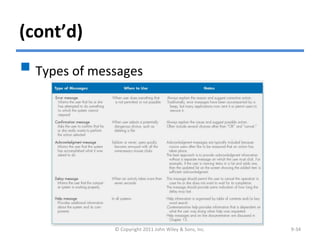
 Types of messages
INPUT DESIGN
Input mechanisms facilitate the
entry of data into the computer
system.
Input design means designing the
screen used to enter information
and forms on which the users write
and type information.
© Copyright 2011 John Wiley & Sons, Inc. 9-35
Basic Principles
The goal of input design is to capture
accurate information for the system
simply and easily.
© Copyright 2011 John Wiley & Sons, Inc. 9-36
Use Online and Batch Processing
Appropriately
There are two general formats for entering inputs
into a computer system: online processing and
batch processing.
Online processing: each input item is entered
into the system immediately.
Batch processing: all the inputs collected over
some period are gathered together and entered
into the system at one time in a batch.
Batch processing simplifies data communications
and cuts communications costs.
© Copyright 2011 John Wiley & Sons, Inc. 9-37
Capture Data at the Source
The most important principle of
input design is to capture the data in
an electronic format at the original
source.
It reduces duplication work, reduces,
processing time, decreases the cost,
decreases the probability of error.
© Copyright 2011 John Wiley & Sons, Inc. 9-38
(cont’d)
 Source data automation refers to using special
hardware devices to automatically capture data
without requiring anyone to type it.
 Source data automation technologies:
– bar code readers
– optical character recognition
– magnetic stripe readers
– smart cards
– RFID (radio frequency identification) tags
– the Web.
© Copyright 2011 John Wiley & Sons, Inc. 9-39
Minimize Keystrokes
Keystrokes cost time and money.
The system should never ask for information
that can be obtained in another way (e.g., by
retrieving it from a database).
The system should not require a user to type
information that can be selected from a list.
The frequent values should be used as the
default value for the data.
© Copyright 2011 John Wiley & Sons, Inc. 9-40
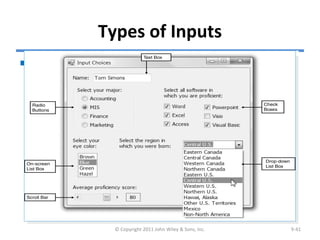
Types of Inputs
 There are many different types of inputs, in the same way
that there are many different types of fields.
© Copyright 2011 John Wiley & Sons, Inc. 9-41
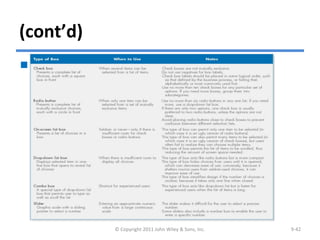
(cont’d)
© Copyright 2011 John Wiley & Sons, Inc. 9-42
There are many types of selection boxes
Input Validation
© Copyright 2011 John Wiley & Sons, Inc. 9-43
All data entered into the system
must be validated in order to ensure
accuracy.
Input validation (also called edit
checks) can take many forms
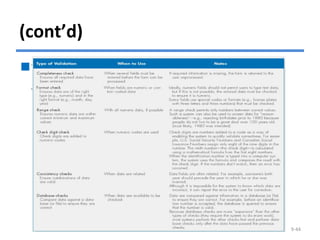
(cont’d)
There are six different types of
validation checks:
© Copyright 2011 John Wiley & Sons, Inc. 9-44
OUTPUT DESIGN
Outputs are the reports that the
system produces, whether on the
screen, on paper, or in other media,
such as the Web.
Outputs are the most visible part of
any system.
© Copyright 2011 John Wiley & Sons, Inc. 9-45
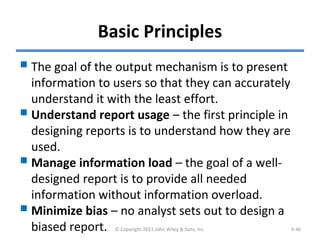
Basic Principles
The goal of the output mechanism is to present
information to users so that they can accurately
understand it with the least effort.
Understand report usage – the first principle in
designing reports is to understand how they are
used.
Manage information load – the goal of a well-
designed report is to provide all needed
information without information overload.
Minimize bias – no analyst sets out to design a
biased report. © Copyright 2011 John Wiley & Sons, Inc. 9-46
(cont’d)
© Copyright 2011 John Wiley & Sons, Inc. 9-47
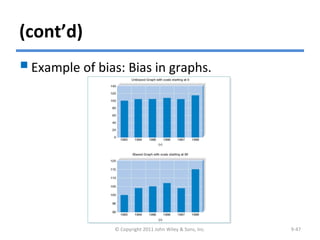
Example of bias: Bias in graphs.
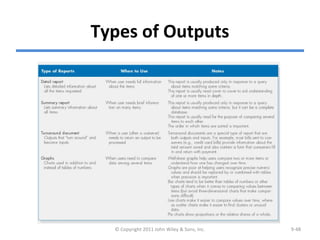
Types of Outputs
© Copyright 2011 John Wiley & Sons, Inc. 9-48
Media
The two dominant media of reports are
paper and electronic.
Paper is the more traditional medium and
is relatively permanent, easy to use, highly
portable, and accessible in most situations.
However, paper reports are expensive.
Many organizations are moving to
electronic production of reports.
© Copyright 2011 John Wiley & Sons, Inc. 9-49
SUMMARY
User interface design principles
- Layout, content awareness, aesthetics, user
experience, consistency, minimize user effort.
The user interface design process
- Use scenario development, interface structure
design, interface standards design, interface
design prototyping, and interface evaluation.
© Copyright 2011 John Wiley & Sons, Inc. 9-50
(cont’d)
Navigation design
- The fundamental goal of navigation design is to
make the system as simple to use as possible.
Input design
- The goal of input design is to simply and easily
capture accurate information for the system.
Output design
- The goal of the output design is to present
information to users so that they can accurately
understand it with the least effort.
© Copyright 2011 John Wiley & Sons, Inc. 9-51
Copyright 2011 John Wiley & Sons, Inc.
All rights reserved. Reproduction or translation of this work
beyond that permitted in Section 117 of the 1976 United States
Copyright Act without the express written permission of the
copyright owner is unlawful. Request for further information
should be addressed to the Permissions Department, John Wiley
& Sons, Inc. The purchaser may make back-up copies for his/her
own use only and not for redistribution or resale. The Publisher
assumes no responsibility for errors, omissions, or damages,
caused by the use of these programs or from the use of the
information contained herein.
© Copyright 2011 John Wiley & Sons, Inc. 9-52

Ch09-User Interface Design

  • 1.
    Systems Analysis andDesignSystems Analysis and Design 5th Edition5th Edition Chapter 9.Chapter 9. User Interface DesignUser Interface Design Alan Dennis, Barbara Haley Wixom, and Roberta Roth 9-1© Copyright 2011 John Wiley & Sons, Inc.
  • 2.
    Chapter 9 Outline Principlesof user interface design. User interface design process. Navigation design. Input design. Output design. © Copyright 2011 John Wiley & Sons, Inc. 9-2
  • 3.
    INTRODUCTION Interface design isthe process of defining how the system will interact with external entities. In this chapter, we focus on the design of user interfaces – how the system will interact with the users. The design of system interfaces defines how the systems exchange information with other systems.© Copyright 2011 John Wiley & Sons, Inc. 9-3
  • 4.
    (cont’d)  The userinterface includes three fundamental parts: - The Navigation mechanism - the way in which the user tells the system what to do. - The input mechanism – the way in which the system captures information. - The output mechanism - the way in which the system provides information to the user or to other systems.  Graphical user interfaces (GUI) use windows, menus, icons, etc., and are the most common type of user interfaces. © Copyright 2011 John Wiley & Sons, Inc. 9-4
  • 5.
    PRINCIPLES FOR USERINTERFACEPRINCIPLES FOR USER INTERFACE DESIGNDESIGN User interface design is an art. The goal is to make the interface pleasing to the eye and simple to use, while minimizing the user’s effort. © Copyright 2011 John Wiley & Sons, Inc. 9-5
  • 6.
    (cont’d) © Copyright 2011John Wiley & Sons, Inc. 9-6
  • 7.
    Layout  Layout refersto organizing areas of the screen and document for different purposes and using these areas consistently throughout the user interface.  The screen is often divided into three areas: – The top area provides the user with ways to navigate through the system; – The middle and the largest area is for display of user’s work; and – The bottom area contains status information about that the user is doing. © Copyright 2011 John Wiley & Sons, Inc. 9-7
  • 8.
    (cont’d) The areas andinformation within areas should have a natural intuitive flow to minimize user’s movement from one area to the next. Ideally, the areas will remain consistent in –size, –shape, –placement for the forms, and –reports used to present it. © Copyright 2011 John Wiley & Sons, Inc. 9-8
  • 9.
    (cont’d) Web page layoutwith multiple navigation areas © Copyright 2011 John Wiley & Sons, Inc. 9-9
  • 10.
    (cont’d) The flow betweensections should also be consistent. © Copyright 2011 John Wiley & Sons, Inc. 9-10
  • 11.
    Content Awareness Content awarenessrefers to the ability of an interface to make the user aware of the information it contains. All interfaces should have titles. Menus should show where the user are and where the user came from to get there. All area should be clear and well defined. Content awareness also applies to the fields and field labels within each area, and the information that a form or report contains. © Copyright 2011 John Wiley & Sons, Inc. 9-11
  • 12.
    Aesthetics Aesthetics refers todesigning interfaces that pleasing to the eye. Interfaces need to be functional and inviting to use. In general, all forms and reports need a certain amount of white space. The design of text is also important. – Fonts and font sizes – Colors and patterns © Copyright 2011 John Wiley & Sons, Inc. 9-12
  • 13.
    (cont’d) An example ofform with high density © Copyright 2011 John Wiley & Sons, Inc. 9-13
  • 14.
    User Experience User experiencerefers to designing the user interface with the users’ level of computer experience in mind. Novice users are concerned with easy of learning. Expert users are concerned with easy of use. Often, the two objectives are complementary and lead to similar design decisions, but sometimes there are trade-offs. © Copyright 2011 John Wiley & Sons, Inc. 9-14
  • 15.
    Consistency  Consistency usuallyrefers to the interface within one computer system, so that all parts of the same system work in the same way. Ideally, however, the system also should be consistent with other computer systems in the organization.  Consistency enables users to predict what will happen, and to reduce the amount of learning.  Consistency occurs at many different levels. – Navigation controls; – Terminology; – Report and form design. © Copyright 2011 John Wiley & Sons, Inc. 9-15
  • 16.
    Minimize User Effort Minimizinguser effort means using the fewest possible mouse clicks or keystrokes to move from one part of the system to another. Three-clicks rule – Users should be able to go from the start or main menu of a system to the information or action they want in no more than three mouse clicks or three keystrokes. © Copyright 2011 John Wiley & Sons, Inc. 9-16
  • 17.
    USER INTERFACE DESIGNPROCESS © Copyright 2011 John Wiley & Sons, Inc. 9-17  User interface design is a five-step process that is iterative.
  • 18.
    Use Scenario Development Ause scenario is an outline of steps that user s perform to accomplish some part of their work. Use scenarios are presented in a simple narrative description that is tied to the DFD. © Copyright 2011 John Wiley & Sons, Inc. 9-18
  • 19.
    (cont’d) Examples of usescenarios © Copyright 2011 John Wiley & Sons, Inc. 9-19
  • 20.
    Interface Structure Design The interface structure design defines the basic components of the interface and how they work together to provide functionality to users.  An interface structure diagram (ISD) is used to show how all screens, forms, and reports are related and how the user moves from one to another.  An ISD is similar to a DFD in that it uses boxes and lines to show the structure. However, unlike DFDs, there are no commonly used rules or standards for ISDs.  The basic structure of the interface follows the basic structure of the business process itself as defined in the process model.© Copyright 2011 John Wiley & Sons, Inc. 9-20
  • 21.
    (cont’d) Interface Structure DiagramExample © Copyright 2011 John Wiley & Sons, Inc. 9-21
  • 22.
    Interface Standards Design The interface standards are the basic design elements that are common across the individual screens, forms, and reports within the system.  An interface metaphor is a concept from the real world that is used as a model for the computer system. – E.g., Quicken uses a checkbook metaphor.  The interface template defines the general appearance of all screens and the paper-based forms and reports. © Copyright 2011 John Wiley & Sons, Inc. 9-22
  • 23.
    (cont’d)  The templatespecifies the names that the interface will use for the major interface objects, the fundamental building blocks of the system.  The template gives names to the most commonly used interface actions. The interface objects and actions, and also their status, may be represented by interface icons. © Copyright 2011 John Wiley & Sons, Inc. 9-23
  • 24.
    Interface Design Prototyping Aninterface design prototype is a mock- up or a simulation of a computer screen, form, or report. Common approaches to interface design prototyping: – Storyboards – HTML prototypes – Language prototypes. © Copyright 2011 John Wiley & Sons, Inc. 9-24
  • 25.
    Storyboard The storyboard showshand-drawn pictures of screens. © Copyright 2011 John Wiley & Sons, Inc. 9-25
  • 26.
    HTML Prototype An HTMLprototype is built with the use of Web pages created in HTML (hypertext mark-up language).  The designer uses HTML to create a series of Web pages that show the fundamental parts of the system. © Copyright 2011 John Wiley & Sons, Inc. 9-26
  • 27.
    Language Prototype A languageprototype is an interface design prototype built in the actual language or by the actual that will be used to build the system. An example of language prototype. © Copyright 2011 John Wiley & Sons, Inc. 9-27
  • 28.
    Interface Evaluation  Theobjective of interface evaluation is to understand how to improve the interface design.  There are four common approaches to interface evaluation. 1. Heuristic evaluation - Compare the interface to a checklist of design principles. 2. Walk-through evaluation - It is a meeting conducted with the users to walk through the interface. 3. Interactive evaluation - Users try out the interface. 4. Formal usability testing - It is a formal testing process to understand how usable the interface is. © Copyright 2011 John Wiley & Sons, Inc. 9-28
  • 29.
    NAVIGATION DESIGN Basic Principles -Analysts usually must assume that users have not read the manual, have not attended training, and do not have external help readily at hand. - All controls should be clear and understandable and placed in an intuitive location on the screen. © Copyright 2011 John Wiley & Sons, Inc. 9-29
  • 30.
    (cont’d)  Prevent Mistakes- The first of principle of designing navigation control is to prevent users from making mistakes. – Labeling commands appropriately and limiting choices. – Confirming with the user that the actions are difficult or impossible to undo.  Simplify Recovery from Mistakes – making “undo” buttons whenever possible.  Use Consistent Grammar Order – Windows application uses an object-action grammar order. © Copyright 2011 John Wiley & Sons, Inc. 9-30
  • 31.
    Types of NavigationControl There are three basic software approaches for defining user commands: - Languages: command language and natural language. - Menus: A menu presents the user with a list of choices. - Direct Manipulation: With direct manipulation, the user enters commands by working directly with interface objects. © Copyright 2011 John Wiley & Sons, Inc. 9-31
  • 32.
    Types of Menus ©Copyright 2011 John Wiley & Sons, Inc. 9-32
  • 33.
    Messages Messages are theway in which the system responds to a user and informs the user of the status of the interaction. Messages should be clear, concise, and complete. All messages should be grammatically correct and free of jargon and abbreviations (unless they are the users’ ones). Avoid negatives and humor.© Copyright 2011 John Wiley & Sons, Inc. 9-33
  • 34.
    (cont’d) © Copyright 2011John Wiley & Sons, Inc. 9-34  Types of messages
  • 35.
    INPUT DESIGN Input mechanismsfacilitate the entry of data into the computer system. Input design means designing the screen used to enter information and forms on which the users write and type information. © Copyright 2011 John Wiley & Sons, Inc. 9-35
  • 36.
    Basic Principles The goalof input design is to capture accurate information for the system simply and easily. © Copyright 2011 John Wiley & Sons, Inc. 9-36
  • 37.
    Use Online andBatch Processing Appropriately There are two general formats for entering inputs into a computer system: online processing and batch processing. Online processing: each input item is entered into the system immediately. Batch processing: all the inputs collected over some period are gathered together and entered into the system at one time in a batch. Batch processing simplifies data communications and cuts communications costs. © Copyright 2011 John Wiley & Sons, Inc. 9-37
  • 38.
    Capture Data atthe Source The most important principle of input design is to capture the data in an electronic format at the original source. It reduces duplication work, reduces, processing time, decreases the cost, decreases the probability of error. © Copyright 2011 John Wiley & Sons, Inc. 9-38
  • 39.
    (cont’d)  Source dataautomation refers to using special hardware devices to automatically capture data without requiring anyone to type it.  Source data automation technologies: – bar code readers – optical character recognition – magnetic stripe readers – smart cards – RFID (radio frequency identification) tags – the Web. © Copyright 2011 John Wiley & Sons, Inc. 9-39
  • 40.
    Minimize Keystrokes Keystrokes costtime and money. The system should never ask for information that can be obtained in another way (e.g., by retrieving it from a database). The system should not require a user to type information that can be selected from a list. The frequent values should be used as the default value for the data. © Copyright 2011 John Wiley & Sons, Inc. 9-40
  • 41.
    Types of Inputs There are many different types of inputs, in the same way that there are many different types of fields. © Copyright 2011 John Wiley & Sons, Inc. 9-41
  • 42.
    (cont’d) © Copyright 2011John Wiley & Sons, Inc. 9-42 There are many types of selection boxes
  • 43.
    Input Validation © Copyright2011 John Wiley & Sons, Inc. 9-43 All data entered into the system must be validated in order to ensure accuracy. Input validation (also called edit checks) can take many forms
  • 44.
    (cont’d) There are sixdifferent types of validation checks: © Copyright 2011 John Wiley & Sons, Inc. 9-44
  • 45.
    OUTPUT DESIGN Outputs arethe reports that the system produces, whether on the screen, on paper, or in other media, such as the Web. Outputs are the most visible part of any system. © Copyright 2011 John Wiley & Sons, Inc. 9-45
  • 46.
    Basic Principles The goalof the output mechanism is to present information to users so that they can accurately understand it with the least effort. Understand report usage – the first principle in designing reports is to understand how they are used. Manage information load – the goal of a well- designed report is to provide all needed information without information overload. Minimize bias – no analyst sets out to design a biased report. © Copyright 2011 John Wiley & Sons, Inc. 9-46
  • 47.
    (cont’d) © Copyright 2011John Wiley & Sons, Inc. 9-47 Example of bias: Bias in graphs.
  • 48.
    Types of Outputs ©Copyright 2011 John Wiley & Sons, Inc. 9-48
  • 49.
    Media The two dominantmedia of reports are paper and electronic. Paper is the more traditional medium and is relatively permanent, easy to use, highly portable, and accessible in most situations. However, paper reports are expensive. Many organizations are moving to electronic production of reports. © Copyright 2011 John Wiley & Sons, Inc. 9-49
  • 50.
    SUMMARY User interface designprinciples - Layout, content awareness, aesthetics, user experience, consistency, minimize user effort. The user interface design process - Use scenario development, interface structure design, interface standards design, interface design prototyping, and interface evaluation. © Copyright 2011 John Wiley & Sons, Inc. 9-50
  • 51.
    (cont’d) Navigation design - Thefundamental goal of navigation design is to make the system as simple to use as possible. Input design - The goal of input design is to simply and easily capture accurate information for the system. Output design - The goal of the output design is to present information to users so that they can accurately understand it with the least effort. © Copyright 2011 John Wiley & Sons, Inc. 9-51
  • 52.
    Copyright 2011 JohnWiley & Sons, Inc. All rights reserved. Reproduction or translation of this work beyond that permitted in Section 117 of the 1976 United States Copyright Act without the express written permission of the copyright owner is unlawful. Request for further information should be addressed to the Permissions Department, John Wiley & Sons, Inc. The purchaser may make back-up copies for his/her own use only and not for redistribution or resale. The Publisher assumes no responsibility for errors, omissions, or damages, caused by the use of these programs or from the use of the information contained herein. © Copyright 2011 John Wiley & Sons, Inc. 9-52