FileNet P8
Rafie Tarabay
eng_rafie@mans.edu.eg
IBM FileNet P8 overview
• The IBM FileNet P8 Platform is a unified-
enterprise content management and business
process management platform that resolves
content, process, compliance, and discovery
issues in one single solution.
FileNet Core Component
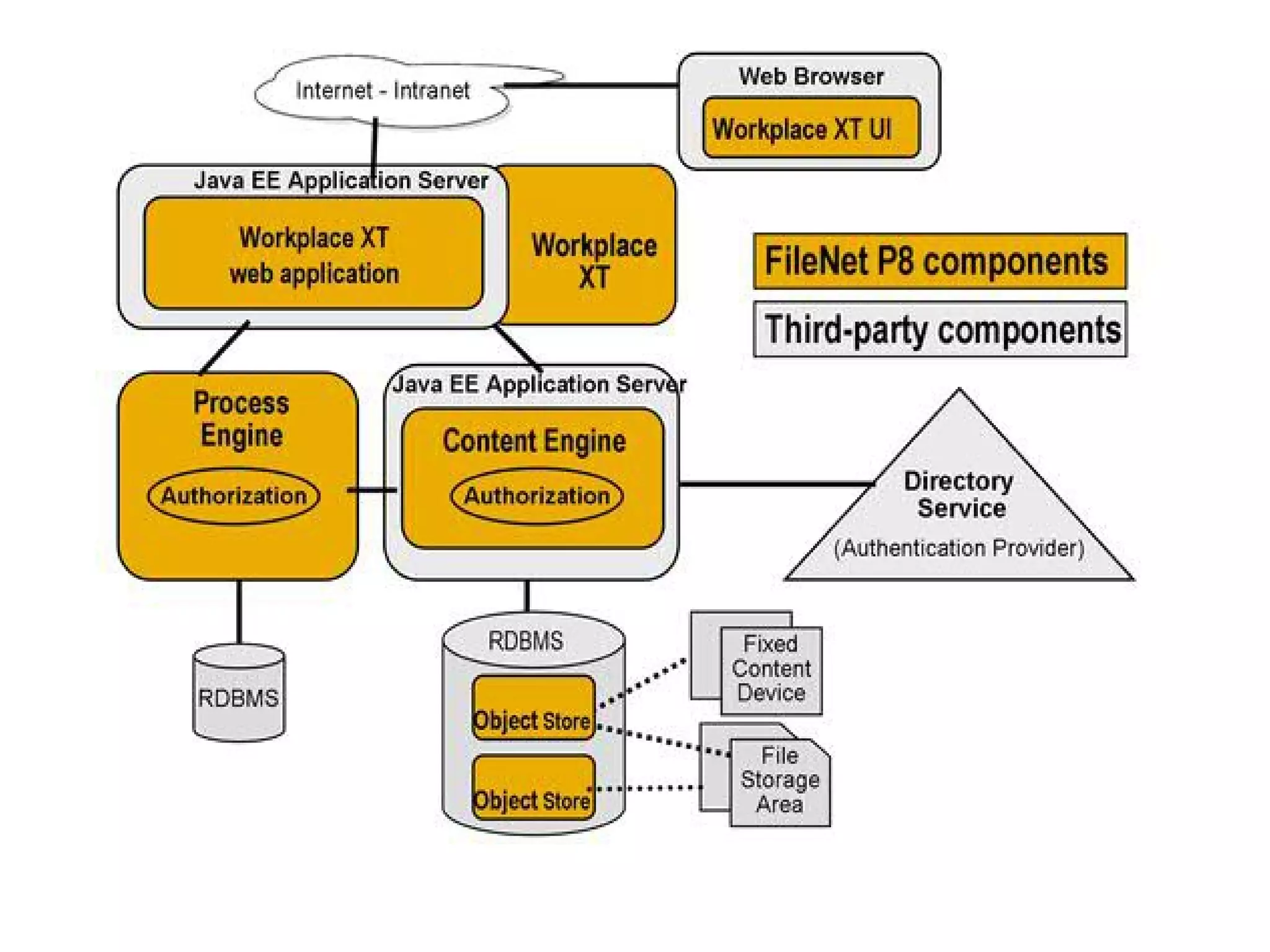
• Content Engine (CE)
• Process Engine (PE)
• Workplace,Workplace XT (WP/WP XT)
Content Engine (CE)
1-Content Engine
• EJB Application
• Store all contents within FileNet
• Store content meta-data in DB
• Provide interface for handling
– Event-based action
– Document life cycle
– Storage integration
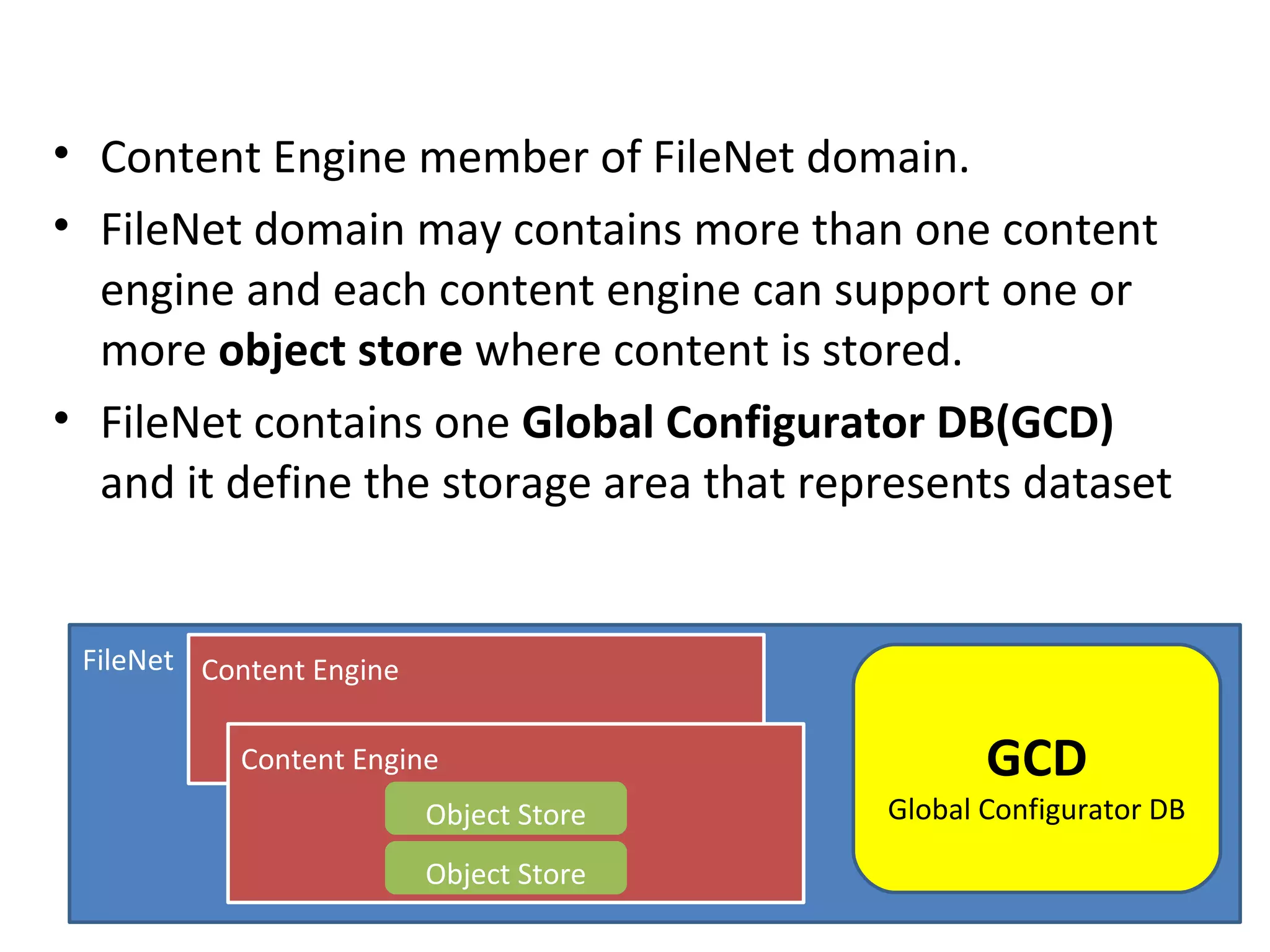
• Content Engine member of FileNet domain.
• FileNet domain may contains more than one content
engine and each content engine can support one or
more object store where content is stored.
• FileNet contains one Global Configurator DB(GCD)
and it define the storage area that represents dataset
FileNet Content Engine
Content Engine
Object Store
Object Store
GCD
Global Configurator DB
CE use an Object Oriented data model define by:
1. Properties
2. Classes
3. Documents
4. Custom Object
5. Foldering
CE Properties
• Object information and meta-data are define
and store as properties for a given object.
CE Classes
• Each object defined as an instance of a class
• The class define
1) what type of object is created.
2) what meta-data.
3) how store the object.
• Main class can contains sub-class that inherit
parent class properties, and can define
additional properties and can override the
parent class behavior.
CE documents
• Object can be document, this object contains
meta-data and one or more content element.
• Document can have life cycle and version, and
can checkin/checkout.
• “DocVersion” table store document object
link documents by “VersionSeries” Object.
CE Custom Object
• It is a meta-data only object with no content
element and are not versionable.
CE Foldering
• Each folder create a single row in Container
table and it used for item organization.
Object Store

Object meta-data always store in normal DB

Object contents can store in
[DB,FileSystem or Fixed Content device]
CE Security
• Define which user allow to create,view,update
and delete any given object.
• It use java authentication model, which based
of “Java Authentication and Authorization Service”
JAAS, content engine relies on application server to
perform JAAS authentication.
• FileNet does NOT contains its own users DB. So, it
use LDAP to get users from the organization domain.
• Access Control Entries (ACE):user privileges on one object.
• Access Control List (ACL):collections of ACE
CE Event Framework
We can run a custom code to response to predefined events like
• Creation
• Deletion
• Update
• Update Security
• Change State
• Checkin
• Checkout
• Cancel Checkout
• Freeze
• Lock
• UnLock
• ….
CE Event Framework
• We can create a custom event and fire it using
“RaiseEvent” method.
• Administrator can configure component to listen
to predefined events to run event handler, ex:
lunch workflow by implement custom event
action.
• Action handler is a java code implements
“EventActionHandler” interface, and deliver as
.jar file located through global class path or
stored locally as “CodeModules”
CE Event Framework
• When a given action occurs on a particular
object, a query executed to find event
subscribe and related event handler.
• Event action handler executed through the
method EventActionHandler.doEvent()
CE interacting with PE
• We can handle events also in content engine by
create a workflow subscription.
• To create a workflow use WorkplaceXT or FileNet
Enterprise manager.
• We can create many versions of workflow but
will not effect the production workflow.
• To publish workflow use “Launch Workflow”
• we can create selection criteria on object level to
launch a workflow only if a major version of
document is added for example.
CE Life Cycle
• Document can move from one state to
another. Ex: in loan application document
move from application to approval.
• Manage document life cycle through:
1. Life cycle policy: define the states that document
can transition through. Policy can apply a new
security template when move to new state.
2. Life cycle action: define the action that occurs when
a document move from one state to another.
CE Storage
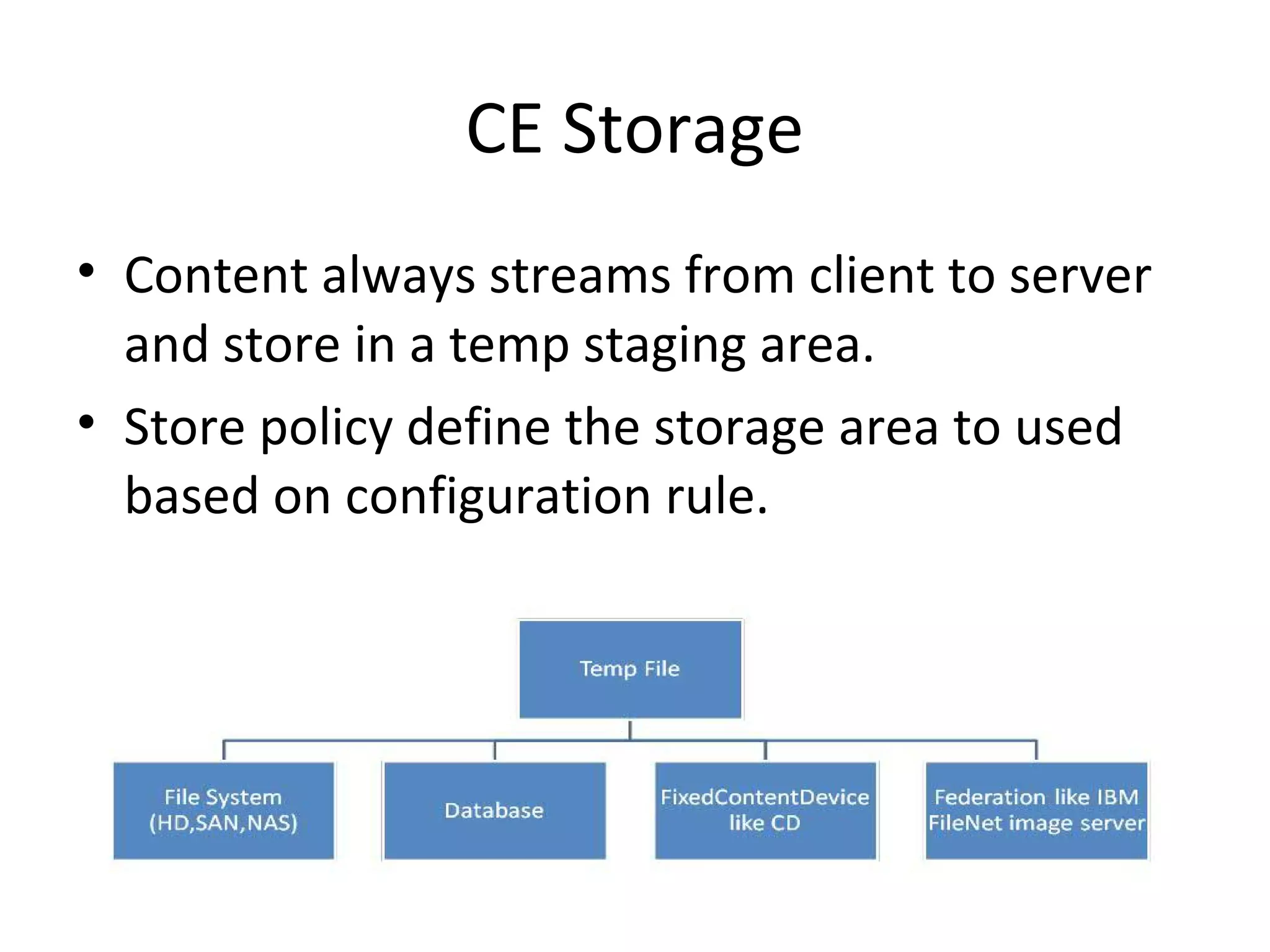
• Content always streams from client to server
and store in a temp staging area.
• Store policy define the storage area to used
based on configuration rule.
CE Storage
• File Location can be define through
– Default Storage Area for object
(or through)
– Storage Policy
CE Fulltext indexing
• Search in objects meta-data, document
textual data.
• We have two search engines:
1. Content search service
2. Legacy content search engine
Content Search Service (CSS)
• Single css server can be used for both indexing
and search. However, it is better to deploy
multiple css servers and assign each one to do
only one job (Indexing or Search).
• Indexing process start when Content Base
Retrieval (CBR) object are created or updated.
[document with class CBR enabled]
Legacy Content Search Engine (CSE)
• Start indexes in collections managed by Verity
server, and temporarily save documents on
file system until indexing, (while CSS index
store in object store).
Migrating from CSE to CSS
To migrated do the next two steps:
1. Enable CSS in object store
2. Switch default search engine to CSS
Content Engine Classification
• When create a new document, a flag
determines whether automatic classification is
executed or not.
• incoming documents of specific content type
can automatically assigned to a target
document class and setting selected
properties on that target class based on value
found in the incoming document.
Content Engine Protocols
• CE communicate with Workplace XT through EJB only.
• CE support communications through :
1. WebService listener (Http protocol)
2. EJB listener
FileNet Enterprise Manager
• It is content engine administration client.
• It use .net APIs over the webservice interface.
• CE Main Components:
1. Document Class
2. Search Template
3. Entity Template
• CE divided into content repository
(Object Repository) then organize
object repository into folders.
• Content repository helps in isolation of contents,
for example create 2012 repository, 2013 repository….
DocuFormW
Content Engine APIs
• .Net/Java, (while PE only java)
• Support methods for handle create , retrieving
, update, delete, updating security.
Federations & Connections
• Sharepoint, LotusQuickr and SAP, store content in
their repositories. Make integration to import, copy,
or move and link data to P8 by using:
1. IBM Content Integrator
2. IBM Content Federation Service
• The communications method using CMIS
(Content Management Interoperability Service),
which is industry-standard method.
Content Management Interoperability
Service (CMIS)
• Support RESTfull and webservice binding.
• Support Create,Read,Update,Delete(CRUD)
operations & Checkin/Checkout &SQL …
Process Engine (PE)
Process Engine
• Process Engine provides the IBM FileNet P8 Platform with
workflow management capabilities. These capabilities
include personal inboxes, work object routing, group
queues, process tracking…
• PE store all workflow information in a DB, except raw
process map -> Content Engine
• PE is a single process multi-thread architecture.
• PE can connect only to single process store.
• PE processes types:
1. PE server: handle all DB persistence, background tasks,
threads.
2. PE Manager: run as single instance, managing PE server
instances include Start/Stop them.
PE configuration
• PE divides workflow data into work items.
• Work items found under Rosters and Queues
• Workflow DB can be standalone or co-located
with CE DB.
• IBM Case Manager need CE DB and PE DB to
co-located in the same DB.
• Workflow definitions stored into CE then
transferred and compiled into PE.
• PE Connections
– Connection Point
 Regions
– Work Queues
– Component Queues
– User Queues
– Rostors
– Event Logs
– Application Space
Regions
• PE can split process data to regions within a
single process store.
• region contains all of the related process
definitions and metadata in separate tables
within the Process Engine database.
• region also contains a unique set of rosters,
queues, and work items.
Workflow Definition
• Consists of maps and each map contains
(steps & routing logic) stored in CE then
transferred and compiled in PE.
• It build using “Process Designer”
Work items
• Lunch workflow = create new instance
contains one or more work items
• Work items contains properties, and
reference to one or more content
objects(attachment) stored into CE.
Rosters
• Workflow at design time define the related roster.
• When launch workflow the roster record the
creation data and contains also some system-level
fields and some exposed properties from work item.
• Restore use for administrative purposes to find work
items regardless of process step.
• When create new Roster, we create new DB table.
Queues
• Helps to find work item process on a
particular step, or the work item that relevant
to users/applications.
Types of Queues
1. Process Queues: public queues where
numerous users might have access and any of
those users are allowed to browse and process
work items from those queues
2. User Queues: work items for a particular user.
3. Component Queues: process queue that allow
run custom actions in background using
“Component Manager Application”
4. System Queues: manage system activities on
work items
In-baskets
• Create a view that has one or more filters to
apply business rule-based criteria to the items
in the queue.
• These filters cannot be modified by the user,
only by the process administrators
Roles
• tie a set of users and groups to one or more
in-baskets.
Application spaces
• Group of roles that apply to application or line
of business.
Event logs
• Event logs, like rosters, are separate tables within the
Process Engine database. Each row represents an
event action for a specific work item.
• The types of events that get logged are configurable
and provide a fair degree of control over how much
data is collected and what it represents. The event log
table can be queried to retrieve data on historical
events that occurred within the system.
• The Process Tracker application uses this data to show
the history for a given work item. The event log tables
are also the primary source of data for the analytics
engine.
PE Access control
• Security manage on level of queues and
rosters not on the work items level.
Process orchestration
• Individual process steps can call out to an
external web service or, conversely, be exposed
as a web service for external consumption.
• There are three main actions involved: receive,
reply, and invoke. The receive and reply steps
define a point in the process to expose externally
as a web services entry point and if necessary
return a response. The invoke and receive steps
call out to an external web service and if
necessary receive a subsequent response.
Component Integrator
• a service for integrating with external systems.
• The Component Integrator makes it possible to import
custom Java components and make them available in a
workflow.
• In the workflow definition, a component step connects to a
component queue configured for one or more operations
in the external component.
There are two parts to the Component Integrator:
1. Component Manager: connects a work item with its
appropriate Java or JMS Service Adaptor, This service runs on
the Workplace/Workplace XT.
2. Configuration: Configure the component queues using Process
Configuration Console.
Analysis and optimization
Case Analyzer tool :
Analyze business processes. Using Microsoft MS SQL
Analysis Services to supply the data in a format that can
be quickly explored and drilled down by users.
Process Simulator tool :
it helps to perform what-if simulations of the process
model to discover bottlenecks in the process execution.
Analysis and simulation aim for continuous improvement
in the quality of the business processes.
PE APIs
There are three primary APIs for PE
1. Java API
2. REST API
3. web services API
The APIs provide classes and methods for:
1. Creating, working, and completing workflow items
2. Searching for work items in queues and rosters
3. Viewing the event logs
IBM Case Manager
• Helps in workflow creation
• Need CE DB,PE DB co-located
• Need Workplace XT
Workplace (WP, WP XT)
• Click to edit Master text
styles
– Second level
• Third level
– Fourth level
» Fifth level
Click to edit Master text styles
• Click to edit Master text
styles
– Second level
• Third level
– Fourth level
» Fifth level
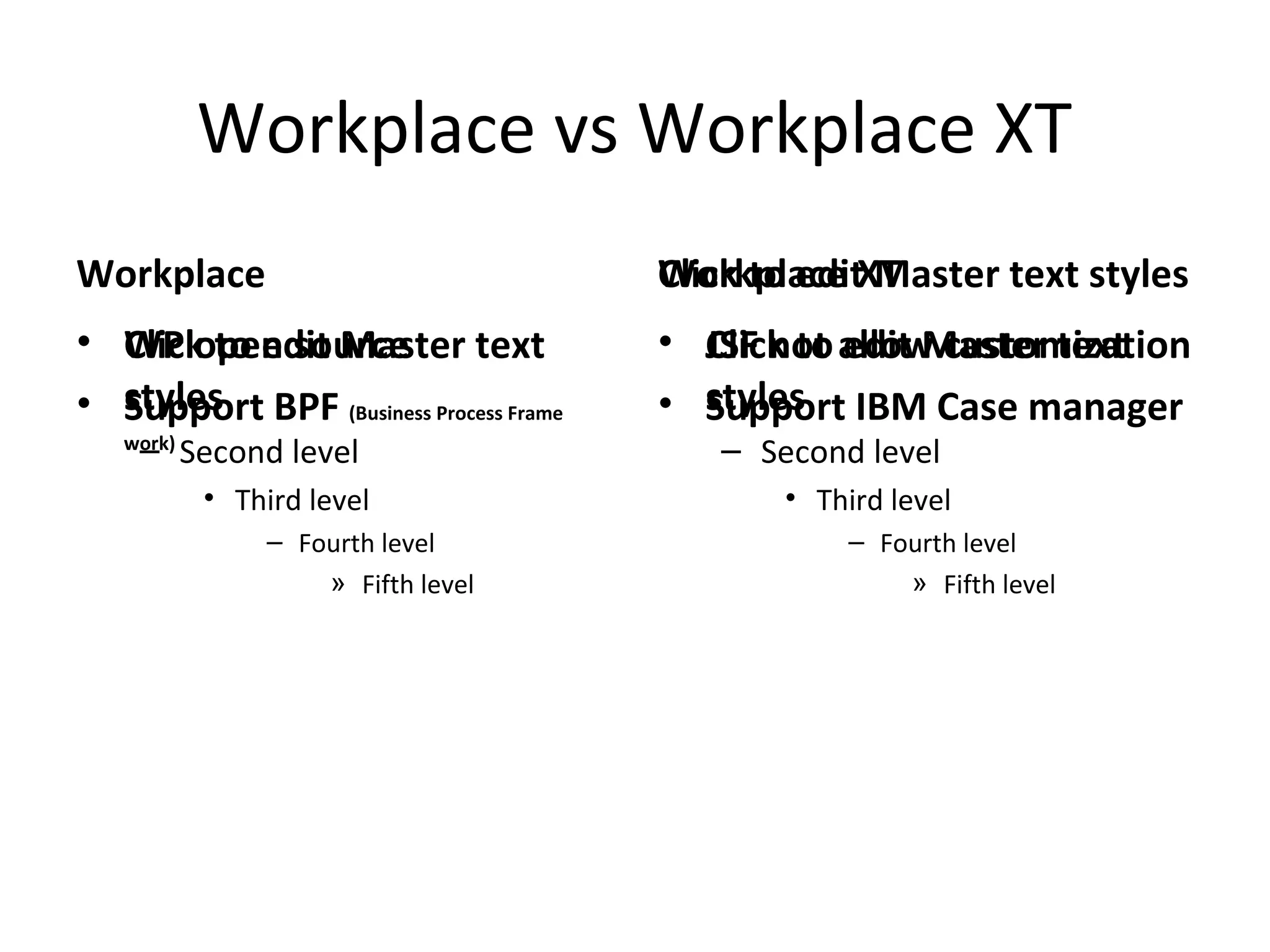
Workplace vs Workplace XT
Workplace
• WP open source
• Support BPF (Business Process Frame
work)
Workplace XT
• JSF not allow customization
• Support IBM Case manager
Workplace XT views
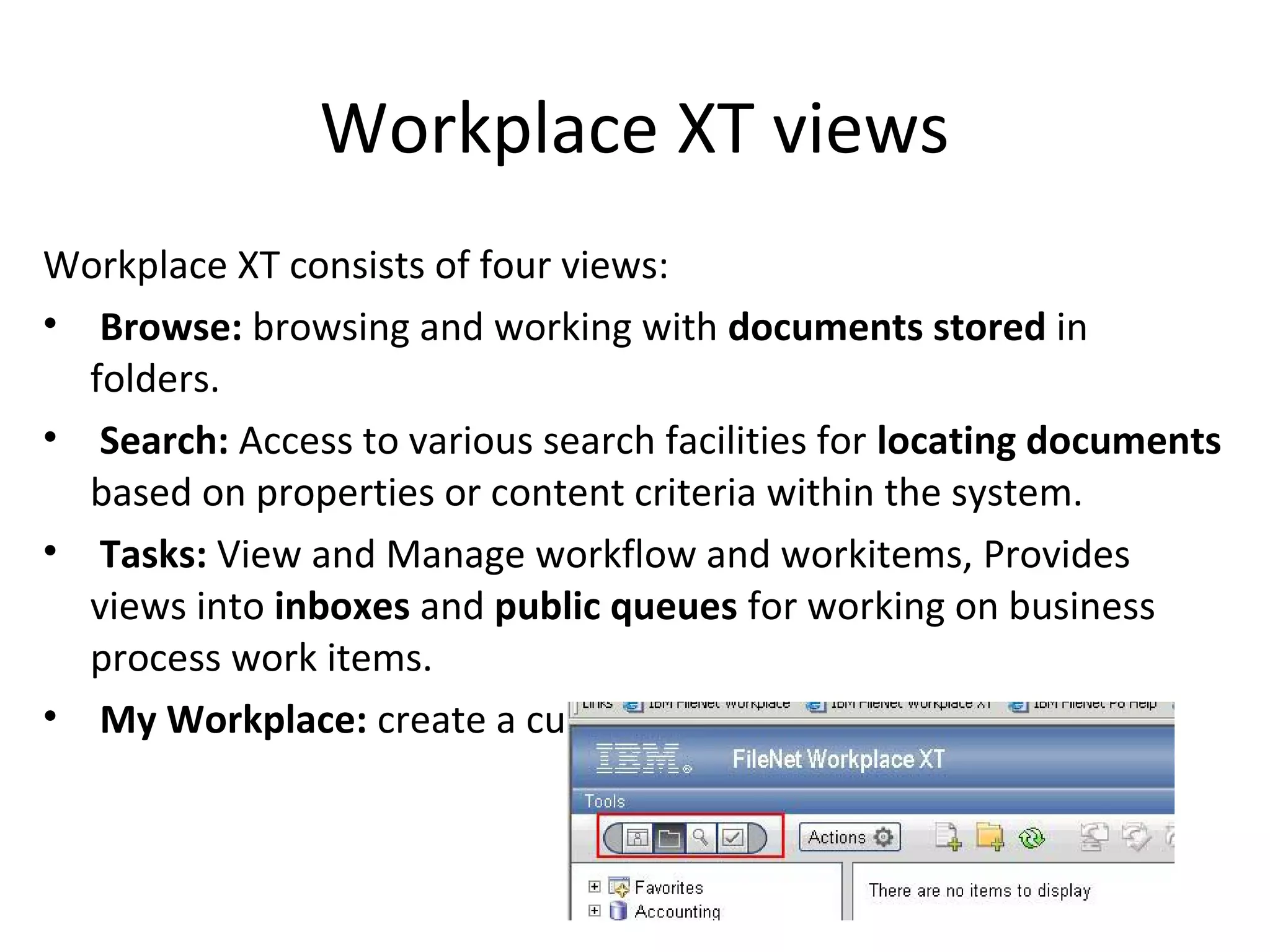
Workplace XT consists of four views:
• Browse: browsing and working with documents stored in
folders.
• Search: Access to various search facilities for locating documents
based on properties or content criteria within the system.
• Tasks: View and Manage workflow and workitems, Provides
views into inboxes and public queues for working on business
process work items.
• My Workplace: create a custom compinations of views.
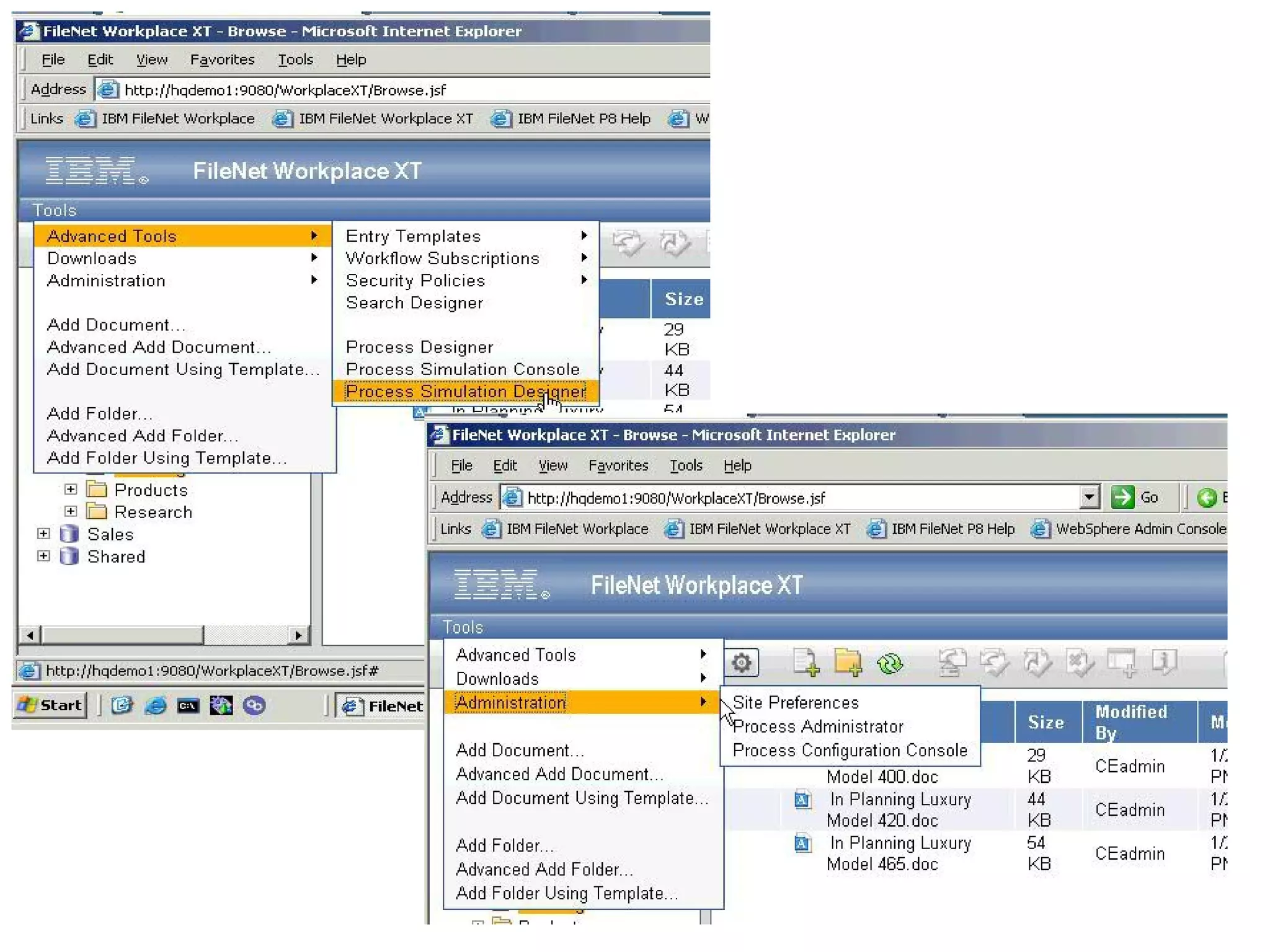
Workplace XT tools
Search Designer: A Java applet-based tool for creating stored searches
and search templates.
Entry Template Designer: Define and edit entry templates used to
simplify the process of creating document folders and forms.
Security Policy Tool: Create and modify security templates used to
control document access at different phases of its life cycle.
Process Designer: The Java applet-based tool creates and manages
workflow maps.
Workflow Subscription Tool: Links workflows with classes to create
subscriptions that automatically launch workflows on document
creation events.
Process Simulator Console: Process simulation console.
Process Simulator Designer: Design simulations for the process
simulator.
Site Preferences: Administer the appearance, behavior, and
connectivity of the FileNet P8 Platform client applications.
Expansion Products
• These products extend enterprise content
management functionality.
• Content ingestion solutions take papers,
faxes, e-mails,.. -> organize it -> insert to
FileNet.
Content Ingestion Products:
1. IBM Content Collector
2. IBM Datacap
3. IBM FileNet Capture
IBM Content Collector
Consists of 4 offerings:
1. Content Collection for Email
2. Content Collection for File System
3. Content Collection for SharePoint
4. Content Collection for SAP
Content Collector retrieves contents from these
sources and apply rules to decide:
1. If the document will process
2. How to process this document
3. Where to store this document
Content Collector Configuration Manager
Helps to develop/implement content collection
Steps:
1. Indentify Source
[Exchange server,Sharepoint,FileSystem, Domino]
2. Identify Target Connector
[Image Service,FileNet,IBM Content Manager,FileSystem]
3. Identify Schedule
IBM Content Collector
• Source connector retrieve content and meta
data, and also can set meta data on source
content, Example: set flag as collected.
• Single collector can connect to multiple types
of sources.
Connector task include:
1. Classification
2. Text extraction
3. Record declaration
IBM Content Collector
Content Collector Task Routes:
• Task route is like a workflow, a visual representation of
process.
• Specify how/where content collected/processed
• It begin with collection and end with storage in the
repository
• Task route apply rules at multiple points in capture
process
• Processing assets include extracting meta data,
classifications, extracting content, de-duplicate and
record declaration.
IBM Datacap
• Complete end-to-end document management
solution.
• Datacap consists of 3 main products:
1. Task Master: SOA capture & automation solution
with web and thick client.
2. RuleRunner: can run as a web service or embedded
inside TaskMaster/fastDoc, it drives business rules
and actions.
3. FastDoc: stand-alone product and can integrate with
SharePoint and file system, and can operate offline.
Datacap process
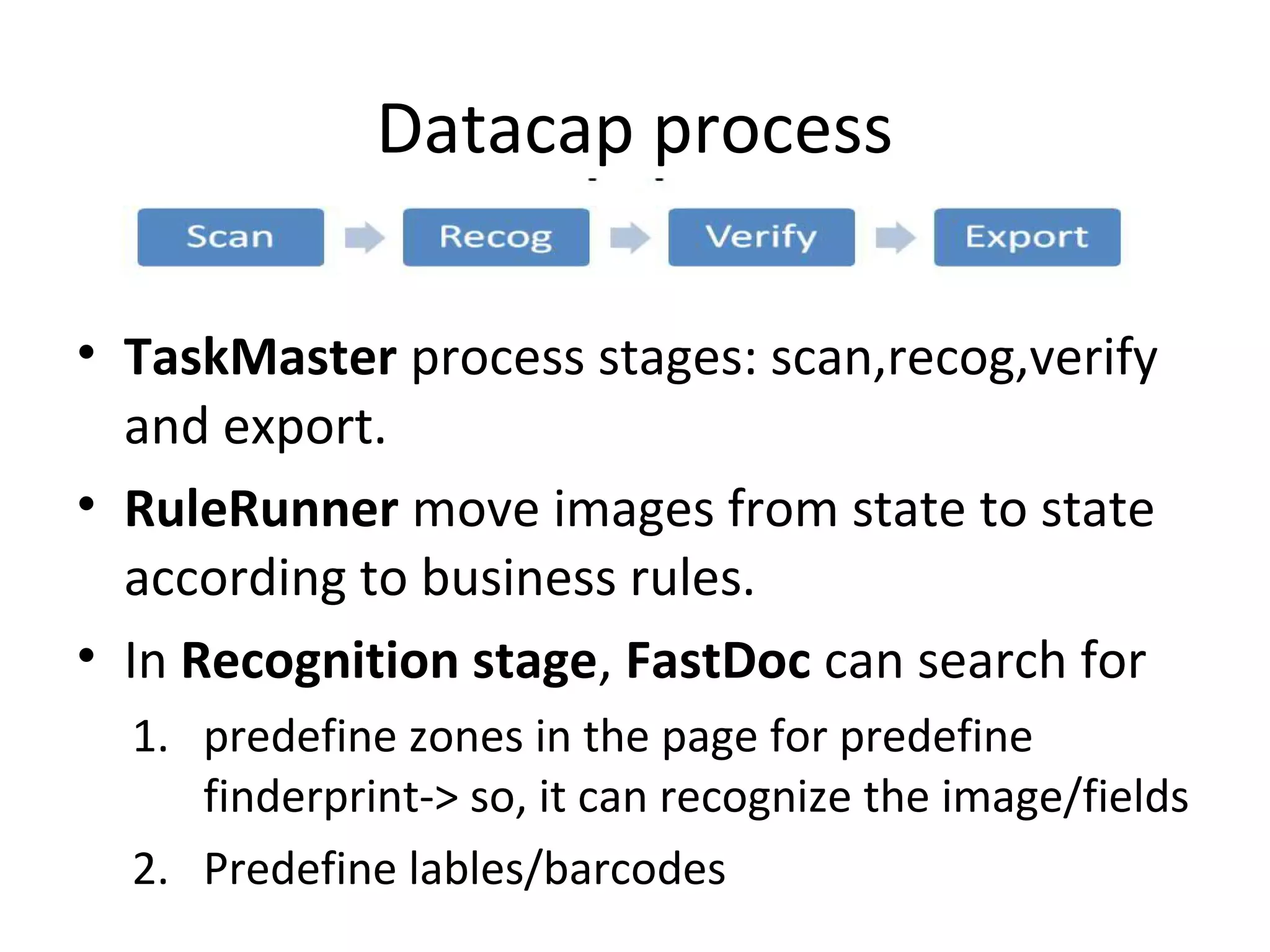
• TaskMaster process stages: scan,recog,verify
and export.
• RuleRunner move images from state to state
according to business rules.
• In Recognition stage, FastDoc can search for
1. predefine zones in the page for predefine
finderprint-> so, it can recognize the image/fields
2. Predefine lables/barcodes

IBM File Net P8

  • 1.
  • 2.
    IBM FileNet P8overview • The IBM FileNet P8 Platform is a unified- enterprise content management and business process management platform that resolves content, process, compliance, and discovery issues in one single solution.
  • 3.
    FileNet Core Component •Content Engine (CE) • Process Engine (PE) • Workplace,Workplace XT (WP/WP XT)
  • 5.
  • 6.
    1-Content Engine • EJBApplication • Store all contents within FileNet • Store content meta-data in DB • Provide interface for handling – Event-based action – Document life cycle – Storage integration
  • 7.
    • Content Enginemember of FileNet domain. • FileNet domain may contains more than one content engine and each content engine can support one or more object store where content is stored. • FileNet contains one Global Configurator DB(GCD) and it define the storage area that represents dataset FileNet Content Engine Content Engine Object Store Object Store GCD Global Configurator DB
  • 8.
    CE use anObject Oriented data model define by: 1. Properties 2. Classes 3. Documents 4. Custom Object 5. Foldering
  • 9.
    CE Properties • Objectinformation and meta-data are define and store as properties for a given object.
  • 10.
    CE Classes • Eachobject defined as an instance of a class • The class define 1) what type of object is created. 2) what meta-data. 3) how store the object. • Main class can contains sub-class that inherit parent class properties, and can define additional properties and can override the parent class behavior.
  • 11.
    CE documents • Objectcan be document, this object contains meta-data and one or more content element. • Document can have life cycle and version, and can checkin/checkout. • “DocVersion” table store document object link documents by “VersionSeries” Object.
  • 12.
    CE Custom Object •It is a meta-data only object with no content element and are not versionable. CE Foldering • Each folder create a single row in Container table and it used for item organization.
  • 13.
    Object Store  Object meta-dataalways store in normal DB  Object contents can store in [DB,FileSystem or Fixed Content device]
  • 14.
    CE Security • Definewhich user allow to create,view,update and delete any given object. • It use java authentication model, which based of “Java Authentication and Authorization Service” JAAS, content engine relies on application server to perform JAAS authentication. • FileNet does NOT contains its own users DB. So, it use LDAP to get users from the organization domain. • Access Control Entries (ACE):user privileges on one object. • Access Control List (ACL):collections of ACE
  • 15.
    CE Event Framework Wecan run a custom code to response to predefined events like • Creation • Deletion • Update • Update Security • Change State • Checkin • Checkout • Cancel Checkout • Freeze • Lock • UnLock • ….
  • 16.
    CE Event Framework •We can create a custom event and fire it using “RaiseEvent” method. • Administrator can configure component to listen to predefined events to run event handler, ex: lunch workflow by implement custom event action. • Action handler is a java code implements “EventActionHandler” interface, and deliver as .jar file located through global class path or stored locally as “CodeModules”
  • 17.
    CE Event Framework •When a given action occurs on a particular object, a query executed to find event subscribe and related event handler. • Event action handler executed through the method EventActionHandler.doEvent()
  • 18.
    CE interacting withPE • We can handle events also in content engine by create a workflow subscription. • To create a workflow use WorkplaceXT or FileNet Enterprise manager. • We can create many versions of workflow but will not effect the production workflow. • To publish workflow use “Launch Workflow” • we can create selection criteria on object level to launch a workflow only if a major version of document is added for example.
  • 19.
    CE Life Cycle •Document can move from one state to another. Ex: in loan application document move from application to approval. • Manage document life cycle through: 1. Life cycle policy: define the states that document can transition through. Policy can apply a new security template when move to new state. 2. Life cycle action: define the action that occurs when a document move from one state to another.
  • 20.
    CE Storage • Contentalways streams from client to server and store in a temp staging area. • Store policy define the storage area to used based on configuration rule.
  • 21.
    CE Storage • FileLocation can be define through – Default Storage Area for object (or through) – Storage Policy
  • 22.
    CE Fulltext indexing •Search in objects meta-data, document textual data. • We have two search engines: 1. Content search service 2. Legacy content search engine
  • 23.
    Content Search Service(CSS) • Single css server can be used for both indexing and search. However, it is better to deploy multiple css servers and assign each one to do only one job (Indexing or Search). • Indexing process start when Content Base Retrieval (CBR) object are created or updated. [document with class CBR enabled]
  • 24.
    Legacy Content SearchEngine (CSE) • Start indexes in collections managed by Verity server, and temporarily save documents on file system until indexing, (while CSS index store in object store).
  • 25.
    Migrating from CSEto CSS To migrated do the next two steps: 1. Enable CSS in object store 2. Switch default search engine to CSS
  • 26.
    Content Engine Classification •When create a new document, a flag determines whether automatic classification is executed or not. • incoming documents of specific content type can automatically assigned to a target document class and setting selected properties on that target class based on value found in the incoming document.
  • 27.
    Content Engine Protocols •CE communicate with Workplace XT through EJB only. • CE support communications through : 1. WebService listener (Http protocol) 2. EJB listener
  • 28.
    FileNet Enterprise Manager •It is content engine administration client. • It use .net APIs over the webservice interface. • CE Main Components: 1. Document Class 2. Search Template 3. Entity Template • CE divided into content repository (Object Repository) then organize object repository into folders. • Content repository helps in isolation of contents, for example create 2012 repository, 2013 repository…. DocuFormW
  • 29.
    Content Engine APIs •.Net/Java, (while PE only java) • Support methods for handle create , retrieving , update, delete, updating security.
  • 30.
    Federations & Connections •Sharepoint, LotusQuickr and SAP, store content in their repositories. Make integration to import, copy, or move and link data to P8 by using: 1. IBM Content Integrator 2. IBM Content Federation Service • The communications method using CMIS (Content Management Interoperability Service), which is industry-standard method.
  • 31.
    Content Management Interoperability Service(CMIS) • Support RESTfull and webservice binding. • Support Create,Read,Update,Delete(CRUD) operations & Checkin/Checkout &SQL …
  • 32.
  • 33.
    Process Engine • ProcessEngine provides the IBM FileNet P8 Platform with workflow management capabilities. These capabilities include personal inboxes, work object routing, group queues, process tracking… • PE store all workflow information in a DB, except raw process map -> Content Engine • PE is a single process multi-thread architecture. • PE can connect only to single process store. • PE processes types: 1. PE server: handle all DB persistence, background tasks, threads. 2. PE Manager: run as single instance, managing PE server instances include Start/Stop them.
  • 34.
    PE configuration • PEdivides workflow data into work items. • Work items found under Rosters and Queues • Workflow DB can be standalone or co-located with CE DB. • IBM Case Manager need CE DB and PE DB to co-located in the same DB. • Workflow definitions stored into CE then transferred and compiled into PE.
  • 35.
    • PE Connections –Connection Point  Regions – Work Queues – Component Queues – User Queues – Rostors – Event Logs – Application Space
  • 36.
    Regions • PE cansplit process data to regions within a single process store. • region contains all of the related process definitions and metadata in separate tables within the Process Engine database. • region also contains a unique set of rosters, queues, and work items.
  • 37.
    Workflow Definition • Consistsof maps and each map contains (steps & routing logic) stored in CE then transferred and compiled in PE. • It build using “Process Designer”
  • 38.
    Work items • Lunchworkflow = create new instance contains one or more work items • Work items contains properties, and reference to one or more content objects(attachment) stored into CE.
  • 39.
    Rosters • Workflow atdesign time define the related roster. • When launch workflow the roster record the creation data and contains also some system-level fields and some exposed properties from work item. • Restore use for administrative purposes to find work items regardless of process step. • When create new Roster, we create new DB table.
  • 40.
    Queues • Helps tofind work item process on a particular step, or the work item that relevant to users/applications.
  • 41.
    Types of Queues 1.Process Queues: public queues where numerous users might have access and any of those users are allowed to browse and process work items from those queues 2. User Queues: work items for a particular user. 3. Component Queues: process queue that allow run custom actions in background using “Component Manager Application” 4. System Queues: manage system activities on work items
  • 42.
    In-baskets • Create aview that has one or more filters to apply business rule-based criteria to the items in the queue. • These filters cannot be modified by the user, only by the process administrators
  • 43.
    Roles • tie aset of users and groups to one or more in-baskets. Application spaces • Group of roles that apply to application or line of business.
  • 44.
    Event logs • Eventlogs, like rosters, are separate tables within the Process Engine database. Each row represents an event action for a specific work item. • The types of events that get logged are configurable and provide a fair degree of control over how much data is collected and what it represents. The event log table can be queried to retrieve data on historical events that occurred within the system. • The Process Tracker application uses this data to show the history for a given work item. The event log tables are also the primary source of data for the analytics engine.
  • 45.
    PE Access control •Security manage on level of queues and rosters not on the work items level.
  • 46.
    Process orchestration • Individualprocess steps can call out to an external web service or, conversely, be exposed as a web service for external consumption. • There are three main actions involved: receive, reply, and invoke. The receive and reply steps define a point in the process to expose externally as a web services entry point and if necessary return a response. The invoke and receive steps call out to an external web service and if necessary receive a subsequent response.
  • 47.
    Component Integrator • aservice for integrating with external systems. • The Component Integrator makes it possible to import custom Java components and make them available in a workflow. • In the workflow definition, a component step connects to a component queue configured for one or more operations in the external component. There are two parts to the Component Integrator: 1. Component Manager: connects a work item with its appropriate Java or JMS Service Adaptor, This service runs on the Workplace/Workplace XT. 2. Configuration: Configure the component queues using Process Configuration Console.
  • 48.
    Analysis and optimization CaseAnalyzer tool : Analyze business processes. Using Microsoft MS SQL Analysis Services to supply the data in a format that can be quickly explored and drilled down by users. Process Simulator tool : it helps to perform what-if simulations of the process model to discover bottlenecks in the process execution. Analysis and simulation aim for continuous improvement in the quality of the business processes.
  • 49.
    PE APIs There arethree primary APIs for PE 1. Java API 2. REST API 3. web services API The APIs provide classes and methods for: 1. Creating, working, and completing workflow items 2. Searching for work items in queues and rosters 3. Viewing the event logs
  • 50.
    IBM Case Manager •Helps in workflow creation • Need CE DB,PE DB co-located • Need Workplace XT
  • 51.
  • 52.
    • Click toedit Master text styles – Second level • Third level – Fourth level » Fifth level Click to edit Master text styles • Click to edit Master text styles – Second level • Third level – Fourth level » Fifth level Workplace vs Workplace XT Workplace • WP open source • Support BPF (Business Process Frame work) Workplace XT • JSF not allow customization • Support IBM Case manager
  • 53.
    Workplace XT views WorkplaceXT consists of four views: • Browse: browsing and working with documents stored in folders. • Search: Access to various search facilities for locating documents based on properties or content criteria within the system. • Tasks: View and Manage workflow and workitems, Provides views into inboxes and public queues for working on business process work items. • My Workplace: create a custom compinations of views.
  • 54.
    Workplace XT tools SearchDesigner: A Java applet-based tool for creating stored searches and search templates. Entry Template Designer: Define and edit entry templates used to simplify the process of creating document folders and forms. Security Policy Tool: Create and modify security templates used to control document access at different phases of its life cycle. Process Designer: The Java applet-based tool creates and manages workflow maps. Workflow Subscription Tool: Links workflows with classes to create subscriptions that automatically launch workflows on document creation events. Process Simulator Console: Process simulation console. Process Simulator Designer: Design simulations for the process simulator. Site Preferences: Administer the appearance, behavior, and connectivity of the FileNet P8 Platform client applications.
  • 56.
    Expansion Products • Theseproducts extend enterprise content management functionality. • Content ingestion solutions take papers, faxes, e-mails,.. -> organize it -> insert to FileNet. Content Ingestion Products: 1. IBM Content Collector 2. IBM Datacap 3. IBM FileNet Capture
  • 57.
    IBM Content Collector Consistsof 4 offerings: 1. Content Collection for Email 2. Content Collection for File System 3. Content Collection for SharePoint 4. Content Collection for SAP Content Collector retrieves contents from these sources and apply rules to decide: 1. If the document will process 2. How to process this document 3. Where to store this document
  • 58.
    Content Collector ConfigurationManager Helps to develop/implement content collection Steps: 1. Indentify Source [Exchange server,Sharepoint,FileSystem, Domino] 2. Identify Target Connector [Image Service,FileNet,IBM Content Manager,FileSystem] 3. Identify Schedule
  • 59.
    IBM Content Collector •Source connector retrieve content and meta data, and also can set meta data on source content, Example: set flag as collected. • Single collector can connect to multiple types of sources. Connector task include: 1. Classification 2. Text extraction 3. Record declaration
  • 60.
    IBM Content Collector ContentCollector Task Routes: • Task route is like a workflow, a visual representation of process. • Specify how/where content collected/processed • It begin with collection and end with storage in the repository • Task route apply rules at multiple points in capture process • Processing assets include extracting meta data, classifications, extracting content, de-duplicate and record declaration.
  • 61.
    IBM Datacap • Completeend-to-end document management solution. • Datacap consists of 3 main products: 1. Task Master: SOA capture & automation solution with web and thick client. 2. RuleRunner: can run as a web service or embedded inside TaskMaster/fastDoc, it drives business rules and actions. 3. FastDoc: stand-alone product and can integrate with SharePoint and file system, and can operate offline.
  • 62.
    Datacap process • TaskMasterprocess stages: scan,recog,verify and export. • RuleRunner move images from state to state according to business rules. • In Recognition stage, FastDoc can search for 1. predefine zones in the page for predefine finderprint-> so, it can recognize the image/fields 2. Predefine lables/barcodes