Data as a Service (DaaS)
In Cloud Computing


                 Presented by,
                 Khushbu M.
                 Joshi
Agenda
 Introduction
 Components Of Cloud Computing
 Data as a Service (DaaS)
 DaaS Architecture
 DaaS: Pricing Model
 Traditional Approach Vs. DaaS
 Benefits
 Drawbacks
 Demonstration of how google provides
  DaaS
 References
Introduction
   Cloud Services
    ◦ Consumer and business products,
      services and solutions that are delivered
      and consumed in real-time over the
      internet
   Cloud Computing
    ◦ Delivery of computing as a service rather
      than product.
    ◦ An emerging IT development, deployment
      and delivery model that enables real-time
      delivery of broad range of IT products,
      services and solutions over the internet
Components Of Cloud
Computing
   IaaS (Infrastructure as a Service)
    ◦ Consumers control and manage the
      systems in terms of the operating
      systems, applications, storage, and
      network connectivity, but do not
      themselves control the cloud
      infrastructure.
   PaaS (Platform as a Service)
    ◦ Consumers purchase access to the
      platforms, enabling them to deploy their
      own software and applications in the
      cloud.
   SaaS (Software as a Service)
    ◦ Consumers purchase the ability to access
      and use an application or service that is
      hosted in the cloud.
Data as a Service
 A service provider that enables data
  access on demand to users regardless
  of their geographic location.
 Similar to SaaS
 Information is stored in the cloud and is
  accessible by a wide range of systems
  and devices
 Two ways to use data-as-a-service:
    ◦ by outsourcing your own data or
    ◦ taking advantage of public data managed by
      a third party
 DaaS is other offering service from
  Cloud providers to its client to use
  provider's database infrastructure on
  the basis of what they use.
 Instead of spending money on setting
  up of database environment on your
  premises, we can take the benefit of
  provider's database cloud.
The sites that provides data as a
service
 Google
 Windows Azure
 Amazon
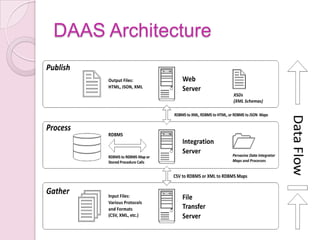
DAAS Architecture
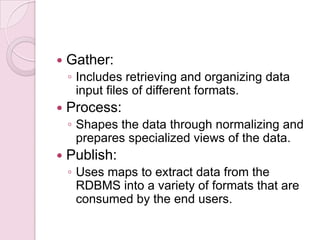
   Gather:
    ◦ Includes retrieving and organizing data
      input files of different formats.
   Process:
    ◦ Shapes the data through normalizing and
      prepares specialized views of the data.
   Publish:
    ◦ Uses maps to extract data from the
      RDBMS into a variety of formats that are
      consumed by the end users.
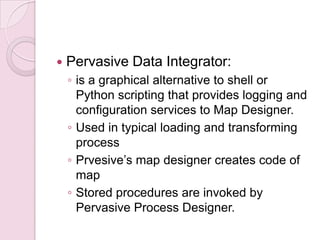
   Pervasive Data Integrator:
    ◦ is a graphical alternative to shell or
      Python scripting that provides logging and
      configuration services to Map Designer.
    ◦ Used in typical loading and transforming
      process
    ◦ Prvesive’s map designer creates code of
      map
    ◦ Stored procedures are invoked by
      Pervasive Process Designer.
DaaS: Pricing Model
1.    Volume-based Model
     a. Quantity-based pricing and
     b. Pay per call

2.    Data type-based Model
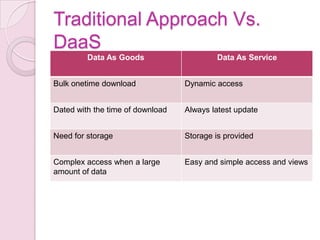
Traditional Approach Vs.
DaaS
         Data As Goods                    Data As Service


Bulk onetime download             Dynamic access


Dated with the time of download   Always latest update


Need for storage                  Storage is provided


Complex access when a large       Easy and simple access and views
amount of data
Benefits
   Agility
   Cost-effectiveness
   Data quality
   Faster/ Easy access
   Larger storage
   Large number of users
   Scalability/ Flexibility
   Reliability
   Maintenance
Drawbacks
 Reliance of the customer on the
  service provider's ability to avoid
  server downtime
 Generally data is not available for
  download
References
 www.google.com/publicdata
 www.wikipedia.com
 http://bekwam.blogspot.com/2010/12/
  building-data-as-service-
  architecture.html
 http://snipplr.com/
 http://pixlr.com/editor/
 http://cssdesk.com/
 http://www.squidoo.com/guide-to-
  cloud-computing

Data as a service

  • 1.
    Data as aService (DaaS) In Cloud Computing Presented by, Khushbu M. Joshi
  • 2.
    Agenda  Introduction  ComponentsOf Cloud Computing  Data as a Service (DaaS)  DaaS Architecture  DaaS: Pricing Model  Traditional Approach Vs. DaaS  Benefits  Drawbacks  Demonstration of how google provides DaaS  References
  • 3.
    Introduction  Cloud Services ◦ Consumer and business products, services and solutions that are delivered and consumed in real-time over the internet  Cloud Computing ◦ Delivery of computing as a service rather than product. ◦ An emerging IT development, deployment and delivery model that enables real-time delivery of broad range of IT products, services and solutions over the internet
  • 4.
    Components Of Cloud Computing  IaaS (Infrastructure as a Service) ◦ Consumers control and manage the systems in terms of the operating systems, applications, storage, and network connectivity, but do not themselves control the cloud infrastructure.
  • 5.
    PaaS (Platform as a Service) ◦ Consumers purchase access to the platforms, enabling them to deploy their own software and applications in the cloud.  SaaS (Software as a Service) ◦ Consumers purchase the ability to access and use an application or service that is hosted in the cloud.
  • 6.
    Data as aService  A service provider that enables data access on demand to users regardless of their geographic location.  Similar to SaaS  Information is stored in the cloud and is accessible by a wide range of systems and devices  Two ways to use data-as-a-service: ◦ by outsourcing your own data or ◦ taking advantage of public data managed by a third party
  • 7.
     DaaS isother offering service from Cloud providers to its client to use provider's database infrastructure on the basis of what they use.  Instead of spending money on setting up of database environment on your premises, we can take the benefit of provider's database cloud.
  • 8.
    The sites thatprovides data as a service  Google  Windows Azure  Amazon
  • 9.
  • 10.
    Gather: ◦ Includes retrieving and organizing data input files of different formats.  Process: ◦ Shapes the data through normalizing and prepares specialized views of the data.  Publish: ◦ Uses maps to extract data from the RDBMS into a variety of formats that are consumed by the end users.
  • 11.
    Pervasive Data Integrator: ◦ is a graphical alternative to shell or Python scripting that provides logging and configuration services to Map Designer. ◦ Used in typical loading and transforming process ◦ Prvesive’s map designer creates code of map ◦ Stored procedures are invoked by Pervasive Process Designer.
  • 12.
    DaaS: Pricing Model 1. Volume-based Model a. Quantity-based pricing and b. Pay per call 2. Data type-based Model
  • 13.
    Traditional Approach Vs. DaaS Data As Goods Data As Service Bulk onetime download Dynamic access Dated with the time of download Always latest update Need for storage Storage is provided Complex access when a large Easy and simple access and views amount of data
  • 14.
    Benefits  Agility  Cost-effectiveness  Data quality  Faster/ Easy access  Larger storage  Large number of users  Scalability/ Flexibility  Reliability  Maintenance
  • 15.
    Drawbacks  Reliance ofthe customer on the service provider's ability to avoid server downtime  Generally data is not available for download
  • 16.
    References  www.google.com/publicdata  www.wikipedia.com http://bekwam.blogspot.com/2010/12/ building-data-as-service- architecture.html  http://snipplr.com/  http://pixlr.com/editor/  http://cssdesk.com/  http://www.squidoo.com/guide-to- cloud-computing