1	
  
Component Based Development
in Perforce
Randy DeFauw
Senior Product Manager
Sven Erik Knop
Lead Consultant
2	
  
What is Component Based Development?
CBD Defined
3	
  
What are Components?
§  Well defined interface and hidden internals
§  High cohesion and low coupling
§  Independent test and release schedules
§  Often developed by separate teams or third-party
§  Examples:
§  Drivers, Services, Car parts, Phone modules, …
4	
  
What is Component Based Development?
§  Products build out of components
§  Assembly and configuration
§  Separation of concerns
§  Specialization of skills
§  Agile workflow and high flexibility
5	
  
Why use CBD?
§  Break complex problems into smaller units
§  Reassemble and reconfigure for new products
§  Reduced cost through
§  Reuse
§  Simplified maintenance
§  Minimal impact of change
6	
  
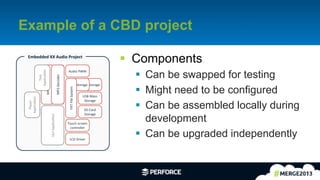
Example of a CBD project
§  Components
§  Can be swapped for testing
§  Might need to be configured
§  Can be assembled locally during
development
§  Can be upgraded independently
MP3	
  Decoder	
  
Flash	
  Storage	
  
Audio	
  PWM	
  
Flash	
  Storage	
  
FAT	
  File	
  System	
  
USB	
  Mass	
  
Storage	
  
SD	
  Card	
  
Storage	
  
GUI	
  ApplicaEon	
  
Touch	
  screen	
  
controller	
  
LCD	
  Driver	
  
Embedded	
  XX	
  Audio	
  Project	
  
Player	
  
ApplicaEon	
  
Streams	
  Buffer	
  
Test	
  
ApplicaEon	
  
MP3	
  Decoder	
  
7	
  
Challenges
§  Projects need to be prepared for components
§  Dependencies and interfaces
§  Requires special tooling
§  Creation of configurations for development and test
§  Reproducibility of delivered configurations
8	
  
Scale of the problem
§  Large projects can contain 1000s of components
§  Often grouped into super-components
§  Examples
§  Car Infotainment Systems
§  Mobile Phones
§  Financial services application
9	
  
Pieces of the Solution
Building blocks
10	
  
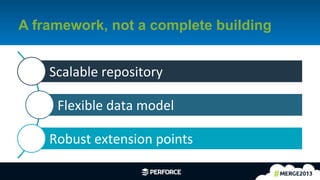
A framework, not a complete building
Scalable	
  repository	
  
Flexible	
  data	
  model	
  
Robust	
  extension	
  points	
  
11	
  
Scalable repository
§  Hold all the components
§  Simplified management
§  Easy updates as the projects and components
change
12	
  
Flexible data model
§  The way that users work with data shouldn’t
have to align with how you store the data
§  Respond quickly to changing code base or
requirements
13	
  
Extension points
§  APIs for tooling
§  Building projects
§  Interacting with other processes
§  Process control
§  Triggers, broker
§  Enforce policies
§  User tools
§  Simplify workflow
§  Available in command line or GUI
14	
  
Patterns
Putting the pieces together
15	
  
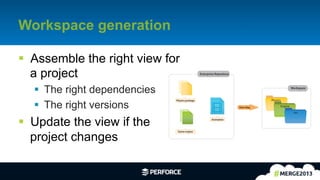
Workspace generation
§  Assemble the right view for
a project
§  The right dependencies
§  The right versions
§  Update the view if the
project changes
Physics package
Game engine
Animation
Physics
Engine
Art
Enterprise Repository
Workspace
View Map
16	
  
Access control
§  Beyond the protections table
§  Per-role, per-project permissions
§  Read in one project, write in another
17	
  
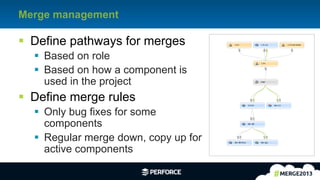
Merge management
§  Define pathways for merges
§  Based on role
§  Based on how a component is
used in the project
§  Define merge rules
§  Only bug fixes for some
components
§  Regular merge down, copy up for
active components
18	
  
Workspace storage
§  Leverage storage solutions for workspace
cloning
§  ZFS clones or commercial equivalent
§  FUSE
§  Provides efficient data management for large
workspaces (> 1 GB)
§  Fast workspace creation and duplication
19	
  
A Reference Framework
A starting point with visual tools
20	
  
Goals
§  A starting point, not a complete solution
§  Illustrate how the tools can solve different parts
of the problem
§  Triggers for policy enforcement
§  Broker as a centralized substitute for end user tools
§  P4V applets for visual guidance
21	
  
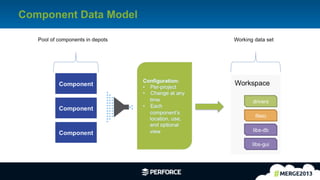
Component Data Model
22	
  
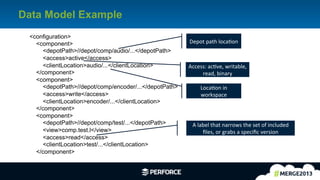
Data Model Example
<configuration>
<component>
<depotPath>//depot/comp/audio/...</depotPath>
<access>active</access>
<clientLocation>audio/...</clientLocation>
</component>
<component>
<depotPath>//depot/comp/encoder/...</depotPath>
<access>write</access>
<clientLocation>encoder/...</clientLocation>
</component>
<component>
<depotPath>//depot/comp/test/...</depotPath>
<view>comp.test.l</view>
<access>read</access>
<clientLocation>test/...</clientLocation>
</component>
Depot	
  path	
  locaEon	
  
Access:	
  acEve,	
  writable,	
  
read,	
  binary	
  
LocaEon	
  in	
  
workspace	
  
A	
  label	
  that	
  narrows	
  the	
  set	
  of	
  included	
  
files,	
  or	
  grabs	
  a	
  specific	
  version	
  
23	
  
Use Cases
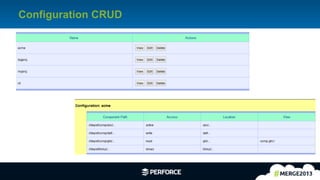
§  Configuration CRUD (CLI/P4V)
§  Generate workspace
§  Update workspace when configuration changes
§  Switch workspace to new configuration
§  Smart sync
§  Intercept edit/submit to enforce configuration rules
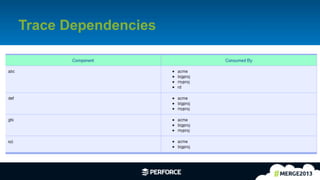
§  List component consumers (dependency
relationships)
24	
  
Configuration CRUD
25	
  
Trace Dependencies
26	
  
Nuts & Bolts
§  Uses triggers, broker, and P4V applets
§  Custom commands defined
§  Guard rails in place
§  Defines storage location for scripts and
configuration in depot
§  Uses XML data formats
§  Uses spec depot and attributes
§  Written with P4Python
27	
  
Enhancements
§  Component hierarchies / nesting
§  More flexible command usage – specify file
arguments, override defaults
§  Support streams
§  Immutable / Automatic labels
§  Multiple depot paths per component
28	
  
Questions?
Contact us!

[Perforce] Component Based Development in Perforce

  • 1.
    1   Component BasedDevelopment in Perforce Randy DeFauw Senior Product Manager Sven Erik Knop Lead Consultant
  • 2.
    2   What isComponent Based Development? CBD Defined
  • 3.
    3   What areComponents? §  Well defined interface and hidden internals §  High cohesion and low coupling §  Independent test and release schedules §  Often developed by separate teams or third-party §  Examples: §  Drivers, Services, Car parts, Phone modules, …
  • 4.
    4   What isComponent Based Development? §  Products build out of components §  Assembly and configuration §  Separation of concerns §  Specialization of skills §  Agile workflow and high flexibility
  • 5.
    5   Why useCBD? §  Break complex problems into smaller units §  Reassemble and reconfigure for new products §  Reduced cost through §  Reuse §  Simplified maintenance §  Minimal impact of change
  • 6.
    6   Example ofa CBD project §  Components §  Can be swapped for testing §  Might need to be configured §  Can be assembled locally during development §  Can be upgraded independently MP3  Decoder   Flash  Storage   Audio  PWM   Flash  Storage   FAT  File  System   USB  Mass   Storage   SD  Card   Storage   GUI  ApplicaEon   Touch  screen   controller   LCD  Driver   Embedded  XX  Audio  Project   Player   ApplicaEon   Streams  Buffer   Test   ApplicaEon   MP3  Decoder  
  • 7.
    7   Challenges §  Projectsneed to be prepared for components §  Dependencies and interfaces §  Requires special tooling §  Creation of configurations for development and test §  Reproducibility of delivered configurations
  • 8.
    8   Scale ofthe problem §  Large projects can contain 1000s of components §  Often grouped into super-components §  Examples §  Car Infotainment Systems §  Mobile Phones §  Financial services application
  • 9.
    9   Pieces ofthe Solution Building blocks
  • 10.
    10   A framework,not a complete building Scalable  repository   Flexible  data  model   Robust  extension  points  
  • 11.
    11   Scalable repository § Hold all the components §  Simplified management §  Easy updates as the projects and components change
  • 12.
    12   Flexible datamodel §  The way that users work with data shouldn’t have to align with how you store the data §  Respond quickly to changing code base or requirements
  • 13.
    13   Extension points § APIs for tooling §  Building projects §  Interacting with other processes §  Process control §  Triggers, broker §  Enforce policies §  User tools §  Simplify workflow §  Available in command line or GUI
  • 14.
  • 15.
    15   Workspace generation § Assemble the right view for a project §  The right dependencies §  The right versions §  Update the view if the project changes Physics package Game engine Animation Physics Engine Art Enterprise Repository Workspace View Map
  • 16.
    16   Access control § Beyond the protections table §  Per-role, per-project permissions §  Read in one project, write in another
  • 17.
    17   Merge management § Define pathways for merges §  Based on role §  Based on how a component is used in the project §  Define merge rules §  Only bug fixes for some components §  Regular merge down, copy up for active components
  • 18.
    18   Workspace storage § Leverage storage solutions for workspace cloning §  ZFS clones or commercial equivalent §  FUSE §  Provides efficient data management for large workspaces (> 1 GB) §  Fast workspace creation and duplication
  • 19.
    19   A ReferenceFramework A starting point with visual tools
  • 20.
    20   Goals §  Astarting point, not a complete solution §  Illustrate how the tools can solve different parts of the problem §  Triggers for policy enforcement §  Broker as a centralized substitute for end user tools §  P4V applets for visual guidance
  • 21.
  • 22.
    22   Data ModelExample <configuration> <component> <depotPath>//depot/comp/audio/...</depotPath> <access>active</access> <clientLocation>audio/...</clientLocation> </component> <component> <depotPath>//depot/comp/encoder/...</depotPath> <access>write</access> <clientLocation>encoder/...</clientLocation> </component> <component> <depotPath>//depot/comp/test/...</depotPath> <view>comp.test.l</view> <access>read</access> <clientLocation>test/...</clientLocation> </component> Depot  path  locaEon   Access:  acEve,  writable,   read,  binary   LocaEon  in   workspace   A  label  that  narrows  the  set  of  included   files,  or  grabs  a  specific  version  
  • 23.
    23   Use Cases § Configuration CRUD (CLI/P4V) §  Generate workspace §  Update workspace when configuration changes §  Switch workspace to new configuration §  Smart sync §  Intercept edit/submit to enforce configuration rules §  List component consumers (dependency relationships)
  • 24.
  • 25.
  • 26.
    26   Nuts &Bolts §  Uses triggers, broker, and P4V applets §  Custom commands defined §  Guard rails in place §  Defines storage location for scripts and configuration in depot §  Uses XML data formats §  Uses spec depot and attributes §  Written with P4Python
  • 27.
    27   Enhancements §  Componenthierarchies / nesting §  More flexible command usage – specify file arguments, override defaults §  Support streams §  Immutable / Automatic labels §  Multiple depot paths per component
  • 28.