
MLflow with RMLflow with R
Javier LuraschiJavier Luraschi
September 2018September 2018
OverviewOverview
What is MLflow?
What is R?
MLflow with R
What is MLflow?What is MLflow?
BackgroundBackground
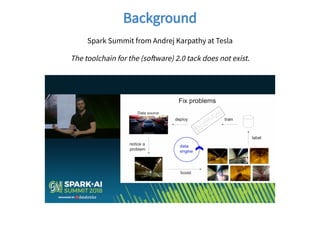
Spark Summit from Andrej Karpathy at Tesla
The toolchain for the (so ware) 2.0 tack does not exist.
MLflowMLflow
“Helps teams manage their machine learning lifecycle.”
Tracking : Track experiments to record and compare params and results.
Projects : Reuse and reproduce code to share or transfer to production.
Models : Manage and deploy models from across libraries and platforms.
What is R?What is R?
R LanguageR Language
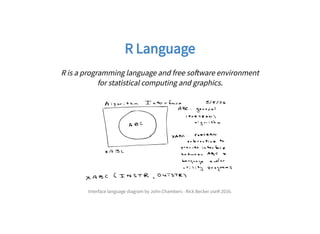
R is a programming language and free so ware environment
for statistical computing and graphics.
Interface language diagram by John Chambers - Rick Becker useR 2016.
R CommunityR Community
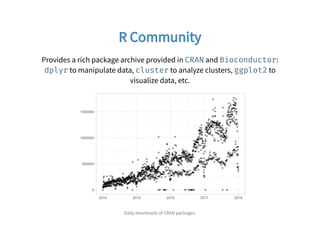
Provides a rich package archive provided in and :
to manipulate data, to analyze clusters, to
visualize data, etc.
CRAN Bioconductor
dplyr cluster ggplot2
Daily downloads of CRAN packages.
R LanguageR Language
Language features I would highlighting:
2.1.1 Vectors
2.1.4 Expression objects
2.1.8 Promise objects
2.1.9 Dot-dot-dot
3.1.4 Operators
cran.r project.org/doc/manuals/R-lang.html
Use CaseUse Case
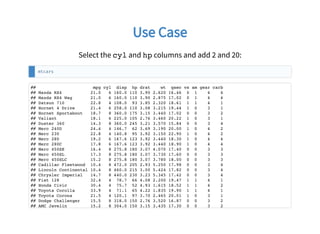
Select the cyl and hp columns and add 2 and 20:
mtcars
## mpg cyl disp hp drat wt qsec vs am gear carb
## Mazda RX4 21.0 6 160.0 110 3.90 2.620 16.46 0 1 4 4
## Mazda RX4 Wag 21.0 6 160.0 110 3.90 2.875 17.02 0 1 4 4
## Datsun 710 22.8 4 108.0 93 3.85 2.320 18.61 1 1 4 1
## Hornet 4 Drive 21.4 6 258.0 110 3.08 3.215 19.44 1 0 3 1
## Hornet Sportabout 18.7 8 360.0 175 3.15 3.440 17.02 0 0 3 2
## Valiant 18.1 6 225.0 105 2.76 3.460 20.22 1 0 3 1
## Duster 360 14.3 8 360.0 245 3.21 3.570 15.84 0 0 3 4
## Merc 240D 24.4 4 146.7 62 3.69 3.190 20.00 1 0 4 2
## Merc 230 22.8 4 140.8 95 3.92 3.150 22.90 1 0 4 2
## Merc 280 19.2 6 167.6 123 3.92 3.440 18.30 1 0 4 4
## Merc 280C 17.8 6 167.6 123 3.92 3.440 18.90 1 0 4 4
## Merc 450SE 16.4 8 275.8 180 3.07 4.070 17.40 0 0 3 3
## Merc 450SL 17.3 8 275.8 180 3.07 3.730 17.60 0 0 3 3
## Merc 450SLC 15.2 8 275.8 180 3.07 3.780 18.00 0 0 3 3
## Cadillac Fleetwood 10.4 8 472.0 205 2.93 5.250 17.98 0 0 3 4
## Lincoln Continental 10.4 8 460.0 215 3.00 5.424 17.82 0 0 3 4
## Chrysler Imperial 14.7 8 440.0 230 3.23 5.345 17.42 0 0 3 4
## Fiat 128 32.4 4 78.7 66 4.08 2.200 19.47 1 1 4 1
## Honda Civic 30.4 4 75.7 52 4.93 1.615 18.52 1 1 4 2
## Toyota Corolla 33.9 4 71.1 65 4.22 1.835 19.90 1 1 4 1
## Toyota Corona 21.5 4 120.1 97 3.70 2.465 20.01 1 0 3 1
## Dodge Challenger 15.5 8 318.0 150 2.76 3.520 16.87 0 0 3 2
## AMC Javelin 15.2 8 304.0 150 3.15 3.435 17.30 0 0 3 2
How to NOT write R codeHow to NOT write R code
This is how I would have written R code as a so ware engineer before
knowing R:
# Select columns subset
data = data.frame(mtcars$cyl, mtcars$hp)
colnames(data) = c("cyl", "hp")
# Transform each row
for (idx in 1:nrow(data)) {
data$cyl[idx] = data$cyl[idx] + 2
}
# One column at a time to use the CPU cache efficiently
for (idx in 1:nrow(data)) {
data$hp[idx] = data$hp[idx] + 20
}
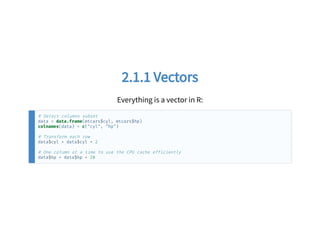
2.1.1 Vectors2.1.1 Vectors
Everything is a vector in R:
# Select columns subset
data = data.frame(mtcars$cyl, mtcars$hp)
colnames(data) = c("cyl", "hp")
# Transform each row
data$cyl = data$cyl + 2
# One column at a time to use the CPU cache efficiently
data$hp = data$hp + 20
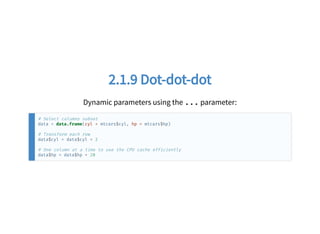
2.1.9 Dot-dot-dot2.1.9 Dot-dot-dot
Dynamic parameters using the ... parameter:
# Select columns subset
data = data.frame(cyl = mtcars$cyl, hp = mtcars$hp)
# Transform each row
data$cyl = data$cyl + 2
# One column at a time to use the CPU cache efficiently
data$hp = data$hp + 20
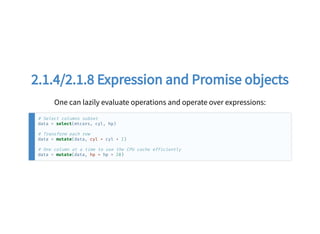
2.1.4/2.1.8 Expression and Promise objects2.1.4/2.1.8 Expression and Promise objects
One can lazily evaluate operations and operate over expressions:
# Select columns subset
data = select(mtcars, cyl, hp)
# Transform each row
data = mutate(data, cyl = cyl + 2)
# One column at a time to use the CPU cache efficiently
data = mutate(data, hp = hp + 20)
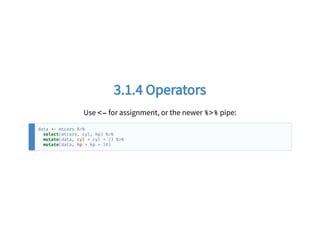
3.1.4 Operators3.1.4 Operators
Use <- for assignment, or the newer %>% pipe:
data mtcars %>%
select(mtcars, cyl, hp) %>%
mutate(data, cyl = cyl + 2) %>%
mutate(data, hp = hp + 20)
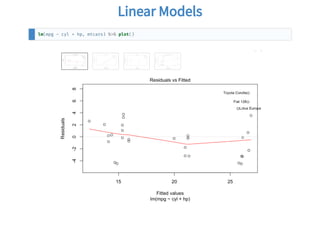
Linear ModelsLinear Models
lm(mpg ~ cyl + hp, mtcars) %>% plot()
MLflow with RMLflow with R
PrinciplesPrinciples
Parity with Python API.
Designed for the R user.
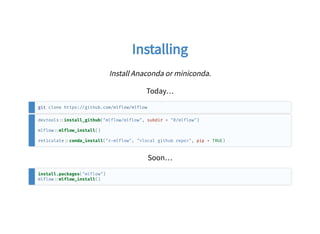
InstallingInstalling
Install Anaconda or miniconda.
Today…
git clone https: github.com/mlflow/mlflow
devtools install_github("mlflow/mlflow", subdir = "R/mlflow")
mlflow mlflow_install()
reticulate conda_install("r mlflow", "<local github repo>", pip = TRUE)
Soon…
install.packages("mlflow")
mlflow mlflow_install()
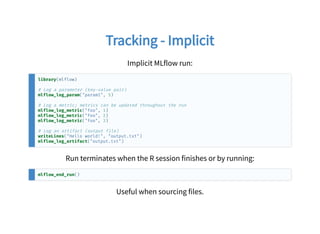
Tracking - ImplicitTracking - Implicit
Implicit MLflow run:
library(mlflow)
# Log a parameter (key value pair)
mlflow_log_param("param1", 5)
# Log a metric; metrics can be updated throughout the run
mlflow_log_metric("foo", 1)
mlflow_log_metric("foo", 2)
mlflow_log_metric("foo", 3)
# Log an artifact (output file)
writeLines("Hello world!", "output.txt")
mlflow_log_artifact("output.txt")
Run terminates when the R session finishes or by running:
mlflow_end_run()
Useful when sourcing files.
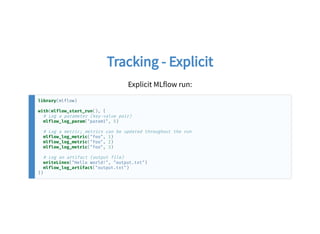
Tracking - ExplicitTracking - Explicit
Explicit MLflow run:
library(mlflow)
with(mlflow_start_run(), {
# Log a parameter (key value pair)
mlflow_log_param("param1", 5)
# Log a metric; metrics can be updated throughout the run
mlflow_log_metric("foo", 1)
mlflow_log_metric("foo", 2)
mlflow_log_metric("foo", 3)
# Log an artifact (output file)
writeLines("Hello world!", "output.txt")
mlflow_log_artifact("output.txt")
})
Tracking - SourcesTracking - Sources
mlflow_run("R/tracking.R")
Or adding the following to tracking.R in RStudio 1.2:
# !source mlflow mlflow_run(entry_point = .file)
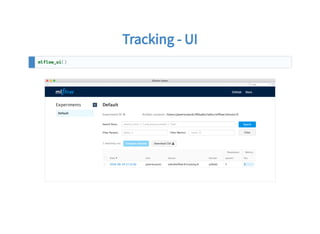
Tracking - UITracking - UI
mlflow_ui()
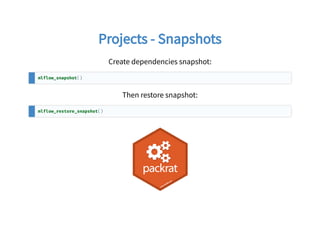
Projects - SnapshotsProjects - Snapshots
Create dependencies snapshot:
mlflow_snapshot()
Then restore snapshot:
mlflow_restore_snapshot()
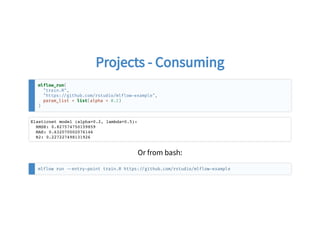
Projects - ConsumingProjects - Consuming
mlflow_run(
"train.R",
"https: github.com/rstudio/mlflow example",
param_list = list(alpha = 0.2)
)
Elasticnet model (alpha=0.2, lambda=0.5):
RMSE: 0.827574750159859
MAE: 0.632070002076146
R2: 0.227227498131926
Or from bash:
mlflow run entry point train.R https: github.com/rstudio/mlflow example
Models - SavingModels - Saving
mlflow_save_model(model)
Generic functions are serialized with crate:
column mlflow_log_param("column", 1)
model lm(
Sepal.Width ~ x,
data.frame(Sepal.Width = iris$Sepal.Width, x = iris[,column])
)
mlflow_save_model(
crate(~ stats predict(model, .x), model)
)
However, mlflow_save_model() can be extended by packages:
#' @export
mlflow_save_flavor.tensorflow function( ) {}
mlflow_load_flavor.tensorflow function( ) {}
mlflow_predict_flavor.tensorflow function( ) {}
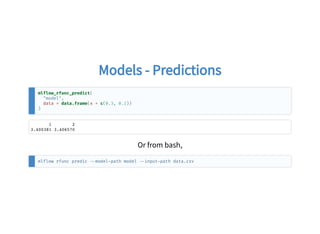
Models - PredictionsModels - Predictions
mlflow_rfunc_predict(
"model",
data = data.frame(x = c(0.3, 0.2))
)
1 2
3.400381 3.406570
Or from bash,
mlflow rfunc predic model path model input path data.csv
Models - ServingModels - Serving
mlflow_rfunc_serve("model")
mlflow rfunc serve model path model
curl -X POST "http: 127.0.0.1 8090/predict/" -H "accept: application/json" -H "Content-Type:
application/json" d '[{"x": [0.3, 0.2]}]'
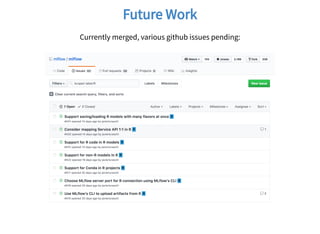
Future WorkFuture Work
Currently merged, various github issues pending:
Thanks!Thanks!
github.com/mlflow/mlflow
@javierluraschi
javier@rstudio.com

MLflow with R

  • 1.
    MLflow with RMLflowwith R Javier LuraschiJavier Luraschi September 2018September 2018
  • 2.
  • 3.
  • 4.
    BackgroundBackground Spark Summit fromAndrej Karpathy at Tesla The toolchain for the (so ware) 2.0 tack does not exist.
  • 5.
    MLflowMLflow “Helps teams managetheir machine learning lifecycle.” Tracking : Track experiments to record and compare params and results. Projects : Reuse and reproduce code to share or transfer to production. Models : Manage and deploy models from across libraries and platforms.
  • 6.
  • 7.
    R LanguageR Language Ris a programming language and free so ware environment for statistical computing and graphics. Interface language diagram by John Chambers - Rick Becker useR 2016.
  • 8.
    R CommunityR Community Providesa rich package archive provided in and : to manipulate data, to analyze clusters, to visualize data, etc. CRAN Bioconductor dplyr cluster ggplot2 Daily downloads of CRAN packages.
  • 9.
    R LanguageR Language Languagefeatures I would highlighting: 2.1.1 Vectors 2.1.4 Expression objects 2.1.8 Promise objects 2.1.9 Dot-dot-dot 3.1.4 Operators cran.r project.org/doc/manuals/R-lang.html
  • 10.
    Use CaseUse Case Selectthe cyl and hp columns and add 2 and 20: mtcars ## mpg cyl disp hp drat wt qsec vs am gear carb ## Mazda RX4 21.0 6 160.0 110 3.90 2.620 16.46 0 1 4 4 ## Mazda RX4 Wag 21.0 6 160.0 110 3.90 2.875 17.02 0 1 4 4 ## Datsun 710 22.8 4 108.0 93 3.85 2.320 18.61 1 1 4 1 ## Hornet 4 Drive 21.4 6 258.0 110 3.08 3.215 19.44 1 0 3 1 ## Hornet Sportabout 18.7 8 360.0 175 3.15 3.440 17.02 0 0 3 2 ## Valiant 18.1 6 225.0 105 2.76 3.460 20.22 1 0 3 1 ## Duster 360 14.3 8 360.0 245 3.21 3.570 15.84 0 0 3 4 ## Merc 240D 24.4 4 146.7 62 3.69 3.190 20.00 1 0 4 2 ## Merc 230 22.8 4 140.8 95 3.92 3.150 22.90 1 0 4 2 ## Merc 280 19.2 6 167.6 123 3.92 3.440 18.30 1 0 4 4 ## Merc 280C 17.8 6 167.6 123 3.92 3.440 18.90 1 0 4 4 ## Merc 450SE 16.4 8 275.8 180 3.07 4.070 17.40 0 0 3 3 ## Merc 450SL 17.3 8 275.8 180 3.07 3.730 17.60 0 0 3 3 ## Merc 450SLC 15.2 8 275.8 180 3.07 3.780 18.00 0 0 3 3 ## Cadillac Fleetwood 10.4 8 472.0 205 2.93 5.250 17.98 0 0 3 4 ## Lincoln Continental 10.4 8 460.0 215 3.00 5.424 17.82 0 0 3 4 ## Chrysler Imperial 14.7 8 440.0 230 3.23 5.345 17.42 0 0 3 4 ## Fiat 128 32.4 4 78.7 66 4.08 2.200 19.47 1 1 4 1 ## Honda Civic 30.4 4 75.7 52 4.93 1.615 18.52 1 1 4 2 ## Toyota Corolla 33.9 4 71.1 65 4.22 1.835 19.90 1 1 4 1 ## Toyota Corona 21.5 4 120.1 97 3.70 2.465 20.01 1 0 3 1 ## Dodge Challenger 15.5 8 318.0 150 2.76 3.520 16.87 0 0 3 2 ## AMC Javelin 15.2 8 304.0 150 3.15 3.435 17.30 0 0 3 2
  • 11.
    How to NOTwrite R codeHow to NOT write R code This is how I would have written R code as a so ware engineer before knowing R: # Select columns subset data = data.frame(mtcars$cyl, mtcars$hp) colnames(data) = c("cyl", "hp") # Transform each row for (idx in 1:nrow(data)) { data$cyl[idx] = data$cyl[idx] + 2 } # One column at a time to use the CPU cache efficiently for (idx in 1:nrow(data)) { data$hp[idx] = data$hp[idx] + 20 }
  • 12.
    2.1.1 Vectors2.1.1 Vectors Everythingis a vector in R: # Select columns subset data = data.frame(mtcars$cyl, mtcars$hp) colnames(data) = c("cyl", "hp") # Transform each row data$cyl = data$cyl + 2 # One column at a time to use the CPU cache efficiently data$hp = data$hp + 20
  • 13.
    2.1.9 Dot-dot-dot2.1.9 Dot-dot-dot Dynamicparameters using the ... parameter: # Select columns subset data = data.frame(cyl = mtcars$cyl, hp = mtcars$hp) # Transform each row data$cyl = data$cyl + 2 # One column at a time to use the CPU cache efficiently data$hp = data$hp + 20
  • 14.
    2.1.4/2.1.8 Expression andPromise objects2.1.4/2.1.8 Expression and Promise objects One can lazily evaluate operations and operate over expressions: # Select columns subset data = select(mtcars, cyl, hp) # Transform each row data = mutate(data, cyl = cyl + 2) # One column at a time to use the CPU cache efficiently data = mutate(data, hp = hp + 20)
  • 15.
    3.1.4 Operators3.1.4 Operators Use<- for assignment, or the newer %>% pipe: data mtcars %>% select(mtcars, cyl, hp) %>% mutate(data, cyl = cyl + 2) %>% mutate(data, hp = hp + 20)
  • 16.
    Linear ModelsLinear Models lm(mpg~ cyl + hp, mtcars) %>% plot()
  • 17.
  • 18.
    PrinciplesPrinciples Parity with PythonAPI. Designed for the R user.
  • 19.
    InstallingInstalling Install Anaconda orminiconda. Today… git clone https: github.com/mlflow/mlflow devtools install_github("mlflow/mlflow", subdir = "R/mlflow") mlflow mlflow_install() reticulate conda_install("r mlflow", "<local github repo>", pip = TRUE) Soon… install.packages("mlflow") mlflow mlflow_install()
  • 20.
    Tracking - ImplicitTracking- Implicit Implicit MLflow run: library(mlflow) # Log a parameter (key value pair) mlflow_log_param("param1", 5) # Log a metric; metrics can be updated throughout the run mlflow_log_metric("foo", 1) mlflow_log_metric("foo", 2) mlflow_log_metric("foo", 3) # Log an artifact (output file) writeLines("Hello world!", "output.txt") mlflow_log_artifact("output.txt") Run terminates when the R session finishes or by running: mlflow_end_run() Useful when sourcing files.
  • 21.
    Tracking - ExplicitTracking- Explicit Explicit MLflow run: library(mlflow) with(mlflow_start_run(), { # Log a parameter (key value pair) mlflow_log_param("param1", 5) # Log a metric; metrics can be updated throughout the run mlflow_log_metric("foo", 1) mlflow_log_metric("foo", 2) mlflow_log_metric("foo", 3) # Log an artifact (output file) writeLines("Hello world!", "output.txt") mlflow_log_artifact("output.txt") })
  • 22.
    Tracking - SourcesTracking- Sources mlflow_run("R/tracking.R") Or adding the following to tracking.R in RStudio 1.2: # !source mlflow mlflow_run(entry_point = .file)
  • 23.
    Tracking - UITracking- UI mlflow_ui()
  • 24.
    Projects - SnapshotsProjects- Snapshots Create dependencies snapshot: mlflow_snapshot() Then restore snapshot: mlflow_restore_snapshot()
  • 25.
    Projects - ConsumingProjects- Consuming mlflow_run( "train.R", "https: github.com/rstudio/mlflow example", param_list = list(alpha = 0.2) ) Elasticnet model (alpha=0.2, lambda=0.5): RMSE: 0.827574750159859 MAE: 0.632070002076146 R2: 0.227227498131926 Or from bash: mlflow run entry point train.R https: github.com/rstudio/mlflow example
  • 26.
    Models - SavingModels- Saving mlflow_save_model(model) Generic functions are serialized with crate: column mlflow_log_param("column", 1) model lm( Sepal.Width ~ x, data.frame(Sepal.Width = iris$Sepal.Width, x = iris[,column]) ) mlflow_save_model( crate(~ stats predict(model, .x), model) ) However, mlflow_save_model() can be extended by packages: #' @export mlflow_save_flavor.tensorflow function( ) {} mlflow_load_flavor.tensorflow function( ) {} mlflow_predict_flavor.tensorflow function( ) {}
  • 27.
    Models - PredictionsModels- Predictions mlflow_rfunc_predict( "model", data = data.frame(x = c(0.3, 0.2)) ) 1 2 3.400381 3.406570 Or from bash, mlflow rfunc predic model path model input path data.csv
  • 28.
    Models - ServingModels- Serving mlflow_rfunc_serve("model") mlflow rfunc serve model path model curl -X POST "http: 127.0.0.1 8090/predict/" -H "accept: application/json" -H "Content-Type: application/json" d '[{"x": [0.3, 0.2]}]'
  • 29.
    Future WorkFuture Work Currentlymerged, various github issues pending:
  • 30.