J ava S cript  O bject Notation  (JSON) Prepared by: Chandra Maul Sharma Software Engineer Oct -20-2011 BOSS Webtech Private Limited www.bosswebtech.com
What is JSON? JSON is syntax for storing and exchanging text information. Much like XML. JSON is smaller than XML, and faster and easier to parse. JSON stands for  J ava S cript  O bject  N otation JSON is lightweight text-data interchange format JSON is language independent  * JSON is "self-describing" and easy to understand
JSON Example { "employees": [ { "firstName":"John" , "lastName":"Doe" },  { "firstName":"Anna" , "lastName":"Smith" },  { "firstName":"Peter" , "lastName":"Jones" } ] }
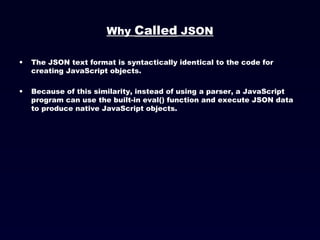
Why  Called  JSON The JSON text format is syntactically identical to the code for creating JavaScript objects. Because of this similarity, instead of using a parser, a JavaScript program can use the built-in eval() function and execute JSON data to produce native JavaScript objects.
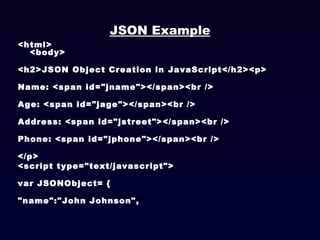
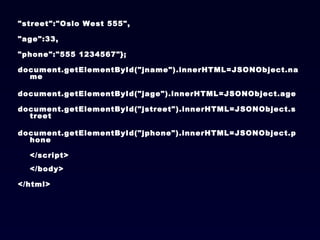
JSON Example <html> <body> <h2>JSON Object Creation in JavaScript</h2><p> Name: <span id=&quot;jname&quot;></span><br />  Age: <span id=&quot;jage&quot;></span><br />  Address: <span id=&quot;jstreet&quot;></span><br />  Phone: <span id=&quot;jphone&quot;></span><br />  </p>  <script type=&quot;text/javascript&quot;> var JSONObject= { &quot;name&quot;:&quot;John Johnson&quot;,
&quot;street&quot;:&quot;Oslo West 555&quot;,  &quot;age&quot;:33, &quot;phone&quot;:&quot;555 1234567&quot;}; document.getElementById(&quot;jname&quot;).innerHTML=JSONObject.name  document.getElementById(&quot;jage&quot;).innerHTML=JSONObject.age  document.getElementById(&quot;jstreet&quot;).innerHTML=JSONObject.street  document.getElementById(&quot;jphone&quot;).innerHTML=JSONObject.phone </script> </body> </html>
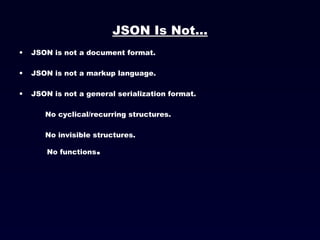
JSON Is Not... JSON is not a document format. JSON is not a markup language. JSON is not a general serialization format. No cyclical/recurring structures. No invisible structures. No functions .
Why Used JSON? For AJAX applications, JSON is faster and easier than XML: Using XML Fetch an XML document  Use the XML DOM to loop through the document  Extract values and store in variables  Using JSON Fetch a JSON string  eval() the JSON string
  Languages ActionScript C / C++ C# Cold Fusion Delphi E Erlang Java Lisp Perl Objective-C Objective CAML PHP Python Rebol Ruby Scheme Squeak
JSON Syntax Rules JSON syntax is a subset of the JavaScript object notation syntax. Data is in name/value pairs  Data is separated by comma  Curly brackets holds objects  Square brackets holds arrays
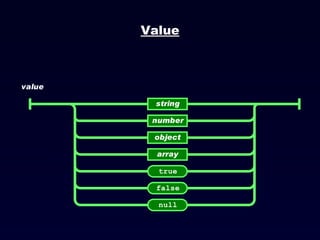
JSON Values JSON values can be: A number (integer or floating point)  A string (in double quotes)  A Boolean (true or false)  An array (in square brackets)  An object (in curly brackets)  null
Value
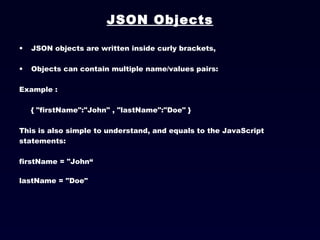
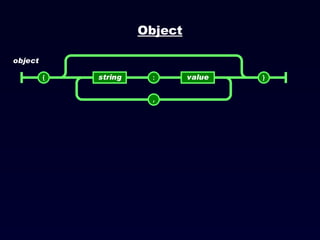
JSON Objects JSON objects are written inside curly brackets, Objects can contain multiple name/values pairs: Example :  { &quot;firstName&quot;:&quot;John&quot; , &quot;lastName&quot;:&quot;Doe&quot; }  This is also simple to understand, and equals to the JavaScript statements:  firstName = &quot;John“ lastName = &quot;Doe&quot;
Object
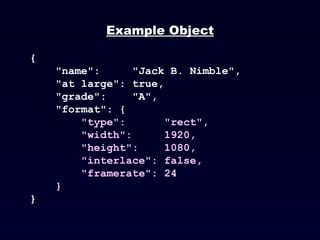
Example Object { &quot;name&quot;:  &quot;Jack B. Nimble&quot;,  &quot;at large&quot;: true,  &quot;grade&quot;:  &quot;A&quot;,  &quot;format&quot;:  { &quot;type&quot;:  &quot;rect&quot;,  &quot;width&quot;:  1920,  &quot;height&quot;:  1080,  &quot;interlace&quot;: false,  &quot;framerate&quot;: 24 } }
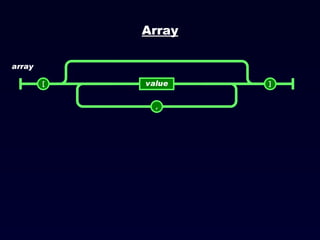
JSON Arrays JSON arrays are written inside square brackets. An array can contain multiple objects: { &quot;employees&quot;: [ { &quot;firstName&quot;:&quot;John&quot; , &quot;lastName&quot;:&quot;Doe&quot; },  { &quot;firstName&quot;:&quot;Anna&quot; , &quot;lastName&quot;:&quot;Smith&quot; },  { &quot;firstName&quot;:&quot;Peter&quot; , &quot;lastName&quot;:&quot;Jones&quot; } ] }  In the example above, the object &quot;employees&quot; is an array containing three objects. Each object is a record of a person (with a first name and a last name).
Array
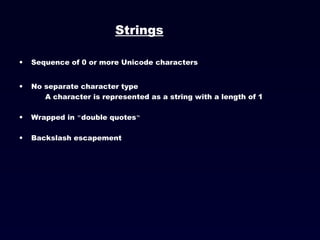
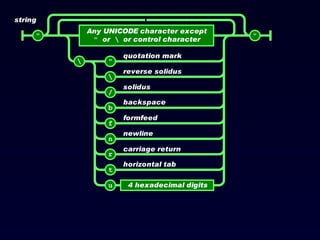
Strings Sequence of 0 or more Unicode characters No separate character type A character is represented as a string with a length of 1 Wrapped in  &quot; double quotes “ Backslash escapement
 
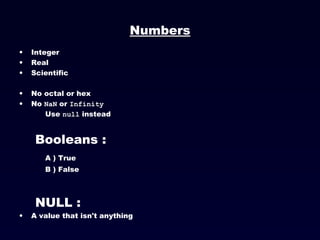
Numbers Integer Real Scientific No octal or hex No  NaN  or  Infinity   Use  null  instead Booleans : A ) True B ) False NULL : A value that isn't anything
Arrays vs Objects Use objects when the key names are arbitrary strings. Use arrays when the key names are sequential integers. Don't get confused by the term Associative Array. JSON Files : The file type for JSON files is &quot;.json“ The MIME type for JSON text is &quot;application/json&quot;
Rules A JSON decoder must accept all well-formed JSON text. A JSON decoder may also accept non-JSON text. A JSON encoder must only produce well-formed JSON text. Be conservative in what you do, be liberal in what you accept from others.
JSONRequest A new facility. Two way data interchange between any page and any server. Exempt from the Same Origin Policy. Campaign to make a standard feature of all browsers.
JSONRequest function  done ( requestNr ,  value ,  exception ) { ... } var  request  =  JSONRequest.post( url ,  data ,  done ); var  request  =  JSONRequest.get( url ,  done ); No messing with headers. No cookies.  No implied authentication .
Arguments against JSON JSON Doesn't Have Namespaces. JSON Has No Validator. JSON Is Not Extensible. JSON Is Not XML.
JSON is Not Extensible It does not need to be.  It can represent any non-recurrent data structure as is. JSON is flexible. New fields can be added to existing structures without obsoleting existing programs.
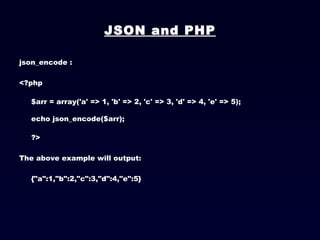
JSON and PHP json_encode : <?php $arr = array('a' => 1, 'b' => 2, 'c' => 3, 'd' => 4, 'e' => 5); echo json_encode($arr); ?>  The above example will output: {&quot;a&quot;:1,&quot;b&quot;:2,&quot;c&quot;:3,&quot;d&quot;:4,&quot;e&quot;:5}  
Json_decode : <?php $json = '{&quot;a&quot;:1,&quot;b&quot;:2,&quot;c&quot;:3,&quot;d&quot;:4,&quot;e&quot;:5}'; var_dump(json_decode($json)); var_dump(json_decode($json, true)); ?>  The above example will output: object(stdClass)#1 (5) { [&quot;a&quot;] => int(1) [&quot;b&quot;] => int(2) [&quot;c&quot;] => int(3) [&quot;d&quot;] => int(4) [&quot;e&quot;] => int(5) } array(5) { [&quot;a&quot;] => int(1) [&quot;b&quot;] => int(2) [&quot;c&quot;] => int(3) [&quot;d&quot;] => int(4) [&quot;e&quot;] => int(5) }
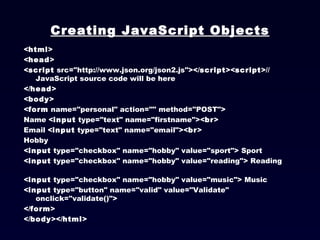
Creating JavaScript Objects < html > < head > < script  src=&quot;http://www.json.org/json2.js&quot;></ script >< script >// JavaScript source code will be here </ head > < body > < form  name=&quot;personal&quot; action=&quot;&quot; method=&quot;POST&quot;> Name < input  type=&quot;text&quot; name=&quot;firstname&quot;>< br > Email < input  type=&quot;text&quot; name=&quot;email&quot;>< br > Hobby  < input  type=&quot;checkbox&quot; name=&quot;hobby&quot; value=&quot;sport&quot;> Sport < input  type=&quot;checkbox&quot; name=&quot;hobby&quot; value=&quot;reading&quot;> Reading < input  type=&quot;checkbox&quot; name=&quot;hobby&quot; value=&quot;music&quot;> Music < input  type=&quot;button&quot; name=&quot;valid&quot; value=&quot;Validate&quot; onclick=&quot;validate()&quot;> </ form > </ body ></ html >
function  validate() {  var  p = document.forms['personal'];   var  JSONObject =  new  Object;  JSONObject.firstname = p['firstname'].value;  JSONObject.email = p['email'].value;  JSONObject.hobby =  new  Array;   for ( var  i=0; i<3; i++)  {  JSONObject.hobby[i] =  new  Object; JSONObject.hobby[i].hobbyName = p['hobby'][i].value; JSONObject.hobby[i].isHobby = p['hobby'][i].checked;  }   JSONstring = JSON.stringify(JSONObject);  runAjax(JSONstring); }
JSON object to PHP with AJAX var request; function runAjax(JSONstring) { request = getHTTPObject();  request.onreadystatechange = sendData;  request.open(&quot;GET&quot;, &quot;parser.php?json=&quot;+JSONstring, true);  request.send(null);}  // function is executed when var request state changes function  sendData() {  // if request object received response   if(request.readyState == 4)  { // parser.php response var JSONtext = request.responseText; // convert received string to JavaScript object var JSONobject = JSON.parse(JSONtext);  // notice how variables are used var msg = &quot;Number of errors: &quot;+JSONobject.errorsNum+ &quot;\n- &quot;+JSONobject.error[0]+ &quot;\n- &quot;+JSONobject.error[1];  alert(msg);  }}
JSON To PHP <?php   // decode JSON string to PHP object $decoded = json_decode($_GET['json']);  // do something with data here   // create  response object $json = array(); $json['errorsNum'] = 2; $json['error'] = array(); $json['error'][] = 'Wrong email!';$json['error'][] = 'Wrong hobby!';  // encode array $json to JSON string $encoded = json_encode($json);  // send response back to index.html// and end script execution die($encoded);  ?>
OUTPUT stdClass Object (  [firstname] => fgfg  [email] =>  [hobby] => Array    (    [0] => stdClass Object    (    [hobbyName] => sport    [isHobby] => 1  )     [1] => stdClass Object  (    [hobbyName] => reading    [isHobby] =>  )   [2] => stdClass Object    (    [hobbyName] => music  [isHobby] =>  )   ))
Thank You!!
BOSS Webtech is a process oriented design house specializing in web design, web development, backend web programming, mobile application development and other web and mobile related design and support services. Recently launched BizPlus – Mobile based survey software. Check it more here  http://bizplusonline.com/ More products here  http://www.bosswebtech.com/products/products.html Contact BOSS Webtech Call 831-998-9121 at US EST/CST/MST/PST Zone  or email  [email_address] About BOSS Webtech

JavaScript Object Notation (JSON)

  • 1.
    J ava Script O bject Notation (JSON) Prepared by: Chandra Maul Sharma Software Engineer Oct -20-2011 BOSS Webtech Private Limited www.bosswebtech.com
  • 2.
    What is JSON?JSON is syntax for storing and exchanging text information. Much like XML. JSON is smaller than XML, and faster and easier to parse. JSON stands for J ava S cript O bject N otation JSON is lightweight text-data interchange format JSON is language independent * JSON is &quot;self-describing&quot; and easy to understand
  • 3.
    JSON Example {&quot;employees&quot;: [ { &quot;firstName&quot;:&quot;John&quot; , &quot;lastName&quot;:&quot;Doe&quot; }, { &quot;firstName&quot;:&quot;Anna&quot; , &quot;lastName&quot;:&quot;Smith&quot; }, { &quot;firstName&quot;:&quot;Peter&quot; , &quot;lastName&quot;:&quot;Jones&quot; } ] }
  • 4.
    Why Called JSON The JSON text format is syntactically identical to the code for creating JavaScript objects. Because of this similarity, instead of using a parser, a JavaScript program can use the built-in eval() function and execute JSON data to produce native JavaScript objects.
  • 5.
    JSON Example <html><body> <h2>JSON Object Creation in JavaScript</h2><p> Name: <span id=&quot;jname&quot;></span><br /> Age: <span id=&quot;jage&quot;></span><br /> Address: <span id=&quot;jstreet&quot;></span><br /> Phone: <span id=&quot;jphone&quot;></span><br /> </p> <script type=&quot;text/javascript&quot;> var JSONObject= { &quot;name&quot;:&quot;John Johnson&quot;,
  • 6.
    &quot;street&quot;:&quot;Oslo West 555&quot;, &quot;age&quot;:33, &quot;phone&quot;:&quot;555 1234567&quot;}; document.getElementById(&quot;jname&quot;).innerHTML=JSONObject.name document.getElementById(&quot;jage&quot;).innerHTML=JSONObject.age document.getElementById(&quot;jstreet&quot;).innerHTML=JSONObject.street document.getElementById(&quot;jphone&quot;).innerHTML=JSONObject.phone </script> </body> </html>
  • 7.
    JSON Is Not...JSON is not a document format. JSON is not a markup language. JSON is not a general serialization format. No cyclical/recurring structures. No invisible structures. No functions .
  • 8.
    Why Used JSON?For AJAX applications, JSON is faster and easier than XML: Using XML Fetch an XML document Use the XML DOM to loop through the document Extract values and store in variables Using JSON Fetch a JSON string eval() the JSON string
  • 9.
    LanguagesActionScript C / C++ C# Cold Fusion Delphi E Erlang Java Lisp Perl Objective-C Objective CAML PHP Python Rebol Ruby Scheme Squeak
  • 10.
    JSON Syntax RulesJSON syntax is a subset of the JavaScript object notation syntax. Data is in name/value pairs Data is separated by comma Curly brackets holds objects Square brackets holds arrays
  • 11.
    JSON Values JSONvalues can be: A number (integer or floating point) A string (in double quotes) A Boolean (true or false) An array (in square brackets) An object (in curly brackets) null
  • 12.
  • 13.
    JSON Objects JSONobjects are written inside curly brackets, Objects can contain multiple name/values pairs: Example : { &quot;firstName&quot;:&quot;John&quot; , &quot;lastName&quot;:&quot;Doe&quot; } This is also simple to understand, and equals to the JavaScript statements: firstName = &quot;John“ lastName = &quot;Doe&quot;
  • 14.
  • 15.
    Example Object {&quot;name&quot;: &quot;Jack B. Nimble&quot;, &quot;at large&quot;: true, &quot;grade&quot;: &quot;A&quot;, &quot;format&quot;: { &quot;type&quot;: &quot;rect&quot;, &quot;width&quot;: 1920, &quot;height&quot;: 1080, &quot;interlace&quot;: false, &quot;framerate&quot;: 24 } }
  • 16.
    JSON Arrays JSONarrays are written inside square brackets. An array can contain multiple objects: { &quot;employees&quot;: [ { &quot;firstName&quot;:&quot;John&quot; , &quot;lastName&quot;:&quot;Doe&quot; }, { &quot;firstName&quot;:&quot;Anna&quot; , &quot;lastName&quot;:&quot;Smith&quot; }, { &quot;firstName&quot;:&quot;Peter&quot; , &quot;lastName&quot;:&quot;Jones&quot; } ] } In the example above, the object &quot;employees&quot; is an array containing three objects. Each object is a record of a person (with a first name and a last name).
  • 17.
  • 18.
    Strings Sequence of0 or more Unicode characters No separate character type A character is represented as a string with a length of 1 Wrapped in &quot; double quotes “ Backslash escapement
  • 19.
  • 20.
    Numbers Integer RealScientific No octal or hex No NaN or Infinity Use null instead Booleans : A ) True B ) False NULL : A value that isn't anything
  • 21.
    Arrays vs ObjectsUse objects when the key names are arbitrary strings. Use arrays when the key names are sequential integers. Don't get confused by the term Associative Array. JSON Files : The file type for JSON files is &quot;.json“ The MIME type for JSON text is &quot;application/json&quot;
  • 22.
    Rules A JSONdecoder must accept all well-formed JSON text. A JSON decoder may also accept non-JSON text. A JSON encoder must only produce well-formed JSON text. Be conservative in what you do, be liberal in what you accept from others.
  • 23.
    JSONRequest A newfacility. Two way data interchange between any page and any server. Exempt from the Same Origin Policy. Campaign to make a standard feature of all browsers.
  • 24.
    JSONRequest function done ( requestNr , value , exception ) { ... } var request = JSONRequest.post( url , data , done ); var request = JSONRequest.get( url , done ); No messing with headers. No cookies. No implied authentication .
  • 25.
    Arguments against JSONJSON Doesn't Have Namespaces. JSON Has No Validator. JSON Is Not Extensible. JSON Is Not XML.
  • 26.
    JSON is NotExtensible It does not need to be. It can represent any non-recurrent data structure as is. JSON is flexible. New fields can be added to existing structures without obsoleting existing programs.
  • 27.
    JSON and PHPjson_encode : <?php $arr = array('a' => 1, 'b' => 2, 'c' => 3, 'd' => 4, 'e' => 5); echo json_encode($arr); ?> The above example will output: {&quot;a&quot;:1,&quot;b&quot;:2,&quot;c&quot;:3,&quot;d&quot;:4,&quot;e&quot;:5}  
  • 28.
    Json_decode : <?php$json = '{&quot;a&quot;:1,&quot;b&quot;:2,&quot;c&quot;:3,&quot;d&quot;:4,&quot;e&quot;:5}'; var_dump(json_decode($json)); var_dump(json_decode($json, true)); ?> The above example will output: object(stdClass)#1 (5) { [&quot;a&quot;] => int(1) [&quot;b&quot;] => int(2) [&quot;c&quot;] => int(3) [&quot;d&quot;] => int(4) [&quot;e&quot;] => int(5) } array(5) { [&quot;a&quot;] => int(1) [&quot;b&quot;] => int(2) [&quot;c&quot;] => int(3) [&quot;d&quot;] => int(4) [&quot;e&quot;] => int(5) }
  • 29.
    Creating JavaScript Objects< html > < head > < script src=&quot;http://www.json.org/json2.js&quot;></ script >< script >// JavaScript source code will be here </ head > < body > < form name=&quot;personal&quot; action=&quot;&quot; method=&quot;POST&quot;> Name < input type=&quot;text&quot; name=&quot;firstname&quot;>< br > Email < input type=&quot;text&quot; name=&quot;email&quot;>< br > Hobby < input type=&quot;checkbox&quot; name=&quot;hobby&quot; value=&quot;sport&quot;> Sport < input type=&quot;checkbox&quot; name=&quot;hobby&quot; value=&quot;reading&quot;> Reading < input type=&quot;checkbox&quot; name=&quot;hobby&quot; value=&quot;music&quot;> Music < input type=&quot;button&quot; name=&quot;valid&quot; value=&quot;Validate&quot; onclick=&quot;validate()&quot;> </ form > </ body ></ html >
  • 30.
    function validate(){ var p = document.forms['personal'];  var JSONObject = new Object; JSONObject.firstname = p['firstname'].value; JSONObject.email = p['email'].value; JSONObject.hobby = new Array;  for ( var i=0; i<3; i++) { JSONObject.hobby[i] = new Object; JSONObject.hobby[i].hobbyName = p['hobby'][i].value; JSONObject.hobby[i].isHobby = p['hobby'][i].checked; }  JSONstring = JSON.stringify(JSONObject); runAjax(JSONstring); }
  • 31.
    JSON object toPHP with AJAX var request; function runAjax(JSONstring) { request = getHTTPObject(); request.onreadystatechange = sendData; request.open(&quot;GET&quot;, &quot;parser.php?json=&quot;+JSONstring, true); request.send(null);}  // function is executed when var request state changes function sendData() { // if request object received response if(request.readyState == 4) { // parser.php response var JSONtext = request.responseText; // convert received string to JavaScript object var JSONobject = JSON.parse(JSONtext);  // notice how variables are used var msg = &quot;Number of errors: &quot;+JSONobject.errorsNum+ &quot;\n- &quot;+JSONobject.error[0]+ &quot;\n- &quot;+JSONobject.error[1];  alert(msg); }}
  • 32.
    JSON To PHP<?php   // decode JSON string to PHP object $decoded = json_decode($_GET['json']);  // do something with data here   // create response object $json = array(); $json['errorsNum'] = 2; $json['error'] = array(); $json['error'][] = 'Wrong email!';$json['error'][] = 'Wrong hobby!';  // encode array $json to JSON string $encoded = json_encode($json);  // send response back to index.html// and end script execution die($encoded);  ?>
  • 33.
    OUTPUT stdClass Object( [firstname] => fgfg [email] => [hobby] => Array ( [0] => stdClass Object ( [hobbyName] => sport [isHobby] => 1 )  [1] => stdClass Object ( [hobbyName] => reading [isHobby] => )  [2] => stdClass Object ( [hobbyName] => music [isHobby] => )  ))
  • 34.
  • 35.
    BOSS Webtech is aprocess oriented design house specializing in web design, web development, backend web programming, mobile application development and other web and mobile related design and support services. Recently launched BizPlus – Mobile based survey software. Check it more here http://bizplusonline.com/ More products here http://www.bosswebtech.com/products/products.html Contact BOSS Webtech Call 831-998-9121 at US EST/CST/MST/PST Zone or email [email_address] About BOSS Webtech