Introduction to JSON
What is JSON
 JSON stands for JavaScript Object
Notation
 JSON is lightweight text-data
interchange format
 JSON is language independent *
 JSON is "self-describing" and easy to
understand
Example JSON
{
"id":1,
"name":”Anoop",
"billingAddress":[{"city":”Bangalore"}]
}
JSON is LIKE XML
 JSON is plain text
 JSON is "self-describing" (human
readable)
 JSON is hierarchical (values within
values)
 JSON can be parsed by JavaScript
JSON is UNLIKE XML
 No end tag
 Shorter
 Quicker to read and write
 Can be parsed using built-in
JavaScript parse()
 Uses arrays
 No reserved words
Data on a web page
 Using XML
 Fetch an XML document
 Use the XML DOM to loop through the document
 Extract values and store in variables
 Using JSON
 Fetch a JSON string
 parse() the JSON string to get javascript objects
JSON Syntax
 Data is in name/value pairs
 Data is separated by commas
 Curly braces hold objects
 Square brackets hold arrays
{
"id":1,
"name":”Anoop",
"billingAddress":[{"city":”Bangalore"}]
}
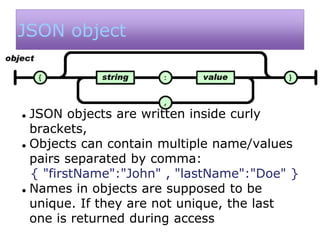
JSON object
 JSON objects are written inside curly
brackets,
 Objects can contain multiple name/values
pairs separated by comma:
{ "firstName":"John" , "lastName":"Doe" }
 Names in objects are supposed to be
unique. If they are not unique, the last
one is returned during access
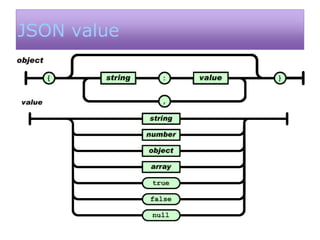
JSON value
JSON Array
 JSON arrays are written inside square brackets.
 An array can contain multiple objects:
{
"employees": [
{ "firstName":”Sanjay" , "lastName":”Adiwal" },
{ "firstName":”Shubham" , "lastName":”Parikh" },
{ "firstName":”Anoop" , "lastName":”Pandey" }
]
}
JSON and Javascript
var employees = ‘[
{ "firstName":”Sanjay" , "lastName":”Adiwal" },
{ "firstName":”Shubham" , "lastName":”Parikh" },
{ "firstName":”Anoop" , "lastName":”Pandey" }
]’;
obj = JSON.parse(employees)
obj[0].lastName //Adiwal
obj[0].firstName // “Sanjay";
JSON and other languages
» APIs are available for all
contemporary web programming
languages
» All browsers today are JSON-aware
» For server-side, specific APIs are in
Java, .Net, PHP, etc.

JSON.pptx

  • 1.
  • 2.
    What is JSON JSON stands for JavaScript Object Notation  JSON is lightweight text-data interchange format  JSON is language independent *  JSON is "self-describing" and easy to understand
  • 3.
  • 4.
    JSON is LIKEXML  JSON is plain text  JSON is "self-describing" (human readable)  JSON is hierarchical (values within values)  JSON can be parsed by JavaScript
  • 5.
    JSON is UNLIKEXML  No end tag  Shorter  Quicker to read and write  Can be parsed using built-in JavaScript parse()  Uses arrays  No reserved words
  • 6.
    Data on aweb page  Using XML  Fetch an XML document  Use the XML DOM to loop through the document  Extract values and store in variables  Using JSON  Fetch a JSON string  parse() the JSON string to get javascript objects
  • 7.
    JSON Syntax  Datais in name/value pairs  Data is separated by commas  Curly braces hold objects  Square brackets hold arrays { "id":1, "name":”Anoop", "billingAddress":[{"city":”Bangalore"}] }
  • 8.
    JSON object  JSONobjects are written inside curly brackets,  Objects can contain multiple name/values pairs separated by comma: { "firstName":"John" , "lastName":"Doe" }  Names in objects are supposed to be unique. If they are not unique, the last one is returned during access
  • 9.
  • 10.
    JSON Array  JSONarrays are written inside square brackets.  An array can contain multiple objects: { "employees": [ { "firstName":”Sanjay" , "lastName":”Adiwal" }, { "firstName":”Shubham" , "lastName":”Parikh" }, { "firstName":”Anoop" , "lastName":”Pandey" } ] }
  • 11.
    JSON and Javascript varemployees = ‘[ { "firstName":”Sanjay" , "lastName":”Adiwal" }, { "firstName":”Shubham" , "lastName":”Parikh" }, { "firstName":”Anoop" , "lastName":”Pandey" } ]’; obj = JSON.parse(employees) obj[0].lastName //Adiwal obj[0].firstName // “Sanjay";
  • 12.
    JSON and otherlanguages » APIs are available for all contemporary web programming languages » All browsers today are JSON-aware » For server-side, specific APIs are in Java, .Net, PHP, etc.