SEOUL
© 2015, Amazon Web Services, Inc. or its affiliates. All rights reserved
실시간 빅데이터 및 스트리밍 분석
김일호 – AWS Solutions Architect
Agenda
• Batch Processing: Amazon Elastic MapReduce (EMR)
• Real-time Processing: Amazon Kinesis
• Cost-saving Tips
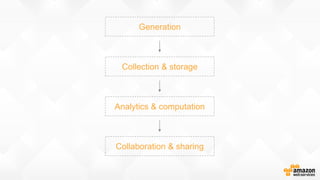
Generation
Collection & storage
Analytics & computation
Collaboration & sharing
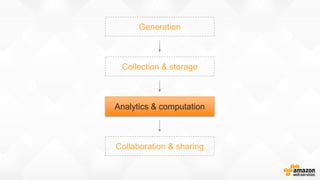
Generation
Collection & storage
Analytics & computation
Collaboration & sharing
Batch processing
Amazon Elastic MapReduce (EMR)
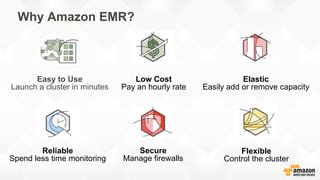
Why Amazon EMR?
Easy to Use
Launch a cluster in minutes
Low Cost
Pay an hourly rate
Elastic
Easily add or remove capacity
Reliable
Spend less time monitoring
Secure
Manage firewalls
Flexible
Control the cluster
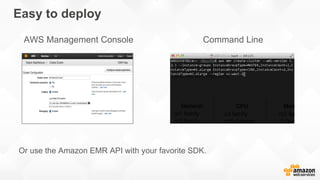
Easy to deploy
AWS Management Console Command Line
Or use the Amazon EMR API with your favorite SDK.
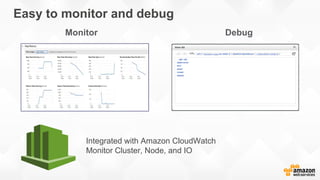
Easy to monitor and debug
Integrated with Amazon CloudWatch
Monitor Cluster, Node, and IO
Monitor Debug
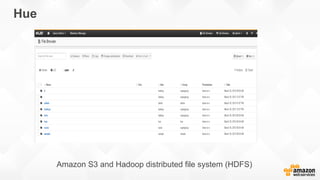
Hue
Amazon S3 and Hadoop distributed file system (HDFS)
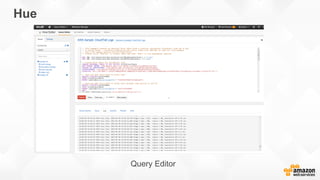
Hue
Query Editor
Hue
Job Browser
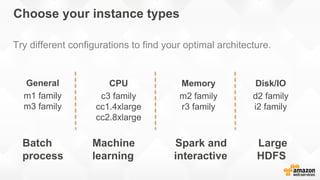
Try different configurations to find your optimal architecture.
CPU
c3 family
cc1.4xlarge
cc2.8xlarge
Memory
m2 family
r3 family
Disk/IO
d2 family
i2 family
General
m1 family
m3 family
Choose your instance types
Batch Machine Spark and Large
process learning interactive HDFS
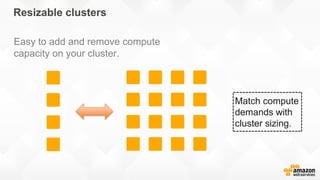
Easy to add and remove compute
capacity on your cluster.
Match compute
demands with
cluster sizing.
Resizable clusters
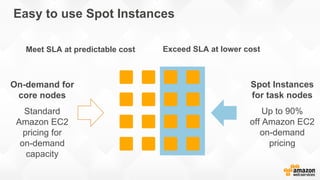
Spot Instances
for task nodes
Up to 90%
off Amazon EC2
on-demand
pricing
On-demand for
core nodes
Standard
Amazon EC2
pricing for
on-demand
capacity
Easy to use Spot Instances
Meet SLA at predictable cost Exceed SLA at lower cost
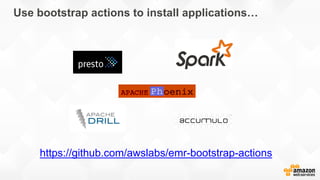
Use bootstrap actions to install applications…
https://github.com/awslabs/emr-bootstrap-actions
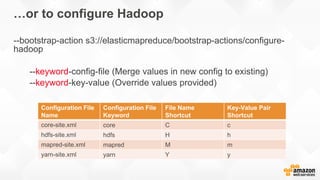
…or to configure Hadoop
--bootstrap-action s3://elasticmapreduce/bootstrap-actions/configure-
hadoop
--keyword-config-file (Merge values in new config to existing)
--keyword-key-value (Override values provided)
Configuration File
Name
Configuration File
Keyword
File Name
Shortcut
Key-Value Pair
Shortcut
core-site.xml core C c
hdfs-site.xml hdfs H h
mapred-site.xml mapred M m
yarn-site.xml yarn Y y
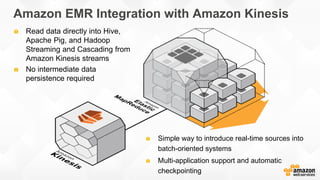
Read data directly into Hive,
Apache Pig, and Hadoop
Streaming and Cascading from
Amazon Kinesis streams
No intermediate data
persistence required
Simple way to introduce real-time sources into
batch-oriented systems
Multi-application support and automatic
checkpointing
Amazon EMR Integration with Amazon Kinesis
Amazon EMR: Leveraging Amazon S3
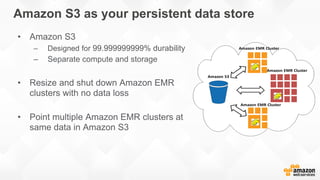
Amazon S3 as your persistent data store
• Amazon S3
– Designed for 99.999999999% durability
– Separate compute and storage
• Resize and shut down Amazon EMR
clusters with no data loss
• Point multiple Amazon EMR clusters at
same data in Amazon S3
EMRFS makes it easier to leverage Amazon S3
• Better performance and error handling options
• Transparent to applications – just read/write to “s3://”
• Consistent view
– For consistent list and read-after-write for new puts
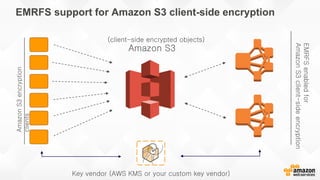
• Support for Amazon S3 server-side and client-side encryption
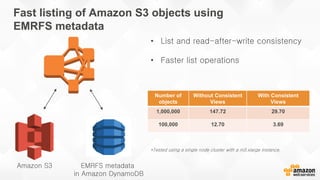
• Faster listing using EMRFS metadata
EMRFS support for Amazon S3 client-side encryption
Amazon S3
AmazonS3encryption
clients
EMRFSenabledfor
AmazonS3client-sideencryption
Key vendor (AWS KMS or your custom key vendor)
(client-side encrypted objects)
Amazon S3 EMRFS metadata
in Amazon DynamoDB
• List and read-after-write consistency
• Faster list operations
Number of
objects
Without Consistent
Views
With Consistent
Views
1,000,000 147.72 29.70
100,000 12.70 3.69
Fast listing of Amazon S3 objects using
EMRFS metadata
*Tested using a single node cluster with a m3.xlarge instance.
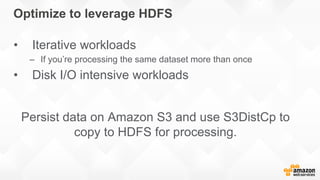
Optimize to leverage HDFS
• Iterative workloads
– If you’re processing the same dataset more than once
• Disk I/O intensive workloads
Persist data on Amazon S3 and use S3DistCp to
copy to HDFS for processing.
Amazon EMR: Design patterns
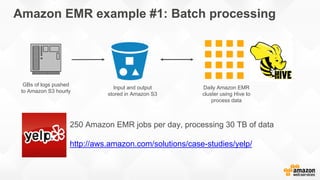
Amazon EMR example #1: Batch processing
GBs of logs pushed
to Amazon S3 hourly
Daily Amazon EMR
cluster using Hive to
process data
Input and output
stored in Amazon S3
250 Amazon EMR jobs per day, processing 30 TB of data
http://aws.amazon.com/solutions/case-studies/yelp/
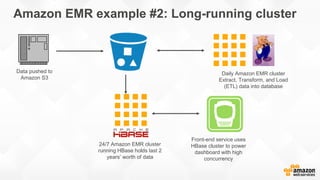
Amazon EMR example #2: Long-running cluster
Data pushed to
Amazon S3
Daily Amazon EMR cluster
Extract, Transform, and Load
(ETL) data into database
24/7 Amazon EMR cluster
running HBase holds last 2
years’ worth of data
Front-end service uses
HBase cluster to power
dashboard with high
concurrency
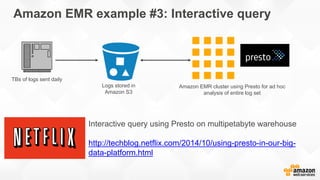
Amazon EMR example #3: Interactive query
TBs of logs sent daily
Logs stored in
Amazon S3
Amazon EMR cluster using Presto for ad hoc
analysis of entire log set
Interactive query using Presto on multipetabyte warehouse
http://techblog.netflix.com/2014/10/using-presto-in-our-big-
data-platform.html
Real-time Processing
Amazon Kinesis
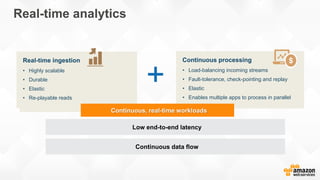
Real-time analytics
Real-time ingestion
• Highly scalable
• Durable
• Elastic
• Re-playable reads
Continuous processing
• Load-balancing incoming streams
• Fault-tolerance, check-pointing and replay
• Elastic
• Enables multiple apps to process in parallel
Continuous data flow
Low end-to-end latency
Continuous, real-time workloads
+
Data ingestion
Global top 10
example.com
Starting simple...
Global top-10
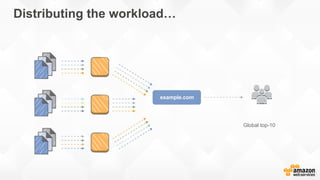
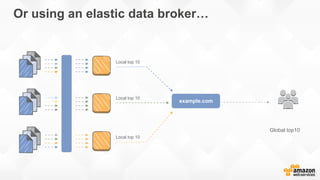
Distributing the workload…
example.com
Global top10
Local top 10
Local top 10
Local top 10
Or using an elastic data broker…
example.com
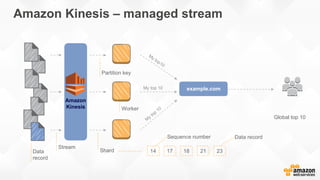
Global top 10
Data
record
Stream
Shard
Partition key
Worker
My top 10
Data recordSequence number
14 17 18 21 23
Amazon Kinesis – managed stream
example.com
Amazon
Kinesis
AWSendpoint
Amazon
S3
Amazon
DynamoDB
Amazon
Redshift
Data
sources
Availability
Zone
Availability
Zone
Data
sources
Data
sources
Data
sources
Data
sources
Availability
Zone
Shard 1
Shard 2
Shard N
[Data
archive]
[Metric
extraction]
[Sliding-window
analysis]
[Machine
learning]
App. 1
App. 2
App. 3
App. 4
Amazon EMR
Amazon Kinesis – common data broker
Amazon Kinesis – stream and shards
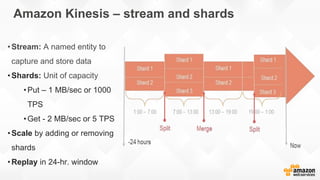
•Stream: A named entity to
capture and store data
•Shards: Unit of capacity
•Put – 1 MB/sec or 1000
TPS
•Get - 2 MB/sec or 5 TPS
•Scale by adding or removing
shards
•Replay in 24-hr. window
How to size your Amazon Kinesis stream
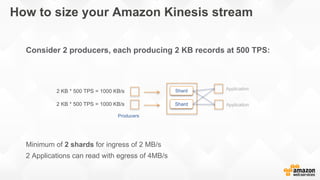
Consider 2 producers, each producing 2 KB records at 500 TPS:
Minimum of 2 shards for ingress of 2 MB/s
2 Applications can read with egress of 4MB/s
Shard
Shard
2 KB * 500 TPS = 1000 KB/s
Application
Producers
Application
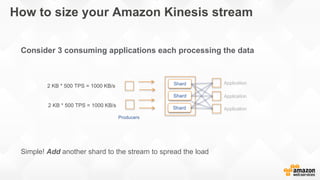
How to size your Amazon Kinesis stream
Consider 3 consuming applications each processing the data
Simple! Add another shard to the stream to spread the load
Shard
Shard
2 KB * 500 TPS = 1000 KB/s
Application
Application
Application
Producers
Shard
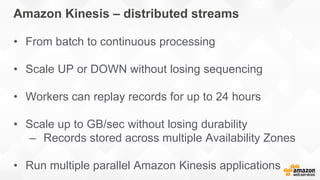
Amazon Kinesis – distributed streams
• From batch to continuous processing
• Scale UP or DOWN without losing sequencing
• Workers can replay records for up to 24 hours
• Scale up to GB/sec without losing durability
– Records stored across multiple Availability Zones
• Run multiple parallel Amazon Kinesis applications
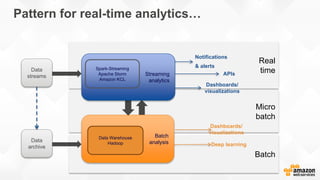
Data processing
Batch
Micro
batch
Real
time
Pattern for real-time analytics…
Batch
analysis
Data Warehouse
Hadoop
Notifications
& alerts
Dashboards/
visualizations
APIsStreaming
analytics
Data
streams
Deep learning
Dashboards/
visualizations
Spark-Streaming
Apache Storm
Amazon KCL
Data
archive
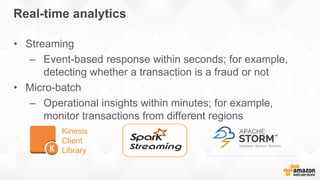
Real-time analytics
• Streaming
– Event-based response within seconds; for example,
detecting whether a transaction is a fraud or not
• Micro-batch
– Operational insights within minutes; for example,
monitor transactions from different regions
Kinesis
Client
Library
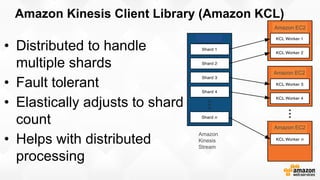
Amazon Kinesis Client Library (Amazon KCL)
• Distributed to handle
multiple shards
• Fault tolerant
• Elastically adjusts to shard
count
• Helps with distributed
processing
Amazon
Kinesis
Stream
Amazon EC2
Amazon EC2
Amazon EC2
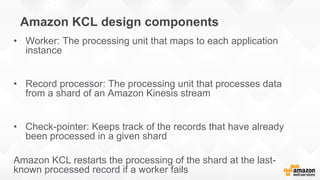
Amazon KCL design components
• Worker: The processing unit that maps to each application
instance
• Record processor: The processing unit that processes data
from a shard of an Amazon Kinesis stream
• Check-pointer: Keeps track of the records that have already
been processed in a given shard
Amazon KCL restarts the processing of the shard at the last-
known processed record if a worker fails
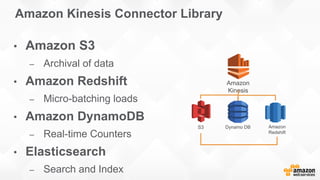
Amazon Kinesis Connector Library
• Amazon S3
– Archival of data
• Amazon Redshift
– Micro-batching loads
• Amazon DynamoDB
– Real-time Counters
• Elasticsearch
– Search and Index
S3 Dynamo DB Amazon
Redshift
Amazon
Kinesis
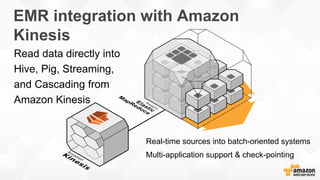
Read data directly into
Hive, Pig, Streaming,
and Cascading from
Amazon Kinesis
Real-time sources into batch-oriented systems
Multi-application support & check-pointing
EMR integration with Amazon
Kinesis
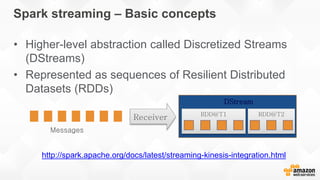
DStream
RDD@T1 RDD@T2
Messages
Receiver
Spark streaming – Basic concepts
• Higher-level abstraction called Discretized Streams
(DStreams)
• Represented as sequences of Resilient Distributed
Datasets (RDDs)
http://spark.apache.org/docs/latest/streaming-kinesis-integration.html
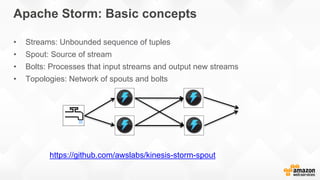
Apache Storm: Basic concepts
• Streams: Unbounded sequence of tuples
• Spout: Source of stream
• Bolts: Processes that input streams and output new streams
• Topologies: Network of spouts and bolts
https://github.com/awslabs/kinesis-storm-spout
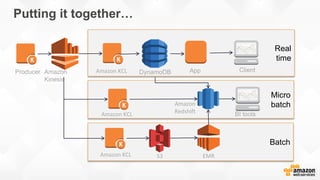
Batch
Micro
batch
Real
time
Putting it together…
Producer Amazon
Kinesis
App Client
EMRS3
Amazon KCL
DynamoDB
Amazon
Redshift BI tools
Amazon KCL
Amazon KCL
Ref. re:invent 2014 BDT310
Cost-saving tips
• Use Amazon S3 as your persistent data store (only pay for compute
when you need it!).
• Use Amazon EC2 Spot Instances (especially with task nodes) to
save 80 percent or more on the Amazon EC2 cost.
• Use Amazon EC2 Reserved Instances if you have steady
workloads.
• Create CloudWatch alerts to notify you if a cluster is underutilized
so that you can shut it down (e.g. Mappers running == 0 for more
than N hours).
• Contact your sales rep about custom pricing options, if you are
spending more than $10K per month on Amazon EMR.
SEOUL
© 2015, Amazon Web Services, Inc. or its affiliates. All rights reserved

AWS Summit Seoul 2015 - AWS 클라우드를 활용한 빅데이터 및 실시간 스트리밍 분석

  • 1.
    SEOUL © 2015, AmazonWeb Services, Inc. or its affiliates. All rights reserved
  • 2.
    실시간 빅데이터 및스트리밍 분석 김일호 – AWS Solutions Architect
  • 3.
    Agenda • Batch Processing:Amazon Elastic MapReduce (EMR) • Real-time Processing: Amazon Kinesis • Cost-saving Tips
  • 4.
    Generation Collection & storage Analytics& computation Collaboration & sharing
  • 5.
    Generation Collection & storage Analytics& computation Collaboration & sharing
  • 6.
  • 7.
    Why Amazon EMR? Easyto Use Launch a cluster in minutes Low Cost Pay an hourly rate Elastic Easily add or remove capacity Reliable Spend less time monitoring Secure Manage firewalls Flexible Control the cluster
  • 8.
    Easy to deploy AWSManagement Console Command Line Or use the Amazon EMR API with your favorite SDK.
  • 9.
    Easy to monitorand debug Integrated with Amazon CloudWatch Monitor Cluster, Node, and IO Monitor Debug
  • 10.
    Hue Amazon S3 andHadoop distributed file system (HDFS)
  • 11.
  • 12.
  • 13.
    Try different configurationsto find your optimal architecture. CPU c3 family cc1.4xlarge cc2.8xlarge Memory m2 family r3 family Disk/IO d2 family i2 family General m1 family m3 family Choose your instance types Batch Machine Spark and Large process learning interactive HDFS
  • 14.
    Easy to addand remove compute capacity on your cluster. Match compute demands with cluster sizing. Resizable clusters
  • 15.
    Spot Instances for tasknodes Up to 90% off Amazon EC2 on-demand pricing On-demand for core nodes Standard Amazon EC2 pricing for on-demand capacity Easy to use Spot Instances Meet SLA at predictable cost Exceed SLA at lower cost
  • 16.
    Use bootstrap actionsto install applications… https://github.com/awslabs/emr-bootstrap-actions
  • 17.
    …or to configureHadoop --bootstrap-action s3://elasticmapreduce/bootstrap-actions/configure- hadoop --keyword-config-file (Merge values in new config to existing) --keyword-key-value (Override values provided) Configuration File Name Configuration File Keyword File Name Shortcut Key-Value Pair Shortcut core-site.xml core C c hdfs-site.xml hdfs H h mapred-site.xml mapred M m yarn-site.xml yarn Y y
  • 18.
    Read data directlyinto Hive, Apache Pig, and Hadoop Streaming and Cascading from Amazon Kinesis streams No intermediate data persistence required Simple way to introduce real-time sources into batch-oriented systems Multi-application support and automatic checkpointing Amazon EMR Integration with Amazon Kinesis
  • 19.
  • 20.
    Amazon S3 asyour persistent data store • Amazon S3 – Designed for 99.999999999% durability – Separate compute and storage • Resize and shut down Amazon EMR clusters with no data loss • Point multiple Amazon EMR clusters at same data in Amazon S3
  • 21.
    EMRFS makes iteasier to leverage Amazon S3 • Better performance and error handling options • Transparent to applications – just read/write to “s3://” • Consistent view – For consistent list and read-after-write for new puts • Support for Amazon S3 server-side and client-side encryption • Faster listing using EMRFS metadata
  • 22.
    EMRFS support forAmazon S3 client-side encryption Amazon S3 AmazonS3encryption clients EMRFSenabledfor AmazonS3client-sideencryption Key vendor (AWS KMS or your custom key vendor) (client-side encrypted objects)
  • 23.
    Amazon S3 EMRFSmetadata in Amazon DynamoDB • List and read-after-write consistency • Faster list operations Number of objects Without Consistent Views With Consistent Views 1,000,000 147.72 29.70 100,000 12.70 3.69 Fast listing of Amazon S3 objects using EMRFS metadata *Tested using a single node cluster with a m3.xlarge instance.
  • 24.
    Optimize to leverageHDFS • Iterative workloads – If you’re processing the same dataset more than once • Disk I/O intensive workloads Persist data on Amazon S3 and use S3DistCp to copy to HDFS for processing.
  • 25.
  • 26.
    Amazon EMR example#1: Batch processing GBs of logs pushed to Amazon S3 hourly Daily Amazon EMR cluster using Hive to process data Input and output stored in Amazon S3 250 Amazon EMR jobs per day, processing 30 TB of data http://aws.amazon.com/solutions/case-studies/yelp/
  • 27.
    Amazon EMR example#2: Long-running cluster Data pushed to Amazon S3 Daily Amazon EMR cluster Extract, Transform, and Load (ETL) data into database 24/7 Amazon EMR cluster running HBase holds last 2 years’ worth of data Front-end service uses HBase cluster to power dashboard with high concurrency
  • 28.
    Amazon EMR example#3: Interactive query TBs of logs sent daily Logs stored in Amazon S3 Amazon EMR cluster using Presto for ad hoc analysis of entire log set Interactive query using Presto on multipetabyte warehouse http://techblog.netflix.com/2014/10/using-presto-in-our-big- data-platform.html
  • 29.
  • 30.
    Real-time analytics Real-time ingestion •Highly scalable • Durable • Elastic • Re-playable reads Continuous processing • Load-balancing incoming streams • Fault-tolerance, check-pointing and replay • Elastic • Enables multiple apps to process in parallel Continuous data flow Low end-to-end latency Continuous, real-time workloads +
  • 31.
  • 32.
  • 33.
    Global top-10 Distributing theworkload… example.com
  • 34.
    Global top10 Local top10 Local top 10 Local top 10 Or using an elastic data broker… example.com
  • 35.
    Global top 10 Data record Stream Shard Partitionkey Worker My top 10 Data recordSequence number 14 17 18 21 23 Amazon Kinesis – managed stream example.com Amazon Kinesis
  • 36.
    AWSendpoint Amazon S3 Amazon DynamoDB Amazon Redshift Data sources Availability Zone Availability Zone Data sources Data sources Data sources Data sources Availability Zone Shard 1 Shard 2 ShardN [Data archive] [Metric extraction] [Sliding-window analysis] [Machine learning] App. 1 App. 2 App. 3 App. 4 Amazon EMR Amazon Kinesis – common data broker
  • 37.
    Amazon Kinesis –stream and shards •Stream: A named entity to capture and store data •Shards: Unit of capacity •Put – 1 MB/sec or 1000 TPS •Get - 2 MB/sec or 5 TPS •Scale by adding or removing shards •Replay in 24-hr. window
  • 38.
    How to sizeyour Amazon Kinesis stream Consider 2 producers, each producing 2 KB records at 500 TPS: Minimum of 2 shards for ingress of 2 MB/s 2 Applications can read with egress of 4MB/s Shard Shard 2 KB * 500 TPS = 1000 KB/s 2 KB * 500 TPS = 1000 KB/s Application Producers Application
  • 39.
    How to sizeyour Amazon Kinesis stream Consider 3 consuming applications each processing the data Simple! Add another shard to the stream to spread the load Shard Shard 2 KB * 500 TPS = 1000 KB/s 2 KB * 500 TPS = 1000 KB/s Application Application Application Producers Shard
  • 40.
    Amazon Kinesis –distributed streams • From batch to continuous processing • Scale UP or DOWN without losing sequencing • Workers can replay records for up to 24 hours • Scale up to GB/sec without losing durability – Records stored across multiple Availability Zones • Run multiple parallel Amazon Kinesis applications
  • 41.
  • 42.
    Batch Micro batch Real time Pattern for real-timeanalytics… Batch analysis Data Warehouse Hadoop Notifications & alerts Dashboards/ visualizations APIsStreaming analytics Data streams Deep learning Dashboards/ visualizations Spark-Streaming Apache Storm Amazon KCL Data archive
  • 43.
    Real-time analytics • Streaming –Event-based response within seconds; for example, detecting whether a transaction is a fraud or not • Micro-batch – Operational insights within minutes; for example, monitor transactions from different regions Kinesis Client Library
  • 44.
    Amazon Kinesis ClientLibrary (Amazon KCL) • Distributed to handle multiple shards • Fault tolerant • Elastically adjusts to shard count • Helps with distributed processing Amazon Kinesis Stream Amazon EC2 Amazon EC2 Amazon EC2
  • 45.
    Amazon KCL designcomponents • Worker: The processing unit that maps to each application instance • Record processor: The processing unit that processes data from a shard of an Amazon Kinesis stream • Check-pointer: Keeps track of the records that have already been processed in a given shard Amazon KCL restarts the processing of the shard at the last- known processed record if a worker fails
  • 46.
    Amazon Kinesis ConnectorLibrary • Amazon S3 – Archival of data • Amazon Redshift – Micro-batching loads • Amazon DynamoDB – Real-time Counters • Elasticsearch – Search and Index S3 Dynamo DB Amazon Redshift Amazon Kinesis
  • 47.
    Read data directlyinto Hive, Pig, Streaming, and Cascading from Amazon Kinesis Real-time sources into batch-oriented systems Multi-application support & check-pointing EMR integration with Amazon Kinesis
  • 48.
    DStream RDD@T1 RDD@T2 Messages Receiver Spark streaming– Basic concepts • Higher-level abstraction called Discretized Streams (DStreams) • Represented as sequences of Resilient Distributed Datasets (RDDs) http://spark.apache.org/docs/latest/streaming-kinesis-integration.html
  • 49.
    Apache Storm: Basicconcepts • Streams: Unbounded sequence of tuples • Spout: Source of stream • Bolts: Processes that input streams and output new streams • Topologies: Network of spouts and bolts https://github.com/awslabs/kinesis-storm-spout
  • 50.
    Batch Micro batch Real time Putting it together… ProducerAmazon Kinesis App Client EMRS3 Amazon KCL DynamoDB Amazon Redshift BI tools Amazon KCL Amazon KCL
  • 51.
  • 52.
    Cost-saving tips • UseAmazon S3 as your persistent data store (only pay for compute when you need it!). • Use Amazon EC2 Spot Instances (especially with task nodes) to save 80 percent or more on the Amazon EC2 cost. • Use Amazon EC2 Reserved Instances if you have steady workloads. • Create CloudWatch alerts to notify you if a cluster is underutilized so that you can shut it down (e.g. Mappers running == 0 for more than N hours). • Contact your sales rep about custom pricing options, if you are spending more than $10K per month on Amazon EMR.
  • 53.
    SEOUL © 2015, AmazonWeb Services, Inc. or its affiliates. All rights reserved