Scaling your analytics
with Amazon EMR
Rahul Pathak - Amazon EMR
Agenda
•  EMR: Hadoop on AWS
–  Elastic clusters tailored for your workflows
–  Minimize costs using Spot instances
–  Easy integration with your datastores
•  Leveraging the Hadoop Ecosystem on EMR
–  Batch & real-time
–  Data warehouse on Hadoop
•  A few examples
Thousands of EMR Customers; Over 15 Million Clusters Launched
Why Amazon EMR?
•  Managed services
•  Easy to tune clusters and trim costs by
dissociating compute and storage
•  Support for multiple datastores
•  Unique features and ecosystem support
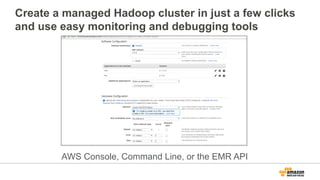
Create a managed Hadoop cluster in just a few clicks
and use easy monitoring and debugging tools
AWS Console, Command Line, or the EMR API
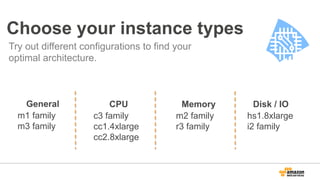
Choose your instance types
Try out different configurations to find your
optimal architecture.
CPU
c3 family
cc1.4xlarge
cc2.8xlarge
Memory
m2 family
r3 family
Disk / IO
hs1.8xlarge
i2 family
General
m1 family
m3 family
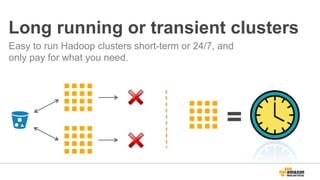
Long running or transient clusters
Easy to run Hadoop clusters short-term or 24/7, and
only pay for what you need.
=
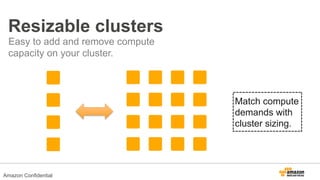
Resizable clusters
Easy to add and remove compute
capacity on your cluster.
Match compute
demands with
cluster sizing.
Amazon Confidential
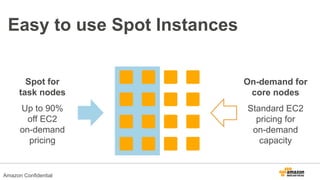
Easy to use Spot Instances
Spot for
task nodes
Up to 90%
off EC2
on-demand
pricing
On-demand for
core nodes
Standard EC2
pricing for
on-demand
capacity
Amazon Confidential
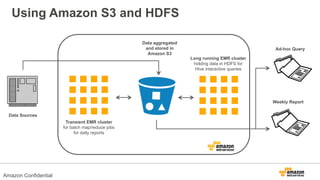
Using Amazon S3 and HDFS
Data Sources
Transient EMR cluster
for batch map/reduce jobs
for daily reports
Long running EMR cluster
holding data in HDFS for
Hive interactive queries
Weekly Report
Ad-hoc Query
Data aggregated
and stored in
Amazon S3
Amazon Confidential
Use the Hadoop Ecosystem
on EMR
Leverage a diverse set of tools to get the most out of your data.
Amazon Confidential
•  Databases
•  Machine learning
•  Metadata stores
•  Exchange formats
•  Diverse query languages
Hadoop 2.x
and much more...
Amazon Confidential
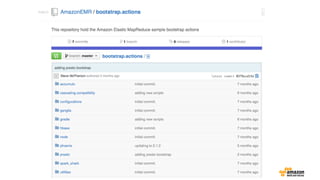
Use bootstrap actions to install whatever
applications you want on your EMR cluster
•  Presto
•  Spark
•  Phoenix
•  Any arbitrary application
Amazon Confidential
HUE: a UI for Hadoop to easily query and browse
through your data
(beta available)
Amazon Confidential
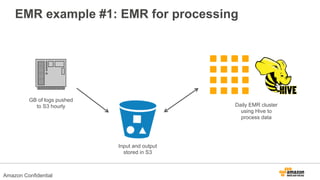
EMR example #1: EMR for processing
GB of logs pushed
to S3 hourly Daily EMR cluster
using Hive to
process data
Input and output
stored in S3
Amazon Confidential
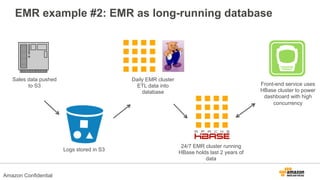
EMR example #2: EMR as long-running database
Sales data pushed
to S3
Amazon Confidential
Logs stored in S3
Daily EMR cluster
ETL data into
database
24/7 EMR cluster running
HBase holds last 2 years of
data
Front-end service uses
HBase cluster to power
dashboard with high
concurrency
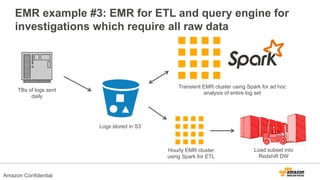
EMR example #3: EMR for ETL and query engine for
investigations which require all raw data
Amazon Confidential
TBs of logs sent
daily
Logs stored in S3
Hourly EMR cluster
using Spark for ETL
Load subset into
Redshift DW
Transient EMR cluster using Spark for ad hoc
analysis of entire log set
Leverage Amazon S3
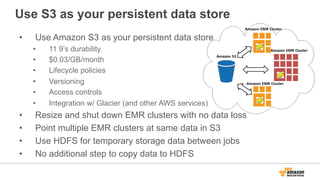
Use S3 as your persistent data store
•  Use Amazon S3 as your persistent data store
•  11 9’s durability
•  $0.03/GB/month
•  Lifecycle policies
•  Versioning
•  Access controls
•  Integration w/ Glacier (and other AWS services)
•  Resize and shut down EMR clusters with no data loss
•  Point multiple EMR clusters at same data in S3
•  Use HDFS for temporary storage data between jobs
•  No additional step to copy data to HDFS
EMRFS makes it easier to leverage S3
•  Better read/write performance and error handling
than open source options (e.g. S3N)
•  Consistent View NEW! (for consistent read after
write)
•  Server-side encryption
•  Faster listing
•  Support for files > 5 GB
EMRFS anti-patterns
•  Iterative workloads
–  If you’re processing the same dataset more than once
•  Disk I/O intensive workloads
...but still use S3: persist data on S3 and use
s3distcp to copy to HDFS for processing
Real Time
  Read Data Directly into Hive,
Pig, Streaming and Cascading
from Kinesis Streams
  No Intermediate Data
Persistence Required
  Simple way to introduce real time sources into Batch
Oriented Systems
  Multi-Application Support & Automatic Checkpointing
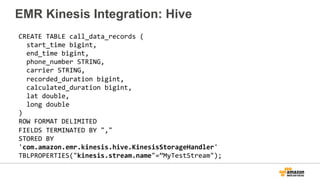
EMR Integration with Kinesis
CREATE	
  TABLE	
  call_data_records	
  (	


  start_time	
  bigint,	


  end_time	
  bigint,	


  phone_number	
  STRING,	


  carrier	
  STRING,	


  recorded_duration	
  bigint,	


  calculated_duration	
  bigint,	


  lat	
  double,	


  long	
  double	
  
)	
  
ROW	
  FORMAT	
  DELIMITED	
  
FIELDS	
  TERMINATED	
  BY	
  ","	
  
STORED	
  BY	
  
'com.amazon.emr.kinesis.hive.KinesisStorageHandler'	
  
TBLPROPERTIES("kinesis.stream.name"=”MyTestStream");	
  
EMR Kinesis Integration: Hive
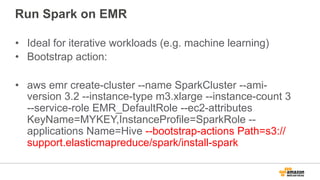
Run Spark on EMR
•  Ideal for iterative workloads (e.g. machine learning)
•  Bootstrap action:
•  aws emr create-cluster --name SparkCluster --ami-
version 3.2 --instance-type m3.xlarge --instance-count 3
--service-role EMR_DefaultRole --ec2-attributes
KeyName=MYKEY,InstanceProfile=SparkRole --
applications Name=Hive --bootstrap-actions Path=s3://
support.elasticmapreduce/spark/install-spark
File size and compression
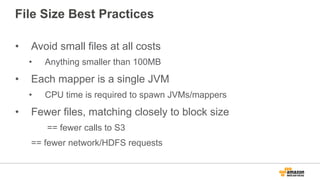
File Size Best Practices
•  Avoid small files at all costs
•  Anything smaller than 100MB
•  Each mapper is a single JVM
•  CPU time is required to spawn JVMs/mappers
•  Fewer files, matching closely to block size
== fewer calls to S3
== fewer network/HDFS requests
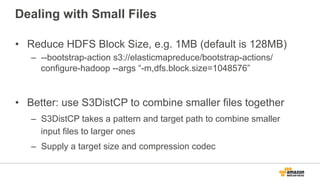
Dealing with Small Files
•  Reduce HDFS Block Size, e.g. 1MB (default is 128MB)
–  --bootstrap-action s3://elasticmapreduce/bootstrap-actions/
configure-hadoop --args “-m,dfs.block.size=1048576”
•  Better: use S3DistCP to combine smaller files together
–  S3DistCP takes a pattern and target path to combine smaller
input files to larger ones
–  Supply a target size and compression codec
S3DistCP Options Option
--src,LOCATION
--dest,LOCATION
--srcPattern,PATTERN
--groupBy,PATTERN
--targetSize,SIZE
--appendToLastFile
--outputCodec,CODEC
--s3ServerSideEncryption
--deleteOnSuccess
--disableMultipartUpload
--multipartUploadChunkSize,SIZE
--numberFiles
--startingIndex,INDEX
--outputManifest,FILENAME
--previousManifest,PATH
--requirePreviousManifest
--copyFromManifest
--s3Endpoint ENDPOINT
--storageClass CLASS
•  Most Important Options
•  --src
•  --srcPattern
•  --dest
•  --groupBy
•  --outputCodec
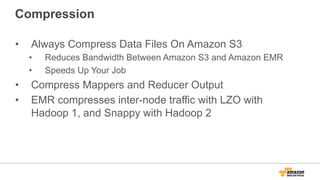
Compression
•  Always Compress Data Files On Amazon S3
•  Reduces Bandwidth Between Amazon S3 and Amazon EMR
•  Speeds Up Your Job
•  Compress Mappers and Reducer Output
•  EMR compresses inter-node traffic with LZO with
Hadoop 1, and Snappy with Hadoop 2
Compression
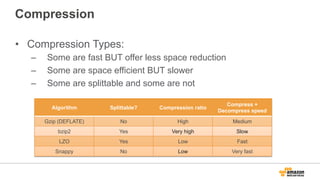
•  Compression Types:
–  Some are fast BUT offer less space reduction
–  Some are space efficient BUT slower
–  Some are splittable and some are not
Algorithm Splittable? Compression ratio
Compress +
Decompress speed
Gzip (DEFLATE) No High Medium
bzip2 Yes Very high Slow
LZO Yes Low Fast
Snappy No Low Very fast
Compression
•  If you are time sensitive, faster compressions are a
better choice
•  If you have large amount of data, use space efficient
compressions
•  If you don’t care, use gzip
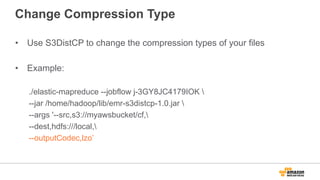
Change Compression Type
•  Use S3DistCP to change the compression types of your files
•  Example:
./elastic-mapreduce --jobflow j-3GY8JC4179IOK 
--jar /home/hadoop/lib/emr-s3distcp-1.0.jar 
--args '--src,s3://myawsbucket/cf,
--dest,hdfs:///local,
--outputCodec,lzo’
Bootstrap actions
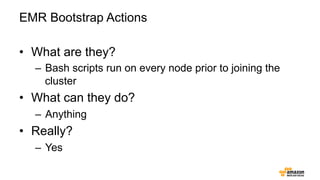
EMR Bootstrap Actions
•  What are they?
–  Bash scripts run on every node prior to joining the
cluster
•  What can they do?
–  Anything
•  Really?
–  Yes
The Hadoop ecosystem runs in Amazon EMR
Optimizing for cost
Cost saving tips
•  Use S3 as your persistent data store (only pay for compute when
you need it!)
•  Use EC2 Spot instances (especially with Task nodes) to save 80%
or more on the EC2 cost
•  Use EC2 Reserved instances if you have steady workloads
•  Create CloudWatch alerts to notify you if a cluster is underutilized
so you can shut it down (e.g. Mappers Running == 0 for more than
N hours)
•  Contact your sales rep about custom pricing options if you are
spending more than $10K per month on EMR
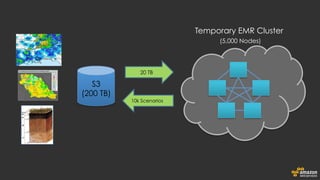
150B Soil Observations 3M Daily Weather
Measurements
200 TB of Data in S3
850K Precision Rainfall
Grids Tracked
The Climate Corporation
Per Simulation:
10K Unique Scenarios Generated
5 Trillion Datapoints
20 TB Data
5-6k Node Hadoop Cluster
Expensive data storage (200TB!)
Long data import times
Long data processing times

Expensive computing required (5 trillion data points!)
Hadoop cluster setup and management complexity
(5-6k cluster nodes!)
Business
Challenge
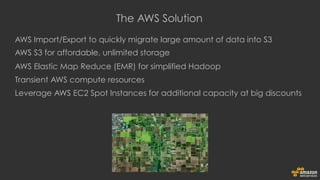
AWS Import/Export to quickly migrate large amount of data into S3
AWS S3 for affordable, unlimited storage
AWS Elastic Map Reduce (EMR) for simplified Hadoop
Transient AWS compute resources
Leverage AWS EC2 Spot Instances for additional capacity at big discounts
The AWS Solution
Temporary EMR Cluster
(5,000 Nodes)
20 TB
10k Scenarios
S3
(200 TB)

Scaling your analytics with Amazon EMR

  • 1.
    Scaling your analytics withAmazon EMR Rahul Pathak - Amazon EMR
  • 2.
    Agenda •  EMR: Hadoopon AWS –  Elastic clusters tailored for your workflows –  Minimize costs using Spot instances –  Easy integration with your datastores •  Leveraging the Hadoop Ecosystem on EMR –  Batch & real-time –  Data warehouse on Hadoop •  A few examples
  • 3.
    Thousands of EMRCustomers; Over 15 Million Clusters Launched
  • 4.
    Why Amazon EMR? • Managed services •  Easy to tune clusters and trim costs by dissociating compute and storage •  Support for multiple datastores •  Unique features and ecosystem support
  • 5.
    Create a managedHadoop cluster in just a few clicks and use easy monitoring and debugging tools AWS Console, Command Line, or the EMR API
  • 6.
    Choose your instancetypes Try out different configurations to find your optimal architecture. CPU c3 family cc1.4xlarge cc2.8xlarge Memory m2 family r3 family Disk / IO hs1.8xlarge i2 family General m1 family m3 family
  • 7.
    Long running ortransient clusters Easy to run Hadoop clusters short-term or 24/7, and only pay for what you need. =
  • 8.
    Resizable clusters Easy toadd and remove compute capacity on your cluster. Match compute demands with cluster sizing. Amazon Confidential
  • 9.
    Easy to useSpot Instances Spot for task nodes Up to 90% off EC2 on-demand pricing On-demand for core nodes Standard EC2 pricing for on-demand capacity Amazon Confidential
  • 10.
    Using Amazon S3and HDFS Data Sources Transient EMR cluster for batch map/reduce jobs for daily reports Long running EMR cluster holding data in HDFS for Hive interactive queries Weekly Report Ad-hoc Query Data aggregated and stored in Amazon S3 Amazon Confidential
  • 11.
    Use the HadoopEcosystem on EMR Leverage a diverse set of tools to get the most out of your data. Amazon Confidential
  • 12.
    •  Databases •  Machinelearning •  Metadata stores •  Exchange formats •  Diverse query languages Hadoop 2.x and much more... Amazon Confidential
  • 13.
    Use bootstrap actionsto install whatever applications you want on your EMR cluster •  Presto •  Spark •  Phoenix •  Any arbitrary application Amazon Confidential
  • 14.
    HUE: a UIfor Hadoop to easily query and browse through your data (beta available) Amazon Confidential
  • 15.
    EMR example #1:EMR for processing GB of logs pushed to S3 hourly Daily EMR cluster using Hive to process data Input and output stored in S3 Amazon Confidential
  • 16.
    EMR example #2:EMR as long-running database Sales data pushed to S3 Amazon Confidential Logs stored in S3 Daily EMR cluster ETL data into database 24/7 EMR cluster running HBase holds last 2 years of data Front-end service uses HBase cluster to power dashboard with high concurrency
  • 17.
    EMR example #3:EMR for ETL and query engine for investigations which require all raw data Amazon Confidential TBs of logs sent daily Logs stored in S3 Hourly EMR cluster using Spark for ETL Load subset into Redshift DW Transient EMR cluster using Spark for ad hoc analysis of entire log set
  • 18.
  • 19.
    Use S3 asyour persistent data store •  Use Amazon S3 as your persistent data store •  11 9’s durability •  $0.03/GB/month •  Lifecycle policies •  Versioning •  Access controls •  Integration w/ Glacier (and other AWS services) •  Resize and shut down EMR clusters with no data loss •  Point multiple EMR clusters at same data in S3 •  Use HDFS for temporary storage data between jobs •  No additional step to copy data to HDFS
  • 20.
    EMRFS makes iteasier to leverage S3 •  Better read/write performance and error handling than open source options (e.g. S3N) •  Consistent View NEW! (for consistent read after write) •  Server-side encryption •  Faster listing •  Support for files > 5 GB
  • 21.
    EMRFS anti-patterns •  Iterativeworkloads –  If you’re processing the same dataset more than once •  Disk I/O intensive workloads ...but still use S3: persist data on S3 and use s3distcp to copy to HDFS for processing
  • 22.
  • 23.
      Read DataDirectly into Hive, Pig, Streaming and Cascading from Kinesis Streams   No Intermediate Data Persistence Required   Simple way to introduce real time sources into Batch Oriented Systems   Multi-Application Support & Automatic Checkpointing EMR Integration with Kinesis
  • 24.
    CREATE  TABLE  call_data_records  (      start_time  bigint,      end_time  bigint,      phone_number  STRING,      carrier  STRING,      recorded_duration  bigint,      calculated_duration  bigint,      lat  double,      long  double   )   ROW  FORMAT  DELIMITED   FIELDS  TERMINATED  BY  ","   STORED  BY   'com.amazon.emr.kinesis.hive.KinesisStorageHandler'   TBLPROPERTIES("kinesis.stream.name"=”MyTestStream");   EMR Kinesis Integration: Hive
  • 25.
    Run Spark onEMR •  Ideal for iterative workloads (e.g. machine learning) •  Bootstrap action: •  aws emr create-cluster --name SparkCluster --ami- version 3.2 --instance-type m3.xlarge --instance-count 3 --service-role EMR_DefaultRole --ec2-attributes KeyName=MYKEY,InstanceProfile=SparkRole -- applications Name=Hive --bootstrap-actions Path=s3:// support.elasticmapreduce/spark/install-spark
  • 26.
    File size andcompression
  • 27.
    File Size BestPractices •  Avoid small files at all costs •  Anything smaller than 100MB •  Each mapper is a single JVM •  CPU time is required to spawn JVMs/mappers •  Fewer files, matching closely to block size == fewer calls to S3 == fewer network/HDFS requests
  • 28.
    Dealing with SmallFiles •  Reduce HDFS Block Size, e.g. 1MB (default is 128MB) –  --bootstrap-action s3://elasticmapreduce/bootstrap-actions/ configure-hadoop --args “-m,dfs.block.size=1048576” •  Better: use S3DistCP to combine smaller files together –  S3DistCP takes a pattern and target path to combine smaller input files to larger ones –  Supply a target size and compression codec
  • 29.
  • 30.
    Compression •  Always CompressData Files On Amazon S3 •  Reduces Bandwidth Between Amazon S3 and Amazon EMR •  Speeds Up Your Job •  Compress Mappers and Reducer Output •  EMR compresses inter-node traffic with LZO with Hadoop 1, and Snappy with Hadoop 2
  • 31.
    Compression •  Compression Types: – Some are fast BUT offer less space reduction –  Some are space efficient BUT slower –  Some are splittable and some are not Algorithm Splittable? Compression ratio Compress + Decompress speed Gzip (DEFLATE) No High Medium bzip2 Yes Very high Slow LZO Yes Low Fast Snappy No Low Very fast
  • 32.
    Compression •  If youare time sensitive, faster compressions are a better choice •  If you have large amount of data, use space efficient compressions •  If you don’t care, use gzip
  • 33.
    Change Compression Type • Use S3DistCP to change the compression types of your files •  Example: ./elastic-mapreduce --jobflow j-3GY8JC4179IOK --jar /home/hadoop/lib/emr-s3distcp-1.0.jar --args '--src,s3://myawsbucket/cf, --dest,hdfs:///local, --outputCodec,lzo’
  • 34.
  • 35.
    EMR Bootstrap Actions • What are they? –  Bash scripts run on every node prior to joining the cluster •  What can they do? –  Anything •  Really? –  Yes
  • 37.
    The Hadoop ecosystemruns in Amazon EMR
  • 38.
  • 39.
    Cost saving tips • Use S3 as your persistent data store (only pay for compute when you need it!) •  Use EC2 Spot instances (especially with Task nodes) to save 80% or more on the EC2 cost •  Use EC2 Reserved instances if you have steady workloads •  Create CloudWatch alerts to notify you if a cluster is underutilized so you can shut it down (e.g. Mappers Running == 0 for more than N hours) •  Contact your sales rep about custom pricing options if you are spending more than $10K per month on EMR
  • 40.
    150B Soil Observations3M Daily Weather Measurements 200 TB of Data in S3 850K Precision Rainfall Grids Tracked The Climate Corporation
  • 41.
    Per Simulation: 10K UniqueScenarios Generated 5 Trillion Datapoints 20 TB Data 5-6k Node Hadoop Cluster
  • 42.
    Expensive data storage(200TB!) Long data import times Long data processing times Expensive computing required (5 trillion data points!) Hadoop cluster setup and management complexity (5-6k cluster nodes!) Business Challenge
  • 43.
    AWS Import/Export toquickly migrate large amount of data into S3 AWS S3 for affordable, unlimited storage AWS Elastic Map Reduce (EMR) for simplified Hadoop Transient AWS compute resources Leverage AWS EC2 Spot Instances for additional capacity at big discounts The AWS Solution


  • 44.
    Temporary EMR Cluster (5,000Nodes) 20 TB 10k Scenarios S3 (200 TB)