Open Text
VIM
Training
info@sapsharks.com
Info@sapsharks.com
Sapsharks.com/OT1
Download this presentation from
the link below
What is VIM?
Vendor invoice management
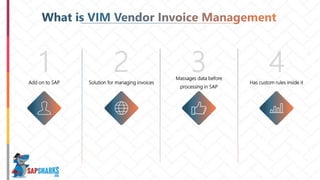
1 2 3 4Add on to SAP
.
Solution for managing invoices
Massages data before
processing in SAP
Has custom rules inside it
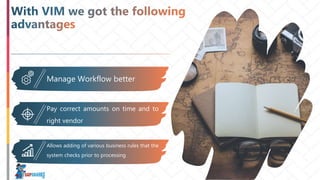
Manage Workflow better
Pay correct amounts on time and to
right vendor
Allows adding of various business rules that the
system checks prior to processing
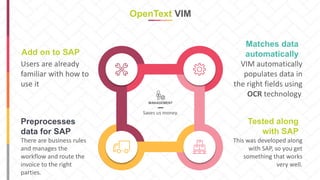
OpenText VIM
MANAGEMENT
Saves us money.
There are business rules
and manages the
workflow and route the
invoice to the right
parties.
Preprocesses
data for SAP
Users are already
familiar with how to
use it
Add on to SAP
VIM automatically
populates data in
the right fields using
OCR technology.
Matches data
automatically
This was developed along
with SAP, so you get
something that works
very well.
Tested along
with SAP
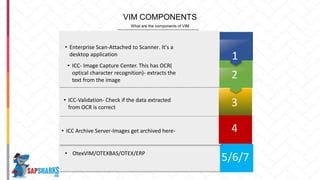
What are the components of VIM
VIM COMPONENTS
• Enterprise Scan-Attached to Scanner. It’s a
desktop application
• ICC- Image Capture Center. This has OCR(
optical character recognition)- extracts the
text from the image
• ICC-Validation- Check if the data extracted
from OCR is correct
4
3
2
1
5/6/7
• ICC Archive Server-Images get archived here- 4
• OtexVIM/OTEXBAS/OTEX/ERP
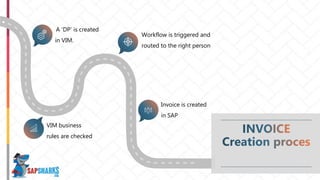
A ‘DP’ is created
in VIM.
Workflow is triggered and
routed to the right person
Invoice is created
in SAP
VIM business
rules are checked
Pay the
right
amount
Reduce
Cost
Pay on
time
What do we want from
AP
Vendor doesn’t call back asking for the
right amount
Pay the right amounts
Delays in payment are expensive for
us
Pay on time
Get discounts by paying on time
Reduce costs
How does VIM help achieve this?
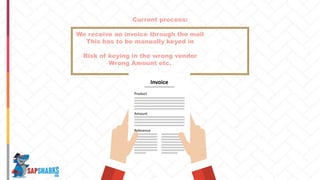
Current process:
Hire the right person
for the right job!
Invoice
Product
Amount
Reference
We receive an invoice through the mail
This has to be manually keyed in
Risk of keying in the wrong vendor
Wrong Amount etc.
There are no
reports on when
an invoice was
keyed in
No automatic
approval process
Everything is done
through email
PRESENTED BY : YOUR OWN NAME
Delays payment
Due to incorrect amounts
and wrong vendors and
Delays in approvals
VIM fixes this issue through various
ways
• OCR technology
• Routing of invoices to the right
approver
• Identifying issues with the invoice
before being created
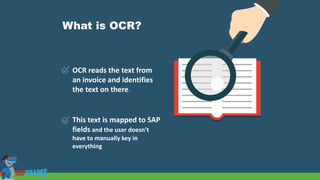
What is OCR?
OCR reads the text from
an invoice and identifies
the text on there.
This text is mapped to SAP
fields and the user doesn’t
have to manually key in
everything
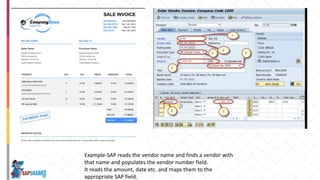
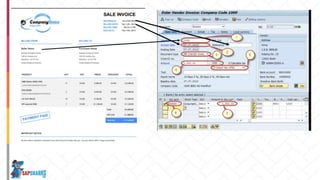
Example-SAP reads the vendor name and finds a vendor with
that name and populates the vendor number field.
It reads the amount, date etc. and maps them to the
appropriate SAP field.
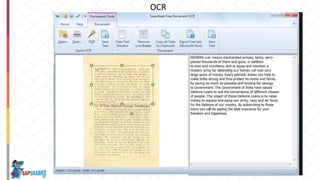
OCR technology extracts text from a
picture.
OCR
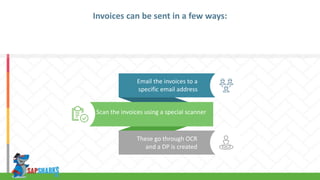
These go through OCR
and a DP is created
Email the invoices to a
specific email address
Invoices can be sent in a few ways:
Scan the invoices using a special scanner
VIM
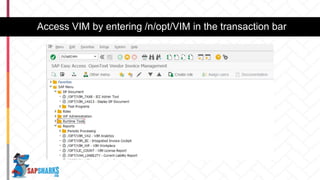
Access VIM by entering /n/opt/VIM in the transaction bar
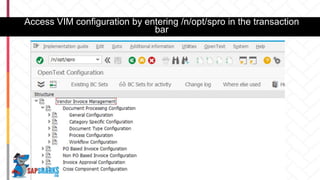
Access VIM configuration by entering /n/opt/spro in the transaction
bar
This only works if you
have the VIM add-on
installed in your system
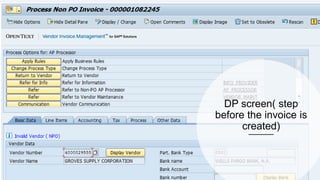
DP screen( step
before the invoice is
created)
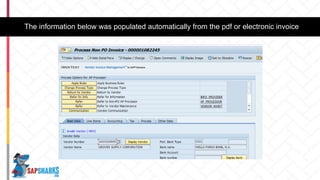
The information below was populated automatically from the pdf or electronic invoice
The coder verifies this information and
passes it on to the A/P person to enter the
G/L account, cost center etc.
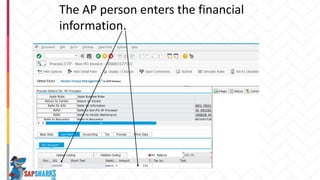
The AP person enters the financial
information.
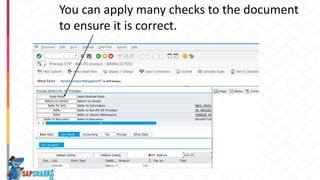
You can apply many checks to the document
to ensure it is correct.
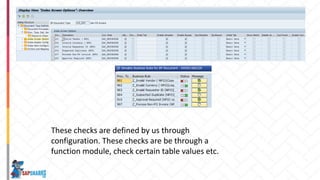
These checks are defined by us through
configuration. These checks are be through a
function module, check certain table values etc.
This ensures that the invoices being created
have the right data and there are less
disputes and we get paid on time.
After the AP person enters the information, we might
need additional approvals or information.
Workflow process.
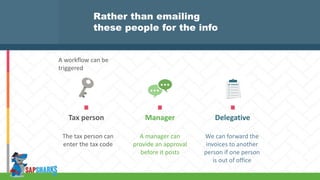
DelegativeTax person Manager
The tax person can
enter the tax code
A manager can
provide an approval
before it posts
We can forward the
invoices to another
person if one person
is out of office
Rather than emailing
these people for the info
A workflow can be
triggered
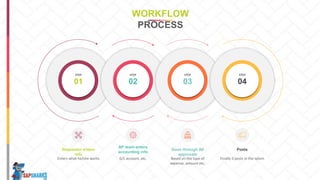
01
STEP
02
STEP
03
STEP
04
STEP
Enters what he/she wants
Requestor enters
info
G/L account, etc.
AP team enters
accounting info
Based on the type of
expense, amount etc.
Goes through All
approvals
Finally it posts in the sytem
Posts
WORKFLOW
PROCESS
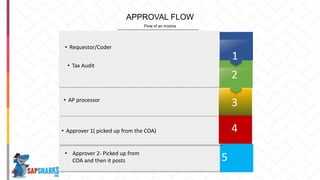
Flow of an invoice
APPROVAL FLOW
• Requestor/Coder
• Tax Audit
• AP processor
4
3
2
1
5
• Approver 1( picked up from the COA) 4
• Approver 2- Picked up from
COA and then it posts
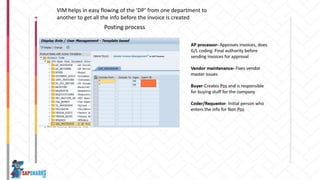
VIM helps in easy flowing of the ‘DP’ from one department to
another to get all the info before the invoice is created
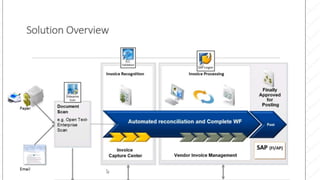
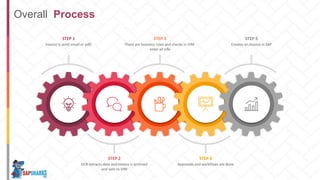
Invoice is sent( email or pdf)
STEP 1
There are business rules and checks in VIM-
enter all info
STEP 3
Creates an invoice in SAP
STEP 5
OCR extracts data and invoice is archived
and sent to VIM
STEP 2
Approvals and workflows are done
STEP 4
Overall Process
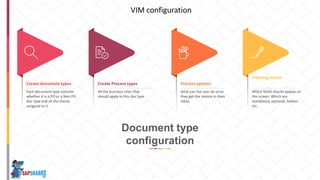
Each document type controls
whether it is a PO or a Non PO
doc type and all the checks
assigned to it
Create document types
All the business roles that
should apply to this doc type
Create Process types
Which fields should appear on
the screen. Which are
mandatory, optional, hidden
etc.
Indexing screen
what can the user do once
they get the invoice in their
inbox
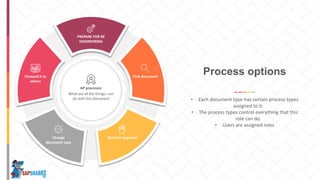
Process options
Document type
configuration
VIM configuration
AP processor
What are all the things I can
do with this document
Forawrd it to
others
PREPARE FOR RE
ENGINEERING
Park document
Send for approvalChange
document type
• Each document type has certain process types
assigned to it.
• The process types control everything that this
role can do.
• Users are assigned roles
Process options
AP processor
What are all the
things I can do with
this document
Forawrd it
to others
PREPARE
FOR RE
ENGINEERIN
G
Park
document
Send for
approval
Change
document
type
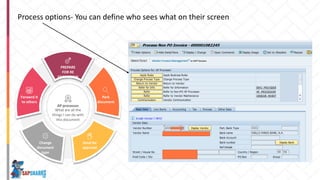
Process options- You can define who sees what on their screen
01
STEP
02
STEP
03
STEP
04
STEP
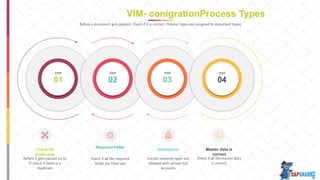
Before it gets passed on to
FI check if there is a
duplicate
Check for
duplicates
Check if all the required
fields are filled out
Required fields
Certain expense types are
allowed with certain G/L
accounts
Validations
Check if all the master data
is correct
Master data is
correct
VIM- conigrationProcess Types
Before a document gets posted- Check if it is correct. Process types are assigned to document types
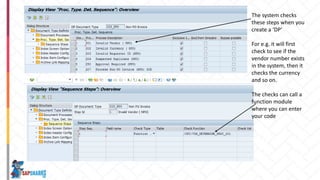
The system checks
these steps when you
create a ‘DP’
For e.g. it will first
check to see if the
vendor number exists
in the system, then it
checks the currency
and so on.
The checks can call a
function module
where you can enter
your code
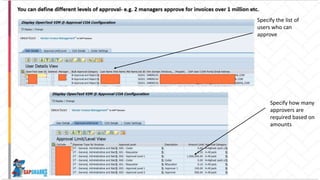
Specify the list of
users who can
approve
Specify how many
approvers are
required based on
amounts
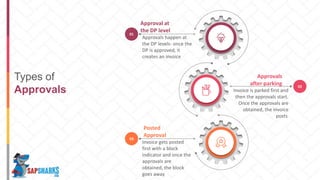
Types of
Approvals 02
Invoice is parked first and
then the approvals start.
Once the approvals are
obtained, the invoice
posts.
Approvals
after parking
01
Approvals happen at
the DP levels- once the
DP is approved, it
creates an invoice
Approval at
the DP level
03
Invoice gets posted
first with a block
indicator and once the
approvals are
obtained, the block
goes away.
Posted
Approval
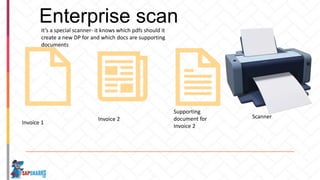
Enterprise scan
Invoice 1
Invoice 2
Supporting
document for
Invoice 2
Scanner
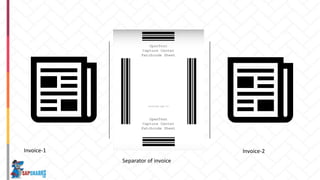
It’s a special scanner- it knows which pdfs should it
create a new DP for and which docs are supporting
documents
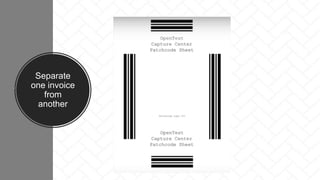
Separate
one invoice
from
another
Invoice-1
Separator of invoice
Invoice-2
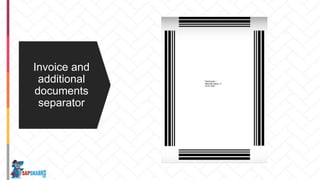
Invoice and
additional
documents
separator
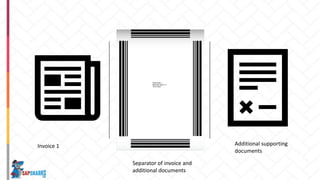
Invoice 1
Separator of invoice and
additional documents
Additional supporting
documents
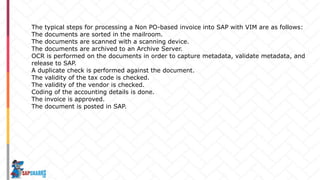
The typical steps for processing a Non PO-based invoice into SAP with VIM are as follows:
The documents are sorted in the mailroom.
The documents are scanned with a scanning device.
The documents are archived to an Archive Server.
OCR is performed on the documents in order to capture metadata, validate metadata, and
release to SAP.
A duplicate check is performed against the document.
The validity of the tax code is checked.
The validity of the vendor is checked.
Coding of the accounting details is done.
The invoice is approved.
The document is posted in SAP.
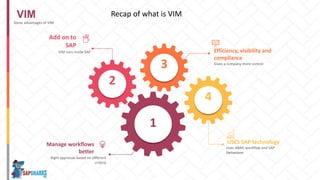
VIM
Some advantages of VIM
Right approvals based on different
criteria
Manage workflows
better
1
2
3
4
VIM runs inside SAP
Add on to
SAP
Efficiency, visibility and
compliance
Gives a company more control
Uses ABAP, workflow and SAP
Netweaver
USES SAP technology
Recap of what is VIM
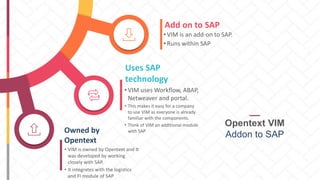
Add on to SAP
• VIM is an add-on to SAP.
• Runs within SAP
Uses SAP
technology
• VIM uses Workflow, ABAP,
Netweaver and portal.
• This makes it easy for a company
to use VIM as everyone is already
familiar with the components.
• Think of VIM an additional module
with SAPOwned by
Opentext
• VIM is owned by Opentext and It
was developed by working
closely with SAP.
• It integrates with the logistics
and FI module of SAP
Opentext VIM
Addon to SAP
Info@sapsharks.com
Sapsharks.com/OT1
Download this presentation from
the link below

SAP Vim(Vendor Invoice management) Opentext

  • 1.
  • 2.
  • 3.
    What is VIM? Vendorinvoice management
  • 4.
    1 2 34Add on to SAP . Solution for managing invoices Massages data before processing in SAP Has custom rules inside it
  • 5.
    Manage Workflow better Paycorrect amounts on time and to right vendor Allows adding of various business rules that the system checks prior to processing
  • 6.
    OpenText VIM MANAGEMENT Saves usmoney. There are business rules and manages the workflow and route the invoice to the right parties. Preprocesses data for SAP Users are already familiar with how to use it Add on to SAP VIM automatically populates data in the right fields using OCR technology. Matches data automatically This was developed along with SAP, so you get something that works very well. Tested along with SAP
  • 7.
    What are thecomponents of VIM VIM COMPONENTS • Enterprise Scan-Attached to Scanner. It’s a desktop application • ICC- Image Capture Center. This has OCR( optical character recognition)- extracts the text from the image • ICC-Validation- Check if the data extracted from OCR is correct 4 3 2 1 5/6/7 • ICC Archive Server-Images get archived here- 4 • OtexVIM/OTEXBAS/OTEX/ERP
  • 8.
    A ‘DP’ iscreated in VIM. Workflow is triggered and routed to the right person Invoice is created in SAP VIM business rules are checked
  • 9.
    Pay the right amount Reduce Cost Pay on time Whatdo we want from AP Vendor doesn’t call back asking for the right amount Pay the right amounts Delays in payment are expensive for us Pay on time Get discounts by paying on time Reduce costs
  • 10.
    How does VIMhelp achieve this?
  • 11.
    Current process: Hire theright person for the right job! Invoice Product Amount Reference We receive an invoice through the mail This has to be manually keyed in Risk of keying in the wrong vendor Wrong Amount etc.
  • 12.
    There are no reportson when an invoice was keyed in
  • 13.
  • 14.
  • 15.
    PRESENTED BY :YOUR OWN NAME Delays payment Due to incorrect amounts and wrong vendors and Delays in approvals
  • 16.
    VIM fixes thisissue through various ways • OCR technology • Routing of invoices to the right approver • Identifying issues with the invoice before being created
  • 17.
    What is OCR? OCRreads the text from an invoice and identifies the text on there. This text is mapped to SAP fields and the user doesn’t have to manually key in everything
  • 18.
    Example-SAP reads thevendor name and finds a vendor with that name and populates the vendor number field. It reads the amount, date etc. and maps them to the appropriate SAP field.
  • 20.
    OCR technology extractstext from a picture.
  • 21.
  • 22.
    These go throughOCR and a DP is created Email the invoices to a specific email address Invoices can be sent in a few ways: Scan the invoices using a special scanner
  • 23.
  • 24.
    Access VIM byentering /n/opt/VIM in the transaction bar
  • 25.
    Access VIM configurationby entering /n/opt/spro in the transaction bar
  • 26.
    This only worksif you have the VIM add-on installed in your system
  • 27.
    DP screen( step beforethe invoice is created)
  • 28.
    The information belowwas populated automatically from the pdf or electronic invoice
  • 29.
    The coder verifiesthis information and passes it on to the A/P person to enter the G/L account, cost center etc.
  • 30.
    The AP personenters the financial information.
  • 31.
    You can applymany checks to the document to ensure it is correct.
  • 32.
    These checks aredefined by us through configuration. These checks are be through a function module, check certain table values etc.
  • 33.
    This ensures thatthe invoices being created have the right data and there are less disputes and we get paid on time.
  • 34.
    After the APperson enters the information, we might need additional approvals or information. Workflow process.
  • 35.
    DelegativeTax person Manager Thetax person can enter the tax code A manager can provide an approval before it posts We can forward the invoices to another person if one person is out of office Rather than emailing these people for the info A workflow can be triggered
  • 36.
    01 STEP 02 STEP 03 STEP 04 STEP Enters what he/shewants Requestor enters info G/L account, etc. AP team enters accounting info Based on the type of expense, amount etc. Goes through All approvals Finally it posts in the sytem Posts WORKFLOW PROCESS
  • 37.
    Flow of aninvoice APPROVAL FLOW • Requestor/Coder • Tax Audit • AP processor 4 3 2 1 5 • Approver 1( picked up from the COA) 4 • Approver 2- Picked up from COA and then it posts
  • 38.
    VIM helps ineasy flowing of the ‘DP’ from one department to another to get all the info before the invoice is created
  • 39.
    Invoice is sent(email or pdf) STEP 1 There are business rules and checks in VIM- enter all info STEP 3 Creates an invoice in SAP STEP 5 OCR extracts data and invoice is archived and sent to VIM STEP 2 Approvals and workflows are done STEP 4 Overall Process
  • 40.
    Each document typecontrols whether it is a PO or a Non PO doc type and all the checks assigned to it Create document types All the business roles that should apply to this doc type Create Process types Which fields should appear on the screen. Which are mandatory, optional, hidden etc. Indexing screen what can the user do once they get the invoice in their inbox Process options Document type configuration VIM configuration
  • 41.
    AP processor What areall the things I can do with this document Forawrd it to others PREPARE FOR RE ENGINEERING Park document Send for approvalChange document type • Each document type has certain process types assigned to it. • The process types control everything that this role can do. • Users are assigned roles Process options
  • 42.
    AP processor What areall the things I can do with this document Forawrd it to others PREPARE FOR RE ENGINEERIN G Park document Send for approval Change document type Process options- You can define who sees what on their screen
  • 43.
    01 STEP 02 STEP 03 STEP 04 STEP Before it getspassed on to FI check if there is a duplicate Check for duplicates Check if all the required fields are filled out Required fields Certain expense types are allowed with certain G/L accounts Validations Check if all the master data is correct Master data is correct VIM- conigrationProcess Types Before a document gets posted- Check if it is correct. Process types are assigned to document types
  • 44.
    The system checks thesesteps when you create a ‘DP’ For e.g. it will first check to see if the vendor number exists in the system, then it checks the currency and so on. The checks can call a function module where you can enter your code
  • 45.
    Specify the listof users who can approve Specify how many approvers are required based on amounts
  • 46.
    Types of Approvals 02 Invoiceis parked first and then the approvals start. Once the approvals are obtained, the invoice posts. Approvals after parking 01 Approvals happen at the DP levels- once the DP is approved, it creates an invoice Approval at the DP level 03 Invoice gets posted first with a block indicator and once the approvals are obtained, the block goes away. Posted Approval
  • 47.
    Enterprise scan Invoice 1 Invoice2 Supporting document for Invoice 2 Scanner It’s a special scanner- it knows which pdfs should it create a new DP for and which docs are supporting documents
  • 48.
  • 49.
  • 50.
  • 51.
    Invoice 1 Separator ofinvoice and additional documents Additional supporting documents
  • 52.
    The typical stepsfor processing a Non PO-based invoice into SAP with VIM are as follows: The documents are sorted in the mailroom. The documents are scanned with a scanning device. The documents are archived to an Archive Server. OCR is performed on the documents in order to capture metadata, validate metadata, and release to SAP. A duplicate check is performed against the document. The validity of the tax code is checked. The validity of the vendor is checked. Coding of the accounting details is done. The invoice is approved. The document is posted in SAP.
  • 53.
    VIM Some advantages ofVIM Right approvals based on different criteria Manage workflows better 1 2 3 4 VIM runs inside SAP Add on to SAP Efficiency, visibility and compliance Gives a company more control Uses ABAP, workflow and SAP Netweaver USES SAP technology Recap of what is VIM
  • 54.
    Add on toSAP • VIM is an add-on to SAP. • Runs within SAP Uses SAP technology • VIM uses Workflow, ABAP, Netweaver and portal. • This makes it easy for a company to use VIM as everyone is already familiar with the components. • Think of VIM an additional module with SAPOwned by Opentext • VIM is owned by Opentext and It was developed by working closely with SAP. • It integrates with the logistics and FI module of SAP Opentext VIM Addon to SAP
  • 55.