• Topology
 Physical and logical network layout of the network.
 Physical
– actual layout of the computer cables and other
network devices
 Logical
– the way in which the network appears to the
devices that use it.
There are a number of reasons:
 Impacts performance.
 A factor in determining the media type used
to cable the network.
 Impacts the cost of cabling the network.
 Some access methods can work only with
specific topologies.
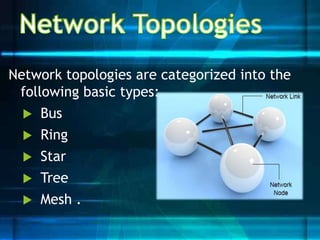
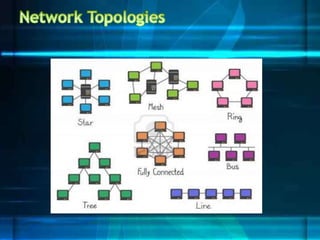
Network topologies are categorized into the
following basic types:
 Bus
 Ring
 Star
 Tree
 Mesh .
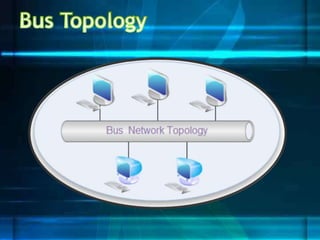
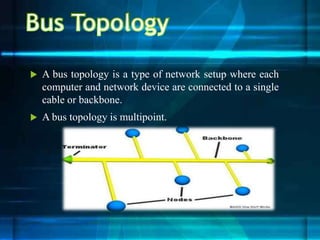
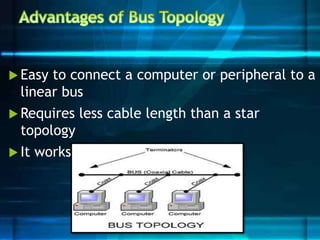
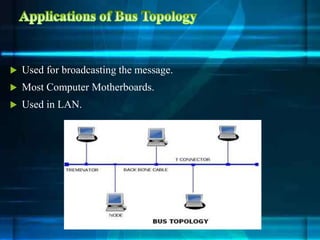
 A bus topology is a type of network setup where each
computer and network device are connected to a single
cable or backbone.
 A bus topology is multipoint.
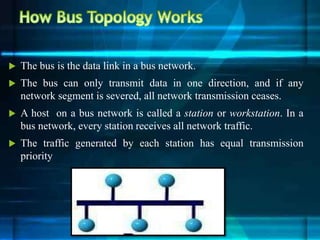
 The bus is the data link in a bus network.
 The bus can only transmit data in one direction, and if any
network segment is severed, all network transmission ceases.
 A host on a bus network is called a station or workstation. In a
bus network, every station receives all network traffic.
 The traffic generated by each station has equal transmission
priority
 Easy to connect a computer or peripheral to a
linear bus
 Requires less cable length than a star
topology
 It works well for small networks.
 Entire network shuts down if there is a break in the main
cable
 Terminators are required at both ends of the backbone cable
 Difficult to identify the problem if the entire network shuts
down
 Not meant to be used as a stand-alone solution in a large
building
 It is slow when more devices are added into the network
 If a main cable is damaged then network will fail or be split
into two networks
 Used for broadcasting the message.
 Most Computer Motherboards.
 Used in LAN.
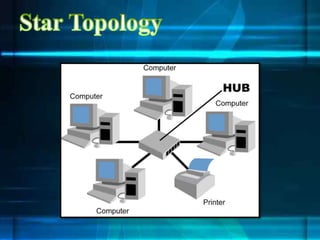
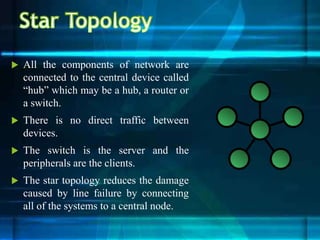
 All the components of network are
connected to the central device called
“hub” which may be a hub, a router or
a switch.
 There is no direct traffic between
devices.
 The switch is the server and the
peripherals are the clients.
 The star topology reduces the damage
caused by line failure by connecting
all of the systems to a central node.
 better performance.
 Performance of the network is dependent on the capacity
of central hub.
 Easy to connect new nodes or devices.
 In star topology new nodes can be added easily without
affecting rest of the network.
 Components can also be removed easily.
 Centralized management. It helps in monitoring the
network.
 Failure of one node or link doesn’t affect the rest of
network..
 Easy to detect the failure and troubleshoot it.
 Too much dependency on central device has its own drawbacks.
 If hub fails whole network goes down.
 The use of hub, a router or a switch as central device increases
the overall cost of the network.
 Performance and number of nodes which can be added in such
topology is depended on capacity of central device
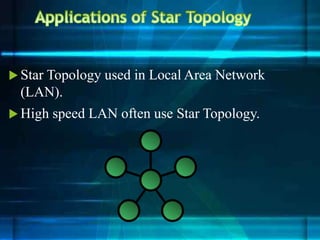
 Star Topology used in Local Area Network
(LAN).
 High speed LAN often use Star Topology.
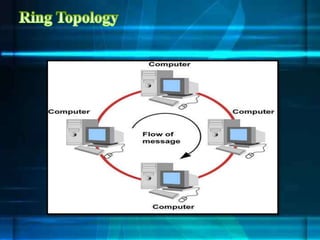
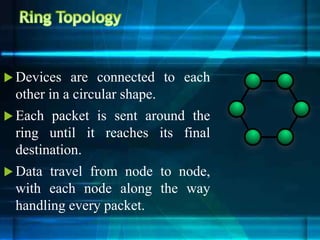
 Devices are connected to each
other in a circular shape.
 Each packet is sent around the
ring until it reaches its final
destination.
 Data travel from node to node,
with each node along the way
handling every packet.
 Ring Topology is very organized.
 Each node gets to send the data when it receives an empty token.
 This helps to reduces chances of collision.
 All the traffic flows in only one direction at very high speed.
 Better performance than Bus topology.
 There is no need for network server to control the connectivity
between workstations.
 Additional components do not affect the performance of network.
 Each computer has equal access to resources.
 One broken workstation can create problems for the
entire network.
 Moving, adding and changing the devices can affect the
network.
 Communication delay is directly proportional to number
of nodes in the network.
 Bandwidth is shared on all links between devices.
 More difficult to configure than a Star.
 Ring Topologies are often found in office Buildings.
 Also used in Schools for networking.
 Today high speed LAN made this topology less popular.
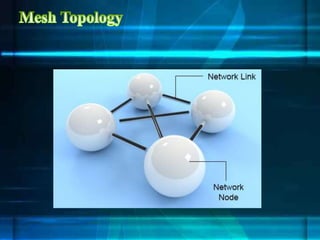
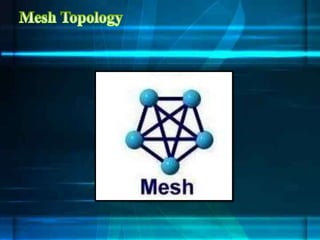
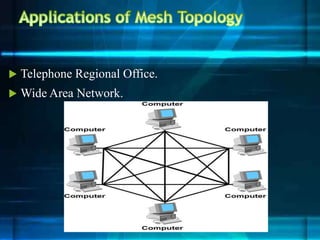
 A mesh network is a network topology in which each node
(called a mesh node) relays data for the network.
 All nodes cooperate in the distribution of data in the network.
 A mesh network can be designed using a flooding technique or a
routing technique.
 Data can be transmitted from different devices simultaneously.
 This topology can withstand high traffic.
 If one of the components fails there is always an alternative
present.
 Data transfer doesn’t get affected.
 Expansion and modification in topology can be done without
disrupting other nodes.
 There are high chances of redundancy in many of the
network connections.
 Overall cost of this network is way too high as compared
to other network topologies.
 Set-up and maintenance of this topology is very difficult.
 Telephone Regional Office.
 Wide Area Network.
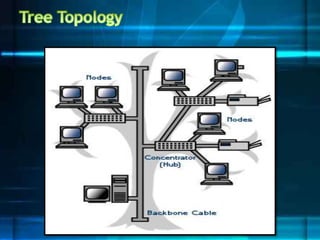
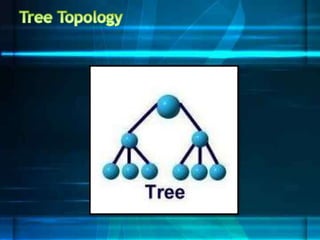
 Tree Topology integrates the characteristics of Star and
Bus topology.
 The number of Star networks are connected using Bus.
 Main cable seems like a main stem of a tree, and other
star networks as the branches.
 It is also called Expanded Star Topology.
 Ethernet protocol is commonly used in this type of
topology.
 It is an extension of Star and bus Topologies, so in networks where
these topologies can't be implemented individually for reasons
related to scalability, tree topology is the best alternative.
 Expansion of Network is possible and easy.
 Divide the whole network into segments (star networks), which
can be easily managed and maintained.
 Error detection and correction is easy.
 Each segment is provided with dedicated point-to-point wiring to
the central hub.
 If one segment is damaged, other segments are not affected.
 Because of its basic structure, tree topology, relies heavily
on the main bus cable, if it breaks whole network is
crippled.
 As more and more nodes and segments are added, the
maintenance becomes difficult.
 Scalability of the network depends on the type of cable .

topology.pptx

  • 2.
    • Topology  Physicaland logical network layout of the network.  Physical – actual layout of the computer cables and other network devices  Logical – the way in which the network appears to the devices that use it.
  • 3.
    There are anumber of reasons:  Impacts performance.  A factor in determining the media type used to cable the network.  Impacts the cost of cabling the network.  Some access methods can work only with specific topologies.
  • 4.
    Network topologies arecategorized into the following basic types:  Bus  Ring  Star  Tree  Mesh .
  • 7.
     A bustopology is a type of network setup where each computer and network device are connected to a single cable or backbone.  A bus topology is multipoint.
  • 8.
     The busis the data link in a bus network.  The bus can only transmit data in one direction, and if any network segment is severed, all network transmission ceases.  A host on a bus network is called a station or workstation. In a bus network, every station receives all network traffic.  The traffic generated by each station has equal transmission priority
  • 9.
     Easy toconnect a computer or peripheral to a linear bus  Requires less cable length than a star topology  It works well for small networks.
  • 10.
     Entire networkshuts down if there is a break in the main cable  Terminators are required at both ends of the backbone cable  Difficult to identify the problem if the entire network shuts down  Not meant to be used as a stand-alone solution in a large building  It is slow when more devices are added into the network  If a main cable is damaged then network will fail or be split into two networks
  • 11.
     Used forbroadcasting the message.  Most Computer Motherboards.  Used in LAN.
  • 13.
     All thecomponents of network are connected to the central device called “hub” which may be a hub, a router or a switch.  There is no direct traffic between devices.  The switch is the server and the peripherals are the clients.  The star topology reduces the damage caused by line failure by connecting all of the systems to a central node.
  • 14.
     better performance. Performance of the network is dependent on the capacity of central hub.  Easy to connect new nodes or devices.  In star topology new nodes can be added easily without affecting rest of the network.  Components can also be removed easily.  Centralized management. It helps in monitoring the network.  Failure of one node or link doesn’t affect the rest of network..  Easy to detect the failure and troubleshoot it.
  • 15.
     Too muchdependency on central device has its own drawbacks.  If hub fails whole network goes down.  The use of hub, a router or a switch as central device increases the overall cost of the network.  Performance and number of nodes which can be added in such topology is depended on capacity of central device
  • 16.
     Star Topologyused in Local Area Network (LAN).  High speed LAN often use Star Topology.
  • 18.
     Devices areconnected to each other in a circular shape.  Each packet is sent around the ring until it reaches its final destination.  Data travel from node to node, with each node along the way handling every packet.
  • 19.
     Ring Topologyis very organized.  Each node gets to send the data when it receives an empty token.  This helps to reduces chances of collision.  All the traffic flows in only one direction at very high speed.  Better performance than Bus topology.  There is no need for network server to control the connectivity between workstations.  Additional components do not affect the performance of network.  Each computer has equal access to resources.
  • 20.
     One brokenworkstation can create problems for the entire network.  Moving, adding and changing the devices can affect the network.  Communication delay is directly proportional to number of nodes in the network.  Bandwidth is shared on all links between devices.  More difficult to configure than a Star.
  • 21.
     Ring Topologiesare often found in office Buildings.  Also used in Schools for networking.  Today high speed LAN made this topology less popular.
  • 24.
     A meshnetwork is a network topology in which each node (called a mesh node) relays data for the network.  All nodes cooperate in the distribution of data in the network.  A mesh network can be designed using a flooding technique or a routing technique.
  • 25.
     Data canbe transmitted from different devices simultaneously.  This topology can withstand high traffic.  If one of the components fails there is always an alternative present.  Data transfer doesn’t get affected.  Expansion and modification in topology can be done without disrupting other nodes.
  • 26.
     There arehigh chances of redundancy in many of the network connections.  Overall cost of this network is way too high as compared to other network topologies.  Set-up and maintenance of this topology is very difficult.
  • 27.
     Telephone RegionalOffice.  Wide Area Network.
  • 30.
     Tree Topologyintegrates the characteristics of Star and Bus topology.  The number of Star networks are connected using Bus.  Main cable seems like a main stem of a tree, and other star networks as the branches.  It is also called Expanded Star Topology.  Ethernet protocol is commonly used in this type of topology.
  • 31.
     It isan extension of Star and bus Topologies, so in networks where these topologies can't be implemented individually for reasons related to scalability, tree topology is the best alternative.  Expansion of Network is possible and easy.  Divide the whole network into segments (star networks), which can be easily managed and maintained.  Error detection and correction is easy.  Each segment is provided with dedicated point-to-point wiring to the central hub.  If one segment is damaged, other segments are not affected.
  • 32.
     Because ofits basic structure, tree topology, relies heavily on the main bus cable, if it breaks whole network is crippled.  As more and more nodes and segments are added, the maintenance becomes difficult.  Scalability of the network depends on the type of cable .