Unity for Deep Learning:
ML-Agents Explained
Mike Geig
Head of Global Evangelism Content
Let’s start with one important
question...
Why program system to complete
a specific task when you can
design it to learn?
Let’s start with one important question...
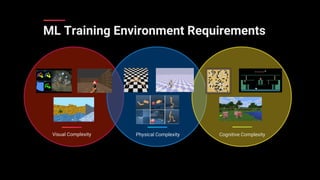
Visual Complexity Cognitive ComplexityPhysical Complexity
ML Training Environment Requirements
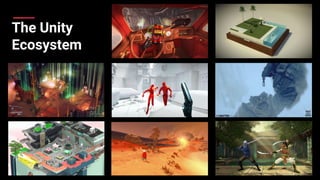
The Unity
Ecosystem
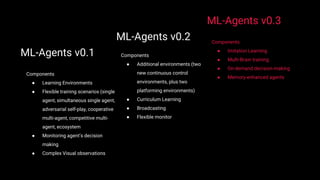
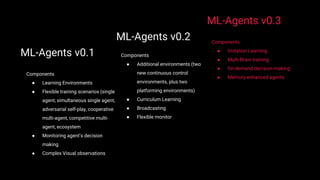
ML-Agents v0.1
Components
● Learning Environments
● Flexible training scenarios (single
agent, simultaneous single agent,
adversarial self-play, cooperative
multi-agent, competitive multi-
agent, ecosystem
● Monitoring agent’s decision
making
● Complex Visual observations
ML-Agents v0.2
Components
● Additional environments (two
new continuous control
environments, plus two
platforming environments)
● Curriculum Learning
● Broadcasting
● Flexible monitor
ML-Agents v0.3
Components
● Imitation Learning
● Multi-Brain training
● On-demand decision-making
● Memory-enhanced agents
How does it work?
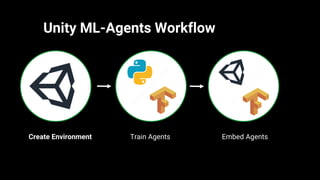
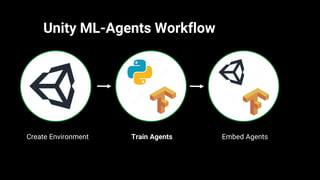
Unity ML-Agents Workflow
Create Environment Train Agents Embed Agents
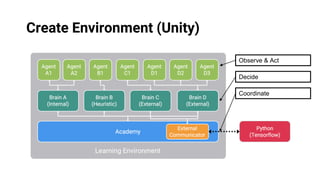
Create Environment (Unity)
Observe & Act
Decide
Coordinate
Unity ML-Agents Workflow
Create Environment Train Agents Embed Agents
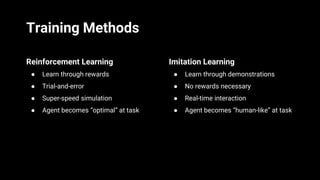
Training Methods
Reinforcement Learning
● Learn through rewards
● Trial-and-error
● Super-speed simulation
● Agent becomes “optimal” at task
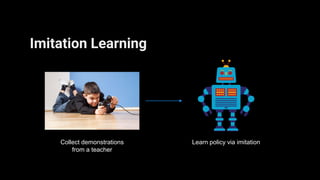
Imitation Learning
● Learn through demonstrations
● No rewards necessary
● Real-time interaction
● Agent becomes “human-like” at task
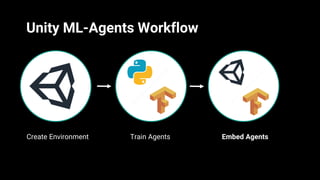
Unity ML-Agents Workflow
Create Environment Train Agents Embed Agents
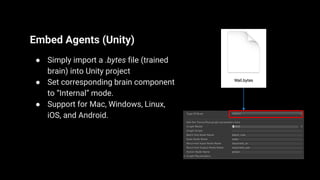
Embed Agents (Unity)
● Simply import a .bytes file (trained
brain) into Unity project
● Set corresponding brain component
to “Internal” mode.
● Support for Mac, Windows, Linux,
iOS, and Android.
Let’s see it in action!
Learning Scenarios
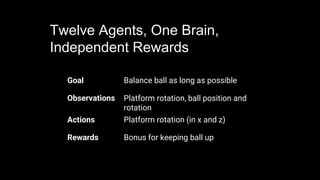
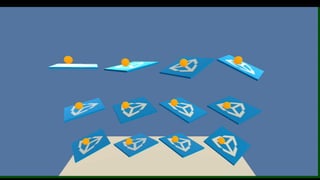
Goal Balance ball as long as possible
Observations Platform rotation, ball position and
rotation
Actions Platform rotation (in x and z)
Rewards Bonus for keeping ball up
Twelve Agents, One Brain,
Independent Rewards
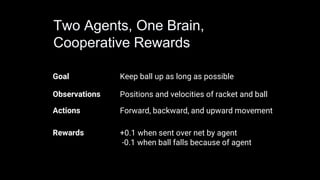
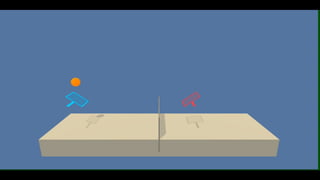
Goal Keep ball up as long as possible
Observations Positions and velocities of racket and ball
Actions Forward, backward, and upward movement
Rewards +0.1 when sent over net by agent
-0.1 when ball falls because of agent
Two Agents, One Brain,
Cooperative Rewards
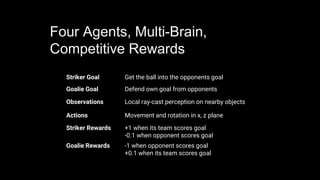
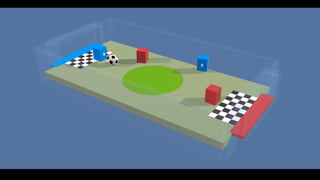
Striker Goal Get the ball into the opponents goal
Goalie Goal Defend own goal from opponents
Observations Local ray-cast perception on nearby objects
Actions Movement and rotation in x, z plane
Striker Rewards +1 when its team scores goal
-0.1 when opponent scores goal
Goalie Rewards -1 when opponent scores goal
+0.1 when its team scores goal
Four Agents, Multi-Brain,
Competitive Rewards
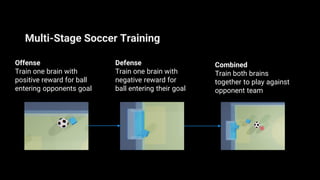
Multi-Stage Soccer Training
Defense
Train one brain with
negative reward for
ball entering their goal
Offense
Train one brain with
positive reward for ball
entering opponents goal
Combined
Train both brains
together to play against
opponent team
Learning Methods
Curriculum Learning
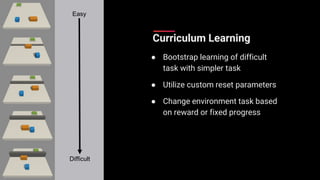
Curriculum Learning
● Bootstrap learning of difficult
task with simpler task
● Utilize custom reset parameters
● Change environment task based
on reward or fixed progress
Easy
Difficult
Imitation Learning
Imitation Learning
Collect demonstrations
from a teacher
Learn policy via imitation
ML-Agents v0.1
Components
● Learning Environments
● Flexible training scenarios (single
agent, simultaneous single agent,
adversarial self-play, cooperative
multi-agent, competitive multi-
agent, ecosystem
● Monitoring agent’s decision
making
● Complex Visual observations
ML-Agents v0.2
Components
● Additional environments (two
new continuous control
environments, plus two
platforming environments)
● Curriculum Learning
● Broadcasting
● Flexible monitor
ML-Agents v0.3
Components
● Imitation Learning
● Multi-Brain training
● On-demand decision-making
● Memory-enhanced agents
We are hiring!
Get it Now
github.com/Unity-Technologies/ml-agents
Contact us
https://unity3d.ai
ML-Agents@Unity3d.com
Thank you!
Mike Geig
Mike@unity3d.com
@MikeGeig

【Unite Tokyo 2018】Unity for ディープ・ラーニング:ツールキット『ML-Agents』のご紹介

  • 2.
    Unity for DeepLearning: ML-Agents Explained
  • 3.
    Mike Geig Head ofGlobal Evangelism Content
  • 4.
    Let’s start withone important question...
  • 5.
    Why program systemto complete a specific task when you can design it to learn? Let’s start with one important question...
  • 8.
    Visual Complexity CognitiveComplexityPhysical Complexity ML Training Environment Requirements
  • 9.
  • 10.
    ML-Agents v0.1 Components ● LearningEnvironments ● Flexible training scenarios (single agent, simultaneous single agent, adversarial self-play, cooperative multi-agent, competitive multi- agent, ecosystem ● Monitoring agent’s decision making ● Complex Visual observations ML-Agents v0.2 Components ● Additional environments (two new continuous control environments, plus two platforming environments) ● Curriculum Learning ● Broadcasting ● Flexible monitor ML-Agents v0.3 Components ● Imitation Learning ● Multi-Brain training ● On-demand decision-making ● Memory-enhanced agents
  • 11.
  • 12.
    Unity ML-Agents Workflow CreateEnvironment Train Agents Embed Agents
  • 13.
    Create Environment (Unity) Observe& Act Decide Coordinate
  • 14.
    Unity ML-Agents Workflow CreateEnvironment Train Agents Embed Agents
  • 15.
    Training Methods Reinforcement Learning ●Learn through rewards ● Trial-and-error ● Super-speed simulation ● Agent becomes “optimal” at task Imitation Learning ● Learn through demonstrations ● No rewards necessary ● Real-time interaction ● Agent becomes “human-like” at task
  • 16.
    Unity ML-Agents Workflow CreateEnvironment Train Agents Embed Agents
  • 17.
    Embed Agents (Unity) ●Simply import a .bytes file (trained brain) into Unity project ● Set corresponding brain component to “Internal” mode. ● Support for Mac, Windows, Linux, iOS, and Android.
  • 18.
    Let’s see itin action!
  • 19.
  • 20.
    Goal Balance ballas long as possible Observations Platform rotation, ball position and rotation Actions Platform rotation (in x and z) Rewards Bonus for keeping ball up Twelve Agents, One Brain, Independent Rewards
  • 22.
    Goal Keep ballup as long as possible Observations Positions and velocities of racket and ball Actions Forward, backward, and upward movement Rewards +0.1 when sent over net by agent -0.1 when ball falls because of agent Two Agents, One Brain, Cooperative Rewards
  • 24.
    Striker Goal Getthe ball into the opponents goal Goalie Goal Defend own goal from opponents Observations Local ray-cast perception on nearby objects Actions Movement and rotation in x, z plane Striker Rewards +1 when its team scores goal -0.1 when opponent scores goal Goalie Rewards -1 when opponent scores goal +0.1 when its team scores goal Four Agents, Multi-Brain, Competitive Rewards
  • 25.
    Multi-Stage Soccer Training Defense Trainone brain with negative reward for ball entering their goal Offense Train one brain with positive reward for ball entering opponents goal Combined Train both brains together to play against opponent team
  • 27.
  • 28.
  • 29.
    Curriculum Learning ● Bootstraplearning of difficult task with simpler task ● Utilize custom reset parameters ● Change environment task based on reward or fixed progress Easy Difficult
  • 31.
  • 32.
    Imitation Learning Collect demonstrations froma teacher Learn policy via imitation
  • 33.
    ML-Agents v0.1 Components ● LearningEnvironments ● Flexible training scenarios (single agent, simultaneous single agent, adversarial self-play, cooperative multi-agent, competitive multi- agent, ecosystem ● Monitoring agent’s decision making ● Complex Visual observations ML-Agents v0.2 Components ● Additional environments (two new continuous control environments, plus two platforming environments) ● Curriculum Learning ● Broadcasting ● Flexible monitor ML-Agents v0.3 Components ● Imitation Learning ● Multi-Brain training ● On-demand decision-making ● Memory-enhanced agents
  • 34.
  • 35.
    Get it Now github.com/Unity-Technologies/ml-agents Contactus https://unity3d.ai ML-Agents@Unity3d.com
  • 36.