











Scriptable Render
Pipelines
Jean-François F Fortin
Graphics Expert, Field Engineer, Unity Technologies
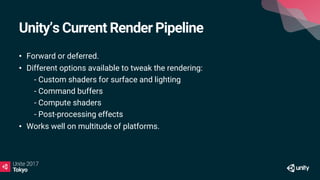
Unity’s Current Render Pipeline
• Forward or deferred.
• Different options available to tweak the rendering:
• - Custom shaders for surface and lighting
• - Command buffers
• - Compute shaders
• - Post-processing effects
• Works well on multitude of platforms.
In Practice…
• Hard to configure for your needs.
• Different rendering techniques
• Different platforms:
• - Different platform strengths
• - Different optimisation strategies
The Flexibility/Extensibility Problem
• Not a problem for most users but more advanced teams wants to modify
or extend unity’s rendering.
• Unity’s rendering pipeline is essentially a black box:
• - Documentation, presentations and shader source code available.
• - Still difficult to understand without a source code license.
The Problem In Pictures
Goals of The New Pipeline
• Need to perform better on modern hardware.
• Low-level, performance critical code in C++.
• High-level, less performance critical code in C#.
• No magic => Open-sourced and available on GitHub.
• https://github.com/Unity-Technologies/ScriptableRenderLoop
Goals of The New Pipeline
• Possibility to create multiple rendering pipelines
• - Built for a specific target in mind: hardware or use case.
• - Less compromises, more flexible, more performance.
• Easier dealing with backwards compatibility
• - Difficult to make changes to rendering.
• - Users expect things to continue working.
Examples of Rendering Pipelines
• HD: targeting “high end”, modern PC and consoles.
• VR: optimized for VR and caching/sharing eye data and different viewport
schemes.
• Low-End/Mobile: optimized for low-end devices or simpler 2D games.
The New Foundations
• Engine: C++, performance critical code
• - Culling
• - Rendering set of objects with filtering, sorting, and batching.
• - Platform abstraction.
• User project: C# and shaders, open source
• - Camera, light, and shadow setup
• - Frame render pass structure and logic
• - Shader (including compute) code.
Let’s talk about the HD Render
Pipeline
HD Render Pipeline: Current Plans
• Provide a built-in render pipeline targeting modern (compute-capable)
platforms.
• Developed with PC and PS4/XB1 in mind.
• Looking at optimizations to include high-end mobile platforms.
• - Special interests on techniques that saves bandwidth (like on-tile
storage/framebuffer fetch)
HD Render Pipeline: Current Plans
• Shaders less reliant on separate shader specializations/variants.
• - Uses more static branching.
• - Shader specializations/variants only where it makes sense upon
profiling on target hardware.
• A more up-to-date / state-of-the-art pipeline for high end games.
• Released as experimental on GitHub, will have a real release later with one
of the next releases.
HD Render Pipeline: Features
• GGX with metal and specular parametrization.
• Anisotropic GGX
• Sub-surface scattering (SSS) and transmission
• Fine pruned tiled lighting (FPTL)
• Physically-based camera parameters
• Supports the post-processing stack
• …
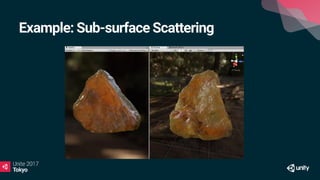
Example: Sub-surface Scattering
Let’s look at some example
code…
Scriptable Rendering Pipelines
is an experimental feature and
this is made for 5.6.0f3.
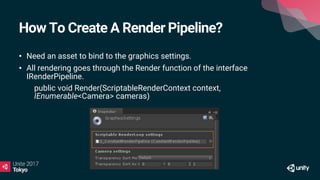
How To Create A Render Pipeline?
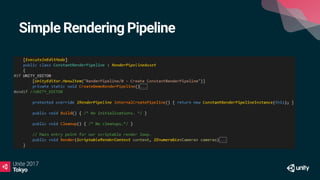
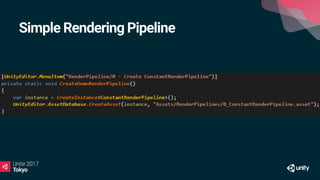
• Need an asset to bind to the graphics settings.
• All rendering goes through the Render function of the interface
IRenderPipeline.
• public void Render(ScriptableRenderContext context,
IEnumerable<Camera> cameras)
What goes in the “Render” function?
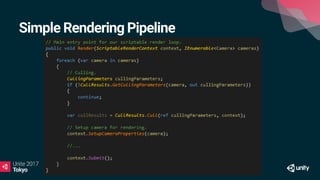
• Inside the render loop you would typically do:
• - Culling for all of the cameras.
• - Calls to CommandBuffer to setup global shader properties, render
targets, dispatch compute shaders, etc.
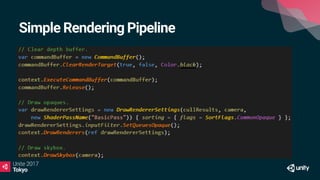
• - Series of calls to ScriptableRenderContext.DrawRenderers.
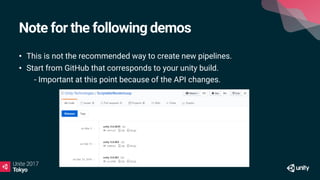
Note for the following demos
• This is not the recommended way to create new pipelines.
• Start from GitHub that corresponds to your unity build.
• - Important at this point because of the API changes.
How To Create A Render Pipeline?
• What do you get from the GitHub builds?
• - Two render loops:
• - BasicRenderLoopTutorial
• - ScriptableRenderLoop/HDRenderPipeline
• - Test scenes.
Demo: How To Create A Render
Pipeline?
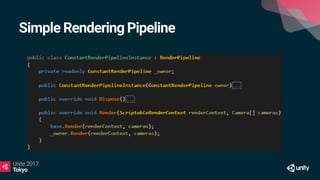
Simple Rendering Pipeline
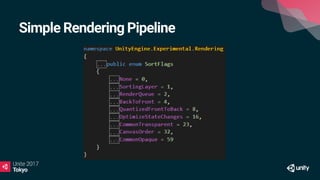
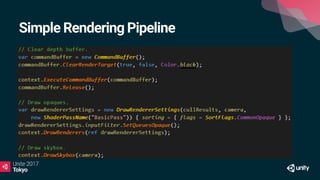
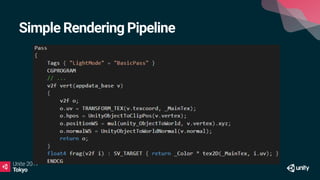
• Even with a simple example we can see that we can control shaders.
• - We could provide different shader pass for different pipelines.
• - Change shaders for set of objects to provide some sort of shader LOD.
• - Change the inputs and outputs of a pass by binding buffers or render
targets.
Simple Rendering Pipeline
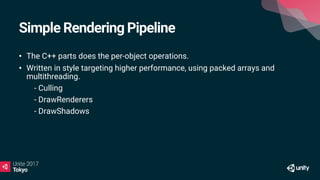
• The C++ parts does the per-object operations.
• Written in style targeting higher performance, using packed arrays and
multithreading.
• - Culling
• - DrawRenderers
• - DrawShadows
Let’s go back to some code…
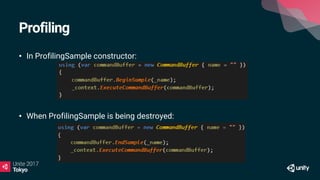
Profiling
• In ProfilingSample constructor:
• When ProfilingSample is being destroyed:
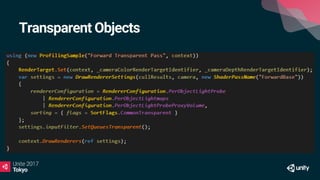
Transparent Objects
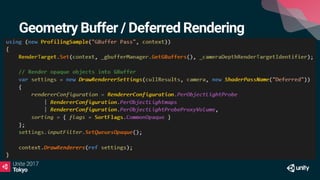
Geometry Buffer / Deferred Rendering
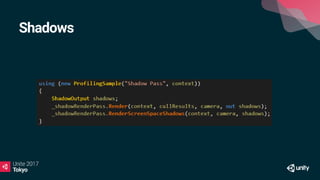
Shadows
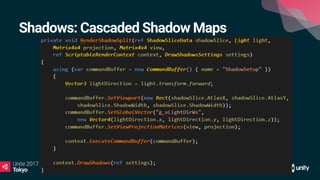
Shadows: Cascaded Shadow Maps
Shadows: Screen Space Shadows [1/2]
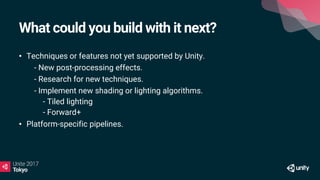
What could you build with it next?
• Techniques or features not yet supported by Unity.
• - New post-processing effects.
• - Research for new techniques.
• - Implement new shading or lighting algorithms.
- Tiled lighting
- Forward+
• Platform-specific pipelines.
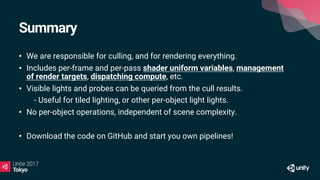
Summary
• We are responsible for culling, and for rendering everything.
• Includes per-frame and per-pass shader uniform variables, management
of render targets, dispatching compute, etc.
• Visible lights and probes can be queried from the cull results.
• - Useful for tiled lighting, or other per-object light lights.
• No per-object operations, independent of scene complexity.
• Download the code on GitHub and start you own pipelines!
Thank you!

【Unite 2017 Tokyo】スクリプタブル・レンダーパイプラインのカスタマイズと拡張

  • 2.
  • 3.
    Jean-François F Fortin GraphicsExpert, Field Engineer, Unity Technologies
  • 4.
    Unity’s Current RenderPipeline • Forward or deferred. • Different options available to tweak the rendering: • - Custom shaders for surface and lighting • - Command buffers • - Compute shaders • - Post-processing effects • Works well on multitude of platforms.
  • 5.
    In Practice… • Hardto configure for your needs. • Different rendering techniques • Different platforms: • - Different platform strengths • - Different optimisation strategies
  • 6.
    The Flexibility/Extensibility Problem •Not a problem for most users but more advanced teams wants to modify or extend unity’s rendering. • Unity’s rendering pipeline is essentially a black box: • - Documentation, presentations and shader source code available. • - Still difficult to understand without a source code license.
  • 7.
  • 14.
    Goals of TheNew Pipeline • Need to perform better on modern hardware. • Low-level, performance critical code in C++. • High-level, less performance critical code in C#. • No magic => Open-sourced and available on GitHub. • https://github.com/Unity-Technologies/ScriptableRenderLoop
  • 15.
    Goals of TheNew Pipeline • Possibility to create multiple rendering pipelines • - Built for a specific target in mind: hardware or use case. • - Less compromises, more flexible, more performance. • Easier dealing with backwards compatibility • - Difficult to make changes to rendering. • - Users expect things to continue working.
  • 16.
    Examples of RenderingPipelines • HD: targeting “high end”, modern PC and consoles. • VR: optimized for VR and caching/sharing eye data and different viewport schemes. • Low-End/Mobile: optimized for low-end devices or simpler 2D games.
  • 17.
    The New Foundations •Engine: C++, performance critical code • - Culling • - Rendering set of objects with filtering, sorting, and batching. • - Platform abstraction. • User project: C# and shaders, open source • - Camera, light, and shadow setup • - Frame render pass structure and logic • - Shader (including compute) code.
  • 18.
    Let’s talk aboutthe HD Render Pipeline
  • 19.
    HD Render Pipeline:Current Plans • Provide a built-in render pipeline targeting modern (compute-capable) platforms. • Developed with PC and PS4/XB1 in mind. • Looking at optimizations to include high-end mobile platforms. • - Special interests on techniques that saves bandwidth (like on-tile storage/framebuffer fetch)
  • 20.
    HD Render Pipeline:Current Plans • Shaders less reliant on separate shader specializations/variants. • - Uses more static branching. • - Shader specializations/variants only where it makes sense upon profiling on target hardware. • A more up-to-date / state-of-the-art pipeline for high end games. • Released as experimental on GitHub, will have a real release later with one of the next releases.
  • 21.
    HD Render Pipeline:Features • GGX with metal and specular parametrization. • Anisotropic GGX • Sub-surface scattering (SSS) and transmission • Fine pruned tiled lighting (FPTL) • Physically-based camera parameters • Supports the post-processing stack • …
  • 22.
  • 23.
    Let’s look atsome example code…
  • 24.
    Scriptable Rendering Pipelines isan experimental feature and this is made for 5.6.0f3.
  • 25.
    How To CreateA Render Pipeline? • Need an asset to bind to the graphics settings. • All rendering goes through the Render function of the interface IRenderPipeline. • public void Render(ScriptableRenderContext context, IEnumerable<Camera> cameras)
  • 26.
    What goes inthe “Render” function? • Inside the render loop you would typically do: • - Culling for all of the cameras. • - Calls to CommandBuffer to setup global shader properties, render targets, dispatch compute shaders, etc. • - Series of calls to ScriptableRenderContext.DrawRenderers.
  • 27.
    Note for thefollowing demos • This is not the recommended way to create new pipelines. • Start from GitHub that corresponds to your unity build. • - Important at this point because of the API changes.
  • 28.
    How To CreateA Render Pipeline? • What do you get from the GitHub builds? • - Two render loops: • - BasicRenderLoopTutorial • - ScriptableRenderLoop/HDRenderPipeline • - Test scenes.
  • 29.
    Demo: How ToCreate A Render Pipeline?
  • 30.
  • 31.
  • 32.
  • 33.
  • 34.
  • 35.
  • 36.
  • 37.
  • 38.
    Simple Rendering Pipeline •Even with a simple example we can see that we can control shaders. • - We could provide different shader pass for different pipelines. • - Change shaders for set of objects to provide some sort of shader LOD. • - Change the inputs and outputs of a pass by binding buffers or render targets.
  • 39.
    Simple Rendering Pipeline •The C++ parts does the per-object operations. • Written in style targeting higher performance, using packed arrays and multithreading. • - Culling • - DrawRenderers • - DrawShadows
  • 40.
    Let’s go backto some code…
  • 41.
    Profiling • In ProfilingSampleconstructor: • When ProfilingSample is being destroyed:
  • 42.
  • 43.
    Geometry Buffer /Deferred Rendering
  • 44.
  • 45.
  • 46.
    Shadows: Screen SpaceShadows [1/2]
  • 47.
    Shadows: Screen SpaceShadows [1/2]
  • 48.
    What could youbuild with it next? • Techniques or features not yet supported by Unity. • - New post-processing effects. • - Research for new techniques. • - Implement new shading or lighting algorithms. - Tiled lighting - Forward+ • Platform-specific pipelines.
  • 49.
    Summary • We areresponsible for culling, and for rendering everything. • Includes per-frame and per-pass shader uniform variables, management of render targets, dispatching compute, etc. • Visible lights and probes can be queried from the cull results. • - Useful for tiled lighting, or other per-object light lights. • No per-object operations, independent of scene complexity. • Download the code on GitHub and start you own pipelines!
  • 51.