

TikTok
Tips, Tricks, and Best Practices
• Introduction
• How it Works
• The Basics
• Best Practices
• Insights
• Thank You
2
Contents
While TikTok has been around for a few years now, with its merger with musical.ly and
expansion worldwide in recent years, TikTok has quickly become a household name and major
player in the digital space.
TikTok has about 800 million active monthly users and has been downloaded over 1.5 billion
times worldwide. It is a remarkable app that is made for self expression in whichever way the
user wants to portray themselves to their audience.
3
Introduction
*stats via hootsuite
• TikTok’s primary audience consists of people between the ages of 16 and 24 years old
• While this is TikTok’s core audience, more and more people a joining TikTok everyday, and
many of TikTok’s biggest influencers are not in this age range
• TikTok’s main philosophy is it’s an app for all ages - there are quickly growing communities
look for different forms of content from music, comedy, dance, reviews, crafts, artwork,
and so much more
*via Forbes
4
Who’s It For?
Introduction
How it Works
For You, Trending Page, Profile Page
Upon opening the app, you’re greeted with the “For You” page. This page is an immersive, full-
screen endless stream/timeline of videos that will make your day.
How it Works:
● TikTok’s feed is algorithmically-developed based on each individuals specific interests,
behaviors, and overall engagement
● Videos take up your full vertical screen - if you stay in one place the video you’re on will
replay
● Swipe up to view the next video, or down to go back to the video you just viewed
6
For You Page
How it Works
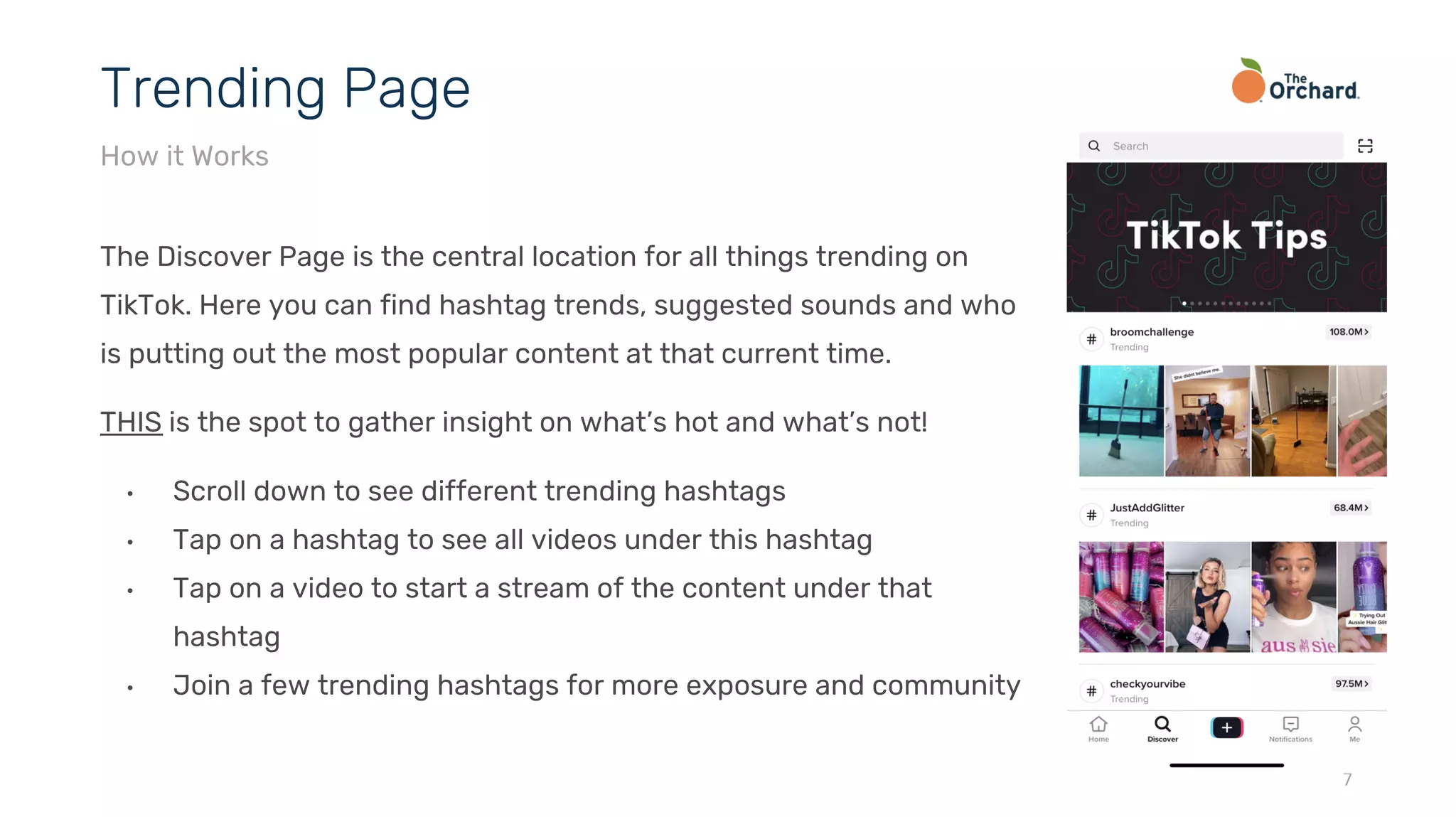
The Discover Page is the central location for all things trending on
TikTok. Here you can find hashtag trends, suggested sounds and who
is putting out the most popular content at that current time.
THIS is the spot to gather insight on what’s hot and what’s not!
• Scroll down to see different trending hashtags
• Tap on a hashtag to see all videos under this hashtag
• Tap on a video to start a stream of the content under that
hashtag
• Join a few trending hashtags for more exposure and community
7
Trending Page
How it Works
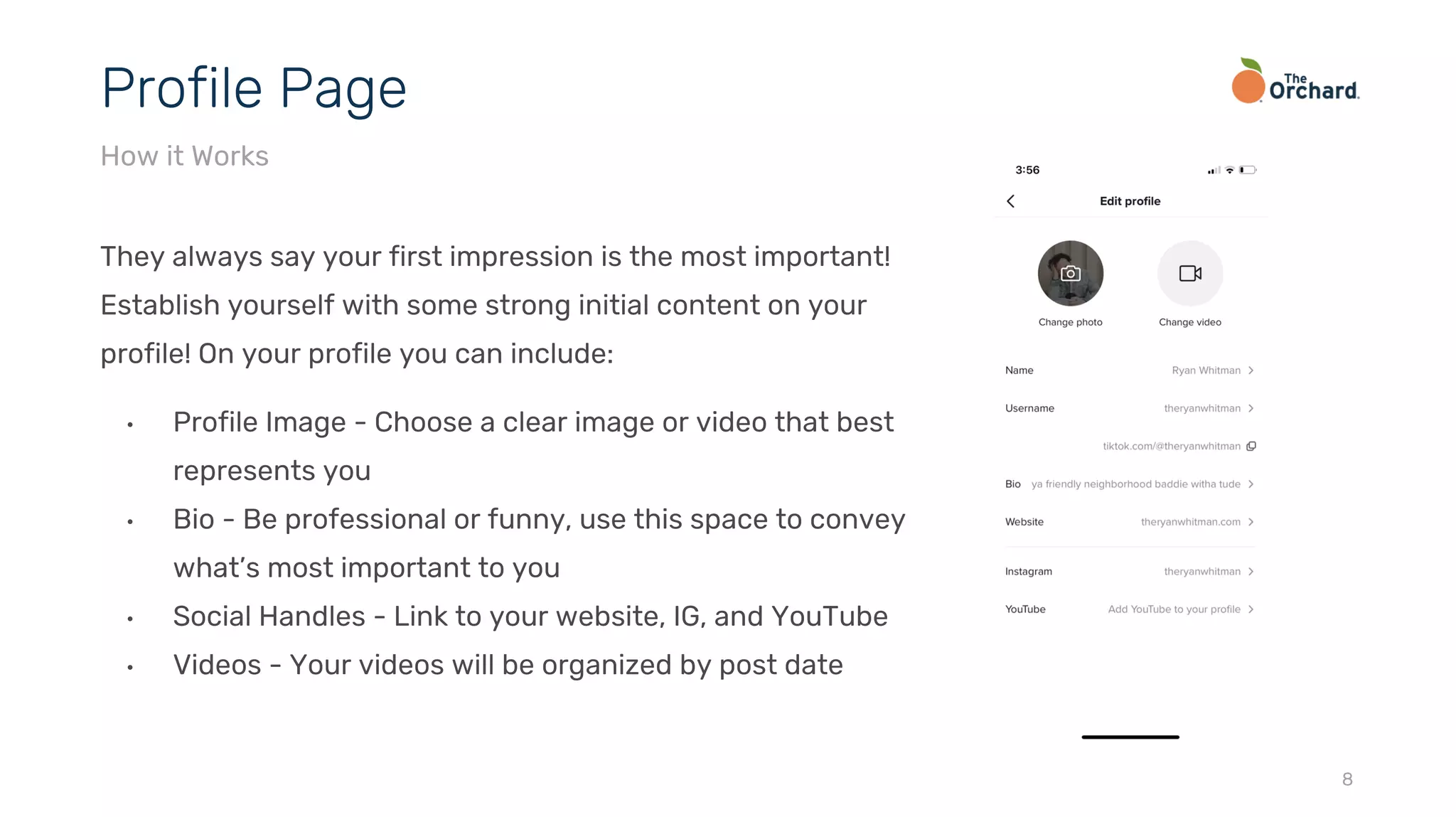
They always say your first impression is the most important!
Establish yourself with some strong initial content on your
profile! On your profile you can include:
• Profile Image - Choose a clear image or video that best
represents you
• Bio - Be professional or funny, use this space to convey
what’s most important to you
• Social Handles - Link to your website, IG, and YouTube
• Videos - Your videos will be organized by post date
8
Profile Page
How it Works
The Basics
Creating Your Page, How To Upload, Editing, Hashtags, Drafts, Posting
Once you’ve downloaded the app, click the profile icon on the bottom right of the screen. This
will prompt you to create your account! You can create an account through a social site, your
phone number, or email. Once your account is created, here are a few tips to get started:
• Create your TikTok profile with a recognizable handle and profile image
• Link your account to Instagram, website, and YouTube.
• Engage with TikTok as a user and embed yourself within the community
• Discover what content users consume, and use that information to find your main
creative focus
If you need help with verification, please contact your Label Manager.
10
Creating Your Page
The Basics
Uploading a video to TikTok is incredibly user friendly:
1. Open the app and click the “+” button on the bottom middle of your screen
2. Either upload videos from your camera roll (bottom right) or record live content (red
button)
3. Choose the length: 15 secs, 60 secs, or from a variety of templates
4. Press the red button to start and press again to stop
5. Once you have completed recording, select the red check-mark in the bottom right of your
screen
6. Adjust your video or add any sounds, effects, text or stickers
7. When you’re pleased with your final product, select “Next” in the bottom right of your
screen and decide whether to post now or “draft” it for later!
11
How To Create a Tik Tok
The Basics
In addition to 15 and 60 second filming options, TikTok also offers a Templates options. Here
you can choose from:
• Morph: Upload 2-5 photos that morph from one to the next
• Film: Create a vintage film look using up to 4 photos
• Photo Flow: Seamlessly showcase up to 5 photos
• Fancy Dots: Transition up to 4 photos in a pointillism format
• Double Exposure: Layer 1-2 photos over each other
• Carousel: Shift between 2-13 photos
• Countdown: Best with 10 photos to showcase in a countdown
• TikTok Travel: Showcase 6 photos as stamps
• Heartbeats: Showcase 2-5 photos with a heartbeat design
• Beat Drop: Set up to 10 photos to a beat drop sound effect 12
Templates
The Basics
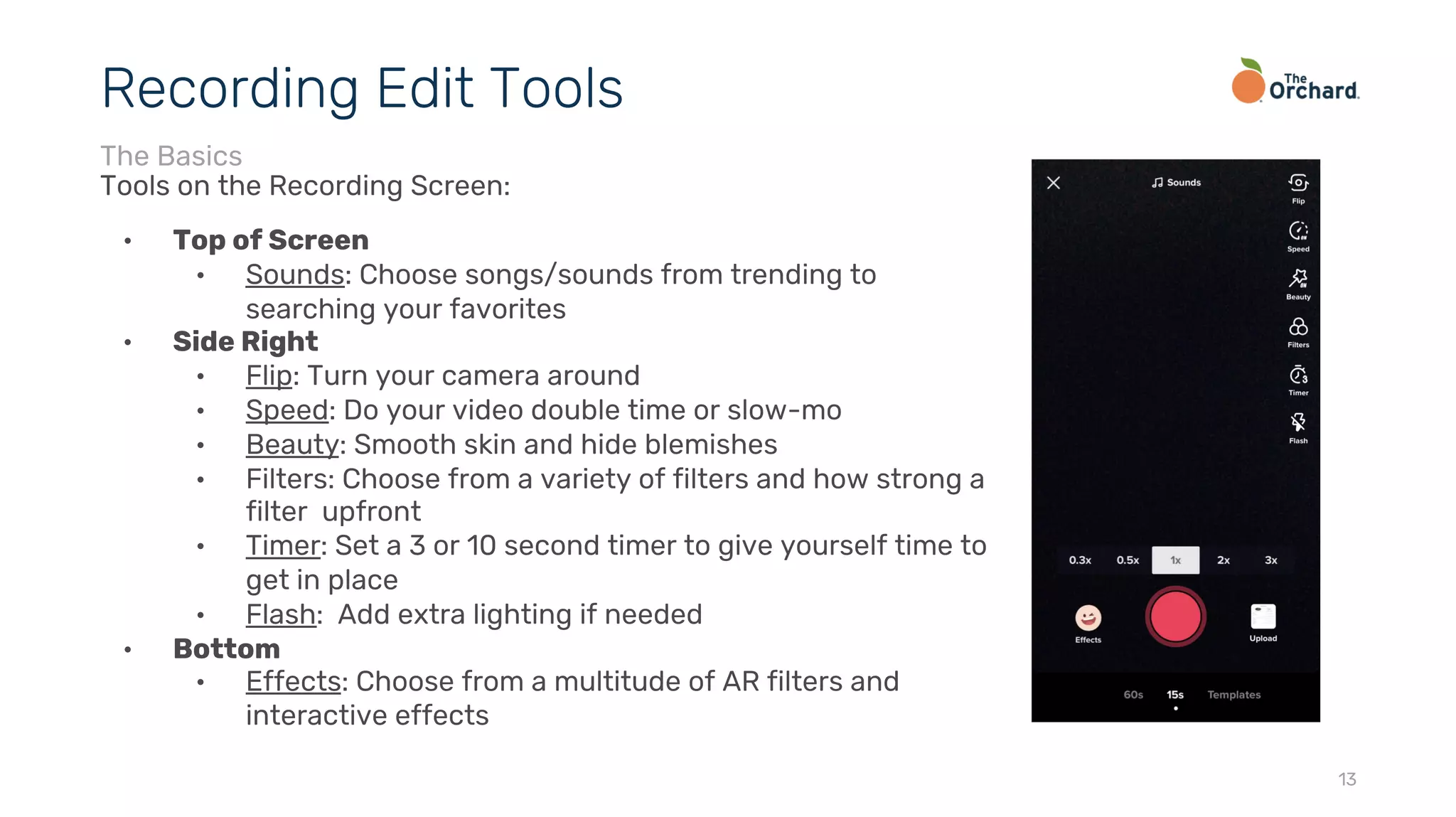
Tools on the Recording Screen:
• Top of Screen
• Sounds: Choose songs/sounds from trending to
searching your favorites
• Side Right
• Flip: Turn your camera around
• Speed: Do your video double time or slow-mo
• Beauty: Smooth skin and hide blemishes
• Filters: Choose from a variety of filters and how strong a
filter upfront
• Timer: Set a 3 or 10 second timer to give yourself time to
get in place
• Flash: Add extra lighting if needed
• Bottom
• Effects: Choose from a multitude of AR filters and
interactive effects
13
Recording Edit Tools
The Basics
Once you’re done recording and hit you’ll be brought to a new page of effects:
• Side Right
• Filters: These are the same filters, but just in case you wanted to add them in
post
• Adjust Clips: Shorten your video or individual clips
• Voice Effects: Add helium to your voice, mic yourself, change it up!
• Bottom
• Sounds: Another chance to add music or a sound to your video
• Effects: Another chance to add fun effects or transitions
• Text: Add text or pop up words to your TikToks
• Stickers: Add a plethora of stickers to add some pizazz
14
Post Recording Edit Tools
The Basics
Hashtags help users find content and trends that are increasing in overall popularity. The
Hashtag page also includes a brief description of the topic and a nearly endless feed of related
videos.
TikTok Hashtag Tip:
• Hashtags act as a central location for content types & trends
• Use hashtags to help discover content that appeals to your interests
• Don’t use too many or irrelevant hashtags.
• Be selective and keep your eye out for secret hashtag trends to use to your
advantage (i.e. #xyzbca, #xyzcba)
• Deliberate and participate in the app-wide challenges
15
Hashtags
The Basics
Drafts are a great way to keep up with your consistency of posting by filming videos and
saving them for later. It is also a great way to hold onto a video you weren’t quite ready to post
because you needed one last addition to make.
TIP: considering filming a great deal of content at one time, and draft it so you have ample
videos to post in the coming days/weeks. It keeps your fans happy with consistent content,
and it gives you more time to create!
16
Drafts
The Basics
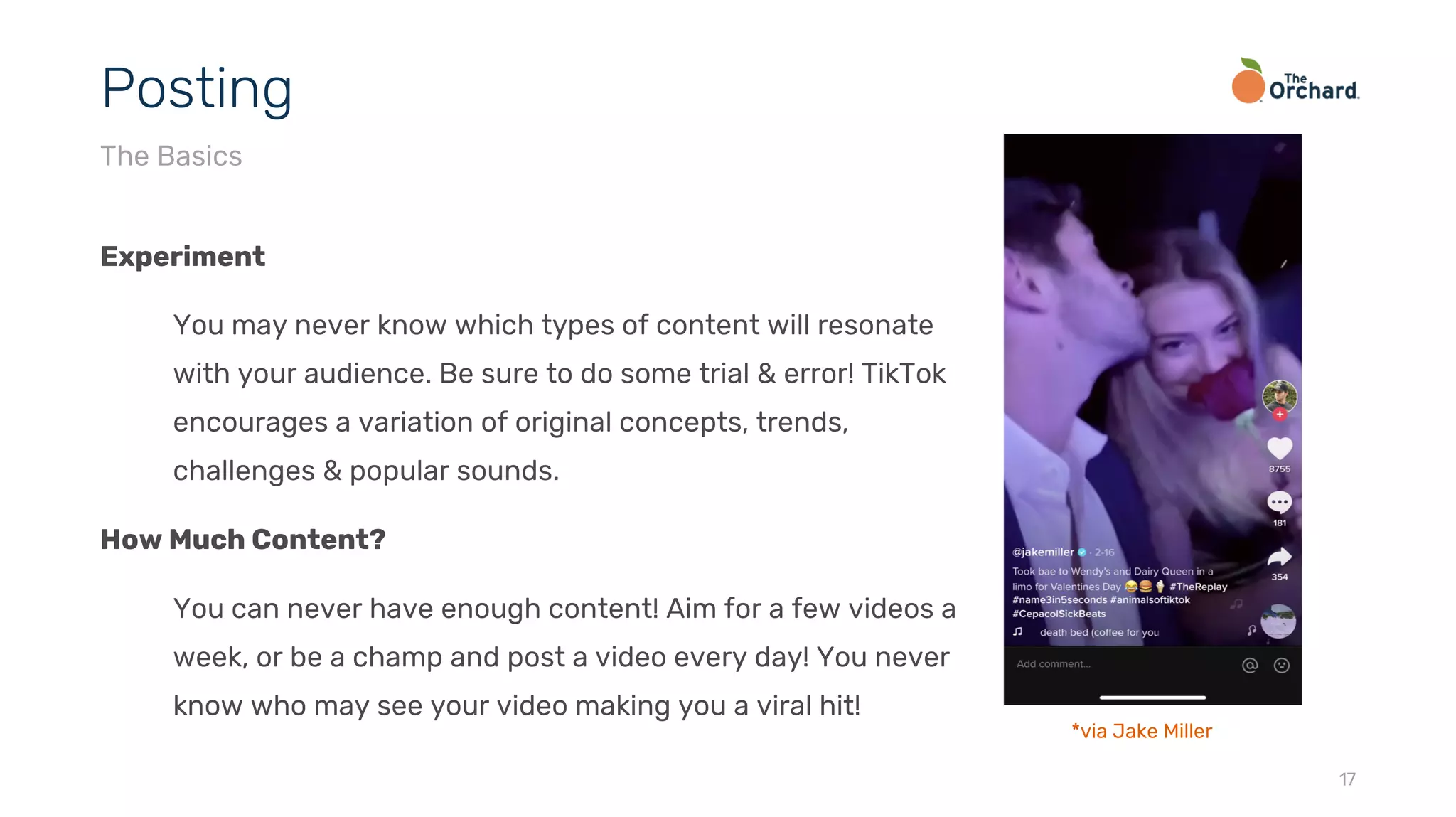
Experiment
You may never know which types of content will resonate
with your audience. Be sure to do some trial & error! TikTok
encourages a variation of original concepts, trends,
challenges & popular sounds.
How Much Content?
You can never have enough content! Aim for a few videos a
week, or be a champ and post a video every day! You never
know who may see your video making you a viral hit!
17
Posting
The Basics
*via Jake Miller
Best Practices
Content, Captions, Community, Direct Messaging
TikTok is your oyster! There’s no rule as to what kind of content to make. Here are a few tips
when making your content:
• Stay authentic to your interest as a creator
• Don’t be afraid to try something you don’t see anyone else doing - pave the way
• Join in on challenges that resonate with you
• Share your hidden talents beyond music
• Show off your personality
• Don’t worry too much about perfection, just have fun!
19
Content
Best Practices
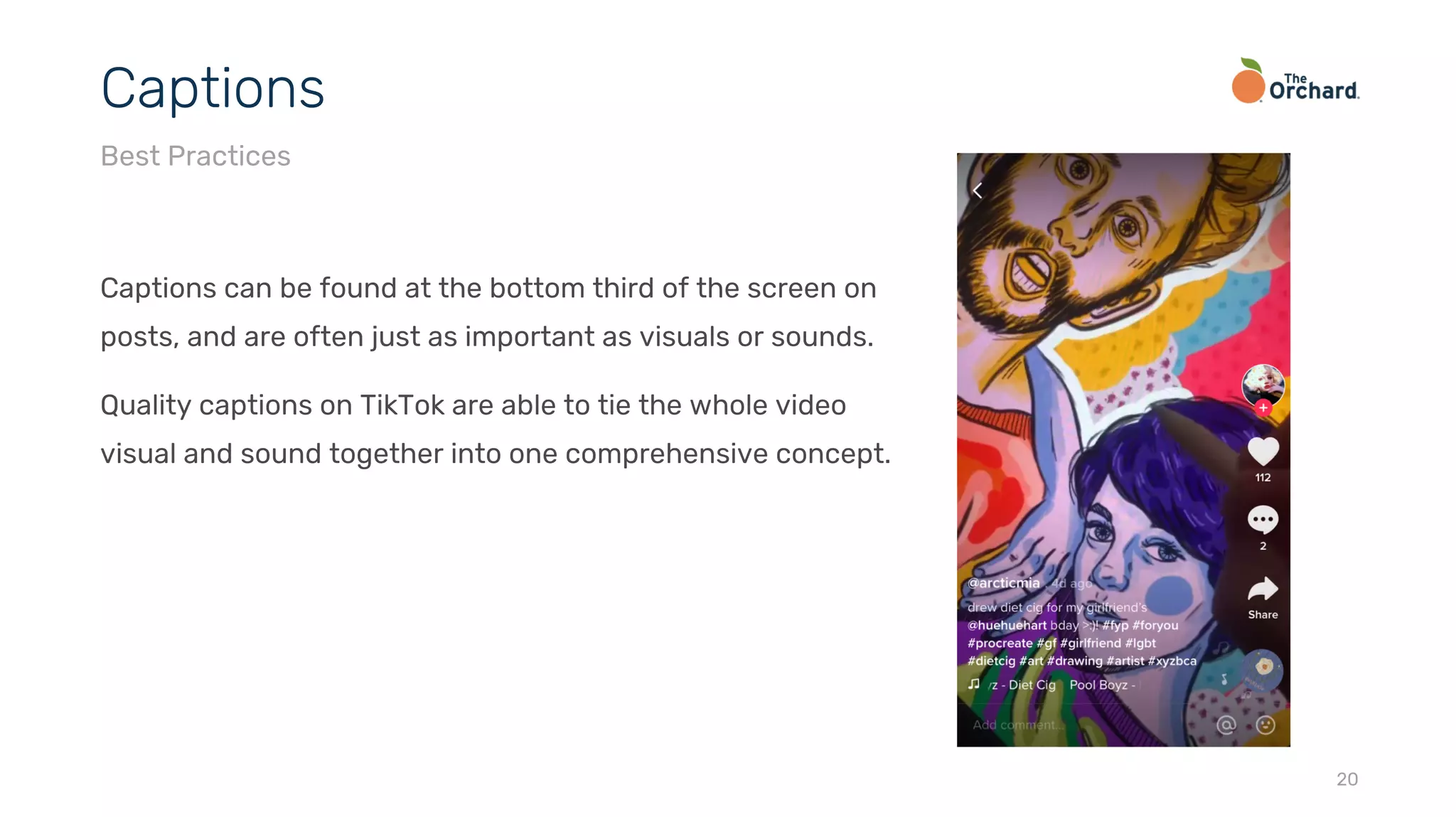
Captions can be found at the bottom third of the screen on
posts, and are often just as important as visuals or sounds.
Quality captions on TikTok are able to tie the whole video
visual and sound together into one comprehensive concept.
20
Captions
Best Practices
As with any social platform, the more you put in the more you get out! Be sure to go beyond
being seen, see your community:
• Like comments on your posts
• Reply to comments on your posts
• Like posts from people you follow, along with those you don’t
• Comment on other posts
Make your presence known.
21
Community
Best Practices
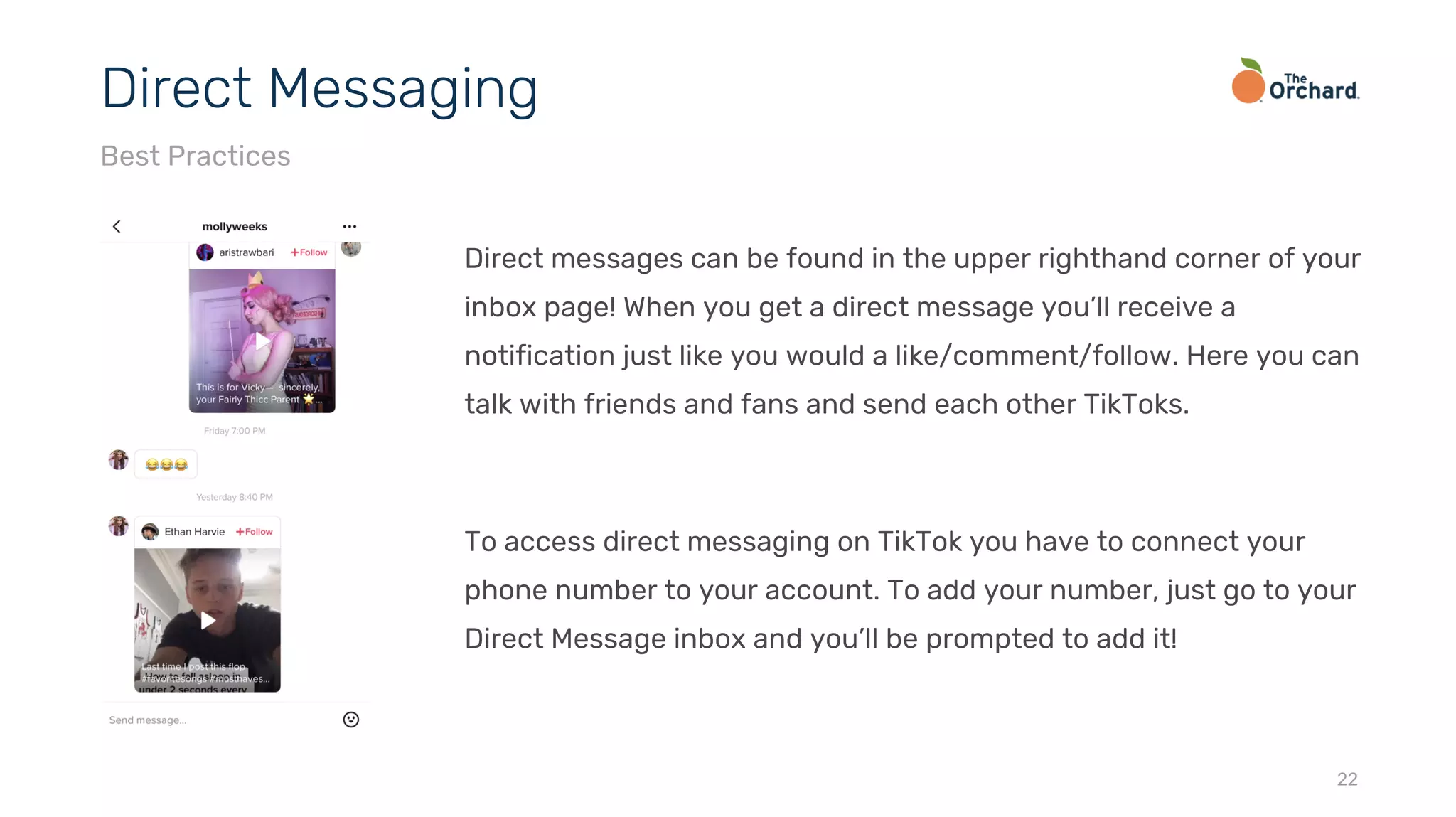
Direct messages can be found in the upper righthand corner of your
inbox page! When you get a direct message you’ll receive a
notification just like you would a like/comment/follow. Here you can
talk with friends and fans and send each other TikToks.
To access direct messaging on TikTok you have to connect your
phone number to your account. To add your number, just go to your
Direct Message inbox and you’ll be prompted to add it!
22
Direct Messaging
Best Practices
To share TikToks in direct messages or anywhere else, tap the arrow button on the post! You
can share via:
• Direct Message
• SMS
• Instagram/Instagram Story (TikToks over 15 seconds cut off on Stories)
• Snapchat
• Facebook/Facebook Messenger
• Twitter
• WhatsApp/WhatsApp Status
• Email
23
Sharing
Best Practices
There are two main ways that Artists can establish themselves on TikTok:
1. Creating their own channel and upload relevant videos,, showcasing their music and BTS
content
2. Working with influencers to spread content to a broader audience
Many individuals and brands do a combination of running their own channels and working with
influencers to spread content to a broader audience. The core of any success relies on being
active on the platform.
24
Music Promotion
Strategy
Insights
Pro Accounts
As a regular user, the only analytics available to you are looking at your likes, comments, and
shares on individual posts. To gain more analytics become a Pro Account. To become a Pro
Account:
• Go to Privacy & Settings
• Select Manage My Account
• Tap: Switch to Pro Account
• Choose a Category (most likely Entertainment as a music artist)
• You’ll be prompted to enter a phone number and be sent a confirmation code via text
Analytics will start being recorded the moment you become a Pro Account, you will not have
analytics for any activity prior to changing your account
26
Analytics - Pro Accounts
Insights
Insights are broken down into 3 categories for Pro Accounts:
• Profile Overview
• Video Views: Total videos in the past 7-28 days broken down by day
• Profile Views: Total profile visits in the past 7-28 days broken down by day
• Follower Count: Graph of overall followers for the past 7-28 days
• Content Insights
• Shows total views of each video in the past 7 days
• Shows which videos have been on the Trending Page
• For every video shows total: likes, comments, shares, play time, views, average watch time,
traffic sources, audience territories
• Follower Insights
• Gender Breakdown: Graph of male vs. female followers
• Top Territories: Breakdown of audience locations
27
Analytics - Pro Accounts
Insights
twitter.com/orchtweets facebook.com/theorchard linkedin.com/company/the-orchard
Thank You
2

TikTok Best Practices 2020

  • 1.
  • 2.
    • Introduction • Howit Works • The Basics • Best Practices • Insights • Thank You 2 Contents
  • 3.
    While TikTok hasbeen around for a few years now, with its merger with musical.ly and expansion worldwide in recent years, TikTok has quickly become a household name and major player in the digital space. TikTok has about 800 million active monthly users and has been downloaded over 1.5 billion times worldwide. It is a remarkable app that is made for self expression in whichever way the user wants to portray themselves to their audience. 3 Introduction *stats via hootsuite
  • 4.
    • TikTok’s primaryaudience consists of people between the ages of 16 and 24 years old • While this is TikTok’s core audience, more and more people a joining TikTok everyday, and many of TikTok’s biggest influencers are not in this age range • TikTok’s main philosophy is it’s an app for all ages - there are quickly growing communities look for different forms of content from music, comedy, dance, reviews, crafts, artwork, and so much more *via Forbes 4 Who’s It For? Introduction
  • 5.
    How it Works ForYou, Trending Page, Profile Page
  • 6.
    Upon opening theapp, you’re greeted with the “For You” page. This page is an immersive, full- screen endless stream/timeline of videos that will make your day. How it Works: ● TikTok’s feed is algorithmically-developed based on each individuals specific interests, behaviors, and overall engagement ● Videos take up your full vertical screen - if you stay in one place the video you’re on will replay ● Swipe up to view the next video, or down to go back to the video you just viewed 6 For You Page How it Works
  • 7.
    The Discover Pageis the central location for all things trending on TikTok. Here you can find hashtag trends, suggested sounds and who is putting out the most popular content at that current time. THIS is the spot to gather insight on what’s hot and what’s not! • Scroll down to see different trending hashtags • Tap on a hashtag to see all videos under this hashtag • Tap on a video to start a stream of the content under that hashtag • Join a few trending hashtags for more exposure and community 7 Trending Page How it Works
  • 8.
    They always sayyour first impression is the most important! Establish yourself with some strong initial content on your profile! On your profile you can include: • Profile Image - Choose a clear image or video that best represents you • Bio - Be professional or funny, use this space to convey what’s most important to you • Social Handles - Link to your website, IG, and YouTube • Videos - Your videos will be organized by post date 8 Profile Page How it Works
  • 9.
    The Basics Creating YourPage, How To Upload, Editing, Hashtags, Drafts, Posting
  • 10.
    Once you’ve downloadedthe app, click the profile icon on the bottom right of the screen. This will prompt you to create your account! You can create an account through a social site, your phone number, or email. Once your account is created, here are a few tips to get started: • Create your TikTok profile with a recognizable handle and profile image • Link your account to Instagram, website, and YouTube. • Engage with TikTok as a user and embed yourself within the community • Discover what content users consume, and use that information to find your main creative focus If you need help with verification, please contact your Label Manager. 10 Creating Your Page The Basics
  • 11.
    Uploading a videoto TikTok is incredibly user friendly: 1. Open the app and click the “+” button on the bottom middle of your screen 2. Either upload videos from your camera roll (bottom right) or record live content (red button) 3. Choose the length: 15 secs, 60 secs, or from a variety of templates 4. Press the red button to start and press again to stop 5. Once you have completed recording, select the red check-mark in the bottom right of your screen 6. Adjust your video or add any sounds, effects, text or stickers 7. When you’re pleased with your final product, select “Next” in the bottom right of your screen and decide whether to post now or “draft” it for later! 11 How To Create a Tik Tok The Basics
  • 12.
    In addition to15 and 60 second filming options, TikTok also offers a Templates options. Here you can choose from: • Morph: Upload 2-5 photos that morph from one to the next • Film: Create a vintage film look using up to 4 photos • Photo Flow: Seamlessly showcase up to 5 photos • Fancy Dots: Transition up to 4 photos in a pointillism format • Double Exposure: Layer 1-2 photos over each other • Carousel: Shift between 2-13 photos • Countdown: Best with 10 photos to showcase in a countdown • TikTok Travel: Showcase 6 photos as stamps • Heartbeats: Showcase 2-5 photos with a heartbeat design • Beat Drop: Set up to 10 photos to a beat drop sound effect 12 Templates The Basics
  • 13.
    Tools on theRecording Screen: • Top of Screen • Sounds: Choose songs/sounds from trending to searching your favorites • Side Right • Flip: Turn your camera around • Speed: Do your video double time or slow-mo • Beauty: Smooth skin and hide blemishes • Filters: Choose from a variety of filters and how strong a filter upfront • Timer: Set a 3 or 10 second timer to give yourself time to get in place • Flash: Add extra lighting if needed • Bottom • Effects: Choose from a multitude of AR filters and interactive effects 13 Recording Edit Tools The Basics
  • 14.
    Once you’re donerecording and hit you’ll be brought to a new page of effects: • Side Right • Filters: These are the same filters, but just in case you wanted to add them in post • Adjust Clips: Shorten your video or individual clips • Voice Effects: Add helium to your voice, mic yourself, change it up! • Bottom • Sounds: Another chance to add music or a sound to your video • Effects: Another chance to add fun effects or transitions • Text: Add text or pop up words to your TikToks • Stickers: Add a plethora of stickers to add some pizazz 14 Post Recording Edit Tools The Basics
  • 15.
    Hashtags help usersfind content and trends that are increasing in overall popularity. The Hashtag page also includes a brief description of the topic and a nearly endless feed of related videos. TikTok Hashtag Tip: • Hashtags act as a central location for content types & trends • Use hashtags to help discover content that appeals to your interests • Don’t use too many or irrelevant hashtags. • Be selective and keep your eye out for secret hashtag trends to use to your advantage (i.e. #xyzbca, #xyzcba) • Deliberate and participate in the app-wide challenges 15 Hashtags The Basics
  • 16.
    Drafts are agreat way to keep up with your consistency of posting by filming videos and saving them for later. It is also a great way to hold onto a video you weren’t quite ready to post because you needed one last addition to make. TIP: considering filming a great deal of content at one time, and draft it so you have ample videos to post in the coming days/weeks. It keeps your fans happy with consistent content, and it gives you more time to create! 16 Drafts The Basics
  • 17.
    Experiment You may neverknow which types of content will resonate with your audience. Be sure to do some trial & error! TikTok encourages a variation of original concepts, trends, challenges & popular sounds. How Much Content? You can never have enough content! Aim for a few videos a week, or be a champ and post a video every day! You never know who may see your video making you a viral hit! 17 Posting The Basics *via Jake Miller
  • 18.
    Best Practices Content, Captions,Community, Direct Messaging
  • 19.
    TikTok is youroyster! There’s no rule as to what kind of content to make. Here are a few tips when making your content: • Stay authentic to your interest as a creator • Don’t be afraid to try something you don’t see anyone else doing - pave the way • Join in on challenges that resonate with you • Share your hidden talents beyond music • Show off your personality • Don’t worry too much about perfection, just have fun! 19 Content Best Practices
  • 20.
    Captions can befound at the bottom third of the screen on posts, and are often just as important as visuals or sounds. Quality captions on TikTok are able to tie the whole video visual and sound together into one comprehensive concept. 20 Captions Best Practices
  • 21.
    As with anysocial platform, the more you put in the more you get out! Be sure to go beyond being seen, see your community: • Like comments on your posts • Reply to comments on your posts • Like posts from people you follow, along with those you don’t • Comment on other posts Make your presence known. 21 Community Best Practices
  • 22.
    Direct messages canbe found in the upper righthand corner of your inbox page! When you get a direct message you’ll receive a notification just like you would a like/comment/follow. Here you can talk with friends and fans and send each other TikToks. To access direct messaging on TikTok you have to connect your phone number to your account. To add your number, just go to your Direct Message inbox and you’ll be prompted to add it! 22 Direct Messaging Best Practices
  • 23.
    To share TikToksin direct messages or anywhere else, tap the arrow button on the post! You can share via: • Direct Message • SMS • Instagram/Instagram Story (TikToks over 15 seconds cut off on Stories) • Snapchat • Facebook/Facebook Messenger • Twitter • WhatsApp/WhatsApp Status • Email 23 Sharing Best Practices
  • 24.
    There are twomain ways that Artists can establish themselves on TikTok: 1. Creating their own channel and upload relevant videos,, showcasing their music and BTS content 2. Working with influencers to spread content to a broader audience Many individuals and brands do a combination of running their own channels and working with influencers to spread content to a broader audience. The core of any success relies on being active on the platform. 24 Music Promotion Strategy
  • 25.
  • 26.
    As a regularuser, the only analytics available to you are looking at your likes, comments, and shares on individual posts. To gain more analytics become a Pro Account. To become a Pro Account: • Go to Privacy & Settings • Select Manage My Account • Tap: Switch to Pro Account • Choose a Category (most likely Entertainment as a music artist) • You’ll be prompted to enter a phone number and be sent a confirmation code via text Analytics will start being recorded the moment you become a Pro Account, you will not have analytics for any activity prior to changing your account 26 Analytics - Pro Accounts Insights
  • 27.
    Insights are brokendown into 3 categories for Pro Accounts: • Profile Overview • Video Views: Total videos in the past 7-28 days broken down by day • Profile Views: Total profile visits in the past 7-28 days broken down by day • Follower Count: Graph of overall followers for the past 7-28 days • Content Insights • Shows total views of each video in the past 7 days • Shows which videos have been on the Trending Page • For every video shows total: likes, comments, shares, play time, views, average watch time, traffic sources, audience territories • Follower Insights • Gender Breakdown: Graph of male vs. female followers • Top Territories: Breakdown of audience locations 27 Analytics - Pro Accounts Insights
  • 28.