W HAT’ S N EW IN V ERSION
2.18?

© SecurActive 2013
P ERFORMANCE V ISION V ERSION 2.18
Applications

HTTP improvements & TLS support

Protocols: Stack, Netflow & Skinny

Flexibility, Usability & Performance
© SecurActive 2013

2
N EW
A PPLICATION D EFINITION
Performance
Vision 2.18

Applications

© SecurActive 2013
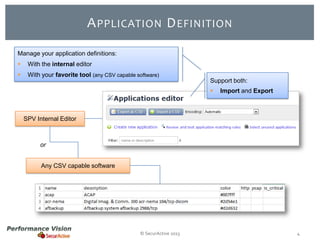
A PPLICATION D EFINITION
Manage your application definitions:


With the internal editor



With your favorite tool (any CSV capable software)
Support both:



Import and Export

SPV Internal Editor

or
Any CSV capable software

© SecurActive 2013

4
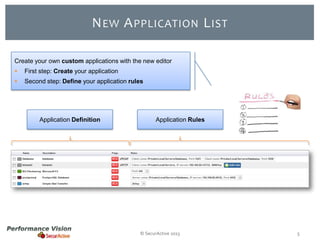
N EW A PPLICATION L IST
Create your own custom applications with the new editor


First step: Create your application



Second step: Define your application rules

Application Definition

Application Rules

© SecurActive 2013

5
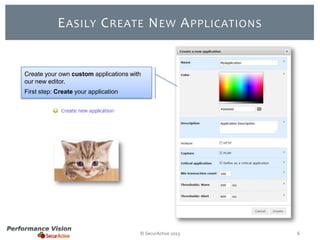
E ASILY C REATE N EW A PPLICATIONS

Create your own custom applications with
our new editor.
First step: Create your application

© SecurActive 2013

6
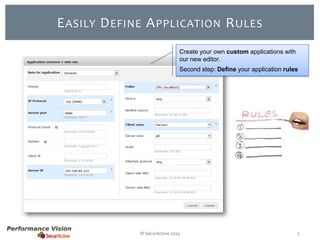
E ASILY D EFINE A PPLICATION R ULES
Create your own custom applications with
our new editor.
Second step: Define your application rules

© SecurActive 2013

7
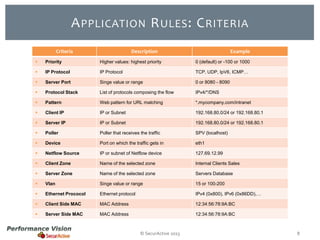
A PPLICATION R ULES : C RITERIA
Criteria

Description

Example



Priority

Higher values: highest priority

0 (default) or -100 or 1000



IP Protocol

IP Protocol

TCP, UDP, IpV6, ICMP…



Server Port

Singe value or range

0 or 8080 - 8090



Protocol Stack

List of protocols composing the flow

IPv4/*/DNS



Pattern

Web pattern for URL matching

*.mycompany.com/intranet



Client IP

IP or Subnet

192.168.80.0/24 or 192.168.80.1



Server IP

IP or Subnet

192.168.80.0/24 or 192.168.80.1



Poller

Poller that receives the traffic

SPV (localhost)



Device

Port on which the traffic gets in

eth1



Netflow Source

IP or subnet of Netflow device

127.69.12.99



Client Zone

Name of the selected zone

Internal Clients Sales



Server Zone

Name of the selected zone

Servers Database



Vlan

Singe value or range

15 or 100-200



Ethernet Prococol

Ethernet protocol

IPv4 (0x800), IPv6 (0x86DD),…



Client Side MAC

MAC Address

12:34:56:78:9A:BC



Server Side MAC

MAC Address

12:34:56:78:9A:BC

© SecurActive 2013

8
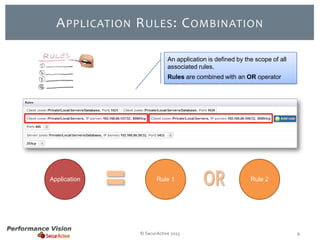
A PPLICATION R ULES : C OMBINATION
An application is defined by the scope of all
associated rules.
Rules are combined with an OR operator

Application

Rule 1

© SecurActive 2013

Rule 2

9
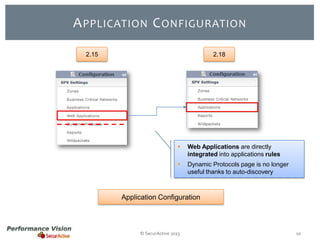
A PPLICATION C ONFIGURATION
2.15

2.18



Web Applications are directly
integrated into applications rules



Dynamic Protocols page is no longer
useful thanks to auto-discovery

Application Configuration

© SecurActive 2013

10
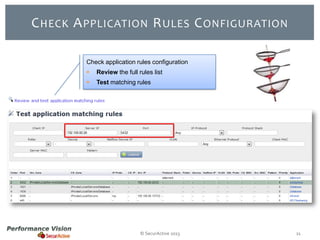
C HECK A PPLICATION R ULES C ONFIGURATION
Check application rules configuration


Review the full rules list



Test matching rules

© SecurActive 2013

11
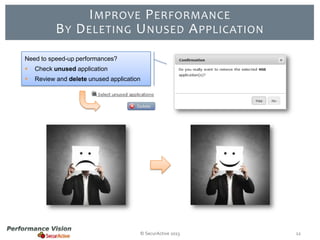
I MPROVE P ERFORMANCE
B Y D ELETING U NUSED A PPLICATION
Need to speed-up performances?


Check unused application



Review and delete unused application

© SecurActive 2013

12
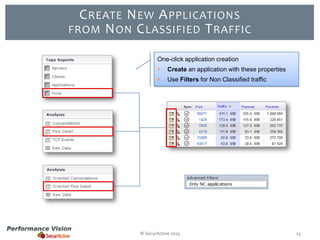
C REATE N EW A PPLICATIONS
FROM N ON C LASSIFIED T RAFFIC
One-click application creation


Create an application with these properties



Use Filters for Non Classified traffic

© SecurActive 2013

13
HTTP IMPROVEMENTS
& TLS SUPPORT

© SecurActive 2013

Performance
Vision 2.18
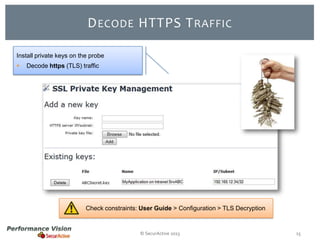
D ECODE HTTPS T RAFFIC
Install private keys on the probe


Decode https (TLS) traffic

Check constraints: User Guide > Configuration > TLS Decryption

© SecurActive 2013

15
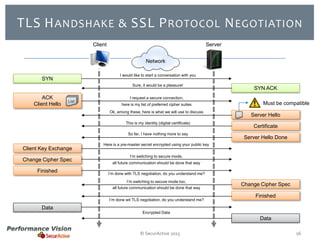
TLS H ANDSHAKE & SSL P ROTOCOL N EGOTIATION
Client

Server
Network
I would like to start a conversation with you

SYN

Sure, it would be a pleasure!

ACK
Client Hello

List

I request a secure connection,
here is my list of preferred cipher suites
Ok, among these, here is what we will use to discuss
This is my identity (digital certificate)
So far, I have nothing more to say

Client Key Exchange
Change Cipher Spec
Finished

SYN ACK
Must be compatible
Server Hello
Certificate

Server Hello Done

Here is a pre-master secret encrypted using your public key
I’m switching to secure mode,
all future communication should be done that way
I’m done with TLS negotiation, do you understand me?
I’m switching to secure mode too,
all future communication should be done that way

I’m done wit TLS negotiation, do you understand me?

Change Cipher Spec
Finished

Data
Encrypted Data

Data
© SecurActive 2013

16
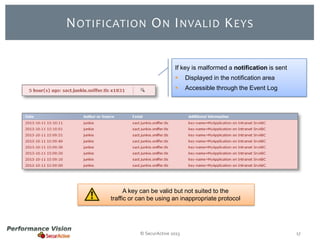
N OTIFICATION O N I NVALID K EYS
If key is malformed a notification is sent


Displayed in the notification area



Accessible through the Event Log

A key can be valid but not suited to the
traffic or can be using an inappropriate protocol

© SecurActive 2013

17
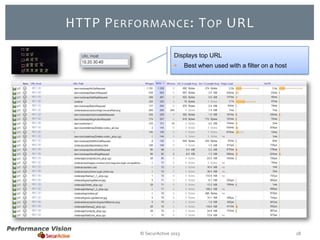
HTTP P ERFORMANCE : T OP URL
Displays top URL


© SecurActive 2013

Best when used with a filter on a host

18
A GGREGATES

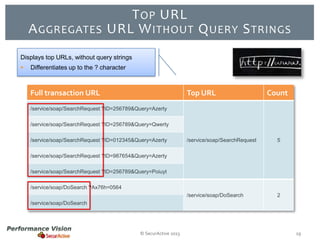
T OP URL
URL W ITHOUT Q UERY S TRINGS

Displays top URLs, without query strings


Differentiates up to the ? character

Full transaction URL

Top URL

Count

/service/soap/SearchRequest ?ID=256789&Query=Azerty
/service/soap/SearchRequest ?ID=256789&Query=Qwerty
/service/soap/SearchRequest ?ID=012345&Query=Azerty

/service/soap/SearchRequest

5

/service/soap/DoSearch

2

/service/soap/SearchRequest ?ID=987654&Query=Azerty
/service/soap/SearchRequest ?ID=256789&Query=Poiuyt
/service/soap/DoSearch ?Ax76h=0564
/service/soap/DoSearch

© SecurActive 2013

19
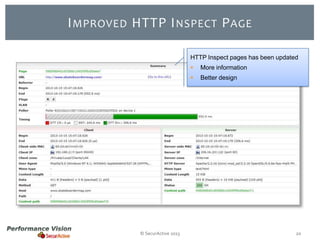
I MPROVED HTTP I NSPECT P AGE
HTTP Inspect pages has been updated



© SecurActive 2013

More information
Better design

20
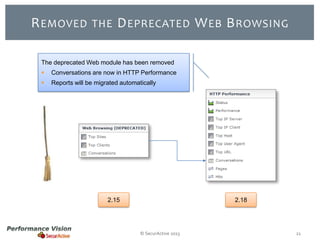
R EMOVED

THE

D EPRECATED W EB B ROWSING

The deprecated Web module has been removed


Conversations are now in HTTP Performance



Reports will be migrated automatically

2.15

2.18

© SecurActive 2013

21
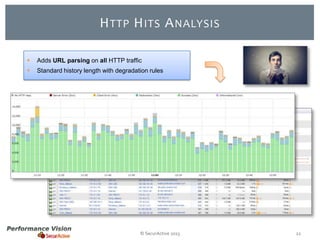
H TTP H ITS A NALYSIS


Adds URL parsing on all HTTP traffic



Standard history length with degradation rules

© SecurActive 2013

22
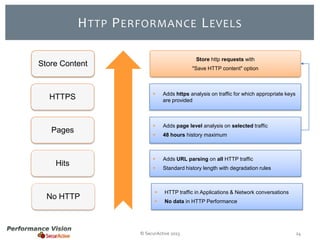
H TTP P ERFORMANCE L EVELS
Store http requests with

Store Content

HTTPS

Pages

Hits

No HTTP

"Save HTTP content" option



Adds https analysis on traffic for which appropriate keys
are provided



Adds page level analysis on selected traffic



48 hours history maximum



Adds URL parsing on all HTTP traffic



Standard history length with degradation rules



HTTP traffic in Applications & Network conversations



No data in HTTP Performance

© SecurActive 2013

24
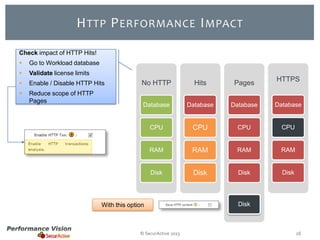
H TTP P ERFORMANCE I MPACT
Check impact of HTTP Hits!


Go to Workload database



Validate license limits



Enable / Disable HTTP Hits



Reduce scope of HTTP
Pages

HTTPS

No HTTP

Hits

Pages

Database

Database

Database

Database

CPU

CPU

CPU

CPU

RAM

RAM

RAM

RAM

Disk

Disk

Disk

Disk

With this option

© SecurActive 2013

Disk

26
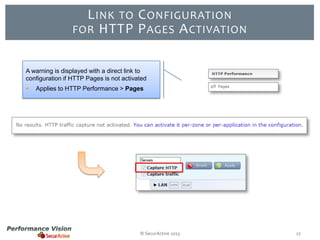
L INK TO C ONFIGURATION
FOR HTTP P AGES A CTIVATION
A warning is displayed with a direct link to
configuration if HTTP Pages is not activated


Applies to HTTP Performance > Pages

© SecurActive 2013

27
P ROTOCOLS :
S TACK, N ETFLOW & S KINNY

© SecurActive 2013

Performance
Vision 2.18
P ROTOCOL S TACK
A New Depth in Analysis!

© SecurActive 2013

29
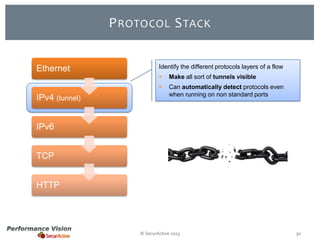
P ROTOCOL S TACK
Ethernet

Identify the different protocols layers of a flow



IPv4 (tunnel)

Make all sort of tunnels visible
Can automatically detect protocols even
when running on non standard ports

IPv6

TCP
HTTP

© SecurActive 2013

30
P ROTOCOL S TACK
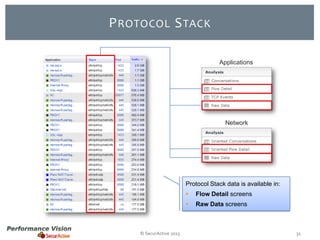
Applications

Network

Protocol Stack data is available in:




© SecurActive 2013

Flow Detail screens

Raw Data screens

31
P ROTOCOL S TACK F ILTER
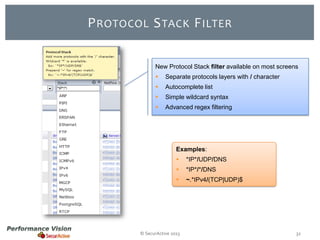
New Protocol Stack filter available on most screens


Separate protocols layers with / character



Autocomplete list



Simple wildcard syntax



Advanced regex filtering

Examples:


*IP*/UDP/DNS



*IP*/*/DNS



~.*IPv4/(TCP|UDP)$

© SecurActive 2013

32
L IST





















ARP
BGP
Bittorrent
CIFS
Citrix
DNS
DNS/TCP
E R S PA N
Ethernet
FTP
Gnutella
GRE
HTTP
ICMP
I C M P v6
IMAP
I P v4
I P v6
IRC
Jabber

OF

P ROTOCOLS





















MGCP
M yS Q L
Netbios
NTP
P C a n ywh e r e
POP
PostgreSQL
RDP
RT C P
RT P
SDP
SIP
Skinny
S S L v2
TCP
Te l n e t
TLS
TNS
UDP
VNC

IN



P ROTOCOL S TACK

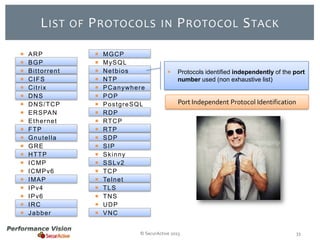
Protocols identified independently of the port
number used (non exhaustive list)

Port Independent Protocol Identification

© SecurActive 2013

33
N ETFLOW V5 S UPPORT
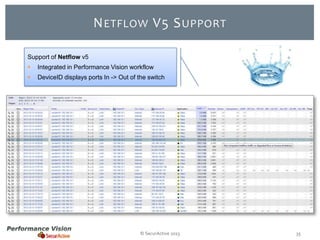
Support of Netflow v5



Integrated in Performance Vision workflow



DeviceID displays ports In -> Out of the switch

© SecurActive 2013

35
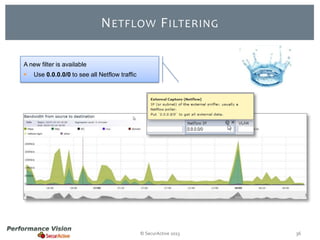
N ETFLOW F ILTERING
A new filter is available


Use 0.0.0.0/0 to see all Netflow traffic

© SecurActive 2013

36
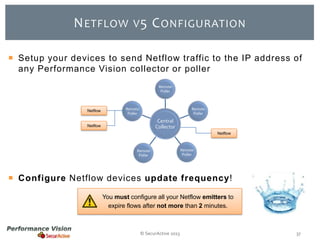
N ETFLOW V 5 C ONFIGURATION
 Setup your devices to send Netflow traffic to the IP address of
any Performance Vision collector or poller
Remote
Poller

Netflow

Remote
Poller

Remote
Poller

Central
Collector

Netflow

Netflow

Remote
Poller

Remote
Poller

 Configure Netflow devices update frequency!
You must configure all your Netflow emitters to
expire flows after not more than 2 minutes.

© SecurActive 2013

37
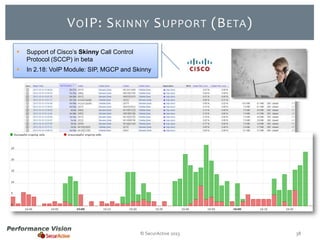
V O IP: S KINNY S UPPORT (B ETA )


Support of Cisco’s Skinny Call Control
Protocol (SCCP) in beta



In 2.18: VoIP Module: SIP, MGCP and Skinny

© SecurActive 2013

38
F LEXIBILITY,
U SABILITY & P ERFORMANCE

© SecurActive 2013

Performance
Vision 2.18
NPS W ORKS

IN

D ISTRIBUTED M ODE

NPP
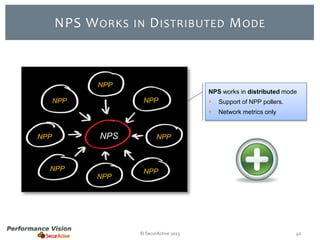
NPS works in distributed mode

NPP

NPP

NPS

NPP
NPP

Support of NPP pollers.



NPP



Network metrics only

NPP

NPP

© SecurActive 2013

40
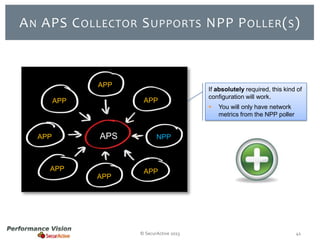
A N APS C OLLECTOR S UPPORTS NPP P OLLER ( S )

APP
APP

APP

APP

APS

APP
APP

If absolutely required, this kind of
configuration will work.


You will only have network
metrics from the NPP poller

NPP

APP

© SecurActive 2013

41
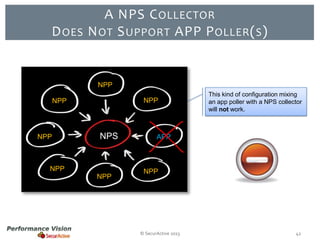
D OES

A NPS C OLLECTOR
N OT S UPPORT APP P OLLER ( S )

NPP
NPP

NPP

NPP

NPS

NPP
NPP

This kind of configuration mixing
an app poller with a NPS collector
will not work.

APP

NPP

© SecurActive 2013

42
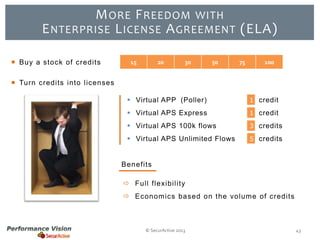
M ORE F REEDOM WITH
E NTERPRISE L ICENSE A GREEMENT (ELA)
 Buy a stock of credits

15

20

30

50

75

100

 Turn credits into licenses
 Virtual APP (Poller)

1 credit

 Virtual APS Express

1 credit

 Virtual APS 100k flows

3 credits

 Virtual APS Unlimited Flows

5 credits

Benefits
 Full flexibility
 Economics based on the volume of credits

© SecurActive 2013

43
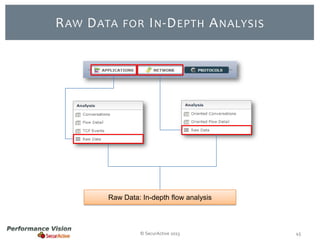
R AW D ATA

FOR I N -D EPTH

A NALYSIS

Raw Data: In-depth flow analysis

© SecurActive 2013

45
R AW D ATA

FOR I N -D EPTH

A NALYSIS

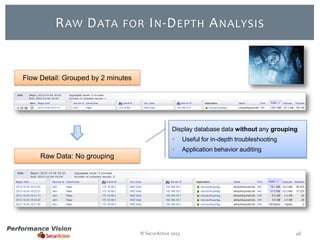
Flow Detail: Grouped by 2 minutes

Display database data without any grouping


Useful for in-depth troubleshooting



Application behavior auditing

Raw Data: No grouping

© SecurActive 2013

46
N EXT L EVEL C USTOM F ILTERS
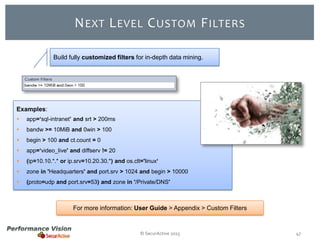
Build fully customized filters for in-depth data mining.

Examples:


app=‘sql-intranet’ and srt > 200ms



bandw >= 10MiB and 0win > 100



begin > 100 and ct.count = 0



app=‘video_live' and diffserv != 20



(ip=10.10.*.* or ip.srv=10.20.30.*) and os.clt='linux‘



zone in 'Headquarters' and port.srv > 1024 and begin > 10000



(proto=udp and port.srv=53) and zone in '/Private/DNS'

For more information: User Guide > Appendix > Custom Filters

© SecurActive 2013

47
C OMBINE A DVANCED F ILTERS
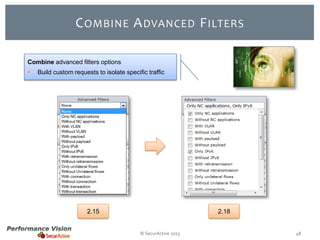
Combine advanced filters options


Build custom requests to isolate specific traffic

2.15

2.18

© SecurActive 2013

48
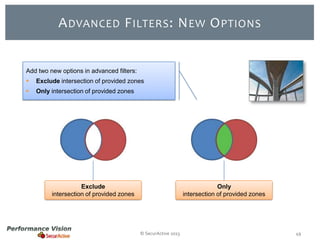
A DVANCED F ILTERS : N EW O PTIONS

Add two new options in advanced filters:


Exclude intersection of provided zones



Only intersection of provided zones

Exclude
intersection of provided zones

Only
intersection of provided zones

© SecurActive 2013

49
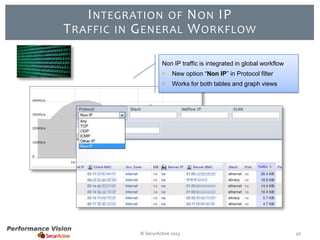
I NTEGRATION OF N ON IP
T RAFFIC IN G ENERAL W ORKFLOW
Non IP traffic is integrated in global workflow


New option “Non IP” in Protocol filter



Works for both tables and graph views

© SecurActive 2013

50
P ERFORMANCES I MPROVEMENTS

Performance oriented improvements


More aggressive default data degradation



ICMP can now be degraded

© SecurActive 2013

51
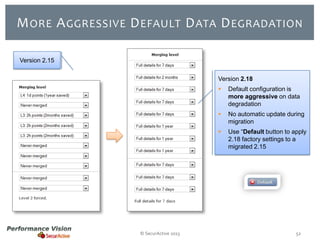
M ORE A GGRESSIVE D EFAULT D ATA D EGRADATION
Version 2.15
Version 2.18




No automatic update during
migration



© SecurActive 2013

Default configuration is
more aggressive on data
degradation

Use “Default button to apply
2.18 factory settings to a
migrated 2.15

52
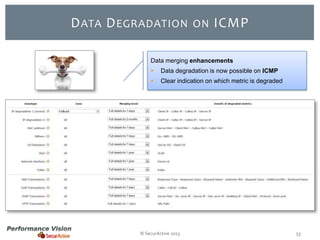
D ATA D EGRADATION

ON

ICMP

Data merging enhancements


Data degradation is now possible on ICMP



Clear indication on which metric is degraded

© SecurActive 2013

53
P ERFORMANCES : U NDER

THE

H OOD

Improved network sniffing


Better usage of multi-core by the
sniffer/dumper

Optimized database querying


Database improvements for user
requests (up to +20% faster)

Faster exporting


© SecurActive 2013

Export to CSV is significantly faster

54
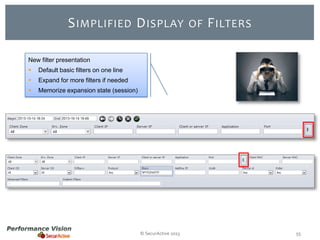
S IMPLIFIED D ISPLAY

OF

F ILTERS

New filter presentation


Default basic filters on one line



Expand for more filters if needed



Memorize expansion state (session)

© SecurActive 2013

55
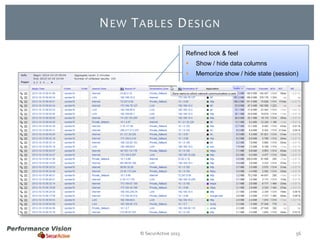
N EW T ABLES D ESIGN
Refined look & feel



© SecurActive 2013

Show / hide data columns
Memorize show / hide state (session)

56
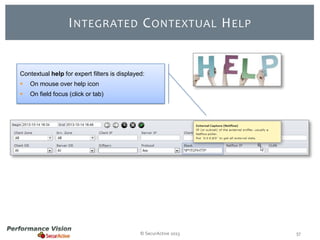
I NTEGRATED C ONTEXTUAL H ELP

Contextual help for expert filters is displayed:


On mouse over help icon



On field focus (click or tab)

© SecurActive 2013

57
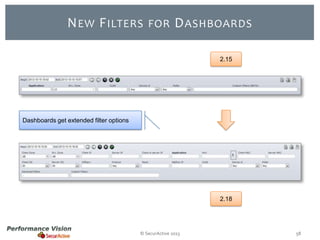
N EW F ILTERS

FOR

D ASHBOARDS
2.15

Dashboards get extended filter options

2.18

© SecurActive 2013

58
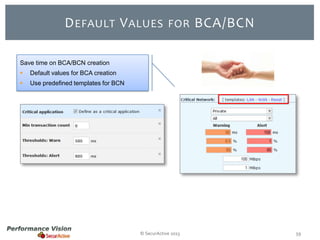
D EFAULT V ALUES

FOR

BCA/BCN

Save time on BCA/BCN creation


Default values for BCA creation



Use predefined templates for BCN

© SecurActive 2013

59
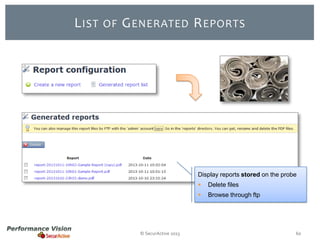
L IST

OF

G ENERATED R EPORTS

Display reports stored on the probe



© SecurActive 2013

Delete files
Browse through ftp

60
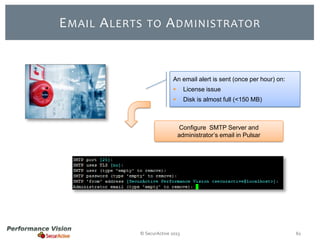
E MAIL A LERTS

TO

A DMINISTRATOR

An email alert is sent (once per hour) on:


License issue



Disk is almost full (<150 MB)

Configure SMTP Server and
administrator’s email in Pulsar

© SecurActive 2013

61
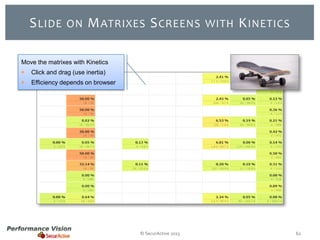
S LIDE

ON

M ATRIXES S CREENS

WITH

K INETICS

Move the matrixes with Kinetics


Click and drag (use inertia)



Efficiency depends on browser

© SecurActive 2013

62
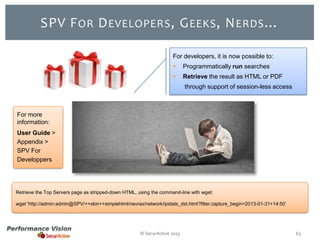
SPV F OR D EVELOPERS , G EEKS , N ERDS …
For developers, it is now possible to:


Programmatically run searches



Retrieve the result as HTML or PDF
through support of session-less access

For more
information:
User Guide >
Appendix >
SPV For
Developpers

Retrieve the Top Servers page as stripped-down HTML, using the command-line with wget:
wget 'http://admin:admin@SPV/++skin++simplehtml/nevrax/network/ipstats_dst.html?filter.capture_begin=2013-01-31+14:50’

© SecurActive 2013

63
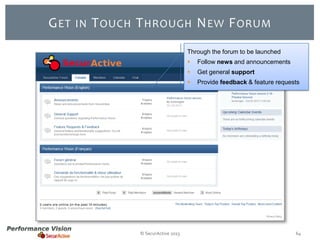
G ET

IN

T OUCH T HROUGH N EW F ORUM
Through the forum to be launched



Get general support



© SecurActive 2013

Follow news and announcements
Provide feedback & feature requests

64
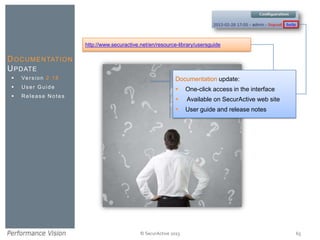
http://www.securactive.net/en/resource-library/usersguide

D O C U M E N TAT I O N
U PDATE


Ve r s i o n 2 . 1 8

Documentation update:



User Guide



One-click access in the interface



Release Notes



Available on SecurActive web site



User guide and release notes

© SecurActive 2013

65
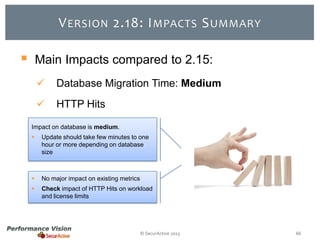
V ERSION 2.18: I MPACTS S UMMARY



Main Impacts compared to 2.15:


Database Migration Time: Medium



HTTP Hits

Impact on database is medium.


Update should take few minutes to one
hour or more depending on database
size



No major impact on existing metrics



Check impact of HTTP Hits on workload
and license limits

© SecurActive 2013

66
R EBOOT A FTER U PDATE

After the upgrade is completed

© SecurActive 2013

67
Y OU ’ RE R EADY

TO

© SecurActive 2013

G O , E NJOY !

68
For any Question
sales@securactive.net
support@securactive.net

T HANK Y OU!

What’s New
in Version
2.1 8 ?

Follow Us on
@SecurActivePV
www.securactive.net
blog.securactive.net

© SecurActive 2013

69

What's new in Performance Vision version 2.18

  • 1.
    W HAT’ SN EW IN V ERSION 2.18? © SecurActive 2013
  • 2.
    P ERFORMANCE VISION V ERSION 2.18 Applications HTTP improvements & TLS support Protocols: Stack, Netflow & Skinny Flexibility, Usability & Performance © SecurActive 2013 2
  • 3.
    N EW A PPLICATIOND EFINITION Performance Vision 2.18 Applications © SecurActive 2013
  • 4.
    A PPLICATION DEFINITION Manage your application definitions:  With the internal editor  With your favorite tool (any CSV capable software) Support both:  Import and Export SPV Internal Editor or Any CSV capable software © SecurActive 2013 4
  • 5.
    N EW APPLICATION L IST Create your own custom applications with the new editor  First step: Create your application  Second step: Define your application rules Application Definition Application Rules © SecurActive 2013 5
  • 6.
    E ASILY CREATE N EW A PPLICATIONS Create your own custom applications with our new editor. First step: Create your application © SecurActive 2013 6
  • 7.
    E ASILY DEFINE A PPLICATION R ULES Create your own custom applications with our new editor. Second step: Define your application rules © SecurActive 2013 7
  • 8.
    A PPLICATION RULES : C RITERIA Criteria Description Example  Priority Higher values: highest priority 0 (default) or -100 or 1000  IP Protocol IP Protocol TCP, UDP, IpV6, ICMP…  Server Port Singe value or range 0 or 8080 - 8090  Protocol Stack List of protocols composing the flow IPv4/*/DNS  Pattern Web pattern for URL matching *.mycompany.com/intranet  Client IP IP or Subnet 192.168.80.0/24 or 192.168.80.1  Server IP IP or Subnet 192.168.80.0/24 or 192.168.80.1  Poller Poller that receives the traffic SPV (localhost)  Device Port on which the traffic gets in eth1  Netflow Source IP or subnet of Netflow device 127.69.12.99  Client Zone Name of the selected zone Internal Clients Sales  Server Zone Name of the selected zone Servers Database  Vlan Singe value or range 15 or 100-200  Ethernet Prococol Ethernet protocol IPv4 (0x800), IPv6 (0x86DD),…  Client Side MAC MAC Address 12:34:56:78:9A:BC  Server Side MAC MAC Address 12:34:56:78:9A:BC © SecurActive 2013 8
  • 9.
    A PPLICATION RULES : C OMBINATION An application is defined by the scope of all associated rules. Rules are combined with an OR operator Application Rule 1 © SecurActive 2013 Rule 2 9
  • 10.
    A PPLICATION CONFIGURATION 2.15 2.18  Web Applications are directly integrated into applications rules  Dynamic Protocols page is no longer useful thanks to auto-discovery Application Configuration © SecurActive 2013 10
  • 11.
    C HECK APPLICATION R ULES C ONFIGURATION Check application rules configuration  Review the full rules list  Test matching rules © SecurActive 2013 11
  • 12.
    I MPROVE PERFORMANCE B Y D ELETING U NUSED A PPLICATION Need to speed-up performances?  Check unused application  Review and delete unused application © SecurActive 2013 12
  • 13.
    C REATE NEW A PPLICATIONS FROM N ON C LASSIFIED T RAFFIC One-click application creation  Create an application with these properties  Use Filters for Non Classified traffic © SecurActive 2013 13
  • 14.
    HTTP IMPROVEMENTS & TLSSUPPORT © SecurActive 2013 Performance Vision 2.18
  • 15.
    D ECODE HTTPST RAFFIC Install private keys on the probe  Decode https (TLS) traffic Check constraints: User Guide > Configuration > TLS Decryption © SecurActive 2013 15
  • 16.
    TLS H ANDSHAKE& SSL P ROTOCOL N EGOTIATION Client Server Network I would like to start a conversation with you SYN Sure, it would be a pleasure! ACK Client Hello List I request a secure connection, here is my list of preferred cipher suites Ok, among these, here is what we will use to discuss This is my identity (digital certificate) So far, I have nothing more to say Client Key Exchange Change Cipher Spec Finished SYN ACK Must be compatible Server Hello Certificate Server Hello Done Here is a pre-master secret encrypted using your public key I’m switching to secure mode, all future communication should be done that way I’m done with TLS negotiation, do you understand me? I’m switching to secure mode too, all future communication should be done that way I’m done wit TLS negotiation, do you understand me? Change Cipher Spec Finished Data Encrypted Data Data © SecurActive 2013 16
  • 17.
    N OTIFICATION ON I NVALID K EYS If key is malformed a notification is sent  Displayed in the notification area  Accessible through the Event Log A key can be valid but not suited to the traffic or can be using an inappropriate protocol © SecurActive 2013 17
  • 18.
    HTTP P ERFORMANCE: T OP URL Displays top URL  © SecurActive 2013 Best when used with a filter on a host 18
  • 19.
    A GGREGATES T OPURL URL W ITHOUT Q UERY S TRINGS Displays top URLs, without query strings  Differentiates up to the ? character Full transaction URL Top URL Count /service/soap/SearchRequest ?ID=256789&Query=Azerty /service/soap/SearchRequest ?ID=256789&Query=Qwerty /service/soap/SearchRequest ?ID=012345&Query=Azerty /service/soap/SearchRequest 5 /service/soap/DoSearch 2 /service/soap/SearchRequest ?ID=987654&Query=Azerty /service/soap/SearchRequest ?ID=256789&Query=Poiuyt /service/soap/DoSearch ?Ax76h=0564 /service/soap/DoSearch © SecurActive 2013 19
  • 20.
    I MPROVED HTTPI NSPECT P AGE HTTP Inspect pages has been updated   © SecurActive 2013 More information Better design 20
  • 21.
    R EMOVED THE D EPRECATEDW EB B ROWSING The deprecated Web module has been removed  Conversations are now in HTTP Performance  Reports will be migrated automatically 2.15 2.18 © SecurActive 2013 21
  • 22.
    H TTP HITS A NALYSIS  Adds URL parsing on all HTTP traffic  Standard history length with degradation rules © SecurActive 2013 22
  • 23.
    H TTP PERFORMANCE L EVELS Store http requests with Store Content HTTPS Pages Hits No HTTP "Save HTTP content" option  Adds https analysis on traffic for which appropriate keys are provided  Adds page level analysis on selected traffic  48 hours history maximum  Adds URL parsing on all HTTP traffic  Standard history length with degradation rules  HTTP traffic in Applications & Network conversations  No data in HTTP Performance © SecurActive 2013 24
  • 24.
    H TTP PERFORMANCE I MPACT Check impact of HTTP Hits!  Go to Workload database  Validate license limits  Enable / Disable HTTP Hits  Reduce scope of HTTP Pages HTTPS No HTTP Hits Pages Database Database Database Database CPU CPU CPU CPU RAM RAM RAM RAM Disk Disk Disk Disk With this option © SecurActive 2013 Disk 26
  • 25.
    L INK TOC ONFIGURATION FOR HTTP P AGES A CTIVATION A warning is displayed with a direct link to configuration if HTTP Pages is not activated  Applies to HTTP Performance > Pages © SecurActive 2013 27
  • 26.
    P ROTOCOLS : STACK, N ETFLOW & S KINNY © SecurActive 2013 Performance Vision 2.18
  • 27.
    P ROTOCOL STACK A New Depth in Analysis! © SecurActive 2013 29
  • 28.
    P ROTOCOL STACK Ethernet Identify the different protocols layers of a flow   IPv4 (tunnel) Make all sort of tunnels visible Can automatically detect protocols even when running on non standard ports IPv6 TCP HTTP © SecurActive 2013 30
  • 29.
    P ROTOCOL STACK Applications Network Protocol Stack data is available in:   © SecurActive 2013 Flow Detail screens Raw Data screens 31
  • 30.
    P ROTOCOL STACK F ILTER New Protocol Stack filter available on most screens  Separate protocols layers with / character  Autocomplete list  Simple wildcard syntax  Advanced regex filtering Examples:  *IP*/UDP/DNS  *IP*/*/DNS  ~.*IPv4/(TCP|UDP)$ © SecurActive 2013 32
  • 31.
    L IST                     ARP BGP Bittorrent CIFS Citrix DNS DNS/TCP E RS PA N Ethernet FTP Gnutella GRE HTTP ICMP I C M P v6 IMAP I P v4 I P v6 IRC Jabber OF P ROTOCOLS                     MGCP M yS Q L Netbios NTP P C a n ywh e r e POP PostgreSQL RDP RT C P RT P SDP SIP Skinny S S L v2 TCP Te l n e t TLS TNS UDP VNC IN  P ROTOCOL S TACK Protocols identified independently of the port number used (non exhaustive list) Port Independent Protocol Identification © SecurActive 2013 33
  • 32.
    N ETFLOW V5S UPPORT Support of Netflow v5  Integrated in Performance Vision workflow  DeviceID displays ports In -> Out of the switch © SecurActive 2013 35
  • 33.
    N ETFLOW FILTERING A new filter is available  Use 0.0.0.0/0 to see all Netflow traffic © SecurActive 2013 36
  • 34.
    N ETFLOW V5 C ONFIGURATION  Setup your devices to send Netflow traffic to the IP address of any Performance Vision collector or poller Remote Poller Netflow Remote Poller Remote Poller Central Collector Netflow Netflow Remote Poller Remote Poller  Configure Netflow devices update frequency! You must configure all your Netflow emitters to expire flows after not more than 2 minutes. © SecurActive 2013 37
  • 35.
    V O IP:S KINNY S UPPORT (B ETA )  Support of Cisco’s Skinny Call Control Protocol (SCCP) in beta  In 2.18: VoIP Module: SIP, MGCP and Skinny © SecurActive 2013 38
  • 36.
    F LEXIBILITY, U SABILITY& P ERFORMANCE © SecurActive 2013 Performance Vision 2.18
  • 37.
    NPS W ORKS IN DISTRIBUTED M ODE NPP NPS works in distributed mode NPP NPP NPS NPP NPP Support of NPP pollers.  NPP  Network metrics only NPP NPP © SecurActive 2013 40
  • 38.
    A N APSC OLLECTOR S UPPORTS NPP P OLLER ( S ) APP APP APP APP APS APP APP If absolutely required, this kind of configuration will work.  You will only have network metrics from the NPP poller NPP APP © SecurActive 2013 41
  • 39.
    D OES A NPSC OLLECTOR N OT S UPPORT APP P OLLER ( S ) NPP NPP NPP NPP NPS NPP NPP This kind of configuration mixing an app poller with a NPS collector will not work. APP NPP © SecurActive 2013 42
  • 40.
    M ORE FREEDOM WITH E NTERPRISE L ICENSE A GREEMENT (ELA)  Buy a stock of credits 15 20 30 50 75 100  Turn credits into licenses  Virtual APP (Poller) 1 credit  Virtual APS Express 1 credit  Virtual APS 100k flows 3 credits  Virtual APS Unlimited Flows 5 credits Benefits  Full flexibility  Economics based on the volume of credits © SecurActive 2013 43
  • 41.
    R AW DATA FOR I N -D EPTH A NALYSIS Raw Data: In-depth flow analysis © SecurActive 2013 45
  • 42.
    R AW DATA FOR I N -D EPTH A NALYSIS Flow Detail: Grouped by 2 minutes Display database data without any grouping  Useful for in-depth troubleshooting  Application behavior auditing Raw Data: No grouping © SecurActive 2013 46
  • 43.
    N EXT LEVEL C USTOM F ILTERS Build fully customized filters for in-depth data mining. Examples:  app=‘sql-intranet’ and srt > 200ms  bandw >= 10MiB and 0win > 100  begin > 100 and ct.count = 0  app=‘video_live' and diffserv != 20  (ip=10.10.*.* or ip.srv=10.20.30.*) and os.clt='linux‘  zone in 'Headquarters' and port.srv > 1024 and begin > 10000  (proto=udp and port.srv=53) and zone in '/Private/DNS' For more information: User Guide > Appendix > Custom Filters © SecurActive 2013 47
  • 44.
    C OMBINE ADVANCED F ILTERS Combine advanced filters options  Build custom requests to isolate specific traffic 2.15 2.18 © SecurActive 2013 48
  • 45.
    A DVANCED FILTERS : N EW O PTIONS Add two new options in advanced filters:  Exclude intersection of provided zones  Only intersection of provided zones Exclude intersection of provided zones Only intersection of provided zones © SecurActive 2013 49
  • 46.
    I NTEGRATION OFN ON IP T RAFFIC IN G ENERAL W ORKFLOW Non IP traffic is integrated in global workflow  New option “Non IP” in Protocol filter  Works for both tables and graph views © SecurActive 2013 50
  • 47.
    P ERFORMANCES IMPROVEMENTS Performance oriented improvements  More aggressive default data degradation  ICMP can now be degraded © SecurActive 2013 51
  • 48.
    M ORE AGGRESSIVE D EFAULT D ATA D EGRADATION Version 2.15 Version 2.18   No automatic update during migration  © SecurActive 2013 Default configuration is more aggressive on data degradation Use “Default button to apply 2.18 factory settings to a migrated 2.15 52
  • 49.
    D ATA DEGRADATION ON ICMP Data merging enhancements  Data degradation is now possible on ICMP  Clear indication on which metric is degraded © SecurActive 2013 53
  • 50.
    P ERFORMANCES :U NDER THE H OOD Improved network sniffing  Better usage of multi-core by the sniffer/dumper Optimized database querying  Database improvements for user requests (up to +20% faster) Faster exporting  © SecurActive 2013 Export to CSV is significantly faster 54
  • 51.
    S IMPLIFIED DISPLAY OF F ILTERS New filter presentation  Default basic filters on one line  Expand for more filters if needed  Memorize expansion state (session) © SecurActive 2013 55
  • 52.
    N EW TABLES D ESIGN Refined look & feel   © SecurActive 2013 Show / hide data columns Memorize show / hide state (session) 56
  • 53.
    I NTEGRATED CONTEXTUAL H ELP Contextual help for expert filters is displayed:  On mouse over help icon  On field focus (click or tab) © SecurActive 2013 57
  • 54.
    N EW FILTERS FOR D ASHBOARDS 2.15 Dashboards get extended filter options 2.18 © SecurActive 2013 58
  • 55.
    D EFAULT VALUES FOR BCA/BCN Save time on BCA/BCN creation  Default values for BCA creation  Use predefined templates for BCN © SecurActive 2013 59
  • 56.
    L IST OF G ENERATEDR EPORTS Display reports stored on the probe   © SecurActive 2013 Delete files Browse through ftp 60
  • 57.
    E MAIL ALERTS TO A DMINISTRATOR An email alert is sent (once per hour) on:  License issue  Disk is almost full (<150 MB) Configure SMTP Server and administrator’s email in Pulsar © SecurActive 2013 61
  • 58.
    S LIDE ON M ATRIXESS CREENS WITH K INETICS Move the matrixes with Kinetics  Click and drag (use inertia)  Efficiency depends on browser © SecurActive 2013 62
  • 59.
    SPV F ORD EVELOPERS , G EEKS , N ERDS … For developers, it is now possible to:  Programmatically run searches  Retrieve the result as HTML or PDF through support of session-less access For more information: User Guide > Appendix > SPV For Developpers Retrieve the Top Servers page as stripped-down HTML, using the command-line with wget: wget 'http://admin:admin@SPV/++skin++simplehtml/nevrax/network/ipstats_dst.html?filter.capture_begin=2013-01-31+14:50’ © SecurActive 2013 63
  • 60.
    G ET IN T OUCHT HROUGH N EW F ORUM Through the forum to be launched   Get general support  © SecurActive 2013 Follow news and announcements Provide feedback & feature requests 64
  • 61.
    http://www.securactive.net/en/resource-library/usersguide D O CU M E N TAT I O N U PDATE  Ve r s i o n 2 . 1 8 Documentation update:  User Guide  One-click access in the interface  Release Notes  Available on SecurActive web site  User guide and release notes © SecurActive 2013 65
  • 62.
    V ERSION 2.18:I MPACTS S UMMARY  Main Impacts compared to 2.15:  Database Migration Time: Medium  HTTP Hits Impact on database is medium.  Update should take few minutes to one hour or more depending on database size  No major impact on existing metrics  Check impact of HTTP Hits on workload and license limits © SecurActive 2013 66
  • 63.
    R EBOOT AFTER U PDATE After the upgrade is completed © SecurActive 2013 67
  • 64.
    Y OU ’RE R EADY TO © SecurActive 2013 G O , E NJOY ! 68
  • 65.
    For any Question sales@securactive.net support@securactive.net THANK Y OU! What’s New in Version 2.1 8 ? Follow Us on @SecurActivePV www.securactive.net blog.securactive.net © SecurActive 2013 69