
Des Cahill, CMO Samepage
Katie Knight, Sr. Customer Success Manager
Get More Done with
Collaboration Tools
1. What is Collaboration (Teamwork)?
2. Common Teamwork Software
3. Tips for your Business
4. Samepage for Business
Road Map
The art of working as a team to perform a task and achieve shared
business goals. Getting the day to day work of your business done.
The shape that collaboration takes depends on your business:
Realtor – Home sale. All documents in one online place. Access for appraiser,
inspector, stager, title agent, client, lender, etc.
 Accounting/Legal – Client document collection, sharing and private
discussion.
 Marketing Agency – Client project, manage subs & budget, share creative
 Architecture/Design – Share sketches, designs with clients
Confidential. Copyright ©2015, Kerio Technologies Inc. All rights reserved.3
Collaboration = Teamwork
Collaboration = Teamwork = Getting Stuff Done
Confidential. Copyright ©2015, Kerio Technologies Inc. All rights reserved.4
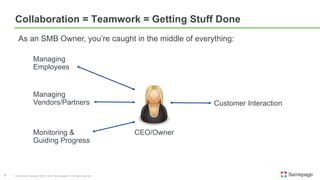
Managing
Employees
Customer Interaction
Managing
Vendors/Partners
Monitoring &
Guiding Progress
CEO/Owner
As an SMB Owner, you’re caught in the middle of everything:
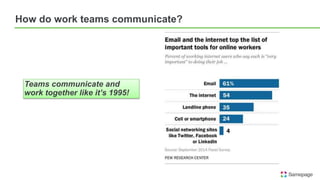
How do work teams communicate?
Teams communicate and
work together like it’s 1995!
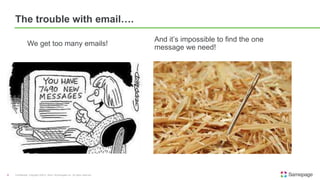
The trouble with email….
Confidential. Copyright ©2015, Kerio Technologies Inc. All rights reserved.6
We get too many emails!
And it’s impossible to find the one
message we need!
2005: Cloud files to the rescue!
Confidential. Copyright ©2015, Kerio Technologies Inc. All rights reserved.7
Box in 2005, and Dropbox in 2008 came along to solve file sharing
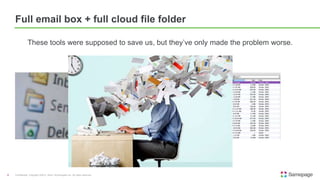
Full email box + full cloud file folder
Confidential. Copyright ©2015, Kerio Technologies Inc. All rights reserved.8
These tools were supposed to save us, but they’ve only made the problem worse.
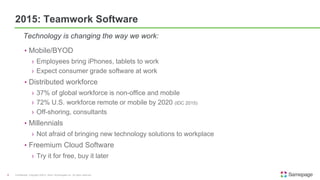
• Mobile/BYOD
› Employees bring iPhones, tablets to work
› Expect consumer grade software at work
• Distributed workforce
› 37% of global workforce is non-office and mobile
› 72% U.S. workforce remote or mobile by 2020 (IDC 2015)
› Off-shoring, consultants
• Millennials
› Not afraid of bringing new technology solutions to workplace
• Freemium Cloud Software
› Try it for free, buy it later
Confidential. Copyright ©2015, Kerio Technologies Inc. All rights reserved.9
Technology is changing the way we work:
2015: Teamwork Software
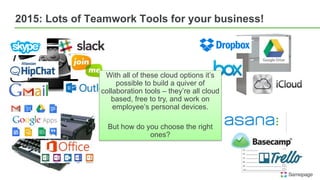
2015: Lots of Teamwork Tools for your business!
With all of these cloud options it’s
possible to build a quiver of
collaboration tools – they’re all cloud
based, free to try, and work on
employee’s personal devices.
But how do you choose the right
ones?
1. There is no one size fits all teamwork software/experiment
› It’s inevitable to adopt different kinds, just don’t adopt 2 of the same kind!
2. Let your departments discover the best tools for their specific tasks
› They know their needs better than IT
3. Try before you buy
› Freemium software lets you use it at no cost/experiment
4. Develop internal norms around the software
› Everyone using it in the same manner
5. Nothing replaces old fashioned business practices
› Leadership communication of business goals
› In person meetings, phone calls, video conferences
Confidential. Copyright ©2015, Kerio Technologies Inc. All rights reserved.11
Tips for your teamwork software strategy
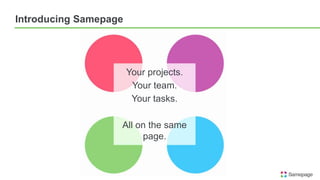
Introducing Samepage
Your projects.
Your team.
Your tasks.
All on the same
page.
Confidential. Copyright ©2015, Kerio Technologies Inc. All rights reserved.13
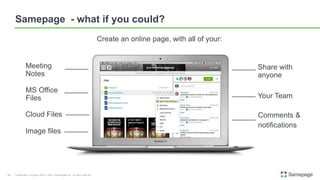
Samepage - what if you could?
Create an online page, with all of your:
Your Team
Meeting
Notes
MS Office
Files
Cloud Files
Share with
anyone
Comments &
notifications
Image files
Confidential. Copyright ©2015, Kerio Technologies Inc. All rights reserved.14
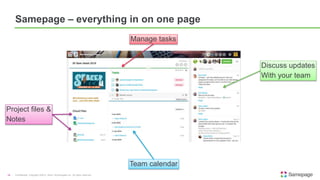
Samepage – everything in on one page
Manage tasks
Discuss updates
With your team
Project files &
Notes
Team calendar
• Create an online page and…..
• Invite your team members to share it
• Put all your meeting and project notes on the page
• Upload powerpoints, spreadsheets, pdfs or any file
• Make ongoing comments about the project on the page
• Put Dropbox, Box, GoogleDrive files on the page
• Share some of the pages with customers
AND
• Have less email in your inbox?
Confidential. Copyright ©2015, Kerio Technologies Inc. All rights reserved.15
With Samepage You Can:
Des Cahill, CMO Samepage
Katie Knight, Sr. Customer Success Manager
Get More Done with
Collaboration Tools
Thanks!
For more info and a free trial of
Samepage visit:
https://www.samepage.io

Evaluating Collaboration Tools for Your Small Business

  • 1.
    Des Cahill, CMOSamepage Katie Knight, Sr. Customer Success Manager Get More Done with Collaboration Tools
  • 2.
    1. What isCollaboration (Teamwork)? 2. Common Teamwork Software 3. Tips for your Business 4. Samepage for Business Road Map
  • 3.
    The art ofworking as a team to perform a task and achieve shared business goals. Getting the day to day work of your business done. The shape that collaboration takes depends on your business: Realtor – Home sale. All documents in one online place. Access for appraiser, inspector, stager, title agent, client, lender, etc.  Accounting/Legal – Client document collection, sharing and private discussion.  Marketing Agency – Client project, manage subs & budget, share creative  Architecture/Design – Share sketches, designs with clients Confidential. Copyright ©2015, Kerio Technologies Inc. All rights reserved.3 Collaboration = Teamwork
  • 4.
    Collaboration = Teamwork= Getting Stuff Done Confidential. Copyright ©2015, Kerio Technologies Inc. All rights reserved.4 Managing Employees Customer Interaction Managing Vendors/Partners Monitoring & Guiding Progress CEO/Owner As an SMB Owner, you’re caught in the middle of everything:
  • 5.
    How do workteams communicate? Teams communicate and work together like it’s 1995!
  • 6.
    The trouble withemail…. Confidential. Copyright ©2015, Kerio Technologies Inc. All rights reserved.6 We get too many emails! And it’s impossible to find the one message we need!
  • 7.
    2005: Cloud filesto the rescue! Confidential. Copyright ©2015, Kerio Technologies Inc. All rights reserved.7 Box in 2005, and Dropbox in 2008 came along to solve file sharing
  • 8.
    Full email box+ full cloud file folder Confidential. Copyright ©2015, Kerio Technologies Inc. All rights reserved.8 These tools were supposed to save us, but they’ve only made the problem worse.
  • 9.
    • Mobile/BYOD › Employeesbring iPhones, tablets to work › Expect consumer grade software at work • Distributed workforce › 37% of global workforce is non-office and mobile › 72% U.S. workforce remote or mobile by 2020 (IDC 2015) › Off-shoring, consultants • Millennials › Not afraid of bringing new technology solutions to workplace • Freemium Cloud Software › Try it for free, buy it later Confidential. Copyright ©2015, Kerio Technologies Inc. All rights reserved.9 Technology is changing the way we work: 2015: Teamwork Software
  • 10.
    2015: Lots ofTeamwork Tools for your business! With all of these cloud options it’s possible to build a quiver of collaboration tools – they’re all cloud based, free to try, and work on employee’s personal devices. But how do you choose the right ones?
  • 11.
    1. There isno one size fits all teamwork software/experiment › It’s inevitable to adopt different kinds, just don’t adopt 2 of the same kind! 2. Let your departments discover the best tools for their specific tasks › They know their needs better than IT 3. Try before you buy › Freemium software lets you use it at no cost/experiment 4. Develop internal norms around the software › Everyone using it in the same manner 5. Nothing replaces old fashioned business practices › Leadership communication of business goals › In person meetings, phone calls, video conferences Confidential. Copyright ©2015, Kerio Technologies Inc. All rights reserved.11 Tips for your teamwork software strategy
  • 12.
    Introducing Samepage Your projects. Yourteam. Your tasks. All on the same page.
  • 13.
    Confidential. Copyright ©2015,Kerio Technologies Inc. All rights reserved.13 Samepage - what if you could? Create an online page, with all of your: Your Team Meeting Notes MS Office Files Cloud Files Share with anyone Comments & notifications Image files
  • 14.
    Confidential. Copyright ©2015,Kerio Technologies Inc. All rights reserved.14 Samepage – everything in on one page Manage tasks Discuss updates With your team Project files & Notes Team calendar
  • 15.
    • Create anonline page and….. • Invite your team members to share it • Put all your meeting and project notes on the page • Upload powerpoints, spreadsheets, pdfs or any file • Make ongoing comments about the project on the page • Put Dropbox, Box, GoogleDrive files on the page • Share some of the pages with customers AND • Have less email in your inbox? Confidential. Copyright ©2015, Kerio Technologies Inc. All rights reserved.15 With Samepage You Can:
  • 16.
    Des Cahill, CMOSamepage Katie Knight, Sr. Customer Success Manager Get More Done with Collaboration Tools Thanks! For more info and a free trial of Samepage visit: https://www.samepage.io

Editor's Notes

  • #5 Could add internal vs external processes
  • #6 They communicate and work together like it’s 1995.
  • #7 Volume of email – separate out the important stuff from the junk, how to keep up Searching for old emails or attachments – remember that email exchange you had about 6 months ago with Joe about your customer’s tax issues….now where is that? Teamwork tracking – it’s a terrible way to manage a project. Is everyone cc’d? Did everyone read the emails? Will more people send emails now? Email is simple, easy to use and everyone has it. But It’s a terrible way to manage projects or ongoing tasks
  • #8 Box 2005 – store your files online and share them with anyone Dropbox 2008 – easily store your files online and share them with anyone. get them synched across your PC, phone and tablet.
  • #10 If 1995 was email and 2005 was cloud file sharing….what’s happening in 2015 for teamwork software, or as some analysts call it the “Digital Workplace” 37% of global workforce, non-office, mobile Millennials – digital native generation
  • #11 There are a few things to notice besides all the pretty logos: Everything here is available on the cloud, to any user in your company to try for free Many of these services are used by your employees at home, so they bring them to work, to help get their work done Employees expect the same level of ease of use and UX polish they get with Google and Apple and other home software The days of centralized IT driven decision making on general office collaboration technologies are going away. Email, productivity no. All else is up for grabs. Different reactions: Business User: This is great! I can use the tools I like to get my work done! IT: Oh no. Employees buying their own stuff. I’m losing control! The inmates are running the asylum. What’s my job now? CEO/Owner: Cloud makes more sense that paying for a server room and buying software licenses. But are we picking the right cloud services? Do they work together? Are we actually getting more done, or just using more software? This is not going to go away. Business users will be continuing to bring cloud solutions to work.
  • #12 2. Marketing may really like dropbox. Engineering really likes Slack. You may find each department starting to adopt the other’s chosen software.
  • #13 wikis, sharepoint, email, dropbox, etc