TROUBLESHOOTING CONTAINERIZED
TRIPLEO DEPLOYMENT
OpenStack Summit Berlin | 13, November 2018
DEVENDRA SHANBHAG
SENIOR CLOUD CONSULTANT
SADIQUE PUTHEN @sadiquepp
PRINCIPAL CLOUD SUCCESS ARCHITECT
2
AGENDA
● Containerized TripleO Deployment
○ Traditional deployment
○ Containerized deployment
○ Building Container images
○ Registering Container images
○ Deployment flow
○ Troubleshooting
● Containerized Overcloud
○ HA Pacemaker containers
○ Standalone Containers
○ Containerized compute node
○ Containerized ceph nodes
○ Neutron Containers
■ DHCP
■ Routers
■ Metadata
○ Troubleshooting
3
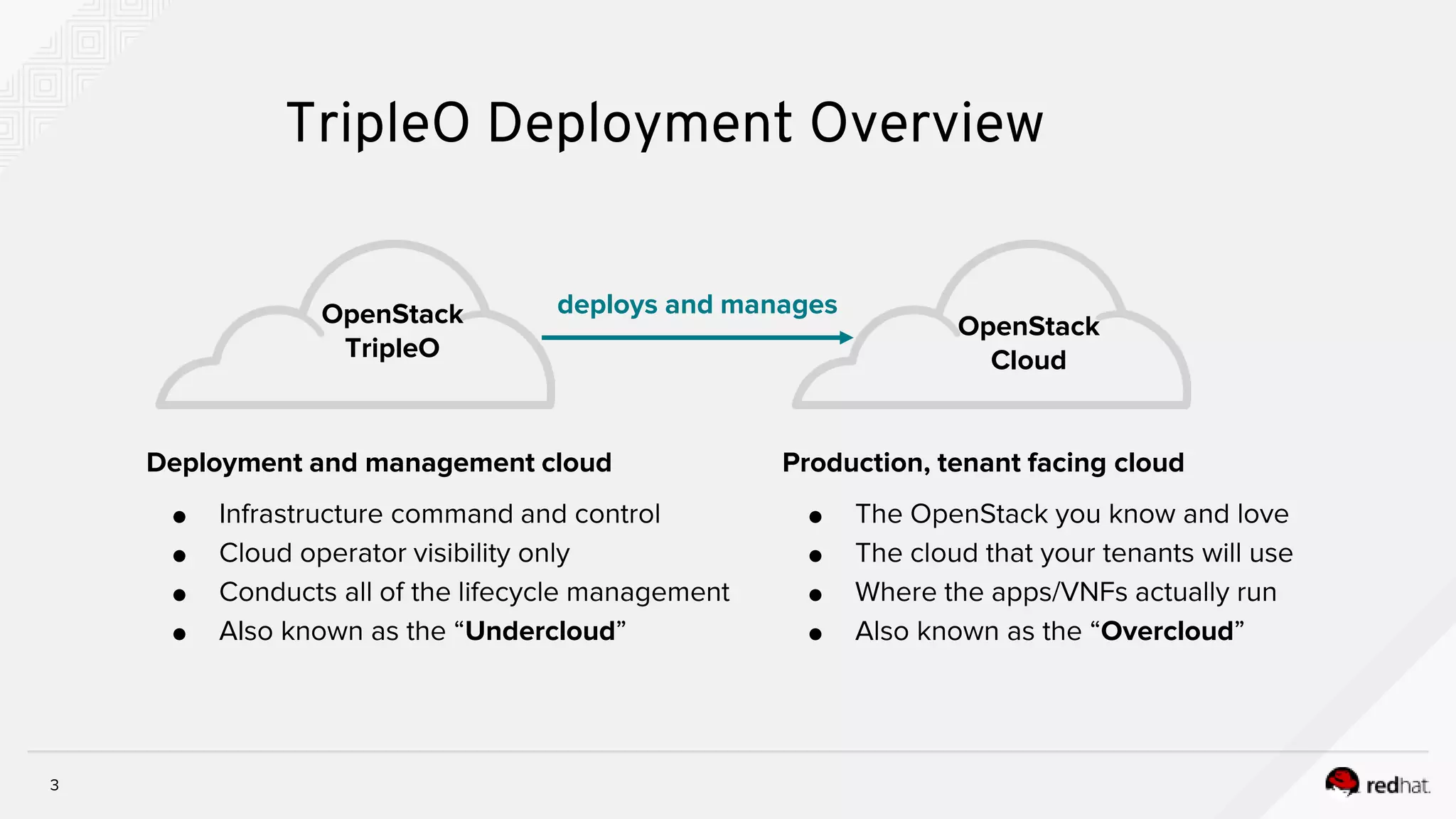
Production, tenant facing cloud
● The OpenStack you know and love
● The cloud that your tenants will use
● Where the apps/VNFs actually run
● Also known as the “Overcloud”
OpenStack
TripleO
OpenStack
Cloud
deploys and manages
Deployment and management cloud
● Infrastructure command and control
● Cloud operator visibility only
● Conducts all of the lifecycle management
● Also known as the “Undercloud”
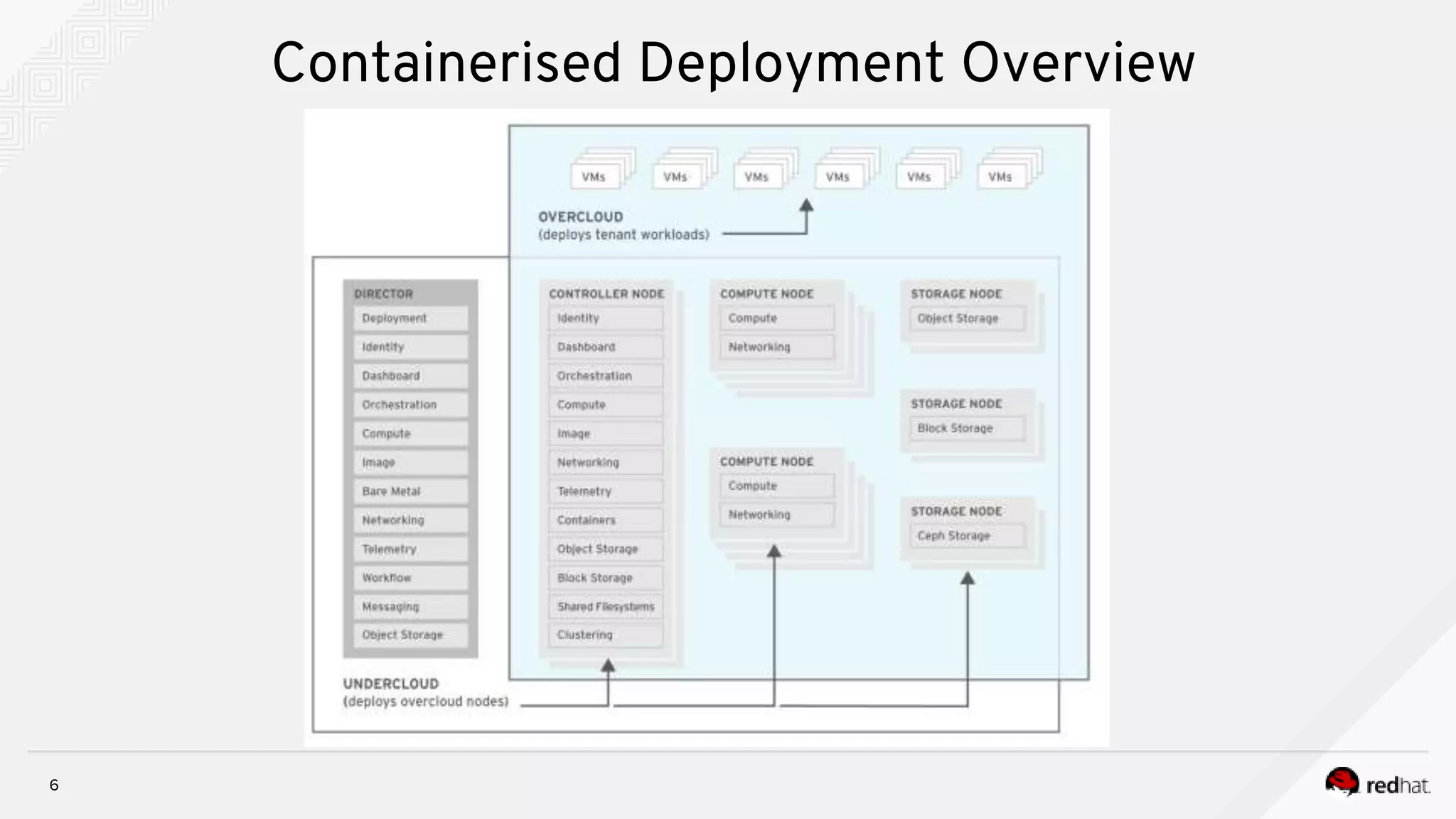
TripleO Deployment Overview
4
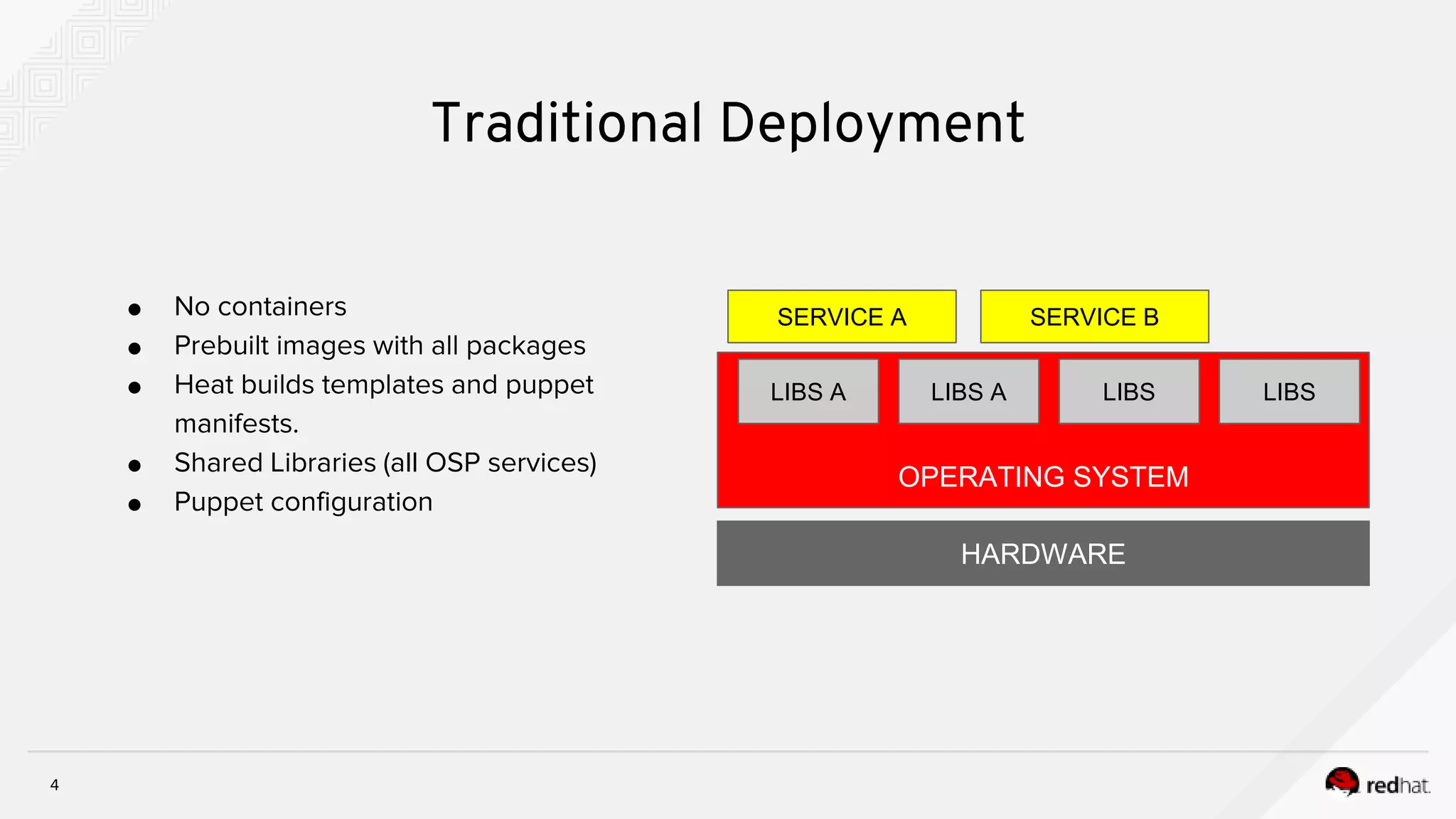
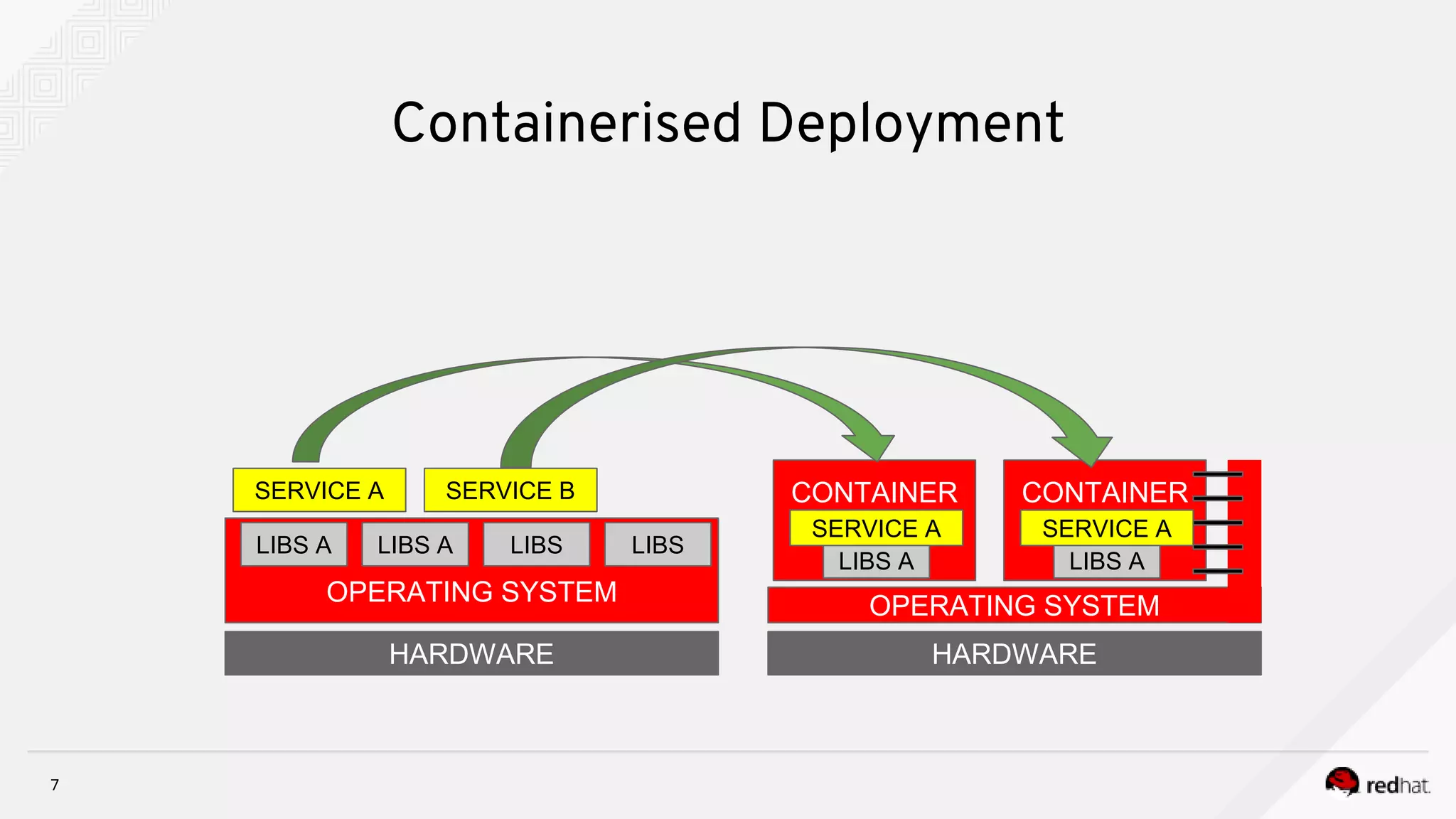
● No containers
● Prebuilt images with all packages
● Heat builds templates and puppet
manifests.
● Shared Libraries (all OSP services)
● Puppet configuration
Traditional Deployment
HARDWARE
OPERATING SYSTEM
LIBS A
SERVICE A SERVICE B
LIBS A LIBS LIBS
TripleO Deployment - Containers
6
Containerised Deployment Overview
7
Containerised Deployment
HARDWARE HARDWARE
OPERATING SYSTEM
LIBS A
SERVICE A SERVICE B
OPERATING SYSTEM
CONTAINER
LIBS A LIBS LIBS
LIBS A
SERVICE A
CONTAINER
LIBS A
SERVICE A
8
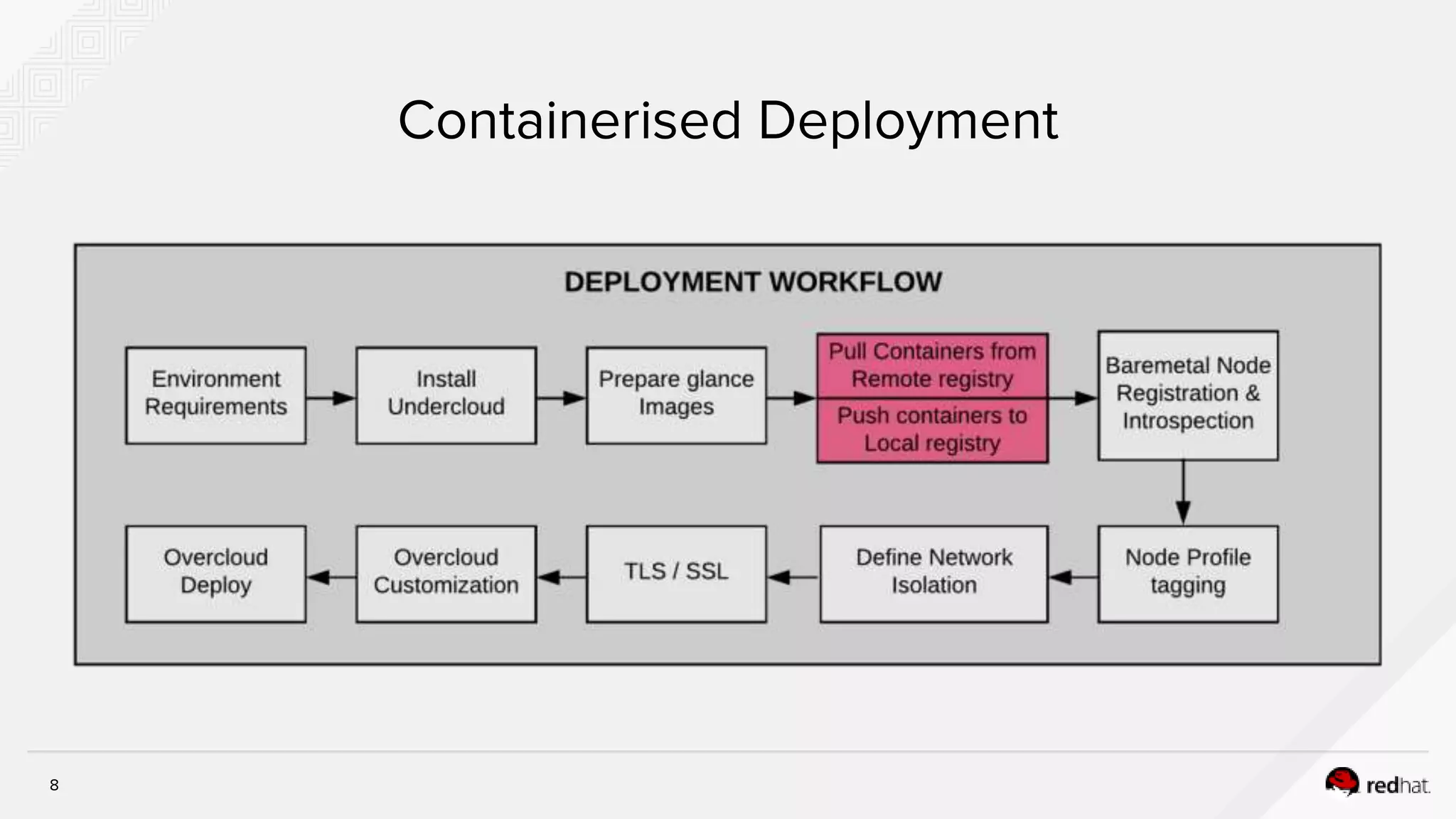
Containerised Deployment
9
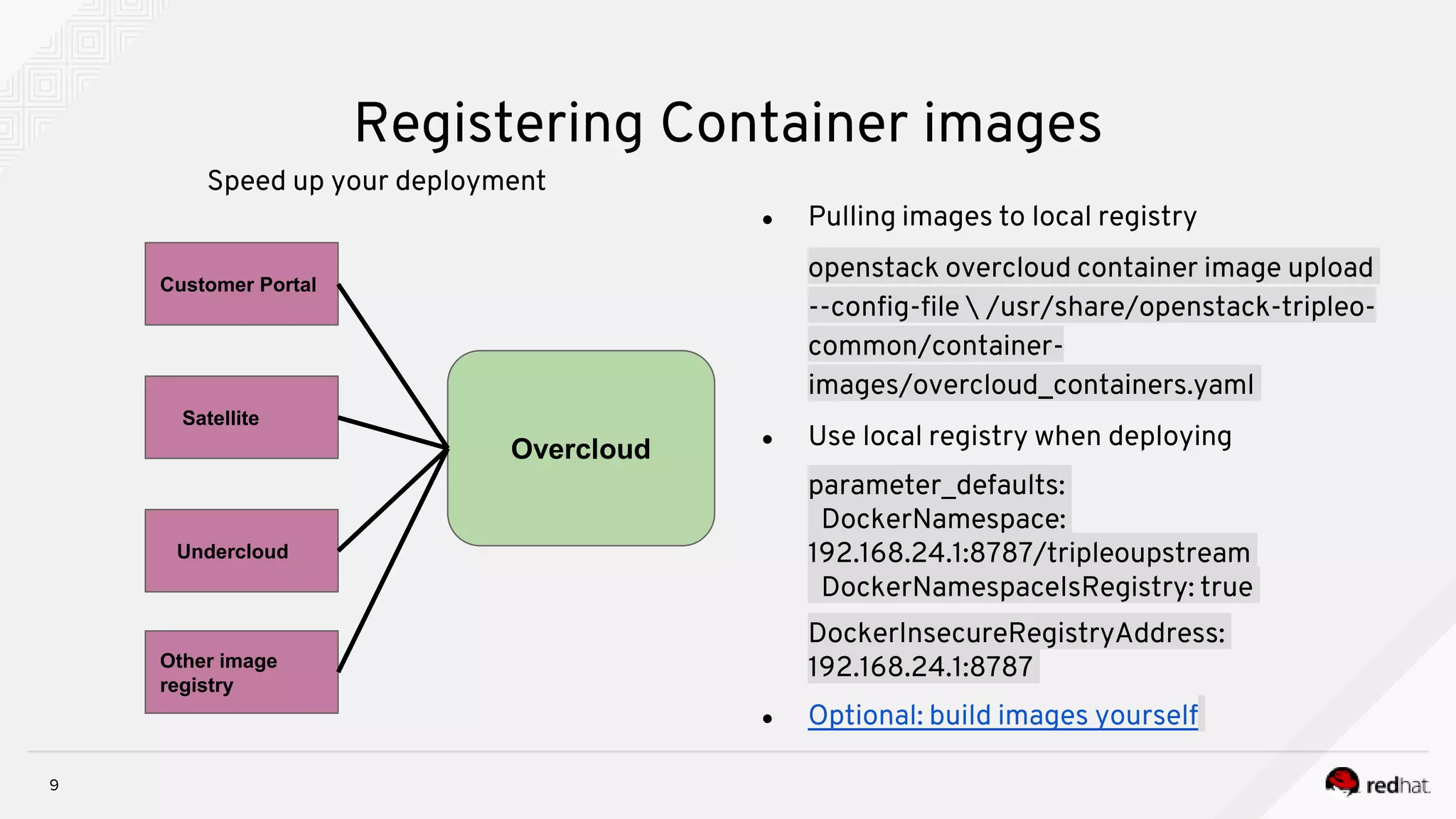
Registering Container images
Speed up your deployment
● Pulling images to local registry
openstack overcloud container image upload
--config-file  /usr/share/openstack-tripleo-
common/container-
images/overcloud_containers.yaml
● Use local registry when deploying
parameter_defaults:
DockerNamespace:
192.168.24.1:8787/tripleoupstream
DockerNamespaceIsRegistry: true
DockerInsecureRegistryAddress:
192.168.24.1:8787
● Optional: build images yourself
Customer Portal
Satellite
Undercloud
Other image
registry
Overcloud
10
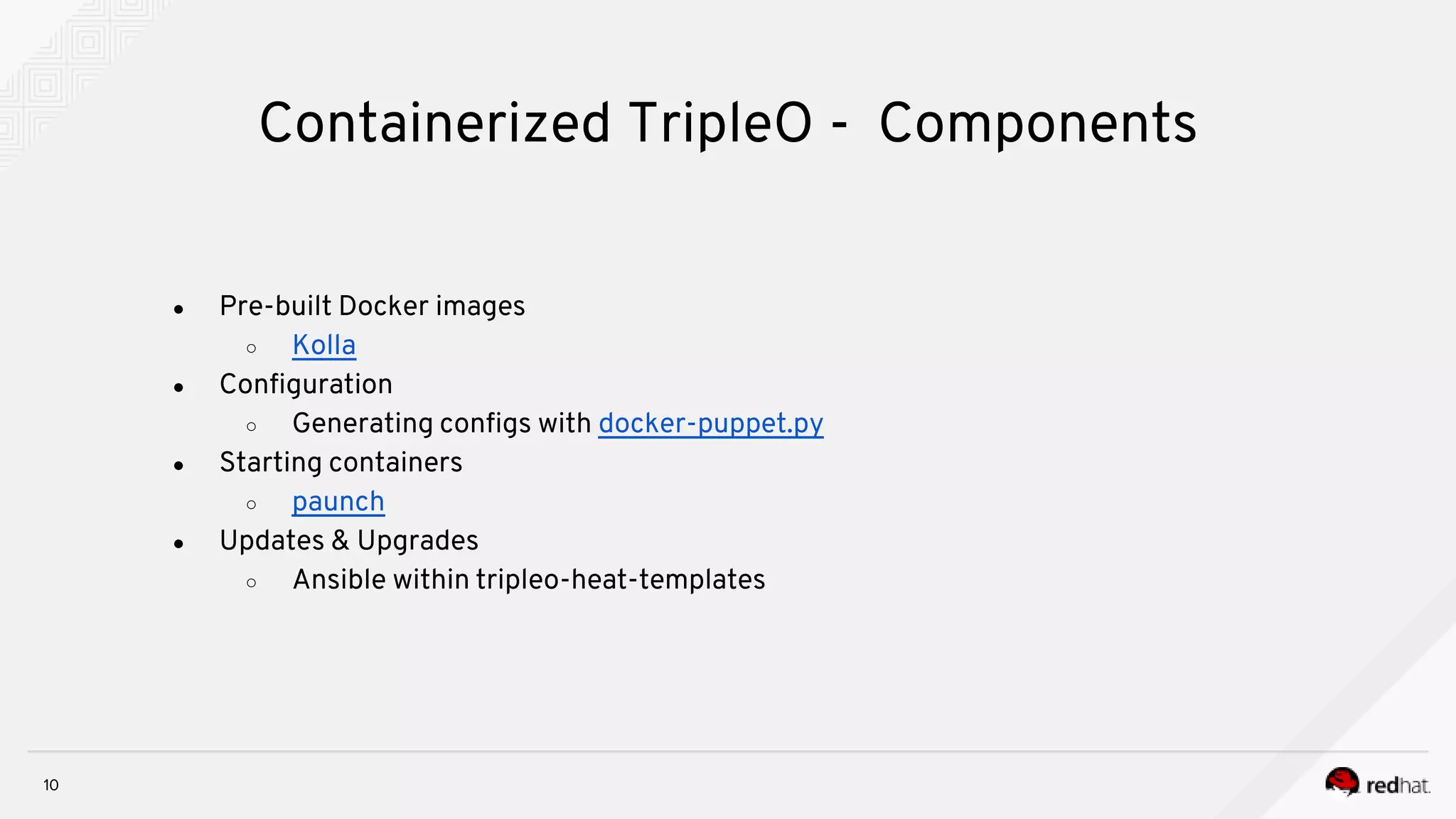
Containerized TripleO - Components
● Pre-built Docker images
○ Kolla
● Configuration
○ Generating configs with docker-puppet.py
● Starting containers
○ paunch
● Updates & Upgrades
○ Ansible within tripleo-heat-templates
11
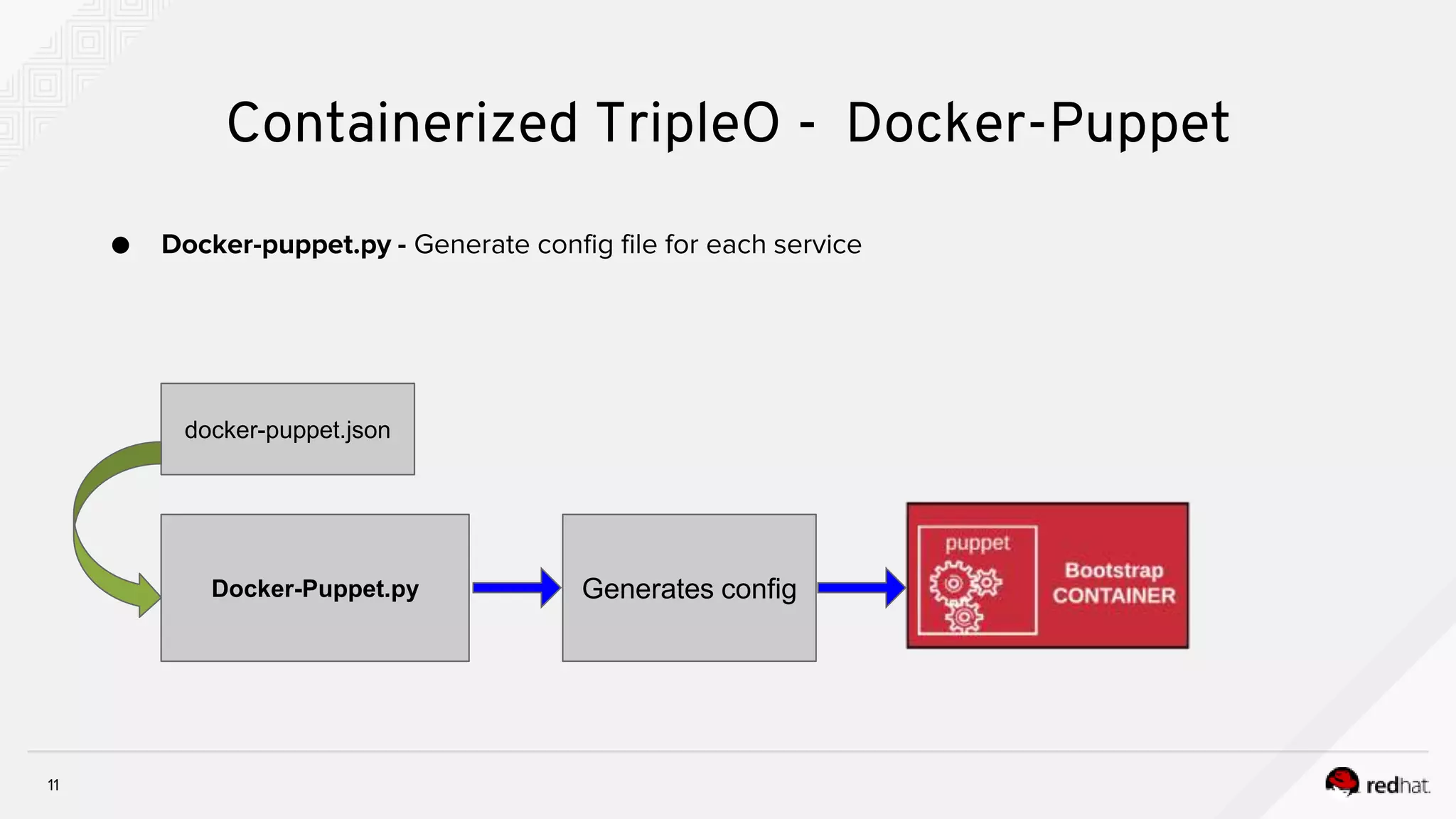
Containerized TripleO - Docker-Puppet
● Docker-puppet.py - Generate config file for each service
Docker-Puppet.py
docker-puppet.json
Generates config
12
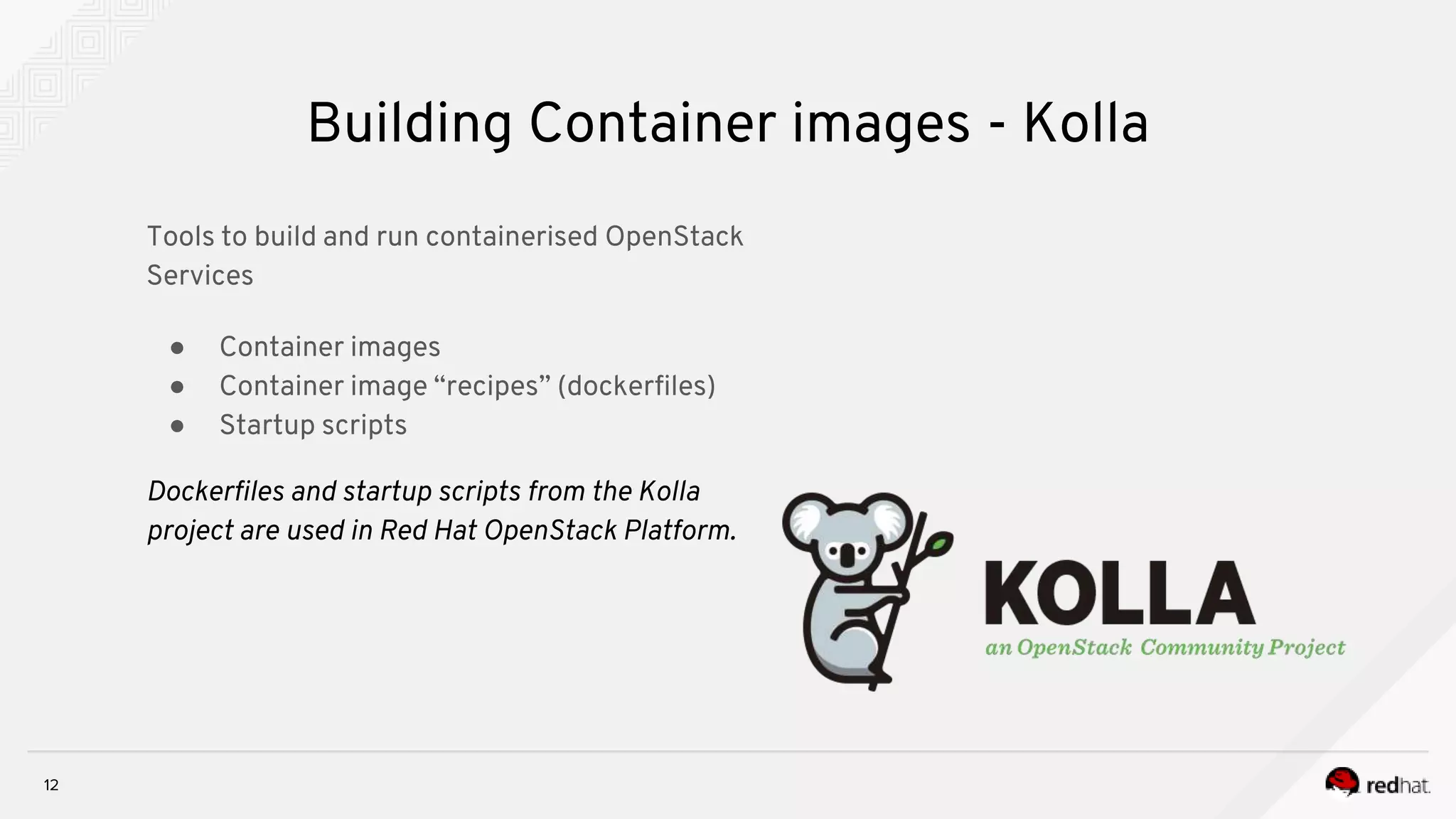
Building Container images - Kolla
Tools to build and run containerised OpenStack
Services
● Container images
● Container image “recipes” (dockerfiles)
● Startup scripts
Dockerfiles and startup scripts from the Kolla
project are used in Red Hat OpenStack Platform.
13
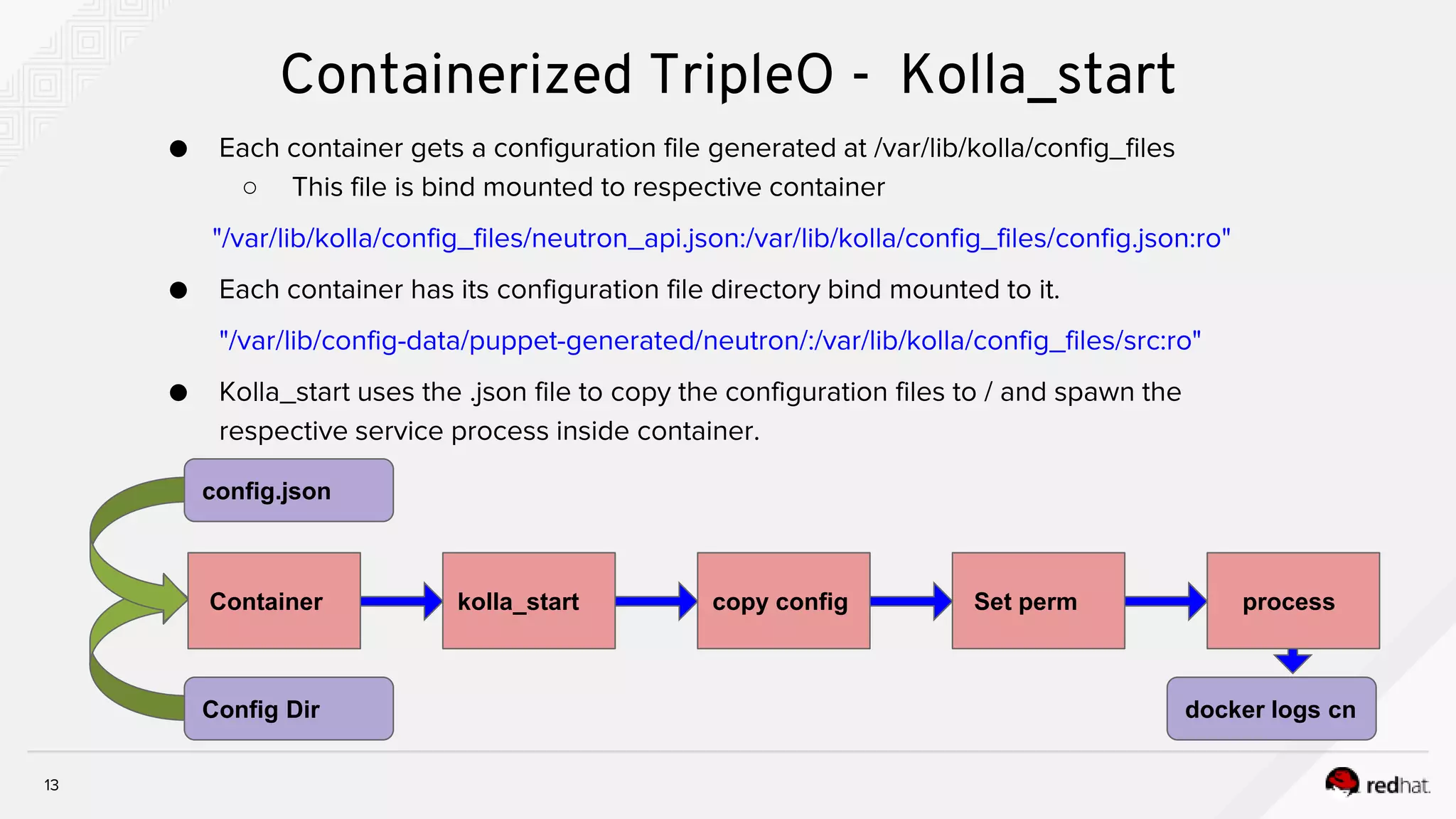
Containerized TripleO - Kolla_start
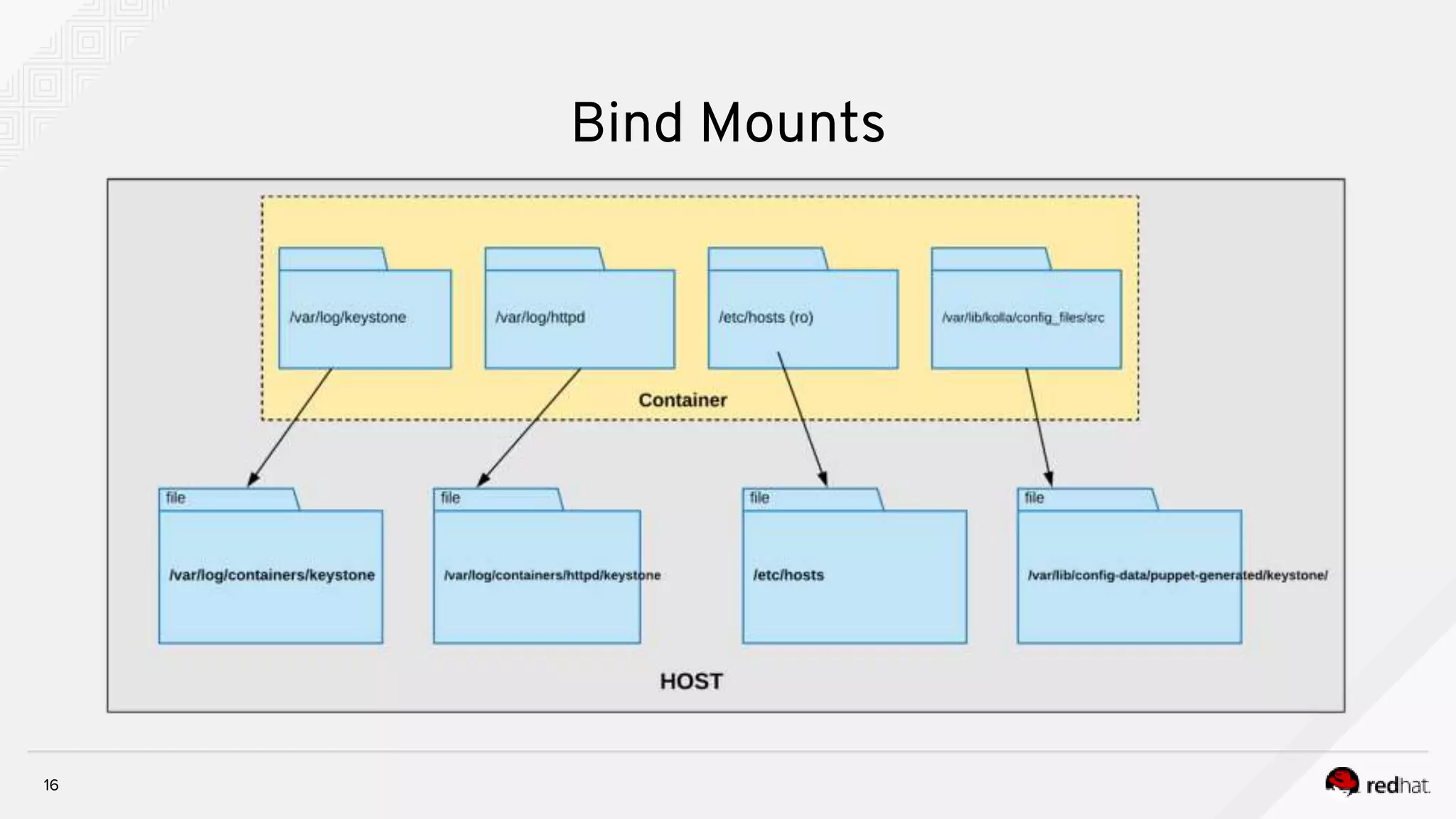
● Each container gets a configuration file generated at /var/lib/kolla/config_files
○ This file is bind mounted to respective container
"/var/lib/kolla/config_files/neutron_api.json:/var/lib/kolla/config_files/config.json:ro"
● Each container has its configuration file directory bind mounted to it.
"/var/lib/config-data/puppet-generated/neutron/:/var/lib/kolla/config_files/src:ro"
● Kolla_start uses the .json file to copy the configuration files to / and spawn the
respective service process inside container.
Container kolla_start copy config Set perm process
config.json
Config Dir docker logs cn
14
Containerized TripleO - Kolla_start
# jq . neutron_api.json
{
"permissions": [
{
"recurse": true,
"path": "/var/log/neutron",
"owner": "neutron:neutron"
}
],
"command": "/usr/bin/neutron-server --config-file /usr/share/neutron/neutron-dist.conf --config-dir
/usr/share/neutron/server --config-file /etc/neutron/neutron.conf --config-file /etc/neutron/plugin.ini --config-dir
/etc/neutron/conf.d/common --config-dir /etc/neutron/conf.d/neutron-server --log-file=/var/log/neutron/server.log",
"config_files": [
{
"preserve_properties": true,
"merge": true,
"source": "/var/lib/kolla/config_files/src/*",
"dest": "/"
}
]
}
15
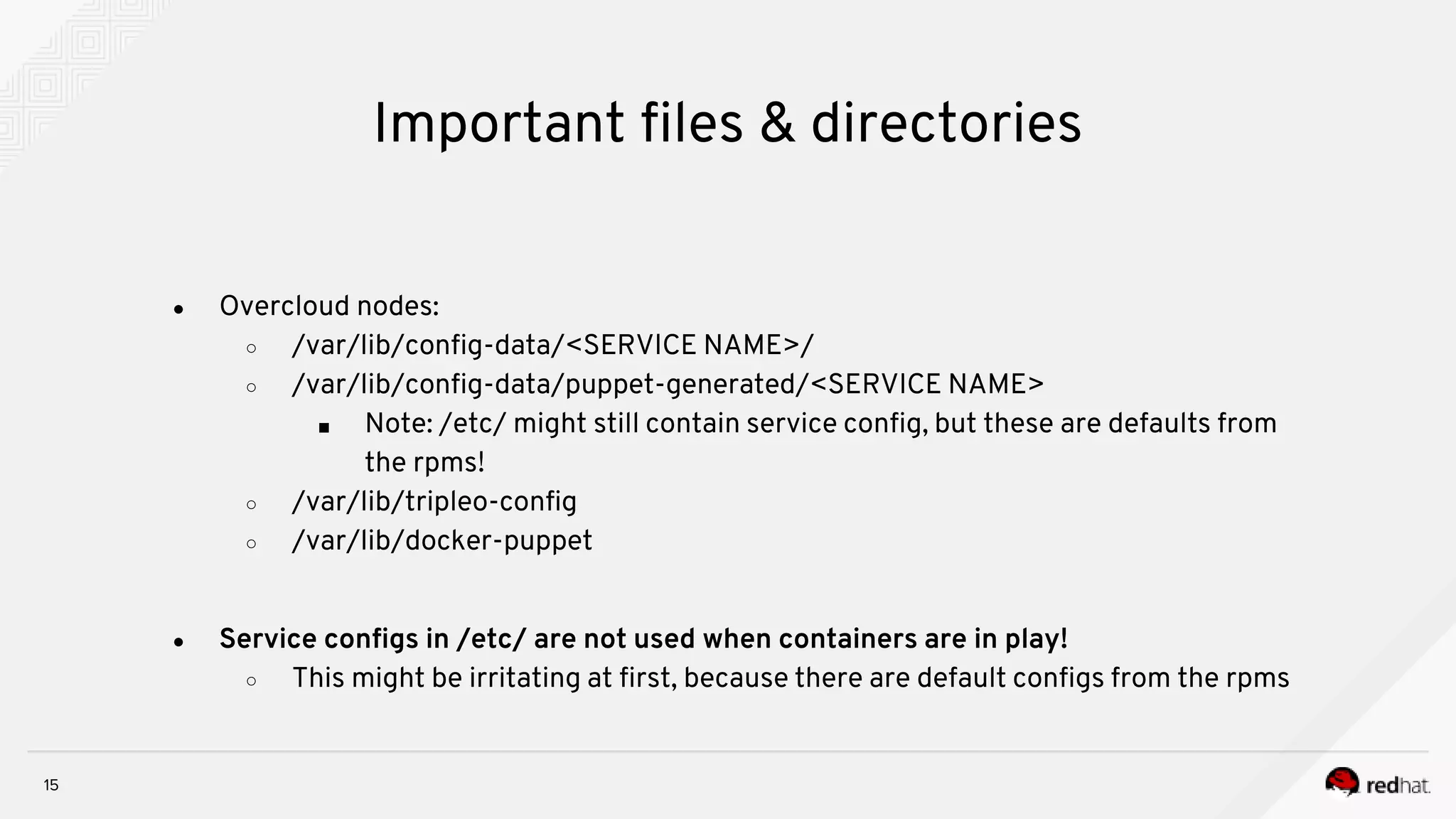
Important files & directories
● Overcloud nodes:
○ /var/lib/config-data/<SERVICE NAME>/
○ /var/lib/config-data/puppet-generated/<SERVICE NAME>
■ Note: /etc/ might still contain service config, but these are defaults from
the rpms!
○ /var/lib/tripleo-config
○ /var/lib/docker-puppet
● Service configs in /etc/ are not used when containers are in play!
○ This might be irritating at first, because there are default configs from the rpms
16
Bind Mounts
17
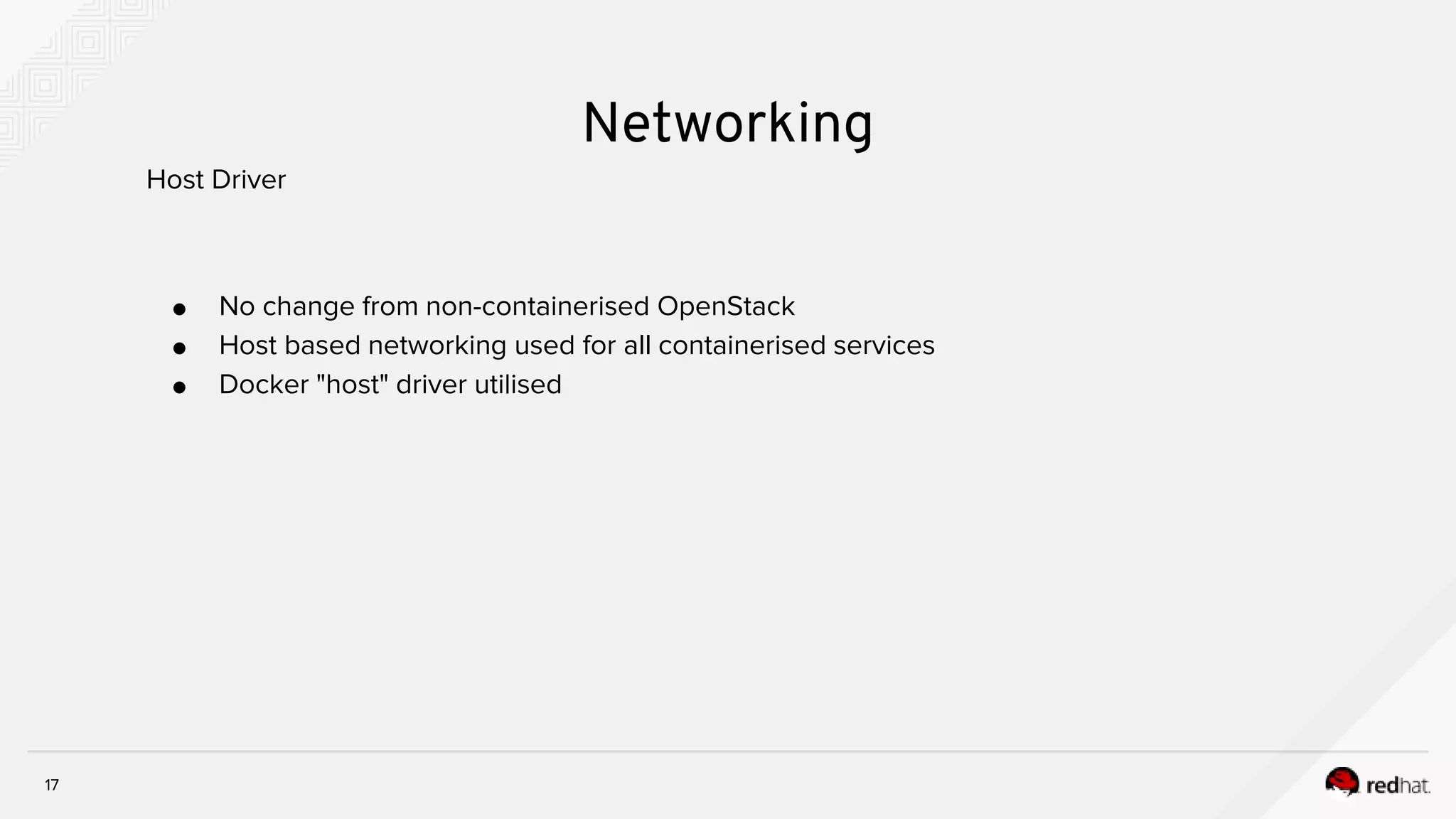
Networking
● No change from non-containerised OpenStack
● Host based networking used for all containerised services
● Docker "host" driver utilised
Host Driver
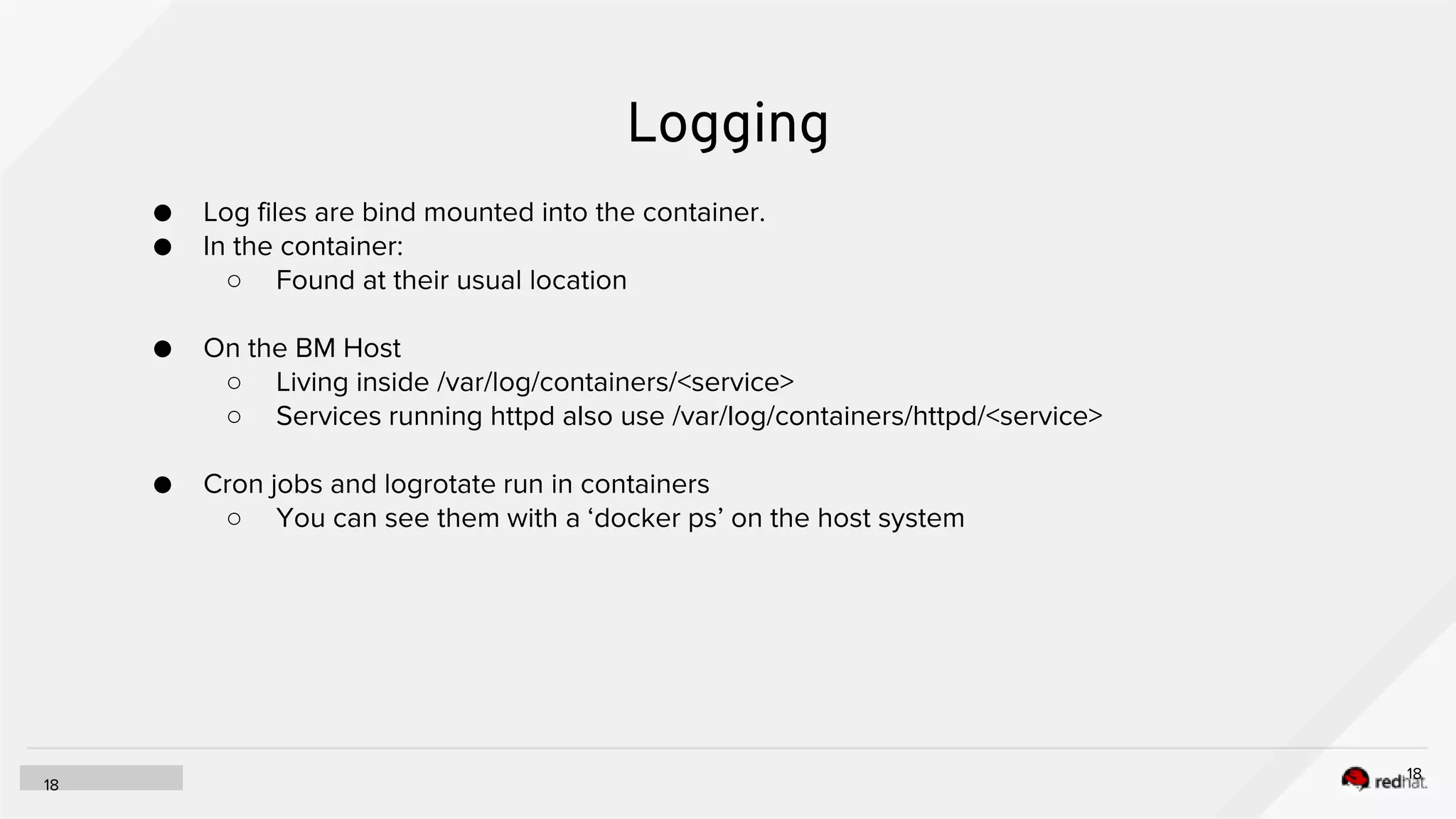
Logging
18
18
● Log files are bind mounted into the container.
● In the container:
○ Found at their usual location
● On the BM Host
○ Living inside /var/log/containers/<service>
○ Services running httpd also use /var/log/containers/httpd/<service>
● Cron jobs and logrotate run in containers
○ You can see them with a ‘docker ps’ on the host system
19
[stack@vm-director-cl2 ]$ cat /home/stack/deployment/deploy.sh
source ~/stackrc
openstack overcloud deploy --templates /usr/share/openstack-tripleo-heat-templates 
--stack cloud2 
-r /home/stack/deployment/roles_data.yaml 
-e /usr/share/openstack-tripleo-heat-templates/environments/network-isolation.yaml 
-e /home/stack/deployment/computehci-node-params.yaml 
-e /home/stack/deployment/advanced-environment.yaml 
-e /usr/share/openstack-tripleo-heat-templates/environments/services-docker/neutron-ovn-dvr-ha.yaml 
-e /home/stack/deployment/overcloud_images.yaml 
-n /home/stack/deployment/network_data.yaml 
--timeout 120 
--control-scale 3 
--control-flavor control 
--compute-scale 0 
--compute-flavor compute 
--ceph-storage-scale 0 
--ceph-storage-flavor ceph-storage 
--ntp-server clock.redhat.com
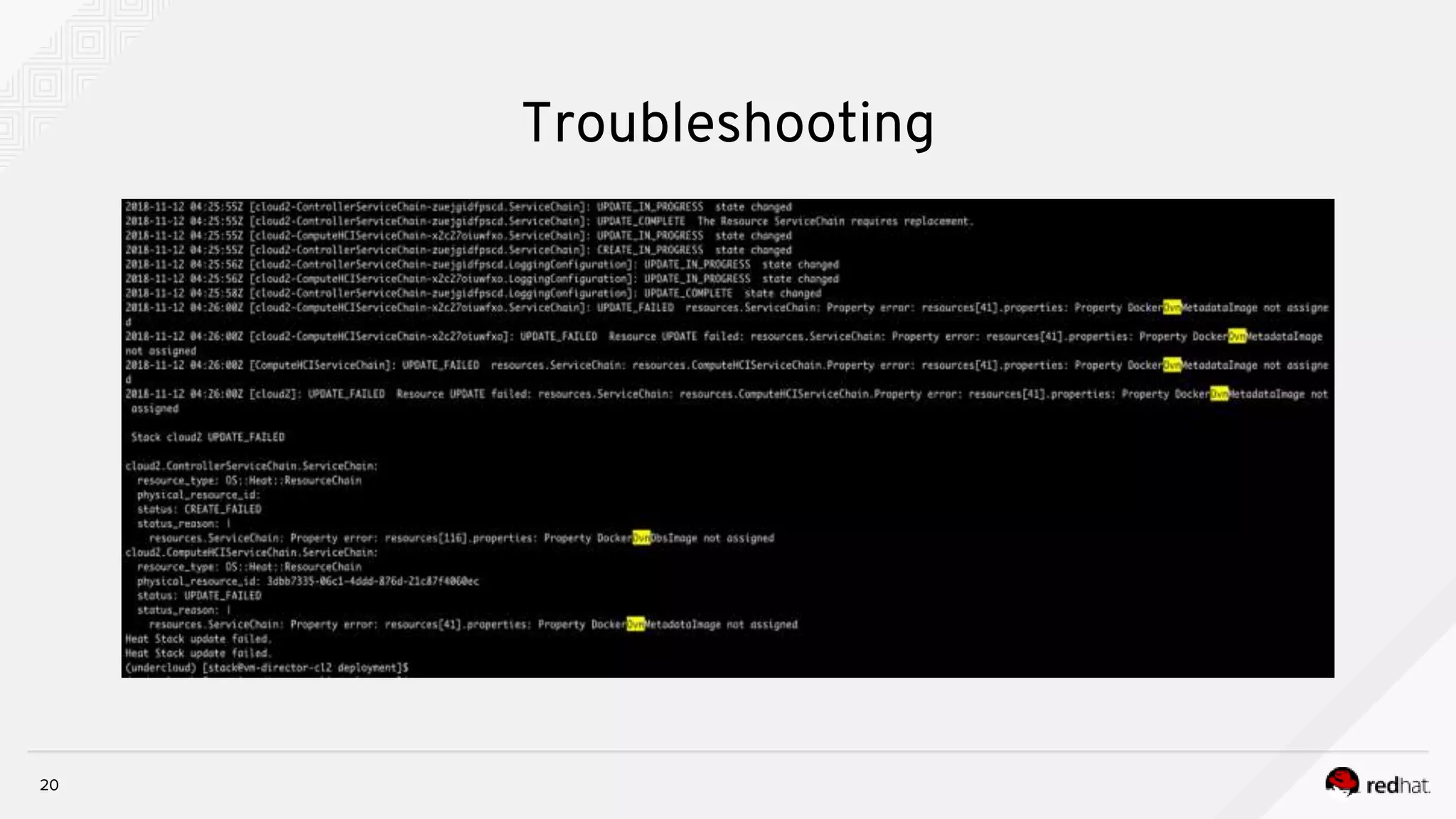
Troubleshooting
20
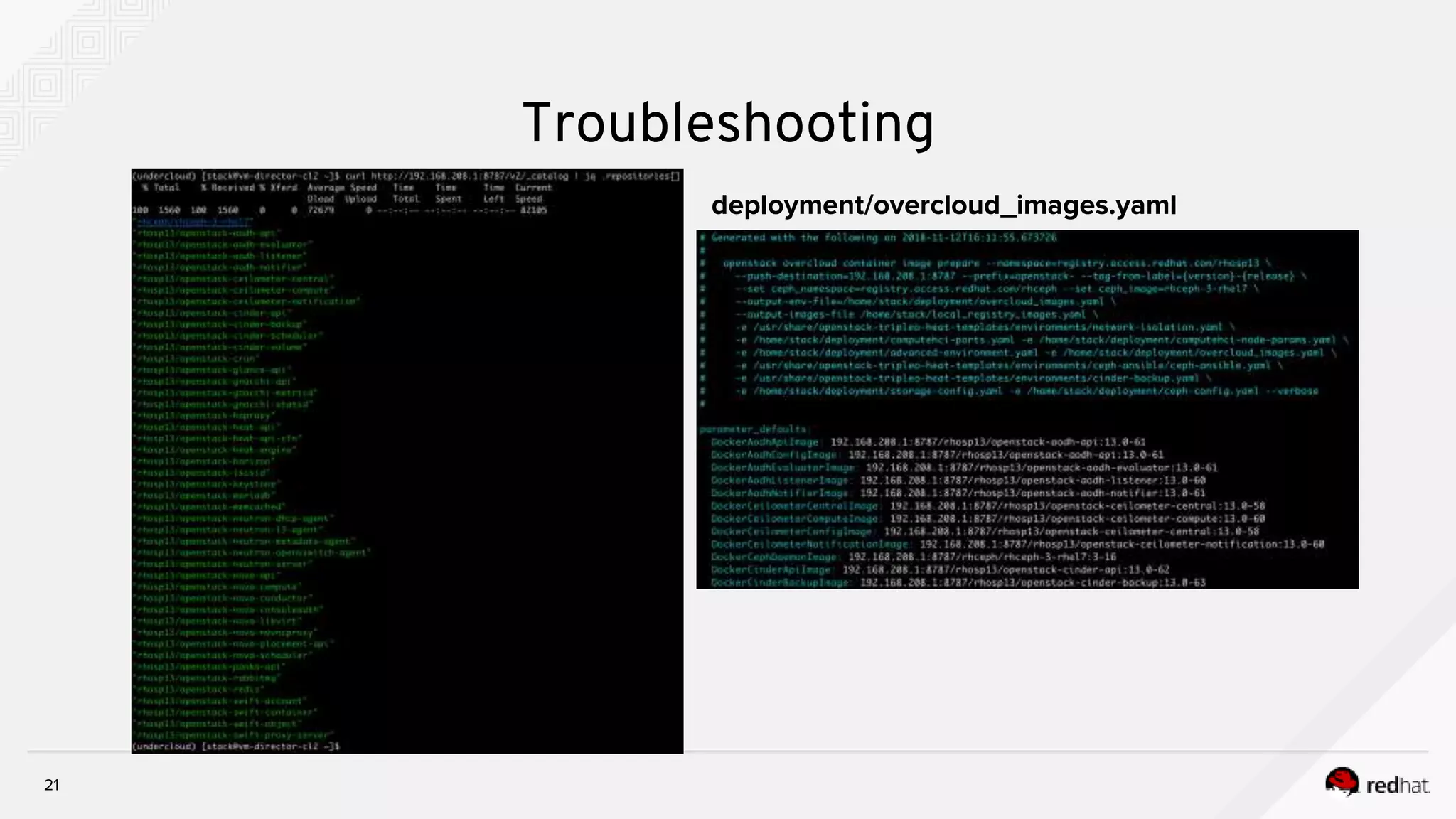
Troubleshooting
21
Troubleshooting
deployment/overcloud_images.yaml
22
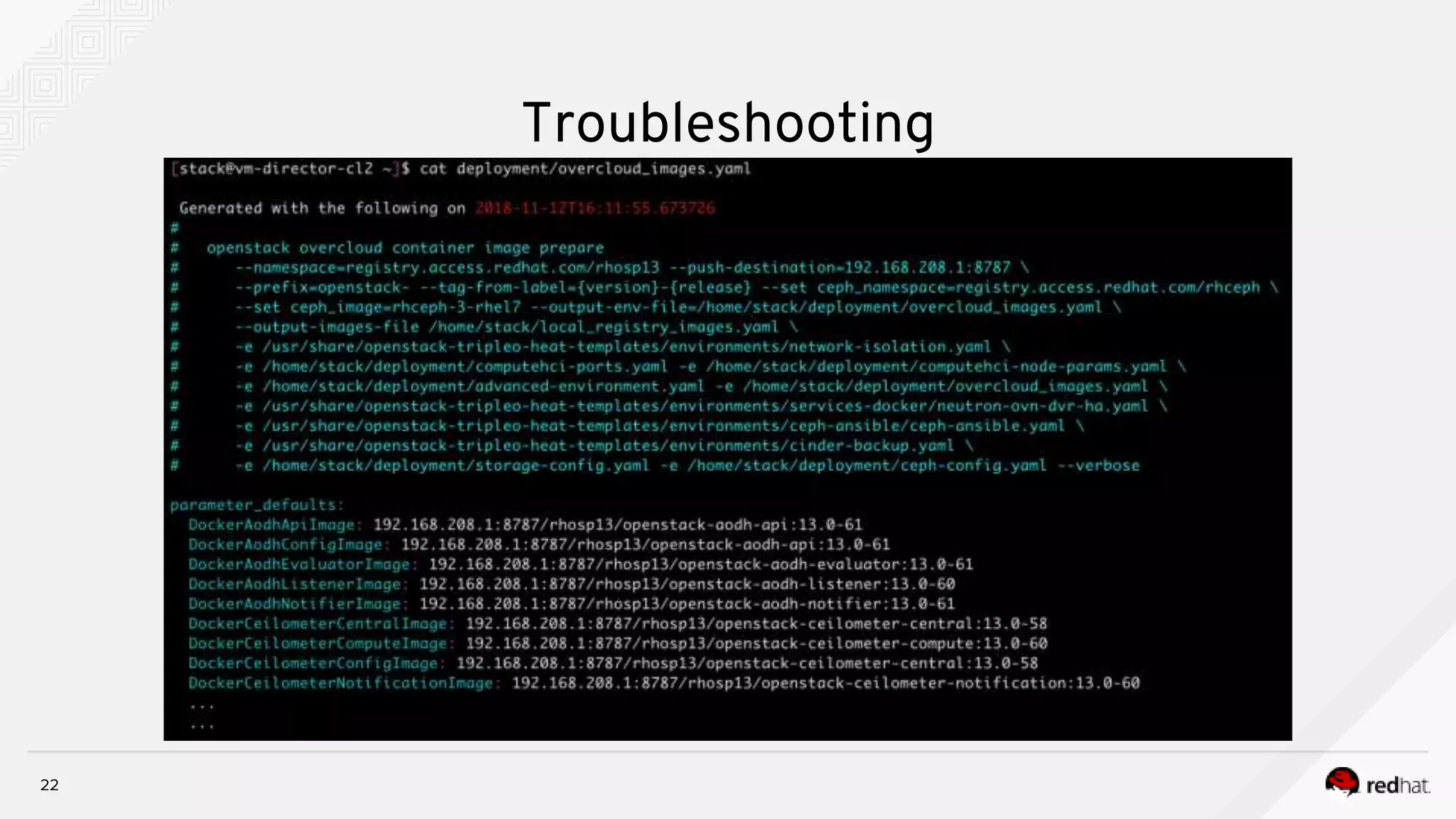
Troubleshooting
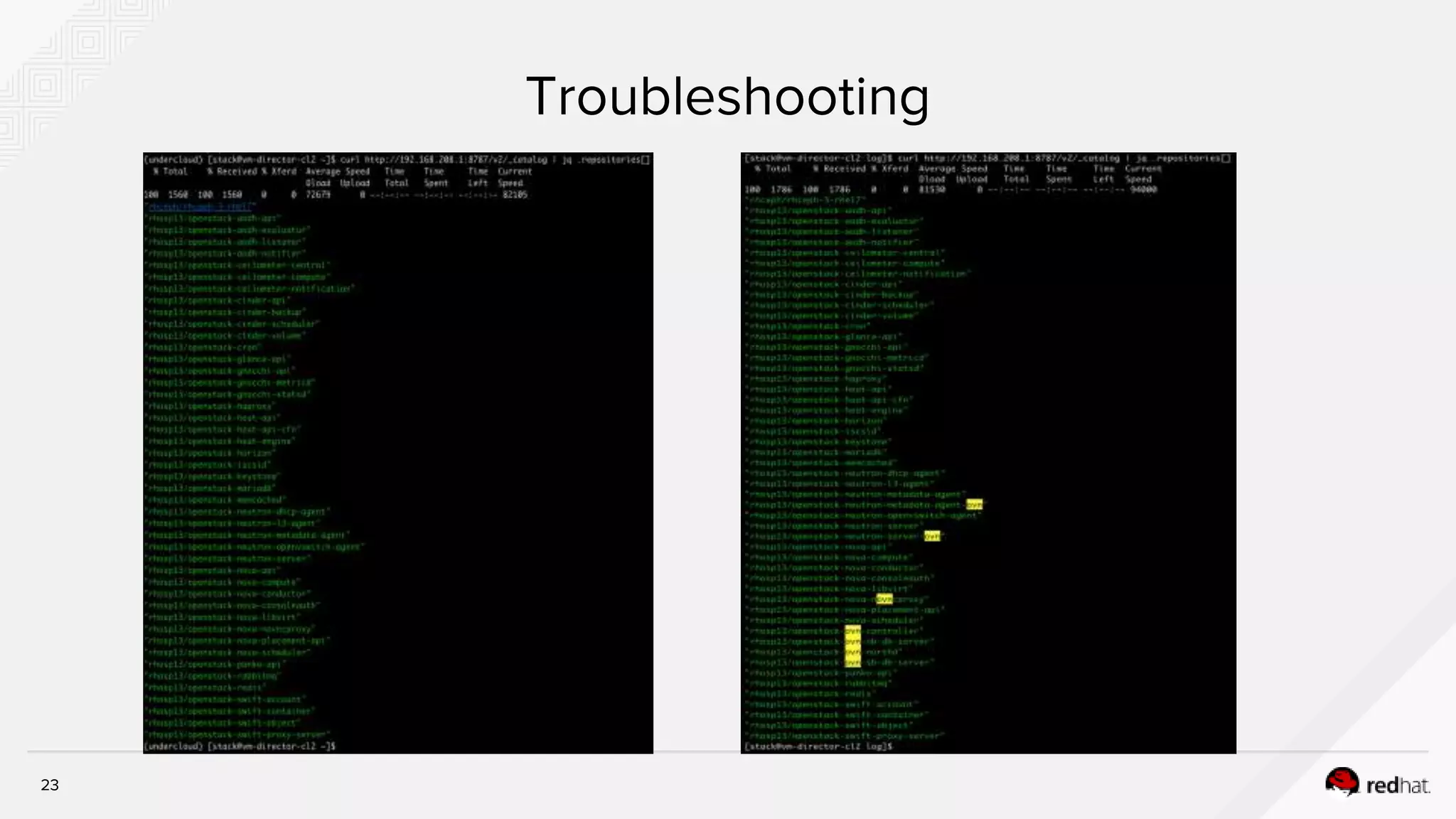
23
Troubleshooting
Containerized Overcloud By TripleO
25
High Availability With Containers
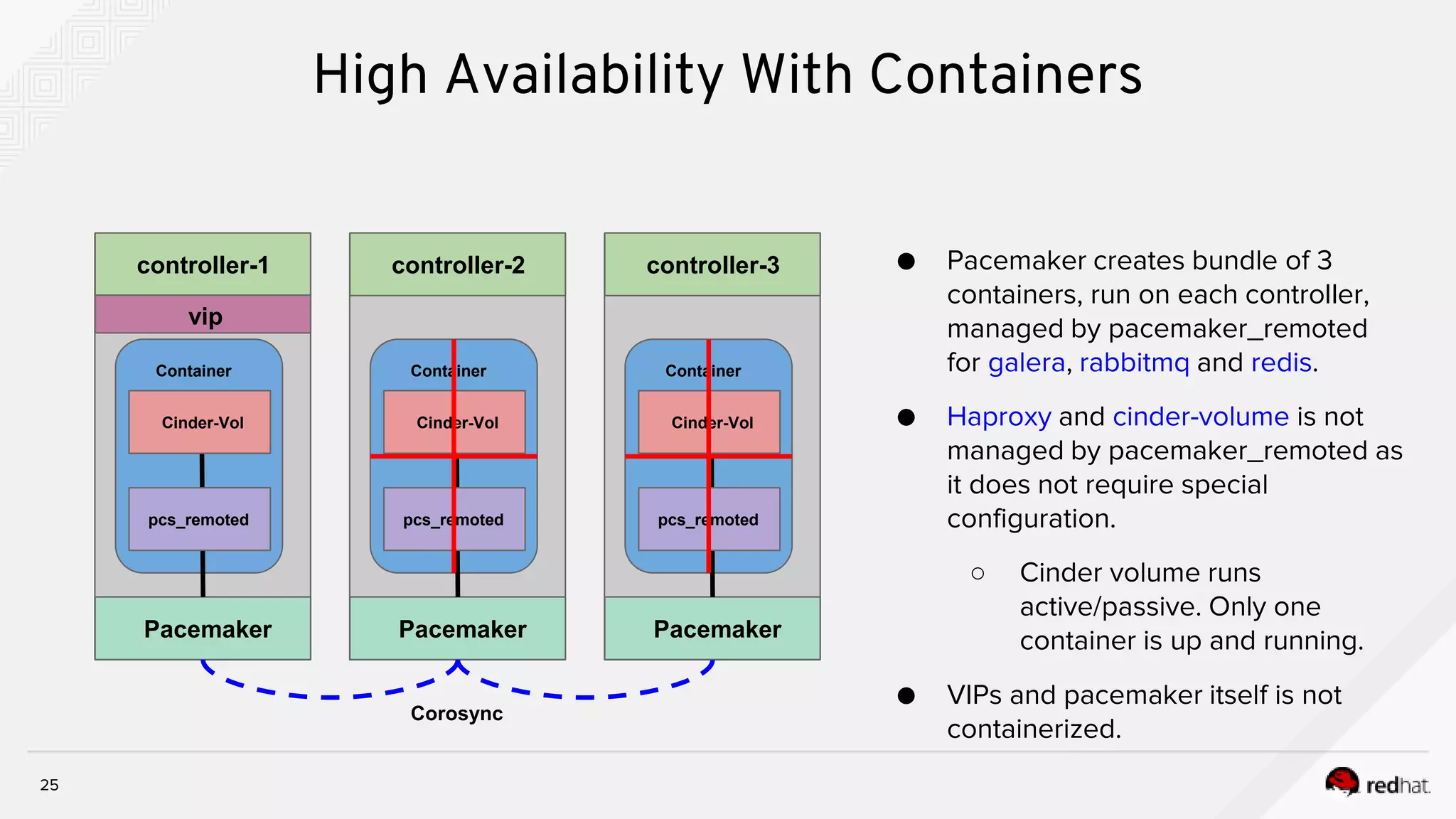
● Pacemaker creates bundle of 3
containers, run on each controller,
managed by pacemaker_remoted
for galera, rabbitmq and redis.
● Haproxy and cinder-volume is not
managed by pacemaker_remoted as
it does not require special
configuration.
○ Cinder volume runs
active/passive. Only one
container is up and running.
● VIPs and pacemaker itself is not
containerized.
Pacemaker
Container
Pacemaker
Container
Pacemaker
pcs_remoted
Container
Corosync
controller-1 controller-2 controller-3
pcs_remotedpcs_remoted
GaleraGalera GaleraHaproxy Haproxy HaproxyCinder-Vol Cinder-Vol Cinder-Vol
vip
26
High Availability With Containers
Container
config.json
Config Dir
kolla_start copy config Set perm process
"permissions": [
{
"recurse": true,
"path": "/var/log/mysql",
"owner": "mysql:mysql"
},
"command": "/usr/sbin/pacemaker_remoted",
"config_files": [
{
"perm": "0644",
"owner": "root",
"source": "/dev/null",
"dest": "/etc/libqb/force-filesystem-sockets"
},
pacemaker remoted Galera
{
"preserve_properties": true,
"merge": true,
"source": "/var/lib/kolla/config_files/src/*",
"dest": "/"
},
[root@controller-2-leaf-1 ~]# docker ps --no-trunc | grep galera
0843f6314b3770380927542bad92411d3edb3d2d4de0bb064c00e2fdae041b18 172.16.1.1:8787/rhosp13/openstack-
mariadb:pcmklatest "/bin/bash /usr/local/bin/kolla_start”
options=ro source-dir=/var/lib/kolla/config_files/mysql.json target-dir=/var/lib/kolla/config_files/config.json (mysql-cfg-files)
options=ro source-dir=/var/lib/config-data/puppet-generated/mysql/ target-dir=/var/lib/kolla/config_files/src (mysql-cfg-data)
options=ro source-dir=/etc/hosts target-dir=/etc/hosts (mysql-hosts)
options=ro source-dir=/etc/localtime target-dir=/etc/localtime (mysql-localtime)
options=rw source-dir=/var/lib/mysql target-dir=/var/lib/mysql (mysql-lib)
options=rw source-dir=/var/log/containers/mysql target-dir=/var/log/mysql (mysql-log)
….
….
27
High Availability With Containers - pcs status
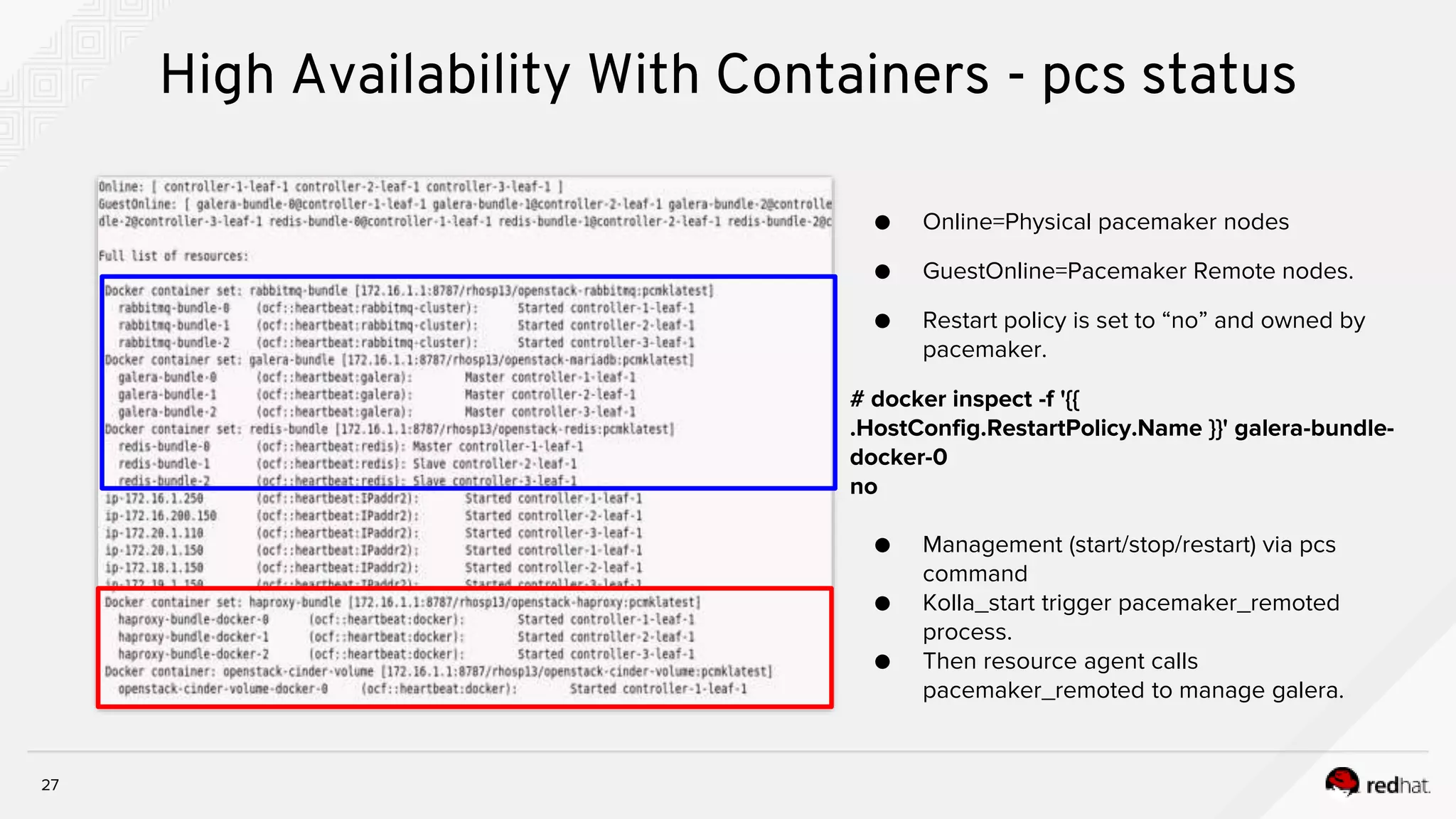
● Online=Physical pacemaker nodes
● GuestOnline=Pacemaker Remote nodes.
● Restart policy is set to “no” and owned by
pacemaker.
# docker inspect -f '{{
.HostConfig.RestartPolicy.Name }}' galera-bundle-
docker-0
no
● Management (start/stop/restart) via pcs
command
● Kolla_start trigger pacemaker_remoted
process.
● Then resource agent calls
pacemaker_remoted to manage galera.
28
HA Containers - Configuration and log files
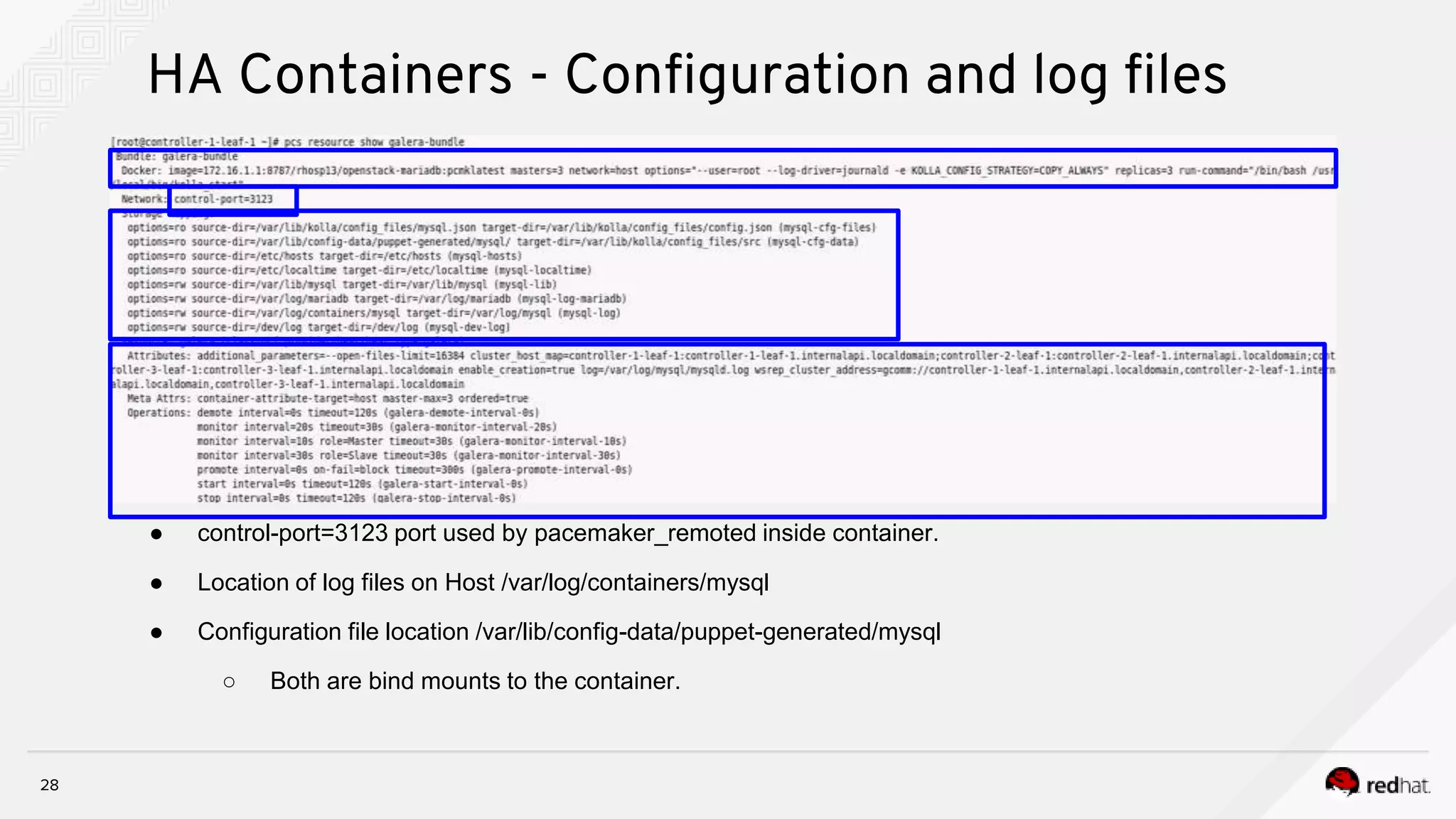
● control-port=3123 port used by pacemaker_remoted inside container.
● Location of log files on Host /var/log/containers/mysql
● Configuration file location /var/lib/config-data/puppet-generated/mysql
○ Both are bind mounts to the container.
neutron_api
29
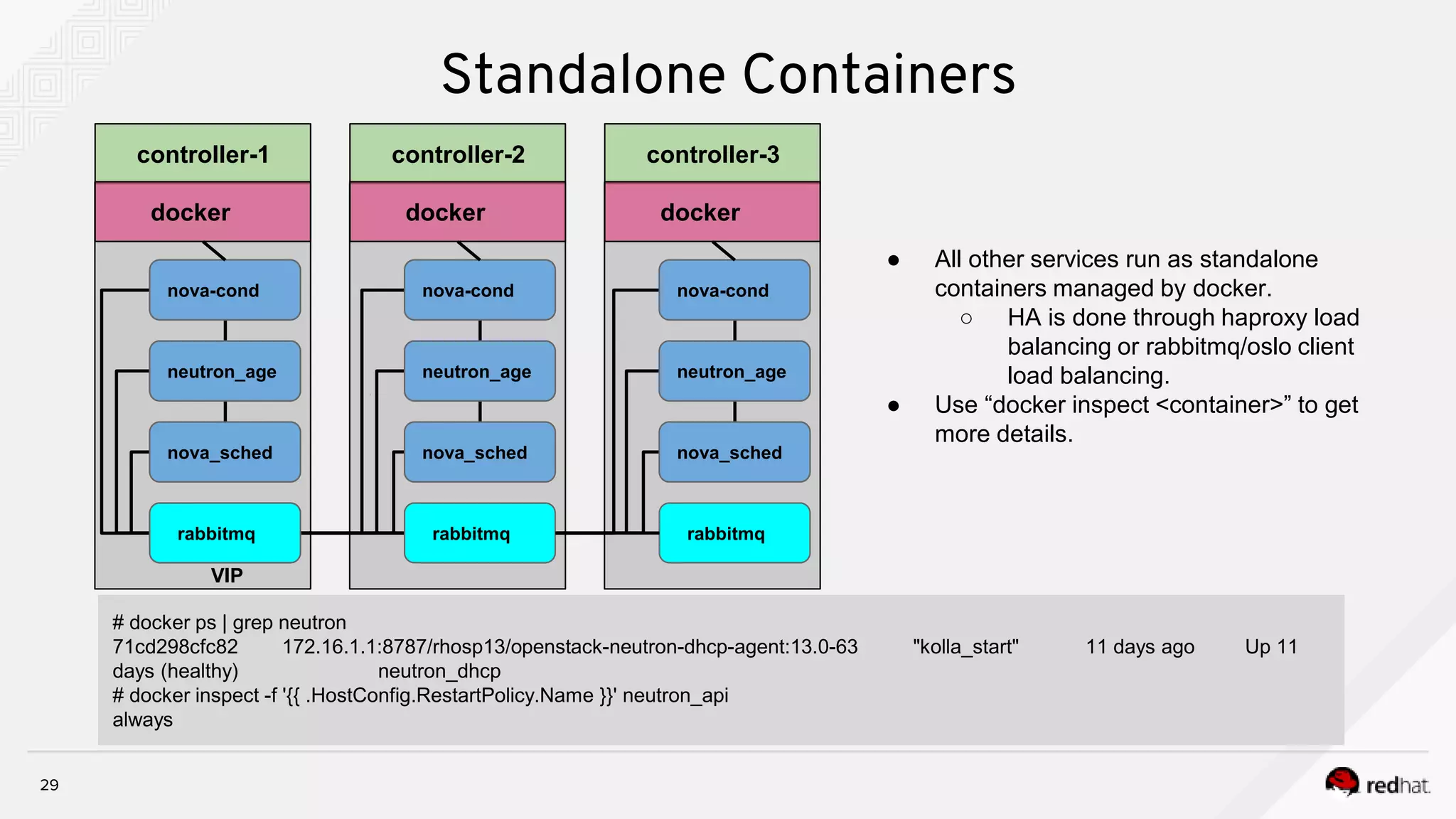
Standalone Containers
● All other services run as standalone
containers managed by docker.
○ HA is done through haproxy load
balancing or rabbitmq/oslo client
load balancing.
● Use “docker inspect <container>” to get
more details.
controller-1 controller-2 controller-3
cinder_api
nova_api
haproxy
neutron_api
cinder_api
nova_api
docker docker docker
neutron_api
cinder_api
nova_api
# docker ps | grep neutron
71cd298cfc82 172.16.1.1:8787/rhosp13/openstack-neutron-dhcp-agent:13.0-63 "kolla_start" 11 days ago Up 11
days (healthy) neutron_dhcp
# docker inspect -f '{{ .HostConfig.RestartPolicy.Name }}' neutron_api
always
rabbitmq rabbitmq rabbitmq
nova_sched
neutron_age
nova-cond
nova_sched
neutron_age
nova-cond
nova_sched
neutron_age
nova-cond
VIP
30
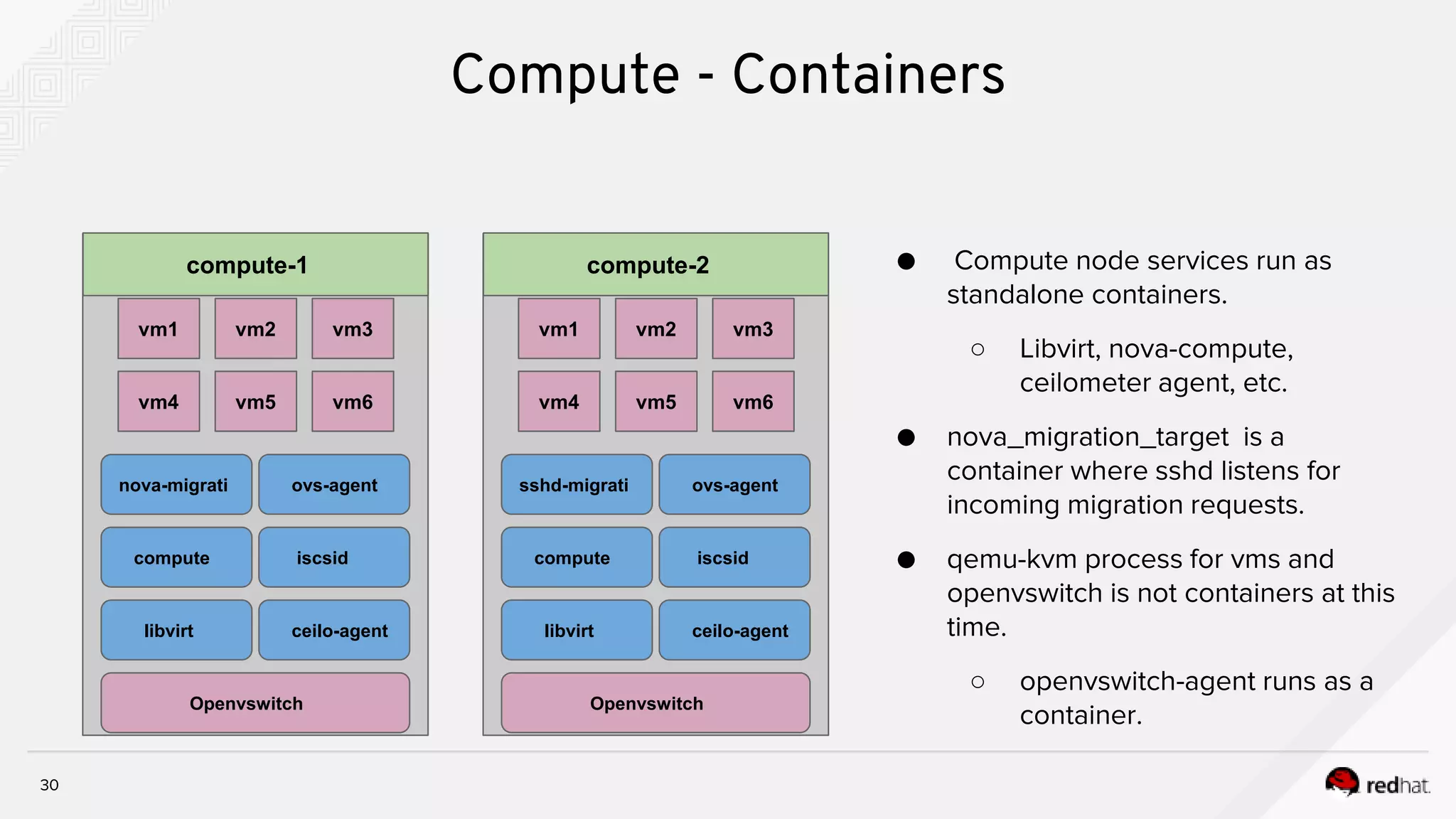
Compute - Containers
● Compute node services run as
standalone containers.
○ Libvirt, nova-compute,
ceilometer agent, etc.
● nova_migration_target is a
container where sshd listens for
incoming migration requests.
● qemu-kvm process for vms and
openvswitch is not containers at this
time.
○ openvswitch-agent runs as a
container.
compute-2
libvirt ceilo-agent
compute iscsid
sshd-migrati ovs-agent
vm4 vm5 vm6
vm1 vm3vm2
Openvswitch
compute-1
libvirt ceilo-agent
compute iscsid
nova-migrati ovs-agent
vm4 vm5 vm6
vm1 vm3vm2
Openvswitch
osd-1
31
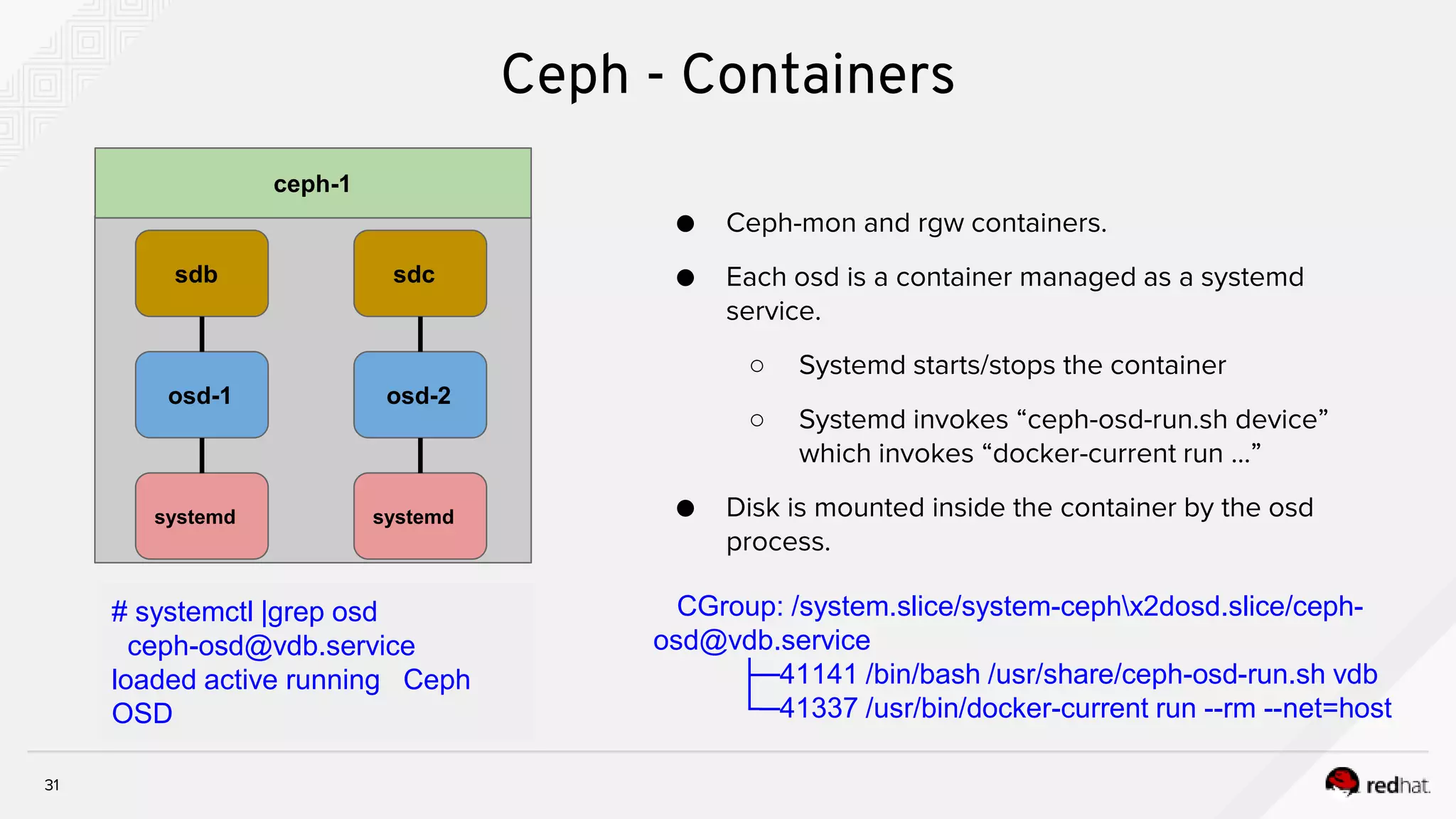
Ceph - Containers
● Ceph-mon and rgw containers.
● Each osd is a container managed as a systemd
service.
○ Systemd starts/stops the container
○ Systemd invokes “ceph-osd-run.sh device”
which invokes “docker-current run …”
● Disk is mounted inside the container by the osd
process.
ceph-1
systemd
sdb
osd-2
systemd
sdc
# systemctl |grep osd
ceph-osd@vdb.service
loaded active running Ceph
OSD
CGroup: /system.slice/system-cephx2dosd.slice/ceph-
osd@vdb.service
├─41141 /bin/bash /usr/share/ceph-osd-run.sh vdb
└─41337 /usr/bin/docker-current run --rm --net=host
32
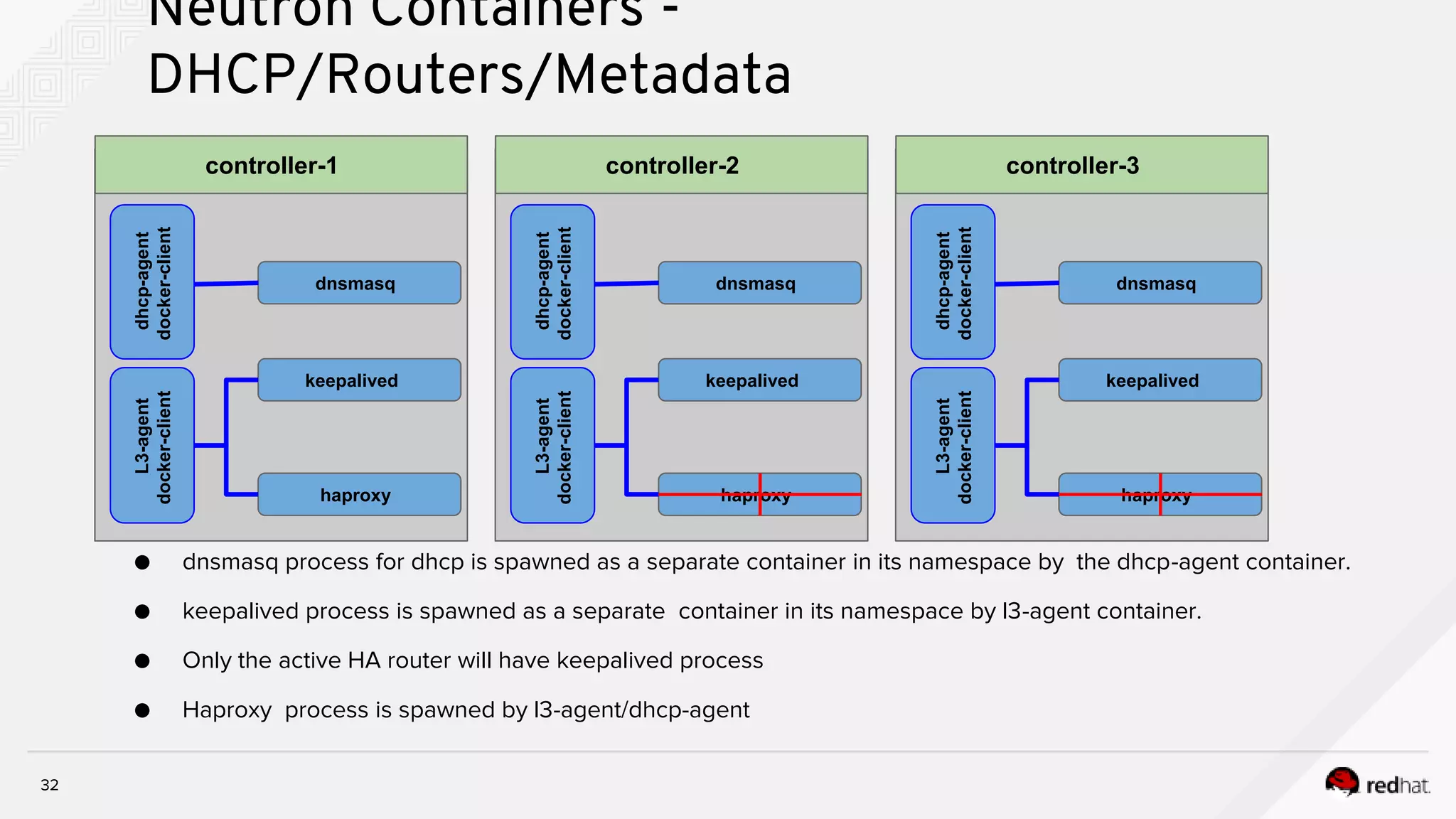
Neutron Containers -
DHCP/Routers/Metadata
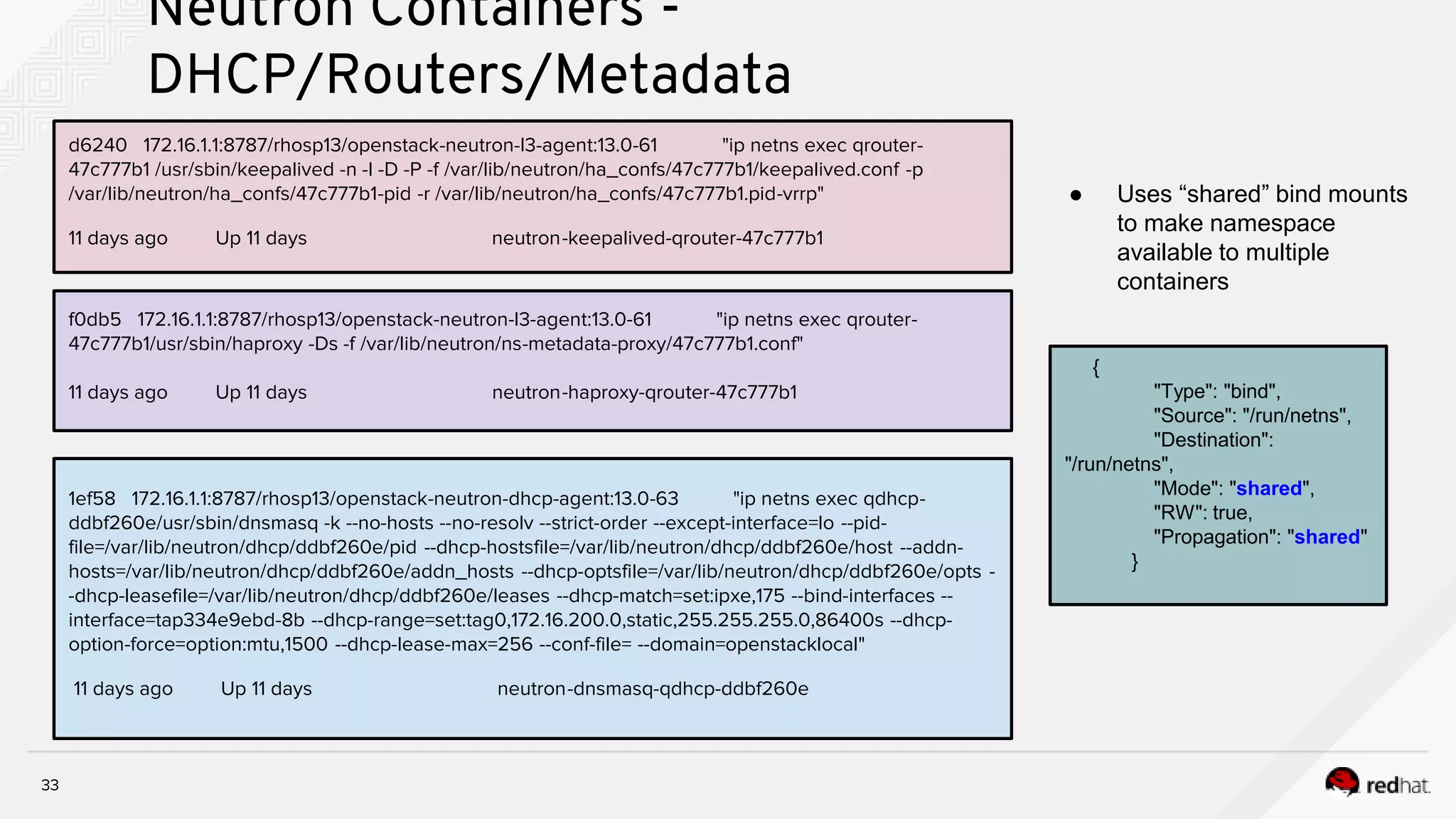
● dnsmasq process for dhcp is spawned as a separate container in its namespace by the dhcp-agent container.
● keepalived process is spawned as a separate container in its namespace by l3-agent container.
● Only the active HA router will have keepalived process
● Haproxy process is spawned by l3-agent/dhcp-agent
controller-1
keepalived
haproxy
L3-agent
docker-client
dnsmasq
dhcp-agent
docker-client controller-2
keepalived
haproxy
L3-agent
docker-client
dnsmasq
dhcp-agent
docker-client
controller-3
keepalived
haproxy
L3-agent
docker-client
dnsmasq
dhcp-agent
docker-client
d6240 172.16.1.1:8787/rhosp13/openstack-neutron-l3-agent:13.0-61 "ip netns exec qrouter-
47c777b1 /usr/sbin/keepalived -n -l -D -P -f /var/lib/neutron/ha_confs/47c777b1/keepalived.conf -p
/var/lib/neutron/ha_confs/47c777b1-pid -r /var/lib/neutron/ha_confs/47c777b1.pid-vrrp"
11 days ago Up 11 days neutron-keepalived-qrouter-47c777b1
33
Neutron Containers -
DHCP/Routers/Metadata
f0db5 172.16.1.1:8787/rhosp13/openstack-neutron-l3-agent:13.0-61 "ip netns exec qrouter-
47c777b1/usr/sbin/haproxy -Ds -f /var/lib/neutron/ns-metadata-proxy/47c777b1.conf"
11 days ago Up 11 days neutron-haproxy-qrouter-47c777b1
1ef58 172.16.1.1:8787/rhosp13/openstack-neutron-dhcp-agent:13.0-63 "ip netns exec qdhcp-
ddbf260e/usr/sbin/dnsmasq -k --no-hosts --no-resolv --strict-order --except-interface=lo --pid-
file=/var/lib/neutron/dhcp/ddbf260e/pid --dhcp-hostsfile=/var/lib/neutron/dhcp/ddbf260e/host --addn-
hosts=/var/lib/neutron/dhcp/ddbf260e/addn_hosts --dhcp-optsfile=/var/lib/neutron/dhcp/ddbf260e/opts -
-dhcp-leasefile=/var/lib/neutron/dhcp/ddbf260e/leases --dhcp-match=set:ipxe,175 --bind-interfaces --
interface=tap334e9ebd-8b --dhcp-range=set:tag0,172.16.200.0,static,255.255.255.0,86400s --dhcp-
option-force=option:mtu,1500 --dhcp-lease-max=256 --conf-file= --domain=openstacklocal"
11 days ago Up 11 days neutron-dnsmasq-qdhcp-ddbf260e
{
"Type": "bind",
"Source": "/run/netns",
"Destination":
"/run/netns",
"Mode": "shared",
"RW": true,
"Propagation": "shared"
}
● Uses “shared” bind mounts
to make namespace
available to multiple
containers
34
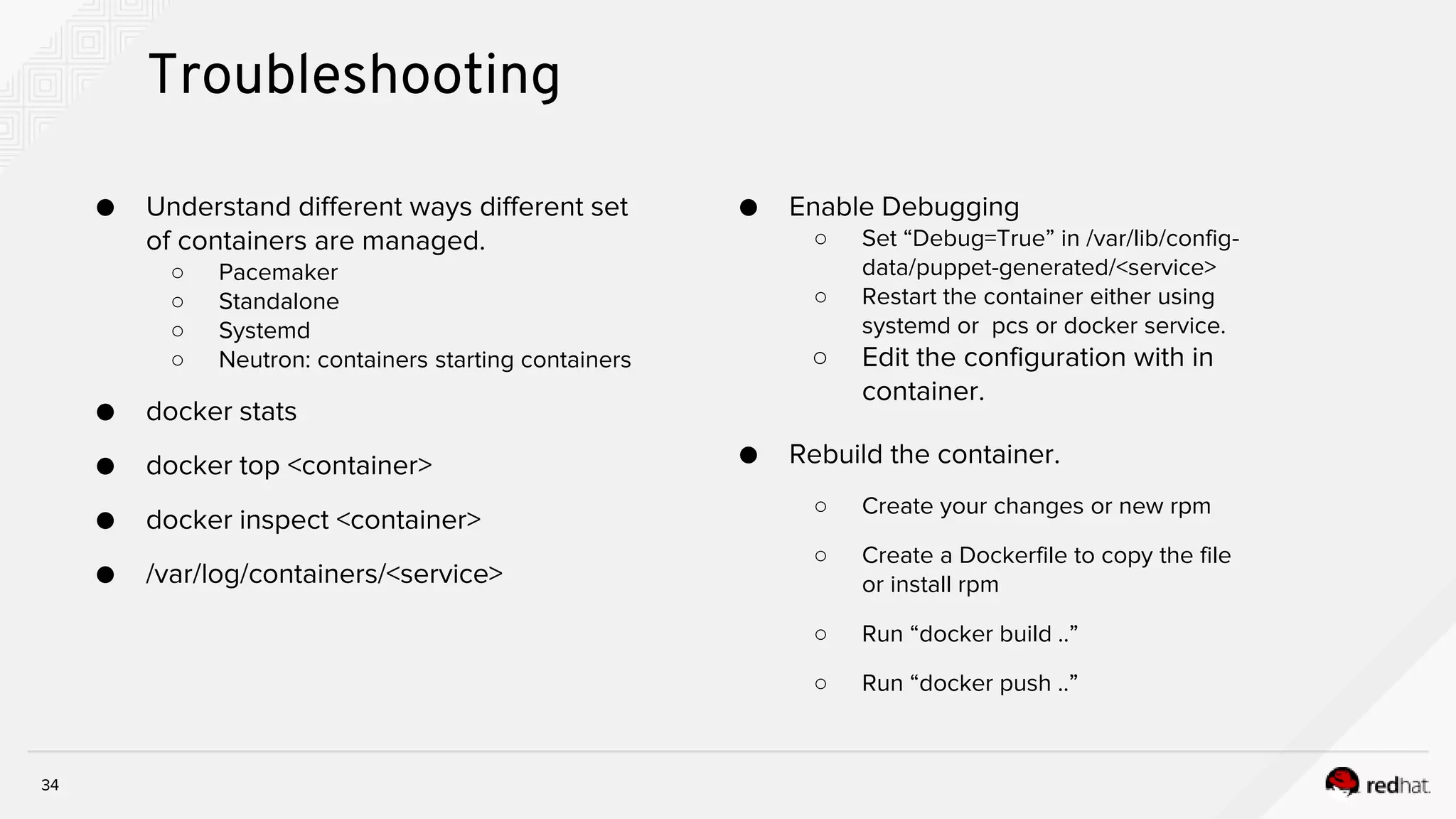
Troubleshooting
● Understand different ways different set
of containers are managed.
○ Pacemaker
○ Standalone
○ Systemd
○ Neutron: containers starting containers
● docker stats
● docker top <container>
● docker inspect <container>
● /var/log/containers/<service>
● Enable Debugging
○ Set “Debug=True” in /var/lib/config-
data/puppet-generated/<service>
○ Restart the container either using
systemd or pcs or docker service.
○ Edit the configuration with in
container.
● Rebuild the container.
○ Create your changes or new rpm
○ Create a Dockerfile to copy the file
or install rpm
○ Run “docker build ..”
○ Run “docker push ..”
THANK YOU
plus.google.com/+RedHat
linkedin.com/company/red-hat
youtube.com/user/RedHatVideos
facebook.com/redhatinc
twitter.com/RedHatNews

Troubleshooting containerized triple o deployment

  • 1.
    TROUBLESHOOTING CONTAINERIZED TRIPLEO DEPLOYMENT OpenStackSummit Berlin | 13, November 2018 DEVENDRA SHANBHAG SENIOR CLOUD CONSULTANT SADIQUE PUTHEN @sadiquepp PRINCIPAL CLOUD SUCCESS ARCHITECT
  • 2.
    2 AGENDA ● Containerized TripleODeployment ○ Traditional deployment ○ Containerized deployment ○ Building Container images ○ Registering Container images ○ Deployment flow ○ Troubleshooting ● Containerized Overcloud ○ HA Pacemaker containers ○ Standalone Containers ○ Containerized compute node ○ Containerized ceph nodes ○ Neutron Containers ■ DHCP ■ Routers ■ Metadata ○ Troubleshooting
  • 3.
    3 Production, tenant facingcloud ● The OpenStack you know and love ● The cloud that your tenants will use ● Where the apps/VNFs actually run ● Also known as the “Overcloud” OpenStack TripleO OpenStack Cloud deploys and manages Deployment and management cloud ● Infrastructure command and control ● Cloud operator visibility only ● Conducts all of the lifecycle management ● Also known as the “Undercloud” TripleO Deployment Overview
  • 4.
    4 ● No containers ●Prebuilt images with all packages ● Heat builds templates and puppet manifests. ● Shared Libraries (all OSP services) ● Puppet configuration Traditional Deployment HARDWARE OPERATING SYSTEM LIBS A SERVICE A SERVICE B LIBS A LIBS LIBS
  • 5.
  • 6.
  • 7.
    7 Containerised Deployment HARDWARE HARDWARE OPERATINGSYSTEM LIBS A SERVICE A SERVICE B OPERATING SYSTEM CONTAINER LIBS A LIBS LIBS LIBS A SERVICE A CONTAINER LIBS A SERVICE A
  • 8.
  • 9.
    9 Registering Container images Speedup your deployment ● Pulling images to local registry openstack overcloud container image upload --config-file /usr/share/openstack-tripleo- common/container- images/overcloud_containers.yaml ● Use local registry when deploying parameter_defaults: DockerNamespace: 192.168.24.1:8787/tripleoupstream DockerNamespaceIsRegistry: true DockerInsecureRegistryAddress: 192.168.24.1:8787 ● Optional: build images yourself Customer Portal Satellite Undercloud Other image registry Overcloud
  • 10.
    10 Containerized TripleO -Components ● Pre-built Docker images ○ Kolla ● Configuration ○ Generating configs with docker-puppet.py ● Starting containers ○ paunch ● Updates & Upgrades ○ Ansible within tripleo-heat-templates
  • 11.
    11 Containerized TripleO -Docker-Puppet ● Docker-puppet.py - Generate config file for each service Docker-Puppet.py docker-puppet.json Generates config
  • 12.
    12 Building Container images- Kolla Tools to build and run containerised OpenStack Services ● Container images ● Container image “recipes” (dockerfiles) ● Startup scripts Dockerfiles and startup scripts from the Kolla project are used in Red Hat OpenStack Platform.
  • 13.
    13 Containerized TripleO -Kolla_start ● Each container gets a configuration file generated at /var/lib/kolla/config_files ○ This file is bind mounted to respective container "/var/lib/kolla/config_files/neutron_api.json:/var/lib/kolla/config_files/config.json:ro" ● Each container has its configuration file directory bind mounted to it. "/var/lib/config-data/puppet-generated/neutron/:/var/lib/kolla/config_files/src:ro" ● Kolla_start uses the .json file to copy the configuration files to / and spawn the respective service process inside container. Container kolla_start copy config Set perm process config.json Config Dir docker logs cn
  • 14.
    14 Containerized TripleO -Kolla_start # jq . neutron_api.json { "permissions": [ { "recurse": true, "path": "/var/log/neutron", "owner": "neutron:neutron" } ], "command": "/usr/bin/neutron-server --config-file /usr/share/neutron/neutron-dist.conf --config-dir /usr/share/neutron/server --config-file /etc/neutron/neutron.conf --config-file /etc/neutron/plugin.ini --config-dir /etc/neutron/conf.d/common --config-dir /etc/neutron/conf.d/neutron-server --log-file=/var/log/neutron/server.log", "config_files": [ { "preserve_properties": true, "merge": true, "source": "/var/lib/kolla/config_files/src/*", "dest": "/" } ] }
  • 15.
    15 Important files &directories ● Overcloud nodes: ○ /var/lib/config-data/<SERVICE NAME>/ ○ /var/lib/config-data/puppet-generated/<SERVICE NAME> ■ Note: /etc/ might still contain service config, but these are defaults from the rpms! ○ /var/lib/tripleo-config ○ /var/lib/docker-puppet ● Service configs in /etc/ are not used when containers are in play! ○ This might be irritating at first, because there are default configs from the rpms
  • 16.
  • 17.
    17 Networking ● No changefrom non-containerised OpenStack ● Host based networking used for all containerised services ● Docker "host" driver utilised Host Driver
  • 18.
    Logging 18 18 ● Log filesare bind mounted into the container. ● In the container: ○ Found at their usual location ● On the BM Host ○ Living inside /var/log/containers/<service> ○ Services running httpd also use /var/log/containers/httpd/<service> ● Cron jobs and logrotate run in containers ○ You can see them with a ‘docker ps’ on the host system
  • 19.
    19 [stack@vm-director-cl2 ]$ cat/home/stack/deployment/deploy.sh source ~/stackrc openstack overcloud deploy --templates /usr/share/openstack-tripleo-heat-templates --stack cloud2 -r /home/stack/deployment/roles_data.yaml -e /usr/share/openstack-tripleo-heat-templates/environments/network-isolation.yaml -e /home/stack/deployment/computehci-node-params.yaml -e /home/stack/deployment/advanced-environment.yaml -e /usr/share/openstack-tripleo-heat-templates/environments/services-docker/neutron-ovn-dvr-ha.yaml -e /home/stack/deployment/overcloud_images.yaml -n /home/stack/deployment/network_data.yaml --timeout 120 --control-scale 3 --control-flavor control --compute-scale 0 --compute-flavor compute --ceph-storage-scale 0 --ceph-storage-flavor ceph-storage --ntp-server clock.redhat.com Troubleshooting
  • 20.
  • 21.
  • 22.
  • 23.
  • 24.
  • 25.
    25 High Availability WithContainers ● Pacemaker creates bundle of 3 containers, run on each controller, managed by pacemaker_remoted for galera, rabbitmq and redis. ● Haproxy and cinder-volume is not managed by pacemaker_remoted as it does not require special configuration. ○ Cinder volume runs active/passive. Only one container is up and running. ● VIPs and pacemaker itself is not containerized. Pacemaker Container Pacemaker Container Pacemaker pcs_remoted Container Corosync controller-1 controller-2 controller-3 pcs_remotedpcs_remoted GaleraGalera GaleraHaproxy Haproxy HaproxyCinder-Vol Cinder-Vol Cinder-Vol vip
  • 26.
    26 High Availability WithContainers Container config.json Config Dir kolla_start copy config Set perm process "permissions": [ { "recurse": true, "path": "/var/log/mysql", "owner": "mysql:mysql" }, "command": "/usr/sbin/pacemaker_remoted", "config_files": [ { "perm": "0644", "owner": "root", "source": "/dev/null", "dest": "/etc/libqb/force-filesystem-sockets" }, pacemaker remoted Galera { "preserve_properties": true, "merge": true, "source": "/var/lib/kolla/config_files/src/*", "dest": "/" }, [root@controller-2-leaf-1 ~]# docker ps --no-trunc | grep galera 0843f6314b3770380927542bad92411d3edb3d2d4de0bb064c00e2fdae041b18 172.16.1.1:8787/rhosp13/openstack- mariadb:pcmklatest "/bin/bash /usr/local/bin/kolla_start” options=ro source-dir=/var/lib/kolla/config_files/mysql.json target-dir=/var/lib/kolla/config_files/config.json (mysql-cfg-files) options=ro source-dir=/var/lib/config-data/puppet-generated/mysql/ target-dir=/var/lib/kolla/config_files/src (mysql-cfg-data) options=ro source-dir=/etc/hosts target-dir=/etc/hosts (mysql-hosts) options=ro source-dir=/etc/localtime target-dir=/etc/localtime (mysql-localtime) options=rw source-dir=/var/lib/mysql target-dir=/var/lib/mysql (mysql-lib) options=rw source-dir=/var/log/containers/mysql target-dir=/var/log/mysql (mysql-log) …. ….
  • 27.
    27 High Availability WithContainers - pcs status ● Online=Physical pacemaker nodes ● GuestOnline=Pacemaker Remote nodes. ● Restart policy is set to “no” and owned by pacemaker. # docker inspect -f '{{ .HostConfig.RestartPolicy.Name }}' galera-bundle- docker-0 no ● Management (start/stop/restart) via pcs command ● Kolla_start trigger pacemaker_remoted process. ● Then resource agent calls pacemaker_remoted to manage galera.
  • 28.
    28 HA Containers -Configuration and log files ● control-port=3123 port used by pacemaker_remoted inside container. ● Location of log files on Host /var/log/containers/mysql ● Configuration file location /var/lib/config-data/puppet-generated/mysql ○ Both are bind mounts to the container.
  • 29.
    neutron_api 29 Standalone Containers ● Allother services run as standalone containers managed by docker. ○ HA is done through haproxy load balancing or rabbitmq/oslo client load balancing. ● Use “docker inspect <container>” to get more details. controller-1 controller-2 controller-3 cinder_api nova_api haproxy neutron_api cinder_api nova_api docker docker docker neutron_api cinder_api nova_api # docker ps | grep neutron 71cd298cfc82 172.16.1.1:8787/rhosp13/openstack-neutron-dhcp-agent:13.0-63 "kolla_start" 11 days ago Up 11 days (healthy) neutron_dhcp # docker inspect -f '{{ .HostConfig.RestartPolicy.Name }}' neutron_api always rabbitmq rabbitmq rabbitmq nova_sched neutron_age nova-cond nova_sched neutron_age nova-cond nova_sched neutron_age nova-cond VIP
  • 30.
    30 Compute - Containers ●Compute node services run as standalone containers. ○ Libvirt, nova-compute, ceilometer agent, etc. ● nova_migration_target is a container where sshd listens for incoming migration requests. ● qemu-kvm process for vms and openvswitch is not containers at this time. ○ openvswitch-agent runs as a container. compute-2 libvirt ceilo-agent compute iscsid sshd-migrati ovs-agent vm4 vm5 vm6 vm1 vm3vm2 Openvswitch compute-1 libvirt ceilo-agent compute iscsid nova-migrati ovs-agent vm4 vm5 vm6 vm1 vm3vm2 Openvswitch
  • 31.
    osd-1 31 Ceph - Containers ●Ceph-mon and rgw containers. ● Each osd is a container managed as a systemd service. ○ Systemd starts/stops the container ○ Systemd invokes “ceph-osd-run.sh device” which invokes “docker-current run …” ● Disk is mounted inside the container by the osd process. ceph-1 systemd sdb osd-2 systemd sdc # systemctl |grep osd ceph-osd@vdb.service loaded active running Ceph OSD CGroup: /system.slice/system-cephx2dosd.slice/ceph- osd@vdb.service ├─41141 /bin/bash /usr/share/ceph-osd-run.sh vdb └─41337 /usr/bin/docker-current run --rm --net=host
  • 32.
    32 Neutron Containers - DHCP/Routers/Metadata ●dnsmasq process for dhcp is spawned as a separate container in its namespace by the dhcp-agent container. ● keepalived process is spawned as a separate container in its namespace by l3-agent container. ● Only the active HA router will have keepalived process ● Haproxy process is spawned by l3-agent/dhcp-agent controller-1 keepalived haproxy L3-agent docker-client dnsmasq dhcp-agent docker-client controller-2 keepalived haproxy L3-agent docker-client dnsmasq dhcp-agent docker-client controller-3 keepalived haproxy L3-agent docker-client dnsmasq dhcp-agent docker-client
  • 33.
    d6240 172.16.1.1:8787/rhosp13/openstack-neutron-l3-agent:13.0-61 "ipnetns exec qrouter- 47c777b1 /usr/sbin/keepalived -n -l -D -P -f /var/lib/neutron/ha_confs/47c777b1/keepalived.conf -p /var/lib/neutron/ha_confs/47c777b1-pid -r /var/lib/neutron/ha_confs/47c777b1.pid-vrrp" 11 days ago Up 11 days neutron-keepalived-qrouter-47c777b1 33 Neutron Containers - DHCP/Routers/Metadata f0db5 172.16.1.1:8787/rhosp13/openstack-neutron-l3-agent:13.0-61 "ip netns exec qrouter- 47c777b1/usr/sbin/haproxy -Ds -f /var/lib/neutron/ns-metadata-proxy/47c777b1.conf" 11 days ago Up 11 days neutron-haproxy-qrouter-47c777b1 1ef58 172.16.1.1:8787/rhosp13/openstack-neutron-dhcp-agent:13.0-63 "ip netns exec qdhcp- ddbf260e/usr/sbin/dnsmasq -k --no-hosts --no-resolv --strict-order --except-interface=lo --pid- file=/var/lib/neutron/dhcp/ddbf260e/pid --dhcp-hostsfile=/var/lib/neutron/dhcp/ddbf260e/host --addn- hosts=/var/lib/neutron/dhcp/ddbf260e/addn_hosts --dhcp-optsfile=/var/lib/neutron/dhcp/ddbf260e/opts - -dhcp-leasefile=/var/lib/neutron/dhcp/ddbf260e/leases --dhcp-match=set:ipxe,175 --bind-interfaces -- interface=tap334e9ebd-8b --dhcp-range=set:tag0,172.16.200.0,static,255.255.255.0,86400s --dhcp- option-force=option:mtu,1500 --dhcp-lease-max=256 --conf-file= --domain=openstacklocal" 11 days ago Up 11 days neutron-dnsmasq-qdhcp-ddbf260e { "Type": "bind", "Source": "/run/netns", "Destination": "/run/netns", "Mode": "shared", "RW": true, "Propagation": "shared" } ● Uses “shared” bind mounts to make namespace available to multiple containers
  • 34.
    34 Troubleshooting ● Understand differentways different set of containers are managed. ○ Pacemaker ○ Standalone ○ Systemd ○ Neutron: containers starting containers ● docker stats ● docker top <container> ● docker inspect <container> ● /var/log/containers/<service> ● Enable Debugging ○ Set “Debug=True” in /var/lib/config- data/puppet-generated/<service> ○ Restart the container either using systemd or pcs or docker service. ○ Edit the configuration with in container. ● Rebuild the container. ○ Create your changes or new rpm ○ Create a Dockerfile to copy the file or install rpm ○ Run “docker build ..” ○ Run “docker push ..”
  • 35.

Editor's Notes

  • #3 We have divided this session into two parts. First we will look at aspects of Containerised tripleO deployment and some troubleshooting. In the second part we will deep dive into containerised overcloud and troubleshooting Since there is a lot to cover, In the interest of time, we are going to keep the Q&A session at the end of the presentation
  • #4 Lets go ahead and look at a tripleO deployment. With tripleO we have 2 clouds. namely (undercloud and overcloud) We begin with creating the Undercloud (an actual operator facing cloud) that contain the necessary OpenStack components to deploy and manage an overcloud (an actual tenant facing workload cloud). The Overcloud is where your tenant are going to run on.
  • #5 Going further In a traditional Openstack deployment, you have prebuilt images with all necessary packages installed and base config injected. HEAT calling puppet to configure the Overcloud nodes &openstack services. All openstack services and sharing the underlying libraries.
  • #7 In a containerised deployment , you now have all the SYStemd managed services now containerised All Overcloud services are same in a traditional as deployed in the docker-based one. Services deployed in traditional are same as deployed in the docker-based one.
  • #8 Now, instead of running as package based services managed by the systemd facility, the ALL the OpenStack services run as containers managed by the docker run command. One obvious DIFFERENCE between these two types of deployments is that the Openstack services are deployed as containers in a container runtime rather than directly on the host operating system What does this bring?? FLEXIBLE - Deployment Flexibility - easier to move services around Dependency Isolation - STABLE each service can be upgraded and rolled back independently - Upgrade Flexibility SCALE - scale individual service’s quickly and easily SECURE - Immutable Infrastructure - atomic operations reduce complexity CONTROL - Resource Constraints - runtime configuration for strict resource control
  • #9 If we look at the deployment workflow, in order to have containerised services, we need access to a container registry The overcloud pulls container images directly from Remote registry. EACH node pulls each image directly from the Container Catalog, which can cause network congestion and slower deployment. In addition, all overcloud nodes require internet acces
  • #10 Hence we create a local registry to sync container images from the remote registry. This method allows you to store a registry internally, which can speed up the deployment and decrease network congestion. Hence recommend satellite to SYNC container images from Remote Reg Having local reg only provide basic functionality. For complete lifecycle mgmt, we recommend using Satellite as the registry
  • #11 Let us look at the key component of container deployment. Kolla- provides container images and scripts Paunch - Library used to start/deploy the containers KOLLA : enables OpenStack to be deployed and run as a set of services that previously would have been stacked together in a single monolithic architecture. Kolla is a project to which it deploys OpenStack Controller plane services within Docker containers. Kolla simplifies deployment and operations by packaging each controller service as a micro-service inside a Docker container.
  • #12 Docker-puppet responsible for generating the config files for each service and run puppet inside a container.. Docker-puppet uses config file docker-puppet.json as SRC for settings which contains the configuration specifics for each service. the way it works, /var/lib/config-data/<SVC> : full copy of the container tree (/etc o the container) /var/lib/config-data/puppet-genetated/<config_volume/ : copy of files modified by puppet. FINALLY it generates checksum. that’s how paunch knows config has changed and it needs to restart the container. Paunch (small library) is used to start the containers. …using config data (json file) found in TripleO service templates. It is a wrapper for docker cli commands. Kolla- provides container images and scripts Paunch - Library used to start/deploy the containers
  • #13  Kolla is used to build the images. You are free to use kolla to build images but we recommend to use pre built images.
  • #14 Once D-p generates config. How do we get the container started…? kolla_start bind mounts /var/lib/config-data/puppet-generated/ and COPIES to root of the container / Sets prems on the config files Starts the container process.
  • #16 /var/lib/config-data/<SVC> : full copy of the container tree (/etc of the container) /var/lib/config-data/puppet-genetated/<config_volume/ : copy of files modified by puppet. /v/l/triple-config - docker container startup files
  • #17 “/path/to/host/resource:/path/to/container/resource[:access]”
  • #19  Log files are bind mounted into the containers. Log files live in /var/log/containers/CONTAINERNAME Services managed by httpd containers are in /var/log/contaniers/httpd/service
  • #25 Thanks Dave. Dave clearly explained how tripleo deploys a containerized overcloud. How to build the images, Configure registry Paunch is used to manage one shot and other containers Docker puppet configuration is generated by docker-puppet.py, Bind mount works and then how kolla_start orchestrates the openstack service startup in containers. Troubleshooting And he also covered how to troubleshoot if something goes wrong during the process. Now let’s shift our focus a little bit to understand how these containers work under the hood after deployment and how to troubleshoot issues during day to day operations.
  • #26 High Availability for the containers not just for the process or not systemd services. This requires pacemaker to manage the containers. New feature create bundles. Image, networking, bind mounts, command, replicas and then create bundles. With in the openstack perspective, pacemaker and VIP are not containerized we have 5 resources created as bundles. Galera, Rabbitq and redis. Haproxy and Cinder volumes Intelligence needed for galera, rabbit and redis. Resource agent, pacemaker_remoted Haproxy and cinder-volumes are simple containers - start and stop Cinder-volume runs active/passive with replica=1
  • #27 Explain the flow. Container is started with Config.json and Config Dir bind mounted along with other required bind mounts. Triggers kola_start to orchestrate the application. Uses the Config.json. Copy config to root which comes from another bind mount. Set permissions needed for various directories/files. Then finally kickstart the process which is pacemaker_remoted for galera, rabbit and redis. Haproxy and cinder-volume service This is how rabbitmq and redis works except it uses different config Dir and config.json
  • #28 Online=Physical nodes GuestOnline is the number of containers with pacemaker_remoted running. Restart policy is set to no so that docker does not need to start/stop on its own which is done through pacemaker. Management operations, especially for troubleshooting need to be done via pacemaker cli (start/stop/restart) etc.
  • #29 Bundle configuration. Image, masters, networking, command etc. Control port: pacemaker remoted port
  • #30 Standalone containers. Most of the containers will fall into this category. Managed by docker with Restart policy set to “always. HA, like in previous openstack releases, is done through either haproxy or rabbitmq.
  • #38 overcloud image prepare cmd.. create an environment file that contains a list of images the overcloud uses import the container images to a different registry source (Satellite) ↠ update|upgrade|ffwd-upgrade prepare ↠ update|upgrade|ffwd-upgrade converge ↠ ceph-upgrade run (for now)