


ProxmoxVE
Open Source LXC and
KVM Managment
Sometimes you just want a nice UI
Linux Fest Northwest 2018
Richard Clark – Crafty Penguins
Who am I ?
● Richard Clark
● SRE Consultant with Crafty Penguins, a division of
KerkhoffTechnologies in Chilliwack, BC Canada
● Software Developer (C, Java, Python, etc.)
● System Administrator
● rick@seerickcode.com, richard@craftypenguins.net
● @seerickcode
PROXMOX
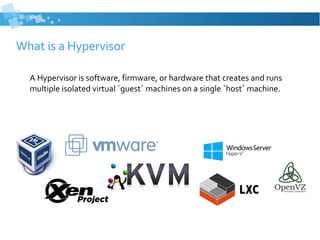
What is a Hypervisor
A Hypervisor is software, firmware, or hardware that creates and runs
multiple isolated virtual `guest` machines on a single `host` machine.
KVM - “Kernel-basedVirtual Machine”
● FullVirtualization for Linux/x86
– Built into linux kernel
– Emulated Hardware (Network,Video, Disk, etc.)
● Paravirtualized drivers
– Windows, Linux, *BSD, OS X, …..
● Manage with command line tools, “virsh”, or various overlay tools (virt-
manager)..
LXC – Linux Containers
● Operating-system-level virtualization
● Low level system that uses cgroups and isolated namespaces
● Linux based guests only
● Guests share the same kernel
● Manage with `lxc` command line
virtsh, or various 3rd
party overlays
● Make it better with :
– Docker! Docker! Docker!
– LXD
KVM or LXC - Different use case
● KVM
– Need to run a non-linux OS
– Need to use different or custom Linux kernel
– Need a virtual video card (Desktop GUI OS)
– Slower, but paravirtualized drivers help (network/storage)
● LXC
– Fast
– Isolation - Other than the kernel, all the underlying setup works almost like a separate
system. Separate repos, upgrades, network config, lower attack surface (install only
what you need)
– Only Linux, and only the same kernel
– No video card emulation *
KVM or LXC ?
KVM & LXC ?
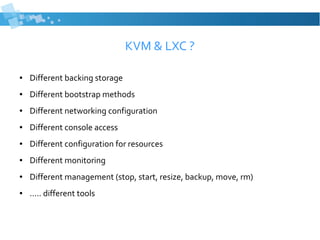
● Different backing storage
● Different bootstrap methods
● Different networking configuration
● Different console access
● Different configuration for resources
● Different monitoring
● Different management (stop, start, resize, backup, move, rm)
● ..... different tools
Why am I giving this talk ?
ProxmoxVirtual Environment
● 10Years this year !
● Management system for KVM and LXC technologies
● Similar toVMWare’sVSphere, XenCenter, etc.
● Open Source (Enterprise _support_ subscription model)
● Rich UI available over HTTPS
● Manage KVM and LXC in same UI
● Virtual Console
● Clustering Solutions
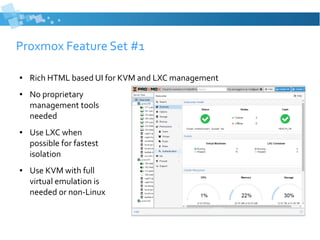
Proxmox Feature Set #1
● Rich HTML based UI for KVM and LXC management
● No proprietary
management tools
needed
● Use LXC when
possible for fastest
isolation
● Use KVM with full
virtual emulation is
needed or non-Linux
Proxmox Feature Set #2
● Open Source
● Based off of Debian (currently 9.x)
– It’s Just Linux - (networking, monitoring, management, tools, etc.)
● Simple repository add and apt-get install
● It is not a ‘Light’ community edition
– Backups, Firewall, Lots of storage options, Clustering, Live Migration
● Great for Personal / HomeLab
– Run various operating systems for training/experimentation
● Starts free, as in beer, with all the features.
Proxmox Feature Set #3
● Lots of backing store file system support
– Network ( LVM Group (iSCSI), iSCSI target/direct, NFS, Ceph RDB, GlusterFS)
– Local
● LVM Group over any block device tech (FC, DRDB, etc.)
● Directory (storage on existing filesystem)
● ZFS
● Clustering for HA
– Multi-Master
– Live Migration to move your ‘important’VMs to other hardware.
● Snapshots
● CLI and RESTfull API
● … much, much, more, and growing every release
Installing Proxmox
● Download the installer ISO from
https://www.proxmox.com/en/downloads
● Install on top of already existing Debian Stretch
– All outlined at https://pve.proxmox.com/wiki/Install_Proxmox_VE_on_Debian_Stretch
– Essentially :
● Add the Repository
echo "deb http://download.proxmox.com/debian/pve stretch pve­no­
subscription" > /etc/apt/sources.list.d/pve­install­repo.list
● Install the GPG Public Key
wget http://download.proxmox.com/debian/proxmox­ve­release­5.x.gpg ­O 
/etc/apt/trusted.gpg.d/proxmox­ve­release­5.x.gpg
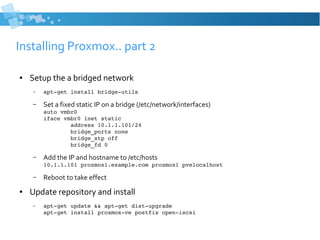
Installing Proxmox.. part 2
● Setup the a bridged network
– apt­get install bridge­utils
– Set a fixed static IP on a bridge (/etc/network/interfaces)
auto vmbr0
iface vmbr0 inet static
        address 10.1.1.101/24
        bridge_ports none
        bridge_stp off
        bridge_fd 0
– Add the IP and hostname to /etc/hosts
10.1.1.101 proxmox1.example.com proxmox1 pvelocalhost
– Reboot to take effect
● Update repository and install
– apt­get update && apt­get dist­upgrade
apt­get install proxmox­ve postfix open­iscsi
Demo ?
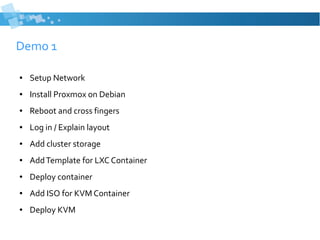
Demo 1
● Setup Network
● Install Proxmox on Debian
● Reboot and cross fingers
● Log in / Explain layout
● Add cluster storage
● AddTemplate for LXC Container
● Deploy container
● Add ISO for KVM Container
● Deploy KVM
Demo 2
● DeployWindows KVM /VirtIO Drivers
● Backups
● Firewall ?
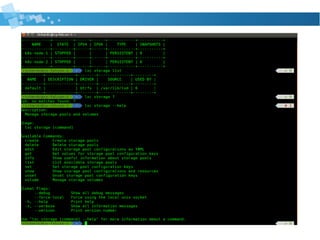
● CLI usage
● ?
ProxmoxVE
Richard Clark – Crafty Penguins
@seerickcode
richard@craftypenguins.net
Questions ?

Proxmox Talk - Linux Fest Northwest 2018

  • 1.
    ProxmoxVE Open Source LXCand KVM Managment Sometimes you just want a nice UI Linux Fest Northwest 2018 Richard Clark – Crafty Penguins
  • 2.
    Who am I? ● Richard Clark ● SRE Consultant with Crafty Penguins, a division of KerkhoffTechnologies in Chilliwack, BC Canada ● Software Developer (C, Java, Python, etc.) ● System Administrator ● rick@seerickcode.com, richard@craftypenguins.net ● @seerickcode
  • 3.
  • 4.
    What is aHypervisor A Hypervisor is software, firmware, or hardware that creates and runs multiple isolated virtual `guest` machines on a single `host` machine.
  • 5.
    KVM - “Kernel-basedVirtualMachine” ● FullVirtualization for Linux/x86 – Built into linux kernel – Emulated Hardware (Network,Video, Disk, etc.) ● Paravirtualized drivers – Windows, Linux, *BSD, OS X, ….. ● Manage with command line tools, “virsh”, or various overlay tools (virt- manager)..
  • 6.
    LXC – LinuxContainers ● Operating-system-level virtualization ● Low level system that uses cgroups and isolated namespaces ● Linux based guests only ● Guests share the same kernel ● Manage with `lxc` command line virtsh, or various 3rd party overlays ● Make it better with : – Docker! Docker! Docker! – LXD
  • 7.
    KVM or LXC- Different use case ● KVM – Need to run a non-linux OS – Need to use different or custom Linux kernel – Need a virtual video card (Desktop GUI OS) – Slower, but paravirtualized drivers help (network/storage) ● LXC – Fast – Isolation - Other than the kernel, all the underlying setup works almost like a separate system. Separate repos, upgrades, network config, lower attack surface (install only what you need) – Only Linux, and only the same kernel – No video card emulation *
  • 8.
  • 9.
    KVM & LXC? ● Different backing storage ● Different bootstrap methods ● Different networking configuration ● Different console access ● Different configuration for resources ● Different monitoring ● Different management (stop, start, resize, backup, move, rm) ● ..... different tools
  • 12.
    Why am Igiving this talk ?
  • 13.
    ProxmoxVirtual Environment ● 10Yearsthis year ! ● Management system for KVM and LXC technologies ● Similar toVMWare’sVSphere, XenCenter, etc. ● Open Source (Enterprise _support_ subscription model) ● Rich UI available over HTTPS ● Manage KVM and LXC in same UI ● Virtual Console ● Clustering Solutions
  • 14.
    Proxmox Feature Set#1 ● Rich HTML based UI for KVM and LXC management ● No proprietary management tools needed ● Use LXC when possible for fastest isolation ● Use KVM with full virtual emulation is needed or non-Linux
  • 15.
    Proxmox Feature Set#2 ● Open Source ● Based off of Debian (currently 9.x) – It’s Just Linux - (networking, monitoring, management, tools, etc.) ● Simple repository add and apt-get install ● It is not a ‘Light’ community edition – Backups, Firewall, Lots of storage options, Clustering, Live Migration ● Great for Personal / HomeLab – Run various operating systems for training/experimentation ● Starts free, as in beer, with all the features.
  • 16.
    Proxmox Feature Set#3 ● Lots of backing store file system support – Network ( LVM Group (iSCSI), iSCSI target/direct, NFS, Ceph RDB, GlusterFS) – Local ● LVM Group over any block device tech (FC, DRDB, etc.) ● Directory (storage on existing filesystem) ● ZFS ● Clustering for HA – Multi-Master – Live Migration to move your ‘important’VMs to other hardware. ● Snapshots ● CLI and RESTfull API ● … much, much, more, and growing every release
  • 17.
    Installing Proxmox ● Downloadthe installer ISO from https://www.proxmox.com/en/downloads ● Install on top of already existing Debian Stretch – All outlined at https://pve.proxmox.com/wiki/Install_Proxmox_VE_on_Debian_Stretch – Essentially : ● Add the Repository echo "deb http://download.proxmox.com/debian/pve stretch pve­no­ subscription" > /etc/apt/sources.list.d/pve­install­repo.list ● Install the GPG Public Key wget http://download.proxmox.com/debian/proxmox­ve­release­5.x.gpg ­O  /etc/apt/trusted.gpg.d/proxmox­ve­release­5.x.gpg
  • 18.
    Installing Proxmox.. part2 ● Setup the a bridged network – apt­get install bridge­utils – Set a fixed static IP on a bridge (/etc/network/interfaces) auto vmbr0 iface vmbr0 inet static         address 10.1.1.101/24         bridge_ports none         bridge_stp off         bridge_fd 0 – Add the IP and hostname to /etc/hosts 10.1.1.101 proxmox1.example.com proxmox1 pvelocalhost – Reboot to take effect ● Update repository and install – apt­get update && apt­get dist­upgrade apt­get install proxmox­ve postfix open­iscsi
  • 20.
  • 21.
    Demo 1 ● SetupNetwork ● Install Proxmox on Debian ● Reboot and cross fingers ● Log in / Explain layout ● Add cluster storage ● AddTemplate for LXC Container ● Deploy container ● Add ISO for KVM Container ● Deploy KVM
  • 22.
    Demo 2 ● DeployWindowsKVM /VirtIO Drivers ● Backups ● Firewall ? ● CLI usage ● ?
  • 23.
    ProxmoxVE Richard Clark –Crafty Penguins @seerickcode richard@craftypenguins.net Questions ?

Editor's Notes

  • #2 Turn off Slack Turn off Skype Turn off Stuff Switching laptops mid OK ? Seating
  • #3 Richard Clark SRE Consultant Crafty Penguins SRE -> Jack of all trades Software Developer Various Languages Systems Administrator Contact details there Dick nickname for Richard Dick and Jane Childrens books
  • #4 I am hear to talk about Proxmox Who has heard of proxmox ? Who has used proxmox ? Amazing Laundry Detergent Glad you took the time to attend my seminar Exciting Business Opportunity Own your own business Selling Proxmox Door to Door Coupons for the Free Knife set will be handed out at the end of the presentation All in one management system for all your VM needs SOME BACKGROUND
  • #5 Some Examples Virtualbox, VMWare Xen/KVM HyperV - Maximize the use of your hardware - Isolation for different needs Containerization Systems Under LInux Let you do kind of the same thing Less Isolated Light Talk about the components we care about for Proxmox
  • #6 The Hypervisor Proxmox uses Full Hardware virtualization Most OS systems you can throw at it Paravirtualized - Light Weight Emulation API instead of Device Driver on Pretend
  • #7 Next part of the background Containers - Light Weight Guest OS on to host Past the Kernel / Userspace / Sandbox On Linux, the “built in” container system is LXC Kernel must be the same - Linux Guests only Tools to manage - LXC, VirtSH, etc. Low Level - Docker LXD
  • #8 Non Linux OS - Why?
  • #9 Should we use KVM or LXC ? Why Not Both
  • #10 Speed up at the end Chaos, Building
  • #11 Earthquakes Volcanos The dead rising from the grave Human Sacrifice Dogs andCat’s living together Mass Hysteria For years of darknesss is upon us
  • #13 7 Years, 1.9 Not affiliated with Proxmox Use at work ..Home lab bare metal Install right after debian Saltstack
  • #16 7 Years, 1.9 Not affiliated with Proxmox Use at work ..Home lab bare metal Install right after debian Saltstack
  • #17 KVM and LXC in one management pane Probably main benefit NO Proprietary binary to install that is not supported on your workstation, just to manage your guests LXC for light weight and fast LInux KVM when full hardware emulation or a different OS is needed.
  • #18 Based off Debian: - Favorite version of Vim, to edit config files - Favorite version of Emacs - why bother - Probably have equivalent to Proxmox baked in somehow. Repo Add, Apt Get install Not a ‘lite’ community edition - Backups, Firewall, storage management, Clustering - Live Migrations - others do it, not for free Homelab: - Solaris, FreeBSD, Ubuntu 18.04, Windows Game server, the list goes on Starts at Free as in Beer, with all the features
  • #19 KVM and LXC machines need somewhere to be Network Based Local ZFS Couple TB of Ram Clustering Multi master Snapshot Handling baked in Filesytem support to Turn off, Image, Turn on. Backup System
  • #23 Talked about the main features Lets see this thing get installed and get some usage.
  • #26 Turn off Slack Turn off Skype Turn off Stuff Switching laptops mid OK ? Seating