DDS 
Cluster 
of 
Interest: 
Demo 
of 
RTI 
DDS 
Toolkit 
for 
LabVIEW 
Tim 
Owen 
EMEA 
TAM, 
RTI
Tim 
Owen 
– 
RTI 
EMEA 
TAM 
• Technical 
Account 
Manager 
for 
RTI 
• Based 
in 
RTI 
EMEA 
Office 
(Milton 
Keynes) 
• Main 
Interface 
for 
Channel 
/ 
Distributors 
• Experience 
in 
embedded 
systems, 
SoIware 
Defined 
Radio 
and 
DSP 
for 
over 
20 
years 
• Worked 
at 
RTI 
for 
2½ 
years
LabVIEW 
• Anyone 
know 
what 
it 
is? 
• Anyone 
here 
currently 
using 
it? 
– Personally 
or 
as 
a 
Company? 
– How 
are 
you 
using 
it? 
– Why 
do 
you 
use 
it 
– 
what’s 
the 
advantage(s)?
So, 
what 
is 
LabVIEW? 
• A 
graphical 
programming 
plaWorm 
• Blocks 
are 
“funcYons” 
or 
logic 
statements 
(while 
loops) 
• Data-­‐driven 
programming: 
– A 
block 
(piece 
of 
code) 
is 
executed 
as 
soon 
as 
all 
its 
inputs 
are 
available. 
– All 
blocks 
with 
their 
inputs 
available 
at 
the 
same 
Yme 
will 
be 
run 
in 
parallel 
• Provides 
hugely 
accelerated 
producYvity 
– Rapid 
Prototyping 
– Scalability
So, 
what 
is 
LabVIEW? 
(cont.) 
• Used 
extensively 
in 
Test 
Measurement/Control 
Apps 
– Also 
Avionics, 
Comms, 
Radar, 
AutomoYve, 
Oil 
& 
Gas 
• Solves 
some 
architectural 
system 
issues 
– NI 
provides 
modular 
scalable 
hardware 
(PXI 
& 
CRIO 
based) 
– 
Signal 
Analysis 
& 
Analog 
I/O 
– Scales 
from 
design 
to 
test 
and 
from 
small 
to 
large 
systems. 
• Huge 
ecosystem 
(Alliance 
Partners) 
and 
Customer 
Base!
So, 
what 
is 
LabVIEW? 
(cont.) 
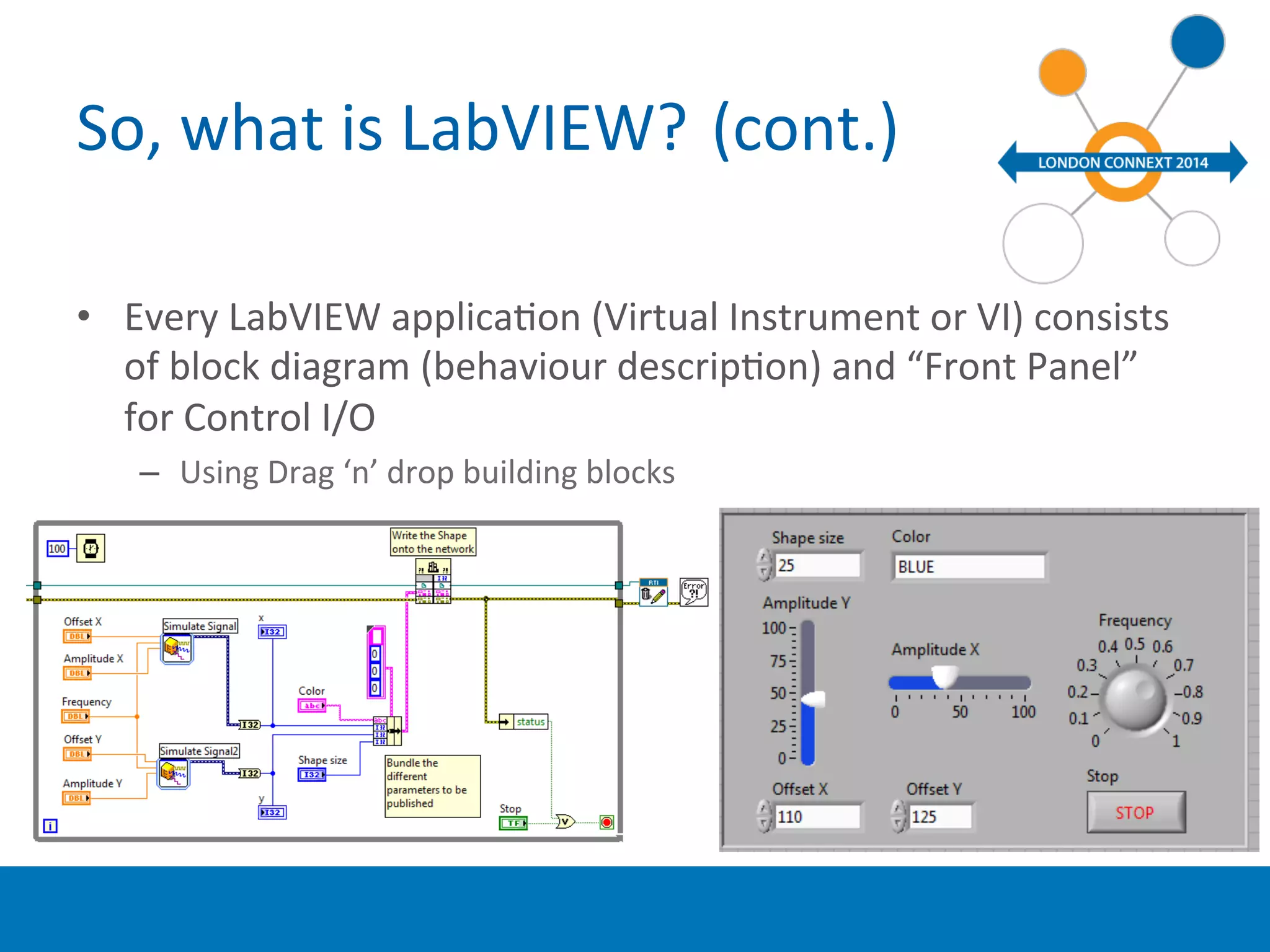
• Every 
LabVIEW 
applicaYon 
(Virtual 
Instrument 
or 
VI) 
consists 
of 
block 
diagram 
(behaviour 
descripYon) 
and 
“Front 
Panel” 
for 
Control 
I/O 
– Using 
Drag 
‘n’ 
drop 
building 
blocks 
• `
Why 
use 
DDS 
and 
LabVIEW? 
• Create 
DDS 
applicaYons 
using 
graphical 
drag 
‘n’ 
drop 
blocks 
in 
LabVIEW 
– 
zero 
coding 
!! 
• Easily 
interfaces 
the 
“contained” 
LabVIEW 
world 
(VIs) 
to 
the 
external 
world 
– Using 
the 
DDS 
tenets 
we 
all 
know 
and 
love! 
J 
– Enables 
integraYon 
with 
Java, 
C/C++, 
C# 
apps 
• Use 
the 
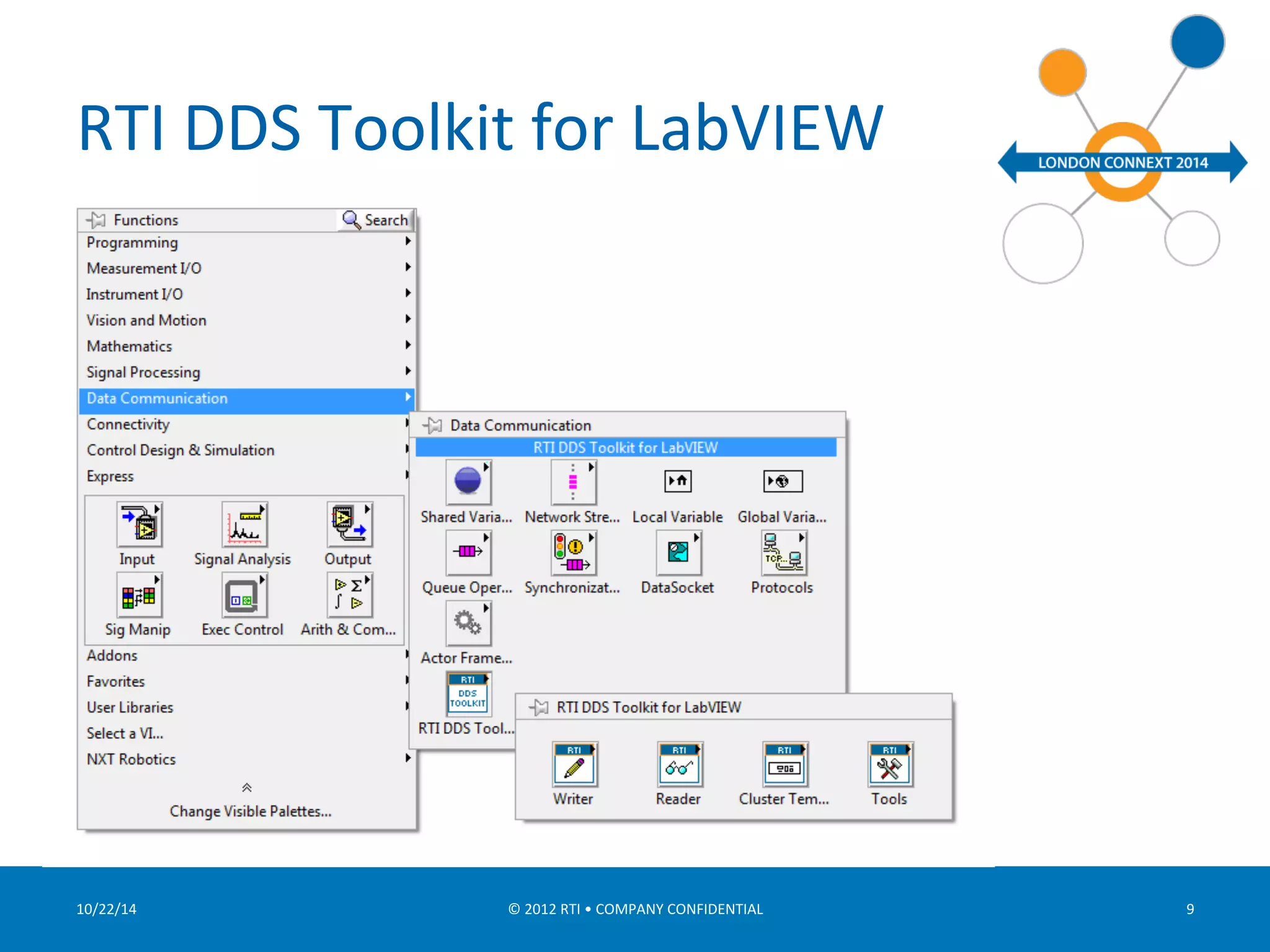
RTI 
DDS 
Toolkit 
for 
LabVIEW 
product 
– Developed 
and 
maintained 
by 
RTI 
• Opens 
new 
markets 
and 
possibiliYes 
for 
DDS 
– Extensively 
used 
throughout 
the 
World 
• Huge 
Ecosystem 
& 
Customer 
base
RTI 
DDS 
Toolkit 
for 
LabVIEW 
10/22/14 
© 
2012 
RTI 
• 
COMPANY 
CONFIDENTIAL 
9
What 
is 
this 
LabVIEW 
DDS 
Toolkit 
demo? 
• Show 
a 
Shapes 
Publisher 
in 
LabVIEW 
• Control 
a 
Lego 
Mindstorm 
EV3 
Robot 
– Using 
standalone 
Java 
DDS 
ApplicaYon 
(Laptop) 
– Interfacing 
to 
LabVIEW 
environment 
using 
the 
“RTI 
DDS 
Toolkit 
for 
LabVIEW” 
Add-­‐on 
– Lego 
Mindstorm 
support 
for 
LabVIEW 
provided 
by 
NI
ImplementaYon 
Details 
• Cluster 
Equivalent 
IDL 
struct 
MyTypeName{ 
string<1024> 
Text; 
//@key 
long 
I32_Num; 
long 
long 
I64_Num; 
unsigned 
short 
U16_Num; 
float[4] 
Sgl_Array; 
innerclusterType 
innercluster; 
}; 
struct 
superinnerClusterType{ 
double 
Dbl_Num; 
ultrainnerClusterType 
ultrainnerCluster; 
}; 
struct 
ultrainnerClusterType{ 
short[2] 
I16_Array; 
}; 
struct 
innerclusterType{ 
float 
Sgl_Num; 
boolean 
Boolean; 
superinnerClusterType 
superinnerCluster; 
};
What 
is 
this 
LabVIEW 
DDS 
Toolkit 
demo? 
(cont.) 
• Shapes 
Publisher
NxT 
What 
is 
this 
LabVIEW 
DDS 
Toolkit 
demo? 
(cont.) 
EV3 
naYve 
comms 
via 
Bluetooth 
(not 
DDS) 
Java 
GUI 
ApplicaBon 
that 
uses 
DDS 
to 
send 
commands 
and 
display 
received 
output 
from 
the 
EV3 
NI 
Environment 
Apps 
generated 
in 
LabVIEW 
DDS 
enabled 
LabView 
(VI) 
ApplicaYon 
that 
reads 
/ 
writes 
data 
across 
the 
EV3 
link 
• Control 
a 
Lego 
Mindstorm 
EV3 
Robot
LimitaYons 
• Currently 
32-­‐bit 
Windows 
• FuncYonality 
… 
– Reading 
by 
polling 
only 
– Reduce 
supported 
data 
types 
• Only 
one 
top-­‐level 
key. 
– LabVIEW 
imposed 
constraints 
• For 
instance, 
no 
complex-­‐type 
arrays.
Product 
Roadmap 
• Feedback 
about 
API 
– Is 
current 
API 
enough 
for 
most 
use 
cases? 
• LabVIEW 
RT 
– VxWorks 
porYng 
for 
CompactRIO 
board 
• Reading 
without 
polling 
– Integrate 
LabVIEW 
Events? 
– Waitsets?
What’s 
next 
? 
• Try 
it! 
• LabVIEW 
available 
as 
free 
45-­‐day 
trial 
– hup://www.ni.com/download-­‐labview 
• Connext 
Professional 
as 
free 
30-­‐day 
trial 
– If 
you 
don’t 
already 
have 
it! 
hup://www.rY.com/downloads/index.html 
• Where 
can 
I 
get 
the 
RTI 
DDS 
Toolkit 
Add-­‐on? 
– Developed 
and 
maintained 
by 
RTI 
– Available 
through 
NI 
only 
(for 
Windows 
only) 
• Via 
the 
VIPM 
in 
LabVIEW 
– It’s 
Free 
– 
even 
for 
a 
permanent 
license 
!!! 
J

Demo of RTI DDS toolkit for LabVIEW

  • 1.
    DDS Cluster of Interest: Demo of RTI DDS Toolkit for LabVIEW Tim Owen EMEA TAM, RTI
  • 2.
    Tim Owen – RTI EMEA TAM • Technical Account Manager for RTI • Based in RTI EMEA Office (Milton Keynes) • Main Interface for Channel / Distributors • Experience in embedded systems, SoIware Defined Radio and DSP for over 20 years • Worked at RTI for 2½ years
  • 3.
    LabVIEW • Anyone know what it is? • Anyone here currently using it? – Personally or as a Company? – How are you using it? – Why do you use it – what’s the advantage(s)?
  • 4.
    So, what is LabVIEW? • A graphical programming plaWorm • Blocks are “funcYons” or logic statements (while loops) • Data-­‐driven programming: – A block (piece of code) is executed as soon as all its inputs are available. – All blocks with their inputs available at the same Yme will be run in parallel • Provides hugely accelerated producYvity – Rapid Prototyping – Scalability
  • 5.
    So, what is LabVIEW? (cont.) • Used extensively in Test Measurement/Control Apps – Also Avionics, Comms, Radar, AutomoYve, Oil & Gas • Solves some architectural system issues – NI provides modular scalable hardware (PXI & CRIO based) – Signal Analysis & Analog I/O – Scales from design to test and from small to large systems. • Huge ecosystem (Alliance Partners) and Customer Base!
  • 6.
    So, what is LabVIEW? (cont.) • Every LabVIEW applicaYon (Virtual Instrument or VI) consists of block diagram (behaviour descripYon) and “Front Panel” for Control I/O – Using Drag ‘n’ drop building blocks • `
  • 7.
    Why use DDS and LabVIEW? • Create DDS applicaYons using graphical drag ‘n’ drop blocks in LabVIEW – zero coding !! • Easily interfaces the “contained” LabVIEW world (VIs) to the external world – Using the DDS tenets we all know and love! J – Enables integraYon with Java, C/C++, C# apps • Use the RTI DDS Toolkit for LabVIEW product – Developed and maintained by RTI • Opens new markets and possibiliYes for DDS – Extensively used throughout the World • Huge Ecosystem & Customer base
  • 9.
    RTI DDS Toolkit for LabVIEW 10/22/14 © 2012 RTI • COMPANY CONFIDENTIAL 9
  • 10.
    What is this LabVIEW DDS Toolkit demo? • Show a Shapes Publisher in LabVIEW • Control a Lego Mindstorm EV3 Robot – Using standalone Java DDS ApplicaYon (Laptop) – Interfacing to LabVIEW environment using the “RTI DDS Toolkit for LabVIEW” Add-­‐on – Lego Mindstorm support for LabVIEW provided by NI
  • 11.
    ImplementaYon Details •Cluster Equivalent IDL struct MyTypeName{ string<1024> Text; //@key long I32_Num; long long I64_Num; unsigned short U16_Num; float[4] Sgl_Array; innerclusterType innercluster; }; struct superinnerClusterType{ double Dbl_Num; ultrainnerClusterType ultrainnerCluster; }; struct ultrainnerClusterType{ short[2] I16_Array; }; struct innerclusterType{ float Sgl_Num; boolean Boolean; superinnerClusterType superinnerCluster; };
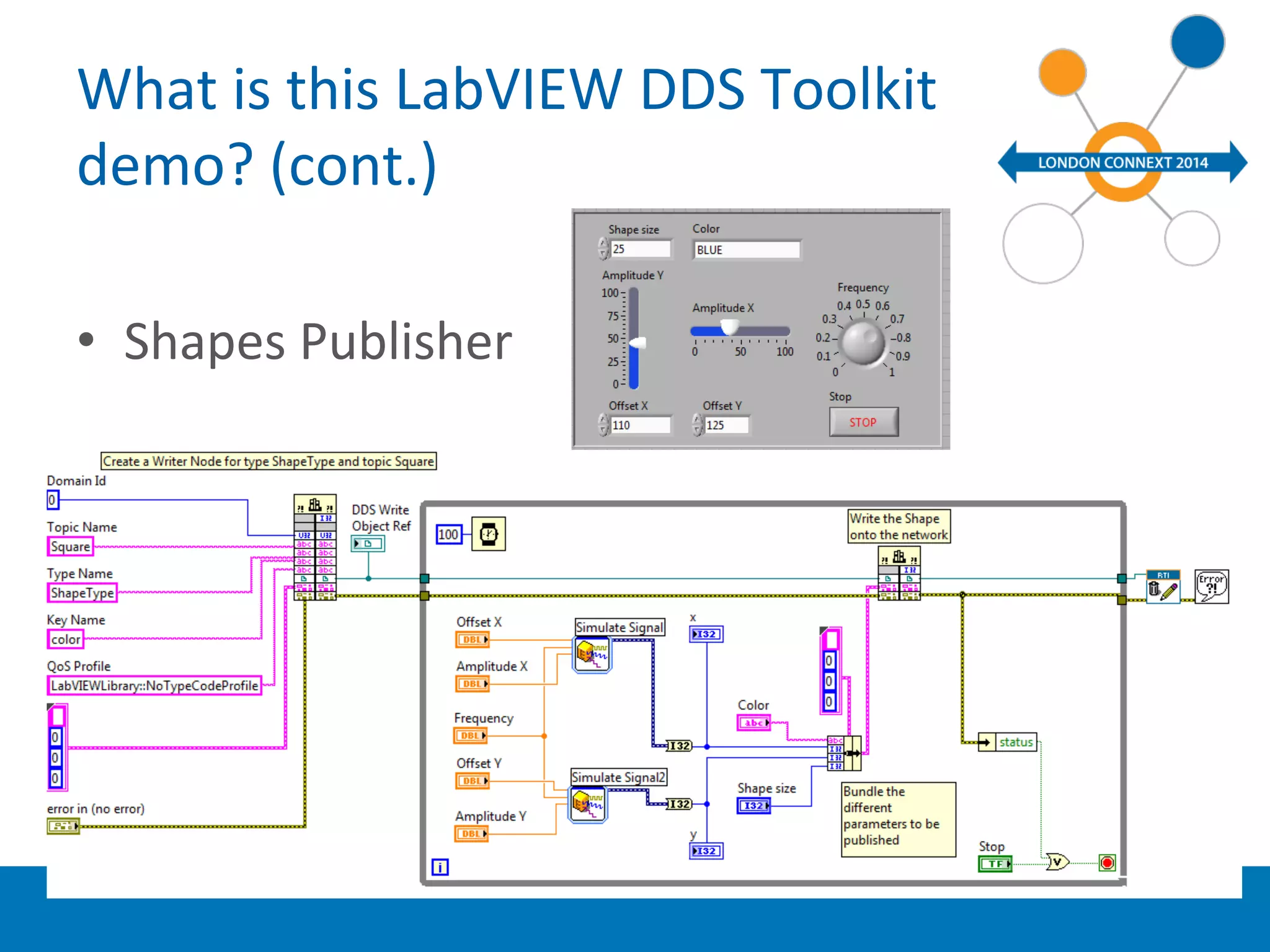
  • 12.
    What is this LabVIEW DDS Toolkit demo? (cont.) • Shapes Publisher
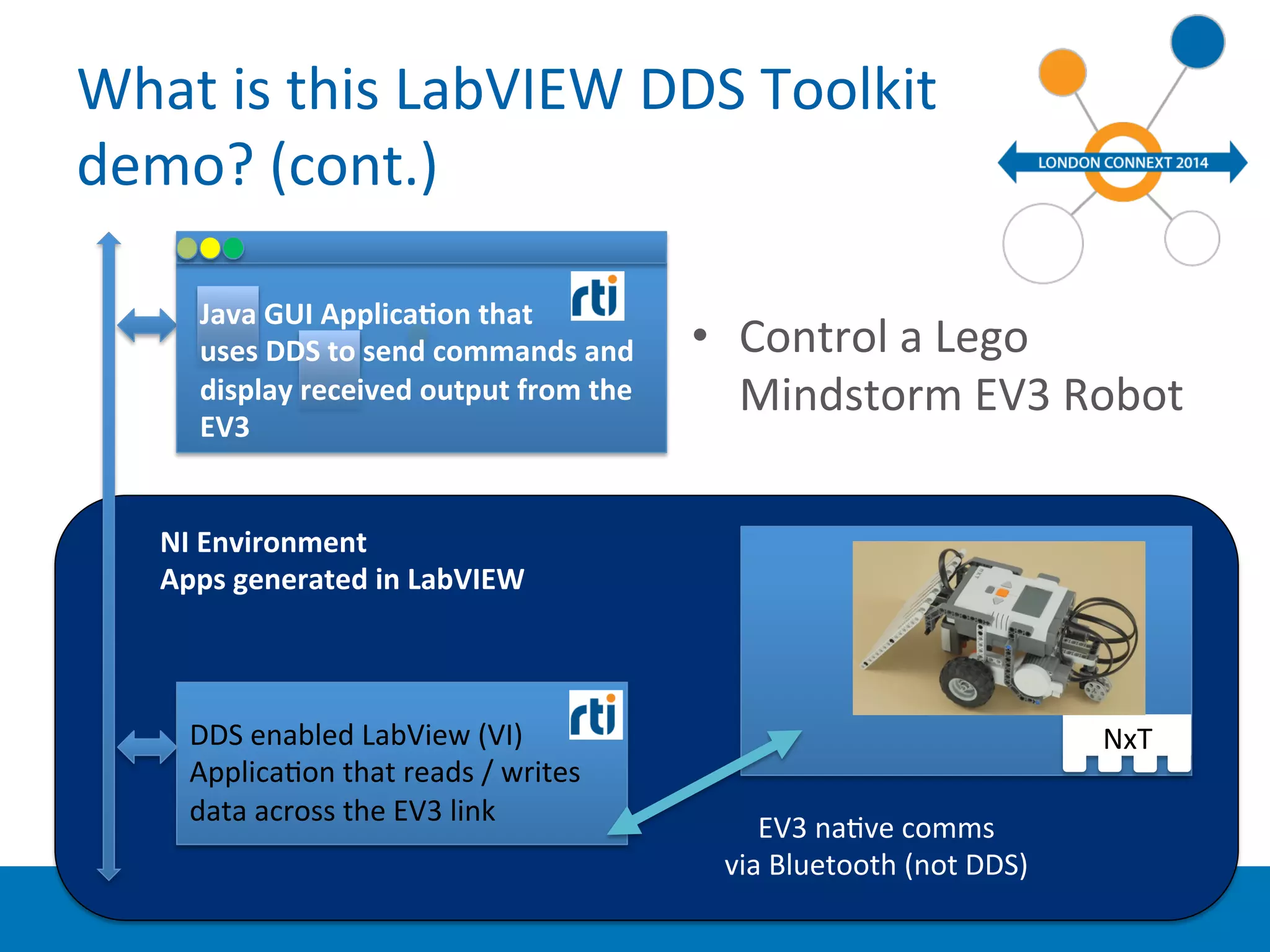
  • 13.
    NxT What is this LabVIEW DDS Toolkit demo? (cont.) EV3 naYve comms via Bluetooth (not DDS) Java GUI ApplicaBon that uses DDS to send commands and display received output from the EV3 NI Environment Apps generated in LabVIEW DDS enabled LabView (VI) ApplicaYon that reads / writes data across the EV3 link • Control a Lego Mindstorm EV3 Robot
  • 14.
    LimitaYons • Currently 32-­‐bit Windows • FuncYonality … – Reading by polling only – Reduce supported data types • Only one top-­‐level key. – LabVIEW imposed constraints • For instance, no complex-­‐type arrays.
  • 15.
    Product Roadmap •Feedback about API – Is current API enough for most use cases? • LabVIEW RT – VxWorks porYng for CompactRIO board • Reading without polling – Integrate LabVIEW Events? – Waitsets?
  • 16.
    What’s next ? • Try it! • LabVIEW available as free 45-­‐day trial – hup://www.ni.com/download-­‐labview • Connext Professional as free 30-­‐day trial – If you don’t already have it! hup://www.rY.com/downloads/index.html • Where can I get the RTI DDS Toolkit Add-­‐on? – Developed and maintained by RTI – Available through NI only (for Windows only) • Via the VIPM in LabVIEW – It’s Free – even for a permanent license !!! J