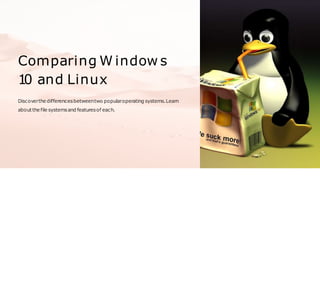
Comparing W indow s
1
0 and Linux
Discoverthe differencesbetweentwo popularoperating systems.Learn
aboutthe file systemsand featuresof each.
Health and Safety Procedures
1 Reduce Strain on 2 Keep your PC 3 Be mindful of User
your Eyes 👀 Secure 🔒 Accounts 👥
Switch on"Night Light" to Install trustedanti-virus Createseparateuser
reduceeyestrainand
improve your
sleep quality.
softwareandusestrong
passwordsto keep
your devicesecure.
accountsfordifferent
membersor groupsto
keepyourfiles
separate
andorganized.
W indow s and Linux Vocabulary
Operating System
GUI
Command Line Interface
Kernel
File System
Registry
PackageManager
T
askManager
T
erminal
Shell
objective
Aftercompletingthistraining,thetraineewillbeableto:
Comparetheuserinterface of Windows10andLinuxandidentify thesimilarities anddifferences
betweenthem.
Evaluatethefile systemsusedby Windows10andLinux
B r i e f a b o u t w i n d w o s a n d l i n u x o s
Windows10andLinuxaretwo popularoperating systemsusedonpersonalcomputersandservers.
Windows10isaproprietaryoperating systemdeveloped by Microsoft, whileLinuxisafreeandopen-
sourceoperating systemthatisdeveloped collaboratively by aglobalcommunityof developers.
Windows 10 is known for its user-friendly graphical interface, extensive software support, and
compatibility withmost hardware.Itiswidely usedonpersonalcomputersandlaptops.However,itis
also criticizedforitshighresourceusage,susceptibility to malware,andhighlicensing costs.
Vocabulary
Boot
The processof starting up yourcomputerby
loading the Operating System.
File System
Organizesand storesfiles and dataonyour
device.
NTFS
Anadvanced file systemdeveloped by
MicrosoftforWindowsNT
.
Multiuser Capability
Allows multipleusersto workonthesame
device at the same time withseparate
accounts.
1
Customize your Start Menu
📜
Add,remove,orresizetilesonyourstart
menuto fit yourpreferences.
2
User Interface and Customization
Options for W indow s
Use Dark Mode 💡
Darkmode canreduce strainonyoureyes
and make yourdesktop looksleekand
modern.
3
Change your Lock Screen
📸
Personalize yourlockscreenwithaunique
photo orslideshow.
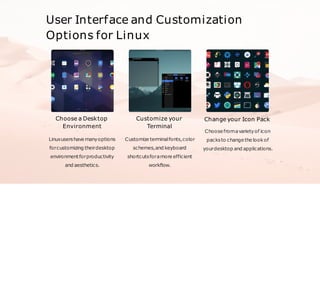
User Interface and Customization
Options for Linux
Choose a Desktop
Environment
Linuxusershave manyoptions
forcustomizing theirdesktop
environmentforproductivity
and aesthetics.
Customize your
Terminal
Customize terminalfonts,color
schemes,and keyboard
shortcutsforamore efficient
workflow.
Change your Icon Pack
Choosefromavarietyof icon
packsto changethe lookof
yourdesktop and applications.
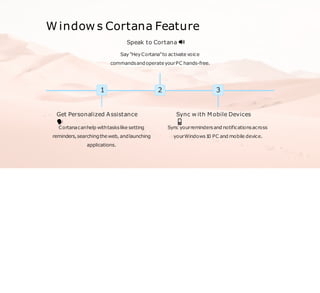
W indow s Cortana Feature
1
Get Personalized Assistance
🗣
Cortanacanhelp withtaskslike setting
reminders,searchingtheweb, andlaunching
applications.
2
Speak to Cortana 🔊
Say"HeyCortana"to activate voice
commandsandoperateyourPC hands-free.
3
Sync w ith Mobile Devices
📱
Sync yourremindersand notificationsacross
yourWindows1
0 PC and mobile device.
Microsoft Edge Web
Brow ser Feature
Organize your Tabs
📑
Create and organize groups
of tabsforeasier
accessibilityand improved
productivity.
1 2 Draw on the Web
🎨
Annotateand drawonweb
pagesto highlightimportant
partsorcreate afun
messageto share.
3 Collections
🧩
Savearticles, images,andinformationyoufind ontheweb to
easilyfind and reference later
.
Linux Feature: Multitasking
Linuxisdesignedformultitasking,allowingusersto runmultipleapplicationsatonce.Thisisgreat for
userswhoneedto switchfrequentlybetweenapplicationsorfordeveloperswhoneed to test multiple
environmentsatonce.
Linux Feature: Multiuser
Capability
Linux supports multiple user accounts and simultaneous sessions,
allowingdifferentusersto accessthesamesystemresourceswithout
interferingwitheachother.
File Systems
NTFS vs FAT
NTFSis more secure and reliable thanFAT
.
NTFSallows largerfile sizesthanFAT
.
NTFScancompressfilesto save diskspace.
ext4 vs XFS
Ext4isbettersuited forsmalldisksand
personaluse.
XFSismore suited forlarge disksand
enterprise use.
Bothare journaling file systems,meaning
theykeep trackof changesto dataincase
of powerfailure orsystemcrashes.
Final Review
1 Cheek Learning
💯
2 Summary
📝
3 Conclusion
🎉
Questions and Answ ers
Let'stest yourknowledge. Answerthesequestions:
1. Whatisafile system?
2. Whichoperating systemisbetterformultitasking:LinuxorWindows?
3. WhatisthekeydifferencebetweenNTFSandFATfile systems?
a n s w e r
Answers:
1. Asystemusedby yourcomputerto organizeandstoredataonyourdevice.
2. Linuxisknownto be betteratmultitasking asit isdesignedforworkingwithmultipleapplicationsat
once.
3. NTFSismoresecure,allowslargerfile sizes,andcancompressfiles to savedisk space.
C o n c l u s i o n
We appreciate your presence in this training course, and we hope that at the end of it you
will have gained knowledge of the most important differences between Windows and Linux
operating systems.

Comparing-Windows-10-and-Linux (1).pptx

  • 1.
    Comparing W indows 1 0 and Linux Discoverthe differencesbetweentwo popularoperating systems.Learn aboutthe file systemsand featuresof each.
  • 2.
    Health and SafetyProcedures 1 Reduce Strain on 2 Keep your PC 3 Be mindful of User your Eyes 👀 Secure 🔒 Accounts 👥 Switch on"Night Light" to Install trustedanti-virus Createseparateuser reduceeyestrainand improve your sleep quality. softwareandusestrong passwordsto keep your devicesecure. accountsfordifferent membersor groupsto keepyourfiles separate andorganized.
  • 3.
    W indow sand Linux Vocabulary Operating System GUI Command Line Interface Kernel File System Registry PackageManager T askManager T erminal Shell
  • 4.
    objective Aftercompletingthistraining,thetraineewillbeableto: Comparetheuserinterface of Windows10andLinuxandidentifythesimilarities anddifferences betweenthem. Evaluatethefile systemsusedby Windows10andLinux
  • 5.
    B r ie f a b o u t w i n d w o s a n d l i n u x o s Windows10andLinuxaretwo popularoperating systemsusedonpersonalcomputersandservers. Windows10isaproprietaryoperating systemdeveloped by Microsoft, whileLinuxisafreeandopen- sourceoperating systemthatisdeveloped collaboratively by aglobalcommunityof developers. Windows 10 is known for its user-friendly graphical interface, extensive software support, and compatibility withmost hardware.Itiswidely usedonpersonalcomputersandlaptops.However,itis also criticizedforitshighresourceusage,susceptibility to malware,andhighlicensing costs.
  • 6.
    Vocabulary Boot The processof startingup yourcomputerby loading the Operating System. File System Organizesand storesfiles and dataonyour device. NTFS Anadvanced file systemdeveloped by MicrosoftforWindowsNT . Multiuser Capability Allows multipleusersto workonthesame device at the same time withseparate accounts. 1 Customize your Start Menu 📜 Add,remove,orresizetilesonyourstart menuto fit yourpreferences. 2 User Interface and Customization Options for W indow s Use Dark Mode 💡 Darkmode canreduce strainonyoureyes and make yourdesktop looksleekand modern. 3 Change your Lock Screen 📸 Personalize yourlockscreenwithaunique photo orslideshow.
  • 7.
    User Interface andCustomization Options for Linux Choose a Desktop Environment Linuxusershave manyoptions forcustomizing theirdesktop environmentforproductivity and aesthetics. Customize your Terminal Customize terminalfonts,color schemes,and keyboard shortcutsforamore efficient workflow. Change your Icon Pack Choosefromavarietyof icon packsto changethe lookof yourdesktop and applications.
  • 8.
    W indow sCortana Feature 1 Get Personalized Assistance 🗣 Cortanacanhelp withtaskslike setting reminders,searchingtheweb, andlaunching applications. 2 Speak to Cortana 🔊 Say"HeyCortana"to activate voice commandsandoperateyourPC hands-free. 3 Sync w ith Mobile Devices 📱 Sync yourremindersand notificationsacross yourWindows1 0 PC and mobile device.
  • 9.
    Microsoft Edge Web Browser Feature Organize your Tabs 📑 Create and organize groups of tabsforeasier accessibilityand improved productivity. 1 2 Draw on the Web 🎨 Annotateand drawonweb pagesto highlightimportant partsorcreate afun messageto share. 3 Collections 🧩 Savearticles, images,andinformationyoufind ontheweb to easilyfind and reference later .
  • 10.
    Linux Feature: Multitasking Linuxisdesignedformultitasking,allowinguserstorunmultipleapplicationsatonce.Thisisgreat for userswhoneedto switchfrequentlybetweenapplicationsorfordeveloperswhoneed to test multiple environmentsatonce.
  • 11.
    Linux Feature: Multiuser Capability Linuxsupports multiple user accounts and simultaneous sessions, allowingdifferentusersto accessthesamesystemresourceswithout interferingwitheachother.
  • 12.
    File Systems NTFS vsFAT NTFSis more secure and reliable thanFAT . NTFSallows largerfile sizesthanFAT . NTFScancompressfilesto save diskspace. ext4 vs XFS Ext4isbettersuited forsmalldisksand personaluse. XFSismore suited forlarge disksand enterprise use. Bothare journaling file systems,meaning theykeep trackof changesto dataincase of powerfailure orsystemcrashes.
  • 13.
    Final Review 1 CheekLearning 💯 2 Summary 📝 3 Conclusion 🎉
  • 14.
    Questions and Answers Let'stest yourknowledge. Answerthesequestions: 1. Whatisafile system? 2. Whichoperating systemisbetterformultitasking:LinuxorWindows? 3. WhatisthekeydifferencebetweenNTFSandFATfile systems?
  • 15.
    a n sw e r Answers: 1. Asystemusedby yourcomputerto organizeandstoredataonyourdevice. 2. Linuxisknownto be betteratmultitasking asit isdesignedforworkingwithmultipleapplicationsat once. 3. NTFSismoresecure,allowslargerfile sizes,andcancompressfiles to savedisk space.
  • 16.
    C o nc l u s i o n We appreciate your presence in this training course, and we hope that at the end of it you will have gained knowledge of the most important differences between Windows and Linux operating systems.