DIGITAL 
PHOTOGRAPHY
WHAT IS DIGITAL 
PHOTOGRAPHY? 
• Digital photography is one of several forms of digital 
imaging. It uses an array of electronic photo detectors to 
capture the image focused by the lens, as opposed to an 
exposure on photographic film. The captured image is then 
digitized and stored as a computer file ready for digital 
processing, viewing, digital publishing or printing. 
• simpled word :it is photography where the image is 
exposed, captured and stored electronically rather than on 
film.
DIGITAL CAMERA 
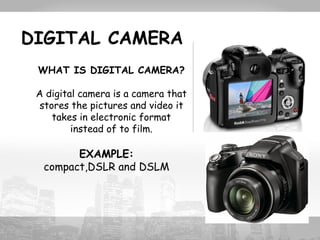
WHAT IS DIGITAL CAMERA? 
A digital camera is a camera that 
stores the pictures and video it 
takes in electronic format 
instead of to film. 
EXAMPLE: 
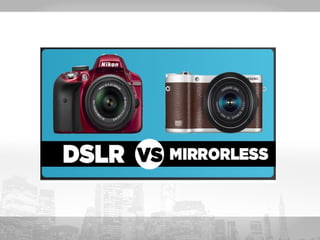
compact,DSLR and DSLM
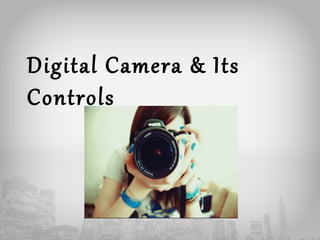
Digital Camera & Its 
Controls
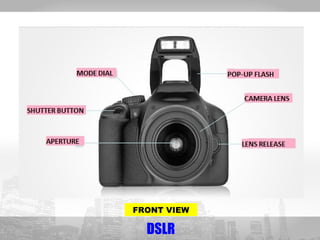
FRONT VIEW 
DSLR
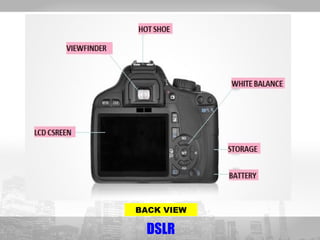
BACK VIEW 
DSLR
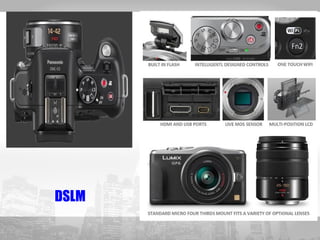
DSLM
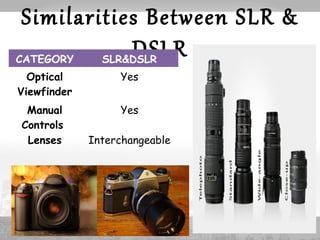
Similarities Between SLR & 
DSLR CATEGORY SLR&DSLR 
Optical 
Yes 
Viewfinder 
Manual 
Controls 
Yes 
Lenses Interchangeable
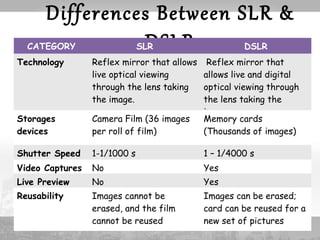
Differences Between SLR & 
CATEGORY SLDR SLR DSLR 
Technology Reflex mirror that allows 
live optical viewing 
through the lens taking 
the image. 
Reflex mirror that 
allows live and digital 
optical viewing through 
the lens taking the 
image. 
Storages 
devices 
Camera Film (36 images 
per roll of film) 
Memory cards 
(Thousands of images) 
Shutter Speed 1-1/1000 s 1 – 1/4000 s 
Video Captures No Yes 
Live Preview No Yes 
Reusability Images cannot be 
erased, and the film 
cannot be reused 
Images can be erased; 
card can be reused for a 
new set of pictures
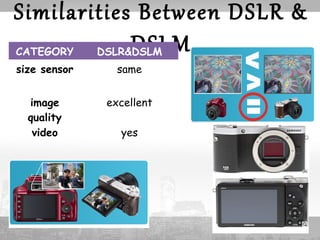
Similarities Between DSLR & 
CATEGORY DSLR&DDSLSMLM 
size sensor same 
image 
quality 
excellent 
video yes
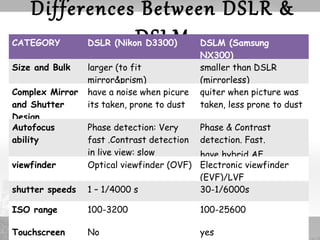
Differences Between DSLR & 
CATEGORY DSLR (NikoDn DS33L00M) DSLM (Samsung 
NX300) 
Size and Bulk larger (to fit 
mirror&prism) 
smaller than DSLR 
(mirrorless) 
Complex Mirror 
and Shutter 
Design 
have a noise when picure 
its taken, prone to dust 
quiter when picture was 
taken, less prone to dust 
Autofocus 
ability 
Phase detection: Very 
fast .Contrast detection 
in live view: slow 
Phase & Contrast 
detection. Fast. 
have hybrid AF 
viewfinder Optical viewfinder (OVF) Electronic viewfinder 
(EVF)/LVF 
shutter speeds 1 – 1/4000 s 30-1/6000s 
ISO range 100-3200 100-25600 
Touchscreen No yes
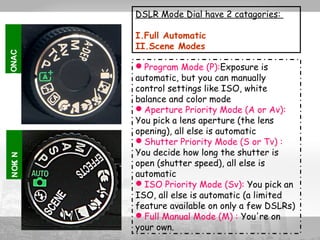
DSLR Mode Dial have 2 catagories: 
I.Full Automatic 
II.Scene Modes 
NOKI N NONAC 
Program Mode (P):Exposure is 
automatic, but you can manually 
control settings like ISO, white 
balance and color mode 
Aperture Priority Mode (A or Av): 
You pick a lens aperture (the lens 
opening), all else is automatic 
Shutter Priority Mode (S or Tv) : 
You decide how long the shutter is 
open (shutter speed), all else is 
automatic 
ISO Priority Mode (Sv): You pick an 
ISO, all else is automatic (a limited 
feature available on only a few DSLRs) 
Full Manual Mode (M) : You're on 
your own.
SLR mode 
DSLR mode 
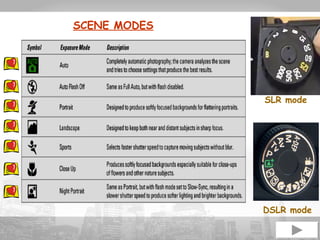
SCENE MODES
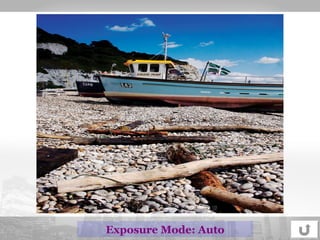
Exposure Mode: Auto
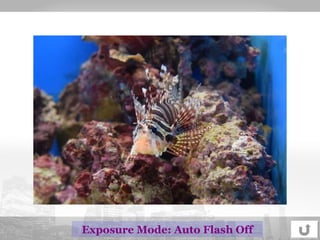
Exposure Mode: Auto Flash Off
Exposure Mode: Potrait
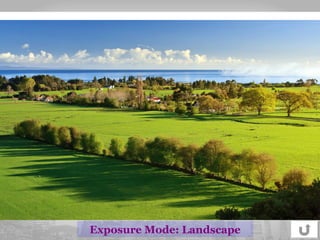
Exposure Mode: Landscape
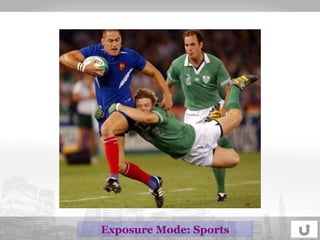
Exposure Mode: Sports
Exposure Mode: Close Up
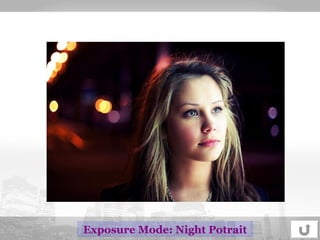
Exposure Mode: Night Potrait
Strength &Technique 
in Digital 
Photography
Visual 
Modification/ 
Manipulation 
Using Camera
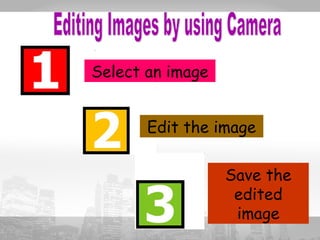
Select an image 
Edit the image 
Save the 
edited 
image
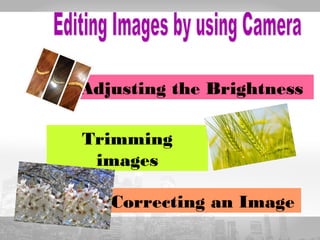
Adjusting the Brightness 
Trimming 
images 
Correcting an Image
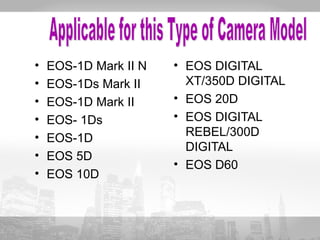
• EOS-1D Mark II N 
• EOS-1Ds Mark II 
• EOS-1D Mark II 
• EOS- 1Ds 
• EOS-1D 
• EOS 5D 
• EOS 10D 
• EOS DIGITAL 
XT/350D DIGITAL 
• EOS 20D 
• EOS DIGITAL 
REBEL/300D 
DIGITAL 
• EOS D60
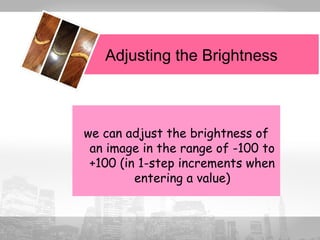
Adjusting the Brightness 
we can adjust the brightness of 
an image in the range of -100 to 
+100 (in 1-step increments when 
entering a value)
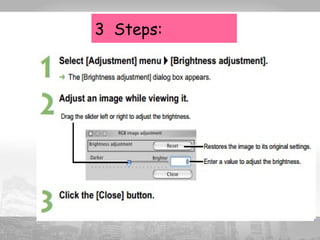
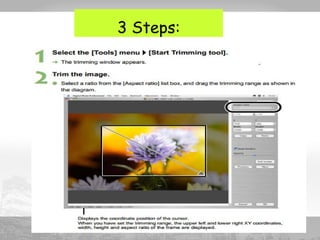
3 Steps:
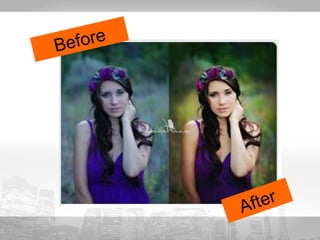
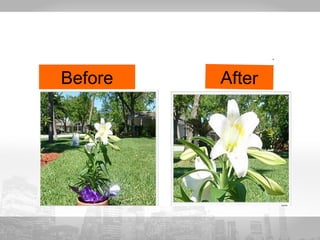
Before 
After
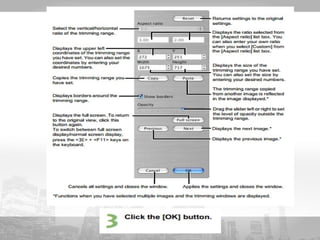
Trimming Images 
We can trim an image 
within our desired range
3 Steps:
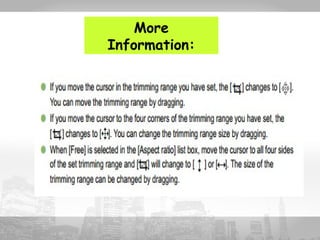
More 
Information:
Before After
Correcting Image 
We can correct an image using: 
Repairing 
Copy Stamp
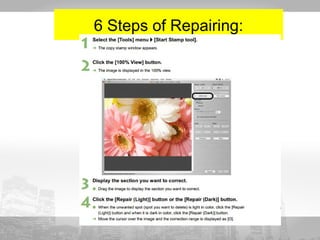
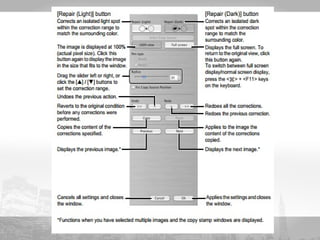
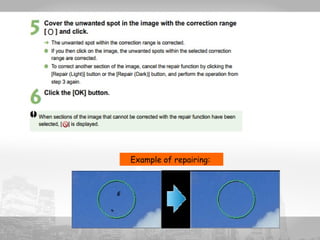
Repairing 
we can correct an image so that unwanted 
spots (spots that we want to delete) on 
the image blend with surrounding color
6 Steps of Repairing:
Example of repairing:
Before After
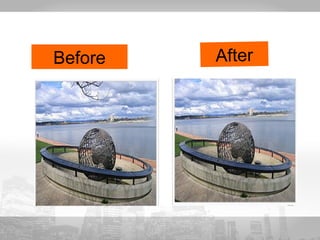
Copy Stamp 
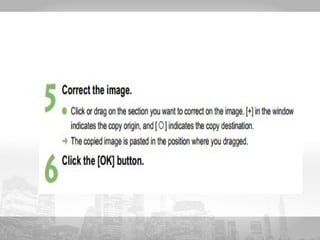
we can correct an image by pasting 
a section copied from another 
part of the same image to 
unwanted part of the image
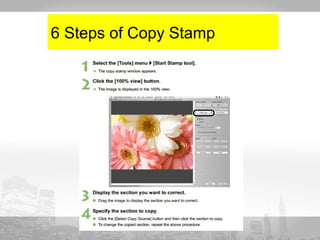
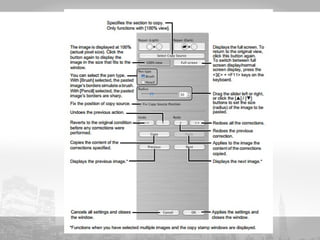
6 Steps of Copy Stamp
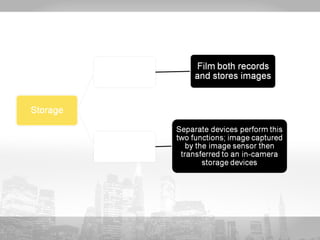
STORAGE 
DEVICES
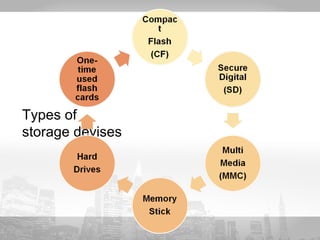
Types of 
storage devises
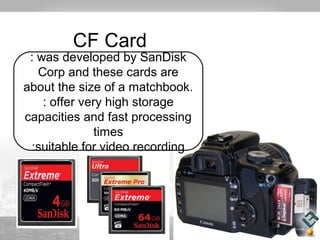
CF Card 
: was developed by SanDisk 
Corp and these cards are 
about the size of a matchbook. 
: offer very high storage 
capacities and fast processing 
times 
:suitable for video recording
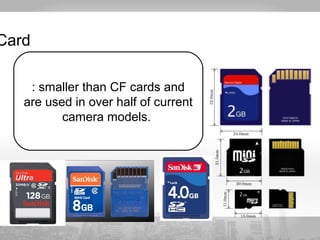
Card 
: smaller than CF cards and 
are used in over half of current 
camera models.
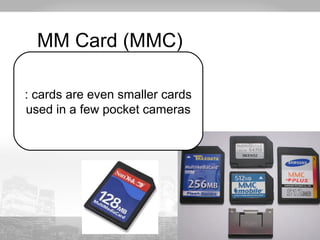
MM Card (MMC) 
: cards are even smaller cards 
used in a few pocket cameras
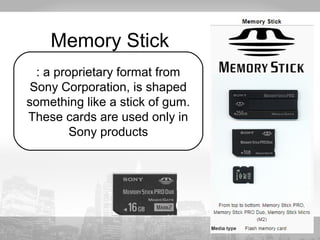
Memory Stick 
: a proprietary format from 
Sony Corporation, is shaped 
something like a stick of gum. 
These cards are used only in 
Sony products
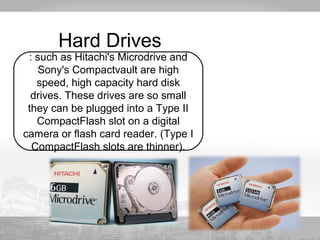
Hard Drives 
: such as Hitachi's Microdrive and 
Sony's Compactvault are high 
speed, high capacity hard disk 
drives. These drives are so small 
they can be plugged into a Type II 
CompactFlash slot on a digital 
camera or flash card reader. (Type I 
CompactFlash slots are thinner).
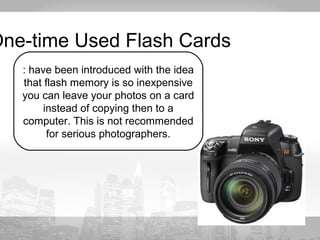
One-time Used Flash Cards 
: have been introduced with the idea 
that flash memory is so inexpensive 
you can leave your photos on a card 
instead of copying then to a 
computer. This is not recommended 
for serious photographers.
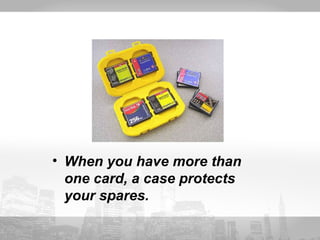
• When you have more than 
one card, a case protects 
your spares.
Digital Photography

  • 1.
  • 2.
    WHAT IS DIGITAL PHOTOGRAPHY? • Digital photography is one of several forms of digital imaging. It uses an array of electronic photo detectors to capture the image focused by the lens, as opposed to an exposure on photographic film. The captured image is then digitized and stored as a computer file ready for digital processing, viewing, digital publishing or printing. • simpled word :it is photography where the image is exposed, captured and stored electronically rather than on film.
  • 3.
    DIGITAL CAMERA WHATIS DIGITAL CAMERA? A digital camera is a camera that stores the pictures and video it takes in electronic format instead of to film. EXAMPLE: compact,DSLR and DSLM
  • 4.
    Digital Camera &Its Controls
  • 5.
  • 6.
  • 7.
  • 8.
    Similarities Between SLR& DSLR CATEGORY SLR&DSLR Optical Yes Viewfinder Manual Controls Yes Lenses Interchangeable
  • 9.
    Differences Between SLR& CATEGORY SLDR SLR DSLR Technology Reflex mirror that allows live optical viewing through the lens taking the image. Reflex mirror that allows live and digital optical viewing through the lens taking the image. Storages devices Camera Film (36 images per roll of film) Memory cards (Thousands of images) Shutter Speed 1-1/1000 s 1 – 1/4000 s Video Captures No Yes Live Preview No Yes Reusability Images cannot be erased, and the film cannot be reused Images can be erased; card can be reused for a new set of pictures
  • 11.
    Similarities Between DSLR& CATEGORY DSLR&DDSLSMLM size sensor same image quality excellent video yes
  • 12.
    Differences Between DSLR& CATEGORY DSLR (NikoDn DS33L00M) DSLM (Samsung NX300) Size and Bulk larger (to fit mirror&prism) smaller than DSLR (mirrorless) Complex Mirror and Shutter Design have a noise when picure its taken, prone to dust quiter when picture was taken, less prone to dust Autofocus ability Phase detection: Very fast .Contrast detection in live view: slow Phase & Contrast detection. Fast. have hybrid AF viewfinder Optical viewfinder (OVF) Electronic viewfinder (EVF)/LVF shutter speeds 1 – 1/4000 s 30-1/6000s ISO range 100-3200 100-25600 Touchscreen No yes
  • 13.
    DSLR Mode Dialhave 2 catagories: I.Full Automatic II.Scene Modes NOKI N NONAC Program Mode (P):Exposure is automatic, but you can manually control settings like ISO, white balance and color mode Aperture Priority Mode (A or Av): You pick a lens aperture (the lens opening), all else is automatic Shutter Priority Mode (S or Tv) : You decide how long the shutter is open (shutter speed), all else is automatic ISO Priority Mode (Sv): You pick an ISO, all else is automatic (a limited feature available on only a few DSLRs) Full Manual Mode (M) : You're on your own.
  • 14.
    SLR mode DSLRmode SCENE MODES
  • 15.
  • 16.
  • 17.
  • 18.
  • 19.
  • 20.
  • 21.
  • 22.
    Strength &Technique inDigital Photography
  • 25.
  • 26.
    Select an image Edit the image Save the edited image
  • 27.
    Adjusting the Brightness Trimming images Correcting an Image
  • 28.
    • EOS-1D MarkII N • EOS-1Ds Mark II • EOS-1D Mark II • EOS- 1Ds • EOS-1D • EOS 5D • EOS 10D • EOS DIGITAL XT/350D DIGITAL • EOS 20D • EOS DIGITAL REBEL/300D DIGITAL • EOS D60
  • 29.
    Adjusting the Brightness we can adjust the brightness of an image in the range of -100 to +100 (in 1-step increments when entering a value)
  • 30.
  • 31.
  • 32.
    Trimming Images Wecan trim an image within our desired range
  • 33.
  • 34.
  • 36.
  • 37.
    Correcting Image Wecan correct an image using: Repairing Copy Stamp
  • 38.
    Repairing we cancorrect an image so that unwanted spots (spots that we want to delete) on the image blend with surrounding color
  • 39.
    6 Steps ofRepairing:
  • 41.
  • 42.
  • 43.
    Copy Stamp wecan correct an image by pasting a section copied from another part of the same image to unwanted part of the image
  • 44.
    6 Steps ofCopy Stamp
  • 47.
  • 49.
  • 50.
    CF Card :was developed by SanDisk Corp and these cards are about the size of a matchbook. : offer very high storage capacities and fast processing times :suitable for video recording
  • 51.
    Card : smallerthan CF cards and are used in over half of current camera models.
  • 52.
    MM Card (MMC) : cards are even smaller cards used in a few pocket cameras
  • 53.
    Memory Stick :a proprietary format from Sony Corporation, is shaped something like a stick of gum. These cards are used only in Sony products
  • 54.
    Hard Drives :such as Hitachi's Microdrive and Sony's Compactvault are high speed, high capacity hard disk drives. These drives are so small they can be plugged into a Type II CompactFlash slot on a digital camera or flash card reader. (Type I CompactFlash slots are thinner).
  • 55.
    One-time Used FlashCards : have been introduced with the idea that flash memory is so inexpensive you can leave your photos on a card instead of copying then to a computer. This is not recommended for serious photographers.
  • 56.
    • When youhave more than one card, a case protects your spares.