Perl on embedded Devices
Jens Rehsack
Niederrhein Perl Mongers
German Perl Workshop 2018
Jens Rehsack (Niederrhein.PM) Perl on embedded Devices German Perl Workshop 2018 1 / 16
Login on Build Server
$ ssh -Y gpw_acc_${VLAN_GRP}@10 .0.${VLAN_GRP }0.1
# e.g. ssh -Y gpc_acc_4@10 .0.40.1
Your password is identical to your login name.
Attach your device (to your Laptop)
$ ls -l /dev | grep -i usb
$ screen /dev/tty.usbserial 115200
On Windows use putty, for example.
Optionally power on your device and watch the boot process
Jens Rehsack (Niederrhein.PM) Perl on embedded Devices German Perl Workshop 2018 3 / 16
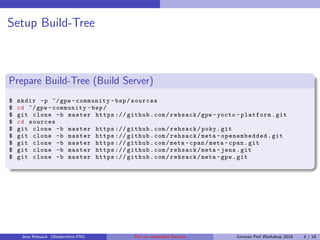
Setup Build-Tree
Prepare Build-Tree (Build Server)
$ mkdir -p ~/gpw -community -bsp/sources
$ cd ~/gpw -community -bsp/
$ git clone -b master https :// github.com/rehsack/gpw -yocto -platform.git
$ cd sources
$ git clone -b master https :// github.com/rehsack/poky.git
$ git clone -b master https :// github.com/rehsack/meta - openembedded.git
$ git clone -b master https :// github.com/meta -cpan/meta -cpan.git
$ git clone -b master https :// github.com/rehsack/meta -jens.git
$ git clone -b master https :// github.com/rehsack/meta -gpw.git
Jens Rehsack (Niederrhein.PM) Perl on embedded Devices German Perl Workshop 2018 4 / 16
Setup Environment
Prepare Environment (Build Server)
# gpw_acc_5 does , gpw_acc_8 uses 8
$ echo "export VLAN_GRP =5
export LANG=en_US.UTF -8
source ~/gpw -community -bsp/sources/poky/scripts/oe -init -bashrc" >> ~/. bashrc
Please use your VLAN group from your name plate on the desk.
Restart and prepare your shell (Build Server)
$ exec bash
$ oe_builddir use ~/gpw -community -bsp/gpw -yocto -platform
Jens Rehsack (Niederrhein.PM) Perl on embedded Devices German Perl Workshop 2018 5 / 16
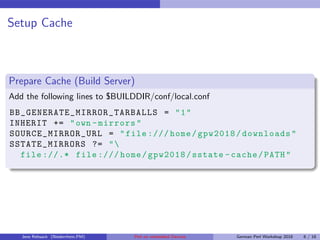
Setup Cache
Prepare Cache (Build Server)
Add the following lines to $BUILDDIR/conf/local.conf
BB_GENERATE_MIRROR_TARBALLS = "1"
INHERIT += "own -mirrors"
SOURCE_MIRROR_URL = "file :/// home/gpw2018/downloads"
SSTATE_MIRRORS ?= "
file ://.* file :/// home/gpw2018/sstate -cache/PATH"
Jens Rehsack (Niederrhein.PM) Perl on embedded Devices German Perl Workshop 2018 6 / 16
Enter Buildmode (Build Server)
Enter Buildmode
# create new screen session named bitbake
$ screen -S bitbake
$ oe_builddir use ~/gpw -community -bsp/gpw -yocto -platform
$ WANTED_ROOT_DEV =emmc mkimgs updatable -app -image
Jens Rehsack (Niederrhein.PM) Perl on embedded Devices German Perl Workshop 2018 8 / 16
Enter Flash (Build Server)
# re -connect to screen session named bitbake
$ screen -r bitbake
$ WANTED_ROOT_DEV =emmc gpw_deploy flash
Reset your device (Your Laptop)
Reset your device and stop automatic booting by pressing space on the terminal
attached to the device serial console.
Flash device (Your Laptop, Device Screen)
run netboot
Jens Rehsack (Niederrhein.PM) Perl on embedded Devices German Perl Workshop 2018 9 / 16
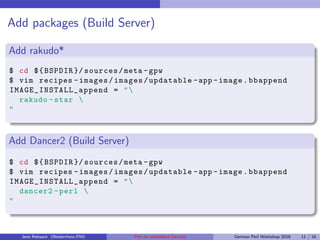
Add packages (Build Server)
Add rakudo*
$ cd ${BSPDIR }/ sources/meta -gpw
$ vim recipes -images/images/updatable -app -image.bbappend
IMAGE_INSTALL_append = "
rakudo -star 
"
Add Dancer2 (Build Server)
$ cd ${BSPDIR }/ sources/meta -gpw
$ vim recipes -images/images/updatable -app -image.bbappend
IMAGE_INSTALL_append = "
dancer2 -perl 
"
Jens Rehsack (Niederrhein.PM) Perl on embedded Devices German Perl Workshop 2018 11 / 16
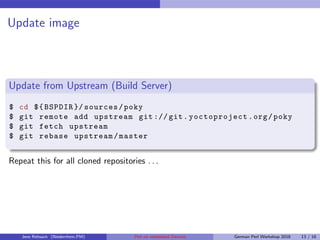
Update image
Update from Upstream (Build Server)
$ cd ${BSPDIR }/ sources/poky
$ git remote add upstream git :// git.yoctoproject.org/poky
$ git fetch upstream
$ git rebase upstream/master
Repeat this for all cloned repositories . . .
Jens Rehsack (Niederrhein.PM) Perl on embedded Devices German Perl Workshop 2018 13 / 16
Own software
Add self written software (Build Server)
$ cd ${BSPDIR }/ sources/meta -gpw
$ mkdir recipes -service/myservice
$ vim recipes -service/myservice/ myservice_git .bb
DESCRIPTION = "My:: Service provides backend for cool stuff"
LICENSE = "MIT"
MAINTAINER = "my.name@my.company"
HOMEPAGE = "https :// myservice.my.company/"
LIC_FILES_CHKSUM = "file ://${ COMMON_LICENSE_DIR }/ MIT;md5 =..."
SRC_REV = " abcdef0123456789abcdef0123456789abcdef01 "
SRC_URI = "
git :// scm.my.company/path/repo.git;rev=${SRC_REV} 
file :// run 
file ://my -service.json 
..."
RDEPENDS_${PN} += " daemontools "
RDEPENDS_${PN} += "dancer2"
RDEPENDS_${PN} += "moox -configfromfile -perl"
do_install_appends () {
install -d -m ${D}${ sysconfdir}
install -m 0644 ${WORKDIR }/my -service.json ${D}${sysconfdir}
install -m 0755 ${WORKDIR }/run ${D}${sysconfdir }/ daemontools /service/run
}
Jens Rehsack (Niederrhein.PM) Perl on embedded Devices German Perl Workshop 2018 14 / 16
Prepare Packger::Utils
Prepare Packger::Utils (Build Server)
# checkout and prepare Packager :: Utils
$ mkdir ~/ Projects
$ cd ~/ Projects
$ git clone https :// github.com/rehsack/Packager -Utils.git
$ cd Packager -Utils
$ perl Makefile.PM
$ cpanm installdeps .
Jens Rehsack (Niederrhein.PM) Perl on embedded Devices German Perl Workshop 2018 15 / 16
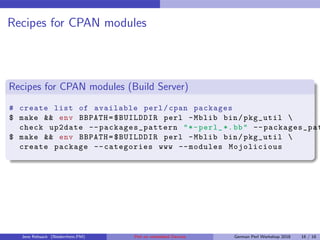
Recipes for CPAN modules
Recipes for CPAN modules (Build Server)
# create list of available perl/cpan packages
$ make && env BBPATH=$BUILDDIR perl -Mblib bin/pkg_util 
check up2date --packages_pattern "*-perl_ *.bb" --packages_pat
$ make && env BBPATH=$BUILDDIR perl -Mblib bin/pkg_util 
create package --categories www --modules Mojolicious
Jens Rehsack (Niederrhein.PM) Perl on embedded Devices German Perl Workshop 2018 16 / 16

Perl on-embedded-devices

  • 1.
    Perl on embeddedDevices Jens Rehsack Niederrhein Perl Mongers German Perl Workshop 2018 Jens Rehsack (Niederrhein.PM) Perl on embedded Devices German Perl Workshop 2018 1 / 16
  • 2.
    Login on BuildServer Login on Build Server $ ssh -Y gpw_acc_${VLAN_GRP}@10 .0.${VLAN_GRP }0.1 # e.g. ssh -Y gpc_acc_4@10 .0.40.1 Your password is identical to your login name. Attach your device (to your Laptop) $ ls -l /dev | grep -i usb $ screen /dev/tty.usbserial 115200 On Windows use putty, for example. Optionally power on your device and watch the boot process Jens Rehsack (Niederrhein.PM) Perl on embedded Devices German Perl Workshop 2018 3 / 16
  • 3.
    Setup Build-Tree Prepare Build-Tree(Build Server) $ mkdir -p ~/gpw -community -bsp/sources $ cd ~/gpw -community -bsp/ $ git clone -b master https :// github.com/rehsack/gpw -yocto -platform.git $ cd sources $ git clone -b master https :// github.com/rehsack/poky.git $ git clone -b master https :// github.com/rehsack/meta - openembedded.git $ git clone -b master https :// github.com/meta -cpan/meta -cpan.git $ git clone -b master https :// github.com/rehsack/meta -jens.git $ git clone -b master https :// github.com/rehsack/meta -gpw.git Jens Rehsack (Niederrhein.PM) Perl on embedded Devices German Perl Workshop 2018 4 / 16
  • 4.
    Setup Environment Prepare Environment(Build Server) # gpw_acc_5 does , gpw_acc_8 uses 8 $ echo "export VLAN_GRP =5 export LANG=en_US.UTF -8 source ~/gpw -community -bsp/sources/poky/scripts/oe -init -bashrc" >> ~/. bashrc Please use your VLAN group from your name plate on the desk. Restart and prepare your shell (Build Server) $ exec bash $ oe_builddir use ~/gpw -community -bsp/gpw -yocto -platform Jens Rehsack (Niederrhein.PM) Perl on embedded Devices German Perl Workshop 2018 5 / 16
  • 5.
    Setup Cache Prepare Cache(Build Server) Add the following lines to $BUILDDIR/conf/local.conf BB_GENERATE_MIRROR_TARBALLS = "1" INHERIT += "own -mirrors" SOURCE_MIRROR_URL = "file :/// home/gpw2018/downloads" SSTATE_MIRRORS ?= " file ://.* file :/// home/gpw2018/sstate -cache/PATH" Jens Rehsack (Niederrhein.PM) Perl on embedded Devices German Perl Workshop 2018 6 / 16
  • 6.
    Enter Buildmode (BuildServer) Enter Buildmode # create new screen session named bitbake $ screen -S bitbake $ oe_builddir use ~/gpw -community -bsp/gpw -yocto -platform $ WANTED_ROOT_DEV =emmc mkimgs updatable -app -image Jens Rehsack (Niederrhein.PM) Perl on embedded Devices German Perl Workshop 2018 8 / 16
  • 7.
    Enter Flash (BuildServer) Enter Flash (Build Server) # re -connect to screen session named bitbake $ screen -r bitbake $ WANTED_ROOT_DEV =emmc gpw_deploy flash Reset your device (Your Laptop) Reset your device and stop automatic booting by pressing space on the terminal attached to the device serial console. Flash device (Your Laptop, Device Screen) run netboot Jens Rehsack (Niederrhein.PM) Perl on embedded Devices German Perl Workshop 2018 9 / 16
  • 8.
    Add packages (BuildServer) Add rakudo* $ cd ${BSPDIR }/ sources/meta -gpw $ vim recipes -images/images/updatable -app -image.bbappend IMAGE_INSTALL_append = " rakudo -star " Add Dancer2 (Build Server) $ cd ${BSPDIR }/ sources/meta -gpw $ vim recipes -images/images/updatable -app -image.bbappend IMAGE_INSTALL_append = " dancer2 -perl " Jens Rehsack (Niederrhein.PM) Perl on embedded Devices German Perl Workshop 2018 11 / 16
  • 9.
    Update image Update fromUpstream (Build Server) $ cd ${BSPDIR }/ sources/poky $ git remote add upstream git :// git.yoctoproject.org/poky $ git fetch upstream $ git rebase upstream/master Repeat this for all cloned repositories . . . Jens Rehsack (Niederrhein.PM) Perl on embedded Devices German Perl Workshop 2018 13 / 16
  • 10.
    Own software Add selfwritten software (Build Server) $ cd ${BSPDIR }/ sources/meta -gpw $ mkdir recipes -service/myservice $ vim recipes -service/myservice/ myservice_git .bb DESCRIPTION = "My:: Service provides backend for cool stuff" LICENSE = "MIT" MAINTAINER = "my.name@my.company" HOMEPAGE = "https :// myservice.my.company/" LIC_FILES_CHKSUM = "file ://${ COMMON_LICENSE_DIR }/ MIT;md5 =..." SRC_REV = " abcdef0123456789abcdef0123456789abcdef01 " SRC_URI = " git :// scm.my.company/path/repo.git;rev=${SRC_REV} file :// run file ://my -service.json ..." RDEPENDS_${PN} += " daemontools " RDEPENDS_${PN} += "dancer2" RDEPENDS_${PN} += "moox -configfromfile -perl" do_install_appends () { install -d -m ${D}${ sysconfdir} install -m 0644 ${WORKDIR }/my -service.json ${D}${sysconfdir} install -m 0755 ${WORKDIR }/run ${D}${sysconfdir }/ daemontools /service/run } Jens Rehsack (Niederrhein.PM) Perl on embedded Devices German Perl Workshop 2018 14 / 16
  • 11.
    Prepare Packger::Utils Prepare Packger::Utils(Build Server) # checkout and prepare Packager :: Utils $ mkdir ~/ Projects $ cd ~/ Projects $ git clone https :// github.com/rehsack/Packager -Utils.git $ cd Packager -Utils $ perl Makefile.PM $ cpanm installdeps . Jens Rehsack (Niederrhein.PM) Perl on embedded Devices German Perl Workshop 2018 15 / 16
  • 12.
    Recipes for CPANmodules Recipes for CPAN modules (Build Server) # create list of available perl/cpan packages $ make && env BBPATH=$BUILDDIR perl -Mblib bin/pkg_util check up2date --packages_pattern "*-perl_ *.bb" --packages_pat $ make && env BBPATH=$BUILDDIR perl -Mblib bin/pkg_util create package --categories www --modules Mojolicious Jens Rehsack (Niederrhein.PM) Perl on embedded Devices German Perl Workshop 2018 16 / 16