HTTP: The Definitive Guide
(ch.6 Proxies)
아키텍트를 꿈꾸는 사람들
Cecil
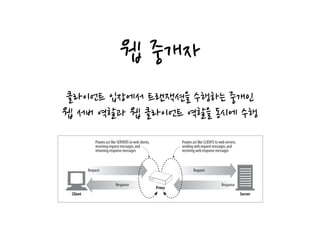
웹 중개자
클라이언트 입장에서 트랜잭션을 수행하는 중개인
웹 서버 역할과 웹 클라이언트 역할을 동시에 수행
HTTP proxy servers are both web servers and web clients. Because HTTP clients
send request messages to proxies, the proxy server must properly handle the requests
and the connections and return responses, just like a web server. At the same time,
the proxy itself sends requests to servers, so it must also behave like a correct HTTP
client, sending requests and receiving responses (see Figure 6-1). If you are creating
your own HTTP proxy, you’ll need to carefully follow the rules for both HTTP cli-
ents and HTTP servers.
Private and Shared Proxies
A proxy server can be dedicated to a single client or shared among many clients.
Figure 6-1. A proxy must be both a server and a client
Client Server
Proxy
Request
Proxies act like SERVERS to web clients,
receiving request messages,and
returning response messages
Request
ResponseResponse
Proxies act like CLIENTS to web servers,
sending web request messages,and
receiving web response messages
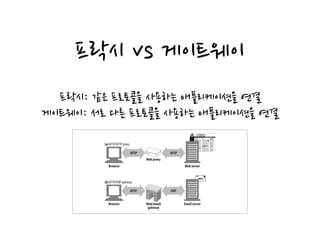
프락시 vs 게이트웨이
프락시: 같은 프로토콜을 사용하는 애플리케이션을 연결
게이트웨이: 서로 다른 프로토콜을 사용하는 애플리케이션을 연결
Figure 6-2 illustrates the difference between proxies and gateways:
• The intermediary device in Figure 6-2a is an HTTP proxy, because the proxy
speaks HTTP to both the client and server.
• The intermediary device in Figure 6-2b is an HTTP/POP gateway, because it ties
an HTTP frontend to a POP email backend. The gateway converts web transac-
tions into the appropriate POP transactions, to allow the user to read email
through HTTP. Web-based email programs such as Yahoo! Mail and MSN Hot-
mail are HTTP email gateways.
In practice, the difference between proxies and gateways is blurry. Because browsers
and servers implement different versions of HTTP, proxies often do some amount of
Figure 6-2. Proxies speak the same protocol; gateways tie together different protocols
Browser Web server
Web proxy
HTTP HTTP
(a) HTTP/HTTP proxy
Browser Email serverWeb/email
gateway
HTTP POP
(b) HTTP/POP gateway
프락시를 사용하는 이유
부적절한 컨텐츠 필터링, 문서에 대한 접근 제어,
보안 방화벽, 웹 캐시, 대리 프락시(리버스),
콘텐츠 라우터(ex:CDN), 트랜스 코더
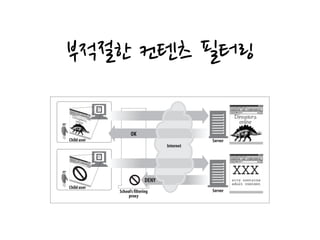
부적절한 컨텐츠 필터링
proxy might permit unrestricted access to educational content but forcibly deny
access to sites that are inappropriate for children.*
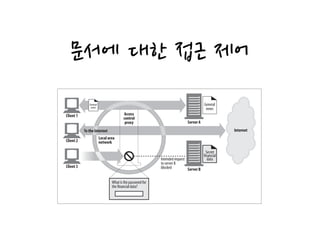
Document access controller (Figure 6-4)
Proxy servers can be used to implement a uniform access-control strategy across
a large set of web servers and web resources and to create an audit trail. This is
Figure 6-3. Proxy application example: child-safe Internet filter
Server
ServerChild user
Child user
School’s filtering
proxy
OK
Internet
DENY
문서에 대한 접근 제어
Figure 6-4. Proxy application example: centralized document access control
Server B
General
news
Client 1
Client 2
Client 3
To the Internet
Secret
financial
data
What is the password for
the financial data?
Intended request
to server B
blocked
Access
control
proxy Server A
General
news
Local area
network
Internet
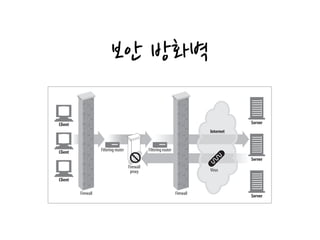
보안 방화벽
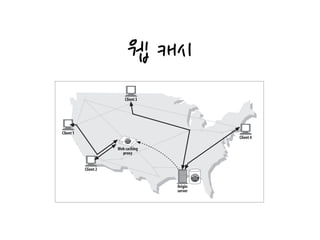
Web cache (Figure 6-6)
Proxy caches maintain local copies of popular documents and serve them on
demand, reducing slow and costly Internet communication.
Figure 6-4. Proxy application example: centralized document access control
Figure 6-5. Proxy application example: security firewall
Server B
Client 2
Client 3
Secret
financial
data
What is the password for
the financial data?
Intended request
to server B
blocked
Local area
network
ServerClient
Client
Client
Internet
Server
Server
Filtering router
Firewall
proxy
Filtering router
Virus
Firewall Firewall
웹 캐시
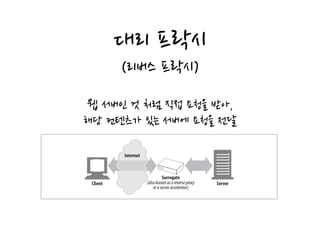
Surrogate (Figure 6-7)
Proxies can masquerade as web servers. These so-called surrogates or reverse
proxies receive real web server requests, but, unlike web servers, they may initiate
Figure 6-6. Proxy application example: web cache
Origin
server
Client 1
Client 2
Client 3
Client 4
Web caching
proxy
대리 프락시
(리버스 프락시)Surrogate (Figure 6-7)
Proxies can masquerade as web servers. These so-called surrogates or reverse
proxies receive real web server requests, but, unlike web servers, they may initiate
communication with other servers to locate the requested content on demand.
Surrogates may be used to improve the performance of slow web servers for com-
mon content. In this configuration, the surrogates often are called server accelera-
tors (Figure 6-7). Surrogates also can be used in conjunction with content-routing
functionality to create distributed networks of on-demand replicated content.
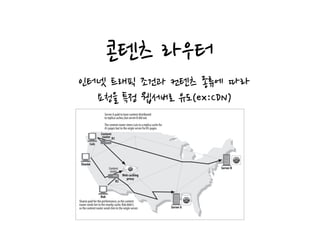
Content router (Figure 6-8)
Proxy servers can act as “content routers,” vectoring requests to particular web
servers based on Internet traffic conditions and type of content.
Figure 6-6. Proxy application example: web cache
Figure 6-7. Proxy application example: surrogate (in a server accelerator deployment)
Origin
server
Client 2
Client Server
Internet
Surrogate
(alsoknownasareverseproxy
oraserveraccelerator)
웹 서버인 것 처럼 직접 요청을 받아,
해당 컨텐츠가 있는 서버에 요청을 전달
콘텐츠 라우터
user or content provider has paid for higher performance (Figure 6-8), or route
HTTP requests through filtering proxies if the user has signed up for a filtering
service. Many interesting services can be constructed using adaptive content-
routing proxies.
Transcoder (Figure 6-9)
Figure 6-8. Proxy application example: content routing
Server A
Sharon
Rob
Luis
Server BContent
router
Content
router
Server A paid to have content distributed
to replica caches,but server B did not.
The content router steers Luis to a replica cache for
A’s pages but to the origin server for B’s pages.
Sharon paid for the performance,so the content
router sends her to the nearby cache.Rob didn’t,
so the content router sends him to the origin server.
R1
R2
Web caching
proxy
인터넷 트래픽 조건과 컨텐츠 종류에 따라
요청을 특정 웹서버로 유도(ex:CDN)
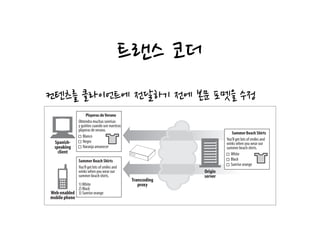
트랜스 코더
Anonymizer (Figure 6-10)
Anonymizer proxies provide heightened privacy and anonymity, by actively
Figure 6-9. Proxy application example: content transcoder
Blanco
Negro
Naranja amanecer
Spanish-
speaking
client
Web-enabled
mobile phone
Summer Beach Shirts
You’ll get lots of smiles and
winks when you wear our
summer beach shirts.
1)White
2) Black
3) Sunrise orange
Playeras deVerano
Obtendra muchas sonrisas
y guiñios cuando use nuestras
playeras de verano.
Transcoding
proxy
Origin
server
Summer Beach Shirts
You’ll get lots of smiles and
winks when you wear our
summer beach shirts.
White
Black
Sunrise orange
컨텐츠를 클라이언트에 전달하기 전에 본문 포멧을 수정
익명화 프락시
(Anonymizer)
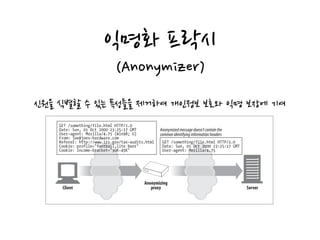
Anonymizer (Figure 6-10)
Anonymizer proxies provide heightened privacy and anonymity, by actively
removing identifying characteristics from HTTP messages (e.g., client IP address,
From header, Referer header, cookies, URI session IDs).*
In Figure 6-10, the anonymizing proxy makes the following changes to the user’s
messages to increase privacy:
• The user’s computer and OS type is removed from the User-Agent header.
• The From header is removed to protect the user’s email address.
• The Referer header is removed to obscure other sites the user has visited.
• The Cookie headers are removed to eliminate profiling and identity data.
Figure 6-9. Proxy application example: content transcoder
Figure 6-10. Proxy application example: anonymizer
mobile phone
Client Server
GET /something/file.html HTTP/1.0
Date: Sun, 01 Oct 2000 23:25:17 GMT
User-agent: Mozilla/4.75 (Win98; U)
From: joe@joes-hardware.com
Referer: http://www.irs.gov/tax-audits.html
Cookie: profile="football,lite beer"
Cookie: income-bracket="30K-45K"
Anonymizing
proxy
GET /something/file.html HTTP/1.0
Date: Sun, 01 Oct 2000 23:25:17 GMT
User-agent: Mozilla/4.75
Anonymizedmessagedoesn’tcontainthe
commonidentifyinginformationheaders
신원을 식별할 수 있는 특성들을 제거하여 개인정보 보호와 익명 보장에 기여
네트워크 아키텍처에서의 프락시
네트워크 상의 프락시 배치
프락시의 연쇄 계층 구조
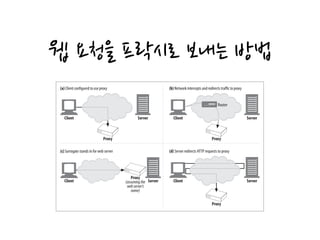
웹 요청을 프락시로 보내는 방법
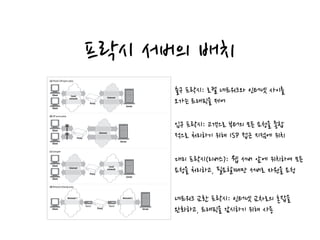
프락시 서버의 배치
Proxy Hierarchies
Proxies can be cascaded in chains called proxy hierarchies. In a proxy hierarchy, mes-
Figure 6-11. Proxies can be deployed many ways, depending on their intended use
Client
Client
Server
Proxy
Internet
(a) Private LAN egress proxy
Client
Client
Server
Internet
(b) ISP access proxy
(c) Surrogate
Client Server
(d) Network exchange proxy
Local
network
Proxy
Client
Client
Server
Proxy
Internet Local
network
Network 1 Network 2
Proxy
Router Router
출구 프락시: 로컬 네트워크와 인터넷 사이를
오가는 트래픽을 제어
입구 프락시: 고객으로 부터의 모든 요청을 종합
적으로 처리하기 위해 ISP 접근 지점에 위치
대리 프락시(리버스): 웹 서버 앞에 위치하여 모든
요청을 처리하고, 필요할때만 서버로 자원을 요청
네트워크 교환 프락시: 인터넷 교차로의 혼잡을
완화하고, 트래픽을 감시하기 위해 사용
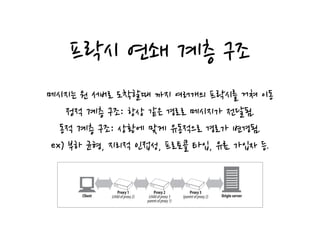
프락시 연쇄 계층 구조
proxy of proxy 2. Likewise, proxy 2 is the child proxy of proxy 3, and proxy 3 is the
parent proxy of proxy 2.
Figure 6-12. Three-level proxy hierarchy
Client
Proxy 1
(childofproxy2) Origin server
Proxy 2
(childofproxy3
parentofproxy1)
Proxy 3
(parentofproxy2)
메시지는 원 서버로 도착할때 까지 여러개의 프락시를 거쳐 이동
정적 계층 구조: 항상 같은 경로로 메시지가 전달됨.
동적 계층 구조: 상황에 맞게 유동적으로 경로가 변경됨.
ex) 부하 균형, 지리적 인접성, 프로토콜 타입, 유료 가입자 등.
웹 요청을 프락시로 보내는 방법
appropriate proxy or server to use on-demand. In some installations, the IP
address and name of the real server is changed and the surrogate is given the
former address and name.
Modify the web server
Some web servers also can be configured to redirect client requests to a proxy by
sending an HTTP redirection command (response code 305) back to the client.
Upon receiving the redirect, the client transacts with the proxy (Figure 6-14d).
The next section explains how to configure clients to send traffic to proxies.
Chapter 20 will explain how to configure the network, DNS, and servers to redirect
traffic to proxy servers.
Client Proxy Settings
Figure 6-14. There are many techniques to direct web requests to proxies
Client Server
Proxy
(a) Client configured to use proxy
Client Server
(b) Network intercepts and redirects traffic to proxy
Client Server
Proxy
(assumingthe
webserver’s
name)
(c) Surrogate stands in for web server
Client Server
(d) Server redirects HTTP requests to proxy
Router
Proxy
Proxy
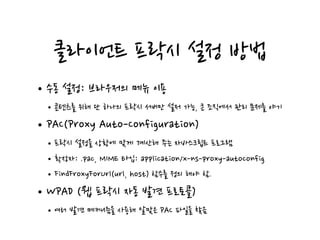
클라이언트 프락시 설정 방법
•수동 설정: 브라우저의 메뉴 이용
•콘텐츠를 위해 단 하나의 프락시 서버만 설저 가능, 큰 조직에서 관리 문제를 야기
•PAC(Proxy Auto-Configuration)
•프락시 설정을 상황에 맞게 계산해 주는 자바스크립트 프로그램
•확장자: .pac, MIME 타입: application/x-ns-proxy-autoconfig
•FindFroxyForUrl(url, host) 함수를 정의 해야 함.
•WPAD (웹 프락시 자동 발견 프로토콜)
•여러 발견 메커니즘을 사용해 알맞은 PAC 파일을 찾음
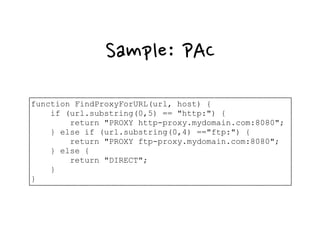
Sample: PAC
function FindProxyForURL(url, host) {
if (url.substring(0,5) == "http:") {
return "PROXY http-proxy.mydomain.com:8080";
} else if (url.substring(0,4) =="ftp:") {
return "PROXY ftp-proxy.mydomain.com:8080";
} else {
return "DIRECT";
}
}
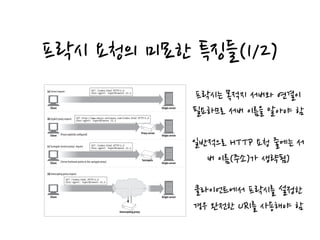
프락시 요청의 미묘한 특징들(1/2)
the server. And proxy-based gateways needed the scheme of the URI to connect to
FTP resources and other schemes. HTTP/1.0 solved the problem by requiring the full
URI for proxy requests, but it retained partial URIs for server requests (there were
too many servers already deployed to change all of them to support full URIs).*
So we need to send partial URIs to servers, and full URIs to proxies. In the case of
explicitly configured client proxy settings, the client knows what type of request to
issue:
• When the client is not set to use a proxy, it sends the partial URI (Figure 6-15a).
• When the client is set to use a proxy, it sends the full URI (Figure 6-15b).
* HTTP/1.1 now requires servers to handle full URIs for both proxy and server requests, but in practice, many
Figure 6-15. Intercepting proxies will get server requests
Client Origin server
(a) Server request GET /index.html HTTP/1.0
User-agent: SuperBrowser v1.3
Client Origin server
(b) Explicit proxy request GET http://www.marys-antiques.com/index.html HTTP/1.0
User-agent: SuperBrowser v1.3
Client
(c) Surrogate (reverse proxy) request GET /index.html HTTP/1.0
User-agent: SuperBrowser v1.3
Client Origin server
(d) Intercepting proxy request
GET /index.html HTTP/1.0
User-agent: SuperBrowser v1.3
Surrogate
Intercepting proxy
(Proxy explicitly configured) Proxy server
Origin server(Server hostname points to the surrogate proxy)
프락시는 목적지 서버와 연결이
필요하므로 서버 이름을 알아야 함
일반적으로 HTTP 요청 줄에는 서
버 이름(주소)가 생략됨)
클라이언트에서 프락시를 설정한
경우 완전한 URI를 사용해야 함
프락시 요청의 미묘한 특징들(2/2)
•목적지 서버가 가상호스팅 되어 있는 경우
•웹 서버는 HOST 헤더를 참고함
•프락시는 프락시 요청과 서버 요청을 모두 다룰 수 있어야 함
•부분 URI와 완전한 URI를 모두 지원 해야 함
•프락시에서 전송중 URI 변경은 조심해야 함
URI 자동 확장과 프락시(1/3)
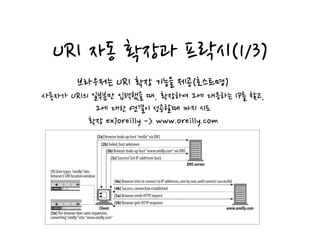
host (refer back to “Expandomatic URLs” in Chapter 2):*
• Many browsers attempt adding a “www.” prefix and a “.com” suffix, in case you
just entered the middle piece of a common web site name (e.g., to let people
enter “yahoo” instead of “www.yahoo.com”).
• Some browsers even pass your unresolvable URI to a third-party site, which
attempts to correct spelling mistakes and suggest URIs you may have intended.
• In addition, the DNS configuration on most systems allows you to enter just the
prefix of the hostname, and the DNS automatically searches the domain. If you are
in the domain “oreilly.com” and type in the hostname “host7,” the DNS automati-
cally attempts to match “host7.oreilly.com”. It’s not a complete, valid hostname.
URI Resolution Without a Proxy
Figure 6-16 shows an example of browser hostname auto-expansion without a
proxy. In steps 2a–3c, the browser looks up variations of the hostname until a valid
hostname is found.
Figure 6-16. Browser auto-expands partial hostnames when no explicit proxy is present
Client
(1) User types “oreilly”into
browser’s URI location window
(3a)The browser does auto-expansion,
converting“oreilly”into “www.oreilly.com”
DNS server
(2b) Failed,host unknown
(2a) Browser looks up host “oreilly”via DNS
(3b) Browser looks up host “www.oreilly.com” via DNS
(3c) Success! Get IP addresses back
www.oreilly.com
(4a) Browser tries to connect to IP addresses,one by one,until connect successful
(4b) Success;connection established
(5a) Browser sends HTTP request
(5b) Browser gets HTTP response
브라우저는 URI 확장 기능을 제공(호스트명)
사용자가 URI의 일부분만 입력했을 때, 확장하여 그에 대응하는 IP를 찾고,
그에 대한 연결이 성공할때 까지 시도
확장 ex)oreilly -> www.oreilly.com
URI 자동 확장과 프락시(2/3)
명시적인 프락시를 사용할때 URI 분석
브라우저는 명시적인 프락시가 있는 경우 호스트명을 확장하지 않음.
• In Step 3a, the browser auto-expands the hostname and asks the DNS to resolve
“www.oreilly.com.” This is successful.
• The browser then successfully connects to www.oreilly.com.
URI Resolution with an Explicit Proxy
When you use an explicit proxy the browser no longer performs any of these conve-
nience expansions, because the user’s URI is passed directly to the proxy.
As shown in Figure 6-17, the browser does not auto-expand the partial hostname
when there is an explicit proxy. As a result, when the user types “oreilly” into the
browser’s location window, the proxy is sent “http://oreilly/” (the browser adds the
default scheme and path but leaves the hostname as entered).
For this reason, some proxies attempt to mimic as much as possible of the browser’s
convenience services as they can, including “www...com” auto-expansion and addi-
Figure 6-17. Browser does not auto-expand partial hostnames when there is an explicit proxy
Client
(1) User types “oreilly”into
browser’s URI location window
(3a)The browser does auto-expansion,
converting“oreilly”into “www.oreilly.com”
DNS server
(2a) Proxy is explicitly configured,
so the browser looks up the address
of the proxy server using DNS
(2b) Success! Get proxy server
IP addresses
www.oreilly.com
(3a) Browser tries to connect to proxy
(3b) Success;connection established
(4a) Browser sends HTTP request
Proxy
GET http://oreilly/ HTTP/1.0
Proxy-connection: Keep-Alive
User-agent: Mozilla/4.72[en] (Win98:I)
Host: oreilly
Accept: */*
Accept-encoding: gzip
Accept-language: en
Accept-charset: iso-8859-1,*,utf-8
Requestmessage,assentin(4a)
(4b) Proxy gets a partial hostname
in the request,because the client
did not auto-expand it.
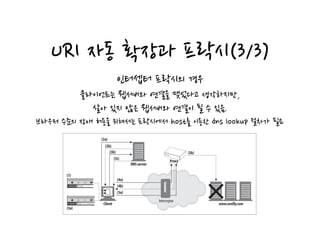
URI 자동 확장과 프락시(3/3)
인터셉터 프락시의 경우
클라이언트는 웹서버와 연결을 맺었다고 생각하지만,
살아 있지 않은 웹서버와 연결이 될 수 있음.
브라우저 수준의 장애 허용을 위해서는 프락시에서 host를 이용한 dns lookup 절차가 필요
Figure 6-18 demonstrates the following transaction:
Figure 6-18. Browser doesn’t detect dead server IP addresses when using intercepting proxies
Client
(1)
(3a)
DNS server
(2b)
(2a)
(3b)
(3c)
www.oreilly.com
(4a)
(4b)
(5a)
Interceptor
Proxy
(5b)
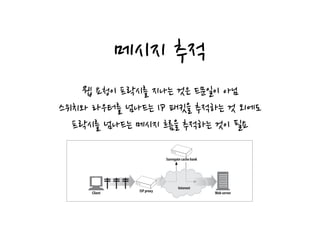
메시지 추적
corporations use caching proxy servers to access the Internet, for security and cost
savings, and many large ISPs use proxy caches to improve performance and imple-
ment features. A significant percentage of web requests today go through proxies. At
the same time, it’s becoming increasingly popular to replicate content on banks of
surrogate caches scattered around the globe, for performance reasons.
Proxies are developed by different vendors. They have different features and bugs
and are administrated by various organizations.
As proxies become more prevalent, you need to be able to trace the flow of messages
Figure 6-19. Access proxies and CDN proxies create two-level proxy hierarchies
Client ISP proxy
Internet
Surrogate cache bank
Web server
웹 요청이 프락시를 지나는 것은 드문일이 아님
스위치와 라우터를 넘나드는 IP 패킷을 추적하는 것 외에도
프락시를 넘나드는 메시지 흐름을 추적하는 것이 필요
메시지 추적:Via
Via 헤더 필드는 메시지가 지나가는 중간 노드의 정보를 나열
메시지가 노드를 지날때 해당 정보를 Via 목록의 끝에 반드시 추가되어야 함.
Via syntax
The Via header field contains a comma-separated list of waypoints. Each waypoint
represents an individual proxy server or gateway hop and contains information about
the protocol and address of that intermediate node. Here is an example of a Via
header with two waypoints:
Via = 1.1 cache.joes-hardware.com, 1.1 proxy.irenes-isp.net
Figure 6-20. Via header example
Client
proxy-62.irenes-isp.net
(HTTP/1.1) www.joes-hardware.com
cache.joes-hardware.com
(HTTP/1.0)
GET /index.html HTTP/1.0
Accept: text/html
Host: www.joes-hardware.com
Via: 1.1 proxy-62.irenes-isp.net, 1.0 cache.joes-hardware.com
Requestmessage(asreceivedbyserver)
[중개자가 받은 프로토콜 이름]/버전 노드 이름 노드 코멘트로 구성
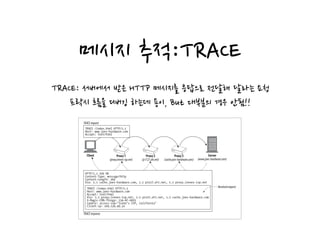
메시지 추적:TRACE
TRACE: 서버에서 받은 HTTP 메시지를 응답으로 전달해 달라는 요청
프락시 흐름을 디버깅 하는데 용이, But 대부분의 경우 안됨!!
the number of proxy hops for TRACE and OPTIONS requests, which is useful for
testing a chain of proxies forwarding messages in an infinite loop or for checking the
Figure 6-23. TRACE response reflects back the received request message
Proxy 1
(proxy.irenes-isp.net)
Client Server
(www.joes-hardware.com)
Proxy 2
(p1127.att.net)
Proxy 3
(cache.joes-hardware.com)
TRACE /index.html HTTP/1.1
Host: www.joes-hardware.com
Accept: text/html
TRACErequest
HTTP/1.1 200 OK
Content-Type: message/http
Content-Length: 269
Via: 1.1 cache.joes-hardware.com, 1.1 p1127.att.net, 1.1 proxy.irenes-isp.net
TRACE /index.html HTTP/1.1
Host: www.joes-hardware.com
Accept: text/html
Via: 1.1 proxy.irenes-isp.net, 1.1 p1127.att.net, 1.1 cache.joes-hardware.com
X-Magic-CDN-Thingy: 134-AF-0003
Cookie: access-isp="Irene’s ISP, California"
Client-ip: 209.134.49.32
TRACEresponse
Receivedrequest
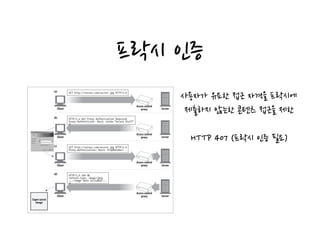
프락시 인증
사용자가 유요한 접근 자격을 프락시에
제출하지 않는한 콘텐츠 접근을 제한
HTTP 407 (프락시 인증 필요)
Handling Unsupported Headers and Methods
The proxy server may not understand all the header fields that pass through it. Some
Figure 6-25. Proxies can implement authentication to control access to content
Client Server
(a) GET http://server.com/secret.jpg HTTP/1.0
Client Server
(b) HTTP/1.o 407 Proxy Authorization Required
Proxy-Authenticate: Basic realm="Secure Stuff"
Client
(c) GET http://server.com/secret.jpg HTTP/1.0
Proxy-Authorization: Basic YnJpOmZvbw==
Client Server
(d) HTTP/1.0 200 OK
Content-type: image/jpeg
...<image data included>...
Access control
proxy
Server
Super secret
image
Access control
proxy
Access control
proxy
Access control
proxy
프락시 상호 운용성
•지원하지 않는 헤더와 메서드
•가능한한 다음 홉(계층)으로 전달해야 함
•같은 이름의 헤더 필드가 여러개인 경우 상대적인 순서도 반드시 유지
•OPTIONS
•서버에 특정 리소스가 어떤 기능을 지원하는지 질의
•Allow 헤더: OPTIONS에 대한 응답
Q&A
References
• David Gourley, Brian Totty, Marjorie Sayer, Sailu Reddy,
Anshu Aggarwal. HTTP 완벽 가이드(이응준, 정상일 옮김). 서울시
마포구: 인사이트, 2014

HTTP 완벽가이드 6장.

  • 1.
    HTTP: The DefinitiveGuide (ch.6 Proxies) 아키텍트를 꿈꾸는 사람들 Cecil
  • 2.
    웹 중개자 클라이언트 입장에서트랜잭션을 수행하는 중개인 웹 서버 역할과 웹 클라이언트 역할을 동시에 수행 HTTP proxy servers are both web servers and web clients. Because HTTP clients send request messages to proxies, the proxy server must properly handle the requests and the connections and return responses, just like a web server. At the same time, the proxy itself sends requests to servers, so it must also behave like a correct HTTP client, sending requests and receiving responses (see Figure 6-1). If you are creating your own HTTP proxy, you’ll need to carefully follow the rules for both HTTP cli- ents and HTTP servers. Private and Shared Proxies A proxy server can be dedicated to a single client or shared among many clients. Figure 6-1. A proxy must be both a server and a client Client Server Proxy Request Proxies act like SERVERS to web clients, receiving request messages,and returning response messages Request ResponseResponse Proxies act like CLIENTS to web servers, sending web request messages,and receiving web response messages
  • 3.
    프락시 vs 게이트웨이 프락시:같은 프로토콜을 사용하는 애플리케이션을 연결 게이트웨이: 서로 다른 프로토콜을 사용하는 애플리케이션을 연결 Figure 6-2 illustrates the difference between proxies and gateways: • The intermediary device in Figure 6-2a is an HTTP proxy, because the proxy speaks HTTP to both the client and server. • The intermediary device in Figure 6-2b is an HTTP/POP gateway, because it ties an HTTP frontend to a POP email backend. The gateway converts web transac- tions into the appropriate POP transactions, to allow the user to read email through HTTP. Web-based email programs such as Yahoo! Mail and MSN Hot- mail are HTTP email gateways. In practice, the difference between proxies and gateways is blurry. Because browsers and servers implement different versions of HTTP, proxies often do some amount of Figure 6-2. Proxies speak the same protocol; gateways tie together different protocols Browser Web server Web proxy HTTP HTTP (a) HTTP/HTTP proxy Browser Email serverWeb/email gateway HTTP POP (b) HTTP/POP gateway
  • 4.
    프락시를 사용하는 이유 부적절한컨텐츠 필터링, 문서에 대한 접근 제어, 보안 방화벽, 웹 캐시, 대리 프락시(리버스), 콘텐츠 라우터(ex:CDN), 트랜스 코더
  • 5.
    부적절한 컨텐츠 필터링 proxymight permit unrestricted access to educational content but forcibly deny access to sites that are inappropriate for children.* Document access controller (Figure 6-4) Proxy servers can be used to implement a uniform access-control strategy across a large set of web servers and web resources and to create an audit trail. This is Figure 6-3. Proxy application example: child-safe Internet filter Server ServerChild user Child user School’s filtering proxy OK Internet DENY
  • 6.
    문서에 대한 접근제어 Figure 6-4. Proxy application example: centralized document access control Server B General news Client 1 Client 2 Client 3 To the Internet Secret financial data What is the password for the financial data? Intended request to server B blocked Access control proxy Server A General news Local area network Internet
  • 7.
    보안 방화벽 Web cache(Figure 6-6) Proxy caches maintain local copies of popular documents and serve them on demand, reducing slow and costly Internet communication. Figure 6-4. Proxy application example: centralized document access control Figure 6-5. Proxy application example: security firewall Server B Client 2 Client 3 Secret financial data What is the password for the financial data? Intended request to server B blocked Local area network ServerClient Client Client Internet Server Server Filtering router Firewall proxy Filtering router Virus Firewall Firewall
  • 8.
    웹 캐시 Surrogate (Figure6-7) Proxies can masquerade as web servers. These so-called surrogates or reverse proxies receive real web server requests, but, unlike web servers, they may initiate Figure 6-6. Proxy application example: web cache Origin server Client 1 Client 2 Client 3 Client 4 Web caching proxy
  • 9.
    대리 프락시 (리버스 프락시)Surrogate(Figure 6-7) Proxies can masquerade as web servers. These so-called surrogates or reverse proxies receive real web server requests, but, unlike web servers, they may initiate communication with other servers to locate the requested content on demand. Surrogates may be used to improve the performance of slow web servers for com- mon content. In this configuration, the surrogates often are called server accelera- tors (Figure 6-7). Surrogates also can be used in conjunction with content-routing functionality to create distributed networks of on-demand replicated content. Content router (Figure 6-8) Proxy servers can act as “content routers,” vectoring requests to particular web servers based on Internet traffic conditions and type of content. Figure 6-6. Proxy application example: web cache Figure 6-7. Proxy application example: surrogate (in a server accelerator deployment) Origin server Client 2 Client Server Internet Surrogate (alsoknownasareverseproxy oraserveraccelerator) 웹 서버인 것 처럼 직접 요청을 받아, 해당 컨텐츠가 있는 서버에 요청을 전달
  • 10.
    콘텐츠 라우터 user orcontent provider has paid for higher performance (Figure 6-8), or route HTTP requests through filtering proxies if the user has signed up for a filtering service. Many interesting services can be constructed using adaptive content- routing proxies. Transcoder (Figure 6-9) Figure 6-8. Proxy application example: content routing Server A Sharon Rob Luis Server BContent router Content router Server A paid to have content distributed to replica caches,but server B did not. The content router steers Luis to a replica cache for A’s pages but to the origin server for B’s pages. Sharon paid for the performance,so the content router sends her to the nearby cache.Rob didn’t, so the content router sends him to the origin server. R1 R2 Web caching proxy 인터넷 트래픽 조건과 컨텐츠 종류에 따라 요청을 특정 웹서버로 유도(ex:CDN)
  • 11.
    트랜스 코더 Anonymizer (Figure6-10) Anonymizer proxies provide heightened privacy and anonymity, by actively Figure 6-9. Proxy application example: content transcoder Blanco Negro Naranja amanecer Spanish- speaking client Web-enabled mobile phone Summer Beach Shirts You’ll get lots of smiles and winks when you wear our summer beach shirts. 1)White 2) Black 3) Sunrise orange Playeras deVerano Obtendra muchas sonrisas y guiñios cuando use nuestras playeras de verano. Transcoding proxy Origin server Summer Beach Shirts You’ll get lots of smiles and winks when you wear our summer beach shirts. White Black Sunrise orange 컨텐츠를 클라이언트에 전달하기 전에 본문 포멧을 수정
  • 12.
    익명화 프락시 (Anonymizer) Anonymizer (Figure6-10) Anonymizer proxies provide heightened privacy and anonymity, by actively removing identifying characteristics from HTTP messages (e.g., client IP address, From header, Referer header, cookies, URI session IDs).* In Figure 6-10, the anonymizing proxy makes the following changes to the user’s messages to increase privacy: • The user’s computer and OS type is removed from the User-Agent header. • The From header is removed to protect the user’s email address. • The Referer header is removed to obscure other sites the user has visited. • The Cookie headers are removed to eliminate profiling and identity data. Figure 6-9. Proxy application example: content transcoder Figure 6-10. Proxy application example: anonymizer mobile phone Client Server GET /something/file.html HTTP/1.0 Date: Sun, 01 Oct 2000 23:25:17 GMT User-agent: Mozilla/4.75 (Win98; U) From: joe@joes-hardware.com Referer: http://www.irs.gov/tax-audits.html Cookie: profile="football,lite beer" Cookie: income-bracket="30K-45K" Anonymizing proxy GET /something/file.html HTTP/1.0 Date: Sun, 01 Oct 2000 23:25:17 GMT User-agent: Mozilla/4.75 Anonymizedmessagedoesn’tcontainthe commonidentifyinginformationheaders 신원을 식별할 수 있는 특성들을 제거하여 개인정보 보호와 익명 보장에 기여
  • 13.
    네트워크 아키텍처에서의 프락시 네트워크상의 프락시 배치 프락시의 연쇄 계층 구조 웹 요청을 프락시로 보내는 방법
  • 14.
    프락시 서버의 배치 ProxyHierarchies Proxies can be cascaded in chains called proxy hierarchies. In a proxy hierarchy, mes- Figure 6-11. Proxies can be deployed many ways, depending on their intended use Client Client Server Proxy Internet (a) Private LAN egress proxy Client Client Server Internet (b) ISP access proxy (c) Surrogate Client Server (d) Network exchange proxy Local network Proxy Client Client Server Proxy Internet Local network Network 1 Network 2 Proxy Router Router 출구 프락시: 로컬 네트워크와 인터넷 사이를 오가는 트래픽을 제어 입구 프락시: 고객으로 부터의 모든 요청을 종합 적으로 처리하기 위해 ISP 접근 지점에 위치 대리 프락시(리버스): 웹 서버 앞에 위치하여 모든 요청을 처리하고, 필요할때만 서버로 자원을 요청 네트워크 교환 프락시: 인터넷 교차로의 혼잡을 완화하고, 트래픽을 감시하기 위해 사용
  • 15.
    프락시 연쇄 계층구조 proxy of proxy 2. Likewise, proxy 2 is the child proxy of proxy 3, and proxy 3 is the parent proxy of proxy 2. Figure 6-12. Three-level proxy hierarchy Client Proxy 1 (childofproxy2) Origin server Proxy 2 (childofproxy3 parentofproxy1) Proxy 3 (parentofproxy2) 메시지는 원 서버로 도착할때 까지 여러개의 프락시를 거쳐 이동 정적 계층 구조: 항상 같은 경로로 메시지가 전달됨. 동적 계층 구조: 상황에 맞게 유동적으로 경로가 변경됨. ex) 부하 균형, 지리적 인접성, 프로토콜 타입, 유료 가입자 등.
  • 16.
    웹 요청을 프락시로보내는 방법 appropriate proxy or server to use on-demand. In some installations, the IP address and name of the real server is changed and the surrogate is given the former address and name. Modify the web server Some web servers also can be configured to redirect client requests to a proxy by sending an HTTP redirection command (response code 305) back to the client. Upon receiving the redirect, the client transacts with the proxy (Figure 6-14d). The next section explains how to configure clients to send traffic to proxies. Chapter 20 will explain how to configure the network, DNS, and servers to redirect traffic to proxy servers. Client Proxy Settings Figure 6-14. There are many techniques to direct web requests to proxies Client Server Proxy (a) Client configured to use proxy Client Server (b) Network intercepts and redirects traffic to proxy Client Server Proxy (assumingthe webserver’s name) (c) Surrogate stands in for web server Client Server (d) Server redirects HTTP requests to proxy Router Proxy Proxy
  • 17.
    클라이언트 프락시 설정방법 •수동 설정: 브라우저의 메뉴 이용 •콘텐츠를 위해 단 하나의 프락시 서버만 설저 가능, 큰 조직에서 관리 문제를 야기 •PAC(Proxy Auto-Configuration) •프락시 설정을 상황에 맞게 계산해 주는 자바스크립트 프로그램 •확장자: .pac, MIME 타입: application/x-ns-proxy-autoconfig •FindFroxyForUrl(url, host) 함수를 정의 해야 함. •WPAD (웹 프락시 자동 발견 프로토콜) •여러 발견 메커니즘을 사용해 알맞은 PAC 파일을 찾음
  • 18.
    Sample: PAC function FindProxyForURL(url,host) { if (url.substring(0,5) == "http:") { return "PROXY http-proxy.mydomain.com:8080"; } else if (url.substring(0,4) =="ftp:") { return "PROXY ftp-proxy.mydomain.com:8080"; } else { return "DIRECT"; } }
  • 19.
    프락시 요청의 미묘한특징들(1/2) the server. And proxy-based gateways needed the scheme of the URI to connect to FTP resources and other schemes. HTTP/1.0 solved the problem by requiring the full URI for proxy requests, but it retained partial URIs for server requests (there were too many servers already deployed to change all of them to support full URIs).* So we need to send partial URIs to servers, and full URIs to proxies. In the case of explicitly configured client proxy settings, the client knows what type of request to issue: • When the client is not set to use a proxy, it sends the partial URI (Figure 6-15a). • When the client is set to use a proxy, it sends the full URI (Figure 6-15b). * HTTP/1.1 now requires servers to handle full URIs for both proxy and server requests, but in practice, many Figure 6-15. Intercepting proxies will get server requests Client Origin server (a) Server request GET /index.html HTTP/1.0 User-agent: SuperBrowser v1.3 Client Origin server (b) Explicit proxy request GET http://www.marys-antiques.com/index.html HTTP/1.0 User-agent: SuperBrowser v1.3 Client (c) Surrogate (reverse proxy) request GET /index.html HTTP/1.0 User-agent: SuperBrowser v1.3 Client Origin server (d) Intercepting proxy request GET /index.html HTTP/1.0 User-agent: SuperBrowser v1.3 Surrogate Intercepting proxy (Proxy explicitly configured) Proxy server Origin server(Server hostname points to the surrogate proxy) 프락시는 목적지 서버와 연결이 필요하므로 서버 이름을 알아야 함 일반적으로 HTTP 요청 줄에는 서 버 이름(주소)가 생략됨) 클라이언트에서 프락시를 설정한 경우 완전한 URI를 사용해야 함
  • 20.
    프락시 요청의 미묘한특징들(2/2) •목적지 서버가 가상호스팅 되어 있는 경우 •웹 서버는 HOST 헤더를 참고함 •프락시는 프락시 요청과 서버 요청을 모두 다룰 수 있어야 함 •부분 URI와 완전한 URI를 모두 지원 해야 함 •프락시에서 전송중 URI 변경은 조심해야 함
  • 21.
    URI 자동 확장과프락시(1/3) host (refer back to “Expandomatic URLs” in Chapter 2):* • Many browsers attempt adding a “www.” prefix and a “.com” suffix, in case you just entered the middle piece of a common web site name (e.g., to let people enter “yahoo” instead of “www.yahoo.com”). • Some browsers even pass your unresolvable URI to a third-party site, which attempts to correct spelling mistakes and suggest URIs you may have intended. • In addition, the DNS configuration on most systems allows you to enter just the prefix of the hostname, and the DNS automatically searches the domain. If you are in the domain “oreilly.com” and type in the hostname “host7,” the DNS automati- cally attempts to match “host7.oreilly.com”. It’s not a complete, valid hostname. URI Resolution Without a Proxy Figure 6-16 shows an example of browser hostname auto-expansion without a proxy. In steps 2a–3c, the browser looks up variations of the hostname until a valid hostname is found. Figure 6-16. Browser auto-expands partial hostnames when no explicit proxy is present Client (1) User types “oreilly”into browser’s URI location window (3a)The browser does auto-expansion, converting“oreilly”into “www.oreilly.com” DNS server (2b) Failed,host unknown (2a) Browser looks up host “oreilly”via DNS (3b) Browser looks up host “www.oreilly.com” via DNS (3c) Success! Get IP addresses back www.oreilly.com (4a) Browser tries to connect to IP addresses,one by one,until connect successful (4b) Success;connection established (5a) Browser sends HTTP request (5b) Browser gets HTTP response 브라우저는 URI 확장 기능을 제공(호스트명) 사용자가 URI의 일부분만 입력했을 때, 확장하여 그에 대응하는 IP를 찾고, 그에 대한 연결이 성공할때 까지 시도 확장 ex)oreilly -> www.oreilly.com
  • 22.
    URI 자동 확장과프락시(2/3) 명시적인 프락시를 사용할때 URI 분석 브라우저는 명시적인 프락시가 있는 경우 호스트명을 확장하지 않음. • In Step 3a, the browser auto-expands the hostname and asks the DNS to resolve “www.oreilly.com.” This is successful. • The browser then successfully connects to www.oreilly.com. URI Resolution with an Explicit Proxy When you use an explicit proxy the browser no longer performs any of these conve- nience expansions, because the user’s URI is passed directly to the proxy. As shown in Figure 6-17, the browser does not auto-expand the partial hostname when there is an explicit proxy. As a result, when the user types “oreilly” into the browser’s location window, the proxy is sent “http://oreilly/” (the browser adds the default scheme and path but leaves the hostname as entered). For this reason, some proxies attempt to mimic as much as possible of the browser’s convenience services as they can, including “www...com” auto-expansion and addi- Figure 6-17. Browser does not auto-expand partial hostnames when there is an explicit proxy Client (1) User types “oreilly”into browser’s URI location window (3a)The browser does auto-expansion, converting“oreilly”into “www.oreilly.com” DNS server (2a) Proxy is explicitly configured, so the browser looks up the address of the proxy server using DNS (2b) Success! Get proxy server IP addresses www.oreilly.com (3a) Browser tries to connect to proxy (3b) Success;connection established (4a) Browser sends HTTP request Proxy GET http://oreilly/ HTTP/1.0 Proxy-connection: Keep-Alive User-agent: Mozilla/4.72[en] (Win98:I) Host: oreilly Accept: */* Accept-encoding: gzip Accept-language: en Accept-charset: iso-8859-1,*,utf-8 Requestmessage,assentin(4a) (4b) Proxy gets a partial hostname in the request,because the client did not auto-expand it.
  • 23.
    URI 자동 확장과프락시(3/3) 인터셉터 프락시의 경우 클라이언트는 웹서버와 연결을 맺었다고 생각하지만, 살아 있지 않은 웹서버와 연결이 될 수 있음. 브라우저 수준의 장애 허용을 위해서는 프락시에서 host를 이용한 dns lookup 절차가 필요 Figure 6-18 demonstrates the following transaction: Figure 6-18. Browser doesn’t detect dead server IP addresses when using intercepting proxies Client (1) (3a) DNS server (2b) (2a) (3b) (3c) www.oreilly.com (4a) (4b) (5a) Interceptor Proxy (5b)
  • 24.
    메시지 추적 corporations usecaching proxy servers to access the Internet, for security and cost savings, and many large ISPs use proxy caches to improve performance and imple- ment features. A significant percentage of web requests today go through proxies. At the same time, it’s becoming increasingly popular to replicate content on banks of surrogate caches scattered around the globe, for performance reasons. Proxies are developed by different vendors. They have different features and bugs and are administrated by various organizations. As proxies become more prevalent, you need to be able to trace the flow of messages Figure 6-19. Access proxies and CDN proxies create two-level proxy hierarchies Client ISP proxy Internet Surrogate cache bank Web server 웹 요청이 프락시를 지나는 것은 드문일이 아님 스위치와 라우터를 넘나드는 IP 패킷을 추적하는 것 외에도 프락시를 넘나드는 메시지 흐름을 추적하는 것이 필요
  • 25.
    메시지 추적:Via Via 헤더필드는 메시지가 지나가는 중간 노드의 정보를 나열 메시지가 노드를 지날때 해당 정보를 Via 목록의 끝에 반드시 추가되어야 함. Via syntax The Via header field contains a comma-separated list of waypoints. Each waypoint represents an individual proxy server or gateway hop and contains information about the protocol and address of that intermediate node. Here is an example of a Via header with two waypoints: Via = 1.1 cache.joes-hardware.com, 1.1 proxy.irenes-isp.net Figure 6-20. Via header example Client proxy-62.irenes-isp.net (HTTP/1.1) www.joes-hardware.com cache.joes-hardware.com (HTTP/1.0) GET /index.html HTTP/1.0 Accept: text/html Host: www.joes-hardware.com Via: 1.1 proxy-62.irenes-isp.net, 1.0 cache.joes-hardware.com Requestmessage(asreceivedbyserver) [중개자가 받은 프로토콜 이름]/버전 노드 이름 노드 코멘트로 구성
  • 26.
    메시지 추적:TRACE TRACE: 서버에서받은 HTTP 메시지를 응답으로 전달해 달라는 요청 프락시 흐름을 디버깅 하는데 용이, But 대부분의 경우 안됨!! the number of proxy hops for TRACE and OPTIONS requests, which is useful for testing a chain of proxies forwarding messages in an infinite loop or for checking the Figure 6-23. TRACE response reflects back the received request message Proxy 1 (proxy.irenes-isp.net) Client Server (www.joes-hardware.com) Proxy 2 (p1127.att.net) Proxy 3 (cache.joes-hardware.com) TRACE /index.html HTTP/1.1 Host: www.joes-hardware.com Accept: text/html TRACErequest HTTP/1.1 200 OK Content-Type: message/http Content-Length: 269 Via: 1.1 cache.joes-hardware.com, 1.1 p1127.att.net, 1.1 proxy.irenes-isp.net TRACE /index.html HTTP/1.1 Host: www.joes-hardware.com Accept: text/html Via: 1.1 proxy.irenes-isp.net, 1.1 p1127.att.net, 1.1 cache.joes-hardware.com X-Magic-CDN-Thingy: 134-AF-0003 Cookie: access-isp="Irene’s ISP, California" Client-ip: 209.134.49.32 TRACEresponse Receivedrequest
  • 27.
    프락시 인증 사용자가 유요한접근 자격을 프락시에 제출하지 않는한 콘텐츠 접근을 제한 HTTP 407 (프락시 인증 필요) Handling Unsupported Headers and Methods The proxy server may not understand all the header fields that pass through it. Some Figure 6-25. Proxies can implement authentication to control access to content Client Server (a) GET http://server.com/secret.jpg HTTP/1.0 Client Server (b) HTTP/1.o 407 Proxy Authorization Required Proxy-Authenticate: Basic realm="Secure Stuff" Client (c) GET http://server.com/secret.jpg HTTP/1.0 Proxy-Authorization: Basic YnJpOmZvbw== Client Server (d) HTTP/1.0 200 OK Content-type: image/jpeg ...<image data included>... Access control proxy Server Super secret image Access control proxy Access control proxy Access control proxy
  • 28.
    프락시 상호 운용성 •지원하지않는 헤더와 메서드 •가능한한 다음 홉(계층)으로 전달해야 함 •같은 이름의 헤더 필드가 여러개인 경우 상대적인 순서도 반드시 유지 •OPTIONS •서버에 특정 리소스가 어떤 기능을 지원하는지 질의 •Allow 헤더: OPTIONS에 대한 응답
  • 29.
  • 30.
    References • David Gourley,Brian Totty, Marjorie Sayer, Sailu Reddy, Anshu Aggarwal. HTTP 완벽 가이드(이응준, 정상일 옮김). 서울시 마포구: 인사이트, 2014