

Apache Druid Auto Scale-out/in for Streaming
Data Ingestion on Kubernetes
Jinchul Kim
About Jinchul
• DevOps engineer and Senior Software Developer at SK Telecom (2017 ~ )
• Scrum master for cloud platform development using Kubernetes, Docker, and a variety of applications
• Committer of Apache Impala Project (2018 ~)
• SAP HANA in-memory engine at SAP Labs Korea (2008 ~ 2017)
• Designed, wrote server-side code by using C++: SQL/SQLScript parser, semantic analyzer, SQL optimizer, rule/
cost based optimization, plan explanation and executor, SQL plan cache, and SQLScript debugger
• Received "SAP Applaud Award" for strategic contribution with impact across teams/functions and overcame
significant challenges on HANA scale-out quality
• Motivation
• Background & terminology
• Apache Kafka
• Apache Druid
• Docker & Kubernetes
• Helm
• Auto Scaling in Druid
• Horizontal Pods Auto Scaling with Custom Metrics on Kubernetes
• Horizontal Pods Auto Scaling: Scale-in issue and workarounds
• Conclusion
Agenda
Motivation
• Why do we need auto-scaling?

• Cost saving by resource management

• What kinds of information do we need for auto-scaling?

• Hardware resource metrics

• Custom metrics from service
Motivation (Cont.)
• Drawbacks in auto-scaling feature of Apache Druid

• Druid's auto scaling is only available in AWS

• A few minutes for start-up and shutdown of VMs

• Druid's auto scaling is tightly coupled with AWS API
Background 

& Terminology
[Overview of Apache Kafka — By Ch.ko123 — Own work, CC BY 4.0, 

https://commons.wikimedia.org/w/index.php?curid=59871096]
[Druid Architecture, http://druid.io/technology]
[Druid Architecture, http://druid.io/docs/latest/design/ ]
[Druid Architecture, http://druid.io/technology]
[Druid Architecture, http://druid.io/technology]
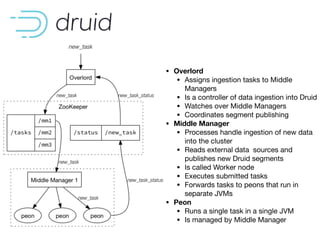
• Overlord
• Assigns ingestion tasks to Middle
Managers 

• Is a controller of data ingestion into Druid

• Watches over Middle Managers

• Coordinates segment publishing

• Middle Manager
• Processes handle ingestion of new data
into the cluster

• Reads external data sources and
publishes new Druid segments

• Is called Worker node

• Executes submitted tasks

• Forwards tasks to peons that run in
separate JVMs

• Peon
• Runs a single task in a single JVM

• Is managed by Middle Manager
WHAT HAS DOCKER DONE FOR US?
• Continuous delivery
- Deliver software more often and with less errors
- No time spent on dev-to-ops handoffs
• Improved Security
- Containers help isolate each part of your system and
provides better control of each component of your
system
• Run anything, anywhere
- All languages, all databases, all operating systems
- Any distribution, any cloud, any machine
• Reproducibility
- Reduces the times we say “it only worked on my
machine”
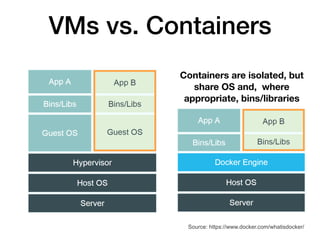
VMs vs. Containers
Source: https://www.docker.com/whatisdocker/
Containers are isolated, but
share OS and, where
appropriate, bins/libraries
WHAT DOES KUBERNETES DO?
• Kubernetes is an open-source system for automating
deployment, scaling, and management of
containerized applications.
• Improves reliability
-Continuously monitors and manages your containers
-Will scale your application to handle changes in load
• Better use of infrastructure resources
-Helps reduce infrastructure requirements by
gracefully scaling up and down your entire platform
• Coordinates what containers run where and when
across your system
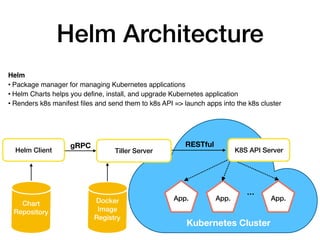
Helm Architecture
Helm Client
gRPC RESTful
Chart

Repository
Kubernetes Cluster
App. App. App.
Helm
• Package manager for managing Kubernetes applications
• Helm Charts helps you define, install, and upgrade Kubernetes application
• Renders k8s manifest files and send them to k8s API => launch apps into the k8s cluster
…
K8S API ServerTiller Server
Docker
Image
Registry
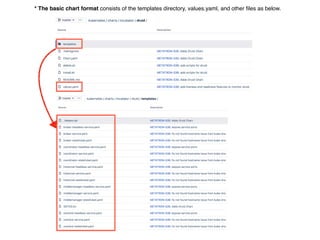
* The basic chart format consists of the templates directory, values.yaml, and other files as below.
Auto Scaling in Druid
The Autoscaling mechanisms currently in place are tightly coupled with our deployment
infrastructure but the framework should be in place for other implementations. We are highly
open to new implementations or extensions of the existing mechanisms. In our own
deployments, middle manager nodes are Amazon AWS EC2 nodes and they are
provisioned to register themselves in a galaxy environment.

If autoscaling is enabled, new middle managers may be added when a task has been in
pending state for too long. Middle managers may be terminated if they have not run any
tasks for a period of time.
“
”
[Autoscaling, http://druid.io/docs/latest/design/overlord.html ]
Description of Auto Scaling in Druid
[EC2AutoScalar.java, https://github.com/apache/incubator-druid/blob/master/indexing-service/src/main/java/org/apache/druid/
indexing/overlord/autoscaling/ec2/EC2AutoScaler.java ]
public class EC2AutoScaler implements AutoScaler<EC2EnvironmentConfig>
{
...
@Override
public AutoScalingData provision() { ... }
...
@Override
public AutoScalingData terminate(List<String> ips) { ... }
...
}
Implementation of Auto Scaling in Druid
Horizontal Pods Auto
Scaling with Custom
Metrics on Kubernetes
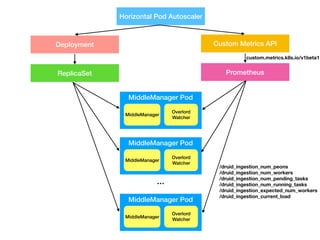
Horizontal Pod Autoscaler
Deployment
ReplicaSet
Custom Metrics API
Prometheus
MiddleManager Pod
MiddleManager
Overlord

Watcher
MiddleManager Pod
MiddleManager
Overlord

Watcher
MiddleManager Pod
MiddleManager
Overlord

Watcher
…
/druid_ingestion_num_peons
/druid_ingestion_num_workers
/druid_ingestion_num_pending_tasks
/druid_ingestion_num_running_tasks
/druid_ingestion_expected_num_workers
/druid_ingestion_current_load
custom.metrics.k8s.io/v1beta1
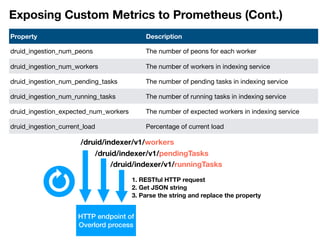
Exposing Custom Metrics to Prometheus (Cont.)
Property Description
druid_ingestion_num_peons The number of peons for each worker
druid_ingestion_num_workers The number of workers in indexing service
druid_ingestion_num_pending_tasks The number of pending tasks in indexing service
druid_ingestion_num_running_tasks The number of running tasks in indexing service
druid_ingestion_expected_num_workers The number of expected workers in indexing service
druid_ingestion_current_load Percentage of current load
/druid/indexer/v1/workers
/druid/indexer/v1/pendingTasks
/druid/indexer/v1/runningTasks
HTTP endpoint of
Overlord process
1. RESTful HTTP request

2. Get JSON string

3. Parse the string and replace the property
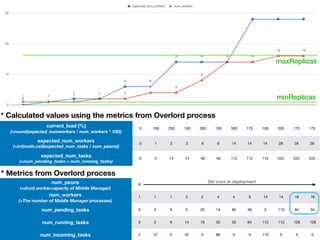
current_load (%)

(=round(expected_numworkers / num_workers * 100))
0 100 200 100 300 150 350 175 100 200 175 175
expected_num_workers

(=int(math.ceil(expected_num_tasks / num_peons))
0 1 2 2 6 6 14 14 14 28 28 28
expected_num_tasks

(=num_pending_tasks + num_running_tasks)
0 2 14 14 46 46 112 112 112 222 222 222
num_peons

(=druid.worker.capacity of Middle Manager)
8
num_workers

(=The number of Middle Manager processes)
1 1 1 2 2 4 4 8 14 14 16 16
num_pending_tasks 0 0 6 0 30 14 80 48 0 110 94 94
num_running_tasks 0 2 8 14 16 32 32 64 112 112 128 128
num_incoming_tasks 2 12 0 32 0 66 0 0 110 0 0 0
* Metrics from Overlord process
* Calculated values using the metrics from Overlord process
minReplicas
maxReplicas
Set once at deployment
$ kubectl create namespace monitoring && kubectl create namespace demo
Exploring Middle Manager Auto Scaling based on Custom Metrics
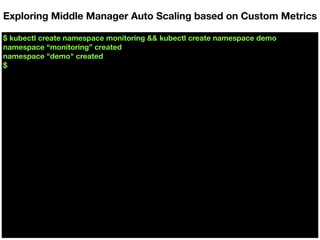
$ kubectl create namespace monitoring && kubectl create namespace demo
namespace “monitoring” created
namespace "demo" created
$
Exploring Middle Manager Auto Scaling based on Custom Metrics
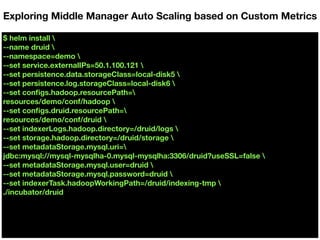
$ helm install 
--name druid 
--namespace=demo 
--set service.externalIPs=50.1.100.121 
--set persistence.data.storageClass=local-disk5 
--set persistence.log.storageClass=local-disk6 
--set configs.hadoop.resourcePath=
resources/demo/conf/hadoop 
--set configs.druid.resourcePath=
resources/demo/conf/druid 
--set indexerLogs.hadoop.directory=/druid/logs 
--set storage.hadoop.directory=/druid/storage 
--set metadataStorage.mysql.uri=
jdbc:mysql://mysql-mysqlha-0.mysql-mysqlha:3306/druid?useSSL=false 
--set metadataStorage.mysql.user=druid 
--set metadataStorage.mysql.password=druid 
--set indexerTask.hadoopWorkingPath=/druid/indexing-tmp 
./incubator/druid
Exploring Middle Manager Auto Scaling based on Custom Metrics
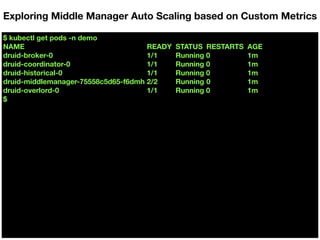
$ kubectl get pods -n demo
Exploring Middle Manager Auto Scaling based on Custom Metrics
$ kubectl get pods -n demo
NAME READY STATUS RESTARTS AGE
druid-broker-0 1/1 Running 0 1m
druid-coordinator-0 1/1 Running 0 1m
druid-historical-0 1/1 Running 0 1m
druid-middlemanager-75558c5d65-f6dmh 2/2 Running 0 1m
druid-overlord-0 1/1 Running 0 1m
$
Exploring Middle Manager Auto Scaling based on Custom Metrics
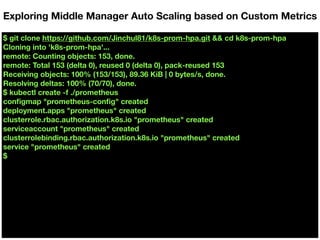
$ git clone https://github.com/Jinchul81/k8s-prom-hpa.git && cd k8s-prom-hpa
Exploring Middle Manager Auto Scaling based on Custom Metrics
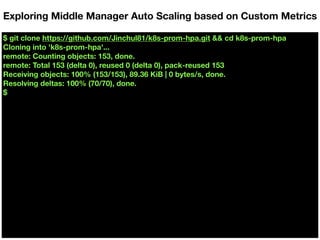
$ git clone https://github.com/Jinchul81/k8s-prom-hpa.git && cd k8s-prom-hpa
Cloning into 'k8s-prom-hpa'...
remote: Counting objects: 153, done.
remote: Total 153 (delta 0), reused 0 (delta 0), pack-reused 153
Receiving objects: 100% (153/153), 89.36 KiB | 0 bytes/s, done.
Resolving deltas: 100% (70/70), done.
$
Exploring Middle Manager Auto Scaling based on Custom Metrics
$ git clone https://github.com/Jinchul81/k8s-prom-hpa.git && cd k8s-prom-hpa
Cloning into 'k8s-prom-hpa'...
remote: Counting objects: 153, done.
remote: Total 153 (delta 0), reused 0 (delta 0), pack-reused 153
Receiving objects: 100% (153/153), 89.36 KiB | 0 bytes/s, done.
Resolving deltas: 100% (70/70), done.
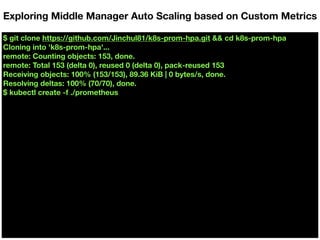
$ kubectl create -f ./prometheus
Exploring Middle Manager Auto Scaling based on Custom Metrics
$ git clone https://github.com/Jinchul81/k8s-prom-hpa.git && cd k8s-prom-hpa
Cloning into 'k8s-prom-hpa'...
remote: Counting objects: 153, done.
remote: Total 153 (delta 0), reused 0 (delta 0), pack-reused 153
Receiving objects: 100% (153/153), 89.36 KiB | 0 bytes/s, done.
Resolving deltas: 100% (70/70), done.
$ kubectl create -f ./prometheus
configmap "prometheus-config" created
deployment.apps "prometheus" created
clusterrole.rbac.authorization.k8s.io "prometheus" created
serviceaccount "prometheus" created
clusterrolebinding.rbac.authorization.k8s.io "prometheus" created
service "prometheus" created
$
Exploring Middle Manager Auto Scaling based on Custom Metrics
$ make certs
Exploring Middle Manager Auto Scaling based on Custom Metrics
$ make certs
Generating TLS certs
Generating a 2048 bit RSA private key
......................................+++
.......................+++
writing new private key to 'metrics-ca.key'
-----
2018/09/19 20:05:54 [INFO] generate received request
2018/09/19 20:05:54 [INFO] received CSR
2018/09/19 20:05:54 [INFO] generating key: rsa-2048
2018/09/19 20:05:55 [INFO] encoded CSR
2018/09/19 20:05:55 [INFO] signed certificate with serial number
369504685819654624616304590957348031615297503101
Generating custom-metrics-api/cm-adapter-serving-certs.yaml
$
Exploring Middle Manager Auto Scaling based on Custom Metrics
$ kubectl create -f ./custom-metrics-api
Exploring Middle Manager Auto Scaling based on Custom Metrics
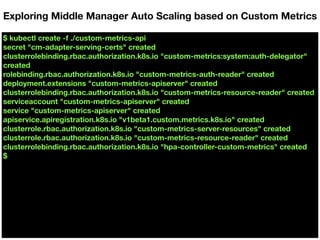
$ kubectl create -f ./custom-metrics-api
secret "cm-adapter-serving-certs" created
clusterrolebinding.rbac.authorization.k8s.io "custom-metrics:system:auth-delegator"
created
rolebinding.rbac.authorization.k8s.io "custom-metrics-auth-reader" created
deployment.extensions "custom-metrics-apiserver" created
clusterrolebinding.rbac.authorization.k8s.io "custom-metrics-resource-reader" created
serviceaccount "custom-metrics-apiserver" created
service "custom-metrics-apiserver" created
apiservice.apiregistration.k8s.io "v1beta1.custom.metrics.k8s.io" created
clusterrole.rbac.authorization.k8s.io "custom-metrics-server-resources" created
clusterrole.rbac.authorization.k8s.io "custom-metrics-resource-reader" created
clusterrolebinding.rbac.authorization.k8s.io "hpa-controller-custom-metrics" created
$
Exploring Middle Manager Auto Scaling based on Custom Metrics
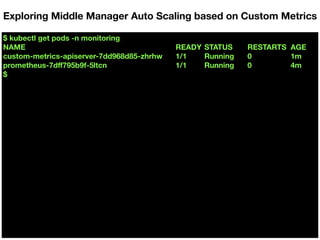
$ kubectl get pods -n monitoring
Exploring Middle Manager Auto Scaling based on Custom Metrics
$ kubectl get pods -n monitoring
NAME READY STATUS RESTARTS AGE
custom-metrics-apiserver-7dd968d85-zhrhw 1/1 Running 0 1m
prometheus-7dff795b9f-5ltcn 1/1 Running 0 4m
$
Exploring Middle Manager Auto Scaling based on Custom Metrics
$ kubectl get --raw "/apis/custom.metrics.k8s.io/v1beta1" | jq .
Exploring Middle Manager Auto Scaling based on Custom Metrics
$ kubectl get --raw "/apis/custom.metrics.k8s.io/v1beta1" | jq .
{
"kind": "APIResourceList",
"apiVersion": "v1",
"groupVersion": "custom.metrics.k8s.io/v1beta1",
"resources": [
{
"name": "persistentvolumeclaims/kubelet_volume_stats_inodes_free",
"singularName": "",
"namespaced": true,
"kind": "MetricValueList",
"verbs": [
"get"
]
},
{
"name": "namespaces/kube_statefulset_status_observed_generation",
"singularName": "",
"namespaced": false,
"kind": "MetricValueList",
"verbs": [
…
Exploring Middle Manager Auto Scaling based on Custom Metrics
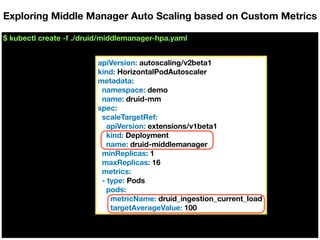
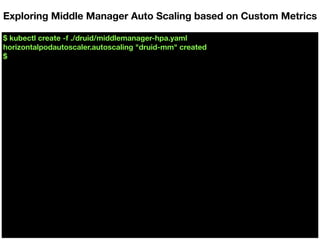
$ kubectl create -f ./druid/middlemanager-hpa.yaml
Exploring Middle Manager Auto Scaling based on Custom Metrics
apiVersion: autoscaling/v2beta1
kind: HorizontalPodAutoscaler
metadata:
namespace: demo
name: druid-mm
spec:
scaleTargetRef:
apiVersion: extensions/v1beta1
kind: Deployment
name: druid-middlemanager
minReplicas: 1
maxReplicas: 16
metrics:
- type: Pods
pods:
metricName: druid_ingestion_current_load
targetAverageValue: 100
$ kubectl create -f ./druid/middlemanager-hpa.yaml
horizontalpodautoscaler.autoscaling "druid-mm" created
$
Exploring Middle Manager Auto Scaling based on Custom Metrics
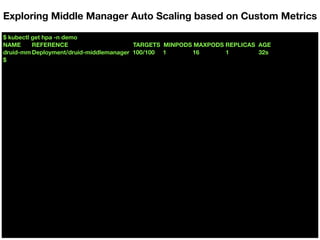
$ kubectl get hpa -n demo
Exploring Middle Manager Auto Scaling based on Custom Metrics
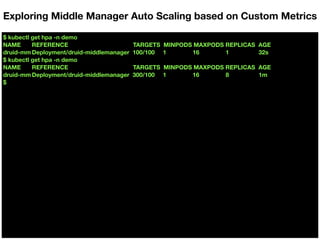
$ kubectl get hpa -n demo
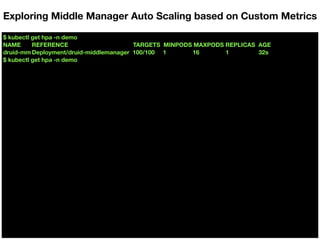
NAME REFERENCE TARGETS MINPODS MAXPODS REPLICAS AGE
druid-mm Deployment/druid-middlemanager 100/100 1 16 1 32s
$
Exploring Middle Manager Auto Scaling based on Custom Metrics
$ kubectl get hpa -n demo
NAME REFERENCE TARGETS MINPODS MAXPODS REPLICAS AGE
druid-mm Deployment/druid-middlemanager 100/100 1 16 1 32s
$ kubectl get hpa -n demo
Exploring Middle Manager Auto Scaling based on Custom Metrics
$ kubectl get hpa -n demo
NAME REFERENCE TARGETS MINPODS MAXPODS REPLICAS AGE
druid-mm Deployment/druid-middlemanager 100/100 1 16 1 32s
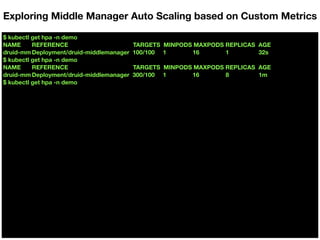
$ kubectl get hpa -n demo
NAME REFERENCE TARGETS MINPODS MAXPODS REPLICAS AGE
druid-mm Deployment/druid-middlemanager 300/100 1 16 8 1m
$
Exploring Middle Manager Auto Scaling based on Custom Metrics
$ kubectl get hpa -n demo
NAME REFERENCE TARGETS MINPODS MAXPODS REPLICAS AGE
druid-mm Deployment/druid-middlemanager 100/100 1 16 1 32s
$ kubectl get hpa -n demo
NAME REFERENCE TARGETS MINPODS MAXPODS REPLICAS AGE
druid-mm Deployment/druid-middlemanager 300/100 1 16 8 1m
$ kubectl get hpa -n demo
Exploring Middle Manager Auto Scaling based on Custom Metrics
$ kubectl get hpa -n demo
NAME REFERENCE TARGETS MINPODS MAXPODS REPLICAS AGE
druid-mm Deployment/druid-middlemanager 100/100 1 16 1 32s
$ kubectl get hpa -n demo
NAME REFERENCE TARGETS MINPODS MAXPODS REPLICAS AGE
druid-mm Deployment/druid-middlemanager 300/100 1 16 8 1m
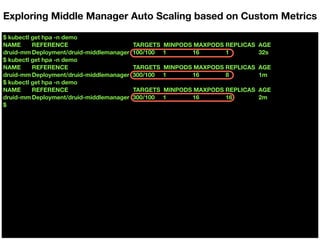
$ kubectl get hpa -n demo
NAME REFERENCE TARGETS MINPODS MAXPODS REPLICAS AGE
druid-mm Deployment/druid-middlemanager 300/100 1 16 16 2m
$
Exploring Middle Manager Auto Scaling based on Custom Metrics
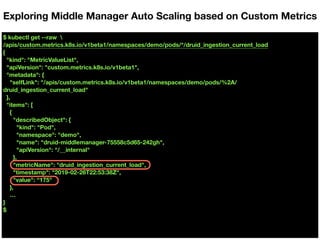
$ kubectl get --raw 
/apis/custom.metrics.k8s.io/v1beta1/namespaces/demo/pods/*/druid_ingestion_current_load
Exploring Middle Manager Auto Scaling based on Custom Metrics
$ kubectl get --raw 
/apis/custom.metrics.k8s.io/v1beta1/namespaces/demo/pods/*/druid_ingestion_current_load
{
"kind": "MetricValueList",
"apiVersion": "custom.metrics.k8s.io/v1beta1",
"metadata": {
"selfLink": "/apis/custom.metrics.k8s.io/v1beta1/namespaces/demo/pods/%2A/
druid_ingestion_current_load"
},
"items": [
{
"describedObject": {
"kind": "Pod",
"namespace": "demo",
"name": "druid-middlemanager-75558c5d65-242gh",
"apiVersion": "/__internal"
},
"metricName": "druid_ingestion_current_load",
"timestamp": "2019-02-26T22:53:38Z",
"value": “175"
},
…
}
$
Exploring Middle Manager Auto Scaling based on Custom Metrics
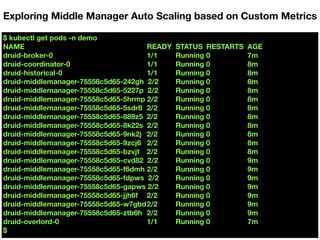
$ kubectl get pods -n demo
NAME READY STATUS RESTARTS AGE
druid-broker-0 1/1 Running 0 7m
druid-coordinator-0 1/1 Running 0 8m
druid-historical-0 1/1 Running 0 8m
druid-middlemanager-75558c5d65-242gh 2/2 Running 0 8m
druid-middlemanager-75558c5d65-5227p 2/2 Running 0 8m
druid-middlemanager-75558c5d65-5hrmp 2/2 Running 0 8m
druid-middlemanager-75558c5d65-5sdr8 2/2 Running 0 8m
druid-middlemanager-75558c5d65-889z5 2/2 Running 0 8m
druid-middlemanager-75558c5d65-8k22s 2/2 Running 0 8m
druid-middlemanager-75558c5d65-9nk2j 2/2 Running 0 8m
druid-middlemanager-75558c5d65-9zcj6 2/2 Running 0 8m
druid-middlemanager-75558c5d65-bzvjt 2/2 Running 0 8m
druid-middlemanager-75558c5d65-cvd82 2/2 Running 0 9m
druid-middlemanager-75558c5d65-f6dmh 2/2 Running 0 9m
druid-middlemanager-75558c5d65-fdpws 2/2 Running 0 9m
druid-middlemanager-75558c5d65-gapws 2/2 Running 0 9m
druid-middlemanager-75558c5d65-jjh6f 2/2 Running 0 9m
druid-middlemanager-75558c5d65-w7gbd2/2 Running 0 9m
druid-middlemanager-75558c5d65-ztb6h 2/2 Running 0 9m
druid-overlord-0 1/1 Running 0 7m
$
Exploring Middle Manager Auto Scaling based on Custom Metrics
Horizontal Pods Auto Scaling:
Scale-in issue and workarounds
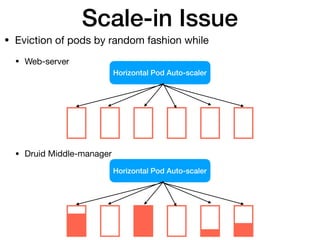
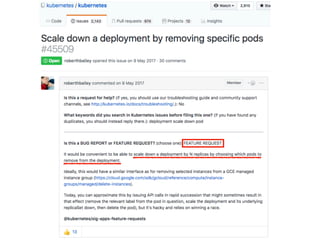
Scale-in Issue
• Eviction of pods by random fashion while

• Web-server


• Druid Middle-manager


Horizontal Pod Auto-scaler
Ç Ç
Horizontal Pod Auto-scaler
Ç Ç
[replica_set.go, https://github.com/kubernetes/kubernetes/blob/master/pkg/controller/replicaset/replica_set.go#L459 ]
Precedences Rules & Workaround
1. Unassigned < Assigned

2. Pending < Unknown < Running

3. Not ready < Ready
4. Ready for empty time < Less time < More time

5. Higher restart counts < Lower restart counts

6. Empty creation time pods < Newer pods < Older pods
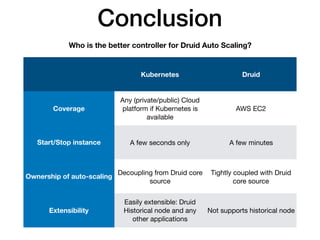
Conclusion
Kubernetes Druid
Coverage
Any (private/public) Cloud
platform if Kubernetes is
available
AWS EC2
Start/Stop instance A few seconds only A few minutes
Ownership of auto-scaling
Decoupling from Druid core
source
Tightly coupled with Druid
core source
Extensibility
Easily extensible: Druid
Historical node and any
other applications
Not supports historical node
Who is the better controller for Druid Auto Scaling?

Apache Druid Auto Scale-out/in for Streaming Data Ingestion on Kubernetes

  • 1.
    Apache Druid AutoScale-out/in for Streaming Data Ingestion on Kubernetes Jinchul Kim
  • 2.
    About Jinchul • DevOpsengineer and Senior Software Developer at SK Telecom (2017 ~ ) • Scrum master for cloud platform development using Kubernetes, Docker, and a variety of applications • Committer of Apache Impala Project (2018 ~) • SAP HANA in-memory engine at SAP Labs Korea (2008 ~ 2017) • Designed, wrote server-side code by using C++: SQL/SQLScript parser, semantic analyzer, SQL optimizer, rule/ cost based optimization, plan explanation and executor, SQL plan cache, and SQLScript debugger • Received "SAP Applaud Award" for strategic contribution with impact across teams/functions and overcame significant challenges on HANA scale-out quality
  • 3.
    • Motivation • Background& terminology • Apache Kafka • Apache Druid • Docker & Kubernetes • Helm • Auto Scaling in Druid • Horizontal Pods Auto Scaling with Custom Metrics on Kubernetes • Horizontal Pods Auto Scaling: Scale-in issue and workarounds • Conclusion Agenda
  • 4.
    Motivation • Why dowe need auto-scaling? • Cost saving by resource management • What kinds of information do we need for auto-scaling? • Hardware resource metrics • Custom metrics from service
  • 5.
    Motivation (Cont.) • Drawbacksin auto-scaling feature of Apache Druid • Druid's auto scaling is only available in AWS • A few minutes for start-up and shutdown of VMs • Druid's auto scaling is tightly coupled with AWS API
  • 6.
  • 7.
    [Overview of ApacheKafka — By Ch.ko123 — Own work, CC BY 4.0, 
 https://commons.wikimedia.org/w/index.php?curid=59871096]
  • 8.
  • 9.
  • 10.
  • 11.
  • 12.
    • Overlord • Assignsingestion tasks to Middle Managers • Is a controller of data ingestion into Druid • Watches over Middle Managers • Coordinates segment publishing • Middle Manager • Processes handle ingestion of new data into the cluster • Reads external data sources and publishes new Druid segments • Is called Worker node • Executes submitted tasks • Forwards tasks to peons that run in separate JVMs • Peon • Runs a single task in a single JVM • Is managed by Middle Manager
  • 13.
    WHAT HAS DOCKERDONE FOR US? • Continuous delivery - Deliver software more often and with less errors - No time spent on dev-to-ops handoffs • Improved Security - Containers help isolate each part of your system and provides better control of each component of your system • Run anything, anywhere - All languages, all databases, all operating systems - Any distribution, any cloud, any machine • Reproducibility - Reduces the times we say “it only worked on my machine”
  • 14.
    VMs vs. Containers Source:https://www.docker.com/whatisdocker/ Containers are isolated, but share OS and, where appropriate, bins/libraries
  • 15.
    WHAT DOES KUBERNETESDO? • Kubernetes is an open-source system for automating deployment, scaling, and management of containerized applications. • Improves reliability -Continuously monitors and manages your containers -Will scale your application to handle changes in load • Better use of infrastructure resources -Helps reduce infrastructure requirements by gracefully scaling up and down your entire platform • Coordinates what containers run where and when across your system
  • 16.
    Helm Architecture Helm Client gRPCRESTful Chart
 Repository Kubernetes Cluster App. App. App. Helm • Package manager for managing Kubernetes applications • Helm Charts helps you define, install, and upgrade Kubernetes application • Renders k8s manifest files and send them to k8s API => launch apps into the k8s cluster … K8S API ServerTiller Server Docker Image Registry
  • 17.
    * The basicchart format consists of the templates directory, values.yaml, and other files as below.
  • 18.
  • 19.
    The Autoscaling mechanismscurrently in place are tightly coupled with our deployment infrastructure but the framework should be in place for other implementations. We are highly open to new implementations or extensions of the existing mechanisms. In our own deployments, middle manager nodes are Amazon AWS EC2 nodes and they are provisioned to register themselves in a galaxy environment. If autoscaling is enabled, new middle managers may be added when a task has been in pending state for too long. Middle managers may be terminated if they have not run any tasks for a period of time. “ ” [Autoscaling, http://druid.io/docs/latest/design/overlord.html ] Description of Auto Scaling in Druid
  • 20.
    [EC2AutoScalar.java, https://github.com/apache/incubator-druid/blob/master/indexing-service/src/main/java/org/apache/druid/ indexing/overlord/autoscaling/ec2/EC2AutoScaler.java ] publicclass EC2AutoScaler implements AutoScaler<EC2EnvironmentConfig> { ... @Override public AutoScalingData provision() { ... } ... @Override public AutoScalingData terminate(List<String> ips) { ... } ... } Implementation of Auto Scaling in Druid
  • 21.
    Horizontal Pods Auto Scalingwith Custom Metrics on Kubernetes
  • 22.
    Horizontal Pod Autoscaler Deployment ReplicaSet CustomMetrics API Prometheus MiddleManager Pod MiddleManager Overlord
 Watcher MiddleManager Pod MiddleManager Overlord
 Watcher MiddleManager Pod MiddleManager Overlord
 Watcher … /druid_ingestion_num_peons /druid_ingestion_num_workers /druid_ingestion_num_pending_tasks /druid_ingestion_num_running_tasks /druid_ingestion_expected_num_workers /druid_ingestion_current_load custom.metrics.k8s.io/v1beta1
  • 24.
    Exposing Custom Metricsto Prometheus (Cont.) Property Description druid_ingestion_num_peons The number of peons for each worker druid_ingestion_num_workers The number of workers in indexing service druid_ingestion_num_pending_tasks The number of pending tasks in indexing service druid_ingestion_num_running_tasks The number of running tasks in indexing service druid_ingestion_expected_num_workers The number of expected workers in indexing service druid_ingestion_current_load Percentage of current load /druid/indexer/v1/workers /druid/indexer/v1/pendingTasks /druid/indexer/v1/runningTasks HTTP endpoint of Overlord process 1. RESTful HTTP request
 2. Get JSON string
 3. Parse the string and replace the property
  • 25.
    current_load (%)
 (=round(expected_numworkers /num_workers * 100)) 0 100 200 100 300 150 350 175 100 200 175 175 expected_num_workers
 (=int(math.ceil(expected_num_tasks / num_peons)) 0 1 2 2 6 6 14 14 14 28 28 28 expected_num_tasks
 (=num_pending_tasks + num_running_tasks) 0 2 14 14 46 46 112 112 112 222 222 222 num_peons
 (=druid.worker.capacity of Middle Manager) 8 num_workers
 (=The number of Middle Manager processes) 1 1 1 2 2 4 4 8 14 14 16 16 num_pending_tasks 0 0 6 0 30 14 80 48 0 110 94 94 num_running_tasks 0 2 8 14 16 32 32 64 112 112 128 128 num_incoming_tasks 2 12 0 32 0 66 0 0 110 0 0 0 * Metrics from Overlord process * Calculated values using the metrics from Overlord process minReplicas maxReplicas Set once at deployment
  • 26.
    $ kubectl createnamespace monitoring && kubectl create namespace demo Exploring Middle Manager Auto Scaling based on Custom Metrics
  • 27.
    $ kubectl createnamespace monitoring && kubectl create namespace demo namespace “monitoring” created namespace "demo" created $ Exploring Middle Manager Auto Scaling based on Custom Metrics
  • 28.
    $ helm install --name druid --namespace=demo --set service.externalIPs=50.1.100.121 --set persistence.data.storageClass=local-disk5 --set persistence.log.storageClass=local-disk6 --set configs.hadoop.resourcePath= resources/demo/conf/hadoop --set configs.druid.resourcePath= resources/demo/conf/druid --set indexerLogs.hadoop.directory=/druid/logs --set storage.hadoop.directory=/druid/storage --set metadataStorage.mysql.uri= jdbc:mysql://mysql-mysqlha-0.mysql-mysqlha:3306/druid?useSSL=false --set metadataStorage.mysql.user=druid --set metadataStorage.mysql.password=druid --set indexerTask.hadoopWorkingPath=/druid/indexing-tmp ./incubator/druid Exploring Middle Manager Auto Scaling based on Custom Metrics
  • 29.
    $ kubectl getpods -n demo Exploring Middle Manager Auto Scaling based on Custom Metrics
  • 30.
    $ kubectl getpods -n demo NAME READY STATUS RESTARTS AGE druid-broker-0 1/1 Running 0 1m druid-coordinator-0 1/1 Running 0 1m druid-historical-0 1/1 Running 0 1m druid-middlemanager-75558c5d65-f6dmh 2/2 Running 0 1m druid-overlord-0 1/1 Running 0 1m $ Exploring Middle Manager Auto Scaling based on Custom Metrics
  • 31.
    $ git clonehttps://github.com/Jinchul81/k8s-prom-hpa.git && cd k8s-prom-hpa Exploring Middle Manager Auto Scaling based on Custom Metrics
  • 32.
    $ git clonehttps://github.com/Jinchul81/k8s-prom-hpa.git && cd k8s-prom-hpa Cloning into 'k8s-prom-hpa'... remote: Counting objects: 153, done. remote: Total 153 (delta 0), reused 0 (delta 0), pack-reused 153 Receiving objects: 100% (153/153), 89.36 KiB | 0 bytes/s, done. Resolving deltas: 100% (70/70), done. $ Exploring Middle Manager Auto Scaling based on Custom Metrics
  • 33.
    $ git clonehttps://github.com/Jinchul81/k8s-prom-hpa.git && cd k8s-prom-hpa Cloning into 'k8s-prom-hpa'... remote: Counting objects: 153, done. remote: Total 153 (delta 0), reused 0 (delta 0), pack-reused 153 Receiving objects: 100% (153/153), 89.36 KiB | 0 bytes/s, done. Resolving deltas: 100% (70/70), done. $ kubectl create -f ./prometheus Exploring Middle Manager Auto Scaling based on Custom Metrics
  • 34.
    $ git clonehttps://github.com/Jinchul81/k8s-prom-hpa.git && cd k8s-prom-hpa Cloning into 'k8s-prom-hpa'... remote: Counting objects: 153, done. remote: Total 153 (delta 0), reused 0 (delta 0), pack-reused 153 Receiving objects: 100% (153/153), 89.36 KiB | 0 bytes/s, done. Resolving deltas: 100% (70/70), done. $ kubectl create -f ./prometheus configmap "prometheus-config" created deployment.apps "prometheus" created clusterrole.rbac.authorization.k8s.io "prometheus" created serviceaccount "prometheus" created clusterrolebinding.rbac.authorization.k8s.io "prometheus" created service "prometheus" created $ Exploring Middle Manager Auto Scaling based on Custom Metrics
  • 35.
    $ make certs ExploringMiddle Manager Auto Scaling based on Custom Metrics
  • 36.
    $ make certs GeneratingTLS certs Generating a 2048 bit RSA private key ......................................+++ .......................+++ writing new private key to 'metrics-ca.key' ----- 2018/09/19 20:05:54 [INFO] generate received request 2018/09/19 20:05:54 [INFO] received CSR 2018/09/19 20:05:54 [INFO] generating key: rsa-2048 2018/09/19 20:05:55 [INFO] encoded CSR 2018/09/19 20:05:55 [INFO] signed certificate with serial number 369504685819654624616304590957348031615297503101 Generating custom-metrics-api/cm-adapter-serving-certs.yaml $ Exploring Middle Manager Auto Scaling based on Custom Metrics
  • 37.
    $ kubectl create-f ./custom-metrics-api Exploring Middle Manager Auto Scaling based on Custom Metrics
  • 38.
    $ kubectl create-f ./custom-metrics-api secret "cm-adapter-serving-certs" created clusterrolebinding.rbac.authorization.k8s.io "custom-metrics:system:auth-delegator" created rolebinding.rbac.authorization.k8s.io "custom-metrics-auth-reader" created deployment.extensions "custom-metrics-apiserver" created clusterrolebinding.rbac.authorization.k8s.io "custom-metrics-resource-reader" created serviceaccount "custom-metrics-apiserver" created service "custom-metrics-apiserver" created apiservice.apiregistration.k8s.io "v1beta1.custom.metrics.k8s.io" created clusterrole.rbac.authorization.k8s.io "custom-metrics-server-resources" created clusterrole.rbac.authorization.k8s.io "custom-metrics-resource-reader" created clusterrolebinding.rbac.authorization.k8s.io "hpa-controller-custom-metrics" created $ Exploring Middle Manager Auto Scaling based on Custom Metrics
  • 39.
    $ kubectl getpods -n monitoring Exploring Middle Manager Auto Scaling based on Custom Metrics
  • 40.
    $ kubectl getpods -n monitoring NAME READY STATUS RESTARTS AGE custom-metrics-apiserver-7dd968d85-zhrhw 1/1 Running 0 1m prometheus-7dff795b9f-5ltcn 1/1 Running 0 4m $ Exploring Middle Manager Auto Scaling based on Custom Metrics
  • 41.
    $ kubectl get--raw "/apis/custom.metrics.k8s.io/v1beta1" | jq . Exploring Middle Manager Auto Scaling based on Custom Metrics
  • 42.
    $ kubectl get--raw "/apis/custom.metrics.k8s.io/v1beta1" | jq . { "kind": "APIResourceList", "apiVersion": "v1", "groupVersion": "custom.metrics.k8s.io/v1beta1", "resources": [ { "name": "persistentvolumeclaims/kubelet_volume_stats_inodes_free", "singularName": "", "namespaced": true, "kind": "MetricValueList", "verbs": [ "get" ] }, { "name": "namespaces/kube_statefulset_status_observed_generation", "singularName": "", "namespaced": false, "kind": "MetricValueList", "verbs": [ … Exploring Middle Manager Auto Scaling based on Custom Metrics
  • 43.
    $ kubectl create-f ./druid/middlemanager-hpa.yaml Exploring Middle Manager Auto Scaling based on Custom Metrics apiVersion: autoscaling/v2beta1 kind: HorizontalPodAutoscaler metadata: namespace: demo name: druid-mm spec: scaleTargetRef: apiVersion: extensions/v1beta1 kind: Deployment name: druid-middlemanager minReplicas: 1 maxReplicas: 16 metrics: - type: Pods pods: metricName: druid_ingestion_current_load targetAverageValue: 100
  • 44.
    $ kubectl create-f ./druid/middlemanager-hpa.yaml horizontalpodautoscaler.autoscaling "druid-mm" created $ Exploring Middle Manager Auto Scaling based on Custom Metrics
  • 45.
    $ kubectl gethpa -n demo Exploring Middle Manager Auto Scaling based on Custom Metrics
  • 46.
    $ kubectl gethpa -n demo NAME REFERENCE TARGETS MINPODS MAXPODS REPLICAS AGE druid-mm Deployment/druid-middlemanager 100/100 1 16 1 32s $ Exploring Middle Manager Auto Scaling based on Custom Metrics
  • 47.
    $ kubectl gethpa -n demo NAME REFERENCE TARGETS MINPODS MAXPODS REPLICAS AGE druid-mm Deployment/druid-middlemanager 100/100 1 16 1 32s $ kubectl get hpa -n demo Exploring Middle Manager Auto Scaling based on Custom Metrics
  • 48.
    $ kubectl gethpa -n demo NAME REFERENCE TARGETS MINPODS MAXPODS REPLICAS AGE druid-mm Deployment/druid-middlemanager 100/100 1 16 1 32s $ kubectl get hpa -n demo NAME REFERENCE TARGETS MINPODS MAXPODS REPLICAS AGE druid-mm Deployment/druid-middlemanager 300/100 1 16 8 1m $ Exploring Middle Manager Auto Scaling based on Custom Metrics
  • 49.
    $ kubectl gethpa -n demo NAME REFERENCE TARGETS MINPODS MAXPODS REPLICAS AGE druid-mm Deployment/druid-middlemanager 100/100 1 16 1 32s $ kubectl get hpa -n demo NAME REFERENCE TARGETS MINPODS MAXPODS REPLICAS AGE druid-mm Deployment/druid-middlemanager 300/100 1 16 8 1m $ kubectl get hpa -n demo Exploring Middle Manager Auto Scaling based on Custom Metrics
  • 50.
    $ kubectl gethpa -n demo NAME REFERENCE TARGETS MINPODS MAXPODS REPLICAS AGE druid-mm Deployment/druid-middlemanager 100/100 1 16 1 32s $ kubectl get hpa -n demo NAME REFERENCE TARGETS MINPODS MAXPODS REPLICAS AGE druid-mm Deployment/druid-middlemanager 300/100 1 16 8 1m $ kubectl get hpa -n demo NAME REFERENCE TARGETS MINPODS MAXPODS REPLICAS AGE druid-mm Deployment/druid-middlemanager 300/100 1 16 16 2m $ Exploring Middle Manager Auto Scaling based on Custom Metrics
  • 51.
    $ kubectl get--raw /apis/custom.metrics.k8s.io/v1beta1/namespaces/demo/pods/*/druid_ingestion_current_load Exploring Middle Manager Auto Scaling based on Custom Metrics
  • 52.
    $ kubectl get--raw /apis/custom.metrics.k8s.io/v1beta1/namespaces/demo/pods/*/druid_ingestion_current_load { "kind": "MetricValueList", "apiVersion": "custom.metrics.k8s.io/v1beta1", "metadata": { "selfLink": "/apis/custom.metrics.k8s.io/v1beta1/namespaces/demo/pods/%2A/ druid_ingestion_current_load" }, "items": [ { "describedObject": { "kind": "Pod", "namespace": "demo", "name": "druid-middlemanager-75558c5d65-242gh", "apiVersion": "/__internal" }, "metricName": "druid_ingestion_current_load", "timestamp": "2019-02-26T22:53:38Z", "value": “175" }, … } $ Exploring Middle Manager Auto Scaling based on Custom Metrics
  • 53.
    $ kubectl getpods -n demo NAME READY STATUS RESTARTS AGE druid-broker-0 1/1 Running 0 7m druid-coordinator-0 1/1 Running 0 8m druid-historical-0 1/1 Running 0 8m druid-middlemanager-75558c5d65-242gh 2/2 Running 0 8m druid-middlemanager-75558c5d65-5227p 2/2 Running 0 8m druid-middlemanager-75558c5d65-5hrmp 2/2 Running 0 8m druid-middlemanager-75558c5d65-5sdr8 2/2 Running 0 8m druid-middlemanager-75558c5d65-889z5 2/2 Running 0 8m druid-middlemanager-75558c5d65-8k22s 2/2 Running 0 8m druid-middlemanager-75558c5d65-9nk2j 2/2 Running 0 8m druid-middlemanager-75558c5d65-9zcj6 2/2 Running 0 8m druid-middlemanager-75558c5d65-bzvjt 2/2 Running 0 8m druid-middlemanager-75558c5d65-cvd82 2/2 Running 0 9m druid-middlemanager-75558c5d65-f6dmh 2/2 Running 0 9m druid-middlemanager-75558c5d65-fdpws 2/2 Running 0 9m druid-middlemanager-75558c5d65-gapws 2/2 Running 0 9m druid-middlemanager-75558c5d65-jjh6f 2/2 Running 0 9m druid-middlemanager-75558c5d65-w7gbd2/2 Running 0 9m druid-middlemanager-75558c5d65-ztb6h 2/2 Running 0 9m druid-overlord-0 1/1 Running 0 7m $ Exploring Middle Manager Auto Scaling based on Custom Metrics
  • 54.
    Horizontal Pods AutoScaling: Scale-in issue and workarounds
  • 55.
    Scale-in Issue • Evictionof pods by random fashion while • Web-server


 • Druid Middle-manager


 Horizontal Pod Auto-scaler Ç Ç Horizontal Pod Auto-scaler Ç Ç
  • 57.
    [replica_set.go, https://github.com/kubernetes/kubernetes/blob/master/pkg/controller/replicaset/replica_set.go#L459 ] PrecedencesRules & Workaround 1. Unassigned < Assigned 2. Pending < Unknown < Running 3. Not ready < Ready 4. Ready for empty time < Less time < More time 5. Higher restart counts < Lower restart counts 6. Empty creation time pods < Newer pods < Older pods
  • 58.
    Conclusion Kubernetes Druid Coverage Any (private/public)Cloud platform if Kubernetes is available AWS EC2 Start/Stop instance A few seconds only A few minutes Ownership of auto-scaling Decoupling from Druid core source Tightly coupled with Druid core source Extensibility Easily extensible: Druid Historical node and any other applications Not supports historical node Who is the better controller for Druid Auto Scaling?