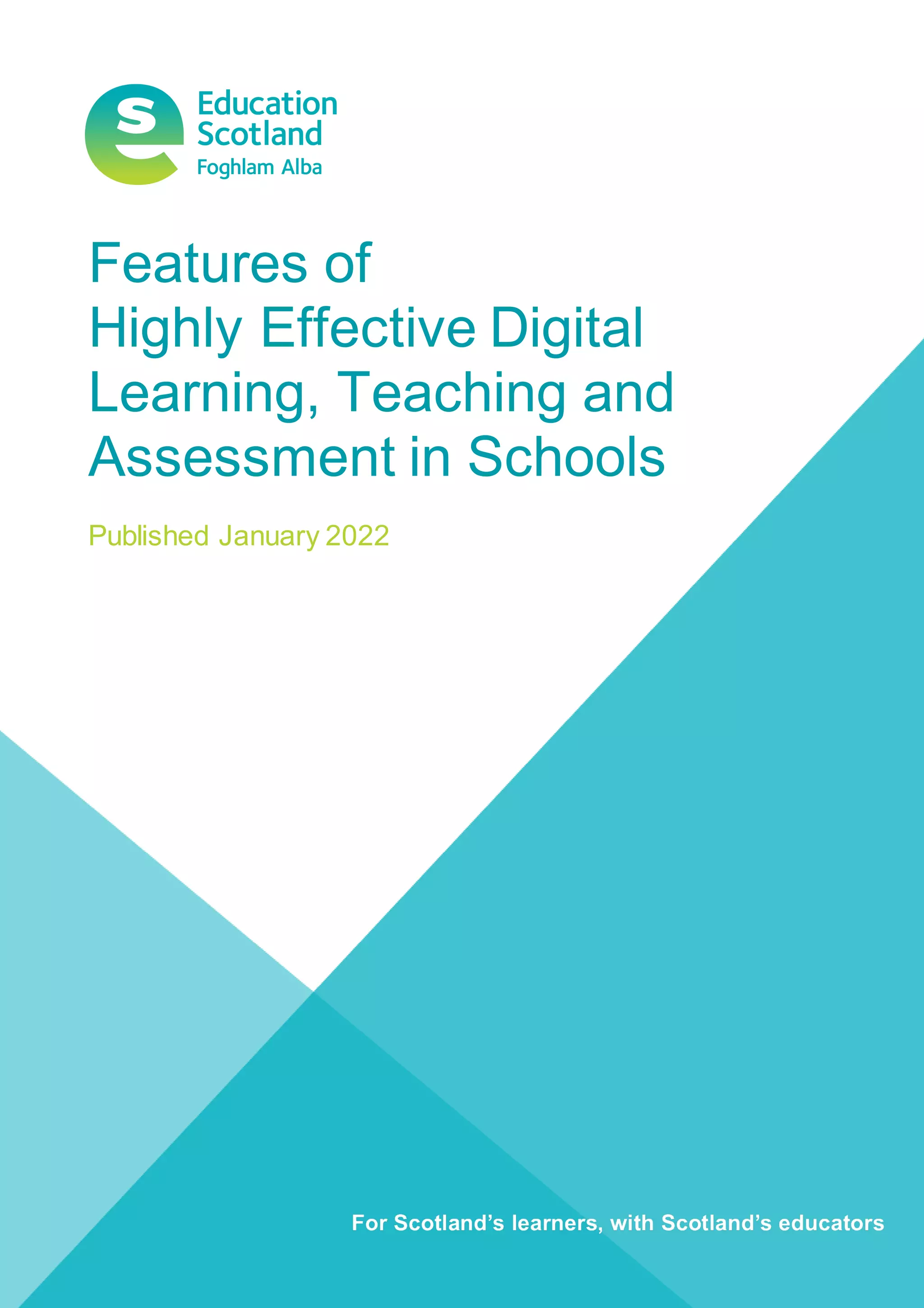
Features of
Highly Effective Digital
Learning, Teaching and
Assessment in Schools
Published January 2022
1 | Features of Highly Effective Digital Learning, Teaching and Assessment
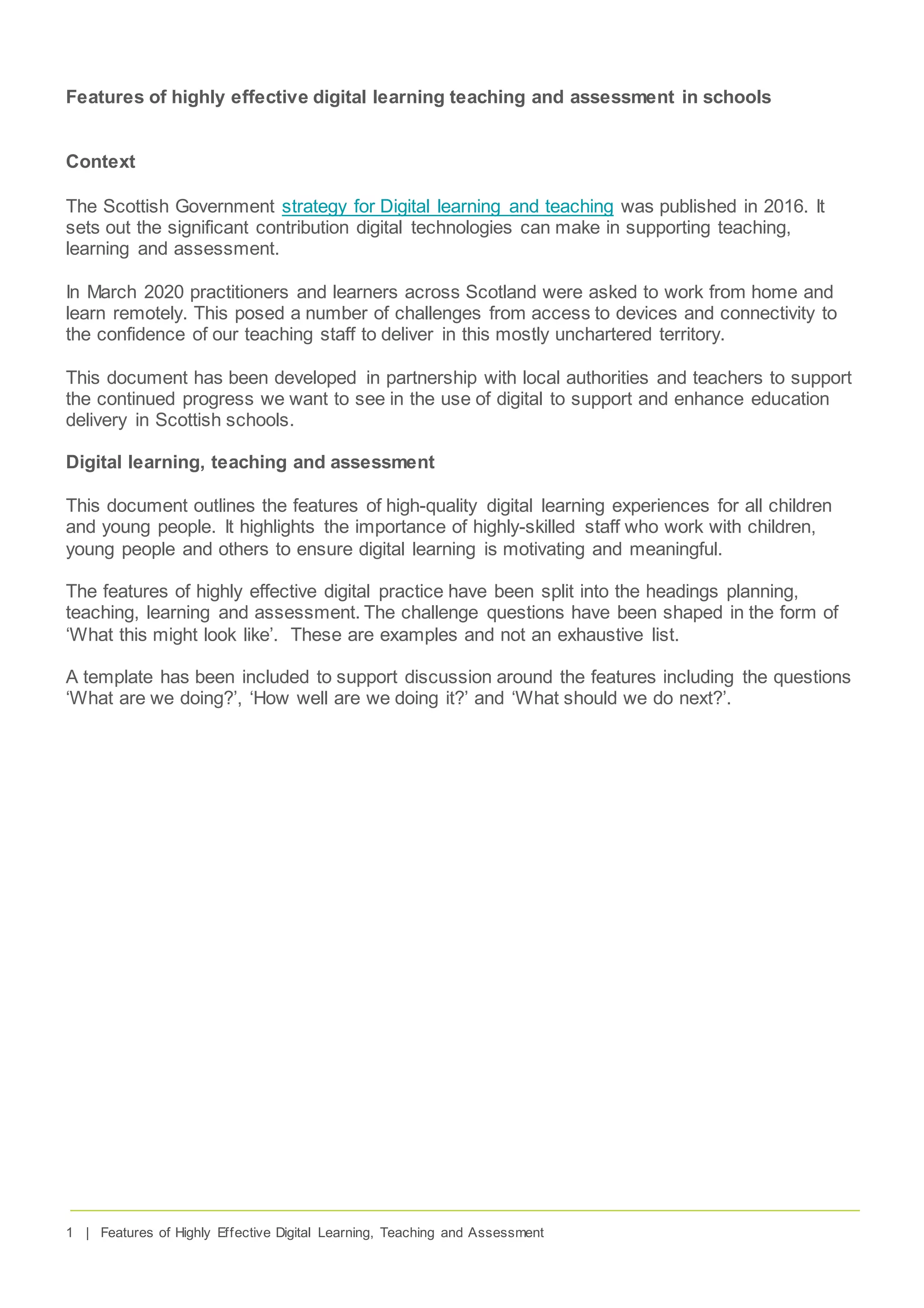
Features of highly effective digital learning teaching and assessment in schools
Context
The Scottish Government strategy for Digital learning and teaching was published in 2016. It
sets out the significant contribution digital technologies can make in supporting teaching,
learning and assessment.
In March 2020 practitioners and learners across Scotland were asked to work from home and
learn remotely. This posed a number of challenges from access to devices and connectivity to
the confidence of our teaching staff to deliver in this mostly unchartered territory.
This document has been developed in partnership with local authorities and teachers to support
the continued progress we want to see in the use of digital to support and enhance education
delivery in Scottish schools.
Digital learning, teaching and assessment
This document outlines the features of high-quality digital learning experiences for all children
and young people. It highlights the importance of highly-skilled staff who work with children,
young people and others to ensure digital learning is motivating and meaningful.
The features of highly effective digital practice have been split into the headings planning,
teaching, learning and assessment. The challenge questions have been shaped in the form of
‘What this might look like’. These are examples and not an exhaustive list.
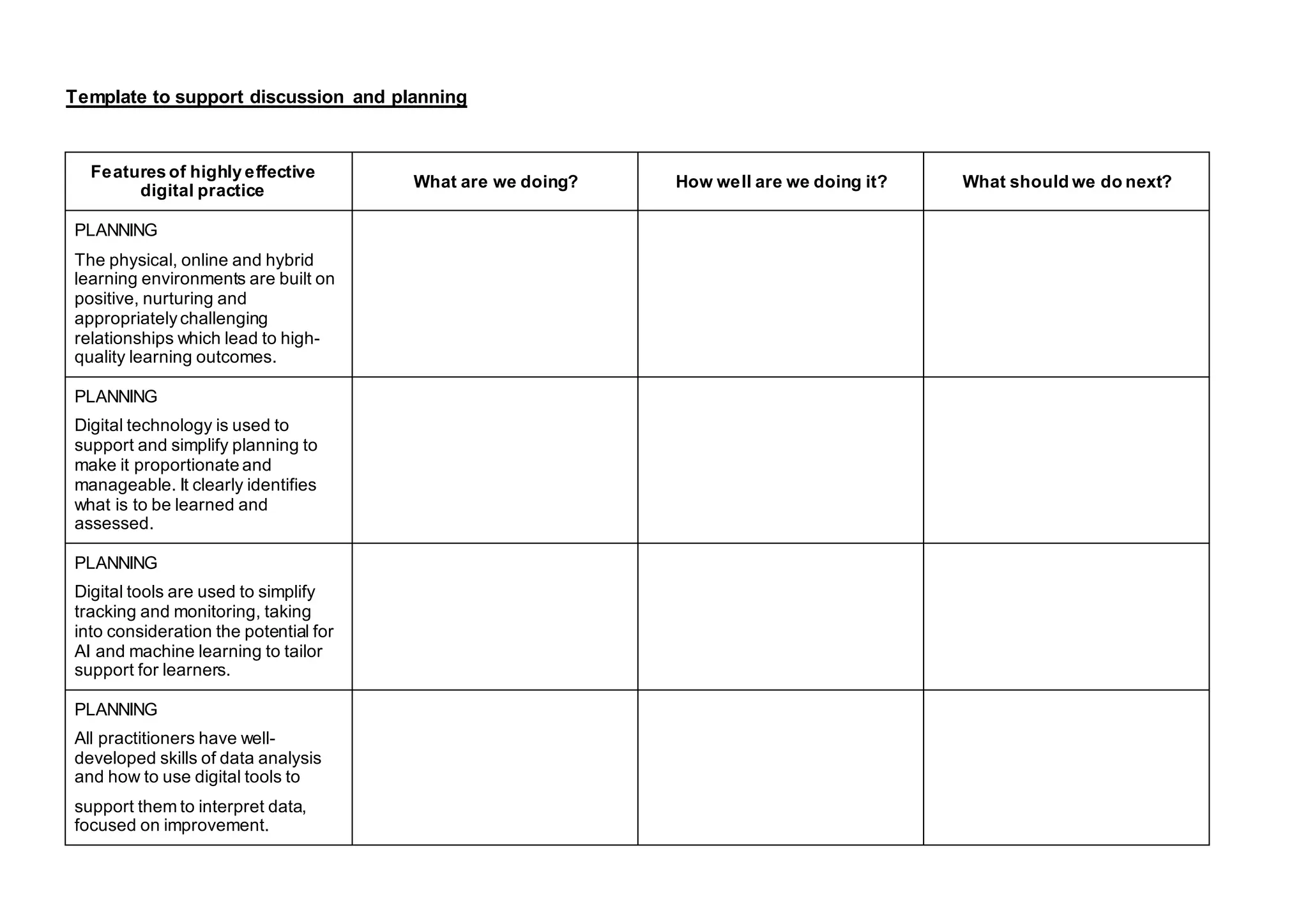
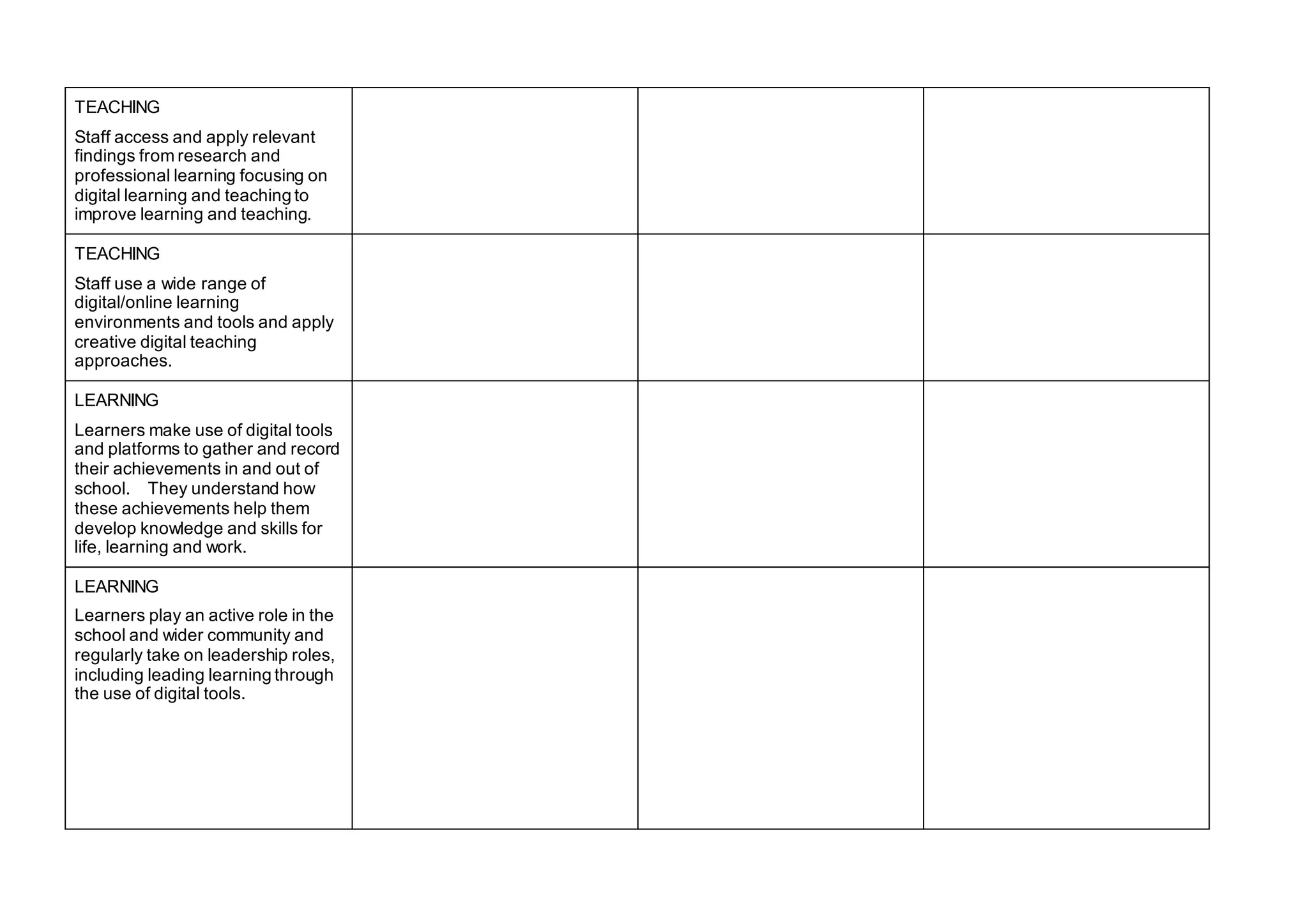
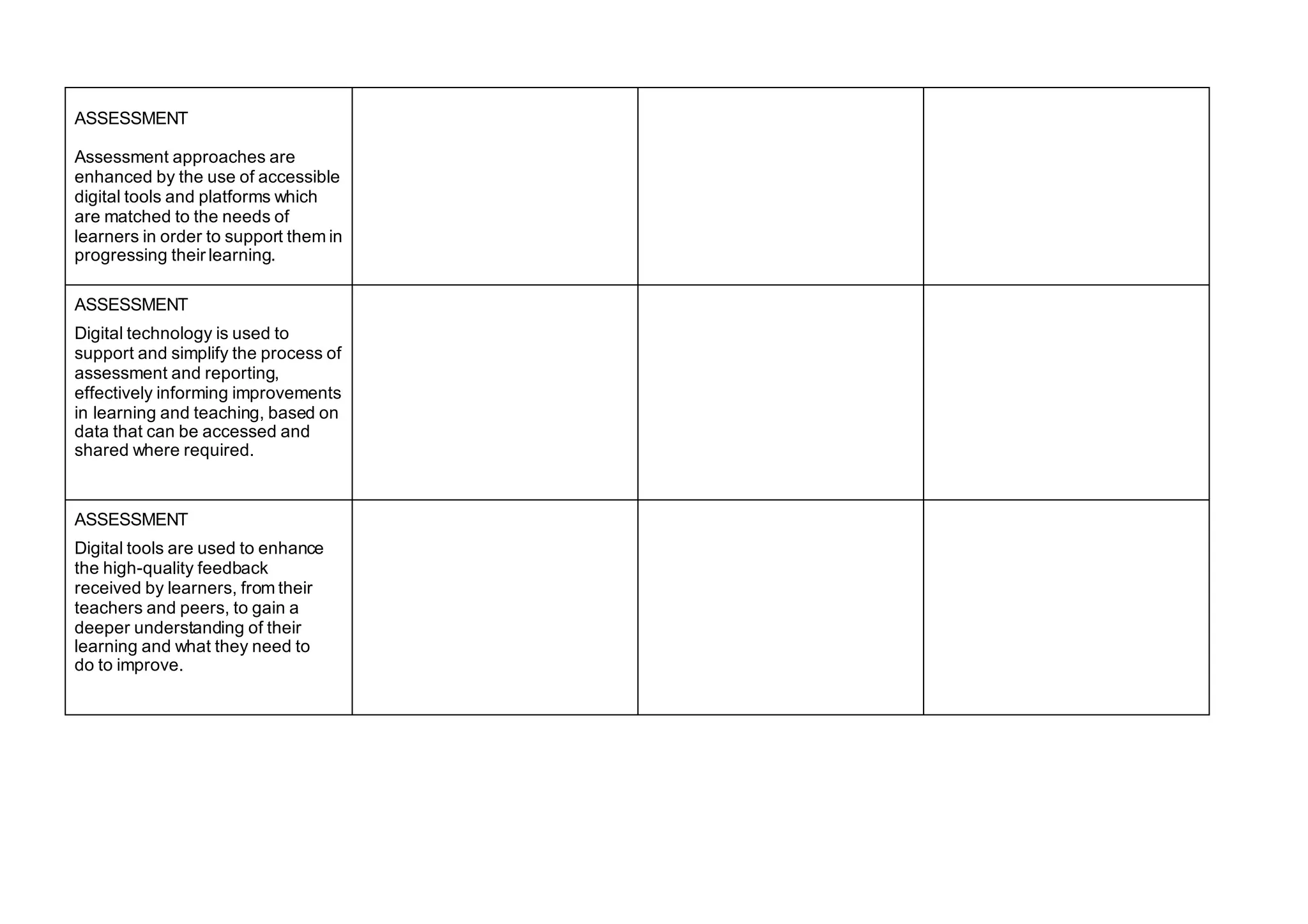
A template has been included to support discussion around the features including the questions
‘What are we doing?’, ‘How well are we doing it?’ and ‘What should we do next?’.
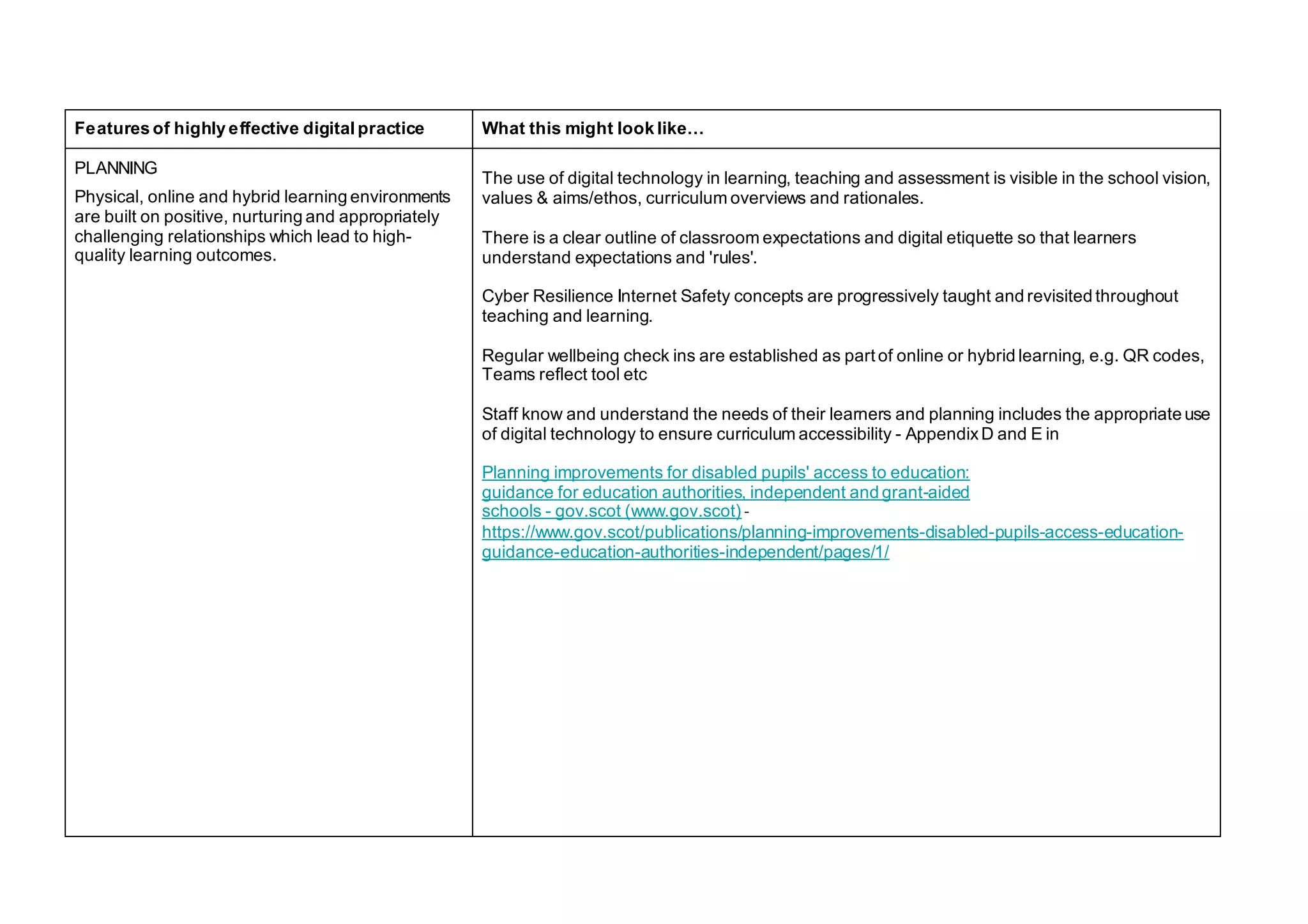
Features of highly effective digital practice What this might look like…
PLANNING
Physical, online and hybrid learning environments
are built on positive, nurturing and appropriately
challenging relationships which lead to high-
quality learning outcomes.
The use of digital technology in learning, teaching and assessment is visible in the school vision,
values & aims/ethos, curriculum overviews and rationales.
There is a clear outline of classroom expectations and digital etiquette so that learners
understand expectations and 'rules'.
Cyber Resilience Internet Safety concepts are progressively taught and revisited throughout
teaching and learning.
Regular wellbeing check ins are established as part of online or hybrid learning, e.g. QR codes,
Teams reflect tool etc
Staff know and understand the needs of their learners and planning includes the appropriate use
of digital technology to ensure curriculum accessibility - AppendixD and E in
Planning improvements for disabled pupils' access to education:
guidance for education authorities, independent and grant-aided
schools - gov.scot (www.gov.scot) -
https://www.gov.scot/publications/planning-improvements-disabled-pupils-access-education-
guidance-education-authorities-independent/pages/1/
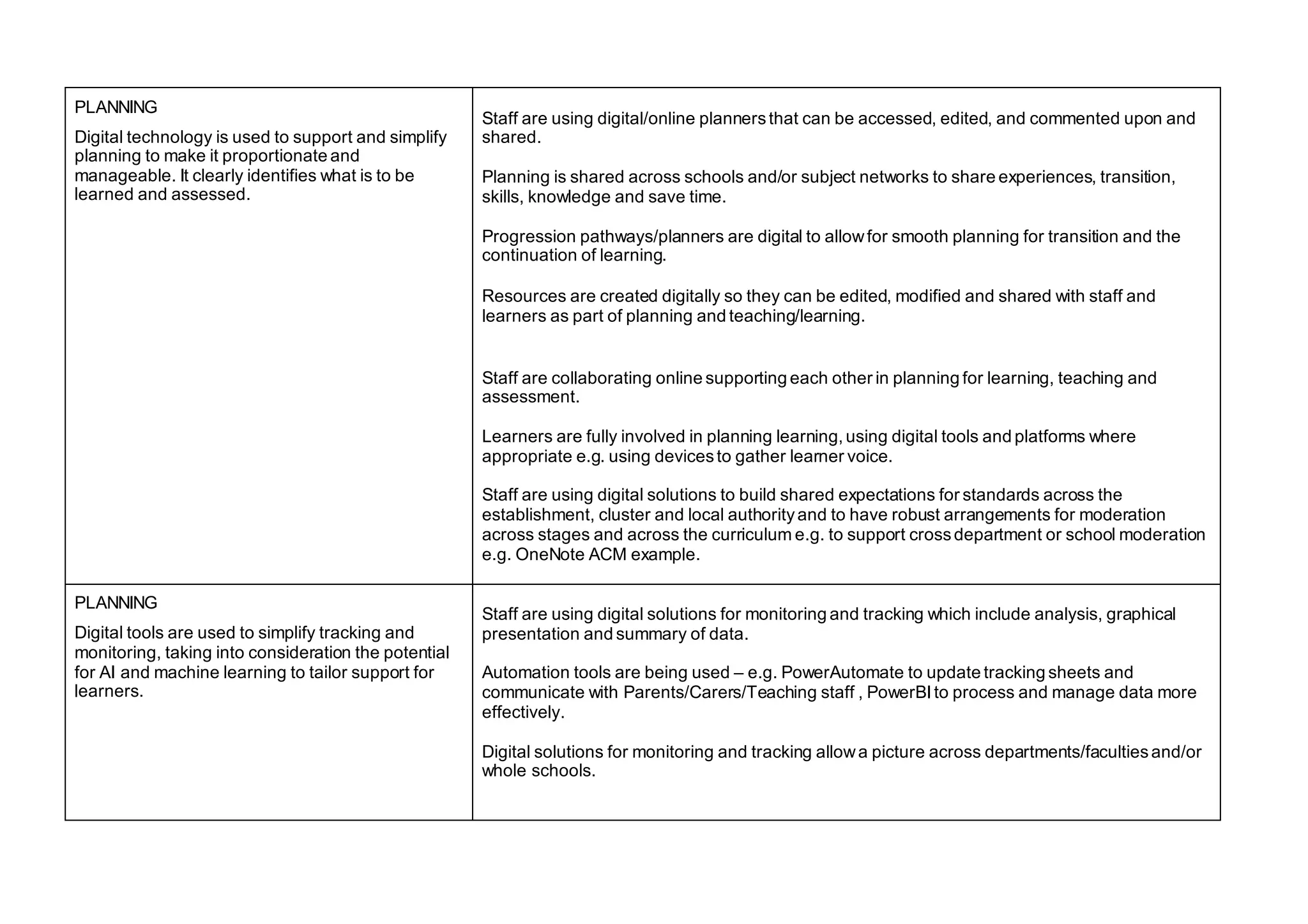
PLANNING
Digital technology is used to support and simplify
planning to make it proportionate and
manageable. It clearly identifies what is to be
learned and assessed.
Staff are using digital/online plannersthat can be accessed, edited, and commented upon and
shared.
Planning is shared across schools and/or subject networks to share experiences, transition,
skills, knowledge and save time.
Progression pathways/planners are digital to allowfor smooth planning for transition and the
continuation of learning.
Resources are created digitally so they can be edited, modified and shared with staff and
learners as part of planning and teaching/learning.
Staff are collaborating online supporting each other in planning for learning, teaching and
assessment.
Learners are fully involved in planning learning, using digital tools and platforms where
appropriate e.g. using devicesto gather learner voice.
Staff are using digital solutions to build shared expectations for standards across the
establishment, cluster and local authorityand to have robust arrangements for moderation
across stages and across the curriculum e.g. to support crossdepartment or school moderation
e.g. OneNote ACM example.
PLANNING
Digital tools are used to simplify tracking and
monitoring, taking into consideration the potential
for AI and machine learning to tailor support for
learners.
Staff are using digital solutions for monitoring and tracking which include analysis, graphical
presentation and summary of data.
Automation tools are being used – e.g. PowerAutomate to update tracking sheets and
communicate with Parents/Carers/Teaching staff , PowerBI to process and manage data more
effectively.
Digital solutions for monitoring and tracking allowa picture across departments/facultiesand/or
whole schools.
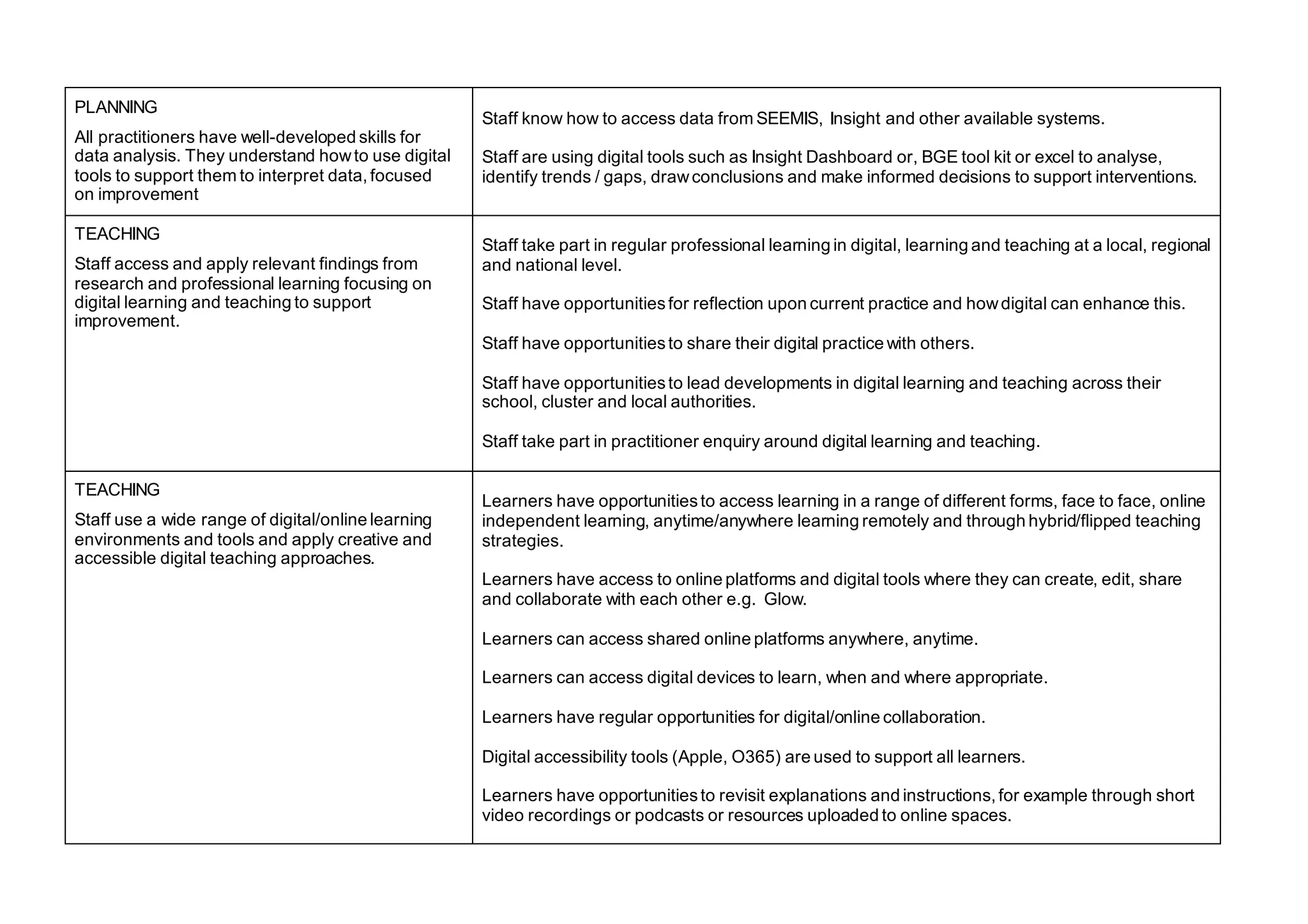
PLANNING
All practitioners have well-developed skills for
data analysis. They understand howto use digital
tools to support them to interpret data, focused
on improvement
Staff know how to access data from SEEMIS, Insight and other available systems.
Staff are using digital tools such as Insight Dashboard or, BGE tool kit or excel to analyse,
identify trends / gaps, drawconclusions and make informed decisions to support interventions.
TEACHING
Staff access and apply relevant findings from
research and professional learning focusing on
digital learning and teaching to support
improvement.
Staff take part in regular professional learning in digital, learning and teaching at a local, regional
and national level.
Staff have opportunitiesfor reflection upon current practice and howdigital can enhance this.
Staff have opportunitiesto share their digital practice with others.
Staff have opportunitiesto lead developments in digital learning and teaching across their
school, cluster and local authorities.
Staff take part in practitioner enquiry around digital learning and teaching.
TEACHING
Staff use a wide range of digital/online learning
environments and tools and apply creative and
accessible digital teaching approaches.
Learners have opportunitiesto access learning in a range of different forms, face to face, online
independent learning, anytime/anywhere learning remotely and through hybrid/flipped teaching
strategies.
Learners have access to online platforms and digital tools where they can create, edit, share
and collaborate with each other e.g. Glow.
Learners can access shared online platforms anywhere, anytime.
Learners can access digital devices to learn, when and where appropriate.
Learners have regular opportunities for digital/online collaboration.
Digital accessibility tools (Apple, O365) are used to support all learners.
Learners have opportunitiesto revisit explanations and instructions, for example through short
video recordings or podcasts or resources uploaded to online spaces.
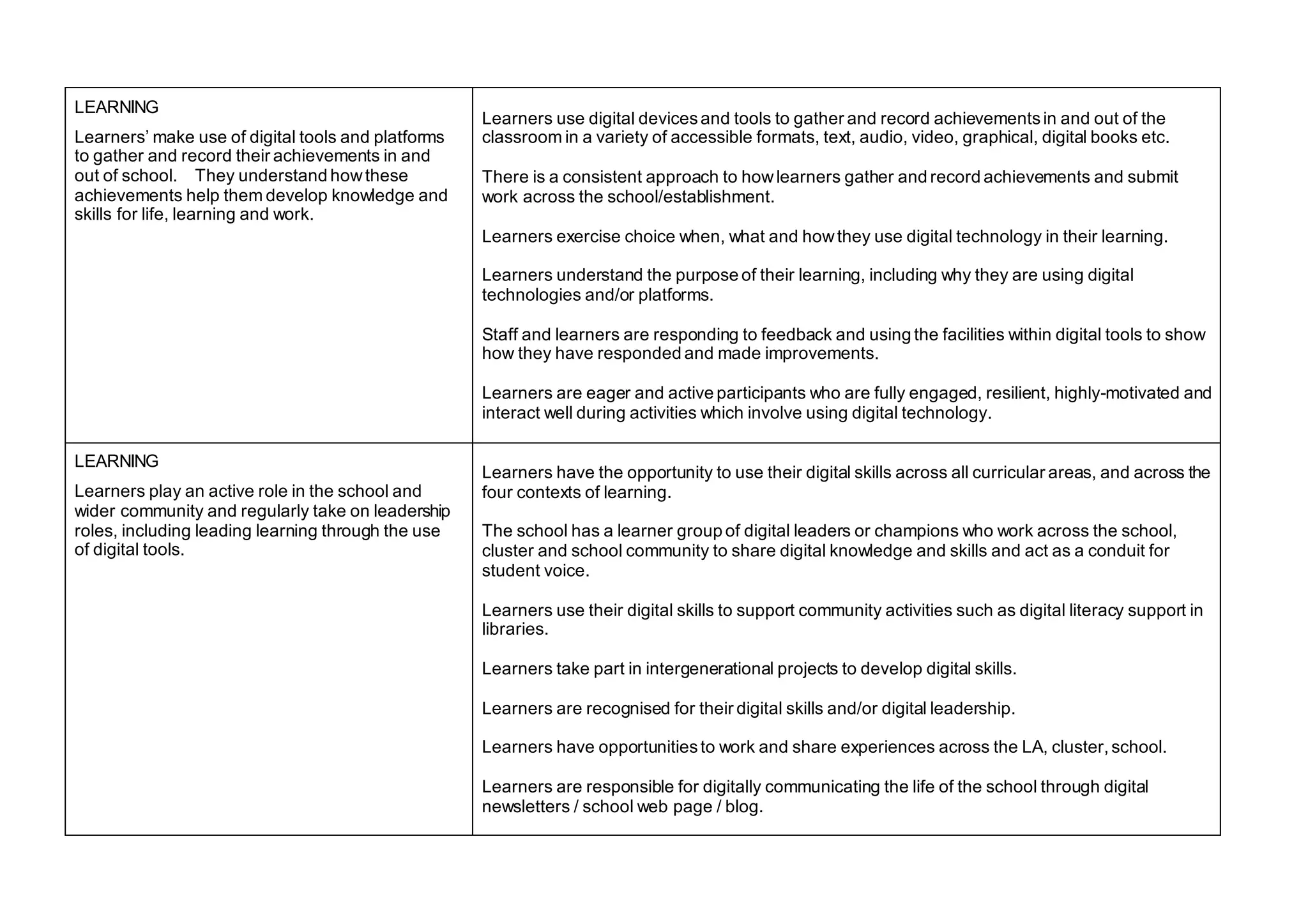
LEARNING
Learners’ make use of digital tools and platforms
to gather and record their achievements in and
out of school. They understand howthese
achievements help them develop knowledge and
skills for life, learning and work.
Learners use digital devicesand tools to gather and record achievementsin and out of the
classroom in a variety of accessible formats, text, audio, video, graphical, digital books etc.
There is a consistent approach to howlearners gather and record achievements and submit
work across the school/establishment.
Learners exercise choice when, what and howthey use digital technology in their learning.
Learners understand the purpose of their learning, including why they are using digital
technologies and/or platforms.
Staff and learners are responding to feedback and using the facilities within digital tools to show
how they have responded and made improvements.
Learners are eager and active participants who are fully engaged, resilient, highly-motivated and
interact well during activities which involve using digital technology.
LEARNING
Learners play an active role in the school and
wider community and regularly take on leadership
roles, including leading learning through the use
of digital tools.
Learners have the opportunity to use their digital skills across all curricular areas, and across the
four contexts of learning.
The school has a learner group of digital leaders or champions who work across the school,
cluster and school community to share digital knowledge and skills and act as a conduit for
student voice.
Learners use their digital skills to support community activities such as digital literacy support in
libraries.
Learners take part in intergenerational projects to develop digital skills.
Learners are recognised for their digital skills and/or digital leadership.
Learners have opportunitiesto work and share experiences across the LA, cluster, school.
Learners are responsible for digitally communicating the life of the school through digital
newsletters / school web page / blog.
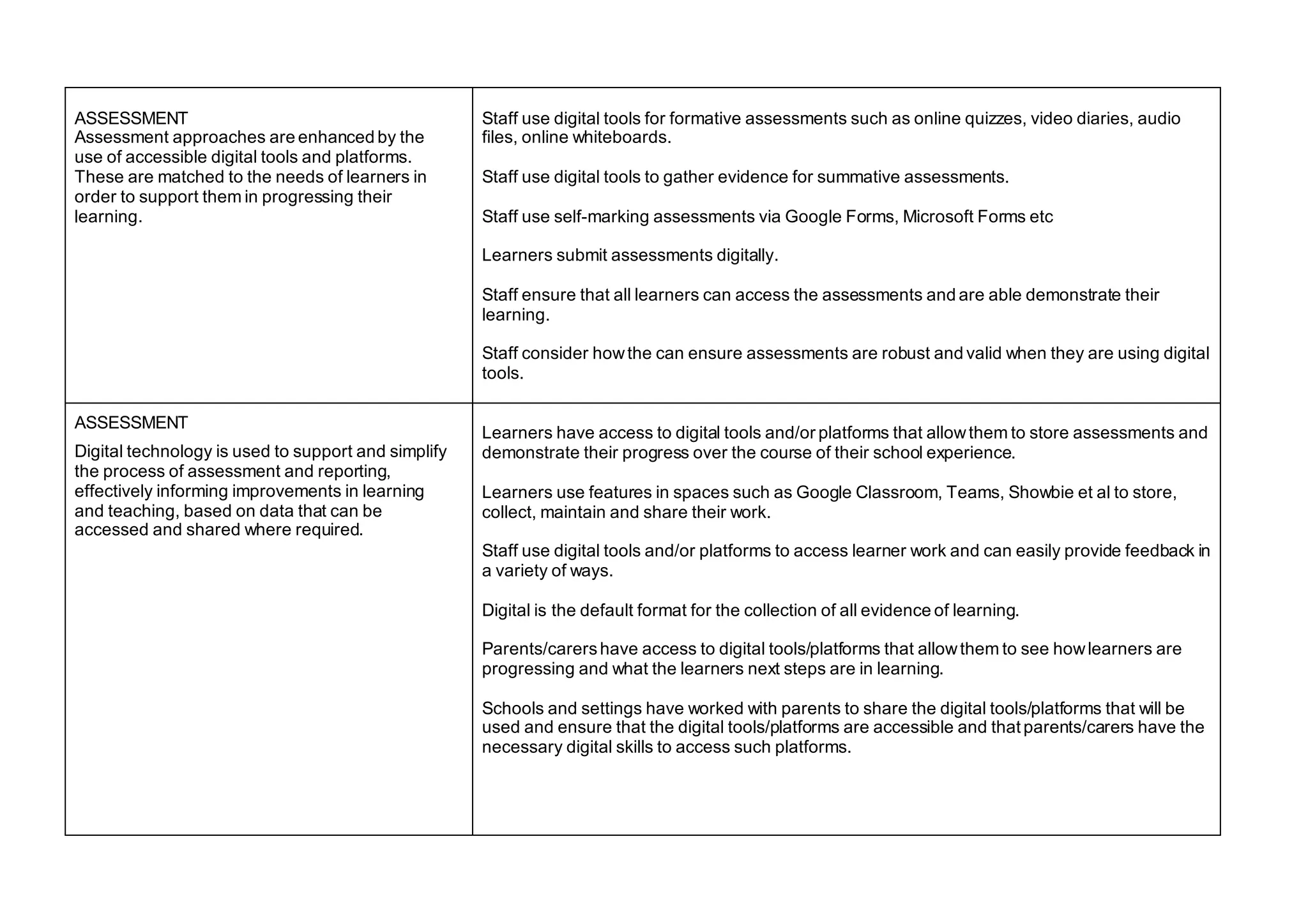
ASSESSMENT
Assessment approaches are enhanced by the
use of accessible digital tools and platforms.
These are matched to the needs of learners in
order to support them in progressing their
learning.
Staff use digital tools for formative assessments such as online quizzes, video diaries, audio
files, online whiteboards.
Staff use digital tools to gather evidence for summative assessments.
Staff use self-marking assessments via Google Forms, Microsoft Forms etc
Learners submit assessments digitally.
Staff ensure that all learners can access the assessments and are able demonstrate their
learning.
Staff consider howthe can ensure assessments are robust and valid when they are using digital
tools.
ASSESSMENT
Digital technology is used to support and simplify
the process of assessment and reporting,
effectively informing improvements in learning
and teaching, based on data that can be
accessed and shared where required.
Learners have access to digital tools and/or platforms that allowthem to store assessments and
demonstrate their progress over the course of their school experience.
Learners use features in spaces such as Google Classroom, Teams, Showbie et al to store,
collect, maintain and share their work.
Staff use digital tools and/or platforms to access learner work and can easily provide feedback in
a variety of ways.
Digital is the default format for the collection of all evidence of learning.
Parents/carershave access to digital tools/platforms that allowthem to see howlearners are
progressing and what the learners next steps are in learning.
Schools and settings have worked with parents to share the digital tools/platforms that will be
used and ensure that the digital tools/platforms are accessible and that parents/carers have the
necessary digital skills to access such platforms.
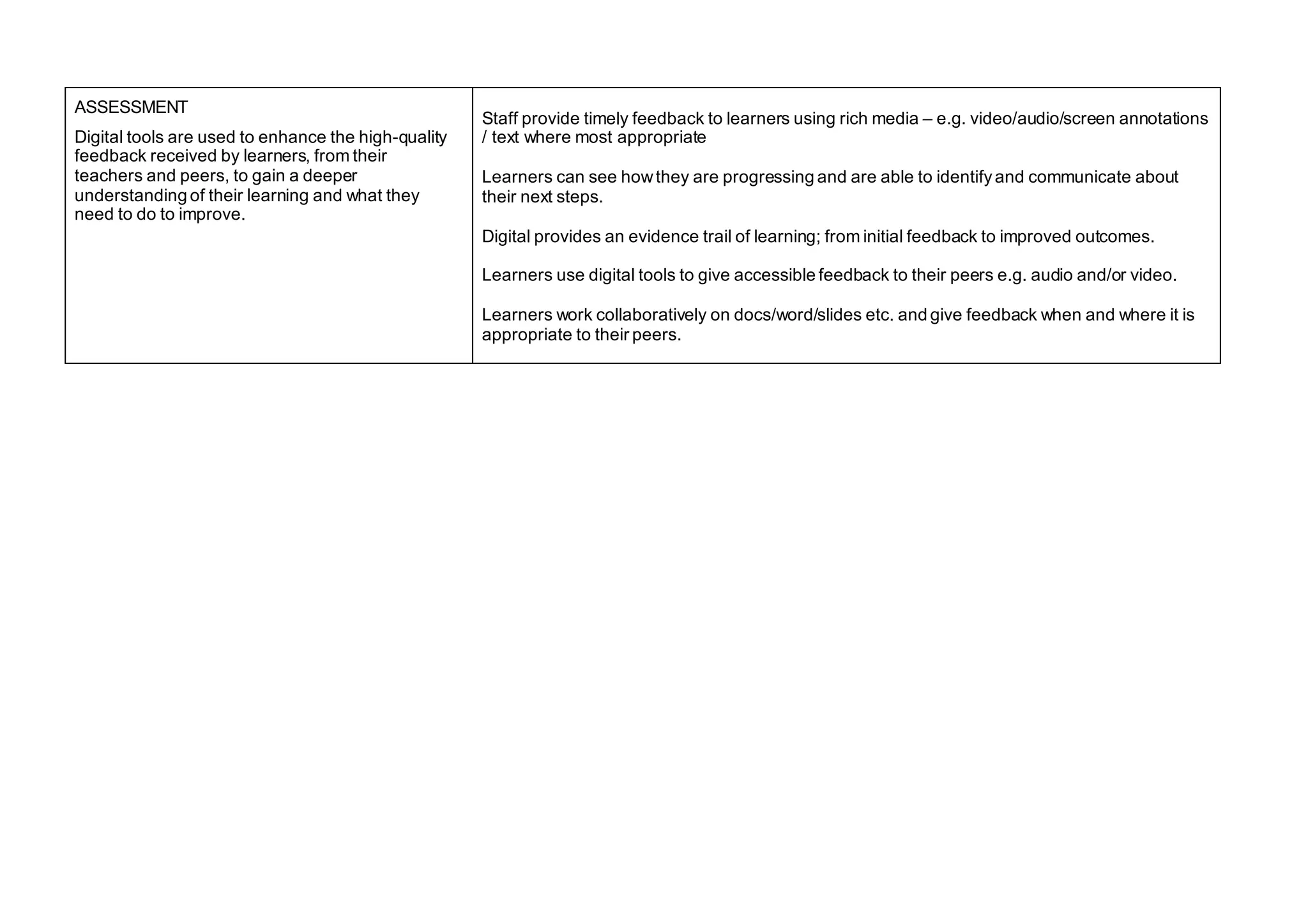
ASSESSMENT
Digital tools are used to enhance the high-quality
feedback received by learners, from their
teachers and peers, to gain a deeper
understanding of their learning and what they
need to do to improve.
Staff provide timely feedback to learners using rich media – e.g. video/audio/screen annotations
/ text where most appropriate
Learners can see howthey are progressing and are able to identifyand communicate about
their next steps.
Digital provides an evidence trail of learning; from initial feedback to improved outcomes.
Learners use digital tools to give accessible feedback to their peers e.g. audio and/or video.
Learners work collaboratively on docs/word/slides etc. and give feedback when and where it is
appropriate to their peers.
Template to support discussion and planning
Features of highly effective
digital practice
What are we doing? How well are we doing it? What should we do next?
PLANNING
The physical, online and hybrid
learning environments are built on
positive, nurturing and
appropriatelychallenging
relationships which lead to high-
quality learning outcomes.
PLANNING
Digital technology is used to
support and simplify planning to
make it proportionate and
manageable. It clearly identifies
what is to be learned and
assessed.
PLANNING
Digital tools are used to simplify
tracking and monitoring, taking
into consideration the potential for
AI and machine learning to tailor
support for learners.
PLANNING
All practitioners have well-
developed skills of data analysis
and how to use digital tools to
support them to interpret data,
focused on improvement.
TEACHING
Staff access and apply relevant
findings from research and
professional learning focusing on
digital learning and teaching to
improve learning and teaching.
TEACHING
Staff use a wide range of
digital/online learning
environments and tools and apply
creative digital teaching
approaches.
LEARNING
Learners make use of digital tools
and platforms to gather and record
their achievements in and out of
school. They understand how
these achievements help them
develop knowledge and skills for
life, learning and work.
LEARNING
Learners play an active role in the
school and wider community and
regularly take on leadership roles,
including leading learning through
the use of digital tools.
ASSESSMENT
Assessment approaches are
enhanced by the use of accessible
digital tools and platforms which
are matched to the needs of
learners in order to support them in
progressing their learning.
ASSESSMENT
Digital technology is used to
support and simplify the process of
assessment and reporting,
effectively informing improvements
in learning and teaching, based on
data that can be accessed and
shared where required.
ASSESSMENT
Digital tools are used to enhance
the high-quality feedback
received by learners, from their
teachers and peers, to gain a
deeper understanding of their
learning and what they need to
do to improve.
Education Scotland
Denholm House
Almondvale Business Park
Almondvale Way
Livingston EH54 6GA
T +44 (0)131 244 4330
E enquiries@educationscotland.gsi.gov.uk
www.education.gov.scot
© Crown Copyright, 2021
You may re-use this information (excluding images and logos) free of charge in any format or medium, under the terms of the Open
Government Licence providing that it is reproduced accurately and not in a misleading context. The material must be acknowledged as
Education Scotland copyright and the document title specified.
To view this licence, visit http://nationalarchives.gov.uk/doc/open-government-licence or e-mail: psi@nationalarchives.gsi.gov.uk
Where we have identified any third party copyright information you will need to obtain permission from the copyright holders concerned.

Features of Highly Effective Digital Learning, Teaching and Assessment in Schools

  • 1.
    Features of Highly EffectiveDigital Learning, Teaching and Assessment in Schools Published January 2022
  • 2.
    1 | Featuresof Highly Effective Digital Learning, Teaching and Assessment Features of highly effective digital learning teaching and assessment in schools Context The Scottish Government strategy for Digital learning and teaching was published in 2016. It sets out the significant contribution digital technologies can make in supporting teaching, learning and assessment. In March 2020 practitioners and learners across Scotland were asked to work from home and learn remotely. This posed a number of challenges from access to devices and connectivity to the confidence of our teaching staff to deliver in this mostly unchartered territory. This document has been developed in partnership with local authorities and teachers to support the continued progress we want to see in the use of digital to support and enhance education delivery in Scottish schools. Digital learning, teaching and assessment This document outlines the features of high-quality digital learning experiences for all children and young people. It highlights the importance of highly-skilled staff who work with children, young people and others to ensure digital learning is motivating and meaningful. The features of highly effective digital practice have been split into the headings planning, teaching, learning and assessment. The challenge questions have been shaped in the form of ‘What this might look like’. These are examples and not an exhaustive list. A template has been included to support discussion around the features including the questions ‘What are we doing?’, ‘How well are we doing it?’ and ‘What should we do next?’.
  • 3.
    Features of highlyeffective digital practice What this might look like… PLANNING Physical, online and hybrid learning environments are built on positive, nurturing and appropriately challenging relationships which lead to high- quality learning outcomes. The use of digital technology in learning, teaching and assessment is visible in the school vision, values & aims/ethos, curriculum overviews and rationales. There is a clear outline of classroom expectations and digital etiquette so that learners understand expectations and 'rules'. Cyber Resilience Internet Safety concepts are progressively taught and revisited throughout teaching and learning. Regular wellbeing check ins are established as part of online or hybrid learning, e.g. QR codes, Teams reflect tool etc Staff know and understand the needs of their learners and planning includes the appropriate use of digital technology to ensure curriculum accessibility - AppendixD and E in Planning improvements for disabled pupils' access to education: guidance for education authorities, independent and grant-aided schools - gov.scot (www.gov.scot) - https://www.gov.scot/publications/planning-improvements-disabled-pupils-access-education- guidance-education-authorities-independent/pages/1/
  • 4.
    PLANNING Digital technology isused to support and simplify planning to make it proportionate and manageable. It clearly identifies what is to be learned and assessed. Staff are using digital/online plannersthat can be accessed, edited, and commented upon and shared. Planning is shared across schools and/or subject networks to share experiences, transition, skills, knowledge and save time. Progression pathways/planners are digital to allowfor smooth planning for transition and the continuation of learning. Resources are created digitally so they can be edited, modified and shared with staff and learners as part of planning and teaching/learning. Staff are collaborating online supporting each other in planning for learning, teaching and assessment. Learners are fully involved in planning learning, using digital tools and platforms where appropriate e.g. using devicesto gather learner voice. Staff are using digital solutions to build shared expectations for standards across the establishment, cluster and local authorityand to have robust arrangements for moderation across stages and across the curriculum e.g. to support crossdepartment or school moderation e.g. OneNote ACM example. PLANNING Digital tools are used to simplify tracking and monitoring, taking into consideration the potential for AI and machine learning to tailor support for learners. Staff are using digital solutions for monitoring and tracking which include analysis, graphical presentation and summary of data. Automation tools are being used – e.g. PowerAutomate to update tracking sheets and communicate with Parents/Carers/Teaching staff , PowerBI to process and manage data more effectively. Digital solutions for monitoring and tracking allowa picture across departments/facultiesand/or whole schools.
  • 5.
    PLANNING All practitioners havewell-developed skills for data analysis. They understand howto use digital tools to support them to interpret data, focused on improvement Staff know how to access data from SEEMIS, Insight and other available systems. Staff are using digital tools such as Insight Dashboard or, BGE tool kit or excel to analyse, identify trends / gaps, drawconclusions and make informed decisions to support interventions. TEACHING Staff access and apply relevant findings from research and professional learning focusing on digital learning and teaching to support improvement. Staff take part in regular professional learning in digital, learning and teaching at a local, regional and national level. Staff have opportunitiesfor reflection upon current practice and howdigital can enhance this. Staff have opportunitiesto share their digital practice with others. Staff have opportunitiesto lead developments in digital learning and teaching across their school, cluster and local authorities. Staff take part in practitioner enquiry around digital learning and teaching. TEACHING Staff use a wide range of digital/online learning environments and tools and apply creative and accessible digital teaching approaches. Learners have opportunitiesto access learning in a range of different forms, face to face, online independent learning, anytime/anywhere learning remotely and through hybrid/flipped teaching strategies. Learners have access to online platforms and digital tools where they can create, edit, share and collaborate with each other e.g. Glow. Learners can access shared online platforms anywhere, anytime. Learners can access digital devices to learn, when and where appropriate. Learners have regular opportunities for digital/online collaboration. Digital accessibility tools (Apple, O365) are used to support all learners. Learners have opportunitiesto revisit explanations and instructions, for example through short video recordings or podcasts or resources uploaded to online spaces.
  • 6.
    LEARNING Learners’ make useof digital tools and platforms to gather and record their achievements in and out of school. They understand howthese achievements help them develop knowledge and skills for life, learning and work. Learners use digital devicesand tools to gather and record achievementsin and out of the classroom in a variety of accessible formats, text, audio, video, graphical, digital books etc. There is a consistent approach to howlearners gather and record achievements and submit work across the school/establishment. Learners exercise choice when, what and howthey use digital technology in their learning. Learners understand the purpose of their learning, including why they are using digital technologies and/or platforms. Staff and learners are responding to feedback and using the facilities within digital tools to show how they have responded and made improvements. Learners are eager and active participants who are fully engaged, resilient, highly-motivated and interact well during activities which involve using digital technology. LEARNING Learners play an active role in the school and wider community and regularly take on leadership roles, including leading learning through the use of digital tools. Learners have the opportunity to use their digital skills across all curricular areas, and across the four contexts of learning. The school has a learner group of digital leaders or champions who work across the school, cluster and school community to share digital knowledge and skills and act as a conduit for student voice. Learners use their digital skills to support community activities such as digital literacy support in libraries. Learners take part in intergenerational projects to develop digital skills. Learners are recognised for their digital skills and/or digital leadership. Learners have opportunitiesto work and share experiences across the LA, cluster, school. Learners are responsible for digitally communicating the life of the school through digital newsletters / school web page / blog.
  • 7.
    ASSESSMENT Assessment approaches areenhanced by the use of accessible digital tools and platforms. These are matched to the needs of learners in order to support them in progressing their learning. Staff use digital tools for formative assessments such as online quizzes, video diaries, audio files, online whiteboards. Staff use digital tools to gather evidence for summative assessments. Staff use self-marking assessments via Google Forms, Microsoft Forms etc Learners submit assessments digitally. Staff ensure that all learners can access the assessments and are able demonstrate their learning. Staff consider howthe can ensure assessments are robust and valid when they are using digital tools. ASSESSMENT Digital technology is used to support and simplify the process of assessment and reporting, effectively informing improvements in learning and teaching, based on data that can be accessed and shared where required. Learners have access to digital tools and/or platforms that allowthem to store assessments and demonstrate their progress over the course of their school experience. Learners use features in spaces such as Google Classroom, Teams, Showbie et al to store, collect, maintain and share their work. Staff use digital tools and/or platforms to access learner work and can easily provide feedback in a variety of ways. Digital is the default format for the collection of all evidence of learning. Parents/carershave access to digital tools/platforms that allowthem to see howlearners are progressing and what the learners next steps are in learning. Schools and settings have worked with parents to share the digital tools/platforms that will be used and ensure that the digital tools/platforms are accessible and that parents/carers have the necessary digital skills to access such platforms.
  • 8.
    ASSESSMENT Digital tools areused to enhance the high-quality feedback received by learners, from their teachers and peers, to gain a deeper understanding of their learning and what they need to do to improve. Staff provide timely feedback to learners using rich media – e.g. video/audio/screen annotations / text where most appropriate Learners can see howthey are progressing and are able to identifyand communicate about their next steps. Digital provides an evidence trail of learning; from initial feedback to improved outcomes. Learners use digital tools to give accessible feedback to their peers e.g. audio and/or video. Learners work collaboratively on docs/word/slides etc. and give feedback when and where it is appropriate to their peers.
  • 9.
    Template to supportdiscussion and planning Features of highly effective digital practice What are we doing? How well are we doing it? What should we do next? PLANNING The physical, online and hybrid learning environments are built on positive, nurturing and appropriatelychallenging relationships which lead to high- quality learning outcomes. PLANNING Digital technology is used to support and simplify planning to make it proportionate and manageable. It clearly identifies what is to be learned and assessed. PLANNING Digital tools are used to simplify tracking and monitoring, taking into consideration the potential for AI and machine learning to tailor support for learners. PLANNING All practitioners have well- developed skills of data analysis and how to use digital tools to support them to interpret data, focused on improvement.
  • 10.
    TEACHING Staff access andapply relevant findings from research and professional learning focusing on digital learning and teaching to improve learning and teaching. TEACHING Staff use a wide range of digital/online learning environments and tools and apply creative digital teaching approaches. LEARNING Learners make use of digital tools and platforms to gather and record their achievements in and out of school. They understand how these achievements help them develop knowledge and skills for life, learning and work. LEARNING Learners play an active role in the school and wider community and regularly take on leadership roles, including leading learning through the use of digital tools.
  • 11.
    ASSESSMENT Assessment approaches are enhancedby the use of accessible digital tools and platforms which are matched to the needs of learners in order to support them in progressing their learning. ASSESSMENT Digital technology is used to support and simplify the process of assessment and reporting, effectively informing improvements in learning and teaching, based on data that can be accessed and shared where required. ASSESSMENT Digital tools are used to enhance the high-quality feedback received by learners, from their teachers and peers, to gain a deeper understanding of their learning and what they need to do to improve.
  • 12.
    Education Scotland Denholm House AlmondvaleBusiness Park Almondvale Way Livingston EH54 6GA T +44 (0)131 244 4330 E enquiries@educationscotland.gsi.gov.uk www.education.gov.scot © Crown Copyright, 2021 You may re-use this information (excluding images and logos) free of charge in any format or medium, under the terms of the Open Government Licence providing that it is reproduced accurately and not in a misleading context. The material must be acknowledged as Education Scotland copyright and the document title specified. To view this licence, visit http://nationalarchives.gov.uk/doc/open-government-licence or e-mail: psi@nationalarchives.gsi.gov.uk Where we have identified any third party copyright information you will need to obtain permission from the copyright holders concerned.