Orchestrating Docker with 
Consul and Terraform
Mitchell Hashimoto 
@mitchellh
HashiCorp 
Powering the software-managed datacenter. 
hashicorp.com
What’s the problem? 
“Orchestration” and why it is needed in a Docker world
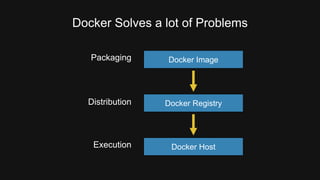
Docker Solves a lot of Problems 
Packaging Docker Image 
Docker Registry 
Docker Host 
Distribution 
Execution
Other Pieces to the Puzzle 
• Infrastructure lifecycle and provisioning 
• Monitoring 
• Discovery 
• Orchestration 
• Transitioning to Docker
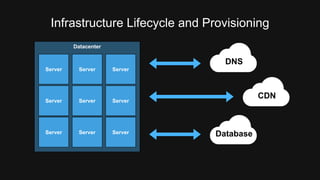
Infrastructure Lifecycle and Provisioning 
Datacenter 
Server Server Server 
DNS 
Database 
CDN
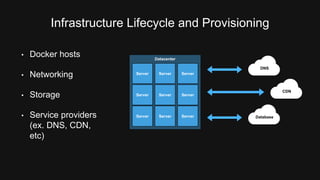
Infrastructure Lifecycle and Provisioning 
Datacenter 
Server Server Server 
DNS 
Database 
CDN 
• Docker hosts 
• Networking 
• Storage 
• Service providers 
(ex. DNS, CDN, 
etc)
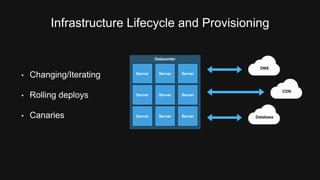
Infrastructure Lifecycle and Provisioning 
Datacenter 
Server Server Server 
DNS 
Database 
CDN 
• Changing/Iterating 
• Rolling deploys 
• Canaries
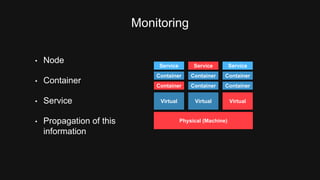
Monitoring 
Container Container Container 
Virtual Virtual Virtual 
Physical (Machine) 
• Node 
• Container 
• Service 
• Propagation of this 
information 
Service Service Service
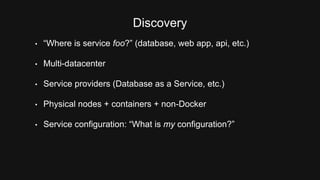
Discovery 
• “Where is service foo?” (database, web app, api, etc.) 
• Multi-datacenter 
• Service providers (Database as a Service, etc.) 
• Physical nodes + containers + non-Docker 
• Service configuration: “What is my configuration?”
Transitioning to Docker 
• Transition isn’t a single step, takes time 
• How to handle legacy + Docker and interaction?
Problems Not Inherent to Docker 
• Not new, not caused by Docker, will exist after Docker 
• Higher density exacerbates problems at earlier stage 
• New aspect: core datacenter functionality is shrinking! 
• Number of servers and containers will only grow, but the number of 
servers/containers we run/manage will shrink over time. 
• Infrastructure lifecycle, discovery, monitoring, orchestration problems 
still exist yesterday, now, and in the future.
Consul and Terraform 
Infrastructure lifecycle, service discovery, 
monitoring, and orchestration at scale 
for all infrastructures.
terraform.io
Build, combine, and launch 
infrastructure safely and efficiently. 
terraform.io
Terraform Goals 
• Unified view of modern datacenter with infrastructure as code 
• Compose multiple tiers (IaaS to PaaS to SaaS) 
• Safely change/iterate infrastructure 
• One workflow, technology agnostic 
• “No more dashboards.”
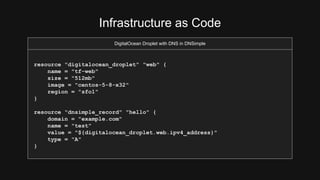
Infrastructure as Code 
DigitalOcean Droplet with DNS in DNSimple 
resource "digitalocean_droplet" "web" { 
name = "tf-web" 
size = "512mb" 
image = "centos-5-8-x32" 
region = "sfo1" 
} 
resource "dnsimple_record" "hello" { 
domain = "example.com" 
name = "test" 
value = "${digitalocean_droplet.web.ipv4_address}" 
type = "A" 
}
Infrastructure as Code 
DigitalOcean Droplet with DNS in DNSimple 
resource "digitalocean_droplet" "web" { 
name = "tf-web" 
size = "512mb" 
image = "centos-5-8-x32" 
region = "sfo1" 
} 
resource "dnsimple_record" "hello" { 
domain = "example.com" 
name = "test" 
value = "${digitalocean_droplet.web.ipv4_address}" 
type = "A" 
}
Infrastructure as Code 
DigitalOcean Droplet with DNS in DNSimple 
resource "digitalocean_droplet" "web" { 
name = "tf-web" 
size = "512mb" 
image = "centos-5-8-x32" 
region = "sfo1" 
} 
resource "dnsimple_record" "hello" { 
domain = "example.com" 
name = "test" 
value = "${digitalocean_droplet.web.ipv4_address}" 
type = "A" 
}
Infrastructure as Code 
DigitalOcean Droplet with DNS in DNSimple 
resource "digitalocean_droplet" "web" { 
name = "tf-web" 
size = "512mb" 
image = "centos-5-8-x32" 
region = "sfo1" 
} 
resource "dnsimple_record" "hello" { 
domain = "example.com" 
name = "test" 
value = "${digitalocean_droplet.web.ipv4_address}" 
type = "A" 
}
Infrastructure as Code 
• Human friendly config, JSON compatible 
• Text format makes it version-able, VCS-friendly 
• Infrastructure as code on a level not before possible
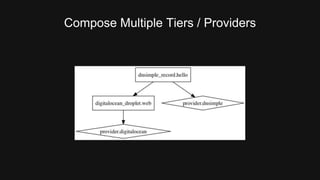
Compose Multiple Tiers / Providers
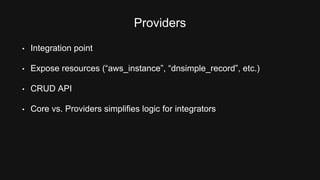
Providers 
• Integration point 
• Expose resources (“aws_instance”, “dnsimple_record”, etc.) 
• CRUD API 
• Core vs. Providers simplifies logic for integrators
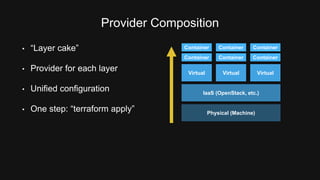
Provider Composition 
• “Layer cake” 
• Provider for each layer 
• Unified configuration 
Container Container Container 
Virtual Virtual Virtual 
IaaS (OpenStack, etc.) 
• One step: “terraform apply” Physical (Machine)
Safely Change/Iterate 
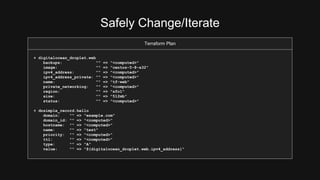
Terraform Plan 
+ digitalocean_droplet.web 
backups: "" => "<computed>" 
image: "" => "centos-5-8-x32" 
ipv4_address: "" => "<computed>" 
ipv4_address_private: "" => "<computed>" 
name: "" => "tf-web" 
private_networking: "" => "<computed>" 
region: "" => "sfo1" 
size: "" => "512mb" 
status: "" => "<computed>" 
+ dnsimple_record.hello 
domain: "" => "example.com" 
domain_id: "" => "<computed>" 
hostname: "" => "<computed>" 
name: "" => "test" 
priority: "" => "<computed>" 
ttl: "" => "<computed>" 
type: "" => "A" 
value: "" => "${digitalocean_droplet.web.ipv4_address}"
Safely Change/Iterate 
Terraform Plan 
+ digitalocean_droplet.web 
backups: "" => "<computed>" 
image: "" => "centos-5-8-x32" 
ipv4_address: "" => "<computed>" 
ipv4_address_private: "" => "<computed>" 
name: "" => "tf-web" 
private_networking: "" => "<computed>" 
region: "" => "sfo1" 
size: "" => "512mb" 
status: "" => "<computed>" 
+ dnsimple_record.hello 
domain: "" => "example.com" 
domain_id: "" => "<computed>" 
hostname: "" => "<computed>" 
name: "" => "test" 
priority: "" => "<computed>" 
ttl: "" => "<computed>" 
type: "" => "A" 
value: "" => "${digitalocean_droplet.web.ipv4_address}"
Safely Change/Iterate 
Terraform Plan 
+ digitalocean_droplet.web 
backups: "" => "<computed>" 
image: "" => "centos-5-8-x32" 
ipv4_address: "" => "<computed>" 
ipv4_address_private: "" => "<computed>" 
name: "" => "tf-web" 
private_networking: "" => "<computed>" 
region: "" => "sfo1" 
size: "" => "512mb" 
status: "" => "<computed>" 
+ dnsimple_record.hello 
domain: "" => "example.com" 
domain_id: "" => "<computed>" 
hostname: "" => "<computed>" 
name: "" => "test" 
priority: "" => "<computed>" 
ttl: "" => "<computed>" 
type: "" => "A" 
value: "" => "${digitalocean_droplet.web.ipv4_address}"
Safely Change/Iterate 
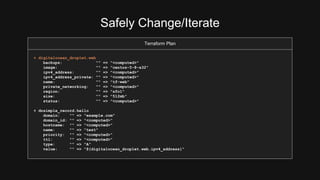
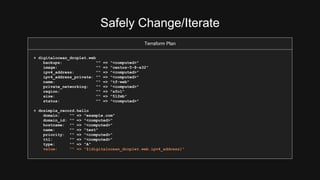
• Plan shows you what will happen 
• Save plans to guarantee what will happen 
• Plans show reasons for certain actions (such as re-create) 
• Prior to Terraform: Operators had to “divine” change ordering, 
parallelization, rollout effect.
Other Features 
• Modules 
• Provisioners (remote-exec, local-exec, etc.) 
• Parameterization 
• Outputs 
• One command run: terraform run github.com/foo/bar
consul.io
Service discovery, configuration, and 
orchestration made easy. Distributed, 
highly available, and datacenter-aware.
Service Discovery 
Where is service foo?
Service Discovery 
Service Discovery via DNS or HTTP 
$ dig web-frontend.service.consul. +short 
10.0.3.89 
10.0.1.46 
$ curl http://localhost:8500/v1/catalog/service/web-frontend 
[{ 
“Node”: “node-e818f1”, 
“Address”: “10.0.3.89”, 
“ServiceID”: “web-frontend”, 
… 
}]
Service Discovery 
• DNS is legacy-friendly. No application changes required. 
• HTTP returns rich metadata. 
• Discover both internal and external services 
(such as service providers)
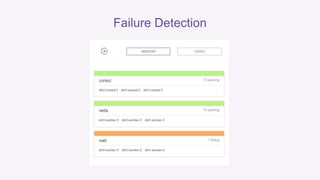
Failure Detection 
Is service foo 
healthy/available?
Failure Detection
Failure Detection 
• DNS won’t return non-healthy services or nodes. 
• HTTP has endpoints to list health state of catalog.
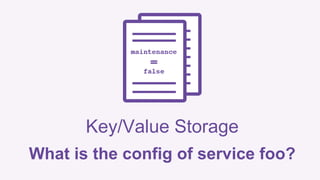
Key/Value Storage 
What is the config of service foo?
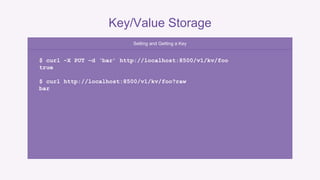
Key/Value Storage 
Setting and Getting a Key 
$ curl –X PUT –d ‘bar’ http://localhost:8500/v1/kv/foo 
true 
$ curl http://localhost:8500/v1/kv/foo?raw 
bar
Key/Value Storage 
• Highly available storage of configuration. 
• Turn knobs without big configuration management process. 
• Watch keys (long poll) for changes 
• ACLs on key/value to protect sensitive information
Multi-Datacenter
Multi-Datacenter 
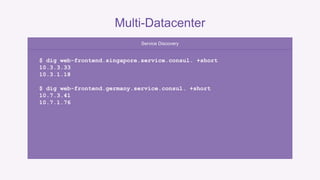
Service Discovery 
$ dig web-frontend.singapore.service.consul. +short 
10.3.3.33 
10.3.1.18 
$ dig web-frontend.germany.service.consul. +short 
10.7.3.41 
10.7.1.76
Multi-Datacenter 
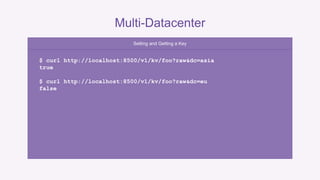
Setting and Getting a Key 
$ curl http://localhost:8500/v1/kv/foo?raw&dc=asia 
true 
$ curl http://localhost:8500/v1/kv/foo?raw&dc=eu 
false
Multi-Datacenter 
• Local by default 
• Can query other datacenters however you may need to 
• Can view all datacenters within one UI
Orchestration 
Events, Exec, Watches
Events, Exec, Watches 
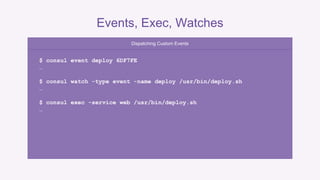
Dispatching Custom Events 
$ consul event deploy 6DF7FE 
… 
$ consul watch -type event -name deploy /usr/bin/deploy.sh 
… 
$ consul exec -service web /usr/bin/deploy.sh 
…
Events, Exec, Watches 
• Powerful orchestration tools 
• Pros/cons to each approach, use the right tool for the job 
• All approaches proven to scale to thousands of agents
Operational Bullet Points 
• Leader election via Raft 
• Gossip protocol for aliveness 
• Three consistency models: default, consistent, and stale 
• Encryption, ACLs available 
• Real world usage to thousands of agents per datacenter
Consul and Terraform + Docker
Consul + Docker 
• progrium/consul (docker-consul) 
• registrator 
• Two options: Consul agent in or out of another Docker container. 
Both are easy, well supported.
Consul: To Docker or Not to Docker 
• Consul in Docker: Health checks must be network based due to 
isolation. 
• Consul on host: Can run health checks that enter container, invoke 
Docker for rich checks (file tests, pid tests, etc.) 
• Up to you, both ways work with the above caveats.
Terraform + Docker 
• Create all infrastructure components, not just Docker hosts: Load 
balancers, DNS, networking, storage, external service providers, etc. 
• Deploy Docker with static assignment (Docker provider, remote-exec), 
or schedulers (ECS, Mesos, Kubernetes, etc.)
Thanks! 
hashicorp.com

Orchestrating Docker with Terraform and Consul by Mitchell Hashimoto

  • 1.
    Orchestrating Docker with Consul and Terraform
  • 2.
  • 3.
    HashiCorp Powering thesoftware-managed datacenter. hashicorp.com
  • 5.
    What’s the problem? “Orchestration” and why it is needed in a Docker world
  • 6.
    Docker Solves alot of Problems Packaging Docker Image Docker Registry Docker Host Distribution Execution
  • 7.
    Other Pieces tothe Puzzle • Infrastructure lifecycle and provisioning • Monitoring • Discovery • Orchestration • Transitioning to Docker
  • 8.
    Infrastructure Lifecycle andProvisioning Datacenter Server Server Server Server Server Server Server Server Server DNS Database CDN
  • 9.
    Infrastructure Lifecycle andProvisioning Datacenter Server Server Server Server Server Server Server Server Server DNS Database CDN • Docker hosts • Networking • Storage • Service providers (ex. DNS, CDN, etc)
  • 10.
    Infrastructure Lifecycle andProvisioning Datacenter Server Server Server Server Server Server Server Server Server DNS Database CDN • Changing/Iterating • Rolling deploys • Canaries
  • 11.
    Monitoring Container ContainerContainer Container Container Container Virtual Virtual Virtual Physical (Machine) • Node • Container • Service • Propagation of this information Service Service Service
  • 12.
    Discovery • “Whereis service foo?” (database, web app, api, etc.) • Multi-datacenter • Service providers (Database as a Service, etc.) • Physical nodes + containers + non-Docker • Service configuration: “What is my configuration?”
  • 13.
    Transitioning to Docker • Transition isn’t a single step, takes time • How to handle legacy + Docker and interaction?
  • 14.
    Problems Not Inherentto Docker • Not new, not caused by Docker, will exist after Docker • Higher density exacerbates problems at earlier stage • New aspect: core datacenter functionality is shrinking! • Number of servers and containers will only grow, but the number of servers/containers we run/manage will shrink over time. • Infrastructure lifecycle, discovery, monitoring, orchestration problems still exist yesterday, now, and in the future.
  • 15.
    Consul and Terraform Infrastructure lifecycle, service discovery, monitoring, and orchestration at scale for all infrastructures.
  • 16.
  • 17.
    Build, combine, andlaunch infrastructure safely and efficiently. terraform.io
  • 18.
    Terraform Goals •Unified view of modern datacenter with infrastructure as code • Compose multiple tiers (IaaS to PaaS to SaaS) • Safely change/iterate infrastructure • One workflow, technology agnostic • “No more dashboards.”
  • 19.
    Infrastructure as Code DigitalOcean Droplet with DNS in DNSimple resource "digitalocean_droplet" "web" { name = "tf-web" size = "512mb" image = "centos-5-8-x32" region = "sfo1" } resource "dnsimple_record" "hello" { domain = "example.com" name = "test" value = "${digitalocean_droplet.web.ipv4_address}" type = "A" }
  • 20.
    Infrastructure as Code DigitalOcean Droplet with DNS in DNSimple resource "digitalocean_droplet" "web" { name = "tf-web" size = "512mb" image = "centos-5-8-x32" region = "sfo1" } resource "dnsimple_record" "hello" { domain = "example.com" name = "test" value = "${digitalocean_droplet.web.ipv4_address}" type = "A" }
  • 21.
    Infrastructure as Code DigitalOcean Droplet with DNS in DNSimple resource "digitalocean_droplet" "web" { name = "tf-web" size = "512mb" image = "centos-5-8-x32" region = "sfo1" } resource "dnsimple_record" "hello" { domain = "example.com" name = "test" value = "${digitalocean_droplet.web.ipv4_address}" type = "A" }
  • 22.
    Infrastructure as Code DigitalOcean Droplet with DNS in DNSimple resource "digitalocean_droplet" "web" { name = "tf-web" size = "512mb" image = "centos-5-8-x32" region = "sfo1" } resource "dnsimple_record" "hello" { domain = "example.com" name = "test" value = "${digitalocean_droplet.web.ipv4_address}" type = "A" }
  • 23.
    Infrastructure as Code • Human friendly config, JSON compatible • Text format makes it version-able, VCS-friendly • Infrastructure as code on a level not before possible
  • 24.
  • 25.
    Providers • Integrationpoint • Expose resources (“aws_instance”, “dnsimple_record”, etc.) • CRUD API • Core vs. Providers simplifies logic for integrators
  • 26.
    Provider Composition •“Layer cake” • Provider for each layer • Unified configuration Container Container Container Container Container Container Virtual Virtual Virtual IaaS (OpenStack, etc.) • One step: “terraform apply” Physical (Machine)
  • 27.
    Safely Change/Iterate TerraformPlan + digitalocean_droplet.web backups: "" => "<computed>" image: "" => "centos-5-8-x32" ipv4_address: "" => "<computed>" ipv4_address_private: "" => "<computed>" name: "" => "tf-web" private_networking: "" => "<computed>" region: "" => "sfo1" size: "" => "512mb" status: "" => "<computed>" + dnsimple_record.hello domain: "" => "example.com" domain_id: "" => "<computed>" hostname: "" => "<computed>" name: "" => "test" priority: "" => "<computed>" ttl: "" => "<computed>" type: "" => "A" value: "" => "${digitalocean_droplet.web.ipv4_address}"
  • 28.
    Safely Change/Iterate TerraformPlan + digitalocean_droplet.web backups: "" => "<computed>" image: "" => "centos-5-8-x32" ipv4_address: "" => "<computed>" ipv4_address_private: "" => "<computed>" name: "" => "tf-web" private_networking: "" => "<computed>" region: "" => "sfo1" size: "" => "512mb" status: "" => "<computed>" + dnsimple_record.hello domain: "" => "example.com" domain_id: "" => "<computed>" hostname: "" => "<computed>" name: "" => "test" priority: "" => "<computed>" ttl: "" => "<computed>" type: "" => "A" value: "" => "${digitalocean_droplet.web.ipv4_address}"
  • 29.
    Safely Change/Iterate TerraformPlan + digitalocean_droplet.web backups: "" => "<computed>" image: "" => "centos-5-8-x32" ipv4_address: "" => "<computed>" ipv4_address_private: "" => "<computed>" name: "" => "tf-web" private_networking: "" => "<computed>" region: "" => "sfo1" size: "" => "512mb" status: "" => "<computed>" + dnsimple_record.hello domain: "" => "example.com" domain_id: "" => "<computed>" hostname: "" => "<computed>" name: "" => "test" priority: "" => "<computed>" ttl: "" => "<computed>" type: "" => "A" value: "" => "${digitalocean_droplet.web.ipv4_address}"
  • 30.
    Safely Change/Iterate •Plan shows you what will happen • Save plans to guarantee what will happen • Plans show reasons for certain actions (such as re-create) • Prior to Terraform: Operators had to “divine” change ordering, parallelization, rollout effect.
  • 31.
    Other Features •Modules • Provisioners (remote-exec, local-exec, etc.) • Parameterization • Outputs • One command run: terraform run github.com/foo/bar
  • 32.
  • 33.
    Service discovery, configuration,and orchestration made easy. Distributed, highly available, and datacenter-aware.
  • 34.
    Service Discovery Whereis service foo?
  • 35.
    Service Discovery ServiceDiscovery via DNS or HTTP $ dig web-frontend.service.consul. +short 10.0.3.89 10.0.1.46 $ curl http://localhost:8500/v1/catalog/service/web-frontend [{ “Node”: “node-e818f1”, “Address”: “10.0.3.89”, “ServiceID”: “web-frontend”, … }]
  • 36.
    Service Discovery •DNS is legacy-friendly. No application changes required. • HTTP returns rich metadata. • Discover both internal and external services (such as service providers)
  • 37.
    Failure Detection Isservice foo healthy/available?
  • 38.
  • 39.
    Failure Detection •DNS won’t return non-healthy services or nodes. • HTTP has endpoints to list health state of catalog.
  • 40.
    Key/Value Storage Whatis the config of service foo?
  • 41.
    Key/Value Storage Settingand Getting a Key $ curl –X PUT –d ‘bar’ http://localhost:8500/v1/kv/foo true $ curl http://localhost:8500/v1/kv/foo?raw bar
  • 42.
    Key/Value Storage •Highly available storage of configuration. • Turn knobs without big configuration management process. • Watch keys (long poll) for changes • ACLs on key/value to protect sensitive information
  • 43.
  • 44.
    Multi-Datacenter Service Discovery $ dig web-frontend.singapore.service.consul. +short 10.3.3.33 10.3.1.18 $ dig web-frontend.germany.service.consul. +short 10.7.3.41 10.7.1.76
  • 45.
    Multi-Datacenter Setting andGetting a Key $ curl http://localhost:8500/v1/kv/foo?raw&dc=asia true $ curl http://localhost:8500/v1/kv/foo?raw&dc=eu false
  • 46.
    Multi-Datacenter • Localby default • Can query other datacenters however you may need to • Can view all datacenters within one UI
  • 47.
  • 48.
    Events, Exec, Watches Dispatching Custom Events $ consul event deploy 6DF7FE … $ consul watch -type event -name deploy /usr/bin/deploy.sh … $ consul exec -service web /usr/bin/deploy.sh …
  • 49.
    Events, Exec, Watches • Powerful orchestration tools • Pros/cons to each approach, use the right tool for the job • All approaches proven to scale to thousands of agents
  • 50.
    Operational Bullet Points • Leader election via Raft • Gossip protocol for aliveness • Three consistency models: default, consistent, and stale • Encryption, ACLs available • Real world usage to thousands of agents per datacenter
  • 51.
  • 52.
    Consul + Docker • progrium/consul (docker-consul) • registrator • Two options: Consul agent in or out of another Docker container. Both are easy, well supported.
  • 53.
    Consul: To Dockeror Not to Docker • Consul in Docker: Health checks must be network based due to isolation. • Consul on host: Can run health checks that enter container, invoke Docker for rich checks (file tests, pid tests, etc.) • Up to you, both ways work with the above caveats.
  • 54.
    Terraform + Docker • Create all infrastructure components, not just Docker hosts: Load balancers, DNS, networking, storage, external service providers, etc. • Deploy Docker with static assignment (Docker provider, remote-exec), or schedulers (ECS, Mesos, Kubernetes, etc.)
  • 55.

Editor's Notes

  • #5 You may recognize some of our tools, we make Vagrant, Packer, Serf, Consul and Terraform.
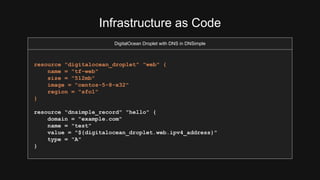
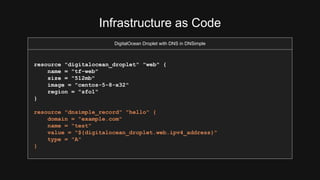
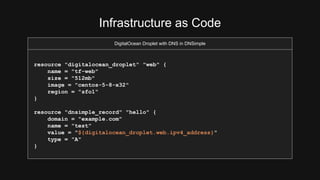
  • #20 This is an example of Terraform configuration. In this example, we’re describing setting up a DO droplet with DNS in DNSimple. This is a good example of combining both IaaS and SaaS, or composing providers.
  • #25 This shows the output of `terraform graph`, which gives you a visual graph of how your datacenter dependencies are laid out.