• Operating System acts as an interface between the application
programs and the machine hardware.
• It is a software, which makes a computer to actually work.
• The OS organizes and controls the hardware.
• It is the software that enables all the programs we use.
• Examples: Windows, Linux, Unix and Mac OS, etc.
What is an Operating System?
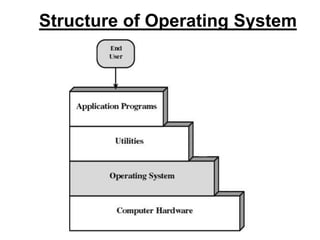
Structure of Operating System
What OS does?
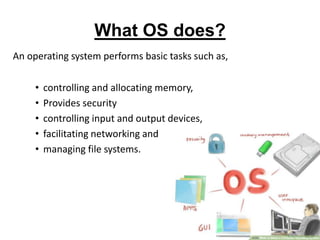
An operating system performs basic tasks such as,
• controlling and allocating memory,
• Provides security
• controlling input and output devices,
• facilitating networking and
• managing file systems.
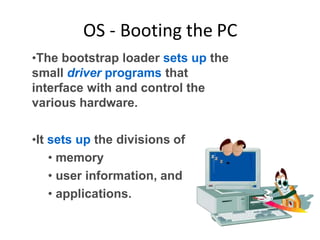
OS - Booting the PC
•The bootstrap loader sets up the
small driver programs that
interface with and control the
various hardware.
•It sets up the divisions of
• memory
• user information, and
• applications.
Mostly used OS
– Windows
– Mac OS
– Unix/Linux and their siblings.
– Chrome OS
WINDOWS OS
• Microsoft Windows operating system was developed by
Microsoft to
overcome the limitation of its own MS-DOS operating
system.
• Its first successful version was Windows 3.0, released in
1990.
• Subsequently released version were “Windows 95,
Windows 98, Windows 2000, Windows XP,
Windows XPProfessional , Windows Vista, Windows 7,
Windows 8, Windows 8.1 and latest one is Windows 10.”
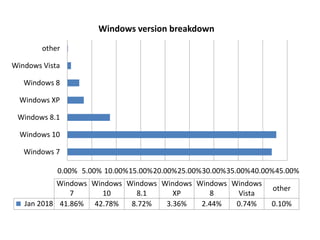
0.00% 5.00% 10.00%15.00%20.00%25.00%30.00%35.00%40.00%45.00%
Windows 7
Windows 10
Windows 8.1
Windows XP
Windows 8
Windows Vista
other
Windows
7
Windows
10
Windows
8.1
Windows
XP
Windows
8
Windows
Vista
other
Jan 2018 41.86% 42.78% 8.72% 3.36% 2.44% 0.74% 0.10%
Windows version breakdown
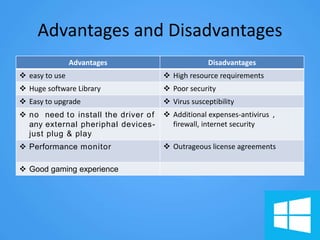
Advantages and Disadvantages
Advantages Disadvantages
 easy to use  High resource requirements
 Huge software Library  Poor security
 Easy to upgrade  Virus susceptibility
 no need to install the driver of
any external pheriphal devices-
just plug & play
 Additional expenses-antivirus ,
firewall, internet security
 Performance monitor  Outrageous license agreements
 Good gaming experience
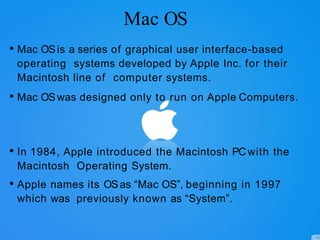
Mac OS
• Mac OSis a series of graphical user interface-based
operating systems developed by Apple Inc. for their
Macintosh line of computer systems.
• Mac OSwas designed only to run on Apple Computers.
• In 1984, Apple introduced the Macintosh PCwith the
Macintosh Operating System.
• Apple names its OSas “Mac OS”, beginning in 1997
which was previously known as “System”.
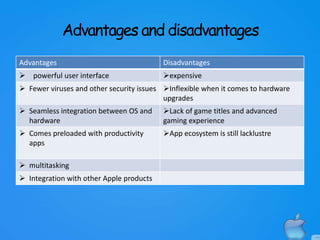
Advantages and disadvantages
Advantages Disadvantages
 powerful user interface expensive
 Fewer viruses and other security issues Inflexible when it comes to hardware
upgrades
 Seamless integration between OS and
hardware
Lack of game titles and advanced
gaming experience
 Comes preloaded with productivity
apps
App ecosystem is still lacklustre
 multitasking
 Integration with other Apple products
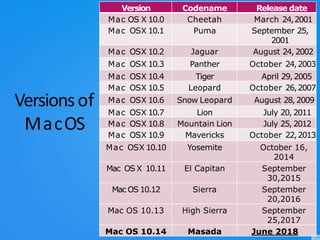
Versionsof
MacOS
Version Codename Release date
Mac OS X 10.0 Cheetah March 24,2001
Mac OSX 10.1 Puma September 25,
2001
Mac OSX 10.2 Jaguar August 24,2002
Mac OSX 10.3 Panther October 24,2003
Mac OSX 10.4 Tiger April 29,2005
Mac OSX 10.5 Leopard October 26,2007
Mac OSX 10.6 Snow Leopard August 28,2009
Mac OSX 10.7 Lion July 20, 2011
Mac OSX 10.8 Mountain Lion July 25, 2012
Mac OSX 10.9 Mavericks October 22,2013
Mac OSX 10.10 Yosemite October 16,
2014
Mac OS X 10.11 El Capitan September
30,2015
Mac OS 10.12 Sierra September
20,2016
Mac OS 10.13 High Sierra September
25,2017
Mac OS 10.14 Masada June 2018
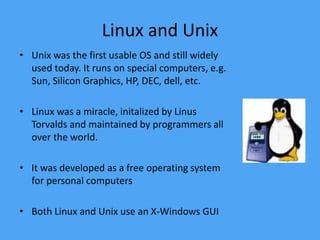
Linux and Unix
• Unix was the first usable OS and still widely
used today. It runs on special computers, e.g.
Sun, Silicon Graphics, HP, DEC, dell, etc.
• Linux was a miracle, initalized by Linus
Torvalds and maintained by programmers all
over the world.
• It was developed as a free operating system
for personal computers
• Both Linux and Unix use an X-Windows GUI
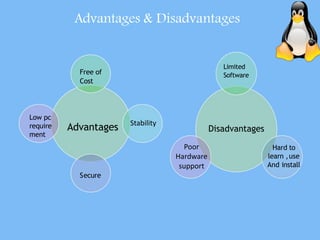
Advantages
Free of
Cost
Stability
Secure
Low pc
require
ment
Disadvantages
Limited
Software
Hard to
learn ,use
And install
Advantages & Disadvantages
Poor
Hardware
support
Google Chrome OS
 Google Chrome OSis aoperating system designed
by Google to work exclusively with web
applications.
 Google Chrome OSis an open source,
lightweight operating system which is initially
intended for secondary devices like netbooks,
not asauser's primary PC.
 Speed,simplicity and security are the keyaspects.
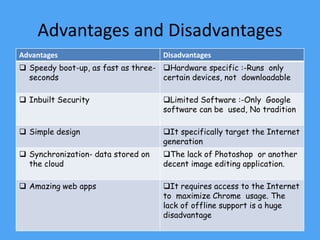
Advantages and Disadvantages
Advantages Disadvantages
 Speedy boot-up, as fast as three-
seconds
Hardware specific :-Runs only
certain devices, not downloadable
 Inbuilt Security Limited Software :-Only Google
software can be used, No tradition
 Simple design It specifically target the Internet
generation
 Synchronization- data stored on
the cloud
The lack of Photoshop or another
decent image editing application.
 Amazing web apps It requires access to the Internet
to maximize Chrome usage. The
lack of offline support is a huge
disadvantage
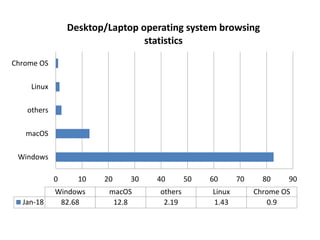
0 10 20 30 40 50 60 70 80 90
Windows
macOS
others
Linux
Chrome OS
Windows macOS others Linux Chrome OS
Jan-18 82.68 12.8 2.19 1.43 0.9
Desktop/Laptop operating system browsing
statistics
Os

Os

  • 2.
    • Operating Systemacts as an interface between the application programs and the machine hardware. • It is a software, which makes a computer to actually work. • The OS organizes and controls the hardware. • It is the software that enables all the programs we use. • Examples: Windows, Linux, Unix and Mac OS, etc. What is an Operating System?
  • 3.
  • 4.
    What OS does? Anoperating system performs basic tasks such as, • controlling and allocating memory, • Provides security • controlling input and output devices, • facilitating networking and • managing file systems.
  • 5.
    OS - Bootingthe PC •The bootstrap loader sets up the small driver programs that interface with and control the various hardware. •It sets up the divisions of • memory • user information, and • applications.
  • 6.
    Mostly used OS –Windows – Mac OS – Unix/Linux and their siblings. – Chrome OS
  • 8.
    WINDOWS OS • MicrosoftWindows operating system was developed by Microsoft to overcome the limitation of its own MS-DOS operating system. • Its first successful version was Windows 3.0, released in 1990. • Subsequently released version were “Windows 95, Windows 98, Windows 2000, Windows XP, Windows XPProfessional , Windows Vista, Windows 7, Windows 8, Windows 8.1 and latest one is Windows 10.”
  • 9.
    0.00% 5.00% 10.00%15.00%20.00%25.00%30.00%35.00%40.00%45.00% Windows7 Windows 10 Windows 8.1 Windows XP Windows 8 Windows Vista other Windows 7 Windows 10 Windows 8.1 Windows XP Windows 8 Windows Vista other Jan 2018 41.86% 42.78% 8.72% 3.36% 2.44% 0.74% 0.10% Windows version breakdown
  • 10.
    Advantages and Disadvantages AdvantagesDisadvantages  easy to use  High resource requirements  Huge software Library  Poor security  Easy to upgrade  Virus susceptibility  no need to install the driver of any external pheriphal devices- just plug & play  Additional expenses-antivirus , firewall, internet security  Performance monitor  Outrageous license agreements  Good gaming experience
  • 12.
    Mac OS • MacOSis a series of graphical user interface-based operating systems developed by Apple Inc. for their Macintosh line of computer systems. • Mac OSwas designed only to run on Apple Computers. • In 1984, Apple introduced the Macintosh PCwith the Macintosh Operating System. • Apple names its OSas “Mac OS”, beginning in 1997 which was previously known as “System”.
  • 13.
    Advantages and disadvantages AdvantagesDisadvantages  powerful user interface expensive  Fewer viruses and other security issues Inflexible when it comes to hardware upgrades  Seamless integration between OS and hardware Lack of game titles and advanced gaming experience  Comes preloaded with productivity apps App ecosystem is still lacklustre  multitasking  Integration with other Apple products
  • 14.
    Versionsof MacOS Version Codename Releasedate Mac OS X 10.0 Cheetah March 24,2001 Mac OSX 10.1 Puma September 25, 2001 Mac OSX 10.2 Jaguar August 24,2002 Mac OSX 10.3 Panther October 24,2003 Mac OSX 10.4 Tiger April 29,2005 Mac OSX 10.5 Leopard October 26,2007 Mac OSX 10.6 Snow Leopard August 28,2009 Mac OSX 10.7 Lion July 20, 2011 Mac OSX 10.8 Mountain Lion July 25, 2012 Mac OSX 10.9 Mavericks October 22,2013 Mac OSX 10.10 Yosemite October 16, 2014 Mac OS X 10.11 El Capitan September 30,2015 Mac OS 10.12 Sierra September 20,2016 Mac OS 10.13 High Sierra September 25,2017 Mac OS 10.14 Masada June 2018
  • 16.
    Linux and Unix •Unix was the first usable OS and still widely used today. It runs on special computers, e.g. Sun, Silicon Graphics, HP, DEC, dell, etc. • Linux was a miracle, initalized by Linus Torvalds and maintained by programmers all over the world. • It was developed as a free operating system for personal computers • Both Linux and Unix use an X-Windows GUI
  • 17.
    Advantages Free of Cost Stability Secure Low pc require ment Disadvantages Limited Software Hardto learn ,use And install Advantages & Disadvantages Poor Hardware support
  • 19.
    Google Chrome OS Google Chrome OSis aoperating system designed by Google to work exclusively with web applications.  Google Chrome OSis an open source, lightweight operating system which is initially intended for secondary devices like netbooks, not asauser's primary PC.  Speed,simplicity and security are the keyaspects.
  • 20.
    Advantages and Disadvantages AdvantagesDisadvantages  Speedy boot-up, as fast as three- seconds Hardware specific :-Runs only certain devices, not downloadable  Inbuilt Security Limited Software :-Only Google software can be used, No tradition  Simple design It specifically target the Internet generation  Synchronization- data stored on the cloud The lack of Photoshop or another decent image editing application.  Amazing web apps It requires access to the Internet to maximize Chrome usage. The lack of offline support is a huge disadvantage
  • 21.
    0 10 2030 40 50 60 70 80 90 Windows macOS others Linux Chrome OS Windows macOS others Linux Chrome OS Jan-18 82.68 12.8 2.19 1.43 0.9 Desktop/Laptop operating system browsing statistics