Greg Patterson
+61 400 231 518
Feature Manipulation Engine
Teacher (Spatial Information): CIT
Senior Research Officer (GIS Specialist): ANU
Safe Software
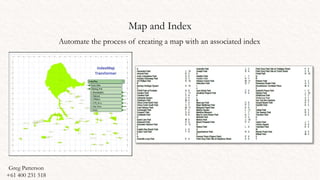
Map and Index
Automate the process of creating a map with an associated index
Greg Patterson
+61 400 231 518
Map and Index
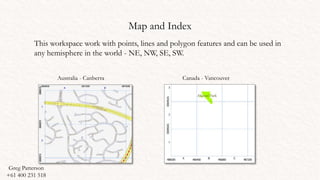
This workspace work with points, lines and polygon features and can be used in
any hemisphere in the world - NE, NW, SE, SW.
Australia - Canberra Canada - Vancouver
Greg Patterson
+61 400 231 518
Map and Index
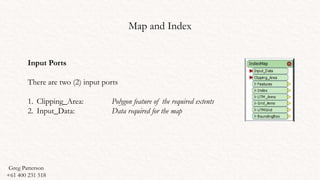
Input Ports
There are two (2) input ports
1. Clipping_Area: Polygon feature of the required extents
2. Input_Data: Data required for the map
Greg Patterson
+61 400 231 518
Map and Index
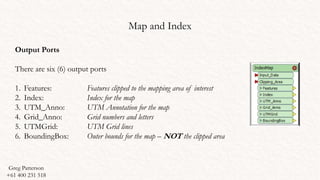
Output Ports
There are six (6) output ports
1. Features: Features clipped to the mapping area of interest
2. Index: Index for the map
3. UTM_Anno: UTM Annotation for the map
4. Grid_Anno: Grid numbers and letters
5. UTMGrid: UTM Grid lines
6. BoundingBox: Outer bounds for the map – NOT the clipped area
Greg Patterson
+61 400 231 518
Map and Index
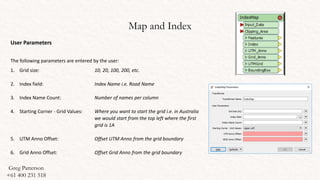
User Parameters
The following parameters are entered by the user:
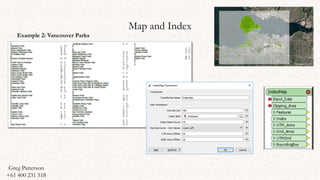
1. Grid size: 10, 20, 100, 200, etc.
2. Index field: Index Name i.e. Road Name
3. Index Name Count: Number of names per column
4. Starting Corner - Grid Values: Where you want to start the grid i.e. in Australia
we would start from the top left where the first
grid is 1A
5. UTM Anno Offset: Offset UTM Anno from the grid boundary
6. Grid Anno Offset: Offset Grid Anno from the grid boundary
Greg Patterson
+61 400 231 518
Map and Index
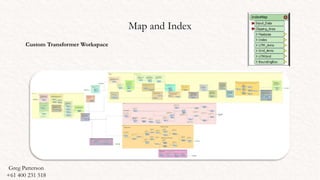
Custom Transformer Workspace
Greg Patterson
+61 400 231 518
Map and Index
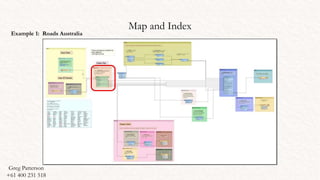
Example 1: Roads Australia
Greg Patterson
+61 400 231 518
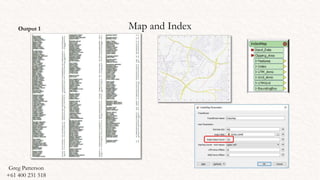
Map and IndexOutput 1
Greg Patterson
+61 400 231 518
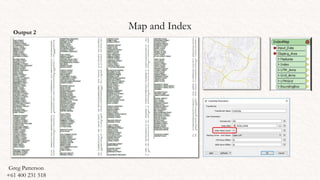
Map and IndexOutput 2
Greg Patterson
+61 400 231 518
Map and Index
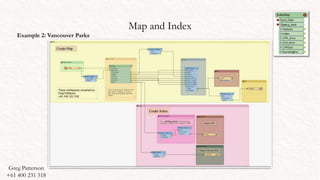
Example 2: Vancouver Parks
Greg Patterson
+61 400 231 518
Map and Index
Example 2: Vancouver Parks
Greg Patterson
+61 400 231 518
Map and Index
OFFSET GRID
The transformer will determine the extents for the dataset and then offset to the nearest value removing the
decimal places and ensuring that the dataset is within the mapping extents
Greg Patterson
+61 400 231 518
Map and Index
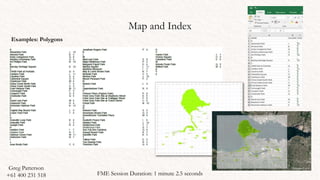
Examples: Polygons
Greg Patterson
+61 400 231 518 FME Session Duration: 1 minute 2.5 seconds
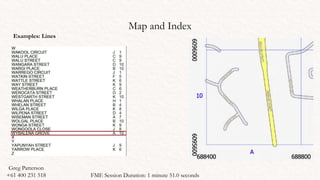
Map and Index
Examples: Lines
Greg Patterson
+61 400 231 518 FME Session Duration: 1 minute 51.0 seconds
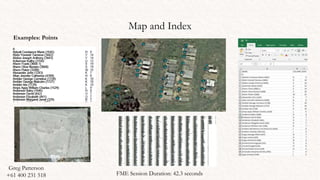
Map and Index
Examples: Points
Greg Patterson
+61 400 231 518 FME Session Duration: 42.3 seconds
Greg Patterson
+61 400 231 518
Greg Patterson
+61 400 231 518
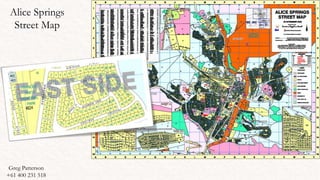
Alice Springs
Street Map
Uses:
There are many uses for this transformer. Examples include:
1. Emergency mapping
2. Location of resources
3. Topographic Maps
4. Map books
Users
There are many agencies that use FME within their agencies and would benefit from using this
transformer:
1. Government agencies (Local, State and Federal)
2. Defence Force
3. Emergency Services (Police, SES)
4. Mapping Agencies
5. Councils
6. TAFE Colleges - Canberra Institute of Technology (CIT)
7. University – Australian National University (ANU)
Greg Patterson
+61 400 231 518
Thankyou !
ACKNOWLEDGEMENTS
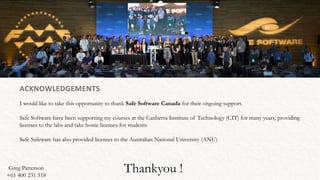
I would like to take this opportunity to thank Safe Software Canada for their ongoing support.
Safe Software have been supporting my courses at the Canberra Institute of Technology (CIT) for many years, providing
licenses to the labs and take home licenses for students
Safe Safeware has also provided licenses to the Australian National University (ANU)
Greg Patterson
+61 400 231 518

Index map

  • 1.
    Greg Patterson +61 400231 518 Feature Manipulation Engine Teacher (Spatial Information): CIT Senior Research Officer (GIS Specialist): ANU Safe Software
  • 2.
    Map and Index Automatethe process of creating a map with an associated index Greg Patterson +61 400 231 518
  • 3.
    Map and Index Thisworkspace work with points, lines and polygon features and can be used in any hemisphere in the world - NE, NW, SE, SW. Australia - Canberra Canada - Vancouver Greg Patterson +61 400 231 518
  • 4.
    Map and Index InputPorts There are two (2) input ports 1. Clipping_Area: Polygon feature of the required extents 2. Input_Data: Data required for the map Greg Patterson +61 400 231 518
  • 5.
    Map and Index OutputPorts There are six (6) output ports 1. Features: Features clipped to the mapping area of interest 2. Index: Index for the map 3. UTM_Anno: UTM Annotation for the map 4. Grid_Anno: Grid numbers and letters 5. UTMGrid: UTM Grid lines 6. BoundingBox: Outer bounds for the map – NOT the clipped area Greg Patterson +61 400 231 518
  • 6.
    Map and Index UserParameters The following parameters are entered by the user: 1. Grid size: 10, 20, 100, 200, etc. 2. Index field: Index Name i.e. Road Name 3. Index Name Count: Number of names per column 4. Starting Corner - Grid Values: Where you want to start the grid i.e. in Australia we would start from the top left where the first grid is 1A 5. UTM Anno Offset: Offset UTM Anno from the grid boundary 6. Grid Anno Offset: Offset Grid Anno from the grid boundary Greg Patterson +61 400 231 518
  • 7.
    Map and Index CustomTransformer Workspace Greg Patterson +61 400 231 518
  • 8.
    Map and Index Example1: Roads Australia Greg Patterson +61 400 231 518
  • 9.
    Map and IndexOutput1 Greg Patterson +61 400 231 518
  • 10.
    Map and IndexOutput2 Greg Patterson +61 400 231 518
  • 11.
    Map and Index Example2: Vancouver Parks Greg Patterson +61 400 231 518
  • 12.
    Map and Index Example2: Vancouver Parks Greg Patterson +61 400 231 518
  • 13.
    Map and Index OFFSETGRID The transformer will determine the extents for the dataset and then offset to the nearest value removing the decimal places and ensuring that the dataset is within the mapping extents Greg Patterson +61 400 231 518
  • 14.
    Map and Index Examples:Polygons Greg Patterson +61 400 231 518 FME Session Duration: 1 minute 2.5 seconds
  • 15.
    Map and Index Examples:Lines Greg Patterson +61 400 231 518 FME Session Duration: 1 minute 51.0 seconds
  • 16.
    Map and Index Examples:Points Greg Patterson +61 400 231 518 FME Session Duration: 42.3 seconds
  • 17.
  • 18.
    Greg Patterson +61 400231 518 Alice Springs Street Map
  • 19.
    Uses: There are manyuses for this transformer. Examples include: 1. Emergency mapping 2. Location of resources 3. Topographic Maps 4. Map books Users There are many agencies that use FME within their agencies and would benefit from using this transformer: 1. Government agencies (Local, State and Federal) 2. Defence Force 3. Emergency Services (Police, SES) 4. Mapping Agencies 5. Councils 6. TAFE Colleges - Canberra Institute of Technology (CIT) 7. University – Australian National University (ANU) Greg Patterson +61 400 231 518
  • 20.
    Thankyou ! ACKNOWLEDGEMENTS I wouldlike to take this opportunity to thank Safe Software Canada for their ongoing support. Safe Software have been supporting my courses at the Canberra Institute of Technology (CIT) for many years, providing licenses to the labs and take home licenses for students Safe Safeware has also provided licenses to the Australian National University (ANU) Greg Patterson +61 400 231 518

Editor's Notes

  • #2 Imagery Source: https://en.wikipedia.org/wiki/Parliament_House,_Canberra#/media/File:Parliament_House_at_dusk,_Canberra_ACT.jpg