
The Best Dishes Are Made With Fresh Ingredients:  Creating CAD Files from an Enterprise SDE Server Matthew Freid GIS Analyst – Bureau of Environmental Services City of Portland Oregon
GIS to CAD Conversion: Project Goals Provide  most current  data to all users  Regardless of format & software used to access it Provide data in native formats and in a  structure that’s immediately useable  No end user translation or management required Make the same data and formatting available  to internal and external users
City of Portland Bureau of Environmental Services  145,000+ accounts in 150 sq mi service area 2,200+ miles of pipe in combined, sanitary and storm system 14,000 sumps and sedimentation manholes that collect storm water runoff CSO abatement program final years of 20 year, $ 1.4 billion program
Matthew Freid: GIS Analyst Provide user support, database mgmt, app design/ integration, business intelligence Focus on Collection System Asset Database Our system combines an IMS/CMS with a GIS Data Maintenance Environment (DME)
GIS Data Delivery:  High Availability Data produced by DME is housed in SDE / SQL Server on Enterprise HUB for internal and external users, along with 100’s of other feature classes Accessed with: Out-of-the box desktop GIS Custom applications for workgroups and mobile users Web applications
GIS Data Delivery:  High Availability Used by maintenance workers, modelers and planners throughout the bureau and city  Integrated access to as-builts, easements and current data from IMS via  www.portlandmaps.com So … lots of the most current data available
Who’s Missing From This Picture??? Before DME was implemented Assets mapped in AutoCAD  Batch exports converted for GIS users Downsides Data consistency Lack of continuous coverage/integration with IMS Currency of other datasets from other sources The Big Advantage  CAD users had the most up to date files to work with in their native format
From Best to Worst Change in data input systems =  no direct access to current data in familiar way! Users could use GIS software to query and analyze the assets data, but… had to use out of date CAD files for designing projects Result?  Create and use copies of final set of dwg’s
Initial Solutions:  Nothing Is Ever Easy Recreating file structure and extents?  Not practical with GIS software Direct access to SDE within AutoCAD? Cumbersome Another need:  Complete, self-contained set of CAD files for distribution to outside consultants and contractors
Try and Try Again Proprietary tool  Ran initial translation from SDE to DWG using AutoCAD  - without complete formatting  Added formatting on the fly for a specific user defined area (BMAP) Issues Preprocessing crashed often, needed human intervention Can’t make files for users outside the city Sometimes didn’t handle datasets from outside the bureau
Find A Better Way Users liked the BMAP approach  Get a file on demand within AutoCAD Try FME? Already used for AutoCAD to SDE conversion so …
Find A Better Way New approach  – use  FME  as a stable environment to: Produce a complete set of fully formatted DWG files for external users Deliver final files via BMAP tool for internal ACAD users Allow any data on Enterprise GIS HUB to be incorporated into the DWG’s
Outside Help Worked with Forte Consulting  Our long suffering support and solution provider for our initial conversion Used FME Workbench and some Mapping files  Goal: City staff could take over and manage the process over time
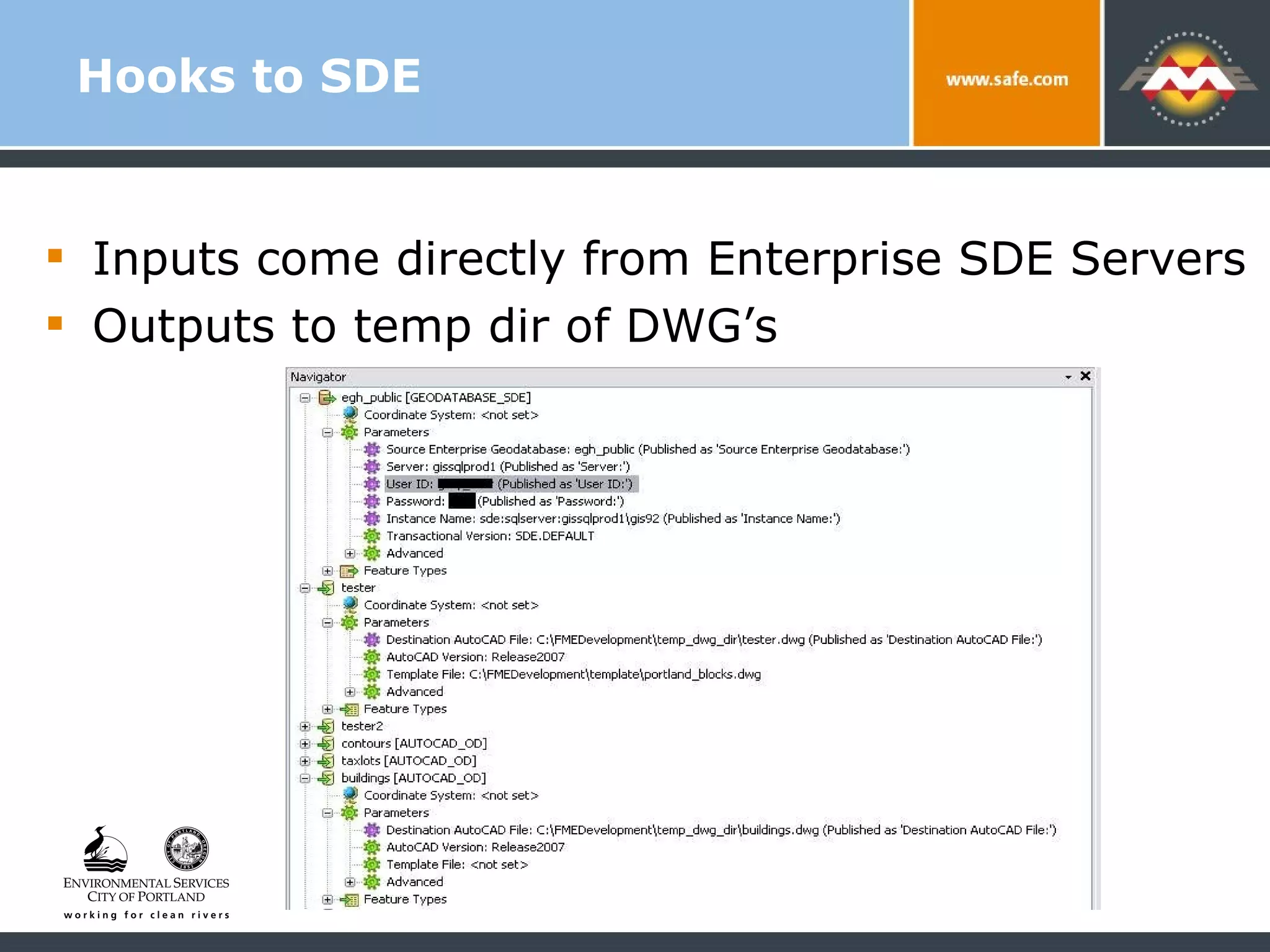
Hooks to SDE Inputs come directly from Enterprise SDE Servers  Outputs to temp dir of DWG’s
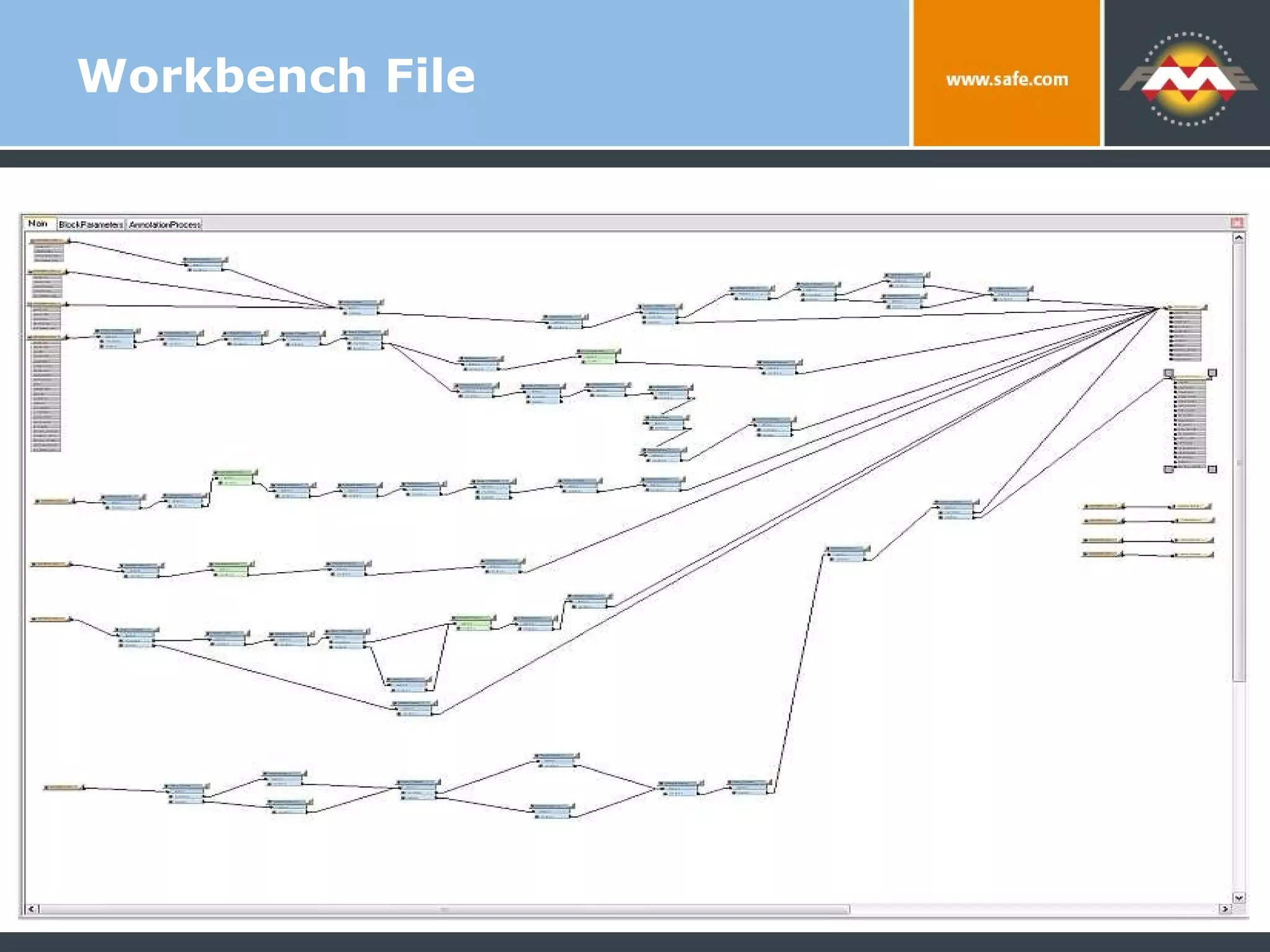
Workbench File
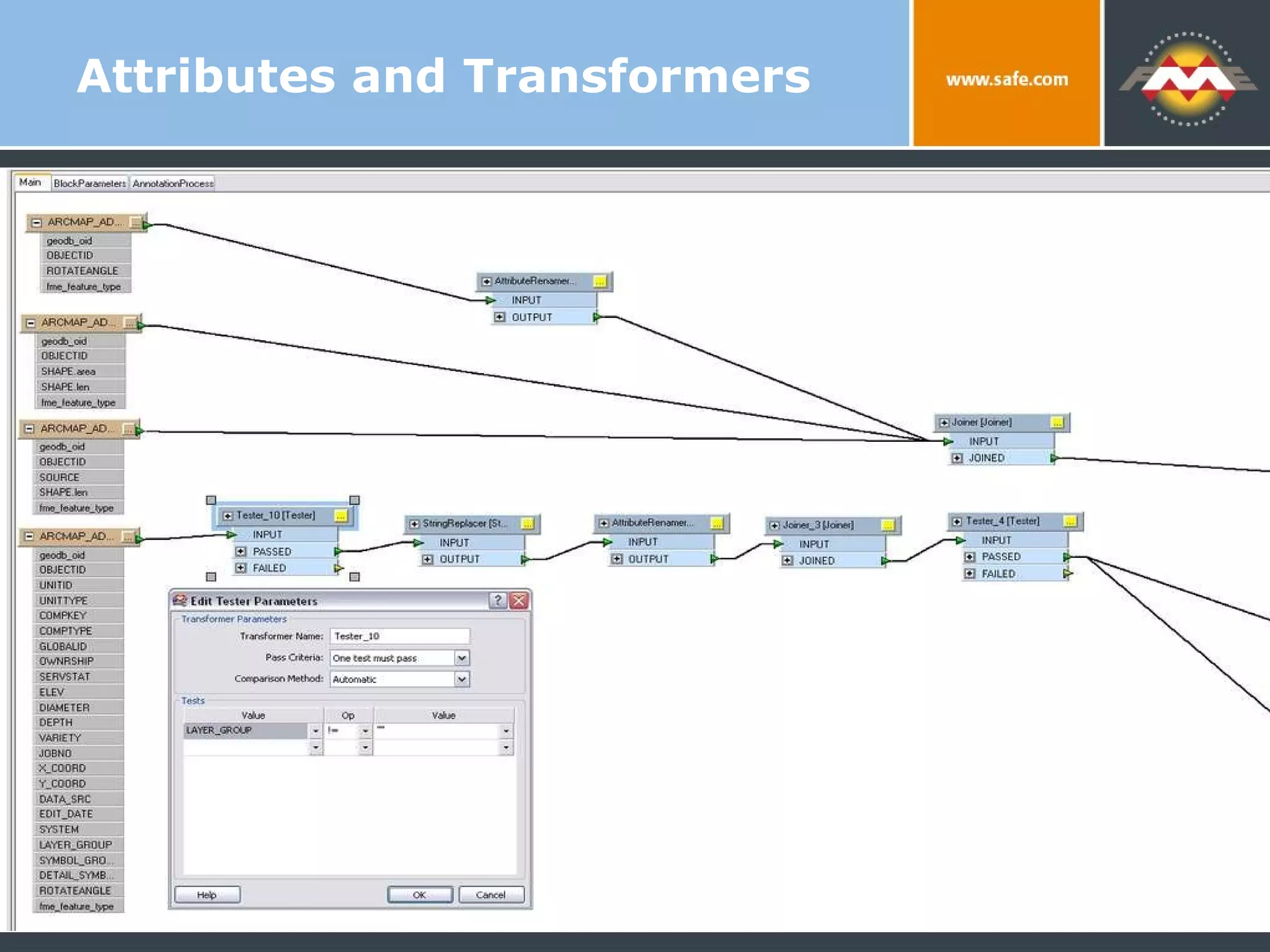
Attributes and Transformers
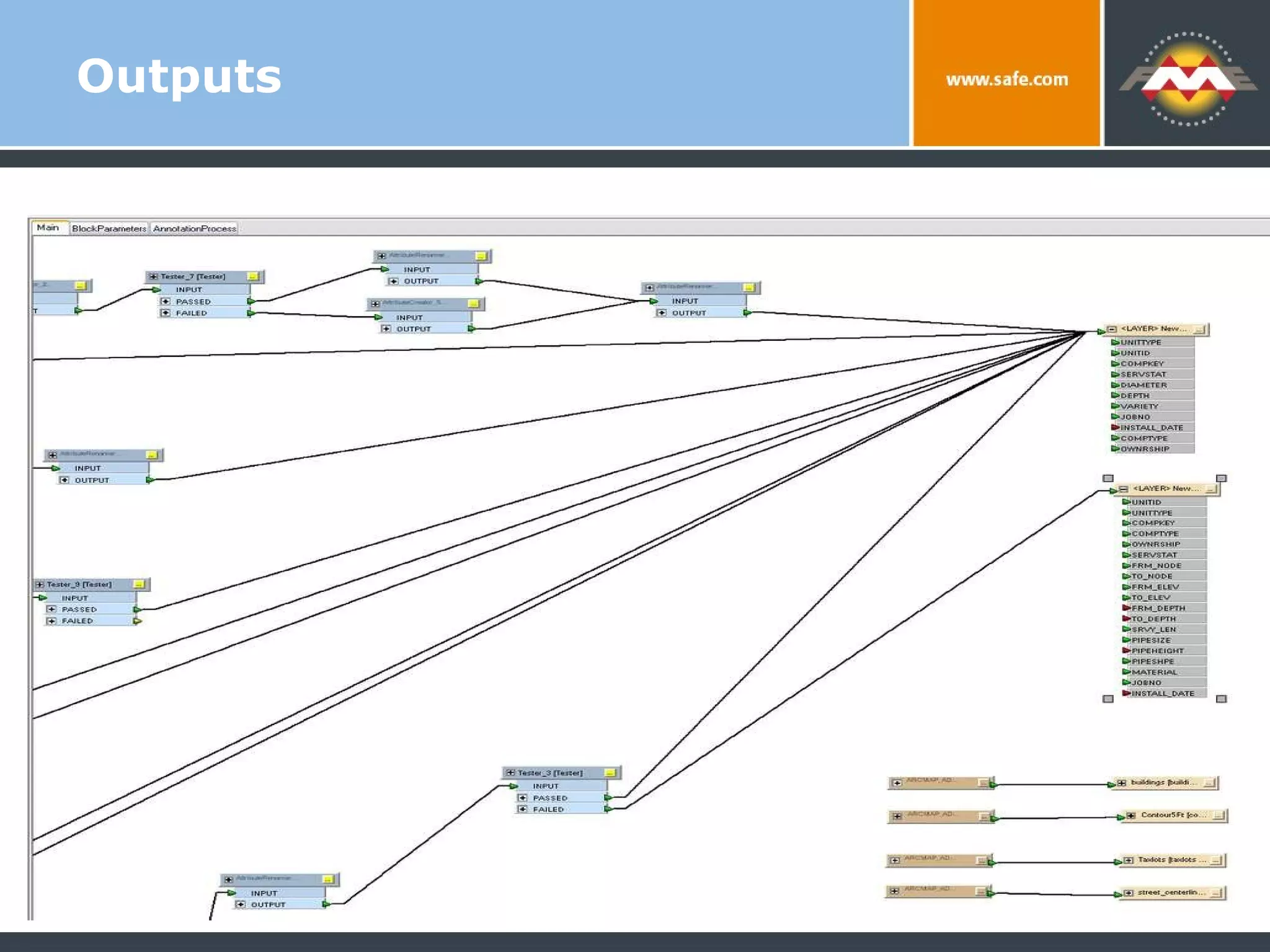
Outputs
Beyond Workbench 2+ temporary DWG’s produced and loaded into a single sub-directory Leave Workbench so we can produce a single DWG that contains features with different sets of OBJECT DATA attribution Consultant helped us create a mapping file to accommodate this
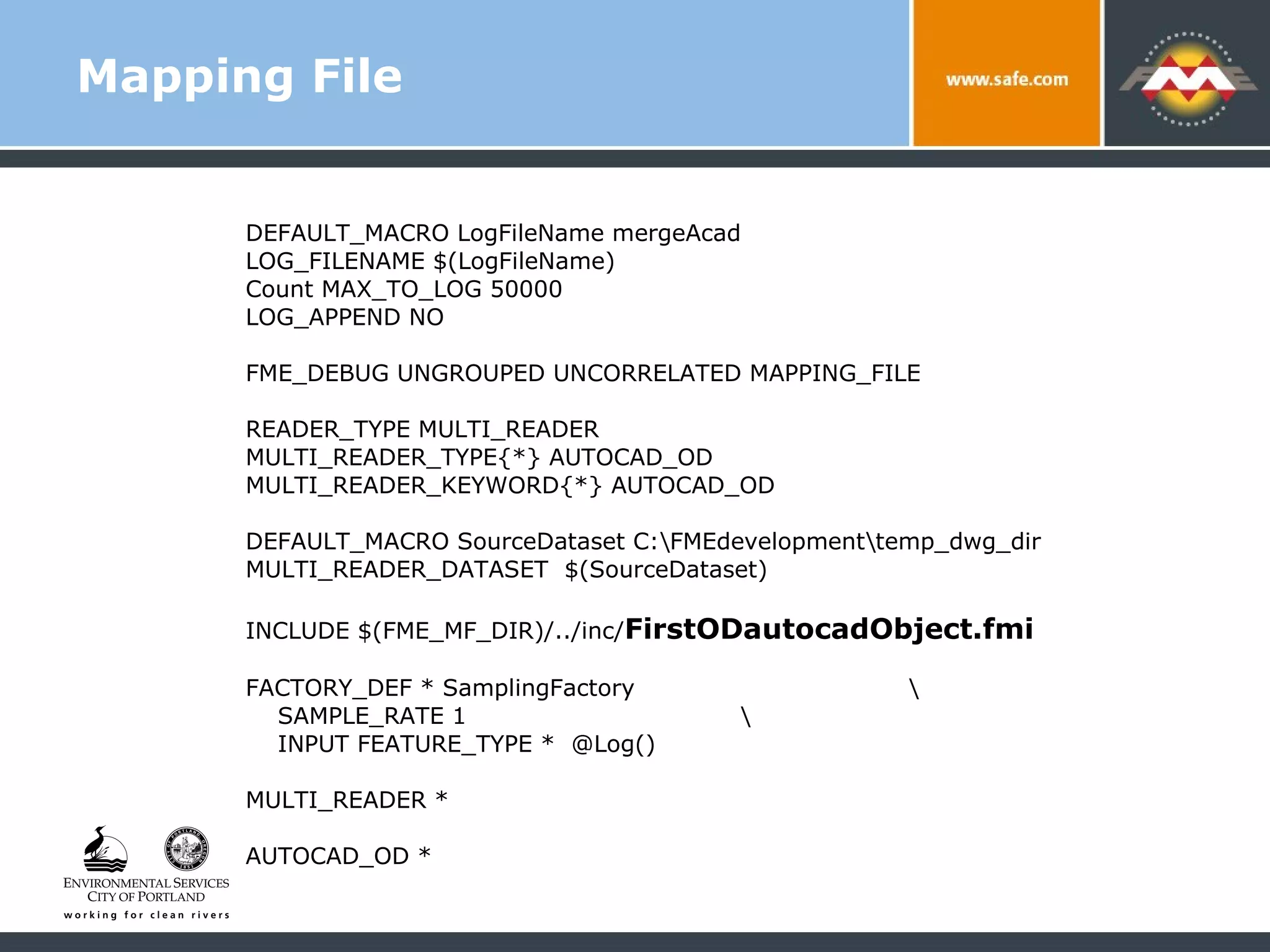
Mapping File DEFAULT_MACRO LogFileName mergeAcad LOG_FILENAME $(LogFileName) Count MAX_TO_LOG 50000 LOG_APPEND NO FME_DEBUG UNGROUPED UNCORRELATED MAPPING_FILE READER_TYPE MULTI_READER MULTI_READER_TYPE{*} AUTOCAD_OD MULTI_READER_KEYWORD{*} AUTOCAD_OD DEFAULT_MACRO SourceDataset C:\FMEdevelopment\temp_dwg_dir MULTI_READER_DATASET  $(SourceDataset) INCLUDE $(FME_MF_DIR)/../inc/ FirstODautocadObject.fmi FACTORY_DEF * SamplingFactory  \ SAMPLE_RATE 1  \ INPUT FEATURE_TYPE *  @Log() MULTI_READER *  AUTOCAD_OD *
The FMI File Controls Attribution and Field definitions Easy way to add new datasets Self documenting nature of a text file system has it’s advantages
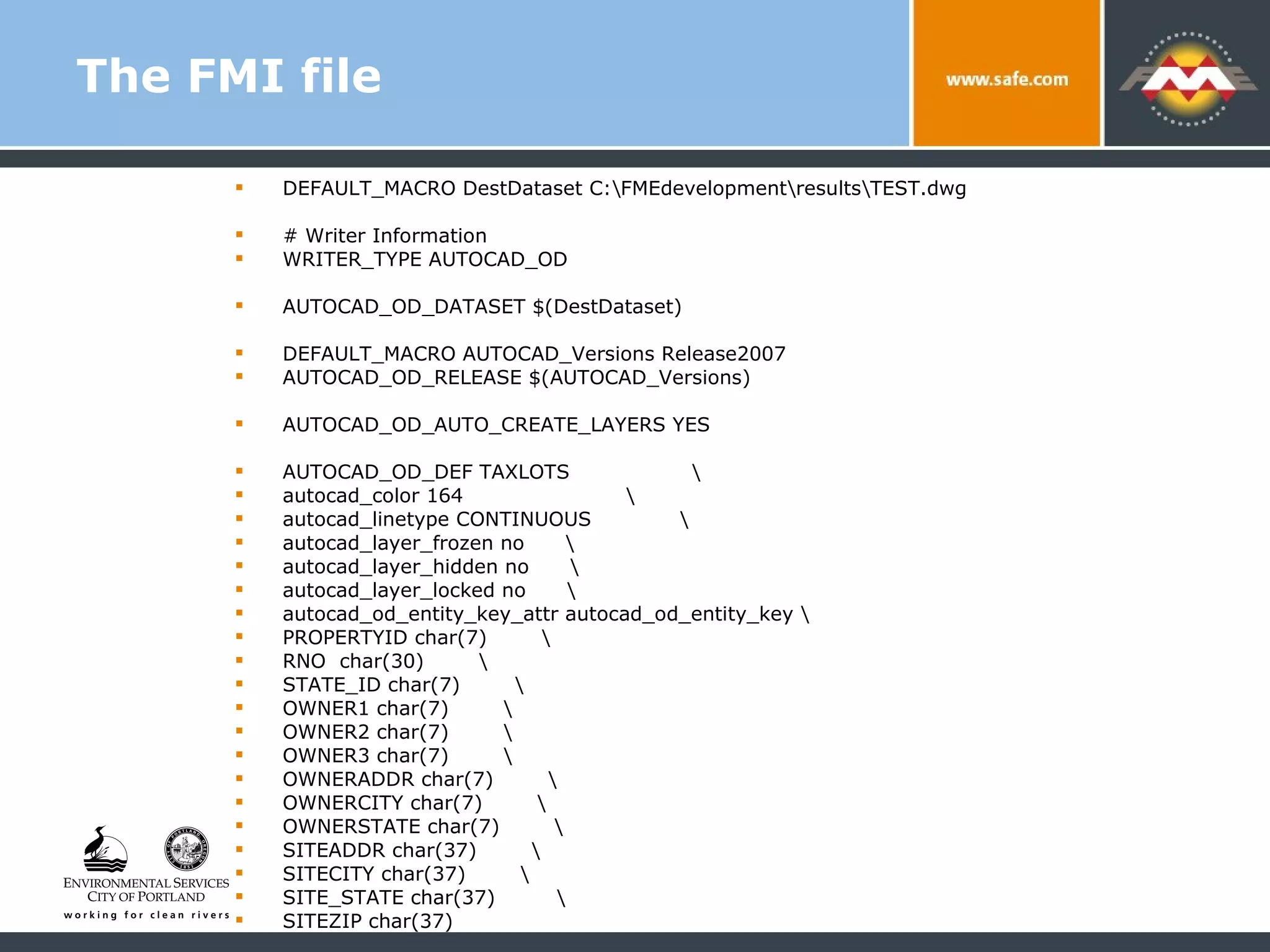
The FMI file DEFAULT_MACRO DestDataset C:\FMEdevelopment\results\TEST.dwg # Writer Information WRITER_TYPE AUTOCAD_OD AUTOCAD_OD_DATASET $(DestDataset) DEFAULT_MACRO AUTOCAD_Versions Release2007 AUTOCAD_OD_RELEASE $(AUTOCAD_Versions) AUTOCAD_OD_AUTO_CREATE_LAYERS YES AUTOCAD_OD_DEF TAXLOTS  \ autocad_color 164  \ autocad_linetype CONTINUOUS  \ autocad_layer_frozen no  \ autocad_layer_hidden no  \ autocad_layer_locked no  \ autocad_od_entity_key_attr autocad_od_entity_key \ PROPERTYID char(7)  \ RNO  char(30)  \ STATE_ID char(7)  \ OWNER1 char(7)  \ OWNER2 char(7)  \ OWNER3 char(7)  \ OWNERADDR char(7)  \ OWNERCITY char(7)  \ OWNERSTATE char(7)  \ SITEADDR char(37)  \  SITECITY char(37)  \  SITE_STATE char(37)  \  SITEZIP char(37)
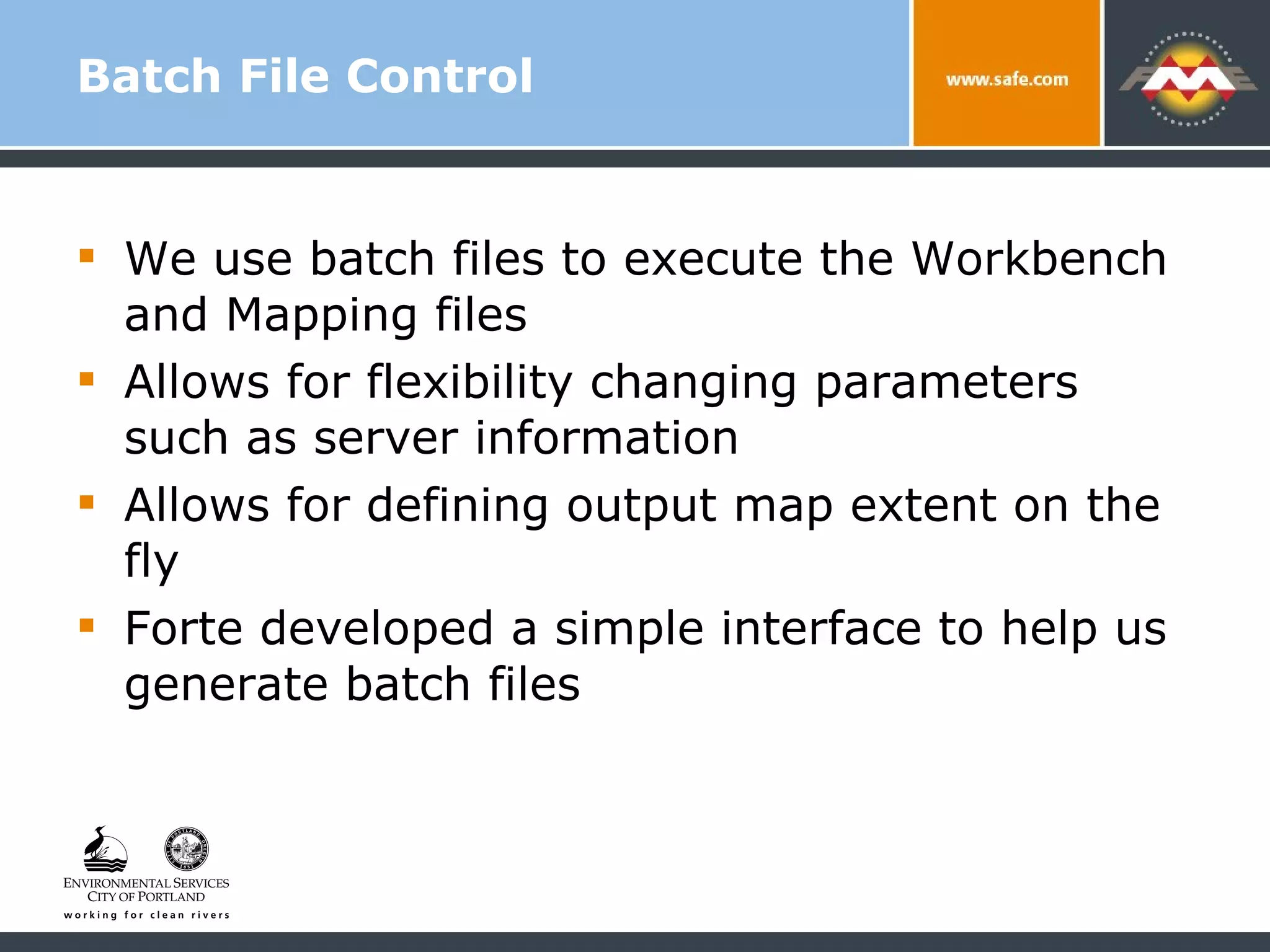
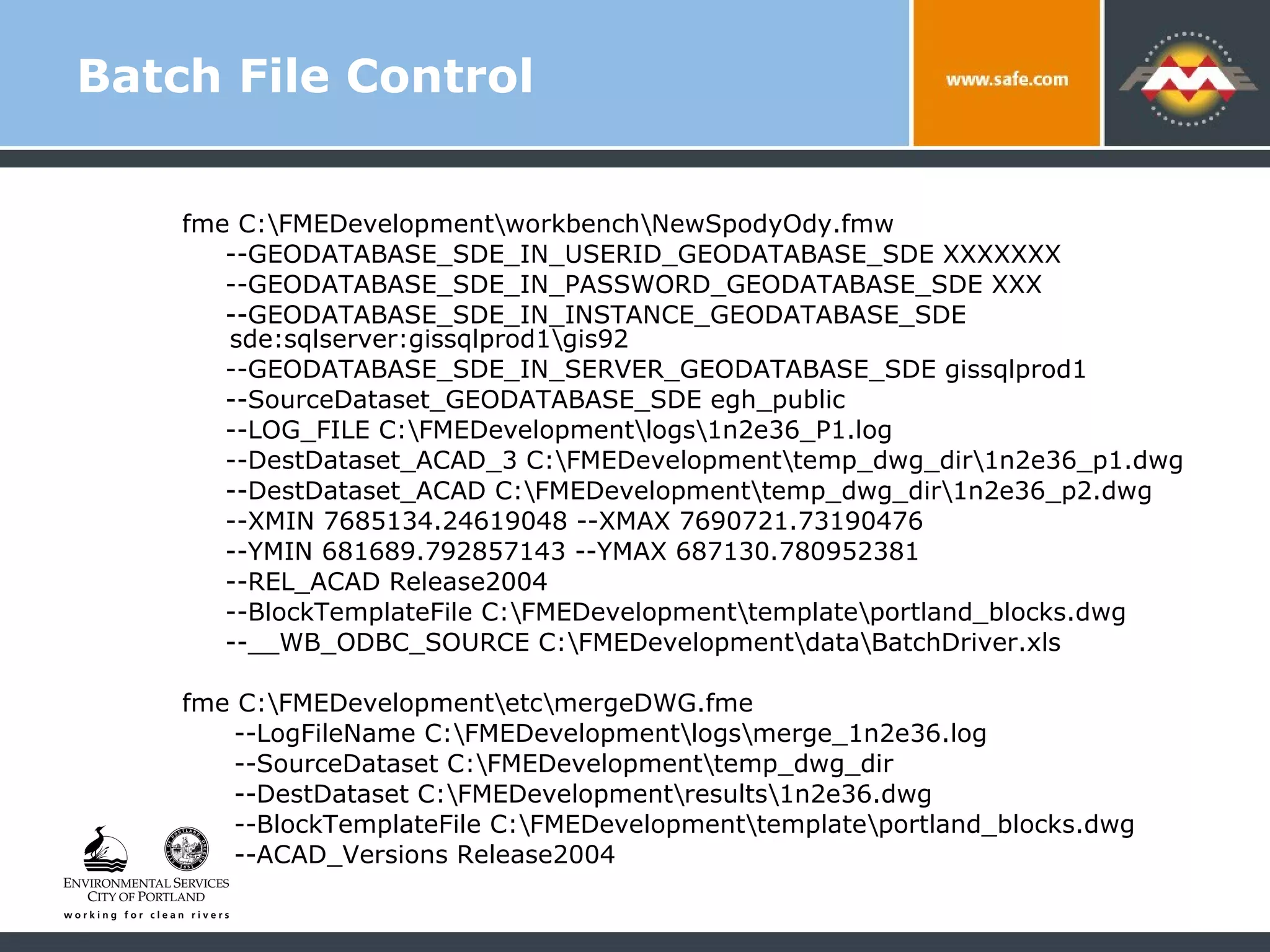
Batch File Control We use batch files to execute the Workbench and Mapping files  Allows for flexibility changing parameters such as server information Allows for defining output map extent on the fly Forte developed a simple interface to help us generate batch files
Batch File Control fme C:\FMEDevelopment\workbench\NewSpodyOdy.fmw  --GEODATABASE_SDE_IN_USERID_GEODATABASE_SDE XXXXXXX  --GEODATABASE_SDE_IN_PASSWORD_GEODATABASE_SDE XXX  --GEODATABASE_SDE_IN_INSTANCE_GEODATABASE_SDE  sde:sqlserver:gissqlprod1\gis92  --GEODATABASE_SDE_IN_SERVER_GEODATABASE_SDE gissqlprod1 --SourceDataset_GEODATABASE_SDE egh_public  --LOG_FILE C:\FMEDevelopment\logs\1n2e36_P1.log  --DestDataset_ACAD_3 C:\FMEDevelopment\temp_dwg_dir\1n2e36_p1.dwg  --DestDataset_ACAD C:\FMEDevelopment\temp_dwg_dir\1n2e36_p2.dwg  --XMIN 7685134.24619048 --XMAX 7690721.73190476  --YMIN 681689.792857143 --YMAX 687130.780952381  --REL_ACAD Release2004  --BlockTemplateFile C:\FMEDevelopment\template\portland_blocks.dwg  --__WB_ODBC_SOURCE C:\FMEDevelopment\data\BatchDriver.xls fme C:\FMEDevelopment\etc\mergeDWG.fme  --LogFileName C:\FMEDevelopment\logs\merge_1n2e36.log  --SourceDataset C:\FMEDevelopment\temp_dwg_dir  --DestDataset C:\FMEDevelopment\results\1n2e36.dwg  --BlockTemplateFile C:\FMEDevelopment\template\portland_blocks.dwg  --ACAD_Versions Release2004
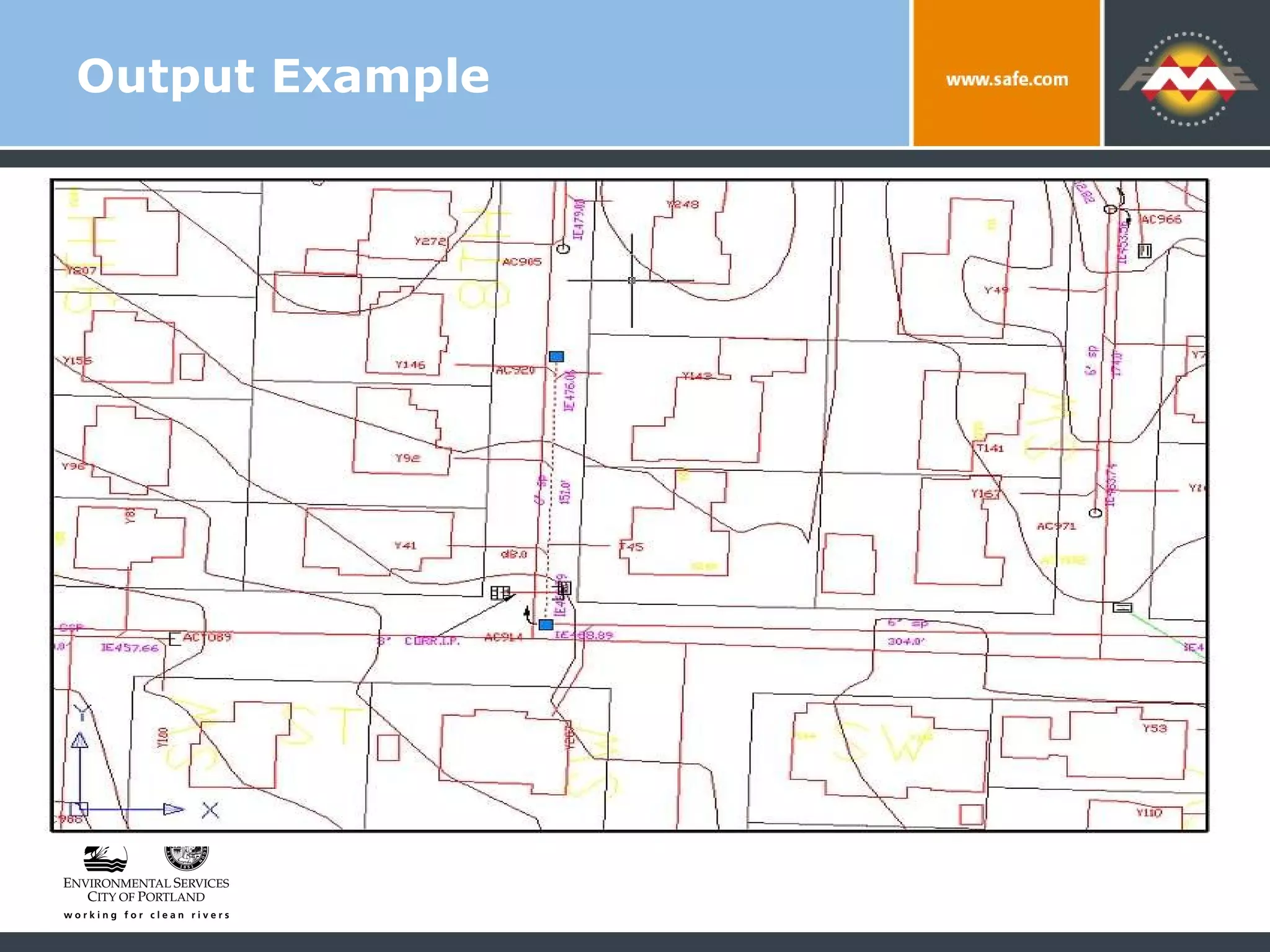
Output Example
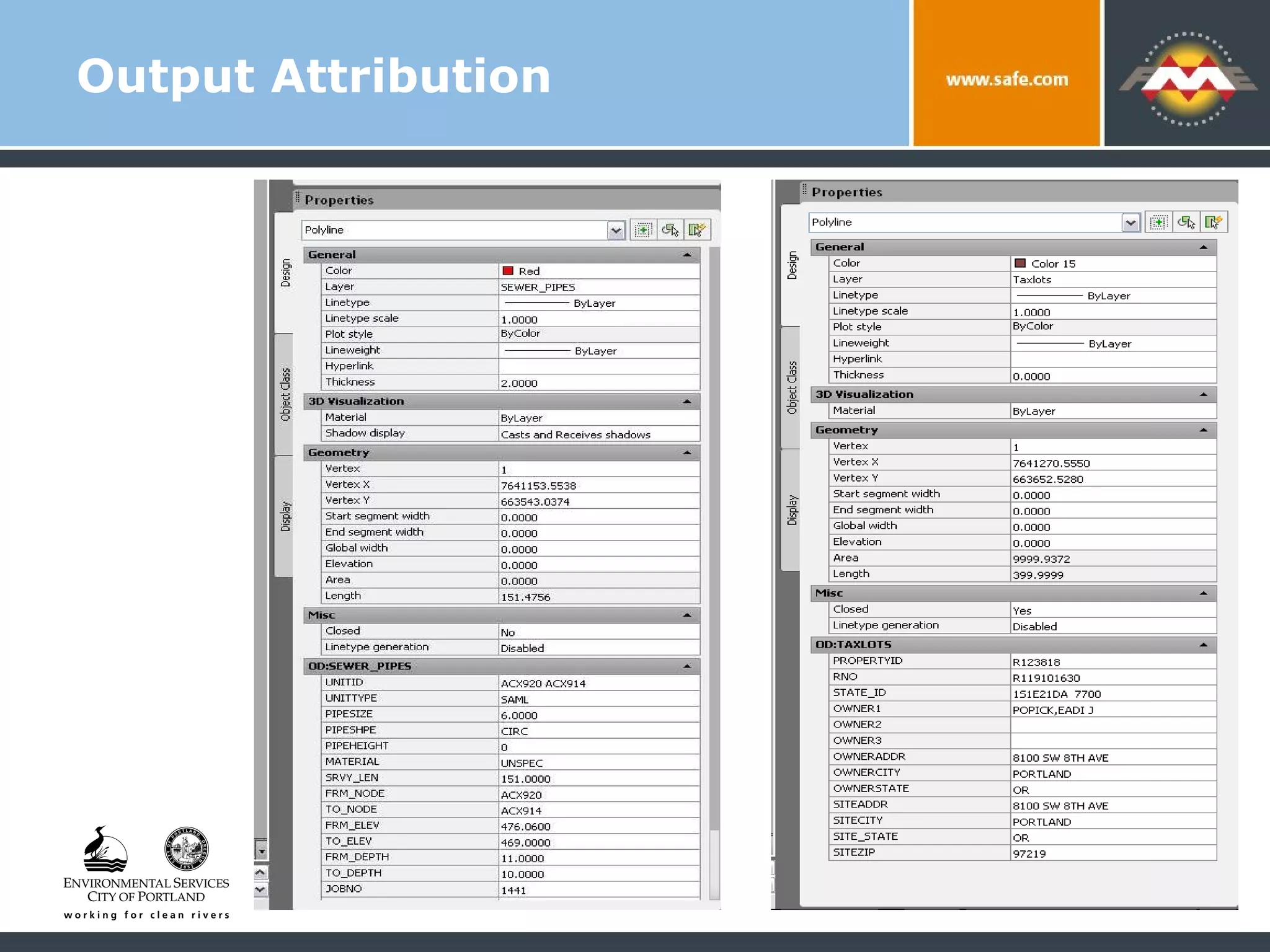
Output Attribution
Results for CAD Users More attribution More datasets as input Most current data available Output standard for all internal and external users
Results For Me A  STABLE  system to export from GIS to CAD that meets users expectation for file structure and contents System is manageable – changes in GIS data or CAD standards can be easily accommodated going forward
Going Forward Server-based solution for web-based ETL Other formats such as Microstation Citywide standard CAD files for all users with complete set of utilities Utilize future versions of FME to streamline process and add new functionality
Thank You! Questions? For more information: Matthew Freid – Matt.Freid@portlandoregon.gov Bureau of Environmental Services  Portland Oregon www.portlandmaps.com

The Best Come from Fresh Ingredients: Creating CAD Files from an Enterprise SDE Server

  • 1.
    The Best DishesAre Made With Fresh Ingredients: Creating CAD Files from an Enterprise SDE Server Matthew Freid GIS Analyst – Bureau of Environmental Services City of Portland Oregon
  • 2.
    GIS to CADConversion: Project Goals Provide most current data to all users Regardless of format & software used to access it Provide data in native formats and in a structure that’s immediately useable No end user translation or management required Make the same data and formatting available to internal and external users
  • 3.
    City of PortlandBureau of Environmental Services 145,000+ accounts in 150 sq mi service area 2,200+ miles of pipe in combined, sanitary and storm system 14,000 sumps and sedimentation manholes that collect storm water runoff CSO abatement program final years of 20 year, $ 1.4 billion program
  • 4.
    Matthew Freid: GISAnalyst Provide user support, database mgmt, app design/ integration, business intelligence Focus on Collection System Asset Database Our system combines an IMS/CMS with a GIS Data Maintenance Environment (DME)
  • 5.
    GIS Data Delivery: High Availability Data produced by DME is housed in SDE / SQL Server on Enterprise HUB for internal and external users, along with 100’s of other feature classes Accessed with: Out-of-the box desktop GIS Custom applications for workgroups and mobile users Web applications
  • 6.
    GIS Data Delivery: High Availability Used by maintenance workers, modelers and planners throughout the bureau and city Integrated access to as-builts, easements and current data from IMS via www.portlandmaps.com So … lots of the most current data available
  • 7.
    Who’s Missing FromThis Picture??? Before DME was implemented Assets mapped in AutoCAD Batch exports converted for GIS users Downsides Data consistency Lack of continuous coverage/integration with IMS Currency of other datasets from other sources The Big Advantage CAD users had the most up to date files to work with in their native format
  • 8.
    From Best toWorst Change in data input systems = no direct access to current data in familiar way! Users could use GIS software to query and analyze the assets data, but… had to use out of date CAD files for designing projects Result? Create and use copies of final set of dwg’s
  • 9.
    Initial Solutions: Nothing Is Ever Easy Recreating file structure and extents? Not practical with GIS software Direct access to SDE within AutoCAD? Cumbersome Another need: Complete, self-contained set of CAD files for distribution to outside consultants and contractors
  • 10.
    Try and TryAgain Proprietary tool Ran initial translation from SDE to DWG using AutoCAD - without complete formatting Added formatting on the fly for a specific user defined area (BMAP) Issues Preprocessing crashed often, needed human intervention Can’t make files for users outside the city Sometimes didn’t handle datasets from outside the bureau
  • 11.
    Find A BetterWay Users liked the BMAP approach Get a file on demand within AutoCAD Try FME? Already used for AutoCAD to SDE conversion so …
  • 12.
    Find A BetterWay New approach – use FME as a stable environment to: Produce a complete set of fully formatted DWG files for external users Deliver final files via BMAP tool for internal ACAD users Allow any data on Enterprise GIS HUB to be incorporated into the DWG’s
  • 13.
    Outside Help Workedwith Forte Consulting Our long suffering support and solution provider for our initial conversion Used FME Workbench and some Mapping files Goal: City staff could take over and manage the process over time
  • 14.
    Hooks to SDEInputs come directly from Enterprise SDE Servers Outputs to temp dir of DWG’s
  • 15.
  • 16.
  • 17.
  • 18.
    Beyond Workbench 2+temporary DWG’s produced and loaded into a single sub-directory Leave Workbench so we can produce a single DWG that contains features with different sets of OBJECT DATA attribution Consultant helped us create a mapping file to accommodate this
  • 19.
    Mapping File DEFAULT_MACROLogFileName mergeAcad LOG_FILENAME $(LogFileName) Count MAX_TO_LOG 50000 LOG_APPEND NO FME_DEBUG UNGROUPED UNCORRELATED MAPPING_FILE READER_TYPE MULTI_READER MULTI_READER_TYPE{*} AUTOCAD_OD MULTI_READER_KEYWORD{*} AUTOCAD_OD DEFAULT_MACRO SourceDataset C:\FMEdevelopment\temp_dwg_dir MULTI_READER_DATASET $(SourceDataset) INCLUDE $(FME_MF_DIR)/../inc/ FirstODautocadObject.fmi FACTORY_DEF * SamplingFactory \ SAMPLE_RATE 1 \ INPUT FEATURE_TYPE * @Log() MULTI_READER * AUTOCAD_OD *
  • 20.
    The FMI FileControls Attribution and Field definitions Easy way to add new datasets Self documenting nature of a text file system has it’s advantages
  • 21.
    The FMI fileDEFAULT_MACRO DestDataset C:\FMEdevelopment\results\TEST.dwg # Writer Information WRITER_TYPE AUTOCAD_OD AUTOCAD_OD_DATASET $(DestDataset) DEFAULT_MACRO AUTOCAD_Versions Release2007 AUTOCAD_OD_RELEASE $(AUTOCAD_Versions) AUTOCAD_OD_AUTO_CREATE_LAYERS YES AUTOCAD_OD_DEF TAXLOTS \ autocad_color 164 \ autocad_linetype CONTINUOUS \ autocad_layer_frozen no \ autocad_layer_hidden no \ autocad_layer_locked no \ autocad_od_entity_key_attr autocad_od_entity_key \ PROPERTYID char(7) \ RNO char(30) \ STATE_ID char(7) \ OWNER1 char(7) \ OWNER2 char(7) \ OWNER3 char(7) \ OWNERADDR char(7) \ OWNERCITY char(7) \ OWNERSTATE char(7) \ SITEADDR char(37) \ SITECITY char(37) \ SITE_STATE char(37) \ SITEZIP char(37)
  • 22.
    Batch File ControlWe use batch files to execute the Workbench and Mapping files Allows for flexibility changing parameters such as server information Allows for defining output map extent on the fly Forte developed a simple interface to help us generate batch files
  • 23.
    Batch File Controlfme C:\FMEDevelopment\workbench\NewSpodyOdy.fmw --GEODATABASE_SDE_IN_USERID_GEODATABASE_SDE XXXXXXX --GEODATABASE_SDE_IN_PASSWORD_GEODATABASE_SDE XXX --GEODATABASE_SDE_IN_INSTANCE_GEODATABASE_SDE sde:sqlserver:gissqlprod1\gis92 --GEODATABASE_SDE_IN_SERVER_GEODATABASE_SDE gissqlprod1 --SourceDataset_GEODATABASE_SDE egh_public --LOG_FILE C:\FMEDevelopment\logs\1n2e36_P1.log --DestDataset_ACAD_3 C:\FMEDevelopment\temp_dwg_dir\1n2e36_p1.dwg --DestDataset_ACAD C:\FMEDevelopment\temp_dwg_dir\1n2e36_p2.dwg --XMIN 7685134.24619048 --XMAX 7690721.73190476 --YMIN 681689.792857143 --YMAX 687130.780952381 --REL_ACAD Release2004 --BlockTemplateFile C:\FMEDevelopment\template\portland_blocks.dwg --__WB_ODBC_SOURCE C:\FMEDevelopment\data\BatchDriver.xls fme C:\FMEDevelopment\etc\mergeDWG.fme --LogFileName C:\FMEDevelopment\logs\merge_1n2e36.log --SourceDataset C:\FMEDevelopment\temp_dwg_dir --DestDataset C:\FMEDevelopment\results\1n2e36.dwg --BlockTemplateFile C:\FMEDevelopment\template\portland_blocks.dwg --ACAD_Versions Release2004
  • 24.
  • 25.
  • 26.
    Results for CADUsers More attribution More datasets as input Most current data available Output standard for all internal and external users
  • 27.
    Results For MeA STABLE system to export from GIS to CAD that meets users expectation for file structure and contents System is manageable – changes in GIS data or CAD standards can be easily accommodated going forward
  • 28.
    Going Forward Server-basedsolution for web-based ETL Other formats such as Microstation Citywide standard CAD files for all users with complete set of utilities Utilize future versions of FME to streamline process and add new functionality
  • 29.
    Thank You! Questions?For more information: Matthew Freid – Matt.Freid@portlandoregon.gov Bureau of Environmental Services Portland Oregon www.portlandmaps.com

Editor's Notes

  • #7 Integrated access to as-builts, easements and current data from IMS such TV inspections and work orders on publicly available website www.portlandmaps.com
  • #8 Currency of other datasets such as taxlots, other utilities coming from GIS, other CAD sources
  • #9 After the change in data input systems, our engineers and designers didn’t have direct access current data in they way they were used to These users have GIS software to query and analyze the assets data, but then had to use out of date CAD files for designing projects Many users made copies of the final set of dwg’s and continued to use them for a long time
  • #10 Recreating the file structure and extents CAD users were accustomed to wasn’t practical with GIS software Direct access to SDE within AutoCAD was cumbersome, didn’t lend it self well to the our formatting standards, and not all users had adequate software A need also exists for a complete, self-contained set of CAD files for distribution to outside consultants and contractors
  • #11 A CAD Analyst developed a tool that ran an initial translation from SDE to DWG using AutoCAD without complete formatting then added it on the fly for a specific user defined area – BMAP Preprocessing didn’t run smoothly across the whole city, crashed often and needed human intervention and management Still lacked the ability to make files for users outside the city without and operating generating a file using the tool in AutoCAD Sometimes didn’t handle other datasets from outside the bureau
  • #12 Already used in translation from AutoCAD to SDE when we implemented the GIS maintenance environment with great success so …
  • #14 Used Workbench and some Mapping files where necessary so that once basic functionality was provided, City staff could take over and manage the process over time
  • #19 Two or more temporary DWG’s are produced and end up in a single subdirectory Here we leave Workbench so that we can produce a single DWG that contains features with different sets of OBJECT DATA attribution – so taxlots have ownership data while pipes have asset data Consultant helped us create a mapping file to accommodate this