













1
Hands-On Mobile App Testing
@dnlkntt
Who am I?
Daniel Knott
Senior Software Test Engineer Mobile
Working @ XING
Author, Blogger and Speaker
http://adventuresinqa.com
@dnlkntt
www.handsonmobileapptesting.com
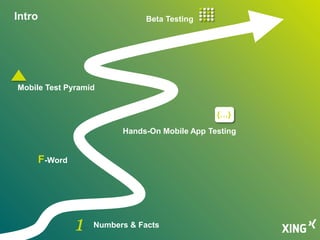
Intro Beta Testing
Mobile Test Pyramid
Hands-On Mobile App Testing
F-Word
Numbers & Facts
{…}
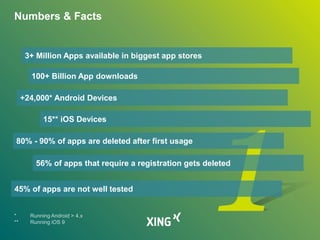
Numbers & Facts
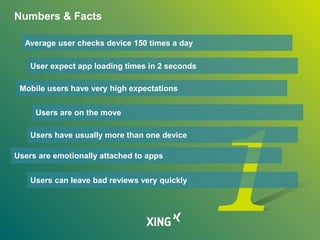
Numbers & Facts
3+ Million Apps available in biggest app stores
100+ Billion App downloads
+24,000* Android Devices
15** iOS Devices
80% - 90% of apps are deleted after first usage
56% of apps that require a registration gets deleted
45% of apps are not well tested
Numbers & Facts
Average user checks device 150 times a day
User expect app loading times in 2 seconds
Mobile users have very high expectations
Users are on the move
Users have usually more than one device
Users are emotionally attached to apps
Users can leave bad reviews very quickly
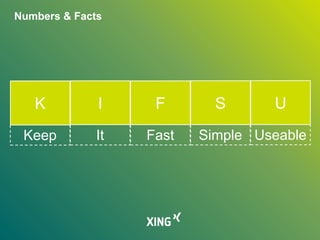
Numbers & Facts
Simple UseableFastItKeep
K I F S U
F-Word
F-Word
http://opensignal.com/reports/2015/08/android-fragmentation/
F-Word
http://opensignal.com/reports/2015/08/android-fragmentation/
F-Word
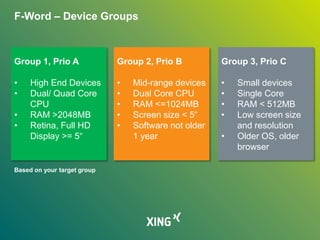
F-Word – Device Groups
Group 1, Prio A
• High End Devices
• Dual/ Quad Core
CPU
• RAM >2048MB
• Retina, Full HD
Display >= 5“
Group 2, Prio B
• Mid-range devices
• Dual Core CPU
• RAM <=1024MB
• Screen size < 5“
• Software not older
1 year
Group 3, Prio C
• Small devices
• Single Core
• RAM < 512MB
• Low screen size
and resolution
• Older OS, older
browser
Based on your target group
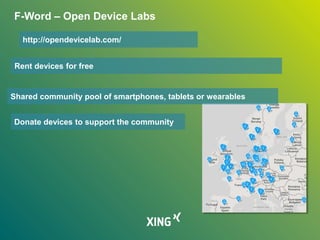
F-Word – Open Device Labs
Rent devices for free
Shared community pool of smartphones, tablets or wearables
Donate devices to support the community
http://opendevicelab.com/
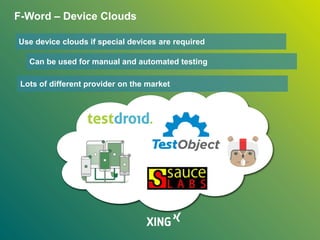
F-Word – Device Clouds
Use device clouds if special devices are required
Can be used for manual and automated testing
Lots of different provider on the market
Hands-On Mobile App Testing
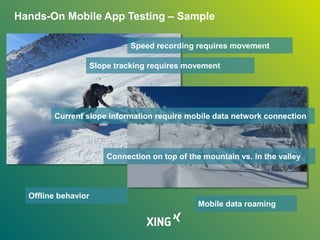
Hands-On Mobile App Testing – Sample
Speed recording requires movement
Slope tracking requires movement
Current slope information require mobile data network connection
Connection on top of the mountain vs. In the valley
Offline behavior
Mobile data roaming
Hands-On Mobile App Testing – Sample
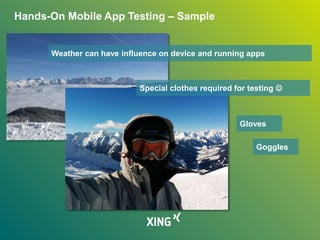
Special clothes required for testing 
Gloves
Goggles
Weather can have influence on device and running apps
Hands-On Mobile App Testing
Author: amateur_photo_bore, http://www.flickr.com/photos/andresv/233667770/
Author: Rain Rabbit, http://www.flickr.com/photos/37996583811@N01/8033259053/
Author, Daniel Sancho, http://www.flickr.com/photos/teclasorg/2852716491/
Hands-On Mobile App Testing
Author: Surat Lozowick, http://www.flickr.com/photos/suratlozowick/4311105154/
Author: Surat Lozowick, http://www.flickr.com/photos/suratlozowick/4464587302/
Hands-On Mobile App Testing
Author: Theus Falcao, http://www.flickr.com/photos/theusfalcao/9563767145/
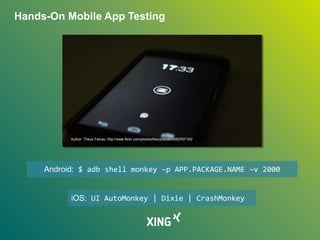
Android: $ adb shell monkey –p APP.PACKAGE.NAME –v 2000
iOS: UI AutoMonkey | Dixie | CrashMonkey
Hands-On Mobile App Testing
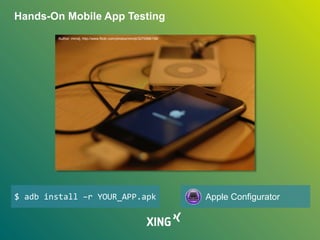
Author: minxlj, http://www.flickr.com/photos/minxlj/3270996158/
$ adb install –r YOUR_APP.apk Apple Configurator
Mobile Test Pyramid
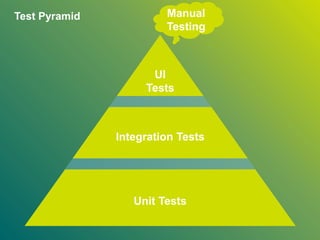
Test Pyramid Manual
Testing
Integration Tests
Unit Tests
UI
Tests
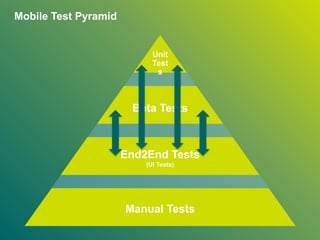
Mobile Test Pyramid
End2End Tests
(UI Tests)
Manual Tests
Beta Tests
Unit
Test
s
Beta Testing
Beta Testing
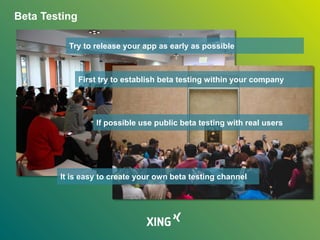
Try to release your app as early as possible
If possible use public beta testing with real users
It is easy to create your own beta testing channel
First try to establish beta testing within your company
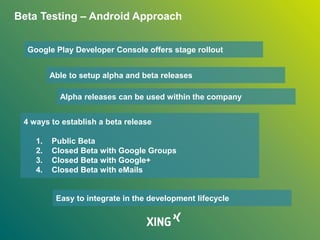
Beta Testing – Android Approach
Google Play Developer Console offers stage rollout
Able to setup alpha and beta releases
4 ways to establish a beta release
1. Public Beta
2. Closed Beta with Google Groups
3. Closed Beta with Google+
4. Closed Beta with eMails
Easy to integrate in the development lifecycle
Alpha releases can be used within the company
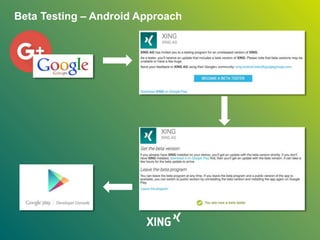
Beta Testing – Android Approach
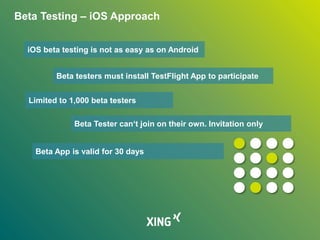
Beta Testing – iOS Approach
iOS beta testing is not as easy as on Android
Beta testers must install TestFlight App to participate
Limited to 1,000 beta testers
Beta Tester can‘t join on their own. Invitation only
Beta App is valid for 30 days
Summary – Take Aways
Mobile users have high expectations - KIFSU
Group your devices | Device Labs | Cloud Testing
Test your app in the wild
Test the update process | Stress test your app
Keep hardware and sensors in mind
Remind the mobile test pyramid
Establish a beta testing program
http://adventuresinqa.com
@dnlkntt
» Numbers:
» http://offers2.compuware.com/rs/compuware/images/Mobile_App_Survey
_Report.pdf
» www.gartner.com/newsroom/id/2665715
» F-Word:
» http://opensignal.com/reports/2015/08/android-fragmentation/
» http://testdroid.com/
» https://testmunk.com/
» https://saucelabs.com/
» https://testobject.com/
» https://aws.amazon.com/de/device-farm/
» Update Testing:
» Apple Configurator: https://itunes.apple.com/de/app/apple-
configurator/id434433123?mt=12
Links & References
» Stress Testing:
» https://github.com/jonathanpenn/ui-auto-monkey
» https://github.com/Skyscanner/Dixie
» https://github.com/mokemokechicken/CrashMonkey
» Pyramid:
» https://stocksnap.io/photo/20D9C664B1
» Beta Testing:
» https://support.google.com/googleplay/android-
developer/answer/3131213
» https://developer.apple.com/library/prerelease/ios/documentation/Langua
gesUtilities/Conceptual/iTunesConnect_Guide/Chapters/BetaTestingTheA
pp.html
» https://developer.apple.com/testflight/
» Photos:
» https://stocksnap.io/
Links & References

Hands-On Mobile App Testing

  • 1.
    1 Hands-On Mobile AppTesting @dnlkntt
  • 2.
    Who am I? DanielKnott Senior Software Test Engineer Mobile Working @ XING Author, Blogger and Speaker http://adventuresinqa.com @dnlkntt www.handsonmobileapptesting.com
  • 3.
    Intro Beta Testing MobileTest Pyramid Hands-On Mobile App Testing F-Word Numbers & Facts {…}
  • 4.
  • 5.
    Numbers & Facts 3+Million Apps available in biggest app stores 100+ Billion App downloads +24,000* Android Devices 15** iOS Devices 80% - 90% of apps are deleted after first usage 56% of apps that require a registration gets deleted 45% of apps are not well tested
  • 6.
    Numbers & Facts Averageuser checks device 150 times a day User expect app loading times in 2 seconds Mobile users have very high expectations Users are on the move Users have usually more than one device Users are emotionally attached to apps Users can leave bad reviews very quickly
  • 7.
    Numbers & Facts SimpleUseableFastItKeep K I F S U
  • 8.
  • 9.
  • 10.
  • 11.
  • 12.
    F-Word – DeviceGroups Group 1, Prio A • High End Devices • Dual/ Quad Core CPU • RAM >2048MB • Retina, Full HD Display >= 5“ Group 2, Prio B • Mid-range devices • Dual Core CPU • RAM <=1024MB • Screen size < 5“ • Software not older 1 year Group 3, Prio C • Small devices • Single Core • RAM < 512MB • Low screen size and resolution • Older OS, older browser Based on your target group
  • 13.
    F-Word – OpenDevice Labs Rent devices for free Shared community pool of smartphones, tablets or wearables Donate devices to support the community http://opendevicelab.com/
  • 14.
    F-Word – DeviceClouds Use device clouds if special devices are required Can be used for manual and automated testing Lots of different provider on the market
  • 15.
  • 16.
    Hands-On Mobile AppTesting – Sample
  • 17.
    Hands-On Mobile AppTesting – Sample Speed recording requires movement Slope tracking requires movement Current slope information require mobile data network connection Connection on top of the mountain vs. In the valley Offline behavior Mobile data roaming
  • 18.
    Hands-On Mobile AppTesting – Sample Special clothes required for testing  Gloves Goggles Weather can have influence on device and running apps
  • 19.
    Hands-On Mobile AppTesting Author: amateur_photo_bore, http://www.flickr.com/photos/andresv/233667770/ Author: Rain Rabbit, http://www.flickr.com/photos/37996583811@N01/8033259053/ Author, Daniel Sancho, http://www.flickr.com/photos/teclasorg/2852716491/
  • 20.
    Hands-On Mobile AppTesting Author: Surat Lozowick, http://www.flickr.com/photos/suratlozowick/4311105154/ Author: Surat Lozowick, http://www.flickr.com/photos/suratlozowick/4464587302/
  • 21.
    Hands-On Mobile AppTesting Author: Theus Falcao, http://www.flickr.com/photos/theusfalcao/9563767145/ Android: $ adb shell monkey –p APP.PACKAGE.NAME –v 2000 iOS: UI AutoMonkey | Dixie | CrashMonkey
  • 22.
    Hands-On Mobile AppTesting Author: minxlj, http://www.flickr.com/photos/minxlj/3270996158/ $ adb install –r YOUR_APP.apk Apple Configurator
  • 23.
  • 24.
    Test Pyramid Manual Testing IntegrationTests Unit Tests UI Tests
  • 25.
    Mobile Test Pyramid End2EndTests (UI Tests) Manual Tests Beta Tests Unit Test s
  • 26.
  • 27.
    Beta Testing Try torelease your app as early as possible If possible use public beta testing with real users It is easy to create your own beta testing channel First try to establish beta testing within your company
  • 28.
    Beta Testing –Android Approach Google Play Developer Console offers stage rollout Able to setup alpha and beta releases 4 ways to establish a beta release 1. Public Beta 2. Closed Beta with Google Groups 3. Closed Beta with Google+ 4. Closed Beta with eMails Easy to integrate in the development lifecycle Alpha releases can be used within the company
  • 29.
    Beta Testing –Android Approach
  • 30.
    Beta Testing –iOS Approach iOS beta testing is not as easy as on Android Beta testers must install TestFlight App to participate Limited to 1,000 beta testers Beta Tester can‘t join on their own. Invitation only Beta App is valid for 30 days
  • 31.
    Summary – TakeAways Mobile users have high expectations - KIFSU Group your devices | Device Labs | Cloud Testing Test your app in the wild Test the update process | Stress test your app Keep hardware and sensors in mind Remind the mobile test pyramid Establish a beta testing program
  • 32.
  • 34.
    » Numbers: » http://offers2.compuware.com/rs/compuware/images/Mobile_App_Survey _Report.pdf »www.gartner.com/newsroom/id/2665715 » F-Word: » http://opensignal.com/reports/2015/08/android-fragmentation/ » http://testdroid.com/ » https://testmunk.com/ » https://saucelabs.com/ » https://testobject.com/ » https://aws.amazon.com/de/device-farm/ » Update Testing: » Apple Configurator: https://itunes.apple.com/de/app/apple- configurator/id434433123?mt=12 Links & References
  • 35.
    » Stress Testing: »https://github.com/jonathanpenn/ui-auto-monkey » https://github.com/Skyscanner/Dixie » https://github.com/mokemokechicken/CrashMonkey » Pyramid: » https://stocksnap.io/photo/20D9C664B1 » Beta Testing: » https://support.google.com/googleplay/android- developer/answer/3131213 » https://developer.apple.com/library/prerelease/ios/documentation/Langua gesUtilities/Conceptual/iTunesConnect_Guide/Chapters/BetaTestingTheA pp.html » https://developer.apple.com/testflight/ » Photos: » https://stocksnap.io/ Links & References

Editor's Notes

  • #5 - Based on some numbes & facts I want to show you how big, important and challenging mobile testing can be
  • #6 - iOS Devices iPad 2 – iPad Pro (7 devices), iPhone 4S – iPhone 6S+ (8 devices)
  • #8 The fact that mobile user have a very high expectation to mobile apps I created my own principle inspired by the KISS principle Keep it Stupid Simple I created KIFSU to keep mobile user expectations in mind
  • #9 I think you have a glue what is behind the F-Word 
  • #10 We all know the problem called fragmentation Several manufacturer and OS version: +24,000 Android Devices
  • #11 Is now the case also for iOS: 15 iOS Devices Don‘t want to dive into this topic. But I will provide you with some ideas to handle the fragmentation problem.
  • #12 First Don‘t buy all devices Not necessary
  • #13 One solution can be: Mobile Device Groups Gather information about your customer Create e.g. 3 groups with specific properties and priority Add device to this groups When testing, test only on devices from this group Everything should based on your target group The same grouping can be applied for mobile web applications e.g. for the different browser.
  • #14 Another approach can be Open Device Labs Who knows the concept of ODLs? Raise your hand
  • #15 If you don‘t want or can‘t buy many test devices cloud testing would be an alternative for you Can be used for manual as well as test automation Several provider available on the market. Just to name some of them.
  • #16 First lets have a look at a sample Then to some more important mobile specific testing
  • #17 Lets start with a short example Imagine you have to test a app for snowboarders or skiers that offers functionality like App offers speed recording, tracking and sharing KLICK Slope information KLICK Current weather based on location KLIC This example should show you, that Mobile Testing requires in the wild testing! Sure you can test in lab situation but let me show you why
  • #18 Recording and tracking can only be done with real movement! Sure you somehow simulate this in a lab but you will problably find problems on the slope Think about mobile data networks A snowboarder is not constantly boarding down the hill, they sit on the slope. Different speeds etc.
  • #19 Slope information require mobile network In the mountains there might be no or only slow network connection Test in the valley as well as on top of the mountain and see how the app behaves Check offline behavior What about data roaming!?
  • #20 Again current weather data requires mobile network Bad weather like sunny sky, cloudy or heavy snow can and will have an impact to your app e.g. in usability There is another big big problem that you should keep in mind. The app will be used in special clothes Gloves with or without touch device support Cold fingers!! Or Googgles or sun classes with different colored screens. Have a huge impact to usabilit This was an extreme example but should show you to never underestimate in the wild testing Have the use cases in mind while testing.
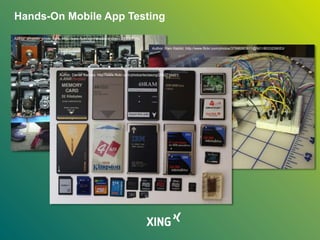
  • #21 1. Camera. Different Vendors == different cameras and resolutions. Even in iPhones different cameras are installed 2. Test the sensors that are used by your app. Tilt sensors, motion sensor, light sensor, shake the phone etc. GPS testing, check that used GPS is released by the app again to save battery 3. Memory, test if your app can be stored on sdk card on android. Test how your app behave when the local phone storage empty, full is  no crashes? Proper error message? Put lots of data to your device and see how it behaves
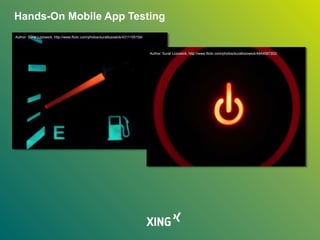
  • #22 1. Test the battery consumption of your app. Charge the app before testing to 100% and mesaure every 10 minutes the current battery state Use tools for measure the battery. There are some tools on the market. Also use an nearyl empty phone for testing and see how the app is performing. Some phones switch off some sensors to save battery, can your app work with that? 2. Start the app and leave the phone in standby mode, open the app again, is the app still working? Maybe triggering a reload to get the latest data from the backend Start the app from multitask  switch off the network  plane mode!?
  • #23 Test different interrupt  notifications, incomming sms, mms, phone call usw. If your app supports push notifications open the app and send a push notification check the handling. Use tools like JouleUnit (Android) On iOS use the Energy Usage Function of Instruments Monkey for Android to stresstest your app and see the handling of the interrupts UI AutoMonkey for ios
  • #24 1. Test the update process of your app Check that user is still logged in Check that data is still the same Check that database changes will not affect the current data Test the update from an older version to the current version
  • #25 Now that you know more specific mobile testing topics I want to talk about the testing pyramid
  • #26 We all know the typical test pyramid created by Mike Cohn when it comes to test automation The pyramid is not aligned to mobile and the mobile test automation tools and the whole approach Unit testing might not be easy on mobile There are lots of interfaces, APIs that needs to mocked which might not be effective or way too time consuming Tools are not vary mature in the mobile test automation business and still manual testing is very important The fact that mobile testing requires lots of manual testing in the wild. I adapted the Test pyramid to fit the current needs.
  • #27 Therefore I created the mobile test pyramid, which is flexible in the different layers Manual testing is the foundation of all. As we have seen in the sample, this can‘t be automated! Some of you might think this is wrong, but the reality has shown to me that manual testing is highly required in mobile projects! Next level is the end2end test level Beta testing which is very important And the top of the pyramid there is unit testing. However, Depending on the App you can also swap die entries Unit, Beta and E2E Tests I am using this pyramid in my projects and within the team to keep the layers in mind.
  • #28 The last topic for today is beta testing How many of you have a beta testing approach in place? Please raise your hands
  • #29 If you have nothing in place. Start simple. Try to establish beta testing within your company among your colleagues Easy because no NDA, easy app distribution and easy feedback management Depending on the company size this can be already a great way to gather early feedback from users If possible try to establish also a beta testing group Real users Fresh set of eyes Provide direct and sometimes harsh feedback, but this is good Is not that hard to create a beta testing programm.
  • #30 For Android Apps it is pretty easy to setup the beta testing Within the google dev console you have the possibility to go with the stage rollout In the stages you can use alpha releases or beta releases If you want to establish a beta testing group you have 4 ways to do that The beta testing is easy to integrate in the development lifecycle Here is the workflow
  • #31 If you go with the closed approach you can use either mail, G+ or Google Groups Invite people to the beta programm and send them a testing URL to the play store They have to click Become a tester and thats it Now they will get an play store update with the current beta version Note: Beta tester can‘t rate the app in the play store It is highly recommended to establish a beta testing community where you can exchange with your testers. Keep confidential stuff in mind before submitting
  • #32 iOS apps can also be beta tested but is not that easy as on Android You can e.g. use Testflight to distribute the beta app to testers but with limitations Only 1000 beta testers Testers can‘t join themselves only invite Beta testing only for 30 days For iOS it also recommended to apply the community management to ask beta testers specific questions and to provide them with a channel where they can leave their comments or feedback.
  • #34 That‘s it, Thank you very much for your attention. If you have questions now is the right time for it.