Docker
Bhanuchander210
A Dev-Ops Tool Info
Written in : Go
Author : Solomon Hykes
Bhanuchander210
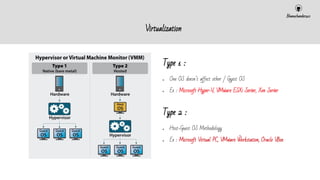
Virtualization
Type 1 :
● One OS doesn’t affect other / Gyest OS
● Ex : Microsoft Hyper-V, VMware ESXi Server, Xen Server
Type 2 :
● Host-Guest OS Methodology
● Ex : Microsoft Virtual PC, VMware Workstation, Oracle VBox
Bhanuchander210
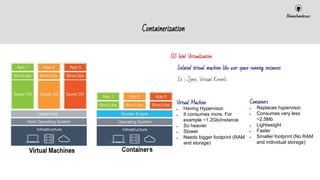
Containerization
OS level Virtualization
●
● Isolated virtual machine like user space running instances
●
● Ex : Zones, Virtual Kernels
Virtual Machine
● Having Hypervisor.
● It consumes more. For
example ~1.2Gb/instance
● So heavier
● Slower
● Needs bigger footprint (RAM
and storage)
Containers
● Replaces hypervisor.
● Consumes very less
~2.5Mb
● Lightweight
● Faster
● Smaller footprint (No RAM
and individual storage)
Bhanuchander210
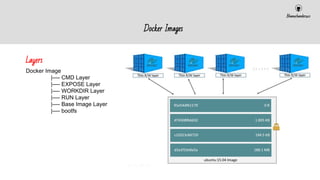
Docker Images
Docker Image
|---- CMD Layer
|---- EXPOSE Layer
|---- WORKDIR Layer
|---- RUN Layer
|---- Base Image Layer
|---- bootfs
Layers
Bhanuchander210
Docker Infra
Bhanuchander210
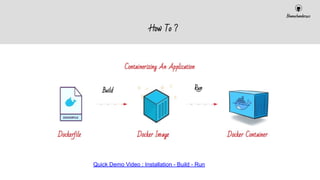
How To ?
Build Run
Quick Demo Video : Installation - Build - Run
Bhanuchander210
Docker Commands
Basic
● docker inspect - Inspecting the information about the custom object.
● docker rm - Removing the object provided in arg.
● docker info - Printing the docker information.
● docker rename - All objects can be renamed.
● docker login - Registry Login
● docker logout - Registry Logout
For containers,
● docker container
● docker ps - Process status for current running processes.
● docker start - Initiating the container.
● docker restart - Restarting the already started container.
● docker cp - Copy the files from the local directory to the container path.
● docker port - Port mapping on running container.
● docker pause
● docker unpause
For Images,
● docker image
● docker search - Search images in customized docker registry.
● docker pull - Pulling images from registry.
● docker push - Pushing images to the customized registry.
● docker save - Save the image as compressed file.
● docker load - Load the compressed file as an image.
● docker rmi - Removing images.
● docker run - Create + Start the container in single command.
Others
● docker volume - Mounting the local directory as a volume object to
the container.
● docker network - Network configuration customizing for bridge,
vlan and overlay networks.
● docker stats - Statistics on the container information on the
machine environment.
● docker top - Normal Top command for quick view.
Bhanuchander210
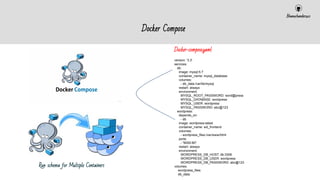
Docker Compose
Docker-compose.yaml
version: '3.3'
services:
db:
image: mysql:5.7
container_name: mysql_database
volumes:
- db_data:/var/lib/mysql
restart: always
environment:
MYSQL_ROOT_PASSWORD: word@press
MYSQL_DATABASE: wordpress
MYSQL_USER: wordpress
MYSQL_PASSWORD: abc@123
wordpress:
depends_on:
- db
image: wordpress:latest
container_name: wd_frontend
volumes:
- wordpress_files:/var/www/html
ports:
- "8000:80"
restart: always
environment:
WORDPRESS_DB_HOST: db:3306
WORDPRESS_DB_USER: wordpress
WORDPRESS_DB_PASSWORD: abc@123
volumes:
wordpress_files:
db_data:
Run schema for Multiple Containers
Bhanuchander210
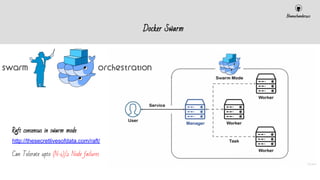
Docker Swarm
Raft consensus in swarm mode
http://thesecretlivesofdata.com/raft/
Can Tolerate upto (N-1)/2 Node failures
Bhanuchander210
Docker Swarm
Master
> docker swarm init
> docker stack deploy -c stack.yml myname
Worker
> docker swarm join --token ***** ip:port
In Master Node :
> docker stack ps msql
ID NAME IMAGE NODE CURRENT STATE
r3qnn6q8v83m msql_db.1 mysql:latest bhanuchander.nmsworks.co.in Running 13 minutes ago
bu06hxyucifm msql_adminer.1 adminer:latest bhanuchander.nmsworks.co.in Running 11 minutes ago
Container Names will be skipped . . . !
Bhanuchander210
Overview
Running Containers
Single/Swarm
Docker-Compose
?
Our application Local Host
Docker Image
Bhanuchander210
Others:
● Rancher
● Docker Machine
● Kubernetes vs Rancher vs Docker Machine
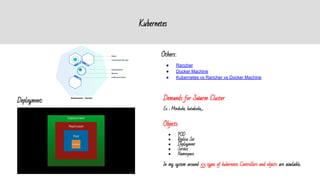
Deployment:
Objects
● POD
● Replica Set
● Deployment
● Service
● Namespace
In my system around 53 types of kubernetes Controllers and objects are available..
Demands for Swarm Cluster
Ex : Minikube, katakoda,....
Kubernetes

Docker ppt

  • 1.
    Docker Bhanuchander210 A Dev-Ops ToolInfo Written in : Go Author : Solomon Hykes
  • 2.
    Bhanuchander210 Virtualization Type 1 : ●One OS doesn’t affect other / Gyest OS ● Ex : Microsoft Hyper-V, VMware ESXi Server, Xen Server Type 2 : ● Host-Guest OS Methodology ● Ex : Microsoft Virtual PC, VMware Workstation, Oracle VBox
  • 3.
    Bhanuchander210 Containerization OS level Virtualization ● ●Isolated virtual machine like user space running instances ● ● Ex : Zones, Virtual Kernels Virtual Machine ● Having Hypervisor. ● It consumes more. For example ~1.2Gb/instance ● So heavier ● Slower ● Needs bigger footprint (RAM and storage) Containers ● Replaces hypervisor. ● Consumes very less ~2.5Mb ● Lightweight ● Faster ● Smaller footprint (No RAM and individual storage)
  • 4.
    Bhanuchander210 Docker Images Docker Image |----CMD Layer |---- EXPOSE Layer |---- WORKDIR Layer |---- RUN Layer |---- Base Image Layer |---- bootfs Layers
  • 5.
  • 6.
    Bhanuchander210 How To ? BuildRun Quick Demo Video : Installation - Build - Run
  • 7.
    Bhanuchander210 Docker Commands Basic ● dockerinspect - Inspecting the information about the custom object. ● docker rm - Removing the object provided in arg. ● docker info - Printing the docker information. ● docker rename - All objects can be renamed. ● docker login - Registry Login ● docker logout - Registry Logout For containers, ● docker container ● docker ps - Process status for current running processes. ● docker start - Initiating the container. ● docker restart - Restarting the already started container. ● docker cp - Copy the files from the local directory to the container path. ● docker port - Port mapping on running container. ● docker pause ● docker unpause For Images, ● docker image ● docker search - Search images in customized docker registry. ● docker pull - Pulling images from registry. ● docker push - Pushing images to the customized registry. ● docker save - Save the image as compressed file. ● docker load - Load the compressed file as an image. ● docker rmi - Removing images. ● docker run - Create + Start the container in single command. Others ● docker volume - Mounting the local directory as a volume object to the container. ● docker network - Network configuration customizing for bridge, vlan and overlay networks. ● docker stats - Statistics on the container information on the machine environment. ● docker top - Normal Top command for quick view.
  • 8.
    Bhanuchander210 Docker Compose Docker-compose.yaml version: '3.3' services: db: image:mysql:5.7 container_name: mysql_database volumes: - db_data:/var/lib/mysql restart: always environment: MYSQL_ROOT_PASSWORD: word@press MYSQL_DATABASE: wordpress MYSQL_USER: wordpress MYSQL_PASSWORD: abc@123 wordpress: depends_on: - db image: wordpress:latest container_name: wd_frontend volumes: - wordpress_files:/var/www/html ports: - "8000:80" restart: always environment: WORDPRESS_DB_HOST: db:3306 WORDPRESS_DB_USER: wordpress WORDPRESS_DB_PASSWORD: abc@123 volumes: wordpress_files: db_data: Run schema for Multiple Containers
  • 9.
    Bhanuchander210 Docker Swarm Raft consensusin swarm mode http://thesecretlivesofdata.com/raft/ Can Tolerate upto (N-1)/2 Node failures
  • 10.
    Bhanuchander210 Docker Swarm Master > dockerswarm init > docker stack deploy -c stack.yml myname Worker > docker swarm join --token ***** ip:port In Master Node : > docker stack ps msql ID NAME IMAGE NODE CURRENT STATE r3qnn6q8v83m msql_db.1 mysql:latest bhanuchander.nmsworks.co.in Running 13 minutes ago bu06hxyucifm msql_adminer.1 adminer:latest bhanuchander.nmsworks.co.in Running 11 minutes ago Container Names will be skipped . . . !
  • 11.
  • 12.
    Bhanuchander210 Others: ● Rancher ● DockerMachine ● Kubernetes vs Rancher vs Docker Machine Deployment: Objects ● POD ● Replica Set ● Deployment ● Service ● Namespace In my system around 53 types of kubernetes Controllers and objects are available.. Demands for Swarm Cluster Ex : Minikube, katakoda,.... Kubernetes