Stop Testing (Only) The
Functionality of Your Mobile Apps!
Anand Bagmar & Justin Ison
@BagmarAnand & @isonic1
Why do we need to think differently
about Mobile App Testing?
@BagmarAnand & @isonic1
2
Differences in Testing approach for
Web & Native Apps Testing
@BagmarAnand & @isonic1
3
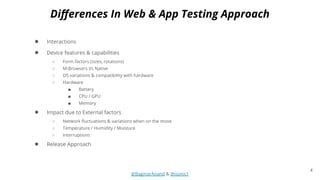
● Interactions
● Device features & capabilities
○ Form factors (sizes, rotations)
○ M-Browsers Vs Native
○ OS variations & compatibility with hardware
○ Hardware
■ Battery
■ CPU / GPU
■ Memory
● Impact due to External factors
○ Network fluctuations & variations when on the move
○ Temperature / Humidity / Moisture
○ Interruptions
● Release Approach
@BagmarAnand & @isonic1
Differences In Web & App Testing Approach
4
Differences in Release approach for
Web & Native Apps Testing
@BagmarAnand & @isonic1
5
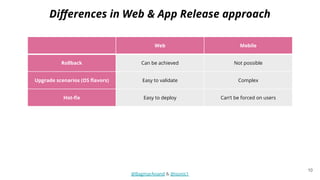
Web Mobile
Rollback Can be achieved Not possible
Upgrade scenarios (OS flavors) Easy to validate Complex
Hot-fix Easy to deploy Can’t be forced on users
External Approvals Not required
Apple / Google App verification
process
Deployment size Does not matter to users App size has impact on users
Compliance Browser compliance
Stock / Custom OS + Hardware
compatibility + Permissions
@BagmarAnand & @isonic1
Differences in Web & App Release approach
6
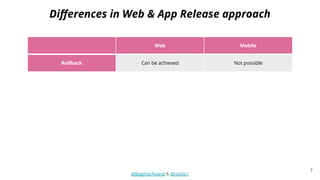
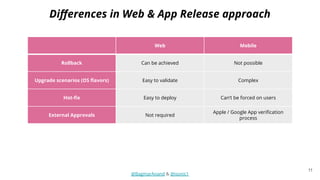
Web Mobile
Rollback Can be achieved Not possible
Upgrade scenarios (OS flavors) Easy to validate Complex
Hot-fix Easy to deploy Can’t be forced on users
External Approvals Not required
Apple / Google App verification
process
Deployment size Does not matter to users App size has impact on users
Compliance Browser compliance
Stock / Custom OS + Hardware
compatibility + Permissions
@BagmarAnand & @isonic1
Differences in Web & App Release approach
7
@BagmarAnand & @isonic1
https://www.npr.org/sections/goatsandsoda/2014/12/01/364749313/ebola-in-the-air-what-science-says-about-how-the-virus-spreads
8
Web Mobile
Rollback Can be achieved Not possible
Upgrade scenarios (OS flavors) Easy to validate Complex
Hot-fix Easy to deploy Can’t be forced on users
External Approvals Not required
Apple / Google App verification
process
Deployment size Does not matter to users App size has impact on users
Compliance Browser compliance
Stock / Custom OS + Hardware
compatibility + Permissions
@BagmarAnand & @isonic1
Differences in Web & App Release approach
9
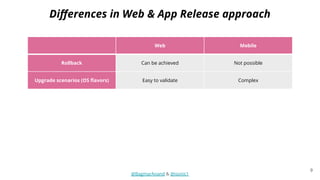
Web Mobile
Rollback Can be achieved Not possible
Upgrade scenarios (OS flavors) Easy to validate Complex
Hot-fix Easy to deploy Can’t be forced on users
External Approvals Not required
Apple / Google App verification
process
Deployment size Does not matter to users App size has impact on users
Compliance Browser compliance
Stock / Custom OS + Hardware
compatibility + Permissions
@BagmarAnand & @isonic1
Differences in Web & App Release approach
10
Web Mobile
Rollback Can be achieved Not possible
Upgrade scenarios (OS flavors) Easy to validate Complex
Hot-fix Easy to deploy Can’t be forced on users
External Approvals Not required
Apple / Google App verification
process
Deployment size Does not matter to users App size has impact on users
Compliance Browser compliance
Stock / Custom OS + Hardware
compatibility + Permissions
@BagmarAnand & @isonic1
Differences in Web & App Release approach
11
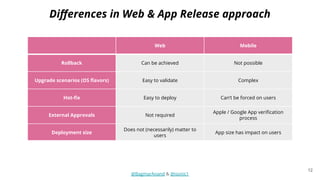
Web Mobile
Rollback Can be achieved Not possible
Upgrade scenarios (OS flavors) Easy to validate Complex
Hot-fix Easy to deploy Can’t be forced on users
External Approvals Not required
Apple / Google App verification
process
Deployment size
Does not (necessarily) matter to
users
App size has impact on users
Compliance Browser compliance
Stock / Custom OS + Hardware
compatibility + Permissions
@BagmarAnand & @isonic1
Differences in Web & App Release approach
12
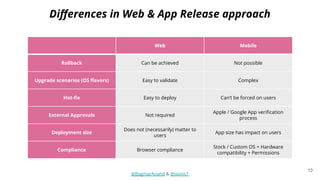
Differences in Web & App Release approach
Web Mobile
Rollback Can be achieved Not possible
Upgrade scenarios (OS flavors) Easy to validate Complex
Hot-fix Easy to deploy Can’t be forced on users
External Approvals Not required
Apple / Google App verification
process
Deployment size
Does not (necessarily) matter to
users
App size has impact on users
Compliance Browser compliance
Stock / Custom OS + Hardware
compatibility + Permissions
@BagmarAnand & @isonic1
13
So, how can you add more value to the
quality of your Native Apps?
@BagmarAnand & @isonic1
STRATEGY
14
@BagmarAnand & @isonic1
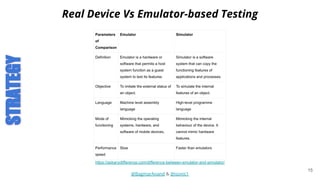
Real Device Vs Emulator-based Testing
https://askanydifference.com/difference-between-emulator-and-simulator/
STRATEGY
15
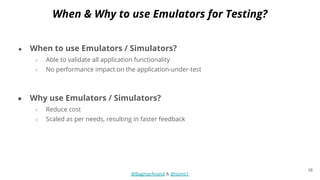
● When to use Emulators / Simulators?
○ Able to validate all application functionality
○ No performance impact on the application-under-test
● Why use Emulators / Simulators?
○ Reduce cost
○ Scaled as per needs, resulting in faster feedback
@BagmarAnand & @isonic1
When & Why to use Emulators for Testing?
16
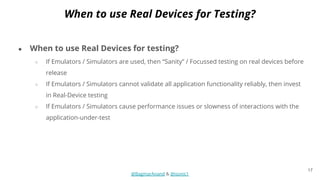
● When to use Real Devices for testing?
○ If Emulators / Simulators are used, then “Sanity” / Focussed testing on real devices before
release
○ If Emulators / Simulators cannot validate all application functionality reliably, then invest
in Real-Device testing
○ If Emulators / Simulators cause performance issues or slowness of interactions with the
application-under-test
@BagmarAnand & @isonic1
When to use Real Devices for Testing?
17
● Cases when Emulators / Simulators may not help
○ Streaming content
○ Applications relying on hardware capabilities
○ Applications dependent on customised OS version
@BagmarAnand & @isonic1
Real Device Vs Emulator-based Testing
18
● It’s not enough to develop an app or any digital content for
that matter. You should strive to make your application
accessible to everyone.
● When should you start? The thought of accessibility should
start at the design or discovery phase or any product
and/or features.
● On this topic, we’re going to talk about a few of them and
how you can test your app for accessibility. Some of the
tools available, and even how to automate some of these.
Mobile Accessibility Testing
@BagmarAnand & @isonic1
STRATEGY
19
● According to the World Health Organization, there are
roughly 285 million people worldwide that suffer from low
vision, and/or color blindness.
Accessibility
The Good, The Bad & The Ugly
@BagmarAnand & @isonic1
20
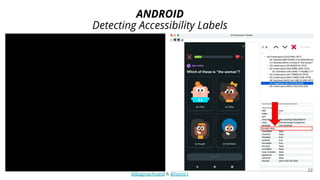
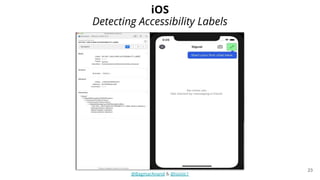
Text To Speech - Voiceover
● Both iOS and Android platforms offer tools to verify voiceover logic.
○ Hearing the text-to-speech on the device/emulator/simulators.
○ Validating the accessibility labels via the layout or various hierarchy viewers apps.
“content-desc” for Android and “Label” for iOS. Both will result in “accessibility-id” in
appium for instance..
@BagmarAnand & @isonic1
21
● Your goal is to ensure people with low vision can utilize your
application, it functions correctly and it makes sense audibly.
Detecting Accessibility Labels
ANDROID
@BagmarAnand & @isonic1
22
Detecting Accessibility Labels
iOS
@BagmarAnand & @isonic1
23
● The Android Studio and Xcode frameworks now for the most part handle layout
changes automatically due to different text sizes.
○ However, problems can occur when designers or developers use custom
fonts. They like any humans, make subconscious decisions that may adversely
impact how your app looks, functions and accessible.
Large Text Font & Display Density Size
@BagmarAnand & @isonic1
24
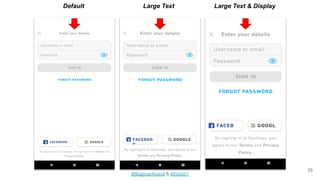
● For those with low vision, increasing the text and even the screen density size is
imperative. Normally these settings are enabled at the devices system level.
○ If these settings are changed from the default your app must be able to
support it.
Default Large Text Large Text & Display
@BagmarAnand & @isonic1
25
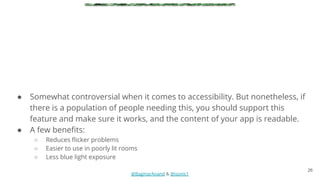
● Somewhat controversial when it comes to accessibility. But nonetheless, if
there is a population of people needing this, you should support this
feature and make sure it works, and the content of your app is readable.
● A few benefits:
○ Reduces flicker problems
○ Easier to use in poorly lit rooms
○ Less blue light exposure
@BagmarAnand & @isonic1
26
@BagmarAnand & @isonic1
27
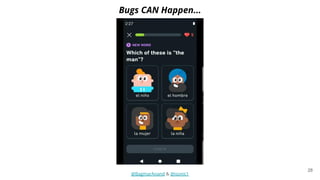
Bugs CAN Happen...
@BagmarAnand & @isonic1
28
● Nowadays there are many digital platforms such as phones/tablets, smart TV’s,
smartwatches, it’s important we have set standards to ensure our apps are accessible
to users with color blindness.
● And we do! The W3C - Web Content Accessibility Guidelines (WCAG 2.0 / 2.1) are a set
of standards and guidelines for mobile accessibility.
● Along with Levels AA and AAA.
○ Level AA (contrast minimum): Requires a contrast of at least 4.5:1 or 3:1 for large scale text.
○ Level AAA (enhanced): Requires a contrast of at least 7:1 or 4.5:1 for large scale text.
Contrast & Color Blindness
@BagmarAnand & @isonic1
29
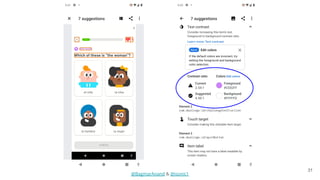
● Many people throughout the world suffer from color blindness.
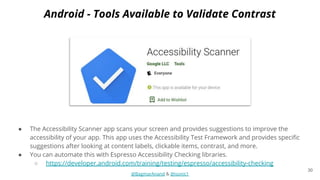
● The Accessibility Scanner app scans your screen and provides suggestions to improve the
accessibility of your app. This app uses the Accessibility Test Framework and provides specific
suggestions after looking at content labels, clickable items, contrast, and more.
● You can automate this with Espresso Accessibility Checking libraries.
○ https://developer.android.com/training/testing/espresso/accessibility-checking
Android - Tools Available to Validate Contrast
@BagmarAnand & @isonic1
30
@BagmarAnand & @isonic1
31
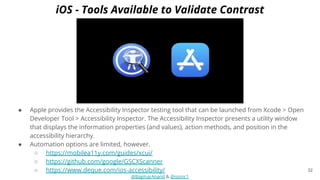
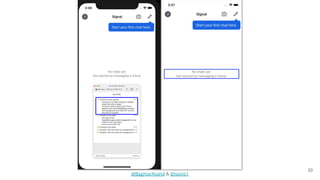
● Apple provides the Accessibility Inspector testing tool that can be launched from Xcode > Open
Developer Tool > Accessibility Inspector. The Accessibility Inspector presents a utility window
that displays the information properties (and values), action methods, and position in the
accessibility hierarchy.
● Automation options are limited, however.
○ https://mobilea11y.com/guides/xcui/
○ https://github.com/google/GSCXScanner
○ https://www.deque.com/ios-accessibility/
iOS - Tools Available to Validate Contrast
@BagmarAnand & @isonic1
32
@BagmarAnand & @isonic1
33
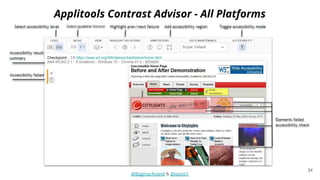
Applitools Contrast Advisor - All Platforms
@BagmarAnand & @isonic1
34
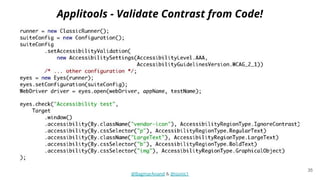
Applitools - Validate Contrast from Code!
@BagmarAnand & @isonic1
35
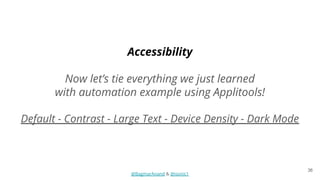
Accessibility
Now let’s tie everything we just learned
with automation example using Applitools!
Default - Contrast - Large Text - Device Density - Dark Mode
@BagmarAnand & @isonic1
36
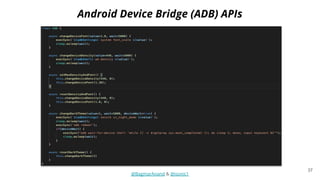
Android Device Bridge (ADB) APIs
@BagmarAnand & @isonic1
37
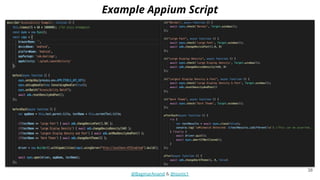
Example Appium Script
@BagmarAnand & @isonic1
38
Let’s look at the results in Applitools!
@BagmarAnand & @isonic1
39
● Consumption Monitoring:
○ CPU
○ Memory
○ Network
○ Battery/Energy
● It's not only important to capture this information, but also storing it
for historical lookup, benchmarking, and detecting trends!
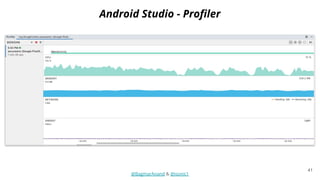
● Android SDK Tools & Xcode provide libraries to test these. We will walk
through the various options available.
Devices Resources & Consumption Testing
@BagmarAnand & @isonic1
STRATEGY
40
● Nowadays, it's not enough to only have tests to ensure quality and
catch regressions. It's imperative to know more about what’s
happening under-the-hood of your application.
Android Studio - Profiler
@BagmarAnand & @isonic1
41
42
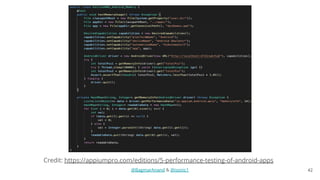
Credit: https://appiumpro.com/editions/5-performance-testing-of-android-apps
@BagmarAnand & @isonic1
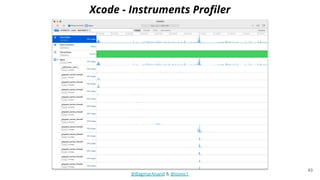
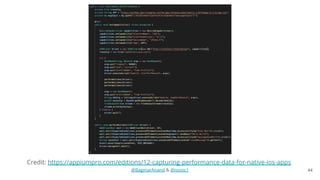
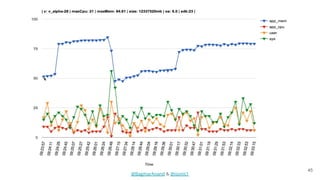
Xcode - Instruments Profiler
@BagmarAnand & @isonic1
43
44
Credit: https://appiumpro.com/editions/12-capturing-performance-data-for-native-ios-apps
@BagmarAnand & @isonic1
45
@BagmarAnand & @isonic1
46
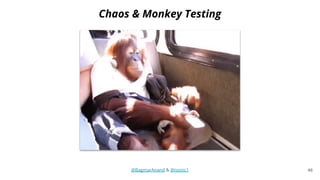
Chaos & Monkey Testing
@BagmarAnand & @isonic1
● You can also stress test your application with monkey testing. Monitor
the logs for errors and even use the profiling tools we talked about
previously.
● We’ll look at few different frameworks available for iOS and Android.
○ These should be used as an additional tool in your toolbox and not to replace
automation.
Chaos & Monkey Testing
@BagmarAnand & @isonic1
STRATEGY
47
● Testing the unexpected! Regressions tests (automated and manual) are
a must-have but they only take you so far. Using a monkey tester can
discover bugs you never knew existed.
iOS - Zalando’s SwiftMonkey
@BagmarAnand & @isonic1
48
Credit Source: https://github.com/zalando/SwiftMonkey
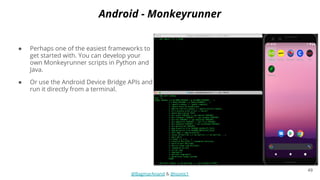
● Perhaps one of the easiest frameworks to
get started with. You can develop your
own Monkeyrunner scripts in Python and
Java.
● Or use the Android Device Bridge APIs and
run it directly from a terminal.
Android - Monkeyrunner
@BagmarAnand & @isonic1
49
@BagmarAnand & @isonic1
50
Create Your Own Monkey Tester
@BagmarAnand & @isonic1
51
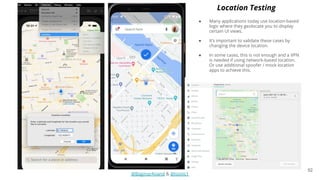
● Many applications today use location-based
logic where they geolocate you to display
certain UI views.
● It’s important to validate these cases by
changing the device location.
● In some cases, this is not enough and a VPN
is needed if using network-based location.
Or use additional spoofer / mock location
apps to achieve this.
Location Testing
@BagmarAnand & @isonic1
52
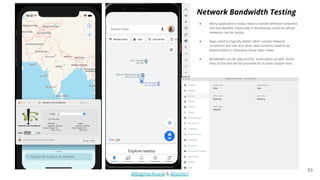
● Many applications today need to handle different networks
and bandwidths. Especially in developing countries where
networks can be spotty.
● Apps need to logically detect when certain network
conditions are met and what view contents need to be
downloaded or otherwise show static views
● Bandwidth can be adjusted for automation as well. Some
links at the end will be provided for further explain how.
Network Bandwidth Testing
@BagmarAnand & @isonic1
53
@BagmarAnand & @isonic1
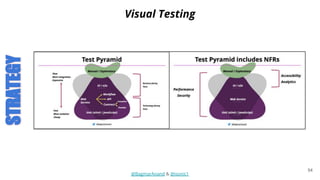
Visual Testing
STRATEGY
54
@BagmarAnand & @isonic1
55
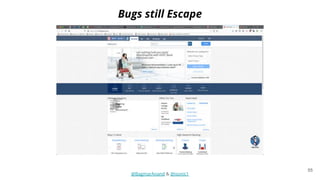
Bugs still Escape
@BagmarAnand & @isonic1
56
Spot the Difference!
@BagmarAnand & @isonic1
57
Spot the Difference!
@BagmarAnand & @isonic1
58
@BagmarAnand & @isonic1
59
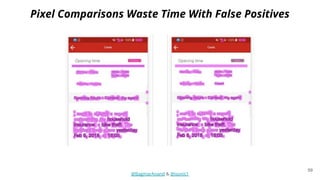
Pixel Comparisons Waste Time With False Positives
@BagmarAnand & @isonic1
60
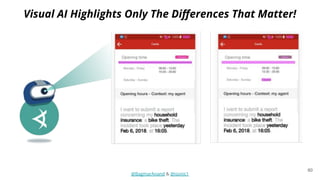
Visual AI Highlights Only The Differences That Matter!
@BagmarAnand & @isonic1
61
Use Visual Assertions Instead of Functional Assertions
● A single assertion for complete
functional coverage
● Bonus: validates the UI
● Does not break when the UI changes
● No coding skills required to maintain
baselines
● Validate UX at scale for all supported
browsers
@BagmarAnand & @isonic1
Beta Testing
● Beta Testing
○ Test Release candidate apps with users willing to use and provide feedback for early
releases of Apps
○ Instrumentation / Reports need to be able to separate between Beta releases Vs
actual release versions of the App
STRATEGY
62
@BagmarAnand & @isonic1
On-field Testing
● On-field Testing
○ Test Release builds of apps with real users identified in the field
○ Share specific criteria and scenarios for validations
Examples
■ Network and network conditions on which testing is to be done
■ Device criteria on which testing is to be done
■ Test scenarios to be executed with relevant Test Data
○ Leverage companies that offer on-field testing as a service
STRATEGY
63
@BagmarAnand & @isonic1
Staged Rollouts
● Staged Rollouts
○ Release apps to a % of users
○ Rollout % can be increased over time based on confidence on quality
○ App can be pulled out if problems are noticed / reported
○ Google PlayStore Staged Rollouts:
https://support.google.com/googleplay/android-developer/answer/6346149?hl=en
○ Apple Phased Releases:
https://help.apple.com/app-store-connect/#/dev3d65fcee1
STRATEGY
64
@BagmarAnand & @isonic1
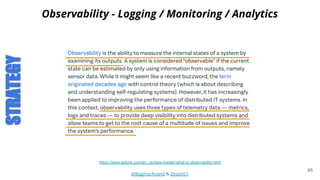
Observability - Logging / Monitoring / Analytics
https://www.splunk.com/en_us/data-insider/what-is-observability.html
STRATEGY
65
@BagmarAnand & @isonic1
Observability - Logging / Monitoring / Analytics
● Observability - The ability to dig into unknowns on the fly
● To enable Observability, ensure:
○ Capture Crash logs with context
○ Build Instrumentation & Correlation with Context in your app
○ Capture user interactions in form of Business and Technical Analytics Events
○ Enhanced Real-time Monitoring & Alerting for your system components and
infrastructure
○ Build Meaningful, Real-time and Contextual Dashboards
● Test for Observability before a full release
66
@BagmarAnand & @isonic1
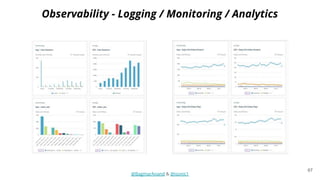
Observability - Logging / Monitoring / Analytics
67
Sources
● Accessibility:
○ https://www.w3.org/WAI/standards-guidelines/mobile
○ https://uxdesign.cc/accessibility-and-dark-ui-themes-f01001339b65
○ https://developer.android.com/guide/topics/ui/accessibility/testing
○ https://gist.github.com/ChiftKey/3901ff7702fec1f07c21f22e54533cde
○ https://github.com/rwapp/A11yUITests
○ https://github.com/google/GSCXScanner - for iOS
○ https://www.deque.com/ios-accessibility/
○ https://developer.apple.com/library/archive/documentation/Accessibility/Conceptual/AccessibilityMacOSX/OSXAXT
estingApps.html
○ https://applitools.com/docs/features/contrast-accessibility.html
● Device Resources & Consumption:
○ https://developer.android.com/studio/profile/android-profiler
○ https://appiumpro.com/editions/5-performance-testing-of-android-apps
○ https://help.apple.com/instruments/mac/current
○ https://appiumpro.com/editions/12-capturing-performance-data-for-native-ios-apps
○ https://medium.com/@andrew.tishchenko/how-to-create-fake-locations-for-ios-207950ee2410
○ https://nshipster.com/network-link-conditioner/
○ https://appiumpro.com/editions/72-simulating-slow-internet-connections-on-android-emulators-with-appium
○ https://appiumpro.com/editions/104-simulating-different-network-conditions-for-virtual-devices
● Monkey Testing:
○ https://developer.android.com/studio/test/monkeyrunner
○ https://github.com/zalando/SwiftMonkey
○ https://medium.com/mobile-quality/how-to-use-chaos-in-your-ios-tests-b49281a1349a
○ https://github.com/isonic1/Appium-Native-Crawler#example-usage
@BagmarAnand & @isonic1
68
Thank you
Anand Bagmar & Justin Ison
@BagmarAnand & @isonic1

Stop Testing (Only) The Functionality of Your Mobile Apps!

  • 1.
    Stop Testing (Only)The Functionality of Your Mobile Apps! Anand Bagmar & Justin Ison @BagmarAnand & @isonic1
  • 2.
    Why do weneed to think differently about Mobile App Testing? @BagmarAnand & @isonic1 2
  • 3.
    Differences in Testingapproach for Web & Native Apps Testing @BagmarAnand & @isonic1 3
  • 4.
    ● Interactions ● Devicefeatures & capabilities ○ Form factors (sizes, rotations) ○ M-Browsers Vs Native ○ OS variations & compatibility with hardware ○ Hardware ■ Battery ■ CPU / GPU ■ Memory ● Impact due to External factors ○ Network fluctuations & variations when on the move ○ Temperature / Humidity / Moisture ○ Interruptions ● Release Approach @BagmarAnand & @isonic1 Differences In Web & App Testing Approach 4
  • 5.
    Differences in Releaseapproach for Web & Native Apps Testing @BagmarAnand & @isonic1 5
  • 6.
    Web Mobile Rollback Canbe achieved Not possible Upgrade scenarios (OS flavors) Easy to validate Complex Hot-fix Easy to deploy Can’t be forced on users External Approvals Not required Apple / Google App verification process Deployment size Does not matter to users App size has impact on users Compliance Browser compliance Stock / Custom OS + Hardware compatibility + Permissions @BagmarAnand & @isonic1 Differences in Web & App Release approach 6
  • 7.
    Web Mobile Rollback Canbe achieved Not possible Upgrade scenarios (OS flavors) Easy to validate Complex Hot-fix Easy to deploy Can’t be forced on users External Approvals Not required Apple / Google App verification process Deployment size Does not matter to users App size has impact on users Compliance Browser compliance Stock / Custom OS + Hardware compatibility + Permissions @BagmarAnand & @isonic1 Differences in Web & App Release approach 7
  • 8.
  • 9.
    Web Mobile Rollback Canbe achieved Not possible Upgrade scenarios (OS flavors) Easy to validate Complex Hot-fix Easy to deploy Can’t be forced on users External Approvals Not required Apple / Google App verification process Deployment size Does not matter to users App size has impact on users Compliance Browser compliance Stock / Custom OS + Hardware compatibility + Permissions @BagmarAnand & @isonic1 Differences in Web & App Release approach 9
  • 10.
    Web Mobile Rollback Canbe achieved Not possible Upgrade scenarios (OS flavors) Easy to validate Complex Hot-fix Easy to deploy Can’t be forced on users External Approvals Not required Apple / Google App verification process Deployment size Does not matter to users App size has impact on users Compliance Browser compliance Stock / Custom OS + Hardware compatibility + Permissions @BagmarAnand & @isonic1 Differences in Web & App Release approach 10
  • 11.
    Web Mobile Rollback Canbe achieved Not possible Upgrade scenarios (OS flavors) Easy to validate Complex Hot-fix Easy to deploy Can’t be forced on users External Approvals Not required Apple / Google App verification process Deployment size Does not matter to users App size has impact on users Compliance Browser compliance Stock / Custom OS + Hardware compatibility + Permissions @BagmarAnand & @isonic1 Differences in Web & App Release approach 11
  • 12.
    Web Mobile Rollback Canbe achieved Not possible Upgrade scenarios (OS flavors) Easy to validate Complex Hot-fix Easy to deploy Can’t be forced on users External Approvals Not required Apple / Google App verification process Deployment size Does not (necessarily) matter to users App size has impact on users Compliance Browser compliance Stock / Custom OS + Hardware compatibility + Permissions @BagmarAnand & @isonic1 Differences in Web & App Release approach 12
  • 13.
    Differences in Web& App Release approach Web Mobile Rollback Can be achieved Not possible Upgrade scenarios (OS flavors) Easy to validate Complex Hot-fix Easy to deploy Can’t be forced on users External Approvals Not required Apple / Google App verification process Deployment size Does not (necessarily) matter to users App size has impact on users Compliance Browser compliance Stock / Custom OS + Hardware compatibility + Permissions @BagmarAnand & @isonic1 13
  • 14.
    So, how canyou add more value to the quality of your Native Apps? @BagmarAnand & @isonic1 STRATEGY 14
  • 15.
    @BagmarAnand & @isonic1 RealDevice Vs Emulator-based Testing https://askanydifference.com/difference-between-emulator-and-simulator/ STRATEGY 15
  • 16.
    ● When touse Emulators / Simulators? ○ Able to validate all application functionality ○ No performance impact on the application-under-test ● Why use Emulators / Simulators? ○ Reduce cost ○ Scaled as per needs, resulting in faster feedback @BagmarAnand & @isonic1 When & Why to use Emulators for Testing? 16
  • 17.
    ● When touse Real Devices for testing? ○ If Emulators / Simulators are used, then “Sanity” / Focussed testing on real devices before release ○ If Emulators / Simulators cannot validate all application functionality reliably, then invest in Real-Device testing ○ If Emulators / Simulators cause performance issues or slowness of interactions with the application-under-test @BagmarAnand & @isonic1 When to use Real Devices for Testing? 17
  • 18.
    ● Cases whenEmulators / Simulators may not help ○ Streaming content ○ Applications relying on hardware capabilities ○ Applications dependent on customised OS version @BagmarAnand & @isonic1 Real Device Vs Emulator-based Testing 18
  • 19.
    ● It’s notenough to develop an app or any digital content for that matter. You should strive to make your application accessible to everyone. ● When should you start? The thought of accessibility should start at the design or discovery phase or any product and/or features. ● On this topic, we’re going to talk about a few of them and how you can test your app for accessibility. Some of the tools available, and even how to automate some of these. Mobile Accessibility Testing @BagmarAnand & @isonic1 STRATEGY 19 ● According to the World Health Organization, there are roughly 285 million people worldwide that suffer from low vision, and/or color blindness.
  • 20.
    Accessibility The Good, TheBad & The Ugly @BagmarAnand & @isonic1 20
  • 21.
    Text To Speech- Voiceover ● Both iOS and Android platforms offer tools to verify voiceover logic. ○ Hearing the text-to-speech on the device/emulator/simulators. ○ Validating the accessibility labels via the layout or various hierarchy viewers apps. “content-desc” for Android and “Label” for iOS. Both will result in “accessibility-id” in appium for instance.. @BagmarAnand & @isonic1 21 ● Your goal is to ensure people with low vision can utilize your application, it functions correctly and it makes sense audibly.
  • 22.
  • 23.
  • 24.
    ● The AndroidStudio and Xcode frameworks now for the most part handle layout changes automatically due to different text sizes. ○ However, problems can occur when designers or developers use custom fonts. They like any humans, make subconscious decisions that may adversely impact how your app looks, functions and accessible. Large Text Font & Display Density Size @BagmarAnand & @isonic1 24 ● For those with low vision, increasing the text and even the screen density size is imperative. Normally these settings are enabled at the devices system level. ○ If these settings are changed from the default your app must be able to support it.
  • 25.
    Default Large TextLarge Text & Display @BagmarAnand & @isonic1 25
  • 26.
    ● Somewhat controversialwhen it comes to accessibility. But nonetheless, if there is a population of people needing this, you should support this feature and make sure it works, and the content of your app is readable. ● A few benefits: ○ Reduces flicker problems ○ Easier to use in poorly lit rooms ○ Less blue light exposure @BagmarAnand & @isonic1 26
  • 27.
  • 28.
  • 29.
    ● Nowadays thereare many digital platforms such as phones/tablets, smart TV’s, smartwatches, it’s important we have set standards to ensure our apps are accessible to users with color blindness. ● And we do! The W3C - Web Content Accessibility Guidelines (WCAG 2.0 / 2.1) are a set of standards and guidelines for mobile accessibility. ● Along with Levels AA and AAA. ○ Level AA (contrast minimum): Requires a contrast of at least 4.5:1 or 3:1 for large scale text. ○ Level AAA (enhanced): Requires a contrast of at least 7:1 or 4.5:1 for large scale text. Contrast & Color Blindness @BagmarAnand & @isonic1 29 ● Many people throughout the world suffer from color blindness.
  • 30.
    ● The AccessibilityScanner app scans your screen and provides suggestions to improve the accessibility of your app. This app uses the Accessibility Test Framework and provides specific suggestions after looking at content labels, clickable items, contrast, and more. ● You can automate this with Espresso Accessibility Checking libraries. ○ https://developer.android.com/training/testing/espresso/accessibility-checking Android - Tools Available to Validate Contrast @BagmarAnand & @isonic1 30
  • 31.
  • 32.
    ● Apple providesthe Accessibility Inspector testing tool that can be launched from Xcode > Open Developer Tool > Accessibility Inspector. The Accessibility Inspector presents a utility window that displays the information properties (and values), action methods, and position in the accessibility hierarchy. ● Automation options are limited, however. ○ https://mobilea11y.com/guides/xcui/ ○ https://github.com/google/GSCXScanner ○ https://www.deque.com/ios-accessibility/ iOS - Tools Available to Validate Contrast @BagmarAnand & @isonic1 32
  • 33.
  • 34.
    Applitools Contrast Advisor- All Platforms @BagmarAnand & @isonic1 34
  • 35.
    Applitools - ValidateContrast from Code! @BagmarAnand & @isonic1 35
  • 36.
    Accessibility Now let’s tieeverything we just learned with automation example using Applitools! Default - Contrast - Large Text - Device Density - Dark Mode @BagmarAnand & @isonic1 36
  • 37.
    Android Device Bridge(ADB) APIs @BagmarAnand & @isonic1 37
  • 38.
  • 39.
    Let’s look atthe results in Applitools! @BagmarAnand & @isonic1 39
  • 40.
    ● Consumption Monitoring: ○CPU ○ Memory ○ Network ○ Battery/Energy ● It's not only important to capture this information, but also storing it for historical lookup, benchmarking, and detecting trends! ● Android SDK Tools & Xcode provide libraries to test these. We will walk through the various options available. Devices Resources & Consumption Testing @BagmarAnand & @isonic1 STRATEGY 40 ● Nowadays, it's not enough to only have tests to ensure quality and catch regressions. It's imperative to know more about what’s happening under-the-hood of your application.
  • 41.
    Android Studio -Profiler @BagmarAnand & @isonic1 41
  • 42.
  • 43.
    Xcode - InstrumentsProfiler @BagmarAnand & @isonic1 43
  • 44.
  • 45.
  • 46.
    46 Chaos & MonkeyTesting @BagmarAnand & @isonic1
  • 47.
    ● You canalso stress test your application with monkey testing. Monitor the logs for errors and even use the profiling tools we talked about previously. ● We’ll look at few different frameworks available for iOS and Android. ○ These should be used as an additional tool in your toolbox and not to replace automation. Chaos & Monkey Testing @BagmarAnand & @isonic1 STRATEGY 47 ● Testing the unexpected! Regressions tests (automated and manual) are a must-have but they only take you so far. Using a monkey tester can discover bugs you never knew existed.
  • 48.
    iOS - Zalando’sSwiftMonkey @BagmarAnand & @isonic1 48 Credit Source: https://github.com/zalando/SwiftMonkey
  • 49.
    ● Perhaps oneof the easiest frameworks to get started with. You can develop your own Monkeyrunner scripts in Python and Java. ● Or use the Android Device Bridge APIs and run it directly from a terminal. Android - Monkeyrunner @BagmarAnand & @isonic1 49
  • 50.
  • 51.
    Create Your OwnMonkey Tester @BagmarAnand & @isonic1 51
  • 52.
    ● Many applicationstoday use location-based logic where they geolocate you to display certain UI views. ● It’s important to validate these cases by changing the device location. ● In some cases, this is not enough and a VPN is needed if using network-based location. Or use additional spoofer / mock location apps to achieve this. Location Testing @BagmarAnand & @isonic1 52
  • 53.
    ● Many applicationstoday need to handle different networks and bandwidths. Especially in developing countries where networks can be spotty. ● Apps need to logically detect when certain network conditions are met and what view contents need to be downloaded or otherwise show static views ● Bandwidth can be adjusted for automation as well. Some links at the end will be provided for further explain how. Network Bandwidth Testing @BagmarAnand & @isonic1 53
  • 54.
    @BagmarAnand & @isonic1 VisualTesting STRATEGY 54
  • 55.
  • 56.
  • 57.
  • 58.
  • 59.
    @BagmarAnand & @isonic1 59 PixelComparisons Waste Time With False Positives
  • 60.
    @BagmarAnand & @isonic1 60 VisualAI Highlights Only The Differences That Matter!
  • 61.
    @BagmarAnand & @isonic1 61 UseVisual Assertions Instead of Functional Assertions ● A single assertion for complete functional coverage ● Bonus: validates the UI ● Does not break when the UI changes ● No coding skills required to maintain baselines ● Validate UX at scale for all supported browsers
  • 62.
    @BagmarAnand & @isonic1 BetaTesting ● Beta Testing ○ Test Release candidate apps with users willing to use and provide feedback for early releases of Apps ○ Instrumentation / Reports need to be able to separate between Beta releases Vs actual release versions of the App STRATEGY 62
  • 63.
    @BagmarAnand & @isonic1 On-fieldTesting ● On-field Testing ○ Test Release builds of apps with real users identified in the field ○ Share specific criteria and scenarios for validations Examples ■ Network and network conditions on which testing is to be done ■ Device criteria on which testing is to be done ■ Test scenarios to be executed with relevant Test Data ○ Leverage companies that offer on-field testing as a service STRATEGY 63
  • 64.
    @BagmarAnand & @isonic1 StagedRollouts ● Staged Rollouts ○ Release apps to a % of users ○ Rollout % can be increased over time based on confidence on quality ○ App can be pulled out if problems are noticed / reported ○ Google PlayStore Staged Rollouts: https://support.google.com/googleplay/android-developer/answer/6346149?hl=en ○ Apple Phased Releases: https://help.apple.com/app-store-connect/#/dev3d65fcee1 STRATEGY 64
  • 65.
    @BagmarAnand & @isonic1 Observability- Logging / Monitoring / Analytics https://www.splunk.com/en_us/data-insider/what-is-observability.html STRATEGY 65
  • 66.
    @BagmarAnand & @isonic1 Observability- Logging / Monitoring / Analytics ● Observability - The ability to dig into unknowns on the fly ● To enable Observability, ensure: ○ Capture Crash logs with context ○ Build Instrumentation & Correlation with Context in your app ○ Capture user interactions in form of Business and Technical Analytics Events ○ Enhanced Real-time Monitoring & Alerting for your system components and infrastructure ○ Build Meaningful, Real-time and Contextual Dashboards ● Test for Observability before a full release 66
  • 67.
    @BagmarAnand & @isonic1 Observability- Logging / Monitoring / Analytics 67
  • 68.
    Sources ● Accessibility: ○ https://www.w3.org/WAI/standards-guidelines/mobile ○https://uxdesign.cc/accessibility-and-dark-ui-themes-f01001339b65 ○ https://developer.android.com/guide/topics/ui/accessibility/testing ○ https://gist.github.com/ChiftKey/3901ff7702fec1f07c21f22e54533cde ○ https://github.com/rwapp/A11yUITests ○ https://github.com/google/GSCXScanner - for iOS ○ https://www.deque.com/ios-accessibility/ ○ https://developer.apple.com/library/archive/documentation/Accessibility/Conceptual/AccessibilityMacOSX/OSXAXT estingApps.html ○ https://applitools.com/docs/features/contrast-accessibility.html ● Device Resources & Consumption: ○ https://developer.android.com/studio/profile/android-profiler ○ https://appiumpro.com/editions/5-performance-testing-of-android-apps ○ https://help.apple.com/instruments/mac/current ○ https://appiumpro.com/editions/12-capturing-performance-data-for-native-ios-apps ○ https://medium.com/@andrew.tishchenko/how-to-create-fake-locations-for-ios-207950ee2410 ○ https://nshipster.com/network-link-conditioner/ ○ https://appiumpro.com/editions/72-simulating-slow-internet-connections-on-android-emulators-with-appium ○ https://appiumpro.com/editions/104-simulating-different-network-conditions-for-virtual-devices ● Monkey Testing: ○ https://developer.android.com/studio/test/monkeyrunner ○ https://github.com/zalando/SwiftMonkey ○ https://medium.com/mobile-quality/how-to-use-chaos-in-your-ios-tests-b49281a1349a ○ https://github.com/isonic1/Appium-Native-Crawler#example-usage @BagmarAnand & @isonic1 68
  • 69.
    Thank you Anand Bagmar& Justin Ison @BagmarAnand & @isonic1