

Conquer 6 Testing Challenges
Insights from Onboarding to Maintenance
Heather Vercillo Sr. PMM @ Applitools
Agenda
✓ High level challenges and solution
✓ Granular testing challenges and
solutions
○ Onboarding
○ Test coverage
○ API testing
○ False positives
○ Test maintenance
○ À la carte platforms
✓ Q&A
Let’s take a high-level look…
Challenges for testing teams today
VOLUME
Surging number of
interfaces, states, and
scenarios to verify
COMPLEXITY
UIs are more complex and
dynamic than ever before
VELOCITY
Increasing frequency of new
features and deployments,
especially w/ AI coding co-pilots
RESOURCES
Limited team budgets = “do
more with less.”
ENVIRONMENTS
Apps are accessed on
thousands of browsers,
devices, & screens
Poor Test Coverage
Both manual testing and traditional test
automation suffer from validating a
finite number of explicit scenarios in a
set amount of time.
Delays Every Release
Rapidly changing UIs in today’s
multi-screen environment require a
large number of end-to-end tests that
need to be constantly rewritten.
Expensive QA Costs
To keep up with modern development,
organizations require an ever-growing
number of expensive headcount
dedicating time to testing software.
Traditional testing can’t keep up
Traditional testing
scales linearly by
adding resources
2000 2005 2010 2015 2020 2025
Release
Frequency
x
Application
Complexity
x
Device
Proliferation
Increasing
complexity
of software quality Traditional test
automation cannot
meet the demands of
the business
The Testing Gap
NO-CODE
Parallel
Execution
AUTHOR
VALIDATE
EXECUTE
ANALYZE
AI-ASSISTED
The Applitools Intelligent Testing Platform
Automated
Maintenance
INTEGRATE
CI/CD
Dashboards &
Reporting
OPS
Insights &
Optimizations
Functional
Testing
Visual
Testing
API
Testing
Cross Browser & Device Testing
FULLY AUTONOMOUS
Web
Crawler
Natural Language
Test Builder
Codeless
Recorder
VISUAL AI & DATA VALIDATIONS
INTELLIGENT INFRASTRUCTURE
Applitools Autonomous
Website
Testing
AUT
Web App
Testing
Let’s get more granular…
Onboarding
🚀 Diverse skill levels
🚀 Learning curves
🚀 Team collaboration
🚀 Consistency
Easy to master
✓ Website crawler
Let technical and non-technical team
members quickly set up tests by discovering
the application URLs.
✓ Author tests in plain English
No coding or locators skills required. Easiest
to understand and maintain.
✓ Interactively record test steps
Speed up authoring by recording steps in
English, and easily refine manually if needed.
✓ Dashboards & reporting
Intuitive interfaces for tracking test results,
making it easier for all team members to
contribute.
Test coverage
🎯 Balancing breadth and depth
🎯 Dynamic applications
🎯 Scalability
🎯 Blind spots
Test it all
✓ Testing powered by Visual AI
Visual AI makes it easy and fast to test the entire
page, including all elements and their properties.
✓ Complete coverage
Complete functional, visual, and API testing within
the same test.
✓ Robust textual assertions
Verify everything you can do with coded tests
from string formats to numeric values.
✓ Test parameterization
Execute tests with explicit arguments or per row
in a test arguments dataset.
✓ Adjusts to website changes
Automatically detects and reports new, missing or
faulty pages on every test run.
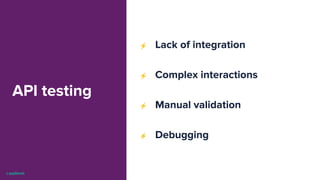
API testing
⚡ Lack of integration
⚡ Complex interactions
⚡ Manual validation
⚡ Debugging
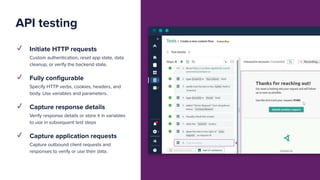
API testing
✓ Initiate HTTP requests
Custom authentication, reset app state, data
cleanup, or verify the backend state.
✓ Fully configurable
Specify HTTP verbs, cookies, headers, and
body. Use variables and parameters.
✓ Capture response details
Verify response details or store it in variables
to use in subsequent test steps
✓ Capture application requests
Capture outbound client requests and
responses to verify or use their data.
False
positives
❎ Noise in results
❎ Time wasted
❎ Erosion of confidence
❎ Complex test suites
✓ Visual match levels
Provides dynamic match settings to adjust for
specific testing needs, such as localization or
branding updates.
✓ Handle dynamic content
Prevents test failures caused by frequently
changing elements.
✓ Adjusts to website changes
Automatically detects and reports new,
missing or faulty pages on every test run.
✓ The best computer vision tech
Accurately mimics the human eye. 10+ dev
years / 4B+ tests.
Notable differences
Test
maintenance
🛠 Application changes
🛠 Flaky tests
🛠 Resource intensive
🛠 Slow response time
Self-maintaining
✓ Self-healing locators
Test are based on visual elements rather
than locators, making them robust to any
technology changes.
✓ Debug tests interactively
From setting breakpoints to step by step
execution. Do everything a code IDE can do.
✓ Scalable maintenance
Accept or reject differences once across all
pages, devices and browsers.
✓ Fewer test steps
80% less test steps to author and maintain
for the entire lifetime of the test.
À la carte
platforms
🧩 Fragmented workflows
🧩 Integration complexity
🧩 Cost
🧩 Learning overload
🧩 Consistency
All-in-one platform
✓ Tooling consolidation
Integrates visual, functional, and API testing into a
single workflow for seamless end-to-end quality
assurance.
✓ Cross device and browser testing
Test your public and internal apps on any device,
browser, operating system, and screen size.
✓ Reporting & analysis
Provides detailed dashboards and actionable
insights to track results and optimize testing
processes.
✓ Budget considerations
Reduces licensing, maintenance, and integration
costs, saving teams significant budget while
streamlining workflows.
Let’s wrap this up…
Questions?
Try Applitools
Autonomous for Free
Additional Resources
Get the Buyer’s Guide
for Testing with AI

Conquer 6 Testing Challenges_Applitools.pdf

  • 1.
    Conquer 6 TestingChallenges Insights from Onboarding to Maintenance Heather Vercillo Sr. PMM @ Applitools
  • 2.
    Agenda ✓ High levelchallenges and solution ✓ Granular testing challenges and solutions ○ Onboarding ○ Test coverage ○ API testing ○ False positives ○ Test maintenance ○ À la carte platforms ✓ Q&A
  • 3.
    Let’s take ahigh-level look…
  • 4.
    Challenges for testingteams today VOLUME Surging number of interfaces, states, and scenarios to verify COMPLEXITY UIs are more complex and dynamic than ever before VELOCITY Increasing frequency of new features and deployments, especially w/ AI coding co-pilots RESOURCES Limited team budgets = “do more with less.” ENVIRONMENTS Apps are accessed on thousands of browsers, devices, & screens
  • 5.
    Poor Test Coverage Bothmanual testing and traditional test automation suffer from validating a finite number of explicit scenarios in a set amount of time. Delays Every Release Rapidly changing UIs in today’s multi-screen environment require a large number of end-to-end tests that need to be constantly rewritten. Expensive QA Costs To keep up with modern development, organizations require an ever-growing number of expensive headcount dedicating time to testing software. Traditional testing can’t keep up Traditional testing scales linearly by adding resources 2000 2005 2010 2015 2020 2025 Release Frequency x Application Complexity x Device Proliferation Increasing complexity of software quality Traditional test automation cannot meet the demands of the business The Testing Gap
  • 6.
    NO-CODE Parallel Execution AUTHOR VALIDATE EXECUTE ANALYZE AI-ASSISTED The Applitools IntelligentTesting Platform Automated Maintenance INTEGRATE CI/CD Dashboards & Reporting OPS Insights & Optimizations Functional Testing Visual Testing API Testing Cross Browser & Device Testing FULLY AUTONOMOUS Web Crawler Natural Language Test Builder Codeless Recorder VISUAL AI & DATA VALIDATIONS INTELLIGENT INFRASTRUCTURE Applitools Autonomous Website Testing AUT Web App Testing
  • 7.
    Let’s get moregranular…
  • 8.
    Onboarding 🚀 Diverse skilllevels 🚀 Learning curves 🚀 Team collaboration 🚀 Consistency
  • 9.
    Easy to master ✓Website crawler Let technical and non-technical team members quickly set up tests by discovering the application URLs. ✓ Author tests in plain English No coding or locators skills required. Easiest to understand and maintain. ✓ Interactively record test steps Speed up authoring by recording steps in English, and easily refine manually if needed. ✓ Dashboards & reporting Intuitive interfaces for tracking test results, making it easier for all team members to contribute.
  • 10.
    Test coverage 🎯 Balancingbreadth and depth 🎯 Dynamic applications 🎯 Scalability 🎯 Blind spots
  • 11.
    Test it all ✓Testing powered by Visual AI Visual AI makes it easy and fast to test the entire page, including all elements and their properties. ✓ Complete coverage Complete functional, visual, and API testing within the same test. ✓ Robust textual assertions Verify everything you can do with coded tests from string formats to numeric values. ✓ Test parameterization Execute tests with explicit arguments or per row in a test arguments dataset. ✓ Adjusts to website changes Automatically detects and reports new, missing or faulty pages on every test run.
  • 12.
    API testing ⚡ Lackof integration ⚡ Complex interactions ⚡ Manual validation ⚡ Debugging
  • 13.
    API testing ✓ InitiateHTTP requests Custom authentication, reset app state, data cleanup, or verify the backend state. ✓ Fully configurable Specify HTTP verbs, cookies, headers, and body. Use variables and parameters. ✓ Capture response details Verify response details or store it in variables to use in subsequent test steps ✓ Capture application requests Capture outbound client requests and responses to verify or use their data.
  • 14.
    False positives ❎ Noise inresults ❎ Time wasted ❎ Erosion of confidence ❎ Complex test suites
  • 15.
    ✓ Visual matchlevels Provides dynamic match settings to adjust for specific testing needs, such as localization or branding updates. ✓ Handle dynamic content Prevents test failures caused by frequently changing elements. ✓ Adjusts to website changes Automatically detects and reports new, missing or faulty pages on every test run. ✓ The best computer vision tech Accurately mimics the human eye. 10+ dev years / 4B+ tests. Notable differences
  • 16.
    Test maintenance 🛠 Application changes 🛠Flaky tests 🛠 Resource intensive 🛠 Slow response time
  • 17.
    Self-maintaining ✓ Self-healing locators Testare based on visual elements rather than locators, making them robust to any technology changes. ✓ Debug tests interactively From setting breakpoints to step by step execution. Do everything a code IDE can do. ✓ Scalable maintenance Accept or reject differences once across all pages, devices and browsers. ✓ Fewer test steps 80% less test steps to author and maintain for the entire lifetime of the test.
  • 18.
    À la carte platforms 🧩Fragmented workflows 🧩 Integration complexity 🧩 Cost 🧩 Learning overload 🧩 Consistency
  • 19.
    All-in-one platform ✓ Toolingconsolidation Integrates visual, functional, and API testing into a single workflow for seamless end-to-end quality assurance. ✓ Cross device and browser testing Test your public and internal apps on any device, browser, operating system, and screen size. ✓ Reporting & analysis Provides detailed dashboards and actionable insights to track results and optimize testing processes. ✓ Budget considerations Reduces licensing, maintenance, and integration costs, saving teams significant budget while streamlining workflows.
  • 20.
  • 21.
    Questions? Try Applitools Autonomous forFree Additional Resources Get the Buyer’s Guide for Testing with AI