MARIO VIVIANI
E U T E C H N O L O G Y E V A N G E L I S T,
A M A Z O N D I G I T A L A P P S A N D G A M E S S E R V I C E S
@mariuxtheone marioviviani
IMPLEMENTING VOICE CONTROL
WITH THE ANDROID MEDIA SESSION API
ON AMAZON FIRE TV
I T ’ S A - M E !
Ma r io V ivia n i
EU Technology Evangelist, Amazon DAGS
@mariuxtheone
Android Developer since 2010
95+ apps published
12,000,000+ downloads
Google Developer Expert 2013-15
Startup Founder, Co-Worker
Speaker at: Droidcon,
Casual Connect, Big Android BBQ,
Google I/O
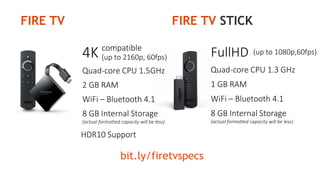
bit.ly/firetvspecs
FullHD
Quad-core CPU 1.3 GHz
1 GB RAM
(up to 1080p,60fps)
WiFi – Bluetooth 4.1
8 GB Internal Storage
(actual formatted capacity will be less)
4K compatible
Quad-core CPU 1.5GHz
2 GB RAM
(up to 2160p, 60fps)
WiFi – Bluetooth 4.1
8 GB Internal Storage
(actual formatted capacity will be less)
HDR10 Support
FIRE TV FIRE TV STICK
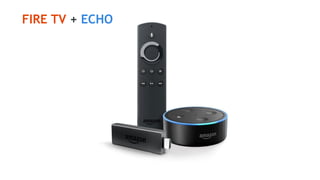
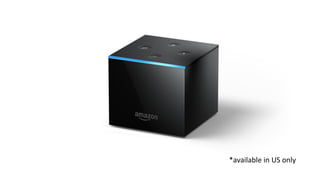
FIRE TV + ECHO
*available in US only
INTEGRATING
MEDIA SESSIONS
ON ANDROID
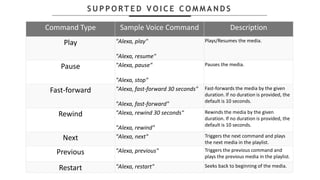
S U P P O RT E D V O I C E C O M M A N D S
Command Type Sample Voice Command Description
Play "Alexa, play"
"Alexa, resume"
Plays/Resumes the media.
Pause "Alexa, pause"
"Alexa, stop"
Pauses the media.
Fast-forward "Alexa, fast-forward 30 seconds"
"Alexa, fast-forward"
Fast-forwards the media by the given
duration. If no duration is provided, the
default is 10 seconds.
Rewind "Alexa, rewind 30 seconds"
"Alexa, rewind"
Rewinds the media by the given
duration. If no duration is provided, the
default is 10 seconds.
Next "Alexa, next" Triggers the next command and plays
the next media in the playlist.
Previous "Alexa, previous" Triggers the previous command and
plays the previous media in the playlist.
Restart "Alexa, restart" Seeks back to beginning of the media.
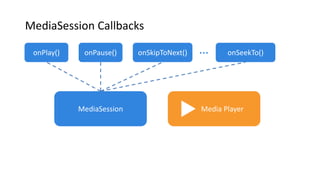
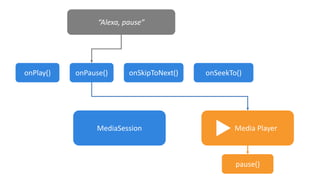
MediaSession
onPlay() onPause() onSkipToNext() onSeekTo()
Media Player
…
MediaSession Callbacks
MediaSession
onPlay() onPause() onSkipToNext() onSeekTo()
“Alexa, pause”
Media Player
pause()
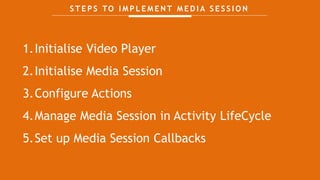
S T E P S TO I M P L E M E N T M E D I A S E S S I O N
1.Initialise Video Player
2.Initialise Media Session
3.Configure Actions
4.Manage Media Session in Activity LifeCycle
5.Set up Media Session Callbacks
INITIALISE
VIDEO PLAYER
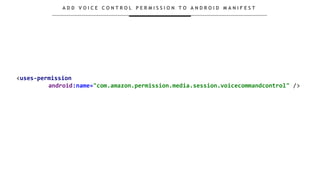
A D D V O I C E C O N T R O L P E R M I S S I O N T O A N D R O I D M A N I F E S T
<uses-permission
android:name="com.amazon.permission.media.session.voicecommandcontrol" />
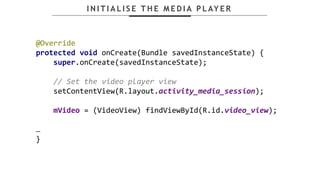
I N I T I A L I S E T H E M E D I A P L AY E R
@Override
protected void onCreate(Bundle savedInstanceState) {
super.onCreate(savedInstanceState);
// Set the video player view
setContentView(R.layout.activity_media_session);
mVideo = (VideoView) findViewById(R.id.video_view);
…
}
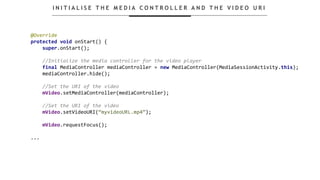
I N I T I A L I S E T H E M E D I A C O N T R O L L E R A N D T H E V I D E O U R I
@Override
protected void onStart() {
super.onStart();
//Initialize the media controller for the video player
final MediaController mediaController = new MediaController(MediaSessionActivity.this);
mediaController.hide();
//Set the URI of the video
mVideo.setMediaController(mediaController);
//Set the URI of the video
mVideo.setVideoURI(“myvideoURL.mp4”);
mVideo.requestFocus();
...
INITIALISE
MEDIA SESSION
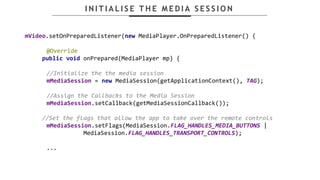
I N I T I A L I S E T H E M E D I A S E S S I O N
mVideo.setOnPreparedListener(new MediaPlayer.OnPreparedListener() {
@Override
public void onPrepared(MediaPlayer mp) {
//Initialize the the media session
mMediaSession = new MediaSession(getApplicationContext(), TAG);
//Assign the Callbacks to the Media Session
mMediaSession.setCallback(getMediaSessionCallback());
//Set the flags that allow the app to take over the remote controls
mMediaSession.setFlags(MediaSession.FLAG_HANDLES_MEDIA_BUTTONS |
MediaSession.FLAG_HANDLES_TRANSPORT_CONTROLS);
...
ADD ACTIONS TO
MEDIA SESSION
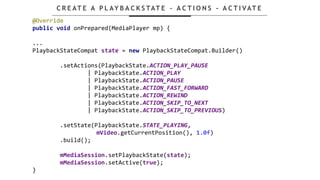
@Override
public void onPrepared(MediaPlayer mp) {
...
PlaybackStateCompat state = new PlaybackStateCompat.Builder()
.setActions(PlaybackState.ACTION_PLAY_PAUSE
| PlaybackState.ACTION_PLAY
| PlaybackState.ACTION_PAUSE
| PlaybackState.ACTION_FAST_FORWARD
| PlaybackState.ACTION_REWIND
| PlaybackState.ACTION_SKIP_TO_NEXT
| PlaybackState.ACTION_SKIP_TO_PREVIOUS)
.setState(PlaybackState.STATE_PLAYING,
mVideo.getCurrentPosition(), 1.0f)
.build();
mMediaSession.setPlaybackState(state);
mMediaSession.setActive(true);
}
C R E AT E A P L AY B A C K S TAT E – A C T I O N S - A C T I VAT E
MANAGE
MEDIA SESSION IN
ACTIVITY LIFECYCLE
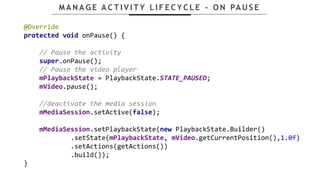
M A N A G E A C T I V I T Y L I F E C Y C L E – O N PA U S E
@Override
protected void onPause() {
// Pause the activity
super.onPause();
// Pause the video player
mPlaybackState = PlaybackState.STATE_PAUSED;
mVideo.pause();
//deactivate the media session
mMediaSession.setActive(false);
mMediaSession.setPlaybackState(new PlaybackState.Builder()
.setState(mPlaybackState, mVideo.getCurrentPosition(),1.0f)
.setActions(getActions())
.build());
}
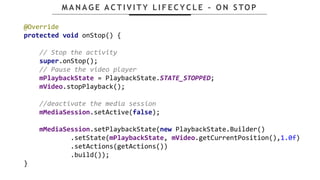
M A N A G E A C T I V I T Y L I F E C Y C L E – O N S TO P
@Override
protected void onStop() {
// Stop the activity
super.onStop();
// Pause the video player
mPlaybackState = PlaybackState.STATE_STOPPED;
mVideo.stopPlayback();
//deactivate the media session
mMediaSession.setActive(false);
mMediaSession.setPlaybackState(new PlaybackState.Builder()
.setState(mPlaybackState, mVideo.getCurrentPosition(),1.0f)
.setActions(getActions())
.build());
}
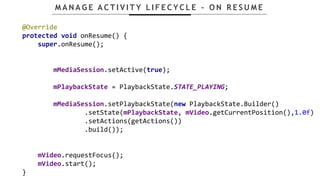
M A N A G E A C T I V I T Y L I F E C Y C L E – O N R E S U M E
@Override
protected void onResume() {
super.onResume();
mMediaSession.setActive(true);
mPlaybackState = PlaybackState.STATE_PLAYING;
mMediaSession.setPlaybackState(new PlaybackState.Builder()
.setState(mPlaybackState, mVideo.getCurrentPosition(),1.0f)
.setActions(getActions())
.build());
mVideo.requestFocus();
mVideo.start();
}
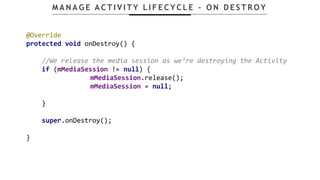
M A N A G E A C T I V I T Y L I F E C Y C L E – O N D E S T R O Y
@Override
protected void onDestroy() {
//We release the media session as we’re destroying the Activity
if (mMediaSession != null) {
mMediaSession.release();
mMediaSession = null;
}
super.onDestroy();
}
SET MEDIA SESSION
CALLBACKS
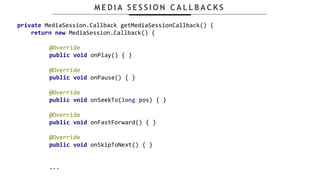
M E D I A S E S S I O N C A L L B A C K S
private MediaSession.Callback getMediaSessionCallback() {
return new MediaSession.Callback() {
@Override
public void onPlay() { }
@Override
public void onPause() { }
@Override
public void onSeekTo(long pos) { }
@Override
public void onFastForward() { }
@Override
public void onSkipToNext() { }
...
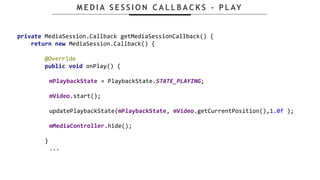
M E D I A S E S S I O N C A L L B A C K S - P L AY
private MediaSession.Callback getMediaSessionCallback() {
return new MediaSession.Callback() {
@Override
public void onPlay() {
mPlaybackState = PlaybackState.STATE_PLAYING;
mVideo.start();
updatePlaybackState(mPlaybackState, mVideo.getCurrentPosition(),1.0f );
mMediaController.hide();
}
...
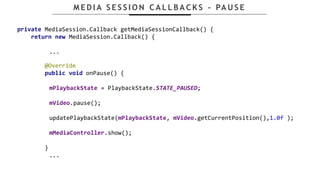
M E D I A S E S S I O N C A L L B A C K S - PA U S E
private MediaSession.Callback getMediaSessionCallback() {
return new MediaSession.Callback() {
...
@Override
public void onPause() {
mPlaybackState = PlaybackState.STATE_PAUSED;
mVideo.pause();
updatePlaybackState(mPlaybackState, mVideo.getCurrentPosition(),1.0f );
mMediaController.show();
}
...
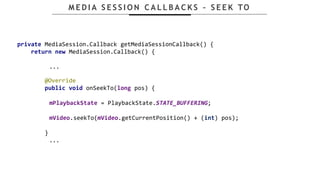
M E D I A S E S S I O N C A L L B A C K S – S E E K TO
private MediaSession.Callback getMediaSessionCallback() {
return new MediaSession.Callback() {
...
@Override
public void onSeekTo(long pos) {
mPlaybackState = PlaybackState.STATE_BUFFERING;
mVideo.seekTo(mVideo.getCurrentPosition() + (int) pos);
}
...
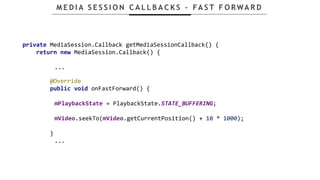
M E D I A S E S S I O N C A L L B A C K S – FA S T F O RWA R D
private MediaSession.Callback getMediaSessionCallback() {
return new MediaSession.Callback() {
...
@Override
public void onFastForward() {
mPlaybackState = PlaybackState.STATE_BUFFERING;
mVideo.seekTo(mVideo.getCurrentPosition() + 10 * 1000);
}
...
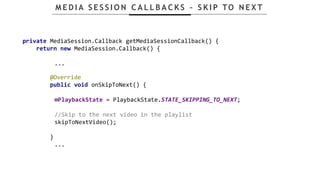
M E D I A S E S S I O N C A L L B A C K S – S K I P TO N E X T
private MediaSession.Callback getMediaSessionCallback() {
return new MediaSession.Callback() {
...
@Override
public void onSkipToNext() {
mPlaybackState = PlaybackState.STATE_SKIPPING_TO_NEXT;
//Skip to the next video in the playlist
skipToNextVideo();
}
...
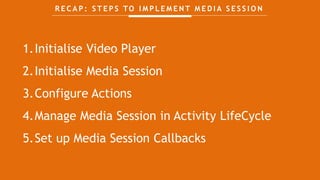
R E C A P : S T E P S TO I M P L E M E N T M E D I A S E S S I O N
1.Initialise Video Player
2.Initialise Media Session
3.Configure Actions
4.Manage Media Session in Activity LifeCycle
5.Set up Media Session Callbacks
BUILDING APPS
FOR TV
IN MINUTES
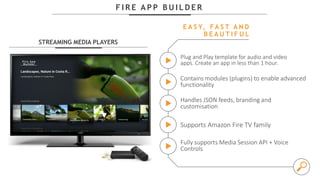
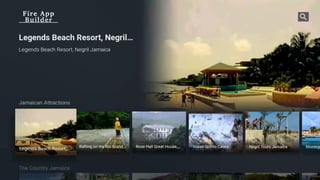
F I R E A P P B U I L D E R
STREAMING MEDIA PLAYERS
Plug and Play template for audio and video
apps. Create an app in less than 1 hour.
E A S Y, FA S T A N D
B E A U T I F U L
Contains modules (plugins) to enable advanced
functionality
Handles JSON feeds, branding and
customisation
Supports Amazon Fire TV family
Fully supports Media Session API + Voice
Controls
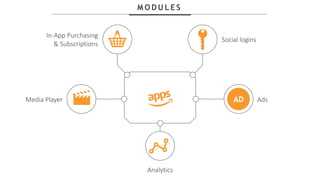
M O D U L E S
Social logins
In-App Purchasing
& Subscriptions
Ads
Analytics
Media Player AD
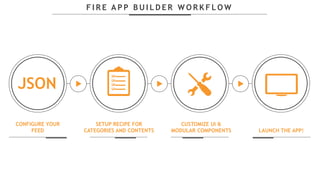
F I R E A P P B U I L D E R W O R K F L O W
CONFIGURE YOUR
FEED LAUNCH THE APP!
CUSTOMIZE UI &
MODULAR COMPONENTS
SETUP RECIPE FOR
CATEGORIES AND CONTENTS
JSON
S TA RT TO D AY !
D O W N L O A D
github.com/amzn/fire-app-builder
D O C U M E N TAT I O N
bit.ly/FireAppBuilderDoc
bit.ly/firetvebook
F R E E E B O O K !
THANK YOU!
Mario Viviani
@mariuxtheone
@AmazonAppDev
vivianim@amazon.co.uk
developer.amazon.com/appstore
bit.ly/firetvebook

IMPLEMENTING VOICE CONTROL WITH THE ANDROID MEDIA SESSION API ON AMAZON FIRE TV - Mario Viviani

  • 1.
    MARIO VIVIANI E UT E C H N O L O G Y E V A N G E L I S T, A M A Z O N D I G I T A L A P P S A N D G A M E S S E R V I C E S @mariuxtheone marioviviani IMPLEMENTING VOICE CONTROL WITH THE ANDROID MEDIA SESSION API ON AMAZON FIRE TV
  • 2.
    I T ’S A - M E ! Ma r io V ivia n i EU Technology Evangelist, Amazon DAGS @mariuxtheone Android Developer since 2010 95+ apps published 12,000,000+ downloads Google Developer Expert 2013-15 Startup Founder, Co-Worker Speaker at: Droidcon, Casual Connect, Big Android BBQ, Google I/O
  • 5.
    bit.ly/firetvspecs FullHD Quad-core CPU 1.3GHz 1 GB RAM (up to 1080p,60fps) WiFi – Bluetooth 4.1 8 GB Internal Storage (actual formatted capacity will be less) 4K compatible Quad-core CPU 1.5GHz 2 GB RAM (up to 2160p, 60fps) WiFi – Bluetooth 4.1 8 GB Internal Storage (actual formatted capacity will be less) HDR10 Support FIRE TV FIRE TV STICK
  • 6.
  • 8.
  • 9.
  • 10.
    S U PP O RT E D V O I C E C O M M A N D S Command Type Sample Voice Command Description Play "Alexa, play" "Alexa, resume" Plays/Resumes the media. Pause "Alexa, pause" "Alexa, stop" Pauses the media. Fast-forward "Alexa, fast-forward 30 seconds" "Alexa, fast-forward" Fast-forwards the media by the given duration. If no duration is provided, the default is 10 seconds. Rewind "Alexa, rewind 30 seconds" "Alexa, rewind" Rewinds the media by the given duration. If no duration is provided, the default is 10 seconds. Next "Alexa, next" Triggers the next command and plays the next media in the playlist. Previous "Alexa, previous" Triggers the previous command and plays the previous media in the playlist. Restart "Alexa, restart" Seeks back to beginning of the media.
  • 11.
    MediaSession onPlay() onPause() onSkipToNext()onSeekTo() Media Player … MediaSession Callbacks
  • 12.
    MediaSession onPlay() onPause() onSkipToNext()onSeekTo() “Alexa, pause” Media Player pause()
  • 13.
    S T EP S TO I M P L E M E N T M E D I A S E S S I O N 1.Initialise Video Player 2.Initialise Media Session 3.Configure Actions 4.Manage Media Session in Activity LifeCycle 5.Set up Media Session Callbacks
  • 14.
  • 15.
    A D DV O I C E C O N T R O L P E R M I S S I O N T O A N D R O I D M A N I F E S T <uses-permission android:name="com.amazon.permission.media.session.voicecommandcontrol" />
  • 16.
    I N IT I A L I S E T H E M E D I A P L AY E R @Override protected void onCreate(Bundle savedInstanceState) { super.onCreate(savedInstanceState); // Set the video player view setContentView(R.layout.activity_media_session); mVideo = (VideoView) findViewById(R.id.video_view); … }
  • 17.
    I N IT I A L I S E T H E M E D I A C O N T R O L L E R A N D T H E V I D E O U R I @Override protected void onStart() { super.onStart(); //Initialize the media controller for the video player final MediaController mediaController = new MediaController(MediaSessionActivity.this); mediaController.hide(); //Set the URI of the video mVideo.setMediaController(mediaController); //Set the URI of the video mVideo.setVideoURI(“myvideoURL.mp4”); mVideo.requestFocus(); ...
  • 18.
  • 19.
    I N IT I A L I S E T H E M E D I A S E S S I O N mVideo.setOnPreparedListener(new MediaPlayer.OnPreparedListener() { @Override public void onPrepared(MediaPlayer mp) { //Initialize the the media session mMediaSession = new MediaSession(getApplicationContext(), TAG); //Assign the Callbacks to the Media Session mMediaSession.setCallback(getMediaSessionCallback()); //Set the flags that allow the app to take over the remote controls mMediaSession.setFlags(MediaSession.FLAG_HANDLES_MEDIA_BUTTONS | MediaSession.FLAG_HANDLES_TRANSPORT_CONTROLS); ...
  • 20.
  • 21.
    @Override public void onPrepared(MediaPlayermp) { ... PlaybackStateCompat state = new PlaybackStateCompat.Builder() .setActions(PlaybackState.ACTION_PLAY_PAUSE | PlaybackState.ACTION_PLAY | PlaybackState.ACTION_PAUSE | PlaybackState.ACTION_FAST_FORWARD | PlaybackState.ACTION_REWIND | PlaybackState.ACTION_SKIP_TO_NEXT | PlaybackState.ACTION_SKIP_TO_PREVIOUS) .setState(PlaybackState.STATE_PLAYING, mVideo.getCurrentPosition(), 1.0f) .build(); mMediaSession.setPlaybackState(state); mMediaSession.setActive(true); } C R E AT E A P L AY B A C K S TAT E – A C T I O N S - A C T I VAT E
  • 22.
  • 23.
    M A NA G E A C T I V I T Y L I F E C Y C L E – O N PA U S E @Override protected void onPause() { // Pause the activity super.onPause(); // Pause the video player mPlaybackState = PlaybackState.STATE_PAUSED; mVideo.pause(); //deactivate the media session mMediaSession.setActive(false); mMediaSession.setPlaybackState(new PlaybackState.Builder() .setState(mPlaybackState, mVideo.getCurrentPosition(),1.0f) .setActions(getActions()) .build()); }
  • 24.
    M A NA G E A C T I V I T Y L I F E C Y C L E – O N S TO P @Override protected void onStop() { // Stop the activity super.onStop(); // Pause the video player mPlaybackState = PlaybackState.STATE_STOPPED; mVideo.stopPlayback(); //deactivate the media session mMediaSession.setActive(false); mMediaSession.setPlaybackState(new PlaybackState.Builder() .setState(mPlaybackState, mVideo.getCurrentPosition(),1.0f) .setActions(getActions()) .build()); }
  • 25.
    M A NA G E A C T I V I T Y L I F E C Y C L E – O N R E S U M E @Override protected void onResume() { super.onResume(); mMediaSession.setActive(true); mPlaybackState = PlaybackState.STATE_PLAYING; mMediaSession.setPlaybackState(new PlaybackState.Builder() .setState(mPlaybackState, mVideo.getCurrentPosition(),1.0f) .setActions(getActions()) .build()); mVideo.requestFocus(); mVideo.start(); }
  • 26.
    M A NA G E A C T I V I T Y L I F E C Y C L E – O N D E S T R O Y @Override protected void onDestroy() { //We release the media session as we’re destroying the Activity if (mMediaSession != null) { mMediaSession.release(); mMediaSession = null; } super.onDestroy(); }
  • 27.
  • 28.
    M E DI A S E S S I O N C A L L B A C K S private MediaSession.Callback getMediaSessionCallback() { return new MediaSession.Callback() { @Override public void onPlay() { } @Override public void onPause() { } @Override public void onSeekTo(long pos) { } @Override public void onFastForward() { } @Override public void onSkipToNext() { } ...
  • 29.
    M E DI A S E S S I O N C A L L B A C K S - P L AY private MediaSession.Callback getMediaSessionCallback() { return new MediaSession.Callback() { @Override public void onPlay() { mPlaybackState = PlaybackState.STATE_PLAYING; mVideo.start(); updatePlaybackState(mPlaybackState, mVideo.getCurrentPosition(),1.0f ); mMediaController.hide(); } ...
  • 30.
    M E DI A S E S S I O N C A L L B A C K S - PA U S E private MediaSession.Callback getMediaSessionCallback() { return new MediaSession.Callback() { ... @Override public void onPause() { mPlaybackState = PlaybackState.STATE_PAUSED; mVideo.pause(); updatePlaybackState(mPlaybackState, mVideo.getCurrentPosition(),1.0f ); mMediaController.show(); } ...
  • 31.
    M E DI A S E S S I O N C A L L B A C K S – S E E K TO private MediaSession.Callback getMediaSessionCallback() { return new MediaSession.Callback() { ... @Override public void onSeekTo(long pos) { mPlaybackState = PlaybackState.STATE_BUFFERING; mVideo.seekTo(mVideo.getCurrentPosition() + (int) pos); } ...
  • 32.
    M E DI A S E S S I O N C A L L B A C K S – FA S T F O RWA R D private MediaSession.Callback getMediaSessionCallback() { return new MediaSession.Callback() { ... @Override public void onFastForward() { mPlaybackState = PlaybackState.STATE_BUFFERING; mVideo.seekTo(mVideo.getCurrentPosition() + 10 * 1000); } ...
  • 33.
    M E DI A S E S S I O N C A L L B A C K S – S K I P TO N E X T private MediaSession.Callback getMediaSessionCallback() { return new MediaSession.Callback() { ... @Override public void onSkipToNext() { mPlaybackState = PlaybackState.STATE_SKIPPING_TO_NEXT; //Skip to the next video in the playlist skipToNextVideo(); } ...
  • 34.
    R E CA P : S T E P S TO I M P L E M E N T M E D I A S E S S I O N 1.Initialise Video Player 2.Initialise Media Session 3.Configure Actions 4.Manage Media Session in Activity LifeCycle 5.Set up Media Session Callbacks
  • 35.
  • 37.
    F I RE A P P B U I L D E R STREAMING MEDIA PLAYERS Plug and Play template for audio and video apps. Create an app in less than 1 hour. E A S Y, FA S T A N D B E A U T I F U L Contains modules (plugins) to enable advanced functionality Handles JSON feeds, branding and customisation Supports Amazon Fire TV family Fully supports Media Session API + Voice Controls
  • 39.
    M O DU L E S Social logins In-App Purchasing & Subscriptions Ads Analytics Media Player AD
  • 40.
    F I RE A P P B U I L D E R W O R K F L O W CONFIGURE YOUR FEED LAUNCH THE APP! CUSTOMIZE UI & MODULAR COMPONENTS SETUP RECIPE FOR CATEGORIES AND CONTENTS JSON
  • 41.
    S TA RTTO D AY ! D O W N L O A D github.com/amzn/fire-app-builder D O C U M E N TAT I O N bit.ly/FireAppBuilderDoc
  • 42.
  • 43.