WHAT HAVE YOU LEARNT ABOUT
TECHNOLOGIES FROM THE
PROCESS OF CONSTRUCTING
THIS PRODUCT?
Steven Hance
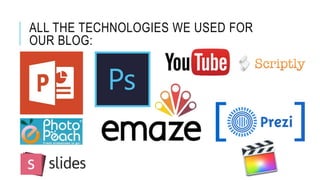
ALL THE TECHNOLOGIES WE USED FOR
OUR BLOG:
SOFTWARE WE USED FOR
RESEARCH AND PLANNING:
1) We used PowerPoint to construct some of our planning and
research for our OTS. We used it because it is easy to use and is
efficient because most people know how to use it and people can use
it simultaneously.
2) We used Slides also to help us do our research and planning to
show a diverse range of technology we can use. However, this had
more customization to what we could put on the slides and we could
also share this between each other
3) PhotoPeach is a software we used in one of our assignments to
collate some photos we took of our equipment that we used and we
chose it with some music that PhotoPeach provided and I embedded
it in one of our assignments and this also shows another variety of
SOFTWARE WE USED FOR
PRODUCTION:
1) Final Cut Pro is the software we used to edit our videos and to mix
the sound we got for the videos. This is where I learnt how to color
balance, use transitions, add credit or text onto footage and how to
increase and decrease sound. This has taught me vital things about
how to edit and to make sure that a video has continuity.
2) We used Photoshop to create our production company and also to
create the bbfc board for our film. This also can help with many
different things such as creating a poster for our film, making the
cover for the DVD. It has taught me how to also change the saturation
of certain parts of an image.
3) Scriptly is the software we used to write the script for our OTS. By
creating this helps the actors know what to say and what to do at the
correct moments
SOFTWARE WE USED FORK OUR
EVALUATION:
1) ScreencastOmatc is what I used to record both the YouTube
commentary and my reaction to it. This taught me how to capture two
things at once and also taught me how to run a commentary of a
video and realizing what we could improve and how we did improve.
2)To upload all of our videos, we upload all of them to YouTube and
then take the embedding code and put it on the blog under the
correct heading. I also learnt how to use different types of editing like
adding annotations, choosing annotations and many different things.

Presentation7

  • 1.
    WHAT HAVE YOULEARNT ABOUT TECHNOLOGIES FROM THE PROCESS OF CONSTRUCTING THIS PRODUCT? Steven Hance
  • 2.
    ALL THE TECHNOLOGIESWE USED FOR OUR BLOG:
  • 3.
    SOFTWARE WE USEDFOR RESEARCH AND PLANNING: 1) We used PowerPoint to construct some of our planning and research for our OTS. We used it because it is easy to use and is efficient because most people know how to use it and people can use it simultaneously. 2) We used Slides also to help us do our research and planning to show a diverse range of technology we can use. However, this had more customization to what we could put on the slides and we could also share this between each other 3) PhotoPeach is a software we used in one of our assignments to collate some photos we took of our equipment that we used and we chose it with some music that PhotoPeach provided and I embedded it in one of our assignments and this also shows another variety of
  • 4.
    SOFTWARE WE USEDFOR PRODUCTION: 1) Final Cut Pro is the software we used to edit our videos and to mix the sound we got for the videos. This is where I learnt how to color balance, use transitions, add credit or text onto footage and how to increase and decrease sound. This has taught me vital things about how to edit and to make sure that a video has continuity. 2) We used Photoshop to create our production company and also to create the bbfc board for our film. This also can help with many different things such as creating a poster for our film, making the cover for the DVD. It has taught me how to also change the saturation of certain parts of an image. 3) Scriptly is the software we used to write the script for our OTS. By creating this helps the actors know what to say and what to do at the correct moments
  • 5.
    SOFTWARE WE USEDFORK OUR EVALUATION: 1) ScreencastOmatc is what I used to record both the YouTube commentary and my reaction to it. This taught me how to capture two things at once and also taught me how to run a commentary of a video and realizing what we could improve and how we did improve. 2)To upload all of our videos, we upload all of them to YouTube and then take the embedding code and put it on the blog under the correct heading. I also learnt how to use different types of editing like adding annotations, choosing annotations and many different things.