What have you learnt about
technologies from this process of
constructing this product?
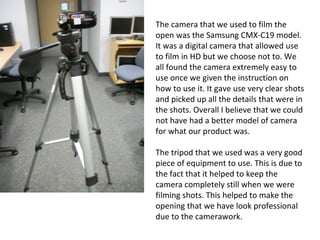
The camera that we used to film the
open was the Samsung CMX-C19 model.
It was a digital camera that allowed use
to film in HD but we choose not to. We
all found the camera extremely easy to
use once we given the instruction on
how to use it. It gave use very clear shots
and picked up all the details that were in
the shots. Overall I believe that we could
not have had a better model of camera
for what our product was.
The tripod that we used was a very good
piece of equipment to use. This is due to
the fact that it helped to keep the
camera completely still when we were
filming shots. This helped to make the
opening that we have look professional
due to the camerawork.
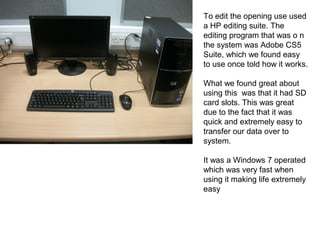
To edit the opening use used
a HP editing suite. The
editing program that was o n
the system was Adobe CS5
Suite, which we found easy
to use once told how it works.
What we found great about
using this was that it had SD
card slots. This was great
due to the fact that it was
quick and extremely easy to
transfer our data over to
system.
It was a Windows 7 operated
which was very fast when
using it making life extremely
easy
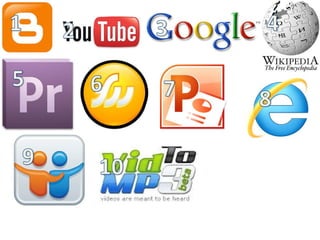
1. Blogger – we used Blogger to store and show all the
information that we gather for our research. We also used
it as a journal to store days where had worked on our
opening.
2. YouTube – we used YouTube to upload to upload the
opening. We also used it to find some of the sound effects
we used with the opening.
3. Google – we used Google to help conduct the research
about thrillers.
4. Wikipedia – like Google we used Wikipedia to help
conduct our research about thrillers.
5. Adobe Premiere CS5 – We used Adobe Premiere CS5 to
edit our thriller opening.
6. Fireworks – we used Fireworks to create our film logo.
7. PowerPoint – we used PowerPoint to answer some
of our evaluation questions and to create some of
our mood boards.
8. Internet Explorer – we used Internet Explorer as
the internet browser to conduct our research.
9. Slide Share – we used Slide Share to share the
PowerPoint's that we created to help use upload
the answers for some of these questions.
10. YouTube Converter – we used a YouTube
Converter to be able to have just the mp3. file of
the sound effects that we needed.
• Throughout this whole process I believe that my
group and I have learnt a lot about all different
kinds of media technologies especially Adobe
Premiere CS5. Before we started no-one in the
group had used the Adobe Premiere CS5 program
before so no-one had a clue on how to use it. Once
we got down to it and learnt how to use it properly
we hardly had any problems using the product.
However there were a few bumps along the away.
These where mainly trying to add the special
effects. However we found solutions to these by
asking our teacher and then once we had the
information on how to add the effects we had no
problems.

Media q6

  • 1.
    What have youlearnt about technologies from this process of constructing this product?
  • 2.
    The camera thatwe used to film the open was the Samsung CMX-C19 model. It was a digital camera that allowed use to film in HD but we choose not to. We all found the camera extremely easy to use once we given the instruction on how to use it. It gave use very clear shots and picked up all the details that were in the shots. Overall I believe that we could not have had a better model of camera for what our product was. The tripod that we used was a very good piece of equipment to use. This is due to the fact that it helped to keep the camera completely still when we were filming shots. This helped to make the opening that we have look professional due to the camerawork.
  • 3.
    To edit theopening use used a HP editing suite. The editing program that was o n the system was Adobe CS5 Suite, which we found easy to use once told how it works. What we found great about using this was that it had SD card slots. This was great due to the fact that it was quick and extremely easy to transfer our data over to system. It was a Windows 7 operated which was very fast when using it making life extremely easy
  • 5.
    1. Blogger –we used Blogger to store and show all the information that we gather for our research. We also used it as a journal to store days where had worked on our opening. 2. YouTube – we used YouTube to upload to upload the opening. We also used it to find some of the sound effects we used with the opening. 3. Google – we used Google to help conduct the research about thrillers. 4. Wikipedia – like Google we used Wikipedia to help conduct our research about thrillers. 5. Adobe Premiere CS5 – We used Adobe Premiere CS5 to edit our thriller opening. 6. Fireworks – we used Fireworks to create our film logo.
  • 6.
    7. PowerPoint –we used PowerPoint to answer some of our evaluation questions and to create some of our mood boards. 8. Internet Explorer – we used Internet Explorer as the internet browser to conduct our research. 9. Slide Share – we used Slide Share to share the PowerPoint's that we created to help use upload the answers for some of these questions. 10. YouTube Converter – we used a YouTube Converter to be able to have just the mp3. file of the sound effects that we needed.
  • 7.
    • Throughout thiswhole process I believe that my group and I have learnt a lot about all different kinds of media technologies especially Adobe Premiere CS5. Before we started no-one in the group had used the Adobe Premiere CS5 program before so no-one had a clue on how to use it. Once we got down to it and learnt how to use it properly we hardly had any problems using the product. However there were a few bumps along the away. These where mainly trying to add the special effects. However we found solutions to these by asking our teacher and then once we had the information on how to add the effects we had no problems.