Agenda
 Introduction
 Functional Flow
 Setup
 Demonstration
 Troubleshooting Diagnostic Scripts
 Q & A
1
Business Concept
Introduction To Cycle Counting
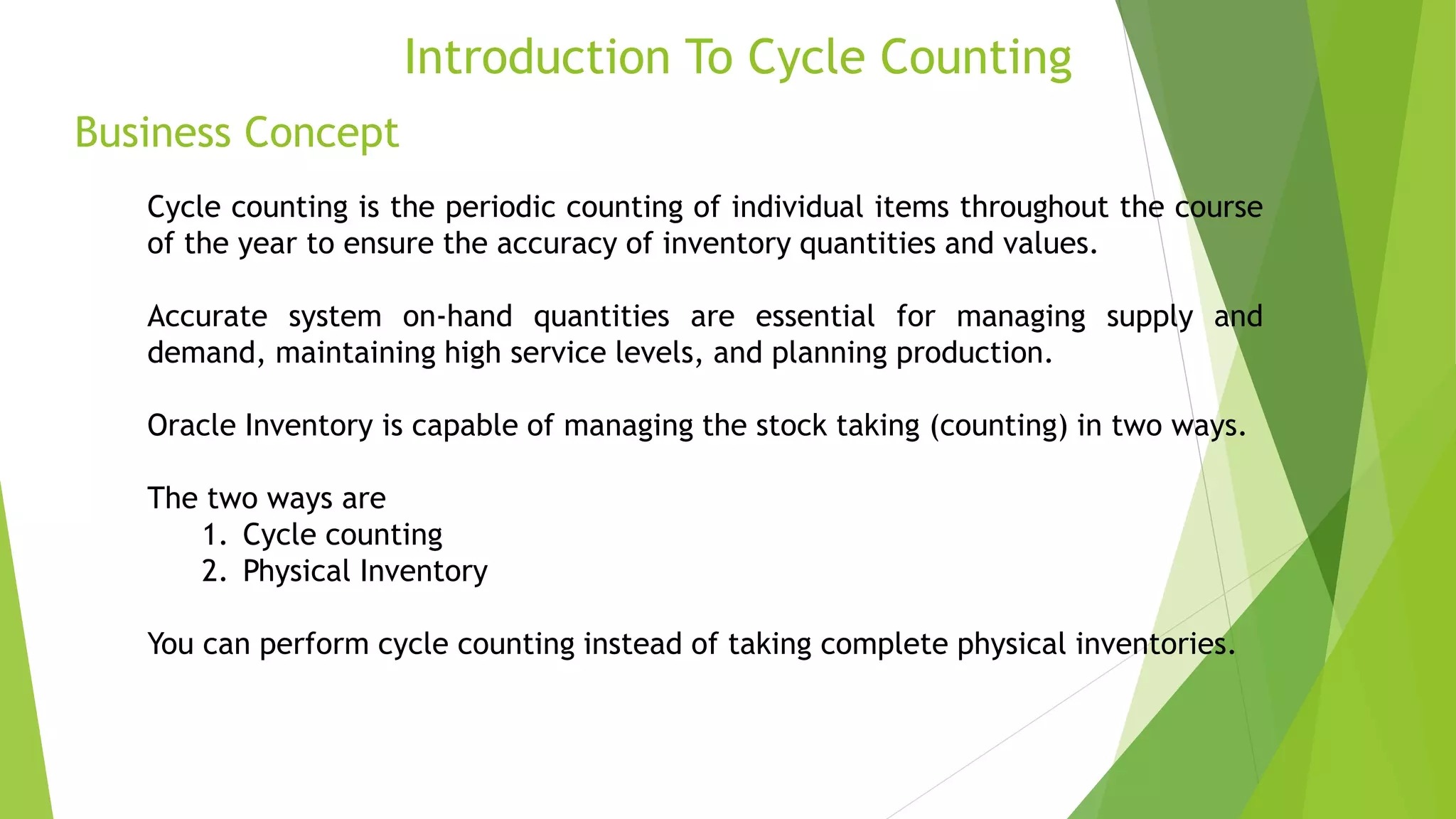
Cycle counting is the periodic counting of individual items throughout the course
of the year to ensure the accuracy of inventory quantities and values.
Accurate system on-hand quantities are essential for managing supply and
demand, maintaining high service levels, and planning production.
Oracle Inventory is capable of managing the stock taking (counting) in two ways.
The two ways are
1. Cycle counting
2. Physical Inventory
You can perform cycle counting instead of taking complete physical inventories.
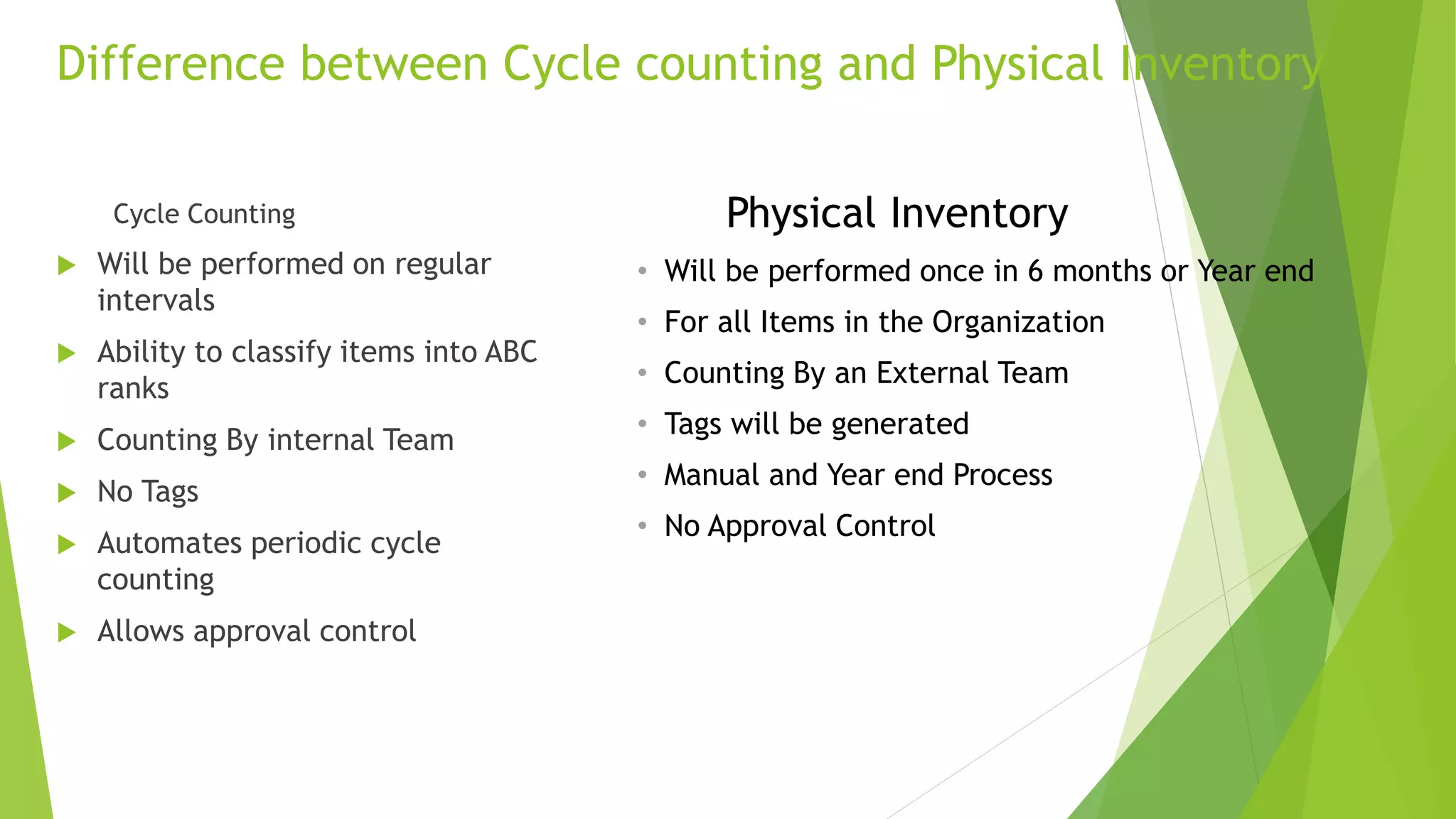
Cycle Counting
 Will be performed on regular
intervals
 Ability to classify items into ABC
ranks
 Counting By internal Team
 No Tags
 Automates periodic cycle
counting
 Allows approval control
Difference between Cycle counting and Physical Inventory
3
Physical Inventory
• Will be performed once in 6 months or Year end
• For all Items in the Organization
• Counting By an External Team
• Tags will be generated
• Manual and Year end Process
• No Approval Control
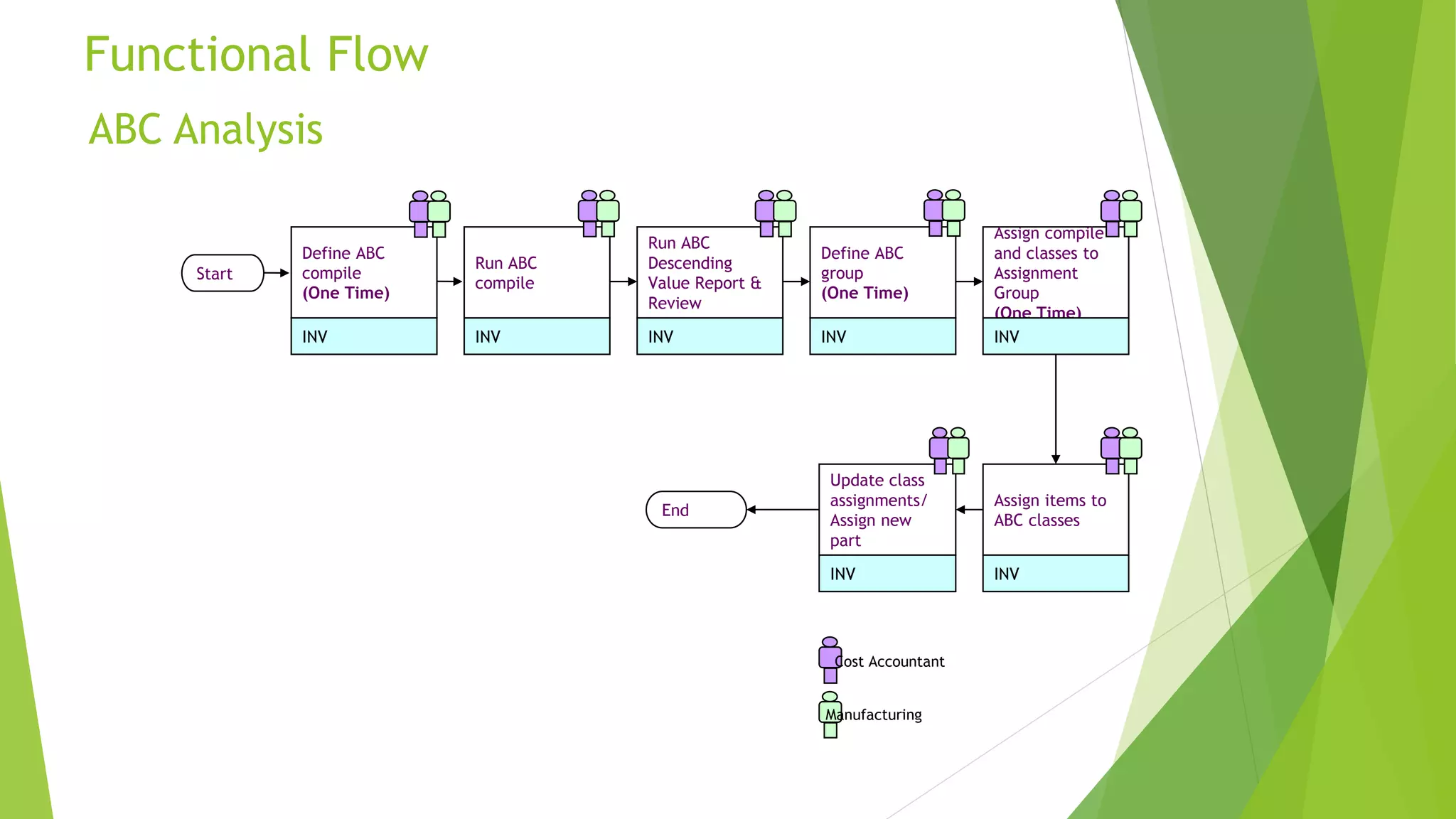
ABC Analysis
Functional Flow
4
Assign items to
ABC classes
Define ABC
compile
(One Time)
Define ABC
group
(One Time)
INVINV
INV
Update class
assignments/
Assign new
part
INV
Run ABC
compile
INV
Run ABC
Descending
Value Report &
Review
INV
Assign compile
and classes to
Assignment
Group
(One Time)
INV
Cost Accountant
Manufacturing
Start
End
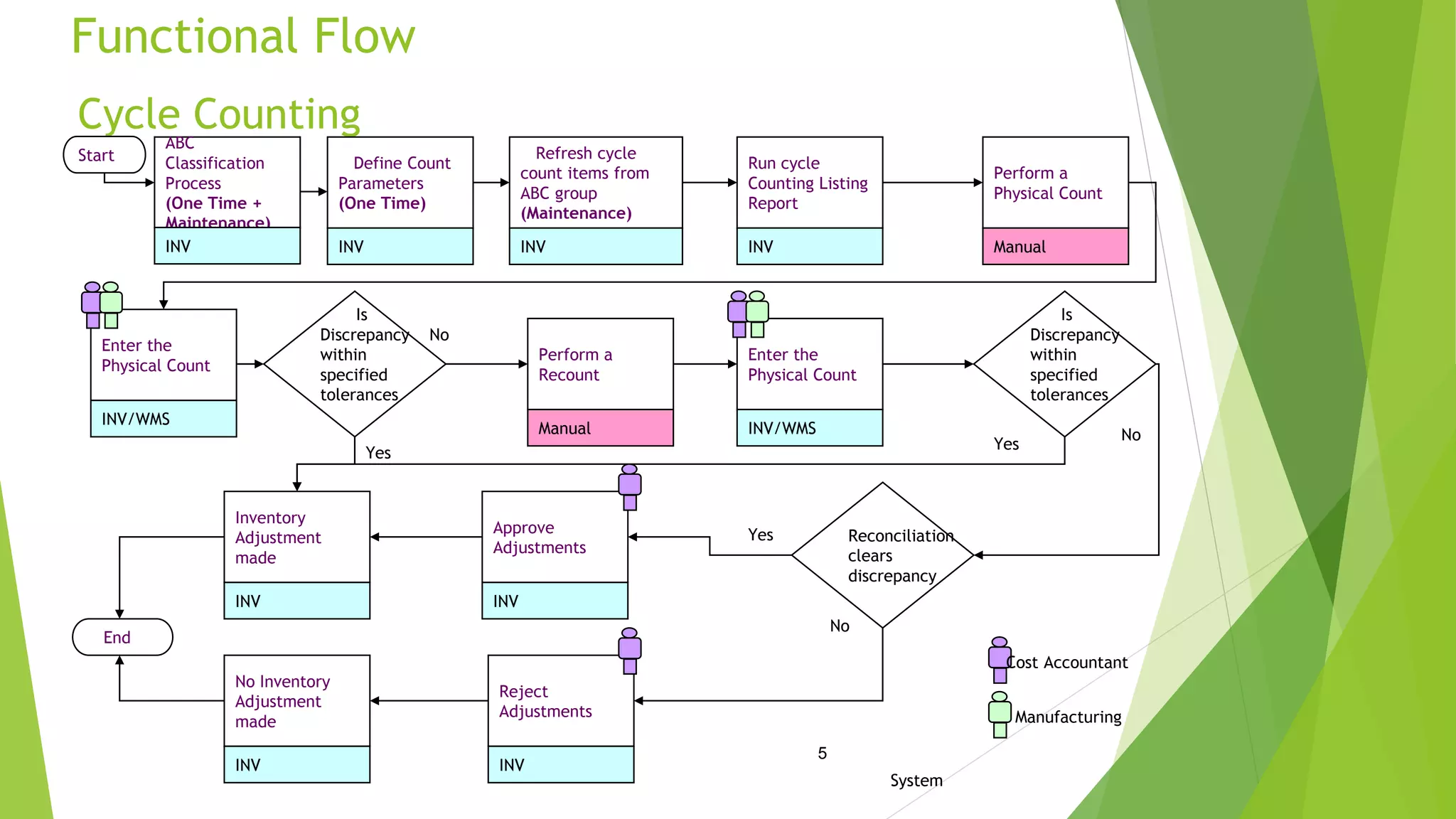
Cycle Counting
Functional Flow
5
5
Perform a
Physical Count
Manual
Define Count
Parameters
(One Time)
INV
Inventory
Adjustment
made
INV
ABC
Classification
Process
(One Time +
Maintenance)
INV
Enter the
Physical Count
INV/WMS
Run cycle
Counting Listing
Report
INV
Cost Accountant
Manufacturing
Is
Discrepancy
within
specified
tolerances
Refresh cycle
count items from
ABC group
(Maintenance)
INV
Yes
Approve
Adjustments
INV
No
Perform a
Recount
Manual
Is
Discrepancy
within
specified
tolerances
Enter the
Physical Count
INV/WMS No
Yes
Reconciliation
clears
discrepancy
No
Yes
Reject
Adjustments
INV
No Inventory
Adjustment
made
INV
System
Start
End
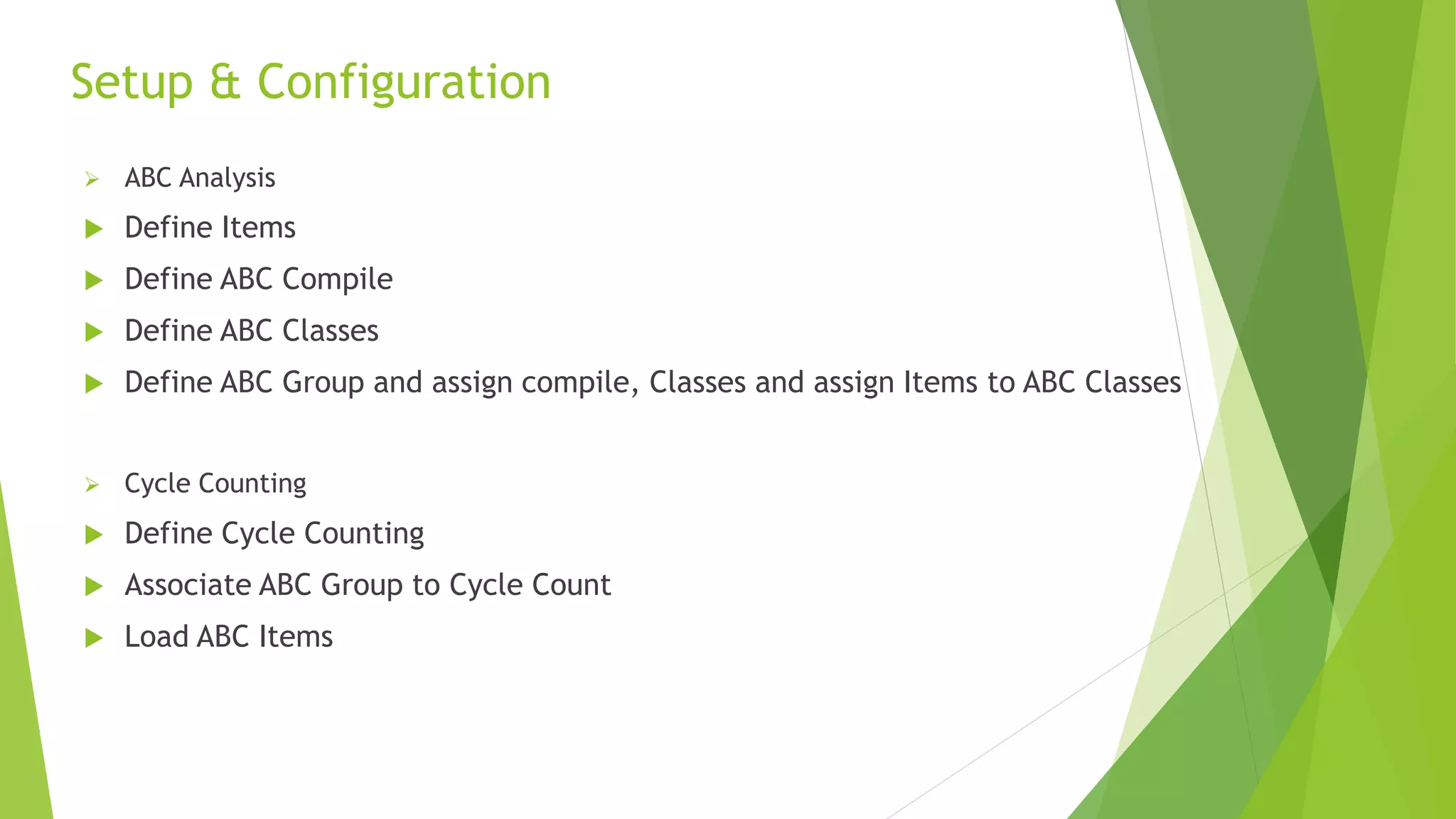
 ABC Analysis
 Define Items
 Define ABC Compile
 Define ABC Classes
 Define ABC Group and assign compile, Classes and assign Items to ABC Classes
 Cycle Counting
 Define Cycle Counting
 Associate ABC Group to Cycle Count
 Load ABC Items
Setup & Configuration
6
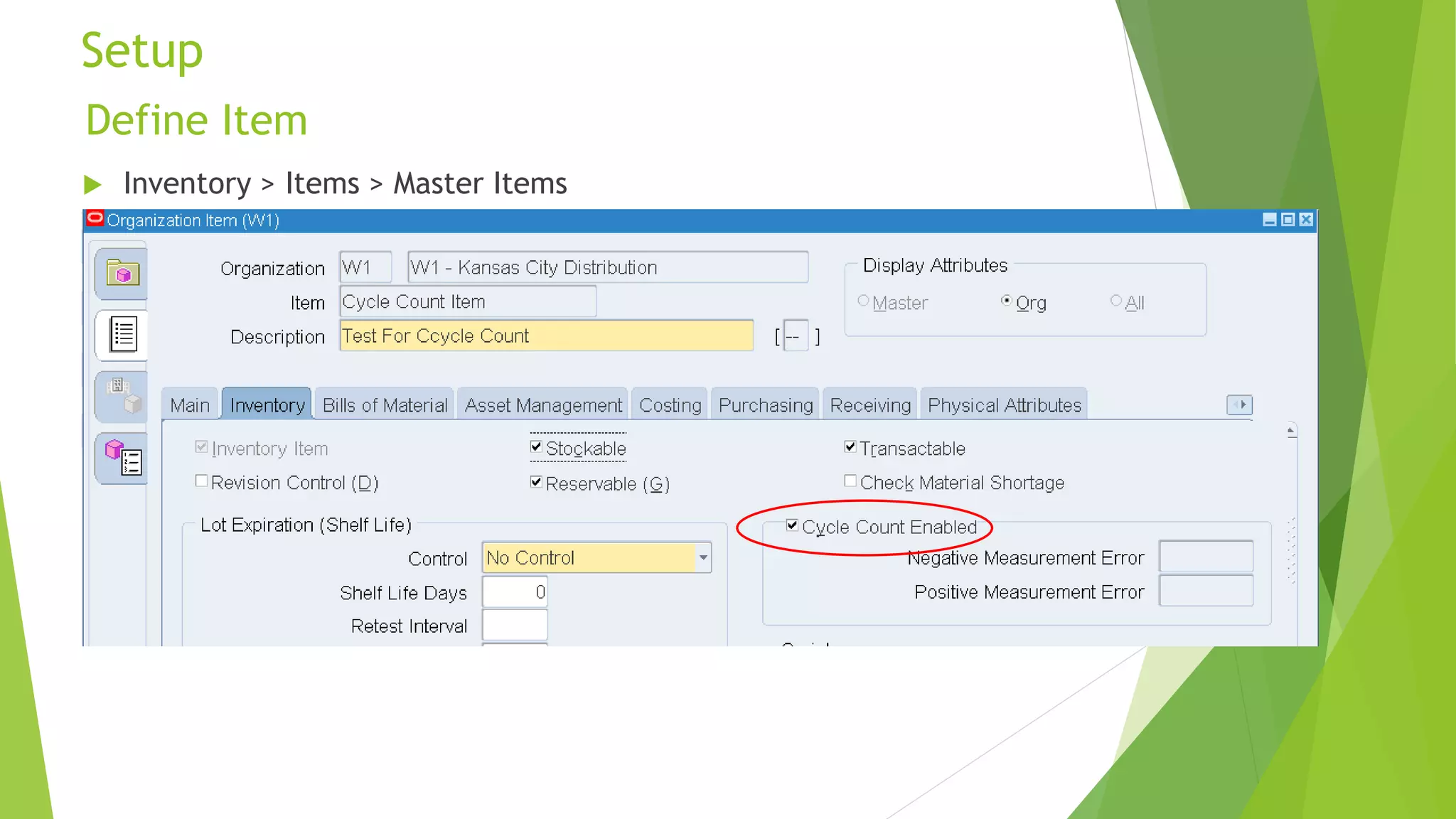
 Inventory > Items > Master Items
Define Item
Setup
7
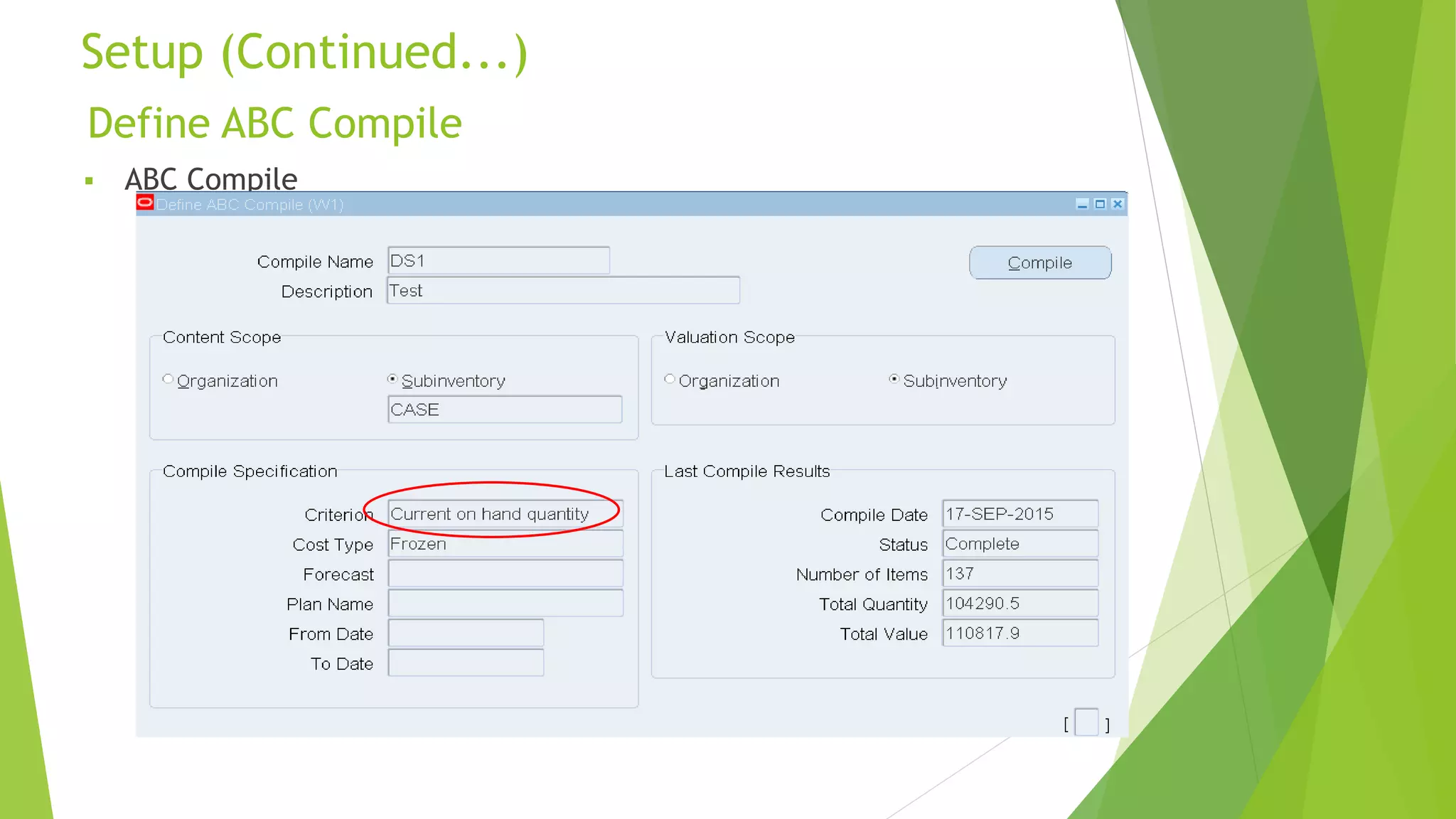
 ABC Compile
Define ABC Compile
Setup (Continued...)
8
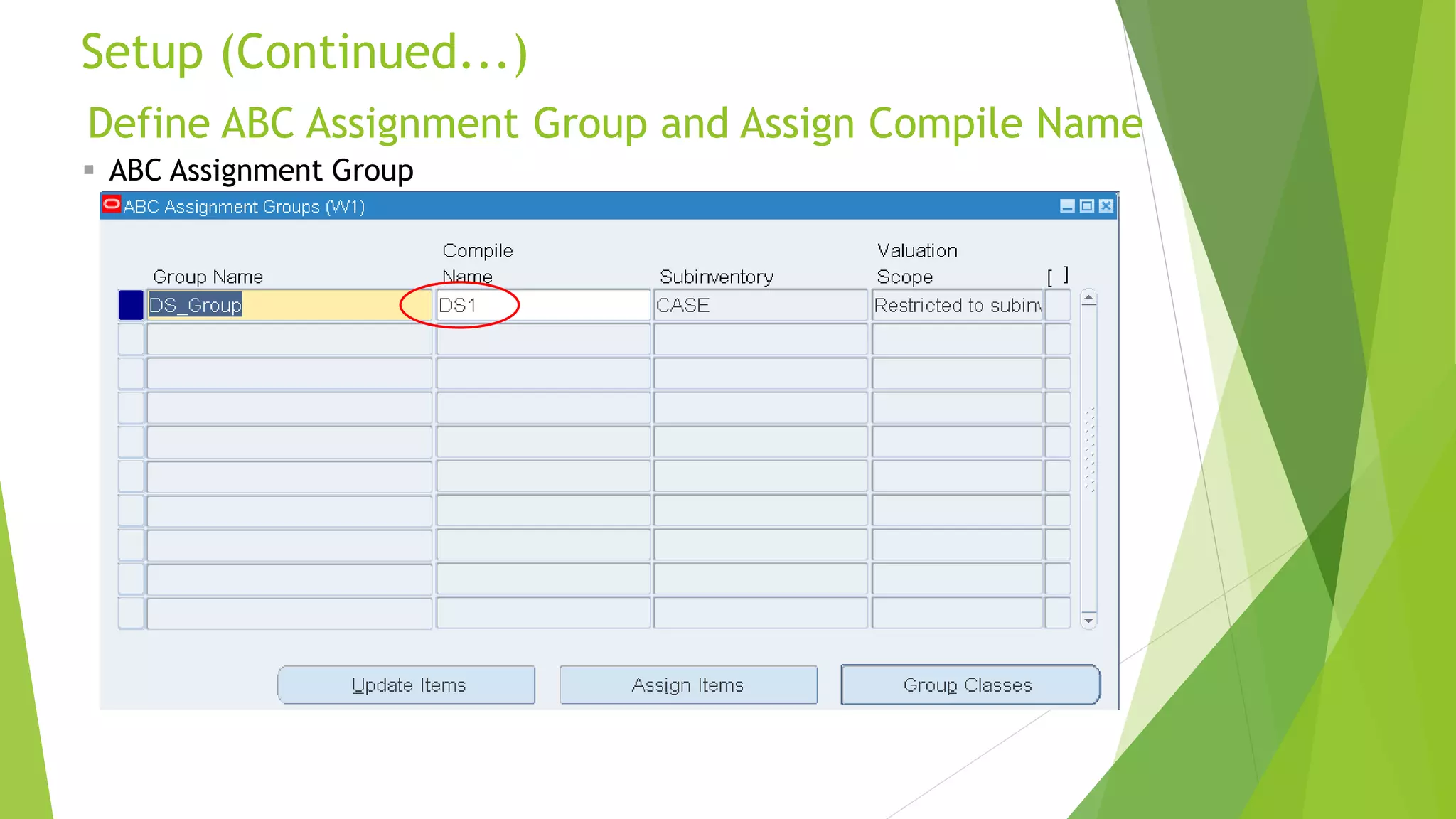
Define ABC Assignment Group and Assign Compile Name
Setup (Continued...)
9
 ABC Assignment Group
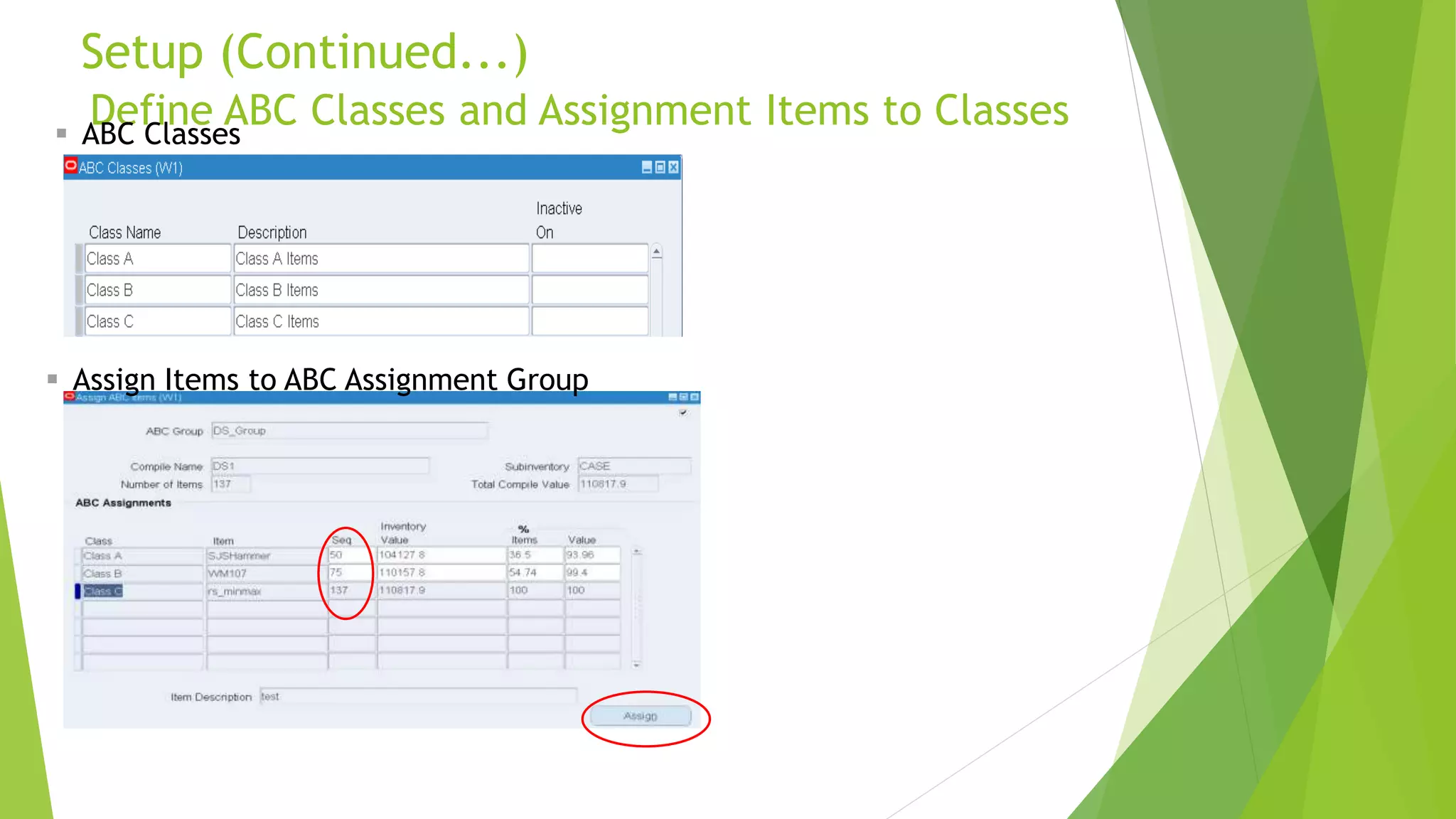
Define ABC Classes and Assignment Items to Classes
Setup (Continued...)
10
 ABC Classes
 Assign Items to ABC Assignment Group
 Cycle Count
Setup (Continued...)
11
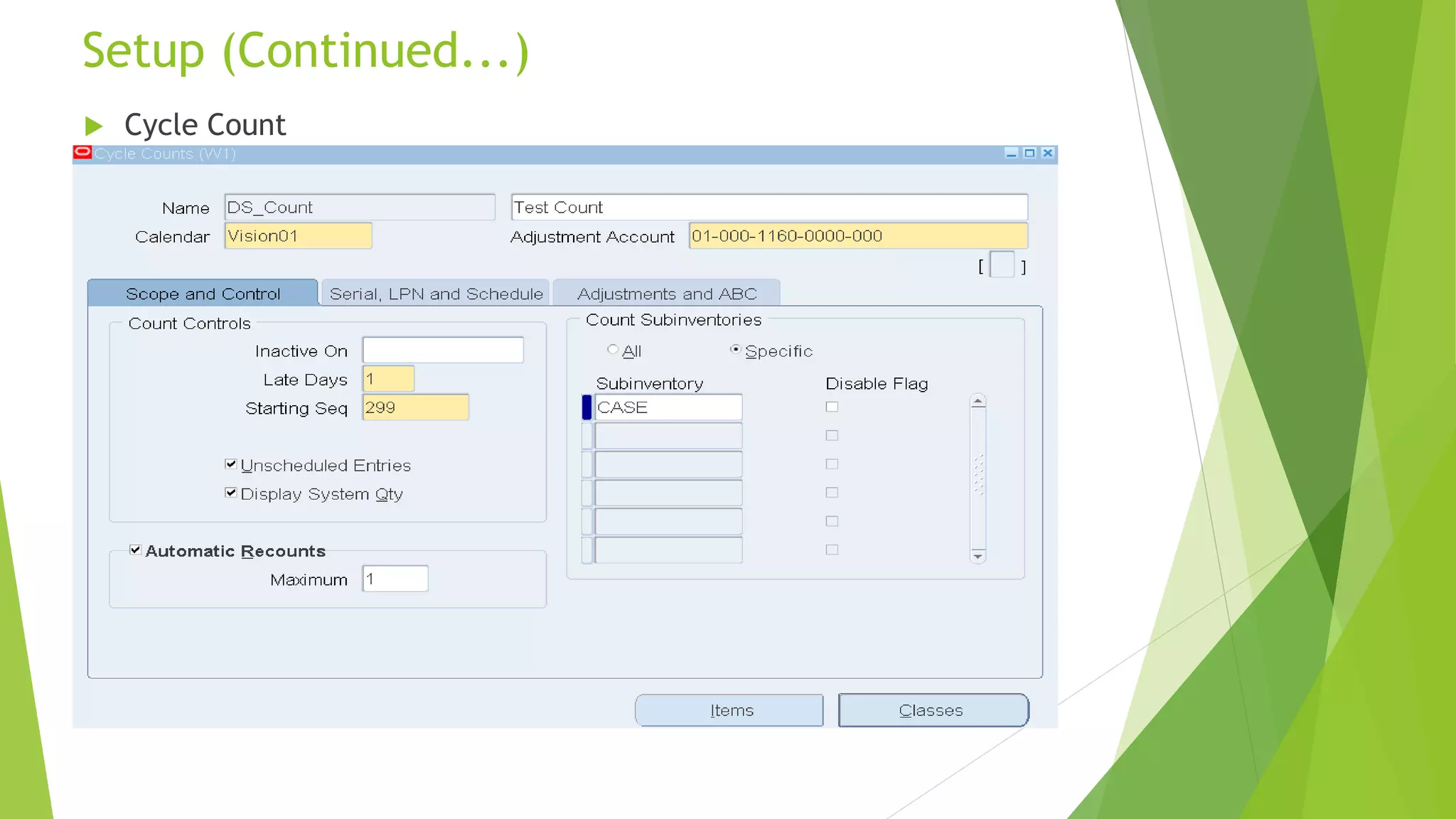
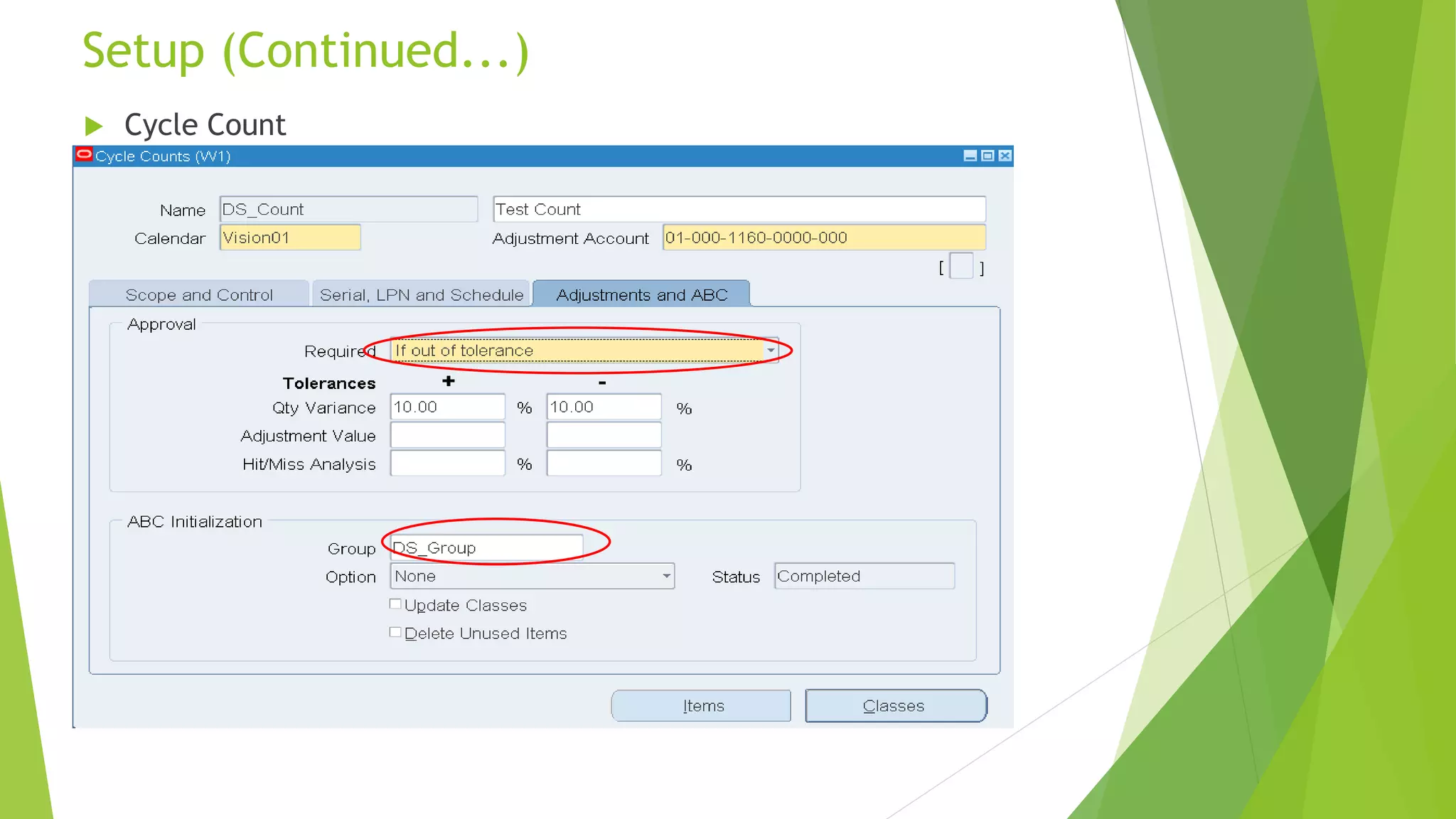
 Cycle Count
Setup (Continued...)
12
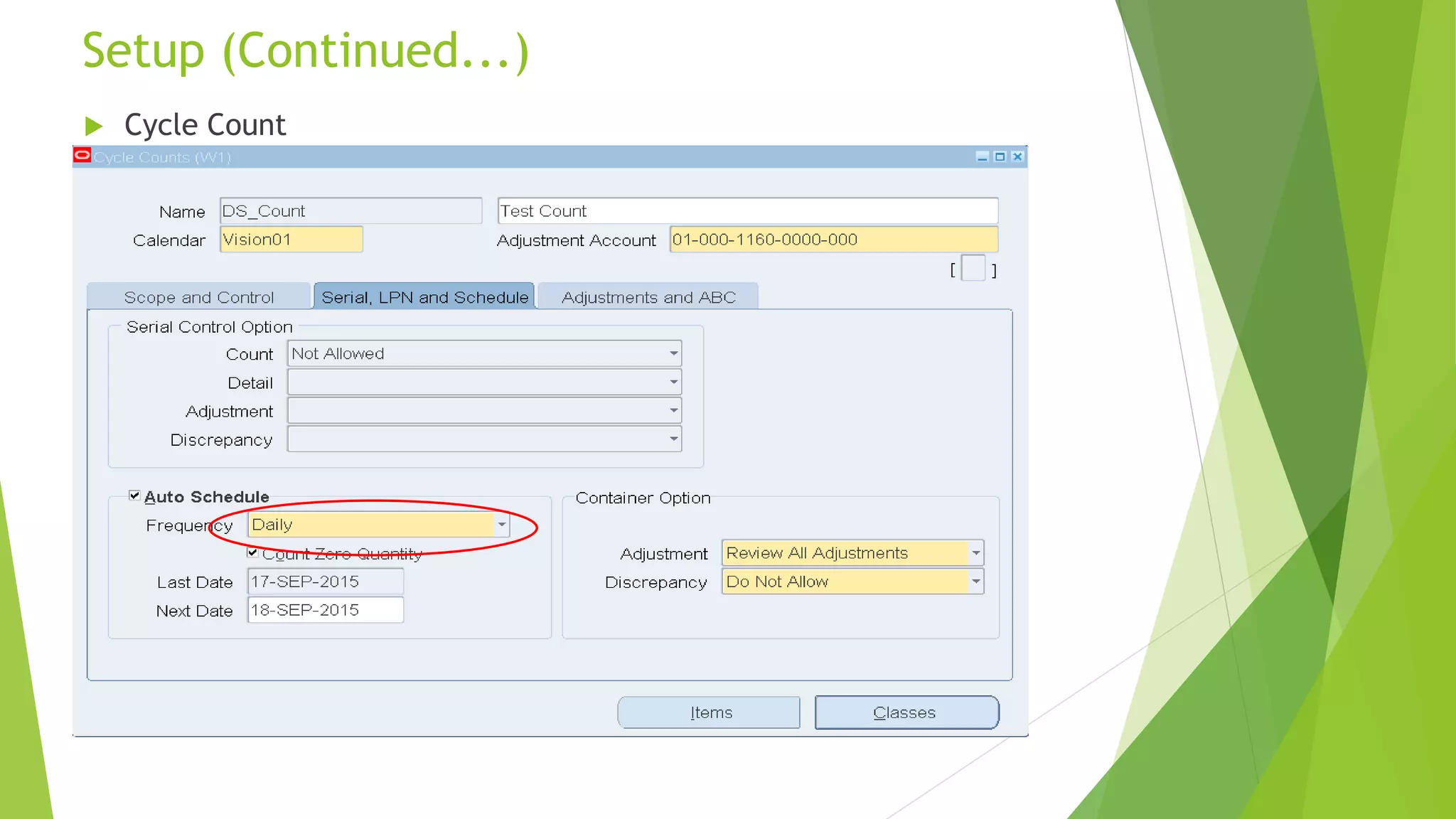
 Cycle Count
Setup (Continued...)
13
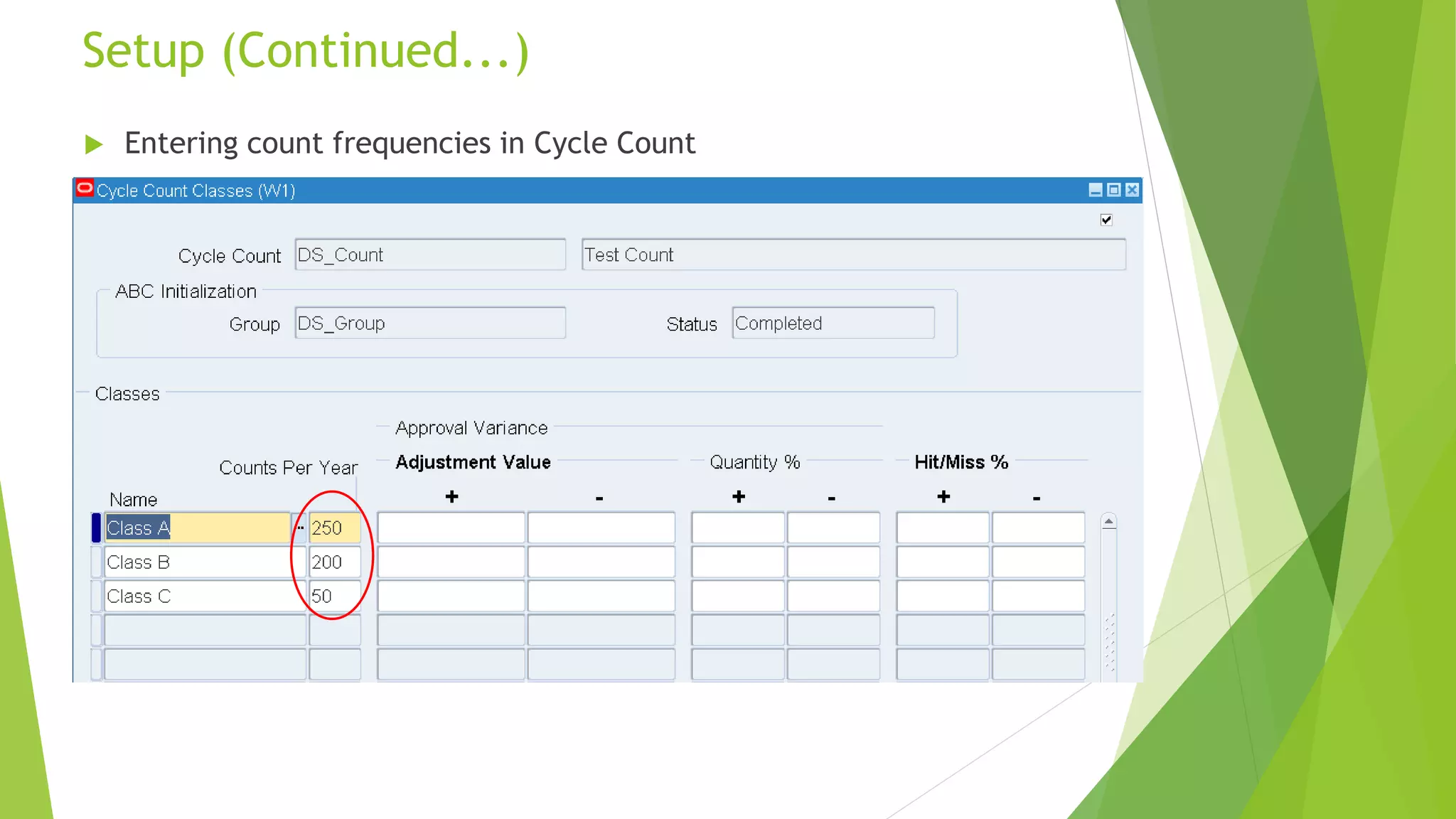
 Entering count frequencies in Cycle Count
Setup (Continued...)
14
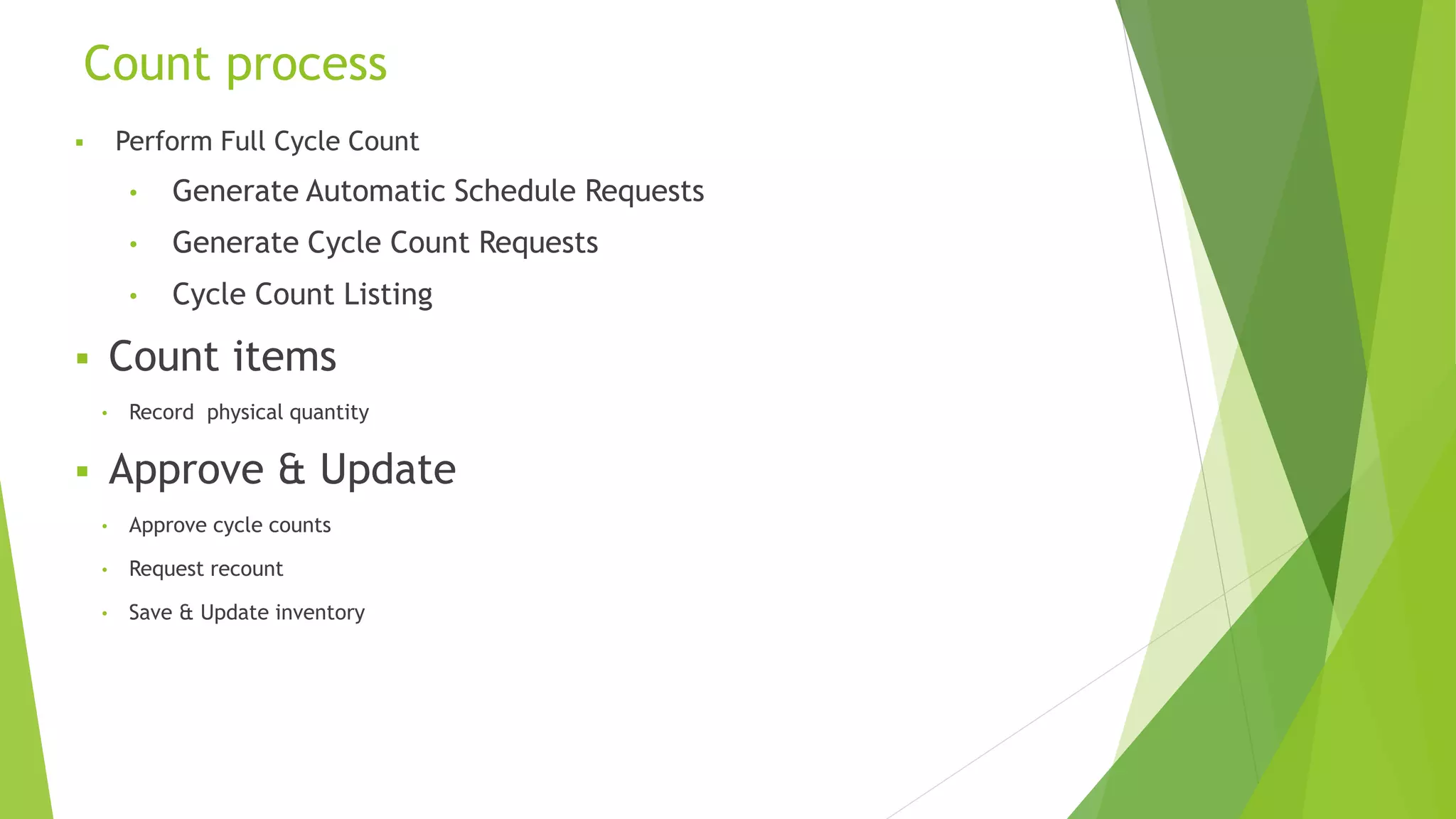
 Perform Full Cycle Count
• Generate Automatic Schedule Requests
• Generate Cycle Count Requests
• Cycle Count Listing
 Count items
• Record physical quantity
 Approve & Update
• Approve cycle counts
• Request recount
• Save & Update inventory
Count process
15
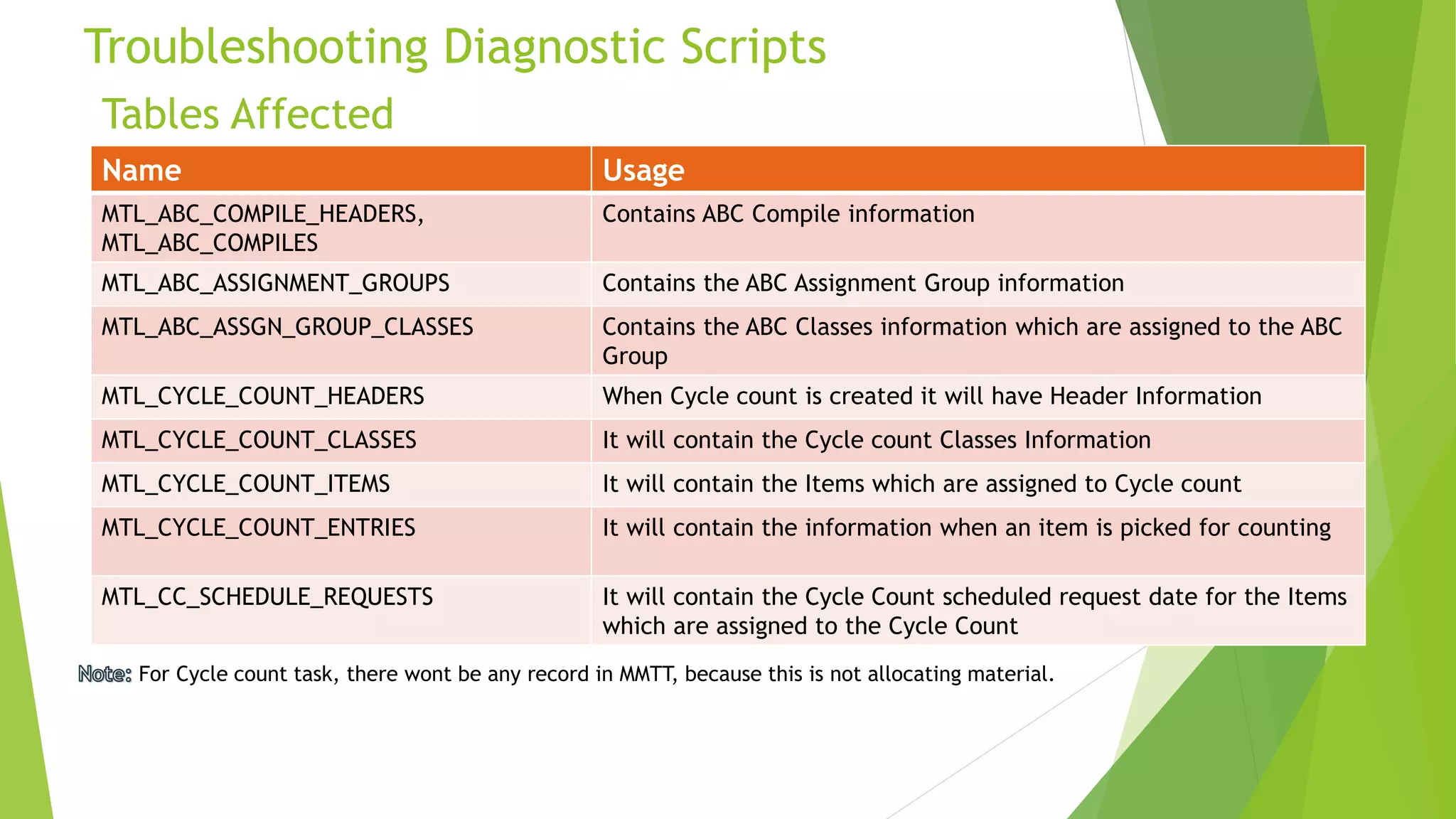
Tables Affected
Troubleshooting Diagnostic Scripts
16
Name Usage
MTL_ABC_COMPILE_HEADERS,
MTL_ABC_COMPILES
Contains ABC Compile information
MTL_ABC_ASSIGNMENT_GROUPS Contains the ABC Assignment Group information
MTL_ABC_ASSGN_GROUP_CLASSES Contains the ABC Classes information which are assigned to the ABC
Group
MTL_CYCLE_COUNT_HEADERS When Cycle count is created it will have Header Information
MTL_CYCLE_COUNT_CLASSES It will contain the Cycle count Classes Information
MTL_CYCLE_COUNT_ITEMS It will contain the Items which are assigned to Cycle count
MTL_CYCLE_COUNT_ENTRIES It will contain the information when an item is picked for counting
MTL_CC_SCHEDULE_REQUESTS It will contain the Cycle Count scheduled request date for the Items
which are assigned to the Cycle Count
For Cycle count task, there wont be any record in MMTT, because this is not allocating material.

Cycle counting final

  • 1.
    Agenda  Introduction  FunctionalFlow  Setup  Demonstration  Troubleshooting Diagnostic Scripts  Q & A 1
  • 2.
    Business Concept Introduction ToCycle Counting Cycle counting is the periodic counting of individual items throughout the course of the year to ensure the accuracy of inventory quantities and values. Accurate system on-hand quantities are essential for managing supply and demand, maintaining high service levels, and planning production. Oracle Inventory is capable of managing the stock taking (counting) in two ways. The two ways are 1. Cycle counting 2. Physical Inventory You can perform cycle counting instead of taking complete physical inventories.
  • 3.
    Cycle Counting  Willbe performed on regular intervals  Ability to classify items into ABC ranks  Counting By internal Team  No Tags  Automates periodic cycle counting  Allows approval control Difference between Cycle counting and Physical Inventory 3 Physical Inventory • Will be performed once in 6 months or Year end • For all Items in the Organization • Counting By an External Team • Tags will be generated • Manual and Year end Process • No Approval Control
  • 4.
    ABC Analysis Functional Flow 4 Assignitems to ABC classes Define ABC compile (One Time) Define ABC group (One Time) INVINV INV Update class assignments/ Assign new part INV Run ABC compile INV Run ABC Descending Value Report & Review INV Assign compile and classes to Assignment Group (One Time) INV Cost Accountant Manufacturing Start End
  • 5.
    Cycle Counting Functional Flow 5 5 Performa Physical Count Manual Define Count Parameters (One Time) INV Inventory Adjustment made INV ABC Classification Process (One Time + Maintenance) INV Enter the Physical Count INV/WMS Run cycle Counting Listing Report INV Cost Accountant Manufacturing Is Discrepancy within specified tolerances Refresh cycle count items from ABC group (Maintenance) INV Yes Approve Adjustments INV No Perform a Recount Manual Is Discrepancy within specified tolerances Enter the Physical Count INV/WMS No Yes Reconciliation clears discrepancy No Yes Reject Adjustments INV No Inventory Adjustment made INV System Start End
  • 6.
     ABC Analysis Define Items  Define ABC Compile  Define ABC Classes  Define ABC Group and assign compile, Classes and assign Items to ABC Classes  Cycle Counting  Define Cycle Counting  Associate ABC Group to Cycle Count  Load ABC Items Setup & Configuration 6
  • 7.
     Inventory >Items > Master Items Define Item Setup 7
  • 8.
     ABC Compile DefineABC Compile Setup (Continued...) 8
  • 9.
    Define ABC AssignmentGroup and Assign Compile Name Setup (Continued...) 9  ABC Assignment Group
  • 10.
    Define ABC Classesand Assignment Items to Classes Setup (Continued...) 10  ABC Classes  Assign Items to ABC Assignment Group
  • 11.
     Cycle Count Setup(Continued...) 11
  • 12.
     Cycle Count Setup(Continued...) 12
  • 13.
     Cycle Count Setup(Continued...) 13
  • 14.
     Entering countfrequencies in Cycle Count Setup (Continued...) 14
  • 15.
     Perform FullCycle Count • Generate Automatic Schedule Requests • Generate Cycle Count Requests • Cycle Count Listing  Count items • Record physical quantity  Approve & Update • Approve cycle counts • Request recount • Save & Update inventory Count process 15
  • 16.
    Tables Affected Troubleshooting DiagnosticScripts 16 Name Usage MTL_ABC_COMPILE_HEADERS, MTL_ABC_COMPILES Contains ABC Compile information MTL_ABC_ASSIGNMENT_GROUPS Contains the ABC Assignment Group information MTL_ABC_ASSGN_GROUP_CLASSES Contains the ABC Classes information which are assigned to the ABC Group MTL_CYCLE_COUNT_HEADERS When Cycle count is created it will have Header Information MTL_CYCLE_COUNT_CLASSES It will contain the Cycle count Classes Information MTL_CYCLE_COUNT_ITEMS It will contain the Items which are assigned to Cycle count MTL_CYCLE_COUNT_ENTRIES It will contain the information when an item is picked for counting MTL_CC_SCHEDULE_REQUESTS It will contain the Cycle Count scheduled request date for the Items which are assigned to the Cycle Count For Cycle count task, there wont be any record in MMTT, because this is not allocating material.

Editor's Notes

  • #2 Use Key words only and avoid LONG phrases. The Topics should only be 1 line. Complete the Topics list with an overview of the Items that will be covered during the Session. This information is similar to what Topics list was in the Advisor Webcast Proposal.
  • #4 Guiding instructional slide around font sizes and highligthing. This is a For your Information slide only. Please remove it from the deck once the information is clear for you !
  • #5 Guiding instructional slide around font sizes and highligthing. This is a For your Information slide only. Please remove it from the deck once the information is clear for you !
  • #6 Guiding instructional slide around font sizes and highligthing. This is a For your Information slide only. Please remove it from the deck once the information is clear for you !
  • #7 Guiding instructional slide around font sizes and highligthing. This is a For your Information slide only. Please remove it from the deck once the information is clear for you !
  • #8 Guiding instructional slide around font sizes and highligthing. This is a For your Information slide only. Please remove it from the deck once the information is clear for you !
  • #9 Guiding instructional slide around font sizes and highligthing. This is a For your Information slide only. Please remove it from the deck once the information is clear for you !
  • #10 Guiding instructional slide around font sizes and highligthing. This is a For your Information slide only. Please remove it from the deck once the information is clear for you !
  • #11 Guiding instructional slide around font sizes and highligthing. This is a For your Information slide only. Please remove it from the deck once the information is clear for you !
  • #12 Guiding instructional slide around font sizes and highligthing. This is a For your Information slide only. Please remove it from the deck once the information is clear for you !
  • #13 Guiding instructional slide around font sizes and highligthing. This is a For your Information slide only. Please remove it from the deck once the information is clear for you !
  • #14 Guiding instructional slide around font sizes and highligthing. This is a For your Information slide only. Please remove it from the deck once the information is clear for you !
  • #15 Guiding instructional slide around font sizes and highligthing. This is a For your Information slide only. Please remove it from the deck once the information is clear for you !
  • #16 Guiding instructional slide around font sizes and highligthing. This is a For your Information slide only. Please remove it from the deck once the information is clear for you !
  • #17 Guiding instructional slide around font sizes and highligthing. This is a For your Information slide only. Please remove it from the deck once the information is clear for you !