EMBEDDED - C
Topics :
1. Operating Systems vs. Embedded Systems.
2. Usage of High Level Languages such as C.
3. Assembly vs. C.
4. Difference between Conventional C and Embedded C.
1. Advantages Of Embedded C .
2. Why C Language for Embedded Systems.
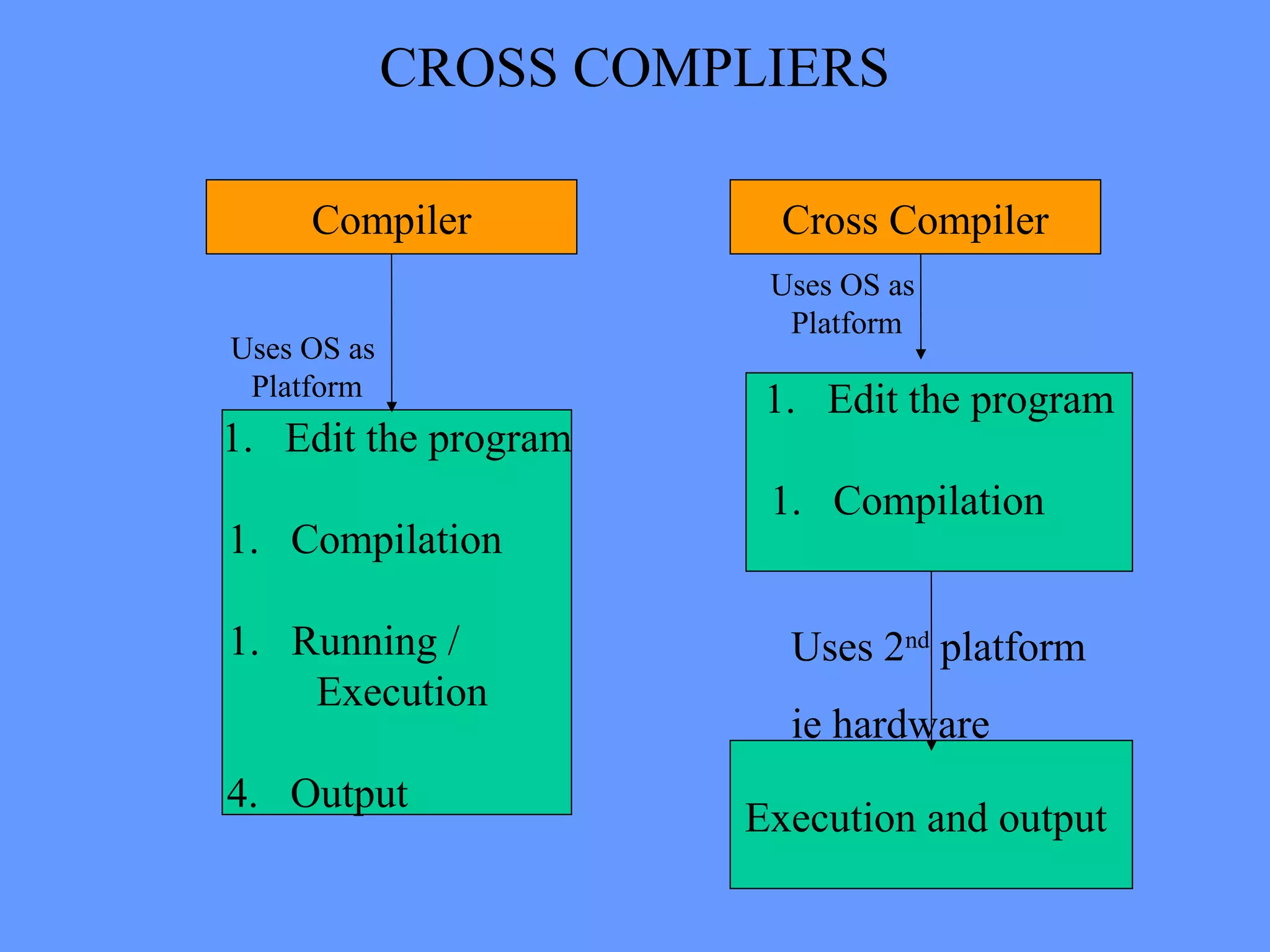
3. Cross compilers.
4. Bit wise operations and start up code.
5. Reentrant functions , Volatile modifiers.
10. Rules for embedded C programming.
Operating Systems vs.
Embedded Systems
• In OS or most of the non-embedded
concepts the processing is of main concern
and the Input / output .
• In Embedded , it is the input / output that is
important and processing serves only to
connect inputs with outputs.
• OS is not closely tied to the hardware, and,
it manipulates hardware registers for
memory management,task process
switching,interrupt request etc.
• Embedded Systems are closely tied to the
hardware throughout the system. The
system consists of manipulating the
hardware registers.
• Developing a program in C involves large
memory caches, virtual memory,register
sets.
• But Embedded systems have limited
memory space and registers.
• The development of OS does not have the
restrictions of the size of the overall
systems, power consumption to a larger
extent.
• The above parameter have to be considered
in designing an Embedded Systems.
Usage of High Level Languages.
• C being a high level language and a
familiar language, among the
programmers it has become the first
choice.
• Languages such as C are easy in
coding.Because they are more reliable
programs and they have increased
programmer productivity and portability
across hardware.
• C has its reputation increased and it is
also implemented in operating systems.
Assembly v/s C.
• The assembly code is difficult to read and
maintain.
• The amount of code reusable from assembly
code is very low.
• C programs are easy to
read,understand,maintain, because it
possesses greater structure.
• With C the programmer need not know the
architecture of the processor.
• Code developed in C will be more portable
to other systems rather than in assembly.
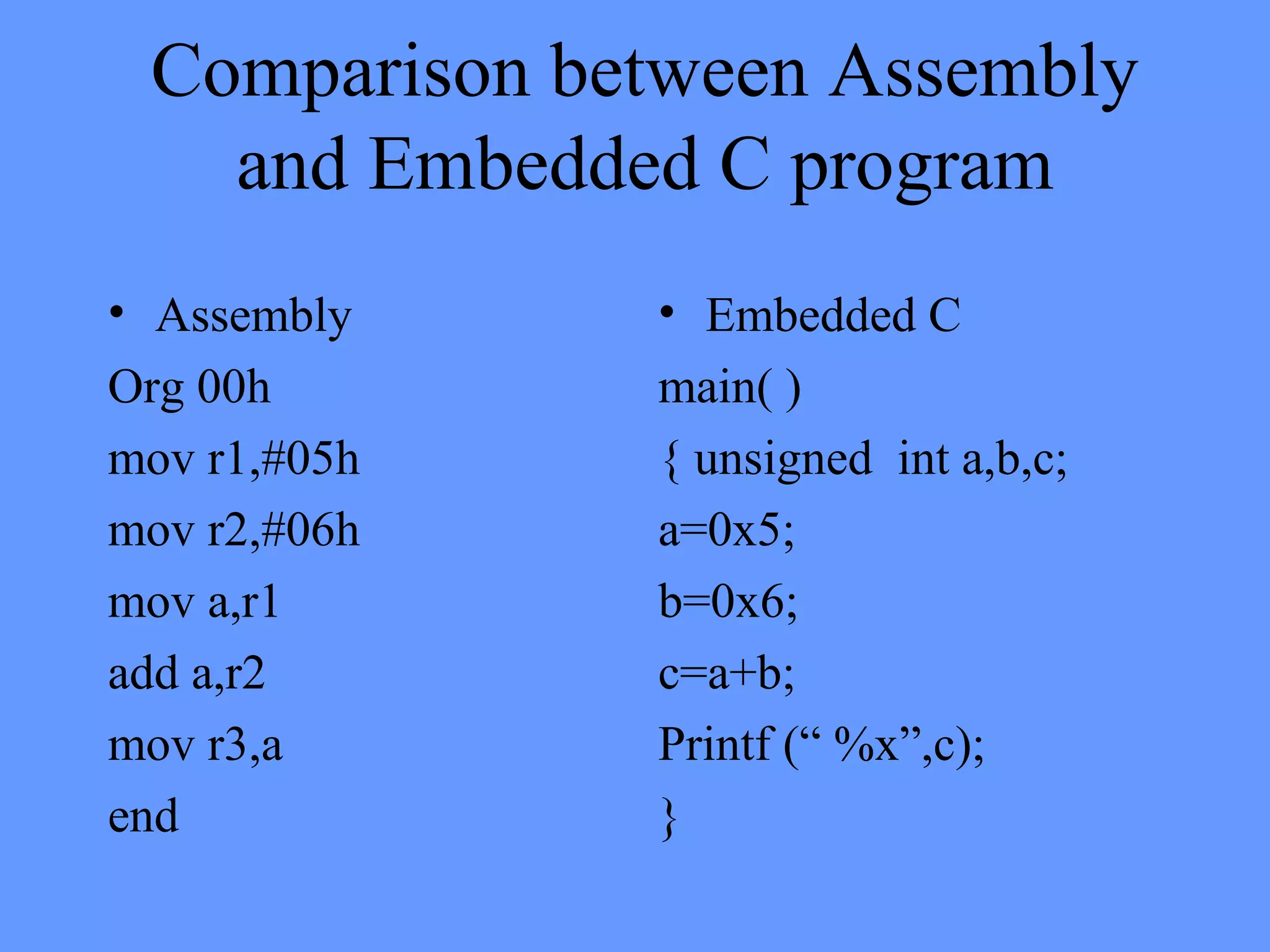
Comparison between Assembly
and Embedded C program
• Assembly
Org 00h
mov r1,#05h
mov r2,#06h
mov a,r1
add a,r2
mov r3,a
end
• Embedded C
main( )
{ unsigned int a,b,c;
a=0x5;
b=0x6;
c=a+b;
Printf (“ %x”,c);
}
Difference between Conventional C and
Embedded C.
• Compliers for conventional C are TC, BC
• Compilers for Embedded C are keil µvision - 2 &
3, PIC C etc.
• Conventional C programs needs complier to
compile the program & run it.
• The embedded C program needs a cross compiler
to compile & generate HEX code.
• The programs in C are basically processor
dependent whereas Embedded C programs are
micro controller dependent.
• The C program is used for developing an
application and not suitable for embedded
systems.
• The embedded C is an extension of the
conventional C. i.e Embedded C has all
the features of normal C, but has some
extra added features which are not
available in C.
• Many functions in C do not support
Reentrant concept of functions.
• C is not memory specific. i.e variables
cannot be put in the desired memory
location but the location of variable can be
found out.
• In embedded C this can be done using
specific inbuilt instructions.
• C depends on particular processor or
application.
• Embedded C is Controller or target specific.
• Embedded C allows direct communication
with memory.
Why C for Micro controllers
• Compatibility
• Direct access to hardware address
• Direct connection to interrupts
• Optimization consideration
• Development environment
• Reentrancy
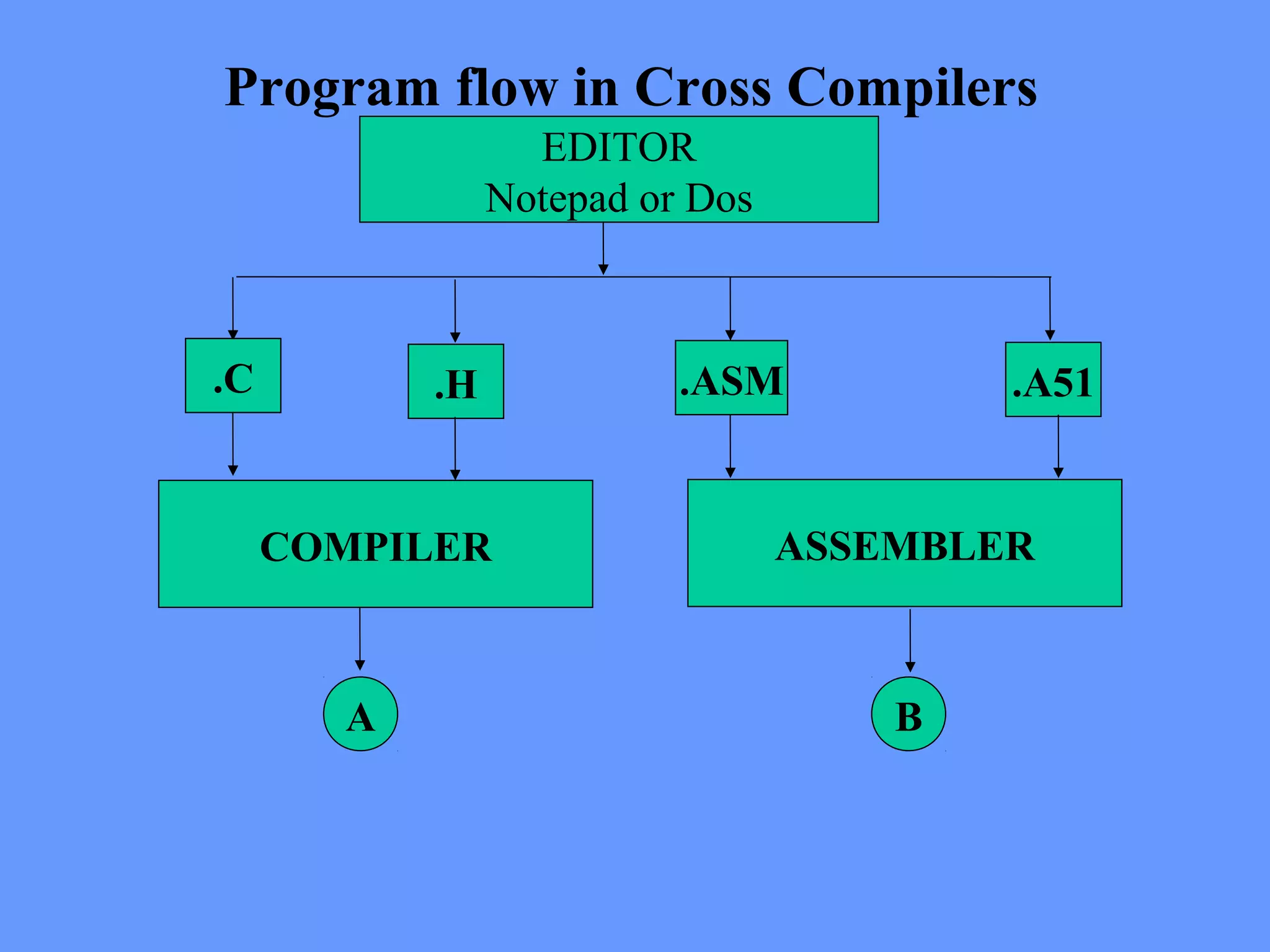
Program flow in Cross Compilers
EDITOR
Notepad or Dos
.C .H .ASM .A51
COMPILER ASSEMBLER
A B
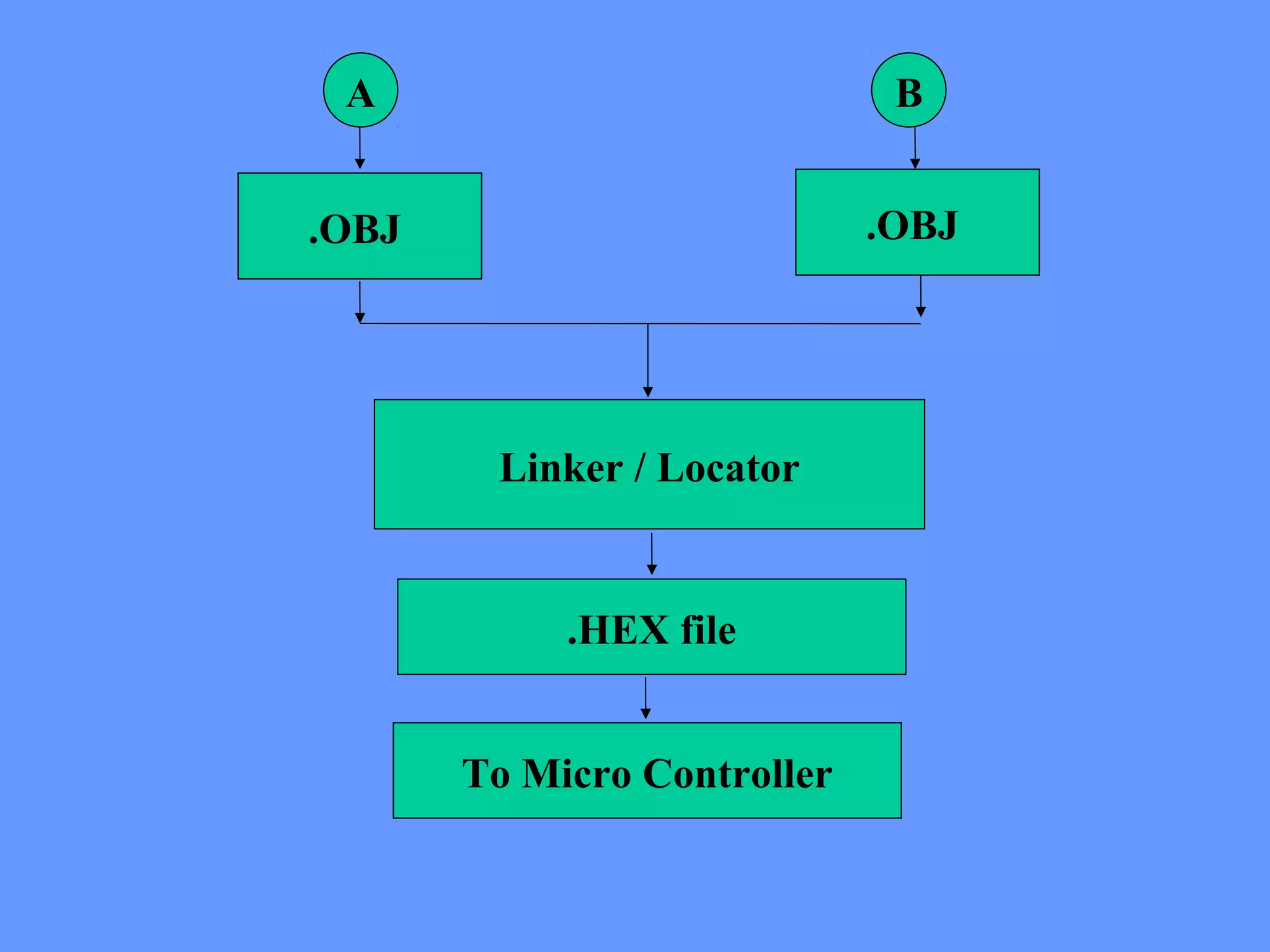
A B
.OBJ .OBJ
Linker / Locator
.HEX file
To Micro Controller
Bit Level Programming & Optimization
Embedded C offers a unique concept of bit level
programming.
This concept is mainly used to declare a variable that
will be stored in the bit addressable area of data
memory.
This is very useful because the variable declared in
this fashion directly points the data in a particular
segment of memory.
Structures and Unions are possible in bit operation.
The bits of the variable can be accessed without using
previously declared bit names.
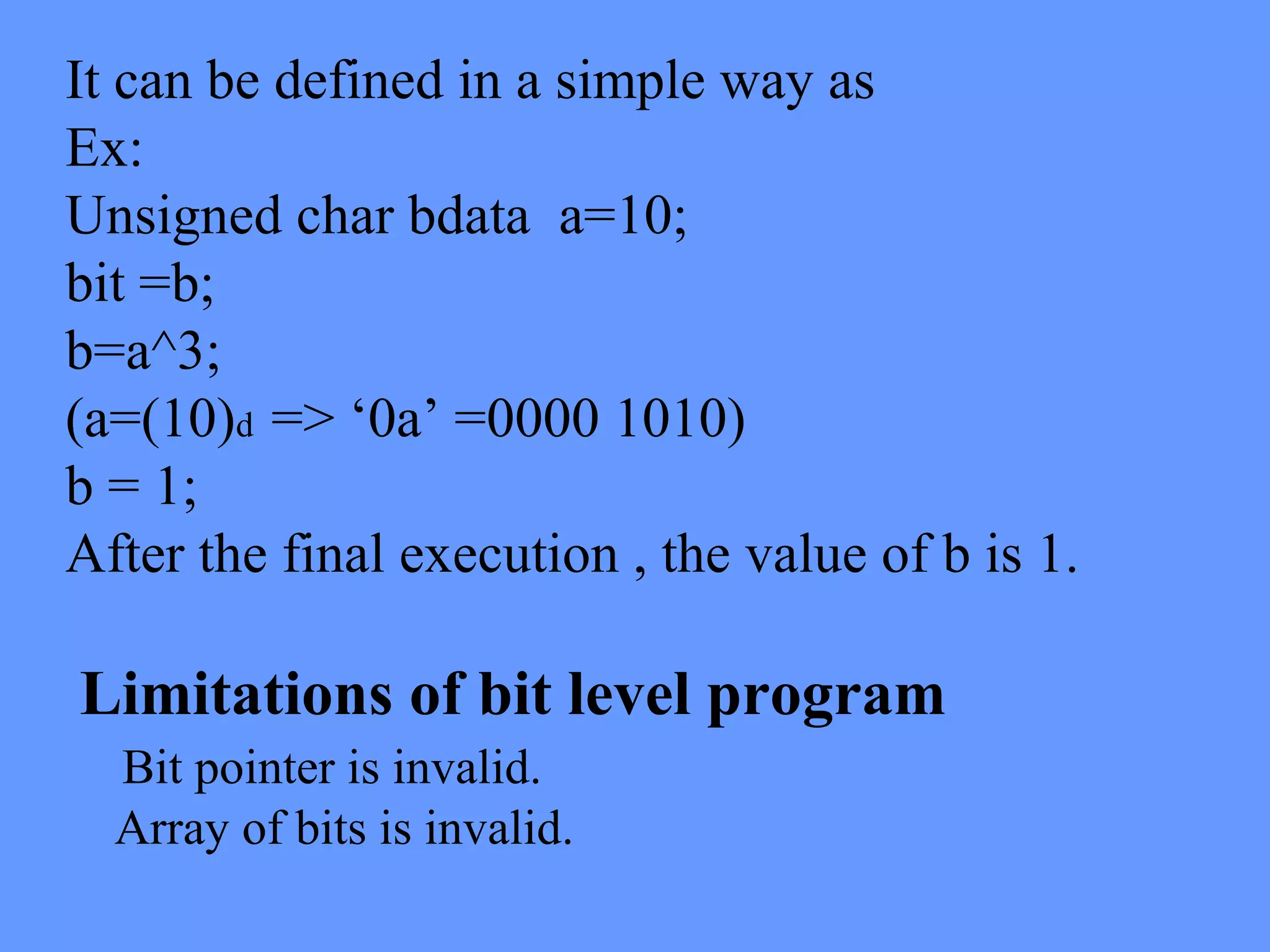
It can be defined in a simple way as
Ex:
Unsigned char bdata a=10;
bit =b;
b=a^3;
(a=(10)d => ‘0a’ =0000 1010)
b = 1;
After the final execution , the value of b is 1.
Limitations of bit level program
Bit pointer is invalid.
Array of bits is invalid.
Startup code
• Startup code is an extra piece of software that
executes prior to main(). The startup code is
generally written in assembly language and linked
with any executable that you build.
• It prepares the way for the execution of programs
written in a high-level language.
• Each such language has its own set of expectations
about the run-time environment in which programs
are executed.
• For example, many languages utilize a stack. Space
for the stack must be allocated and some registers or
data structures initialized before software written in
the high-level language can be properly executed.
• Startup code for an embedded system should
be provided with the cross compiler.
• If the compiler is designed to be used for
embedded software development, it generally
will be. But it is also important to consider
whether this code and its proper use are well
documented.
• The startup code will be written in the
assembly language of your target
processor and should, ideally, be provided to
you in source code form. If properly
implemented, you shouldn't ever need to
make any changes, but it's still helpful to look
at it and understand what it does.
• Startup code for C/C++ usually performs the
following actions:
• Disable interrupts
• Copy any initialized data from ROM to RAM
• Zero the un-initialized data area
• Allocate space for and initialize the stack
• Create and initialize the heap
• Execute the constructors and initializers for all
global variables (C++ only)
• Enable interrupts
• Call main()
Embedded Software Development
• The embedded software development tools, cannot
make assumption about the target platform.
• The user has to provide some details of the system
to the tools through explicit statements or
instructions.
• Once these data are given to the tools, these tools
generate the expected outputs on the computer
system itself so that the programmer can analyze
or make suitable changes in the software to get the
desired output.
Reentrancy, Static, Volatile keywords
• A variable is a named object that resides in the
RAM.
• In C programs each function call causes a frame to
be pushed on to stack which contains function
parameters and allocation of the locals of the
functions.
• In embedded C there is no stack allocated .
• In a block of memory, a function is given a fixed
address space for its local variables .
• Thus recursive calls to a function will cause the
data in the variables to be corrupted.
• In this, a separate copy of the locals for
each function exists.
• Because the stack is simulated reentrant
functions are large.
• Care should be taken that these function do
not cross the memory limitations when
copies of the functions are created.
• This also requires the elimination of any bit
parameters, locals and return values from
reentrant functions.
Reentrant Functions
Function shared by several processes
Reentrant
Function
under
execution
SAME TIME
Another
FunctionINTERRUPTS
Reentrant
Function
Starts Again
int calc (char I, int b) reentrant
{
int x;
x=table [ i ];
return (x * b);
}
Reentrant
function known
as Recursive
function and
c a l l e d
simultaneously
by two or more
functions
Used in real-time applications where
interrupt code & non-interrupt code
must share a function.
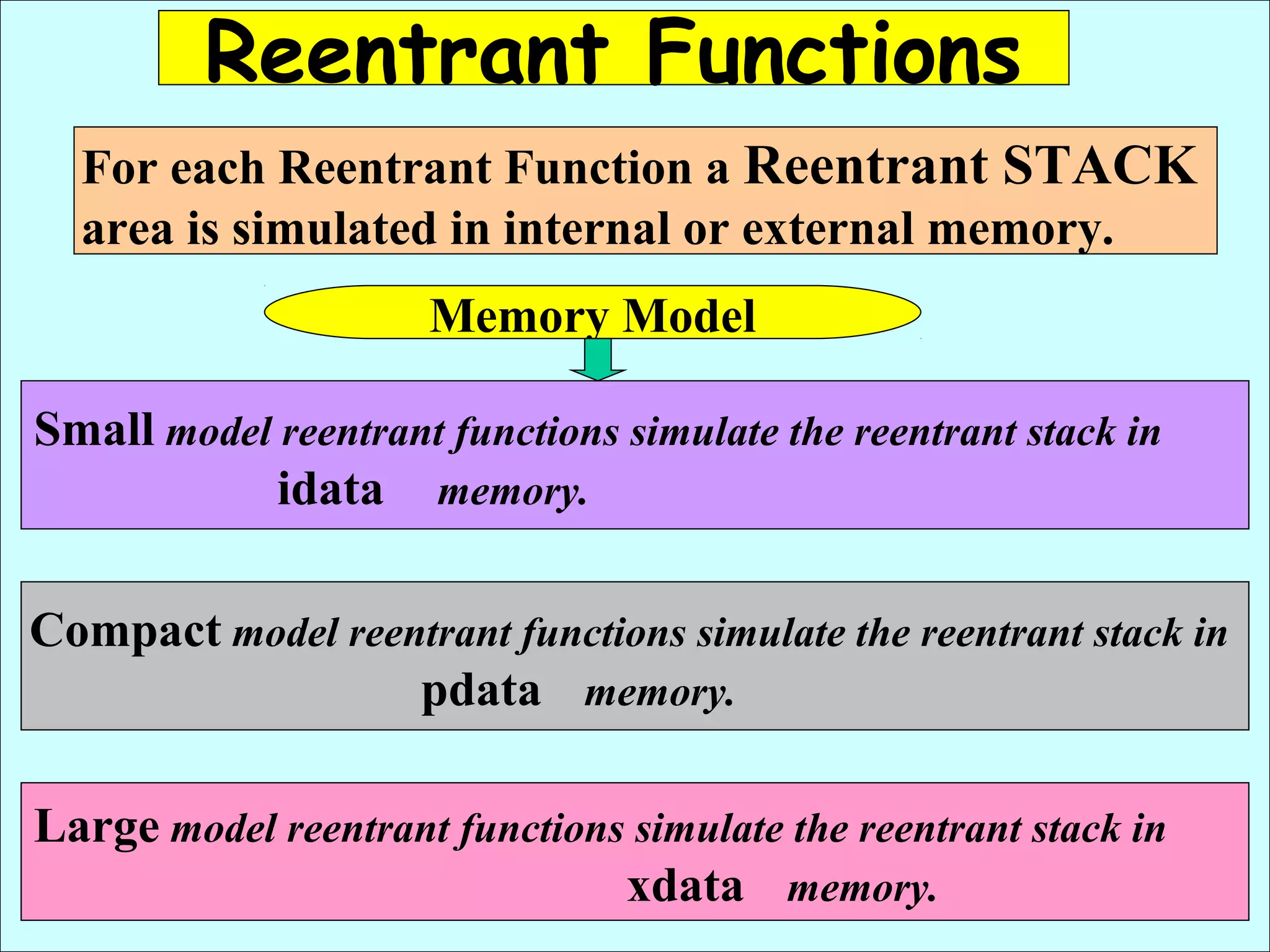
Reentrant Functions
For each Reentrant Function a Reentrant STACK
area is simulated in internal or external memory.
Memory Model
Small model reentrant functions simulate the reentrant stack in
idata memory.
Compact model reentrant functions simulate the reentrant stack in
pdata memory.
Large model reentrant functions simulate the reentrant stack in
xdata memory.
VOLATILE MODIFIERS
• Volatile is global variable.
• These are specifically used in case of ports or
interrupts.
Features :
• Volatile takes 1 byte instruction.
• Permanent memory location is allotted.
• Type casting is not possible.
• No optimization.
• Volatile can modify the value dynamically.
• Volatile modifier can change the value outside the
scope of function.
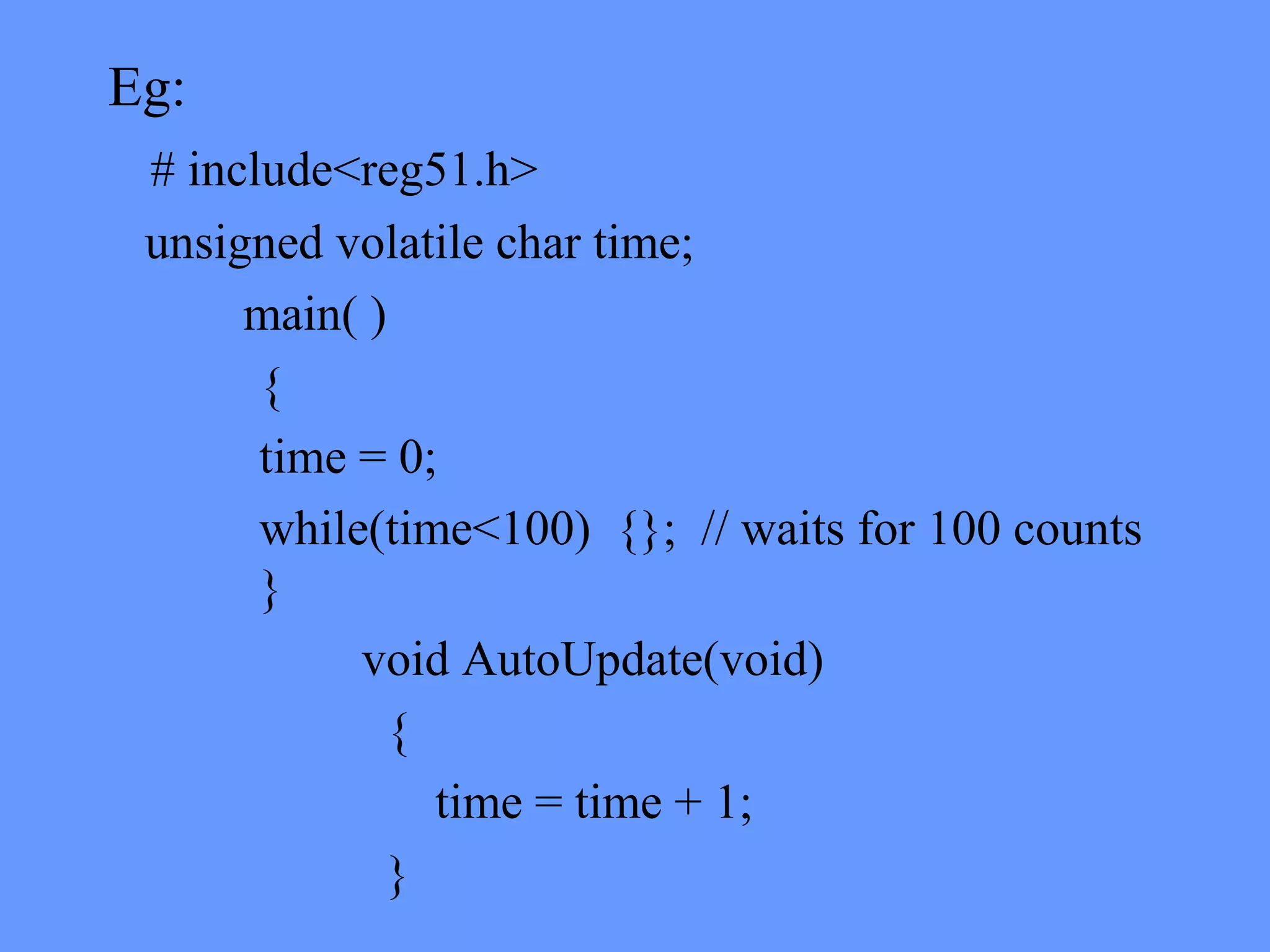
Eg:
# include<reg51.h>
unsigned volatile char time;
main( )
{
time = 0;
while(time<100) {}; // waits for 100 counts
}
void AutoUpdate(void)
{
time = time + 1;
}
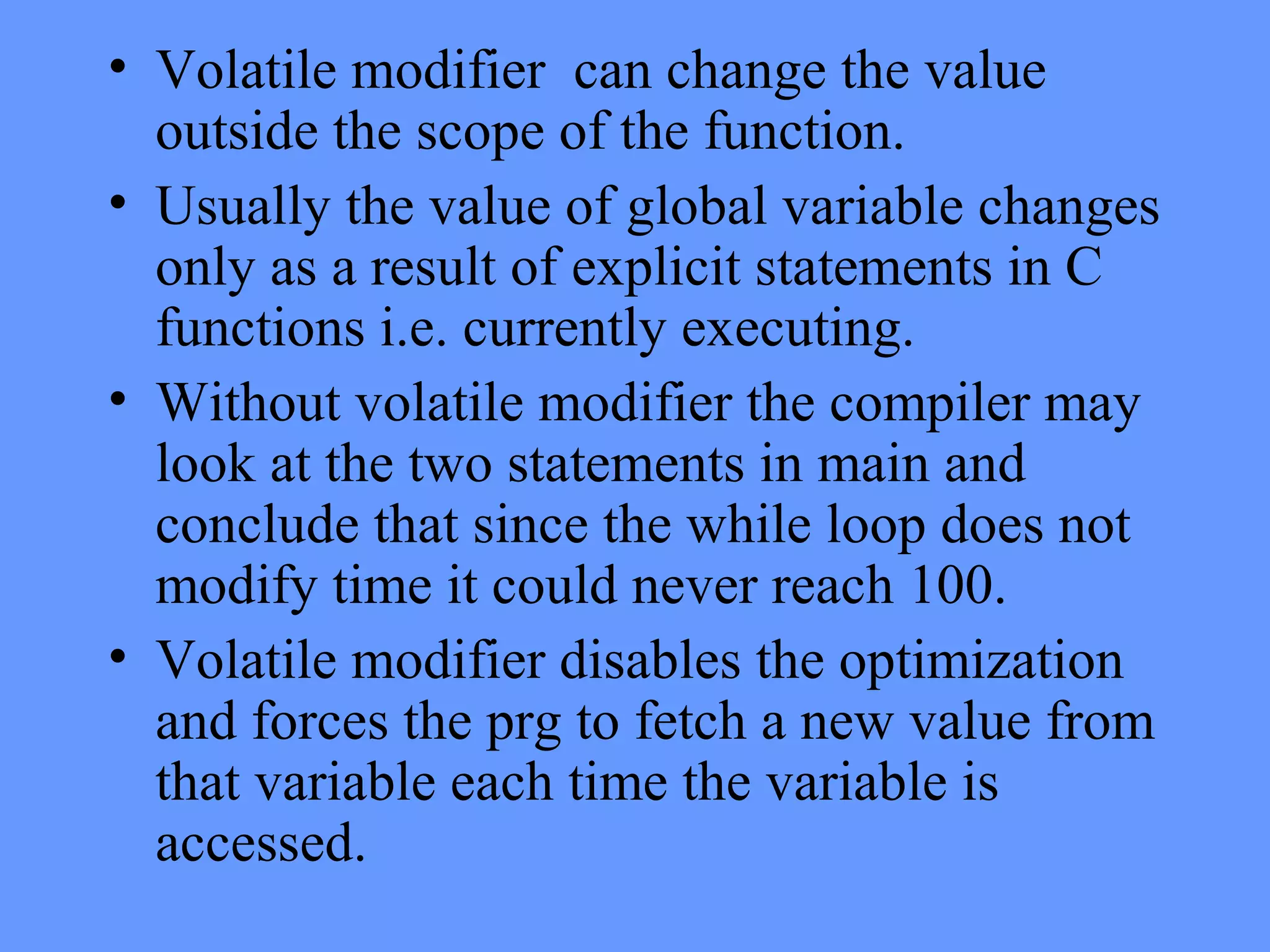
• Volatile modifier can change the value
outside the scope of the function.
• Usually the value of global variable changes
only as a result of explicit statements in C
functions i.e. currently executing.
• Without volatile modifier the compiler may
look at the two statements in main and
conclude that since the while loop does not
modify time it could never reach 100.
• Volatile modifier disables the optimization
and forces the prg to fetch a new value from
that variable each time the variable is
accessed.
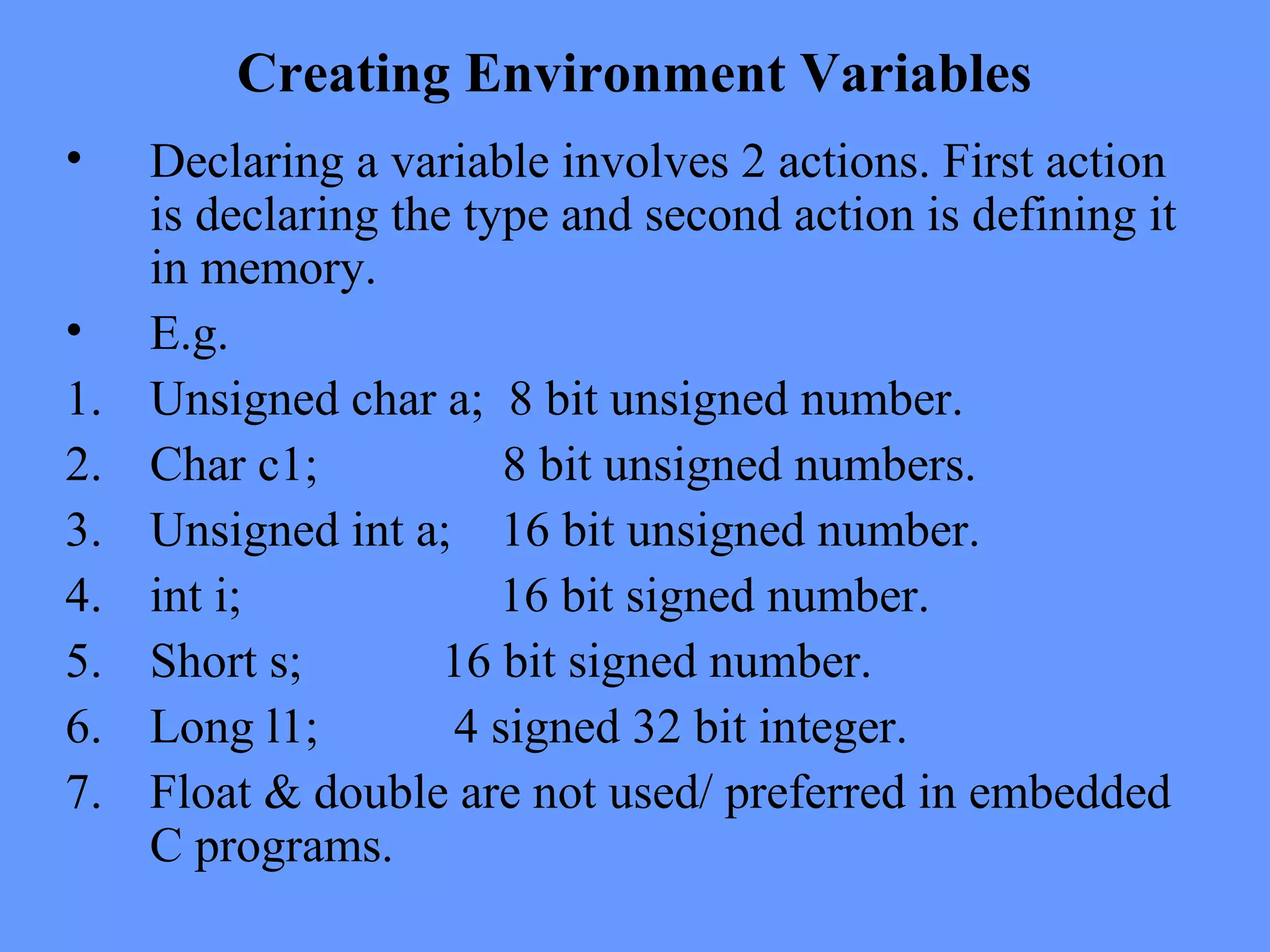
Creating Environment Variables
• Declaring a variable involves 2 actions. First action
is declaring the type and second action is defining it
in memory.
• E.g.
1. Unsigned char a; 8 bit unsigned number.
2. Char c1; 8 bit unsigned numbers.
3. Unsigned int a; 16 bit unsigned number.
4. int i; 16 bit signed number.
5. Short s; 16 bit signed number.
6. Long l1; 4 signed 32 bit integer.
7. Float & double are not used/ preferred in embedded
C programs.
Automatic and Static Variables.
These contents are allowed to change, all the
variables must be located in the RAM and not
ROM.
Automatic variables contains temporary information
used only by one software module.These variables
are allocated,used and then de-allocated from the
stack.These variables provide protection limiting
the scope of access in such a way that only the
program that created the local variable can access
it.The information stored in this are not permanent.
Static variable is information shared by more than
one program module. Static variables are not de-
allocated. The memory is permanent.
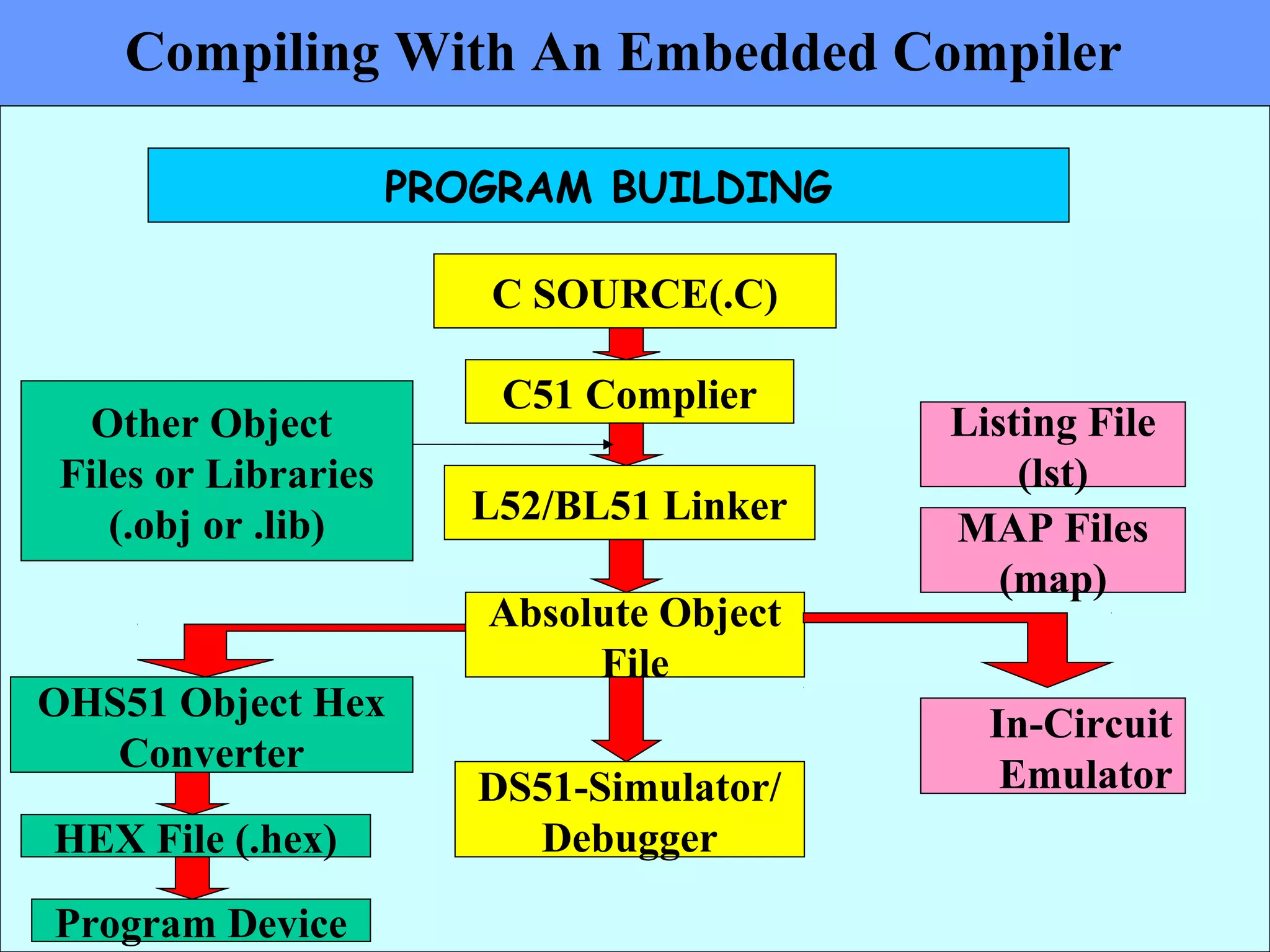
Compiling With An Embedded Compiler
PROGRAM BUILDING
C SOURCE(.C)
C51 Complier
L52/BL51 Linker
Absolute Object
File
DS51-Simulator/
Debugger
Other Object
Files or Libraries
(.obj or .lib)
OHS51 Object Hex
Converter
In-Circuit
Emulator
HEX File (.hex)
Program Device
Listing File
(lst)
MAP Files
(map)
Creating Executable Programs, temporary
files,Include files and Library files.
• The C source code is compiled using c51 compiler by
invoking C51.exe.
• The command line is
C51 source files [directives….]
where
Source files: is the name of the source program to be
compiled.
Directive: are directives to the compiler to control the
function of the compiler
• The source code is usually developed in C or
assembly which are executable programs.
• C51 compiler generates a series of output files
during compilation.
• Basename.lst : (list file) these contain formatted
source text with any errors detected by the
compiler .
• Basename.obj: (object code) These contain the
relocatable object code.These are linked to an
absolute module by L51 linker/locator.
• Basename.I:contains source text as expanded by
the preprocessor.All macros are expanded and all
comments are deleted on this listing.32
• Basename.src: these are assembly source files
generated from c source code.These are assembled
with A51 assembler.
• Basename.hex (I): this is a hex file or a binary file
used to program the device.
Include files:
Embedded c program needs some important include
and library files.Include files includes mainly the
header files which are required to convert the
source code suitable for application or device.
• Some of the most common header files used in the
ARM LPC 2129 are “LPC21xx.h”.
• Apart from these, common header used in
conventional C i.e <stdio.h> can be used.
• User can create own header files and reduce the
code size.
• Some of the important library functions are
inbuilt features that help the user to access the
internal memory location as well as external
hardware pins of the device.
• Some of these header files as well as the library
functions are not available in conventional C.
Running the Compiler
The most commonly used compilers are keil- 2,3
, Pic C and Hitech C.
In Keil micro-vision 2 or 3,
A new project has to be created in the start.
For that project, a target, usually a controller which is
used for the application is selected .
For that project a source group is added.Source group
usually contains the source code files.
Once the source code is developed ,this code is
compiled by the cross compiler.
This compilation is usually called as “Build”.
During this stage, object files are created by the
compiler.
After compilation, these are linked to the linker
which produces a .hex code.These code
formats are suitable for the micro controller.
Identifying Error Levels During compilation:
There are three different categories in identifying
the error levels during compilation. These errors
are caused during
1.assembling
2.compiling and
3.Run time.
The assembling errors are caused during the
assembling of the source code.The compilation
errors are generated during compilation.
The above two errors are caused due to syntax
errors in the program . These errors are generated
by the compiler for the users reference. The errors
and the reason for these are provided as help to the
user in Keil library functions.
These are described under the heading as
A51(assembling errors), C51(compile time
errors) and Linking errors.
Run time errors:
The runtime errors are caused during the linking
of the source code. The runtime errors are generated
during runtime by loader/linker. These errors are not
highlighted during the compile time. Because these
errors does not affect the compiler while generating
object code.
These errors are caused when the processor cannot
execute any instruction which are used in the program.
The errors and the reason for these are provided as help
to the user in Keil library functions.
Generation of Compiler output files
A compiler mainly translates program written in a high
level language into an equivalent set of opcodes for a
particular processor.Each processor has its own unique
machine language .
A compiler that runs on one computer platform and
produces code for another is called as
“Cross compiler”.
A compiler produces a series of files called as object
files.
CROSS COMPLIERS
1. Edit the program
1. Compilation
1. Running /
Execution
4. Output
Compiler
Uses OS as
Platform
Cross Compiler
Uses OS as
Platform
1. Edit the program
1. Compilation
Execution and output
Uses 2nd
platform
ie hardware
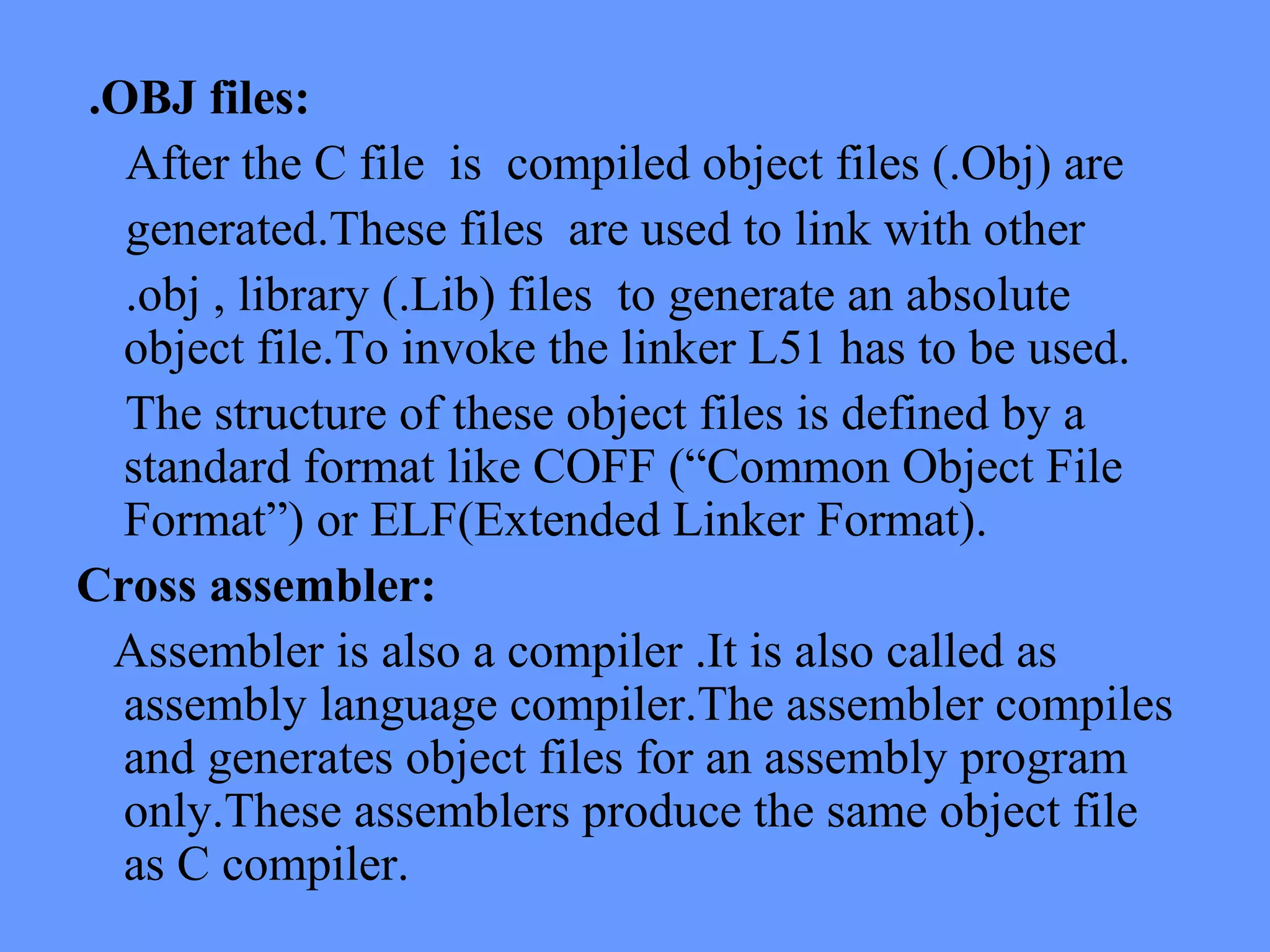
.OBJ files:
After the C file is compiled object files (.Obj) are
generated.These files are used to link with other
.obj , library (.Lib) files to generate an absolute
object file.To invoke the linker L51 has to be used.
The structure of these object files is defined by a
standard format like COFF (“Common Object File
Format”) or ELF(Extended Linker Format).
Cross assembler:
Assembler is also a compiler .It is also called as
assembly language compiler.The assembler compiles
and generates object files for an assembly program
only.These assemblers produce the same object file
as C compiler.
Debuggers:
Are used for the step by step execution of the
program.In this for each execution in steps, the
debugger operates on the object code generated
during compile time.
Linkers:
The different object files generated by the
compiler are linked together to form a new object
file. This file contains all the code and data from
the input object files and are in the same object
file format.
MAP files generated by the linker gives
information of absolute object file/absolute
location of program,which includes both data and
code. Once the linking is finished, all the machine
language codes from all the input object files will
be in the text section of the new data.
While the linker is in the process of merging the
contents it also looks for unresolved symbols.
After merging all the code & data sections &
resolving all the symbol references, the linker
produces a special relocatable copy of the
program. i.e. The program is complete except that
no memory address is allotted for data & code
sections.
Locator / Loader:
• The tool that performs the conversion from
relocatable program to executable binary images
is called locater.
The input to the locater is the information about
the memory on the target address .
• The locater uses the information to assign physical
memory to each code & data sections within the
locatable program.
• It will then produce an output file that contains a
binary memory image that can be loaded into the
target ROM.
• In 8051/ ARM the locater is built in the linker
itself.
• The memory information required by the linker is
passed in the form of a linker script.
• This script informs the linker’s built in locator
about the memory on the target board and instructs
it to locate the data and BSS sections in the RAM.
• The result of this final step of build process is an
absolutely located binary image that can be
downloaded to an embedded system or
programmed in to a read –memory device.
Emulator :
Emulators are hardware devices which duplicate the
functions of one system as that of the other system, so
that second system appears to behave as the first
system.
Emulators are basically the processor modules which
are custom programmed to behave as the actual target
system as it was a real target.
These are based on single processor. The processor are
preprogrammed for the target requirement.
In the actual circuit all the devices are physically
present on the system so that they provide the desired
signals to the processor or controller to do its job.
• In this, since the processor are preprogrammed, the
signals generated by the actual devices on the target
are particularly generated by the processor and the
processor generates corresponding required output
which should be actually generated by the target itself.
Simulators
Simulators are software, present in the IDE
that simulates the hardware conditions which
would have been generated by the actual
hardware components in the target.
These help the programmer to debug the
program step by step and check the proper
flow of the program. This works on the
concept of virtual circuit. We can check the
output by simulating the required condition.
8051 Simulator simplifies code development
with Micro C and Micro-IDE.
Errors in user programs can be found and fixed
quickly in simulation mode by avoiding time
consuming downloads to the target board. Support
for hardware ports in simulation. Use real I/O
ports from your target boards while simulating the
program on your PC. Integrated Development
Environment to edit, build, download, simulate
and debug within the same program. Simulation of
8051 programs in C, Assembly or mixed level.
Simulated program can be simultaneously viewed
in C and Assembly.
Variable window to watch C variable names,
values and addresses.
Register window to watch the simulated special function
registers including all ports.
Memory window to watch and modify up to 4GB of
simulated program memory, 256kB.
Call stack window to view list of function calls that lead to
current program line (traces all jumps and calls )
Terminal window to simulate the serial port ( both receive
and transmit are simulated )
Output Window Debug Tab to watch debug messages
Fully customizable window layout with dockable or
floating debug windows. Stop Debugging button to stop
simulation at any point Go button to start execution Step
Into and Step Over buttons to single-step through the
source code at C or Assembly level Unlimited number of
breakpoints to stop execution at any C or Assembly source
line.
Rules for developing Embedded C
Program
• Code Optimization.
1. Minimize local variables
If the number of local variables in a function is less,
the compiler will be able to fit them into registers.
Hence, it will be avoiding frame pointer operations
on local variables that are kept on stack. This can
result in considerable improvement due to two
reasons:
• All local variables are in registers so this improves
performance over accessing them from memory.
• If no local variables need to be saved on the stack,
the compiler will not incur the overhead of setting up
and restoring the frame pointer.
1. Declare local variables in the inner most scope
• Do not declare all the local variables in the
outermost function scope.
• If local variables are declared in the inner most
scope.
• If the parameter was declared in the outermost
scope, all function calls would have incurred the
overhead of object .
• Place case labels in narrow range
•If the case labels are in a narrow range, the compiler
does not generate a if-else-if cascade for the switch
statement.
• Instead, it generates a jump table of case labels along
with manipulating the value of the switch to index the
table.
•This code generated is faster than if-else-if cascade
code that is generated in cases where the case labels
are far apart.
•Also, performance of a jump table based switch
statement is independent of the number of case entries
in switch statement.
Reduce the number of parameters
Function calls with large number of parameters may be
expensive due to large number of parameter pushes on stack on
each call.
For the same reason, avoid passing complete structures
as parameters. Use pointers and references in such cases.
Use references for parameter passing and return value for
types bigger than 4 bytes
Passing parameters by value results in the complete
parameter being copied on to the stack. This is fine for regular
types like integer, pointer etc. These types are generally restricted
to four bytes. When passing bigger types, the cost of copying the
object on the stack can be prohibitive. When the function exits the
destructor will also be invoked.
 
Thus it is efficient to pass references as parameters. This
way you save on the overhead of a temporary object
creation, copying and destruction. This optimization can
be performed easily without a major impact to the code by
replacing pass by value parameters by const references.
(It is important to pass const references so that a bug in
the called function does not change the actual value of the
parameter.
Passing bigger objects as return values also has the same
performance issues. A temporary return object is created
in this case too.
•Use All the SFR’s in capital letters only.
•Reduce the warnings in the program.
•Make use of MACRO definitions in the program.
•Always define the variables in the code memory by using the
keyword code in declaration.
•Eg unsigned int code a[] = { };
•Always define as unsigned type of declaration.
•Make use of sbit definition for single bit declaration.
•Eg sbit rs = P3^6;
•Since these are not floating point co-processor, no decimal
values can be given as input to them.
• So we cannot define the above declaration as sbit rs = P3.6.
• The declaration like this below are invalid.
P3^6 = 0;
• P3^6 is bit addressable type & 0 is a 8 bit data which cannot be
stored in single bit.
• Permanent termination of the program is got by using while(1);
• Infinite loop can be achieved by
while(1)
{
………
}

Embedded _c_

  • 1.
  • 2.
    Topics : 1. OperatingSystems vs. Embedded Systems. 2. Usage of High Level Languages such as C. 3. Assembly vs. C. 4. Difference between Conventional C and Embedded C. 1. Advantages Of Embedded C . 2. Why C Language for Embedded Systems. 3. Cross compilers. 4. Bit wise operations and start up code. 5. Reentrant functions , Volatile modifiers. 10. Rules for embedded C programming.
  • 3.
    Operating Systems vs. EmbeddedSystems • In OS or most of the non-embedded concepts the processing is of main concern and the Input / output . • In Embedded , it is the input / output that is important and processing serves only to connect inputs with outputs.
  • 4.
    • OS isnot closely tied to the hardware, and, it manipulates hardware registers for memory management,task process switching,interrupt request etc. • Embedded Systems are closely tied to the hardware throughout the system. The system consists of manipulating the hardware registers. • Developing a program in C involves large memory caches, virtual memory,register sets.
  • 5.
    • But Embeddedsystems have limited memory space and registers. • The development of OS does not have the restrictions of the size of the overall systems, power consumption to a larger extent. • The above parameter have to be considered in designing an Embedded Systems.
  • 6.
    Usage of HighLevel Languages. • C being a high level language and a familiar language, among the programmers it has become the first choice. • Languages such as C are easy in coding.Because they are more reliable programs and they have increased programmer productivity and portability across hardware. • C has its reputation increased and it is also implemented in operating systems.
  • 7.
    Assembly v/s C. •The assembly code is difficult to read and maintain. • The amount of code reusable from assembly code is very low. • C programs are easy to read,understand,maintain, because it possesses greater structure. • With C the programmer need not know the architecture of the processor. • Code developed in C will be more portable to other systems rather than in assembly.
  • 8.
    Comparison between Assembly andEmbedded C program • Assembly Org 00h mov r1,#05h mov r2,#06h mov a,r1 add a,r2 mov r3,a end • Embedded C main( ) { unsigned int a,b,c; a=0x5; b=0x6; c=a+b; Printf (“ %x”,c); }
  • 9.
    Difference between ConventionalC and Embedded C. • Compliers for conventional C are TC, BC • Compilers for Embedded C are keil µvision - 2 & 3, PIC C etc. • Conventional C programs needs complier to compile the program & run it. • The embedded C program needs a cross compiler to compile & generate HEX code. • The programs in C are basically processor dependent whereas Embedded C programs are micro controller dependent.
  • 10.
    • The Cprogram is used for developing an application and not suitable for embedded systems. • The embedded C is an extension of the conventional C. i.e Embedded C has all the features of normal C, but has some extra added features which are not available in C. • Many functions in C do not support Reentrant concept of functions.
  • 11.
    • C isnot memory specific. i.e variables cannot be put in the desired memory location but the location of variable can be found out. • In embedded C this can be done using specific inbuilt instructions. • C depends on particular processor or application. • Embedded C is Controller or target specific. • Embedded C allows direct communication with memory.
  • 12.
    Why C forMicro controllers • Compatibility • Direct access to hardware address • Direct connection to interrupts • Optimization consideration • Development environment • Reentrancy
  • 13.
    Program flow inCross Compilers EDITOR Notepad or Dos .C .H .ASM .A51 COMPILER ASSEMBLER A B
  • 14.
    A B .OBJ .OBJ Linker/ Locator .HEX file To Micro Controller
  • 15.
    Bit Level Programming& Optimization Embedded C offers a unique concept of bit level programming. This concept is mainly used to declare a variable that will be stored in the bit addressable area of data memory. This is very useful because the variable declared in this fashion directly points the data in a particular segment of memory. Structures and Unions are possible in bit operation. The bits of the variable can be accessed without using previously declared bit names.
  • 16.
    It can bedefined in a simple way as Ex: Unsigned char bdata a=10; bit =b; b=a^3; (a=(10)d => ‘0a’ =0000 1010) b = 1; After the final execution , the value of b is 1. Limitations of bit level program Bit pointer is invalid. Array of bits is invalid.
  • 17.
    Startup code • Startupcode is an extra piece of software that executes prior to main(). The startup code is generally written in assembly language and linked with any executable that you build. • It prepares the way for the execution of programs written in a high-level language. • Each such language has its own set of expectations about the run-time environment in which programs are executed. • For example, many languages utilize a stack. Space for the stack must be allocated and some registers or data structures initialized before software written in the high-level language can be properly executed.
  • 18.
    • Startup codefor an embedded system should be provided with the cross compiler. • If the compiler is designed to be used for embedded software development, it generally will be. But it is also important to consider whether this code and its proper use are well documented. • The startup code will be written in the assembly language of your target processor and should, ideally, be provided to you in source code form. If properly implemented, you shouldn't ever need to make any changes, but it's still helpful to look at it and understand what it does.
  • 19.
    • Startup codefor C/C++ usually performs the following actions: • Disable interrupts • Copy any initialized data from ROM to RAM • Zero the un-initialized data area • Allocate space for and initialize the stack • Create and initialize the heap • Execute the constructors and initializers for all global variables (C++ only) • Enable interrupts • Call main()
  • 20.
    Embedded Software Development •The embedded software development tools, cannot make assumption about the target platform. • The user has to provide some details of the system to the tools through explicit statements or instructions. • Once these data are given to the tools, these tools generate the expected outputs on the computer system itself so that the programmer can analyze or make suitable changes in the software to get the desired output.
  • 21.
    Reentrancy, Static, Volatilekeywords • A variable is a named object that resides in the RAM. • In C programs each function call causes a frame to be pushed on to stack which contains function parameters and allocation of the locals of the functions. • In embedded C there is no stack allocated . • In a block of memory, a function is given a fixed address space for its local variables . • Thus recursive calls to a function will cause the data in the variables to be corrupted.
  • 22.
    • In this,a separate copy of the locals for each function exists. • Because the stack is simulated reentrant functions are large. • Care should be taken that these function do not cross the memory limitations when copies of the functions are created. • This also requires the elimination of any bit parameters, locals and return values from reentrant functions.
  • 23.
    Reentrant Functions Function sharedby several processes Reentrant Function under execution SAME TIME Another FunctionINTERRUPTS Reentrant Function Starts Again int calc (char I, int b) reentrant { int x; x=table [ i ]; return (x * b); } Reentrant function known as Recursive function and c a l l e d simultaneously by two or more functions Used in real-time applications where interrupt code & non-interrupt code must share a function.
  • 24.
    Reentrant Functions For eachReentrant Function a Reentrant STACK area is simulated in internal or external memory. Memory Model Small model reentrant functions simulate the reentrant stack in idata memory. Compact model reentrant functions simulate the reentrant stack in pdata memory. Large model reentrant functions simulate the reentrant stack in xdata memory.
  • 25.
    VOLATILE MODIFIERS • Volatileis global variable. • These are specifically used in case of ports or interrupts. Features : • Volatile takes 1 byte instruction. • Permanent memory location is allotted. • Type casting is not possible. • No optimization. • Volatile can modify the value dynamically. • Volatile modifier can change the value outside the scope of function.
  • 26.
    Eg: # include<reg51.h> unsigned volatilechar time; main( ) { time = 0; while(time<100) {}; // waits for 100 counts } void AutoUpdate(void) { time = time + 1; }
  • 27.
    • Volatile modifiercan change the value outside the scope of the function. • Usually the value of global variable changes only as a result of explicit statements in C functions i.e. currently executing. • Without volatile modifier the compiler may look at the two statements in main and conclude that since the while loop does not modify time it could never reach 100. • Volatile modifier disables the optimization and forces the prg to fetch a new value from that variable each time the variable is accessed.
  • 28.
    Creating Environment Variables •Declaring a variable involves 2 actions. First action is declaring the type and second action is defining it in memory. • E.g. 1. Unsigned char a; 8 bit unsigned number. 2. Char c1; 8 bit unsigned numbers. 3. Unsigned int a; 16 bit unsigned number. 4. int i; 16 bit signed number. 5. Short s; 16 bit signed number. 6. Long l1; 4 signed 32 bit integer. 7. Float & double are not used/ preferred in embedded C programs.
  • 29.
    Automatic and StaticVariables. These contents are allowed to change, all the variables must be located in the RAM and not ROM. Automatic variables contains temporary information used only by one software module.These variables are allocated,used and then de-allocated from the stack.These variables provide protection limiting the scope of access in such a way that only the program that created the local variable can access it.The information stored in this are not permanent. Static variable is information shared by more than one program module. Static variables are not de- allocated. The memory is permanent.
  • 30.
    Compiling With AnEmbedded Compiler PROGRAM BUILDING C SOURCE(.C) C51 Complier L52/BL51 Linker Absolute Object File DS51-Simulator/ Debugger Other Object Files or Libraries (.obj or .lib) OHS51 Object Hex Converter In-Circuit Emulator HEX File (.hex) Program Device Listing File (lst) MAP Files (map)
  • 31.
    Creating Executable Programs,temporary files,Include files and Library files. • The C source code is compiled using c51 compiler by invoking C51.exe. • The command line is C51 source files [directives….] where Source files: is the name of the source program to be compiled. Directive: are directives to the compiler to control the function of the compiler
  • 32.
    • The sourcecode is usually developed in C or assembly which are executable programs. • C51 compiler generates a series of output files during compilation. • Basename.lst : (list file) these contain formatted source text with any errors detected by the compiler . • Basename.obj: (object code) These contain the relocatable object code.These are linked to an absolute module by L51 linker/locator. • Basename.I:contains source text as expanded by the preprocessor.All macros are expanded and all comments are deleted on this listing.32
  • 33.
    • Basename.src: theseare assembly source files generated from c source code.These are assembled with A51 assembler. • Basename.hex (I): this is a hex file or a binary file used to program the device. Include files: Embedded c program needs some important include and library files.Include files includes mainly the header files which are required to convert the source code suitable for application or device.
  • 34.
    • Some ofthe most common header files used in the ARM LPC 2129 are “LPC21xx.h”. • Apart from these, common header used in conventional C i.e <stdio.h> can be used. • User can create own header files and reduce the code size. • Some of the important library functions are inbuilt features that help the user to access the internal memory location as well as external hardware pins of the device. • Some of these header files as well as the library functions are not available in conventional C.
  • 35.
    Running the Compiler Themost commonly used compilers are keil- 2,3 , Pic C and Hitech C. In Keil micro-vision 2 or 3, A new project has to be created in the start. For that project, a target, usually a controller which is used for the application is selected . For that project a source group is added.Source group usually contains the source code files. Once the source code is developed ,this code is compiled by the cross compiler. This compilation is usually called as “Build”. During this stage, object files are created by the compiler.
  • 36.
    After compilation, theseare linked to the linker which produces a .hex code.These code formats are suitable for the micro controller.
  • 37.
    Identifying Error LevelsDuring compilation: There are three different categories in identifying the error levels during compilation. These errors are caused during 1.assembling 2.compiling and 3.Run time. The assembling errors are caused during the assembling of the source code.The compilation errors are generated during compilation. The above two errors are caused due to syntax errors in the program . These errors are generated by the compiler for the users reference. The errors and the reason for these are provided as help to the user in Keil library functions.
  • 38.
    These are describedunder the heading as A51(assembling errors), C51(compile time errors) and Linking errors. Run time errors: The runtime errors are caused during the linking of the source code. The runtime errors are generated during runtime by loader/linker. These errors are not highlighted during the compile time. Because these errors does not affect the compiler while generating object code. These errors are caused when the processor cannot execute any instruction which are used in the program.
  • 39.
    The errors andthe reason for these are provided as help to the user in Keil library functions. Generation of Compiler output files A compiler mainly translates program written in a high level language into an equivalent set of opcodes for a particular processor.Each processor has its own unique machine language . A compiler that runs on one computer platform and produces code for another is called as “Cross compiler”. A compiler produces a series of files called as object files.
  • 40.
    CROSS COMPLIERS 1. Editthe program 1. Compilation 1. Running / Execution 4. Output Compiler Uses OS as Platform Cross Compiler Uses OS as Platform 1. Edit the program 1. Compilation Execution and output Uses 2nd platform ie hardware
  • 41.
    .OBJ files: After theC file is compiled object files (.Obj) are generated.These files are used to link with other .obj , library (.Lib) files to generate an absolute object file.To invoke the linker L51 has to be used. The structure of these object files is defined by a standard format like COFF (“Common Object File Format”) or ELF(Extended Linker Format). Cross assembler: Assembler is also a compiler .It is also called as assembly language compiler.The assembler compiles and generates object files for an assembly program only.These assemblers produce the same object file as C compiler.
  • 42.
    Debuggers: Are used forthe step by step execution of the program.In this for each execution in steps, the debugger operates on the object code generated during compile time. Linkers: The different object files generated by the compiler are linked together to form a new object file. This file contains all the code and data from the input object files and are in the same object file format. MAP files generated by the linker gives information of absolute object file/absolute
  • 43.
    location of program,whichincludes both data and code. Once the linking is finished, all the machine language codes from all the input object files will be in the text section of the new data. While the linker is in the process of merging the contents it also looks for unresolved symbols. After merging all the code & data sections & resolving all the symbol references, the linker produces a special relocatable copy of the program. i.e. The program is complete except that no memory address is allotted for data & code sections.
  • 44.
    Locator / Loader: •The tool that performs the conversion from relocatable program to executable binary images is called locater. The input to the locater is the information about the memory on the target address . • The locater uses the information to assign physical memory to each code & data sections within the locatable program. • It will then produce an output file that contains a binary memory image that can be loaded into the target ROM. • In 8051/ ARM the locater is built in the linker itself.
  • 45.
    • The memoryinformation required by the linker is passed in the form of a linker script. • This script informs the linker’s built in locator about the memory on the target board and instructs it to locate the data and BSS sections in the RAM. • The result of this final step of build process is an absolutely located binary image that can be downloaded to an embedded system or programmed in to a read –memory device.
  • 46.
    Emulator : Emulators arehardware devices which duplicate the functions of one system as that of the other system, so that second system appears to behave as the first system. Emulators are basically the processor modules which are custom programmed to behave as the actual target system as it was a real target. These are based on single processor. The processor are preprogrammed for the target requirement. In the actual circuit all the devices are physically present on the system so that they provide the desired signals to the processor or controller to do its job.
  • 47.
    • In this,since the processor are preprogrammed, the signals generated by the actual devices on the target are particularly generated by the processor and the processor generates corresponding required output which should be actually generated by the target itself.
  • 48.
    Simulators Simulators are software,present in the IDE that simulates the hardware conditions which would have been generated by the actual hardware components in the target. These help the programmer to debug the program step by step and check the proper flow of the program. This works on the concept of virtual circuit. We can check the output by simulating the required condition. 8051 Simulator simplifies code development with Micro C and Micro-IDE.
  • 49.
    Errors in userprograms can be found and fixed quickly in simulation mode by avoiding time consuming downloads to the target board. Support for hardware ports in simulation. Use real I/O ports from your target boards while simulating the program on your PC. Integrated Development Environment to edit, build, download, simulate and debug within the same program. Simulation of 8051 programs in C, Assembly or mixed level. Simulated program can be simultaneously viewed in C and Assembly. Variable window to watch C variable names, values and addresses.
  • 50.
    Register window towatch the simulated special function registers including all ports. Memory window to watch and modify up to 4GB of simulated program memory, 256kB. Call stack window to view list of function calls that lead to current program line (traces all jumps and calls ) Terminal window to simulate the serial port ( both receive and transmit are simulated ) Output Window Debug Tab to watch debug messages Fully customizable window layout with dockable or floating debug windows. Stop Debugging button to stop simulation at any point Go button to start execution Step Into and Step Over buttons to single-step through the source code at C or Assembly level Unlimited number of breakpoints to stop execution at any C or Assembly source line.
  • 51.
    Rules for developingEmbedded C Program • Code Optimization. 1. Minimize local variables If the number of local variables in a function is less, the compiler will be able to fit them into registers. Hence, it will be avoiding frame pointer operations on local variables that are kept on stack. This can result in considerable improvement due to two reasons: • All local variables are in registers so this improves performance over accessing them from memory. • If no local variables need to be saved on the stack, the compiler will not incur the overhead of setting up and restoring the frame pointer.
  • 52.
    1. Declare localvariables in the inner most scope • Do not declare all the local variables in the outermost function scope. • If local variables are declared in the inner most scope. • If the parameter was declared in the outermost scope, all function calls would have incurred the overhead of object .
  • 53.
    • Place case labelsin narrow range •If the case labels are in a narrow range, the compiler does not generate a if-else-if cascade for the switch statement. • Instead, it generates a jump table of case labels along with manipulating the value of the switch to index the table. •This code generated is faster than if-else-if cascade code that is generated in cases where the case labels are far apart. •Also, performance of a jump table based switch statement is independent of the number of case entries in switch statement.
  • 54.
    Reduce the numberof parameters Function calls with large number of parameters may be expensive due to large number of parameter pushes on stack on each call. For the same reason, avoid passing complete structures as parameters. Use pointers and references in such cases. Use references for parameter passing and return value for types bigger than 4 bytes Passing parameters by value results in the complete parameter being copied on to the stack. This is fine for regular types like integer, pointer etc. These types are generally restricted to four bytes. When passing bigger types, the cost of copying the object on the stack can be prohibitive. When the function exits the destructor will also be invoked.  
  • 55.
    Thus it isefficient to pass references as parameters. This way you save on the overhead of a temporary object creation, copying and destruction. This optimization can be performed easily without a major impact to the code by replacing pass by value parameters by const references. (It is important to pass const references so that a bug in the called function does not change the actual value of the parameter. Passing bigger objects as return values also has the same performance issues. A temporary return object is created in this case too.
  • 56.
    •Use All theSFR’s in capital letters only. •Reduce the warnings in the program. •Make use of MACRO definitions in the program. •Always define the variables in the code memory by using the keyword code in declaration. •Eg unsigned int code a[] = { }; •Always define as unsigned type of declaration. •Make use of sbit definition for single bit declaration. •Eg sbit rs = P3^6; •Since these are not floating point co-processor, no decimal values can be given as input to them.
  • 57.
    • So wecannot define the above declaration as sbit rs = P3.6. • The declaration like this below are invalid. P3^6 = 0; • P3^6 is bit addressable type & 0 is a 8 bit data which cannot be stored in single bit. • Permanent termination of the program is got by using while(1); • Infinite loop can be achieved by while(1) { ……… }