PROGRAMMING WORKBOOK


     HAAS AUTOMATION, INC.
        2800 Sturgis Rd.
        Oxnard, CA 93030


            June 2006
JUNE 2006                                                                                   PROGRAMMING


                                       HAAS AUTOMATION INC.
                                           2800 Sturgis Road
                                         Oxnard, California 93030
                                          Phone: 805-278-1800
                                          www.HaasCNC.com


   The information in this workbook is reviewed regularly and any necessary changes will be incor-
   porated in the next revision. This material is subject to change without notice.

   Warning: This workbook is for the exclusive use of Haas Customers, Distributors and Trainers
   and is protected by copyright law. The reproduction, transmission or use of this document or its
   contents for profit is not permitted.

   All content is the property of Haas Automation, Inc., copyright 2006. This Workbook may not be
   copied,distributed or reproduced for profit, in full or in part, without written permission from Haas
   Automation, Inc. This training information is being supplied for free to all Haas
   customers and schools that are learning to use Haas equipment. Haas information should never
   be modified unless you have written permission by Haas Automation.

   Enquiries to Haas Automation about training information or a letter of authorization to copy,
   contact ebowman@haascnc.com


                                    Copyright 2006, Haas Automation


                                                                                                           I
PROGRAMMING                                                                                     JUNE 2006


                      CUSTOMER SATISFACTION PROCEDURE

     Dear Haas customer,

     Your complete satisfaction and goodwill are of the utmost importance to both Haas Automation,
     Inc., and the Haas distributor where you purchased your equipment. Normally, any concerns you
     may have about the sales transaction or the operation of your equipment will be rapidly resolved
     by your distributor.

     However, if your concerns are not resolved to your complete satisfaction, and you have dis-
     cussed your concerns with a member of the dealership’s management, the General Manager or
     the dealership’s owner directly, please do the following:

     Contact Haas Automation’s Customer Service Center by calling 800-331-6746 and ask for the
     Customer Service Department. So that we may resolve your concerns as quickly as possible,
     please have the following information available when you call:

           •   Your name, company name, address and phone number
           •   The machine model and serial number
           •   The dealership name, and the name of your latest contact at the dealership
           •   The nature of your concern

           If you wish to write Haas Automation, please use this address:

           Haas Automation, Inc.
           2800 Sturgis Road
           Oxnard, CA 93030
           Att: Customer Satisfaction Manager
           e-mail: Service@HaasCNC.com

     Once you contact the Haas Automation Customer Service Center, we will make every effort to
     work directly with you and your distributor to quickly resolve your concerns. At Haas Automation,
     we know that a good Customer-Distributor-Manufacturer relationship will help ensure continued
     success for all concerned.

     NOTE: Should you have a problem with your machine, please consult your operator's manual
     first. If this does not resolve the problem, call your authorized Haas distributor. As a final solu-
     tion, call Haas directly at the number indicated below.


                                Haas Automation, Inc.
                                2800 Sturgis Road
                                Oxnard, California 93030-8933          USA
                                Phone: (805) 278-1800


II
JUNE 2006                                                                                           PROGRAMMING


                                              CONTENTS
INTRODUCTION ........................................................................................................ 1
THE COORDINATE SYSTEM .......................................................................................... 2
MACHINE HOME ....................................................................................................... 5
ABSOLUTE AND INCREMENTAL POSITIONING .................................................................... 6
POSITIONING EXERCISE .............................................................................................. 8
PROGRAMMING WITH CODES ....................................................................................... 9
PROGRAM FORMAT ................................................................................................. 10
DEFINITIONS WITHIN THE FORMAT .............................................................................. 11
OFTEN USED PREPARATORY "G" CODES ........................................................................ 13
PREPARATORY "G" CODES LIST ................................................................................... 14
MACHINE DEFAULTS ................................................................................................ 18
OFTEN USED MISCELLANEOUS "M" CODES ..................................................................... 19
MISCELLANEOUS "M" CODES LIST ............................................................................... 20
PROGRAM STRUCTURE ............................................................................................ 22
ALPHABETICAL ADDRESS CODES ................................................................................ 24
RAPID POSITION COMMAND (G00) .............................................................................. 30
LINEAR INTERPOLATION COMMAND (G01) ..................................................................... 31
CIRCULAR INTERPOLATION COMMANDS (G02, G03) ......................................................... 32
INTERPOLATION EXERCISE ........................................................................................ 41
PROGRAM START-UP LINES ....................................................................................... 42
PROGRAM ENDING LINES.......................................................................................... 43
INCH / METRIC SELECTION (G20, G21) .......................................................................... 44
WORK COORDINATE SELECTION (G54-59, G110-129 & G154 with P1-99) ................................ 45
MORE WORK COORDINATE SELECTION (G52, G53,) .......................................................... 46
TOOL LENGTH COMPENSATION (G43)........................................................................... 47
DWELL COMMAND (G04) .......................................................................................... 48
REFERENCE POINT AND RETURN (G28) ........................................................................ 49
ANOTHER WAY TO RETURN TO MACHINE ZERO (G53) ........................................................ 50
CIRCULAR POCKET MILLING (G12, G13)........................................................................ 51
CIRCULAR POCKET MILLING EXERCISE ......................................................................... 55


                                                                                                                          III
PROGRAMMING                                                                                          JUNE 2006


                                              CONTENTS
 CIRCULAR PLANE SELECTION (G17, G18, G19) ............................................................... 56
 CUTTER COMPENSATION (G40, G41, G42) ..................................................................... 60
 CUTTER COMPENSATION EXERCISE #1 .......................................................................... 66
 ADVANTAGES OF CUTTER COMPENSATION ..................................................................... 67
 CUTTER COMPENSATION EXERCISE #2 .......................................................................... 68
 THREAD MILLING WITH HELICAL MOTION ...................................................................... 70
 CANNED CYCLES FOR DRILLING TAPPING AND BORING ..................................................... 72
 CANCEL CANNED CYCLE (G80) ................................................................................... 73
 CANNED CYCLE RETURN PLANES (G98, G99) ................................................................. 74
 DRILL CANNED CYCLE (G81) ..................................................................................... 75
 SPOT DRILL/COUNTERBORE CANNED CYCLE (G82) .......................................................... 76
 DEEP HOLE PECK DRILL CANNED CYCLE (G83) ............................................................... 77
 CANNED CYCLE EXERCISE #1 ..................................................................................... 80
 TAPPING CANNED CYCLE (G84) .................................................................................. 82
 REVERSE TAPPING CANNED CYCLE (G74) ...................................................................... 83
 BORE IN - BORE OUT CANNED CYCLE (G85) ................................................................... 84
 BORE IN - STOP - RAPID OUT CANNED CYCLE (G86) ......................................................... 85
 BORE IN - MANUAL RETRACT CANNED CYCLE (G87) ......................................................... 86
 BORE IN - DWELL - MANUAL RETRACT CANNED CYCLE (G88) .............................................. 87
 BORE IN - DWELL - BORE OUT CANNED CYCLE (G89) ........................................................ 88
 CANNED CYCLE EXERCISE #2 ..................................................................................... 90
 HIGH SPEED PECK DRILL CANNED CYCLE (G73) .............................................................. 92
 BORE IN - SHIFT OFF - RAPID OUT CANNED CYCLE (G76) ................................................... 96
 BACK BORE CANNED CYCLE (G77) .............................................................................. 97
 BOLT HOLE PATTERNS (G70, G71, G72) ........................................................................ 98
 BOLT HOLE CIRCLE (G70) ......................................................................................... 99
 BOLT HOLE ARC (G71) ............................................................................................ 100
 BOLT HOLES ALONG AN ANGLE (G72) ......................................................................... 101
 CANNED CYCLE EXERCISE #3 .................................................................................... 102
 SUBROUTINE (M97, M98, M99) ................................................................................. 105


IV
JUNE 2006                                                                                           PROGRAMMING


                                              CONTENTS
GENERAL PURPOSE POCKET MILLING (G150) ................................................................ 109
MISCELLANEOUS "M" CODES ..................................................................................... 116
FINAL EXERCISE .................................................................................................... 132


           WORKBOOK EXAMPLES AND EXERCISES DEFINED WITH A 20 TOOL CARROUSEL
All program examples and exercises in this workbook are using the tools listed below, except for
Canned Cycle Exercise #2 (P.91) and the final exercise (P.132) . The same tools are being used in
those exercises, though in a different numerical order.


                T1 = 1/2 DIA. 4 FLT. E.M.
                T2 = 5/8 DIA. 2 FLT. E.M.
                T3 = 1/2 DIA. 90 DEG SPOT DRILL
                T4 = 1/4 DIA. DRILL
                T5 = 3/8 DIA. 2 FLT. E.M.
                T6 = #7 .201 DIA. STUB DRILL
                T7 = 1/4-20 SPIRAL TAP
                T8 = 3/4 DIA. THREAD MILL
                T9 = 3.0 DIA. 5 FLT. SHELL MILL
                T10 = 7/8 DIA. INSERT DRILL
                T11 = 1/2 DIA. 2 FLT. E.M.
                T12 = 3/4 DIA. 4 FLT. E.M.
                T13 = 1/2 DIA. 2 FLT. BALL E.M.
                T14 = 5/16 DIA. DRILL
                T15 = 3/8 DIA. DRILL
                T16 = 1/2 DIA. DRILL
                T17 = 3/8-16 TAP
                T18 = 7/16-14 TAP
                T19 = BORING TOOL
                T20 = SPINDLE PROBE


                                                                                                                          V
PROGRAMMING   JUNE 2006


VI
JUNE 2006                                                                           PROGRAMMING


   INTRODUCTION
   This manual provides basic programming principles necessary to begin programming the
   HAAS C.N.C. Milling Machine.

   In a “CNC” (Computerized Numerical Control) machine, the tool is controlled by a
   computer and is programmed with a machine code system that enables it to be operated
   with minimal supervision and with a great deal of repeatability.

   The same principles used in operating a manual machine are used in programming a CNC
   machine. The main difference is that instead of cranking handles to position a slide to a
   certain point, the dimension is stored in the memory of the machine control once. The
   control will then move the machine to these positions each time the program is run.

   In order to operate and program a CNC controlled machine, a basic understanding of
   machining practices and a working knowledge of math is necessary. It is also important
   to become familiar with the control console and the placement of the keys, switches,
   displays, etc., that are pertinent to the operation of the machine.

   This workbook can be used for both operator’s and programmer’s. It is intended to give
   a basic understanding of CNC programming and it’s applications. It is not intended as an
   in-depth study of all ranges of machine use, but as an overview of common and potential
   situations facing CNC programmers. Much more training and information is necessary
   before attempting to program on the machine.

   This programming manual is meant as a supplementary teaching aid to users of the HAAS
   Mill. The information in this workbook may apply in whole or in part to the operation of other
   CNC machines. Its use is intended only as an aid in the operation of the HAAS Milling
   Machine. For a complete explanation and an in-depth description, refer to the Program-
   ming and Operation Manual that is supplied with your HAAS Mill.


                                                                                                    1
PROGRAMMING                                                                             JUNE 2006


    THE COORDINATE SYSTEM
    The first diagram we are concerned with is called a NUMBER LINE. This number line has
    a zero reference point location that is called an
    ABSOLUTE ZERO and may be placed at any
    point along the number line.
                                                                    Horizontal number line

             The number line also has numbered increments on either side of absolute zero.
             Moving away from zero to the right are positive increments. Moving away from
             zero to the left are negative increments. The “+”, or positive increments, are
             understood, therefore no sign is needed. We use positive and negative signs
             along with increment value's to indicate its relationship to zero on the line. If we
             choose to move to the third increment on the minus (-) side of zero, we would call
             for -3. If we choose the second increment in the plus range, we would call for 2.
             Our concern is the distance and the direction from zero.

             Remember that zero may be placed at any point along the line, and that once
             placed, one side of zero has negative increments and the other side has positive
             increments.


Vertical number line
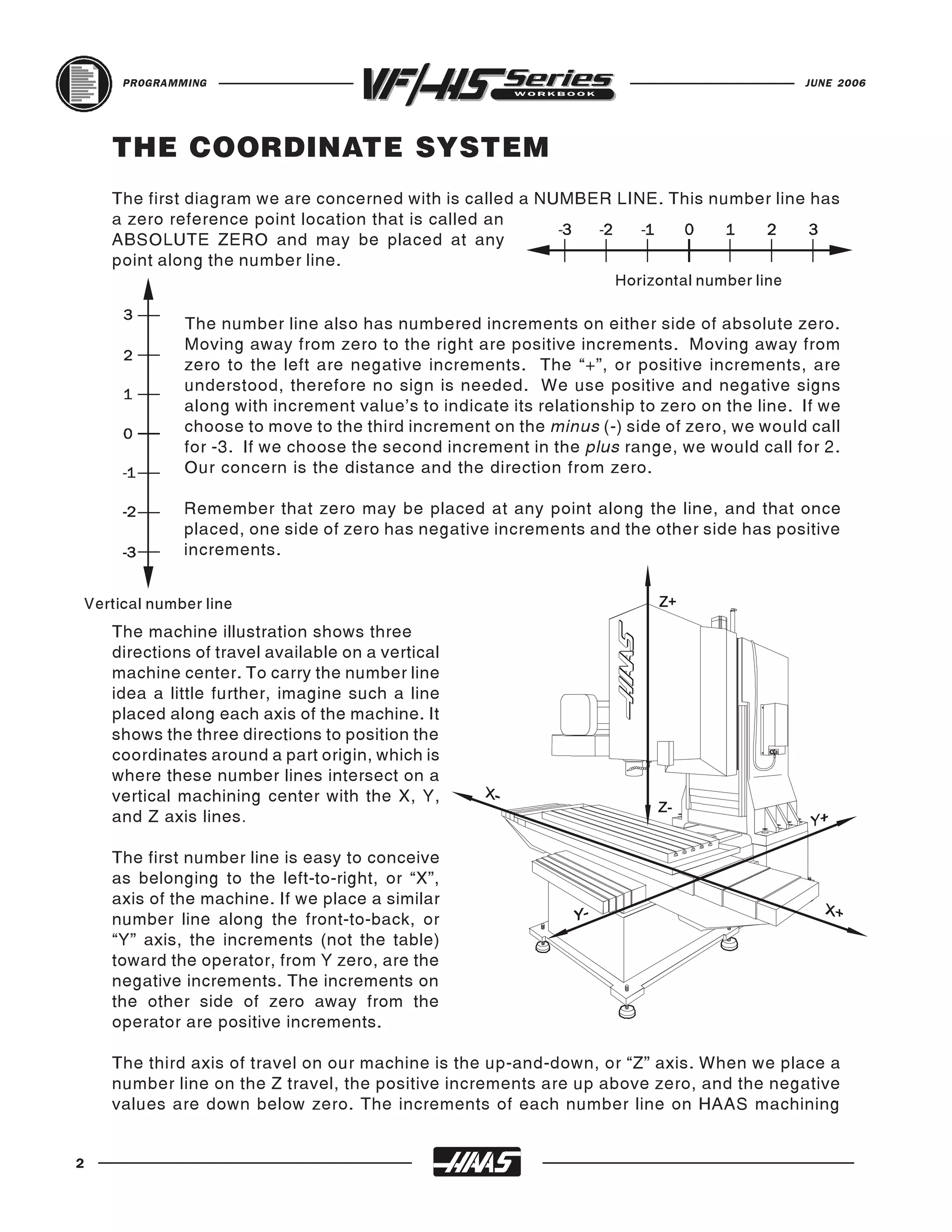
    The machine illustration shows three
    directions of travel available on a vertical
    machine center. To carry the number line
    idea a little further, imagine such a line
    placed along each axis of the machine. It
    shows the three directions to position the
    coordinates around a part origin, which is
    where these number lines intersect on a
    vertical machining center with the X, Y,
    and Z axis lines.

    The first number line is easy to conceive
    as belonging to the left-to-right, or “X”,
    axis of the machine. If we place a similar
    number line along the front-to-back, or
    “Y” axis, the increments (not the table)
    toward the operator, from Y zero, are the
    negative increments. The increments on
    the other side of zero away from the
    operator are positive increments.

    The third axis of travel on our machine is the up-and-down, or “Z” axis. When we place a
    number line on the Z travel, the positive increments are up above zero, and the negative
    values are down below zero. The increments of each number line on HAAS machining


2
JUNE 2006                                                                                        PROGRAMMING


   centers equals .0001 inches. Also, while a line theoretically travels infinitely in either
   direction once established, the three lines placed along the X, Y, and Z axes of the machine
   do not have unlimited accessibility. That is to say, we are limited by the range of travel on
   the model of machining center.

                         HAAS MILLING MACHINE TRAVELS

 VF-1         20"   X   16"   X   20"    VF-2SS        30"   X   16"   X   20"   VS-1          84" X 50" X 50"
 20-30 INCH VMCS                         HIG-SPEED                               X-LARGE FRAME

 VF-2         30"   X   16"   X   20"    VF-2SSYT      30"   X   20"   X   20"   VS-3          150" X 50" X 50"
 VF-1YT       20"   X   20"   X   20"    VF-3SS        40"   X   20"   X   25"
 VF-2YT       30"   X   20"   X   20"    VF-3SSYT      40"   X   26"   X   25"
                                                                                 VF-5/50TR     38" X 26" X 25"
                                         VF-4SS        50"   X   20"   X   25"
                                                                                 50-TAPER 5-AXIS /50-TAPER

                                                                                 VF-6/50TR     64" X 32" X 30"
                                         VF-6SS        64"   X   32"   X   30"
 VF-3         40" X     20"   X   25"
 40-64 INCH VMCS

 VF-3YT       40" X     26"   X   25"
                                                                                 OM-1          8" X 8" X 8"
 VF-4         50" X     20"   X   25"    VF-4SSAPC     50"X20" X 25"
                                                                                 OFFICE MILL

                                                                                 OM-1A         8" X 8" X 12"
                                         PALLET CHANGER MACHINES

 VF-5/40      50" X     26"   X   25"    VF-3APC       40" X 20" X 25"
                                                                                 OM-2          12" X 10" X 12"
 VF-5/40XT    60" X     26"   X   25"    VF-3SSAPC     40"X20" X 25"
                                                                                 OM-2A         12" X 10" X 12"
 VF-6/40      64" X     32"   X   30"    VF-4APC       50" X 20" X 25"
 VF-8/40      64" X     40"   X   30"
                                         VF-4SSAPCQ    50" X 20" X 25"
                                                                                 HMC HORIZONTAL SPINDLE

                                                                                 EC-300        20" X 18" X 14"
                                         MINI-FMS (DUAL PALLET CHANGERS)

 VF-7/40      84" X 32" X 30"            VF-3APCQ      40" X 20" X 25"
                                                                                 EC-SERIES

                                                                                 EC-400        20" X 20" X 20"
 80-120 INCH VMCS

 VF-9/40      84" X 40" X 30"            VF-3SSAPCQ    40"X 20" X 25"
                                                                                 EC-400PP      20" X 20" X 20"
 VF-10/40     120" X 32" X 30"           VF-4APCQ      50" X 20" X 25"
                                                                                 EC-500        32" X 20" X 28"
 VF-11/40     120" X 40" X 30"
                                                                                 EC-1600       64" X 40" X 32"
                                         VF-5/40TR     38" X 26" X 25"           EC-2000       84" X 40" X 32"
                                                                                 EC-3000       120" X 40" X 32"
                                         5-AXIS TRUNNION

 VM-2         30" X 20" X 20"            VF-2TR        30" X 16" X 20"
 MOLD MACHINE

 VM-3         40" X 26" X 25"            VF-6/40TR     64" X 32" X 30"
 VM-6         64" X 32" X 30"
                                                                                 HMC HORIZONTAL SPINDLE

                                         VR-8          64" X 40" X 30"           HS-3          150" X 50" X 60"
                                                                                 HS-SERIES

                                                                                 HS-3R         150" X 50" X 60"
                                         5-AXIS SPINDLE

 MDC-500      20" X 14" X 20"            VR-9          84" X 40" X 30"
                                                                                 HS-4          150" X 66" X 60"
 MILL DRILL CENTER

                                         VR-11B        120" X 40" X 30"
                                                                                 HS-4R         150" X 66" X 60"
 TM-1P        30" X 12" X 16"                                                    HS-6          84" X 50" X 60"
 TOOLROOM MILLS

 TM-1         30" X 12" X 16"            VF-3YT/50     40" X     26"   X   25"   HS-6R         84" X 50" X 60"
                                         MEDIUM FRAME / 50-TAPER

 TM-2         40" X 16" X 16"            VF-5/50       50" X     26"   X   25"   HS-7          84" X 66" X 60"
                                         VF-5/50XT     60" X     26"   X   25"   HS-7R         84" X 66" X 60"
                                         VF-6/50       64" X     32"   X   30"
 MINI-MILL  16" X 12" X 10"              VF-8/50       64" X     40"   X   30"
 MINI VMCS

 SUPER M.M. 16" X 12" X 10"
                                         VF-7/50       84" X 32" X 30"
                                         LARGE FRAME / 50-TAPER

 GR-408       50" X 100"      X    11"   VF-9/50       84" X 40" X 30"
 GANTRY

 GR-510       121" X 61"      X    11"   VF-10/50      120" X 32" X 30"
 GR-512       145" X 61"      X    11"   VF-11/50      120" X 40" X 30"
 GR-710       121" X 85"      X    11"
 GR-712       145" X 85"      X    11"


                                                                                                                  3
PROGRAMMING                                                                                JUNE 2006


    Remember, when we are moving the machine, we are concerned with positioning the center
    of the spindle in relation to X,Y and Z zero. Although the machine table is the moving part,
    we have to keep in mind our coordinates are based off our theoretical spindle movement.

    Keep in mind that the part zero position may be defined at any point along each of the three
    axes, and will usually be different for each setup of the machine.

    It is noteworthy to mention here that the Z-axis is set with the machine zero position in the
    upward position, or the tool change position. This will place most all Z moves in a negative
    range of travel.

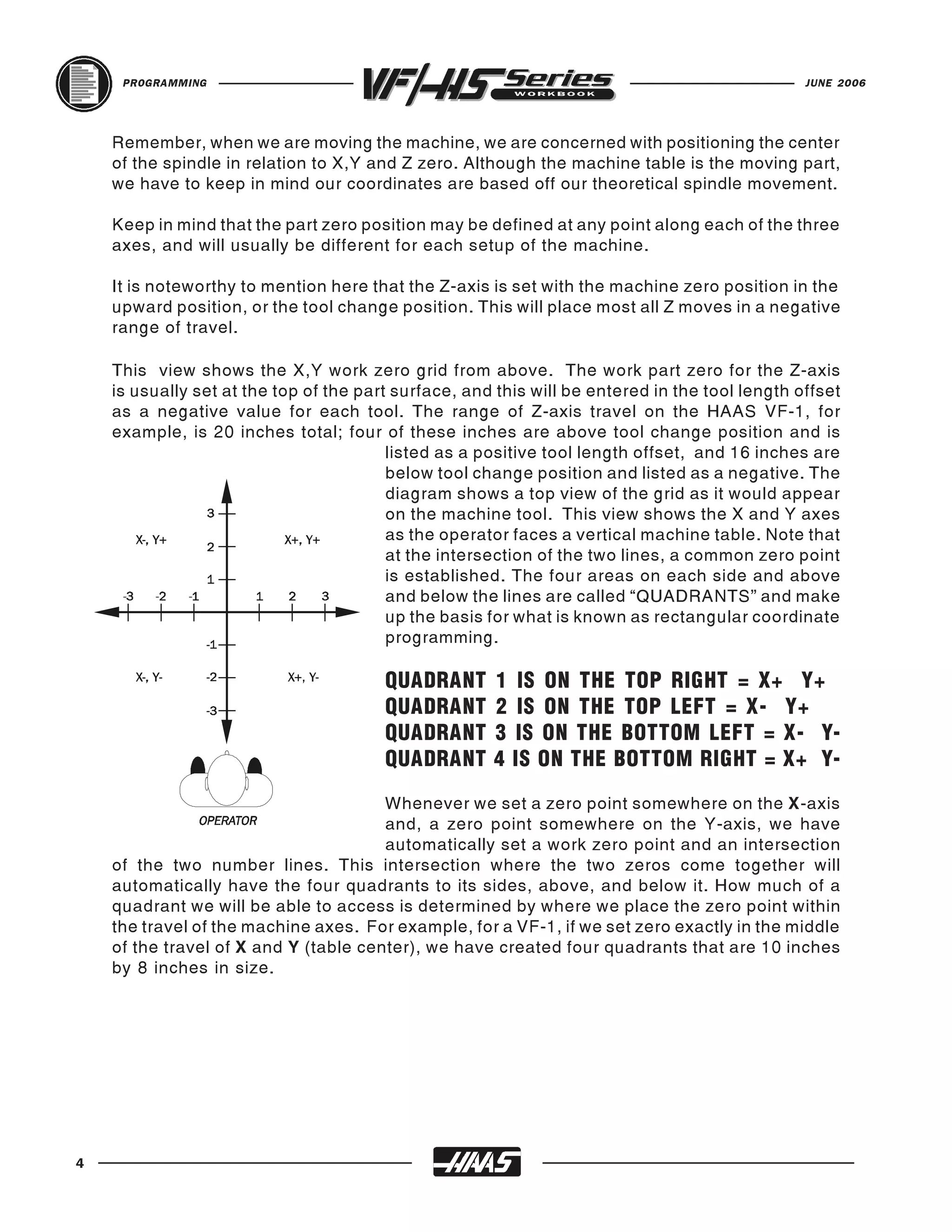
    This view shows the X,Y work zero grid from above. The work part zero for the Z-axis
    is usually set at the top of the part surface, and this will be entered in the tool length offset
    as a negative value for each tool. The range of Z-axis travel on the HAAS VF-1, for
    example, is 20 inches total; four of these inches are above tool change position and is
                                         listed as a positive tool length offset, and 16 inches are
                                         below tool change position and listed as a negative. The
                                         diagram shows a top view of the grid as it would appear
                                         on the machine tool. This view shows the X and Y axes
                                         as the operator faces a vertical machine table. Note that
                                         at the intersection of the two lines, a common zero point
                                         is established. The four areas on each side and above
                                         and below the lines are called “QUADRANTS” and make
                                         up the basis for what is known as rectangular coordinate
                                         programming.

                                        QUADRANT      1 IS ON THE TOP RIGHT = X+ Y+
                                        QUADRANT      2 IS ON THE TOP LEFT = X- Y+
                                        QUADRANT      3 IS ON THE BOTTOM LEFT = X- Y-
                                        QUADRANT      4 IS ON THE BOTTOM RIGHT = X+ Y-
                                       Whenever we set a zero point somewhere on the X-axis
                                       and, a zero point somewhere on the Y-axis, we have
                                       automatically set a work zero point and an intersection
    of the two number lines. This intersection where the two zeros come together will
    automatically have the four quadrants to its sides, above, and below it. How much of a
    quadrant we will be able to access is determined by where we place the zero point within
    the travel of the machine axes. For example, for a VF-1, if we set zero exactly in the middle
    of the travel of X and Y (table center), we have created four quadrants that are 10 inches
    by 8 inches in size.


4
JUNE 2006                                                                              PROGRAMMING


   MACHINE HOME
   The principle of machine home may be seen when doing a reference return of all machine
   axes at machine start-up. A zero return (POWER UP/RESTART) is performed when you
                                     power on machine, all three axes are moved to extreme
                                     positive locations until limit switches are reached. When this
                                     condition is satisfied, the only way to move any of the three
                                     axes is in the negative direction (except for a positive four
                                     inches in Z-axis). This is because this position is defined as
                                     your MACHINE HOME for each of the three axes automati-
                                     cally when the machine was sent home with the POWER-UP/
                                     RESTART key. In effect, now the positive quadrants cannot
                                     be reached from machine home position in X and Y axes, and
                                     all the moves will be found to be in the X-, Y- quadrant. It is
                                     only by setting a new part zero somewhere within the travel
     X0Y0 part origin point is where


                                     of each axes that other quadrants are able to be reached.
     the X and Y axes intersect.


   Sometimes it is useful in the machining of a part to utilize more than one of these X,Y
     Quadrant + or - signs shown
     here are defined around zero.


   quadrants. An example of this is a round part that has it’s datum lines running through the
   center. The setup of such a part may need machining to be performed in all four quadrants
   of a part. This is why you would want to make use of all four quadrants of the X and Y axes
   on a milling machine. As you gain more experience in machine tool programming and of
   setup techniques, you'll have a better understanding of how to position your machine tool
   and how to define a part zero origin and how to position a tool around that origin .


                                                                                                       5
PROGRAMMING                                                                             JUNE 2006


    ABSOLUTE & INCREMENTAL POSITIONING
    In Absolute positioning, all coordinate positions are given with regard to their relationship
    to a fixed zero, origin point, that is referred to as part zero. This is the most common type
    of positioning.

    Another type of positioning is called incremental positioning. Incremental positioning
    concerns itself with distance and direction from the last position. A new coordinate is
    entered in terms of its relationship to the previous position, and not from a fixed zero or
    origin. In other words, after a block of information has been executed, the position that the
    tool is now at is the new zero point for the next move to be made.

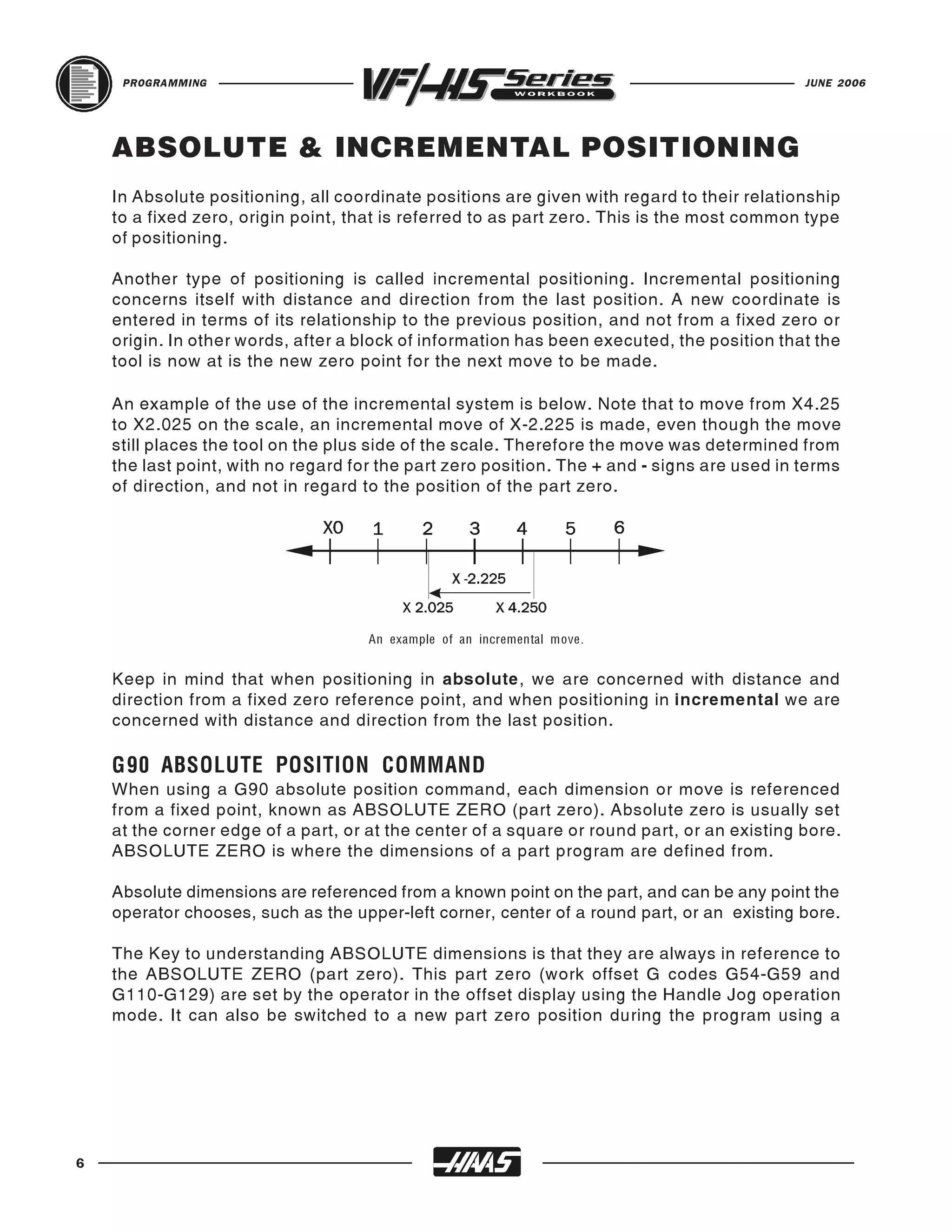
    An example of the use of the incremental system is below. Note that to move from X4.25
    to X2.025 on the scale, an incremental move of X-2.225 is made, even though the move
    still places the tool on the plus side of the scale. Therefore the move was determined from
    the last point, with no regard for the part zero position. The + and - signs are used in terms
    of direction, and not in regard to the position of the part zero.


    Keep in mind that when positioning in absolute, we are concerned with distance and
                                     An example of an incremental move.


    direction from a fixed zero reference point, and when positioning in incremental we are
    concerned with distance and direction from the last position.


    When using a G90 absolute position command, each dimension or move is referenced
    G90 ABSOLUTE POSITION COMMAND
    from a fixed point, known as ABSOLUTE ZERO (part zero). Absolute zero is usually set
    at the corner edge of a part, or at the center of a square or round part, or an existing bore.
    ABSOLUTE ZERO is where the dimensions of a part program are defined from.

    Absolute dimensions are referenced from a known point on the part, and can be any point the
    operator chooses, such as the upper-left corner, center of a round part, or an existing bore.

    The Key to understanding ABSOLUTE dimensions is that they are always in reference to
    the ABSOLUTE ZERO (part zero). This part zero (work offset G codes G54-G59 and
    G110-G129) are set by the operator in the offset display using the Handle Jog operation
    mode. It can also be switched to a new part zero position during the program using a


6
JUNE 2006                                                                             PROGRAMMING


   different work offset G code that defines in it, another location (when machining with
   multiple vises and/or fixtures at separate locations on the machine table.)

   Each dimension, or X-Y point is known as a coordinate. If a position 2 inches to the right,
   and 2 inches down (toward you) from part zero was programmed, the X coordinate would
   be X2.0 and the Y coordinate would be Y-2.0. And the machine would go to that exact
   location from part zero, regardless of where it began, within the travel of the machine tool.

   X2.0 Y-2.0 could be a hole location, an arc end point, or the end of a line which are known
   coordinate values.


   This code is modal and changes the way axis motion commands are interpreted. G91
   G91 INCREMENTAL POSITION COMMAND
   makes all subsequent commands incremental.

   Incremental dimensions are referenced from one point to another. This can be a conve-
   nient way to input dimensions into a program (especially for G81-G89, G73, G74, and G77
   canned cycles) depending on the blueprint.

   When using a G91 incremental position command, each measurement or move is the
   actual distance to the next location (whether it is a hole location, end of arc, or end of line)
   and is always in reference from the current location.

   If you programmed a G91 with an X coordinate of X2.0 and a Y coordinate of Y-2.0, the
   machine would go that exact distance from where it is, regardless of where it began, within
   the travel of the machine tool.

   Absolute mode should be your positioning mode of choice for most applications. There are
   times when incremental mode can be quite helpful. Repeating motions within a subroutine,
   for example, is one excellent example. If you have six identical pockets to machine on a
   Haas mill, you can save programming effort if you specify the motions incrementally to
   machine one pocket. Then just call up the subroutine again to repeat the commands to do
   another pocket at a new location.


                                                                                                      7
PROGRAMMING                                                                    JUNE 2006


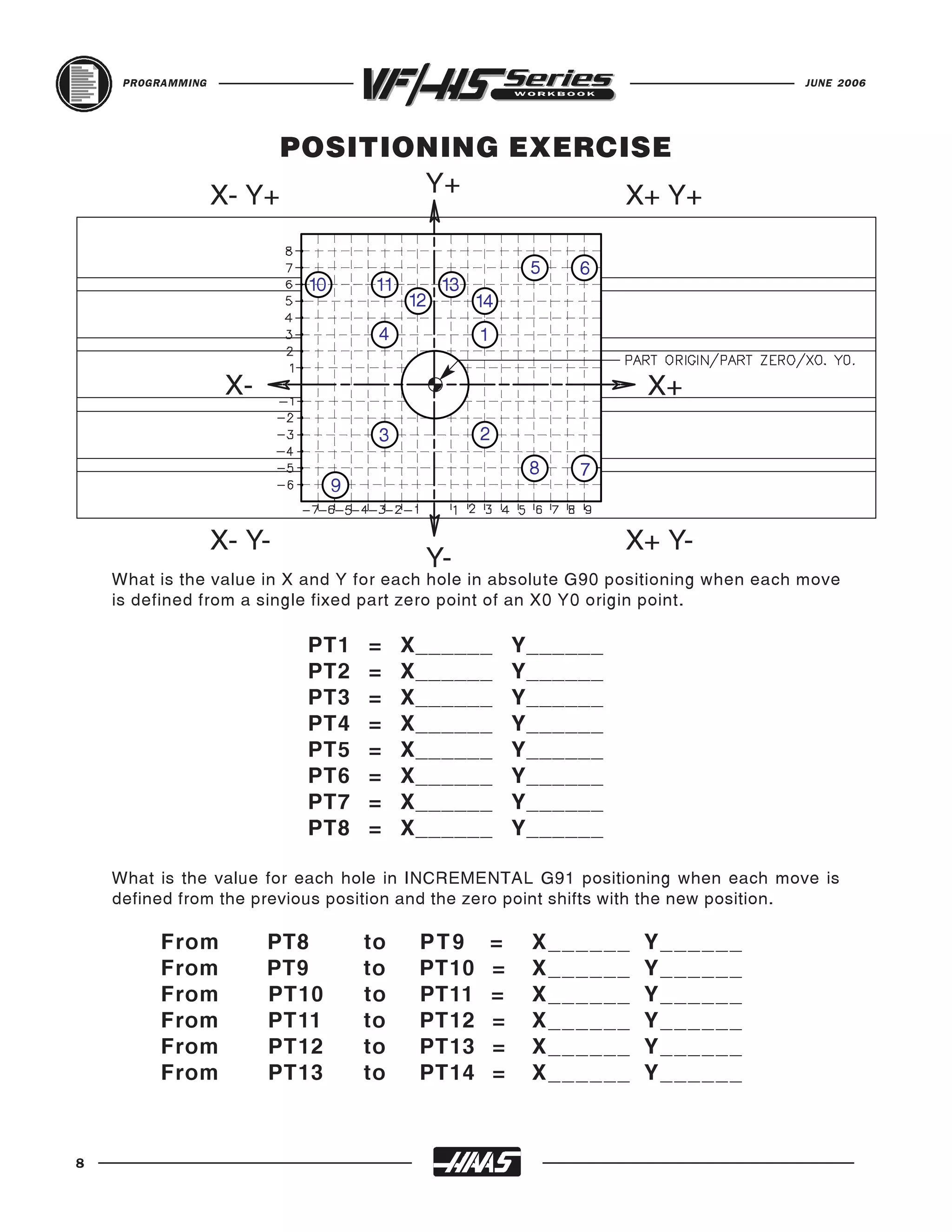
                         POSITIONING EXERCISE
                   X- Y+        Y+         X+ Y+

                                                             5   6
                           10        11        13
                                          12        14
                                     4              1

                    X-                                                  X+
                                     3              2
                                                             8   7
                                9


                   X- Y-                                              X+ Y-
                                           Y-
    What is the value in X and Y for each hole in absolute G90 positioning when each move
    is defined from a single fixed part zero point of an X0 Y0 origin point.

                           PT1      =     X______           Y______
                           PT2      =     X______           Y______
                           PT3      =     X______           Y______
                           PT4      =     X______           Y______
                           PT5      =     X______           Y______
                           PT6      =     X______           Y______
                           PT7      =     X______           Y______
                           PT8      =     X______           Y______

    What is the value for each hole in INCREMENTAL G91 positioning when each move is
    defined from the previous position and the zero point shifts with the new position.

          From           PT8        to     PT9          =    X ______   Y ______
          From           PT9        to     PT10         =    X ______   Y ______
          From           PT10       to     PT11         =    X ______   Y ______
          From           PT11       to     PT12         =    X ______   Y ______
          From           PT12       to     PT13         =    X ______   Y ______
          From           PT13       to     PT14         =    X ______   Y ______


8
JUNE 2006                                                                          PROGRAMMING


   PROGRAMMING WITH CODES
   The definition of a part program for any CNC consists of movements of the tool, and speed
   changes to the spindle RPM. It also contains auxiliary command functions such as tool
   changes, coolant on or off commands, or external M code commands.

   Tool movements consist of rapid positioning commands, straight line moves or movement
   along an arc of the tool at a controlled speed.

   The HAAS mill has three (3) linear axes defined as X axis, Y axis, and Z axis. The X and
   Y axis will move the machine table below and around the spindles centerline, while the Z
   axis moves the tool spindle down toward or up and away from the machine table. The
   "machine zero" position is where the spindle is pointing down at the upper right corner, with
   the machine table all the way to the left in the X axis and all the way toward you in the Y
   axis and Z axis is up at the tool change position. Motion in the X axis will move the machine
   table to the right with negative values and to the left with positive values. The Y axis will
   move the machine table toward you with positive values and away from you with negative
   values. Motion in the Z axis will move the tool toward the machine table with negative
   values and away from the machine table with positive values.

   A program is written as a set of instructions given in the order they are to be performed.
   The instructions, if given in English, might look like this:

            LINE   #1   =   SELECT CUTTING TOOL.
            LINE   #2   =   TURN SPINDLE ON AND SELECT THE RPM.
            LINE   #3   =   RAPID TO THE STARTING POSITION OF THE PART.
            LINE   #4   =   TURN COOLANT ON.
            LINE   #5   =   CHOOSE PROPER FEED RATE AND MAKE THE CUT(S).
            LINE   #6   =   TURN THE SPINDLE AND COOLANT OFF.
            LINE   #7   =   RETURN TO CLEARANCE POSITION TO SELECT ANOTHER TOOL.

   and so on. But our machine control understands only these messages when given in
   machine code, also referred to as G and M code programming. Before considering the
   meaning and the use of codes, it is helpful to lay down a few guidelines.


                                                                                                   9
PROGRAMMING                                                                                    JUNE 2006


     PROGRAM FORMAT
     There is no positional requirement for the address codes. They may be placed in any order
     within the block. Each individual can format their programs many different ways. But,
     program format or program style is an important part of CNC machining. Their are some
     program command formats that can be moved around, and some commands need to be a
     certain way, and there are some standard program rules that are just good to follow. The
     point is that a programmer needs to have an organized program format that’s consistent
     and efficient so that any CNC machinist in your shop can understand it.

     Some standard program rules to consider are:

     Program X, Y and Z in alphabetical order on any block. The machine will read Z, X or Y in
     any order, but we want to be consistent. If more than one of X, Y or Z is on a line, they
     should be listed together and in order. Write X first, Y next, then Z.

     You can put G and M codes anywhere on a line of code. But, in the beginning when N/C
     programming was being developed G codes had to be in the beginning of a line and M codes had
     to be at the end. And this rule, a lot of people still follow and is a good standard to continue.

     Some CNC machines allow you to write more the one M code per line of code and some
     won’t. On the HAAS, only one M code may be programmed per block and all M codes are
     activated or cause an action to occur after everything else on the line has been executed.

     Program format is a series and sequence of commands that a machine may accept and
     execute. Program format is the order in which the machine code is listed in a program that
     consist of command words. Command words begin with a single letter and then numbers for
     each word. If it has a plus (+) value, no sign is needed. If it has a minus value, it must be entered
     with a minus (-) sign. If a command word is only a number and not a value, then no sign or
     decimal point is entered with that command. Program format defines the "language of the
     machine tool."

     N1 (MILL OUTSIDE EDGE) ;
     T1 M06 (1/2 DIA. 4 FLT END MILL) ;
     G90 G54 G00 X-2.3 Y2.3 S1600 M03 ;
     G43 H01 Z0.1 M08 ;
     G01 Z-0.625 F50. ;
     G41 Y2. D01 F9.6 ;
     X2. ;
     Y-2. ;
     X-2. ;
     Y2.25 ;
     G40 X-2.3 Y2.3 ;
     G00 Z1. M09 ;
     G28 G91 Y0. Z0. M05 ;
     M01 ;


10
JUNE 2006                                                                          PROGRAMMING


   DEFINITIONS WITHIN THE FORMAT
   1. CHARACTER : A single alphanumeric character value or the "+" and "-" sign.

   2. WORD : A series of characters defining a single function such as a, "X" displacement,
   an "F" feedrate, or G and M codes. A letter is the first character of a word for each of the
   different commands. There may be a distance and direction defined for a word in a
   program. The distance and direction in a word is made up of a value, with a plus (+) or
   minus (-) sign. A plus (+) value is recognized if no sign is given in a word.

   3. BLOCK : Series of words defining a single instruction. An instruction may consist of
   a single linear motion, a circular motion or canned cycle, plus additional information such
   as a feedrate or miscellaneous command (M-codes).

   4. POSITIVE SIGNS : If the value following an address letter command such as A, B, C,
   I, J, K, R, U, V, W, X, Y, Z, is positive, the plus sign need not be programmed in.
   If it has a minus value it must be programmed in with a minus (-) sign.

   5. LEADING ZERO'S : If the digits proceeding a number are zero, they need not be
   programmed in. The HAAS control will automatically enter in the leading zero's.
              EXAMPLE: G0 for G00 and M1 for M01,
   Trailing zeros must be programmed: M30 not M3, G70 not G7.

   6. MODAL COMMANDS : Codes that are active for more than the line in which they are
   issued are called MODAL commands. Rapid traverse, feedrate moves, and canned cycles
   are all examples of modal commands. A NON-MODAL command which once called, are
   effective only in the calling block, and are then immediately forgotten by the control.

   7. PREPARATORY FUNCTIONS : "G" codes use the information contained on the line
   to make the machine tool do specific operations, such as :
        1.) Move the tool at rapid traverse.
        2.) Move the tool at a feedrate along a straight line.
        3.) Move the tool along an arc at a feedrate in a clockwise direction.
        4.) Move the tool along an arc at a feedrate in a counterclockwise direction.
        5.) Move the tool through a series of repetitive operations controlled by "fixed
            cycles" such as, spot drilling, drilling, boring, and tapping.

   8. MISCELLANEOUS FUNCTIONS : "M" codes are effective or cause an action to occur
   at the end of the block, and only one M code is allowed in each block of a program.

   9. SEQUENCE NUMBERS : N1 thru N99999 in a program are only used to locate and
   identify a line or block and its relative position within a CNC program. A program can be
   with or without SEQUENCE NUMBERS. The only function of SEQUENCE NUMBERS is
   to locate a certain block or line within a CNC program.


                                                                                                  11
PROGRAMMING                                                                        JUNE 2006


     AN EXAMPLE OF THE PROGRAM'S FIRST COUPLE OF LINES

     The FIRST line or block in a program should be a tool number (T1) and a tool change (M06)
     command.

     The SECOND line or block should contain an absolute (G90) command along with, a work
     offset (G54 is the default), part zero command . A rapid (G00) command to position to an
     X Y coordinate location, a spindle speed command (Snnnn), and a spindle ON clockwise
     command (M03), or you could have the spindle speed and clockwise command defined on
     a separate line.

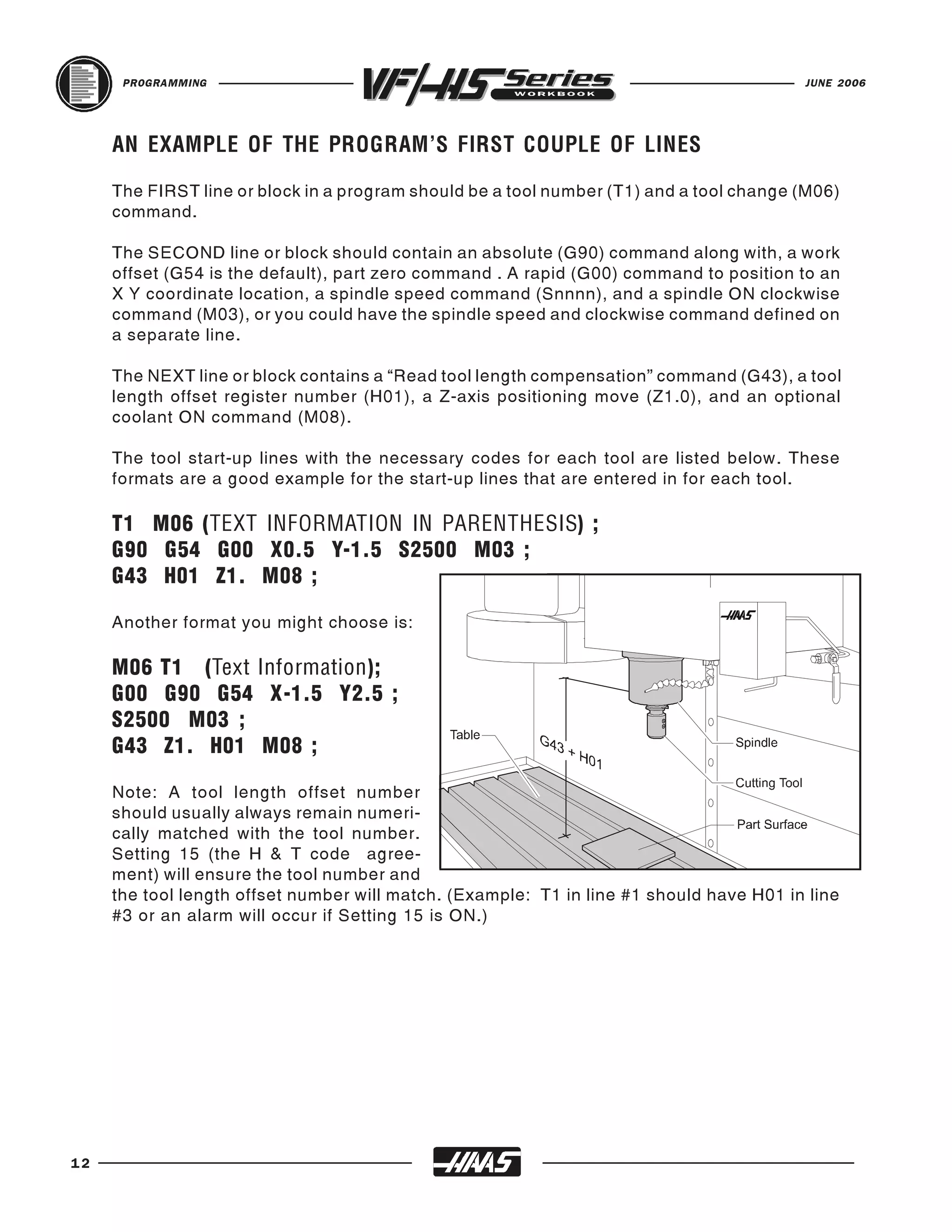
     The NEXT line or block contains a “Read tool length compensation” command (G43), a tool
     length offset register number (H01), a Z-axis positioning move (Z1.0), and an optional
     coolant ON command (M08).

     The tool start-up lines with the necessary codes for each tool are listed below. These
     formats are a good example for the start-up lines that are entered in for each tool.

     T1 M06 (TEXT INFORMATION IN PARENTHESIS) ;
     G90 G54 G00 X0.5 Y-1.5 S2500 M03 ;
     G43 H01 Z1. M08 ;

     Another format you might choose is:

     M06 T1 (Text Information);
     G00 G90 G54 X-1.5 Y2.5 ;
     S2500 M03 ;
     G43 Z1. H01 M08 ;

     Note: A tool length offset number
     should usually always remain numeri-
     cally matched with the tool number.
     Setting 15 (the H & T code agree-
     ment) will ensure the tool number and
     the tool length offset number will match. (Example: T1 in line #1 should have H01 in line
     #3 or an alarm will occur if Setting 15 is ON.)


12
JUNE 2006                                                                            PROGRAMMING


   OFTEN USED PREPARATORY "G" CODES
   G00      Rapid traverse motion; Used for non-cutting moves of the machine in positioning quick
            to a location to be machined, or rapid away after program cuts have been performed.
            Maximum rapid motion (I.P.M.) of a Haas machine will vary on machine model.

   G01      Linear interpolation motion; Used for actual machining and metal removal.
            Governed by a programmed feedrate in inches (or mm) per minute. Maximum feed
            rate (I.P.M.) of a Haas machine will vary on machine model.

   G02      Circular Interpolation, Clockwise

   G03      Circular Interpolation, Counterclockwise

   G28      Machine Home (Rapid traverse)

   G40      Cutter Compensation CANCEL

   G41      Cutter Compensation LEFT of the programmed path

   G42      Cutter Compensation RIGHT of the programmed path

   G43      Tool LENGTH Compensation +

   G53      Machine Coordinate Positioning, Non-Modal

   G54      Work Coordinate #1 (Part zero offset location)

   G80      Canned Cycle Cancel

   G81      Drill Canned Cycle

   G82      Spot Drill Canned Cycle

   G83      Peck Drill Canned Cycle

   G84      Tapping Canned Cycle

   G90      Absolute Programming Positioning

   G91      Incremental Programming Positioning

   G98      Canned Cycle Initial Point Return

   G99      Canned Cycle Rapid (R) Plane Return


                                                                                                    13
PROGRAMMING                                                                                      JUNE 2006


     PREPARATORY "G" CODES LIST
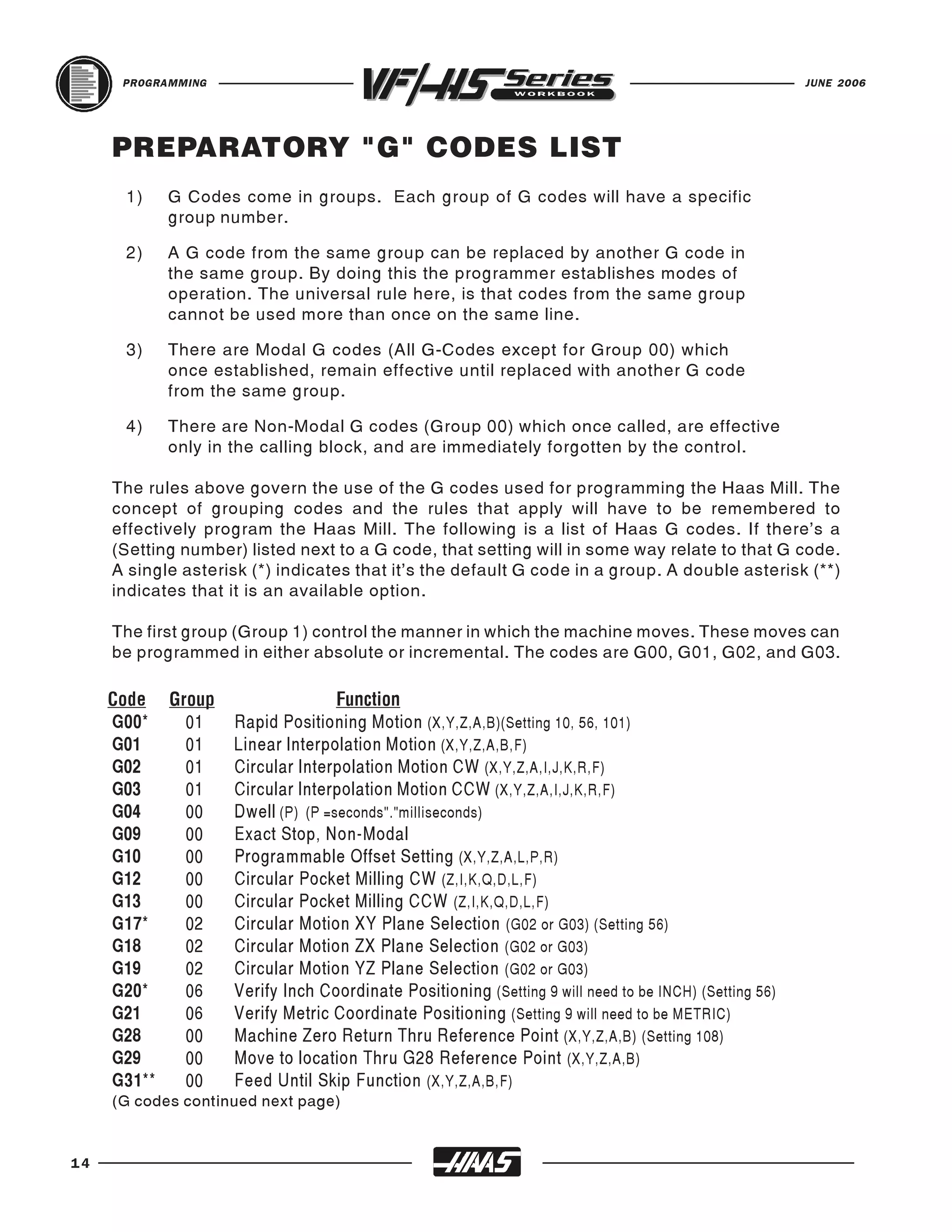
      1)    G Codes come in groups. Each group of G codes will have a specific
            group number.

      2)    A G code from the same group can be replaced by another G code in
            the same group. By doing this the programmer establishes modes of
            operation. The universal rule here, is that codes from the same group
            cannot be used more than once on the same line.

      3)    There are Modal G codes (All G-Codes except for Group 00) which
            once established, remain effective until replaced with another G code
            from the same group.

      4)    There are Non-Modal G codes (Group 00) which once called, are effective
            only in the calling block, and are immediately forgotten by the control.

     The rules above govern the use of the G codes used for programming the Haas Mill. The
     concept of grouping codes and the rules that apply will have to be remembered to
     effectively program the Haas Mill. The following is a list of Haas G codes. If there’s a
     (Setting number) listed next to a G code, that setting will in some way relate to that G code.
     A single asterisk (*) indicates that it’s the default G code in a group. A double asterisk (**)
     indicates that it is an available option.

     The first group (Group 1) control the manner in which the machine moves. These moves can
     be programmed in either absolute or incremental. The codes are G00, G01, G02, and G03.


     G00*   01      Rapid Positioning Motion (X,Y,Z,A,B)(Setting 10, 56, 101)
     Code Group                    Function

     G01    01      Linear Interpolation Motion (X,Y,Z,A,B,F)
     G02    01      Circular Interpolation Motion CW (X,Y,Z,A,I,J,K,R,F)
     G03    01      Circular Interpolation Motion CCW (X,Y,Z,A,I,J,K,R,F)
     G04    00      Dwell (P) (P =seconds"."milliseconds)
     G09    00      Exact Stop, Non-Modal
     G10    00      Programmable Offset Setting (X,Y,Z,A,L,P,R)
     G12    00      Circular Pocket Milling CW (Z,I,K,Q,D,L,F)
     G13    00      Circular Pocket Milling CCW (Z,I,K,Q,D,L,F)
     G17*   02      Circular Motion XY Plane Selection (G02 or G03) (Setting 56)
     G18    02      Circular Motion ZX Plane Selection (G02 or G03)
     G19    02      Circular Motion YZ Plane Selection (G02 or G03)
     G20*   06      Verify Inch Coordinate Positioning (Setting 9 will need to be INCH) (Setting 56)
     G21    06      Verify Metric Coordinate Positioning (Setting 9 will need to be METRIC)
     G28    00      Machine Zero Return Thru Reference Point (X,Y,Z,A,B) (Setting 108)
     G29    00      Move to location Thru G28 Reference Point (X,Y,Z,A,B)
     G31**  00      Feed Until Skip Function (X,Y,Z,A,B,F)
     (G codes continued next page)


14
JUNE 2006                                                                                   PROGRAMMING


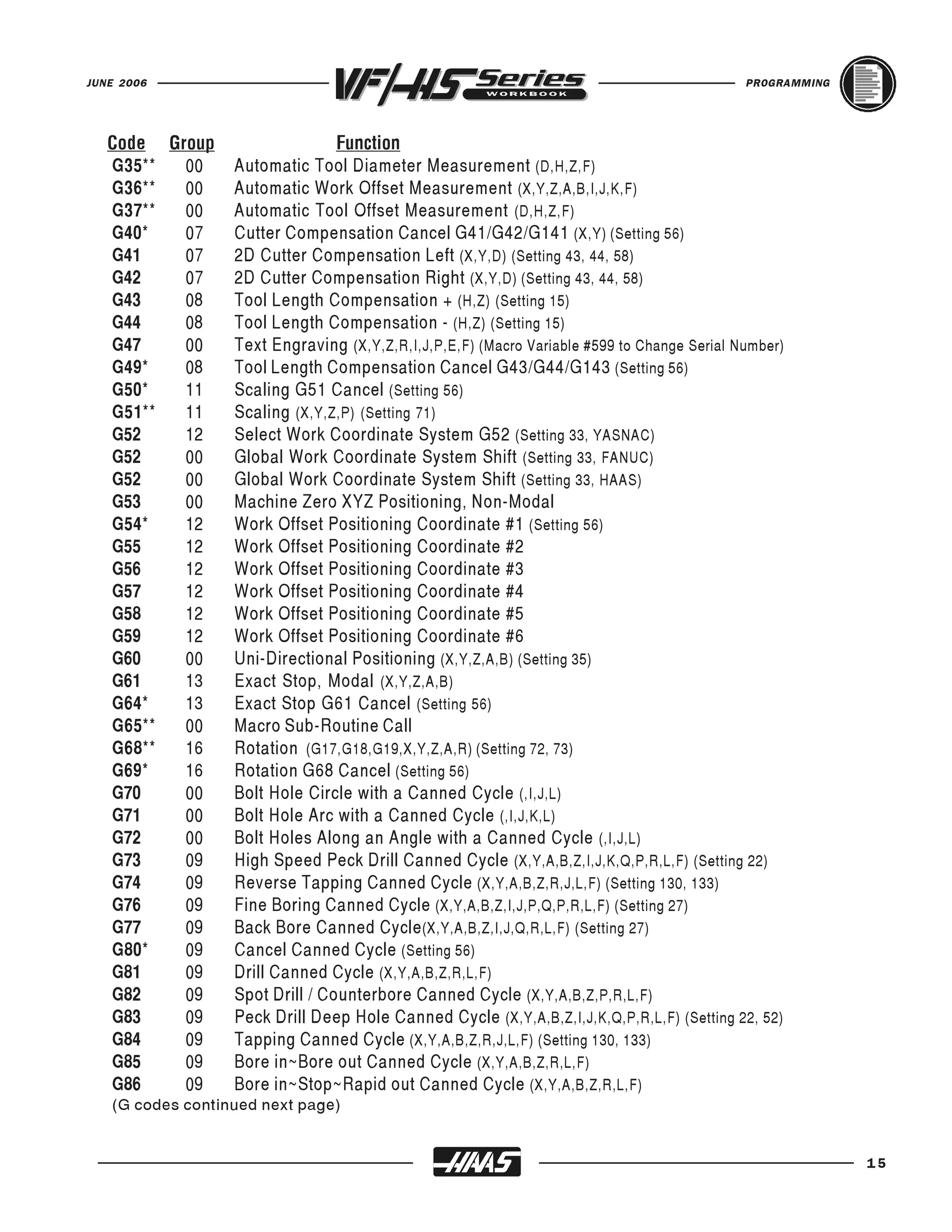
   G35**  00      Automatic Tool Diameter Measurement (D,H,Z,F)
   Code Group                    Function

   G36**  00      Automatic Work Offset Measurement (X,Y,Z,A,B,I,J,K,F)
   G37**  00      Automatic Tool Offset Measurement (D,H,Z,F)
   G40*   07      Cutter Compensation Cancel G41/G42/G141 (X,Y) (Setting 56)
   G41    07      2D Cutter Compensation Left (X,Y,D) (Setting 43, 44, 58)
   G42    07      2D Cutter Compensation Right (X,Y,D) (Setting 43, 44, 58)
   G43    08      Tool Length Compensation + (H,Z) (Setting 15)
   G44    08      Tool Length Compensation - (H,Z) (Setting 15)
   G47    00      Text Engraving (X,Y,Z,R,I,J,P,E,F) (Macro Variable #599 to Change Serial Number)
   G49*   08      Tool Length Compensation Cancel G43/G44/G143 (Setting 56)
   G50*   11      Scaling G51 Cancel (Setting 56)
   G51**  11      Scaling (X,Y,Z,P) (Setting 71)
   G52    12      Select Work Coordinate System G52 (Setting 33, YASNAC)
   G52    00      Global Work Coordinate System Shift (Setting 33, FANUC)
   G52    00      Global Work Coordinate System Shift (Setting 33, HAAS)
   G53    00      Machine Zero XYZ Positioning, Non-Modal
   G54*   12      Work Offset Positioning Coordinate #1 (Setting 56)
   G55    12      Work Offset Positioning Coordinate #2
   G56    12      Work Offset Positioning Coordinate #3
   G57    12      Work Offset Positioning Coordinate #4
   G58    12      Work Offset Positioning Coordinate #5
   G59    12      Work Offset Positioning Coordinate #6
   G60    00      Uni-Directional Positioning (X,Y,Z,A,B) (Setting 35)
   G61    13      Exact Stop, Modal (X,Y,Z,A,B)
   G64*   13      Exact Stop G61 Cancel (Setting 56)
   G65**  00      Macro Sub-Routine Call
   G68**  16      Rotation (G17,G18,G19,X,Y,Z,A,R) (Setting 72, 73)
   G69*   16      Rotation G68 Cancel (Setting 56)
   G70    00      Bolt Hole Circle with a Canned Cycle (,I,J,L)
   G71    00      Bolt Hole Arc with a Canned Cycle (,I,J,K,L)
   G72    00      Bolt Holes Along an Angle with a Canned Cycle (,I,J,L)
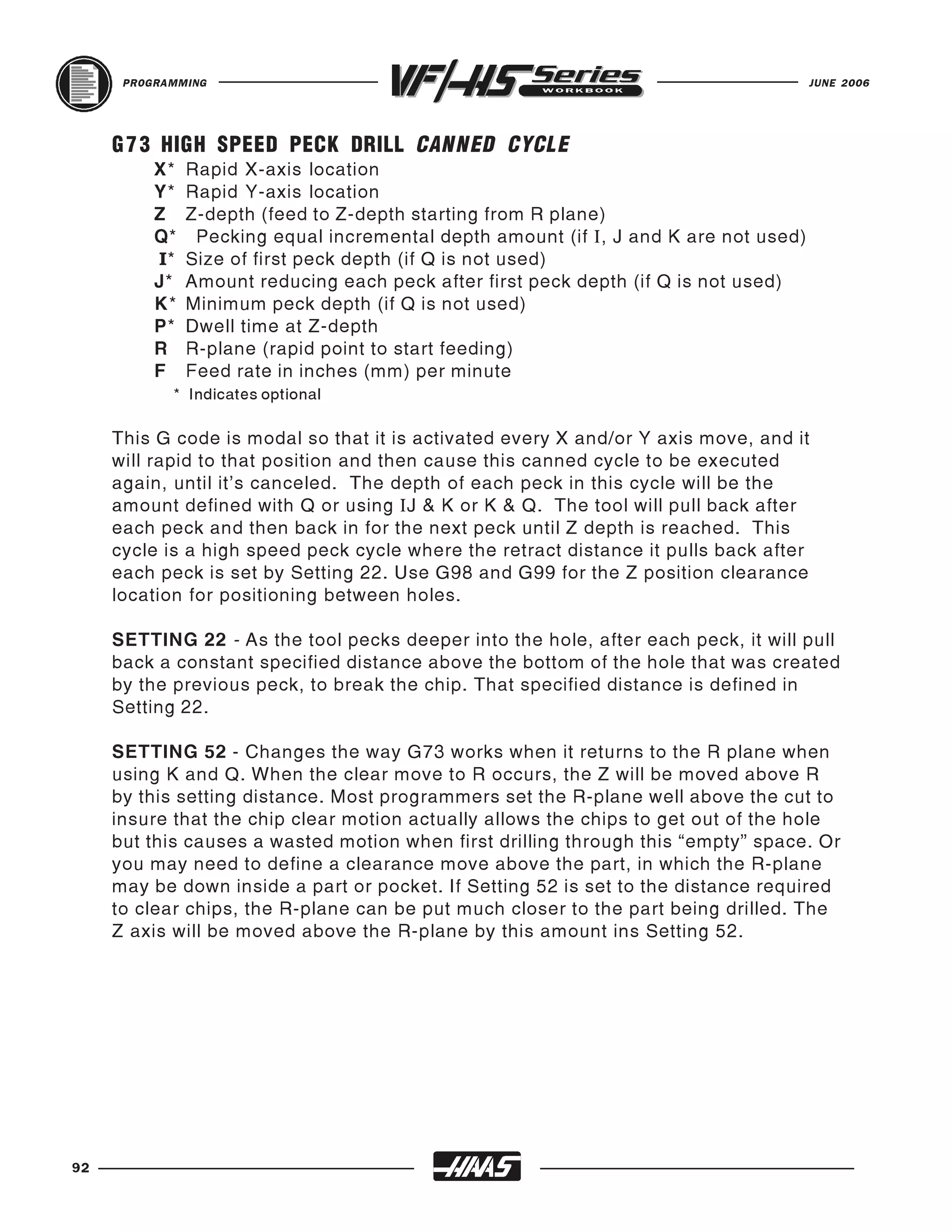
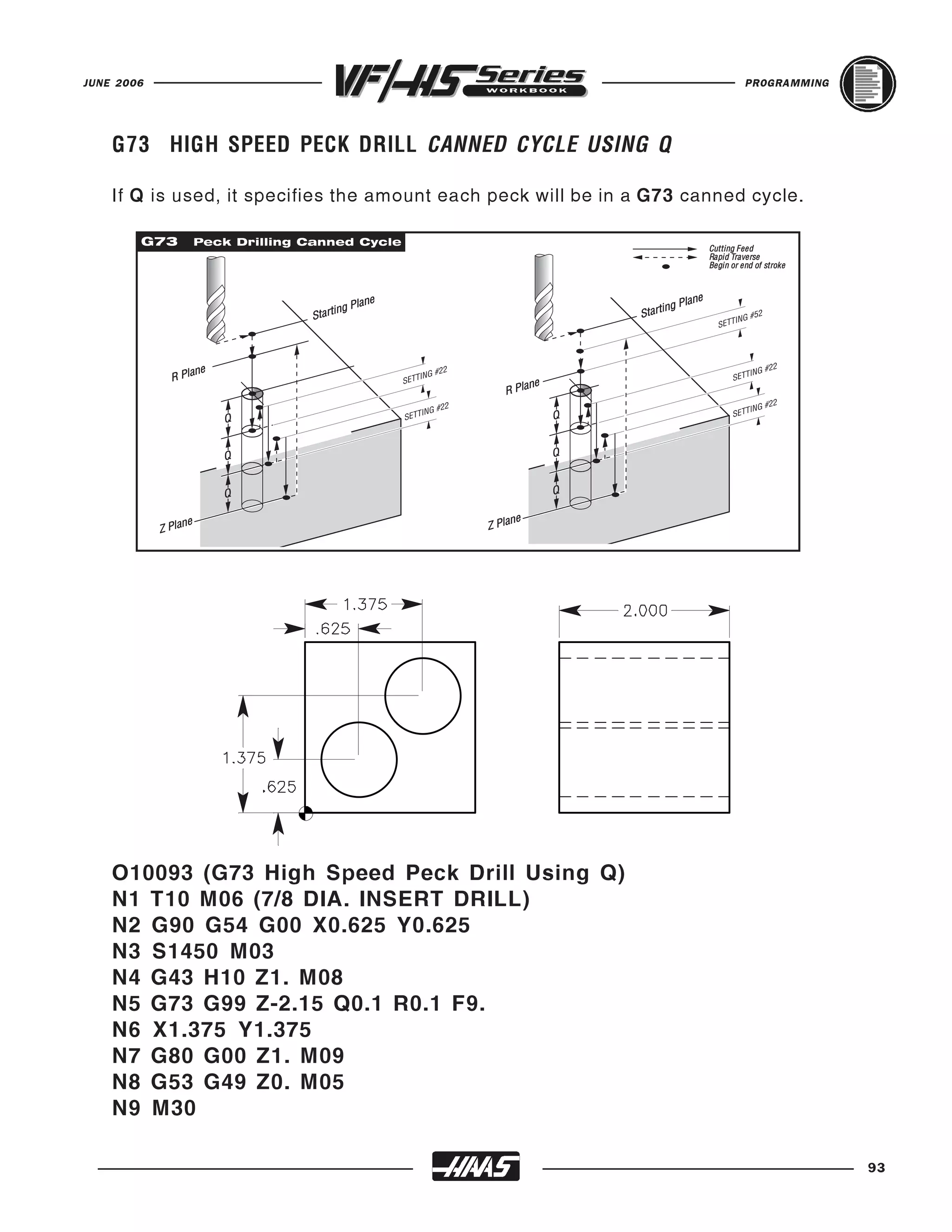
   G73    09      High Speed Peck Drill Canned Cycle (X,Y,A,B,Z,I,J,K,Q,P,R,L,F) (Setting 22)
   G74    09      Reverse Tapping Canned Cycle (X,Y,A,B,Z,R,J,L,F) (Setting 130, 133)
   G76    09      Fine Boring Canned Cycle (X,Y,A,B,Z,I,J,P,Q,P,R,L,F) (Setting 27)
   G77    09      Back Bore Canned Cycle (X,Y,A,B,Z,I,J,Q,R,L,F) (Setting 27)
   G80*   09      Cancel Canned Cycle (Setting 56)
   G81    09      Drill Canned Cycle (X,Y,A,B,Z,R,L,F)
   G82    09      Spot Drill / Counterbore Canned Cycle (X,Y,A,B,Z,P,R,L,F)
   G83    09      Peck Drill Deep Hole Canned Cycle (X,Y,A,B,Z,I,J,K,Q,P,R,L,F) (Setting 22, 52)
   G84    09      Tapping Canned Cycle (X,Y,A,B,Z,R,J,L,F) (Setting 130, 133)
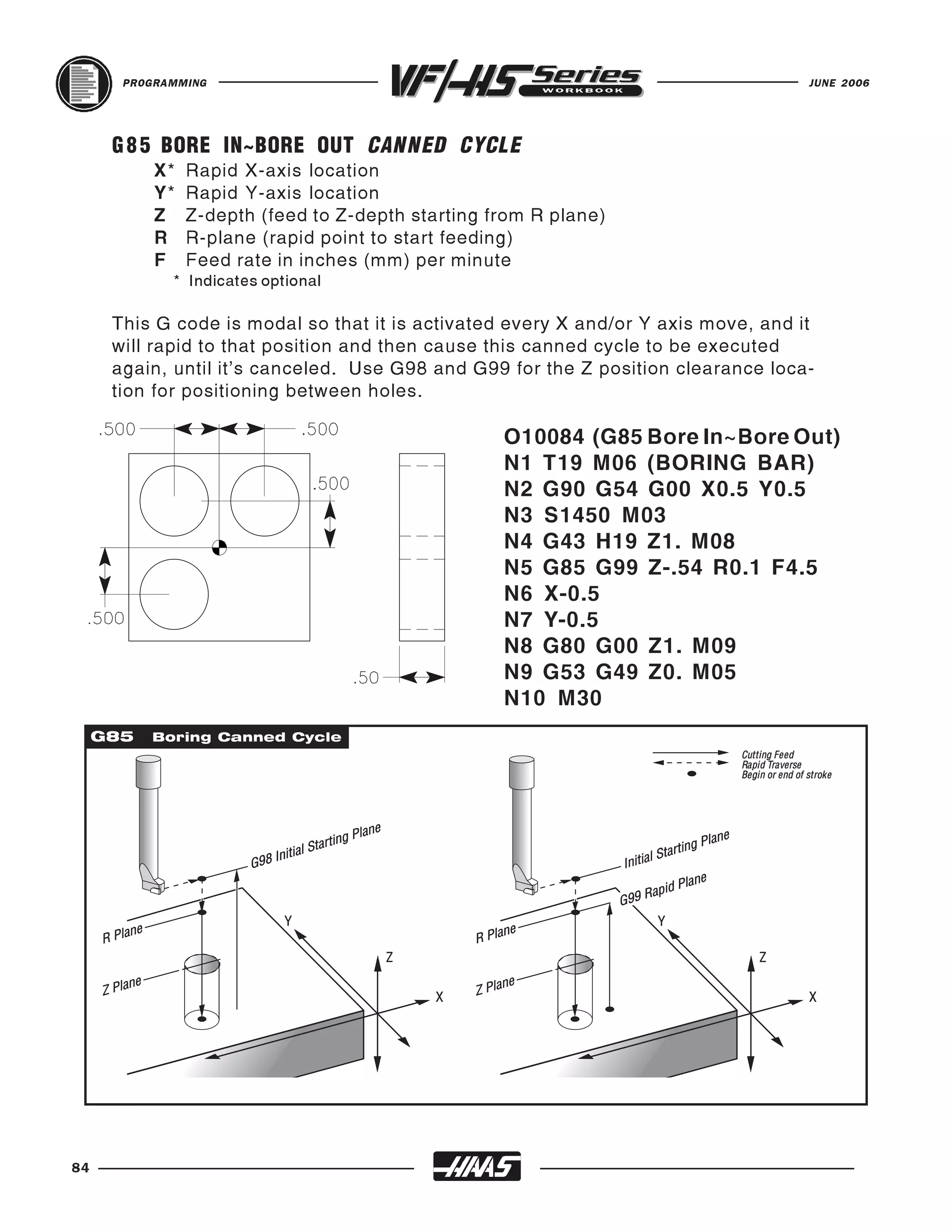
   G85    09      Bore in~Bore out Canned Cycle (X,Y,A,B,Z,R,L,F)
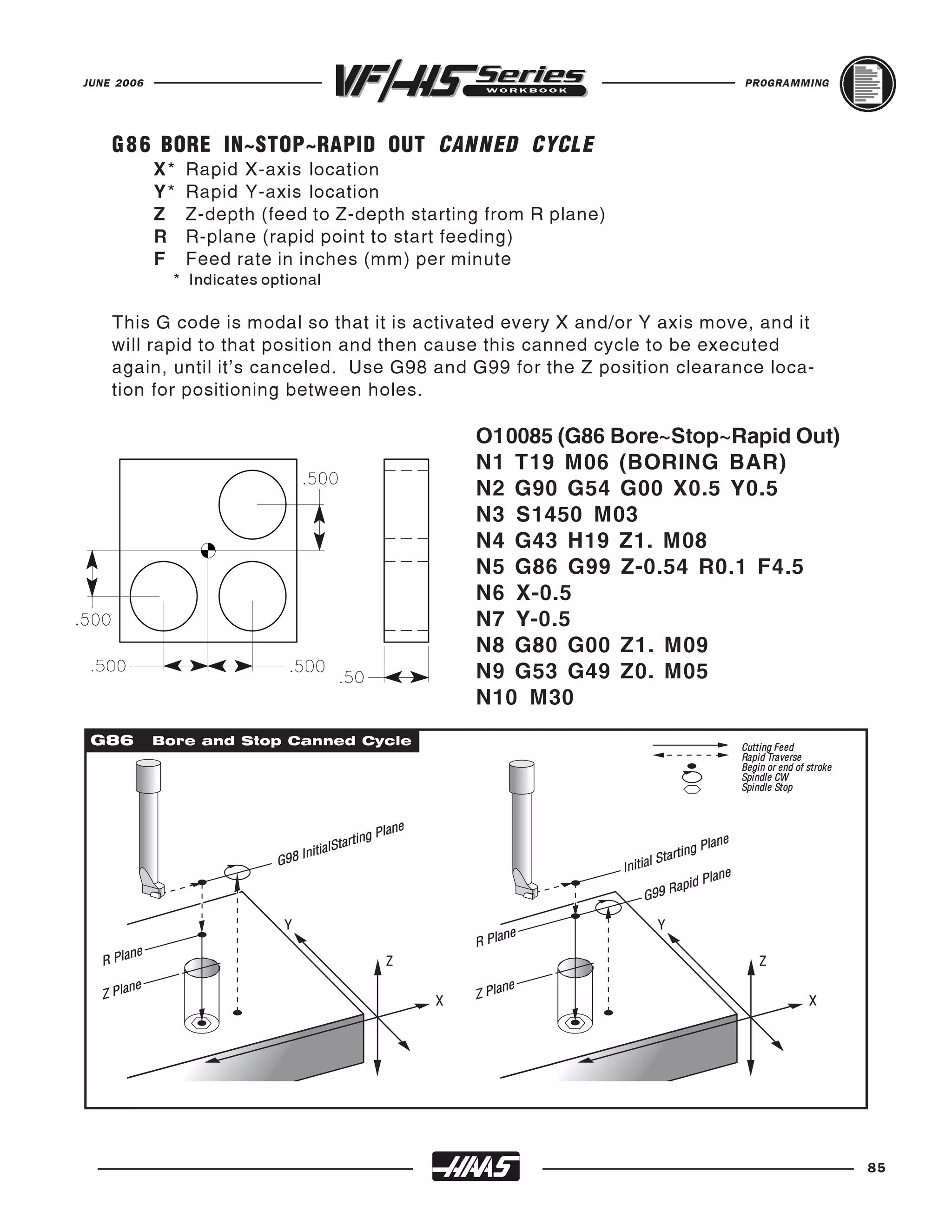
   G86    09      Bore in~Stop~Rapid out Canned Cycle (X,Y,A,B,Z,R,L,F)
   (G codes continued next page)


                                                                                                          15
PROGRAMMING                                                                                  JUNE 2006


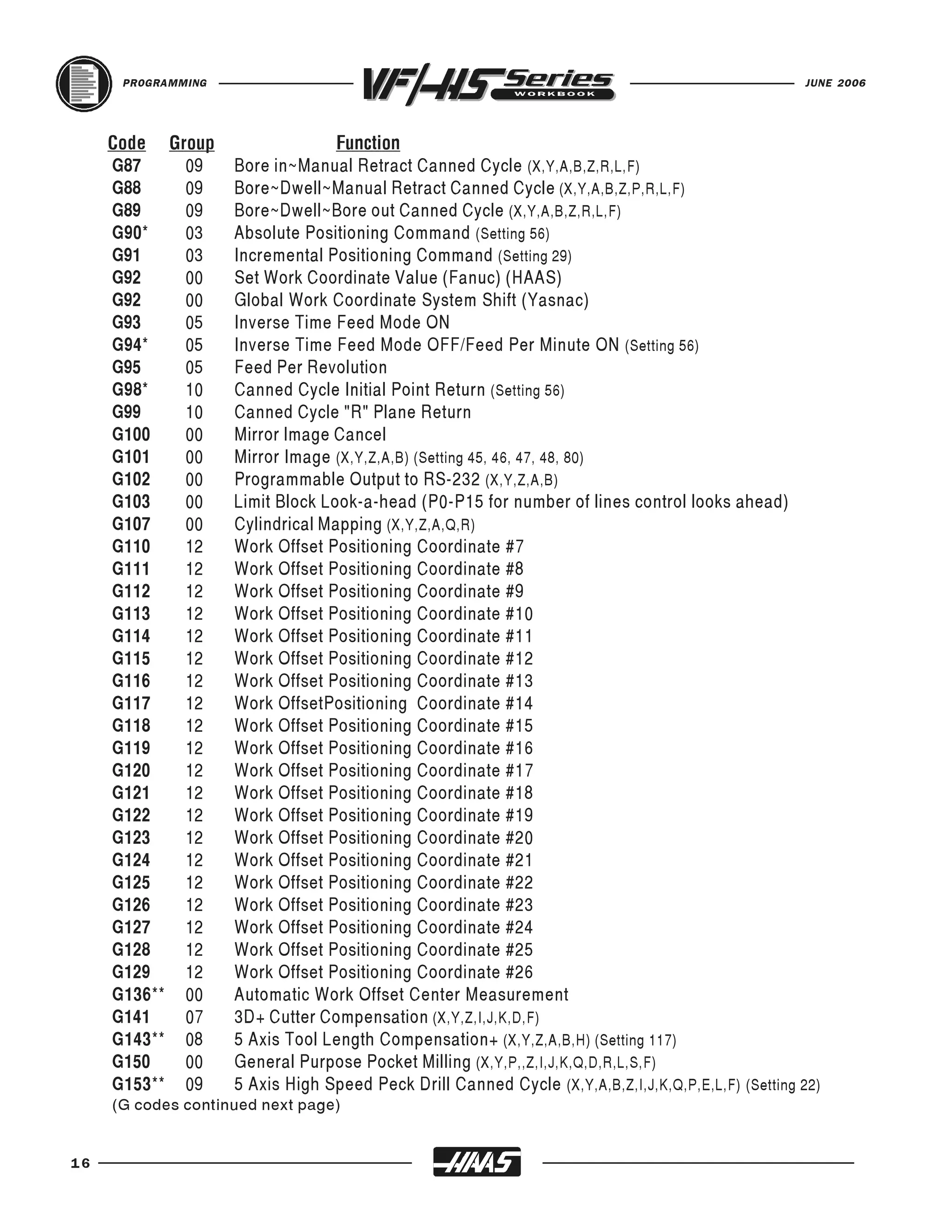
     G87    09      Bore in~Manual Retract Canned Cycle (X,Y,A,B,Z,R,L,F)
     Code Group                   Function

     G88    09      Bore~Dwell~Manual Retract Canned Cycle (X,Y,A,B,Z,P,R,L,F)
     G89    09      Bore~Dwell~Bore out Canned Cycle (X,Y,A,B,Z,R,L,F)
     G90*   03      Absolute Positioning Command (Setting 56)
     G91    03      Incremental Positioning Command (Setting 29)
     G92    00      Set Work Coordinate Value (Fanuc) (HAAS)
     G92    00      Global Work Coordinate System Shift (Yasnac)
     G93    05      Inverse Time Feed Mode ON
     G94*   05      Inverse Time Feed Mode OFF/Feed Per Minute ON (Setting 56)
     G95    05      Feed Per Revolution
     G98*   10      Canned Cycle Initial Point Return (Setting 56)
     G99    10      Canned Cycle "R" Plane Return
     G100   00      Mirror Image Cancel
     G101   00      Mirror Image (X,Y,Z,A,B) (Setting 45, 46, 47, 48, 80)
     G102   00      Programmable Output to RS-232 (X,Y,Z,A,B)
     G103   00      Limit Block Look-a-head (P0-P15 for number of lines control looks ahead)
     G107   00      Cylindrical Mapping (X,Y,Z,A,Q,R)
     G110   12      Work Offset Positioning Coordinate #7
     G111   12      Work Offset Positioning Coordinate #8
     G112   12      Work Offset Positioning Coordinate #9
     G113   12      Work Offset Positioning Coordinate #10
     G114   12      Work Offset Positioning Coordinate #11
     G115   12      Work Offset Positioning Coordinate #12
     G116   12      Work Offset Positioning Coordinate #13
     G117   12      Work OffsetPositioning Coordinate #14
     G118   12      Work Offset Positioning Coordinate #15
     G119   12      Work Offset Positioning Coordinate #16
     G120   12      Work Offset Positioning Coordinate #17
     G121   12      Work Offset Positioning Coordinate #18
     G122   12      Work Offset Positioning Coordinate #19
     G123   12      Work Offset Positioning Coordinate #20
     G124   12      Work Offset Positioning Coordinate #21
     G125   12      Work Offset Positioning Coordinate #22
     G126   12      Work Offset Positioning Coordinate #23
     G127   12      Work Offset Positioning Coordinate #24
     G128   12      Work Offset Positioning Coordinate #25
     G129   12      Work Offset Positioning Coordinate #26
     G136** 00      Automatic Work Offset Center Measurement
     G141   07      3D+ Cutter Compensation (X,Y,Z,I,J,K,D,F)
     G143** 08      5 Axis Tool Length Compensation+ (X,Y,Z,A,B,H) (Setting 117)
     G150   00      General Purpose Pocket Milling (X,Y,P,,Z,I,J,K,Q,D,R,L,S,F)
     G153** 09      5 Axis High Speed Peck Drill Canned Cycle (X,Y,A,B,Z,I,J,K,Q,P,E,L,F) (Setting 22)
     (G codes continued next page)


16
JUNE 2006                                                                                     PROGRAMMING


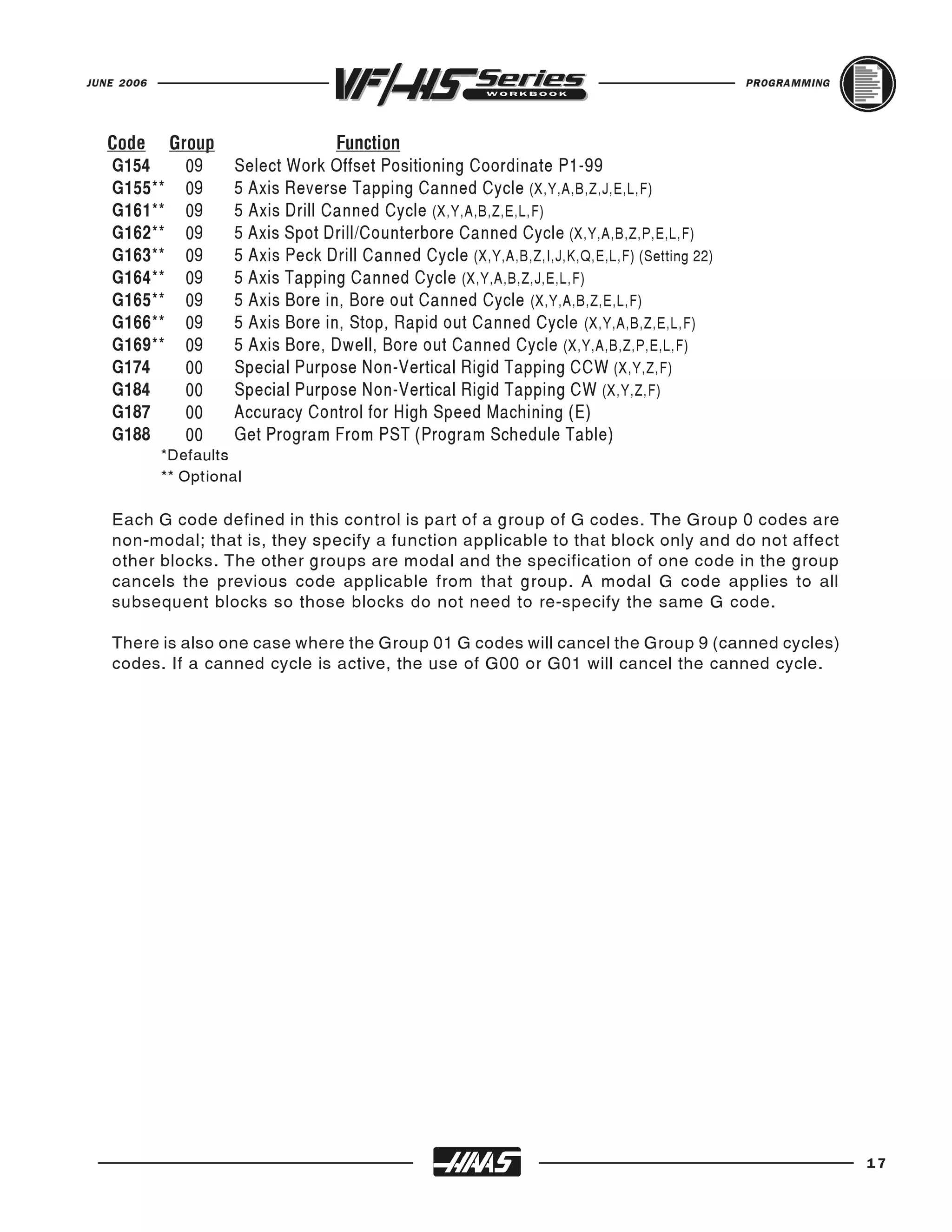
   G154   09          Select Work Offset Positioning Coordinate P1-99
   Code Group                       Function

   G155** 09          5 Axis Reverse Tapping Canned Cycle (X,Y,A,B,Z,J,E,L,F)
   G161** 09          5 Axis Drill Canned Cycle (X,Y,A,B,Z,E,L,F)
   G162** 09          5 Axis Spot Drill/Counterbore Canned Cycle (X,Y,A,B,Z,P,E,L,F)
   G163** 09          5 Axis Peck Drill Canned Cycle (X,Y,A,B,Z,I,J,K,Q,E,L,F) (Setting 22)
   G164** 09          5 Axis Tapping Canned Cycle (X,Y,A,B,Z,J,E,L,F)
   G165** 09          5 Axis Bore in, Bore out Canned Cycle (X,Y,A,B,Z,E,L,F)
   G166** 09          5 Axis Bore in, Stop, Rapid out Canned Cycle (X,Y,A,B,Z,E,L,F)
   G169** 09          5 Axis Bore, Dwell, Bore out Canned Cycle (X,Y,A,B,Z,P,E,L,F)
   G174   00          Special Purpose Non-Vertical Rigid Tapping CCW (X,Y,Z,F)
   G184   00          Special Purpose Non-Vertical Rigid Tapping CW (X,Y,Z,F)
   G187   00          Accuracy Control for High Speed Machining (E)
   G188   00          Get Program From PST (Program Schedule Table)
            *Defaults
            ** Optional

   Each G code defined in this control is part of a group of G codes. The Group 0 codes are
   non-modal; that is, they specify a function applicable to that block only and do not affect
   other blocks. The other groups are modal and the specification of one code in the group
   cancels the previous code applicable from that group. A modal G code applies to all
   subsequent blocks so those blocks do not need to re-specify the same G code.

   There is also one case where the Group 01 G codes will cancel the Group 9 (canned cycles)
   codes. If a canned cycle is active, the use of G00 or G01 will cancel the canned cycle.


                                                                                                            17
PROGRAMMING                                                                          JUNE 2006


     MACHINE DEFAULTS
     A default is an automatic function of the machine tool control. After powering up the
     machine, the control will recognize the default “G” code values. The machine will go to the
     part zero that was entered in for G54 if no other work coordinate code was specified in the
     actual program, because the machine automatically recognizes the G54 column upon
     start-up. That is a default.

     The control automatically recognizes these G codes when your HAAS mill is powered up:

           G00        Rapid Traverse
           G17        X,Y Circular Plane Selection
           G20        Verify Inch (Setting 9 will need to be on INCH)
           G40        Cutter Compensation Cancel
           G49        Tool length Compensation Cancel
           G50        G51 Cancel
           G54        Work Coordinate Zero #1 (1 of 26 available)
           G64        Exact Stop Cancel
           G69        G68 Cancel (optional)
           G80        Canned Cycle Cancel
           G90        Absolute Programming
           G94        Inverse Time Feed Deactivate
           G98        Initial Point Return

     There is no default feed rate (F code) or spindle speed (S code) , but once an F or S code
     is programmed, it will apply until another feed rate or spindle speed is entered or the
     machine is turned off.


18
JUNE 2006                                                                          PROGRAMMING


   OFTEN USED MISCELLANEOUS "M" CODES
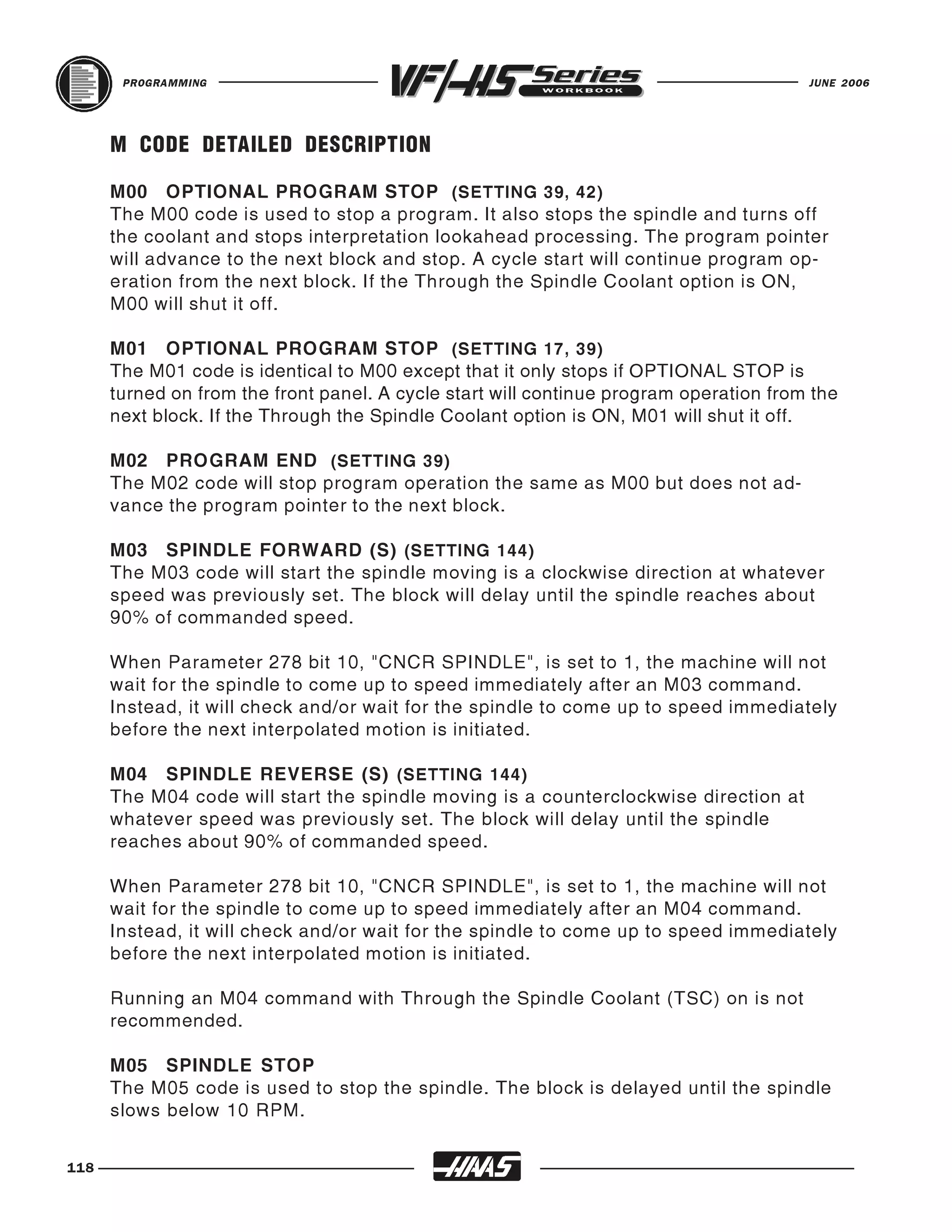
   M00      The M00 code is used for a Program Stop command on the machine.
            It stops the spindle, turns off coolant and stops look-a-head processing.
            Pressing CYCLE START again will continue the program on the next
            block of the program.

   M01      The M01 code is used for an Optional Program Stop command.
            Pressing the OPT STOP key on the control panel signals the machine
            to perform a stop command when the control reads an M01 command.
            It will then perform like an M00.

   M03      Starts the spindle CLOCKWISE. Must have a spindle speed defined.

   M04      Starts the spindle COUNTERCLOCKWISE. Must have a spindle speed defined.

   M05      STOPS the spindle.

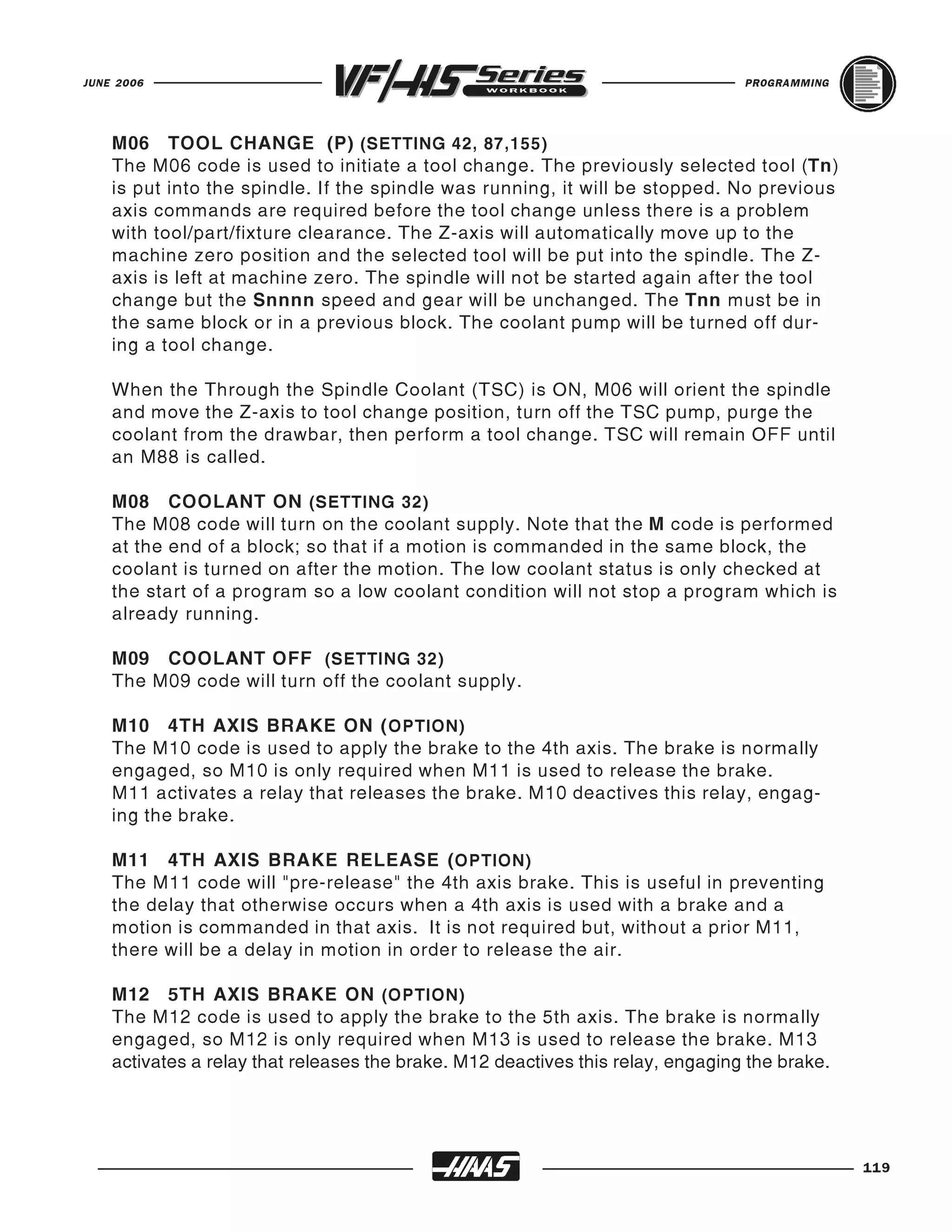
   M06      Tool change command along with a tool number will execute a
            tool change for that tool. This command will automatically stop the
            spindle, Z-axis will move up to the machine zero position and the
            selected tool will be put in spindle. The coolant pump will turn off
            right before executing the tool change.

   M08      Coolant ON command.

   M09      Coolant OFF command.

   M30      Program End and Reset to the beginning of program.

   M97      Local Subroutine call

   M98      Subprogram call

   M99      Subprogram return (M98) or Subroutine return (M97), or a Program loop.

   NOTE: Only one "M" code can be used per line. And the M-codes will be the last command to be
   executed in a line, regardless of where it's located in that line.


                                                                                                  19
PROGRAMMING                                                                              JUNE 2006


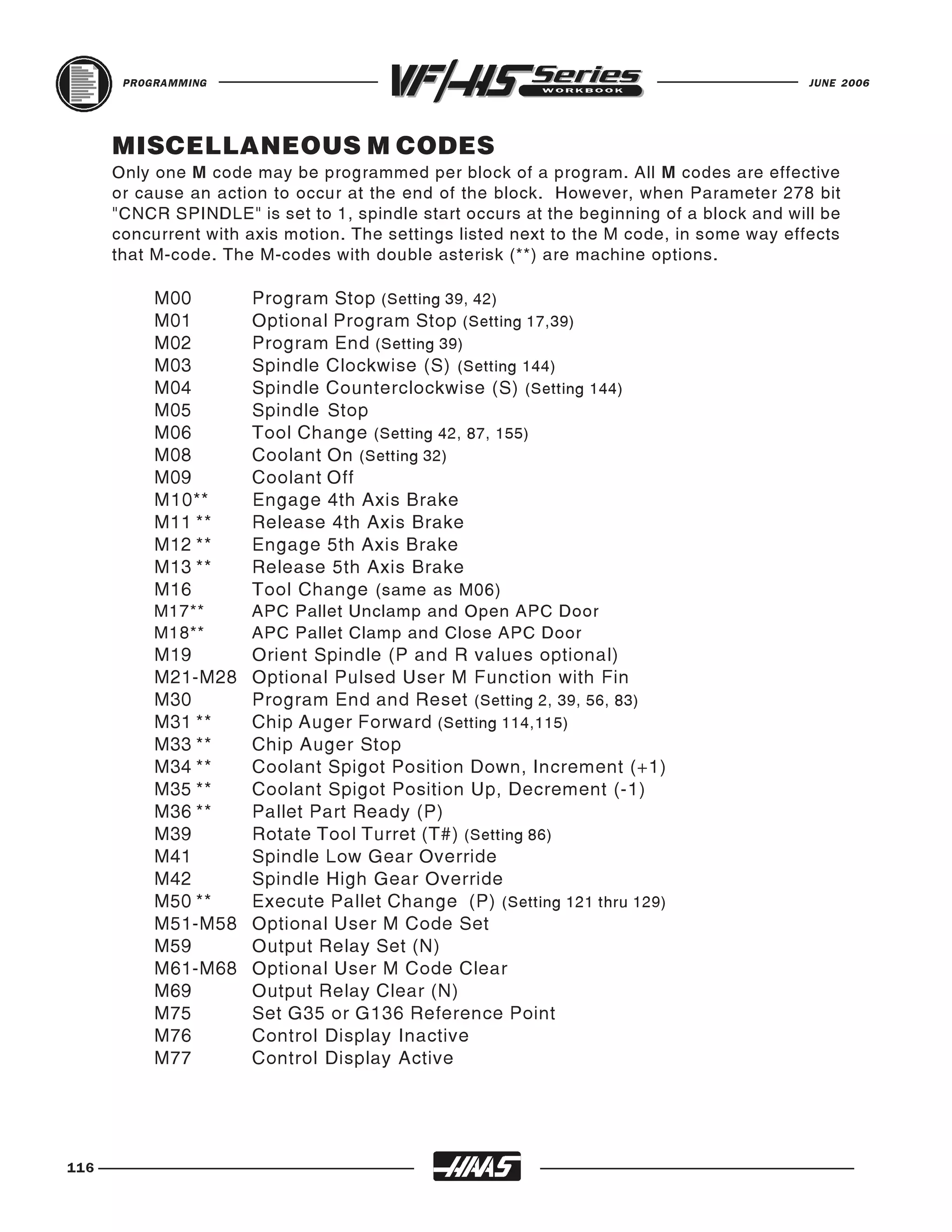
     MISCELLANEOUS "M" CODES LIST
     All M codes are activated or cause an action to occur after everything else on a block has
     been completed. And only one M code is allowed per block in a program. If there is a
     (Setting number) listed next to an M code, that setting will in some way relate to that M code.
     The following list is a summary of Haas M codes. A * indicates options available.

      M00      Program Stop (Setting 39, 42)
      M01      Optional Program Stop (Setting 17,39)
      M02      Program End (Setting 39)
      M03      Spindle On, Clockwise (S) (Setting 144)
      M04      Spindle On, Counterclockwise (S) (Setting 144)
      M05      Spindle Stop
      M06      Tool Change (T) (Setting 42, 87, 155)
      M08      Coolant On (Setting 32)
      M09      Coolant Off
      M10**    4th Axis Brake On
      M11**    4th Axis Brake Release
      M12**    5th Axis Brake On
      M13**    5th Axis Brake Release
      M16      Tool Change (T) (Same as M06)
      M17**    APC Pallet Unclamp and Open APC Door
      M18**    APC Pallet Clamp and Close APC Door
      M19      Orient Spindle (P,R values optional)
     M21-M28   Optional User M Code Interface with M-Fin Signals
      M30      Program End and Reset (Setting 2, 39, 56, 83)
      M31      Chip Auger Forward (Setting 114,115)
      M33      Chip Auger Stop
      M34      Coolant Spigot Position Down, Increment (+1)
      M35      Coolant Spigot Position Up, Decrement (-1)
      M36**    Pallet Part Ready (P)
      M39      Rotate Tool Turret (T#) (Setting 86)
      M41      Spindle Low Gear Override
      M42      Spindle High Gear Override
      M50**    Execute Pallet Change (P) (Setting 121 thru,129)
     M51-M58   Optional User M Code Set
      M59      Output Relay Set (N)
     M61-M68   Optional User M Code Clear
      M69      Output Relay Clear (N)
      M75      Set G35 or G136 Reference Point
      M76      Control Display Inactive
      M77      Control Display Active
     (M codes continued next page)


20
JUNE 2006                                                                          PROGRAMMING


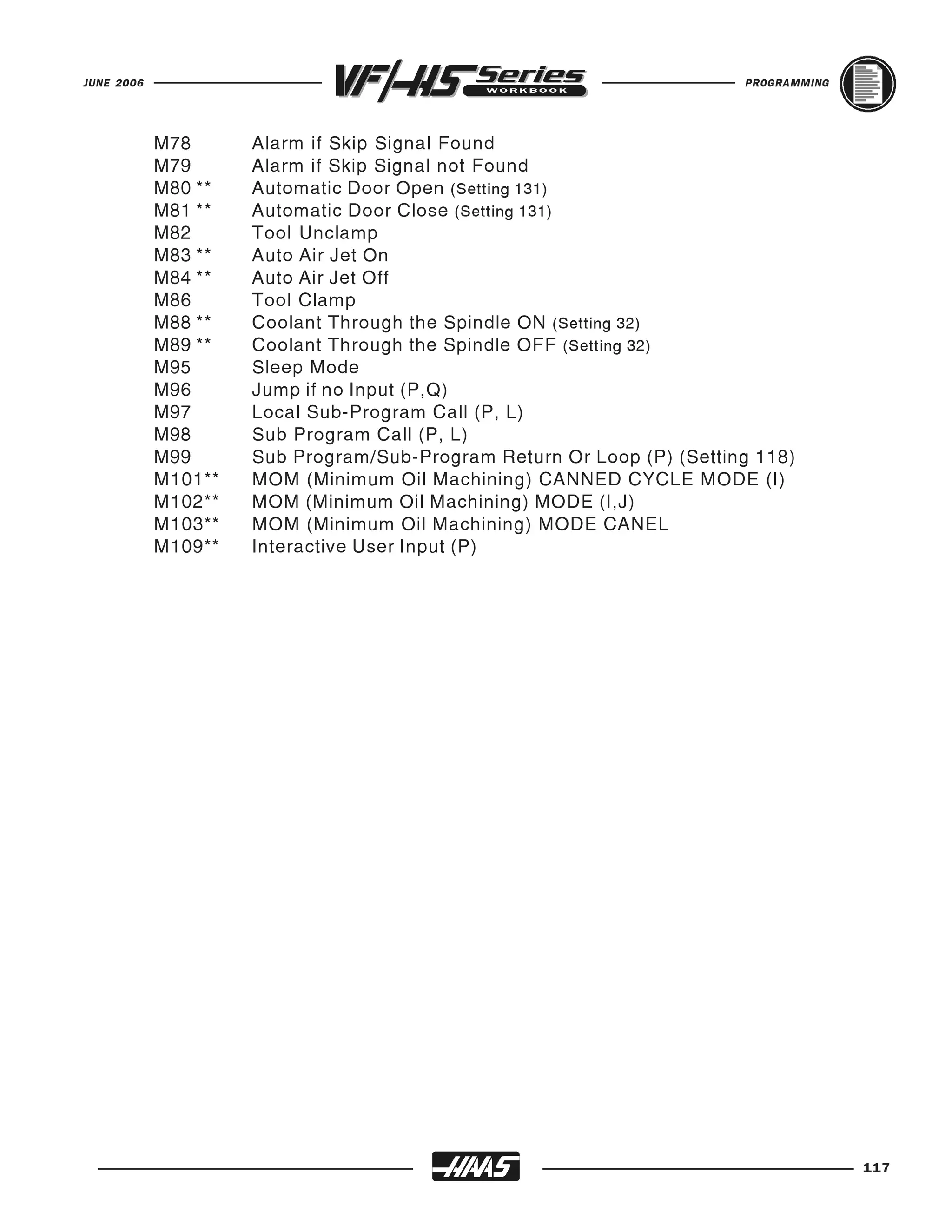
     M78       Alarm if Skip Signal Found
     M79       Alarm if Skip Signal Not Found
     M80**     Automatic Door Open (Setting 131)
     M81**     Automatic Door Close (Setting 131)
     M82       Tool Unclamp
     M83**     Auto Air Jet On
     M84**     Auto Air Jet Off
     M86       Tool Clamp
     M88**     Coolant Through the Spindle On (Setting 32)
     M89**     Coolant Through the Spindle Off (Setting 32)
     M93       Axis POS Capture Start (P, Q)
     M94       Axis POS Capture Stop
     M95       Sleep Mode
     M96       Jump if No Input (P, Q)
     M97       Local Sub-Program Call (P, L)
     M98       Sub Program Call (P, L)
     M99       M97 Local Sub-Program or M98 Sub-Program Return or Loop Program (Setting 118)
     M101**    MOM (Minimum Oil Machining) CANNED CYCLE MODE (I)
     M102**    MOM (Minimum Oil Machining) MODE (I,J)
     M103**    MOM (Minimum Oil Machining) MODE CANEL
     M109      Interactive User Input (P)
            ** Options


                                                                                                 21
PROGRAMMING                                                                           JUNE 2006


     PROGRAM STRUCTURE
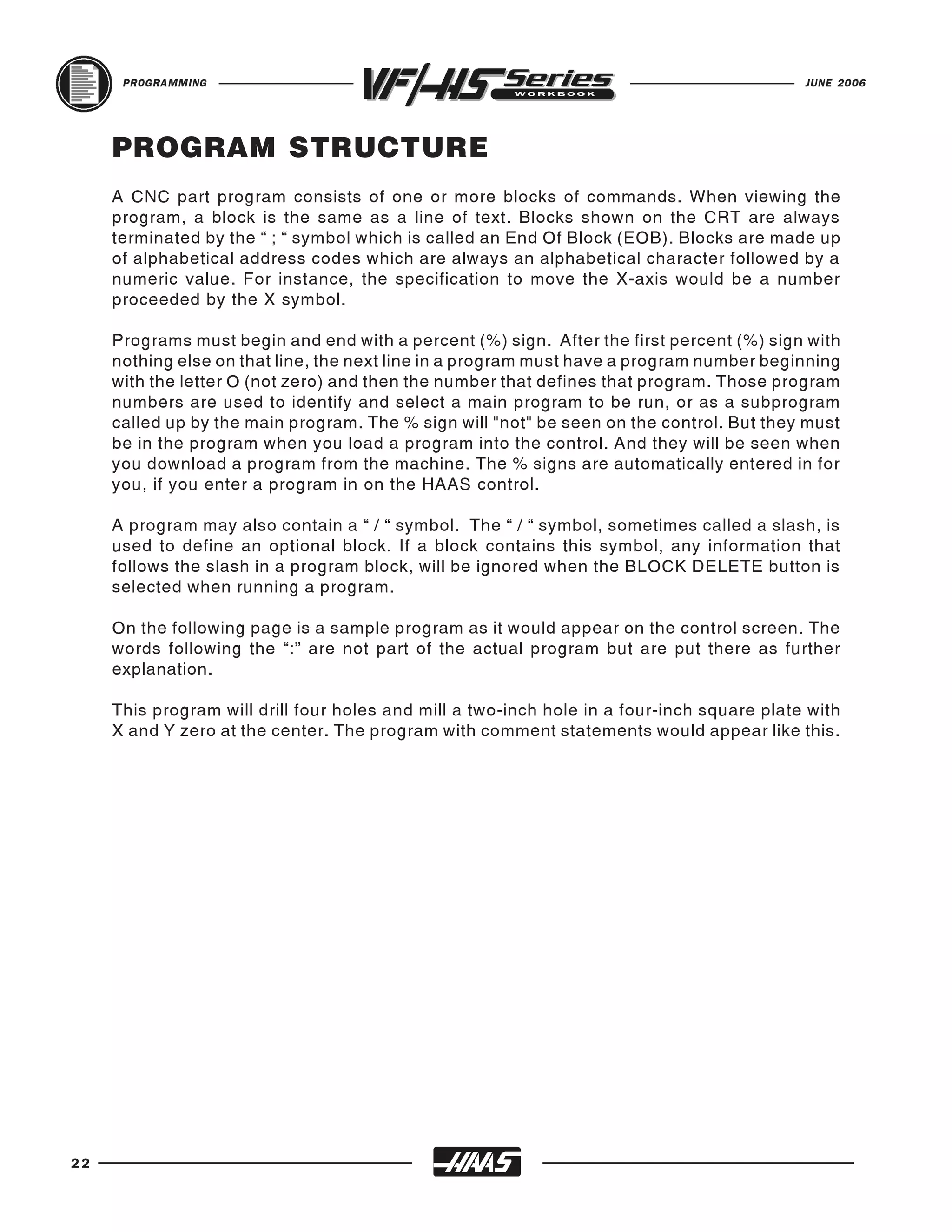
     A CNC part program consists of one or more blocks of commands. When viewing the
     program, a block is the same as a line of text. Blocks shown on the CRT are always
     terminated by the “ ; “ symbol which is called an End Of Block (EOB). Blocks are made up
     of alphabetical address codes which are always an alphabetical character followed by a
     numeric value. For instance, the specification to move the X-axis would be a number
     proceeded by the X symbol.

     Programs must begin and end with a percent (%) sign. After the first percent (%) sign with
     nothing else on that line, the next line in a program must have a program number beginning
     with the letter O (not zero) and then the number that defines that program. Those program
     numbers are used to identify and select a main program to be run, or as a subprogram
     called up by the main program. The % sign will "not" be seen on the control. But they must
     be in the program when you load a program into the control. And they will be seen when
     you download a program from the machine. The % signs are automatically entered in for
     you, if you enter a program in on the HAAS control.

     A program may also contain a “ / “ symbol. The “ / “ symbol, sometimes called a slash, is
     used to define an optional block. If a block contains this symbol, any information that
     follows the slash in a program block, will be ignored when the BLOCK DELETE button is
     selected when running a program.

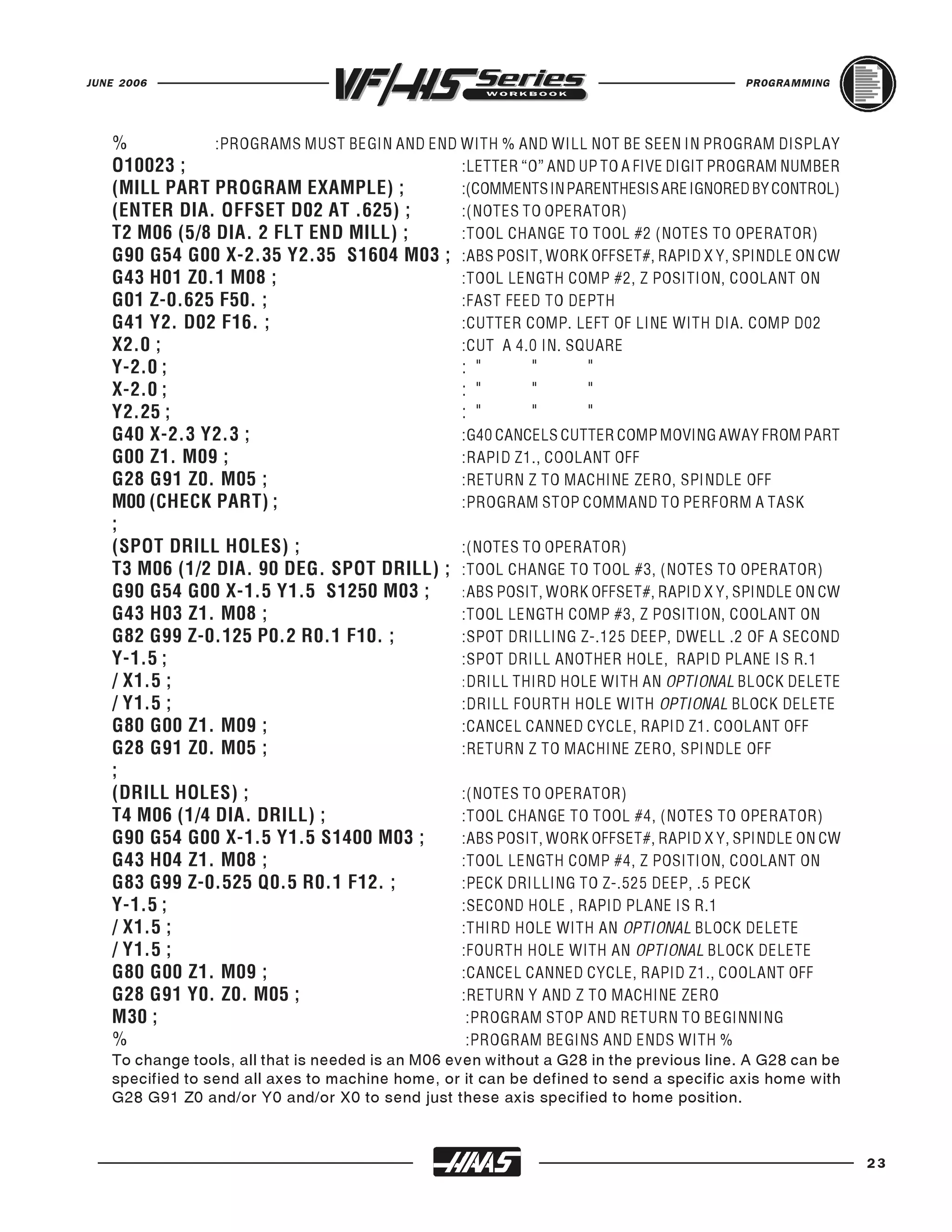
     On the following page is a sample program as it would appear on the control screen. The
     words following the “:” are not part of the actual program but are put there as further
     explanation.

     This program will drill four holes and mill a two-inch hole in a four-inch square plate with
     X and Y zero at the center. The program with comment statements would appear like this.


22
JUNE 2006                                                                                PROGRAMMING


   %           :PROGRAMS MUST BEGIN AND END WITH % AND WILL NOT BE SEEN IN PROGRAM DISPLAY
   O10023 ;                                 :LETTER “O” AND UP TO A FIVE DIGIT PROGRAM NUMBER
   (MILL PART PROGRAM EXAMPLE) ;            :(COMMENTS IN PARENTHESIS ARE IGNORED BY CONTROL)
   (ENTER DIA. OFFSET D02 AT .625) ;        :(NOTES TO OPERATOR)
   T2 M06 (5/8 DIA. 2 FLT END MILL) ;       :TOOL CHANGE TO TOOL #2 (NOTES TO OPERATOR)
   G90 G54 G00 X-2.35 Y2.35 S1604 M03 ; :ABS POSIT, WORK OFFSET#, RAPID X Y, SPINDLE ON CW
   G43 H01 Z0.1 M08 ;                       :TOOL LENGTH COMP #2, Z POSITION, COOLANT ON
   G01 Z-0.625 F50. ;                       :FAST FEED TO DEPTH
   G41 Y2. D02 F16. ;                       :CUTTER COMP. LEFT OF LINE WITH DIA. COMP D02
   X2.0 ;                                   :CUT A 4.0 IN. SQUARE
   Y-2.0 ;                                  : "       "      "
   X-2.0 ;                                  : "       "      "
   Y2.25 ;                                  : "       "      "
   G40 X-2.3 Y2.3 ;                         :G40 CANCELS CUTTER COMP MOVING AWAY FROM PART
   G00 Z1. M09 ;                            :RAPID Z1., COOLANT OFF
   G28 G91 Z0. M05 ;                        :RETURN Z TO MACHINE ZERO, SPINDLE OFF
   M00 (CHECK PART) ;                       :PROGRAM STOP COMMAND TO PERFORM A TASK
   ;
   (SPOT DRILL HOLES) ;                     :(NOTES TO OPERATOR)
   T3 M06 (1/2 DIA. 90 DEG. SPOT DRILL) ; :TOOL CHANGE TO TOOL #3, (NOTES TO OPERATOR)
   G90 G54 G00 X-1.5 Y1.5 S1250 M03 ;       : ABS POSIT, WORK OFFSET#, RAPID X Y, SPINDLE ON CW
   G43 H03 Z1. M08 ;                        :TOOL LENGTH COMP #3, Z POSITION, COOLANT ON
   G82 G99 Z-0.125 P0.2 R0.1 F10. ;         :SPOT DRILLING Z-.125 DEEP, DWELL .2 OF A SECOND
   Y-1.5 ;                                  :SPOT DRILL ANOTHER HOLE, RAPID PLANE IS R.1
   / X1.5 ;                                 : DRILL THIRD HOLE WITH AN OPTIONAL BLOCK DELETE
   / Y1.5 ;                                 :DRILL FOURTH HOLE WITH OPTIONAL BLOCK DELETE
   G80 G00 Z1. M09 ;                        :CANCEL CANNED CYCLE, RAPID Z1. COOLANT OFF
   G28 G91 Z0. M05 ;                        :RETURN Z TO MACHINE ZERO, SPINDLE OFF
   ;
   (DRILL HOLES) ;                          :(NOTES TO OPERATOR)
   T4 M06 (1/4 DIA. DRILL) ;                :TOOL CHANGE TO TOOL #4, (NOTES TO OPERATOR)
   G90 G54 G00 X-1.5 Y1.5 S1400 M03 ;       :ABS POSIT, WORK OFFSET#, RAPID X Y, SPINDLE ON CW
   G43 H04 Z1. M08 ;                        :TOOL LENGTH COMP #4, Z POSITION, COOLANT ON
   G83 G99 Z-0.525 Q0.5 R0.1 F12. ;         :PECK DRILLING TO Z-.525 DEEP, .5 PECK
   Y-1.5 ;                                  :SECOND HOLE , RAPID PLANE IS R.1
   / X1.5 ;                                 :THIRD HOLE WITH AN OPTIONAL BLOCK DELETE
   / Y1.5 ;                                 :FOURTH HOLE WITH AN OPTIONAL BLOCK DELETE
   G80 G00 Z1. M09 ;                        :CANCEL CANNED CYCLE, RAPID Z1., COOLANT OFF
   G28 G91 Y0. Z0. M05 ;                    :RETURN Y AND Z TO MACHINE ZERO
   M30 ;                                     :PROGRAM STOP AND RETURN TO BEGINNING

   To change tools, all that is needed is an M06 even without a G28 in the previous line. A G28 can be
   %                                         :PROGRAM BEGINS AND ENDS WITH %

   specified to send all axes to machine home, or it can be defined to send a specific axis home with
   G28 G91 Z0 and/or Y0 and/or X0 to send just these axis specified to home position.


                                                                                                         23
PROGRAMMING                                                                              JUNE 2006


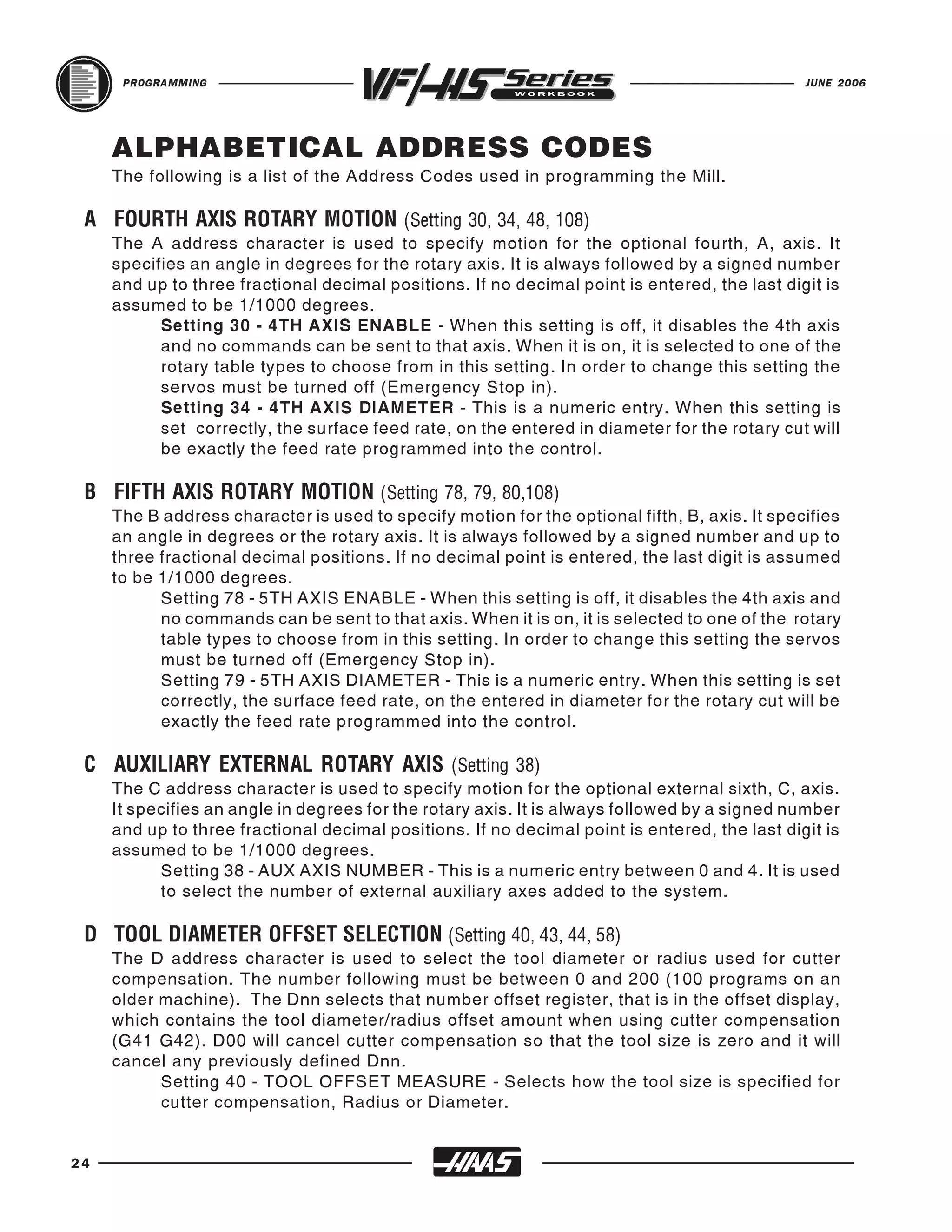
     ALPHABETICAL ADDRESS CODES
     The following is a list of the Address Codes used in programming the Mill.


     The A address character is used to specify motion for the optional fourth, A, axis. It
 A FOURTH AXIS ROTARY MOTION (Setting 30, 34, 48, 108)
     specifies an angle in degrees for the rotary axis. It is always followed by a signed number
     and up to three fractional decimal positions. If no decimal point is entered, the last digit is
     assumed to be 1/1000 degrees.
           Setting 30 - 4TH AXIS ENABLE - When this setting is off, it disables the 4th axis
           and no commands can be sent to that axis. When it is on, it is selected to one of the
           rotary table types to choose from in this setting. In order to change this setting the
           servos must be turned off (Emergency Stop in).
           Setting 34 - 4TH AXIS DIAMETER - This is a numeric entry. When this setting is
           set correctly, the surface feed rate, on the entered in diameter for the rotary cut will
           be exactly the feed rate programmed into the control.


     The B address character is used to specify motion for the optional fifth, B, axis. It specifies
 B FIFTH AXIS ROTARY MOTION (Setting 78, 79, 80,108)
     an angle in degrees or the rotary axis. It is always followed by a signed number and up to
     three fractional decimal positions. If no decimal point is entered, the last digit is assumed
     to be 1/1000 degrees.
           Setting 78 - 5TH AXIS ENABLE - When this setting is off, it disables the 4th axis and
           no commands can be sent to that axis. When it is on, it is selected to one of the rotary
           table types to choose from in this setting. In order to change this setting the servos
           must be turned off (Emergency Stop in).
           Setting 79 - 5TH AXIS DIAMETER - This is a numeric entry. When this setting is set
           correctly, the surface feed rate, on the entered in diameter for the rotary cut will be
           exactly the feed rate programmed into the control.


     The C address character is used to specify motion for the optional external sixth, C, axis.
 C AUXILIARY EXTERNAL ROTARY AXIS (Setting 38)
     It specifies an angle in degrees for the rotary axis. It is always followed by a signed number
     and up to three fractional decimal positions. If no decimal point is entered, the last digit is
     assumed to be 1/1000 degrees.
           Setting 38 - AUX AXIS NUMBER - This is a numeric entry between 0 and 4. It is used
           to select the number of external auxiliary axes added to the system.


     The D address character is used to select the tool diameter or radius used for cutter
 D TOOL DIAMETER OFFSET SELECTION (Setting 40, 43, 44, 58)
     compensation. The number following must be between 0 and 200 (100 programs on an
     older machine). The Dnn selects that number offset register, that is in the offset display,
     which contains the tool diameter/radius offset amount when using cutter compensation
     (G41 G42). D00 will cancel cutter compensation so that the tool size is zero and it will
     cancel any previously defined Dnn.
           Setting 40 - TOOL OFFSET MEASURE - Selects how the tool size is specified for
           cutter compensation, Radius or Diameter.


24
JUNE 2006                                                                                  PROGRAMMING


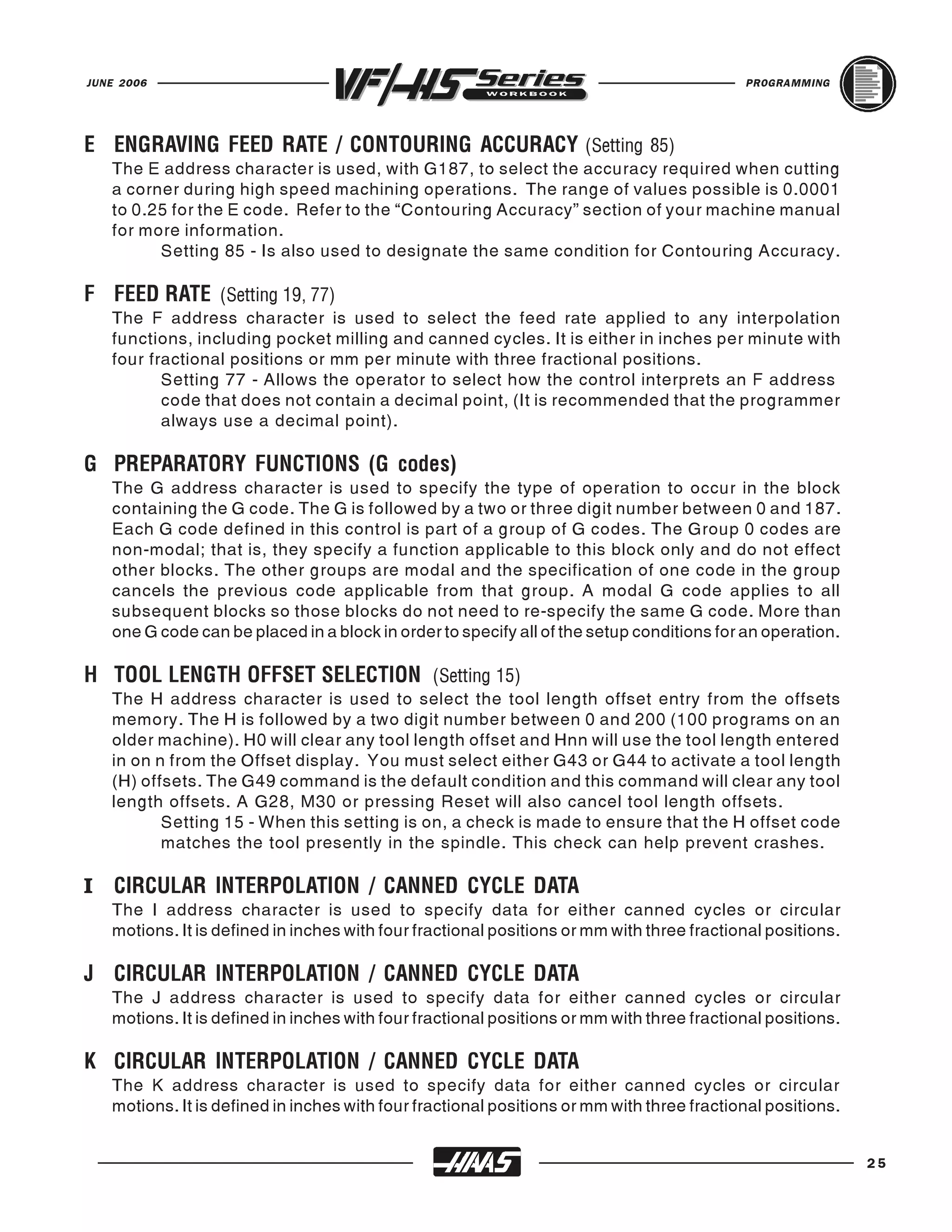
   The E address character is used, with G187, to select the accuracy required when cutting
E ENGRAVING FEED RATE / CONTOURING ACCURACY (Setting 85)
   a corner during high speed machining operations. The range of values possible is 0.0001
   to 0.25 for the E code. Refer to the “Contouring Accuracy” section of your machine manual
   for more information.
         Setting 85 - Is also used to designate the same condition for Contouring Accuracy.


   The F address character is used to select the feed rate applied to any interpolation
F FEED RATE (Setting 19, 77)
   functions, including pocket milling and canned cycles. It is either in inches per minute with
   four fractional positions or mm per minute with three fractional positions.
          Setting 77 - Allows the operator to select how the control interprets an F address
          code that does not contain a decimal point, (It is recommended that the programmer
          always use a decimal point).


   The G address character is used to specify the type of operation to occur in the block
G PREPARATORY FUNCTIONS (G codes)
   containing the G code. The G is followed by a two or three digit number between 0 and 187.
   Each G code defined in this control is part of a group of G codes. The Group 0 codes are
   non-modal; that is, they specify a function applicable to this block only and do not effect
   other blocks. The other groups are modal and the specification of one code in the group
   cancels the previous code applicable from that group. A modal G code applies to all
   subsequent blocks so those blocks do not need to re-specify the same G code. More than
   one G code can be placed in a block in order to specify all of the setup conditions for an operation.


   The H address character is used to select the tool length offset entry from the offsets
H TOOL LENGTH OFFSET SELECTION (Setting 15)
   memory. The H is followed by a two digit number between 0 and 200 (100 programs on an
   older machine). H0 will clear any tool length offset and Hnn will use the tool length entered
   in on n from the Offset display. You must select either G43 or G44 to activate a tool length
   (H) offsets. The G49 command is the default condition and this command will clear any tool
   length offsets. A G28, M30 or pressing Reset will also cancel tool length offsets.
          Setting 15 - When this setting is on, a check is made to ensure that the H offset code
          matches the tool presently in the spindle. This check can help prevent crashes.

I CIRCULAR INTERPOLATION / CANNED CYCLE DATA
   The I address character is used to specify data for either canned cycles or circular
   motions. It is defined in inches with four fractional positions or mm with three fractional positions.


   The J address character is used to specify data for either canned cycles or circular
J CIRCULAR INTERPOLATION / CANNED CYCLE DATA
   motions. It is defined in inches with four fractional positions or mm with three fractional positions.


   The K address character is used to specify data for either canned cycles or circular
K CIRCULAR INTERPOLATION / CANNED CYCLE DATA
   motions. It is defined in inches with four fractional positions or mm with three fractional positions.


                                                                                                            25
PROGRAMMING                                                                          JUNE 2006


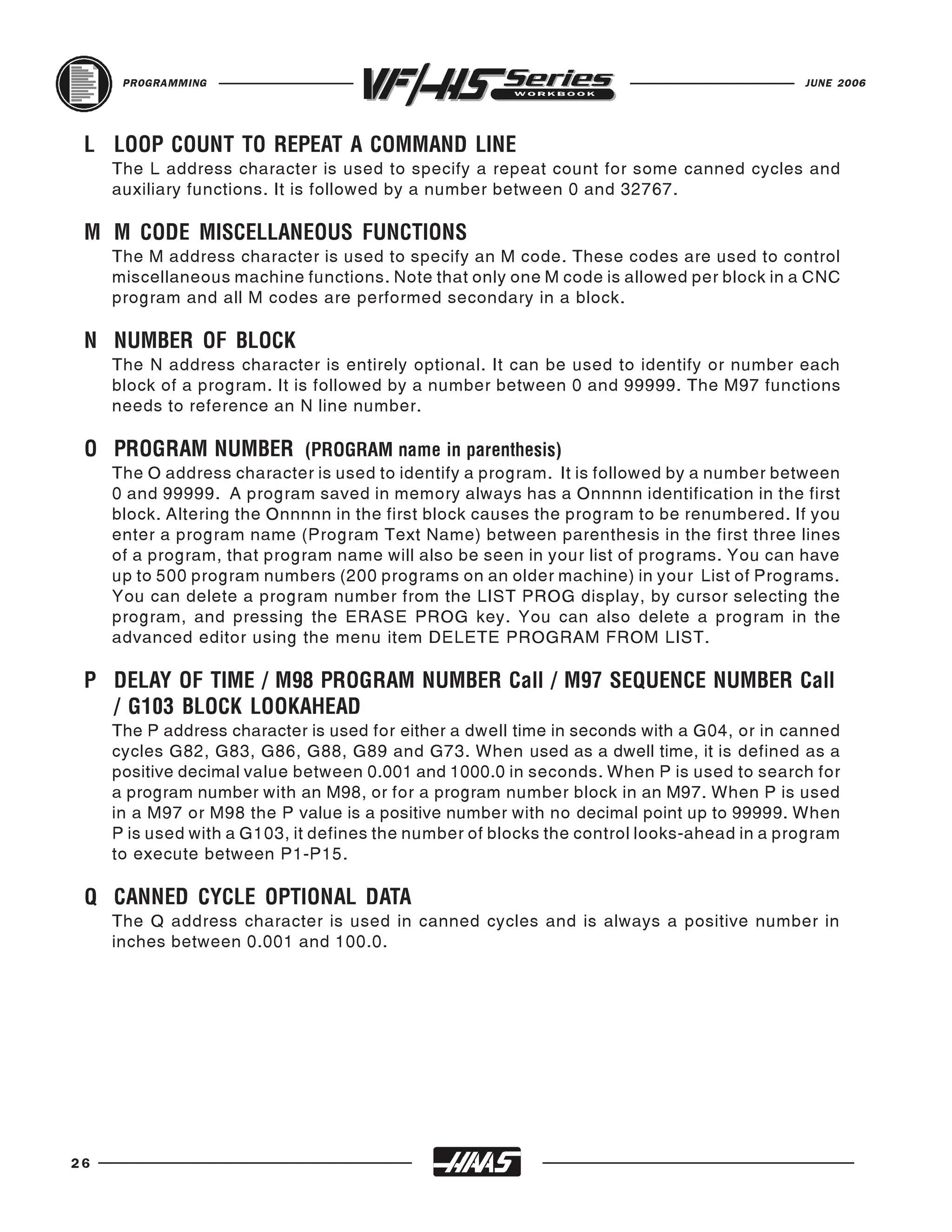
     The L address character is used to specify a repeat count for some canned cycles and
 L LOOP COUNT TO REPEAT A COMMAND LINE
     auxiliary functions. It is followed by a number between 0 and 32767.


     The M address character is used to specify an M code. These codes are used to control
 M M CODE MISCELLANEOUS FUNCTIONS
     miscellaneous machine functions. Note that only one M code is allowed per block in a CNC
     program and all M codes are performed secondary in a block.


     The N address character is entirely optional. It can be used to identify or number each
 N NUMBER OF BLOCK
     block of a program. It is followed by a number between 0 and 99999. The M97 functions
     needs to reference an N line number.


     The O address character is used to identify a program. It is followed by a number between
 O PROGRAM NUMBER (PROGRAM name in parenthesis)
     0 and 99999. A program saved in memory always has a Onnnnn identification in the first
     block. Altering the Onnnnn in the first block causes the program to be renumbered. If you
     enter a program name (Program Text Name) between parenthesis in the first three lines
     of a program, that program name will also be seen in your list of programs. You can have
     up to 500 program numbers (200 programs on an older machine) in your List of Programs.
     You can delete a program number from the LIST PROG display, by cursor selecting the
     program, and pressing the ERASE PROG key. You can also delete a program in the
     advanced editor using the menu item DELETE PROGRAM FROM LIST.

 P DELAY OF TIME / M98 PROGRAM NUMBER Call / M97 SEQUENCE NUMBER Call

     The P address character is used for either a dwell time in seconds with a G04, or in canned
   / G103 BLOCK LOOKAHEAD
     cycles G82, G83, G86, G88, G89 and G73. When used as a dwell time, it is defined as a
     positive decimal value between 0.001 and 1000.0 in seconds. When P is used to search for
     a program number with an M98, or for a program number block in an M97. When P is used
     in a M97 or M98 the P value is a positive number with no decimal point up to 99999. When
     P is used with a G103, it defines the number of blocks the control looks-ahead in a program
     to execute between P1-P15.


     The Q address character is used in canned cycles and is always a positive number in
 Q CANNED CYCLE OPTIONAL DATA
     inches between 0.001 and 100.0.


26
JUNE 2006                                                                            PROGRAMMING


   The R address character is used in canned cycles or circular interpolation. It's either in
R CIRCULAR INTERPOLATION / CANNED CYCLE DATA (Setting 52)
   inches with four fractional positions or mm with three fractional positions. It is followed by
   number in inches or metric. It's usually used to define the reference plane for canned cycles.


   The S address character is used to specify the spindle speed in conjunction with M41 and
S SPINDLE SPEED COMMAND (Setting 20)
   M42. The S is followed by an unsigned number between 1 - 99999. The S command does
   not turn the spindle on or off; it only sets the desired speed. If a gear change is required
   in order to set the commanded speed, this command will cause a gear change to occur
   even if the spindle is stopped. If spindle is running, a gear change operation will occur and
   the spindle will start running at the new speed.


   The T address character is used to select the tool for the next tool change. The number
T TOOL SELECTION CODE (Setting 15)
   following must be a positive number between 1 and (20) the number in Parameter 65. It
   does not cause the tool change operation to occur. The Tnn may be placed in the same
   block that starts tool change (M06 or M16) or in any previous block.


   The U address character is used to specify motion for the optional external linear, U-axis.
U AUXILIARY EXTERNAL LINEAR AXIS
   It specifies a position of motion in inches. It is always followed by a signed number and up
   to four fractional decimal positions. If no decimal point is entered, the last digit is assumed
   to be 1/10000 inches. The smallest magnitude is 0.0001 inches, the most negative value
   is -8380.0000 inches, and the largest number is 8380.0000 inches.


   The V address character is used to specify motion for the optional external linear, V-axis.
V AUXILIARY EXTERNAL LINEAR AXIS
   It specifies a position of motion in inches. It is always followed by a signed number and up
   to four fractional decimal positions. If no decimal point is entered, the last digit is assumed
   to be 1/10000 inches.


   The W address character is used to specify motion for the optional external linear, W-axis.
W AUXILIARY EXTERNAL LINEAR AXIS
   It specifies a position of motion in inches. It is always followed by a signed number and up
   to four fractional decimal positions. If no decimal point is entered, the last digit is assumed
   to be 1/10000 inches.


                                                                                                     27
PROGRAMMING                                                                             JUNE 2006


     The X address character is used to specify motion for the X-axis. It specifies a position
 X LINEAR X-AXIS MOTION (Setting 45)
     or distance along the X-axis. It is either in inches with four fractional positions or mm with
     three fractional positions. It is followed by a signed number in inches or metric. If no
     decimal point is entered, the last digit is assumed to be 1/10000 inches or 1/1000 mm.


     The Y address character is used to specify motion for the Y-axis. It specifies a position
 Y LINEAR Y-AXIS MOTION (Setting 46)
     or distance along the Y-axis. It is either in inches with four fractional positions or mm with
     three fractional positions. It is followed by a signed number in inches or metric. If no
     decimal point is entered, the last digit is assumed to be 1/10000 inches or 1/1000 mm.


     The Z address character is used to specify motion for the Z-axis. It specifies a position or
 Z LINEAR Z-AXIS MOTION (Setting 47)
     distance along the Z-axis. It is either in inches with four fractional positions or mm with
     three fractional positions. It is followed by a signed number in inches or metric. If no
     decimal point is entered, the last digit is assumed to be 1/10000 inches or 1/1000 mm.


28
JUNE 2006   PROGRAMMING


                          29
PROGRAMMING                                                                             JUNE 2006


     RAPID POSITION COMMAND
     G00        RAPID POSITIONING MOTION
           *X    Positioning X axis motion
           *Y    Positioning Y axis motion
           *Z    Positioning Z axis motion
           *A    Positioning A axis motion
            * indicates optional

     This G code is for rapid traverse of the three or four axes of the machine. This G00 code
     is modal and causes all the following blocks to be in rapid motion until another Group 01
     code is specified. Generally, rapid motions "will not" be in a straight line. All the axes
     specified are moved at the maximum speed and will not necessarily complete each axis
     move at the same time. It activates each axis drive motor independantly of each other and,
     as a result, the axis with the shortest move will reach its desination first. So you need to
     be careful of any obstructions to avoid with this type of rapid move. The tool will first move
     from the current position in a straight line along a 45 degree angle to an intermediate
     location when one of these axes has completed its move. Then the machine will position
     parallel to the X or Y axis to complete the move to the final location. If the Z axis is also
     in the program move, it will operate in the same manner along with the X and Y axes. Only
     the axes specified are moved and the commands for absolute (G90) or incremental (G91)
     will change how the values are interpreted.


                                                    Y+


             X-                                                                 X+


                                                    Y-
     ABSOLUTE POSITIONING - G90 G00 X2.25 Y1.25
                or
     INCREMENTAL POSITIONING - G91 G00 X5.25 Y2.25


30
JUNE 2006                                                                                PROGRAMMING


   LINEAR INTERPOLATION COMMAND
   G01           LINEAR INTERPOLATION MOTION
            *X     Linear X-axis motion
            *Y     Linear Y-axis motion
            *Z     Linear Z-axis motion
            *A     Linear A-axis motion
            *F     Feed rate in inches (mm) per minute
             * indicates optional

   This G code provides for straight line (linear) motion from point to point. Motion can occur
   in 1, 2 or 3 axes. All axis specified will start at the same time and proceed to their destination
   and arrive simultaneously at the specified feedrate. The rotary axis may also provide motion
   around an axis or center point. The speed of all axes are controlled by a feedrate specified
   along with axis moves. Rotary axis feedrate is dependent on rotary axis diameter setting

   (Setting 34) and will provide a controlled motion. The F command is modal and may be
   specified in a previous block. Only the axes specified are moved in either absolute (G90) or
   incremental (G91) modal commands which change how values are interpreted.
                                                      Location are defined around part
                                                      geometry using cutter comp.

                                                      (Absolute with Cutter Comp.)
                                                      G01 G41 X0. Y-0.25 D01 F12.
                                                      G90 Y1.75 (Absolute G90 Command)
                                                      X0.546 Y3.25
                                                      X2.
                                                      Y0.
                                                      X0.
                                                      G40 X-0.35 Y-0.25
                                                              or
                                                      (Incremental with Cutter Comp.)
                                                      G01 G41 X0. Y-0.25 D01 F12.
                                                      G91 Y2. (Incremental G91 Command)
                                                      X0.546 Y1.5
                                                      X1.454
                                                      Y-3.25
                                                      X-2.
                                                      G40 X-0.35 Y-0.25
                                                      .....


                                                                                                        31
PROGRAMMING                                                                             JUNE 2006


     CIRCULAR INTERPOLATION COMMANDS
     G02        CW CIRCULAR INTERPOLATION MOTION &
     G03        CCW CIRCULAR INTERPOLATION MOTION
           *X     Circular end point X-axis motion
           *Y     Circular end point Y-axis motion
           *Z     Circular end point Z-axis motion
           *A     Circular end point A-axis motion
           *I     X-axis Distance from start point to arc center (If R is not used)
           *J     Y-axis Distance from start point to arc center (If R is not used)
           *K     Z-axis Distance from start point to arc center (If R is not used)
           *R     Radius of the arc to be machined (If I, J, K are not used)
           *F     Feed rate in inches (or mm) per minute
            * indicates optional

     G03 will generate a counterclockwise circular motion, but is otherwise defined the same
     way as G02.

     These G codes are used to specify a clockwise or counterclockwise motion of two, of the
     linear axes. Circular motion is possible in two of the three axes in either the X, Y, and/or
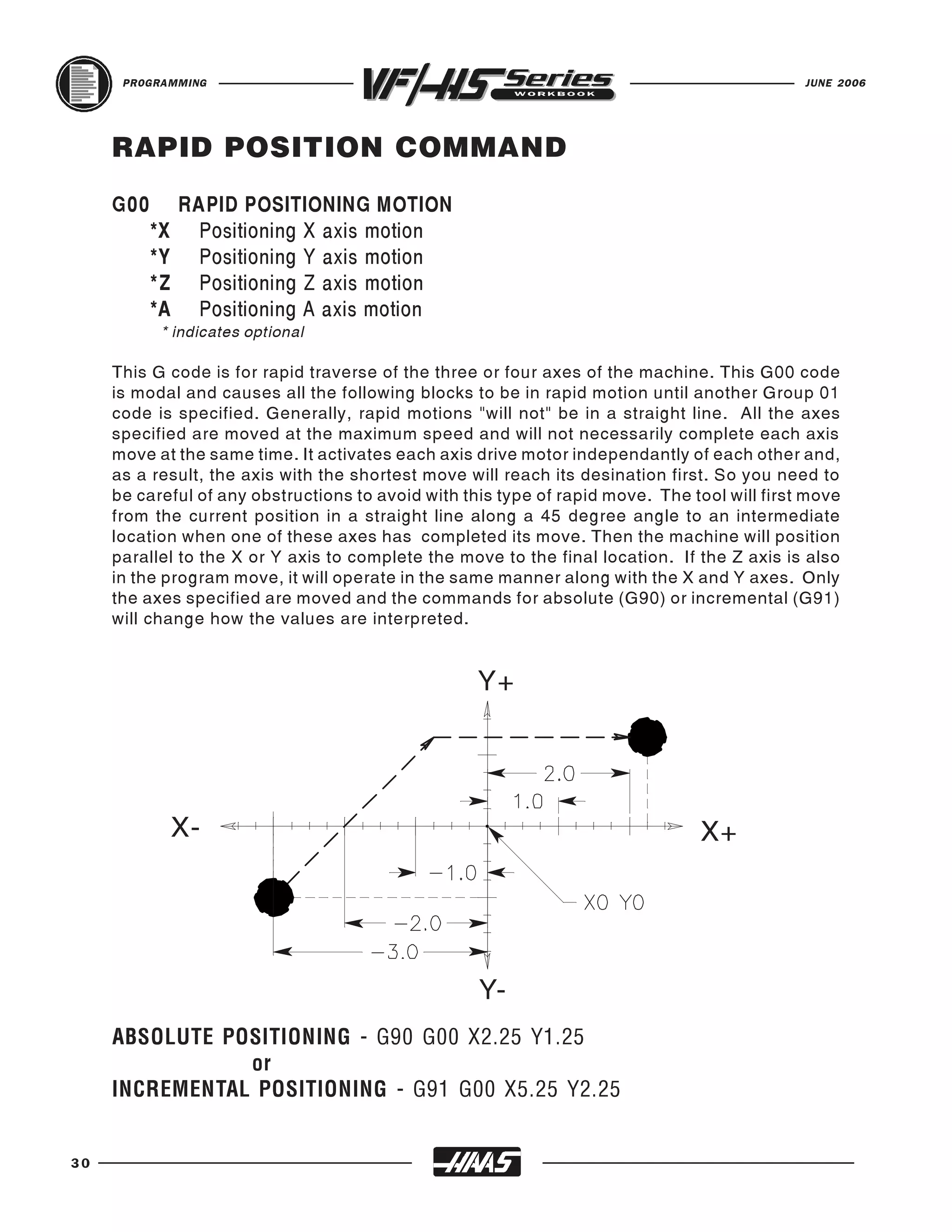
     Z axes as selected by G17, G18, and G19. The X, Y, and Z in a circular command (G02
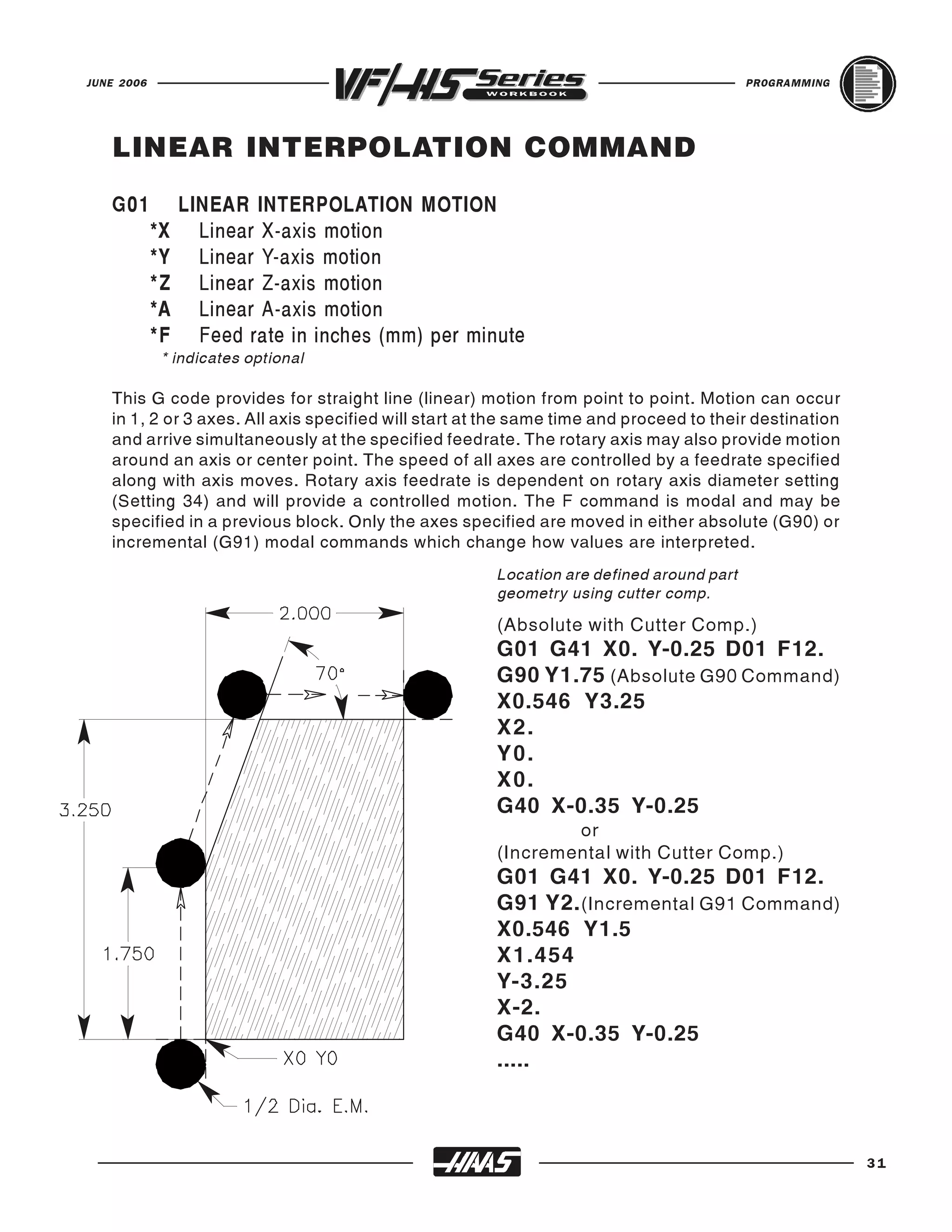
     or G03) is used to define the end point of that motion in either absolute (G90) or incremental
     (G91) motion. If any of the axes, X, Y, or Z for the selected plane is not specified, the
     endpoint location of the arc will then be recognized the same as the starting point of the
     arc, for that axis. There are two basic command formats for defining circular interpolation,
     depending on whether the I JK method or the R method is used to define the arc center.

     Circular interpolation commands are used to move a tool along a circular arc to the
     commanded end position. Five pieces of information are required for executing a circular
     interpolation command:


                            G02                                           G03


                    R                                                              R
                              J                                            J
                        I                                                         I


32
JUNE 2006                                                                               PROGRAMMING


     The Five pieces of information for executing a circular interpolation command.

           Item                             Command                         Remark
 1   Plane selection command                   G17          Arc parrallel to XY-plane
     Plane selection command                   G18          Arc parrallel to ZX-plane
     Plane selection command                   G19          Arc parrallel to YZ-plane
 2   Arc start position coordinates            X,Y,Z        Coordinates of the start position
 3   Rotation direction                        G02          Clockwise direction
                                               G03          Counterclockwise direction
 4   Arc end position (G90) Absolute           X,Y,Z        Coordinates of the end position on
                or                                          the work coordinate system
     Arc end position (G91) Incremental        X,Y,Z        Distance from start position to end

     I J K method (arc center coordinate)      I,J,K
                                                            position in X, Y, and Z axes, respectively
 5                                                          Distance from start position to arc
                or                                          center in X, Y, and Z axes, respectively
     R method (arc radius)                      R           Arc radius value

     There are two ways to specify the center of the circular arc that your rotating around. The
     first uses I, J, or K to specify the distance from the starting point to the center of the arc.
     The second uses R to specify the radius of the arc. These two ways will be further
     described below:

     The " I ", "J" and "K" values are "INCREMENTAL" distances from the tools starting point
     (START POINT) on arc to the ARC CENTER.

     " I " = Incremental distance from Start Point to arc center in the "X axis."
     "J" = Incremental distance from Start Point to arc center in the "Y axis."
     "K" = Incremental distance from Start Point to arc center in the "Z axis."

     R is easier to define, though it's easier to make a mistake and get an incorrect radius. If
     R is used, and you make a mistake with the start point, or the end point, and the machine
     can still do the radius, and does it, then you'll have an incorrect radius. If you make a
     mistake with the I JK method, machine will be more likely to stop and give you an alarm
     before executing it. Though, using an R in a G02 or G03 is still easier and the preffered
     method to manually program an arc.

     R is the distance from the starting point to the center of the circle. With a positive R, the
     control will generate a circular path of 180 degrees or less, but to generate a circular path
     of over 180 degrees, then specify a negative R. When R is used, a complete 360 degree
     arc is not possible. X, Y, or Z is required to specify an endpoint different from the starting
     point. So anything under a 360 degree arc can be performed with an R command in a G02
     or G03.


                                                                                                         33
PROGRAMMING                                                                              JUNE 2006


     G02 CW CIRCULAR INTERPOLATION
     Contouring a part profile using a G02 circular interpolation command, uses the axis
     information contained in a block, to move the tool in a CLOCKWISE circular move,
     up to 360 degrees.

     The velocity at which the tool is moving is controlled by the feedrate (F) command.

     All circular interpolation moves are defined and machined by programming in three pieces
     of information into the control, they are :

           ARC START POINT - the program moves that gets you to the start of the arc.

           ARC END POINT - the arc end point in two axes that's defined in the G02 command.

           ARC CENTER - incremental distance from start point to arc center or define radius.

           The START POINT is the point defined prior to the G02 line, usually with a G01 linear
           positioning move.

           The END POINT is defined by the "X" and "Y" coordinates contained in the
           G02 line, when in the G17- XY PLANE.

           The ARC CENTER is defined in the G02 line with " I " for the Xaxis and "J"
           for the Y axis for the incremental distance and direction from the start point to the arc
           center, when in the G17- XY PLANE otr by the "R" Radius value.


     (These moves are defined using nocutter compensation. Cutter Comp. will be defined later.)
          N6 G01 Y1.25 F12. (to start point in Y axis)
           N7 X1.500 (to start point in X axis)
           N8 G02 X2.25 Y0.5 (I0. J-0.75 or R0.75)                    (G02 using I J or Radius)
           N9 G01 Y-0.25

34
JUNE 2006                                                                                               PROGRAMMING


   G02 CW CIRCULAR INTERPOLATION USING
   "I", &"J" FOR THE X & Y AXIS
   The " I ", "J" and "K" values are INCREMENTAL distances from where the tool starts
   cutting the arc (START POINT) to the ARC CENTER.

   When I , J, or K are used to specify the center of the arc, R is not used. Only the I , J, or
   K specific to the selected plane (IJ for G17, IK for G18, JK for G19) are allowed. If only
   one of the I , J, K is specified, the others are assumed to be zero. The I , J, or K is the
   distance from the starting point to the center of the circle. Using I , J, or K is the only way
   to cut a complete 360 degree arc; in this case, the starting point is the same as the ending
   point and no X, Y, or Z is needed. To cut a complete circle of 360 degrees (360O), you do
   not need to specify an ending point X, Y, or Z; just program I , J, or K to define the center
   of the circle.

   NOTE: This example of G02 circular moves is not using cutter compensation, and so the
   circular moves that are shown here are defined from the center of the cutter around arc.
   For 90 degree corners or fillets the " I " and "J" values can be defined like you see below.

                                    END POINT                                          START POINT
                                                              1/2 DIA. END MILL


              START POINT   (I.5)          G02 X-1.75 Y2.25 I0.5 J0.         G01X1.5       (J-0.75)


                                                               G02 X2.25 Y1.5 I0. J-0.75
                                         G01Y1.75                                                            END POINT


                                                                    XY ORIGIN


                                          G02 X-2.25 Y-1. I0. J1.25
               END POINT
                                                                                   G01 Y-1.25
                                                                                                             START POINT


                                                           G02 X1.25 Y-2.25 I-1. J0.
                                                                                              (I 1 .)
                                            (J1.25)

                                                          G01 X-1.


                                                START POINT                       END POINT


                                                                                                                           35
PROGRAMMING                                                                                           JUNE 2006


     G02 CW CIRCULAR MOTION USING "R"
     The letter address "R" can be substituted for the letter addresses " I ", "J" and/or "K" for
     various corners or fillets and the "R" value is more easily defined.

     Just as "I" "J" and "K", are used to locate the ARC CENTER in relation to the START
     POINT, "R" does the same function with less input.

     When R is used to specify the center of the circle, a complete 360 degree arc is not
     possible. When defining an arc less then 360 degrees using the R command, the X, Y, or
     Z needs to specify an endpoint different from the starting point. And R defines the distance
     from the starting point to the center of the circle. With a positive R, the control will generate
     a radius of 180 degrees or less; to generate a radius of over 180 degrees, you need to
     specify an R command with a negative value.

     NOTE: This example of G02 circular moves is not using cutter compensation, and so the
     circular moves that are shown here are defined from the center of the cutter around arc.
     For 90 degree corners or fillets the "R" values can be defined like you see below.

                                  END POINT                                             START POINT
                                                               1/2 DIA. END MILL


                START POINT   (R.5)
                                              G02 X-1.75 Y2.25 R0.5           G01X1.5           (R0.75)

                                      G01Y1.75                                                            END POINT
                                                                       G02 X2.25 Y1.5 R0.75


                                                                      XY ORIGIN


                                      G02 X-2.25 Y-1. R1.25
                 END POINT                                                         G01 Y-1.25
                                                                                                          START POINT
                                                                                                 ( R1.)
                                              (R1.25)
                                                               G02 X1.25 Y-2.25 R1.0
                                                        G01 X-1.


                                               START POINT                           END POINT


36
JUNE 2006                                                                               PROGRAMMING


   G03 CCW CIRCULAR INTERPOLATION
   Contouring a part profile using a G03 circular interpolation command, uses the axis
   information contained in a block, to move the tool in a COUNTERCLOCKWISE circular
   move, up to 360 degrees.

   The velocity at which the tool is moving is controlled by the feedrate (F) command.

   All circular interpolation moves are defined and machined by programming in three pieces
   of information into the control, they are :

            ARC START POINT - the program moves that gets you to the start of the arc.

            ARC END POINT - the arc end point in two axes that's defined in the G03 command.

            ARC CENTER - incremental distance from start point to arc center or define radius.

            The START POINT is the point defined prior to the G03 line, usually with a G01 linear
            positioning move.

            The END POINT is defined by the "X" and "Y" coordinates contained in the
            G03 line, when in the G17- XY PLANE.

            The ARC CENTER is defined in the G03 line with " I " for the Xaxis and "J"
            for the Y axis for the incremental distance and direction from the start point to the arc
            center, when in the G17- XY PLANE otr by the "R" Radius value.


   (These moves are defined using nocutter compensation. Cutter Comp. will be defined later.)
        N6 G01 Y-1.0 F12. (to start point in Y axis)
            N7 X1.250 (to start point in X axis)
            N8 G03 X0.750 Y-1.500 (I0. J-0.5 or R0.5)                   (G02 using I J or Radius)
            N9 G01 Y-2.250

                                                                                                        37
PROGRAMMING                                                                                JUNE 2006


     G03 CCW CIRCULAR INTERPOLATION USING
     "I", &"J" FOR THE X & Y AXIS
     The " I ", "J" and "K" values are INCREMENTAL distances from where the tool starts
     cutting the arc (START POINT) to the ARC CENTER.

     When I , J, or K are used to specify the center of the arc, R is not used. Only the I , J, or
     K specific to the selected plane ( I J for G17, I K for G18, JK for G19) are allowed. If only
     one of the I , J, K is specified, the others are assumed to be zero. The I , J, or K is the
     distance from the starting point to the center of the circle. Use of I , J, or K is the only way
     to cut a complete 360 degree arc; in this case, the starting point is the same as the ending
     point and no X, Y, or Z is needed. To cut a complete circle of 360 degrees (360O), you do
     not need to specify an ending point X, Y, or Z; just program I , J, or K to define the center
     of the circle.

     NOTE: This example of G03 circular moves is not using cutter compensation, and so the
     circular moves that are shown here are defined from the center of the cutter around arc.
     For 90 degree corners or fillets the " I " and "J" values can be defined like you see below.


                                                                                                R.500
               R.250
                                                                                                 R.250

                                                       G03 X1.5 Y1.75 I -0.25 J0.
                                         G01 X-1.75
                                                                                      (I-.25)


                                                 1/2 DIA. END MILL
 4.00 SQ.                                                                     G01 Y1.5


                                                               XY ORIGIN


                                                         G03 X1.75 Y-1.25 I 0. J0.5
                                    G01 Y-1.
       2.00 TYP.


                                                G03 X-1. Y-1.75 I 0.75 J0.
                                      (I0.75)


                                                                             (J.5)
               R .750
                                                                                                R.500
              R 1.000                                           G01 X1.25
                                                                                                 R.750


38
JUNE 2006                                                                                   PROGRAMMING


   G03 CCW CIRCULAR MOTION USING "R"
   The letter address "R" can be substituted for the letter addresses "I", "J" and/or "K" for
   various corners or fillets and the "R" value is more easily defined.

   Just as "I" "J" and "K", are used to locate the ARC CENTER in relation to the START
   POINT , "R" does the same function with less input.

   When R is used to specify the center of the circle, a complete 360 degree arc is not
   possible. When defining an arc less then 360 degrees using the R command, the X, Y, or
   Z needs to specify an endpoint different from the starting point. And R defines the distance
   from the starting point to the center of the circle. With a positive R, the control will generate
   a radius of 180 degrees or less; to generate a radius of over 180 degrees, you need to
   specify an R command with a negative value.

   NOTE: This example of G03 circular moves is not using cutter compensation, and so the
   circular moves that are shown here are defined from the center of the cutter around arc.
   For 90 degree corners or fillets the "R" values can be defined like you see below.


                                                                                               R.500
             R.250
                                                                                                R.250
                                      G01 X-1.75
                                                    G03 X1.5 Y1.75 R0.25           (R.25)


                                              1/2 DIA. END MILL
4.00 SQ.                                                                G01 Y1.5


                                                           XY ORIGIN


                                 G01 Y-1.
      2.00 TYP.                                           G03 X1.75 Y-1.25 R0.5
                                   (R.75)


                                               G03 X-1. Y-1.75 R0.75
             R.750                                                         (R.5)

            R 1.000                                                                           R.500
                                                           G01 X1.25                           R.750


                                                                                                          39
PROGRAMMING                                                                        JUNE 2006


                                                    The following line will cut an arc less
                                                    than 180 degrees (180 o) using a positive
                                                    R value:


                                                    G90 G54 G00 X-0.25 Y-0.25
                                                    G01 Y1.5 F12.
                                                    G02 X1.884 Y2.384 R1.25


                                                    To generate an arc of over 180 degrees
                                                    you need to specify a negative R
                                                    value(180 0) using an R minus:


                                                    G90 G54 G00 X-0.25 Y-0.25
                                                    G01 Y1.5 F12.
                                                    G02 X1.884 Y0.616 R-1.25


                                                    A complete 360 degree arc using an R
                                                    command is not possible. To do a 360
                                                    degree arc in a G02 or G03 you need to
                                                    use I and/or J to define the center of a
                                                    circle for a complete 360 degree arc.


          G03      CCW CIRCULAR INTERPOLATION MOTION
          G03 will generate counterclockwise circular motion but is otherwise
          the same as G02.


40
JUNE 2006                                                                       PROGRAMMING


                    INTERPOLATION EXERCISE

                                                                   Cutter will be a .500 dia.
                                                                   end mill. Start contour
                                                                   from the top left corner of
                                                                   part and mill around out-
                                                                   side of part .625 deep.
                                                                   When defining a circular
                                                                   move (G02 or G03) you
                                                                   can use either an IJK or
                                                                   an R command but not
                                                                   both. Cutter Compensa-
                                                                   tion is not being used in
                                                                   this exercise so Mill
                                                                   around outside of part
                                                                   with end mill defining the
                                                                   very center of cutter to
                                                                   position around part.

                                                                     "I" = X axis incremental
                                                                     distance and direction
                                                                     from the start point to

   O00010 (INTERPOLATION EXERCISE)
                                                                     the arc center.
                                                                     "J" = Y axis incremental
   T1 M06 (1/2 DIA. 4 FLT END MILL)                                  distance and direction
   G90 G54 G00 X_______ Y______ (Start/Finish)                       from the start point to

   S1520 M03
                                                                     the arc center.

   G43 H01 Z0.1 M08
   G01 Z_______ F50. (Fast feed down to depth, non-cutting move)
   X______ F12. (Feed end mill over to the top right radius and continue around

   G0__ X_____ Y_____ R_____ (or use I_____ and J_____ instead of R)
   part, to the end, defining center of tool. Cutter compensation is not being used here.)

   G0__ Y______
   G0__ X_____ Y_____ R_____ (or use I_____ and J_____ instead of R)
   G0__ X______
   Y ______
   G0__ X_____ Y_____ R_____ (or use I_____ and J_____ instead of R)
   G0__ X______
   Y ______
   G00 Z1. M09
   G28 G91 Z0. M05
   M30

                                                                                                 41
PROGRAMMING                                                              JUNE 2006


     PROGRAM START-UP LINES
 T1 M06                   T1     - Selects tool number one to be loaded
                                   into the spindle.
                          M06    - Activates the tool change sequence.

 G90 G54 G00 X___ Y____   G90    -   Activates control to be in ABSOLUTE.
                          G54    -   Selects work coordinate offset system No. 1
                          G00    -   Preparatory function for RAPID.
                          X__    -   Axis move to initial X position.
                          Y__    -   Axis move to initial Y position.

 S1200 M03                S1200 - Informs the control that 1200 has
                                  been selected as the RPM for this tool.
                          M03 - Turns the spindle on in a clockwise
                                  direction at a speed of 1200 RPM.

 G43 H01 Z0.1 M08         G43    - Recognizes the tool length offset value
                                   stored in the Hnn code offset
                                   display register in the offset LENGTH
                                   GEOMETRY display.
                          H01    - Defines to the control which offset
                                   register the tool offset value is stored in.
                          Z0.1   - Informs the control to move from full
                                   spindle retract to this Z value and
                                   apply the tool length offset.
                          M08    - Turns the coolant on.


42
JUNE 2006                                                                                         PROGRAMMING


   PROGRAM ENDING LINES
   G00 Z1. M09                           G00 - Preparatory function for rapid.
                                         Z1. - Retracts tool to 1.0 above part zero in
                                               preparation for full spindle retract.
                                         M09 - Turns the coolant off.

   G28 G91 Y0. Z0. M05                   G28 - This preparatory function causes a
                                               return to machine zero of all axes. If an
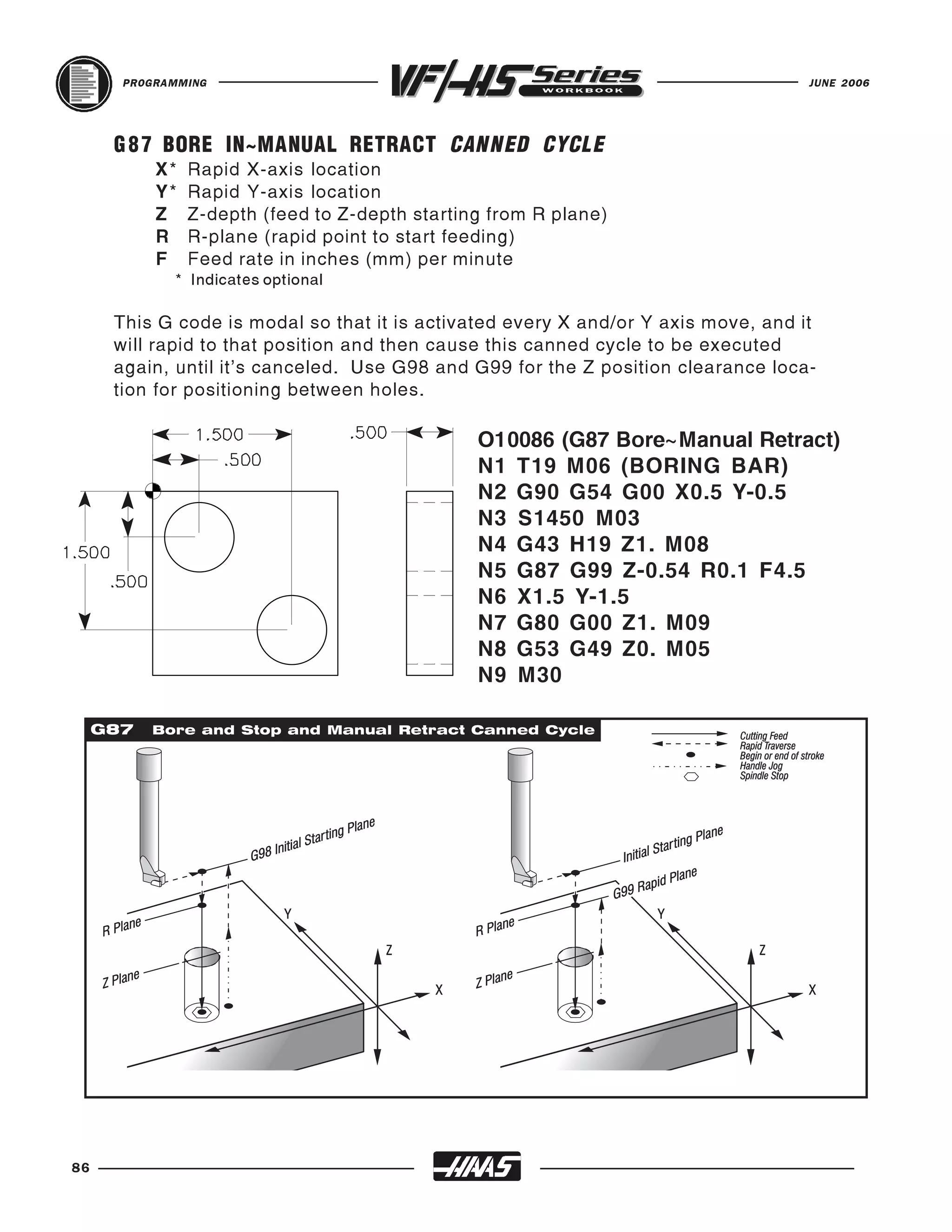
                                               X, Y and Z are specified, only those axes
                                               specified will be moved.G28 will not recognize
                                               any tool length compensation in this move.
                                         G91 - Preparatory function for incremental
                                               mode, which is required for rapid move to
                                               the G28 reference point (see page 47 ) .
                                         Y0. - This will select the Y axis to position the
                                               table toward you to its machine zero.
                                         Z0. - This insures a full retract, of Z axis
                                               in the up direction to machine zero
                                         M05 - This command will turn off spindle.

   --------- USING G53 TO SEND MACHINE HOME INSTEAD OF G28 G91 ---------

   G53 G49 Y0. Z0. M05                   G53 - This preparatory function temporarily ignores
                                                    works offsets, and positions the machine axes
                                                    from machine home. It is non-modal; so the
                                                    next block will revert back to the previously
                                                    selected work offset (see page 48) .
                                         G49 - This preparatory function cancels tool length
                                                    compensation.
                                         Y0. - This will select the Y axis to position the
                                                    table toward you to its machine zero.
                                         Z0. - This insures a full retract, of Z axis
                                                    in the up direction to machine zero
                                         M05 - This command will turn off spindle.
   --------------------------------------------------------------------------------------------------------------

   M30                                   M30 - Signals End of Program and Reset, to the
                                               control. The program will reset to the first block
                                               of the program and stop. It also stops the
                                               spindle, turns off the coolant and cancels tool
                                               length offsets. It also makes the control ready
                                               for the next cycle.


                                                                                                                    43
PROGRAMMING                                                                         JUNE 2006


     INCH / METRIC SELECTION
     G20 Inch programming selection
     G21 metric programming selection

     Selection between inch and metric programs can only be done with Setting 9.
     Changing Setting
     9 from inches to metric or back again will not convert the programs in memory. You
     must change your program axis values with metric or inch units and reload them
     after changing this setting.

     Inch programming allows displacements up to +/-15400.000 inches and a resolution of
     0.0001 inches. When in inch, the feed rate is defined as inches per minute, with a
     range of 0.0001 to 500.0000 mm/min.

     Metric programming allows displacements up to +/-39300.000 mm and a resolution
     of 0.001 mm. When in metric, the feed rate is defined as millimeters per minute with
     a range of 0.001 to +/-12700.000 mm/min.

     When jogging in metric, the speeds and units on the keypad are interpreted as mm/
     min but the value used is ten times larger than shown on the keypad.

     The optional fourth and fifth axis programming is not effected by the selection of metric.
     It is always programmed in degrees. The auxiliary C axis is also always in degrees.

     The standard G codes G20 and G21 are sometimes used to switch over between
     inch and metric but, on the Haas control, the G20 (inch) and G21 (mm) codes can
     only be used to ensure that the inch/metric Setting 9 is set correctly for that program.

           Setting 9 DIMENSIONING - This is an Inch/Metric setting, When it is set to
           Inch, the programmed units for X, Y, and Z are inches to 0.0001. When it's set
           to Metric, programmed units are in millimeters to 0.001. Changing this
           setting will not convert a program over to the new setting. You must change
           the program axis values for the new units. When set to Inch, the Group 6
           default G code is G20. When Set to Metric, the default G Coce is G21. When
           this setting is changed from inches to metric, or visa versa, all the offset values
           will be converted over accordingly.


44
JUNE 2006                                                                           PROGRAMMING


   WORK COORDINATE SELECTION

   G54-59      WORK COORDINATE OFFSET SYSTEM #1-6
   These G-codes will select one of the six work coordinate offsets that are entered in the
   Work Zero Offset display page. All subsequent references to axes’ positions will be
   recognized in the new coordinate system.

   G110-G129         WORK COORDINATE OFFSET SYSTEM #7-26
   These G-codes are the same as work offsets G54 to G59.

   G154 P1-99         WORK COORDINATE OFFSET SYSTEM #7-105
   G154 was added in mill software version 12.02 and above. This feature provides 99
   more work offsets. In all previous versions, the user was limited to a maximum of 27
   work offsets. These included the standard work offsets (designated G54 through G59),
   and twenty additional work offsets (G110 through G129). Now with G154 P1 to P99,
   your able to activate additional work offsets. For example G154 P10 will select work
   offset 10 from the list of additional work offset. Note that G110 to G129 refer to the
   same work offsets as the G154 P1 through P20 i.e., they can be selected by using
   either method. The Work Offset display screens have been adjusted accordingly. The
   Position page display has also been enhanced so that when a G154 work offset is
   active, the heading in the upper right work offset will show the G154 P value.
   Note: In software 12.02, G154 renamed to G155 - In all previous versions, G154 was 5-AXIS REV
   TAP CYCLE. This has been changed to G155.


                                                                                                   45
PROGRAMMING                                                                          JUNE 2006


     MORE WORK COORDINATE SELECTION
     Note: The G52 command works differently depending on the value of Setting 33. This
     setting selects the FANUC, HAAS, or YASNAC style of coordinates, which are listed below:

     G 5 2 WORK COORDINATE OFFSET SYSTEM YASNAC
     This code selects the G52 work coordinate system. The G52 works the same as G54 etc.,
     except that the G52 system will be set by a G92 code as well as from the offsets display.

     G52 SET LOCAL COORDINATE WORK OFFSET SHIFT VALUE FANUC
     This code sets the origin of the local (child) coordinate system to the command location,
     relative to the current work system origin. G52 is a non-modal, no motion code. The G52
     coordinate system will stay in effect for all work systems until it is canceled. The G52 is
     canceled when RESET is pressed and at the end of a program. It is also canceled during
     a program by M30, G52, X0 Y0 Z0, or by a G92 command.

     G52 SET LOCAL COORDINATE WORK OFFSET SHIFT VALUE HAAS
     This code acts the same as in the Fanuc control except that G52 is not cleared at power-
     up, RESET, or when an M30 is performed. It is canceled with a
     G52, X0 and/or Y0 and/or Z0, or by a G92 command.

     G 5 3 NON-MODAL MACHINE POSITION COORDINATE SYSTEM
     This code temporarily ignores work coordinates offset and uses the machine coordinate
     system (machine zero). It is non-modal; so the next block will revert to whatever work
     offset command that was previously selected.


46
JUNE 2006                                                                           PROGRAMMING


     TOOL LENGTH COMPENSATION

     G43 Tool Length Compensation + (plus)
     This code selects tool length compensation in a positive direction. That is; the tool length
     offsets are added to the commanded axis positions. An Hnn must be programmed to
     select the correct offset register from the offset display for that tool being used.

     During the setup process, each tool point was touched-off to the part zero surface. From
     this position a TOOL LENGTH DISTANCE offset was recorded for that tool with the TOOL
     OFSET MESUR key. This TOOL LENGTH is referred to as the "Z" axis origin move to the
     part zero surface.


     The programmed code to position tool:


                                                          G43 H01 Z.1


       TOOL CHANGER                                          SPINDLE

                                                                            CUTTING TOOL


                                                         PART SURFACE
                               MACHINE TABLE


     G44 TOOL LENGTH COMPENSATION - (MINUS)
     This code selects tool length compensation in a negative direction. That is; the tool length
     offsets are subtracted from the commanded axis positions. A Hnn must be programmed
     to select the correct entry from offsets memory.

     G49 CANCELS G43/G44
     This G code cancels tool length compensation. Putting in a H00 will also cancel tool length
     compensation. M30, and RESET will also cancel tool length comp.


                                                                                                    47
PROGRAMMING                                                                    JUNE 2006


     DWELL COMMAND
     G04 Dwell
         P The dwell time in seconds or milliseconds

     G04 is used to cause a delay or dwell in the program. The block containing G04 will
     delay for the time specified in the P code. When programmed on a line following
     some motion such as G00, G01, G02 and G03 all motion will be stopped for the
     amount of time specified in the P command in seconds. If the P has no fraction part,
     the delay is in milliseconds (0.001 seconds); otherwise the delay is in seconds.
     The slide motion is stopped, but the spindle will continue to rotate at the requested
     RPM, and the coolant stays on.

                           G04 P____
                                               Minimum value - P.001  of a second
                                               Maximum value - P1000.0 seconds


48
JUNE 2006                                                                    PROGRAMMING


   REFERENCE POINT AND RETURN
   G28 Return To Reference Point, set optional intermediate point

   The G28 code is used to return to the machine zero position on all axes. If an X, Y,
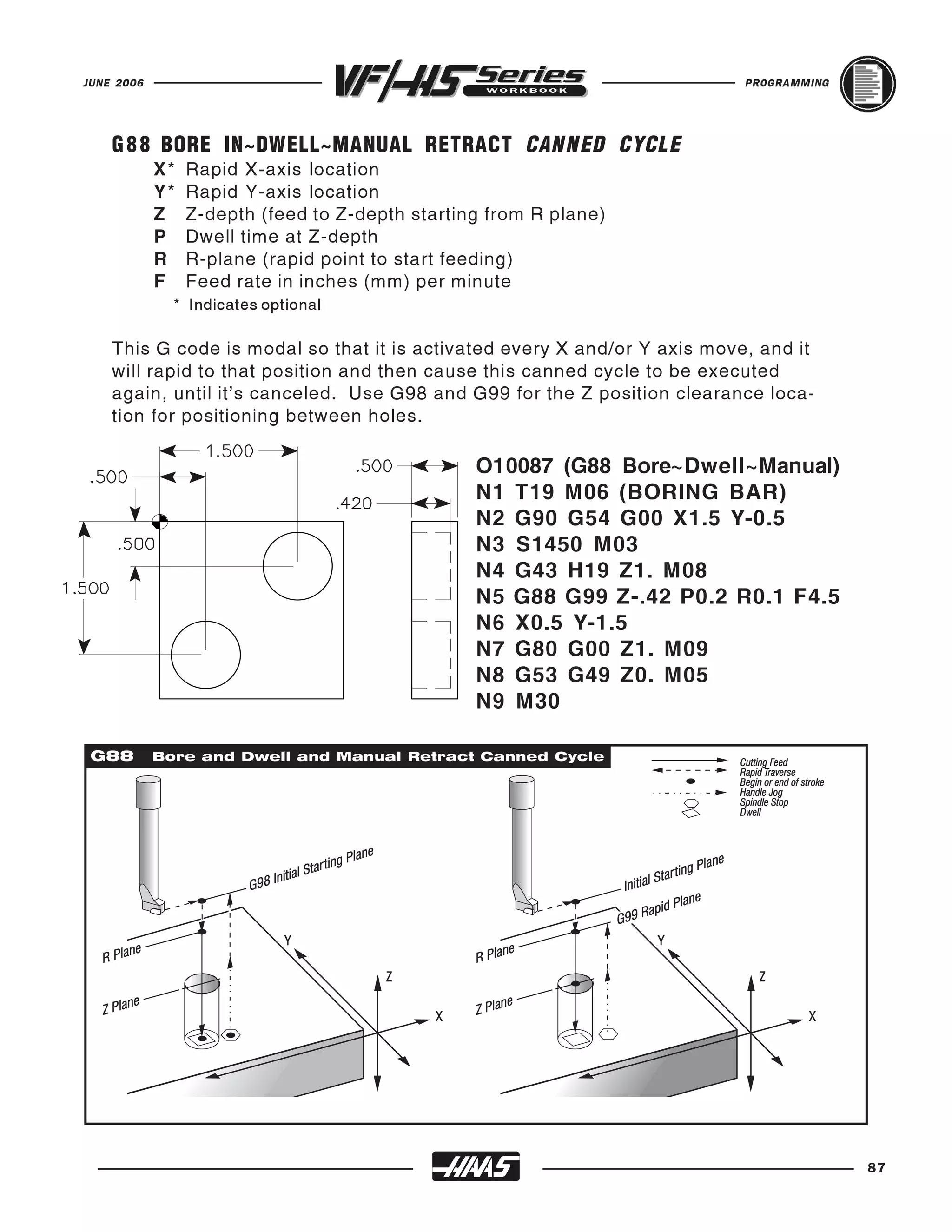
   Z, or A axis is on the same block and specifies a location, only those axes will move
   and return to the machines’ zero reference point and the movement to the machines'
   zero reference point will be through that specified location. This point is called the
   intermediate point and is saved, if needed, for use in G29. If you do not want to
   position through an intermediate point while specifying a specific axis to position
   to machine zero, than add a incremental (G91) command to this line along with a Z0,
   Y0, and/or X0 for the specific axis you want to send to machine zero. This will
   command those axes specified to position incrementally to a zero distance as an
   intermediate point, and then those axes specified will then position to machine
   zero. Just be sure to program in an absolute (G90) command in the start-up lines
   for the next tool which is usually needed for the beginning of each tool.

   If no X, Y, Z, or A is specified, all axes will be moved directly to machine zero. Any
   auxiliary axes (B, C,...) are returned to there machine home after the X, Y, Z, and A
   axes. G28 will not recognize any tool length offsets in this move.
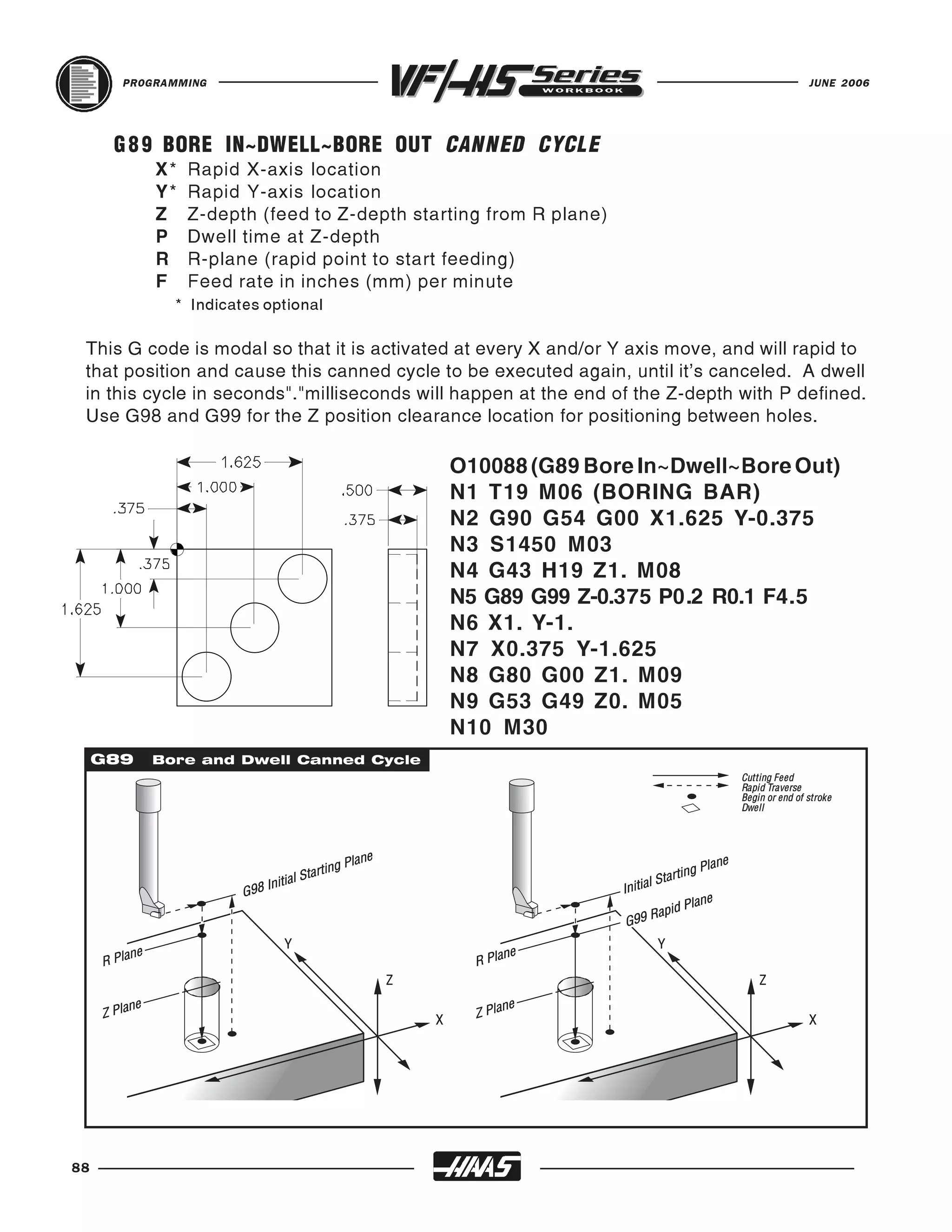


                                        SPINDLE


                      G28 G91 Z0


                                MACHINE TABLE

                                                                                            49
PROGRAMMING                                                                          JUNE 2006


     ANOTHER WAY TO RETURN TO MACHINE ZERO
     G53 Non-Modal Machine Coordinate Selection
     This code temporarily ignores work coordinates offset and uses the machine coordinate
     system (machine zero). This gives you a command to move to a specific location defined
     from the machine zero reference point. It is non-modal; so the next command block will
     revert back to the work coordinate offset command, that was previously active.

     This G53 command may be used to send the machine home for a tool change, or to send
     the machine home in YZ axes at the end of a program, rather than using a G28. A G28 works
     good for sending the machine home, and most people have learned to send it home this
     way. But to send it straight home with a G28, and a specific axis, you need to also define
     a G91 so that it positions through the intermediate point incrementally to go straight home
     (see previous page). And then, you will usually need to be sure to switch back to a G90
     absolute command, for your next move. And instead of dealing with switching in and out
     of absolute and incremental you could command a G53 along with a Z0, Y0, and/or X0 for
     the specific axis you want to send to machine zero.
     Just be sure to cancel your tool length offset with a (G49) command when you define a G53
     G49 Z0 to send Z-axis to machine home for a tool change.


                                         SPINDLE


            G53 G49 G00 Z0.
                  or
            G53 G49 G00 Y0. Z0.


                                  MACHINE TABLE

50
JUNE 2006                                                                              PROGRAMMING


   CIRCULAR POCKET MILLING
   There are two G codes, G12 and G13 that will provide for pocket milling of a circular
   shape. They're different only in which direction of rotation is used. G12 and G13 are
   non-modal.

   G12 Circular Pocket Milling Clockwise
       X Position in X axis to center of circular pocket
       Y Position in Y axis to center of circular pocket
       Z Z depth of cut, or it's the increment depth of cuts when used with G91
       I Radius Of First Circle (Or it's the finish radius if K is not used)
       K Radius Of Finished Circle (If specified)
       Q Radius cut increment step-over of the spiral out (Q is used with K only)
       L Loop count for repeating incremental depth of cuts (L is used with G91)
       D* Cutter Comp. Offset Number (Enter cutter size in offset display register)
       F Feed Rate in inches (mm) per minute
            This G12 code implies the use of G42 cutter compensation right

   G13 Circular Pocket Milling Counterclockwise
            This G13 code implies the use of G41 cutter compensation left and will be
            machining in a counterclockwise direction, but is otherwise the same as G12.
            G13 is usually preffered instead of G12, since G13 will be climb cutting when used
            with a standard right handed tool.

   *In order to get the exact programmed circular pocket diameter, the control uses the
   selected D code tool size. If this compensation is not desired, program D0.

   The tool must be positioned at the center of the circular pocket either in a previous block
   or in this command using an X and Y position. The cuts are performed entirely with circular
   motions of varying radiuses.

   The G12 Code implies the use of G42 cutter compensation right.
   The G13 Code implies the use of G41 cutter compensation left.

   To remove all the material within the circle use an I and Q value less than the tool diameter and
   a K value equal to the circle radius. G12 and G13 belongs to Group zero and thus is non-modal.
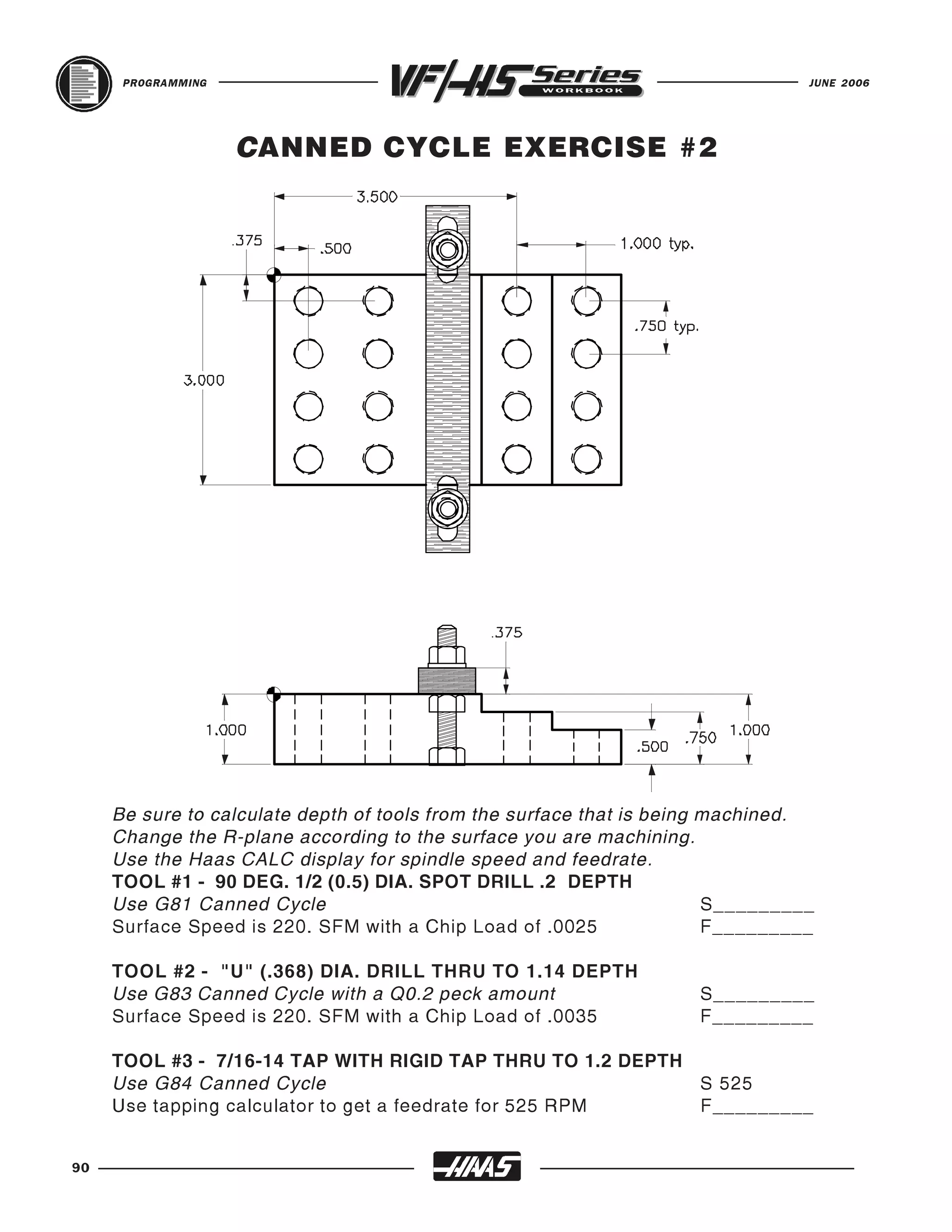
   If no K & Q is specified, the center roughing passes of this command are removed
   completely and only one finish pass of the circular pocket is performed.

   If G91 (incremental) is specified and an L count is included, the Z increment is repeated
   L times at the F feed rate command.

   NOTE: This command will not bring the tool back out of the circular pocket after it's done.
   So be sure to move the tool up in the Z axis, above the fixture and part, before you position
   to another XY location to machine.


                                                                                                       51
PROGRAMMING                                                                          JUNE 2006


     EXAMPLE: G12/G13 ONE PASS "I " ONLY
     (G13 is usually preferred, for machining a counterclockwise climb cut on material.)

     O 10052
     N11 (D01 DIA. OFFSET IS .500)
     N12 T15 M06 (1/2 DIA. 2-FLT END MILL)
     N13 G90 G54 G00 X2.5 Y-2.5 (position to X Y center of circular pocket)
     N14 S1910 M03
     N15 G43 H15 Z0.1 M08
     N16 G13 Z-0.375 I 0.5 D15 F12. (1.0 Dia. x.375 deep circular pocket 1 pass)
     N17 G00 Z1. M09
     N18 G53 G49 Y0. Z0.
     N19 M30
     *You can feed Z axis down with a faster or slower feedrate (N26) then what's in the G12/
     G13 line for a different Z axis feedrate down, then what's in the G12/G13 pocket command.
     O 10052
     N21 (D01 DIA. OFFSET IS .500)
     N22 T15 M06 (1/2 DIA. 2-FLT END MILL)
     N23 G90 G54 G00 X2.5 Y-2.5 (position to X Y center of circular pocket)
     N24 S1910 M03
     N25 G43 H15 Z0.1 M08
     N26 G01 Z-0.375 F6. (Feeding Z axis down slower or faster before G13 line)*
     N27 G13 I 0.5 D15 F10. (1.0 Dia. x .375 deep circular pocket 1 pass)
     N28 G00 Z1. M09
     N29 G53 G49 Y0. Z0.
     N30 M30
52
JUNE 2006                                                                       PROGRAMMING


   EXAMPLE: G12/G13 MULTIPLE PASSES I , K & Q
   (G13 is usually preferred, in machining a counterclockwise climb cut of the material.)

   O 10053
   N31 (D02 DIA. OFFSET IS .625)
   N32 T2 M06 (5/8 DIA. 2-FLT END MILL)
   N33 G90 G54 G00 X2.5 Y-2.5 (X Y center location of circular pocket)
   N34 S1520 M03
   N35 G43 H02 Z0.1 M08
   N36 G13 Z-0.375 I 0.3 K1.5 Q0.3 D02 F9. (3.0 Dia. x.375 G13 pocket)
   N37 G00 Z1. M09
   N38 G53 G49 Y0. Z0.
   N39 M30
   *You can feed the Z axis down with a faster or slower feedrate then what's in the G12/G13
   line for a different Z axis feedrate down, then what's in the G12/G13 pocket command.
   O 10053
   N41 (D02 DIA. OFFSET IS .625)
   N42 T2 M06 (5/8 DIA. 2-FLT END MILL)
   N43 G90 G54 G00 X2.5 Y-2.5 (X Y center location of circular pocket)
   N44 S1520 M03
   N45 G43 H02 Z0.1 M08
   N46 G01 Z-0.375 F6. (Feeding Z axis down slower or faster before G13 line)*
   N47 G13 I 0.3 K1.5 Q0.3 D02 F9. (3.0 Dia. x .5 dp circular pocket)*
   N48 G00 Z1. M09
   N49 G53 G49 Y0. Z0.
   N50 M30
                                                                                               53
PROGRAMMING                                                                             JUNE 2006


     EXAMPLE: G12/G13 MULTIPLE "Z" PASSES TO DEPTH USING INCREMENTAL


     O 10054
     G91 AND AN "L" LOOP COUNT


     N51 (D02 DIA. OFFSET IS .625)
     N52 T2 M06 (5/8 DIA. 2-FLT E.M.)
     N53 G90 G54 G00 X2.5 Y-2.5 (X Y center location of circular pocket)
     N54 S1520 M03
     N55 G43 H02 Z0.1 M08
     N56 G01 Z0. F30. (Move down to start point to begin increment down)
     N57 G13 G91 Z-0.375 I0.325 K2. Q0.3 D02 L4 F12. (4.0 Dia. x 1.5
     Deep circular pocket)
     N58 G00 G90 Z1. M09
     N59 G53 G49 Y0. Z0.
     N60 M30

     The above program uses G91 and a "L" count of four. This cycle is multiplied by the "L"
     command and will do it a total of four times at the Z depth increment of .375 to a total depth
     of 1.5 in. The G91 and "L" count can also be used for G12 and G13 "I" only line.

     Since the G91 incremental Z depth is looped together within the G13 circular pocket
     command, you are unable to separate the Z axis feedrate from the X and Y axis feedrate. The
     feedrate in the Z axis will be the same as X and Y axis.

     You may want to fast feed down to the Z surface, of where the circular pocket begins, to start
     incrementally step down to establish the desired depth.


54
JUNE 2006                                                                             PROGRAMMING


            CIRCULAR POCKET MILLING EXERCISE
    G12 Circular Pocket Milling CW
                   or
    G13 Circular Pocket Milling CCW
      X Position to center of pocket
      Y Position to center of pocket
      Z Depth of cut or increment down
      I Radius of First Circle (or the
        finish radius If K is not used).
      K Radius of Finished Circle
                                                                  CPM1

        (if specified).
      Q Radius step over Increment
        (must be used with K).
                                                                              CPM2
      D Cutter Comp. number
        (Enter cutter size into offset
        display register number).
      L Loop count for repeating
        deeper cuts.
      F Feedrate in inch (mm) per min.


   Circular Pocket Mill CPM 1 which is a 2.0 Dia.      Circular Pocket Mill CPM 2 which is a 2.0
   TOOL 2 IS A 5/8 DIA. 2 FLUTE END MILL WITH A SPINDLE SPEED OF 1620 RPM.

   x .500 dp. pocket, spiraling out to a rough 1.980   Dia. x .750 dp. pocket incrementaly stepping
   diameter using I 0.25, K0.99 and Q0.2 roughing      down 0.25 depth using an L3 count and an
   out pocket. Then mill another circular pocket       incremental G91 command to do 3 passes on
   command to finish CPM 1 using 1.0 "I only" as       a circular pocket using I0.3, K1.0 and Q0.35
   a circular pocket finish pass.                      to machine out pocket.

   O00020 (CIRCULAR POCKET MILLING EXERCISE)
   T___ M___ (T2 IS A 5/8 DIA. 2 FLT CENTER CUTTING END MILL)
   G___ G___ G___ X______ Y______ (X Y position to center of CPM1)
   S______ M_____
   G___ H____ Z_____ M___ (Rapid to .1 above part)
   G___ Z____ I____ K____ Q____ D___ F7.2 (CPM1 with I ,K& Q)
   G___ I_____ D____ F12.5 ( I only for a finish pass of CPM1)
   G___ Z_____ (Rapid Z to a .1 clearance position above part)
   X______ Y______ (X Y position to center of CPM2)
   G01 Z0. F20. (Feed down to the start point to start incremental depth down)
   G___ G___ Z____ I___ K___ Q___ D___ L___ F10. ( I , K, Q & G91)
   G___ G___ Z____ M___ (Switch to absolute, Rapid 1.0 above part, coolant off)
   G53 G49 Z0. M05
   M30

                                                                                                      55
PROGRAMMING                                                                    JUNE 2006


     CIRCULAR PLANE SELECTION
     There are three G-codes for circular plane selection that are used to define the two
     axes, of either X, Y or Z, that you would like to do a G02 (CW) or G03 (CCW) circular
     motion in (XY, YZ, XZ). The plane selection is modal and stays in effect for all
     subsequent circular interpolation moves, until you command another circular plane
     G-code. There are three G codes used to select the circular plane; G17 for the XY
     plane, G18 for the XZ plane, and G19 for the YZ plane.


     When machine is powered on, the default for plane selection is G17 for the XY
     plane. This means that G02 or G03 circular moves in the XY plane is already
     selected without programming in a G17, so the G17 XY-plane will always be active
     when you Power On the machine.

     If you would like to perform G02 or G03 helical motion in either G17, G18, or G19
     it is possible by programming the linear axis which is not in the plane that is
     selected. This third axis will be moved along the specified axis in a linear manner
     while the other two axes are moved in a circular motion around the third axis. The
     speed of each axis will be controlled so that the helical rate matches the pro-
     grammed feed rate.

     If cutter radius compensation (G41 or G42) is selected, you can only use it in the
     G17 XY-circular plane. Cutter compensation for circular motions in the G18 XZ or
     G19 YZ planes can only be done with G141 3D+ cutter compensation.


56
JUNE 2006                                                           PROGRAMMING


   G 1 7 XY CIRCULAR PLANE SELECTION
   The G17 code is used to select the XY plane for circular
   motion. In this plane, circular motion is defined as clockwise
   for the operator looking down onto the XY table from above


   O10057 (G17 XY CIRCULAR PLANE)
   N1 T1 M06 (1/2 DIA. 4 FLT E.M.)
   N2 G90 G54 G00 X4. Y3.25 S2600 M03 (XY start point of arc)
   N3 G43 H01 Z0.1 M08
   N4 G01 Z-0.375 F50.
   N5 G17 G02 X5.25 Y2. R1.25 F10. (G17 circular motion XY plane)
   N6 G00 Z0.1
   N7 X5. Y-.25
   N8 G01 Z-0.375 F50.
                         (G17 is the default when you power up machine)

   N9 X3.25 Y0.8 F10.
   N10 Y-.25
   N11 G00 Z1.
   N12 X-0.25 Y1.
   N13 G01 Z-0.375 F50.
   N14 G17 G03 X1. Y-0.25 R1.25 F10. (G17 circular motion XY plane)
   N15 G00 Z1. M09
   N16 G53 G49 Y0. Z0. M05
   N12 M30


                                                                                  57
PROGRAMMING                                                                   JUNE 2006


     G 1 8 XZ CIRCULAR PLANE SELECTION
     The G18 code is used for doing circular motion in the XZ-
     plane. In these diagrams shown here, you might think the
     G02 and G03 arrows are incorrect. But they are correct in
     showing the G18 plane. You need to look at the circular
     direction as if you're standing at the back of the machine
     looking toward the spindle, for the G02 clockwise and G03
     counterclockwise directions in the G18 XZ circular plane.


     O10058 (G18 ZX CIRCULAR PLANE SELECTION)
     N101 T13 M06 (1/2 DIA. 2 FLT BALL E.M.)
     N102 G90 G54 G17 G00 X1.5 Y0. S2600 M03 (XY start point of arc)
     N103 G43 H13 Z0.1 M08
     N104 G01 Z0. F20.
     N105 M97 P200 L80 (Local sub-routine call done 80 times with L80)
     N106 G17 G00 Z1. M09 (Switch back to G17 XY-plane when done using G18)
     N107 G53 G49 Y0. Z0. M05
     N108 M30

     N200 G91 G01 Y-0.01(Local sub-routine N200 called by M97 on line N105)
     (Local sub-routine N200 called by M97 P200 on line N105, repeated 80 times with L80)

     N201 G90
     N202 G18 G02 X3. Z0. R0.75 F12. (G18 circular motion ZX plane)
     N203 G91 G01 Y-0.01
     N204 G90
     N205 G18 G03 X1.5 Z0. R0.75 F12. (G18 circular motion ZX plane)
     N206 M99 (An M99 will cause the program to jump back to the next
                     line after the M97 sub-routine call in the main program.)

58
JUNE 2006                                                                 PROGRAMMING


   G 1 9 YZ CIRCULAR PLANE SELECTION
   The G19 code is used for doing circular motion in the YZ-
   plane. In the G19 plane, you need to look at the circular
   direction as if you're standing on the right side of machine
   where the machine control is, looking toward the other
   end, for the G02 clockwise and G03 counterclockwise direc-
   tions in the G19 YZ circular plane.


   O10059 (G19 YZ CIRCULAR PLANE SELECTION)
   N1 T13 M06 (1/2 DIA. 2 FLT BALL E.M.)
   N2 G90 G54 G17 G00 X0. Y1.5 S2600 M03 (XY start point of arc)
   N3 G43 H13 Z0.1 M08
   N4 G01 Z0. F20.
   N5 M97 P100 L80 (Local sub-routine call done 80 times with L80)
   N6 G17 G00 Z1. M09 (Switch back to G17 XY-plane when finished using G19)
   N7 G53 G49 Y0. Z0. M05
   N8 M30

   N100 G91 G01 X-0.01
   (Local sub-routine N100 called by M97 P100 in line N5, repeated 80 times with L80)

   N101 G90
   N102 G19 G03 Y3. Z0. R0.75 F12. (G19 circular motion YZ plane)
   N103 G91 G01 X-0.01
   N104 G90
   N105 G19 G02 Y1.5 Z0. R.75 F12. (G19 circular motion YZ plane)
   N106 M99 (An M99 will cause the program to jump back to the next
                   line after the M97 sub-routine call in the main program.)

                                                                                        59
PROGRAMMING                                                                         JUNE 2006


     CUTTER COMPENSATION
     Cutter compensation is used to offset the center of the cutter, and shift it the distance
     of the radius, to the specified side of the programmed path. Complex part geom-
     etries having angled lines, lines tangent to arcs, and lines intersecting arcs involve
     substantial trigonometric computations to determine the center of the cutter. Cutter
     compensation involves programming the part geometry directly instead of the tool
     center. The cutter compensation commands are Cutter Comp. Left (G41), Cutter
     Comp Right (G42) and Cutter Comp Cancel (G40).
                                                                              G41 Left of the Line
     G40 Cutter Comp Cancel
     G40 will cancel the G41 or G42 cutter compensation commands.
     A tool using cutter compensation will change from a compen-
     sated position to an uncompensated position. Programming in
     a D00 will also cancel cutter compensation. Be sure to cancel
     cutter compensation, when you're done with each milling cut
     series that's using compensation.

     G41 Cutter Compensation Left
     G41 will select cutter compensation left; that is the tool is moved
     to the left of the programmed path to compensate for the radius
     of the tool. A Dnn must also be programmed to select the correct
     tool size from the DIAMETER/RADIUS offset display register.

     G42 Cutter Compensation Right
     G42 will select cutter compensation right; that is the tool is moved
     to the right of the programmed path to compensate for the size
     of the tool. A Dnn must also be programmed to select the correct
     tool size from the DIAMETER/RADIUS offset display register.

     Dnn Cutter Comp value - The actual offset amount must be
     input in the specified tool offset display number. On the HAAS G42 Right of the Line
     you have 200 tool DIAMETER/RADIUS offsets to use. Usually,
      you have one cutter offset for each tool, and it is best to use the same offset number
     as is the tool number. On the HAAS tool geometry OFSET DISPLAY page, the two
     columns to the right side of this display are for your cutter diameter offsets. The
     (RADIUS/DIAMETER) GEOMETRY column, in the offset display, is to set your
     initial cutter offset value and can be defined as either a DIAMETER or RADIUS
     value, by selecting the one you want to use in SETTING 40. The selection you
     choose will be listed at the top of the offset geometry column. The WEAR column
     to the right of the tool (RADIUS/DIAMETER) GEOMETRY column is for any
     adjustments you need to make from the initial tool GEOMETRY offset. And these
     value are added together by the control and used as one value.


60
JUNE 2006                                                                   PROGRAMMING


   G41 Cutter Compensation Left
   G42 Cutter Compensation Right
   G40 Cancel Cutter Comp G41 and G42

   Understanding cutter compensation can be simplified if one has a basic under-
   standing of manual machining. There are two common types of cutting conditions
   associated with milling machines. They are CLIMB and CONVENTIONAL cutting.

   Two common rules for these types of cuts are:

   If the programmed cutter path needs to mill CLIMB cutting, which is what's usually
   desired on CNC machines, since the machines are rigid enough to handle this type
   of cut, and the conditions from this type of cut are usually preferred. And if it's a
   standard right handed tool, it will then be programmed with G41 cutter LEFT of the
   programmed path.

   If the programmed cutter path needs to mill with CONVENTIONAL cutting, and it's
   a standard right handed tool, it will then be programmed with G42 cutter RIGHT of
   the programmed path.


   N104     G00 X-2.5 Y-2.0
Program without cutter compensation.

   N105     G01 Z-0.45 F50.
   N106     X-2.25 F12.
   N107     Y1.75
   N108     G02 X-1.75 Y2.25 R0.5
   N109     G01 X1.5
   N110     G02 X2.25 Y1.5 R0.75
   N111     G01 Y???? (Calculate point)
   N112     X???? Y-2.25 (Calculate point)
   N113     G01 X-1.75
   N114     G02 X-2.25 Y-1.75 R0.5
   N115     G01 X-2.35 Y-2.0

Program with cutter compensation.
Dia. value for D01 would be .500

   N104     G00 X-2.35 Y-2.0
in DIAMETER offset register #1.

   N105     G01 Z-0.45 F50.
   N106     G41 X-2. D01 F12. (turn on C.C. with an X and/or Y move)
   N107     Y1.75
   N108     G02 X-1.75 Y2. R0.25
   N109     G01 X1.5
   N110     G02 X2. Y1.5 R0.5
   N111     G01 Y-1.
   N112     X-0.75 Y-2.
   N113     X-1.75
   N114     G02 X-2. Y-1.75 R0.25
   N115     G40 G01 X-2.35 (turn off C.C. with an X and /or Y move)

                                                                                           61
PROGRAMMING                                                                           JUNE 2006


     When programming without cutter compensation, to the center of the cutter, a
     problem occurs cutting angle geometry. The cutter center must be offset to the part
     geometry to maintain the cutter tangency. For example, the Y axis move from Point
     A to Point B must have the Delta "Y" calculated dimension added to the .75
     dimension. The X axis move from Point B to Point C must have the Delta "X"
     calculated dimension subtracted from the 1.25 dimension.


     Program is to the center of the cutter manually calculating the cutter compensation of tool.
     O10062
     N1 T12 M06 (3/4 DIA. 4 FLT END MILL)
     N2 G90 G54 G00 X-0.475 Y-0.1 (X Y position away from part, with center of tool)
     N3 S1275 M03
     N4 G43 H12 Z0.1 M08
     N5 G01 Z-0.25 F50.
     N6 X-0.375 F12.
     N7 Y?.???? (center of tool)
     N8 X?.???? Y1.875 (center of tool)
     N9 X2.6
     N10 G00 Z1. M09
                                     If however, the programming is being done with cutter

     N11 G53 G49 Y0. Z0. M05
                                     compensation in effect, the moves from Point A, to
                                     Point B, to Point C will reflect the actual geometry or
     N12 M30                         part print X and Y coordinate values. The control will
                                           offset the cutter center around Point B and Point C to
                                           maintain the required cutter tangency.


62
JUNE 2006                                                                   PROGRAMMING


   O10063 (Part program using cutter compensation)
   N1 T12 M06 (3/4 DIA. 4 FLT END MILL)
   N2 G90 G54 G00 X-0.475 Y-0.1 (X Y position away from part, with center of tool)
   N3 S1275 M03
   N4 G43 H12 Z0.1 M08
   N5 G01 Z-0.25 F50.
   N6 G41 X0. D12 F12. (Position onto part line, turning on Cutter Compensation)
   N7 Y0.75
   N8 X1.25 Y1.5
   N9 X2.6
   N10 G40 X2.7 Y2. (Position off of part to the X Y center of tool, turning off C.C.)
   N11 G00 Z1. M09
   N12 G53 G49 Y0. Z0. M05
   M30

   When the part has been programmed using cutter compensation we are, in effect,
   programming with a zero diameter cutter, to the center of the tool. The tool diameter
   value is entered in on the OFFSET display page under the RADIUS/DIAMETER
   geometry offset column. The control will position the tool the offset amount, off of
   the programmed part line that is programmed so that the edge of the tool is
   positioning around the part geometry.


                                                                                           63
PROGRAMMING                                                                      JUNE 2006


     If, at the time of setup, the cutting tool requested by the planning is for a diameter
     not available currently in your shop, then input the available size on the offset page.
     DO NOT change the program. Cutter compensation takes the stored value for the
     diameter and calculates the cutter path offset from that value.

     If a larger tool is going to be used, you will need to make sure that you change the
     starting and ending positions so that the distance of the cutter is positioned half the
     diameter off the part for clearance when you lead onto and off of the part.


     Machining part with C.C. using an undersize tool.

     O10064 (Part program using cutter compensation)
     N1 T1 M06 (1/2 DIA. 4 FLT END MILL)
     N2 G90 G54 G00 X-0.475 Y-0.1 (X Y position away from part, with center of tool)
     N3 S1275 M03
     N4 G43 H01 Z0.1 M08
     N5 G01 Z-0.25 F50.
     N6 G41 X0. D01 F12. (Position onto part line, turning on Cutter Compensation)
     N7 Y0.75
     N8 X1.25 Y1.5
     N9 X2.6
     N10 G40 X2.7 Y2. (Position off of part to the X Y center of tool, turning off C.C.)
     N11 G00 Z1. M09
     N12 G53 G49 Y0. Z0. M05
     M30
64
JUNE 2006                                                                              PROGRAMMING


   NOTE: Advantage of cutter compensation can be taken when a rough and finish
   pass must be done with one tool. As we have seen, if we program the finish
   geometry and use cutter compensation, we will get a finish pass.

   If however, prior to the rough pass, we input a diameter offset value that is oversize
   to the physical size of the end mill, and then program the finish geometry, the control
   will offset the end mill more, leaving stock for a finish pass. Then program the same
   end mill using another offset with the correct offset value and the same geometry.

   EXAMPLE: If the cutter is .500 diameter, and you want to leave .010 stock for a
   finish pass. Then enter a diameter offset number (Dn) command for tool DIAMETER
   Geometry of .520 for machining a roughing pass around part. And then define
   another pass around part using the same program coordinates but a different
   diameter offset number (Dn), and enter in the correct diameter offset value of .500
   to machine part to the finish size.


   TOOL 1 has .520 in D21
          and .500 in D01

   O10065
   N1 T1 M06 (1/2 DIA.4 FLT END MILL)
   N2 G90 G54 G00 X-2.5 Y-2. S1600 M03
   N3 G43 H01 Z0.1 M08
   N4 G01 Z-0.45 F50.
   N5 G41 X-2. D21 F12. (C.C. ON using D21)
   N6 Y1.75
   N7 G02 X-1.75 Y2. R0.25
   N8 G01 X1.5
   N9 G02 X2. Y1.5 R0.5
   N10 G01 Y-1.
   N11 X-.75 Y-2.
   N12 X-1.75
   N13 G02 X-2. Y-1.75 R0.25
   N14 G40 G01 X-2.35 Y-1.8 (Turn off C.C. with an X and/or Y move off of part and then do a finish
   pass around part using the same part geometry but a different C.C. offset.)
   N15 G41 X-2. D01 F9. (Turn on C.C. using D01 for a finish pass using the same program geometery.)
   N16 Y1.75
   N17 G02 X-1.75 Y2. R0.25
   N18 G01 X1.5
   N19 G02 X2. Y1.5 R0.5
   N20 G01 Y-1.
   N21 X-.75 Y-2.
   N22 X-1.75
   N23 G02 X-2. Y-1.75 R0.25
   N24 G40 G01 X-2.35 Y-1.75 (Turn off C.C. with an X and/or Y move off of part.)
   N25 G00 Z1. M09
   N26 G53 G49 Z0. Y0. M05
   N27 M30


                                                                                                       65
PROGRAMMING                                                                        JUNE 2006


           CUTTER COMPENSATION EXERCISE #1


                                                                             Cutter will be a
                                                                             .500 dia. end mill.
                                                                             Start contour from
                                                                             upper left corner
                                                                             of part and mill
                                                                             around outside of
                                                                             part .625 deep.
                                                                             Mill around outside
                                                                             of part using cutter
                                                                             compensation to
                                                                             offset the cutter,
                                                                             and then define the
                                                                             actual part print
                                                                             geometry locations
                                                                             to position tool
                                                                             around part.


     Use a 1/2 dia. End Mill. Mill around outside of part .625 deep using Cutter Comp.
     O00030 (CUTTER COMPENSATION EXERCISE #1)
     T1 M06 (1/2 DIA. 4 FLT END MILL)
     G90 G54 G00 X_______ Y______ (Position to the center of tool)
     S2400 M03
     G43 H01 Z0.1 M08
     G01 Z_______ F50. (Fast feed to depth non-cutting move)
     G___ Y_______ D____ F12. (Turn on C.C. moving onto part)
     X_______
     G0__ X_____ Y_____ R_____ (or use I_____ and J_____ instead of R)
     G0__ Y_______
     G0__ X_____ Y_____ R_____ (or use I_____ and J_____ instead of R)
     G0__ X_______
     G0__ X_____ Y_____ R_____ (or use I_____ and J_____ instead of R)
     G0__ Y_______ (Position off part at least half the cutter diameter before canceling C.C.)
     G___G___ X________ Y_______ (Cancel cutter comp. feeding off of part)
     G00 Z1. M09
     G53 G49 Z0. M05
     M30

66
JUNE 2006                                                                            PROGRAMMING


   ADVANTAGES OF CUTTER COMPENSATION
   1. The mathematical computations for determining a tool path are greatly simplified.
   2. Because the geometry and not the tool center is programmed, the same program
   can be used for a variety of different cutter diameters.
   3. When using cutter compensation you are then able to control and adjust for part
   dimensions using your cutter diameter/radius offsets register.
   4. The same program path can be used for the roughing passes as well as finishing
   cuts by using different cutter offset numbers.
   SOME RESTRICTIONS WITH CUTTER COMPENSATION
   1. A cutter compensation command (G41, G42 or G40) must be on the same block
   with an X and/or Y linear command when moving onto or off of the part using cutter
   comp. You cannot turn on or off cutter compensation with a Z axis move.
   2. You can use cutter comp. in the G18 (X, Z) or G19 (Y, Z) planes using G141.
   3. You cannot turn ON or OFF cutter compensation in a G02 or G03 circular move,
   it must be in a linear G00 or G01 straight line move.
   WHEN ACTIVATING CUTTER COMPENSATION, CARE MUST BE TAKEN TO:
   1. Select a clearance point, without cutter compensation, to a start point in the X and
   Y axis at least half the cutter diameter off the part before you start initiating cutter
   compensation.
   2. Bring the Z axis down without cutter compensation in effect.
   3. Make an X and/or Y axis move with a G41 or G42 call-out on the same line, with
   a diameter offset Dnn command, which has the cutter diameter value in the offset
   display register being used.
   WHEN DEACTIVATING CUTTER COMPENSATION, CARE MUST BE TAKEN TO:
   1. Select a clearance point in X and/or Y axis, at least half the cutter diameter off the part.
   2. DO NOT cancel cutter compensation on any line that is still cutting the part.
   3. Cancel of cutter compensation (G40) may be a one or two axis move, but you may
   need values entered for both X and Y axis. This may need to be done to ensure that
   both axes will position to the location you want, or remain fixed and not move during
   the cancel (G40) process. This is a programming technique that may be a
   programmer's preference. The code can be written with only a one axis move, but
   the programmer should be aware of the results. If only one of the axes, X or Y, is
   on the cancel (G40) command line, the control will move both axes during the
   cancel process. And the machine will position the axis that was not defined back to
   center position of that tool to the last known axis coordinate values.

                                                                                                     67
PROGRAMMING                                                                             JUNE 2006


                CUTTER COMPENSATION EXERCISE #2
     To program this part profile, use the .750 diameter end mill, starting at the lower left hand
     corner. Use CUTTER COMPENSATION, and climb cut part profile with only one finish
     pass .450 deep.

     (Use the HAAS calculator to get the spindle speed and feed)

     TOOL 12 - 3/4 DIA. 4 FLT. END MILL                   Surface Speed (FPM) = 275.
                                                          Chip Per Flute = .0025


68
JUNE 2006                                      PROGRAMMING


    _____________________________________________
    O00040 (CUTTER COMPENSATION EXERCISE #2)

    _____________________________________________
    _____________________________________________
    _____________________________________________
    _____________________________________________
    _____________________________________________
    _____________________________________________
    _____________________________________________
    _____________________________________________
    _____________________________________________
    _____________________________________________
    _____________________________________________
    _____________________________________________
    _____________________________________________
    _____________________________________________
    _____________________________________________
    _____________________________________________
    _____________________________________________
    _____________________________________________
    _____________________________________________
    _____________________________________________
    _____________________________________________
    _____________________________________________
    _____________________________________________
    _____________________________________________
    _____________________________________________
    _____________________________________________
    _____________________________________________

                                                             69
PROGRAMMING                                                                         JUNE 2006


     THREAD MILLING WITH HELICAL MOTION
     Thread milling uses a cutter formed with the pitch
     of the thread to be cut. The cutters are solid car-
     bide, fragile and expensive.

     Thread milling is accomplished with Helical milling.
     Use a standard G02 or G03 move to create the
     circular move in the X-Y axis and then insert a Z
     move on the same block corresponding to the
     thread pitch. This will generate one turn of the
     thread. If you are using a multiple tooth cutter, it will
     generate the rest of the thread depth. The speed of
     each axis will be controlled so that the helical rate
                                                                    .750 Dia.


     matches the programmed feed rate.

     Thread milling can be used to machine larger inter-
     nal or external threads. You can also thread mill,
     port threads, blind hole threads, metric threads
     and most all the special type of threads that are
     good to thread mill.
      You can also adjust for the thread size using
     diameter compensation.


                                                                       2-12 UN 3B
                                                                 Minor Dia. - 1.9100/1.9198

     To do a complete 360 degree thread pass using a G02 or G03 you need to use an I and/
     or J to define the center of a circle for a complete thread pass. Because you cannot do a
     360 degree arc using an R command.

     O10070 (Looping a Helical Move with a Single Point Tool)
     N31 T8 M06 (1.0 dia. single point thread tool to do a 2.0-12 thread)
     N32 G90 G54 G00 X1.6 Y-1.25
     N33 S1450 M03
     N34 G43 H08 Z0.1 M08
     N35 G01 Z-0.8 F50.
     N36 G41 X2.25 D08 F10. (Move over to thread and turn on C.C.)
     N37 G91 G03 X0. Y0. I-1. J0. Z.0833 F3. L10 (Repeat 10x to mill thread)
     N38 G90 G40 G01 X1.6 Y-1.25 (Move off of thread and turn off C.C.)
     N39 G00 Z0.1 M09
     N40 G53 G49 Z0.
     N41 M30


70
JUNE 2006                                                            PROGRAMMING


                                       2-12 UN 3B
                                Minor Dia. - 1.9100/1.9198

    O00071 (A Single Helical Move with a Thread Hob)
    N51 T8 M06 (12 pitch x 3/4 inch dia. 4-flt. thread hob for a 2.0-12 thread)
    N52 G90 G54 G00 X1.25 Y-1.25
    N53 S1450 M03
    N54 G43 H08 Z0.1 M08
    N55 G01 Z-1.0 F50.
    N56 G41 X1.75 Y-1.75 D08 (position over to turn on cutter comp)
    N57 G03 X2.25 Y-1.25 R0.5 F10. (arcing into thread)
    N58 G03 X2.25 Y-1.25 I-1. J0. Z-0.9167 F12. (to mill complete thread)
    N59 G03 X1.75 Y-.75 R0.5 (arcing off of thread)
    N50 G40 G01 X1.25 Y-1.25 (position over to turn off cutter comp)
    N51 G00 Z0.1 M09
    N52 G53 G49 Z0.
    N53 M30


                                                                                   71
PROGRAMMING                                                                                JUNE 2006


     CANNED CYCLES FOR DRILLING TAPPING AND
     BORING
     A canned cycle is used to simplify programming of a part. Canned cycles are defined for
     the most common Z-axis repetitive operation such as drilling, tapping, and boring. There
     are 13 canned cycles to choose from and once selected a canned cycle is active until
     canceled with G80. When active, the canned cycle is executed every time an X and/or Y-
     axis move is programmed. Those X Y moves are executed as RAPID commands and the
     Z motions are executed as feed commands, and the canned cycle is performed again for
     any X-Y coordinates that follow. The five operations in a canned cycle are:

           1)   Positioning of the X and Y axes (and/or optional A axis).
           2)   Rapid traverse to the R plane.
           3)   The drilling, tapping, and boring for the canned cycle being used.
           4)   Operation at the bottom of hole.
           5)   Retraction to the R plane (G99) or initial starting point (G98).

     The positioning of a canned cycle in the X and/or Y axes can be done in either in absolute
     (G90) or incremental (G91). Incremental (G91) motion in a canned cycle is often useful
     with a loop (Lnn) count which will repeat the canned cycle operation that many times with
     each incremental X or Y move for the canned cycle.

     Incremental example using an "L" repeat command:
     N15 G81 G99 Z-0.5 R0.1 F6.5 (This will drill one hole at the present location.)
     N16 G91 X-0.5625 L9 (To drill 9 more holes .5625 in the minus direction equally spaced.)
     N17 G90 X~~~~ Y~~~~

     If an L0 is in the canned cycle line, the cycle will not execute until the control reads the next
     X and/or Y position location. One reason to define an L0 is for not drilling a hole in the center
     of a bolt hole pattern.

     Using L0 so as to not drill a hole in the center of bolt circle example:
     N21 X1.25 Y-0.75 (Center location of bolt hole pattern)
     N22 G81 G99 Z-0.5 R0.1 F6.5 L0 (L0 on G81 line so as not to drill hole in the center of BHC)
     N23 G70 I0.75 J10. L6 (6 hole Bolt-Hole-Circle)

     Once a canned cycle is defined, that operation is performed at every X-Y position
     subsequently listed in a block. Some of the canned cycle numerical values can also be
     changed after the canned cycle is defined. The most important of these are the R plane value
     and the Z depth value, and all subsequent cycles are performed with the new R or Z value.

     The G98 and G99 are modal commands which change the way the canned cycles operate.
     When G98 (machine default value) is active, the Z-axis will return to the initial start point
     at the completion of the canned cycle for clearance over to the next X Y hole location.
     When G99 is active, the Z-axis will return to the rapid (R) plane when the canned cycle is
     completed for clearance to the next X Y location. Changes to the G98/G99 selection can
     also be made after the canned cycle is active. If changed, the new G98/G99 value will
     change all subsequent canned cycle.


72
JUNE 2006                                                                                      PROGRAMMING


                                       CANNED CYCLES
   G                                          Operation at the                 Z axis
            Z Drilling Operation                                                               Application
  CODE                                         End of Hole                   Retraction
                                                                                             high speed peck
    G73       intermittent feed in             dwell (optional)               rapid out
                                                                                                  drilling
    G74      spindle CCW feed in            spindle reverse CW                 feed out      left hand tapping
    G76             feed in            dwell, spindle stop, orient, shift     rapid out         fine boring
              spindle stop, shift,
    G77                                      orient spindle, shift            rapid out        back boring
            rapid in, shift, feed up
    G81             feed in                          none                     rapid out           drilling
    G82             feed in                          dwell                    rapid out         spot drilling
    G83       intermittent feed in             dwell (optional)               rapid out      peck drilling cycle
    G84       spindle CW feed in           spindle reverse CCW                 feed out        tapping cycle
    G85             feed in                          none                      feed out        boring cycle
    G86             feed in                  spindle stop,orient              rapid out        boring cycle
    G87             feed in                  spindle stop, orient           manual jog out     boring cycle
    G88             feed in              dwell, spindle stop, orient        manual jog out     boring cycle
    G89             feed in                          dwell                    rapid out        boring cycle

    Setting 27 - G76/G77 SHIFT DIR. - More information aobout this setting is defined with the G76 and
    G77 codes.

    Setting 28 - CAN CYCLE ACT W/O X/Y - For all canned cycles
    This is an On/Off setting. If a canned cycle is defined in a block without an X or Y location, there
    are two common actions taken by other controls; some will execute the canned cycle at that time
    and some will not. When it is off, an initial canned cycle definition without an X or Y motion will not
    cause the canned cycle to be executed. When it is on, the initial canned cycle definition will cause
    one cycle to be executed even if there is no X or Y motion in that Canned Cycle command block. Most
    users prefer having this ON.

    Setting 52 - G83 RETRACT ABOVE R - More information is defined with G83 about this setting.

    Setting 57 - EXACT STOP CANNED X-Y - For all canned cycles
    This is an On/Off setting. When it is off, the rapid X-Y motion associated with a canned
    cycle may not get exact stop; according to other conditions. When it is on, the X-Y motion
    always gets exact stop. This will make canned cycles slower but less likely to run into a
    close tolerance/interference fixture. Most users will have this OFF.

    G80 CANNED CYCLES CANCEL
    The G80 code is used to cancel a canned cycle. This G code is modal in that it deactivates
    all canned cycles G73, G74, G76, G77, or G81-G89 until a new one is selected. In addition
    to this, a G00 or G01 code will also cancel any active canned cycle.


                                                                                                                   73
PROGRAMMING                                                                           JUNE 2006


     CANNED CYCLE RETURN PLANES

     This G code is modal and changes the way a canned cycle operates. With G98, the Z axis
     G98 CANNED CYCLE INITIAL POINT RETURN
     returns to its initial starting point (Z position it was at when the canned cycle was first
     defined) between each new X and/or Y location. This allows for positioning up and around
     areas of a part, fixture, and/or clamp that is in the path of a tool to the next location.


     This G code is modal and changes the way a canned cycle operates. With G99, the Z axis
     G99 CANNED CYCLE R PLANE RETURN
     will stay down at the R plane between each new X and/or Y location, when there is no
     obstruction is in the way of the tool to the next location.

     O10074 (G98/G99 Return Plane in a Canned Cycle)
     N1 T15 M06 (3/8 DIA. DRILL)
     N2 G90 G54 G00 X1.5 Y-0.5 (1)
     N3 S1200 M03
     N4 G43 H15 Z1. M08 (initial start point is Z1.0)
     N5 G83 G99 Z-.625 Q.2 R0.1 F8. (G99 rapids to R.1 between holes)
     N6 X0.5 Y-0.75 (2)
     N7 Y-2.25 (3)
     N8 G98 X1.5 Y-2.5 (G98 position to initial start point after drilling) (4)
     N9 G99 X3.5 Z-1.2 R-0.4 (stays down at R plane after drilling hole) (5)
     N10 X4.5 Y-2.25 (6)
     N11 Y-0.75 (7)
     N12 X3.5 Y-0.5 (8)
     N13 G80 G00 Z1. M09
     N14 G53 G49 Z0. M05
     N15 M30


74
JUNE 2006                                                                          PROGRAMMING


    G81          DRILL CANNED CYCLE
            X*   Rapid X-axis location
            Y*   Rapid Y-axis location
            Z    Z-depth (feed to Z-depth starting from R plane)
            R    R-plane (rapid point to start feeding)
            F    Feed rate in inches (mm) per minute
             * Indicates optional

    This G code is modal so that it is activated every X and/or Y axis move, and it will rapid
    to that position and then cause this canned cycle to be executed again, until it's canceled.
    Use G98 and G99 for the Z position clearance location for positioning between holes.

                                                         O10075 (G81 Drilling Cycle)
                                                         N1 T16 M06 (1/2 DIA. DRILL)
                                                         N2 G90 G54 G00 X0.5 Y-0.5
                                                         N3 S1450 M03
                                                         N4 G43 H16 Z1. M08
                                                         N5 G81 G99 Z-0.375 R0.1 F9.
                                                         N6 X1.5
                                                         N7 Y-1.5
                                                         N8 X0.5
                                                         N9 G80 G00 Z1. M09
                                                         N10 G53 G49 Z0. M05
                                                         N11 M30


                                                                                                   75
PROGRAMMING                                                                           JUNE 2006


     G 8 2 SPOT DRILL~COUNTERBORE CANNED CYCLE
          X*   Rapid X-axis location
          Y*   Rapid Y-axis location
          Z    Z-depth (feed to Z-depth starting from R plane)
          P    Dwell time at Z-depth
          R    R-plane (rapid point to start feeding)
          F    Feed rate in inches (mm) per minute
            * Indicates optional

     This G code is modal so that it is activated every X and/or Y axis move, and it will rapid
     to that position and then cause this canned cycle to be executed again, until it's canceled.
     A dwell in seconds/milliseconds is caused at the bottom of each Z-depth in this cycle
     which is defined with P. Use G98 and G99 for the Z position clearance location for
     positioning between holes.
                                                    O10076 (G82 Drill~Dwell Cycle)
                                                    N1 T11 M06 (1/2 DIA. 2 FLT E.M.)
                                                    N2 G90 G54 G00 X0.5 Y-0.5
                                                    N3 S1200 M03
                                                    N4 G43 H11 Z1. M08
                                                    N5 G82 G99 Z-0.375 P0.5 R0.1 F7.5
                                                    N6 X1.5
                                                    N 7 Y-1.5
                                                    N8 X0.5
                                                    N9 G80 G00 Z1. M09
                                                    N10 G53 G49 Z0. M05
                                                    N11 M30


76
JUNE 2006                                                                             PROGRAMMING


    G83          DEEP HOLE PECK DRILL CANNED CYCLE
            X*   Rapid X-axis location
            Y*   Rapid Y-axis location
            Z    Z-depth (feed to Z-depth starting from R plane)
            Q*   Pecking equal incremental depth amount (if I, J and K are not used)
            I*   Size of first peck depth (if Q is not used)
            J*   Amount reducing each peck after first peck depth (if Q is not used)
            K*   Minimum peck depth (if Q is not used)
            P    Dwell time at Z-depth
            R    R-plane (rapid point to start feeding)
            F    Feed rate in inches (mm) per minute
             * Indicates optional

    This G code is modal so that it is activated every X and/or Y axis move, and it will rapid
    to that position and then cause this canned cycle to be executed again, until it's canceled.
    And the depth for each peck in this cycle will be the amount defined with Q. Then the tool
    will rapid up to the R plane after each peck and then back in for the next peck until Z depth
    is reached. Use G98 and G99 for the Z position clearance location for positioning between
    holes.

    If I, J, and K are specified, a different operating mode is selected. The first
    pass will cut in by I, each succeeding cut will be reduced by amount J, and
    the minimum cutting depth is K.

    Setting 22 - As the tool pecks deeper into the hole, with each peck it rapids out to the
    R-plane, and then back in to a constant specified distance above the bottom of the hole that
    was created by the previous peck. That specified distance is defined in Setting 22.

    Setting 52 - Changes the way G83 works when it returns to the R-plane. Most program-
    mers set the R-plane well above the cut to insure that the chip clear motion actually allows
    the chips to get out of the hole but this causes a wasted motion when first drilling through
    this “empty” space. If Setting 52 is set to the distance required to clear chips, the R plane
    can be put much closer to the part being drilled. When the clear move to R occurs, the Z
    will be moved above R by this setting.


                                                                                                    77
PROGRAMMING                                     JUNE 2006


         O10078 (G83 Deep Hole Pedk Drill Using Q)
         N1 T10 M06 (7/8 DIA. DRILL)
         N2 G90 G54 G00 X0.625 Y0.625
         N3 S1050 M03
         N4 G43 H10 Z1. M08
         N5 G83 G99 Z-2.3 Q0.5 R0.1 F8.
         N6 X1.375 Y1.375
         N7 G80 G00 Z1. M09
         N8 G53 G49 Z0. M05
         N9 M30

78
JUNE 2006                                              PROGRAMMING


    O10079 (G83 Deep Hole Pedk Drill Using I, J & K)
    N1 T16 M06 (1/2 DIA. DRILL)
    N2 G90 G54 G00 X0.625 Y0.625
    N3 S1833 M03
    N4 G43 H16 Z1. M08
    N5 G83 G99 Z-2.18 I0.5 J0.1 K0.2 R0.1 F9.
    N6 X1.375 Y1.375
    N7 G80 G00 Z1. M09
    N8 G53 G49 Z0. M05
    N9 M30

                                                                     79
PROGRAMMING                                                                JUNE 2006


                     CANNED CYCLE EXERCISE #1


     TOOL 3 - is a 1/2 DIA. SPOT DRILL - Drill To a depth of .200 to leave
     a .400 dia. spot for a counterbore chamfer. (use a G81 canned cycle)
             S1604 Spindle Speed             (Surface Speed is 210.)
             F6.5 Feed Per Minute            (Chip Load is .002)

     TOOL 4 is a 1/4 DIA. DRILL - Drill thru to a 1.1 depth (use a G83 canned cycle
     with a .150 peck amount).
              S2903 Spindle Speed             (Surface Speed is 210.)
              F14.5 Feed Per Minute           (Chip Load is .0025)

     TOOL 5 is a 3/8 DIA. 2-FLT. END MILL - Drill to a .325 depth (use a G82
     canned cycle with a 0.2 of a second dwell).
            S2037 Spindle Speed             (Surface Speed is 210.)
            F12.2 Feed Per Minute           (Chip Load is .0015)


80
JUNE 2006                                      PROGRAMMING


               CANNED CYCLE EXERCISE #1
    O00050 (CANNED CYCLE EXERCISE #1)
    T3 M____ (T3 - 1/2 DIA. SPOT DRILL)
    G____ G____ G____ X______ Y______
    S_____ M____
    G____ H____ Z______ M____
    G____ G____ Z______ R____ F____
    X______ Y______
    X______ Y______
    X______ Y______
    G____ G____ Z______ M____
    G____ G____ Z______ M____
    M____ (Optional stop)

    T4 M____ (T4 - 1/4 DIA. DRILL)
    G____ G____ G____ X______ Y______
    S_____ M____
    G____ H____ Z______ M____
    G____ G____ Z______ Q____ R____ F____
    X______ Y______
    X______ Y______
    X______ Y______
    G____ G____ Z______ M____
    G____ G____ Z______ M____
    M____ (Optional stop)

    T5 M____ (T5 - 3/8 DIA. 2 FLT. END MILL)
    G____ G____ G____ X______ Y______
    S_____ M____
    G____ H____ Z______ M____
    G____ G____ Z______ P____ R____ F____
    X______ Y______
    X______ Y______
    X______ Y______
    G____ G____ Z______ M____
    G____ G____ Z______ M____
    M____ (Program End and Reset)

                                                             81
PROGRAMMING                                                                       JUNE 2006


     G 8 4 TAPPING CANNED CYCLE
          X*   Rapid X-axis location
                                                                   You don't need to start

          Y*   Rapid Y-axis location
                                                                   the spindle with a M03

          Z    Z-depth (tapping Z-depth starting from R plane)
                                                                   for a tap that's using G84

          J*   Tapping Retract Speed (Rev. 10.13 and above)
                                                                   because this cycle will

          R    R-plane (rapid point to start feeding)
                                                                   turn on the spindle for

          F    Feed rate in inches (mm) per minute
                                                                   you automatically and it

            * Indicates optional
                                                                   will do it quicker.


     This G code is modal. Use G98 and G99 for the Z position clearance location.
     On older machines without vector motors, if your using a spindle speed that's in
     low gear you, may want to command M42 to force it into high gear, because most
     tapping (a smaller size tap) operations don't need the torque of low gear. And in
     high gear the tapping operation performs quicker.
     Newer machines have Setting 130, Tap Retract Speed, can be set with, 1 thru 9,
     to quick-reverse-out of thread up to 9 times faster then going in, If J is not used.
     With Rigid Tapping, the ratio between feedrate and spindle speed must be calculated
     for thread pitch being cut. The calculation is 1 : Threads Per Inch x rpm = tapping
     feedrate. Use the Haas calculator for the speed and feed numbers.

                                             O10082 (G84 R.H. Tapping Cycle)
                                             N1 T18 M06 (7/16-14 TAP)
                                             N2 G90 G54 G00 X0.625 Y0.625
                                             N3 S500 (You don't need M03, the
                                             G84 turns on the spindle for you.)
                                             N4 G43 H18 Z1. M08
                                             N5 G84 G99 Z-0.65 R0.1 J3 F35.7143
                                             N6 X-0.625 Y-0.625
                                             N7 G80 G00 Z1. M09
                                             N8 G53 G49 Z0. M05
                                             N9 M30


82
JUNE 2006                                                                                                                                        PROGRAMMING


 G 7 4 REVERSE (LEFT HAND) TAPPING CANNED CYCLE
       X*     Rapid X-axis location
                                                                                                                  You don't need to start

       Y*     Rapid Y-axis location
                                                                                                                  the spindle with a M04

       Z      Z-depth (tapping Z-depth starting from R plane)
                                                                                                                  for a tap that's using G74

       J*     Tapping Retract Speed (Rev. 10.13 and above)
                                                                                                                  because this cycle will

       R      R-plane (rapid point to start feeding)
                                                                                                                  turn on the spindle for

       F      Feed rate in inches (mm) per minute
                                                                                                                  you automatically and it

            * Indicates optional
                                                                                                                  will do it quicker.


 This G code is modal. Use G98 and G99 for the Z position clearance location.
 On older machines without vector motors, if your using a spindle speed that's in low
 gear you, may want to command M42 to force it into high gear, because most tap-
 ping (a smaller size tap) operations don't need the torque of low gear. And in high
 gear the tapping operation performs quicker.
 Newer machines have Setting 130, Tap Retract Speed, can be set with, 1 thru 9,
 to quick-reverse-out of thread up to 9 times faster then going in, If J is not used.
 With Rigid Tapping, the ratio between feedrate and the spindle speed must be
 calculated for the thread pitch being cut. The calculation is 1/Threads Per Inch x
 rpm = tapping feedrate. Use the Haas calculator for the speed and feed numbers.
                                                                              O10083 (G74 L.H. Tapping Cycle)
                                                                              N1 T18 M06 (7/16-14 L.H. TAP)
                                                                              N2 G90 G54 G00 X-0.625 Y0.625
                                                                              N3 S490 (You don't need M03, the
                                                                              G84 turns on the spindle for you.)
                                                                              N4    G43 H18 Z1. M08
                                                                              N5    G74 G99 Z-0.65 R0.1 J3 F35.
                                                                              N6    X0.625 Y0-.625
                                                                              N7    G80 G00 Z1. M09
                                                                              N8    G53 G49 Z0. M05
                                                                              N9    M30
                    G74         Tapping Canned Cycle                                         G98 / G99       Z Axis position between holes
                                                                                                             Cutting Feed
                                                                                                             Rapid Traverse
                                                                                                             Begin or end of stroke
                                                                                                             Spindle CW
                                                                                                             Spindle CCW


                                                               lane
                                                         ting P                                                lane
                                              itial S
                                                      tar                                                ting P
                                         98 In                                                     l Star
                                        G                                                    Initia

                                                                                                        Plane
                                                                                                  Rapid
                                                  Y                                           G99
                                                                                                       Y
                           ne                                                           ne
                      R Pla                                           Z         R Pla                                         Z

                                                                          X                                                                  X
                           ne                                                        ne
                      Z Pla                                                     Z Pla


                                                                                                                                                               83
PROGRAMMING                                                                                                                 JUNE 2006


      G 8 5 BORE IN~BORE OUT CANNED CYCLE
                  X*   Rapid X-axis location
                  Y*   Rapid Y-axis location
                  Z    Z-depth (feed to Z-depth starting from R plane)
                  R    R-plane (rapid point to start feeding)
                  F    Feed rate in inches (mm) per minute
                    * Indicates optional

      This G code is modal so that it is activated every X and/or Y axis move, and it
      will rapid to that position and then cause this canned cycle to be executed
      again, until it's canceled. Use G98 and G99 for the Z position clearance loca-
      tion for positioning between holes.

                                                                             O10084 (G85 Bore In~Bore Out)
                                                                             N1 T19 M06 (BORING BAR)
                                                                             N2 G90 G54 G00 X0.5 Y0.5
                                                                             N3 S1450 M03
                                                                             N4 G43 H19 Z1. M08
                                                                             N5 G85 G99 Z-.54 R0.1 F4.5
                                                                             N6 X-0.5
                                                                             N7 Y-0.5
                                                                             N8 G80 G00 Z1. M09
                                                                             N9 G53 G49 Z0. M05
                                                                             N10 M30
     G85          Boring Canned Cycle
                                                                                                                    Cutting Feed
                                                                                                                    Rapid Traverse
                                                                                                                    Begin or end of stroke


                                                      lane
                                              arting P                                                 g Pla
                                                                                                               ne
                                       ial St                                                     artin
                              G98 Init                                                 Initial St
                                                                                                          ne
                                                                                               d Pla
                                                                                          Rapi
                                                                                      G99
                                    Y                                                       Y
             ne                                                              ne
     R Pla                                                           R Pla
                                                             Z                                                          Z
          ne                                                                 ne
     Z Pla                                                       X   Z Pla                                                          X


84
JUNE 2006                                                                                                     PROGRAMMING


    G 8 6 BORE IN~STOP~RAPID OUT CANNED CYCLE
             X*   Rapid X-axis location
             Y*   Rapid Y-axis location
             Z    Z-depth (feed to Z-depth starting from R plane)
             R    R-plane (rapid point to start feeding)
             F    Feed rate in inches (mm) per minute
               * Indicates optional

    This G code is modal so that it is activated every X and/or Y axis move, and it
    will rapid to that position and then cause this canned cycle to be executed
    again, until it's canceled. Use G98 and G99 for the Z position clearance loca-
    tion for positioning between holes.

                                                                 O10085 (G86 Bore~Stop~Rapid Out)
                                                                 N1 T19 M06 (BORING BAR)
                                                                 N2 G90 G54 G00 X0.5 Y0.5
                                                                 N3 S1450 M03
                                                                 N4 G43 H19 Z1. M08
                                                                 N5 G86 G99 Z-0.54 R0.1 F4.5
                                                                 N6 X-0.5
                                                                 N7 Y-0.5
                                                                 N8 G80 G00 Z1. M09
                                                                 N9 G53 G49 Z0. M05
                                                                 N10 M30
 G86         Bore and Stop Canned Cycle                                                                       Cutting Feed
                                                                                                              Rapid Traverse
                                                                                                              Begin or end of stroke
                                                                                                              Spindle CW
                                                                                                              Spindle Stop


                                                      lane
                                         Star   ting P                                                 lane
                                 Initial                                                   tart   ing P
                             G98                                                   itial S
                                                                              In
                                                                                                  d   Plane
                                                                                             Rapi
                                                                                     G99

                              Y                                                          Y
                                                                         ne
                                                                 R Pla
       ne
  R Pla                                                  Z                                                        Z
        ne                                                               ne
  Z Pla                                                      X   Z Pla                                                        X


                                                                                                                                       85
PROGRAMMING                                                                                                                JUNE 2006


       G 8 7 BORE IN~MANUAL RETRACT CANNED CYCLE
                  X*   Rapid X-axis location
                  Y*   Rapid Y-axis location
                  Z    Z-depth (feed to Z-depth starting from R plane)
                  R    R-plane (rapid point to start feeding)
                  F    Feed rate in inches (mm) per minute
                    * Indicates optional

       This G code is modal so that it is activated every X and/or Y axis move, and it
       will rapid to that position and then cause this canned cycle to be executed
       again, until it's canceled. Use G98 and G99 for the Z position clearance loca-
       tion for positioning between holes.

                                                                        O10086 (G87 Bore~Manual Retract)
                                                                        N1 T19 M06 (BORING BAR)
                                                                        N2 G90 G54 G00 X0.5 Y-0.5
                                                                        N3 S1450 M03
                                                                        N4 G43 H19 Z1. M08
                                                                        N5 G87 G99 Z-0.54 R0.1 F4.5
                                                                        N6 X1.5 Y-1.5
                                                                        N7 G80 G00 Z1. M09
                                                                        N8 G53 G49 Z0. M05
                                                                        N9 M30

     G87          Bore and Stop and Manual Retract Canned Cycle                                                    Cutting Feed
                                                                                                                   Rapid Traverse
                                                                                                                   Begin or end of stroke
                                                                                                                   Handle Jog
                                                                                                                   Spindle Stop


                                                         lane
                                            tar t   ing P                                                  Plane
                                  Initial S                                                  l Star ting
                              G98                                                     Initia
                                                                                                    lane
                                                                                         Ra  pid P
                                                                                     G99
                                       Y                                                       Y
             ne                                                                 ne
     R Pla                                                              R Pla
                                                                Z                                                       Z
          ne                                                                 ne
     Z Pla                                                          X   Z Pla                                                        X


86
JUNE 2006                                                                                                    PROGRAMMING


    G 8 8 BORE IN~DWELL~MANUAL RETRACT CANNED CYCLE
               X*   Rapid X-axis location
               Y*   Rapid Y-axis location
               Z    Z-depth (feed to Z-depth starting from R plane)
               P    Dwell time at Z-depth
               R    R-plane (rapid point to start feeding)
               F    Feed rate in inches (mm) per minute
                 * Indicates optional

    This G code is modal so that it is activated every X and/or Y axis move, and it
    will rapid to that position and then cause this canned cycle to be executed
    again, until it's canceled. Use G98 and G99 for the Z position clearance loca-
    tion for positioning between holes.

                                                                   O10087 (G88 Bore~Dwell~Manual)
                                                                   N1 T19 M06 (BORING BAR)
                                                                   N2 G90 G54 G00 X1.5 Y-0.5
                                                                   N3 S1450 M03
                                                                   N4 G43 H19 Z1. M08
                                                                   N5 G88 G99 Z-.42 P0.2 R0.1 F4.5
                                                                   N6 X0.5 Y-1.5
                                                                   N7 G80 G00 Z1. M09
                                                                   N8 G53 G49 Z0. M05
                                                                   N9 M30

 G88           Bore and Dwell and Manual Retract Canned Cycle                                               Cutting Feed
                                                                                                            Rapid Traverse
                                                                                                            Begin or end of stroke
                                                                                                            Handle Jog
                                                                                                            Spindle Stop
                                                                                                            Dwell


                                                    lane
                                       Star   ting P                                              g Pla
                                                                                                       ne
                                nitial                                                    tar tin
                           G98
                               I
                                                                                 Initial S
                                                                                                lane
                                                                                         pid P
                                                                                G9 9 Ra
                                   Y                                                     Y
          ne                                                               ne
  R Pla                                                            R Pla
                                                           Z                                                     Z
       ne                                                               ne
  Z Pla                                                        X   Z Pla                                                      X


                                                                                                                                     87
PROGRAMMING                                                                                                                 JUNE 2006


       G 8 9 BORE IN~DWELL~BORE OUT CANNED CYCLE
                X*   Rapid X-axis location
                Y*   Rapid Y-axis location
                Z    Z-depth (feed to Z-depth starting from R plane)
                P    Dwell time at Z-depth
                R    R-plane (rapid point to start feeding)
                F    Feed rate in inches (mm) per minute
                  * Indicates optional

 This G code is modal so that it is activated at every X and/or Y axis move, and will rapid to
 that position and cause this canned cycle to be executed again, until it's canceled. A dwell
 in this cycle in seconds"."milliseconds will happen at the end of the Z-depth with P defined.
 Use G98 and G99 for the Z position clearance location for positioning between holes.

                                                                        O10088 (G89 Bore In~Dwell~Bore Out)
                                                                        N1 T19 M06 (BORING BAR)
                                                                        N2 G90 G54 G00 X1.625 Y-0.375
                                                                        N3 S1450 M03
                                                                        N4 G43 H19 Z1. M08
                                                                        N5 G89 G99 Z-0.375 P0.2 R0.1 F4.5
                                                                        N6 X1. Y-1.
                                                                        N7 X0.375 Y-1.625
                                                                        N8 G80 G00 Z1. M09
                                                                        N9 G53 G49 Z0. M05
                                                                        N10 M30
     G89        Bore and Dwell Canned Cycle
                                                                                                                     Cutting Feed
                                                                                                                     Rapid Traverse
                                                                                                                     Begin or end of stroke
                                                                                                                     Dwell


                                                         lane                                                   ne
                                         Star   ting P                                                  g Pla
                                                                                                   artin
                                 Initial                                               Initia
                                                                                              l St
                           G98
                                                                                                           ne
                                                                                                     d Pla
                                                                                             Rapi
                                                                                       G99
                                     Y                                                         Y
          ne                                                                      ne
     R Pla                                                                R Pla
                                                                Z                                                        Z
           ne                                                                     ne
     Z Pla                                                          X     Z Pla                                                      X


88
JUNE 2006   PROGRAMMING


                          89
PROGRAMMING                                                                JUNE 2006


                    CANNED CYCLE EXERCISE #2


     Be sure to calculate depth of tools from the surface that is being machined.
     Change the R-plane according to the surface you are machining.
     Use the Haas CALC display for spindle speed and feedrate.
     TOOL #1 - 90 DEG. 1/2 (0.5) DIA. SPOT DRILL .2 DEPTH
     Use G81 Canned Cycle                                               S_________
     Surface Speed is 220. SFM with a Chip Load of .0025                F_________

     TOOL #2 - "U" (.368) DIA. DRILL THRU TO 1.14 DEPTH
     Use G83 Canned Cycle with a Q0.2 peck amount                    S_________
     Surface Speed is 220. SFM with a Chip Load of .0035             F_________

     TOOL #3 - 7/16-14 TAP WITH RIGID TAP THRU TO 1.2 DEPTH
     Use G84 Canned Cycle                                   S 525
     Use tapping calculator to get a feedrate for 525 RPM   F_________


90
JUNE 2006                                  PROGRAMMING


    _____________________________________________
    O00060 (CANNED CYCLE EXERCISE #2)

    _____________________________________________
    _____________________________________________
    _____________________________________________
    _____________________________________________
    _____________________________________________
    _____________________________________________
    _____________________________________________
    _____________________________________________
    _____________________________________________
    _____________________________________________
    _____________________________________________
    _____________________________________________
    _____________________________________________
    _____________________________________________
    _____________________________________________
    _____________________________________________
    _____________________________________________
    _____________________________________________
    _____________________________________________
    _____________________________________________
    _____________________________________________
    _____________________________________________
    _____________________________________________
    _____________________________________________
    _____________________________________________
    _____________________________________________
    _____________________________________________

                                                         91
PROGRAMMING                                                                     JUNE 2006


     G 7 3 HIGH SPEED PECK DRILL CANNED CYCLE
          X*   Rapid X-axis location
          Y*   Rapid Y-axis location
          Z    Z-depth (feed to Z-depth starting from R plane)
          Q*    Pecking equal incremental depth amount (if I, J and K are not used)
          I*   Size of first peck depth (if Q is not used)
          J*   Amount reducing each peck after first peck depth (if Q is not used)
          K*   Minimum peck depth (if Q is not used)
          P*   Dwell time at Z-depth
          R    R-plane (rapid point to start feeding)
          F    Feed rate in inches (mm) per minute
            * Indicates optional

     This G code is modal so that it is activated every X and/or Y axis move, and it
     will rapid to that position and then cause this canned cycle to be executed
     again, until it's canceled. The depth of each peck in this cycle will be the
     amount defined with Q or using IJ & K or K & Q. The tool will pull back after
     each peck and then back in for the next peck until Z depth is reached. This
     cycle is a high speed peck cycle where the retract distance it pulls back after
     each peck is set by Setting 22. Use G98 and G99 for the Z position clearance
     location for positioning between holes.

     SETTING 22 - As the tool pecks deeper into the hole, after each peck, it will pull
     back a constant specified distance above the bottom of the hole that was created
     by the previous peck, to break the chip. That specified distance is defined in
     Setting 22.

     SETTING 52 - Changes the way G73 works when it returns to the R plane when
     using K and Q. When the clear move to R occurs, the Z will be moved above R
     by this setting distance. Most programmers set the R-plane well above the cut to
     insure that the chip clear motion actually allows the chips to get out of the hole
     but this causes a wasted motion when first drilling through this “empty” space. Or
     you may need to define a clearance move above the part, in which the R-plane
     may be down inside a part or pocket. If Setting 52 is set to the distance required
     to clear chips, the R-plane can be put much closer to the part being drilled. The
     Z axis will be moved above the R-plane by this amount ins Setting 52.


92
JUNE 2006                                                                                                               PROGRAMMING


    G73 HIGH SPEED PECK DRILL CANNED CYCLE USING Q

    If Q is used, it specifies the amount each peck will be in a G73 canned cycle.

        G73           Peck Drilling Canned Cycle
                                                                                                            Cutting Feed
                                                                                                            Rapid Traverse
                                                                                                            Begin or end of stroke


                                              lane                                                   lane
                                         ing P                                               ing P
                                    Start                                               Start                      IN   G #5
                                                                                                                            2
                                                                                                              SETT


                                                                                                                                2
                      ne                                        22                                                          G #2
              R Pla                                  SETT
                                                         ING #                                                    SETT
                                                                                                                       IN
                                                                               ne
                                                                         R Pla
                                                                                                                              22
                                                          ING   #22                                                      ING #
                                                     SETT                           Q                             SETT
                           Q


                           Q                                                        Q


                           Q                                                        Q

                 ne                                                        ne
            Z Pla                                                     Z Pla


    O10093 (G73 High Speed Peck Drill Using Q)
    N1 T10 M06 (7/8 DIA. INSERT DRILL)
    N2 G90 G54 G00 X0.625 Y0.625
    N3 S1450 M03
    N4 G43 H10 Z1. M08
    N5 G73 G99 Z-2.15 Q0.1 R0.1 F9.
    N6 X1.375 Y1.375
    N7 G80 G00 Z1. M09
    N8 G53 G49 Z0. M05
    N9 M30

                                                                                                                                      93
PROGRAMMING                                                                                   JUNE 2006


     G73 HIGH SPEED PECK DRILL CANNED CYCLE USING I,J,K
     G73        Peck Drilling with I, J & K options


           ne
      R Pla
                                                   22
                                              ING #
                                          SETT


                  I1 = I


                        -J


                                                        If I, J, and K are specified, a different oper-
              I2 = I1


                                                        ating mode is selected. The first peck will be
                        -J
              I3 = I2


                                                        in by I, each succeeding peck will be re-
                                                        duced by the J amount, with aminimum peck
                  I4 = K


                                                        being defined with K.
           ne
      Z Pla


     O10094 (G73 High Speed Peck Drill Using I, J & K)
     N1 T10 M06 (7/8 DIA. INSERT DRILL)
     N2 G90 G54 G00 X0.625 Y0.625
     N3 S1450 M03
     N4 G43 H10 Z1. M08
     N5 G73 G99 Z-2.15 I0.4 J0.05 K0.1 R0.1 F9.
     N6 X0.1.375 Y1.375
     N7 G80 G00 Z1. M09
     N8 G53 G49 Z0. M05
     N9 M30
94
JUNE 2006                                                                                    PROGRAMMING


    G73 HIGH SPEED PECK DRILL CANNED CYCLE USING K & Q
              G73        Peck Drilling with K & Q options


                                                                 If K and Q commands are specified
                                                                 together with a G73, a different oper-
                                                            22
                                                      ING #


                                                                 ating mode is selected in this cycle.
                                                 SETT
                 ne
            R Pla


                                                                 After a number of pecks of Q dis-
                          Q


                                                                 tance down into the part totals up to
                                                                 the K amount, and then multiples of
                          Q


                                                                 K thereafter, the tool will then return
                          Q


                                                                 to the R-plane. This allows much
                                 Q


                                                                 faster drilling than a G83, but still
                                 Q


                                                                 returns to the R plane occasionally to
                                                                 clear chips.
                                 Q


                    ne
            Z Pla


    O10095 (G73 High Speed Peck Drill Using K & Q)
    N1 T10 M06 (7/8 DIA. INSERT DRILL)
    N2 G90 G54 G00 X0.625 Y0.625
    N3 S1450 M03
    N4 G43 H10 Z1. M08
    N5 G73 G99 Z-2.15 K1. Q0.2 R0.1 F9.
    N6 X0.1.375 Y1.375
    N7 G80 G00 Z1. M09
    N8 G53 G49 Z0. M05
    N9 M30

                                                                                                           95
PROGRAMMING                                                                                                                              JUNE 2006


     G 7 6 BORE IN~STOP~SHIFT~RAPID OUT CANNED CYCLE                                                               The Q value distance
                 X*
                                                                                                                   will shift in the direc-
                      Rapid X-axis location                                                                        tion set by setting 27.
                 Y*   Rapid Y-axis location                                                                        If Q is not specified,
                 Z    Z-depth (feed to Z-depth starting from R plane)                                              the optional I and J
                 P    Dwell time at Z-depth                                                                        values are used to
                 Q*   Shift value, always incremental (if I or J are not used)                                     define the shift
                                                                                                                   distance and direction.
                 I*   Shift value X-axis (if Q is not used)
                 J*   Shift value Y-axis (if Q is not used)
                 R    R-plane (rapid point to start feeding)
                 F    Feed rate in inches (mm) per minute
                  * Indicates optional

     This G code is modal so that it is activated every X and/or Y axis move, and it
     will rapid to that position and then cause this canned cycle to be executed
     again, until it's canceled. Use G98 and G99 for the Z position clearance loca-
     tion for positioning between holes.

                                                                       O10096 (G76 Bore~Stop~Shift~Rapid)
                                                                       N1 T19 M06 (BORING BAR)
                                                                       N2 G90 G54 G00 X1.0 Y-1.25
                                                                       N3 S1450 M03
                                                                       N4 G43 H19 Z1. M08
                                                                       N5 G76 G99 Z-0.55 P0.2 I-0.01 R0.1 F4.5
                                                                       N6 G80 G00 Z1. M09
                                                                       N7 G53 G49 Z0. M05
                                                                       N8 M30

     G76         Fine Boring Canned Cycle                                                                            Cutting Feed
                                                                                                                     Rapid Traverse
                                                                                                                     Begin or end of stroke
                                                                                                                     Shift
                                                                                                                     Spindle Orient


                                                           Plane                                                    ne
                                                 artin
                                                       g                                                    g Pla
                                   Initia
                                          l St                                                   l St artin
                             G98                                                          Initia

                                                                                                              ne
                                                                                                        d Pla
                                                                                               Rapi
                                      Y                                                  G99
                                                                                                        Y

     R   Plane                                                     Z
                                                                            R   Plane                                        Z

                                                                        X                                                                X
           ne                                                                     ne
     Z Pla                                                                  Z Pla

                                   Shift                                                      Shift


96
JUNE 2006                                                                                                       PROGRAMMING


         G 7 7 BACK BORE CANNED CYCLE                                                                        The Q value distance
                                                                                                             will shift in the direc-
                     STOP~SHIFT~RAPID IN~SHIFT~SPINDLE ON
                                                                                                             tion set by setting 27.
                     BORE UP~STOP~SHIFT~RAPID OUT CANNED CYCLE                                               If Q is not specified,
               X*     Rapid X-axis location                                                                  the optional I and J
               Y*     Rapid Y-axis location                                                                  values are used to
               Z      Z-depth (feed to Z-depth starting from R plane)                                        define the shift
               Q*     Shift value, always incremental (if I or J are not used)
                                                                                                             distance and direction.

               I*     Shift value X-axis (if Q is not used)
               J*     Shift value Y-axis (if Q is not used)
               R      R-plane (rapid point to start feeding)
               F      Feed rate in inches (mm) per minute
                    * Indicates optional
         This G code is modal so that it is activated every X and/or Y axis move, and it
         will rapid to that position and then cause this canned cycle to be executed
         again, until it's canceled. Use G98 and G99 for the Z position clearance location
         for positioning between holes.
                                                                                   O10097 (G76 Back Bore)
                                                                                   N1 T19 M06 (BACK BORING BAR)
                                                                                   N2 G90 G54 G00 X1.25 Y-0.75
                                                                                   N3 S1450 M03
                                                                                   N4 G43 H19 Z1. M08
                                                                                   N5 G77 G99 Z-0.4 R-0.55 Q0.12 F4.5
                                                                                   N6 G80 G00 Z1. M09
                                                                                   N7 G53 G49 Z0. M05
                                                                                   N8 M30


                                                                                         This cycle will shift the X and/or Y
                                                                                         axis prior to and after cutting in
G77         Back Boring Canned Cycle


                                                                                         order to clear the tool while enter-
                                                                                         ing and exiting the part. The Q
                                                                                         value shift direction is set with
                                                          lane
                                                     ing P
                                                Start


                                                                                         setting 27. If Q is not specified,
                                                                                         the optional I and J values can be
                                                                                         used to determine shift direction
                                                                 ne


                                                                                         and distance. The tool will rapid
                                                    Y
                                                         Z Pla


                                                                                         down to the R clearance depth and
                                                                          Z


                                                                                         feed up to the Z command depth
      oring


                                                                                         for back counterbore.
Back B                                                                             X
                                   Shift
         ne
    R Pla


                       Cutting Feed                               Shift
                       Rapid Traverse                             Spindle Orient
                       Begin or end of stroke                     Spindle CW


                                                                                                                                        97
PROGRAMMING                                                                    JUNE 2006


     BOLT HOLE PATTERNS
     There are three G codes that provide commands used to do bolt holes patterns.
     They are G70, G71, and G72. These G codes are defined with one of the canned
     cycles G73, G74, G76, G77, or G81-G89. You define the angle of the bolt hole
     pattern, 0 to 360.0 degrees horizontal from three O'clock CCW. A minus sign will
     reverse angles CW.

     G70    BOLT HOLE CIRCLE COMMAND
       I   = Radius of the bolt hole circle
       J   = Starting angle of first hole from three o'clock, 0 to 360.0 deg.
       L   = Number of evenly spaced holes around bolt hole circle

     The tool must be positioned at the center of the circle either in a previous block
     or in the G70 block. G70 belongs to Group zero and thus is non-modal. For a
     G70 to work correctly, a canned cycle must be active to perform the desired drill,
     tap or bore cycle.


     G71 BOLT HOLE ARC COMMAND
       I = Radius of the bolt hole arc
       J = Starting angle of first hole from three o'clock, 0 to 360.0 deg.
       K = Angular spacing between holes (+ or -)
       L = Number of evenly spaced holes around bolt hole arc

     The tool must be positioned at the center of the arc either in a previous block or
     in the G71 block. G71 belongs to Group zero and thus is non-modal. For a G71
     to work correctly, a canned cycle must be active to perform the desired drill, tap
     or bore cycle. Using a K minus value (K-30.0) defines positioning around the
     bolt hole arc CW starting from the J angle.


     G72    BOLT HOLES ALONG AN ANGLE
       I   = Distance between bolt holes along an angle
       J   = Angle of holes from three o'clock, 0 to 360.0 deg.
       L   = Number of evenly spaced holes along an angle

     This G72 code drills L holes in a straight line at the specified angle. G72 belongs
     to Group zero and thus is non-modal. For a G72 to work correctly, a canned
     cycle must be active to perform the desired drill, tap or bore cycle.


98
JUNE 2006                                                                        PROGRAMMING


                            BOLT HOLE CIRCLE
    You must position to the center of a bolt hole circle using X and Y coordinates on
    the G70 command block in a program, or have the XY coordinates defined in a
    previous block when defining a bolt hole circle.

    If an L0 is on the canned cycle line, the cycle will not execute that command
    until the control reads the next line for a G70 command, so as not to drill a hole
    in the center of a bolt hole circle. Or you can combine the drill cycle with the G70
    on the same line, and it will also, not drill a hole in the center.

    A minus sign will reverse angle CW.

    Be sure to use a decimal point with angle command codes.

    G70     BOLT HOLE CIRCLE COMMAND
            I = Radius of the bolt hole circle
            J = First hole starting angle from three o' clock (0 to 360.0 deg. CCW)
            L = Number of evenly spaced holes around bolt hole circle


    O10099 (Bolt Hole Circle)
    N1 T15 M06 (3/8 DIA. DRILL)
    N2 G90 G54 G00 X2. Y-1.5 (Center
    N3 S1620 M03
                                                position of bolt hole circle)

    N4 G43 H15 Z1. M08
    N5 G81 G99 Z-0.45 R0.1 F8. L0
    N6 G70 I1.25 J10. L8
                                                 (Having L0 on line N5 will cause machine


    N7 G80 G00 Z1. M09
                                                 to not do this command until the control


    N8 G53 G49 Z0. M05
                                                 reads the next line, so as not to drill a hole


    N9 M30
                                                 in the center of bolt circle. Or you can
                                                 combine N5 and N6 together, minus the
                                                 L0, to also not drill a hole in the center.)


                                                                                                  99
PROGRAMMING                                                                    JUNE 2006


                                BOLT HOLE ARC
      You must position to the center of a bolt hole arc using X and Y coordinates on
      the G71 command block in a program, or have the XY coordinates defined in a
      previous block when defining a bolt hole arc.

      If an L0 is on the canned cycle line, the cycle will not execute that command
      until the control reads the next line for a G71 command, so as not to drill a hole
      in the center of a bolt hole arc. Or you can combine the drill cycle with the G71
      on the same line, and it will also not drill a hole in the center.

      A minus sign will reverse angles CW.

      Be sure to use a decimal point with angle command codes.

      G71     BOLT HOLE ARC COMMAND
            I = Radius of the bolt hole arc
            J = First hole starting angle from three o' clock (0 to 360.0 deg. CCW)
            K = Angular spacing between holes (+ or -)
            L = Number of evenly spaced holes around bolt hole arc


      O10100 (Bolt Hole Arc)
      N1 T15 M06 (3/8 DIA. DRILL)
      N2 G90 G54 G00 X2. Y-1.5 (Center position of bolt hole arc)
      N3 S1450 M03
      N4 G43 H15 Z1. M08
      N5 G81 G99 Z-0.45 R0.1 F8. L0
                                        (Having L0 on line N5 will cause machine

      N6 G71 I0.875 J45. K36. L6
                                        to not do this command until the control


      N7 G80 G00 Z1. M09
                                        reads the next line, so as not to drill a hole


      N8 G53 G49 Z0. M05
                                        in the center of bolt circle. Or you can


      N9 M30
                                        combine N5 and N6 together, minus the
                                        L0, to also not drill a hole in the center.)


100
JUNE 2006                                                                  PROGRAMMING


                 BOLT HOLES ALONG AN ANGLE
    If an L0 is on the canned cycle line, the cycle will not execute that command
    until the control reads the next line for the G72 command. Or you can combine
    the G72 with the drill cycle on the same line.

    A minus sign will reverse angle CW.

    Be sure to use a decimal point with angle command codes.

    G72       BOLT HOLES ALONG AN ANGLE
            I = Distance between bolt holes along an angle
            J = Angle of holes from three o' clock (0 to 360.0 deg. CCW)
            L = Number of evenly spaced holes along an angle


    O10101 (Bolt Holes Along An Angle)
    N1 T16 M06 (1/2 DIA. DRILL)
    N2 G90 G54 G00 X0.65 Y-1.5 (Start position of bolt holes along an angle)
    N3 S1450 M03
    N4 G43 H16 Z1. M08
    N5 G81 G99 Z-0.45 R0.1 G72 I0.5 J20. L7 F8.
    N6 G80 G00 Z1. M09
    N7 G53 G49 Z0. M05
    N8 M30


                                                                                         101
PROGRAMMING                                                                      JUNE 2006


                     CANNED CYCLE EXERCISE #3


      Program a #7 (.201) Drill at 3200 RPM with 11.5 feedrate to Z-0.95 drill tip depth
      for Bolt Hole Circle, drilling thru part with Z-1.1 for Bolt Hole Arc, and drilling to
      Z-0.65 drill tip depth for Bolt Holes Along an Angle. Define rapid plane .100 up from
      the bottom of each circular pocket for Bolt Hole Circle and Bolt Hole Arc, and back
      to R0.1 above part for Bolt Holes along an Angle. Because of clearance prob-
      lems, a G98 needs to be used to rapid to initial start point between each holes in
      the bolt hole circle and bolt hole arc.

      NOTE: If an L0 is on the canned cycle line, it will not execute that command until
      the control reads the next location so as not to drill a hole in the center of a bolt
      hole circle or bolt hole arc command.


102
JUNE 2006                                                                   PROGRAMMING


    O00070 (CANNED CYCLE EXERCISE #3)
    T6 M06 (#7 .201 DIA. CARBIDE STUB DRILL)
    G___ G___ G___ X_____ Y_____ (X Y center position of Bolt Hole Circle)
    S3200 M____
    G___ H___ Z_____ M___ (Position to Z0.1 for the initial point, coolant on)
    G___ G___ Z-0.95 Q0.2 R____ F11.5 (G83 with G98 initial point return)
    G___ I_____ J_____ L___ (Bolt Hole Circle command for 6 holes)
    X_____Y_____ L___ (Go to Bolt Hole Arc center, with no hole here using L0)
    G___ Z-1.1 R_____ I_____ J____ K_____ L___ (Bolt Hole Arc 5 holes)
    G___ X____ Y____ Z-0.65 R___ I____ J____ L___ (Define a Bolt Holes

    G___ G___ Z_____ M___ (Cancel canned cycle and turn coolant off)
    Along an Angle, with XY start location, new Z depth and change the R plane)

    G___ G___ Z_____ M___ (Send Z home and turn spindle off)
    M01 (Optional Stop)

    T7 M06 (1/4-20 Tap)
    G___ G___ G___ X_____ Y_____ (X Y center position of Bolt Hole Circle)
    S750 (G84 will turn on spindle)
    G___ H___ Z_____ M___ (Position to Z0.1 for the initial point, coolant on)
    G___ G___ Z-0.8 R_____ F____ (G84 with G98 initial point return)
    G___ I_____ J_____ L___ (Bolt Hole Circle command for 6 holes)
    X_____Y_____ L___ (Go to Bolt Hole Arc center, but no hole here using L0)
    G___ Z-1.1 R___ I_____ J____ K_____ L___ (Bolt Hole Arc 5 holes)
    G___ X____ Y____ Z-0.55 R___ I____ J____ L___ (Define a Bolt Holes

    G___ G___ Z_____ M___ (Cancel canned cycle and turn off coolant)
    Along an Angle, with XY start location, new Z depth and change R plane)

    G___ G___ Y_____ Z_____ M___ (Send Y and Z home and turn off spindle)
    M30 (End of Program)

    The circular pockets are 0.50 deep, and 0.75 deep, so the rapid R-plane should
    be defined 0.1 above the bottom surface of each pocket (R-0.4 and R-0.65), so
    as not to drill air from top of part down to where the surface of pocket begins. Be
    careful, because the R-plane needs to be changed back to R0.1 to the rapid
    plane above part surface when your positioning over to drill and tap Bolt Holes
    Along an Angle.

    NOTE: Be sure to use decimal points with angle commands.


                                                                                          103
PROGRAMMING   JUNE 2006


104
JUNE 2006                                                                   PROGRAMMING


    SUBROUTINE
    A subprogram is a separate program called up by another program. The use of
    subprograms can significantly reduce the amount of programming on some
    parts. Subroutines allow the CNC programmer to define a series of commands
    which might be repeated several times in a program and, instead of repeating
    them many times, they can be “called up” when needed. A subroutine call is
    done with M97 or M98 and a Pnnnn. The P code command identifies the O pro-
    gram number being used when executed with M98 or an N sequence number to
    identify the block where a local subroutine starts when executed with M97.

    Local subroutines are called with an M97. This can be easier to use than the
    M98 because the subroutine is contained within the main program without the
    need to define a separate Onnnn program. With local subroutines, you define an
    M30 for the end of your main program portion. And after the M30 list all of your
    subroutines starting with a N sequence number to define the beginning of a local
    subroutine. And then end every subroutine with an M99 to send the control back
    to the very next line in the main program after the subroutine call.

    A subroutine call from the main program calls up program blocks in a subroutine
    to be executed just as if they were included in the main program. Then to return
    back to the main program, you end a subroutine with an M99 which sends it back
    to the next line after the subroutine call in the main program.

    Another important feature of a "subroutine call" is that the M97 and M98 block
    may also include an L (loop) or repeat count. If there is an Ln with the subrou-
    tine call it is repeated that number of times before the main program continues
    with the next block.

    The most common use of subroutines is in the definition of a series of holes
    which may need to be center drilled, peck drilled, tapped, and/or chamfered. If a
    subroutine is defined that consists only of the X-Y position of the holes, the main
    program can define the canned cycles, and the hole locations can be called up
    in the subroutine to do each of the tool operations. Thus, the X-Y positions can
    be entered only once and used several times for each tool.


                                                                                          105
PROGRAMMING                                                      JUNE 2006


      O10106 (PROGRAM CALLING SUB-PROGRAM WITH AN M98)
      T3 M06 (90 DEG. 1/2 DIA. SPOT DRILL)
      G90 G54 G00 X1.5 Y-0.5 (1)
      S1400 M03
      G43 H03 Z1. M08
      G81 G99 Z-0.24 R0.1 F7. (G81 Drilling Canned Cycle)
      M98 P10107 (Call Sub-Program O10107)
      T15 M06 ("U" .368 DIA. DRILL)
      G90 G54 G00 X1.5 Y-0.5 (1)
      S2100 M03
      G43 H15 Z1. M08
      G83 G99 Z-0.75 Q0.2 R0.1 F12.5 (G83 Peck Drilling Canned Cycle)
      M98 P10107 (Call Sub-Program O10107)
      T18 M06 (7/16-14 TAP)
      G90 G54 G00 X1.5 Y-0.5 (1)
      S525 (G84 will turn on the spindle, so no M03 is needed)
      G43 H18 Z1. M08
      G84 G99 Z-0.6 R0.1 F37.5 (G84 Tapping Canned Cycle)
      M98 P10107 (Call Sub-Program O10107)
      G53 G49 Y0.
      M30 (End Program)


106
JUNE 2006                                       PROGRAMMING


    (Sub-program)

    O10107
    (Listing all the hole locations)

    X0.5 Y-0.75 (2)
    Y-2.25 (3)
    G98 X1.5 Y-2.5 (4)
    G99 X3.5 (5)
    X4.5 Y-2.25 (6)
    Y-0.75 (7)
    X3.5 Y-0.5 (8)
    G80 G00 Z1.0 M09
    G53 G49 Z0. M05
    M99 (An M99 ends a sub-program and
    returns back to the next line in the main
    program after the M98 sub-program call.)


                                                              107
PROGRAMMING                                                     JUNE 2006


      O10108 (PROGRAM CALLING LOCAL SUB-ROUTINE WITH M97)
      T3 M06 (90 DEG. 1/2 DIA. SPOT DRILL)
      G90 G54 G00 X1.5 Y-0.5 (1)
      S1400 M03
      G43 H03 Z1. M08
      G81 G99 Z-0.24 R0.1 F7. (G81 Drilling Canned Cycle)
      M97 P10 (Call Local Sub-Routine N101)

      T15 M06 ("U" .368 DIA. DRILL)
      G90 G54 G00 X1.5 Y-0.5 (1)
      S2100 M03
      G43 H15 Z1. M08
      G83 G99 Z-.75 Q0.2 R0.1 F12.5 (G83 Peck Drilling Canned Cycle)
      M97 P10 (Call Local Sub-Routine N101)

      T18 M06 (7/16-14 TAP)
      G90 G54 G00 X1.5 Y-0.5 (1)
      S525 (G84 will turn on the spindle, so no M03 is needed)
      G43 H18 Z1. M08
      G84 G99 Z-.6 R0.1 F37.5 (G84 Tapping Canned Cycle)
      M97 P10 (Call Local Sub-Routine N101)
      G53 G49 Y0. Z0.
      M30 (End of main program)


      N10 (Local subroutine example listing all the hole locations)
      (N10 is Local Sub-Routine after M30) (Part print on previous page)
      X.5 Y-.75 (2)
      Y-2.25 (3)
      G98 X1.5 Y-2.5 (4)
      G99 X3.5 (5)
      X4.5 Y-2.25 (6)
      Y-.75 (7)
      X3.5 Y-.5 (8)
      G80 G00 Z1.0 M09
      G53 G49 Z0. M05
      M99 (An M99 ends a sub-routine and returns back to the next line in
      the main program after the M97 sub-routine call.)

108
JUNE 2006                                                                            PROGRAMMING


    GENERAL PURPOSE POCKET MILLING
            G150 General Purpose Pocket Milling
            P Subprogram call of program number that defines pocket geometry
            X X position of starting hole (not needed if you're already at that location)
            Y Y position of starting hole (not needed if you're already at that location)
            Z Final depth of pocket
            Q Incremental Z-axis depth, starting from R plane
            R R plane clearance position
            I X-axis shift over cut increment (use I or J, not both)
            J Y-axis shift over cut increment (use I or J, not both)
            K Finishing cut allowance
            G41 Left or G42 Right (of program path) Cutter compensation
            D Cutter compensation geometry offset register number
            F Feed rate

    This G code provides for general purpose pocket milling. The shape of the pocket
    to be machined must be defined by a series of motions within a subprogram. A
    series of motions in either the X or Y axis will be used to cut out the specified
    shape, followed by a finishing pass to clean up the outer edge. Only one of
    either I or J must be specified. If I is used, the pocket is cut by shifting over in
    the X axis, and the strokes will be along the Y axis. If J is used, the pocket is cut
    by shifting over in the Y axis, and the strokes will be along the X axis. I and J
    must be positive numbers. The K command is a finish pass and must be a posi-
    tive number. There is no finishing pass for the Z depth using the K command. A
    Z depth finish pass can be calculated using Z, Q, and R commands.

    Multiple Q cuts can be defined to get to the final Z depth. The feed down to the
    final Z depth starts from the R plane, feeding down by the Q amount for each
    pass until the Z depth is reached. Q must be positive.

    If an L count is specified on the G150 command line, with a G91 and an X and/or
    Y value, the entire block is repeated again at an incremental X or Y distance,
    L number of times.

    The subroutine must define a closed loop area with a series of G01, G02, or G03
    motions in the X and Y axes, and must end with an M99. G codes G90 and G91
    can also be used in the subprogram to select absolute or incremental motion.
    Any codes other than G, I, J, R, X, or Y are ignored in the subprogram, which
    must consist of no more than 40 moves. (In control software version 11.11, G150
    Pocket Milling was increased to 40 geometry moves. In all previous versions,
    G150 could be defined with no more than 20 geometry moves.)


                                                                                                   109
PROGRAMMING                                                                   JUNE 2006


      With a G150 pocket milling command, you may need a clearance hole drilled to
      Z depth of pocket, prior to the endmill entering for a G150 pocket cycle, since it
      plunges straight down in the Z axis. You may choose to specify an XY starting
      hole location to be drilled, prior to, or in the G150 command.

      The first motion of a subprogram should define a move from the starting hole
      location onto a start point of the pocket geometry. The final move in the subpro-
      gram should close the loop at the same point where you began the pocket geom-
      etry. In the example on the following page, the start point of the G150 is X1.5
      Y3.25, and the first move of the subprogram is X0.5. Therefore, the last move of
      the subprogram must return to X0.5 Y3.25.

      If K is specified, the roughing cuts will cut inside the programmed pocket size by
      the amount of K. The finishing pass will follow along the pocket geometry edge
      and is done at the full pocket depth.


      O10110 (PROGRAM NAME HERE, SHOWS IN LIST PROGRAM)
      (Tool 1 drills a clearance hole in the pocket for endmill to plunge into)


      N101 T16 M06 (1/2 DIA. DRILL)
      (Drill Starting hole for endmill to plunge down in Z axis for G150 pocket cycle)

      N102 G90 G54 G00 X1.5 Y3.25 (Starting location for drilling)
      N103 S1528 M03
      N104 G43 H16 Z1. M08
      N105 G83 G99 Z-1.25 Q0.25 R0.1 F6.1
      N106 G80 G00 Z1. M09
      N107 G53 G49 Z0. M05


      N108 T11 M06 (1/2 DIA. 2 FLT. ENDMILL)
      (G150 Shift X axis with I, milling down Q steps to Z depth)

      N109 G90 G54 G00 X1.5 Y3.25 (Start location for pocket milling routine)
      N110 S2100 M03
      N111 G43 H11 Z1. M08
      N112 G01 Z.01 F30. (Feed down to start point in Z for incremental Q depth)
      N113 G150 P10111 G41 D11 I.4 (or J.4) K.02 Z-1.25 Q.63 R.01 F16.5
      N114 G40 G01 X1.5 Y3.25 (Be sure to cancel cutter compensation)
      N115 G00 Z0.1 M09
      N116 G53 G49 Y0. Z0. M05
      N117 M30
      The G150 pocket milling sub-program is called up on line N206 (this page) with
      G150 P109. This tells the control to look for program O00109 (next page) for the
      finish geometry of the pocket being machined.

110
JUNE 2006                                                                   PROGRAMMING


    O10111 (G150 POCKET GEOMETRY)
    N1 G01 X0.5
    (SUBPROGRAM)


    N2 Y1.5
    N3 G03 X2.25 R0.875
    N4 G01 X5.25
    N5 G03 X7. R0.875
    N6 G01 Y5.
    N7 G03 X5.25 R0.875
    N8 G01 X2.25
    N9 G03 X0.5 R0.875
    N10 G01 Y3.25
    N11 M99 (Returns to main program)


                                      G150 NOTES
    1. Position the endmill to the starting point inside the pocket. Do not have cutter
    overlap on any line of the pocket geometry with the entry of the endmill.

    2. The G150 command line calls up a subprogram with a P command (P12345)
    that specifies the separate subprogram (O12345) which defines the geometry of a
    pocket. This pocket geometry must be defined in 40 strokes (moves) or less.
    In control software version 11.11, G150 Pocket Milling was increased to 40 ge-
    ometry moves. In all previous versions, a G150 could not be defined with more
    than 20 geometry moves in the subprogram called up by the G150.

    3. The G150 pocket geometry command cannot be listed after the M30 command,
    like the way M97 (Local subprogram call) is used. Instead, G150 uses a P command
    to call up a separate program which contains the pocket geometry.


                                                                                          111
PROGRAMMING                                                                     JUNE 2006


      4. You can also define an island within the G150 pocket command. Remember
      that you only have a total of 40 moves to define the pocket geometry (only 20
      moves for machines with ver.11.11 and earlier).

      5. When positioning on and off of an island inside a G150 subprogram that's
      using cutter compensation (G41/G42). The cutter will be either left or right of the
      line you’re positioning onto. If you’re positioning onto the island or pocket at the
      same location you position off the island or pocket, you will leave a large scallop
      the size of the offset radius. To eliminate this scallop, you need to overlap the
      entry and exit moves by a little more than the offset amount, in the offset register,
      so that the center of the cutter overlaps the path on the entry and exit moves,
      when defining an Island in a G150 pocket command.

      6. Define the pocket geometry tool path in the direction you wish to cut. Define
      the path counterclockwise to climb cut using G41, or clockwise to conventional
      cut with a G42. The cutting path direction needs to be reversed when positioning
      onto an island inside the pocket when climb or conventional cutting with endmill.

       You might need to drill a clearance hole for the endmill to plunge straight
      down in the Z axis for the G150 pocket cycle command.

      O10112 (PROGRAM NAME)
      N101 T16 M06 (1/2 DIA. DRILL)
      N102 G90 G54 G00 X1.5 Y3.25 (Start location for drilling clearance hole)
      N103 S1528 M03
      N104 G43 H16 Z1. M08
      N105 G83 G99 Z-1.25 Q0.25 R0.1 F6.1
      N106 G80 G00 Z1. M09
      N107 G53 G49 Z0. M05


      N108 T11 M06 (1/2 DIA. 2 FLT END MILL)
      (G150 Shift Y axis with J, milling down Q steps to Z depth.)

      N109 G90 G54 G00 X1.5 Y3.25 (Start location for pocket milling routine)
      N110 S2100 M03
      N111 G43 H11 Z0.1 M08
      N112 G01 Z0.01 F30. (Feed down to start point in Z axis for incremental Q depth)
      N113 G150 P10113 G41 D11 I.4 (or J.4) K.02 Z-1.25 Q.63 R.01 F16.5
      N114 G40 G01 X1.5 Y3.25 (Be sure to cancel cutter compensation)
      N115 G00 Z0.1 M09
      N116 G53 G49 Y0. Z0. M05
      N117 M30

112
JUNE 2006                                                                                                   PROGRAMMING


    The following is a sub-program for a G150 pocket geometry milling cycle. The
    main program, O00110, is calling P111 on line N206. The G150 P111 commands
    cause the control to look for program O00111 for the finish geometry of the
    pocket being machined.

    O10113 (G150 Pocket geometry)
    N1 G01 X0.5
    (SUBPROGRAM)


    N2 Y1.5
    N3 G03 X2.25 R0.875
    N4 G01 X4.
    N5 Y3.
    N6 X2.5
    N7 G02 Y3.5 R0.25
    N8 G01 X5.
    N9 G02 Y3. R0.25
    N10 G01 X3.4
    N11 Y1.5
    N12 X5.25
    N13 G03 X7. R0.875
    N14 G01 Y5.
    N15 G03 X5.25 R0.875
    N16 G01 X2.25
    N17 G03 X0.5 R0.875
    N18 G01 Y3.25
    N19 M99 (Returns to main program)

            G150 General Purpose Pocket                                                  = Starting Hole


                                          withI-                                                   withJ-
                                     over                                                     over
                                ping                                                     ping
                        -   Step                                                 -   Step


                            Step over command with I or J less than diameter of tool


                                                                                                                          113
PROGRAMMING                                                                 JUNE 2006


      7. When you're defining the pocket geometry in the subprogram, define it from a
      starting point inside the pocket. Then define the pocket geometry, beginning
      with a move onto the side of the pocket. Close the loop where you began, and
      end the subprogram there with an M99. Don't define a move back to the starting
      point where you began.

      8. The Q value must be defined in a G150 command, even if you're only doing
      one pass to the final Z depth. The Q amount is defined from the R plane. If you
      only want one pass, and your final depth is Z-0.25, and you're starting the
      pocket at R0.1 above part, then your Q value will be Q0.35. If, however, you give
      it a Q0.25, it will move from R0.1 down to Z-0.15 (the amount Q0.25) into the
      pocket. Then it will take a second pass to the final depth of Z-0.25.

      9. If you execute a G150 pocket milling command and have an invalid move in
      your pocket geometry with an alarm 370, Pocket Definition Error, the control will
      stop on the G150 command line in the main program. To locate this invalid move
      quicker (within the pocket geometry). Run the pocket subprogram separately in
      Graphics to find the errors. To run the subprogram in Graphics, you'll need to
      enter a feedrate (G01) command on the first line of the subprogram; troubleshoot
      the pocket geometry in Graphics. After correcting the moves in the subprogram,
      take the feedrate command back out, and verify the fix in Graphics on the main
      program.


114
JUNE 2006   PROGRAMMING


                          115
PROGRAMMING                                                                        JUNE 2006


      MISCELLANEOUS M CODES
      Only one M code may be programmed per block of a program. All M codes are effective
      or cause an action to occur at the end of the block. However, when Parameter 278 bit
      "CNCR SPINDLE" is set to 1, spindle start occurs at the beginning of a block and will be
      concurrent with axis motion. The settings listed next to the M code, in some way effects
      that M-code. The M-codes with double asterisk (**) are machine options.

           M00        Program Stop (Setting 39, 42)
           M01        Optional Program Stop (Setting 17,39)
           M02        Program End (Setting 39)
           M03        Spindle Clockwise (S) (Setting 144)
           M04        Spindle Counterclockwise (S) (Setting 144)
           M05        Spindle Stop
           M06        Tool Change (Setting 42, 87, 155)
           M08        Coolant On (Setting 32)
           M09        Coolant Off
           M10**      Engage 4th Axis Brake
           M11 **     Release 4th Axis Brake
           M12 **     Engage 5th Axis Brake
           M13 **     Release 5th Axis Brake
           M16        Tool Change (same as M06)
           M17**      APC Pallet Unclamp and Open APC Door
           M18**      APC Pallet Clamp and Close APC Door
           M19        Orient Spindle (P and R values optional)
           M21-M28    Optional Pulsed User M Function with Fin
           M30        Program End and Reset (Setting 2, 39, 56, 83)
           M31 **     Chip Auger Forward (Setting 114,115)
           M33 **     Chip Auger Stop
           M34 **     Coolant Spigot Position Down, Increment (+1)
           M35 **     Coolant Spigot Position Up, Decrement (-1)
           M36 **     Pallet Part Ready (P)
           M39        Rotate Tool Turret (T#) (Setting 86)
           M41        Spindle Low Gear Override
           M42        Spindle High Gear Override
           M50 **     Execute Pallet Change (P) (Setting 121 thru 129)
           M51-M58    Optional User M Code Set
           M59        Output Relay Set (N)
           M61-M68    Optional User M Code Clear
           M69        Output Relay Clear (N)
           M75        Set G35 or G136 Reference Point
           M76        Control Display Inactive
           M77        Control Display Active


116
JUNE 2006                                                              PROGRAMMING


            M78      Alarm if Skip Signal Found
            M79      Alarm if Skip Signal not Found
            M80 **   Automatic Door Open (Setting 131)
            M81 **   Automatic Door Close (Setting 131)
            M82      Tool Unclamp
            M83 **   Auto Air Jet On
            M84 **   Auto Air Jet Off
            M86      Tool Clamp
            M88 **   Coolant Through the Spindle ON (Setting 32)
            M89 **   Coolant Through the Spindle OFF (Setting 32)
            M95      Sleep Mode
            M96      Jump if no Input (P,Q)
            M97      Local Sub-Program Call (P, L)
            M98      Sub Program Call (P, L)
            M99      Sub Program/Sub-Program Return Or Loop (P) (Setting 118)
            M101**   MOM (Minimum Oil Machining) CANNED CYCLE MODE (I)
            M102**   MOM (Minimum Oil Machining) MODE (I,J)
            M103**   MOM (Minimum Oil Machining) MODE CANEL
            M109**   Interactive User Input (P)


                                                                                     117
PROGRAMMING                                                                      JUNE 2006


      M CODE DETAILED DESCRIPTION

      M00 OPTIONAL PROGRAM STOP (SETTING 39, 42)
      The M00 code is used to stop a program. It also stops the spindle and turns off
      the coolant and stops interpretation lookahead processing. The program pointer
      will advance to the next block and stop. A cycle start will continue program op-
      eration from the next block. If the Through the Spindle Coolant option is ON,
      M00 will shut it off.

      M01 OPTIONAL PROGRAM STOP (SETTING 17, 39)
      The M01 code is identical to M00 except that it only stops if OPTIONAL STOP is
      turned on from the front panel. A cycle start will continue program operation from the
      next block. If the Through the Spindle Coolant option is ON, M01 will shut it off.

      M02 PROGRAM END (SETTING 39)
      The M02 code will stop program operation the same as M00 but does not ad-
      vance the program pointer to the next block.

      M03 SPINDLE FORWARD (S) (SETTING 144)
      The M03 code will start the spindle moving is a clockwise direction at whatever
      speed was previously set. The block will delay until the spindle reaches about
      90% of commanded speed.

      When Parameter 278 bit 10, "CNCR SPINDLE", is set to 1, the machine will not
      wait for the spindle to come up to speed immediately after an M03 command.
      Instead, it will check and/or wait for the spindle to come up to speed immediately
      before the next interpolated motion is initiated.

      M04 SPINDLE REVERSE (S) (SETTING 144)
      The M04 code will start the spindle moving is a counterclockwise direction at
      whatever speed was previously set. The block will delay until the spindle
      reaches about 90% of commanded speed.

      When Parameter 278 bit 10, "CNCR SPINDLE", is set to 1, the machine will not
      wait for the spindle to come up to speed immediately after an M04 command.
      Instead, it will check and/or wait for the spindle to come up to speed immediately
      before the next interpolated motion is initiated.

      Running an M04 command with Through the Spindle Coolant (TSC) on is not
      recommended.

      M05 SPINDLE STOP
      The M05 code is used to stop the spindle. The block is delayed until the spindle
      slows below 10 RPM.


118
JUNE 2006                                                                        PROGRAMMING


    M06 TOOL CHANGE (P) (SETTING 42, 87,155)
    The M06 code is used to initiate a tool change. The previously selected tool (Tn)
    is put into the spindle. If the spindle was running, it will be stopped. No previous
    axis commands are required before the tool change unless there is a problem
    with tool/part/fixture clearance. The Z-axis will automatically move up to the
    machine zero position and the selected tool will be put into the spindle. The Z-
    axis is left at machine zero. The spindle will not be started again after the tool
    change but the Snnnn speed and gear will be unchanged. The Tnn must be in
    the same block or in a previous block. The coolant pump will be turned off dur-
    ing a tool change.

    When the Through the Spindle Coolant (TSC) is ON, M06 will orient the spindle
    and move the Z-axis to tool change position, turn off the TSC pump, purge the
    coolant from the drawbar, then perform a tool change. TSC will remain OFF until
    an M88 is called.

    M08 COOLANT ON (SETTING 32)
    The M08 code will turn on the coolant supply. Note that the M code is performed
    at the end of a block; so that if a motion is commanded in the same block, the
    coolant is turned on after the motion. The low coolant status is only checked at
    the start of a program so a low coolant condition will not stop a program which is
    already running.

    M09 COOLANT OFF (SETTING 32)
    The M09 code will turn off the coolant supply.

    M10 4TH AXIS BRAKE ON ( OPTION)
    The M10 code is used to apply the brake to the 4th axis. The brake is normally
    engaged, so M10 is only required when M11 is used to release the brake.
    M11 activates a relay that releases the brake. M10 deactives this relay, engag-
    ing the brake.

    M11 4TH AXIS BRAKE RELEASE ( OPTION)
    The M11 code will "pre-release" the 4th axis brake. This is useful in preventing
    the delay that otherwise occurs when a 4th axis is used with a brake and a
    motion is commanded in that axis. It is not required but, without a prior M11,
    there will be a delay in motion in order to release the air.

    M12 5TH AXIS BRAKE ON (OPTION)
    The M12 code is used to apply the brake to the 5th axis. The brake is normally
    engaged, so M12 is only required when M13 is used to release the brake. M13
    activates a relay that releases the brake. M12 deactives this relay, engaging the brake.


                                                                                               119
PROGRAMMING                                                                   JUNE 2006


      M13 5TH AXIS BRAKE RELEASE ( OPTION)
      The M13 code will "pre-release" the 5th axis brake. This is useful in preventing
      the delay that otherwise occurs when a 5th axis is used with a brake and a
      motion is commanded in that axis. It is not required but, without a prior M13,
      there will be a delay in motion in order to release the air.

      M16   TOOL CHANGE (P) (SAME AS M06)

      M17   UNCLAMP APC PALLET AND OPEN APC DOOR (FOR SERVICE TECHS.)
      This M-code is used on vertical machining centers with pallet changers. It is
      used as a maintenance/test function only. Pallet changes should be commanded
      with an M50 command only.

      M18   CLAMP APC PALLET AND CLOSE APC DOOR (FOR SERVICE TECHS.)
      Used the same way as M17.

      M19 ORIENT SPINDLE (P, R) (OPTION)
      The M19 code is used to orient the spindle to a fixed position. The spindle is
      oriented electronically. A P value can be added as an option that will cause the
      spindle to be oriented to a particular angle (in degrees). For example, M19 P270
      will orient the spindle to 270 degrees. An R value will recognize up to four
      places to the right of the decimal point. An M19 R123.4567 will position the
      spindle to the angle specified by the R value.

      M21-M28 OPTIONAL USER M CODE INTERFACE WITH M-FIN SIGNAL
      The M21 through M28 codes are optional for user interfaces. They will activate
      one of relays 1132 through 1139, wait for the M-fin signal, release the relay, and
      wait for the M-fin signal to cease. The RESET button will terminate any opera-
      tion that is hung-up waiting for M-fin.

      M30 PROGRAM END AND RESET (SETTING 2, 39, 56, 83)
      The M30 code is used to end a program. It stops the spindle, turns off coolant,
      program pointer is reset to the top of program, and machine stops. The parts
      M30 counters in the Current Commands display are also incremented. M30 will
      also cancel any tool length offsets. When Through the Spindle Coolant (TSC)
      option is ON, M30 will shut it OFF, and then perform the M30 command.

      M31 CHIP AUGER FORWARD (SETTING 114, 115)
      M31 starts the chip conveyor motor in the forward direction. The forward direc-
      tion is defined as the direction that the conveyor must move to transport chips
      out of the work cell. The conveyor will not turn if the door is open. This may be
      overridden by setting bit 17 of parameter 209 (CNVY DR OVRD).

      M33   CHIP AUGER STOP


120
JUNE 2006                                                                    PROGRAMMING


    M34 COOLANT SPIGOT POSITION DOWN, INCREMENT (+1)
    M34 Increments the current spigot position down one place. Incrementing the
    spigot position causes the spigot to move down one place from the home position.
    The home position is designated as zero. If the current home position is desig-
    nated as 5 and M34 is executed, then the current spigot position will move down
    to position 6. The spigot home position is with the spigot at the most positive Z
    axis location the spigot can attain. Incrementing the spigot then lowers the coolant
    stream direction.

    M35 COOLANT SPIGOT POSITION UP, DECREMENT (-1)
    M35 decrements the coolant spigot position up one place. Decrementing the
    spigot position causes the spigot to move up toward the spigot home position.
    The home position is designated as zero. If the current spigot position is 5 and
    M35 is executed, then the current spigot position will move up to 4. The spigot
    home position for a horizontal mill places the spigot at the most positive Z axis
    location. Decrementing the spigot will raise the coolant stream direction.

    M36 PALLET PART READY (OPTION)
    Used on machines with pallet changers. Flashes PART READY button on the
    pallet switch box. It delays the pallet change execution until the PART READY
    button is depressed.

    M39 ROTATE TOOL TURRET (T#) (SETTING 86)
    The M39 code is used to rotate the tool turret without performing a tool change.
    The desired tool pocket number (Tn) must be programmed previous to the M39.
    This M code may be useful to move an empty pocket to face the spindle. This is
    not normally required but is useful for diagnostic purposes or to recover from a
    tool changer crash. Remember that the pocket facing the spindle must always be
    empty for a tool change.

    M41 SPINDLE LOW GEAR OVERRIDE
    The M41 code is used to override the spindle gear implied by the Snnn com-
    mand. With M41, the spindle gear will always be low. If the speed commanded is
    above the low gear limit, the spindle speed will be the low gear limit. This M
    code does not turn the spindle on or off. If the spindle was turning before this
    command, it will be started again. If it was stopped before this command it will
    be left off. M41 is ignored if there is no gear box.

    M42 SPINDLE HIGH GEAR OVERRIDE
    The M42 code is used to override the spindle gear implied by the Snnn com-
    mand. With M42, the spindle gear will always be high. Note that this may reduce
    the torque at the tool. This M code does not turn the spindle on or off. If the
    spindle was turning before this command, it will be started again. If it was stopped
    before this command it will be left off. M42 is ignored if there is no gear box.


                                                                                           121
PROGRAMMING                                                                   JUNE 2006


      M50 EXECUTE PALLET CHANGE (SETTING 121 THRU 129) (OPTION)
      Executes a pallet change sequence.

      M51-M58 OPTIONAL USER M CODE SET
      The M51 through M58 codes are optional for user interfaces. They will activate
      one of relays 1132 through 1139 and leave it active. These are the same relays
      used for M21-M28. Use M61-M68 to turn these off. The RESET key will turn off
      all of these relays.

      M59   OUTPUT RELAY SET (N)

      M61-M68 OPTIONAL USER M CODE CLEAR
      The M61 through M68 codes are optional for user interfaces. They will deactivate
      one of relays 1132 through 1139. These are the same relays used for M21-M28.

      M69   OUTPUT RELAY CLEAR (N)

      M75 SET G35 OR G136 REFERENCE POINT
      This code is used to set the reference point used for G35 and G136. It must be
      used after a motion which is terminated with the skip function.

      M76 CONTROL DISPLAY INACTIVE
      This code is used to disable the updating of the screen displays. It is not neces-
      sary for machine performance.

      M77 CONTROL DISPLAY ACTIVE
      This code is used to enable the updating of the screen displays. It is only used
      when M76 has been used to disable the displays.

      M78 ALARM IF SKIP SIGNAL FOUND
      This code is used to generate an alarm if the previous skip function actually got
      the skip signal. This is usually used when a skip signal is not expected and may
      indicate a probe crash. This code can be placed in a block with the skip function
      or in any subsequent block. The skip functions are G31, G36, and G37.

      M79 ALARM IF SKIP SIGNAL NOT FOUND
      This code is used to generate an alarm if the previous skip function did not
      actually get the skip signal. This is usually done when the absence of the skip
      signal means a positioning error of a probe. This code can be placed in a block
      with the skip function or in any subsequent block. The skip functions are G31,
      G36, and G37.


122
JUNE 2006                                                                    PROGRAMMING


    M80 AUTOMATIC DOOR OPEN (SETTING 131) ( OPTION)
    The M-Codes that control the Auto Door have been changed. The new M-codes
    are M80 to open. Note: Setting 51 DOOR HOLD OVERRIDE must be set to ON,
    parameter 57 bit 31 DOOR STOP SP must be set to zero and setting 131 AUTO
    DOOR set to ON, an M80 will cause the door to open and an M81 will cause it to
    close. Also, the control will beep while the door is in motion.

    M81 AUTOMATIC DOOR CLOSE (SETTING 131) ( OPTION)
    An M80 will cause the door to open and an M81 will cause it to close. Also, the
    control will beep while the door is in motion.

    M82 TOOL UNCLAMP
    This code is used to release the tool from the spindle. It is not normally needed
    as tool change operations do this automatically and a manual TOOL RELEASE
    button is available to the operator.
    THIS M CODE IS NOT RECOMMENDED FOR USE AS THE TOOL WILL BE
    DROPPED FROM THE SPINDLE AND MAY DAMAGE THE TOOL, THE MA-
    CHINE, OR YOUR SETUP.

    M83 AUTO AIR JET ON (OPTION)
    An M83 will turn the Air Gun on. Additionally, an M83 Pnnn (where nnn is in
    millisec-onds) will turn it on for the specified time, then off automatically.
    Note: The Air Blast is assigned to discrete output #1138. An M84 will turn it off

    M84 AUTO AIR JET OFF (OPTION)
    An M83 will turn the Air Gun on, and an M84 will turn the Air Gun off.

    M86 TOOL CLAMP
    This code will clamp a tool into the spindle. It is not normally needed as tool
    change operations do this automatically and a manual TOOL RELEASE button
    is available to the operator.

    M88 COOLANT THRU THE SPINDLE ON (SETTING 32) (OPTION)
    This code is used to turn on the Through the Spindle Coolant (TSC) option.
    When M88 is called, the spindle will stop, then the TSC pump will turn on, and
    the spindle will restart.

    M89 COOLANT THRU THE SPINDLE OFF (SETTING 32) (OPTION)
    This code is used to turn off the Through the Spindle Coolant (TSC) option.
    When M89 is called, the spindle will stop and the TSC pump will shut off. Turns
    on purge for the amount of time specified in parameter 237 then turns off purge.


                                                                                           123
PROGRAMMING                                                                    JUNE 2006


      M93 START AXIS POS CAPTURE (P, Q)
      These M codes permit the control to capture the position of an auxiliary axis
      when a discrete input goes high.The format is:

      M93 Px Qx (where P is the axis number and Q is a discrete input number from 0
      to 63) M94

      M93 causes the control to watch the discrete input specified by the Q value, and
      when it goes high, captures the position of the axis specified by the P value. The
      position is then copied to hidden macro variable 749.

      M94 STOP AXIS POS CAPTURE
      M94 stops the AXIS POS CAPTURE.

      M95 SLEEP MODE
      Sleep mode is essentially a long dwell. Sleep mode can be used when the user
      wishes his machine to begin warming itself up early in the morning and be ready
      for use upon his arrival. The format of the M95 command is:

           M95 (hh:mm)

      The comment immediately following the M95 must contain the hours and min-
      utes that the machine is to sleep for. For example, if the current time were 6pm
      and the user wanted the machine to sleep until 6:30am the next morning, the
      following command would be used:

           M95 (1230)

      Up to 99 hours can be specified thus allowing the machine to sleep for over 4
      days. If the time is specified using an incorrect format, alarm 324 DELAY TIME
      RANGE ERROR will be generated. When the machine enters sleep mode and
      the following message is displayed:

                     HAAS
                  SLEEP MODE
                 REMAINING TIME nnn MIN.

      The message will be re-displayed in a different position on the screen each
      second so that the user can see at a glance that the machine is sleeping.
       This has the advantage of preventing the message from being "burned" into one
      spot on the screen.


124
JUNE 2006                                                                   PROGRAMMING


    When less than one minute of sleep time remains, the message will change to:

            REMAINING TIME nn SEC.

    If the user presses any key or opens the door, sleep mode will be cancelled and
    the active program will wait at the block following the M95 until the user presses
    the Cycle Start key.
    For the last 30 seconds of the sleep time, the machine will beep and display an
    additional message:

            WAKE UP IN nn SECONDS

    When the sleep time has elapsed and the active program will continue at the
    block following M95.

    M96      JUMP IF NO INPUT (P, Q)
            P Block to branch to when conditional test succeeds
            Q Discrete input to test, 0.31

    This code is used to test a discrete input for 0 status. When this block is ex-
    ecuted and the input signal specified by Q is 0, a branch to the block specified
    by P is performed. A Pnnnn code is required and must match a line number
    within the same program. The Q value must be in the range of 0 to 31. These
    correspond to the discrete inputs found on the diagnostic display page with the
    upper left being input 0 and the lower right being 31. Q is not required within the
    M96 block. The last specified Q will be used. This command stops the lookahead
    queue until the test is made at runtime. Since the lookahead queue is exhausted,
    M96 cannot be executed when cutter compensation is invoked. M96 cannot be
    executed from a main DNC program. If you wish to use M96 in DNC, it must be
    in a resident subroutine called from the DNC program.
    The following is an M96 example:
    N05 M96 P5 Q8           (TEST INPUT DOOR S, UNTIL CLOSED);
    N10       (START OF SOME PROGRAM LOOP);
    .
    .         (PROGRAM THAT MACHINES PART);
    .
    N85 M21          (EXECUTE AN EXTERNAL USER FUNCTION)
    N90 M96 P10 Q27 (LOOP TO N10 IF SPARE INPUT IS 0);
    N95 M30         (IF SPARE INPUT IS 1 THEN END PROGRAM);


                                                                                          125
PROGRAMMING                                                                    JUNE 2006


      M97 LOCAL SUB-PROGRAM CALL (P, L)
      This code is used to call a sub-program, referenced by a line number N within
      the same program. A Pnnnnn code is required and must match the N line num-
      ber. This is used for simple sub-program within a program and does not require
      the complication of having a separate program. A local sub-program must still
      end with an M99. If there is an L count on the M97 line, the sub-program will be
      repeated that number of times.

           Main program:
           O04321 (Start of main program)
           ...
           ... (Part program)
           ...
           M97 P123 (Jumps to line N123, after the M30, to execute a local sub-program.)
           ... (The M99 at the end of the sub-program will cause it to jump back here.)
           ...
           ... (Finish part program)
           ...
           M30 (End of main program)
           N123 (Identifies the start of the Local Sub-Program called up by M97 P123)
           ...
           ... (Local sub-program portion of part)
           ...
           M99 (Jumps back to the line after local sub-program call in the main program)


126
JUNE 2006                                                                          PROGRAMMING


    M98 SUB-PROGRAM CALL (P, L)
    This M98 code is used to call a sub-program. The Pnnnn code is the sub-pro-
    gram number being called; it must be in the same block as the M98. The sub-
    program number being called must already be loaded into the control, and it
    must contain an M99 at the end in order to return to the next line in the main
    program. An L count can also be included on the line containing the M98, which
    will cause the subroutine to be repeated L times before continuing to the next
    block.

            Main program:
            O05432 (Start of main program)
            ...
            ... (Part program)
            ...
            M98 P234 (Jumps to program O00234 to execute sub-program)
            ... (The M99 at the end of the sub-program will jump back here)
            ...
            ... (Finish part program)
            ...
            M30 (End of main program)

            Sub-program:
            O00234 (Identifies the start of a separate sub-program)
            ...
            ... (Sub-program portion of part)
            ...
            M99 (Jumps back to the line after the sub-program call in the main program)


                                                                                                 127
PROGRAMMING                                                                             JUNE 2006


      M99 SUB-PROGRAM RETURN OR LOOP (SETTING 118)
      In the main program, an M99 will cause the program to loop back to the
      beginning and repeat over and over again without stopping.

           Main program:
           O06543
           ...
           ... (Complete part program)
           ...
           ...
           M99 (This will cause the program to jump back to the beginning and repeat itself)

      An M99 without a P code at the end of a sub-program will return to the main
      program after executing the sub-routine or macro called.

           Main program:
           O07654
           ...
           ... (Part program)
           ...
           M98 P345 (Jumps to program O00345 to run)
           ... (The M99 at the end of the sub-program will jump back here)
           ...
           ... (Finish part)
           ...
           M30 (End of main program)


           Sub-program:
           O00345 (Identifies sub-program)
           ...
           ... (Sub-program portion of part)
           ...
           M99 (Jumps back to the line after the sub-program call)

      Note: If M99 Pnnnn is used at the end of the sub-program, it will cause a jump to
      line number Nnnnn (containing the same number as Pnnnn) in the main program.

      A condition of using an M99 Pnnnn in the Haas control varies from that seen in
      Fanuc-compatible controls. In Fanuc-compatible controls, M99 Pnnnn will return to
      the main program and resume execution at block N specified by M99 Pnnnn. For
      the Haas control, M99 will NOT return to block N specified in the M99 return call,
      but (like always) will jump to the line after the sub-program call in the main program.


128
JUNE 2006                                                                         PROGRAMMING


    You can simulate Fanuc behavior by using the following code-calling program:

              Fanuc                                    Haas

             Main program:                             Main program:
              O00432                                    O00543
              ...                                       ...
              N50 M98 P9876                             N50 M98 P9876
              ...                                       N51 M99 P101
              ...                                       ...
              N100 (to continue here)                   ...
              ...                                       N101 (to continue here)
              ...                                       ...
              ...                                       ...
              M30                                       M30

             Sub-program:                              Sub-program:
              O09876                                    O09876
              M99 P101                                  M99

    If you have macros, you can use a global variable and specify a block to jump to by adding
    #nnn=dddd in the subroutine and then using M99 P#nnn after the subroutine call. There are
    many ways to jump conditionally after an M99 return when using macros.

    M101       MOM (MINIMUM OIL MACHINING) CANNED CYCLE MODE
    M101 tells the system to start MOM whenever the appropriate G-Code Canned Cycle is
    encountered (G73, G74, G76, G77, and G81 thru G89). Oil is dispensed for the on time
    duration whenever the tool is at the R-Plane.
          I - On time (Canned Cycle Mode) squirt duration in seconds (0.050 is 50 msec).

    M102       MOM MODE
    M102 tells the system to ignore the G-Code Canned Cycles and dispense oil whenever
    M102 is encountered in the program. Oil is dispensed for the on time duration at a
    periodicity dictated by the Time Between Squirts MOM.
          I - On time (Canned Cycle Mode) squirt duration in seconds (0.050 is 50 msec).
          J - Cycle time (MOM Mode Cycle) in seconds between squirts.

    M103      MOM MODE CANCEL
    M103 tells the system to cancel both MOM Canned Mode and MOM Mode (no oil will
    be dispensed via MOM).


                                                                                                 129
PROGRAMMING                                                                           JUNE 2006


      M109      INTERACTIVE USER INPUT (P) (OPTION)
      This M code allows a G-code program to place a short prompt on the screen, get a single
      character input from the user and store it in a macro variable. The first 15 characters from
      the comment following the M109 will be displayed as a prompt in the lower left corner of
      the screen. A macro variable in the range 500 through 599 must be specified by a P code.
      Note also that due to the look-ahead feature, it is necessary to include a loop in the
      program following the M109 to check for a non-zero response before continuing. The
      program can check for any character that can be entered from the keyboard by comparing
      with the decimal equivalent of the ASCII character.


130
JUNE 2006   PROGRAMMING


                          131
PROGRAMMING                                                        JUNE 2006


                           FINAL EXERCISE


      TOOL 1 - 3/4 Dia. 4 Flt. End Mill - finish mill contour .3 depth 1 pass.
      250 SFM@.003 chip per flute.                    S________ F_______

      TOOL 2 - 7/8 Dia. 2 Flt. Insert Drill - rough drill circular pocket .490
      deep with a G73 canned cycle. 250 SFM@.005 chip per flute.
                                                    S________ F_______

      TOOL 3 - 5/8 Dia. 2 Flt. End Mill - finish 1.800 dia. x .5 deep circular
      G13 pocket .250 SFM@.0025 chip per flute. S________ F _______

      TOOL 4 - 1/2 Dia. Spot Drill - spot drill 6 holes Z-.4 deep with R-.2 in
      a G81 cycle. 200 SFM@.003 chip per flute. S________ F _______

      TOOL 5 - 5/16 Dia. Drill - drill 6 holes thru using G83 canned cycle
      200 SFM@.0025 chip per flute.                 S________ F_______

      TOOL 6 - 3/8-16 UN Tap - tap 6 holes thru with a G84 rigid tapping
      machine. Tap at 650 RPM.                  S650        F_______

132
JUNE 2006                                                                 PROGRAMMING


                                                           TOOL #1
                                                     TOOL #1 - .750 dia. 4 Flt E.M.
                                                     Climb cut a finish pass around
                                                     part to contour a .3 depth with
                                                     1 pass using cutter comp.
                                                     250 FPM@.003 chip per tooth.


                                                     Note 1: Be sure to position the
                                                     cutter to the center of the tool
                                                     at least half the cutter diameter
                                                     off of the part surface before
                                                     activating cutter comp.

            O00080 (FINAL EXERCISE)
            T___ M___ (3/4 DIA. FLT. END MILL)
            G___ G___ G___ X______ Y______
            S____ M___
            G___ H___ Z____ M___
            G___ Z____ F50. (Non-cutting fast feed to depth)
            G___ Y_____ D___ F___ (Turn on Cutter Comp.)
            X _____
            G___ X______ Y______ R______             Note 2: Be sure to position
            G___ Y______                             End Mill at least half the
            X_____ Y_____                            cutter diameter off of part
            X _____                                  surface before canceling
            X_____ Y_____                            cutter comp. Cancel back
            Y _____                                  to the XY center of tool.
            G___ X______ Y______ R______
            G___ G___ X_____ Y_____ (Cancel Cutter Comp.)
            G___ Z_____M___
            G___ G___ Z____ M___


                                                                                         133
PROGRAMMING                                                         JUNE 2006


                                TOOL #2
                                     TOOL #2 - .875 Dia. 2 Flt. Insert Drill
                                     Rough drill 1.800 circular pocket .490
                                     deep using a G73 canned cycle at
                                     250 FPM x .005 chip per tooth.


                    T___ M___ (7/8 DIA. INSERT DRILL)
                    G___ G___ G___ X_____ Y_____
                    S_____ M_____
                    G___ H___ Z_____ M___
                    G___ Z_____ Q_____ R____ F___
                    G___ G___ Z_____ M___
                    G___ G___ Z_____ M___


134
JUNE 2006                                                          PROGRAMMING


                               TOOL #3
                                      TOOL #3 - .625 Dia. 2 Flt. End Mill
                                      Finish machine 1.800 circular pocket
                                      at .500 depth, using a G13 Circular
                                      Pocket Milling Command at with
                                      250 FPM @ .0025 chip per tooth.


    T___ M___ (5/8 DIA. 2 FLT. END MILL)
    G___ G___ G___ X_____ Y_____
    S_____ M_____
    G___ H___ Z_____ M___
    G___ Z_____ F____ (Plunge Z axis down in part at a feedrate)
    G___ I_____ K_____ Q_____ Z_____ D___ F___
    G___ Z_____ M___
    G___ G___ Z_____ M___


                                                                                 135
PROGRAMMING                                                                                 JUNE 2006


                                              TOOL 4, 5 & 6


                               (first hole)                                  (second hole)


                          (sixth hole)                                              (third hole)


                                              (fifth hole)   (fourth hole)


      The rapid plane for the drill and tap is R-.2 down from the top surface of part.

      TOOL #4 - .500 Dia. Spot Drill
      Use a G81 to spot drill 6 holes to a depth of -.5 starting from a -.2 rapid plane.
      200 FPM @ .003 chip per tooth.

      TOOL #5 - .3125 Dia. Drill
      Use a G83 to drill 6 holes thru to a depth of -.72 with a 0.1 peck depth amount
      and a -.2 rapid plane.
      200 FPM @ .0025 chip per tooth.

      TOOL #6 - 3/8-16 Tap
      Use a G84 to tap 6 holes thru part to a -.75 depth and a -.2 rapid plane,
      with a 650 RPM. Machine is equiped with rigid tapping.


136
JUNE 2006                                                           PROGRAMMING


                              TOOL 4, 5 & 6

    T___ M___   (1/2 DIA. SPOT DRILL)
    G___ G___ G___ X______ Y______
    S_____ M_____
    G___ H___ Z_____ M___
    G___ G___ Z_____ R____ F___
    M___ P____

    T___ M___ (5/16 DIA. DRILL)
    G___ G___ G___ X______ Y______
    S_____ M_____
    G___ H___ Z_____ M___
    G___ G___ Z_____ Q____ R____ F___
    M___ P___

    T___ M___ (3/8-16 TAP)
    G___ G___ G___ X______ Y______
    S_____ (M03 not needed with G84)
    G___ H___ Z_____ M___
    G___ G___ Z_____ R____ F___
    M___ P___
    G53 Y0. Z0.
    T1 M06 (Change back to tool #1 for the next part to be run)
    M___ (End of program)


                       Use G98 and G99 for          O 00081
                                                    G___ X_______
                                                    (SUB-PROGRAM)

                       the Z position clearance
                       location for positioning     G___ Y_______
                       between holes.
                                                    G___ X______ Y_____
                       G98 Initial Point Return     G___ X______
                       G99 R Plane Return           X______Y______
                                                    G___ G___ Z____ M___
                                                    G___ G___ Z____ M___
                                                    M___


                                                                                  137
Conversion Formulas
                                     Conversion Form
                                                 ormulas
          inch x 25.4 = mm                                           mm x 0.03937 = inch
          foot x 304.8 = mm                                          meter x 39.37 = inch
          mile x 1.609 = km                                          km x 0.6214 = mile
                            Fahrenheit to Celsius: (°F - 32) ÷ 1.8 = ° C
                            Celsius to Fahrenheit: (° C x 1.8) + 32 = °F
Degrees, Minutes,Seconds to Decimal Degrees: Degrees+ (Minutes/60) +(Seconds/3600) = Decimal Degrees
                   M i l l a n d L a t h e C o n v e r s i o n s
    To Find:                                                                     Formula:
    Revolutions Per Minute                  RPM                  =           (SFM x 3.8 2) ÷ D
    Surface Feet Per Minute                 SFM                  =           R P M x D x 0 . 2 62
    Surface Meters Per Minute (Metric)      SMPM                 =           SFM x 0.3048
    Feed Per Minute Milling Feedrate        FPM                  =           FPT x T x R P M
    Feed Per Revolution                     FPR                  =           FPM ÷ R P M
    Feed Per Tooth - Mill                   FPT                  =           FP M ÷ ( T x R P M )
    Feed Per Minute - Lathe                 FPM                  =           FP R x R P M
    Metal Removal Rate                      MMR                  =           W x d x F
    Advance Per Revolution                  ADV/R                =           F ÷ RPM
                                         T h r e a d s
    Mill Tapping Feedrate                   FPM                  =           1 ÷ TPI x RPM
    Lathe Threading Feedrate (Thread Lead) FPR                   =           1 ÷ TPI
                                                                 % of Thread Height x .01299
    Tap Drill Size                     =   Major Dia. of Tap -
                                                                              TPI
                                                      Major Dia. of Tap - Drill Dia.
    Percent of Full Thread             =   TPI x
                                                                   .01299
    Mill Tapping Feedrate (Metric)     =   RPM x Metric Pitch
                                                                     % of Thread Height x Metric Pitch
    Tap Drill Size (Metric)            =   Tap Major Dia. (mm) -
                                                                                 76.980
                                       =
                                            76.980
                                           Metric Pitch x Basic Major Diameter (mm) - Drilled Hole (mm)
    Percent of Full Thread (Metric)


                                       M i s c e l l a n e o u s
               Radius of Circle                   =       Circumference x 0.159155
               Diameter of Circle                 =       Circumference x 0.31831
               Circumference of Circle            =       D x 3.1416
               Area of Circle                     =       R2 x 3.1416
               Cutting Time in Minutes (Mill)     =       L ÷ FP M
               Cutting Time in Seconds (Lathe)    =       Distance to go x 60 sec
                                                               FPR x R P M

        A b b r e v i a t i o n s a n d M e a s                  u r e m e n t U n i t s
  D     = Diameter of Milling Cutter or Lathe Part RPM           = Revolutions per Minute (Spindle Speed)
  F     = Feed (Inch or metric)                    SFM           = surface feet per minute
  d     = depth of cut                             SMPM          = Surface Meters per Minute
  FPR   = Feed per Revolution                      T             = Number of Teeth in the Cutter
  FPT   = Feed per Tooth                           TPI           = Threads per Inch
  FPM   = Feed per Minute (Table Travel Feedrate)  W             = Width of Cut
  FPR   = Feed per Revolution                      °C            = Degrees Celsius
  L     = Length of Cut (Inches)                   °F            = Degrees Fahrenheit
                                                            `                                       01-14-04
DECIMAL EQUIVALENTS WITH TAP DRILLS CHART
Decimal Drill             Tap         Decimal Drill              Tap         Decimal Drill              Tap       Decimal Drill               Tap
Equiv. Size      mm       Sizes       Equiv.   Size     mm       Sizes       Equiv.   Size     mm       Sizes     Equiv. Size      mm         Sizes
.0019685        0.05                  .0781    5/64    1.984                 .2008            5.1                 .3750 3/8       9.525
.0039370        0.1                   .0785    47      1.994   #3-48         .2010    7       5.105   1/4-20      .3770 V         9.576
.0059 9 7       0.150                 .0787            2.0                   .2031    13/64 5.159                 .3780           9.6
.0063 9 6       0.160                 .0807            2.05    M2.5 x 0.45   .2040    6       5.182               .3819           9.7
.0067 9 5       0.170                 .0810    46      2.057                 .2047            5.2                 .3858           9.8
.0071 9 4       0.180                 .0820    45      2.083   #3-56         .2055    5       5.220               .3860 W         9.804
.0075 9 3       0.191                 .0827            2.1                   .2087            5.3                 .3898           9.9
.0079 9 2       0.2                   .0846            2.15                  .2090    4       5.309               .3906 25/64     9.921    7/16-20
.0083 9 1       0.211                 .0860    44      2.184                 .2126            5.4                 .3937           10.0
.0087 9 0       0.221                 .0866            2.2                   .2130    3       5.410   1/4-28      .3970 X         10.084
.0091 8 9       0.231                 .0886            2.25                  .2165            5.5                 .4016           10.2      M12 x 1.75
.0095 8 8       0.241                 .0890    43      2.261   #4-40         .2188    7/32    5.558   1/4-32      .4040 Y         10.262    7/16-28
.0098           0.25                  .0906            2.3                   .2205            5.6                 .4062 13/32     10.318
.0100 8 7       0.254                 .0925            2.35                  .2210    2       5.613               .4130 Z         10.490
.0105 8 6       0.267                 .0935    42      2.375   #4-48         .2244            5.7                 .4134           10.5
.0110 8 5       0.279                 .0938    3/32    2.383                 .2280    1       5.791               .4219 27/64     10.716   1/2-13
.0115 8 4       0.292                 .0945            2.4                   .2283            5.8                 .4331           11.0
.0118    -      0.3                   .0960    41      2.438                 .2323            5.9                 .4375 7/16      11.113
.0120 8 3       0.305                 .0965            2.45                  .2340    A       5.944               .4528           11.5
.0125 8 2       0.318                 .0980    40      2.489                 .2344    15/64 5.954                 .4531 29/64     11.509   1/2-20
.0130 8 1       0.330                 .0984            2.5     M3 x 0.5      .2362            6.0     M7 x 1      .4688 15/32     11.908   1/2-28
.0135 8 0       0.343                 .0995    39      2.527                 .2380    B       6.045               .4724           12.0     M14 x 2
.0138    -      0.35                  .1015    38      2.578   #5-40         .2402            6.1                 .4844 31/64     12.304   9/16-12
.0145 7 9       0.368                 .1024            2.6                   .2420    C       6.147               .4921           12.5
.0156 1/64      0.396                 .1040    37      2.642   #5-44         .2441            6.2                 .5000 1/2       12.700
.0158    -      0.4                   .1063            2.7                   .2460    D       6.248               .5118           13.0
.0160 7 8       0.406                 .1065    36      2.705   #6-32         .2480            6.3                 .5156 33/64     13.096   9/16-18 9/16-24
.0177    -      0.45                  .1094    7/64    2.779                 .2500    1/4 & E 6.350               .5312 17/32     13.493   5/8-11
.0180 7 7       0.457                 .1100    35      2.794                 .2520            6.4                 .5315           13.5
.0197    -      0.5                   .1102            2.8                   .2559            6.5                 .5469 35/64     13.891
.0200 7 6       0.508                 .1110    34      2.819                 .2570    F       6.528   5/16-18     .5512           14.0     M16 x 2
.0210 7 5       0.533                 .1130    33      2.870   #6-40         .2598            6.6                 .5625 9/16      14.288   5/8-16
.0217    -      0.55                  .1142            2.9     M3.5 x 0.6    .2610    G       6.629               .5709           14.5
.0225 7 4       0.572                 .1160    32      2.946                 .2638            6.7                 .5781 37/64     14.684   5/8-18 5/8-20
.0236    -      0.6                   .1181            3.0                   .2656    17/64 6.746                 .5906           15.0
.0240 7 3       0.610                 .1200    31      3.048                 .2660    H       6.756               .5938 19/32     15.083   5/8-24 5/8-28 5/8-32
.0250 7 2       0.635                 .1220            3.1                   .2677            6.8     M8 x 1.25   .6094 39/64     15.479    11/16-12
.0256    -      0.65                  .1250    1/8     3.175                 .2717            6.9                 .6102           15.5      M18 x 2.5
.0260 7 1       0.660                 .1260            3.2                   .2720    I       6.909   5/16-24     .6250 5/8       15.875    11/16-16
.0276    -      0.7                   .1285    30      3.264                 .2756            7.0                 .6299           16.0
.0280 7 0       0.711                 .1299            3.3     M4 x 0.7      .2770    J       7.036               .6406 41/64     16.271    11/16-20
.0292 6 9       0.742                 .1339            3.4                   .2795            7.1                 .6496           16.5
.0295    -      0.75    M1 x 0.25     .1360    29      3.454   #8-32 #8-36   .2810    K       7.137               .6562 21/32     16.668    11/16-24 11/16-28
.0310 6 8       0.787                 .1378            3.5                   .2812    9/32    7.143   5/16-32        -              -       11/16-32 3/4-10
.0313 1/32      0.793                 .1405    28      3.569                 .2835            7.2                 .6693           17.0
.0315    -      0.8                   .1406    9/64    3.571                 .2874            7.3                 .6719 43/64     17.066   3/4-12
.0320 6 7       0.813                 .1417            3.6                   .2900    L       7.366               .6875 11/16     17.463   3/4-16
.0330 6 6       0.838                 .1440    27      3.658                 .2913            7.4                 .6890           17.5     M20 x 2.5
.0335    -      0.85    M1.1 x 0.25   .1457            3.7                   .2950    M       7.493               .7031 45/64     17.859   3/4-20
.0350 6 5       0.889                 .1470    26      3.734                 .2953            7.5                 .7087           18.0
.0354    -      0.9                   .1476            3.75    M4.5 x 0.75   .2969    19/64 7.541                 .7188 23/32     18.258   3/4-28 3/4-32
.0360 6 4       0.914                 .1495    25      3.797   #10-24        .2992            7.6                 .7283           18.5
.0370 6 3       0.940                 .1496            3.8                   .3020    N       7.671               .7344 47/64     18.654   13/16-12
.0374    -      0.95    M1.2 x 0.25   .1520    24      3.861                 .3031            7.7                 .7480           19.0
.0380 6 2       0.965                 .1535            3.9                   .3071            7.8     M9 x 1.25   .7500 3/4       19.050   13/16-16
.0390 6 1       0.991                 .1540    23      3.912                 .3110            7.9                 .7656 49/64     19.446   13/16-20 7/8-9
.0394    -      1.0                   .1562    5/32    3.968                 .3125    5/16    7.938   3/8-16      .7677           19.5     M22 x 2.5
.0400 6 0       1.016                 .1570    22      3.988                 .3150            8.0                 .7812 25/32     19.843   13/16-32
.0410 5 9       1.041                 .1575            4.0                   .3160    O       8.026               .7874           20.0
.0420 5 8       1.067                 .1590    21      4.039   #10-32        .3189            8.1                 .7969 51/64     20.241   7/8-12
.0430 5 7       1.092                 .1610    20      4.089                 .3228            8.2                 .8071           20.5
.0433    -      1.1     M1.4 x 0.3    .1614            4.1                   .3230    P       8.204               .8125 13/16     20.638   7/8-14 7/8-16
.0465 5 6       1.181                 .1654            4.2     M5 x 0.8      .3268            8.3                 .8268           21.0     M24 x 3
.0469 3/64      1.191   #0-80         .1660    19      4.216                 .3281    21/64 8.334     3/8-20      .8281 53/64     21.034   7/8-20
.0472    -      1.2                   .1693            4.3                   .3307            8.4                 .8438 27/32     21.433   7/8-28 7/8-32
.0492    -      1.25    M1.6 x 0.35   .1695    18      4.305                 .3320    Q       8.433   3/8-24      .8465           21.5
.0512    -      1.3                   .1719    11/64   4.366                 .3346            8.5     M10 x 1.5   .8594 55/64     21.829   15/16-12
.0520 5 5       1.321                 .1730    17      4.394                 .3386            8.6                 .8661           22.0
.0550 5 4       1.397                 .1732            4.4                   .3390    R       8.611               .8750 7/8       22.225   15/16-16 1.0-8
.0551    -      1.4                   .1770    16      4.496   #12-24        .3425            8.7                 .8858           22.5
.0571           1.45    M1.8 x 0.35   .1772            4.5                   .3438    11/32   8.733   3/8-32      .8906 57/64     22.621   15/16-20
.0591    -      1.5                   .1800    15      4.572                 .3465            8.8                 .9055           23.0
.0595 5 3       1.511   #1-64 #1-72   .1811            4.6                   .3480    S       8.839               .9062 29/32     23.018   15/16-28 15/16-32
.0625 1/16      1.588                 .1820    14      4.623   #12-28        .3504            8.9                 .9219 59/64     23.416   1.0-12
.0630    -      1.6     M2 x 0.4      .1850    13      4.699   #12-32        .3543            9.0                 .9252           23.5
.0635 5 2       1.613                 .1875    3/16    4.763                 .3580    T       9.093               .9375 15/16     23.813   1.0-16 11/16-8
.0669    -      1.7                   .1890    12      4.801                 .3583            9.1                 .9449           24.0     M27 x 3
.0670 5 1       1.702                 .1910    11      4.851                 .3594    23/64 9.129                 .9531 61/64     24.209   1.0-20
.0689    -      1.75    M2.2 x 0.45   .1929            4.9                   .3622            9.2                 .9646           24.5
.0700 5 0       1.778   #2-56 #2-64   .1935    10      4.915                 .3661            9.3                 .9688 31/32     24.608   1.0-28 1.0-32
.0709    -      1.8                   .1960    9       4.978                 .3680    U       9.347   7/16-14     .9843           25.0
.0730 4 9       1.854                 .1969            5.0     M6 x 1        .3701            9.4                 .9844 63/64     25.004    11/16-12 11/8-7
.0748    -      1.9                   .1990    8       5.055                 .3740            9.5                 1 .000 1        25.400    11/16-16 11/8-8
.0760 4 8       1.930                                             www.HaasCNC.com                                                   07/9/03

HAAS Mill Workbook

  • 1.
    PROGRAMMING WORKBOOK HAAS AUTOMATION, INC. 2800 Sturgis Rd. Oxnard, CA 93030 June 2006
  • 3.
    JUNE 2006 PROGRAMMING HAAS AUTOMATION INC. 2800 Sturgis Road Oxnard, California 93030 Phone: 805-278-1800 www.HaasCNC.com The information in this workbook is reviewed regularly and any necessary changes will be incor- porated in the next revision. This material is subject to change without notice. Warning: This workbook is for the exclusive use of Haas Customers, Distributors and Trainers and is protected by copyright law. The reproduction, transmission or use of this document or its contents for profit is not permitted. All content is the property of Haas Automation, Inc., copyright 2006. This Workbook may not be copied,distributed or reproduced for profit, in full or in part, without written permission from Haas Automation, Inc. This training information is being supplied for free to all Haas customers and schools that are learning to use Haas equipment. Haas information should never be modified unless you have written permission by Haas Automation. Enquiries to Haas Automation about training information or a letter of authorization to copy, contact ebowman@haascnc.com Copyright 2006, Haas Automation I
  • 4.
    PROGRAMMING JUNE 2006 CUSTOMER SATISFACTION PROCEDURE Dear Haas customer, Your complete satisfaction and goodwill are of the utmost importance to both Haas Automation, Inc., and the Haas distributor where you purchased your equipment. Normally, any concerns you may have about the sales transaction or the operation of your equipment will be rapidly resolved by your distributor. However, if your concerns are not resolved to your complete satisfaction, and you have dis- cussed your concerns with a member of the dealership’s management, the General Manager or the dealership’s owner directly, please do the following: Contact Haas Automation’s Customer Service Center by calling 800-331-6746 and ask for the Customer Service Department. So that we may resolve your concerns as quickly as possible, please have the following information available when you call: • Your name, company name, address and phone number • The machine model and serial number • The dealership name, and the name of your latest contact at the dealership • The nature of your concern If you wish to write Haas Automation, please use this address: Haas Automation, Inc. 2800 Sturgis Road Oxnard, CA 93030 Att: Customer Satisfaction Manager e-mail: Service@HaasCNC.com Once you contact the Haas Automation Customer Service Center, we will make every effort to work directly with you and your distributor to quickly resolve your concerns. At Haas Automation, we know that a good Customer-Distributor-Manufacturer relationship will help ensure continued success for all concerned. NOTE: Should you have a problem with your machine, please consult your operator's manual first. If this does not resolve the problem, call your authorized Haas distributor. As a final solu- tion, call Haas directly at the number indicated below. Haas Automation, Inc. 2800 Sturgis Road Oxnard, California 93030-8933 USA Phone: (805) 278-1800 II
  • 5.
    JUNE 2006 PROGRAMMING CONTENTS INTRODUCTION ........................................................................................................ 1 THE COORDINATE SYSTEM .......................................................................................... 2 MACHINE HOME ....................................................................................................... 5 ABSOLUTE AND INCREMENTAL POSITIONING .................................................................... 6 POSITIONING EXERCISE .............................................................................................. 8 PROGRAMMING WITH CODES ....................................................................................... 9 PROGRAM FORMAT ................................................................................................. 10 DEFINITIONS WITHIN THE FORMAT .............................................................................. 11 OFTEN USED PREPARATORY "G" CODES ........................................................................ 13 PREPARATORY "G" CODES LIST ................................................................................... 14 MACHINE DEFAULTS ................................................................................................ 18 OFTEN USED MISCELLANEOUS "M" CODES ..................................................................... 19 MISCELLANEOUS "M" CODES LIST ............................................................................... 20 PROGRAM STRUCTURE ............................................................................................ 22 ALPHABETICAL ADDRESS CODES ................................................................................ 24 RAPID POSITION COMMAND (G00) .............................................................................. 30 LINEAR INTERPOLATION COMMAND (G01) ..................................................................... 31 CIRCULAR INTERPOLATION COMMANDS (G02, G03) ......................................................... 32 INTERPOLATION EXERCISE ........................................................................................ 41 PROGRAM START-UP LINES ....................................................................................... 42 PROGRAM ENDING LINES.......................................................................................... 43 INCH / METRIC SELECTION (G20, G21) .......................................................................... 44 WORK COORDINATE SELECTION (G54-59, G110-129 & G154 with P1-99) ................................ 45 MORE WORK COORDINATE SELECTION (G52, G53,) .......................................................... 46 TOOL LENGTH COMPENSATION (G43)........................................................................... 47 DWELL COMMAND (G04) .......................................................................................... 48 REFERENCE POINT AND RETURN (G28) ........................................................................ 49 ANOTHER WAY TO RETURN TO MACHINE ZERO (G53) ........................................................ 50 CIRCULAR POCKET MILLING (G12, G13)........................................................................ 51 CIRCULAR POCKET MILLING EXERCISE ......................................................................... 55 III
  • 6.
    PROGRAMMING JUNE 2006 CONTENTS CIRCULAR PLANE SELECTION (G17, G18, G19) ............................................................... 56 CUTTER COMPENSATION (G40, G41, G42) ..................................................................... 60 CUTTER COMPENSATION EXERCISE #1 .......................................................................... 66 ADVANTAGES OF CUTTER COMPENSATION ..................................................................... 67 CUTTER COMPENSATION EXERCISE #2 .......................................................................... 68 THREAD MILLING WITH HELICAL MOTION ...................................................................... 70 CANNED CYCLES FOR DRILLING TAPPING AND BORING ..................................................... 72 CANCEL CANNED CYCLE (G80) ................................................................................... 73 CANNED CYCLE RETURN PLANES (G98, G99) ................................................................. 74 DRILL CANNED CYCLE (G81) ..................................................................................... 75 SPOT DRILL/COUNTERBORE CANNED CYCLE (G82) .......................................................... 76 DEEP HOLE PECK DRILL CANNED CYCLE (G83) ............................................................... 77 CANNED CYCLE EXERCISE #1 ..................................................................................... 80 TAPPING CANNED CYCLE (G84) .................................................................................. 82 REVERSE TAPPING CANNED CYCLE (G74) ...................................................................... 83 BORE IN - BORE OUT CANNED CYCLE (G85) ................................................................... 84 BORE IN - STOP - RAPID OUT CANNED CYCLE (G86) ......................................................... 85 BORE IN - MANUAL RETRACT CANNED CYCLE (G87) ......................................................... 86 BORE IN - DWELL - MANUAL RETRACT CANNED CYCLE (G88) .............................................. 87 BORE IN - DWELL - BORE OUT CANNED CYCLE (G89) ........................................................ 88 CANNED CYCLE EXERCISE #2 ..................................................................................... 90 HIGH SPEED PECK DRILL CANNED CYCLE (G73) .............................................................. 92 BORE IN - SHIFT OFF - RAPID OUT CANNED CYCLE (G76) ................................................... 96 BACK BORE CANNED CYCLE (G77) .............................................................................. 97 BOLT HOLE PATTERNS (G70, G71, G72) ........................................................................ 98 BOLT HOLE CIRCLE (G70) ......................................................................................... 99 BOLT HOLE ARC (G71) ............................................................................................ 100 BOLT HOLES ALONG AN ANGLE (G72) ......................................................................... 101 CANNED CYCLE EXERCISE #3 .................................................................................... 102 SUBROUTINE (M97, M98, M99) ................................................................................. 105 IV
  • 7.
    JUNE 2006 PROGRAMMING CONTENTS GENERAL PURPOSE POCKET MILLING (G150) ................................................................ 109 MISCELLANEOUS "M" CODES ..................................................................................... 116 FINAL EXERCISE .................................................................................................... 132 WORKBOOK EXAMPLES AND EXERCISES DEFINED WITH A 20 TOOL CARROUSEL All program examples and exercises in this workbook are using the tools listed below, except for Canned Cycle Exercise #2 (P.91) and the final exercise (P.132) . The same tools are being used in those exercises, though in a different numerical order. T1 = 1/2 DIA. 4 FLT. E.M. T2 = 5/8 DIA. 2 FLT. E.M. T3 = 1/2 DIA. 90 DEG SPOT DRILL T4 = 1/4 DIA. DRILL T5 = 3/8 DIA. 2 FLT. E.M. T6 = #7 .201 DIA. STUB DRILL T7 = 1/4-20 SPIRAL TAP T8 = 3/4 DIA. THREAD MILL T9 = 3.0 DIA. 5 FLT. SHELL MILL T10 = 7/8 DIA. INSERT DRILL T11 = 1/2 DIA. 2 FLT. E.M. T12 = 3/4 DIA. 4 FLT. E.M. T13 = 1/2 DIA. 2 FLT. BALL E.M. T14 = 5/16 DIA. DRILL T15 = 3/8 DIA. DRILL T16 = 1/2 DIA. DRILL T17 = 3/8-16 TAP T18 = 7/16-14 TAP T19 = BORING TOOL T20 = SPINDLE PROBE V
  • 8.
    PROGRAMMING JUNE 2006 VI
  • 9.
    JUNE 2006 PROGRAMMING INTRODUCTION This manual provides basic programming principles necessary to begin programming the HAAS C.N.C. Milling Machine. In a “CNC” (Computerized Numerical Control) machine, the tool is controlled by a computer and is programmed with a machine code system that enables it to be operated with minimal supervision and with a great deal of repeatability. The same principles used in operating a manual machine are used in programming a CNC machine. The main difference is that instead of cranking handles to position a slide to a certain point, the dimension is stored in the memory of the machine control once. The control will then move the machine to these positions each time the program is run. In order to operate and program a CNC controlled machine, a basic understanding of machining practices and a working knowledge of math is necessary. It is also important to become familiar with the control console and the placement of the keys, switches, displays, etc., that are pertinent to the operation of the machine. This workbook can be used for both operator’s and programmer’s. It is intended to give a basic understanding of CNC programming and it’s applications. It is not intended as an in-depth study of all ranges of machine use, but as an overview of common and potential situations facing CNC programmers. Much more training and information is necessary before attempting to program on the machine. This programming manual is meant as a supplementary teaching aid to users of the HAAS Mill. The information in this workbook may apply in whole or in part to the operation of other CNC machines. Its use is intended only as an aid in the operation of the HAAS Milling Machine. For a complete explanation and an in-depth description, refer to the Program- ming and Operation Manual that is supplied with your HAAS Mill. 1
  • 10.
    PROGRAMMING JUNE 2006 THE COORDINATE SYSTEM The first diagram we are concerned with is called a NUMBER LINE. This number line has a zero reference point location that is called an ABSOLUTE ZERO and may be placed at any point along the number line. Horizontal number line The number line also has numbered increments on either side of absolute zero. Moving away from zero to the right are positive increments. Moving away from zero to the left are negative increments. The “+”, or positive increments, are understood, therefore no sign is needed. We use positive and negative signs along with increment value's to indicate its relationship to zero on the line. If we choose to move to the third increment on the minus (-) side of zero, we would call for -3. If we choose the second increment in the plus range, we would call for 2. Our concern is the distance and the direction from zero. Remember that zero may be placed at any point along the line, and that once placed, one side of zero has negative increments and the other side has positive increments. Vertical number line The machine illustration shows three directions of travel available on a vertical machine center. To carry the number line idea a little further, imagine such a line placed along each axis of the machine. It shows the three directions to position the coordinates around a part origin, which is where these number lines intersect on a vertical machining center with the X, Y, and Z axis lines. The first number line is easy to conceive as belonging to the left-to-right, or “X”, axis of the machine. If we place a similar number line along the front-to-back, or “Y” axis, the increments (not the table) toward the operator, from Y zero, are the negative increments. The increments on the other side of zero away from the operator are positive increments. The third axis of travel on our machine is the up-and-down, or “Z” axis. When we place a number line on the Z travel, the positive increments are up above zero, and the negative values are down below zero. The increments of each number line on HAAS machining 2
  • 11.
    JUNE 2006 PROGRAMMING centers equals .0001 inches. Also, while a line theoretically travels infinitely in either direction once established, the three lines placed along the X, Y, and Z axes of the machine do not have unlimited accessibility. That is to say, we are limited by the range of travel on the model of machining center. HAAS MILLING MACHINE TRAVELS VF-1 20" X 16" X 20" VF-2SS 30" X 16" X 20" VS-1 84" X 50" X 50" 20-30 INCH VMCS HIG-SPEED X-LARGE FRAME VF-2 30" X 16" X 20" VF-2SSYT 30" X 20" X 20" VS-3 150" X 50" X 50" VF-1YT 20" X 20" X 20" VF-3SS 40" X 20" X 25" VF-2YT 30" X 20" X 20" VF-3SSYT 40" X 26" X 25" VF-5/50TR 38" X 26" X 25" VF-4SS 50" X 20" X 25" 50-TAPER 5-AXIS /50-TAPER VF-6/50TR 64" X 32" X 30" VF-6SS 64" X 32" X 30" VF-3 40" X 20" X 25" 40-64 INCH VMCS VF-3YT 40" X 26" X 25" OM-1 8" X 8" X 8" VF-4 50" X 20" X 25" VF-4SSAPC 50"X20" X 25" OFFICE MILL OM-1A 8" X 8" X 12" PALLET CHANGER MACHINES VF-5/40 50" X 26" X 25" VF-3APC 40" X 20" X 25" OM-2 12" X 10" X 12" VF-5/40XT 60" X 26" X 25" VF-3SSAPC 40"X20" X 25" OM-2A 12" X 10" X 12" VF-6/40 64" X 32" X 30" VF-4APC 50" X 20" X 25" VF-8/40 64" X 40" X 30" VF-4SSAPCQ 50" X 20" X 25" HMC HORIZONTAL SPINDLE EC-300 20" X 18" X 14" MINI-FMS (DUAL PALLET CHANGERS) VF-7/40 84" X 32" X 30" VF-3APCQ 40" X 20" X 25" EC-SERIES EC-400 20" X 20" X 20" 80-120 INCH VMCS VF-9/40 84" X 40" X 30" VF-3SSAPCQ 40"X 20" X 25" EC-400PP 20" X 20" X 20" VF-10/40 120" X 32" X 30" VF-4APCQ 50" X 20" X 25" EC-500 32" X 20" X 28" VF-11/40 120" X 40" X 30" EC-1600 64" X 40" X 32" VF-5/40TR 38" X 26" X 25" EC-2000 84" X 40" X 32" EC-3000 120" X 40" X 32" 5-AXIS TRUNNION VM-2 30" X 20" X 20" VF-2TR 30" X 16" X 20" MOLD MACHINE VM-3 40" X 26" X 25" VF-6/40TR 64" X 32" X 30" VM-6 64" X 32" X 30" HMC HORIZONTAL SPINDLE VR-8 64" X 40" X 30" HS-3 150" X 50" X 60" HS-SERIES HS-3R 150" X 50" X 60" 5-AXIS SPINDLE MDC-500 20" X 14" X 20" VR-9 84" X 40" X 30" HS-4 150" X 66" X 60" MILL DRILL CENTER VR-11B 120" X 40" X 30" HS-4R 150" X 66" X 60" TM-1P 30" X 12" X 16" HS-6 84" X 50" X 60" TOOLROOM MILLS TM-1 30" X 12" X 16" VF-3YT/50 40" X 26" X 25" HS-6R 84" X 50" X 60" MEDIUM FRAME / 50-TAPER TM-2 40" X 16" X 16" VF-5/50 50" X 26" X 25" HS-7 84" X 66" X 60" VF-5/50XT 60" X 26" X 25" HS-7R 84" X 66" X 60" VF-6/50 64" X 32" X 30" MINI-MILL 16" X 12" X 10" VF-8/50 64" X 40" X 30" MINI VMCS SUPER M.M. 16" X 12" X 10" VF-7/50 84" X 32" X 30" LARGE FRAME / 50-TAPER GR-408 50" X 100" X 11" VF-9/50 84" X 40" X 30" GANTRY GR-510 121" X 61" X 11" VF-10/50 120" X 32" X 30" GR-512 145" X 61" X 11" VF-11/50 120" X 40" X 30" GR-710 121" X 85" X 11" GR-712 145" X 85" X 11" 3
  • 12.
    PROGRAMMING JUNE 2006 Remember, when we are moving the machine, we are concerned with positioning the center of the spindle in relation to X,Y and Z zero. Although the machine table is the moving part, we have to keep in mind our coordinates are based off our theoretical spindle movement. Keep in mind that the part zero position may be defined at any point along each of the three axes, and will usually be different for each setup of the machine. It is noteworthy to mention here that the Z-axis is set with the machine zero position in the upward position, or the tool change position. This will place most all Z moves in a negative range of travel. This view shows the X,Y work zero grid from above. The work part zero for the Z-axis is usually set at the top of the part surface, and this will be entered in the tool length offset as a negative value for each tool. The range of Z-axis travel on the HAAS VF-1, for example, is 20 inches total; four of these inches are above tool change position and is listed as a positive tool length offset, and 16 inches are below tool change position and listed as a negative. The diagram shows a top view of the grid as it would appear on the machine tool. This view shows the X and Y axes as the operator faces a vertical machine table. Note that at the intersection of the two lines, a common zero point is established. The four areas on each side and above and below the lines are called “QUADRANTS” and make up the basis for what is known as rectangular coordinate programming. QUADRANT 1 IS ON THE TOP RIGHT = X+ Y+ QUADRANT 2 IS ON THE TOP LEFT = X- Y+ QUADRANT 3 IS ON THE BOTTOM LEFT = X- Y- QUADRANT 4 IS ON THE BOTTOM RIGHT = X+ Y- Whenever we set a zero point somewhere on the X-axis and, a zero point somewhere on the Y-axis, we have automatically set a work zero point and an intersection of the two number lines. This intersection where the two zeros come together will automatically have the four quadrants to its sides, above, and below it. How much of a quadrant we will be able to access is determined by where we place the zero point within the travel of the machine axes. For example, for a VF-1, if we set zero exactly in the middle of the travel of X and Y (table center), we have created four quadrants that are 10 inches by 8 inches in size. 4
  • 13.
    JUNE 2006 PROGRAMMING MACHINE HOME The principle of machine home may be seen when doing a reference return of all machine axes at machine start-up. A zero return (POWER UP/RESTART) is performed when you power on machine, all three axes are moved to extreme positive locations until limit switches are reached. When this condition is satisfied, the only way to move any of the three axes is in the negative direction (except for a positive four inches in Z-axis). This is because this position is defined as your MACHINE HOME for each of the three axes automati- cally when the machine was sent home with the POWER-UP/ RESTART key. In effect, now the positive quadrants cannot be reached from machine home position in X and Y axes, and all the moves will be found to be in the X-, Y- quadrant. It is only by setting a new part zero somewhere within the travel X0Y0 part origin point is where of each axes that other quadrants are able to be reached. the X and Y axes intersect. Sometimes it is useful in the machining of a part to utilize more than one of these X,Y Quadrant + or - signs shown here are defined around zero. quadrants. An example of this is a round part that has it’s datum lines running through the center. The setup of such a part may need machining to be performed in all four quadrants of a part. This is why you would want to make use of all four quadrants of the X and Y axes on a milling machine. As you gain more experience in machine tool programming and of setup techniques, you'll have a better understanding of how to position your machine tool and how to define a part zero origin and how to position a tool around that origin . 5
  • 14.
    PROGRAMMING JUNE 2006 ABSOLUTE & INCREMENTAL POSITIONING In Absolute positioning, all coordinate positions are given with regard to their relationship to a fixed zero, origin point, that is referred to as part zero. This is the most common type of positioning. Another type of positioning is called incremental positioning. Incremental positioning concerns itself with distance and direction from the last position. A new coordinate is entered in terms of its relationship to the previous position, and not from a fixed zero or origin. In other words, after a block of information has been executed, the position that the tool is now at is the new zero point for the next move to be made. An example of the use of the incremental system is below. Note that to move from X4.25 to X2.025 on the scale, an incremental move of X-2.225 is made, even though the move still places the tool on the plus side of the scale. Therefore the move was determined from the last point, with no regard for the part zero position. The + and - signs are used in terms of direction, and not in regard to the position of the part zero. Keep in mind that when positioning in absolute, we are concerned with distance and An example of an incremental move. direction from a fixed zero reference point, and when positioning in incremental we are concerned with distance and direction from the last position. When using a G90 absolute position command, each dimension or move is referenced G90 ABSOLUTE POSITION COMMAND from a fixed point, known as ABSOLUTE ZERO (part zero). Absolute zero is usually set at the corner edge of a part, or at the center of a square or round part, or an existing bore. ABSOLUTE ZERO is where the dimensions of a part program are defined from. Absolute dimensions are referenced from a known point on the part, and can be any point the operator chooses, such as the upper-left corner, center of a round part, or an existing bore. The Key to understanding ABSOLUTE dimensions is that they are always in reference to the ABSOLUTE ZERO (part zero). This part zero (work offset G codes G54-G59 and G110-G129) are set by the operator in the offset display using the Handle Jog operation mode. It can also be switched to a new part zero position during the program using a 6
  • 15.
    JUNE 2006 PROGRAMMING different work offset G code that defines in it, another location (when machining with multiple vises and/or fixtures at separate locations on the machine table.) Each dimension, or X-Y point is known as a coordinate. If a position 2 inches to the right, and 2 inches down (toward you) from part zero was programmed, the X coordinate would be X2.0 and the Y coordinate would be Y-2.0. And the machine would go to that exact location from part zero, regardless of where it began, within the travel of the machine tool. X2.0 Y-2.0 could be a hole location, an arc end point, or the end of a line which are known coordinate values. This code is modal and changes the way axis motion commands are interpreted. G91 G91 INCREMENTAL POSITION COMMAND makes all subsequent commands incremental. Incremental dimensions are referenced from one point to another. This can be a conve- nient way to input dimensions into a program (especially for G81-G89, G73, G74, and G77 canned cycles) depending on the blueprint. When using a G91 incremental position command, each measurement or move is the actual distance to the next location (whether it is a hole location, end of arc, or end of line) and is always in reference from the current location. If you programmed a G91 with an X coordinate of X2.0 and a Y coordinate of Y-2.0, the machine would go that exact distance from where it is, regardless of where it began, within the travel of the machine tool. Absolute mode should be your positioning mode of choice for most applications. There are times when incremental mode can be quite helpful. Repeating motions within a subroutine, for example, is one excellent example. If you have six identical pockets to machine on a Haas mill, you can save programming effort if you specify the motions incrementally to machine one pocket. Then just call up the subroutine again to repeat the commands to do another pocket at a new location. 7
  • 16.
    PROGRAMMING JUNE 2006 POSITIONING EXERCISE X- Y+ Y+ X+ Y+ 5 6 10 11 13 12 14 4 1 X- X+ 3 2 8 7 9 X- Y- X+ Y- Y- What is the value in X and Y for each hole in absolute G90 positioning when each move is defined from a single fixed part zero point of an X0 Y0 origin point. PT1 = X______ Y______ PT2 = X______ Y______ PT3 = X______ Y______ PT4 = X______ Y______ PT5 = X______ Y______ PT6 = X______ Y______ PT7 = X______ Y______ PT8 = X______ Y______ What is the value for each hole in INCREMENTAL G91 positioning when each move is defined from the previous position and the zero point shifts with the new position. From PT8 to PT9 = X ______ Y ______ From PT9 to PT10 = X ______ Y ______ From PT10 to PT11 = X ______ Y ______ From PT11 to PT12 = X ______ Y ______ From PT12 to PT13 = X ______ Y ______ From PT13 to PT14 = X ______ Y ______ 8
  • 17.
    JUNE 2006 PROGRAMMING PROGRAMMING WITH CODES The definition of a part program for any CNC consists of movements of the tool, and speed changes to the spindle RPM. It also contains auxiliary command functions such as tool changes, coolant on or off commands, or external M code commands. Tool movements consist of rapid positioning commands, straight line moves or movement along an arc of the tool at a controlled speed. The HAAS mill has three (3) linear axes defined as X axis, Y axis, and Z axis. The X and Y axis will move the machine table below and around the spindles centerline, while the Z axis moves the tool spindle down toward or up and away from the machine table. The "machine zero" position is where the spindle is pointing down at the upper right corner, with the machine table all the way to the left in the X axis and all the way toward you in the Y axis and Z axis is up at the tool change position. Motion in the X axis will move the machine table to the right with negative values and to the left with positive values. The Y axis will move the machine table toward you with positive values and away from you with negative values. Motion in the Z axis will move the tool toward the machine table with negative values and away from the machine table with positive values. A program is written as a set of instructions given in the order they are to be performed. The instructions, if given in English, might look like this: LINE #1 = SELECT CUTTING TOOL. LINE #2 = TURN SPINDLE ON AND SELECT THE RPM. LINE #3 = RAPID TO THE STARTING POSITION OF THE PART. LINE #4 = TURN COOLANT ON. LINE #5 = CHOOSE PROPER FEED RATE AND MAKE THE CUT(S). LINE #6 = TURN THE SPINDLE AND COOLANT OFF. LINE #7 = RETURN TO CLEARANCE POSITION TO SELECT ANOTHER TOOL. and so on. But our machine control understands only these messages when given in machine code, also referred to as G and M code programming. Before considering the meaning and the use of codes, it is helpful to lay down a few guidelines. 9
  • 18.
    PROGRAMMING JUNE 2006 PROGRAM FORMAT There is no positional requirement for the address codes. They may be placed in any order within the block. Each individual can format their programs many different ways. But, program format or program style is an important part of CNC machining. Their are some program command formats that can be moved around, and some commands need to be a certain way, and there are some standard program rules that are just good to follow. The point is that a programmer needs to have an organized program format that’s consistent and efficient so that any CNC machinist in your shop can understand it. Some standard program rules to consider are: Program X, Y and Z in alphabetical order on any block. The machine will read Z, X or Y in any order, but we want to be consistent. If more than one of X, Y or Z is on a line, they should be listed together and in order. Write X first, Y next, then Z. You can put G and M codes anywhere on a line of code. But, in the beginning when N/C programming was being developed G codes had to be in the beginning of a line and M codes had to be at the end. And this rule, a lot of people still follow and is a good standard to continue. Some CNC machines allow you to write more the one M code per line of code and some won’t. On the HAAS, only one M code may be programmed per block and all M codes are activated or cause an action to occur after everything else on the line has been executed. Program format is a series and sequence of commands that a machine may accept and execute. Program format is the order in which the machine code is listed in a program that consist of command words. Command words begin with a single letter and then numbers for each word. If it has a plus (+) value, no sign is needed. If it has a minus value, it must be entered with a minus (-) sign. If a command word is only a number and not a value, then no sign or decimal point is entered with that command. Program format defines the "language of the machine tool." N1 (MILL OUTSIDE EDGE) ; T1 M06 (1/2 DIA. 4 FLT END MILL) ; G90 G54 G00 X-2.3 Y2.3 S1600 M03 ; G43 H01 Z0.1 M08 ; G01 Z-0.625 F50. ; G41 Y2. D01 F9.6 ; X2. ; Y-2. ; X-2. ; Y2.25 ; G40 X-2.3 Y2.3 ; G00 Z1. M09 ; G28 G91 Y0. Z0. M05 ; M01 ; 10
  • 19.
    JUNE 2006 PROGRAMMING DEFINITIONS WITHIN THE FORMAT 1. CHARACTER : A single alphanumeric character value or the "+" and "-" sign. 2. WORD : A series of characters defining a single function such as a, "X" displacement, an "F" feedrate, or G and M codes. A letter is the first character of a word for each of the different commands. There may be a distance and direction defined for a word in a program. The distance and direction in a word is made up of a value, with a plus (+) or minus (-) sign. A plus (+) value is recognized if no sign is given in a word. 3. BLOCK : Series of words defining a single instruction. An instruction may consist of a single linear motion, a circular motion or canned cycle, plus additional information such as a feedrate or miscellaneous command (M-codes). 4. POSITIVE SIGNS : If the value following an address letter command such as A, B, C, I, J, K, R, U, V, W, X, Y, Z, is positive, the plus sign need not be programmed in. If it has a minus value it must be programmed in with a minus (-) sign. 5. LEADING ZERO'S : If the digits proceeding a number are zero, they need not be programmed in. The HAAS control will automatically enter in the leading zero's. EXAMPLE: G0 for G00 and M1 for M01, Trailing zeros must be programmed: M30 not M3, G70 not G7. 6. MODAL COMMANDS : Codes that are active for more than the line in which they are issued are called MODAL commands. Rapid traverse, feedrate moves, and canned cycles are all examples of modal commands. A NON-MODAL command which once called, are effective only in the calling block, and are then immediately forgotten by the control. 7. PREPARATORY FUNCTIONS : "G" codes use the information contained on the line to make the machine tool do specific operations, such as : 1.) Move the tool at rapid traverse. 2.) Move the tool at a feedrate along a straight line. 3.) Move the tool along an arc at a feedrate in a clockwise direction. 4.) Move the tool along an arc at a feedrate in a counterclockwise direction. 5.) Move the tool through a series of repetitive operations controlled by "fixed cycles" such as, spot drilling, drilling, boring, and tapping. 8. MISCELLANEOUS FUNCTIONS : "M" codes are effective or cause an action to occur at the end of the block, and only one M code is allowed in each block of a program. 9. SEQUENCE NUMBERS : N1 thru N99999 in a program are only used to locate and identify a line or block and its relative position within a CNC program. A program can be with or without SEQUENCE NUMBERS. The only function of SEQUENCE NUMBERS is to locate a certain block or line within a CNC program. 11
  • 20.
    PROGRAMMING JUNE 2006 AN EXAMPLE OF THE PROGRAM'S FIRST COUPLE OF LINES The FIRST line or block in a program should be a tool number (T1) and a tool change (M06) command. The SECOND line or block should contain an absolute (G90) command along with, a work offset (G54 is the default), part zero command . A rapid (G00) command to position to an X Y coordinate location, a spindle speed command (Snnnn), and a spindle ON clockwise command (M03), or you could have the spindle speed and clockwise command defined on a separate line. The NEXT line or block contains a “Read tool length compensation” command (G43), a tool length offset register number (H01), a Z-axis positioning move (Z1.0), and an optional coolant ON command (M08). The tool start-up lines with the necessary codes for each tool are listed below. These formats are a good example for the start-up lines that are entered in for each tool. T1 M06 (TEXT INFORMATION IN PARENTHESIS) ; G90 G54 G00 X0.5 Y-1.5 S2500 M03 ; G43 H01 Z1. M08 ; Another format you might choose is: M06 T1 (Text Information); G00 G90 G54 X-1.5 Y2.5 ; S2500 M03 ; G43 Z1. H01 M08 ; Note: A tool length offset number should usually always remain numeri- cally matched with the tool number. Setting 15 (the H & T code agree- ment) will ensure the tool number and the tool length offset number will match. (Example: T1 in line #1 should have H01 in line #3 or an alarm will occur if Setting 15 is ON.) 12
  • 21.
    JUNE 2006 PROGRAMMING OFTEN USED PREPARATORY "G" CODES G00 Rapid traverse motion; Used for non-cutting moves of the machine in positioning quick to a location to be machined, or rapid away after program cuts have been performed. Maximum rapid motion (I.P.M.) of a Haas machine will vary on machine model. G01 Linear interpolation motion; Used for actual machining and metal removal. Governed by a programmed feedrate in inches (or mm) per minute. Maximum feed rate (I.P.M.) of a Haas machine will vary on machine model. G02 Circular Interpolation, Clockwise G03 Circular Interpolation, Counterclockwise G28 Machine Home (Rapid traverse) G40 Cutter Compensation CANCEL G41 Cutter Compensation LEFT of the programmed path G42 Cutter Compensation RIGHT of the programmed path G43 Tool LENGTH Compensation + G53 Machine Coordinate Positioning, Non-Modal G54 Work Coordinate #1 (Part zero offset location) G80 Canned Cycle Cancel G81 Drill Canned Cycle G82 Spot Drill Canned Cycle G83 Peck Drill Canned Cycle G84 Tapping Canned Cycle G90 Absolute Programming Positioning G91 Incremental Programming Positioning G98 Canned Cycle Initial Point Return G99 Canned Cycle Rapid (R) Plane Return 13
  • 22.
    PROGRAMMING JUNE 2006 PREPARATORY "G" CODES LIST 1) G Codes come in groups. Each group of G codes will have a specific group number. 2) A G code from the same group can be replaced by another G code in the same group. By doing this the programmer establishes modes of operation. The universal rule here, is that codes from the same group cannot be used more than once on the same line. 3) There are Modal G codes (All G-Codes except for Group 00) which once established, remain effective until replaced with another G code from the same group. 4) There are Non-Modal G codes (Group 00) which once called, are effective only in the calling block, and are immediately forgotten by the control. The rules above govern the use of the G codes used for programming the Haas Mill. The concept of grouping codes and the rules that apply will have to be remembered to effectively program the Haas Mill. The following is a list of Haas G codes. If there’s a (Setting number) listed next to a G code, that setting will in some way relate to that G code. A single asterisk (*) indicates that it’s the default G code in a group. A double asterisk (**) indicates that it is an available option. The first group (Group 1) control the manner in which the machine moves. These moves can be programmed in either absolute or incremental. The codes are G00, G01, G02, and G03. G00* 01 Rapid Positioning Motion (X,Y,Z,A,B)(Setting 10, 56, 101) Code Group Function G01 01 Linear Interpolation Motion (X,Y,Z,A,B,F) G02 01 Circular Interpolation Motion CW (X,Y,Z,A,I,J,K,R,F) G03 01 Circular Interpolation Motion CCW (X,Y,Z,A,I,J,K,R,F) G04 00 Dwell (P) (P =seconds"."milliseconds) G09 00 Exact Stop, Non-Modal G10 00 Programmable Offset Setting (X,Y,Z,A,L,P,R) G12 00 Circular Pocket Milling CW (Z,I,K,Q,D,L,F) G13 00 Circular Pocket Milling CCW (Z,I,K,Q,D,L,F) G17* 02 Circular Motion XY Plane Selection (G02 or G03) (Setting 56) G18 02 Circular Motion ZX Plane Selection (G02 or G03) G19 02 Circular Motion YZ Plane Selection (G02 or G03) G20* 06 Verify Inch Coordinate Positioning (Setting 9 will need to be INCH) (Setting 56) G21 06 Verify Metric Coordinate Positioning (Setting 9 will need to be METRIC) G28 00 Machine Zero Return Thru Reference Point (X,Y,Z,A,B) (Setting 108) G29 00 Move to location Thru G28 Reference Point (X,Y,Z,A,B) G31** 00 Feed Until Skip Function (X,Y,Z,A,B,F) (G codes continued next page) 14
  • 23.
    JUNE 2006 PROGRAMMING G35** 00 Automatic Tool Diameter Measurement (D,H,Z,F) Code Group Function G36** 00 Automatic Work Offset Measurement (X,Y,Z,A,B,I,J,K,F) G37** 00 Automatic Tool Offset Measurement (D,H,Z,F) G40* 07 Cutter Compensation Cancel G41/G42/G141 (X,Y) (Setting 56) G41 07 2D Cutter Compensation Left (X,Y,D) (Setting 43, 44, 58) G42 07 2D Cutter Compensation Right (X,Y,D) (Setting 43, 44, 58) G43 08 Tool Length Compensation + (H,Z) (Setting 15) G44 08 Tool Length Compensation - (H,Z) (Setting 15) G47 00 Text Engraving (X,Y,Z,R,I,J,P,E,F) (Macro Variable #599 to Change Serial Number) G49* 08 Tool Length Compensation Cancel G43/G44/G143 (Setting 56) G50* 11 Scaling G51 Cancel (Setting 56) G51** 11 Scaling (X,Y,Z,P) (Setting 71) G52 12 Select Work Coordinate System G52 (Setting 33, YASNAC) G52 00 Global Work Coordinate System Shift (Setting 33, FANUC) G52 00 Global Work Coordinate System Shift (Setting 33, HAAS) G53 00 Machine Zero XYZ Positioning, Non-Modal G54* 12 Work Offset Positioning Coordinate #1 (Setting 56) G55 12 Work Offset Positioning Coordinate #2 G56 12 Work Offset Positioning Coordinate #3 G57 12 Work Offset Positioning Coordinate #4 G58 12 Work Offset Positioning Coordinate #5 G59 12 Work Offset Positioning Coordinate #6 G60 00 Uni-Directional Positioning (X,Y,Z,A,B) (Setting 35) G61 13 Exact Stop, Modal (X,Y,Z,A,B) G64* 13 Exact Stop G61 Cancel (Setting 56) G65** 00 Macro Sub-Routine Call G68** 16 Rotation (G17,G18,G19,X,Y,Z,A,R) (Setting 72, 73) G69* 16 Rotation G68 Cancel (Setting 56) G70 00 Bolt Hole Circle with a Canned Cycle (,I,J,L) G71 00 Bolt Hole Arc with a Canned Cycle (,I,J,K,L) G72 00 Bolt Holes Along an Angle with a Canned Cycle (,I,J,L) G73 09 High Speed Peck Drill Canned Cycle (X,Y,A,B,Z,I,J,K,Q,P,R,L,F) (Setting 22) G74 09 Reverse Tapping Canned Cycle (X,Y,A,B,Z,R,J,L,F) (Setting 130, 133) G76 09 Fine Boring Canned Cycle (X,Y,A,B,Z,I,J,P,Q,P,R,L,F) (Setting 27) G77 09 Back Bore Canned Cycle (X,Y,A,B,Z,I,J,Q,R,L,F) (Setting 27) G80* 09 Cancel Canned Cycle (Setting 56) G81 09 Drill Canned Cycle (X,Y,A,B,Z,R,L,F) G82 09 Spot Drill / Counterbore Canned Cycle (X,Y,A,B,Z,P,R,L,F) G83 09 Peck Drill Deep Hole Canned Cycle (X,Y,A,B,Z,I,J,K,Q,P,R,L,F) (Setting 22, 52) G84 09 Tapping Canned Cycle (X,Y,A,B,Z,R,J,L,F) (Setting 130, 133) G85 09 Bore in~Bore out Canned Cycle (X,Y,A,B,Z,R,L,F) G86 09 Bore in~Stop~Rapid out Canned Cycle (X,Y,A,B,Z,R,L,F) (G codes continued next page) 15
  • 24.
    PROGRAMMING JUNE 2006 G87 09 Bore in~Manual Retract Canned Cycle (X,Y,A,B,Z,R,L,F) Code Group Function G88 09 Bore~Dwell~Manual Retract Canned Cycle (X,Y,A,B,Z,P,R,L,F) G89 09 Bore~Dwell~Bore out Canned Cycle (X,Y,A,B,Z,R,L,F) G90* 03 Absolute Positioning Command (Setting 56) G91 03 Incremental Positioning Command (Setting 29) G92 00 Set Work Coordinate Value (Fanuc) (HAAS) G92 00 Global Work Coordinate System Shift (Yasnac) G93 05 Inverse Time Feed Mode ON G94* 05 Inverse Time Feed Mode OFF/Feed Per Minute ON (Setting 56) G95 05 Feed Per Revolution G98* 10 Canned Cycle Initial Point Return (Setting 56) G99 10 Canned Cycle "R" Plane Return G100 00 Mirror Image Cancel G101 00 Mirror Image (X,Y,Z,A,B) (Setting 45, 46, 47, 48, 80) G102 00 Programmable Output to RS-232 (X,Y,Z,A,B) G103 00 Limit Block Look-a-head (P0-P15 for number of lines control looks ahead) G107 00 Cylindrical Mapping (X,Y,Z,A,Q,R) G110 12 Work Offset Positioning Coordinate #7 G111 12 Work Offset Positioning Coordinate #8 G112 12 Work Offset Positioning Coordinate #9 G113 12 Work Offset Positioning Coordinate #10 G114 12 Work Offset Positioning Coordinate #11 G115 12 Work Offset Positioning Coordinate #12 G116 12 Work Offset Positioning Coordinate #13 G117 12 Work OffsetPositioning Coordinate #14 G118 12 Work Offset Positioning Coordinate #15 G119 12 Work Offset Positioning Coordinate #16 G120 12 Work Offset Positioning Coordinate #17 G121 12 Work Offset Positioning Coordinate #18 G122 12 Work Offset Positioning Coordinate #19 G123 12 Work Offset Positioning Coordinate #20 G124 12 Work Offset Positioning Coordinate #21 G125 12 Work Offset Positioning Coordinate #22 G126 12 Work Offset Positioning Coordinate #23 G127 12 Work Offset Positioning Coordinate #24 G128 12 Work Offset Positioning Coordinate #25 G129 12 Work Offset Positioning Coordinate #26 G136** 00 Automatic Work Offset Center Measurement G141 07 3D+ Cutter Compensation (X,Y,Z,I,J,K,D,F) G143** 08 5 Axis Tool Length Compensation+ (X,Y,Z,A,B,H) (Setting 117) G150 00 General Purpose Pocket Milling (X,Y,P,,Z,I,J,K,Q,D,R,L,S,F) G153** 09 5 Axis High Speed Peck Drill Canned Cycle (X,Y,A,B,Z,I,J,K,Q,P,E,L,F) (Setting 22) (G codes continued next page) 16
  • 25.
    JUNE 2006 PROGRAMMING G154 09 Select Work Offset Positioning Coordinate P1-99 Code Group Function G155** 09 5 Axis Reverse Tapping Canned Cycle (X,Y,A,B,Z,J,E,L,F) G161** 09 5 Axis Drill Canned Cycle (X,Y,A,B,Z,E,L,F) G162** 09 5 Axis Spot Drill/Counterbore Canned Cycle (X,Y,A,B,Z,P,E,L,F) G163** 09 5 Axis Peck Drill Canned Cycle (X,Y,A,B,Z,I,J,K,Q,E,L,F) (Setting 22) G164** 09 5 Axis Tapping Canned Cycle (X,Y,A,B,Z,J,E,L,F) G165** 09 5 Axis Bore in, Bore out Canned Cycle (X,Y,A,B,Z,E,L,F) G166** 09 5 Axis Bore in, Stop, Rapid out Canned Cycle (X,Y,A,B,Z,E,L,F) G169** 09 5 Axis Bore, Dwell, Bore out Canned Cycle (X,Y,A,B,Z,P,E,L,F) G174 00 Special Purpose Non-Vertical Rigid Tapping CCW (X,Y,Z,F) G184 00 Special Purpose Non-Vertical Rigid Tapping CW (X,Y,Z,F) G187 00 Accuracy Control for High Speed Machining (E) G188 00 Get Program From PST (Program Schedule Table) *Defaults ** Optional Each G code defined in this control is part of a group of G codes. The Group 0 codes are non-modal; that is, they specify a function applicable to that block only and do not affect other blocks. The other groups are modal and the specification of one code in the group cancels the previous code applicable from that group. A modal G code applies to all subsequent blocks so those blocks do not need to re-specify the same G code. There is also one case where the Group 01 G codes will cancel the Group 9 (canned cycles) codes. If a canned cycle is active, the use of G00 or G01 will cancel the canned cycle. 17
  • 26.
    PROGRAMMING JUNE 2006 MACHINE DEFAULTS A default is an automatic function of the machine tool control. After powering up the machine, the control will recognize the default “G” code values. The machine will go to the part zero that was entered in for G54 if no other work coordinate code was specified in the actual program, because the machine automatically recognizes the G54 column upon start-up. That is a default. The control automatically recognizes these G codes when your HAAS mill is powered up: G00 Rapid Traverse G17 X,Y Circular Plane Selection G20 Verify Inch (Setting 9 will need to be on INCH) G40 Cutter Compensation Cancel G49 Tool length Compensation Cancel G50 G51 Cancel G54 Work Coordinate Zero #1 (1 of 26 available) G64 Exact Stop Cancel G69 G68 Cancel (optional) G80 Canned Cycle Cancel G90 Absolute Programming G94 Inverse Time Feed Deactivate G98 Initial Point Return There is no default feed rate (F code) or spindle speed (S code) , but once an F or S code is programmed, it will apply until another feed rate or spindle speed is entered or the machine is turned off. 18
  • 27.
    JUNE 2006 PROGRAMMING OFTEN USED MISCELLANEOUS "M" CODES M00 The M00 code is used for a Program Stop command on the machine. It stops the spindle, turns off coolant and stops look-a-head processing. Pressing CYCLE START again will continue the program on the next block of the program. M01 The M01 code is used for an Optional Program Stop command. Pressing the OPT STOP key on the control panel signals the machine to perform a stop command when the control reads an M01 command. It will then perform like an M00. M03 Starts the spindle CLOCKWISE. Must have a spindle speed defined. M04 Starts the spindle COUNTERCLOCKWISE. Must have a spindle speed defined. M05 STOPS the spindle. M06 Tool change command along with a tool number will execute a tool change for that tool. This command will automatically stop the spindle, Z-axis will move up to the machine zero position and the selected tool will be put in spindle. The coolant pump will turn off right before executing the tool change. M08 Coolant ON command. M09 Coolant OFF command. M30 Program End and Reset to the beginning of program. M97 Local Subroutine call M98 Subprogram call M99 Subprogram return (M98) or Subroutine return (M97), or a Program loop. NOTE: Only one "M" code can be used per line. And the M-codes will be the last command to be executed in a line, regardless of where it's located in that line. 19
  • 28.
    PROGRAMMING JUNE 2006 MISCELLANEOUS "M" CODES LIST All M codes are activated or cause an action to occur after everything else on a block has been completed. And only one M code is allowed per block in a program. If there is a (Setting number) listed next to an M code, that setting will in some way relate to that M code. The following list is a summary of Haas M codes. A * indicates options available. M00 Program Stop (Setting 39, 42) M01 Optional Program Stop (Setting 17,39) M02 Program End (Setting 39) M03 Spindle On, Clockwise (S) (Setting 144) M04 Spindle On, Counterclockwise (S) (Setting 144) M05 Spindle Stop M06 Tool Change (T) (Setting 42, 87, 155) M08 Coolant On (Setting 32) M09 Coolant Off M10** 4th Axis Brake On M11** 4th Axis Brake Release M12** 5th Axis Brake On M13** 5th Axis Brake Release M16 Tool Change (T) (Same as M06) M17** APC Pallet Unclamp and Open APC Door M18** APC Pallet Clamp and Close APC Door M19 Orient Spindle (P,R values optional) M21-M28 Optional User M Code Interface with M-Fin Signals M30 Program End and Reset (Setting 2, 39, 56, 83) M31 Chip Auger Forward (Setting 114,115) M33 Chip Auger Stop M34 Coolant Spigot Position Down, Increment (+1) M35 Coolant Spigot Position Up, Decrement (-1) M36** Pallet Part Ready (P) M39 Rotate Tool Turret (T#) (Setting 86) M41 Spindle Low Gear Override M42 Spindle High Gear Override M50** Execute Pallet Change (P) (Setting 121 thru,129) M51-M58 Optional User M Code Set M59 Output Relay Set (N) M61-M68 Optional User M Code Clear M69 Output Relay Clear (N) M75 Set G35 or G136 Reference Point M76 Control Display Inactive M77 Control Display Active (M codes continued next page) 20
  • 29.
    JUNE 2006 PROGRAMMING M78 Alarm if Skip Signal Found M79 Alarm if Skip Signal Not Found M80** Automatic Door Open (Setting 131) M81** Automatic Door Close (Setting 131) M82 Tool Unclamp M83** Auto Air Jet On M84** Auto Air Jet Off M86 Tool Clamp M88** Coolant Through the Spindle On (Setting 32) M89** Coolant Through the Spindle Off (Setting 32) M93 Axis POS Capture Start (P, Q) M94 Axis POS Capture Stop M95 Sleep Mode M96 Jump if No Input (P, Q) M97 Local Sub-Program Call (P, L) M98 Sub Program Call (P, L) M99 M97 Local Sub-Program or M98 Sub-Program Return or Loop Program (Setting 118) M101** MOM (Minimum Oil Machining) CANNED CYCLE MODE (I) M102** MOM (Minimum Oil Machining) MODE (I,J) M103** MOM (Minimum Oil Machining) MODE CANEL M109 Interactive User Input (P) ** Options 21
  • 30.
    PROGRAMMING JUNE 2006 PROGRAM STRUCTURE A CNC part program consists of one or more blocks of commands. When viewing the program, a block is the same as a line of text. Blocks shown on the CRT are always terminated by the “ ; “ symbol which is called an End Of Block (EOB). Blocks are made up of alphabetical address codes which are always an alphabetical character followed by a numeric value. For instance, the specification to move the X-axis would be a number proceeded by the X symbol. Programs must begin and end with a percent (%) sign. After the first percent (%) sign with nothing else on that line, the next line in a program must have a program number beginning with the letter O (not zero) and then the number that defines that program. Those program numbers are used to identify and select a main program to be run, or as a subprogram called up by the main program. The % sign will "not" be seen on the control. But they must be in the program when you load a program into the control. And they will be seen when you download a program from the machine. The % signs are automatically entered in for you, if you enter a program in on the HAAS control. A program may also contain a “ / “ symbol. The “ / “ symbol, sometimes called a slash, is used to define an optional block. If a block contains this symbol, any information that follows the slash in a program block, will be ignored when the BLOCK DELETE button is selected when running a program. On the following page is a sample program as it would appear on the control screen. The words following the “:” are not part of the actual program but are put there as further explanation. This program will drill four holes and mill a two-inch hole in a four-inch square plate with X and Y zero at the center. The program with comment statements would appear like this. 22
  • 31.
    JUNE 2006 PROGRAMMING % :PROGRAMS MUST BEGIN AND END WITH % AND WILL NOT BE SEEN IN PROGRAM DISPLAY O10023 ; :LETTER “O” AND UP TO A FIVE DIGIT PROGRAM NUMBER (MILL PART PROGRAM EXAMPLE) ; :(COMMENTS IN PARENTHESIS ARE IGNORED BY CONTROL) (ENTER DIA. OFFSET D02 AT .625) ; :(NOTES TO OPERATOR) T2 M06 (5/8 DIA. 2 FLT END MILL) ; :TOOL CHANGE TO TOOL #2 (NOTES TO OPERATOR) G90 G54 G00 X-2.35 Y2.35 S1604 M03 ; :ABS POSIT, WORK OFFSET#, RAPID X Y, SPINDLE ON CW G43 H01 Z0.1 M08 ; :TOOL LENGTH COMP #2, Z POSITION, COOLANT ON G01 Z-0.625 F50. ; :FAST FEED TO DEPTH G41 Y2. D02 F16. ; :CUTTER COMP. LEFT OF LINE WITH DIA. COMP D02 X2.0 ; :CUT A 4.0 IN. SQUARE Y-2.0 ; : " " " X-2.0 ; : " " " Y2.25 ; : " " " G40 X-2.3 Y2.3 ; :G40 CANCELS CUTTER COMP MOVING AWAY FROM PART G00 Z1. M09 ; :RAPID Z1., COOLANT OFF G28 G91 Z0. M05 ; :RETURN Z TO MACHINE ZERO, SPINDLE OFF M00 (CHECK PART) ; :PROGRAM STOP COMMAND TO PERFORM A TASK ; (SPOT DRILL HOLES) ; :(NOTES TO OPERATOR) T3 M06 (1/2 DIA. 90 DEG. SPOT DRILL) ; :TOOL CHANGE TO TOOL #3, (NOTES TO OPERATOR) G90 G54 G00 X-1.5 Y1.5 S1250 M03 ; : ABS POSIT, WORK OFFSET#, RAPID X Y, SPINDLE ON CW G43 H03 Z1. M08 ; :TOOL LENGTH COMP #3, Z POSITION, COOLANT ON G82 G99 Z-0.125 P0.2 R0.1 F10. ; :SPOT DRILLING Z-.125 DEEP, DWELL .2 OF A SECOND Y-1.5 ; :SPOT DRILL ANOTHER HOLE, RAPID PLANE IS R.1 / X1.5 ; : DRILL THIRD HOLE WITH AN OPTIONAL BLOCK DELETE / Y1.5 ; :DRILL FOURTH HOLE WITH OPTIONAL BLOCK DELETE G80 G00 Z1. M09 ; :CANCEL CANNED CYCLE, RAPID Z1. COOLANT OFF G28 G91 Z0. M05 ; :RETURN Z TO MACHINE ZERO, SPINDLE OFF ; (DRILL HOLES) ; :(NOTES TO OPERATOR) T4 M06 (1/4 DIA. DRILL) ; :TOOL CHANGE TO TOOL #4, (NOTES TO OPERATOR) G90 G54 G00 X-1.5 Y1.5 S1400 M03 ; :ABS POSIT, WORK OFFSET#, RAPID X Y, SPINDLE ON CW G43 H04 Z1. M08 ; :TOOL LENGTH COMP #4, Z POSITION, COOLANT ON G83 G99 Z-0.525 Q0.5 R0.1 F12. ; :PECK DRILLING TO Z-.525 DEEP, .5 PECK Y-1.5 ; :SECOND HOLE , RAPID PLANE IS R.1 / X1.5 ; :THIRD HOLE WITH AN OPTIONAL BLOCK DELETE / Y1.5 ; :FOURTH HOLE WITH AN OPTIONAL BLOCK DELETE G80 G00 Z1. M09 ; :CANCEL CANNED CYCLE, RAPID Z1., COOLANT OFF G28 G91 Y0. Z0. M05 ; :RETURN Y AND Z TO MACHINE ZERO M30 ; :PROGRAM STOP AND RETURN TO BEGINNING To change tools, all that is needed is an M06 even without a G28 in the previous line. A G28 can be % :PROGRAM BEGINS AND ENDS WITH % specified to send all axes to machine home, or it can be defined to send a specific axis home with G28 G91 Z0 and/or Y0 and/or X0 to send just these axis specified to home position. 23
  • 32.
    PROGRAMMING JUNE 2006 ALPHABETICAL ADDRESS CODES The following is a list of the Address Codes used in programming the Mill. The A address character is used to specify motion for the optional fourth, A, axis. It A FOURTH AXIS ROTARY MOTION (Setting 30, 34, 48, 108) specifies an angle in degrees for the rotary axis. It is always followed by a signed number and up to three fractional decimal positions. If no decimal point is entered, the last digit is assumed to be 1/1000 degrees. Setting 30 - 4TH AXIS ENABLE - When this setting is off, it disables the 4th axis and no commands can be sent to that axis. When it is on, it is selected to one of the rotary table types to choose from in this setting. In order to change this setting the servos must be turned off (Emergency Stop in). Setting 34 - 4TH AXIS DIAMETER - This is a numeric entry. When this setting is set correctly, the surface feed rate, on the entered in diameter for the rotary cut will be exactly the feed rate programmed into the control. The B address character is used to specify motion for the optional fifth, B, axis. It specifies B FIFTH AXIS ROTARY MOTION (Setting 78, 79, 80,108) an angle in degrees or the rotary axis. It is always followed by a signed number and up to three fractional decimal positions. If no decimal point is entered, the last digit is assumed to be 1/1000 degrees. Setting 78 - 5TH AXIS ENABLE - When this setting is off, it disables the 4th axis and no commands can be sent to that axis. When it is on, it is selected to one of the rotary table types to choose from in this setting. In order to change this setting the servos must be turned off (Emergency Stop in). Setting 79 - 5TH AXIS DIAMETER - This is a numeric entry. When this setting is set correctly, the surface feed rate, on the entered in diameter for the rotary cut will be exactly the feed rate programmed into the control. The C address character is used to specify motion for the optional external sixth, C, axis. C AUXILIARY EXTERNAL ROTARY AXIS (Setting 38) It specifies an angle in degrees for the rotary axis. It is always followed by a signed number and up to three fractional decimal positions. If no decimal point is entered, the last digit is assumed to be 1/1000 degrees. Setting 38 - AUX AXIS NUMBER - This is a numeric entry between 0 and 4. It is used to select the number of external auxiliary axes added to the system. The D address character is used to select the tool diameter or radius used for cutter D TOOL DIAMETER OFFSET SELECTION (Setting 40, 43, 44, 58) compensation. The number following must be between 0 and 200 (100 programs on an older machine). The Dnn selects that number offset register, that is in the offset display, which contains the tool diameter/radius offset amount when using cutter compensation (G41 G42). D00 will cancel cutter compensation so that the tool size is zero and it will cancel any previously defined Dnn. Setting 40 - TOOL OFFSET MEASURE - Selects how the tool size is specified for cutter compensation, Radius or Diameter. 24
  • 33.
    JUNE 2006 PROGRAMMING The E address character is used, with G187, to select the accuracy required when cutting E ENGRAVING FEED RATE / CONTOURING ACCURACY (Setting 85) a corner during high speed machining operations. The range of values possible is 0.0001 to 0.25 for the E code. Refer to the “Contouring Accuracy” section of your machine manual for more information. Setting 85 - Is also used to designate the same condition for Contouring Accuracy. The F address character is used to select the feed rate applied to any interpolation F FEED RATE (Setting 19, 77) functions, including pocket milling and canned cycles. It is either in inches per minute with four fractional positions or mm per minute with three fractional positions. Setting 77 - Allows the operator to select how the control interprets an F address code that does not contain a decimal point, (It is recommended that the programmer always use a decimal point). The G address character is used to specify the type of operation to occur in the block G PREPARATORY FUNCTIONS (G codes) containing the G code. The G is followed by a two or three digit number between 0 and 187. Each G code defined in this control is part of a group of G codes. The Group 0 codes are non-modal; that is, they specify a function applicable to this block only and do not effect other blocks. The other groups are modal and the specification of one code in the group cancels the previous code applicable from that group. A modal G code applies to all subsequent blocks so those blocks do not need to re-specify the same G code. More than one G code can be placed in a block in order to specify all of the setup conditions for an operation. The H address character is used to select the tool length offset entry from the offsets H TOOL LENGTH OFFSET SELECTION (Setting 15) memory. The H is followed by a two digit number between 0 and 200 (100 programs on an older machine). H0 will clear any tool length offset and Hnn will use the tool length entered in on n from the Offset display. You must select either G43 or G44 to activate a tool length (H) offsets. The G49 command is the default condition and this command will clear any tool length offsets. A G28, M30 or pressing Reset will also cancel tool length offsets. Setting 15 - When this setting is on, a check is made to ensure that the H offset code matches the tool presently in the spindle. This check can help prevent crashes. I CIRCULAR INTERPOLATION / CANNED CYCLE DATA The I address character is used to specify data for either canned cycles or circular motions. It is defined in inches with four fractional positions or mm with three fractional positions. The J address character is used to specify data for either canned cycles or circular J CIRCULAR INTERPOLATION / CANNED CYCLE DATA motions. It is defined in inches with four fractional positions or mm with three fractional positions. The K address character is used to specify data for either canned cycles or circular K CIRCULAR INTERPOLATION / CANNED CYCLE DATA motions. It is defined in inches with four fractional positions or mm with three fractional positions. 25
  • 34.
    PROGRAMMING JUNE 2006 The L address character is used to specify a repeat count for some canned cycles and L LOOP COUNT TO REPEAT A COMMAND LINE auxiliary functions. It is followed by a number between 0 and 32767. The M address character is used to specify an M code. These codes are used to control M M CODE MISCELLANEOUS FUNCTIONS miscellaneous machine functions. Note that only one M code is allowed per block in a CNC program and all M codes are performed secondary in a block. The N address character is entirely optional. It can be used to identify or number each N NUMBER OF BLOCK block of a program. It is followed by a number between 0 and 99999. The M97 functions needs to reference an N line number. The O address character is used to identify a program. It is followed by a number between O PROGRAM NUMBER (PROGRAM name in parenthesis) 0 and 99999. A program saved in memory always has a Onnnnn identification in the first block. Altering the Onnnnn in the first block causes the program to be renumbered. If you enter a program name (Program Text Name) between parenthesis in the first three lines of a program, that program name will also be seen in your list of programs. You can have up to 500 program numbers (200 programs on an older machine) in your List of Programs. You can delete a program number from the LIST PROG display, by cursor selecting the program, and pressing the ERASE PROG key. You can also delete a program in the advanced editor using the menu item DELETE PROGRAM FROM LIST. P DELAY OF TIME / M98 PROGRAM NUMBER Call / M97 SEQUENCE NUMBER Call The P address character is used for either a dwell time in seconds with a G04, or in canned / G103 BLOCK LOOKAHEAD cycles G82, G83, G86, G88, G89 and G73. When used as a dwell time, it is defined as a positive decimal value between 0.001 and 1000.0 in seconds. When P is used to search for a program number with an M98, or for a program number block in an M97. When P is used in a M97 or M98 the P value is a positive number with no decimal point up to 99999. When P is used with a G103, it defines the number of blocks the control looks-ahead in a program to execute between P1-P15. The Q address character is used in canned cycles and is always a positive number in Q CANNED CYCLE OPTIONAL DATA inches between 0.001 and 100.0. 26
  • 35.
    JUNE 2006 PROGRAMMING The R address character is used in canned cycles or circular interpolation. It's either in R CIRCULAR INTERPOLATION / CANNED CYCLE DATA (Setting 52) inches with four fractional positions or mm with three fractional positions. It is followed by number in inches or metric. It's usually used to define the reference plane for canned cycles. The S address character is used to specify the spindle speed in conjunction with M41 and S SPINDLE SPEED COMMAND (Setting 20) M42. The S is followed by an unsigned number between 1 - 99999. The S command does not turn the spindle on or off; it only sets the desired speed. If a gear change is required in order to set the commanded speed, this command will cause a gear change to occur even if the spindle is stopped. If spindle is running, a gear change operation will occur and the spindle will start running at the new speed. The T address character is used to select the tool for the next tool change. The number T TOOL SELECTION CODE (Setting 15) following must be a positive number between 1 and (20) the number in Parameter 65. It does not cause the tool change operation to occur. The Tnn may be placed in the same block that starts tool change (M06 or M16) or in any previous block. The U address character is used to specify motion for the optional external linear, U-axis. U AUXILIARY EXTERNAL LINEAR AXIS It specifies a position of motion in inches. It is always followed by a signed number and up to four fractional decimal positions. If no decimal point is entered, the last digit is assumed to be 1/10000 inches. The smallest magnitude is 0.0001 inches, the most negative value is -8380.0000 inches, and the largest number is 8380.0000 inches. The V address character is used to specify motion for the optional external linear, V-axis. V AUXILIARY EXTERNAL LINEAR AXIS It specifies a position of motion in inches. It is always followed by a signed number and up to four fractional decimal positions. If no decimal point is entered, the last digit is assumed to be 1/10000 inches. The W address character is used to specify motion for the optional external linear, W-axis. W AUXILIARY EXTERNAL LINEAR AXIS It specifies a position of motion in inches. It is always followed by a signed number and up to four fractional decimal positions. If no decimal point is entered, the last digit is assumed to be 1/10000 inches. 27
  • 36.
    PROGRAMMING JUNE 2006 The X address character is used to specify motion for the X-axis. It specifies a position X LINEAR X-AXIS MOTION (Setting 45) or distance along the X-axis. It is either in inches with four fractional positions or mm with three fractional positions. It is followed by a signed number in inches or metric. If no decimal point is entered, the last digit is assumed to be 1/10000 inches or 1/1000 mm. The Y address character is used to specify motion for the Y-axis. It specifies a position Y LINEAR Y-AXIS MOTION (Setting 46) or distance along the Y-axis. It is either in inches with four fractional positions or mm with three fractional positions. It is followed by a signed number in inches or metric. If no decimal point is entered, the last digit is assumed to be 1/10000 inches or 1/1000 mm. The Z address character is used to specify motion for the Z-axis. It specifies a position or Z LINEAR Z-AXIS MOTION (Setting 47) distance along the Z-axis. It is either in inches with four fractional positions or mm with three fractional positions. It is followed by a signed number in inches or metric. If no decimal point is entered, the last digit is assumed to be 1/10000 inches or 1/1000 mm. 28
  • 37.
    JUNE 2006 PROGRAMMING 29
  • 38.
    PROGRAMMING JUNE 2006 RAPID POSITION COMMAND G00 RAPID POSITIONING MOTION *X Positioning X axis motion *Y Positioning Y axis motion *Z Positioning Z axis motion *A Positioning A axis motion * indicates optional This G code is for rapid traverse of the three or four axes of the machine. This G00 code is modal and causes all the following blocks to be in rapid motion until another Group 01 code is specified. Generally, rapid motions "will not" be in a straight line. All the axes specified are moved at the maximum speed and will not necessarily complete each axis move at the same time. It activates each axis drive motor independantly of each other and, as a result, the axis with the shortest move will reach its desination first. So you need to be careful of any obstructions to avoid with this type of rapid move. The tool will first move from the current position in a straight line along a 45 degree angle to an intermediate location when one of these axes has completed its move. Then the machine will position parallel to the X or Y axis to complete the move to the final location. If the Z axis is also in the program move, it will operate in the same manner along with the X and Y axes. Only the axes specified are moved and the commands for absolute (G90) or incremental (G91) will change how the values are interpreted. Y+ X- X+ Y- ABSOLUTE POSITIONING - G90 G00 X2.25 Y1.25 or INCREMENTAL POSITIONING - G91 G00 X5.25 Y2.25 30
  • 39.
    JUNE 2006 PROGRAMMING LINEAR INTERPOLATION COMMAND G01 LINEAR INTERPOLATION MOTION *X Linear X-axis motion *Y Linear Y-axis motion *Z Linear Z-axis motion *A Linear A-axis motion *F Feed rate in inches (mm) per minute * indicates optional This G code provides for straight line (linear) motion from point to point. Motion can occur in 1, 2 or 3 axes. All axis specified will start at the same time and proceed to their destination and arrive simultaneously at the specified feedrate. The rotary axis may also provide motion around an axis or center point. The speed of all axes are controlled by a feedrate specified along with axis moves. Rotary axis feedrate is dependent on rotary axis diameter setting (Setting 34) and will provide a controlled motion. The F command is modal and may be specified in a previous block. Only the axes specified are moved in either absolute (G90) or incremental (G91) modal commands which change how values are interpreted. Location are defined around part geometry using cutter comp. (Absolute with Cutter Comp.) G01 G41 X0. Y-0.25 D01 F12. G90 Y1.75 (Absolute G90 Command) X0.546 Y3.25 X2. Y0. X0. G40 X-0.35 Y-0.25 or (Incremental with Cutter Comp.) G01 G41 X0. Y-0.25 D01 F12. G91 Y2. (Incremental G91 Command) X0.546 Y1.5 X1.454 Y-3.25 X-2. G40 X-0.35 Y-0.25 ..... 31
  • 40.
    PROGRAMMING JUNE 2006 CIRCULAR INTERPOLATION COMMANDS G02 CW CIRCULAR INTERPOLATION MOTION & G03 CCW CIRCULAR INTERPOLATION MOTION *X Circular end point X-axis motion *Y Circular end point Y-axis motion *Z Circular end point Z-axis motion *A Circular end point A-axis motion *I X-axis Distance from start point to arc center (If R is not used) *J Y-axis Distance from start point to arc center (If R is not used) *K Z-axis Distance from start point to arc center (If R is not used) *R Radius of the arc to be machined (If I, J, K are not used) *F Feed rate in inches (or mm) per minute * indicates optional G03 will generate a counterclockwise circular motion, but is otherwise defined the same way as G02. These G codes are used to specify a clockwise or counterclockwise motion of two, of the linear axes. Circular motion is possible in two of the three axes in either the X, Y, and/or Z axes as selected by G17, G18, and G19. The X, Y, and Z in a circular command (G02 or G03) is used to define the end point of that motion in either absolute (G90) or incremental (G91) motion. If any of the axes, X, Y, or Z for the selected plane is not specified, the endpoint location of the arc will then be recognized the same as the starting point of the arc, for that axis. There are two basic command formats for defining circular interpolation, depending on whether the I JK method or the R method is used to define the arc center. Circular interpolation commands are used to move a tool along a circular arc to the commanded end position. Five pieces of information are required for executing a circular interpolation command: G02 G03 R R J J I I 32
  • 41.
    JUNE 2006 PROGRAMMING The Five pieces of information for executing a circular interpolation command. Item Command Remark 1 Plane selection command G17 Arc parrallel to XY-plane Plane selection command G18 Arc parrallel to ZX-plane Plane selection command G19 Arc parrallel to YZ-plane 2 Arc start position coordinates X,Y,Z Coordinates of the start position 3 Rotation direction G02 Clockwise direction G03 Counterclockwise direction 4 Arc end position (G90) Absolute X,Y,Z Coordinates of the end position on or the work coordinate system Arc end position (G91) Incremental X,Y,Z Distance from start position to end I J K method (arc center coordinate) I,J,K position in X, Y, and Z axes, respectively 5 Distance from start position to arc or center in X, Y, and Z axes, respectively R method (arc radius) R Arc radius value There are two ways to specify the center of the circular arc that your rotating around. The first uses I, J, or K to specify the distance from the starting point to the center of the arc. The second uses R to specify the radius of the arc. These two ways will be further described below: The " I ", "J" and "K" values are "INCREMENTAL" distances from the tools starting point (START POINT) on arc to the ARC CENTER. " I " = Incremental distance from Start Point to arc center in the "X axis." "J" = Incremental distance from Start Point to arc center in the "Y axis." "K" = Incremental distance from Start Point to arc center in the "Z axis." R is easier to define, though it's easier to make a mistake and get an incorrect radius. If R is used, and you make a mistake with the start point, or the end point, and the machine can still do the radius, and does it, then you'll have an incorrect radius. If you make a mistake with the I JK method, machine will be more likely to stop and give you an alarm before executing it. Though, using an R in a G02 or G03 is still easier and the preffered method to manually program an arc. R is the distance from the starting point to the center of the circle. With a positive R, the control will generate a circular path of 180 degrees or less, but to generate a circular path of over 180 degrees, then specify a negative R. When R is used, a complete 360 degree arc is not possible. X, Y, or Z is required to specify an endpoint different from the starting point. So anything under a 360 degree arc can be performed with an R command in a G02 or G03. 33
  • 42.
    PROGRAMMING JUNE 2006 G02 CW CIRCULAR INTERPOLATION Contouring a part profile using a G02 circular interpolation command, uses the axis information contained in a block, to move the tool in a CLOCKWISE circular move, up to 360 degrees. The velocity at which the tool is moving is controlled by the feedrate (F) command. All circular interpolation moves are defined and machined by programming in three pieces of information into the control, they are : ARC START POINT - the program moves that gets you to the start of the arc. ARC END POINT - the arc end point in two axes that's defined in the G02 command. ARC CENTER - incremental distance from start point to arc center or define radius. The START POINT is the point defined prior to the G02 line, usually with a G01 linear positioning move. The END POINT is defined by the "X" and "Y" coordinates contained in the G02 line, when in the G17- XY PLANE. The ARC CENTER is defined in the G02 line with " I " for the Xaxis and "J" for the Y axis for the incremental distance and direction from the start point to the arc center, when in the G17- XY PLANE otr by the "R" Radius value. (These moves are defined using nocutter compensation. Cutter Comp. will be defined later.) N6 G01 Y1.25 F12. (to start point in Y axis) N7 X1.500 (to start point in X axis) N8 G02 X2.25 Y0.5 (I0. J-0.75 or R0.75) (G02 using I J or Radius) N9 G01 Y-0.25 34
  • 43.
    JUNE 2006 PROGRAMMING G02 CW CIRCULAR INTERPOLATION USING "I", &"J" FOR THE X & Y AXIS The " I ", "J" and "K" values are INCREMENTAL distances from where the tool starts cutting the arc (START POINT) to the ARC CENTER. When I , J, or K are used to specify the center of the arc, R is not used. Only the I , J, or K specific to the selected plane (IJ for G17, IK for G18, JK for G19) are allowed. If only one of the I , J, K is specified, the others are assumed to be zero. The I , J, or K is the distance from the starting point to the center of the circle. Using I , J, or K is the only way to cut a complete 360 degree arc; in this case, the starting point is the same as the ending point and no X, Y, or Z is needed. To cut a complete circle of 360 degrees (360O), you do not need to specify an ending point X, Y, or Z; just program I , J, or K to define the center of the circle. NOTE: This example of G02 circular moves is not using cutter compensation, and so the circular moves that are shown here are defined from the center of the cutter around arc. For 90 degree corners or fillets the " I " and "J" values can be defined like you see below. END POINT START POINT 1/2 DIA. END MILL START POINT (I.5) G02 X-1.75 Y2.25 I0.5 J0. G01X1.5 (J-0.75) G02 X2.25 Y1.5 I0. J-0.75 G01Y1.75 END POINT XY ORIGIN G02 X-2.25 Y-1. I0. J1.25 END POINT G01 Y-1.25 START POINT G02 X1.25 Y-2.25 I-1. J0. (I 1 .) (J1.25) G01 X-1. START POINT END POINT 35
  • 44.
    PROGRAMMING JUNE 2006 G02 CW CIRCULAR MOTION USING "R" The letter address "R" can be substituted for the letter addresses " I ", "J" and/or "K" for various corners or fillets and the "R" value is more easily defined. Just as "I" "J" and "K", are used to locate the ARC CENTER in relation to the START POINT, "R" does the same function with less input. When R is used to specify the center of the circle, a complete 360 degree arc is not possible. When defining an arc less then 360 degrees using the R command, the X, Y, or Z needs to specify an endpoint different from the starting point. And R defines the distance from the starting point to the center of the circle. With a positive R, the control will generate a radius of 180 degrees or less; to generate a radius of over 180 degrees, you need to specify an R command with a negative value. NOTE: This example of G02 circular moves is not using cutter compensation, and so the circular moves that are shown here are defined from the center of the cutter around arc. For 90 degree corners or fillets the "R" values can be defined like you see below. END POINT START POINT 1/2 DIA. END MILL START POINT (R.5) G02 X-1.75 Y2.25 R0.5 G01X1.5 (R0.75) G01Y1.75 END POINT G02 X2.25 Y1.5 R0.75 XY ORIGIN G02 X-2.25 Y-1. R1.25 END POINT G01 Y-1.25 START POINT ( R1.) (R1.25) G02 X1.25 Y-2.25 R1.0 G01 X-1. START POINT END POINT 36
  • 45.
    JUNE 2006 PROGRAMMING G03 CCW CIRCULAR INTERPOLATION Contouring a part profile using a G03 circular interpolation command, uses the axis information contained in a block, to move the tool in a COUNTERCLOCKWISE circular move, up to 360 degrees. The velocity at which the tool is moving is controlled by the feedrate (F) command. All circular interpolation moves are defined and machined by programming in three pieces of information into the control, they are : ARC START POINT - the program moves that gets you to the start of the arc. ARC END POINT - the arc end point in two axes that's defined in the G03 command. ARC CENTER - incremental distance from start point to arc center or define radius. The START POINT is the point defined prior to the G03 line, usually with a G01 linear positioning move. The END POINT is defined by the "X" and "Y" coordinates contained in the G03 line, when in the G17- XY PLANE. The ARC CENTER is defined in the G03 line with " I " for the Xaxis and "J" for the Y axis for the incremental distance and direction from the start point to the arc center, when in the G17- XY PLANE otr by the "R" Radius value. (These moves are defined using nocutter compensation. Cutter Comp. will be defined later.) N6 G01 Y-1.0 F12. (to start point in Y axis) N7 X1.250 (to start point in X axis) N8 G03 X0.750 Y-1.500 (I0. J-0.5 or R0.5) (G02 using I J or Radius) N9 G01 Y-2.250 37
  • 46.
    PROGRAMMING JUNE 2006 G03 CCW CIRCULAR INTERPOLATION USING "I", &"J" FOR THE X & Y AXIS The " I ", "J" and "K" values are INCREMENTAL distances from where the tool starts cutting the arc (START POINT) to the ARC CENTER. When I , J, or K are used to specify the center of the arc, R is not used. Only the I , J, or K specific to the selected plane ( I J for G17, I K for G18, JK for G19) are allowed. If only one of the I , J, K is specified, the others are assumed to be zero. The I , J, or K is the distance from the starting point to the center of the circle. Use of I , J, or K is the only way to cut a complete 360 degree arc; in this case, the starting point is the same as the ending point and no X, Y, or Z is needed. To cut a complete circle of 360 degrees (360O), you do not need to specify an ending point X, Y, or Z; just program I , J, or K to define the center of the circle. NOTE: This example of G03 circular moves is not using cutter compensation, and so the circular moves that are shown here are defined from the center of the cutter around arc. For 90 degree corners or fillets the " I " and "J" values can be defined like you see below. R.500 R.250 R.250 G03 X1.5 Y1.75 I -0.25 J0. G01 X-1.75 (I-.25) 1/2 DIA. END MILL 4.00 SQ. G01 Y1.5 XY ORIGIN G03 X1.75 Y-1.25 I 0. J0.5 G01 Y-1. 2.00 TYP. G03 X-1. Y-1.75 I 0.75 J0. (I0.75) (J.5) R .750 R.500 R 1.000 G01 X1.25 R.750 38
  • 47.
    JUNE 2006 PROGRAMMING G03 CCW CIRCULAR MOTION USING "R" The letter address "R" can be substituted for the letter addresses "I", "J" and/or "K" for various corners or fillets and the "R" value is more easily defined. Just as "I" "J" and "K", are used to locate the ARC CENTER in relation to the START POINT , "R" does the same function with less input. When R is used to specify the center of the circle, a complete 360 degree arc is not possible. When defining an arc less then 360 degrees using the R command, the X, Y, or Z needs to specify an endpoint different from the starting point. And R defines the distance from the starting point to the center of the circle. With a positive R, the control will generate a radius of 180 degrees or less; to generate a radius of over 180 degrees, you need to specify an R command with a negative value. NOTE: This example of G03 circular moves is not using cutter compensation, and so the circular moves that are shown here are defined from the center of the cutter around arc. For 90 degree corners or fillets the "R" values can be defined like you see below. R.500 R.250 R.250 G01 X-1.75 G03 X1.5 Y1.75 R0.25 (R.25) 1/2 DIA. END MILL 4.00 SQ. G01 Y1.5 XY ORIGIN G01 Y-1. 2.00 TYP. G03 X1.75 Y-1.25 R0.5 (R.75) G03 X-1. Y-1.75 R0.75 R.750 (R.5) R 1.000 R.500 G01 X1.25 R.750 39
  • 48.
    PROGRAMMING JUNE 2006 The following line will cut an arc less than 180 degrees (180 o) using a positive R value: G90 G54 G00 X-0.25 Y-0.25 G01 Y1.5 F12. G02 X1.884 Y2.384 R1.25 To generate an arc of over 180 degrees you need to specify a negative R value(180 0) using an R minus: G90 G54 G00 X-0.25 Y-0.25 G01 Y1.5 F12. G02 X1.884 Y0.616 R-1.25 A complete 360 degree arc using an R command is not possible. To do a 360 degree arc in a G02 or G03 you need to use I and/or J to define the center of a circle for a complete 360 degree arc. G03 CCW CIRCULAR INTERPOLATION MOTION G03 will generate counterclockwise circular motion but is otherwise the same as G02. 40
  • 49.
    JUNE 2006 PROGRAMMING INTERPOLATION EXERCISE Cutter will be a .500 dia. end mill. Start contour from the top left corner of part and mill around out- side of part .625 deep. When defining a circular move (G02 or G03) you can use either an IJK or an R command but not both. Cutter Compensa- tion is not being used in this exercise so Mill around outside of part with end mill defining the very center of cutter to position around part. "I" = X axis incremental distance and direction from the start point to O00010 (INTERPOLATION EXERCISE) the arc center. "J" = Y axis incremental T1 M06 (1/2 DIA. 4 FLT END MILL) distance and direction G90 G54 G00 X_______ Y______ (Start/Finish) from the start point to S1520 M03 the arc center. G43 H01 Z0.1 M08 G01 Z_______ F50. (Fast feed down to depth, non-cutting move) X______ F12. (Feed end mill over to the top right radius and continue around G0__ X_____ Y_____ R_____ (or use I_____ and J_____ instead of R) part, to the end, defining center of tool. Cutter compensation is not being used here.) G0__ Y______ G0__ X_____ Y_____ R_____ (or use I_____ and J_____ instead of R) G0__ X______ Y ______ G0__ X_____ Y_____ R_____ (or use I_____ and J_____ instead of R) G0__ X______ Y ______ G00 Z1. M09 G28 G91 Z0. M05 M30 41
  • 50.
    PROGRAMMING JUNE 2006 PROGRAM START-UP LINES T1 M06 T1 - Selects tool number one to be loaded into the spindle. M06 - Activates the tool change sequence. G90 G54 G00 X___ Y____ G90 - Activates control to be in ABSOLUTE. G54 - Selects work coordinate offset system No. 1 G00 - Preparatory function for RAPID. X__ - Axis move to initial X position. Y__ - Axis move to initial Y position. S1200 M03 S1200 - Informs the control that 1200 has been selected as the RPM for this tool. M03 - Turns the spindle on in a clockwise direction at a speed of 1200 RPM. G43 H01 Z0.1 M08 G43 - Recognizes the tool length offset value stored in the Hnn code offset display register in the offset LENGTH GEOMETRY display. H01 - Defines to the control which offset register the tool offset value is stored in. Z0.1 - Informs the control to move from full spindle retract to this Z value and apply the tool length offset. M08 - Turns the coolant on. 42
  • 51.
    JUNE 2006 PROGRAMMING PROGRAM ENDING LINES G00 Z1. M09 G00 - Preparatory function for rapid. Z1. - Retracts tool to 1.0 above part zero in preparation for full spindle retract. M09 - Turns the coolant off. G28 G91 Y0. Z0. M05 G28 - This preparatory function causes a return to machine zero of all axes. If an X, Y and Z are specified, only those axes specified will be moved.G28 will not recognize any tool length compensation in this move. G91 - Preparatory function for incremental mode, which is required for rapid move to the G28 reference point (see page 47 ) . Y0. - This will select the Y axis to position the table toward you to its machine zero. Z0. - This insures a full retract, of Z axis in the up direction to machine zero M05 - This command will turn off spindle. --------- USING G53 TO SEND MACHINE HOME INSTEAD OF G28 G91 --------- G53 G49 Y0. Z0. M05 G53 - This preparatory function temporarily ignores works offsets, and positions the machine axes from machine home. It is non-modal; so the next block will revert back to the previously selected work offset (see page 48) . G49 - This preparatory function cancels tool length compensation. Y0. - This will select the Y axis to position the table toward you to its machine zero. Z0. - This insures a full retract, of Z axis in the up direction to machine zero M05 - This command will turn off spindle. -------------------------------------------------------------------------------------------------------------- M30 M30 - Signals End of Program and Reset, to the control. The program will reset to the first block of the program and stop. It also stops the spindle, turns off the coolant and cancels tool length offsets. It also makes the control ready for the next cycle. 43
  • 52.
    PROGRAMMING JUNE 2006 INCH / METRIC SELECTION G20 Inch programming selection G21 metric programming selection Selection between inch and metric programs can only be done with Setting 9. Changing Setting 9 from inches to metric or back again will not convert the programs in memory. You must change your program axis values with metric or inch units and reload them after changing this setting. Inch programming allows displacements up to +/-15400.000 inches and a resolution of 0.0001 inches. When in inch, the feed rate is defined as inches per minute, with a range of 0.0001 to 500.0000 mm/min. Metric programming allows displacements up to +/-39300.000 mm and a resolution of 0.001 mm. When in metric, the feed rate is defined as millimeters per minute with a range of 0.001 to +/-12700.000 mm/min. When jogging in metric, the speeds and units on the keypad are interpreted as mm/ min but the value used is ten times larger than shown on the keypad. The optional fourth and fifth axis programming is not effected by the selection of metric. It is always programmed in degrees. The auxiliary C axis is also always in degrees. The standard G codes G20 and G21 are sometimes used to switch over between inch and metric but, on the Haas control, the G20 (inch) and G21 (mm) codes can only be used to ensure that the inch/metric Setting 9 is set correctly for that program. Setting 9 DIMENSIONING - This is an Inch/Metric setting, When it is set to Inch, the programmed units for X, Y, and Z are inches to 0.0001. When it's set to Metric, programmed units are in millimeters to 0.001. Changing this setting will not convert a program over to the new setting. You must change the program axis values for the new units. When set to Inch, the Group 6 default G code is G20. When Set to Metric, the default G Coce is G21. When this setting is changed from inches to metric, or visa versa, all the offset values will be converted over accordingly. 44
  • 53.
    JUNE 2006 PROGRAMMING WORK COORDINATE SELECTION G54-59 WORK COORDINATE OFFSET SYSTEM #1-6 These G-codes will select one of the six work coordinate offsets that are entered in the Work Zero Offset display page. All subsequent references to axes’ positions will be recognized in the new coordinate system. G110-G129 WORK COORDINATE OFFSET SYSTEM #7-26 These G-codes are the same as work offsets G54 to G59. G154 P1-99 WORK COORDINATE OFFSET SYSTEM #7-105 G154 was added in mill software version 12.02 and above. This feature provides 99 more work offsets. In all previous versions, the user was limited to a maximum of 27 work offsets. These included the standard work offsets (designated G54 through G59), and twenty additional work offsets (G110 through G129). Now with G154 P1 to P99, your able to activate additional work offsets. For example G154 P10 will select work offset 10 from the list of additional work offset. Note that G110 to G129 refer to the same work offsets as the G154 P1 through P20 i.e., they can be selected by using either method. The Work Offset display screens have been adjusted accordingly. The Position page display has also been enhanced so that when a G154 work offset is active, the heading in the upper right work offset will show the G154 P value. Note: In software 12.02, G154 renamed to G155 - In all previous versions, G154 was 5-AXIS REV TAP CYCLE. This has been changed to G155. 45
  • 54.
    PROGRAMMING JUNE 2006 MORE WORK COORDINATE SELECTION Note: The G52 command works differently depending on the value of Setting 33. This setting selects the FANUC, HAAS, or YASNAC style of coordinates, which are listed below: G 5 2 WORK COORDINATE OFFSET SYSTEM YASNAC This code selects the G52 work coordinate system. The G52 works the same as G54 etc., except that the G52 system will be set by a G92 code as well as from the offsets display. G52 SET LOCAL COORDINATE WORK OFFSET SHIFT VALUE FANUC This code sets the origin of the local (child) coordinate system to the command location, relative to the current work system origin. G52 is a non-modal, no motion code. The G52 coordinate system will stay in effect for all work systems until it is canceled. The G52 is canceled when RESET is pressed and at the end of a program. It is also canceled during a program by M30, G52, X0 Y0 Z0, or by a G92 command. G52 SET LOCAL COORDINATE WORK OFFSET SHIFT VALUE HAAS This code acts the same as in the Fanuc control except that G52 is not cleared at power- up, RESET, or when an M30 is performed. It is canceled with a G52, X0 and/or Y0 and/or Z0, or by a G92 command. G 5 3 NON-MODAL MACHINE POSITION COORDINATE SYSTEM This code temporarily ignores work coordinates offset and uses the machine coordinate system (machine zero). It is non-modal; so the next block will revert to whatever work offset command that was previously selected. 46
  • 55.
    JUNE 2006 PROGRAMMING TOOL LENGTH COMPENSATION G43 Tool Length Compensation + (plus) This code selects tool length compensation in a positive direction. That is; the tool length offsets are added to the commanded axis positions. An Hnn must be programmed to select the correct offset register from the offset display for that tool being used. During the setup process, each tool point was touched-off to the part zero surface. From this position a TOOL LENGTH DISTANCE offset was recorded for that tool with the TOOL OFSET MESUR key. This TOOL LENGTH is referred to as the "Z" axis origin move to the part zero surface. The programmed code to position tool: G43 H01 Z.1 TOOL CHANGER SPINDLE CUTTING TOOL PART SURFACE MACHINE TABLE G44 TOOL LENGTH COMPENSATION - (MINUS) This code selects tool length compensation in a negative direction. That is; the tool length offsets are subtracted from the commanded axis positions. A Hnn must be programmed to select the correct entry from offsets memory. G49 CANCELS G43/G44 This G code cancels tool length compensation. Putting in a H00 will also cancel tool length compensation. M30, and RESET will also cancel tool length comp. 47
  • 56.
    PROGRAMMING JUNE 2006 DWELL COMMAND G04 Dwell P The dwell time in seconds or milliseconds G04 is used to cause a delay or dwell in the program. The block containing G04 will delay for the time specified in the P code. When programmed on a line following some motion such as G00, G01, G02 and G03 all motion will be stopped for the amount of time specified in the P command in seconds. If the P has no fraction part, the delay is in milliseconds (0.001 seconds); otherwise the delay is in seconds. The slide motion is stopped, but the spindle will continue to rotate at the requested RPM, and the coolant stays on. G04 P____ Minimum value - P.001 of a second Maximum value - P1000.0 seconds 48
  • 57.
    JUNE 2006 PROGRAMMING REFERENCE POINT AND RETURN G28 Return To Reference Point, set optional intermediate point The G28 code is used to return to the machine zero position on all axes. If an X, Y, Z, or A axis is on the same block and specifies a location, only those axes will move and return to the machines’ zero reference point and the movement to the machines' zero reference point will be through that specified location. This point is called the intermediate point and is saved, if needed, for use in G29. If you do not want to position through an intermediate point while specifying a specific axis to position to machine zero, than add a incremental (G91) command to this line along with a Z0, Y0, and/or X0 for the specific axis you want to send to machine zero. This will command those axes specified to position incrementally to a zero distance as an intermediate point, and then those axes specified will then position to machine zero. Just be sure to program in an absolute (G90) command in the start-up lines for the next tool which is usually needed for the beginning of each tool. If no X, Y, Z, or A is specified, all axes will be moved directly to machine zero. Any auxiliary axes (B, C,...) are returned to there machine home after the X, Y, Z, and A axes. G28 will not recognize any tool length offsets in this move. SPINDLE G28 G91 Z0 MACHINE TABLE 49
  • 58.
    PROGRAMMING JUNE 2006 ANOTHER WAY TO RETURN TO MACHINE ZERO G53 Non-Modal Machine Coordinate Selection This code temporarily ignores work coordinates offset and uses the machine coordinate system (machine zero). This gives you a command to move to a specific location defined from the machine zero reference point. It is non-modal; so the next command block will revert back to the work coordinate offset command, that was previously active. This G53 command may be used to send the machine home for a tool change, or to send the machine home in YZ axes at the end of a program, rather than using a G28. A G28 works good for sending the machine home, and most people have learned to send it home this way. But to send it straight home with a G28, and a specific axis, you need to also define a G91 so that it positions through the intermediate point incrementally to go straight home (see previous page). And then, you will usually need to be sure to switch back to a G90 absolute command, for your next move. And instead of dealing with switching in and out of absolute and incremental you could command a G53 along with a Z0, Y0, and/or X0 for the specific axis you want to send to machine zero. Just be sure to cancel your tool length offset with a (G49) command when you define a G53 G49 Z0 to send Z-axis to machine home for a tool change. SPINDLE G53 G49 G00 Z0. or G53 G49 G00 Y0. Z0. MACHINE TABLE 50
  • 59.
    JUNE 2006 PROGRAMMING CIRCULAR POCKET MILLING There are two G codes, G12 and G13 that will provide for pocket milling of a circular shape. They're different only in which direction of rotation is used. G12 and G13 are non-modal. G12 Circular Pocket Milling Clockwise X Position in X axis to center of circular pocket Y Position in Y axis to center of circular pocket Z Z depth of cut, or it's the increment depth of cuts when used with G91 I Radius Of First Circle (Or it's the finish radius if K is not used) K Radius Of Finished Circle (If specified) Q Radius cut increment step-over of the spiral out (Q is used with K only) L Loop count for repeating incremental depth of cuts (L is used with G91) D* Cutter Comp. Offset Number (Enter cutter size in offset display register) F Feed Rate in inches (mm) per minute This G12 code implies the use of G42 cutter compensation right G13 Circular Pocket Milling Counterclockwise This G13 code implies the use of G41 cutter compensation left and will be machining in a counterclockwise direction, but is otherwise the same as G12. G13 is usually preffered instead of G12, since G13 will be climb cutting when used with a standard right handed tool. *In order to get the exact programmed circular pocket diameter, the control uses the selected D code tool size. If this compensation is not desired, program D0. The tool must be positioned at the center of the circular pocket either in a previous block or in this command using an X and Y position. The cuts are performed entirely with circular motions of varying radiuses. The G12 Code implies the use of G42 cutter compensation right. The G13 Code implies the use of G41 cutter compensation left. To remove all the material within the circle use an I and Q value less than the tool diameter and a K value equal to the circle radius. G12 and G13 belongs to Group zero and thus is non-modal. If no K & Q is specified, the center roughing passes of this command are removed completely and only one finish pass of the circular pocket is performed. If G91 (incremental) is specified and an L count is included, the Z increment is repeated L times at the F feed rate command. NOTE: This command will not bring the tool back out of the circular pocket after it's done. So be sure to move the tool up in the Z axis, above the fixture and part, before you position to another XY location to machine. 51
  • 60.
    PROGRAMMING JUNE 2006 EXAMPLE: G12/G13 ONE PASS "I " ONLY (G13 is usually preferred, for machining a counterclockwise climb cut on material.) O 10052 N11 (D01 DIA. OFFSET IS .500) N12 T15 M06 (1/2 DIA. 2-FLT END MILL) N13 G90 G54 G00 X2.5 Y-2.5 (position to X Y center of circular pocket) N14 S1910 M03 N15 G43 H15 Z0.1 M08 N16 G13 Z-0.375 I 0.5 D15 F12. (1.0 Dia. x.375 deep circular pocket 1 pass) N17 G00 Z1. M09 N18 G53 G49 Y0. Z0. N19 M30 *You can feed Z axis down with a faster or slower feedrate (N26) then what's in the G12/ G13 line for a different Z axis feedrate down, then what's in the G12/G13 pocket command. O 10052 N21 (D01 DIA. OFFSET IS .500) N22 T15 M06 (1/2 DIA. 2-FLT END MILL) N23 G90 G54 G00 X2.5 Y-2.5 (position to X Y center of circular pocket) N24 S1910 M03 N25 G43 H15 Z0.1 M08 N26 G01 Z-0.375 F6. (Feeding Z axis down slower or faster before G13 line)* N27 G13 I 0.5 D15 F10. (1.0 Dia. x .375 deep circular pocket 1 pass) N28 G00 Z1. M09 N29 G53 G49 Y0. Z0. N30 M30 52
  • 61.
    JUNE 2006 PROGRAMMING EXAMPLE: G12/G13 MULTIPLE PASSES I , K & Q (G13 is usually preferred, in machining a counterclockwise climb cut of the material.) O 10053 N31 (D02 DIA. OFFSET IS .625) N32 T2 M06 (5/8 DIA. 2-FLT END MILL) N33 G90 G54 G00 X2.5 Y-2.5 (X Y center location of circular pocket) N34 S1520 M03 N35 G43 H02 Z0.1 M08 N36 G13 Z-0.375 I 0.3 K1.5 Q0.3 D02 F9. (3.0 Dia. x.375 G13 pocket) N37 G00 Z1. M09 N38 G53 G49 Y0. Z0. N39 M30 *You can feed the Z axis down with a faster or slower feedrate then what's in the G12/G13 line for a different Z axis feedrate down, then what's in the G12/G13 pocket command. O 10053 N41 (D02 DIA. OFFSET IS .625) N42 T2 M06 (5/8 DIA. 2-FLT END MILL) N43 G90 G54 G00 X2.5 Y-2.5 (X Y center location of circular pocket) N44 S1520 M03 N45 G43 H02 Z0.1 M08 N46 G01 Z-0.375 F6. (Feeding Z axis down slower or faster before G13 line)* N47 G13 I 0.3 K1.5 Q0.3 D02 F9. (3.0 Dia. x .5 dp circular pocket)* N48 G00 Z1. M09 N49 G53 G49 Y0. Z0. N50 M30 53
  • 62.
    PROGRAMMING JUNE 2006 EXAMPLE: G12/G13 MULTIPLE "Z" PASSES TO DEPTH USING INCREMENTAL O 10054 G91 AND AN "L" LOOP COUNT N51 (D02 DIA. OFFSET IS .625) N52 T2 M06 (5/8 DIA. 2-FLT E.M.) N53 G90 G54 G00 X2.5 Y-2.5 (X Y center location of circular pocket) N54 S1520 M03 N55 G43 H02 Z0.1 M08 N56 G01 Z0. F30. (Move down to start point to begin increment down) N57 G13 G91 Z-0.375 I0.325 K2. Q0.3 D02 L4 F12. (4.0 Dia. x 1.5 Deep circular pocket) N58 G00 G90 Z1. M09 N59 G53 G49 Y0. Z0. N60 M30 The above program uses G91 and a "L" count of four. This cycle is multiplied by the "L" command and will do it a total of four times at the Z depth increment of .375 to a total depth of 1.5 in. The G91 and "L" count can also be used for G12 and G13 "I" only line. Since the G91 incremental Z depth is looped together within the G13 circular pocket command, you are unable to separate the Z axis feedrate from the X and Y axis feedrate. The feedrate in the Z axis will be the same as X and Y axis. You may want to fast feed down to the Z surface, of where the circular pocket begins, to start incrementally step down to establish the desired depth. 54
  • 63.
    JUNE 2006 PROGRAMMING CIRCULAR POCKET MILLING EXERCISE G12 Circular Pocket Milling CW or G13 Circular Pocket Milling CCW X Position to center of pocket Y Position to center of pocket Z Depth of cut or increment down I Radius of First Circle (or the finish radius If K is not used). K Radius of Finished Circle CPM1 (if specified). Q Radius step over Increment (must be used with K). CPM2 D Cutter Comp. number (Enter cutter size into offset display register number). L Loop count for repeating deeper cuts. F Feedrate in inch (mm) per min. Circular Pocket Mill CPM 1 which is a 2.0 Dia. Circular Pocket Mill CPM 2 which is a 2.0 TOOL 2 IS A 5/8 DIA. 2 FLUTE END MILL WITH A SPINDLE SPEED OF 1620 RPM. x .500 dp. pocket, spiraling out to a rough 1.980 Dia. x .750 dp. pocket incrementaly stepping diameter using I 0.25, K0.99 and Q0.2 roughing down 0.25 depth using an L3 count and an out pocket. Then mill another circular pocket incremental G91 command to do 3 passes on command to finish CPM 1 using 1.0 "I only" as a circular pocket using I0.3, K1.0 and Q0.35 a circular pocket finish pass. to machine out pocket. O00020 (CIRCULAR POCKET MILLING EXERCISE) T___ M___ (T2 IS A 5/8 DIA. 2 FLT CENTER CUTTING END MILL) G___ G___ G___ X______ Y______ (X Y position to center of CPM1) S______ M_____ G___ H____ Z_____ M___ (Rapid to .1 above part) G___ Z____ I____ K____ Q____ D___ F7.2 (CPM1 with I ,K& Q) G___ I_____ D____ F12.5 ( I only for a finish pass of CPM1) G___ Z_____ (Rapid Z to a .1 clearance position above part) X______ Y______ (X Y position to center of CPM2) G01 Z0. F20. (Feed down to the start point to start incremental depth down) G___ G___ Z____ I___ K___ Q___ D___ L___ F10. ( I , K, Q & G91) G___ G___ Z____ M___ (Switch to absolute, Rapid 1.0 above part, coolant off) G53 G49 Z0. M05 M30 55
  • 64.
    PROGRAMMING JUNE 2006 CIRCULAR PLANE SELECTION There are three G-codes for circular plane selection that are used to define the two axes, of either X, Y or Z, that you would like to do a G02 (CW) or G03 (CCW) circular motion in (XY, YZ, XZ). The plane selection is modal and stays in effect for all subsequent circular interpolation moves, until you command another circular plane G-code. There are three G codes used to select the circular plane; G17 for the XY plane, G18 for the XZ plane, and G19 for the YZ plane. When machine is powered on, the default for plane selection is G17 for the XY plane. This means that G02 or G03 circular moves in the XY plane is already selected without programming in a G17, so the G17 XY-plane will always be active when you Power On the machine. If you would like to perform G02 or G03 helical motion in either G17, G18, or G19 it is possible by programming the linear axis which is not in the plane that is selected. This third axis will be moved along the specified axis in a linear manner while the other two axes are moved in a circular motion around the third axis. The speed of each axis will be controlled so that the helical rate matches the pro- grammed feed rate. If cutter radius compensation (G41 or G42) is selected, you can only use it in the G17 XY-circular plane. Cutter compensation for circular motions in the G18 XZ or G19 YZ planes can only be done with G141 3D+ cutter compensation. 56
  • 65.
    JUNE 2006 PROGRAMMING G 1 7 XY CIRCULAR PLANE SELECTION The G17 code is used to select the XY plane for circular motion. In this plane, circular motion is defined as clockwise for the operator looking down onto the XY table from above O10057 (G17 XY CIRCULAR PLANE) N1 T1 M06 (1/2 DIA. 4 FLT E.M.) N2 G90 G54 G00 X4. Y3.25 S2600 M03 (XY start point of arc) N3 G43 H01 Z0.1 M08 N4 G01 Z-0.375 F50. N5 G17 G02 X5.25 Y2. R1.25 F10. (G17 circular motion XY plane) N6 G00 Z0.1 N7 X5. Y-.25 N8 G01 Z-0.375 F50. (G17 is the default when you power up machine) N9 X3.25 Y0.8 F10. N10 Y-.25 N11 G00 Z1. N12 X-0.25 Y1. N13 G01 Z-0.375 F50. N14 G17 G03 X1. Y-0.25 R1.25 F10. (G17 circular motion XY plane) N15 G00 Z1. M09 N16 G53 G49 Y0. Z0. M05 N12 M30 57
  • 66.
    PROGRAMMING JUNE 2006 G 1 8 XZ CIRCULAR PLANE SELECTION The G18 code is used for doing circular motion in the XZ- plane. In these diagrams shown here, you might think the G02 and G03 arrows are incorrect. But they are correct in showing the G18 plane. You need to look at the circular direction as if you're standing at the back of the machine looking toward the spindle, for the G02 clockwise and G03 counterclockwise directions in the G18 XZ circular plane. O10058 (G18 ZX CIRCULAR PLANE SELECTION) N101 T13 M06 (1/2 DIA. 2 FLT BALL E.M.) N102 G90 G54 G17 G00 X1.5 Y0. S2600 M03 (XY start point of arc) N103 G43 H13 Z0.1 M08 N104 G01 Z0. F20. N105 M97 P200 L80 (Local sub-routine call done 80 times with L80) N106 G17 G00 Z1. M09 (Switch back to G17 XY-plane when done using G18) N107 G53 G49 Y0. Z0. M05 N108 M30 N200 G91 G01 Y-0.01(Local sub-routine N200 called by M97 on line N105) (Local sub-routine N200 called by M97 P200 on line N105, repeated 80 times with L80) N201 G90 N202 G18 G02 X3. Z0. R0.75 F12. (G18 circular motion ZX plane) N203 G91 G01 Y-0.01 N204 G90 N205 G18 G03 X1.5 Z0. R0.75 F12. (G18 circular motion ZX plane) N206 M99 (An M99 will cause the program to jump back to the next line after the M97 sub-routine call in the main program.) 58
  • 67.
    JUNE 2006 PROGRAMMING G 1 9 YZ CIRCULAR PLANE SELECTION The G19 code is used for doing circular motion in the YZ- plane. In the G19 plane, you need to look at the circular direction as if you're standing on the right side of machine where the machine control is, looking toward the other end, for the G02 clockwise and G03 counterclockwise direc- tions in the G19 YZ circular plane. O10059 (G19 YZ CIRCULAR PLANE SELECTION) N1 T13 M06 (1/2 DIA. 2 FLT BALL E.M.) N2 G90 G54 G17 G00 X0. Y1.5 S2600 M03 (XY start point of arc) N3 G43 H13 Z0.1 M08 N4 G01 Z0. F20. N5 M97 P100 L80 (Local sub-routine call done 80 times with L80) N6 G17 G00 Z1. M09 (Switch back to G17 XY-plane when finished using G19) N7 G53 G49 Y0. Z0. M05 N8 M30 N100 G91 G01 X-0.01 (Local sub-routine N100 called by M97 P100 in line N5, repeated 80 times with L80) N101 G90 N102 G19 G03 Y3. Z0. R0.75 F12. (G19 circular motion YZ plane) N103 G91 G01 X-0.01 N104 G90 N105 G19 G02 Y1.5 Z0. R.75 F12. (G19 circular motion YZ plane) N106 M99 (An M99 will cause the program to jump back to the next line after the M97 sub-routine call in the main program.) 59
  • 68.
    PROGRAMMING JUNE 2006 CUTTER COMPENSATION Cutter compensation is used to offset the center of the cutter, and shift it the distance of the radius, to the specified side of the programmed path. Complex part geom- etries having angled lines, lines tangent to arcs, and lines intersecting arcs involve substantial trigonometric computations to determine the center of the cutter. Cutter compensation involves programming the part geometry directly instead of the tool center. The cutter compensation commands are Cutter Comp. Left (G41), Cutter Comp Right (G42) and Cutter Comp Cancel (G40). G41 Left of the Line G40 Cutter Comp Cancel G40 will cancel the G41 or G42 cutter compensation commands. A tool using cutter compensation will change from a compen- sated position to an uncompensated position. Programming in a D00 will also cancel cutter compensation. Be sure to cancel cutter compensation, when you're done with each milling cut series that's using compensation. G41 Cutter Compensation Left G41 will select cutter compensation left; that is the tool is moved to the left of the programmed path to compensate for the radius of the tool. A Dnn must also be programmed to select the correct tool size from the DIAMETER/RADIUS offset display register. G42 Cutter Compensation Right G42 will select cutter compensation right; that is the tool is moved to the right of the programmed path to compensate for the size of the tool. A Dnn must also be programmed to select the correct tool size from the DIAMETER/RADIUS offset display register. Dnn Cutter Comp value - The actual offset amount must be input in the specified tool offset display number. On the HAAS G42 Right of the Line you have 200 tool DIAMETER/RADIUS offsets to use. Usually, you have one cutter offset for each tool, and it is best to use the same offset number as is the tool number. On the HAAS tool geometry OFSET DISPLAY page, the two columns to the right side of this display are for your cutter diameter offsets. The (RADIUS/DIAMETER) GEOMETRY column, in the offset display, is to set your initial cutter offset value and can be defined as either a DIAMETER or RADIUS value, by selecting the one you want to use in SETTING 40. The selection you choose will be listed at the top of the offset geometry column. The WEAR column to the right of the tool (RADIUS/DIAMETER) GEOMETRY column is for any adjustments you need to make from the initial tool GEOMETRY offset. And these value are added together by the control and used as one value. 60
  • 69.
    JUNE 2006 PROGRAMMING G41 Cutter Compensation Left G42 Cutter Compensation Right G40 Cancel Cutter Comp G41 and G42 Understanding cutter compensation can be simplified if one has a basic under- standing of manual machining. There are two common types of cutting conditions associated with milling machines. They are CLIMB and CONVENTIONAL cutting. Two common rules for these types of cuts are: If the programmed cutter path needs to mill CLIMB cutting, which is what's usually desired on CNC machines, since the machines are rigid enough to handle this type of cut, and the conditions from this type of cut are usually preferred. And if it's a standard right handed tool, it will then be programmed with G41 cutter LEFT of the programmed path. If the programmed cutter path needs to mill with CONVENTIONAL cutting, and it's a standard right handed tool, it will then be programmed with G42 cutter RIGHT of the programmed path. N104 G00 X-2.5 Y-2.0 Program without cutter compensation. N105 G01 Z-0.45 F50. N106 X-2.25 F12. N107 Y1.75 N108 G02 X-1.75 Y2.25 R0.5 N109 G01 X1.5 N110 G02 X2.25 Y1.5 R0.75 N111 G01 Y???? (Calculate point) N112 X???? Y-2.25 (Calculate point) N113 G01 X-1.75 N114 G02 X-2.25 Y-1.75 R0.5 N115 G01 X-2.35 Y-2.0 Program with cutter compensation. Dia. value for D01 would be .500 N104 G00 X-2.35 Y-2.0 in DIAMETER offset register #1. N105 G01 Z-0.45 F50. N106 G41 X-2. D01 F12. (turn on C.C. with an X and/or Y move) N107 Y1.75 N108 G02 X-1.75 Y2. R0.25 N109 G01 X1.5 N110 G02 X2. Y1.5 R0.5 N111 G01 Y-1. N112 X-0.75 Y-2. N113 X-1.75 N114 G02 X-2. Y-1.75 R0.25 N115 G40 G01 X-2.35 (turn off C.C. with an X and /or Y move) 61
  • 70.
    PROGRAMMING JUNE 2006 When programming without cutter compensation, to the center of the cutter, a problem occurs cutting angle geometry. The cutter center must be offset to the part geometry to maintain the cutter tangency. For example, the Y axis move from Point A to Point B must have the Delta "Y" calculated dimension added to the .75 dimension. The X axis move from Point B to Point C must have the Delta "X" calculated dimension subtracted from the 1.25 dimension. Program is to the center of the cutter manually calculating the cutter compensation of tool. O10062 N1 T12 M06 (3/4 DIA. 4 FLT END MILL) N2 G90 G54 G00 X-0.475 Y-0.1 (X Y position away from part, with center of tool) N3 S1275 M03 N4 G43 H12 Z0.1 M08 N5 G01 Z-0.25 F50. N6 X-0.375 F12. N7 Y?.???? (center of tool) N8 X?.???? Y1.875 (center of tool) N9 X2.6 N10 G00 Z1. M09 If however, the programming is being done with cutter N11 G53 G49 Y0. Z0. M05 compensation in effect, the moves from Point A, to Point B, to Point C will reflect the actual geometry or N12 M30 part print X and Y coordinate values. The control will offset the cutter center around Point B and Point C to maintain the required cutter tangency. 62
  • 71.
    JUNE 2006 PROGRAMMING O10063 (Part program using cutter compensation) N1 T12 M06 (3/4 DIA. 4 FLT END MILL) N2 G90 G54 G00 X-0.475 Y-0.1 (X Y position away from part, with center of tool) N3 S1275 M03 N4 G43 H12 Z0.1 M08 N5 G01 Z-0.25 F50. N6 G41 X0. D12 F12. (Position onto part line, turning on Cutter Compensation) N7 Y0.75 N8 X1.25 Y1.5 N9 X2.6 N10 G40 X2.7 Y2. (Position off of part to the X Y center of tool, turning off C.C.) N11 G00 Z1. M09 N12 G53 G49 Y0. Z0. M05 M30 When the part has been programmed using cutter compensation we are, in effect, programming with a zero diameter cutter, to the center of the tool. The tool diameter value is entered in on the OFFSET display page under the RADIUS/DIAMETER geometry offset column. The control will position the tool the offset amount, off of the programmed part line that is programmed so that the edge of the tool is positioning around the part geometry. 63
  • 72.
    PROGRAMMING JUNE 2006 If, at the time of setup, the cutting tool requested by the planning is for a diameter not available currently in your shop, then input the available size on the offset page. DO NOT change the program. Cutter compensation takes the stored value for the diameter and calculates the cutter path offset from that value. If a larger tool is going to be used, you will need to make sure that you change the starting and ending positions so that the distance of the cutter is positioned half the diameter off the part for clearance when you lead onto and off of the part. Machining part with C.C. using an undersize tool. O10064 (Part program using cutter compensation) N1 T1 M06 (1/2 DIA. 4 FLT END MILL) N2 G90 G54 G00 X-0.475 Y-0.1 (X Y position away from part, with center of tool) N3 S1275 M03 N4 G43 H01 Z0.1 M08 N5 G01 Z-0.25 F50. N6 G41 X0. D01 F12. (Position onto part line, turning on Cutter Compensation) N7 Y0.75 N8 X1.25 Y1.5 N9 X2.6 N10 G40 X2.7 Y2. (Position off of part to the X Y center of tool, turning off C.C.) N11 G00 Z1. M09 N12 G53 G49 Y0. Z0. M05 M30 64
  • 73.
    JUNE 2006 PROGRAMMING NOTE: Advantage of cutter compensation can be taken when a rough and finish pass must be done with one tool. As we have seen, if we program the finish geometry and use cutter compensation, we will get a finish pass. If however, prior to the rough pass, we input a diameter offset value that is oversize to the physical size of the end mill, and then program the finish geometry, the control will offset the end mill more, leaving stock for a finish pass. Then program the same end mill using another offset with the correct offset value and the same geometry. EXAMPLE: If the cutter is .500 diameter, and you want to leave .010 stock for a finish pass. Then enter a diameter offset number (Dn) command for tool DIAMETER Geometry of .520 for machining a roughing pass around part. And then define another pass around part using the same program coordinates but a different diameter offset number (Dn), and enter in the correct diameter offset value of .500 to machine part to the finish size. TOOL 1 has .520 in D21 and .500 in D01 O10065 N1 T1 M06 (1/2 DIA.4 FLT END MILL) N2 G90 G54 G00 X-2.5 Y-2. S1600 M03 N3 G43 H01 Z0.1 M08 N4 G01 Z-0.45 F50. N5 G41 X-2. D21 F12. (C.C. ON using D21) N6 Y1.75 N7 G02 X-1.75 Y2. R0.25 N8 G01 X1.5 N9 G02 X2. Y1.5 R0.5 N10 G01 Y-1. N11 X-.75 Y-2. N12 X-1.75 N13 G02 X-2. Y-1.75 R0.25 N14 G40 G01 X-2.35 Y-1.8 (Turn off C.C. with an X and/or Y move off of part and then do a finish pass around part using the same part geometry but a different C.C. offset.) N15 G41 X-2. D01 F9. (Turn on C.C. using D01 for a finish pass using the same program geometery.) N16 Y1.75 N17 G02 X-1.75 Y2. R0.25 N18 G01 X1.5 N19 G02 X2. Y1.5 R0.5 N20 G01 Y-1. N21 X-.75 Y-2. N22 X-1.75 N23 G02 X-2. Y-1.75 R0.25 N24 G40 G01 X-2.35 Y-1.75 (Turn off C.C. with an X and/or Y move off of part.) N25 G00 Z1. M09 N26 G53 G49 Z0. Y0. M05 N27 M30 65
  • 74.
    PROGRAMMING JUNE 2006 CUTTER COMPENSATION EXERCISE #1 Cutter will be a .500 dia. end mill. Start contour from upper left corner of part and mill around outside of part .625 deep. Mill around outside of part using cutter compensation to offset the cutter, and then define the actual part print geometry locations to position tool around part. Use a 1/2 dia. End Mill. Mill around outside of part .625 deep using Cutter Comp. O00030 (CUTTER COMPENSATION EXERCISE #1) T1 M06 (1/2 DIA. 4 FLT END MILL) G90 G54 G00 X_______ Y______ (Position to the center of tool) S2400 M03 G43 H01 Z0.1 M08 G01 Z_______ F50. (Fast feed to depth non-cutting move) G___ Y_______ D____ F12. (Turn on C.C. moving onto part) X_______ G0__ X_____ Y_____ R_____ (or use I_____ and J_____ instead of R) G0__ Y_______ G0__ X_____ Y_____ R_____ (or use I_____ and J_____ instead of R) G0__ X_______ G0__ X_____ Y_____ R_____ (or use I_____ and J_____ instead of R) G0__ Y_______ (Position off part at least half the cutter diameter before canceling C.C.) G___G___ X________ Y_______ (Cancel cutter comp. feeding off of part) G00 Z1. M09 G53 G49 Z0. M05 M30 66
  • 75.
    JUNE 2006 PROGRAMMING ADVANTAGES OF CUTTER COMPENSATION 1. The mathematical computations for determining a tool path are greatly simplified. 2. Because the geometry and not the tool center is programmed, the same program can be used for a variety of different cutter diameters. 3. When using cutter compensation you are then able to control and adjust for part dimensions using your cutter diameter/radius offsets register. 4. The same program path can be used for the roughing passes as well as finishing cuts by using different cutter offset numbers. SOME RESTRICTIONS WITH CUTTER COMPENSATION 1. A cutter compensation command (G41, G42 or G40) must be on the same block with an X and/or Y linear command when moving onto or off of the part using cutter comp. You cannot turn on or off cutter compensation with a Z axis move. 2. You can use cutter comp. in the G18 (X, Z) or G19 (Y, Z) planes using G141. 3. You cannot turn ON or OFF cutter compensation in a G02 or G03 circular move, it must be in a linear G00 or G01 straight line move. WHEN ACTIVATING CUTTER COMPENSATION, CARE MUST BE TAKEN TO: 1. Select a clearance point, without cutter compensation, to a start point in the X and Y axis at least half the cutter diameter off the part before you start initiating cutter compensation. 2. Bring the Z axis down without cutter compensation in effect. 3. Make an X and/or Y axis move with a G41 or G42 call-out on the same line, with a diameter offset Dnn command, which has the cutter diameter value in the offset display register being used. WHEN DEACTIVATING CUTTER COMPENSATION, CARE MUST BE TAKEN TO: 1. Select a clearance point in X and/or Y axis, at least half the cutter diameter off the part. 2. DO NOT cancel cutter compensation on any line that is still cutting the part. 3. Cancel of cutter compensation (G40) may be a one or two axis move, but you may need values entered for both X and Y axis. This may need to be done to ensure that both axes will position to the location you want, or remain fixed and not move during the cancel (G40) process. This is a programming technique that may be a programmer's preference. The code can be written with only a one axis move, but the programmer should be aware of the results. If only one of the axes, X or Y, is on the cancel (G40) command line, the control will move both axes during the cancel process. And the machine will position the axis that was not defined back to center position of that tool to the last known axis coordinate values. 67
  • 76.
    PROGRAMMING JUNE 2006 CUTTER COMPENSATION EXERCISE #2 To program this part profile, use the .750 diameter end mill, starting at the lower left hand corner. Use CUTTER COMPENSATION, and climb cut part profile with only one finish pass .450 deep. (Use the HAAS calculator to get the spindle speed and feed) TOOL 12 - 3/4 DIA. 4 FLT. END MILL Surface Speed (FPM) = 275. Chip Per Flute = .0025 68
  • 77.
    JUNE 2006 PROGRAMMING _____________________________________________ O00040 (CUTTER COMPENSATION EXERCISE #2) _____________________________________________ _____________________________________________ _____________________________________________ _____________________________________________ _____________________________________________ _____________________________________________ _____________________________________________ _____________________________________________ _____________________________________________ _____________________________________________ _____________________________________________ _____________________________________________ _____________________________________________ _____________________________________________ _____________________________________________ _____________________________________________ _____________________________________________ _____________________________________________ _____________________________________________ _____________________________________________ _____________________________________________ _____________________________________________ _____________________________________________ _____________________________________________ _____________________________________________ _____________________________________________ _____________________________________________ 69
  • 78.
    PROGRAMMING JUNE 2006 THREAD MILLING WITH HELICAL MOTION Thread milling uses a cutter formed with the pitch of the thread to be cut. The cutters are solid car- bide, fragile and expensive. Thread milling is accomplished with Helical milling. Use a standard G02 or G03 move to create the circular move in the X-Y axis and then insert a Z move on the same block corresponding to the thread pitch. This will generate one turn of the thread. If you are using a multiple tooth cutter, it will generate the rest of the thread depth. The speed of each axis will be controlled so that the helical rate .750 Dia. matches the programmed feed rate. Thread milling can be used to machine larger inter- nal or external threads. You can also thread mill, port threads, blind hole threads, metric threads and most all the special type of threads that are good to thread mill. You can also adjust for the thread size using diameter compensation. 2-12 UN 3B Minor Dia. - 1.9100/1.9198 To do a complete 360 degree thread pass using a G02 or G03 you need to use an I and/ or J to define the center of a circle for a complete thread pass. Because you cannot do a 360 degree arc using an R command. O10070 (Looping a Helical Move with a Single Point Tool) N31 T8 M06 (1.0 dia. single point thread tool to do a 2.0-12 thread) N32 G90 G54 G00 X1.6 Y-1.25 N33 S1450 M03 N34 G43 H08 Z0.1 M08 N35 G01 Z-0.8 F50. N36 G41 X2.25 D08 F10. (Move over to thread and turn on C.C.) N37 G91 G03 X0. Y0. I-1. J0. Z.0833 F3. L10 (Repeat 10x to mill thread) N38 G90 G40 G01 X1.6 Y-1.25 (Move off of thread and turn off C.C.) N39 G00 Z0.1 M09 N40 G53 G49 Z0. N41 M30 70
  • 79.
    JUNE 2006 PROGRAMMING 2-12 UN 3B Minor Dia. - 1.9100/1.9198 O00071 (A Single Helical Move with a Thread Hob) N51 T8 M06 (12 pitch x 3/4 inch dia. 4-flt. thread hob for a 2.0-12 thread) N52 G90 G54 G00 X1.25 Y-1.25 N53 S1450 M03 N54 G43 H08 Z0.1 M08 N55 G01 Z-1.0 F50. N56 G41 X1.75 Y-1.75 D08 (position over to turn on cutter comp) N57 G03 X2.25 Y-1.25 R0.5 F10. (arcing into thread) N58 G03 X2.25 Y-1.25 I-1. J0. Z-0.9167 F12. (to mill complete thread) N59 G03 X1.75 Y-.75 R0.5 (arcing off of thread) N50 G40 G01 X1.25 Y-1.25 (position over to turn off cutter comp) N51 G00 Z0.1 M09 N52 G53 G49 Z0. N53 M30 71
  • 80.
    PROGRAMMING JUNE 2006 CANNED CYCLES FOR DRILLING TAPPING AND BORING A canned cycle is used to simplify programming of a part. Canned cycles are defined for the most common Z-axis repetitive operation such as drilling, tapping, and boring. There are 13 canned cycles to choose from and once selected a canned cycle is active until canceled with G80. When active, the canned cycle is executed every time an X and/or Y- axis move is programmed. Those X Y moves are executed as RAPID commands and the Z motions are executed as feed commands, and the canned cycle is performed again for any X-Y coordinates that follow. The five operations in a canned cycle are: 1) Positioning of the X and Y axes (and/or optional A axis). 2) Rapid traverse to the R plane. 3) The drilling, tapping, and boring for the canned cycle being used. 4) Operation at the bottom of hole. 5) Retraction to the R plane (G99) or initial starting point (G98). The positioning of a canned cycle in the X and/or Y axes can be done in either in absolute (G90) or incremental (G91). Incremental (G91) motion in a canned cycle is often useful with a loop (Lnn) count which will repeat the canned cycle operation that many times with each incremental X or Y move for the canned cycle. Incremental example using an "L" repeat command: N15 G81 G99 Z-0.5 R0.1 F6.5 (This will drill one hole at the present location.) N16 G91 X-0.5625 L9 (To drill 9 more holes .5625 in the minus direction equally spaced.) N17 G90 X~~~~ Y~~~~ If an L0 is in the canned cycle line, the cycle will not execute until the control reads the next X and/or Y position location. One reason to define an L0 is for not drilling a hole in the center of a bolt hole pattern. Using L0 so as to not drill a hole in the center of bolt circle example: N21 X1.25 Y-0.75 (Center location of bolt hole pattern) N22 G81 G99 Z-0.5 R0.1 F6.5 L0 (L0 on G81 line so as not to drill hole in the center of BHC) N23 G70 I0.75 J10. L6 (6 hole Bolt-Hole-Circle) Once a canned cycle is defined, that operation is performed at every X-Y position subsequently listed in a block. Some of the canned cycle numerical values can also be changed after the canned cycle is defined. The most important of these are the R plane value and the Z depth value, and all subsequent cycles are performed with the new R or Z value. The G98 and G99 are modal commands which change the way the canned cycles operate. When G98 (machine default value) is active, the Z-axis will return to the initial start point at the completion of the canned cycle for clearance over to the next X Y hole location. When G99 is active, the Z-axis will return to the rapid (R) plane when the canned cycle is completed for clearance to the next X Y location. Changes to the G98/G99 selection can also be made after the canned cycle is active. If changed, the new G98/G99 value will change all subsequent canned cycle. 72
  • 81.
    JUNE 2006 PROGRAMMING CANNED CYCLES G Operation at the Z axis Z Drilling Operation Application CODE End of Hole Retraction high speed peck G73 intermittent feed in dwell (optional) rapid out drilling G74 spindle CCW feed in spindle reverse CW feed out left hand tapping G76 feed in dwell, spindle stop, orient, shift rapid out fine boring spindle stop, shift, G77 orient spindle, shift rapid out back boring rapid in, shift, feed up G81 feed in none rapid out drilling G82 feed in dwell rapid out spot drilling G83 intermittent feed in dwell (optional) rapid out peck drilling cycle G84 spindle CW feed in spindle reverse CCW feed out tapping cycle G85 feed in none feed out boring cycle G86 feed in spindle stop,orient rapid out boring cycle G87 feed in spindle stop, orient manual jog out boring cycle G88 feed in dwell, spindle stop, orient manual jog out boring cycle G89 feed in dwell rapid out boring cycle Setting 27 - G76/G77 SHIFT DIR. - More information aobout this setting is defined with the G76 and G77 codes. Setting 28 - CAN CYCLE ACT W/O X/Y - For all canned cycles This is an On/Off setting. If a canned cycle is defined in a block without an X or Y location, there are two common actions taken by other controls; some will execute the canned cycle at that time and some will not. When it is off, an initial canned cycle definition without an X or Y motion will not cause the canned cycle to be executed. When it is on, the initial canned cycle definition will cause one cycle to be executed even if there is no X or Y motion in that Canned Cycle command block. Most users prefer having this ON. Setting 52 - G83 RETRACT ABOVE R - More information is defined with G83 about this setting. Setting 57 - EXACT STOP CANNED X-Y - For all canned cycles This is an On/Off setting. When it is off, the rapid X-Y motion associated with a canned cycle may not get exact stop; according to other conditions. When it is on, the X-Y motion always gets exact stop. This will make canned cycles slower but less likely to run into a close tolerance/interference fixture. Most users will have this OFF. G80 CANNED CYCLES CANCEL The G80 code is used to cancel a canned cycle. This G code is modal in that it deactivates all canned cycles G73, G74, G76, G77, or G81-G89 until a new one is selected. In addition to this, a G00 or G01 code will also cancel any active canned cycle. 73
  • 82.
    PROGRAMMING JUNE 2006 CANNED CYCLE RETURN PLANES This G code is modal and changes the way a canned cycle operates. With G98, the Z axis G98 CANNED CYCLE INITIAL POINT RETURN returns to its initial starting point (Z position it was at when the canned cycle was first defined) between each new X and/or Y location. This allows for positioning up and around areas of a part, fixture, and/or clamp that is in the path of a tool to the next location. This G code is modal and changes the way a canned cycle operates. With G99, the Z axis G99 CANNED CYCLE R PLANE RETURN will stay down at the R plane between each new X and/or Y location, when there is no obstruction is in the way of the tool to the next location. O10074 (G98/G99 Return Plane in a Canned Cycle) N1 T15 M06 (3/8 DIA. DRILL) N2 G90 G54 G00 X1.5 Y-0.5 (1) N3 S1200 M03 N4 G43 H15 Z1. M08 (initial start point is Z1.0) N5 G83 G99 Z-.625 Q.2 R0.1 F8. (G99 rapids to R.1 between holes) N6 X0.5 Y-0.75 (2) N7 Y-2.25 (3) N8 G98 X1.5 Y-2.5 (G98 position to initial start point after drilling) (4) N9 G99 X3.5 Z-1.2 R-0.4 (stays down at R plane after drilling hole) (5) N10 X4.5 Y-2.25 (6) N11 Y-0.75 (7) N12 X3.5 Y-0.5 (8) N13 G80 G00 Z1. M09 N14 G53 G49 Z0. M05 N15 M30 74
  • 83.
    JUNE 2006 PROGRAMMING G81 DRILL CANNED CYCLE X* Rapid X-axis location Y* Rapid Y-axis location Z Z-depth (feed to Z-depth starting from R plane) R R-plane (rapid point to start feeding) F Feed rate in inches (mm) per minute * Indicates optional This G code is modal so that it is activated every X and/or Y axis move, and it will rapid to that position and then cause this canned cycle to be executed again, until it's canceled. Use G98 and G99 for the Z position clearance location for positioning between holes. O10075 (G81 Drilling Cycle) N1 T16 M06 (1/2 DIA. DRILL) N2 G90 G54 G00 X0.5 Y-0.5 N3 S1450 M03 N4 G43 H16 Z1. M08 N5 G81 G99 Z-0.375 R0.1 F9. N6 X1.5 N7 Y-1.5 N8 X0.5 N9 G80 G00 Z1. M09 N10 G53 G49 Z0. M05 N11 M30 75
  • 84.
    PROGRAMMING JUNE 2006 G 8 2 SPOT DRILL~COUNTERBORE CANNED CYCLE X* Rapid X-axis location Y* Rapid Y-axis location Z Z-depth (feed to Z-depth starting from R plane) P Dwell time at Z-depth R R-plane (rapid point to start feeding) F Feed rate in inches (mm) per minute * Indicates optional This G code is modal so that it is activated every X and/or Y axis move, and it will rapid to that position and then cause this canned cycle to be executed again, until it's canceled. A dwell in seconds/milliseconds is caused at the bottom of each Z-depth in this cycle which is defined with P. Use G98 and G99 for the Z position clearance location for positioning between holes. O10076 (G82 Drill~Dwell Cycle) N1 T11 M06 (1/2 DIA. 2 FLT E.M.) N2 G90 G54 G00 X0.5 Y-0.5 N3 S1200 M03 N4 G43 H11 Z1. M08 N5 G82 G99 Z-0.375 P0.5 R0.1 F7.5 N6 X1.5 N 7 Y-1.5 N8 X0.5 N9 G80 G00 Z1. M09 N10 G53 G49 Z0. M05 N11 M30 76
  • 85.
    JUNE 2006 PROGRAMMING G83 DEEP HOLE PECK DRILL CANNED CYCLE X* Rapid X-axis location Y* Rapid Y-axis location Z Z-depth (feed to Z-depth starting from R plane) Q* Pecking equal incremental depth amount (if I, J and K are not used) I* Size of first peck depth (if Q is not used) J* Amount reducing each peck after first peck depth (if Q is not used) K* Minimum peck depth (if Q is not used) P Dwell time at Z-depth R R-plane (rapid point to start feeding) F Feed rate in inches (mm) per minute * Indicates optional This G code is modal so that it is activated every X and/or Y axis move, and it will rapid to that position and then cause this canned cycle to be executed again, until it's canceled. And the depth for each peck in this cycle will be the amount defined with Q. Then the tool will rapid up to the R plane after each peck and then back in for the next peck until Z depth is reached. Use G98 and G99 for the Z position clearance location for positioning between holes. If I, J, and K are specified, a different operating mode is selected. The first pass will cut in by I, each succeeding cut will be reduced by amount J, and the minimum cutting depth is K. Setting 22 - As the tool pecks deeper into the hole, with each peck it rapids out to the R-plane, and then back in to a constant specified distance above the bottom of the hole that was created by the previous peck. That specified distance is defined in Setting 22. Setting 52 - Changes the way G83 works when it returns to the R-plane. Most program- mers set the R-plane well above the cut to insure that the chip clear motion actually allows the chips to get out of the hole but this causes a wasted motion when first drilling through this “empty” space. If Setting 52 is set to the distance required to clear chips, the R plane can be put much closer to the part being drilled. When the clear move to R occurs, the Z will be moved above R by this setting. 77
  • 86.
    PROGRAMMING JUNE 2006 O10078 (G83 Deep Hole Pedk Drill Using Q) N1 T10 M06 (7/8 DIA. DRILL) N2 G90 G54 G00 X0.625 Y0.625 N3 S1050 M03 N4 G43 H10 Z1. M08 N5 G83 G99 Z-2.3 Q0.5 R0.1 F8. N6 X1.375 Y1.375 N7 G80 G00 Z1. M09 N8 G53 G49 Z0. M05 N9 M30 78
  • 87.
    JUNE 2006 PROGRAMMING O10079 (G83 Deep Hole Pedk Drill Using I, J & K) N1 T16 M06 (1/2 DIA. DRILL) N2 G90 G54 G00 X0.625 Y0.625 N3 S1833 M03 N4 G43 H16 Z1. M08 N5 G83 G99 Z-2.18 I0.5 J0.1 K0.2 R0.1 F9. N6 X1.375 Y1.375 N7 G80 G00 Z1. M09 N8 G53 G49 Z0. M05 N9 M30 79
  • 88.
    PROGRAMMING JUNE 2006 CANNED CYCLE EXERCISE #1 TOOL 3 - is a 1/2 DIA. SPOT DRILL - Drill To a depth of .200 to leave a .400 dia. spot for a counterbore chamfer. (use a G81 canned cycle) S1604 Spindle Speed (Surface Speed is 210.) F6.5 Feed Per Minute (Chip Load is .002) TOOL 4 is a 1/4 DIA. DRILL - Drill thru to a 1.1 depth (use a G83 canned cycle with a .150 peck amount). S2903 Spindle Speed (Surface Speed is 210.) F14.5 Feed Per Minute (Chip Load is .0025) TOOL 5 is a 3/8 DIA. 2-FLT. END MILL - Drill to a .325 depth (use a G82 canned cycle with a 0.2 of a second dwell). S2037 Spindle Speed (Surface Speed is 210.) F12.2 Feed Per Minute (Chip Load is .0015) 80
  • 89.
    JUNE 2006 PROGRAMMING CANNED CYCLE EXERCISE #1 O00050 (CANNED CYCLE EXERCISE #1) T3 M____ (T3 - 1/2 DIA. SPOT DRILL) G____ G____ G____ X______ Y______ S_____ M____ G____ H____ Z______ M____ G____ G____ Z______ R____ F____ X______ Y______ X______ Y______ X______ Y______ G____ G____ Z______ M____ G____ G____ Z______ M____ M____ (Optional stop) T4 M____ (T4 - 1/4 DIA. DRILL) G____ G____ G____ X______ Y______ S_____ M____ G____ H____ Z______ M____ G____ G____ Z______ Q____ R____ F____ X______ Y______ X______ Y______ X______ Y______ G____ G____ Z______ M____ G____ G____ Z______ M____ M____ (Optional stop) T5 M____ (T5 - 3/8 DIA. 2 FLT. END MILL) G____ G____ G____ X______ Y______ S_____ M____ G____ H____ Z______ M____ G____ G____ Z______ P____ R____ F____ X______ Y______ X______ Y______ X______ Y______ G____ G____ Z______ M____ G____ G____ Z______ M____ M____ (Program End and Reset) 81
  • 90.
    PROGRAMMING JUNE 2006 G 8 4 TAPPING CANNED CYCLE X* Rapid X-axis location You don't need to start Y* Rapid Y-axis location the spindle with a M03 Z Z-depth (tapping Z-depth starting from R plane) for a tap that's using G84 J* Tapping Retract Speed (Rev. 10.13 and above) because this cycle will R R-plane (rapid point to start feeding) turn on the spindle for F Feed rate in inches (mm) per minute you automatically and it * Indicates optional will do it quicker. This G code is modal. Use G98 and G99 for the Z position clearance location. On older machines without vector motors, if your using a spindle speed that's in low gear you, may want to command M42 to force it into high gear, because most tapping (a smaller size tap) operations don't need the torque of low gear. And in high gear the tapping operation performs quicker. Newer machines have Setting 130, Tap Retract Speed, can be set with, 1 thru 9, to quick-reverse-out of thread up to 9 times faster then going in, If J is not used. With Rigid Tapping, the ratio between feedrate and spindle speed must be calculated for thread pitch being cut. The calculation is 1 : Threads Per Inch x rpm = tapping feedrate. Use the Haas calculator for the speed and feed numbers. O10082 (G84 R.H. Tapping Cycle) N1 T18 M06 (7/16-14 TAP) N2 G90 G54 G00 X0.625 Y0.625 N3 S500 (You don't need M03, the G84 turns on the spindle for you.) N4 G43 H18 Z1. M08 N5 G84 G99 Z-0.65 R0.1 J3 F35.7143 N6 X-0.625 Y-0.625 N7 G80 G00 Z1. M09 N8 G53 G49 Z0. M05 N9 M30 82
  • 91.
    JUNE 2006 PROGRAMMING G 7 4 REVERSE (LEFT HAND) TAPPING CANNED CYCLE X* Rapid X-axis location You don't need to start Y* Rapid Y-axis location the spindle with a M04 Z Z-depth (tapping Z-depth starting from R plane) for a tap that's using G74 J* Tapping Retract Speed (Rev. 10.13 and above) because this cycle will R R-plane (rapid point to start feeding) turn on the spindle for F Feed rate in inches (mm) per minute you automatically and it * Indicates optional will do it quicker. This G code is modal. Use G98 and G99 for the Z position clearance location. On older machines without vector motors, if your using a spindle speed that's in low gear you, may want to command M42 to force it into high gear, because most tap- ping (a smaller size tap) operations don't need the torque of low gear. And in high gear the tapping operation performs quicker. Newer machines have Setting 130, Tap Retract Speed, can be set with, 1 thru 9, to quick-reverse-out of thread up to 9 times faster then going in, If J is not used. With Rigid Tapping, the ratio between feedrate and the spindle speed must be calculated for the thread pitch being cut. The calculation is 1/Threads Per Inch x rpm = tapping feedrate. Use the Haas calculator for the speed and feed numbers. O10083 (G74 L.H. Tapping Cycle) N1 T18 M06 (7/16-14 L.H. TAP) N2 G90 G54 G00 X-0.625 Y0.625 N3 S490 (You don't need M03, the G84 turns on the spindle for you.) N4 G43 H18 Z1. M08 N5 G74 G99 Z-0.65 R0.1 J3 F35. N6 X0.625 Y0-.625 N7 G80 G00 Z1. M09 N8 G53 G49 Z0. M05 N9 M30 G74 Tapping Canned Cycle G98 / G99 Z Axis position between holes Cutting Feed Rapid Traverse Begin or end of stroke Spindle CW Spindle CCW lane ting P lane itial S tar ting P 98 In l Star G Initia Plane Rapid Y G99 Y ne ne R Pla Z R Pla Z X X ne ne Z Pla Z Pla 83
  • 92.
    PROGRAMMING JUNE 2006 G 8 5 BORE IN~BORE OUT CANNED CYCLE X* Rapid X-axis location Y* Rapid Y-axis location Z Z-depth (feed to Z-depth starting from R plane) R R-plane (rapid point to start feeding) F Feed rate in inches (mm) per minute * Indicates optional This G code is modal so that it is activated every X and/or Y axis move, and it will rapid to that position and then cause this canned cycle to be executed again, until it's canceled. Use G98 and G99 for the Z position clearance loca- tion for positioning between holes. O10084 (G85 Bore In~Bore Out) N1 T19 M06 (BORING BAR) N2 G90 G54 G00 X0.5 Y0.5 N3 S1450 M03 N4 G43 H19 Z1. M08 N5 G85 G99 Z-.54 R0.1 F4.5 N6 X-0.5 N7 Y-0.5 N8 G80 G00 Z1. M09 N9 G53 G49 Z0. M05 N10 M30 G85 Boring Canned Cycle Cutting Feed Rapid Traverse Begin or end of stroke lane arting P g Pla ne ial St artin G98 Init Initial St ne d Pla Rapi G99 Y Y ne ne R Pla R Pla Z Z ne ne Z Pla X Z Pla X 84
  • 93.
    JUNE 2006 PROGRAMMING G 8 6 BORE IN~STOP~RAPID OUT CANNED CYCLE X* Rapid X-axis location Y* Rapid Y-axis location Z Z-depth (feed to Z-depth starting from R plane) R R-plane (rapid point to start feeding) F Feed rate in inches (mm) per minute * Indicates optional This G code is modal so that it is activated every X and/or Y axis move, and it will rapid to that position and then cause this canned cycle to be executed again, until it's canceled. Use G98 and G99 for the Z position clearance loca- tion for positioning between holes. O10085 (G86 Bore~Stop~Rapid Out) N1 T19 M06 (BORING BAR) N2 G90 G54 G00 X0.5 Y0.5 N3 S1450 M03 N4 G43 H19 Z1. M08 N5 G86 G99 Z-0.54 R0.1 F4.5 N6 X-0.5 N7 Y-0.5 N8 G80 G00 Z1. M09 N9 G53 G49 Z0. M05 N10 M30 G86 Bore and Stop Canned Cycle Cutting Feed Rapid Traverse Begin or end of stroke Spindle CW Spindle Stop lane Star ting P lane Initial tart ing P G98 itial S In d Plane Rapi G99 Y Y ne R Pla ne R Pla Z Z ne ne Z Pla X Z Pla X 85
  • 94.
    PROGRAMMING JUNE 2006 G 8 7 BORE IN~MANUAL RETRACT CANNED CYCLE X* Rapid X-axis location Y* Rapid Y-axis location Z Z-depth (feed to Z-depth starting from R plane) R R-plane (rapid point to start feeding) F Feed rate in inches (mm) per minute * Indicates optional This G code is modal so that it is activated every X and/or Y axis move, and it will rapid to that position and then cause this canned cycle to be executed again, until it's canceled. Use G98 and G99 for the Z position clearance loca- tion for positioning between holes. O10086 (G87 Bore~Manual Retract) N1 T19 M06 (BORING BAR) N2 G90 G54 G00 X0.5 Y-0.5 N3 S1450 M03 N4 G43 H19 Z1. M08 N5 G87 G99 Z-0.54 R0.1 F4.5 N6 X1.5 Y-1.5 N7 G80 G00 Z1. M09 N8 G53 G49 Z0. M05 N9 M30 G87 Bore and Stop and Manual Retract Canned Cycle Cutting Feed Rapid Traverse Begin or end of stroke Handle Jog Spindle Stop lane tar t ing P Plane Initial S l Star ting G98 Initia lane Ra pid P G99 Y Y ne ne R Pla R Pla Z Z ne ne Z Pla X Z Pla X 86
  • 95.
    JUNE 2006 PROGRAMMING G 8 8 BORE IN~DWELL~MANUAL RETRACT CANNED CYCLE X* Rapid X-axis location Y* Rapid Y-axis location Z Z-depth (feed to Z-depth starting from R plane) P Dwell time at Z-depth R R-plane (rapid point to start feeding) F Feed rate in inches (mm) per minute * Indicates optional This G code is modal so that it is activated every X and/or Y axis move, and it will rapid to that position and then cause this canned cycle to be executed again, until it's canceled. Use G98 and G99 for the Z position clearance loca- tion for positioning between holes. O10087 (G88 Bore~Dwell~Manual) N1 T19 M06 (BORING BAR) N2 G90 G54 G00 X1.5 Y-0.5 N3 S1450 M03 N4 G43 H19 Z1. M08 N5 G88 G99 Z-.42 P0.2 R0.1 F4.5 N6 X0.5 Y-1.5 N7 G80 G00 Z1. M09 N8 G53 G49 Z0. M05 N9 M30 G88 Bore and Dwell and Manual Retract Canned Cycle Cutting Feed Rapid Traverse Begin or end of stroke Handle Jog Spindle Stop Dwell lane Star ting P g Pla ne nitial tar tin G98 I Initial S lane pid P G9 9 Ra Y Y ne ne R Pla R Pla Z Z ne ne Z Pla X Z Pla X 87
  • 96.
    PROGRAMMING JUNE 2006 G 8 9 BORE IN~DWELL~BORE OUT CANNED CYCLE X* Rapid X-axis location Y* Rapid Y-axis location Z Z-depth (feed to Z-depth starting from R plane) P Dwell time at Z-depth R R-plane (rapid point to start feeding) F Feed rate in inches (mm) per minute * Indicates optional This G code is modal so that it is activated at every X and/or Y axis move, and will rapid to that position and cause this canned cycle to be executed again, until it's canceled. A dwell in this cycle in seconds"."milliseconds will happen at the end of the Z-depth with P defined. Use G98 and G99 for the Z position clearance location for positioning between holes. O10088 (G89 Bore In~Dwell~Bore Out) N1 T19 M06 (BORING BAR) N2 G90 G54 G00 X1.625 Y-0.375 N3 S1450 M03 N4 G43 H19 Z1. M08 N5 G89 G99 Z-0.375 P0.2 R0.1 F4.5 N6 X1. Y-1. N7 X0.375 Y-1.625 N8 G80 G00 Z1. M09 N9 G53 G49 Z0. M05 N10 M30 G89 Bore and Dwell Canned Cycle Cutting Feed Rapid Traverse Begin or end of stroke Dwell lane ne Star ting P g Pla artin Initial Initia l St G98 ne d Pla Rapi G99 Y Y ne ne R Pla R Pla Z Z ne ne Z Pla X Z Pla X 88
  • 97.
    JUNE 2006 PROGRAMMING 89
  • 98.
    PROGRAMMING JUNE 2006 CANNED CYCLE EXERCISE #2 Be sure to calculate depth of tools from the surface that is being machined. Change the R-plane according to the surface you are machining. Use the Haas CALC display for spindle speed and feedrate. TOOL #1 - 90 DEG. 1/2 (0.5) DIA. SPOT DRILL .2 DEPTH Use G81 Canned Cycle S_________ Surface Speed is 220. SFM with a Chip Load of .0025 F_________ TOOL #2 - "U" (.368) DIA. DRILL THRU TO 1.14 DEPTH Use G83 Canned Cycle with a Q0.2 peck amount S_________ Surface Speed is 220. SFM with a Chip Load of .0035 F_________ TOOL #3 - 7/16-14 TAP WITH RIGID TAP THRU TO 1.2 DEPTH Use G84 Canned Cycle S 525 Use tapping calculator to get a feedrate for 525 RPM F_________ 90
  • 99.
    JUNE 2006 PROGRAMMING _____________________________________________ O00060 (CANNED CYCLE EXERCISE #2) _____________________________________________ _____________________________________________ _____________________________________________ _____________________________________________ _____________________________________________ _____________________________________________ _____________________________________________ _____________________________________________ _____________________________________________ _____________________________________________ _____________________________________________ _____________________________________________ _____________________________________________ _____________________________________________ _____________________________________________ _____________________________________________ _____________________________________________ _____________________________________________ _____________________________________________ _____________________________________________ _____________________________________________ _____________________________________________ _____________________________________________ _____________________________________________ _____________________________________________ _____________________________________________ _____________________________________________ 91
  • 100.
    PROGRAMMING JUNE 2006 G 7 3 HIGH SPEED PECK DRILL CANNED CYCLE X* Rapid X-axis location Y* Rapid Y-axis location Z Z-depth (feed to Z-depth starting from R plane) Q* Pecking equal incremental depth amount (if I, J and K are not used) I* Size of first peck depth (if Q is not used) J* Amount reducing each peck after first peck depth (if Q is not used) K* Minimum peck depth (if Q is not used) P* Dwell time at Z-depth R R-plane (rapid point to start feeding) F Feed rate in inches (mm) per minute * Indicates optional This G code is modal so that it is activated every X and/or Y axis move, and it will rapid to that position and then cause this canned cycle to be executed again, until it's canceled. The depth of each peck in this cycle will be the amount defined with Q or using IJ & K or K & Q. The tool will pull back after each peck and then back in for the next peck until Z depth is reached. This cycle is a high speed peck cycle where the retract distance it pulls back after each peck is set by Setting 22. Use G98 and G99 for the Z position clearance location for positioning between holes. SETTING 22 - As the tool pecks deeper into the hole, after each peck, it will pull back a constant specified distance above the bottom of the hole that was created by the previous peck, to break the chip. That specified distance is defined in Setting 22. SETTING 52 - Changes the way G73 works when it returns to the R plane when using K and Q. When the clear move to R occurs, the Z will be moved above R by this setting distance. Most programmers set the R-plane well above the cut to insure that the chip clear motion actually allows the chips to get out of the hole but this causes a wasted motion when first drilling through this “empty” space. Or you may need to define a clearance move above the part, in which the R-plane may be down inside a part or pocket. If Setting 52 is set to the distance required to clear chips, the R-plane can be put much closer to the part being drilled. The Z axis will be moved above the R-plane by this amount ins Setting 52. 92
  • 101.
    JUNE 2006 PROGRAMMING G73 HIGH SPEED PECK DRILL CANNED CYCLE USING Q If Q is used, it specifies the amount each peck will be in a G73 canned cycle. G73 Peck Drilling Canned Cycle Cutting Feed Rapid Traverse Begin or end of stroke lane lane ing P ing P Start Start IN G #5 2 SETT 2 ne 22 G #2 R Pla SETT ING # SETT IN ne R Pla 22 ING #22 ING # SETT Q SETT Q Q Q Q Q ne ne Z Pla Z Pla O10093 (G73 High Speed Peck Drill Using Q) N1 T10 M06 (7/8 DIA. INSERT DRILL) N2 G90 G54 G00 X0.625 Y0.625 N3 S1450 M03 N4 G43 H10 Z1. M08 N5 G73 G99 Z-2.15 Q0.1 R0.1 F9. N6 X1.375 Y1.375 N7 G80 G00 Z1. M09 N8 G53 G49 Z0. M05 N9 M30 93
  • 102.
    PROGRAMMING JUNE 2006 G73 HIGH SPEED PECK DRILL CANNED CYCLE USING I,J,K G73 Peck Drilling with I, J & K options ne R Pla 22 ING # SETT I1 = I -J If I, J, and K are specified, a different oper- I2 = I1 ating mode is selected. The first peck will be -J I3 = I2 in by I, each succeeding peck will be re- duced by the J amount, with aminimum peck I4 = K being defined with K. ne Z Pla O10094 (G73 High Speed Peck Drill Using I, J & K) N1 T10 M06 (7/8 DIA. INSERT DRILL) N2 G90 G54 G00 X0.625 Y0.625 N3 S1450 M03 N4 G43 H10 Z1. M08 N5 G73 G99 Z-2.15 I0.4 J0.05 K0.1 R0.1 F9. N6 X0.1.375 Y1.375 N7 G80 G00 Z1. M09 N8 G53 G49 Z0. M05 N9 M30 94
  • 103.
    JUNE 2006 PROGRAMMING G73 HIGH SPEED PECK DRILL CANNED CYCLE USING K & Q G73 Peck Drilling with K & Q options If K and Q commands are specified together with a G73, a different oper- 22 ING # ating mode is selected in this cycle. SETT ne R Pla After a number of pecks of Q dis- Q tance down into the part totals up to the K amount, and then multiples of Q K thereafter, the tool will then return Q to the R-plane. This allows much Q faster drilling than a G83, but still Q returns to the R plane occasionally to clear chips. Q ne Z Pla O10095 (G73 High Speed Peck Drill Using K & Q) N1 T10 M06 (7/8 DIA. INSERT DRILL) N2 G90 G54 G00 X0.625 Y0.625 N3 S1450 M03 N4 G43 H10 Z1. M08 N5 G73 G99 Z-2.15 K1. Q0.2 R0.1 F9. N6 X0.1.375 Y1.375 N7 G80 G00 Z1. M09 N8 G53 G49 Z0. M05 N9 M30 95
  • 104.
    PROGRAMMING JUNE 2006 G 7 6 BORE IN~STOP~SHIFT~RAPID OUT CANNED CYCLE The Q value distance X* will shift in the direc- Rapid X-axis location tion set by setting 27. Y* Rapid Y-axis location If Q is not specified, Z Z-depth (feed to Z-depth starting from R plane) the optional I and J P Dwell time at Z-depth values are used to Q* Shift value, always incremental (if I or J are not used) define the shift distance and direction. I* Shift value X-axis (if Q is not used) J* Shift value Y-axis (if Q is not used) R R-plane (rapid point to start feeding) F Feed rate in inches (mm) per minute * Indicates optional This G code is modal so that it is activated every X and/or Y axis move, and it will rapid to that position and then cause this canned cycle to be executed again, until it's canceled. Use G98 and G99 for the Z position clearance loca- tion for positioning between holes. O10096 (G76 Bore~Stop~Shift~Rapid) N1 T19 M06 (BORING BAR) N2 G90 G54 G00 X1.0 Y-1.25 N3 S1450 M03 N4 G43 H19 Z1. M08 N5 G76 G99 Z-0.55 P0.2 I-0.01 R0.1 F4.5 N6 G80 G00 Z1. M09 N7 G53 G49 Z0. M05 N8 M30 G76 Fine Boring Canned Cycle Cutting Feed Rapid Traverse Begin or end of stroke Shift Spindle Orient Plane ne artin g g Pla Initia l St l St artin G98 Initia ne d Pla Rapi Y G99 Y R Plane Z R Plane Z X X ne ne Z Pla Z Pla Shift Shift 96
  • 105.
    JUNE 2006 PROGRAMMING G 7 7 BACK BORE CANNED CYCLE The Q value distance will shift in the direc- STOP~SHIFT~RAPID IN~SHIFT~SPINDLE ON tion set by setting 27. BORE UP~STOP~SHIFT~RAPID OUT CANNED CYCLE If Q is not specified, X* Rapid X-axis location the optional I and J Y* Rapid Y-axis location values are used to Z Z-depth (feed to Z-depth starting from R plane) define the shift Q* Shift value, always incremental (if I or J are not used) distance and direction. I* Shift value X-axis (if Q is not used) J* Shift value Y-axis (if Q is not used) R R-plane (rapid point to start feeding) F Feed rate in inches (mm) per minute * Indicates optional This G code is modal so that it is activated every X and/or Y axis move, and it will rapid to that position and then cause this canned cycle to be executed again, until it's canceled. Use G98 and G99 for the Z position clearance location for positioning between holes. O10097 (G76 Back Bore) N1 T19 M06 (BACK BORING BAR) N2 G90 G54 G00 X1.25 Y-0.75 N3 S1450 M03 N4 G43 H19 Z1. M08 N5 G77 G99 Z-0.4 R-0.55 Q0.12 F4.5 N6 G80 G00 Z1. M09 N7 G53 G49 Z0. M05 N8 M30 This cycle will shift the X and/or Y axis prior to and after cutting in G77 Back Boring Canned Cycle order to clear the tool while enter- ing and exiting the part. The Q value shift direction is set with lane ing P Start setting 27. If Q is not specified, the optional I and J values can be used to determine shift direction ne and distance. The tool will rapid Y Z Pla down to the R clearance depth and Z feed up to the Z command depth oring for back counterbore. Back B X Shift ne R Pla Cutting Feed Shift Rapid Traverse Spindle Orient Begin or end of stroke Spindle CW 97
  • 106.
    PROGRAMMING JUNE 2006 BOLT HOLE PATTERNS There are three G codes that provide commands used to do bolt holes patterns. They are G70, G71, and G72. These G codes are defined with one of the canned cycles G73, G74, G76, G77, or G81-G89. You define the angle of the bolt hole pattern, 0 to 360.0 degrees horizontal from three O'clock CCW. A minus sign will reverse angles CW. G70 BOLT HOLE CIRCLE COMMAND I = Radius of the bolt hole circle J = Starting angle of first hole from three o'clock, 0 to 360.0 deg. L = Number of evenly spaced holes around bolt hole circle The tool must be positioned at the center of the circle either in a previous block or in the G70 block. G70 belongs to Group zero and thus is non-modal. For a G70 to work correctly, a canned cycle must be active to perform the desired drill, tap or bore cycle. G71 BOLT HOLE ARC COMMAND I = Radius of the bolt hole arc J = Starting angle of first hole from three o'clock, 0 to 360.0 deg. K = Angular spacing between holes (+ or -) L = Number of evenly spaced holes around bolt hole arc The tool must be positioned at the center of the arc either in a previous block or in the G71 block. G71 belongs to Group zero and thus is non-modal. For a G71 to work correctly, a canned cycle must be active to perform the desired drill, tap or bore cycle. Using a K minus value (K-30.0) defines positioning around the bolt hole arc CW starting from the J angle. G72 BOLT HOLES ALONG AN ANGLE I = Distance between bolt holes along an angle J = Angle of holes from three o'clock, 0 to 360.0 deg. L = Number of evenly spaced holes along an angle This G72 code drills L holes in a straight line at the specified angle. G72 belongs to Group zero and thus is non-modal. For a G72 to work correctly, a canned cycle must be active to perform the desired drill, tap or bore cycle. 98
  • 107.
    JUNE 2006 PROGRAMMING BOLT HOLE CIRCLE You must position to the center of a bolt hole circle using X and Y coordinates on the G70 command block in a program, or have the XY coordinates defined in a previous block when defining a bolt hole circle. If an L0 is on the canned cycle line, the cycle will not execute that command until the control reads the next line for a G70 command, so as not to drill a hole in the center of a bolt hole circle. Or you can combine the drill cycle with the G70 on the same line, and it will also, not drill a hole in the center. A minus sign will reverse angle CW. Be sure to use a decimal point with angle command codes. G70 BOLT HOLE CIRCLE COMMAND I = Radius of the bolt hole circle J = First hole starting angle from three o' clock (0 to 360.0 deg. CCW) L = Number of evenly spaced holes around bolt hole circle O10099 (Bolt Hole Circle) N1 T15 M06 (3/8 DIA. DRILL) N2 G90 G54 G00 X2. Y-1.5 (Center N3 S1620 M03 position of bolt hole circle) N4 G43 H15 Z1. M08 N5 G81 G99 Z-0.45 R0.1 F8. L0 N6 G70 I1.25 J10. L8 (Having L0 on line N5 will cause machine N7 G80 G00 Z1. M09 to not do this command until the control N8 G53 G49 Z0. M05 reads the next line, so as not to drill a hole N9 M30 in the center of bolt circle. Or you can combine N5 and N6 together, minus the L0, to also not drill a hole in the center.) 99
  • 108.
    PROGRAMMING JUNE 2006 BOLT HOLE ARC You must position to the center of a bolt hole arc using X and Y coordinates on the G71 command block in a program, or have the XY coordinates defined in a previous block when defining a bolt hole arc. If an L0 is on the canned cycle line, the cycle will not execute that command until the control reads the next line for a G71 command, so as not to drill a hole in the center of a bolt hole arc. Or you can combine the drill cycle with the G71 on the same line, and it will also not drill a hole in the center. A minus sign will reverse angles CW. Be sure to use a decimal point with angle command codes. G71 BOLT HOLE ARC COMMAND I = Radius of the bolt hole arc J = First hole starting angle from three o' clock (0 to 360.0 deg. CCW) K = Angular spacing between holes (+ or -) L = Number of evenly spaced holes around bolt hole arc O10100 (Bolt Hole Arc) N1 T15 M06 (3/8 DIA. DRILL) N2 G90 G54 G00 X2. Y-1.5 (Center position of bolt hole arc) N3 S1450 M03 N4 G43 H15 Z1. M08 N5 G81 G99 Z-0.45 R0.1 F8. L0 (Having L0 on line N5 will cause machine N6 G71 I0.875 J45. K36. L6 to not do this command until the control N7 G80 G00 Z1. M09 reads the next line, so as not to drill a hole N8 G53 G49 Z0. M05 in the center of bolt circle. Or you can N9 M30 combine N5 and N6 together, minus the L0, to also not drill a hole in the center.) 100
  • 109.
    JUNE 2006 PROGRAMMING BOLT HOLES ALONG AN ANGLE If an L0 is on the canned cycle line, the cycle will not execute that command until the control reads the next line for the G72 command. Or you can combine the G72 with the drill cycle on the same line. A minus sign will reverse angle CW. Be sure to use a decimal point with angle command codes. G72 BOLT HOLES ALONG AN ANGLE I = Distance between bolt holes along an angle J = Angle of holes from three o' clock (0 to 360.0 deg. CCW) L = Number of evenly spaced holes along an angle O10101 (Bolt Holes Along An Angle) N1 T16 M06 (1/2 DIA. DRILL) N2 G90 G54 G00 X0.65 Y-1.5 (Start position of bolt holes along an angle) N3 S1450 M03 N4 G43 H16 Z1. M08 N5 G81 G99 Z-0.45 R0.1 G72 I0.5 J20. L7 F8. N6 G80 G00 Z1. M09 N7 G53 G49 Z0. M05 N8 M30 101
  • 110.
    PROGRAMMING JUNE 2006 CANNED CYCLE EXERCISE #3 Program a #7 (.201) Drill at 3200 RPM with 11.5 feedrate to Z-0.95 drill tip depth for Bolt Hole Circle, drilling thru part with Z-1.1 for Bolt Hole Arc, and drilling to Z-0.65 drill tip depth for Bolt Holes Along an Angle. Define rapid plane .100 up from the bottom of each circular pocket for Bolt Hole Circle and Bolt Hole Arc, and back to R0.1 above part for Bolt Holes along an Angle. Because of clearance prob- lems, a G98 needs to be used to rapid to initial start point between each holes in the bolt hole circle and bolt hole arc. NOTE: If an L0 is on the canned cycle line, it will not execute that command until the control reads the next location so as not to drill a hole in the center of a bolt hole circle or bolt hole arc command. 102
  • 111.
    JUNE 2006 PROGRAMMING O00070 (CANNED CYCLE EXERCISE #3) T6 M06 (#7 .201 DIA. CARBIDE STUB DRILL) G___ G___ G___ X_____ Y_____ (X Y center position of Bolt Hole Circle) S3200 M____ G___ H___ Z_____ M___ (Position to Z0.1 for the initial point, coolant on) G___ G___ Z-0.95 Q0.2 R____ F11.5 (G83 with G98 initial point return) G___ I_____ J_____ L___ (Bolt Hole Circle command for 6 holes) X_____Y_____ L___ (Go to Bolt Hole Arc center, with no hole here using L0) G___ Z-1.1 R_____ I_____ J____ K_____ L___ (Bolt Hole Arc 5 holes) G___ X____ Y____ Z-0.65 R___ I____ J____ L___ (Define a Bolt Holes G___ G___ Z_____ M___ (Cancel canned cycle and turn coolant off) Along an Angle, with XY start location, new Z depth and change the R plane) G___ G___ Z_____ M___ (Send Z home and turn spindle off) M01 (Optional Stop) T7 M06 (1/4-20 Tap) G___ G___ G___ X_____ Y_____ (X Y center position of Bolt Hole Circle) S750 (G84 will turn on spindle) G___ H___ Z_____ M___ (Position to Z0.1 for the initial point, coolant on) G___ G___ Z-0.8 R_____ F____ (G84 with G98 initial point return) G___ I_____ J_____ L___ (Bolt Hole Circle command for 6 holes) X_____Y_____ L___ (Go to Bolt Hole Arc center, but no hole here using L0) G___ Z-1.1 R___ I_____ J____ K_____ L___ (Bolt Hole Arc 5 holes) G___ X____ Y____ Z-0.55 R___ I____ J____ L___ (Define a Bolt Holes G___ G___ Z_____ M___ (Cancel canned cycle and turn off coolant) Along an Angle, with XY start location, new Z depth and change R plane) G___ G___ Y_____ Z_____ M___ (Send Y and Z home and turn off spindle) M30 (End of Program) The circular pockets are 0.50 deep, and 0.75 deep, so the rapid R-plane should be defined 0.1 above the bottom surface of each pocket (R-0.4 and R-0.65), so as not to drill air from top of part down to where the surface of pocket begins. Be careful, because the R-plane needs to be changed back to R0.1 to the rapid plane above part surface when your positioning over to drill and tap Bolt Holes Along an Angle. NOTE: Be sure to use decimal points with angle commands. 103
  • 112.
    PROGRAMMING JUNE 2006 104
  • 113.
    JUNE 2006 PROGRAMMING SUBROUTINE A subprogram is a separate program called up by another program. The use of subprograms can significantly reduce the amount of programming on some parts. Subroutines allow the CNC programmer to define a series of commands which might be repeated several times in a program and, instead of repeating them many times, they can be “called up” when needed. A subroutine call is done with M97 or M98 and a Pnnnn. The P code command identifies the O pro- gram number being used when executed with M98 or an N sequence number to identify the block where a local subroutine starts when executed with M97. Local subroutines are called with an M97. This can be easier to use than the M98 because the subroutine is contained within the main program without the need to define a separate Onnnn program. With local subroutines, you define an M30 for the end of your main program portion. And after the M30 list all of your subroutines starting with a N sequence number to define the beginning of a local subroutine. And then end every subroutine with an M99 to send the control back to the very next line in the main program after the subroutine call. A subroutine call from the main program calls up program blocks in a subroutine to be executed just as if they were included in the main program. Then to return back to the main program, you end a subroutine with an M99 which sends it back to the next line after the subroutine call in the main program. Another important feature of a "subroutine call" is that the M97 and M98 block may also include an L (loop) or repeat count. If there is an Ln with the subrou- tine call it is repeated that number of times before the main program continues with the next block. The most common use of subroutines is in the definition of a series of holes which may need to be center drilled, peck drilled, tapped, and/or chamfered. If a subroutine is defined that consists only of the X-Y position of the holes, the main program can define the canned cycles, and the hole locations can be called up in the subroutine to do each of the tool operations. Thus, the X-Y positions can be entered only once and used several times for each tool. 105
  • 114.
    PROGRAMMING JUNE 2006 O10106 (PROGRAM CALLING SUB-PROGRAM WITH AN M98) T3 M06 (90 DEG. 1/2 DIA. SPOT DRILL) G90 G54 G00 X1.5 Y-0.5 (1) S1400 M03 G43 H03 Z1. M08 G81 G99 Z-0.24 R0.1 F7. (G81 Drilling Canned Cycle) M98 P10107 (Call Sub-Program O10107) T15 M06 ("U" .368 DIA. DRILL) G90 G54 G00 X1.5 Y-0.5 (1) S2100 M03 G43 H15 Z1. M08 G83 G99 Z-0.75 Q0.2 R0.1 F12.5 (G83 Peck Drilling Canned Cycle) M98 P10107 (Call Sub-Program O10107) T18 M06 (7/16-14 TAP) G90 G54 G00 X1.5 Y-0.5 (1) S525 (G84 will turn on the spindle, so no M03 is needed) G43 H18 Z1. M08 G84 G99 Z-0.6 R0.1 F37.5 (G84 Tapping Canned Cycle) M98 P10107 (Call Sub-Program O10107) G53 G49 Y0. M30 (End Program) 106
  • 115.
    JUNE 2006 PROGRAMMING (Sub-program) O10107 (Listing all the hole locations) X0.5 Y-0.75 (2) Y-2.25 (3) G98 X1.5 Y-2.5 (4) G99 X3.5 (5) X4.5 Y-2.25 (6) Y-0.75 (7) X3.5 Y-0.5 (8) G80 G00 Z1.0 M09 G53 G49 Z0. M05 M99 (An M99 ends a sub-program and returns back to the next line in the main program after the M98 sub-program call.) 107
  • 116.
    PROGRAMMING JUNE 2006 O10108 (PROGRAM CALLING LOCAL SUB-ROUTINE WITH M97) T3 M06 (90 DEG. 1/2 DIA. SPOT DRILL) G90 G54 G00 X1.5 Y-0.5 (1) S1400 M03 G43 H03 Z1. M08 G81 G99 Z-0.24 R0.1 F7. (G81 Drilling Canned Cycle) M97 P10 (Call Local Sub-Routine N101) T15 M06 ("U" .368 DIA. DRILL) G90 G54 G00 X1.5 Y-0.5 (1) S2100 M03 G43 H15 Z1. M08 G83 G99 Z-.75 Q0.2 R0.1 F12.5 (G83 Peck Drilling Canned Cycle) M97 P10 (Call Local Sub-Routine N101) T18 M06 (7/16-14 TAP) G90 G54 G00 X1.5 Y-0.5 (1) S525 (G84 will turn on the spindle, so no M03 is needed) G43 H18 Z1. M08 G84 G99 Z-.6 R0.1 F37.5 (G84 Tapping Canned Cycle) M97 P10 (Call Local Sub-Routine N101) G53 G49 Y0. Z0. M30 (End of main program) N10 (Local subroutine example listing all the hole locations) (N10 is Local Sub-Routine after M30) (Part print on previous page) X.5 Y-.75 (2) Y-2.25 (3) G98 X1.5 Y-2.5 (4) G99 X3.5 (5) X4.5 Y-2.25 (6) Y-.75 (7) X3.5 Y-.5 (8) G80 G00 Z1.0 M09 G53 G49 Z0. M05 M99 (An M99 ends a sub-routine and returns back to the next line in the main program after the M97 sub-routine call.) 108
  • 117.
    JUNE 2006 PROGRAMMING GENERAL PURPOSE POCKET MILLING G150 General Purpose Pocket Milling P Subprogram call of program number that defines pocket geometry X X position of starting hole (not needed if you're already at that location) Y Y position of starting hole (not needed if you're already at that location) Z Final depth of pocket Q Incremental Z-axis depth, starting from R plane R R plane clearance position I X-axis shift over cut increment (use I or J, not both) J Y-axis shift over cut increment (use I or J, not both) K Finishing cut allowance G41 Left or G42 Right (of program path) Cutter compensation D Cutter compensation geometry offset register number F Feed rate This G code provides for general purpose pocket milling. The shape of the pocket to be machined must be defined by a series of motions within a subprogram. A series of motions in either the X or Y axis will be used to cut out the specified shape, followed by a finishing pass to clean up the outer edge. Only one of either I or J must be specified. If I is used, the pocket is cut by shifting over in the X axis, and the strokes will be along the Y axis. If J is used, the pocket is cut by shifting over in the Y axis, and the strokes will be along the X axis. I and J must be positive numbers. The K command is a finish pass and must be a posi- tive number. There is no finishing pass for the Z depth using the K command. A Z depth finish pass can be calculated using Z, Q, and R commands. Multiple Q cuts can be defined to get to the final Z depth. The feed down to the final Z depth starts from the R plane, feeding down by the Q amount for each pass until the Z depth is reached. Q must be positive. If an L count is specified on the G150 command line, with a G91 and an X and/or Y value, the entire block is repeated again at an incremental X or Y distance, L number of times. The subroutine must define a closed loop area with a series of G01, G02, or G03 motions in the X and Y axes, and must end with an M99. G codes G90 and G91 can also be used in the subprogram to select absolute or incremental motion. Any codes other than G, I, J, R, X, or Y are ignored in the subprogram, which must consist of no more than 40 moves. (In control software version 11.11, G150 Pocket Milling was increased to 40 geometry moves. In all previous versions, G150 could be defined with no more than 20 geometry moves.) 109
  • 118.
    PROGRAMMING JUNE 2006 With a G150 pocket milling command, you may need a clearance hole drilled to Z depth of pocket, prior to the endmill entering for a G150 pocket cycle, since it plunges straight down in the Z axis. You may choose to specify an XY starting hole location to be drilled, prior to, or in the G150 command. The first motion of a subprogram should define a move from the starting hole location onto a start point of the pocket geometry. The final move in the subpro- gram should close the loop at the same point where you began the pocket geom- etry. In the example on the following page, the start point of the G150 is X1.5 Y3.25, and the first move of the subprogram is X0.5. Therefore, the last move of the subprogram must return to X0.5 Y3.25. If K is specified, the roughing cuts will cut inside the programmed pocket size by the amount of K. The finishing pass will follow along the pocket geometry edge and is done at the full pocket depth. O10110 (PROGRAM NAME HERE, SHOWS IN LIST PROGRAM) (Tool 1 drills a clearance hole in the pocket for endmill to plunge into) N101 T16 M06 (1/2 DIA. DRILL) (Drill Starting hole for endmill to plunge down in Z axis for G150 pocket cycle) N102 G90 G54 G00 X1.5 Y3.25 (Starting location for drilling) N103 S1528 M03 N104 G43 H16 Z1. M08 N105 G83 G99 Z-1.25 Q0.25 R0.1 F6.1 N106 G80 G00 Z1. M09 N107 G53 G49 Z0. M05 N108 T11 M06 (1/2 DIA. 2 FLT. ENDMILL) (G150 Shift X axis with I, milling down Q steps to Z depth) N109 G90 G54 G00 X1.5 Y3.25 (Start location for pocket milling routine) N110 S2100 M03 N111 G43 H11 Z1. M08 N112 G01 Z.01 F30. (Feed down to start point in Z for incremental Q depth) N113 G150 P10111 G41 D11 I.4 (or J.4) K.02 Z-1.25 Q.63 R.01 F16.5 N114 G40 G01 X1.5 Y3.25 (Be sure to cancel cutter compensation) N115 G00 Z0.1 M09 N116 G53 G49 Y0. Z0. M05 N117 M30 The G150 pocket milling sub-program is called up on line N206 (this page) with G150 P109. This tells the control to look for program O00109 (next page) for the finish geometry of the pocket being machined. 110
  • 119.
    JUNE 2006 PROGRAMMING O10111 (G150 POCKET GEOMETRY) N1 G01 X0.5 (SUBPROGRAM) N2 Y1.5 N3 G03 X2.25 R0.875 N4 G01 X5.25 N5 G03 X7. R0.875 N6 G01 Y5. N7 G03 X5.25 R0.875 N8 G01 X2.25 N9 G03 X0.5 R0.875 N10 G01 Y3.25 N11 M99 (Returns to main program) G150 NOTES 1. Position the endmill to the starting point inside the pocket. Do not have cutter overlap on any line of the pocket geometry with the entry of the endmill. 2. The G150 command line calls up a subprogram with a P command (P12345) that specifies the separate subprogram (O12345) which defines the geometry of a pocket. This pocket geometry must be defined in 40 strokes (moves) or less. In control software version 11.11, G150 Pocket Milling was increased to 40 ge- ometry moves. In all previous versions, a G150 could not be defined with more than 20 geometry moves in the subprogram called up by the G150. 3. The G150 pocket geometry command cannot be listed after the M30 command, like the way M97 (Local subprogram call) is used. Instead, G150 uses a P command to call up a separate program which contains the pocket geometry. 111
  • 120.
    PROGRAMMING JUNE 2006 4. You can also define an island within the G150 pocket command. Remember that you only have a total of 40 moves to define the pocket geometry (only 20 moves for machines with ver.11.11 and earlier). 5. When positioning on and off of an island inside a G150 subprogram that's using cutter compensation (G41/G42). The cutter will be either left or right of the line you’re positioning onto. If you’re positioning onto the island or pocket at the same location you position off the island or pocket, you will leave a large scallop the size of the offset radius. To eliminate this scallop, you need to overlap the entry and exit moves by a little more than the offset amount, in the offset register, so that the center of the cutter overlaps the path on the entry and exit moves, when defining an Island in a G150 pocket command. 6. Define the pocket geometry tool path in the direction you wish to cut. Define the path counterclockwise to climb cut using G41, or clockwise to conventional cut with a G42. The cutting path direction needs to be reversed when positioning onto an island inside the pocket when climb or conventional cutting with endmill. You might need to drill a clearance hole for the endmill to plunge straight down in the Z axis for the G150 pocket cycle command. O10112 (PROGRAM NAME) N101 T16 M06 (1/2 DIA. DRILL) N102 G90 G54 G00 X1.5 Y3.25 (Start location for drilling clearance hole) N103 S1528 M03 N104 G43 H16 Z1. M08 N105 G83 G99 Z-1.25 Q0.25 R0.1 F6.1 N106 G80 G00 Z1. M09 N107 G53 G49 Z0. M05 N108 T11 M06 (1/2 DIA. 2 FLT END MILL) (G150 Shift Y axis with J, milling down Q steps to Z depth.) N109 G90 G54 G00 X1.5 Y3.25 (Start location for pocket milling routine) N110 S2100 M03 N111 G43 H11 Z0.1 M08 N112 G01 Z0.01 F30. (Feed down to start point in Z axis for incremental Q depth) N113 G150 P10113 G41 D11 I.4 (or J.4) K.02 Z-1.25 Q.63 R.01 F16.5 N114 G40 G01 X1.5 Y3.25 (Be sure to cancel cutter compensation) N115 G00 Z0.1 M09 N116 G53 G49 Y0. Z0. M05 N117 M30 112
  • 121.
    JUNE 2006 PROGRAMMING The following is a sub-program for a G150 pocket geometry milling cycle. The main program, O00110, is calling P111 on line N206. The G150 P111 commands cause the control to look for program O00111 for the finish geometry of the pocket being machined. O10113 (G150 Pocket geometry) N1 G01 X0.5 (SUBPROGRAM) N2 Y1.5 N3 G03 X2.25 R0.875 N4 G01 X4. N5 Y3. N6 X2.5 N7 G02 Y3.5 R0.25 N8 G01 X5. N9 G02 Y3. R0.25 N10 G01 X3.4 N11 Y1.5 N12 X5.25 N13 G03 X7. R0.875 N14 G01 Y5. N15 G03 X5.25 R0.875 N16 G01 X2.25 N17 G03 X0.5 R0.875 N18 G01 Y3.25 N19 M99 (Returns to main program) G150 General Purpose Pocket = Starting Hole withI- withJ- over over ping ping - Step - Step Step over command with I or J less than diameter of tool 113
  • 122.
    PROGRAMMING JUNE 2006 7. When you're defining the pocket geometry in the subprogram, define it from a starting point inside the pocket. Then define the pocket geometry, beginning with a move onto the side of the pocket. Close the loop where you began, and end the subprogram there with an M99. Don't define a move back to the starting point where you began. 8. The Q value must be defined in a G150 command, even if you're only doing one pass to the final Z depth. The Q amount is defined from the R plane. If you only want one pass, and your final depth is Z-0.25, and you're starting the pocket at R0.1 above part, then your Q value will be Q0.35. If, however, you give it a Q0.25, it will move from R0.1 down to Z-0.15 (the amount Q0.25) into the pocket. Then it will take a second pass to the final depth of Z-0.25. 9. If you execute a G150 pocket milling command and have an invalid move in your pocket geometry with an alarm 370, Pocket Definition Error, the control will stop on the G150 command line in the main program. To locate this invalid move quicker (within the pocket geometry). Run the pocket subprogram separately in Graphics to find the errors. To run the subprogram in Graphics, you'll need to enter a feedrate (G01) command on the first line of the subprogram; troubleshoot the pocket geometry in Graphics. After correcting the moves in the subprogram, take the feedrate command back out, and verify the fix in Graphics on the main program. 114
  • 123.
    JUNE 2006 PROGRAMMING 115
  • 124.
    PROGRAMMING JUNE 2006 MISCELLANEOUS M CODES Only one M code may be programmed per block of a program. All M codes are effective or cause an action to occur at the end of the block. However, when Parameter 278 bit "CNCR SPINDLE" is set to 1, spindle start occurs at the beginning of a block and will be concurrent with axis motion. The settings listed next to the M code, in some way effects that M-code. The M-codes with double asterisk (**) are machine options. M00 Program Stop (Setting 39, 42) M01 Optional Program Stop (Setting 17,39) M02 Program End (Setting 39) M03 Spindle Clockwise (S) (Setting 144) M04 Spindle Counterclockwise (S) (Setting 144) M05 Spindle Stop M06 Tool Change (Setting 42, 87, 155) M08 Coolant On (Setting 32) M09 Coolant Off M10** Engage 4th Axis Brake M11 ** Release 4th Axis Brake M12 ** Engage 5th Axis Brake M13 ** Release 5th Axis Brake M16 Tool Change (same as M06) M17** APC Pallet Unclamp and Open APC Door M18** APC Pallet Clamp and Close APC Door M19 Orient Spindle (P and R values optional) M21-M28 Optional Pulsed User M Function with Fin M30 Program End and Reset (Setting 2, 39, 56, 83) M31 ** Chip Auger Forward (Setting 114,115) M33 ** Chip Auger Stop M34 ** Coolant Spigot Position Down, Increment (+1) M35 ** Coolant Spigot Position Up, Decrement (-1) M36 ** Pallet Part Ready (P) M39 Rotate Tool Turret (T#) (Setting 86) M41 Spindle Low Gear Override M42 Spindle High Gear Override M50 ** Execute Pallet Change (P) (Setting 121 thru 129) M51-M58 Optional User M Code Set M59 Output Relay Set (N) M61-M68 Optional User M Code Clear M69 Output Relay Clear (N) M75 Set G35 or G136 Reference Point M76 Control Display Inactive M77 Control Display Active 116
  • 125.
    JUNE 2006 PROGRAMMING M78 Alarm if Skip Signal Found M79 Alarm if Skip Signal not Found M80 ** Automatic Door Open (Setting 131) M81 ** Automatic Door Close (Setting 131) M82 Tool Unclamp M83 ** Auto Air Jet On M84 ** Auto Air Jet Off M86 Tool Clamp M88 ** Coolant Through the Spindle ON (Setting 32) M89 ** Coolant Through the Spindle OFF (Setting 32) M95 Sleep Mode M96 Jump if no Input (P,Q) M97 Local Sub-Program Call (P, L) M98 Sub Program Call (P, L) M99 Sub Program/Sub-Program Return Or Loop (P) (Setting 118) M101** MOM (Minimum Oil Machining) CANNED CYCLE MODE (I) M102** MOM (Minimum Oil Machining) MODE (I,J) M103** MOM (Minimum Oil Machining) MODE CANEL M109** Interactive User Input (P) 117
  • 126.
    PROGRAMMING JUNE 2006 M CODE DETAILED DESCRIPTION M00 OPTIONAL PROGRAM STOP (SETTING 39, 42) The M00 code is used to stop a program. It also stops the spindle and turns off the coolant and stops interpretation lookahead processing. The program pointer will advance to the next block and stop. A cycle start will continue program op- eration from the next block. If the Through the Spindle Coolant option is ON, M00 will shut it off. M01 OPTIONAL PROGRAM STOP (SETTING 17, 39) The M01 code is identical to M00 except that it only stops if OPTIONAL STOP is turned on from the front panel. A cycle start will continue program operation from the next block. If the Through the Spindle Coolant option is ON, M01 will shut it off. M02 PROGRAM END (SETTING 39) The M02 code will stop program operation the same as M00 but does not ad- vance the program pointer to the next block. M03 SPINDLE FORWARD (S) (SETTING 144) The M03 code will start the spindle moving is a clockwise direction at whatever speed was previously set. The block will delay until the spindle reaches about 90% of commanded speed. When Parameter 278 bit 10, "CNCR SPINDLE", is set to 1, the machine will not wait for the spindle to come up to speed immediately after an M03 command. Instead, it will check and/or wait for the spindle to come up to speed immediately before the next interpolated motion is initiated. M04 SPINDLE REVERSE (S) (SETTING 144) The M04 code will start the spindle moving is a counterclockwise direction at whatever speed was previously set. The block will delay until the spindle reaches about 90% of commanded speed. When Parameter 278 bit 10, "CNCR SPINDLE", is set to 1, the machine will not wait for the spindle to come up to speed immediately after an M04 command. Instead, it will check and/or wait for the spindle to come up to speed immediately before the next interpolated motion is initiated. Running an M04 command with Through the Spindle Coolant (TSC) on is not recommended. M05 SPINDLE STOP The M05 code is used to stop the spindle. The block is delayed until the spindle slows below 10 RPM. 118
  • 127.
    JUNE 2006 PROGRAMMING M06 TOOL CHANGE (P) (SETTING 42, 87,155) The M06 code is used to initiate a tool change. The previously selected tool (Tn) is put into the spindle. If the spindle was running, it will be stopped. No previous axis commands are required before the tool change unless there is a problem with tool/part/fixture clearance. The Z-axis will automatically move up to the machine zero position and the selected tool will be put into the spindle. The Z- axis is left at machine zero. The spindle will not be started again after the tool change but the Snnnn speed and gear will be unchanged. The Tnn must be in the same block or in a previous block. The coolant pump will be turned off dur- ing a tool change. When the Through the Spindle Coolant (TSC) is ON, M06 will orient the spindle and move the Z-axis to tool change position, turn off the TSC pump, purge the coolant from the drawbar, then perform a tool change. TSC will remain OFF until an M88 is called. M08 COOLANT ON (SETTING 32) The M08 code will turn on the coolant supply. Note that the M code is performed at the end of a block; so that if a motion is commanded in the same block, the coolant is turned on after the motion. The low coolant status is only checked at the start of a program so a low coolant condition will not stop a program which is already running. M09 COOLANT OFF (SETTING 32) The M09 code will turn off the coolant supply. M10 4TH AXIS BRAKE ON ( OPTION) The M10 code is used to apply the brake to the 4th axis. The brake is normally engaged, so M10 is only required when M11 is used to release the brake. M11 activates a relay that releases the brake. M10 deactives this relay, engag- ing the brake. M11 4TH AXIS BRAKE RELEASE ( OPTION) The M11 code will "pre-release" the 4th axis brake. This is useful in preventing the delay that otherwise occurs when a 4th axis is used with a brake and a motion is commanded in that axis. It is not required but, without a prior M11, there will be a delay in motion in order to release the air. M12 5TH AXIS BRAKE ON (OPTION) The M12 code is used to apply the brake to the 5th axis. The brake is normally engaged, so M12 is only required when M13 is used to release the brake. M13 activates a relay that releases the brake. M12 deactives this relay, engaging the brake. 119
  • 128.
    PROGRAMMING JUNE 2006 M13 5TH AXIS BRAKE RELEASE ( OPTION) The M13 code will "pre-release" the 5th axis brake. This is useful in preventing the delay that otherwise occurs when a 5th axis is used with a brake and a motion is commanded in that axis. It is not required but, without a prior M13, there will be a delay in motion in order to release the air. M16 TOOL CHANGE (P) (SAME AS M06) M17 UNCLAMP APC PALLET AND OPEN APC DOOR (FOR SERVICE TECHS.) This M-code is used on vertical machining centers with pallet changers. It is used as a maintenance/test function only. Pallet changes should be commanded with an M50 command only. M18 CLAMP APC PALLET AND CLOSE APC DOOR (FOR SERVICE TECHS.) Used the same way as M17. M19 ORIENT SPINDLE (P, R) (OPTION) The M19 code is used to orient the spindle to a fixed position. The spindle is oriented electronically. A P value can be added as an option that will cause the spindle to be oriented to a particular angle (in degrees). For example, M19 P270 will orient the spindle to 270 degrees. An R value will recognize up to four places to the right of the decimal point. An M19 R123.4567 will position the spindle to the angle specified by the R value. M21-M28 OPTIONAL USER M CODE INTERFACE WITH M-FIN SIGNAL The M21 through M28 codes are optional for user interfaces. They will activate one of relays 1132 through 1139, wait for the M-fin signal, release the relay, and wait for the M-fin signal to cease. The RESET button will terminate any opera- tion that is hung-up waiting for M-fin. M30 PROGRAM END AND RESET (SETTING 2, 39, 56, 83) The M30 code is used to end a program. It stops the spindle, turns off coolant, program pointer is reset to the top of program, and machine stops. The parts M30 counters in the Current Commands display are also incremented. M30 will also cancel any tool length offsets. When Through the Spindle Coolant (TSC) option is ON, M30 will shut it OFF, and then perform the M30 command. M31 CHIP AUGER FORWARD (SETTING 114, 115) M31 starts the chip conveyor motor in the forward direction. The forward direc- tion is defined as the direction that the conveyor must move to transport chips out of the work cell. The conveyor will not turn if the door is open. This may be overridden by setting bit 17 of parameter 209 (CNVY DR OVRD). M33 CHIP AUGER STOP 120
  • 129.
    JUNE 2006 PROGRAMMING M34 COOLANT SPIGOT POSITION DOWN, INCREMENT (+1) M34 Increments the current spigot position down one place. Incrementing the spigot position causes the spigot to move down one place from the home position. The home position is designated as zero. If the current home position is desig- nated as 5 and M34 is executed, then the current spigot position will move down to position 6. The spigot home position is with the spigot at the most positive Z axis location the spigot can attain. Incrementing the spigot then lowers the coolant stream direction. M35 COOLANT SPIGOT POSITION UP, DECREMENT (-1) M35 decrements the coolant spigot position up one place. Decrementing the spigot position causes the spigot to move up toward the spigot home position. The home position is designated as zero. If the current spigot position is 5 and M35 is executed, then the current spigot position will move up to 4. The spigot home position for a horizontal mill places the spigot at the most positive Z axis location. Decrementing the spigot will raise the coolant stream direction. M36 PALLET PART READY (OPTION) Used on machines with pallet changers. Flashes PART READY button on the pallet switch box. It delays the pallet change execution until the PART READY button is depressed. M39 ROTATE TOOL TURRET (T#) (SETTING 86) The M39 code is used to rotate the tool turret without performing a tool change. The desired tool pocket number (Tn) must be programmed previous to the M39. This M code may be useful to move an empty pocket to face the spindle. This is not normally required but is useful for diagnostic purposes or to recover from a tool changer crash. Remember that the pocket facing the spindle must always be empty for a tool change. M41 SPINDLE LOW GEAR OVERRIDE The M41 code is used to override the spindle gear implied by the Snnn com- mand. With M41, the spindle gear will always be low. If the speed commanded is above the low gear limit, the spindle speed will be the low gear limit. This M code does not turn the spindle on or off. If the spindle was turning before this command, it will be started again. If it was stopped before this command it will be left off. M41 is ignored if there is no gear box. M42 SPINDLE HIGH GEAR OVERRIDE The M42 code is used to override the spindle gear implied by the Snnn com- mand. With M42, the spindle gear will always be high. Note that this may reduce the torque at the tool. This M code does not turn the spindle on or off. If the spindle was turning before this command, it will be started again. If it was stopped before this command it will be left off. M42 is ignored if there is no gear box. 121
  • 130.
    PROGRAMMING JUNE 2006 M50 EXECUTE PALLET CHANGE (SETTING 121 THRU 129) (OPTION) Executes a pallet change sequence. M51-M58 OPTIONAL USER M CODE SET The M51 through M58 codes are optional for user interfaces. They will activate one of relays 1132 through 1139 and leave it active. These are the same relays used for M21-M28. Use M61-M68 to turn these off. The RESET key will turn off all of these relays. M59 OUTPUT RELAY SET (N) M61-M68 OPTIONAL USER M CODE CLEAR The M61 through M68 codes are optional for user interfaces. They will deactivate one of relays 1132 through 1139. These are the same relays used for M21-M28. M69 OUTPUT RELAY CLEAR (N) M75 SET G35 OR G136 REFERENCE POINT This code is used to set the reference point used for G35 and G136. It must be used after a motion which is terminated with the skip function. M76 CONTROL DISPLAY INACTIVE This code is used to disable the updating of the screen displays. It is not neces- sary for machine performance. M77 CONTROL DISPLAY ACTIVE This code is used to enable the updating of the screen displays. It is only used when M76 has been used to disable the displays. M78 ALARM IF SKIP SIGNAL FOUND This code is used to generate an alarm if the previous skip function actually got the skip signal. This is usually used when a skip signal is not expected and may indicate a probe crash. This code can be placed in a block with the skip function or in any subsequent block. The skip functions are G31, G36, and G37. M79 ALARM IF SKIP SIGNAL NOT FOUND This code is used to generate an alarm if the previous skip function did not actually get the skip signal. This is usually done when the absence of the skip signal means a positioning error of a probe. This code can be placed in a block with the skip function or in any subsequent block. The skip functions are G31, G36, and G37. 122
  • 131.
    JUNE 2006 PROGRAMMING M80 AUTOMATIC DOOR OPEN (SETTING 131) ( OPTION) The M-Codes that control the Auto Door have been changed. The new M-codes are M80 to open. Note: Setting 51 DOOR HOLD OVERRIDE must be set to ON, parameter 57 bit 31 DOOR STOP SP must be set to zero and setting 131 AUTO DOOR set to ON, an M80 will cause the door to open and an M81 will cause it to close. Also, the control will beep while the door is in motion. M81 AUTOMATIC DOOR CLOSE (SETTING 131) ( OPTION) An M80 will cause the door to open and an M81 will cause it to close. Also, the control will beep while the door is in motion. M82 TOOL UNCLAMP This code is used to release the tool from the spindle. It is not normally needed as tool change operations do this automatically and a manual TOOL RELEASE button is available to the operator. THIS M CODE IS NOT RECOMMENDED FOR USE AS THE TOOL WILL BE DROPPED FROM THE SPINDLE AND MAY DAMAGE THE TOOL, THE MA- CHINE, OR YOUR SETUP. M83 AUTO AIR JET ON (OPTION) An M83 will turn the Air Gun on. Additionally, an M83 Pnnn (where nnn is in millisec-onds) will turn it on for the specified time, then off automatically. Note: The Air Blast is assigned to discrete output #1138. An M84 will turn it off M84 AUTO AIR JET OFF (OPTION) An M83 will turn the Air Gun on, and an M84 will turn the Air Gun off. M86 TOOL CLAMP This code will clamp a tool into the spindle. It is not normally needed as tool change operations do this automatically and a manual TOOL RELEASE button is available to the operator. M88 COOLANT THRU THE SPINDLE ON (SETTING 32) (OPTION) This code is used to turn on the Through the Spindle Coolant (TSC) option. When M88 is called, the spindle will stop, then the TSC pump will turn on, and the spindle will restart. M89 COOLANT THRU THE SPINDLE OFF (SETTING 32) (OPTION) This code is used to turn off the Through the Spindle Coolant (TSC) option. When M89 is called, the spindle will stop and the TSC pump will shut off. Turns on purge for the amount of time specified in parameter 237 then turns off purge. 123
  • 132.
    PROGRAMMING JUNE 2006 M93 START AXIS POS CAPTURE (P, Q) These M codes permit the control to capture the position of an auxiliary axis when a discrete input goes high.The format is: M93 Px Qx (where P is the axis number and Q is a discrete input number from 0 to 63) M94 M93 causes the control to watch the discrete input specified by the Q value, and when it goes high, captures the position of the axis specified by the P value. The position is then copied to hidden macro variable 749. M94 STOP AXIS POS CAPTURE M94 stops the AXIS POS CAPTURE. M95 SLEEP MODE Sleep mode is essentially a long dwell. Sleep mode can be used when the user wishes his machine to begin warming itself up early in the morning and be ready for use upon his arrival. The format of the M95 command is: M95 (hh:mm) The comment immediately following the M95 must contain the hours and min- utes that the machine is to sleep for. For example, if the current time were 6pm and the user wanted the machine to sleep until 6:30am the next morning, the following command would be used: M95 (1230) Up to 99 hours can be specified thus allowing the machine to sleep for over 4 days. If the time is specified using an incorrect format, alarm 324 DELAY TIME RANGE ERROR will be generated. When the machine enters sleep mode and the following message is displayed: HAAS SLEEP MODE REMAINING TIME nnn MIN. The message will be re-displayed in a different position on the screen each second so that the user can see at a glance that the machine is sleeping. This has the advantage of preventing the message from being "burned" into one spot on the screen. 124
  • 133.
    JUNE 2006 PROGRAMMING When less than one minute of sleep time remains, the message will change to: REMAINING TIME nn SEC. If the user presses any key or opens the door, sleep mode will be cancelled and the active program will wait at the block following the M95 until the user presses the Cycle Start key. For the last 30 seconds of the sleep time, the machine will beep and display an additional message: WAKE UP IN nn SECONDS When the sleep time has elapsed and the active program will continue at the block following M95. M96 JUMP IF NO INPUT (P, Q) P Block to branch to when conditional test succeeds Q Discrete input to test, 0.31 This code is used to test a discrete input for 0 status. When this block is ex- ecuted and the input signal specified by Q is 0, a branch to the block specified by P is performed. A Pnnnn code is required and must match a line number within the same program. The Q value must be in the range of 0 to 31. These correspond to the discrete inputs found on the diagnostic display page with the upper left being input 0 and the lower right being 31. Q is not required within the M96 block. The last specified Q will be used. This command stops the lookahead queue until the test is made at runtime. Since the lookahead queue is exhausted, M96 cannot be executed when cutter compensation is invoked. M96 cannot be executed from a main DNC program. If you wish to use M96 in DNC, it must be in a resident subroutine called from the DNC program. The following is an M96 example: N05 M96 P5 Q8 (TEST INPUT DOOR S, UNTIL CLOSED); N10 (START OF SOME PROGRAM LOOP); . . (PROGRAM THAT MACHINES PART); . N85 M21 (EXECUTE AN EXTERNAL USER FUNCTION) N90 M96 P10 Q27 (LOOP TO N10 IF SPARE INPUT IS 0); N95 M30 (IF SPARE INPUT IS 1 THEN END PROGRAM); 125
  • 134.
    PROGRAMMING JUNE 2006 M97 LOCAL SUB-PROGRAM CALL (P, L) This code is used to call a sub-program, referenced by a line number N within the same program. A Pnnnnn code is required and must match the N line num- ber. This is used for simple sub-program within a program and does not require the complication of having a separate program. A local sub-program must still end with an M99. If there is an L count on the M97 line, the sub-program will be repeated that number of times. Main program: O04321 (Start of main program) ... ... (Part program) ... M97 P123 (Jumps to line N123, after the M30, to execute a local sub-program.) ... (The M99 at the end of the sub-program will cause it to jump back here.) ... ... (Finish part program) ... M30 (End of main program) N123 (Identifies the start of the Local Sub-Program called up by M97 P123) ... ... (Local sub-program portion of part) ... M99 (Jumps back to the line after local sub-program call in the main program) 126
  • 135.
    JUNE 2006 PROGRAMMING M98 SUB-PROGRAM CALL (P, L) This M98 code is used to call a sub-program. The Pnnnn code is the sub-pro- gram number being called; it must be in the same block as the M98. The sub- program number being called must already be loaded into the control, and it must contain an M99 at the end in order to return to the next line in the main program. An L count can also be included on the line containing the M98, which will cause the subroutine to be repeated L times before continuing to the next block. Main program: O05432 (Start of main program) ... ... (Part program) ... M98 P234 (Jumps to program O00234 to execute sub-program) ... (The M99 at the end of the sub-program will jump back here) ... ... (Finish part program) ... M30 (End of main program) Sub-program: O00234 (Identifies the start of a separate sub-program) ... ... (Sub-program portion of part) ... M99 (Jumps back to the line after the sub-program call in the main program) 127
  • 136.
    PROGRAMMING JUNE 2006 M99 SUB-PROGRAM RETURN OR LOOP (SETTING 118) In the main program, an M99 will cause the program to loop back to the beginning and repeat over and over again without stopping. Main program: O06543 ... ... (Complete part program) ... ... M99 (This will cause the program to jump back to the beginning and repeat itself) An M99 without a P code at the end of a sub-program will return to the main program after executing the sub-routine or macro called. Main program: O07654 ... ... (Part program) ... M98 P345 (Jumps to program O00345 to run) ... (The M99 at the end of the sub-program will jump back here) ... ... (Finish part) ... M30 (End of main program) Sub-program: O00345 (Identifies sub-program) ... ... (Sub-program portion of part) ... M99 (Jumps back to the line after the sub-program call) Note: If M99 Pnnnn is used at the end of the sub-program, it will cause a jump to line number Nnnnn (containing the same number as Pnnnn) in the main program. A condition of using an M99 Pnnnn in the Haas control varies from that seen in Fanuc-compatible controls. In Fanuc-compatible controls, M99 Pnnnn will return to the main program and resume execution at block N specified by M99 Pnnnn. For the Haas control, M99 will NOT return to block N specified in the M99 return call, but (like always) will jump to the line after the sub-program call in the main program. 128
  • 137.
    JUNE 2006 PROGRAMMING You can simulate Fanuc behavior by using the following code-calling program: Fanuc Haas Main program: Main program: O00432 O00543 ... ... N50 M98 P9876 N50 M98 P9876 ... N51 M99 P101 ... ... N100 (to continue here) ... ... N101 (to continue here) ... ... ... ... M30 M30 Sub-program: Sub-program: O09876 O09876 M99 P101 M99 If you have macros, you can use a global variable and specify a block to jump to by adding #nnn=dddd in the subroutine and then using M99 P#nnn after the subroutine call. There are many ways to jump conditionally after an M99 return when using macros. M101 MOM (MINIMUM OIL MACHINING) CANNED CYCLE MODE M101 tells the system to start MOM whenever the appropriate G-Code Canned Cycle is encountered (G73, G74, G76, G77, and G81 thru G89). Oil is dispensed for the on time duration whenever the tool is at the R-Plane. I - On time (Canned Cycle Mode) squirt duration in seconds (0.050 is 50 msec). M102 MOM MODE M102 tells the system to ignore the G-Code Canned Cycles and dispense oil whenever M102 is encountered in the program. Oil is dispensed for the on time duration at a periodicity dictated by the Time Between Squirts MOM. I - On time (Canned Cycle Mode) squirt duration in seconds (0.050 is 50 msec). J - Cycle time (MOM Mode Cycle) in seconds between squirts. M103 MOM MODE CANCEL M103 tells the system to cancel both MOM Canned Mode and MOM Mode (no oil will be dispensed via MOM). 129
  • 138.
    PROGRAMMING JUNE 2006 M109 INTERACTIVE USER INPUT (P) (OPTION) This M code allows a G-code program to place a short prompt on the screen, get a single character input from the user and store it in a macro variable. The first 15 characters from the comment following the M109 will be displayed as a prompt in the lower left corner of the screen. A macro variable in the range 500 through 599 must be specified by a P code. Note also that due to the look-ahead feature, it is necessary to include a loop in the program following the M109 to check for a non-zero response before continuing. The program can check for any character that can be entered from the keyboard by comparing with the decimal equivalent of the ASCII character. 130
  • 139.
    JUNE 2006 PROGRAMMING 131
  • 140.
    PROGRAMMING JUNE 2006 FINAL EXERCISE TOOL 1 - 3/4 Dia. 4 Flt. End Mill - finish mill contour .3 depth 1 pass. 250 SFM@.003 chip per flute. S________ F_______ TOOL 2 - 7/8 Dia. 2 Flt. Insert Drill - rough drill circular pocket .490 deep with a G73 canned cycle. 250 SFM@.005 chip per flute. S________ F_______ TOOL 3 - 5/8 Dia. 2 Flt. End Mill - finish 1.800 dia. x .5 deep circular G13 pocket .250 SFM@.0025 chip per flute. S________ F _______ TOOL 4 - 1/2 Dia. Spot Drill - spot drill 6 holes Z-.4 deep with R-.2 in a G81 cycle. 200 SFM@.003 chip per flute. S________ F _______ TOOL 5 - 5/16 Dia. Drill - drill 6 holes thru using G83 canned cycle 200 SFM@.0025 chip per flute. S________ F_______ TOOL 6 - 3/8-16 UN Tap - tap 6 holes thru with a G84 rigid tapping machine. Tap at 650 RPM. S650 F_______ 132
  • 141.
    JUNE 2006 PROGRAMMING TOOL #1 TOOL #1 - .750 dia. 4 Flt E.M. Climb cut a finish pass around part to contour a .3 depth with 1 pass using cutter comp. 250 FPM@.003 chip per tooth. Note 1: Be sure to position the cutter to the center of the tool at least half the cutter diameter off of the part surface before activating cutter comp. O00080 (FINAL EXERCISE) T___ M___ (3/4 DIA. FLT. END MILL) G___ G___ G___ X______ Y______ S____ M___ G___ H___ Z____ M___ G___ Z____ F50. (Non-cutting fast feed to depth) G___ Y_____ D___ F___ (Turn on Cutter Comp.) X _____ G___ X______ Y______ R______ Note 2: Be sure to position G___ Y______ End Mill at least half the X_____ Y_____ cutter diameter off of part X _____ surface before canceling X_____ Y_____ cutter comp. Cancel back Y _____ to the XY center of tool. G___ X______ Y______ R______ G___ G___ X_____ Y_____ (Cancel Cutter Comp.) G___ Z_____M___ G___ G___ Z____ M___ 133
  • 142.
    PROGRAMMING JUNE 2006 TOOL #2 TOOL #2 - .875 Dia. 2 Flt. Insert Drill Rough drill 1.800 circular pocket .490 deep using a G73 canned cycle at 250 FPM x .005 chip per tooth. T___ M___ (7/8 DIA. INSERT DRILL) G___ G___ G___ X_____ Y_____ S_____ M_____ G___ H___ Z_____ M___ G___ Z_____ Q_____ R____ F___ G___ G___ Z_____ M___ G___ G___ Z_____ M___ 134
  • 143.
    JUNE 2006 PROGRAMMING TOOL #3 TOOL #3 - .625 Dia. 2 Flt. End Mill Finish machine 1.800 circular pocket at .500 depth, using a G13 Circular Pocket Milling Command at with 250 FPM @ .0025 chip per tooth. T___ M___ (5/8 DIA. 2 FLT. END MILL) G___ G___ G___ X_____ Y_____ S_____ M_____ G___ H___ Z_____ M___ G___ Z_____ F____ (Plunge Z axis down in part at a feedrate) G___ I_____ K_____ Q_____ Z_____ D___ F___ G___ Z_____ M___ G___ G___ Z_____ M___ 135
  • 144.
    PROGRAMMING JUNE 2006 TOOL 4, 5 & 6 (first hole) (second hole) (sixth hole) (third hole) (fifth hole) (fourth hole) The rapid plane for the drill and tap is R-.2 down from the top surface of part. TOOL #4 - .500 Dia. Spot Drill Use a G81 to spot drill 6 holes to a depth of -.5 starting from a -.2 rapid plane. 200 FPM @ .003 chip per tooth. TOOL #5 - .3125 Dia. Drill Use a G83 to drill 6 holes thru to a depth of -.72 with a 0.1 peck depth amount and a -.2 rapid plane. 200 FPM @ .0025 chip per tooth. TOOL #6 - 3/8-16 Tap Use a G84 to tap 6 holes thru part to a -.75 depth and a -.2 rapid plane, with a 650 RPM. Machine is equiped with rigid tapping. 136
  • 145.
    JUNE 2006 PROGRAMMING TOOL 4, 5 & 6 T___ M___ (1/2 DIA. SPOT DRILL) G___ G___ G___ X______ Y______ S_____ M_____ G___ H___ Z_____ M___ G___ G___ Z_____ R____ F___ M___ P____ T___ M___ (5/16 DIA. DRILL) G___ G___ G___ X______ Y______ S_____ M_____ G___ H___ Z_____ M___ G___ G___ Z_____ Q____ R____ F___ M___ P___ T___ M___ (3/8-16 TAP) G___ G___ G___ X______ Y______ S_____ (M03 not needed with G84) G___ H___ Z_____ M___ G___ G___ Z_____ R____ F___ M___ P___ G53 Y0. Z0. T1 M06 (Change back to tool #1 for the next part to be run) M___ (End of program) Use G98 and G99 for O 00081 G___ X_______ (SUB-PROGRAM) the Z position clearance location for positioning G___ Y_______ between holes. G___ X______ Y_____ G98 Initial Point Return G___ X______ G99 R Plane Return X______Y______ G___ G___ Z____ M___ G___ G___ Z____ M___ M___ 137
  • 146.
    Conversion Formulas Conversion Form ormulas inch x 25.4 = mm mm x 0.03937 = inch foot x 304.8 = mm meter x 39.37 = inch mile x 1.609 = km km x 0.6214 = mile Fahrenheit to Celsius: (°F - 32) ÷ 1.8 = ° C Celsius to Fahrenheit: (° C x 1.8) + 32 = °F Degrees, Minutes,Seconds to Decimal Degrees: Degrees+ (Minutes/60) +(Seconds/3600) = Decimal Degrees M i l l a n d L a t h e C o n v e r s i o n s To Find: Formula: Revolutions Per Minute RPM = (SFM x 3.8 2) ÷ D Surface Feet Per Minute SFM = R P M x D x 0 . 2 62 Surface Meters Per Minute (Metric) SMPM = SFM x 0.3048 Feed Per Minute Milling Feedrate FPM = FPT x T x R P M Feed Per Revolution FPR = FPM ÷ R P M Feed Per Tooth - Mill FPT = FP M ÷ ( T x R P M ) Feed Per Minute - Lathe FPM = FP R x R P M Metal Removal Rate MMR = W x d x F Advance Per Revolution ADV/R = F ÷ RPM T h r e a d s Mill Tapping Feedrate FPM = 1 ÷ TPI x RPM Lathe Threading Feedrate (Thread Lead) FPR = 1 ÷ TPI % of Thread Height x .01299 Tap Drill Size = Major Dia. of Tap - TPI Major Dia. of Tap - Drill Dia. Percent of Full Thread = TPI x .01299 Mill Tapping Feedrate (Metric) = RPM x Metric Pitch % of Thread Height x Metric Pitch Tap Drill Size (Metric) = Tap Major Dia. (mm) - 76.980 = 76.980 Metric Pitch x Basic Major Diameter (mm) - Drilled Hole (mm) Percent of Full Thread (Metric) M i s c e l l a n e o u s Radius of Circle = Circumference x 0.159155 Diameter of Circle = Circumference x 0.31831 Circumference of Circle = D x 3.1416 Area of Circle = R2 x 3.1416 Cutting Time in Minutes (Mill) = L ÷ FP M Cutting Time in Seconds (Lathe) = Distance to go x 60 sec FPR x R P M A b b r e v i a t i o n s a n d M e a s u r e m e n t U n i t s D = Diameter of Milling Cutter or Lathe Part RPM = Revolutions per Minute (Spindle Speed) F = Feed (Inch or metric) SFM = surface feet per minute d = depth of cut SMPM = Surface Meters per Minute FPR = Feed per Revolution T = Number of Teeth in the Cutter FPT = Feed per Tooth TPI = Threads per Inch FPM = Feed per Minute (Table Travel Feedrate) W = Width of Cut FPR = Feed per Revolution °C = Degrees Celsius L = Length of Cut (Inches) °F = Degrees Fahrenheit ` 01-14-04
  • 147.
    DECIMAL EQUIVALENTS WITHTAP DRILLS CHART Decimal Drill Tap Decimal Drill Tap Decimal Drill Tap Decimal Drill Tap Equiv. Size mm Sizes Equiv. Size mm Sizes Equiv. Size mm Sizes Equiv. Size mm Sizes .0019685 0.05 .0781 5/64 1.984 .2008 5.1 .3750 3/8 9.525 .0039370 0.1 .0785 47 1.994 #3-48 .2010 7 5.105 1/4-20 .3770 V 9.576 .0059 9 7 0.150 .0787 2.0 .2031 13/64 5.159 .3780 9.6 .0063 9 6 0.160 .0807 2.05 M2.5 x 0.45 .2040 6 5.182 .3819 9.7 .0067 9 5 0.170 .0810 46 2.057 .2047 5.2 .3858 9.8 .0071 9 4 0.180 .0820 45 2.083 #3-56 .2055 5 5.220 .3860 W 9.804 .0075 9 3 0.191 .0827 2.1 .2087 5.3 .3898 9.9 .0079 9 2 0.2 .0846 2.15 .2090 4 5.309 .3906 25/64 9.921 7/16-20 .0083 9 1 0.211 .0860 44 2.184 .2126 5.4 .3937 10.0 .0087 9 0 0.221 .0866 2.2 .2130 3 5.410 1/4-28 .3970 X 10.084 .0091 8 9 0.231 .0886 2.25 .2165 5.5 .4016 10.2 M12 x 1.75 .0095 8 8 0.241 .0890 43 2.261 #4-40 .2188 7/32 5.558 1/4-32 .4040 Y 10.262 7/16-28 .0098 0.25 .0906 2.3 .2205 5.6 .4062 13/32 10.318 .0100 8 7 0.254 .0925 2.35 .2210 2 5.613 .4130 Z 10.490 .0105 8 6 0.267 .0935 42 2.375 #4-48 .2244 5.7 .4134 10.5 .0110 8 5 0.279 .0938 3/32 2.383 .2280 1 5.791 .4219 27/64 10.716 1/2-13 .0115 8 4 0.292 .0945 2.4 .2283 5.8 .4331 11.0 .0118 - 0.3 .0960 41 2.438 .2323 5.9 .4375 7/16 11.113 .0120 8 3 0.305 .0965 2.45 .2340 A 5.944 .4528 11.5 .0125 8 2 0.318 .0980 40 2.489 .2344 15/64 5.954 .4531 29/64 11.509 1/2-20 .0130 8 1 0.330 .0984 2.5 M3 x 0.5 .2362 6.0 M7 x 1 .4688 15/32 11.908 1/2-28 .0135 8 0 0.343 .0995 39 2.527 .2380 B 6.045 .4724 12.0 M14 x 2 .0138 - 0.35 .1015 38 2.578 #5-40 .2402 6.1 .4844 31/64 12.304 9/16-12 .0145 7 9 0.368 .1024 2.6 .2420 C 6.147 .4921 12.5 .0156 1/64 0.396 .1040 37 2.642 #5-44 .2441 6.2 .5000 1/2 12.700 .0158 - 0.4 .1063 2.7 .2460 D 6.248 .5118 13.0 .0160 7 8 0.406 .1065 36 2.705 #6-32 .2480 6.3 .5156 33/64 13.096 9/16-18 9/16-24 .0177 - 0.45 .1094 7/64 2.779 .2500 1/4 & E 6.350 .5312 17/32 13.493 5/8-11 .0180 7 7 0.457 .1100 35 2.794 .2520 6.4 .5315 13.5 .0197 - 0.5 .1102 2.8 .2559 6.5 .5469 35/64 13.891 .0200 7 6 0.508 .1110 34 2.819 .2570 F 6.528 5/16-18 .5512 14.0 M16 x 2 .0210 7 5 0.533 .1130 33 2.870 #6-40 .2598 6.6 .5625 9/16 14.288 5/8-16 .0217 - 0.55 .1142 2.9 M3.5 x 0.6 .2610 G 6.629 .5709 14.5 .0225 7 4 0.572 .1160 32 2.946 .2638 6.7 .5781 37/64 14.684 5/8-18 5/8-20 .0236 - 0.6 .1181 3.0 .2656 17/64 6.746 .5906 15.0 .0240 7 3 0.610 .1200 31 3.048 .2660 H 6.756 .5938 19/32 15.083 5/8-24 5/8-28 5/8-32 .0250 7 2 0.635 .1220 3.1 .2677 6.8 M8 x 1.25 .6094 39/64 15.479 11/16-12 .0256 - 0.65 .1250 1/8 3.175 .2717 6.9 .6102 15.5 M18 x 2.5 .0260 7 1 0.660 .1260 3.2 .2720 I 6.909 5/16-24 .6250 5/8 15.875 11/16-16 .0276 - 0.7 .1285 30 3.264 .2756 7.0 .6299 16.0 .0280 7 0 0.711 .1299 3.3 M4 x 0.7 .2770 J 7.036 .6406 41/64 16.271 11/16-20 .0292 6 9 0.742 .1339 3.4 .2795 7.1 .6496 16.5 .0295 - 0.75 M1 x 0.25 .1360 29 3.454 #8-32 #8-36 .2810 K 7.137 .6562 21/32 16.668 11/16-24 11/16-28 .0310 6 8 0.787 .1378 3.5 .2812 9/32 7.143 5/16-32 - - 11/16-32 3/4-10 .0313 1/32 0.793 .1405 28 3.569 .2835 7.2 .6693 17.0 .0315 - 0.8 .1406 9/64 3.571 .2874 7.3 .6719 43/64 17.066 3/4-12 .0320 6 7 0.813 .1417 3.6 .2900 L 7.366 .6875 11/16 17.463 3/4-16 .0330 6 6 0.838 .1440 27 3.658 .2913 7.4 .6890 17.5 M20 x 2.5 .0335 - 0.85 M1.1 x 0.25 .1457 3.7 .2950 M 7.493 .7031 45/64 17.859 3/4-20 .0350 6 5 0.889 .1470 26 3.734 .2953 7.5 .7087 18.0 .0354 - 0.9 .1476 3.75 M4.5 x 0.75 .2969 19/64 7.541 .7188 23/32 18.258 3/4-28 3/4-32 .0360 6 4 0.914 .1495 25 3.797 #10-24 .2992 7.6 .7283 18.5 .0370 6 3 0.940 .1496 3.8 .3020 N 7.671 .7344 47/64 18.654 13/16-12 .0374 - 0.95 M1.2 x 0.25 .1520 24 3.861 .3031 7.7 .7480 19.0 .0380 6 2 0.965 .1535 3.9 .3071 7.8 M9 x 1.25 .7500 3/4 19.050 13/16-16 .0390 6 1 0.991 .1540 23 3.912 .3110 7.9 .7656 49/64 19.446 13/16-20 7/8-9 .0394 - 1.0 .1562 5/32 3.968 .3125 5/16 7.938 3/8-16 .7677 19.5 M22 x 2.5 .0400 6 0 1.016 .1570 22 3.988 .3150 8.0 .7812 25/32 19.843 13/16-32 .0410 5 9 1.041 .1575 4.0 .3160 O 8.026 .7874 20.0 .0420 5 8 1.067 .1590 21 4.039 #10-32 .3189 8.1 .7969 51/64 20.241 7/8-12 .0430 5 7 1.092 .1610 20 4.089 .3228 8.2 .8071 20.5 .0433 - 1.1 M1.4 x 0.3 .1614 4.1 .3230 P 8.204 .8125 13/16 20.638 7/8-14 7/8-16 .0465 5 6 1.181 .1654 4.2 M5 x 0.8 .3268 8.3 .8268 21.0 M24 x 3 .0469 3/64 1.191 #0-80 .1660 19 4.216 .3281 21/64 8.334 3/8-20 .8281 53/64 21.034 7/8-20 .0472 - 1.2 .1693 4.3 .3307 8.4 .8438 27/32 21.433 7/8-28 7/8-32 .0492 - 1.25 M1.6 x 0.35 .1695 18 4.305 .3320 Q 8.433 3/8-24 .8465 21.5 .0512 - 1.3 .1719 11/64 4.366 .3346 8.5 M10 x 1.5 .8594 55/64 21.829 15/16-12 .0520 5 5 1.321 .1730 17 4.394 .3386 8.6 .8661 22.0 .0550 5 4 1.397 .1732 4.4 .3390 R 8.611 .8750 7/8 22.225 15/16-16 1.0-8 .0551 - 1.4 .1770 16 4.496 #12-24 .3425 8.7 .8858 22.5 .0571 1.45 M1.8 x 0.35 .1772 4.5 .3438 11/32 8.733 3/8-32 .8906 57/64 22.621 15/16-20 .0591 - 1.5 .1800 15 4.572 .3465 8.8 .9055 23.0 .0595 5 3 1.511 #1-64 #1-72 .1811 4.6 .3480 S 8.839 .9062 29/32 23.018 15/16-28 15/16-32 .0625 1/16 1.588 .1820 14 4.623 #12-28 .3504 8.9 .9219 59/64 23.416 1.0-12 .0630 - 1.6 M2 x 0.4 .1850 13 4.699 #12-32 .3543 9.0 .9252 23.5 .0635 5 2 1.613 .1875 3/16 4.763 .3580 T 9.093 .9375 15/16 23.813 1.0-16 11/16-8 .0669 - 1.7 .1890 12 4.801 .3583 9.1 .9449 24.0 M27 x 3 .0670 5 1 1.702 .1910 11 4.851 .3594 23/64 9.129 .9531 61/64 24.209 1.0-20 .0689 - 1.75 M2.2 x 0.45 .1929 4.9 .3622 9.2 .9646 24.5 .0700 5 0 1.778 #2-56 #2-64 .1935 10 4.915 .3661 9.3 .9688 31/32 24.608 1.0-28 1.0-32 .0709 - 1.8 .1960 9 4.978 .3680 U 9.347 7/16-14 .9843 25.0 .0730 4 9 1.854 .1969 5.0 M6 x 1 .3701 9.4 .9844 63/64 25.004 11/16-12 11/8-7 .0748 - 1.9 .1990 8 5.055 .3740 9.5 1 .000 1 25.400 11/16-16 11/8-8 .0760 4 8 1.930 www.HaasCNC.com 07/9/03